Surface Pro 4 in laptop mode facing left with a Surface Pen next to it Surface Pro 4 in laptop mode facing left with a Surface Pen next to it Surface Pro 4 in laptop mode facing left with a Surface Pen next to it Surface Pro 4 in laptop mode facing left with a Surface Pen next to it Surface Pro 4 in laptop mode facing left with a Surface Pen next to it

Powerful & versatile

Surface Pro 4 is the ultimate productivity device. Work with the power of full desktop software anywhere your day takes you.

Surface Pro 4 display with Pen touching the screen and a color picker appearing on the screen Surface Pro 4 display with Pen touching the screen and a color picker appearing on the screen Surface Pro 4 display with Pen touching the screen and a color picker appearing on the screen Surface Pro 4 display with Pen touching the screen and a color picker appearing on the screen Surface Pro 4 display with Pen touching the screen and a color picker appearing on the screen

Vibrant PixelSense™ Display

PixelSense™ combines Pen* and touch with higher resolution than 13” MacBook Pro.1


Surface Pen upright with a detail image of a man's hand drawing on screen with Surface Pen Surface Pen upright with a detail image of a man's hand drawing on screen with Surface Pen Surface Pen upright with a detail image of a man's hand drawing on screen with Surface Pen Surface Pen upright with a detail image of a man's hand drawing on screen with Surface Pen Surface Pen upright with a detail image of a man's hand drawing on screen with Surface Pen

Sketch & write naturally

Surface Pen* has 1024 levels of pressure sensitivity and no lag between the Pen tip and your line. Replace your iPad and MacBook with one device.

LEARN MORE ABOUT SURFACE PEN
Maya app open on the Surface Pro 4 display with Surface Dial in front of itMaya app open on the Surface Pro 4 display with Surface Dial in front of it Maya app open on the Surface Pro 4 display with Surface Dial in front of itMaya app open on the Surface Pro 4 display with Surface Dial in front of itMaya app open on the Surface Pro 4 display with Surface Dial in front of it

Surface Dial

A new tool for the creative process.

Interact with Surface Pro 4 in a whole new way using Surface Dial. Click and hold to display a radial menu of tools to do the things you love in applications like Adobe CC, Bluebeam, and more.*

LEARN MORE
  • The most secure Windows ever built

    Windows Hello is the password-free sign-in that gives you the fastest, most secure way to unlock your Surface using facial recognition. Comprehensive safeguards include built-in antivirus, firewall, and internet protections.

  • Quickest way to set ideas in motion

    For handwriting notes, easy editing, and precision sketching, Windows Ink on your Surface helps you capture ideas as quickly as they occur.

  • Bring your ideas to life in 3D

    Use your Surface to draw, make, and share in 3D. With 3D in Windows 10, you can now experience and create amazing things in a new dimension.

Surface Pro 4 in laptop mode on desk with sticky notes visible on the screen Surface Pro 4 in laptop mode on desk with sticky notes visible on the screen Surface Pro 4 in laptop mode on desk with sticky notes visible on the screen Surface Pro 4 in laptop mode on desk with sticky notes visible on the screen

One click to Cortana

Click and hold the top of Surface Pen to activate Cortana.

Surface Pro 4 with Surface Pen attached to the side of the display sitting on table Surface Pro 4 with Surface Pen attached to the side of the display sitting on table Surface Pro 4 with Surface Pen attached to the side of the display sitting on table Surface Pro 4 with Surface Pen attached to the side of the display sitting on table

One click to OneNote

With one click of Surface Pen, a blank OneNote page appears for quick notes.

Intel® Core™ m3

Intel® Core™ m3, a powerful, cool running processor. Compatible with Surface Dial* (off-screen interaction).

Intel® Core™ i5

Choose an Intel® Core™ i5 processor with Intel® HD Graphics for strong processing performance. Compatible with Surface Dial* (off-screen interaction). Includes Surface Pen.

Intel® Core™ i7

The Intel® Core™ i7 option includes Intel® Iris graphics, making your photo, video, and 3D applications run faster. It also gives you the ability to play more PC games. Compatible with Surface Dial* (off-screen interaction). Includes Surface Pen.


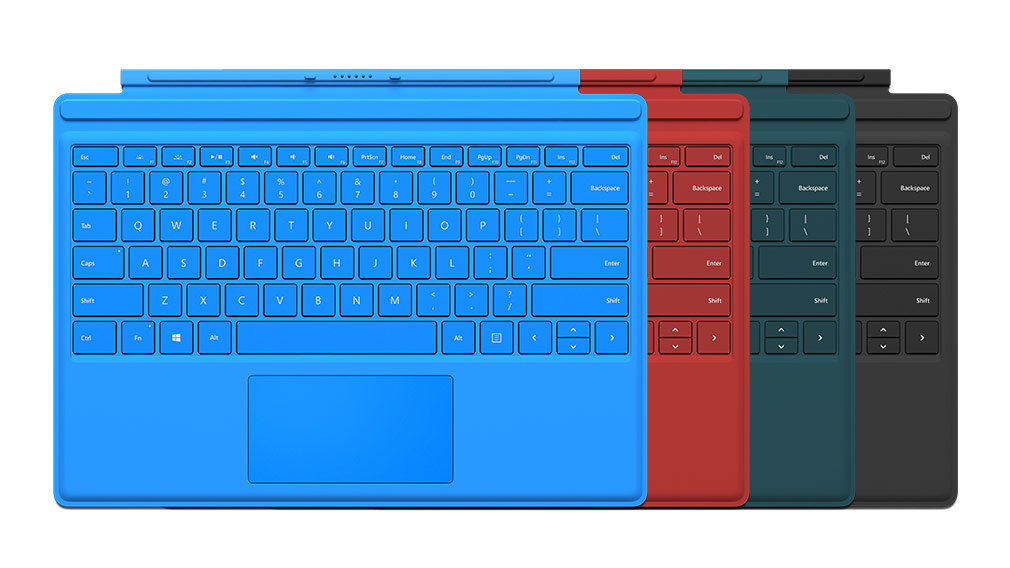
Four Surface Pro 4 keyboards showing color options Four Surface Pro 4 keyboards showing color options Four Surface Pro 4 keyboards showing color options Four Surface Pro 4 keyboards showing color options Four Surface Pro 4 keyboards showing color options

Surface Pro 4 Type Cover

The most advanced typing experience yet.

LEARN MORE
Surface penSurface penSurface penSurface pen

Surface Pen

Experience the ultimate modern writing experience with Surface Pen. Write, draw, or mark-up documents digitally. Write and erase naturally with a working eraser on the end.

Surface DockSurface DockSurface DockSurface Dock

Surface Dock

Transform your Surface into a desktop PC.

* Type Cover, Surface Dial, Microsoft Office and some software sold separately.  Surface Pen sold separately for Surface Pro 4 Intel® Core™ m3 with 128GB SSD hard drive and 4GB RAM.

1 3D Mark – Skydiver: Overall test of Surface Pro 4 Core i7 v. MacBook Air 13” Core i7, Oct. 2015.