PixelSense — higher than 4K resolution.

Visualize ideas as you paint, edit, and design. Let the 10-bit color depth and strikingly large 28” display pull you in from across the room. Or, lose yourself in the creative details of your work.

Starting at

Ships early 2017

Surface Studio facing front with large image of cyclist on screenSurface Studio facing front with large image of cyclist on screenSurface Studio facing front with large image of cyclist on screenSurface Studio facing front with large image of cyclist on screenSurface Studio facing front with large image of cyclist on screen

28

Inch

PixelSense™ Display

192

PPI

4500 x 3000 resolution

10

point

multi-touch

3:2

Aspect ratio


sRGBDCI-P3Vivid

See color-accurate on-screen images exactly as they were intended in the sRGB color space. Critical for professional photos, videos, imaging applications, and online shopping sites.

Close up of Surface Studio in studio mode with Surface pen next to itClose up of Surface Studio in studio mode with Surface pen next to itClose up of Surface Studio in studio mode with Surface pen next to itClose up of Surface Studio in studio mode with Surface pen next to itClose up of Surface Studio in studio mode with Surface pen next to it

Zero Gravity Hinge

Surface Studio is designed with a Zero Gravity Hinge that moves the display weightlessly from an upright angle, down into Studio Mode with one hand.

Surface Pen lying on its side with an image of Surface Pen tip touching screen behind itSurface Pen lying on its side with an image of Surface Pen tip touching screen behind itSurface Pen lying on its side with an image of Surface Pen tip touching screen behind itSurface Pen lying on its side with an image of Surface Pen tip touching screen behind itSurface Pen lying on its side with an image of Surface Pen tip touching screen behind it

Sketch and write naturally.

Surface Pen is an intuitive tool for creation. It gives you 1024 levels of pressure sensitivity, has a 12-month battery life, and also works with Surface Pro 4 and Surface Book.

LEARN MORE ABOUT SURFACE PEN
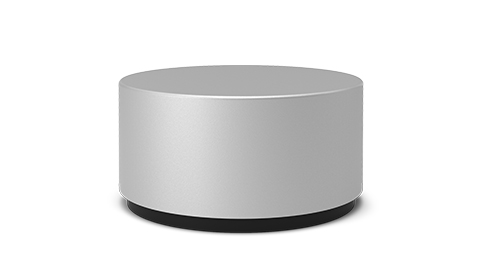
Surface Studio display with Sketchable app open and Surface dial laid over the screen triggering color controlsSurface Studio display with Sketchable app open and Surface dial laid over the screen triggering color controlsSurface Studio display with Sketchable app open and Surface dial laid over the screen triggering color controlsSurface Studio display with Sketchable app open and Surface dial laid over the screen triggering color controlsSurface Studio display with Sketchable app open and Surface dial laid over the screen triggering color controlsSurface Studio in desktop mode with Mental Canvas app open on screen and Surface dial on desk controlling an onscreen widgetSurface Studio in desktop mode with Mental Canvas app open on screen and Surface dial on desk controlling an onscreen widgetSurface Studio in desktop mode with Mental Canvas app open on screen and Surface dial on desk controlling an onscreen widgetSurface Studio in desktop mode with Mental Canvas app open on screen and Surface dial on desk controlling an onscreen widgetSurface Studio in desktop mode with Mental Canvas app open on screen and Surface dial on desk controlling an onscreen widgetSurface Studio display with Drawboard PDF app open and Surface dial laid on screen, controlling an onscreen widgetSurface Studio display with Drawboard PDF app open and Surface dial laid on screen, controlling an onscreen widgetSurface Studio display with Drawboard PDF app open and Surface dial laid on screen, controlling an onscreen widgetSurface Studio display with Drawboard PDF app open and Surface dial laid on screen, controlling an onscreen widgetSurface Studio display with Drawboard PDF app open and Surface dial laid on screen, controlling an onscreen widgetSurface Studio display with Bluebeam Revu app open and Surface Dial laid on the screenSurface Studio display with Bluebeam Revu app open and Surface Dial laid on the screenSurface Studio display with Bluebeam Revu app open and Surface Dial laid on the screenSurface Studio display with Bluebeam Revu app open and Surface Dial laid on the screenSurface Studio display with Bluebeam Revu app open and Surface Dial laid on the screenSurface Studio display with Moho™ app open and Surface Dial laid on the screen, controlling an onscreen widgetSurface Studio display with Moho™ app open and Surface Dial laid on the screen, controlling an onscreen widgetSurface Studio display with Moho™ app open and Surface Dial laid on the screen, controlling an onscreen widgetSurface Studio display with Moho™ app open and Surface Dial laid on the screen, controlling an onscreen widgetSurface Studio display with Moho™ app open and Surface Dial laid on the screen, controlling an onscreen widgetSurface Studio display with StaffPad open with Surface Dial laid on the screen, controlling an onscreen widgetSurface Studio display with StaffPad open with Surface Dial laid on the screen, controlling an onscreen widgetSurface Studio display with StaffPad open with Surface Dial laid on the screen, controlling an onscreen widgetSurface Studio display with StaffPad open with Surface Dial laid on the screen, controlling an onscreen widgetSurface Studio display with StaffPad open with Surface Dial laid on the screen, controlling an onscreen widgetcomputer monitorcomputer monitorcomputer monitorcomputer monitorcomputer monitor

CUSTOMIZE YOUR EXPERIENCE

Apps* for Surface Dial.

SketchableSketchableMental CanvasMental CanvasDrawboard PDFDrawboard PDFBluebeam RevuBluebeam RevuMoho™Moho™StaffPadStaffPad

Sketchable

Surface Dial gives you quick and intuitive access to the brush settings you use most. Make fast and fluid color adjustments, and rotate or scale your canvas to achieve a finer level of control.

  • Password-free sign-in.

    Change the way you think about passwords. With Windows Hello face sign-in, you have a hands-free way to log-in to your device. It can even remember multiple faces for different accounts.

  • The quickest way to set ideas in motion.

    Now you can access Windows Ink workspace with a single click of the Eraser Button on Surface Pen. Get immediate access to all of your Inking apps like screen capture and Sticky notes.

  • Your truly personal digital assistant.

    Cortana1 is more powerful than ever in the latest version of Windows. Ask her a question, find a file on your device, or even call an Uber for your commute home – all with your voice.

Man and woman working across from each other both with the Surface studio in studio modeMan and woman working across from each other both with the Surface studio in studio modeMan and woman working across from each other both with the Surface studio in studio modeMan and woman working across from each other both with the Surface studio in studio modeMan and woman working across from each other both with the Surface studio in studio mode

Breathe new life into your work, together.

Design is a collaborative process. Work together on one screen, or use the huge display to show your idea to a teammate. Surface Studio is your one device, from first draft to final production.

Adobe Premier open on the Surface Studio displayAdobe Premier open on the Surface Studio displayAdobe Premier open on the Surface Studio displayAdobe Premier open on the Surface Studio displayAdobe Premier open on the Surface Studio displayAdobe Photoshop open on the Surface Studio displayAdobe Photoshop open on the Surface Studio displayAdobe Photoshop open on the Surface Studio displayAdobe Photoshop open on the Surface Studio displayAdobe Photoshop open on the Surface Studio displayAutodesk Maya 2016 open on the Surface Studio displayAutodesk Maya 2016 open on the Surface Studio displayAutodesk Maya 2016 open on the Surface Studio displayAutodesk Maya 2016 open on the Surface Studio displayAutodesk Maya 2016 open on the Surface Studio displayAdobe Lightroom open on the Surface Studio displayAdobe Lightroom open on the Surface Studio displayAdobe Lightroom open on the Surface Studio displayAdobe Lightroom open on the Surface Studio displayAdobe Lightroom open on the Surface Studio displayMicrosoft PowerPoint open on the Surface Studio displayMicrosoft PowerPoint open on the Surface Studio displayMicrosoft PowerPoint open on the Surface Studio displayMicrosoft PowerPoint open on the Surface Studio displayMicrosoft PowerPoint open on the Surface Studio displayMicrosoft Word open on the Surface Studio displayMicrosoft Word open on the Surface Studio displayMicrosoft Word open on the Surface Studio displayMicrosoft Word open on the Surface Studio displayMicrosoft Word open on the Surface Studio display
Adobe PremierAdobe PremierAdobe PhotoshopAdobe PhotoshopAutodesk Maya 2016Autodesk Maya 2016Adobe LightroomAdobe LightroomMicrosoft PowerPointMicrosoft PowerPointMicrosoft WordMicrosoft Word

The power to create.

This is the perfect, powerful device for running professional-grade software like Solidworks, Adobe Premiere Pro, and Autodesk.* And, these powerful applications take on a whole new life with tools unique to Surface, like Surface Pen and Surface Dial.*

The power to play.

Xbox One S controller facing front with image of trucks racing through a forest behind itXbox One S controller facing front with image of trucks racing through a forest behind itXbox One S controller facing front with image of trucks racing through a forest behind itXbox One S controller facing front with image of trucks racing through a forest behind itXbox One S controller facing front with image of trucks racing through a forest behind it

Play your favorite games on Surface Studio with up to eight paired Xbox Wireless controllers* — no USB or special receivers required — and take full advantage of the controllers’ enhanced comfort and feel.

LEARN MORE ABOUT XBOX ON WINDOWS
There's a Surface Studio that's perfect for you.

Sketch, paint, and draw on the brilliant 28” PixelSense™ Display. Innovative Zero-Gravity Hinge lets you work upright in Desktop Mode or down in Studio Mode, moving the display effortlessly with one hand. Collaborate and share work with teammates. Run professional-grade software. Log in with facial recognition technology.

Intel® Core™ i5

Choose an Intel® Core™ i5 processor with Intel® HD Graphics for strong processing performance. Compatible with Surface Dial* (on- and off-screen interaction). Includes Surface Pen and Windows 10 Pro.

Intel® Core™ i7

The Intel® Core™ i7 option includes Intel® Iris graphics, making your photo, video, and 3D applications run faster. It also gives you the ability to play more PC games. Compatible with Surface Dial* (on- and off-screen interaction). Includes Surface Pen and Windows 10 Pro.


Powerful accessories.

Surface Studio is a whole new class of device, one designed for the creative process. To help bring your ideas to life and complete that experience, we’ve designed accessories that work perfectly with your Surface.

VIEW ALL ACCESSORIES

* Sold separately.

1 Cortana available in select global markets; experience may vary by region and device.