

Great Alternative To Adobe PDF
 WPS PDF is an office service tool of WPS Office (including Writer, Spreadsheet, Presentation, and PDF), a perfect alternative to Adobe Acrobat, iLovepdf, Smallpdf, Foxit, and other PDF softwares.
WPS PDF provides a one-stop PDF solution, including converting, editing, and signing PDF files.You can manage and collaborate on PDF files in one place. You can also use our web platform or app to edit, manage, store, and share PDF files across devices.
WPS PDF on the web platform allows you to convert, sign, merge, fill in, split, organize, and compress PDF files online for limited times free of charge. You can be more productive and work smarter with your documents.
The PDF Blog in the WPS PDF website provides high-quality articles and step-by-step guides on how to use PDF tools. It summarizes free download and free trial information about top PDF softwares by aggregating information from various authoritative websites and platforms.
Key Features for WPS Office PDF
![PDF Edit]() PDF Edit
PDF Edit
![PDF Convert]() PDF Convert
PDF Convert
![PDF Sign]() PDF Sign
PDF Sign
![OCR]() OCR
OCR
![PDF Organize]() PDF Organize
PDF Organize
![PDF Compress]() PDF Compress
PDF Compress
![Cloud Collaboration]() Cloud Collaboration
Cloud Collaboration
![PDF Protect]() PDF Protect
PDF Protect
![More Free Features]() More Free Features
More Free Features
![Features Under Development]() Features Under Development
Features Under Development
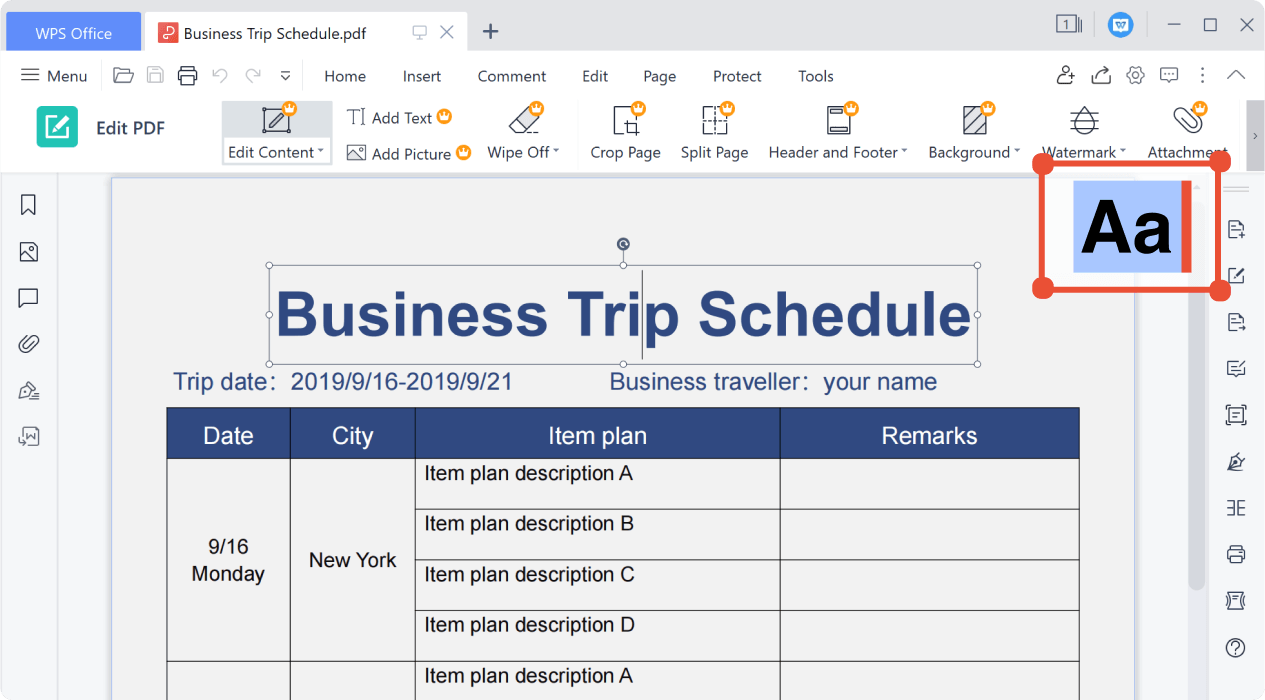
Edit PDF Like Word
Edit PDF content and make beautiful annotations Insert links, page numbers, comments, and shapes
Powerful PDF Tools Across All Platforms
Desktop Application All-in-one office suite for Windows PC or Mac
Mobile App The complete office suite for Android & iPhone
Online Web Free PDF productivity solution on the cloud.
Free to try WPS PDF toolkits with powerful editing and converting features.
1. For the Windows system on PC: Get the installation package in EXE format. WPS Office is available for Windows 7/8/9/10/11. 2. For the MacOS or Linux system: Click "Free Download" to get the installation package for the corresponding system.
1. For phones with the Android system: Go to Google Play and get the WPS Office installation package in apk format. 2. For iPhones with the iOS system: Go to Apple Store and search for WPS Office. 3. PDF Editor Pro: Download it from Google Play or Apple App Store.
Online PDF tools: Use free online PDF tools to merge, compress, create, edit and convert PDFs. Quick and easy. No installation or registration required. Turn images, ebooks, and documents to PDFs in a secure manner and vice versa.
Create PDF
Open PDF
Create PDF from the file
Create Blank PDF
Edit&Manage PDF
PDF Edit
Merge PDF
Compress PDF
Split PDF
Sign PDF
Organize PDF
Fill PDF
Convert PDF
PDF to Word
Word to PDF
PDF to Excel
Excel to PDF
PDF to PPT
PPT to PDF
PDF to Picture
Picture to PDF
Other Useful Features
Picture to text (OCR)
Extract text in pictures
PDF cloud collaboration
Batch PDF Printing
Batch PDF Printing for mutiple PDF files
PDF Template
Desktop Application
Mobile App
Online Web
All-in-one office suite for Windows PC or Mac
Create PDF
Open PDF
Create PDF from the file
Create Blank PDF
Edit&Manage PDF
PDF Edit
Merge PDF
Compress PDF
Split PDF
Sign PDF
Organize PDF
Fill PDF
Convert PDF
PDF to Word
Word to PDF
PDF to Excel
Excel to PDF
PDF to PPT
PPT to PDF
PDF to Picture
Picture to PDF
Other Useful Features
Picture to text (OCR)
Extract text in pictures
PDF cloud collaboration
Batch PDF Printing
Batch PDF Printing for mutiple PDF files
PDF Template
1. For the Windows system on PC: Get the installation package in EXE format. WPS Office is available for Windows 7/8/9/10/11. 2. For the MacOS or Linux system: Click "Free Download" to get the installation package for the corresponding system.
FAQ Online for PDF
What is the best free PDF tool?
WPS PDF Blog offers quality articles with recommended top PDF tools (available online or offline) for users to choose:
7 Best Free PDF Tools for Beginners
4 Best Free PDF Converter Apps for Mobile and Laptop
3 Best Free PDF Tools for Editing
How can I edit a PDF without Adobe?
Is the PDF to Word conversion free of charge?
Trust by users around the world


Find the Free Fesources and Solutions
Scarica WPS PDF gratuitamente per scoprire altre funzionalità.
Unione di PDF
Consente di selezionare più file PDF e di unirli in un unico file PDF online.
Da PDF a Word
Consente di convertire in pochi secondi file PDF in documenti Word modificabili (formati doc e docx)
Da PDF a Excel
Consente di convertire file PDF in fogli di calcolo Excel modificabili online senza dover scaricare alcun software
Da PDF a PPT
Consente di convertire file PDF in presentazioni PowerPoint modificabili online senza limiti di dimensioni
Divisione di file PDF
Consente di separare tutte le pagine di un unico file PDF online e di estrarre le pagine in più file PDF.
Da Word a PDF
Consente di convertire gratuitamente file Word (doc, docx) in file PDF di facile condivisione mantenendo il layout
Da Excel a PDF
Consente di convertire gratuitamente fogli di calcolo Excel (xls, xlsx) in file PDF facili da leggere
Da PPT a PDF
Consente di convertire gratuitamente presentazioni PowerPoint (ppt, pptx) in file PDF facili da visualizzare e da condividere
Da JPG a PDF
Consente di convertire gratuitamente immagini (JPG, JPEG, PNG, BMP) in file PDF e di regolare facilmente l'orientamento e i margini dei file PDF
Organizzazione di PDF
Consente di gestire più pagine di un file PDF (è possibile aggiungere, eliminare o riordinare le pagine)
Compressione di PDF
Consente di ridurre le dimensioni dei file PDF online utilizzando 3 metodi di compressione
Firma di PDF
Consente di creare firme elettroniche e di inserirle in file PDF online, nonché di proteggere la firma elettronica personale

This is by far one of the best esign apps I have ever used. Simple, easy, and free. You can easily fill in check mark boxes and sign a signature and line it up. I finished filling out my document in 3 mins and was able to save and print it as a PDF which could be downloaded to my PC Windows system and phone with no ads. I would suggest this app to everyone.
I like WPS. It is a competitive free office suite, at no cost! WPS Office also has a PDF editor and viewer option, with a number of features including PDF to Word, PDF to Excel, and Merge PDF. I mostly use the viewer.
On PDF, WPS is capable of converting and editing a PDF file. You can convert to other formats (Word, Excel, PowerPoint, JPG), edit text, change font, change image, put a signature and do much more. You can also print files from other file formats like .doc or .xls to PDFs. You can do these even while offline.