MessagePack is an efficient binary serialization format. It lets you exchange data among multiple languages like JSON. But it's faster and smaller. Small integers are encoded into a single byte, and typical short strings require only one extra byte in addition to the strings themselves.
Next:
MessagePack is supported by over 50 programming languages and environments. See list of implementations.
Redis scripting has support for MessagePack because it is a fast and compact serialization format with a simple to implement specification. I liked it so much that I implemented a MessagePack C extension for Lua just to include it into Redis.
Salvatore Sanfilippo, creator of Redis
Fluentd uses MessagePack for all internal data representation. It's crazy fast because of zero-copy optimization of msgpack-ruby. Now MessagePack is an essential component of Fluentd to achieve high performance and flexibility at the same time.
Sadayuki Furuhashi, creator of Fluentd
Treasure Data built a multi-tenant database optimized for analytical queries using MessagePack. The schemaless database is growing by billions of records every month. We also use MessagePack as a glue between components. Actually we just wanted a fast replacement of JSON, and MessagePack is simply useful.
Kazuki Ohta, CTO
MessagePack has been simply invaluable to us. We use MessagePack + Memcache to cache many of our feeds on Pinterest. These feeds are compressed and very quick to unpack thanks to MessagePack while Memcache gives us fast atomic pushes.
MessagePack is a binary-based JSON-like serialization library.
MessagePack for D is a pure D implementation of MessagePack.
Features
Small size and High performance
Zero copy serialization / deserialization
Streaming deserializer for non-contiguous IO situation
Supports D features (Ranges, Tuples, real type)
Note: The real type is only supported in D.
Don't use the real type when communicating with other programming languages.
Note that Unpacker will raise an exception if a loss of precision occurs.
Current Limitations
No circular references support
If you want to use the LDC compiler, you need at least version 0.15.2 beta2
Install
Use dub to add it as a dependency:
% dub install msgpack-d
Usage
Example code can be found in the example directory.
msgpack-d is very simple to use. Use pack for serialization, and unpack for deserialization:
importstd.file;
import msgpack;
structS { int x; float y; string z; }
voidmain()
{
S input = S(10, 25.5, "message");
// serialize dataubyte[] inData = pack(input);
// write data to a file
write("file.dat", inData);
// read data from a fileubyte[] outData = cast(ubyte[])read("file.dat");
// unserialize the data
S target = outData.unpack!S();
// verify data is the sameassert(target.x == input.x);
assert(target.y == input.y);
assert(target.z == input.z);
}
Feature: Skip serialization/deserialization of a specific field.
Use the @nonPacked attribute:
structUser
{
string name;
@nonPacked int level; // pack / unpack will ignore the 'level' field
}
Feature: Use your own serialization/deserialization routines for custom class and struct types.
msgpack-d provides the functions registerPackHandler / registerUnpackHandler to allow you
to use custom routines during the serialization or deserialization of user-defined class and struct types.
This feature is especially useful when serializing a derived class object when that object is statically
typed as a base class object.
For example:
classDocument { }
classXmlDocument : Document
{
this() { }
this(string name) { this.name = name; }
string name;
}
voidxmlPackHandler(ref Packer p, ref XmlDocument xml)
{
p.pack(xml.name);
}
voidxmlUnpackHandler(ref Unpacker u, ref XmlDocument xml)
{
u.unpack(xml.name);
}
voidmain()
{
/// Register the 'xmlPackHandler' and 'xmlUnpackHandler' routines for/// XmlDocument object instances.
registerPackHandler!(XmlDocument, xmlPackHandler);
registerUnpackHandler!(XmlDocument, xmlUnpackHandler);
/// Now we can serialize/deserialize XmlDocument object instances via a/// base class reference.Document doc = new XmlDocument("test.xml");
auto data = pack(doc);
XmlDocument xml = unpack!XmlDocument(data);
assert(xml.name =="test.xml"); // xml.name is "test.xml"
}
The PackerImpl / Unpacker / StreamingUnpacker types
These types are used by the pack and unpack functions.
MessagePack is an efficient binary serialization format.
It lets you exchange data among multiple languages like JSON.
But it's faster and smaller.
This package provides CPython bindings for reading and writing MessagePack data.
Install
$ pip install msgpack-python
PyPy
msgpack-python provides pure python implementation. PyPy can use this.
Windows
When you can't use binary distribution, you need to install Visual Studio
or Windows SDK on Windows.
Without extension, using pure python implementation on CPython runs slowly.
You should always pass the use_list keyword argument. See performance issues relating to use_list option below.
Read the docstring for other options.
Streaming unpacking
Unpacker is a "streaming unpacker". It unpacks multiple objects from one
stream (or from bytes provided through its feed method).
import msgpack
from io import BytesIO
buf = BytesIO()
for i inrange(100):
buf.write(msgpack.packb(range(i)))
buf.seek(0)
unpacker = msgpack.Unpacker(buf)
for unpacked in unpacker:
print unpacked
Packing/unpacking of custom data type
It is also possible to pack/unpack custom data types. Here is an example for
datetime.datetime.
As an alternative to iteration, Unpacker objects provide unpack,
skip, read_array_header and read_map_header methods. The former two
read an entire message from the stream, respectively de-serialising and returning
the result, or ignoring it. The latter two methods return the number of elements
in the upcoming container, so that each element in an array, or key-value pair
in a map, can be unpacked or skipped individually.
Each of these methods may optionally write the packed data it reads to a
callback function:
from io import BytesIO
defdistribute(unpacker, get_worker):
nelems = unpacker.read_map_header()
for i inrange(nelems):
# Select a worker for the given key
key = unpacker.unpack()
worker = get_worker(key)
# Send the value as a packed message to worker
bytestream = BytesIO()
unpacker.skip(bytestream.write)
worker.send(bytestream.getvalue())
Notes
string and binary type
In old days, msgpack doesn't distinguish string and binary types like Python 1.
The type for represent string and binary types is named raw.
msgpack can distinguish string and binary type for now. But it is not like Python 2.
Python 2 added unicode string. But msgpack renamed raw to str and added bin type.
It is because keep compatibility with data created by old libs. raw was used for text more than binary.
Currently, while msgpack-python supports new bin type, default setting doesn't use it and
decodes raw as bytes instead of unicode (str in Python 3).
You can change this by using use_bin_type=True option in Packer and encoding="utf-8" option in Unpacker.
You can use it with default and ext_hook. See below.
Note for msgpack-python 0.2.x users
The msgpack-python 0.3 have some incompatible changes.
The default value of use_list keyword argument is True from 0.3.
You should pass the argument explicitly for backward compatibility.
Unpacker.unpack() and some unpack methods now raises OutOfData
instead of StopIteration.
StopIteration is used for iterator protocol only.
Note about performance
GC
CPython's GC starts when growing allocated object.
This means unpacking may cause useless GC.
You can use gc.disable() when unpacking large message.
use_list option
List is the default sequence type of Python.
But tuple is lighter than list.
You can use use_list=False while unpacking when performance is important.
Python's dict can't use list as key and MessagePack allows array for key of mapping.
use_list=False allows unpacking such message.
Another way to unpacking such object is using object_pairs_hook.
Development
Test
MessagePack uses pytest for testing.
Run test with following command:
Only in packing. Atoms are packed as binaries. Default value is pack.
Otherwise, any term including atoms throws badarg.
{known_atoms, [atom()]}
Both in packing and unpacking. In packing, if an atom is in this list
a binary is encoded as a binary. In unpacking, msgpacked binaries are
decoded as atoms with erlang:binary_to_existing_atom/2 with encoding
utf8. Default value is an empty list.
Even if allow_atom is none, known atoms are packed.
{unpack_str, as_binary|as_list}
A switch to choose decoded term style of str type when unpacking.
Only available at new spec. Default is as_list.
mode        as_binary    as_list
-----------+------------+-------
bin         binary()     binary()
str         binary()     string()
{validate_string, boolean()}
Only in unpacking, UTF-8 validation at unpacking from str type will
be enabled. Default value is false.
{pack_str, from_binary|from_list|none}
A switch to choose packing of string() when packing. Only available
at new spec. Default is from_list for symmetry with unpack_str
option.
mode        from_list    from_binary    none
-----------+------------+--------------+-----------------
binary()    bin          str*/bin       bin
string()    str*/array   array of int   array of int
list()      array        array          array
But the default option pays the cost of performance for symmetry. If
the overhead of UTF-8 validation is unacceptable, choosing none as
the option would be the best.
* Tries to pack as str if it is a valid string().
{map_format, map|jiffy|jsx}
Both at packing and unpacking. Default value is map.
At both. The default behaviour in case of facing ext data at decoding
is to ignore them as its length is known.
Now msgpack-erlang supports ext type. Now you can serialize everything
with your original (de)serializer. That will enable us to handle
erlang- native types like pid(), ref() contained in tuple(). See
test/msgpack_ext_example_tests.erl for example code.
The Float type of Message Pack represents IEEE 754 floating point number, so it includes Nan and Infinity.
In unpacking, msgpack-erlang returns nan, positive_infinity and negative_infinity.
License
Apache License 2.0
Release Notes
0.7.0
Support nan, positive_infinity and negative_infinity
0.6.0
Support OTP 19.0
0.5.0
Renewed optional arguments to pack/unpack interface. This is
incompatible change from 0.4 series.
0.4.0
Deprecate nil
Moved to rebar3
Promote default map unpacker as default format when OTP is >= 17
Added QuickCheck tests
Since this version OTP older than R16B03-1 are no more supported
0.3.5 / 0.3.4
0.3 series will be the last versions that supports R16B or older
versions of OTP.
OTP 18.0 support
Promote default map unpacker as default format when OTP is >= 18
0.3.3
Add OTP 17 series to Travis-CI tests
Fix wrong numbering for ext types
Allow packing maps even when {format,map} is not set
Fix Dialyzer invalid contract warning
Proper use of null for jiffy-style encoding/decoding
0.3.2
set back default style as jiffy
fix bugs around nil/null handling
0.3.0
supports map new in 17.0
jiffy-style maps will be deprecated in near future
set default style as map
0.2.8
0.2 series works with OTP 17.0, R16, R15, and with MessagePack's new
and old format. But does not support map type introduced in
OTP 17.0.
Simply use haxelib git to use this github repo or haxelib install msgpack-haxe to use the one in the haxelib repository.
Supported Type:
Null
Bool
Int
Float
Object
Bytes
String
Array
IntMap/StringMap
Example code:
package;
importorg.msgpack.MsgPack;
classExample {
publicstaticfunctionmain() {
var i = { a: 1, b: 2, c: "Hello World!" };
var m =MsgPack.encode(i);
var o =MsgPack.decode(m);
trace(i);
trace(m.toHex());
trace(o);
}
}
This is MessagePack serialization/deserialization for CLI (Common Language Infrastructure) implementations such as .NET Framework, Silverlight, Mono (including Moonlight.)
This library can be used from ALL CLS compliant languages such as C#, F#, Visual Basic, Iron Python, Iron Ruby, PowerShell, C++/CLI or so.
Usage
You can serialize/deserialize objects as following:
Create serializer via MessagePackSerializer.Create generic method. This method creates dependent types serializers as well.
Invoke serializer as following:
** Pack method with destination Stream and target object for serialization.
** Unpack method with source Stream.
// Creates serializer.varserializer = SerializationContext.Default.GetSerializer<T>();
// Pack obj to stream.serializer.Pack(stream, obj);
// Unpack from stream.varunpackedObject = serializer.Unpack(stream);
For mono, you can use net461 or net35 drops as you run with.
For Unity, unity3d drop is suitable.
How to build
For .NET Framework
Install Visual Studio 2017 (Community edition is OK) and 2015 (for MsgPack.Windows.sln).
Run with Visual Studio Developer Command Prompt:
msbuild MsgPack.sln
Or (for Unity 3D drops):
msbuild MsgPack.compats.sln
Or (for Windows Runtime/Phone drops and Silverlight 5 drops):
msbuild MsgPack.Windows.sln
Or (for Xamarin unit testing, you must have Xamarin Business or upper license and Mac machine on the LAN to build on Windows):
msbuild MsgPack.Xamarin.sln
Or open one of above solution files in your IDE and run build command in it.
For Mono
Open MsgPack.mono.sln with MonoDevelop and then click Build menu item.
(Of cource, you can build via xbuild.)
Own Unity 3D Build
First of all, there are binary drops on github release page, you should use it to save your time.
Because we will not guarantee source code organization compatibilities, we might add/remove non-public types or members, which should break source code build.
If you want to import sources, you must include just only described on MsgPack.Unity3D.csproj.
If you want to use ".NET 2.0 Subset" settings, you must use just only described on MsgPack.Unity3D.CorLibOnly.csproj file, and define CORLIB_ONLY compiler constants.
MessagePack is an efficient binary serialization
format, which lets you exchange data among multiple languages like JSON,
except that it's faster and smaller. Small integers are encoded into a
single byte while typical short strings require only one extra byte in
addition to the strings themselves.
Example
In C:
#include<msgpack.h>
#include<stdio.h>intmain(void)
{
/* msgpack::sbuffer is a simple buffer implementation. */
msgpack_sbuffer sbuf;
msgpack_sbuffer_init(&sbuf);
/* serialize values into the buffer using msgpack_sbuffer_write callback function. */
msgpack_packer pk;
msgpack_packer_init(&pk, &sbuf, msgpack_sbuffer_write);
msgpack_pack_array(&pk, 3);
msgpack_pack_int(&pk, 1);
msgpack_pack_true(&pk);
msgpack_pack_str(&pk, 7);
msgpack_pack_str_body(&pk, "example", 7);
/* deserialize the buffer into msgpack_object instance. *//* deserialized object is valid during the msgpack_zone instance alive. */
msgpack_zone mempool;
msgpack_zone_init(&mempool, 2048);
msgpack_object deserialized;
msgpack_unpack(sbuf.data, sbuf.size, NULL, &mempool, &deserialized);
/* print the deserialized object. */msgpack_object_print(stdout, deserialized);
puts("");
msgpack_zone_destroy(&mempool);
msgpack_sbuffer_destroy(&sbuf);
return0;
}
#include<msgpack.hpp>
#include<string>
#include<iostream>
#include<sstream>intmain(void)
{
msgpack::type::tuple<int, bool, std::string> src(1, true, "example");
// serialize the object into the buffer.// any classes that implements write(const char*,size_t) can be a buffer.
std::stringstream buffer;
msgpack::pack(buffer, src);
// send the buffer ...
buffer.seekg(0);
// deserialize the buffer into msgpack::object instance.
std::string str(buffer.str());
msgpack::object_handle oh =
msgpack::unpack(str.data(), str.size());
// deserialized object is valid during the msgpack::object_handle instance is alive.
msgpack::object deserialized = oh.get();
// msgpack::object supports ostream.
std::cout << deserialized << std::endl;
// convert msgpack::object instance into the original type.// if the type is mismatched, it throws msgpack::type_error exception.
msgpack::type::tuple<int, bool, std::string> dst;
deserialized.convert(dst);
return0;
}
Installer squeaksource
project:'MessagePack';
install:'ConfigurationOfMessagePack'.
(Smalltalkat:#ConfigurationOfMessagePack) project development load
Pharo
Gofer it
smalltalkhubUser:'MasashiUmezawa'project:'MessagePack';
configuration;
load.
(Smalltalkat:#ConfigurationOfMessagePack) project development load
You might need MpTypeMapper initializeAll on new encoder/decoder-related updates.
MessagePack for Actionscript3 (Flash, Flex and AIR).
as3-msgpack was designed to work with the interfaces IDataInput and IDataOutput, thus the API might be easily connected with the native classes that handle binary data (such as ByteArray, Socket, FileStream and URLStream).
Moreover, as3-msgpack is capable of decoding data from binary streams.
Get started: http://loteixeira.github.io/lib/2013/08/19/as3-msgpack/
Basic usage (encoding/decoding):
// create messagepack objectvar msgpack:MsgPack =new MsgPack();// encode an arrayvarbytes:ByteArray= msgpack.write([1, 2, 3, 4, 5]);// rewind the bufferbytes.position=0;// print the decoded objecttrace(msgpack.read(bytes));
This extension provide API for communicating with MessagePack serialization.
MessagePack is a binary-based efficient object serialization library.
It enables to exchange structured objects between many languages like JSON.
But unlike JSON, it is very fast and small.
Requirement
PHP 5.0 +
Install
Install from PECL
Msgpack is an PECL extension, thus you can simply install it by:
pecl install msgpack
Compile Msgpack from source
$/path/to/phpize
$./configure
$make && make install
To enable your own data structures to be automatically serialized from and to
msgpack, derive from Encodable and Decodable as shown
in the following example:
This is an implementation of MessagePack for
R6RS Scheme.
API references
Function (pack! bv message) Function (pack! bv message offset)
Pack message to message pack format bytevector and put it into the
bv destructively. Given bv must have enough length to hold the message.
Optional argument offset indicates where to start with, default is 0.
Function (pack message)
The same as pack! but this one creates a new bytevector.
Function (pack-size message)
Calculate the converted message size.
Function (unpack bv) Function (unpack bv offset)
Unpack the given message format bytevector to Scheme object.
Optional argument offset indicates where to start with, default is 0.
Function (get-unpack in)
Unpack the given binary input port to Scheme object.
Conversion rules
As you already know, Scheme doesn't have static types so the conversion of
Scheme objects to message pack data might cause unexpected results. To avoid
it, I will describe how conversion works.
Scheme to message packInteger conversion
The library automatically decides proper size. More specifically, if it
can fit to message pack's fixnum then library uses it, so are uint8-64.
If the number is too big, then an error is raised. Users must know it tries
to use uint as much as possible. If the given number was negative then
sint will be used.
Floating point conversion
Unfortunately R6RS doesn't have difference between float and double. So
when flonum is given then it always converts to double number.
Collection conversion
Message pack has collections which are map and array. And these are associated
with alist (association list) and vector respectively. When you want to convert
alist to message pack data, then you need to make sure the cdr part will be
the data and if you put (("key" "value))_ then it will be converted to nested
map.
The collection size calculation is done automatically. It tries to use the
smallest size.
Message pack to Scheme
The other way around is easy, it can simply restore the byte data to Scheme
object. Following describes the conversion rules;
u-msgpack-python is a lightweight MessagePack serializer and deserializer module written in pure Python, compatible with both Python 2 and 3, as well CPython and PyPy implementations of Python. u-msgpack-python is fully compliant with the latest MessagePack specification.
NOTE: The standard method for encoding integers in msgpack is to use the most compact representation possible, and to encode negative integers as signed ints and non-negative numbers as unsigned ints.
For compatibility with other implementations, I'm following this convention. On the unpacking side, every integer type becomes an Int64 in Julia, unless it doesn't fit (ie. values greater than 2^63 are unpacked as Uint64).
I might change this at some point, and/or provide a way to control the unpacked types.
The Extension Type
The MsgPack spec defines the extension type to be a tuple of (typecode, bytearray) where typecode is an application-specific identifier for the data in bytearray. MsgPack.jl provides support for the extension type through the Ext immutable.
julia> a = [0x34, 0xff, 0x76, 0x22, 0xd3, 0xab]
6-element Array{UInt8,1}:0x340xff0x760x220xd30xab
julia> b =Ext(22, a)
MsgPack.Ext(22,UInt8[0x34,0xff,0x76,0x22,0xd3,0xab])
julia> p =pack(b)
9-element Array{UInt8,1}:0xc70x060x160x340xff0x760x220xd30xab
julia> c =unpack(p)
MsgPack.Ext(22,UInt8[0x34,0xff,0x76,0x22,0xd3,0xab])
julia> c == b
true
MsgPack reserves typecodes in the range [-128, -1] for future types specified by the MsgPack spec. MsgPack.jl enforces this when creating an Ext but if you are packing an implementation defined extension type (currently there are none) you can pass impltype=true.
julia>Ext(-43, Uint8[1, 5, 3, 9])
ERROR: MsgPack Ext typecode -128 through -1 reserved by implementation
in call at /Users/sean/.julia/v0.4/MsgPack/src/MsgPack.jl:48
julia>Ext(-43, Uint8[1, 5, 3, 9], impltype=true)
MsgPack.Ext(-43,UInt8[0x01,0x05,0x03,0x09])
Serialization
MsgPack.jl also defines the extserialize and extdeserialize convenience functions. These functions can turn an arbitrary object into an Ext and vice-versa.
julia>type Point{T}
x::T
y::Tend
julia> r =Point(2.5, 7.8)
Point{Float64}(2.5,7.8)
julia> e = MsgPack.extserialize(123, r)
MsgPack.Ext(123,UInt8[0x11,0x01,0x02,0x05,0x50,0x6f,0x69,0x6e,0x74,0x23 … 0x40,0x0e,0x33,0x33,0x33,0x33,0x33,0x33,0x1f,0x40])
julia> s = MsgPack.extdeserialize(e)
(123,Point{Float64}(2.5,7.8))
julia> s[2]
Point{Float64}(2.5,7.8)
julia> r
Point{Float64}(2.5,7.8)
Since these functions use serialize under the hood they are subject to the following caveat.
In general, this process will not work if the reading and writing are done by
different versions of Julia, or an instance of Julia with a different system
image.
clojure-msgpack is a lightweight and simple library for converting
between native Clojure data structures and MessagePack byte formats.
clojure-msgpack only depends on Clojure itself; it has no third-party
dependencies.
Installation
Usage
Basic
pack: Serialize object as a sequence of java.lang.Bytes.
clojure-msgpack provides a streaming API for situations where it is more
convenient or efficient to work with byte streams instead of fixed byte arrays
(e.g. size of object is not known ahead of time).
The streaming counterpart to msgpack.core/pack is msgpack.core/pack-stream
which returns nil and accepts either
java.io.OutputStream
or
java.io.DataOutput
as an additional argument.
Serializing a value of unrecognized type will fail with IllegalArgumentException. See Application types if you want to register your own types.
Clojure types
Some native Clojure types don't have an obvious MessagePack counterpart. We can
serialize them as Extended types. To enable automatic conversion of these
types, load the clojure-extensions library.
(msg/pack:hello)
; => IllegalArgumentException No implementation of method: :pack-stream of; protocol: #'msgpack.core/Packable found for class: clojure.lang.Keyword; clojure.core/-cache-protocol-fn (core _deftype.clj:544)
Note: No error is thrown if an unpacked value is reserved under the old spec
but defined under the new spec. We always deserialize something if we can
regardless of compatibility-mode.
Portable: Depends only on the required components of the SML Basis Library specification.
Composable: Composable combinators for encoding and decoding.
Usage
MLton and MLKit
Include mlmsgpack.mlb in your MLB file.
Poly/ML
From the interactive shell, use .sml files in the following order.
mlmsgpack-aux.sml
realprinter-default.sml
mlmsgpack.sml
SML/NJ
Use mlmsgpack.cm.
Moscow ML
From the interactive shell, use .sml files in the following order.
large.sml
mlmsgpack-aux.sml
realprinter-fail.sml
mlmsgpack.sml
Makefile.mosml is also provided.
HaMLet
From the interactive shell, use .sml files in the following order.
mlmsgpack-aux.sml
realprinter-fail.sml
mlmsgpack.sml
Alice ML
Makefile.alice is provided.
make -f Makefile.alice
alicerun mlmsgpack-test
SML#
For separate compilation, .smi files are provided. Require mlmsgpack.smi from your .smi file.
From the interactive shell, use .sml files in the following order.
mlmsgpack-aux.sml
realprinter-default.sml
mlmsgpack.sml
Tutorial
See TUTORIAL.md.
Known Problems
Our recommendation is MLton, MLKit, Poly/ML and SML#(>=2.0.0) as all tests passed on them.
SML/NJ and Moscow ML are fine if you don't use real values.
SML/NJ
Packing real values fail or produces imprecise results in some cases.
Moscow ML
Packing real values is not supported, since some components of the SML Basis Library are not provided.
HaMLet
Packing real values is not supported, since some components of the SML Basis Library are not provided.
Some functions are very slow, although they work properly. (We tested HaMLet compiled with MLton.)
Alice ML
Packing real values is not supported, since some components of the SML Basis Library are not provided.
Also, some unit tests fail.
SML#
Most functions do not work properly because of bugs of SML# prior to version 2.0.0.
See Also
There already exists another MessagePack implemenatation for SML,
called MsgPack-SML, which is targeted for MLton.
CMP is a C implementation of the MessagePack serialization format. It
currently implements version 5 of the MessagePack
Spec.
CMP's goal is to be lightweight and straightforward, forcing nothing on the
programmer.
License
While I'm a big believer in the GPL, I license CMP under the MIT license.
Example Usage
The following examples use a file as the backend, and are modeled after the
examples included with the msgpack-c project.
#include<stdbool.h>
#include<stdint.h>
#include<stdio.h>
#include<stdlib.h>
#include"cmp.h"staticboolread_bytes(void *data, size_t sz, FILE *fh) {
returnfread(data, sizeof(uint8_t), sz, fh) == (sz * sizeof(uint8_t));
}
staticboolfile_reader(cmp_ctx_t *ctx, void *data, size_t limit) {
returnread_bytes(data, limit, (FILE *)ctx->buf);
}
staticboolfile_skipper(cmp_ctx_t *ctx, size_t count) {
returnfseek((FILE *)ctx->buf, count, SEEK_CUR);
}
staticsize_tfile_writer(cmp_ctx_t *ctx, constvoid *data, size_t count) {
returnfwrite(data, sizeof(uint8_t), count, (FILE *)ctx->buf);
}
voiderror_and_exit(constchar *msg) {
fprintf(stderr, "%s\n\n", msg);
exit(EXIT_FAILURE);
}
intmain(void) {
FILE *fh = NULL;
cmp_ctx_t cmp;
uint32_t array_size = 0;
uint32_t str_size = 0;
char hello[6] = {0, 0, 0, 0, 0, 0};
char message_pack[12] = {0, 0, 0, 0, 0, 0, 0, 0, 0, 0, 0, 0};
fh = fopen("cmp_data.dat", "w+b");
if (fh == NULL)
error_and_exit("Error opening data.dat");
cmp_init(&cmp, fh, file_reader, file_skipper, file_writer);
if (!cmp_write_array(&cmp, 2))
error_and_exit(cmp_strerror(&cmp));
if (!cmp_write_str(&cmp, "Hello", 5))
error_and_exit(cmp_strerror(&cmp));
if (!cmp_write_str(&cmp, "MessagePack", 11))
error_and_exit(cmp_strerror(&cmp));
rewind(fh);
if (!cmp_read_array(&cmp, &array_size))
error_and_exit(cmp_strerror(&cmp));
/* You can read the str byte size and then read str bytes... */if (!cmp_read_str_size(&cmp, &str_size))
error_and_exit(cmp_strerror(&cmp));
if (str_size > (sizeof(hello) - 1))
error_and_exit("Packed 'hello' length too long\n");
if (!read_bytes(hello, str_size, fh))
error_and_exit(cmp_strerror(&cmp));
/* * ...or you can set the maximum number of bytes to read and do it all in * one call*/
str_size = sizeof(message_pack);
if (!cmp_read_str(&cmp, message_pack, &str_size))
error_and_exit(cmp_strerror(&cmp));
printf("Array Length: %u.\n", array_size);
printf("[\"%s\", \"%s\"]\n", hello, message_pack);
fclose(fh);
return EXIT_SUCCESS;
}
Advanced Usage
See the examples folder.
Fast, Lightweight, Flexible, and Robust
CMP uses no internal buffers; conversions, encoding and decoding are done on
the fly.
CMP's source and header file together are ~4k LOC.
CMP makes no heap allocations.
CMP uses standardized types rather than declaring its own, and it depends only
on stdbool.h, stdint.h and string.h.
CMP is written using C89 (ANSI C), aside, of course, from its use of
fixed-width integer types and bool.
On the other hand, CMP's test suite requires C99.
CMP only requires the programmer supply a read function, a write function, and
an optional skip function. In this way, the programmer can use CMP on memory,
files, sockets, etc.
CMP is portable. It uses fixed-width integer types, and checks the endianness
of the machine at runtime before swapping bytes (MessagePack is big-endian).
CMP provides a fairly comprehensive error reporting mechanism modeled after
errno and strerror.
CMP is thread aware; while contexts cannot be shared between threads, each
thread may use its own context freely.
CMP is tested using the MessagePack test suite as well as a large set of custom
test cases. Its small test program is compiled with clang using -Wall -Werror -Wextra ... along with several other flags, and generates no compilation
errors in either clang or GCC.
CMP's source is written as readably as possible, using explicit, descriptive
variable names and a consistent, clear style.
CMP's source is written to be as secure as possible. Its testing suite checks
for invalid values, and data is always treated as suspect before it passes
validation.
CMP's API is designed to be clear, convenient and unsurprising. Strings are
null-terminated, binary data is not, error codes are clear, and so on.
CMP provides optional backwards compatibility for use with other MessagePack
implementations that only implement version 4 of the spec.
Building
There is no build system for CMP. The programmer can drop cmp.c and cmp.h
in their source tree and modify as necessary. No special compiler settings are
required to build it, and it generates no compilation errors in either clang or
gcc.
Versioning
CMP's versions are single integers. I don't use semantic versioning because
I don't guarantee that any version is completely compatible with any other. In
general, semantic versioning provides a false sense of security. You should be
evaluating compatibility yourself, not relying on some stranger's versioning
convention.
Stability
I only guarantee stability for versions released on
the releases page. While rare, both master and develop
branches may have errors or mismatched versions.
Backwards Compatibility
Version 4 of the MessagePack spec has no BIN type, and provides no STR8
marker. In order to remain backwards compatible with version 4 of MessagePack,
do the following:
Avoid these functions:
cmp_write_bin
cmp_write_bin_marker
cmp_write_str8_marker
cmp_write_str8
cmp_write_bin8_marker
cmp_write_bin8
cmp_write_bin16_marker
cmp_write_bin16
cmp_write_bin32_marker
cmp_write_bin32
Use these functions in lieu of their v5 counterparts:
cmp_write_str_marker_v4 instead of cmp_write_str_marker
Msgpack for HHVM, It is a msgpack binding for HHVM
API
msgpack_pack(mixed $input) : string;
pack a input to msgpack, object and resource are not supported, array and other types supported,
false on failure.
msgpack_unpack(string $pac) : mixed;
unpack a msgpack.
Installation
$ git clone https://github.com/reeze/msgpack-hhvm --depth=1
$ cd msgpack-hhvm
$ hphpize && cmake .&& make
$ cp msgpack.so /path/to/your/hhvm/ext/dir
If you don't have hphpize program, please intall package hhvm-dev
This Jackson extension library handles reading and writing of data encoded in MessagePack data format.
It extends standard Jackson streaming API (JsonFactory, JsonParser, JsonGenerator), and as such works seamlessly with all the higher level data abstractions (data binding, tree model, and pluggable extensions).
Maven dependency
To use this module on Maven-based projects, use following dependency:
Decodes buf from in msgpack. buf can be a Buffer or a bl instance.
In order to support a stream interface, a user must pass in a bl instance.
registerEncoder(check(obj), encode(obj))
Register a new custom object type for being automatically encoded.
The arguments are:
check, a function that will be called to check if the passed
object should be encoded with the encode function
encode, a function that will be called to encode an object in binary
form; this function must return a Buffer which include the same type
for registerDecoder.
registerDecoder(type, decode(buf))
Register a new custom object type for being automatically decoded.
The arguments are:
type, is a greater than zero integer identificating the type once serialized
decode, a function that will be called to decode the object from
the passed Buffer
Register a new custom object type for being automatically encoded and
decoded. The arguments are:
type, is a greater than zero integer identificating the type once serialized
constructor, the function that will be used to match the objects
with instanceof
encode, a function that will be called to encode an object in binary
form; this function must return a Buffer that can be
deserialized by the decode function
decode, a function that will be called to decode the object from
the passed Buffer
QMsgPack is a simple and powerful Delphi & C++ Builder implementation for messagepack protocol.
QMsgPack is a part of QDAC 3.0,Source code hosted in Sourceforge(http://sourceforge.net/p/qdac3).
Feathers
· Full types support,include messagepack extension type
· Full open source,free for used in ANY PURPOSE
· Quick and simple interface
· RTTI support include
Install
QMsgPack is not a desgin time package.So just place QMsgPack files into search path and add to your project.
// packing
MsgPackStream stream(&ba, QIODevice::WriteOnly);
stream << 1 << 2.3 << "some string";

// unpacking
MsgPackStream stream(ba);
int a;
double b;
QSting s;
stream >> a >> b >> s;
Qt types and User types
There is packers and unpackers for QColor, QTime, QDate, QDateTime, QPoint, QSize, QRect. Also you can create your own packer/unpacker methods for Qt or your own types. See docs for details.
Field names can be set in much the same way as the encoding/json package. For example:
typePersonstruct {
Namestring`msg:"name"`Addressstring`msg:"address"`Ageint`msg:"age"`Hiddenstring`msg:"-"`// this field is ignored
unexported bool// this field is also ignored
}
By default, the code generator will satisfy msgp.Sizer, msgp.Encodable, msgp.Decodable,
msgp.Marshaler, and msgp.Unmarshaler. Carefully-designed applications can use these methods to do
marshalling/unmarshalling with zero heap allocations.
While msgp.Marshaler and msgp.Unmarshaler are quite similar to the standard library's
json.Marshaler and json.Unmarshaler, msgp.Encodable and msgp.Decodable are useful for
stream serialization. (*msgp.Writer and *msgp.Reader are essentially protocol-aware versions
of *bufio.Writer and *bufio.Reader, respectively.)
Features
Extremely fast generated code
Test and benchmark generation
JSON interoperability (see msgp.CopyToJSON() and msgp.UnmarshalAsJSON())
Support for complex type declarations
Native support for Go's time.Time, complex64, and complex128 types
Generation of both []byte-oriented and io.Reader/io.Writer-oriented methods
As long as the declarations of MyInt and Data are in the same file as Struct, the parser will determine that the type information for MyInt and Data can be passed into the definition of Struct before its methods are generated.
Extensions
MessagePack supports defining your own types through "extensions," which are just a tuple of
the data "type" (int8) and the raw binary. You can see a worked example in the wiki.
Status
Mostly stable, in that no breaking changes have been made to the /msgp library in more than a year. Newer versions
of the code may generate different code than older versions for performance reasons. I (@philhofer) am aware of a
number of stability-critical commercial applications that use this code with good results. But, caveat emptor.
You can read more about how msgp maps MessagePack types onto Go types in the wiki.
Here some of the known limitations/restrictions:
Identifiers from outside the processed source file are assumed (optimistically) to satisfy the generator's interfaces. If this isn't the case, your code will fail to compile.
Like most serializers, chan and func fields are ignored, as well as non-exported fields.
Encoding of interface{} is limited to built-ins or types that have explicit encoding methods.
Maps must have string keys. This is intentional (as it preserves JSON interop.) Although non-string map keys are not forbidden by the MessagePack standard, many serializers impose this restriction. (It also means any well-formed struct can be de-serialized into a map[string]interface{}.) The only exception to this rule is that the deserializers will allow you to read map keys encoded as bin types, due to the fact that some legacy encodings permitted this. (However, those values will still be cast to Go strings, and they will be converted to str types when re-encoded. It is the responsibility of the user to ensure that map keys are UTF-8 safe in this case.) The same rules hold true for JSON translation.
If the output compiles, then there's a pretty good chance things are fine. (Plus, we generate tests for you.) Please, please, please file an issue if you think the generator is writing broken code.
As one might expect, the generated methods that deal with []byte are faster for small objects, but the io.Reader/Writer methods are generally more memory-efficient (and, at some point, faster) for large (> 2KB) objects.
msgpack-cli is command line tool that converts data from JSON to Msgpack and vice versa. Also allows calling RPC methods via msgpack-rpc.
Installation
% go get github.com/jakm/msgpack-cli
Debian packages and Windows binaries are available on project's
Releases page.
Usage
msgpack-cli

Usage:
    msgpack-cli encode <input-file> [--out=<output-file>] [--disable-int64-conv]
    msgpack-cli decode <input-file> [--out=<output-file>] [--pp]
    msgpack-cli rpc <host> <port> <method> [<params>|--file=<input-file>] [--pp]
        [--timeout=<timeout>][--disable-int64-conv]
    msgpack-cli -h | --help
    msgpack-cli --version

Commands:
    encode                Encode data from input file to STDOUT
    decode                Decode data from input file to STDOUT
    rpc                   Call RPC method and write result to STDOUT

Options:
    -h --help             Show this help message and exit
    --version             Show version
    --out=<output-file>   Write output data to file instead of STDOUT
    --file=<input-file>   File where parameters or RPC method are read from
    --pp                  Pretty-print - indent output JSON data
    --timeout=<timeout>   Timeout of RPC call [default: 30]
    --disable-int64-conv  Disable the default behaviour such that JSON numbers
                          are converted to float64 or int64 numbers by their
                          meaning, all result numbers will have float64 type


Arguments:
    <input-file>          File where data are read from
    <host>                Server hostname
    <port>                Server port
    <method>              Name of RPC method
    <params>              Parameters of RPC method in JSON format
txmsgpackrpc is a library for writing asynchronous
msgpack-rpc
servers and clients in Python, using Twisted
framework. Library is based on
txMsgpack, but some
improvements and fixes were made.
Features
user friendly API
modular object model
working timeouts and reconnecting
connection pool support
TCP, SSL, UDP and UNIX sockets
Python 3 note
To use UNIX sockets with Python 3 please use Twisted framework 15.3.0 and above.
Computation of PI with 5 places finished in 0.022390 seconds

Computation of PI with 100 places finished in 0.037856 seconds

Computation of PI with 1000 places finished in 0.038070 seconds

Computation of PI with 10000 places finished in 0.073907 seconds

Computation of PI with 100000 places finished in 6.741683 seconds

Computation of PI with 5 places finished in 0.001142 seconds

Computation of PI with 100 places finished in 0.001182 seconds

Computation of PI with 1000 places finished in 0.001206 seconds

Computation of PI with 10000 places finished in 0.001230 seconds

Computation of PI with 100000 places finished in 0.001255 seconds

Computation of PI with 1000000 places finished in 432.574457 seconds

Computation of PI with 1000000 places finished in 402.551226 seconds

DONE
Server
from__future__import print_function
from collections import defaultdict
from twisted.internet import defer, reactor, utils
from twisted.python import failure
from txmsgpackrpc.server import MsgpackRPCServer
pi_chudovsky_bs ='''"""Python3 program to calculate Pi using python long integers, binarysplitting and the Chudnovsky algorithmSee: http://www.craig-wood.com/nick/articles/pi-chudnovsky/ for moreinfoNick Craig-Wood <[email protected]>"""import mathfrom time import timedef sqrt(n, one): """ Return the square root of n as a fixed point number with the one passed in. It uses a second order Newton-Raphson convgence. This doubles the number of significant figures on each iteration. """ # Use floating point arithmetic to make an initial guess floating_point_precision = 10**16 n_float = float((n * floating_point_precision) // one) / floating_point_precision x = (int(floating_point_precision * math.sqrt(n_float)) * one) // floating_point_precision n_one = n * one while 1: x_old = x x = (x + n_one // x) // 2 if x == x_old: break return xdef pi_chudnovsky_bs(digits): """ Compute int(pi * 10**digits) This is done using Chudnovsky's series with binary splitting """ C = 640320 C3_OVER_24 = C**3 // 24 def bs(a, b): """ Computes the terms for binary splitting the Chudnovsky infinite series a(a) = +/- (13591409 + 545140134*a) p(a) = (6*a-5)*(2*a-1)*(6*a-1) b(a) = 1 q(a) = a*a*a*C3_OVER_24 returns P(a,b), Q(a,b) and T(a,b) """ if b - a == 1: # Directly compute P(a,a+1), Q(a,a+1) and T(a,a+1) if a == 0: Pab = Qab = 1 else: Pab = (6*a-5)*(2*a-1)*(6*a-1) Qab = a*a*a*C3_OVER_24 Tab = Pab * (13591409 + 545140134*a) # a(a) * p(a) if a & 1: Tab = -Tab else: # Recursively compute P(a,b), Q(a,b) and T(a,b) # m is the midpoint of a and b m = (a + b) // 2 # Recursively calculate P(a,m), Q(a,m) and T(a,m) Pam, Qam, Tam = bs(a, m) # Recursively calculate P(m,b), Q(m,b) and T(m,b) Pmb, Qmb, Tmb = bs(m, b) # Now combine Pab = Pam * Pmb Qab = Qam * Qmb Tab = Qmb * Tam + Pam * Tmb return Pab, Qab, Tab # how many terms to compute DIGITS_PER_TERM = math.log10(C3_OVER_24/6/2/6) N = int(digits/DIGITS_PER_TERM + 1) # Calclate P(0,N) and Q(0,N) P, Q, T = bs(0, N) one = 10**digits sqrtC = sqrt(10005*one, one) return (Q*426880*sqrtC) // Tif __name__ == "__main__": import sys digits = int(sys.argv[1]) pi = pi_chudnovsky_bs(digits) print(pi)'''defset_timeout(deferred, timeout=30):
defcallback(value):
ifnot watchdog.called:
watchdog.cancel()
return value
deferred.addBoth(callback)
watchdog = reactor.callLater(timeout, defer.timeout, deferred)
classComputePI(MsgpackRPCServer):
def__init__(self):
self.waiting = defaultdict(list)
self.results = {}
defremote_PI(self, digits, timeout=None):
if digits inself.results:
return defer.succeed(self.results[digits])
d = defer.Deferred()
if digits notinself.waiting:
subprocessDeferred =self.computePI(digits, timeout)
defcallWaiting(res):
waiting =self.waiting[digits]
delself.waiting[digits]
ifisinstance(res, failure.Failure):
func =lambdad: d.errback(res)
else:
func =lambdad: d.callback(res)
for d in waiting:
func(d)
subprocessDeferred.addBoth(callWaiting)
self.waiting[digits].append(d)
return d
defcomputePI(self, digits, timeout):
d = utils.getProcessOutputAndValue('/usr/bin/python', args=('-c', pi_chudovsky_bs, str(digits)))
defcallback((out, err, code)):
if code ==0:
pi =int(out)
self.results[digits] = pi
return pi
else:
return failure.Failure(RuntimeError('Computation failed: '+ err))
if timeout isnotNone:
set_timeout(d, timeout)
d.addCallback(callback)
return d
defmain():
server = ComputePI()
reactor.listenTCP(8000, server.getStreamFactory())
if__name__=='__main__':
reactor.callWhenRunning(main)
reactor.run()
Client
from__future__import print_function
import sys
import time
from twisted.internet import defer, reactor, task
from twisted.python import failure
@defer.inlineCallbacksdefmain():
try:
from txmsgpackrpc.client import connect
c =yield connect('localhost', 8000, waitTimeout=900)
defcallback(res, digits, start_time):
ifisinstance(res, failure.Failure):
print('Computation of PI with %d places failed: %s'%
(digits, res.getErrorMessage()), end='\n\n')
else:
print('Computation of PI with %d places finished in %f seconds'%
(digits, time.time() - start_time), end='\n\n')
sys.stdout.flush()
defers = []
for _ inrange(2):
for digits in (5, 100, 1000, 10000, 100000, 1000000):
d = c.createRequest('PI', digits, 600)
d.addBoth(callback, digits, time.time())
defers.append(d)
# wait for 30 secondsyield task.deferLater(reactor, 30, lambda: None)
yield defer.DeferredList(defers)
print('DONE')
exceptException:
import traceback
traceback.print_exc()
finally:
reactor.stop()
if__name__=='__main__':
reactor.callWhenRunning(main)
reactor.run()
Multicast UDP example
Example servers join to group 224.0.0.5 and listen on port 8000. Their only
method echo returns its parameter.
Client joins group to 224.0.0.5, sends multicast request to group on port 8000
and waits for 5 seconds for responses. If some responses are received,
protocol callbacks with tuple of results and individual parts are checked for
errors. If no responses are received, protocol errbacks with TimeoutError.
Because there is no common way to determine number of peers in group,
MsgpackMulticastDatagramProtocol always wait for responses until waitTimeout
expires.
Since J has no native Dictionary / Hashmap type, one has been implemented for the purposes of MsgPack serialization.
Construction:
`HM =: '' conew 'HashMap'`
This will instantiate a new HashMap object.
`set__HM 'key';'value'`
This will add a key value pair to the dicitonary. Note the length of the boxed array argument must be two. i.e. if the value is an array itself, then it must be boxed together before appending to the key value.
`get__HM 'key'`
This will return the value for the given key, if one exists.
To pack a HashMap:
`packObj s: HM`
Here HM is the HashMap reference name. It must be symbolized first, before packing. Furthermore, to add a HashMap as a value of another HashMap:
`set__HM 'hashmapkey';s:HM2`
The inner HashMap reference (HM2) must be symbolized before adding to the dictionary. If you are adding a list of HashMaps to the parent HashMap:
`set__HM 'key'; <(s:HM2;s:HM3;s:HM4)`
Note the HashMap array is boxed so that the argument for set is of length two. Since the HashMap HM stores the reference to the child HashMaps as symbols, they must be desymbolized if retrieved. e.g.
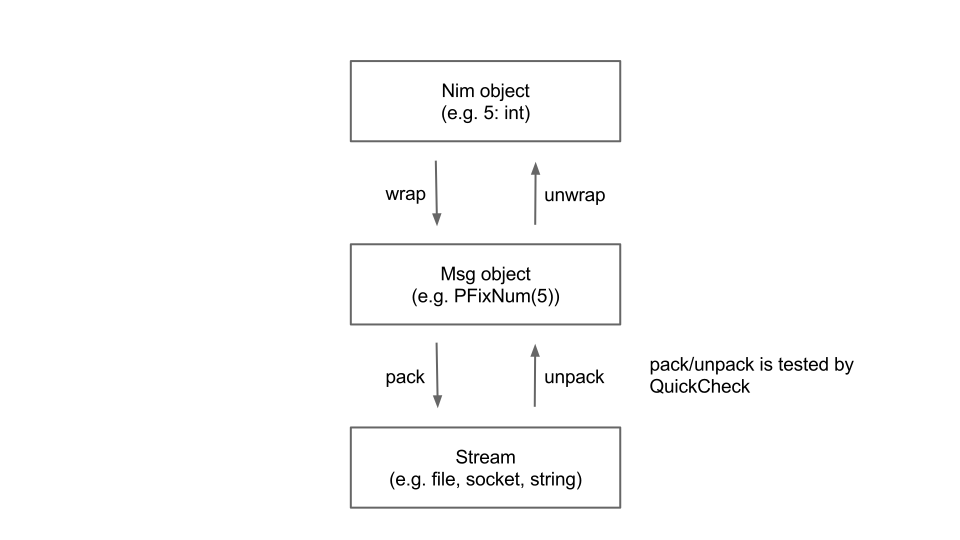
msgpack-nim currently provides only the basic functionality.
Please see what's listed in Todo section. Compared to other language bindings, it's well-tested by
1000 auto-generated test cases by Haskell QuickCheck, which always runs
on every commit to Github repository. Please try make quickcheck on your local machine
to see what happens (It will take a bit while. Be patient). Have a nice packing!
Install
$ nimble update
$ nimble install msgpack
Example
import msgpack
import streams
# You can use any stream subclasses to serialize/deserialize# messages. e.g. FileStreamlet st: Stream = newStringStream()
assert(st.getPosition == 0)
# Type checking protects you from making trivial mistakes.# Now we pack {"a":[5,-3], "b":[1,2,3]} but more complex# combination of any Msg types is allowed.## In xs we can mix specific conversion (PFixNum) and generic# conversion (unwrap).let xs: Msg = wrap(@[PFixNum(5), (-3).wrap])
let ys: Msg = wrap(@[("a".wrap, xs.wrap), ("b".wrap, @[1, 2, 3].wrap)])
st.pack(ys.wrap) # Serialize!# We need to reset the cursor to the beginning of the target# byte sequence.
st.setPosition(0)
let msg = st.unpack # Deserialize!# output:# a# 5# -3# b# 1# 2# 3for e in msg.unwrapMap:
echo e.key.unwrapStr
for e in e.val.unwrapArray:
echo e.unwrapInt
Todo
Implement unwrapInto to convert Msg object to Nim object handily
Evaluate performance and scalability
Talk with offical Ruby implementation
Don't repeat yourself: The code now has too much duplications. Using templates?
The core of MPack contains a buffered reader and writer, and a tree-style parser that decodes into a tree of dynamically typed nodes. Helper functions can be enabled to read values of expected type, to work with files, to allocate strings automatically, to check UTF-8 encoding, and more. The MPack featureset can be configured at compile-time to set which features, components and debug checks are compiled, and what dependencies are available.
The MPack code is small enough to be embedded directly into your codebase. The easiest way to use it is to download the amalgamation package and insert the source files directly into your project. Copy mpack.h and mpack.c into to your codebase, and copy mpack-config.h.sample as mpack-config.h. You can use the defaults or edit it if you'd like to customize the MPack featureset.
The Node API parses a chunk of MessagePack data into an immutable tree of dynamically-typed nodes. A series of helper functions can be used to extract data of specific types from each node.
// parse a file into a node treempack_tree_t tree;
mpack_tree_init_file(&tree, "homepage-example.mp", 0);
mpack_node_t root = mpack_tree_root(&tree);
// extract the example data on the msgpack homepagebool compact = mpack_node_bool(mpack_node_map_cstr(root, "compact"));
int schema = mpack_node_i32(mpack_node_map_cstr(root, "schema"));
// clean up and check for errorsif (mpack_tree_destroy(tree) != mpack_ok) {
fprintf(stderr, "An error occurred decoding the data!\n");
return;
}
Note that no additional error handling is needed in the above code. If the file is missing or corrupt, if map keys are missing or if nodes are not in the expected types, special "nil" nodes and false/zero values are returned and the tree is placed in an error state. An error check is only needed before using the data.
The above example decodes into allocated pages of nodes. A fixed node pool can be provided to the parser instead in memory-constrained environments. For maximum performance and minimal memory usage, the Expect API can be used to parse data of a predefined schema.
The Write API
The MPack Write API encodes structured data to MessagePack.
// encode to memory bufferchar* data;
size_t size;
mpack_writer_t writer;
mpack_writer_init_growable(&writer, &data, &size);
// write the example on the msgpack homepagempack_start_map(&writer, 2);
mpack_write_cstr(&writer, "compact");
mpack_write_bool(&writer, true);
mpack_write_cstr(&writer, "schema");
mpack_write_uint(&writer, 0);
mpack_finish_map(&writer);
// finish writingif (mpack_writer_destroy(&writer) != mpack_ok) {
fprintf(stderr, "An error occurred encoding the data!\n");
return;
}
// use the datado_something_with_data(data, size);
free(data);
In the above example, we encode to a growable memory buffer. The writer can instead write to a pre-allocated or stack-allocated buffer, avoiding the need for memory allocation. The writer can also be provided with a flush function (such as a file or socket write function) to call when the buffer is full or when writing is done.
If any error occurs, the writer is placed in an error state. The writer will flag an error if too much data is written, if the wrong number of elements are written, if the data could not be flushed, etc. No additional error handling is needed in the above code; any subsequent writes are ignored when the writer is in an error state, so you don't need to check every write for errors.
Note in particular that in debug mode, the mpack_finish_map() call above ensures that two key/value pairs were actually written as claimed, something that other MessagePack C/C++ libraries may not do.
Comparison With Other Parsers
MPack is rich in features while maintaining very high performance and a small code footprint. Here's a short feature table comparing it to other C parsers:
A larger feature comparison table is available here which includes descriptions of the various entries in the table.
This benchmarking suite compares the performance of MPack to other implementations of schemaless serialization formats. MPack outperforms all JSON and MessagePack libraries, and in some tests MPack is several times faster than RapidJSON for equivalent data.
Why Not Just Use JSON?
Conceptually, MessagePack stores data similarly to JSON: they are both composed of simple values such as numbers and strings, stored hierarchically in maps and arrays. So why not just use JSON instead? The main reason is that JSON is designed to be human-readable, so it is not as efficient as a binary serialization format:
Compound types such as strings, maps and arrays are delimited, so appropriate storage cannot be allocated upfront. The whole object must be parsed to determine its size.
Strings are not stored in their native encoding. Special characters such as quotes and backslashes must be escaped when written and converted back when read.
Numbers are particularly inefficient (especially when parsing back floats), making JSON inappropriate as a base format for structured data that contains lots of numbers.
Binary data is not supported by JSON at all. Small binary blobs such as icons and thumbnails need to be Base64 encoded or passed out-of-band.
The above issues greatly increase the complexity of the decoder. Full-featured JSON decoders are quite large, and minimal decoders tend to leave out such features as string unescaping and float parsing, instead leaving these up to the user or platform. This can lead to hard-to-find platform-specific and locale-specific bugs, as well as a greater potential for security vulnerabilites. This also significantly decreases performance, making JSON unattractive for use in applications such as mobile games.
While the space inefficiencies of JSON can be partially mitigated through minification and compression, the performance inefficiencies cannot. More importantly, if you are minifying and compressing the data, then why use a human-readable format in the first place?
Running the Unit Tests
The MPack build process does not build MPack into a library; it is used to build and run the unit tests. You do not need to build MPack or the unit testing suite to use MPack.
On Linux, the test suite uses SCons and requires Valgrind, and can be run in the repository or in the amalgamation package. Run scons to build and run the test suite in full debug configuration.
On Windows, there is a Visual Studio solution, and on OS X, there is an Xcode project for building and running the test suite.
You can also build and run the test suite in all supported configurations, which is what the continuous integration server will build and run. If you are on 64-bit, you will need support for cross-compiling to 32-bit, and running 32-bit binaries with 64-bit Valgrind. On Ubuntu, you'll need libc6-dbg:i386. On Arch you'll need gcc-multilib or lib32-clang, and valgrind-multilib. Use scons all=1 -j16 (or some appropriate thread count) to build and run all tests.
RMP is designed to be lightweight and straightforward. There are low-level API, which gives you
full control on data encoding/decoding process and makes no heap allocations. On the other hand
there are high-level API, which provides you convenient interface using Rust standard library and
compiler reflection, allowing to encode/decode structures using derive attribute.
Zero-copy value decoding
RMP allows to decode bytes from a buffer in a zero-copy manner easily and blazingly fast, while Rust
static checks guarantees that the data will be valid until buffer lives.
Clear error handling
RMP's error system guarantees that you never receive an error enum with unreachable variant.
Robust and tested
This project is developed using TDD and CI, so any found bugs will be fixed without breaking
existing functionality.
Requirements
Rust 1.13
Versioning
This project adheres to Semantic Versioning. However until 1.0.0 comes there
will be the following rules:
Any API/ABI breaking changes will be notified in the changelog explicitly and results in minor
version bumping.
API extending features results in patch version bumping.
Non-breaking bug fixes and performance improving results in patch version bumping.
I am fully aware of another msgpack implementation written in nim. But I want something easier to use. Another motivation come from the nim language itself. The current version of nim compiler offer many improvements, including 'generics ' specialization. I found out nim compiler is smart enough to make serialization/deserialization to/from msgpack easy and convenient.
requirement: nim ver 0.11.2 or later
Example
import msgpack4nim, streams
type#lets try with a rather complex objectCustomType = object
count: int
content: seq[int]
name: string
ratio: float
attr: array[0..5, int]
ok: boolprocinitCustomType():CustomType=
result.count = -1
result.content = @[1,2,3]
result.name = "custom"
result.ratio = 1.0for i in0..5: result.attr[i] = i
result.ok = falsevar x = initCustomType()
#you can use another stream compatible#class here e.g. FileStreamvar s = newStringStream()
s.pack(x) #here the magic happened
s.setPosition(0)
var xx: CustomType
s.unpack(xx) #and here tooassert xx == x
echo"OK ", xx.name
see? you only need to call 'pack' and 'unpack', and the compiler do the hard work for you. Very easy, convenient, and works well
if you think setting up a StringStream too much for you, you can simply call pack(yourobject) and it will return a string containing msgpack data.
  var a = @[1,2,3,4,5,6,7,8,9,0]
  var buf = pack(a)
  var aa: seq[int]
  unpack(buf, aa)
  assert a == aa
in case the compiler cannot decide how to serialize or deserialize your very very complex object, you can help it in easy way
by defining your own handler pack_type/unpack_type
type#not really complex, just for example
mycomplexobject = object
a: someSimpleType
b: someSimpleType
#help the compiler to decideprocpack_type*(s: Stream, x: mycomplexobject) =
s.pack(x.a) # let the compiler decide
s.pack(x.b) # let the compiler decide#help the compiler to decideprocunpack_type*(s: Stream, x: var complexobject) =
s.unpack(x.a)
s.unpack(x.b)
var s: newStringStream()
var x: mycomplexobject
s.pack(x) #pack as usual
s.setPosition(0)
s.unpack(x) #unpack as usual
object and tuple by default converted to msgpack array, however
you can tell the compiler to convert it to map by supplying --define:msgpack_obj_to_map
nim c --define:msgpack_obj_to_map yourfile.nim
or --define:msgpack_obj_to_stream to convert object/tuple fields value into stream of msgpack objects
nim c --define:msgpack_obj_to_stream yourfile.nim
What this means? It means by default, each object/tuple will be converted to one msgpack array contains
field(s) value only without their field(s) name.
If you specify that the object/tuple will be converted to msgpack map, then each object/tuple will be
converted to one msgpack map contains key-value pairs. The key will be field name, and the value will be field value.
If you specify that the object/tuple will be converted to msgpack stream, then each object/tuple will be converted
into one or more msgpack's type for each object's field and then the resulted stream will be concatenated
to the msgpack stream buffer.
Which one should I use?
Usually, other msgpack libraries out there convert object/tuple/record/struct or whatever structured data supported by
the language into msgpack array, but always make sure to consult the documentation first.
If both of the serializer and deserializer agreed to one convention, then usually there will be no problem.
No matter which library/language you use, you can exchange msgpack data among them.
ref-types:
ref something :
if ref value is nil, it will be packed into msgpack nil, and when unpacked, usually will do nothing except seq[T] will be @[]
if ref value not nil, it will be dereferenced e.g. pack(val[]) or unpack(val[])
ref subject to some restriction. see restriction below
ptr will be treated like ref during pack
unpacking ptr will invoke alloc, so you must dealloc it
circular reference:
altough detecting circular reference is not too difficult(using set of pointers), the current implementation does not provide circular reference detection. If you pack something contains circular reference, you know something bad will happened
Restriction:
For objects their type is not serialized. This means essentially that it does not work if the object has some other runtime type than its compiletime type:
import streams, msgpack4nim
typeTA = objectofRootObjTB = objectofTA
f: intvar
a: refTA
b: refTBnew(b)
a = b
echostringify(pack(a))
#produces "[ ]" or "{ }"#not "[ 0 ]" or '{ "f" : 0 }'
limitation:
these types will be ignored:
procedural type
cstring(it is not safe to assume it always terminated by null)
pointer
these types cannot be automatically pack/unpacked:
void (will cause compile time error)
however, you can provide your own handler for cstring and pointer
Gotchas:
because data conversion did not preserve original data types, the following code is perfectly valid and will raise no exception
import msgpack4nim, streams, tables, sets, strtabs
typeHorse = object
legs: int
foals: seq[string]
attr: Table[string, string]
Cat = object
legs: uint8
kittens: HashSet[string]
traits: StringTableRefprocinitHorse():Horse=
result.legs = 4
result.foals = @["jilly", "colt"]
result.attr = initTable[string, string]()
result.attr["color"] ="black"
result.attr["speed"] ="120mph"var stallion = initHorse()
var tom: Catvar buf = pack(stallion) #pack a Horse hereunpack(buf, tom)
#abracadabra, it will unpack into a Catecho"legs: ", $tom.legs
echo"kittens: ", $tom.kittens
echo"traits: ", $tom.traits
another gotcha:
typeKAB = objectofRootObj
aaa: int
bbb: intKCD = objectofKAB
ccc: int
ddd: intKEF = objectofKCD
eee: int
fff: intvar kk = KEF()
echostringify(pack(kk))
# will produce "{ "eee" : 0, "fff" : 0, "ccc" : 0, "ddd" : 0, "aaa" : 0, "bbb" : 0 }"# not "{ "aaa" : 0, "bbb" : 0, "ccc" : 0, "ddd" : 0, "eee" : 0, "fff" : 0 }"
bin and ext format
this implementation provide function to encode/decode msgpack bin/ext format header, but for the body, you must write it yourself to the StringStream
import streams, msgpack4nim
const exttype0 = 0var s = newStringStream()
var body = "this is the body"
s.pack_ext(body.len, exttype0)
s.write(body)
#the same goes to bin format
s.pack_bin(body.len)
s.write(body)
s.setPosition(0)
#unpack_ext return tuple[exttype:uint8, len: int]let (extype, extlen) = s.unpack_ext()
var extbody = s.readStr(extlen)
assert extbody == body
let binlen = s.unpack_bin()
var binbody = s.readStr(binlen)
assert binbody == body
stringify
you can convert msgpack data to readable string using stringify function
typeHorse = object
legs: int
speed: int
color: string
name: stringvar cc = Horse(legs:4, speed:150, color:"black", name:"stallion")
var zz = pack(cc)
echostringify(zz)
toAny takes a string of msgpack data or a stream, then it will produce msgAny which you can interrogate of it's type and value during runtime by accessing it's member msgType
toAny recognize all valid msgpack message and translate it into a group of types:
Licensed under the Apache License, Version 2.0 (the "License"); you may not use this file except in compliance with the License You may obtain a copy of the License at
Unless required by applicable law or agreed to in writing, software distributed under the License is distributed on an "AS IS" BASIS, WITHOUT WARRANTIES OR CONDITIONS OF ANY KIND, either express or implied. See the License for the specific language governing permissions and limitations under the License.
mruby-simplemsgpack searches for msgpack-c on your system, if it can find it it links against it, there is also a bundled version of msgpack-c included if you don't have it installed in your system.
You need at least msgpack-c 1.
Example
Objects can be packed with Object#to_msgpack or MessagePack.pack:
A string with multiple packed values can be unpacked by handing a block to
MessagePack.unpack:
packed = packed_string + packed_hash
unpacked = []
MessagePack.unpack(packed) do |result|
  unpacked << result
end
unpacked # => ['bye', { a: 'hash', with: [1, 'embedded', 'array'] }]
When using MessagePack.unpack with a block and passing it a incomplete packed Message
it returns the number of bytes it was able to unpack, if it was able to unpack the howl Message it returns self.
This is helpful if the given data contains an incomplete
last object and we want to continue unpacking after we have more data.
packed = packed_string + packed_hash.slice(0, packed_hash.length/2)
unpacked = []
unpacked_length =MessagePack.unpack(packed) do |result|
unpacked << result
end
unpacked_length # => 4 (length of packed_string)
unpacked # => ['bye']
Extension Types
To customize how objects are packed, define an extension type.
By default, MessagePack packs symbols as strings and does not convert them
back when unpacking them. Symbols can be preserved by registering an extension
type for them:
For nil, true, false, Fixnum, Float, String, Array and Hash a registered
ext type is ignored. They are always packed according to the MessagePack
specification.
Proc, blocks or lambas
If you want to pack and unpack mruby blocks take a look at the mruby-proc-irep-ext gem, it can be registered like the other extension types
Pure JavaScript only (No node-gyp nor gcc required)
Faster than any other pure JavaScript libraries on node.js v4
Even faster than node-gyp C++ based msgpack library (90% faster on encoding)
Streaming encoding and decoding interface is also available. It's more faster.
Ready for Web browsers including Chrome, Firefox, Safari and even IE8
Tested on Node.js v0.10, v0.12, v4, v5 and v6 as well as Web browsers
Encoding and Decoding MessagePack
var msgpack =require("msgpack-lite");
// encode from JS Object to MessagePack (Buffer)var buffer =msgpack.encode({"foo":"bar"});
// decode from MessagePack (Buffer) to JS Objectvar data =msgpack.decode(buffer); // => {"foo": "bar"}// if encode/decode receives an invalid argument an error is thrown
Writing to MessagePack Stream
var fs =require("fs");
var msgpack =require("msgpack-lite");
var writeStream =fs.createWriteStream("test.msp");
var encodeStream =msgpack.createEncodeStream();
encodeStream.pipe(writeStream);
// send multiple objects to streamencodeStream.write({foo:"bar"});
encodeStream.write({baz:"qux"});
// call this once you're done writing to the stream.encodeStream.end();
Reading from MessagePack Stream
var fs =require("fs");
var msgpack =require("msgpack-lite");
var readStream =fs.createReadStream("test.msp");
var decodeStream =msgpack.createDecodeStream();
// show multiple objects decoded from streamreadStream.pipe(decodeStream).on("data", console.warn);
Decoding MessagePack Bytes Array
var msgpack =require("msgpack-lite");
// decode() accepts Buffer instance per defaultmsgpack.decode(Buffer([0x81, 0xA3, 0x66, 0x6F, 0x6F, 0xA3, 0x62, 0x61, 0x72]));
// decode() also accepts Array instancemsgpack.decode([0x81, 0xA3, 0x66, 0x6F, 0x6F, 0xA3, 0x62, 0x61, 0x72]);
// decode() accepts raw Uint8Array instance as wellmsgpack.decode(newUint8Array([0x81, 0xA3, 0x66, 0x6F, 0x6F, 0xA3, 0x62, 0x61, 0x72]));
Command Line Interface
A CLI tool bin/msgpack converts data stream from JSON to MessagePack and vice versa.
$ make test-browser-local
open the following url in a browser:
http://localhost:4000/__zuul
Browser Build
Browser version msgpack.min.js is also available. 50KB minified, 14KB gziped.
<!--[if lte IE 9]><script src="https://cdnjs.cloudflare.com/ajax/libs/es5-shim/4.1.10/es5-shim.min.js"></script><script src="https://cdnjs.cloudflare.com/ajax/libs/json3/3.3.2/json3.min.js"></script><![endif]-->
<scriptsrc="https://rawgit.com/kawanet/msgpack-lite/master/dist/msgpack.min.js"></script>
<script>
// encode from JS Object to MessagePack (Uint8Array)var buffer =msgpack.encode({foo:"bar"});// decode from MessagePack (Uint8Array) to JS Objectvar array =newUint8Array([0x81, 0xA3, 0x66, 0x6F, 0x6F, 0xA3, 0x62, 0x61, 0x72]);var data =msgpack.decode(array);</script>
MessagePack With Browserify
Step #1: write some code at first.
var msgpack =require("msgpack-lite");
var buffer =msgpack.encode({"foo":"bar"});
var data =msgpack.decode(buffer);
console.warn(data); // => {"foo": "bar"}
Proceed to the next steps if you prefer faster browserify compilation time.
Step #2: add browser property on package.json in your project. This refers the global msgpack object instead of including whole of msgpack-lite source code.
A benchmark tool lib/benchmark.js is available to compare encoding/decoding speed
(operation per second) with other MessagePack modules.
It counts operations of 1KB JSON document in 10 seconds.
Streaming benchmark tool lib/benchmark-stream.js is also available.
It counts milliseconds for 1,000,000 operations of 30 bytes fluentd msgpack fragment.
This shows streaming encoding and decoding are super faster.
$ npm run benchmark-stream 2
operation (1000000 x 2)
op
ms
op/s
stream.write(msgpack.encode(obj));
1000000
3027
330360
stream.write(notepack.encode(obj));
1000000
2012
497017
msgpack.Encoder().on("data",ondata).encode(obj);
1000000
2956
338294
msgpack.createEncodeStream().write(obj);
1000000
1888
529661
stream.write(msgpack.decode(buf));
1000000
2020
495049
stream.write(notepack.decode(buf));
1000000
1794
557413
msgpack.Decoder().on("data",ondata).decode(buf);
1000000
2744
364431
msgpack.createDecodeStream().write(buf);
1000000
1341
745712
Test environment: msgpack-lite 0.1.14, Node v4.2.3, Intel(R) Xeon(R) CPU E5-2666 v3 @ 2.90GHz
MessagePack Mapping Table
The following table shows how JavaScript objects (value) will be mapped to
MessagePack formats
and vice versa.
Source Value
MessagePack Format
Value Decoded
null, undefined
nil format family
null
Boolean (true, false)
bool format family
Boolean (true, false)
Number (32bit int)
int format family
Number (int or double)
Number (64bit double)
float format family
Number (double)
String
str format family
String
Buffer
bin format family
Buffer
Array
array format family
Array
Map
map format family
Map (if usemap=true)
Object (plain object)
map format family
Object (or Map if usemap=true)
Object (see below)
ext format family
Object (see below)
Note that both null and undefined are mapped to nil 0xC1 type.
This means undefined value will be upgraded to null in other words.
Extension Types
The MessagePack specification allows 128 application-specific extension types.
The library uses the following types to make round-trip conversion possible
for JavaScript native objects.
Type
Object
Type
Object
0x00
0x10
0x01
EvalError
0x11
Int8Array
0x02
RangeError
0x12
Uint8Array
0x03
ReferenceError
0x13
Int16Array
0x04
SyntaxError
0x14
Uint16Array
0x05
TypeError
0x15
Int32Array
0x06
URIError
0x16
Uint32Array
0x07
0x17
Float32Array
0x08
0x18
Float64Array
0x09
0x19
Uint8ClampedArray
0x0A
RegExp
0x1A
ArrayBuffer
0x0B
Boolean
0x1B
Buffer
0x0C
String
0x1C
0x0D
Date
0x1D
DataView
0x0E
Error
0x1E
0x0F
Number
0x1F
Other extension types are mapped to built-in ExtBuffer object.
Custom Extension Types (Codecs)
Register a custom extension type number to serialize/deserialize your own class instances.
var msgpack =require("msgpack-lite");
var codec =msgpack.createCodec();
codec.addExtPacker(0x3F, MyVector, myVectorPacker);
codec.addExtUnpacker(0x3F, myVectorUnpacker);
var data =newMyVector(1, 2);
var encoded =msgpack.encode(data, {codec: codec});
var decoded =msgpack.decode(encoded, {codec: codec});
functionMyVector(x, y) {
this.x= x;
this.y= y;
}
functionmyVectorPacker(vector) {
var array = [vector.x, vector.y];
returnmsgpack.encode(array); // return Buffer serialized
}
functionmyVectorUnpacker(buffer) {
var array =msgpack.decode(buffer);
returnnewMyVector(array[0], array[1]); // return Object deserialized
}
The first argument of addExtPacker and addExtUnpacker should be an integer within the range of 0 and 127 (0x0 and 0x7F). myClassPacker is a function that accepts an instance of MyClass, and should return a buffer representing that instance. myClassUnpacker is the opposite: it accepts a buffer and should return an instance of MyClass.
If you pass an array of functions to addExtPacker or addExtUnpacker, the value to be encoded/decoded will pass through each one in order. This allows you to do things like this:
You can also pass the codec option to msgpack.Decoder(options), msgpack.Encoder(options), msgpack.createEncodeStream(options), and msgpack.createDecodeStream(options).
If you wish to modify the default built-in codec, you can access it at msgpack.codec.preset.
Custom Codec Options
msgpack.createCodec() function accepts some options.
It does NOT have the preset extension types defined when no options given.
var codec =msgpack.createCodec();
preset: It has the preset extension types described above.
var codec =msgpack.createCodec({preset:true});
safe: It runs a validation of the value before writing it into buffer. This is the default behavior for some old browsers which do not support ArrayBuffer object.
var codec =msgpack.createCodec({safe:true});
useraw: It uses raw formats instead of bin and str.
var codec =msgpack.createCodec({useraw:true});
int64: It decodes msgpack's int64/uint64 formats with int64-buffer object.
var codec =msgpack.createCodec({int64:true});
binarraybuffer: It ties msgpack's bin format with ArrayBuffer object, instead of Buffer object.
var codec =msgpack.createCodec({binarraybuffer:true, preset:true});
uint8array: It returns Uint8Array object when encoding, instead of Buffer object.
var codec =msgpack.createCodec({uint8array:true});
usemap: Uses the global JavaScript Map type, if available, to unpack
MessagePack map elements.
Permission is hereby granted, free of charge, to any person obtaining a copy
of this software and associated documentation files (the "Software"), to deal
in the Software without restriction, including without limitation the rights
to use, copy, modify, merge, publish, distribute, sublicense, and/or sell
copies of the Software, and to permit persons to whom the Software is
furnished to do so, subject to the following conditions:
The above copyright notice and this permission notice shall be included in all
copies or substantial portions of the Software.
THE SOFTWARE IS PROVIDED "AS IS", WITHOUT WARRANTY OF ANY KIND, EXPRESS OR
IMPLIED, INCLUDING BUT NOT LIMITED TO THE WARRANTIES OF MERCHANTABILITY,
FITNESS FOR A PARTICULAR PURPOSE AND NONINFRINGEMENT. IN NO EVENT SHALL THE
AUTHORS OR COPYRIGHT HOLDERS BE LIABLE FOR ANY CLAIM, DAMAGES OR OTHER
LIABILITY, WHETHER IN AN ACTION OF CONTRACT, TORT OR OTHERWISE, ARISING FROM,
OUT OF OR IN CONNECTION WITH THE SOFTWARE OR THE USE OR OTHER DEALINGS IN THE
SOFTWARE.
msgpack-tools contains simple command-line utilities for converting from MessagePack to JSON and vice-versa. They support options for lax parsing, lossy conversions, pretty-printing, and base64 encoding.
msgpack2json -- Convert MessagePack to JSON
json2msgpack -- Convert JSON to MessagePack
They can be used for dumping MessagePack from a file or web API to a human-readable format, or for converting hand-written or generated JSON to MessagePack. The lax parsing mode supports comments and trailing commas in JSON, making it possible to hand-write your app or game data in JSON and convert it at build-time to MessagePack.
Mac OS X (Homebrew): brew install https://ludocode.github.io/msgpack-tools.rb
Debian (Ubuntu, etc.): .deb package for x86_64 in the latest release; install with dpkg
For other platforms, msgpack-tools must be built from source. Download the msgpack-tools tarball from the latest release page (not the "source code" archive generated by GitHub, but the actual release package.)
msgpack-tools uses CMake. A configure wrapper is provided that calls CMake, so you can simply run the usual:
./configure && make && sudo make install
If you are building from the repository, you will need md2man to generate the man pages.
Differences between MessagePack and JSON
MessagePack is intended to be very close to JSON in supported features, so they can usually be transparently converted from one to the other. There are some differences, however, which can complicate conversions.
These are the differences in what objects are representable in each format:
JSON keys must be strings. MessagePack keys can be any type, including maps and arrays.
JSON supports "bignums", i.e. integers of any size. MessagePack integers must fit within a 64-bit signed or unsigned integer.
JSON real numbers are specified in decimal scientific notation and can have arbitrary precision. MessagePack real numbers are in IEEE 754 standard 32-bit or 64-bit binary.
MessagePack supports binary and extension type objects. JSON does not support binary data. Binary data is often encoded into a base64 string to be embedded into a JSON document.
A JSON document can be encoded in UTF-8, UTF-16 or UTF-32, and the entire document must be in the same encoding. MessagePack strings are required to be UTF-8, although this is not enforced by many encoding/decoding libraries.
By default, msgpack2json and json2msgpack convert in strict mode. If an object in the source format is not representable in the destination format, the converter aborts with an error. A lax mode is available which performs a "lossy" conversion, and base64 conversion modes are available to support binary data in JSON.
In the examples above, the method pack automatically pack a value depending on its type.
But not all PHP types can be uniquely translated to MessagePack types. For example,
MessagePack format defines map and array types, which are represented by a single array
type in PHP. By default, the packer will pack a PHP array as a MessagePack array if it
has sequential numeric keys, starting from 0 and as a MessagePack map otherwise:
Check "Custom Types" section below on how to pack arbitrary PHP objects.
Type detection mode
Automatically detecting a MP type of PHP arrays/strings adds some overhead which can be noticed
when you pack large (16- and 32-bit) arrays or strings. However, if you know the variable type
in advance (for example, you only work with utf-8 strings or/and associative arrays), you can
eliminate this overhead by forcing the packer to use the appropriate type, which will save it
from running the auto detection routine:
// convert PHP strings to MP strings, PHP arrays to MP maps$packer->setTypeDetectionMode(Packer::FORCE_STR|Packer::FORCE_MAP);// convert PHP strings to MP binaries, PHP arrays to MP arrays$packer->setTypeDetectionMode(Packer::FORCE_BIN|Packer::FORCE_ARR);// this will throw \InvalidArgumentException$packer->setTypeDetectionMode(Packer::FORCE_STR|Packer::FORCE_BIN);$packer->setTypeDetectionMode(Packer::FORCE_MAP|Packer::FORCE_ARR);
Unpacking
To unpack data you can either use an instance of BufferUnpacker:
If the packed data is received in chunks (e.g. when reading from a stream), use the tryUnpack
method, which will try to unpack data and return an array of unpacked data instead of throwing an InsufficientDataException:
The binary MessagePack format has unsigned 64-bit as its largest integer data type,
but PHP does not support such integers. By default, while unpacking uint64 value
the library will throw a IntegerOverflowException.
You can change this default behavior to unpack uint64 integer to a string:
In addition to the basic types,
the library provides the functionality to serialize and deserialize arbitrary types.
To do this, you need to create a transformer, that converts your type to a type, which can be handled by MessagePack.
For example, the code below shows how to add DateTime object support:
If an error occurs during packing/unpacking, a PackingFailedException or UnpackingFailedException
will be thrown, respectively.
In addition, there are two more exceptions that can be thrown during unpacking:
InsufficientDataException
IntegerOverflowException
Tests
Run tests as follows:
$ phpunit
Also, if you already have Docker installed, you can run the tests in a docker container.
First, create a container:
$ ./dockerfile.sh | docker build -t msgpack -
The command above will create a container named msgpack with PHP 7.0 runtime.
You may change the default runtime by defining the PHP_RUNTIME environment variable:
YSMessagePack is a messagePack packer/unpacker written in swift (swift 3 ready). It is designed to be easy to use. YSMessagePack include following features:
Pack custom structs and classes / unpack objects by groups and apply handler to each group (easier to re-construct your struct$)
Asynchronous unpacking
Pack and unpack multiple message-packed data regardless of types with only one line of code
Specify how many items to unpack
Get remaining bytes that were not message-packed ; start packing from some index -- so you can mix messagepack with other protocol!!!
Helper methods to cast NSData to desired types
Operator +^ and +^= to join NSData
Version
1.6.2 (Dropped swift 2 support, swift 3 support only from now on)
Installation
Simply add files under YSMessagePack/Classes to your project,
use cocoapod, add "pod 'YSMessagePack', '~> 1.6.2' to your podfile
Usage
Pack:
let exampleInt:Int=1let exampleStr:String="Hello World"let exampleArray: [Int] = [1, 2, 3, 4, 5, 6]
let bool:Bool=true// To pack items, just put all of them in a single array// and call the `pack(items:)` function//this will be the packed datalet msgPackedBytes: NSData =pack(items: [true, foo, exampleInt, exampleStr, exampleArray])
// Now your payload is ready to send!!!
But what if we have some custom data structure to send?
//To make your struct / class packablestructMyStruct: Packable { //Confirm to this protocolvar name:Stringvar index:IntfuncpackFormat() -> [Packable] { //protocol functionreturn [name, index] //pack order
}
funcmsgtype() -> MsgPackTypes {
return .Custom
}
}
let exampleInt:Int=1let exampleStr:String="Hello World"let exampleArray: [Int] = [1, 2, 3, 4, 5]
let bool:Bool=truelet foo =MyStruct(name: "foo", index: 626)
let msgPackedBytes =pack(items: [bool, foo, exampleInt, exampleStr, exampleArray])
Or you can pack them individually and add them to a byte array manually (Which is also less expensive)
let exampleInt:Int=1let exampleStr:String="Hello World"let exampleArray: [Int] = [1, 2, 3, 4, 5, 6]
//Now pack them individuallylet packedInt = exampleInt.packed()
//if you didn't specific encoding, the default encoding will be ASCII
#ifswift(>=3)
let packedStr = exampleStr.packed(withEncoding: NSASCIIStringEncoding)
#elselet packedStr = exampleStr.packed(withEncoding: .ascii)
#endiflet packedArray = exampleArray.packed()
//You can use this operator +^ the join the data on rhs to the end of data on lhslet msgPackedBytes: NSData = packedInt +^ packedStr +^ packedArray
Unpack
YSMessagePack offer a number of different ways and options to unpack include unpack asynchronously, see the example project for detail.
To unpack a messagepacked bytearray is pretty easy:
do {
//The unpack method will return an array of NSData which each element is an unpacked objectlet unpackedItems =try msgPackedBytes.itemsUnpacked()
//instead of casting the NSData to the type you want, you can call these `.castTo..` methods to do the job for youlet int:Int= unpackedItems[2].castToInt()
//Same as packing, you can also specify the encoding you want to use, default is ASCIIlet str:String= unpackedItem[3].castToString()
let array: NSArray = unpackedItems[4].castToArray()
} catchlet error as NSError{
NSLog("Error occurs during unpacking: %@", error)
}
//Remember how to pack your struct? Here is a better way to unpack a stream of bytes formatted in specific formatlet testObj1 =MyStruct(name: "TestObject1", index: 1)
let testObj2 =MyStruct(name: "TestObject2", index: 2)
let testObj3 =MyStruct(name: "TestObject3", index: 3)
let packed =packCustomObjects(testObj1, testObj2, testObj3) //This is an other method that can pack your own struct easierlet nobjsInOneGroup =2try! packed.unpackByGroupsWith(nobjsInOneGroup) {
(unpackedData, isLast) ->Bool//you can also involve additional args like number of groups to unpackguardlet name = unpackedData[0].castToString() else {returnfalse} //abort unpacking hen something wronglet index = unpackedData[1]
let testObj =MyStruct(name: name, index: index) // assembly returntrue//proceed unpacking, or return false to abort
}
If you don't want to unpack every single thing included in the message-pack byte array, you can also specify an amount to unpack, if you want to keep the remaining bytes, you can put true in the returnRemainingBytes argument, the remaining bytes will stored in the end of the NSData array.
do {
//Unpack only 2 objects, and we are not interested in remaining byteslet unpackedItems =try msgPackedBytes.itemsUnpacked(specific_amount: 2, returnRemainingBytes: false)
print(unpackedItems.count) //will print 2
} catchlet error as NSError{
NSLog("Error occurs during unpacking: %@", error)
}
This library is a lightweight implementation of the MessagePack binary serialization format. MessagePack is a 1-to-1 binary representation of JSON, and the official specification can be found here: https://github.com/msgpack....
This library is designed to be super light weight.
Its easiest to understand how this library works if you think in terms of json. The type MPackMap represents a dictionary, and the type MPackArray represents an array.
Create MPack instances with the static method MPack.From(object);. You can pass any simple type (such as string, integer, etc), or any Array composed of a simple type. MPack also has implicit conversions from most of the basic types built in.
Transform an MPack object back into a CLR type with the static method MPack.To<T>(); or MPack.To(type);. MPack also has explicit converions going back to most basic types, you can do string str = (string)mpack; for instance.
MPack now supports native asynchrounous reading and cancellation tokens. It will not block a thread to wait on a stream.
NuGet
MPack is available as a NuGet package!
PM> Install-Package MPack
Usage
Create a object model that can be represented as MsgPack. Here we are creating a dictionary, but really it can be anything:
Serialize the data to a byte array or to a stream to be saved, transmitted, etc:
byte[] encodedBytes = dictionary.EncodeToBytes();
// -- or --dictionary.EncodeToStream(stream);
Parse the binary data back into a MPack object model (you can also cast back to an MPackMap or MPackArray after reading if you want dictionary/array methods):
varreconstructed = MPack.ParseFromBytes(encodedBytes);
// -- or --varreconstructed = MPack.ParseFromStream(stream);
Turn MPack objects back into types that we understand with the generic To<>() method. Since we know the types of everything here we can just call To<bool>() to reconstruct our bool, but if you don't know you can access the instance enum MPack.ValueType to know what kind of value it is:
This Arduino library provides a light weight serializer and parser for messagepack.
Install
Download the zip, and import it with your Arduino IDE: Sketch>Include Library>Add .zip library
Usage
See the either the .h file, or the examples (led_controller and test_uno_writer).
In short:
functions like msgpck_what_next(Stream * s); watch the next type of data without reading it (without advancing the buffer of Stream s).
functions like msgpck_read_bool(Stream * s, bool *b) read a value from Stream s.
functions like msgpck_write_bool(Stream * s, bool b) write a value on Stream s.
Notes:
Stream are used as much as possible in order not to add to much overhead with buffers. Therefore you should be able to store the minimum number of value at a given time.
Map and Array related functions concern only their headers. Ex: If you want to write an array containing two elements you should write the array header, then write the two elements.
Limitations
Currently the library does not support:
8 bytes float (Only 4 bytes floats are supported by default on every Arduino and floats are anyway not recommended on Arduino)
The usage of MsgPack class is very simple. You need create an object and call read and write methods.
```actionscript
// message pack object created
var msgpack:MsgPack = new MsgPack();
// encode an array
var bytes:ByteArray = msgpack.write([1, 2, 3, 4, 5]);
// rewind the buffer
bytes.position = 0;
// print the decoded object
trace(msgpack.read(bytes));
### Flags
<p>Currently there are three flags which you may use to initialize a MsgPack object:</p>
* <code>MsgPackFlags.READ_STRING_AS_BYTE_ARRAY</code>: message pack string data is read as byte array instead of string;
* <code>MsgPackFlags.ACCEPT_LITTLE_ENDIAN</code>: MsgPack objects will work with little endian buffers (message pack specification defines big endian as default).
* <code>MsgPackFlags.SPEC2013_COMPATIBILITY</code>: MsgPack will run in backwards compatibility mode.

```actionscript
var msg:MsgPack;

// use logical operator OR to set the flags.
msgpack = new MsgPack(MsgPackFlags.READ_STRING_AS_BYTE_ARRAY | MsgPackFlags.ACCEPT_LITTLE_ENDIAN);
Advanced Usage
Extensions
You can create your own Extension Workers by extending the ExtensionWorker Class and then assigning it to the MsgPack Factory.
The following example assigns a custom worker which extends the ExtensionWorker Class.
```actionscript
var msgpack:MsgPack = new MsgPack();
// Assign the new worker to the factory.
msgpack.factory.assign(new CustomWorker());
<p>For more information regarding Extensions refer to the MessagePack specification.</p>

### Priorities
<p>Worker priority behaves similar to how the Adobe Event Dispatcher priorities work. In MessagePack, deciding which worker will be use for serializing/deserializing depends on two(2) factors.</p>
1. The order in which the worker was assigned to the factory.
2. The priority of the worker. Higher values take precedence.

All workers have a default priority of 0.

<p>In the following example <code>workerB</code> will never be used because it's assign after <code>workerA</code></p>
```actionscript
var msgpack:MsgPack = new MsgPack();

var workerA:StringWorker = new StringWorker();
var workerB:DifferentStringWorker = new DifferentStringWorker();

msgpack.factory.assign(workerA);
msgpack.factory.assign(workerB);
However if we adjust the priority of workerB, then workerA will never be used.
```actionscript
var msgpack:MsgPack = new MsgPack();
var workerA:StringWorker = new StringWorker();
var workerB:DifferentStringWorker = new DifferentStringWorker(null, 1);
## Credits
This application uses Open Source components. You can find the source code of their open source projects along with license information below. We acknowledge and are grateful to these developers for their contributions to open source.

Project: as3-msgpack https://github.com/loteixeira/as3-msgpack
Copyright (C) 2013 Lucas Teixeira
License (Apache V2.0) http://www.apache.org/licenses/LICENSE-2.0
msgpack11 is a tiny MsgPack library for C++11, providing MsgPack parsing and serialization.
This library is inspired by json11.
The API of msgpack11 is designed to be similar with json11.
Installation
Using CMake
git clone [email protected]:ar90n/msgpack11.git
mkdir build
cd build
cmake ../msgpack11
make && make install
Using Buck
git clone [email protected]:ar90n/msgpack11.git
cd msgpack11
buck build :msgpack11
Data::MessagePack - Perl 6 implementation of MessagePack
SYNOPSIS
use Data::MessagePack;
my $data-structure = {
key => 'value',
k2 => [ 1, 2, 3 ]
};
my $packed = Data::MessagePack::pack( $data-structure );
my $unpacked = Data::MessagePack::unpack( $packed );
Or for streaming:
use Data::MessagePack::StreamingUnpacker;
my $supplier = Some Supplier; #Could be from IO::Socket::Async for instance
my $unpacker = Data::MessagePack::StreamingUnpacker.new(
source => $supplier.Supply
);
$unpacker.tap( -> $value {
say "Got new value";
say $value.perl;
}, done => { say "Source supply is done"; } );
DESCRIPTION
The present module proposes an implemetation of the MessagePack specification as described on http://msgpack.org/. The implementation is now in Pure Perl which could come as a performance penalty opposed to some other packer implemented in C.
WHY THAT MODULE
There are already some part of MessagePack implemented in Perl6, with for instance MessagePack available here: https://github.com/uasi/messagepack-pm6, however that module only implements the unpacking part of the specification. Futhermore, that module uses the unpack functionality which is tagged as experimental as of today
FUNCTIONS
function pack
That function takes a data structure as parameter, and returns a Blob with the packed version of the data structure.
function unpack
That function takes a MessagePack packed message as parameter, and returns the deserialized data structure.
This is a command line tool to inspect/show a data serialized by MessagePack.
Installation
Executable binary files are available from releases. Download a file for your platform, and use it.
Otherwise, you can install rubygem version on your CRuby runtime:
$ gem install msgpack-inspect
Usage
Usage: msgpack-inspect [options] FILE
Options:
-f, --format FORMAT output format of inspection result (yaml/json/jsonl) [default: yaml]
-r, --require LIB ruby file path to require (to load ext type definitions)
-v, --version Show version of this software
-h, --help Show this message
-r option is available oly with rubygem version, and unavailable with mruby binary release.
FILE is a file which msgpack binary stored. Specify - to inspect data from STDIN.
This command shows the all data contained in specified format (YAML in default).
MessagePack is an efficient binary serialization format. It lets you exchange data among multiple languages like JSON. But it's faster and smaller. Small integers are encoded into a single byte, and typical short strings require only one extra byte in addition to the strings themselves.
let hey =MessagePack("hey there!")
let bytes = MessagePack.encode(hey)
let original =String(try MessagePack.decode(bytes: bytes))
Performance optimized
var encoder =Encoder()
encoder.encode(.string("one"))
encoder.encode(.int(2))
encoder.encode(.double(3.0))
let encoded = encoder.bytes// be careful, we use raw pointer herevar decoder =Decoder(bytes: encoded, count: encoded.count)
// throws on invalid datalet value =try decoder.decode()
// reuse decoder
decoder.rewind()
// you can avoid extra MessagePack object// if you sure about the structure// throws on wrong typelet string =try decoder.decode(String.self)
let int =try decoder.decode(UInt8.self)
let double =try decoder.decode(Double.self)
print("decoded manually: \(string), \(int), \(double)")
CWPack is a lightweight and yet complete implementation of the
MessagePack serialization format
version 5.
Excellent Performance
Together with MPack, CWPack is the fastest open-source messagepack implementation. Both totally outperform
CMP and msgpack-c
Design
CWPack does no memory allocations and no file handling. All that is done
outside of CWPack.
CWPack is working against memory buffers. User defined handlers are called when buffers are
filled up (packing) or needs refill (unpack).
Containers (arrays, maps) are read/written in parts, first the item containing the size and
then the contained items one by one. Exception to this is the cw_skip_items function which
skip whole containers.
Example
Pack and unpack example from the MessagePack home page:
CWPack may be run in compatibility mode. It affects only packing; EXT is considered illegal, BIN are transformed to STR and generation of STR8 is supressed.
Error handling
When an error is detected in a context, the context is stopped and all future calls to that context are immediatly returned without any actions.
CWPack does not check for illegal values (e.g. in STR for illegal unicode characters).
Build
CWPack consists of a single src file and two header files. It is written
in strict ansi C and the files are together ~ 1.2K lines. No separate build is neccesary, just include the
files in your own build.
CWPack has no dependencies to other libraries.
Test
Included in the test folder are a module test and a performance test and shell scripts to run them.
MessagePack for C#(.NET, .NET Core, Unity, Xamarin)
Extremely fast MessagePack serializer for C#, x10 faster than MsgPack-Cli and acquires best performance compared with all the other C# serializers. MessagePack for C# has built-in LZ4 compression which can achieve super fast and small binary size. Performance is always important! for Game, Distributed computing, Microservices, Store data to Redis, etc.
for Unity, download from releases page, providing .unitypackage. Unity IL2CPP or Xamarin AOT Environment, check the pre-code generation section.
Quick Start
Define class and mark as [MessagePackObject] and public members(property or field) mark as [Key], call MessagePackSerializer.Serialize<T>/Deserialize<T>. ToJson helps dump binary.
// mark MessagePackObjectAttribute
[MessagePackObject]
publicclassMyClass
{
// Key is serialization index, it is important for versioning.
[Key(0)]
public intAge { get; set; }
[Key(1)]
public stringFirstName { get; set; }
[Key(2)]
public stringLastName { get; set; }
// public members and does not serialize target, mark IgnoreMemberttribute
[IgnoreMember]
public stringFullName { get { return FirstName + LastName; } }
}
classProgram
{
staticvoidMain(string[] args)
{
varmc = newMyClass
{
Age = 99,
FirstName = "hoge",
LastName = "huga",
};
// call Serialize/Deserialize, that's all.varbytes = MessagePackSerializer.Serialize(mc);
varmc2 = MessagePackSerializer.Deserialize<MyClass>(bytes);
// you can dump msgpack binary to human readable json.// In default, MeesagePack for C# reduce property name information.// [99,"hoge","huga"]varjson = MessagePackSerializer.ToJson(bytes);
Console.WriteLine(json);
}
}
MessagePackAnalyzer helps object definition. Attributes, accessibility etc are detected and it becomes a compiler error.
If you want to allow a specific type (for example, when registering a custom type), put MessagePackAnalyzer.json at the project root and make the Build Action to AdditionalFiles.
This is a sample of the contents of MessagePackAnalyzer.json.
You can add custom type support and has some official/third-party extension package. for ImmutableCollections(ImmutableList<>, etc), for ReactiveProperty and for Unity(Vector3, Quaternion, etc...), for F#(Record, FsList, Discriminated Unions, etc...). Please see extensions section.
MessagePack.Nil is built-in null/void/unit representation type of MessagePack for C#.
Object Serialization
MessagePack for C# can serialze your own public Class or Struct. Serialization target must marks [MessagePackObject] and [Key]. Key type can choose int or string. If key type is int, serialized format is used array. If key type is string, serialized format is used map. If you define [MessagePackObject(keyAsPropertyName: true)], does not require KeyAttribute.
[MessagePackObject]
publicclassSample1
{
[Key(0)]
public intFoo { get; set; }
[Key(1)]
public intBar { get; set; }
}
[MessagePackObject]
publicclassSample2
{
[Key("foo")]
public intFoo { get; set; }
[Key("bar")]
public intBar { get; set; }
}
[MessagePackObject(keyAsPropertyName: true)]
publicclassSample3
{
// no needs KeyAttributepublic intFoo { get; set; }
// If ignore public member, you can use IgnoreMemberAttribute
[IgnoreMember]
public intBar { get; set; }
}
// [10,20]Console.WriteLine(MessagePackSerializer.ToJson(newSample1 { Foo = 10, Bar = 20 }));
// {"foo":10,"bar":20}Console.WriteLine(MessagePackSerializer.ToJson(newSample2 { Foo = 10, Bar = 20 }));
// {"Foo":10}Console.WriteLine(MessagePackSerializer.ToJson(newSample3 { Foo = 10, Bar = 20 }));
All patterns serialization target are public instance member(field or property). If you want to avoid serialization target, you can add [IgnoreMember] to target member.
target class must be public, does not allows private, internal class.
Which should uses int key or string key? I recommend use int key because faster and compact than string key. But string key has key name information, it is useful for debugging.
MessagePackSerializer requests target must put attribute is for robustness. If class is grown, you need to be conscious of versioning. MessagePackSerializer uses default value if key does not exists. If uses int key, should be start from 0 and should be sequential. If unnecessary properties come out, please make a missing number. Reuse is bad. Also, if Int Key's jump number is too large, it affects binary size.
[MessagePackObject]
publicclassIntKeySample
{
[Key(3)]
public intA { get; set; }
[Key(10)]
public intB { get; set; }
}
// [null,null,null,0,null,null,null,null,null,null,0]Console.WriteLine(MessagePackSerializer.ToJson(newIntKeySample()));
I want to use like JSON.NET! I don't want to put attribute! If you think that way, you can use a contractless resolver.
publicclassContractlessSample
{
public intMyProperty1 { get; set; }
public intMyProperty2 { get; set; }
}
vardata = newContractlessSample { MyProperty1 = 99, MyProperty2 = 9999 };
varbin = MessagePackSerializer.Serialize(data, MessagePack.Resolvers.ContractlessStandardResolver.Instance);
// {"MyProperty1":99,"MyProperty2":9999}Console.WriteLine(MessagePackSerializer.ToJson(bin));
// You can set ContractlessStandardResolver as default.MessagePackSerializer.SetDefaultResolver(MessagePack.Resolvers.ContractlessStandardResolver.Instance);
// serializable.varbin2 = MessagePackSerializer.Serialize(data);
ContractlessStandardResolver can serialize anonymous type, too.
I don't need type, I want to use like BinaryFormatter! You can use as typeless resolver and helpers. Please see Typeless section.
Resolver is key customize point of MessagePack for C#. Details, please see extension point.
DataContract compatibility
You can use [DataContract] instead of [MessagePackObject]. If type is marked DataContract, you can use [DataMember] instead of [Key] and [IgnoreDataMember] instead of [IgnoreMember].
[DataMember(Order = int)] is same as [Key(int)], [DataMember(Name = string)] is same as [Key(string)]. If use [DataMember], same as [Key(nameof(propertyname)].
Using DataContract makes it a shared class library and you do not have to refer to MessagePack for C#. However, it is not included in analysis by Analyzer or code generation by mpc.exe. Also, functions like UnionAttribute, MessagePackFormatterAttribute, SerializationConstructorAttribute etc can not be used. For this reason, I recommend that you use the MessagePack for C# attribute basically.
MessagePack for C# supports serialize interface. It is like XmlInclude or ProtoInclude. MessagePack for C# there called Union. UnionAttribute can only attach to interface or abstract class. It requires discriminated integer key and sub-type.
Serialization of inherited type, flatten in array(or map), be carefult to integer key, it cannot duplicate parent and all childrens.
Dynamic(Untyped) Deserialization
If use MessagePackSerializer.Deserialize<object> or MessagePackSerializer.Deserialize<dynamic>, convert messagepack binary to primitive values that convert from msgpack-primitive to bool, char, sbyte, byte, short, int, long, ushort, uint, ulong, float, double, DateTime, string, byte[], object[], IDictionary<object, object>.
So you can access indexer for msgpack map and array.
Typeless
Typeless API is like BinaryFormatter, embed type information to binary so no needs type to deserialize.
objectmc = newSandbox.MyClass()
{
Age = 10,
FirstName = "hoge",
LastName = "huga"
};
// serialize to typelessvarbin = MessagePackSerializer.Typeless.Serialize(mc);
// binary data is embeded type-assembly information.// ["Sandbox.MyClass, Sandbox",10,"hoge","huga"]Console.WriteLine(MessagePackSerializer.ToJson(bin));
// can deserialize to MyClass with typelessvarobjModel = MessagePackSerializer.Typeless.Deserialize(bin) as MyClass;
Type information is serialized by mspgack ext format, typecode is 100.
MessagePackSerializer.Typeless is shortcut of Serialize/Deserialize<object>(TypelessContractlessStandardResolver.Instance). If you want to configure default typeless resolver, you can set by MessagePackSerializer.Typeless.RegisterDefaultResolver.
Performance
Benchmarks comparing to other serializers run on Windows 10 Pro x64 Intel Core i7-6700K 4.00GHz, 32GB RAM. Benchmark code is here - and there version info, ZeroFormatter and FlatBuffers has infinitely fast deserializer so ignore deserialize performance.
MessagePack for C# uses many techniques for improve performance.
Serializer uses only ref byte[] and int offset, don't use (Memory)Stream(call Stream api has overhead)
High-level API uses internal memory pool, don't allocate working memory under 64K
Call PrimitiveAPI directly when il code generation knows target is primitive
Reduce branch of variable length format when il code generation knows target(integer/string) range
Don't use IEnumerable<T> abstraction on iterate collection, see:CollectionFormatterBase and inherited collection formatters
Uses pre generated lookup table to reduce check messagepack type, see: MessagePackBinary
Before creating this library, I implemented a fast fast serializer with ZeroFormatter#Performance. And this is a further evolved implementation. MessagePack for C# is always fast, optimized for all types(primitive, small struct, large object, any collections).
LZ4 Compression
MessagePack is a fast and compact format but it is not compression. LZ4 is extremely fast compression algorithm, with MessagePack for C# can achive extremely fast perfrormance and extremely compact binary size!
MessagePack for C# has built-in LZ4 support. You can use LZ4MessagePackSerializer instead of MessagePackSerializer. Builtin support is special, I've created serialize-compression pipeline and special tuned for the pipeline so share the working memory, don't allocate, don't resize until finished.
Serialized binary is not simply compressed lz4 binary. Serialized binary is valid MessagePack binary used ext-format and custom typecode(99).
vararray= Enumerable.Range(1, 100).Select(x => newMyClass { Age = 5, FirstName = "foo", LastName = "bar" }).ToArray();
// call LZ4MessagePackSerializer instead of MessagePackSerializer, api is completely samevarlz4Bytes = LZ4MessagePackSerializer.Serialize(array);
varmc2 = LZ4MessagePackSerializer.Deserialize<MyClass[]>(lz4Bytes);
// you can dump lz4 message pack// [[5,"hoge","huga"],[5,"hoge","huga"],....]varjson = LZ4MessagePackSerializer.ToJson(lz4Bytes);
Console.WriteLine(json);
// lz4Bytes is valid MessagePack, it is using ext-format( [TypeCode:99, SourceLength|CompressedBinary] )// [99,"0gAAA+vf3ABkkwWjZm9vo2JhcgoA////yVBvo2Jhcg=="]varrawJson = MessagePackSerializer.ToJson(lz4Bytes);
Console.WriteLine(rawJson);
built-in LZ4 support uses primitive LZ4 API. The LZ4 API is more efficient if you know the size of original source length. Therefore, size is written on the top.
Compression speed is not always fast. Depending on the target binary, it may be short or longer. However, even at worst, it is about twice, but it is still often faster than other uncompressed serializers.
If target binary size under 64 bytes, LZ4MessagePackSerializer does not compress to optimize small size serialization.
Compare with protobuf, JSON, ZeroFormatter
protbuf-net is major, most used binary-format library on .NET. I love protobuf-net and respect that great work. But if uses protobuf-net for general-purpose serialization format, you may encounts annoying issue.
[ProtoContract]
publicclassParent
{
[ProtoMember(1)]
public intPrimitive { get; set; }
[ProtoMember(2)]
public ChildProp { get; set; }
[ProtoMember(3)]
public int[] Array { get; set; }
}
[ProtoContract]
publicclassChild
{
[ProtoMember(1)]
public intNumber { get; set; }
}
using (var ms = newMemoryStream())
{
// serialize null.ProtoBuf.Serializer.Serialize<Parent>(ms, null);
ms.Position = 0;
varresult = ProtoBuf.Serializer.Deserialize<Parent>(ms);
Console.WriteLine(result != null); // True, not null. but all property are zero formatted.Console.WriteLine(result.Primitive); // 0Console.WriteLine(result.Prop); // nullConsole.WriteLine(result.Array); // null
}
using (var ms = newMemoryStream())
{
// serialize empty array.ProtoBuf.Serializer.Serialize<Parent>(ms, newParent { Array = newint[0] });
ms.Position = 0;
varresult = ProtoBuf.Serializer.Deserialize<Parent>(ms);
Console.WriteLine(result.Array == null); // True, null!
}
protobuf(-net) can not handle null and empty collection correctly. Because protobuf has no null representation( this is the protobuf-net authors answer).
MessagePack specification can completely serialize C# type system. This is the reason to recommend MessagePack over protobuf.
Protocol Buffers has good IDL and gRPC, that is a much good point than MessagePack. If you want to use IDL, I recommend Google.Protobuf than MessagePack.
JSON is good general-purpose format. It is perfect, simple and enough spec. But it's text. Text can not avoid the overhead of UTF-8 conversion. Jil is wonderful, but can not exceed the difference in wire format specifications.
ZeroFormatter is similar as FlatBuffers but specialized to C#. It is special. Deserialization is infinitely fast but instead the binary size is large. And ZeroFormatter's caching algorithm requires additional memory.
Again, ZeroFormatter is special. When situation matches with ZeroFormatter, it demonstrates power of format. But for many common uses, MessagePack for C# would be better.
Extensions
MessagePack for C# has extension point and you can add external type's serialization support. There are official extension support.
MessagePack.ImmutableCollection package add support for System.Collections.Immutable library. It adds ImmutableArray<>, ImmutableList<>, ImmutableDictionary<,>, ImmutableHashSet<>, ImmutableSortedDictionary<,>, ImmutableSortedSet<>, ImmutableQueue<>, ImmutableStack<>, IImmutableList<>, IImmutableDictionary<,>, IImmutableQueue<>, IImmutableSet<>, IImmutableStack<> serialization support.
MessagePack.ReactiveProperty package add support for ReactiveProperty library. It adds ReactiveProperty<>, IReactiveProperty<>, IReadOnlyReactiveProperty<>, ReactiveCollection<>, Unit serialization support. It is useful for save viewmodel state.
MessagePack.UnityShims package provides shim of Unity's standard struct(Vector2, Vector3, Vector4, Quaternion, Color, Bounds, Rect) and there formatter. It can enable to commnicate between server and Unity client.
After install, extension package must enable by configuration. Here is sample of enable all extension.
// set extensions to default resolver.MessagePack.Resolvers.CompositeResolver.RegisterAndSetAsDefault(
// enable extension packages first
ImmutableCollectionResolver.Instance,
ReactivePropertyResolver.Instance,
MessagePack.Unity.Extension.UnityBlitResolver.Instance,
MessagePack.Unity.UnityResolver.Instance,
// finaly use standard(default) resolver
StandardResolver.Instance);
);
MessagePackSerializer is the entry point of MessagePack for C#. Its static methods are main API of MessagePack for C#.
API
Description
DefaultResolver
FormatterResolver that used resolver less overloads. If does not set it, used StandardResolver.
SetDefaultResolver
Set default resolver of MessagePackSerializer APIs.
Serialize<T>
Convert object to byte[] or write to stream. There has IFormatterResolver overload, used specified resolver.
SerializeUnsafe<T>
Same as Serialize<T> but return ArraySegement<byte>. The result of ArraySegment is contains internal buffer pool, it can not share across thread and can not hold, so use quickly.
Deserialize<T>
Convert byte[] or stream to object. There has IFormatterResolver overload, used specified resolver.
NonGeneric.*
NonGeneric APIs of Serialize/Deserialize. There accept type parameter at first argument. This API is bit slower than generic API but useful for framework integration such as ASP.NET formatter.
Typeless.*
Typeless APIs of Serialize/Deserialize. This API no needs type parameter like BinaryFormatter. This API makes .NET specific binary and bit slower than standard APIs.
ToJson
Dump message-pack binary to JSON string. It is useful for debugging.
FromJson
From Json string to MessagePack binary.
MessagePack for C# operates at the byte[] level, so byte[] API is faster than Stream API. If byte [] can be used for I/O, I recommend using the byte [] API.
Deserialize<T>(Stream) has bool readStrict overload. It means read byte[] from stream strictly size. The default is false, it reads all stream data, it is faster than readStrict but if the data is contiguous, you can use readStrict = true.
High-Level API uses memory pool internaly to avoid unnecessary memory allocation. If result size is under 64K, allocates GC memory only for the return bytes.
LZ4MessagePackSerializer has same api with MessagePackSerializer and DefaultResolver is shared. LZ4MessagePackSerializer has additional SerializeToBlock method.
Low-Level API(IMessagePackFormatter)
IMessagePackFormatter is serializer by each type. For example Int32Formatter : IMessagePackFormatter<Int32> represents Int32 MessagePack serializer.
All api works on byte[] level, no use Stream, no use Writer/Reader so improve performance. Many builtin formatters exists under MessagePack.Formatters. You can get sub type serializer by formatterResolver.GetFormatter<T>. Here is sample of write own formatter.
MessagePackBinary is most low-level API like Reader/Writer of other serializers. MessagePackBinary is static class because avoid create Reader/Writer allocation.
Skip MessagePackFormat binary block with sub structures(array/map), returns read size. This is useful for create deserializer.
ReadMessageBlockFromStreamUnsafe
Read binary block from Stream, if readOnlySingleMessage = false then read sub structures(array/map).
Write/ReadMapHeader
Write/Read map format header(element length).
WriteMapHeaderForceMap32Block
Write map format header, always use map32 format(length is fixed, 5).
Write/ReadArrayHeader
Write/Read array format header(element length).
WriteArrayHeaderForceArray32Block
Write array format header, always use array32 format(length is fixed, 5).
Write/Read***
*** is primitive type name(Int32, Single, String, etc...)
Write***Force***Block
*** is primitive integer name(Byte, Int32, UInt64, etc...), acquire strict block and write code
Write/ReadBytes
Write/Read byte[] to use bin format.
Write/ReadExtensionFormat
Write/Read ext format header(Length + TypeCode) and content byte[].
Write/ReadExtensionFormatHeader
Write/Read ext format, header(Length + TypeCode) only.
WriteExtensionFormatHeaderForceExt32Block
Write ext format header, always use ext32 format(length is fixed, 6).
IsNil
Is TypeCode Nil?
GetMessagePackType
Return MessagePackType of target MessagePack bianary position.
EnsureCapacity
Resize if byte can not fill.
FastResize
Buffer.BlockCopy version of Array.Resize.
FastCloneWithResize
Same as FastResize but return copied byte[].
Read API returns deserialized primitive and read size. Write API returns write size and guranteed auto ensure ref byte[]. Write/Read API has byte[] overload and Stream overload, basically the byte[] API is faster.
DateTime is serialized to new MessagePack extension spec proposal, it serialize/deserialize UTC and loses Kind info. If you useNativeDateTimeResolver serialized native DateTime binary format and it can keep Kind info but cannot communicate other platforms.
MessagePackCode means msgpack format of first byte. Its static class has ToMessagePackType and ToFormatName utility methods.
MessagePackRange means Min-Max fix range of msgpack format.
Extension Point(IFormatterResolver)
IFormatterResolver is storage of typed serializers. Serializer api accepts resolver and can customize serialization.
Resovler Name
Description
BuiltinResolver
Builtin primitive and standard classes resolver. It includes primitive(int, bool, string...) and there nullable, array and list. and some extra builtin types(Guid, Uri, BigInteger, etc...).
StandardResolver
Composited resolver. It resolves in the following order builtin -> attribute -> dynamic enum -> dynamic generic -> dynamic union -> dynamic object -> primitive object. This is the default of MessagePackSerializer.
MessagePack primitive object resolver. It is used fallback in object type and supports bool, char, sbyte, byte, short, int, long, ushort, uint, ulong, float, double, DateTime, string, byte[], ICollection, IDictionary.
DynamicObjectTypeFallbackResolver
It is used fallback in object type and resolve primitive object -> dynamic contractless object
AttributeFormatterResolver
Get formatter from [MessagePackFormatter] attribute.
CompositeResolver
Singleton helper of setup custom resolvers. You can use Register or RegisterAndSetAsDefault API.
NativeDateTimeResolver
Serialize by .NET native DateTime binary format.
OldSpecResolver
str and bin serialize/deserialize follows old messagepack spec(use raw format)
DynamicEnumResolver
Resolver of enum and there nullable, serialize there underlying type. It uses dynamic code generation to avoid boxing and boostup performance serialize there name.
DynamicEnumAsStringResolver
Resolver of enum and there nullable. It uses reflection call for resolve nullable at first time.
DynamicGenericResolver
Resolver of generic type(Tuple<>, List<>, Dictionary<,>, Array, etc). It uses reflection call for resolve generic argument at first time.
DynamicUnionResolver
Resolver of interface marked by UnionAttribute. It uses dynamic code generation to create dynamic formatter.
DynamicObjectResolver
Resolver of class and struct maked by MessagePackObjectAttribute. It uses dynamic code generation to create dynamic formatter.
DynamicContractlessObjectResolver
Resolver of all classes and structs. It does not needs MessagePackObjectAttribute and serialized key as string(same as marked [MessagePackObject(true)]).
TypelessObjectResolver
Used for object, embed .NET type in binary by ext(100) format so no need to pass type in deserilization.
TypelessContractlessStandardResolver
Composited resolver. It resolves in the following order nativedatetime -> builtin -> attribute -> dynamic enum -> dynamic generic -> dynamic union -> dynamic object -> dynamiccontractless -> typeless. This is the default of MessagePackSerializer.Typeless
It is the only configuration point to assemble the resolver's priority. In most cases, it is sufficient to have one custom resolver globally. CompositeResolver will be its helper.
// use global-singleton CompositeResolver.// This method initialize CompositeResolver and set to default MessagePackSerializerCompositeResolver.RegisterAndSetAsDefault(
// resolver custom types first
ImmutableCollectionResolver.Instance,
ReactivePropertyResolver.Instance,
MessagePack.Unity.Extension.UnityBlitResolver.Instance,
MessagePack.Unity.UnityResolver.Instance,
// finaly use standard resolver
StandardResolver.Instance);
Here is sample of use DynamicEnumAsStringResolver with DynamicContractlessObjectResolver(It is JSON.NET-like lightweight setting.)
// composite same as StandardResolverCompositeResolver.RegisterAndSetAsDefault(
MessagePack.Resolvers.BuiltinResolver.Instance,
MessagePack.Resolvers.AttributeFormatterResolver.Instance,
// replace enum resolver
MessagePack.Resolvers.DynamicEnumAsStringResolver.Instance,
MessagePack.Resolvers.DynamicGenericResolver.Instance,
MessagePack.Resolvers.DynamicUnionResolver.Instance,
MessagePack.Resolvers.DynamicObjectResolver.Instance,
MessagePack.Resolvers.PrimitiveObjectResolver.Instance,
// final fallback(last priority)
MessagePack.Resolvers.DynamicContractlessObjectResolver.Instance
);
If you want to write custom composite resolver, you can write like following.
If you want to make your extension package, you need to make formatter and resolver. IMessagePackFormatter accepts IFormatterResolver on every request of serialize/deserialize. You can get child-type serialize on resolver.GetFormatterWithVerify<T>.
Here is sample of own resolver.
publicclassSampleCustomResolver : IFormatterResolver
{
// Resolver should be singleton.public static IFormatterResolverInstance = newSampleCustomResolver();
SampleCustomResolver()
{
}
// GetFormatter<T>'s get cost should be minimized so use type cache.publicIMessagePackFormatter<T> GetFormatter<T>()
{
return FormatterCache<T>.formatter;
}
staticclassFormatterCache<T>
{
public static readonly IMessagePackFormatter<T> formatter;
// generic's static constructor should be minimized for reduce type generation size!// use outer helper method.staticFormatterCache()
{
formatter = (IMessagePackFormatter<T>)SampleCustomResolverGetFormatterHelper.GetFormatter(typeof(T));
}
}
}
internalstaticclassSampleCustomResolverGetFormatterHelper
{
// If type is concrete type, use type-formatter mapstatic readonly Dictionary<Type, object> formatterMap = newDictionary<Type, object>()
{
{typeof(FileInfo), new FileInfoFormatter()}
// add more your own custom serializers.
};
internalstaticobjectGetFormatter(Typet)
{
objectformatter;
if (formatterMap.TryGetValue(t, out formatter))
{
return formatter;
}
// If target type is generics, use MakeGenericType.if (t.IsGenericParameter && t.GetGenericTypeDefinition() == typeof(ValueTuple<,>))
{
return Activator.CreateInstance(typeof(ValueTupleFormatter<,>).MakeGenericType(t.GenericTypeArguments));
}
// If type can not get, must return null for fallback mecanism.returnnull;
}
}
MessaegPackFormatterAttribute
MessaegPackFormatterAttribute is lightweight extension point of class, struct, interface, enum. This is like JSON.NET's JsonConverterAttribute. For example, serialize private field.
Formatter is retrieved by AttributeFormatterResolver, it is included in StandardResolver.
Reserved Extension Types
MessagePack for C# already used some messagepack ext type codes, be careful to use same ext code.
Code
Type
Use by
-1
DateTime
msgpack-spec reserved for timestamp
30
Vector2[]
for Unity, UnsafeBlitFormatter
31
Vector3[]
for Unity, UnsafeBlitFormatter
32
Vector4[]
for Unity, UnsafeBlitFormatter
33
Quaternion[]
for Unity, UnsafeBlitFormatter
34
Color[]
for Unity, UnsafeBlitFormatter
35
Bounds[]
for Unity, UnsafeBlitFormatter
36
Rect[]
for Unity, UnsafeBlitFormatter
37
Int[]
for Unity, UnsafeBlitFormatter
38
Float[]
for Unity, UnsafeBlitFormatter
39
Double[]
for Unity, UnsafeBlitFormatter
99
All
LZ4MessagePackSerializer
100
object
TypelessFormatter
for Unity
You can install by package and includes source code. If build target as PC, you can use as is but if build target uses IL2CPP, you can not use Dynamic***Resolver so use pre-code generation. Please see pre-code generation section.
In Unity, MessagePackSerializer can serialize Vector2, Vector3, Quaternion, Color, Bounds, Rect and there nullable by built-in extension UnityResolver. It is included StandardResolver by default.
MessagePack for C# has additional unsafe extension. UnsafeBlitResolver is special resolver for extremely fast unsafe serialization/deserialization for struct array.
x20 faster Vector3[] serialization than native JsonUtility. If use UnsafeBlitResolver, serialize special format(ext:typecode 30~39) Vector2[], Vector3[], Quaternion[], Color[], Bounds[], Rect[]. If use UnityBlitWithPrimitiveArrayResolver, supports int[], float[], double[] too. This special feature is useful for serialize Mesh(many Vector3[]) or many transform position.
If you want to use unsafe resolver, you must enables unsafe option and define additional symbols. At first, write -unsafe on smcs.rsp, gmcs.rsp etc. And define ENABLE_UNSAFE_MSGPACK symbol.
Here is sample of configuration.
Resolvers.CompositeResolver.RegisterAndSetAsDefault(
MessagePack.Unity.UnityResolver.Instance,
MessagePack.Unity.Extension.UnityBlitWithPrimitiveArrayResolver.Instance,
// If PC, use StandardResolver// MessagePack.Resolvers.StandardResolver.Instance,// If IL2CPP, Builtin + GeneratedResolver.// MessagePack.Resolvers.BuiltinResolver.Instance,
);
MessagePack.UnityShims NuGet package is for .NET ServerSide serialization support to communicate with Unity. It includes shim of Vector3 etc and Safe/Unsafe serialization extension.
If you want to share class between Unity and Server, you can use SharedProject or Reference as Link or new MSBuild(VS2017)'s wildcard reference etc. Anyway you need to source-code level share. This is sample project structure of use SharedProject.
SharedProject(source code sharing)
Source codes of server-client shared
ServerProject(.NET 4.6/.NET Core/.NET Standard)
[SharedProject]
[MessagePack]
[MessagePack.UnityShims]
ClientDllProject(.NET 3.5)
[SharedProject]
[MessagePack](not dll, use MessagePack.unitypackage's sourcecodes)
Unity
[Builded ClientDll]
Other ways, use plain POCO by DataContract/DataMember can use.
Pre Code Generation(Unity/Xamarin Supports)
MessagePack for C# generates object formatter dynamically by ILGenerator. It is fast and transparently generated at run time. But it needs generate cost at first time and it does not work on AOT environment(Xamarin, Unity IL2CPP, etc.).
Note: If Unity's build target as PC, does not need code generation. It works well.
If you want to avoid generate cost or run on Xamarin or Unity, you need pre-code generation. mpc.exe(MessagePackCompiler) is code generator of MessagePack for C#. mpc is located in packages\MessagePack.*.*.*\tools\mpc.exe or includes for unity's package. mpc is using Roslyn so analyze source code.
mpc arguments help:
-i, --input [required]Input path of analyze csproj
-o, --output [required]Output file path
-c, --conditionalsymbol [optional, default=empty]conditional compiler symbol
-r, --resolvername [optional, default=GeneratedResolver]Set resolver name
-n, --namespace [optional, default=MessagePack]Set namespace root name
-m, --usemapmode [optional, default=false]Force use map mode serialization
// Simple Sample:
mpc.exe -i "..\src\Sandbox.Shared.csproj" -o "MessagePackGenerated.cs"
// Use force map simulate DynamicContractlessObjectResolver
mpc.exe -i "..\src\Sandbox.Shared.csproj" -o "MessagePackGenerated.cs" -m
If you create DLL by msbuild project, you can use Pre/Post build event.
<PropertyGroup>
<PreBuildEvent>
mpc.exe, here is useful for analyze/generate target is self project.
</PreBuildEvent>
<PostBuildEvent>
mpc.exe, here is useful for analyze target is another project.
</PostBuildEvent>
</PropertyGroup>
In default, mpc.exe generates resolver to MessagePack.Resolvers.GeneratedResolver and formatters generates to MessagePack.Formatters.***. And application launch, you need to set Resolver at first.
// CompositeResolver is singleton helper for use custom resolver.// Ofcourse you can also make custom resolver.MessagePack.Resolvers.CompositeResolver.RegisterAndSetAsDefault(
// use generated resolver first, and combine many other generated/custom resolvers
MessagePack.Resolvers.GeneratedResolver.Instance,
// finally, use builtin/primitive resolver(don't use StandardResolver, it includes dynamic generation)
MessagePack.Resolvers.BuiltinResolver.Instance,
AttributeFormatterResolver.Instance,
MessagePack.Resolvers.PrimitiveObjectResolver.Instance
);
Note: mpc.exe is currently only run on Windows. It is .NET Core's Roslyn workspace API limitation and not supported yet. But I want to implements to all platforms...
RPC
MessagePack advocated MessagePack RPC, but formulation is stopped and it is not widely used. I've created gRPC based MessagePack HTTP/2 RPC streaming framework called MagicOnion. gRPC usually communicates with Protocol Buffers using IDL. But MagicOnion uses MessagePack for C# and does not needs IDL. If communicates C# to C#, schemaless(C# classes as schema) is better than IDL.
How to Build
Open MessagePack.sln on Visual Studio 2017.
Unity Project is using symbolic link. At first, run make_unity_symlink.bat so linked under Unity project. You can open src\MessagePack.UnityClient on Unity Editor.
Author Info
Yoshifumi Kawai(a.k.a. neuecc) is a software developer in Japan.
He is the Director/CTO at Grani, Inc.
Grani is a mobile game developer company in Japan and well known for using C#.
He is awarding Microsoft MVP for Visual C# since 2011.
He is known as the creator of UniRx(Reactive Extensions for Unity)
MessagePack.FSharpExtensions is a MessagePack-CSharp extension library for F#.
Usage
openMessagePackopenMessagePack.ResolversopenMessagePack.FSharp
CompositeResolver.RegisterAndSetAsDefault(
FSharpResolver.Instance,
StandardResolver.Instance
)
[<MessagePackObject>]typeUnionSample =| Foo of XYZ : int
| Bar of OPQ : string list
letdata= Foo 999letbin= MessagePackSerializer.Serialize(data)
match MessagePackSerializer.Deserialize<UnionSample>(bin) with| Foo x ->
printfn "%d" x
| Bar xs ->
printfn "%A" xs
This is a low-level @nogc, nothrow, @safe, pure and betterC compatible
MessagePack serializer and deserializer. The
library was designed to avoid any external dependencies and handle the low-level protocol
details only. As a result the library doesn't have to do any error handling or
buffer management. This library does never dynamically allocate memory.
import msgpack_ll;
// Buffer allocation is not handled by the libraryubyte[128] buffer;
// The MsgpackType enum contains all low-level MessagePack typesenum type = MsgpackType.uint8;
// The DataSize!(MsgpackType) function returns the size of serialized data// for a certain type.// The formatter and parser use ref ubyte[DataSize!type] types. This// forces the compiler to do array length checks at compile time and avoid// any runtime bounds checking.// Format the number 42 as a uint8 type. This will require// DataSize!(MsgpackType.uint8) == 2 bytes storage.
formatType!(type)(42, buffer[0..DataSize!type]);
// To deserialize we have to somehow get the data type at runtime// Then verify the type is as expected.assert(getType(buffer[0]) == type);
// Now deserialize. Here we have to specify the MsgpackType// as a compile time value.const result = parseType!type(buffer[0..DataSize!type]);
assert(result ==42);
A quick view at the generated code for this library
Serializing an 8 bit integer
voidformat(refubyte[128] buffer)
{
enum type = MsgpackType.uint8;
formatType!(type)(42, buffer[0..DataSize!type]);
}
Because of clever typing there's no runtime bounds checking but all bounds
checks are performed at compile time by type checking.
Serializing a small negative integer into one byte
voidformat(refubyte[128] buffer)
{
enum type = MsgpackType.negFixInt;
formatType!(type)(-11, buffer[0..DataSize!type]);
}
The MessagePack format is cleverly designed, so encoding the type is actually free
in this case.
pure nothrow @nogc @safe void msgpack_ll.format(ref ubyte[128]):mov BYTE PTR [rdi],-11ret
Deserializing an expected type
boolparse(refubyte[128] buffer, refbyte value)
{
enum type = MsgpackType.negFixInt;
auto rtType = getType(buffer[0]);
if(rtType != type)
returnfalse;
value = parseType!type(buffer[0..DataSize!type]);
returntrue;
}
The compiler will inline functions and can see through the switch block in
getType. If you explicitly ask for one type, the compiler will reduce the
code to a simple explicit if check for this type!
boolparse(refubyte[128] buffer, refbyte value)
{
auto rtType = getType(buffer[0]);
switch(rtType)
{
case MsgpackType.negFixInt:
value = parseType!(MsgpackType.negFixInt)(buffer[0..DataSize!(MsgpackType.negFixInt)]);
returntrue;
case MsgpackType.int8:
value = parseType!(MsgpackType.int8)(buffer[0..DataSize!(MsgpackType.int8)]);
returntrue;
default:
returnfalse;
}
}
The generated code is obviously slighly more complex. The interesting part here
is that type checking is directly done using the raw type value and not the
enum values returned by getType. Even manually written ASM probably can't do
much better here.
Automatic Message Pack detection (from the HTTP headers) and encoding of all JSON messages to Message Pack.
Extension of the current ExpressJS API; Introducing the Response.msgPack(jsObject) method on the standard ExpressJS Response object.
Getting Started
With auto-detection and transformation enabled, the middleware detects automatically the HTTP header Accept: application/x-msgpack and piggybacks the Response.json() method of the ExpressJS API, to encode the JSON response as Message Pack. This method is usefull, when you have existing applications that need use the middleware, without changing the codebase very much.
Note: Remember the add the header Accept: application/x-msgpack in the request.
Also it can have auto detection and transformation disabled. The middleware extends the Response object of the ExpressJS framework, by adding the msgPack() method to it. Then to return an encoded response, you just use the Response.msgPack() method that accepts the Javascript object as parameter. For example,
Contributions are welcome 🤘 We encourage developers like you to help us improve the projects we've shared with the community. Please see the Contributing Guide and the Code of Conduct.
Permission is hereby granted, free of charge, to any person obtaining a copy of this software and associated documentation files (the "Software"), to deal in the Software without restriction, including without limitation the rights to use, copy, modify, merge, publish, distribute, sublicense, and/or sell copies of the Software, and to permit persons to whom the Software is furnished to do so, subject to the following conditions:
The above copyright notice and this permission notice shall be included in all copies or substantial portions of the Software.
THE SOFTWARE IS PROVIDED "AS IS", WITHOUT WARRANTY OF ANY KIND, EXPRESS OR IMPLIED, INCLUDING BUT NOT LIMITED TO THE WARRANTIES OF MERCHANTABILITY, FITNESS FOR A PARTICULAR PURPOSE AND NONINFRINGEMENT. IN NO EVENT SHALL THE AUTHORS OR COPYRIGHT HOLDERS BE LIABLE FOR ANY CLAIM, DAMAGES OR OTHER LIABILITY, WHETHER IN AN ACTION OF CONTRACT, TORT OR OTHERWISE, ARISING FROM, OUT OF OR IN CONNECTION WITH THE SOFTWARE OR THE USE OR OTHER DEALINGS IN THE SOFTWARE.