markdown-writer
Make Atom a better Markdown editor and an easier static blogging tool.
Markdown-Writer for Atom



Adds tons of features to make Atom an even better Markdown/AsciiDoc editor!
Works great with static blogging as well. Try it with Jekyll, Octopress, Hexo and any of your favorite static blog engines.
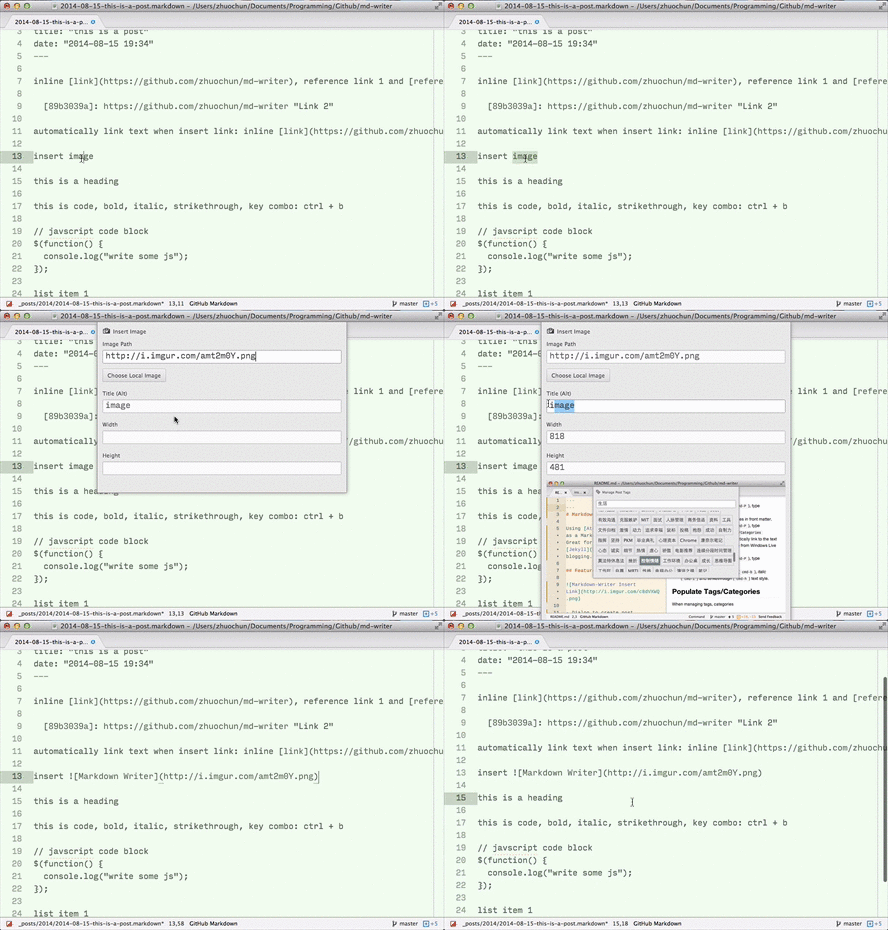
More GIFs Here: Create New Post, Insert Reference Link, Remove Reference Link.
Notice
From version
1.5.0, default keymaps that come with this package are removed (exceptenter/tab).You can execute command
Markdown Writer: Create Default keymapsto append the original list of keymaps to your keymap config file, then modify them based on your needs. Refer to wiki.
Features
Blogging
- Create new post with front matters (setup required).
- Create new draft with front matters (setup required).
-
Publish draft moves a draft to post's directory with front matters (
date,published) updated. - Manage tags and categories in front matters (setup required).
- Site specific settings (view setup).
General
-
Continue lists when you press
enter. -
Insert link (
shift-cmd-k) and automatically link to the text next time.- Insert inline link.
- Insert reference link with title. Use
-in title field to create an empty title reference link. - Remove link (and its reference) after URL is deleted.
- Search published posts by title in your blog.
-
Insert footnote (
markdown-writer:insert-footnote), and edit footnote labels. -
Insert image (
shift-cmd-i), auto-detect image height/width, and optionally copy images to your site's images directory. -
Insert table (
markdown-writer:insert-table), and a shortcut to jump to next table cell (cmd-j cmd-t). -
Format table (
markdown-writer:format-table) with table alignments. -
Toggle headings:
ctrl-alt-[1-5]to switch amongH1toH5. -
Toggle text styles (customization supported):
-
code(cmd-') -
bold (
cmd-b) -
italic (
cmd-i) -
strike through(cmd-h) -
'''code block'''(shift-cmd-") -
<kbd>key</kbd>(cmd + k) -
- unordered list(shift-cmd-U) -
0. ordered list(shift-cmd-O) -
> blockquote(shift-cmd->) -
- [ ] task list(markdown-writer:toggle-task)
-
-
Jumping commands:
- Jump to previous heading (
cmd-j cmd-p) - Jump to next heading (
cmd-j cmd-n) - Jump to next table cell (
cmd-j cmd-t) - Jump to reference marker/definition (
cmd-j cmd-d)
- Jump to previous heading (
-
Markdown cheat sheet (
markdown-writer:open-cheat-sheet). -
Correct order list numbers (
markdown-writer:correct-order-list-numbers). - Toolbar for Markdown Writer is available at tool-bar-markdown-writer.
- AsciiDoc support with language-asciidoc.
You can find and trigger all features in:
- Open Command Palette (
shift-cmd-P), enterMarkdown Writer - Or, go to menubar
Packages -> Markdown Writer.
Installation
- In Atom, go to Settings (
cmd-,) -> Install -> SearchMarkdown Writer. - Or, run
apm install markdown-writer.
If you saw errors after this plugin updated, please try restart Atom to allow it reloads the updated code.
Setup
Go to Settings (cmd-,) -> Packages -> Markdown-Writer -> Settings.
If you do not see any settings (due to a Atom's bug), please activate Markdown-Writer using command (e.g.
Open Cheat Sheet). Close and reopen the Settings page.
To manage tags/categories in front matter, please follow this setup.
To manage all configurations (e.g. project specific settings, change italic text styles), refer to this wiki document.
Project
- View CHANGELOG
- Bugs, suggestions or feature requests, open an issue
- Contribute to project, view guide
- License in MIT
- Shipped by Zhuochun
and contributors
- Star GitHub repo and Atom package to support us


 and
and 


