

ReportPlus Embedded
Bring the power of analytics to your solutions
Help your customers make better business decisions by embedding powerful analytics into your apps using the Infragistics ReportPlus Embedded SDK
In the Infragistics Ultimate Installer, choose ReportPlus Desktop under Trials, and then make sure SDK is selected on the right

Make Your Apps Shine With Powerful Integrated Analytics
Integrated analytics makes it simple for your users to glean powerful insights from the data generated by your app. Building BI and analytics directly into your app adds value for users and keeps them using the app longer.
ReportPlus Reference Application
Get the App »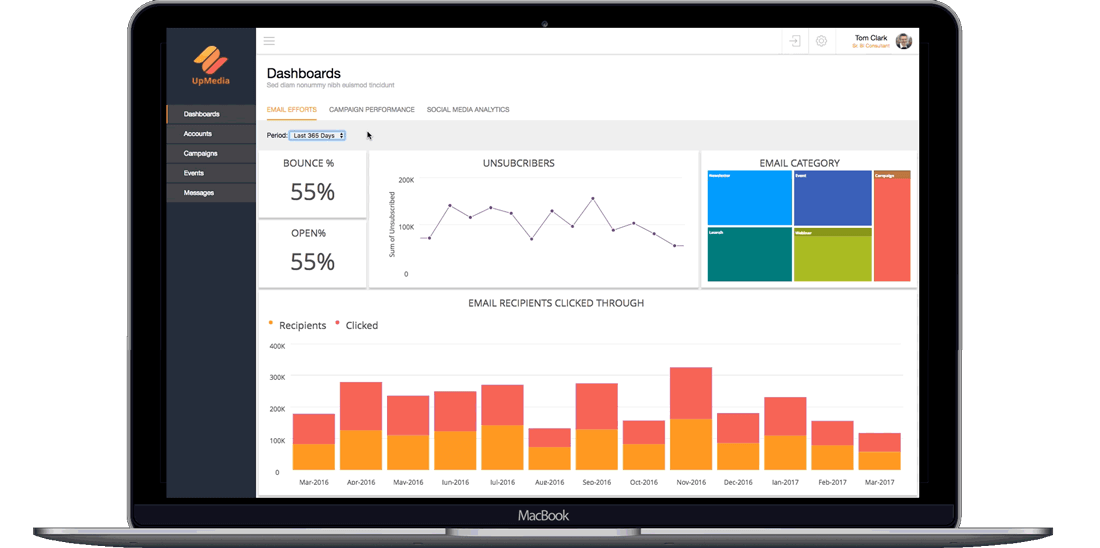
This web-based marketing campaign tracking app showcases the power of ReportPlus Embedded SDK,
enabling users to visualize and evaluate email efforts, campaign performance, and social media analytics
Additional Key Information
- *For internal applications, hosting application must have direct access to the data server by residing on the same network or being connected via VPN.
- *For external facing applications the suggested solution is producing a custom server side API to make data available through CSV or the OData format via http/https.
- **ReportPlus Server is required for embedding Dashboards in a web application.
Server Requirements
- Microsoft Windows Server (4GB+ memory, .Net Framework 4.6, ASP.NET 4.0, IIS, Windows Authentication enabled for IIS, part of a Network Domain with access to users in an Active Directory).
- For any OAuth2 based data sources (e.g. Google Analytics) the server will need to be configured to use HTTPS and the installed ReportPlus server URL will need to be authorized to access the OAuth2 based data source. See the ReportPlus OAuth configuration document for more details.
- Microsoft SQL Server 2012.
Local Language Support
- ReportPlus Mobile for iOS and Android - English, Dutch, French, German, Italian, Japanese, Portuguese, Russian, Simplified Chinese, Spanish, and Traditional Chinese
- ReportPlus Desktop for Windows - English and Japanese
- ReportPlus Server with Browser Experience - English
Programming Languages Supported For Embedded
- ReportPlus Mobile for iOS: Objective-C and Swift
- ReportPlus Desktop for Windows: C# and XAML with support for WPF and Windows Forms Apps
- ReportPlus Server with Browser Experience: JQuery
Have Infragistics Ultimate or Professional?
Current Infragistics Ultimate and Professional customers have free access to one ReportPlus Desktop and Mobile subscription and a trial of the ReportPlus Embedded SDK to embed on the desktop.
*Select your product name, and then click ReportPlus Desktop. In the ReportPlus Desktop installer, choose Advanced install, and then select Install ReportPlus SDK
New Customer?
The ReportPlus Embedded SDK is included in every trial of Infragistics Ultimate and Professional.
*In the Infragistics Ultimate installer, choose ReportPlus Desktop under Trials, and then make sure SDK is selected on the right
Request More Information
Fill out this simple form or call 1-888-448-1277 to schedule a demo or request licensing details

Join the Conversation
-
ReportPlus Desktop Release Notes – Volume Release 1.2.30.0
POSTED ON: 05/26/2017 2:32 AM BY: Jessica SkarzynskiReportPlus Desktop Version 1.2.30.0 is here: Enhancements: Switched to lightweight charts Dropbox v2 API support Enterprise Repository... -
ReportPlus Desktop Release Notes – Volume Release 1.1.250.0
POSTED ON: 02/16/2017 4:05 AM BY: Mobile ManReportPlus Desktop Version 1.1.250.0 is here with feature enhancements, fixes and new SDK localization services too: Enhancements: Calculated... -
Custom Data Visualizations using D3.js with ReportPlus
POSTED ON: 01/10/2017 9:00 AM BY: Torrey BettsIntroduction One of the most powerful data visualization frameworks on the web is D3.js. The visualizations can be simple or... -
Why Storytelling through Data Is a Required Skill in 2017
POSTED ON: 01/05/2017 7:30 AM BY: Mobile ManBusiness Intelligence, data visualization and dashboards made a huge impact in 2016. In fact, 89% of business leaders believe big data will... -
Geographical Heat Maps and How to Use Them with ReportPlus
POSTED ON: 12/12/2016 1:35 AM BY: Mobile ManOur recent ReportPlus release welcomed a new interactive real-time data visualization to our family — the Heat Map — available for you in... -
ReportPlus Desktop 1.1.128 Release Notes
POSTED ON: 12/05/2016 1:28 AM BY: Mobile ManWe've just shipped some great new features with ReportPlus Desktop, Version 1.1.128! Thanks to your continuous feedback we're improving the...