- Getting Started
- Getting Started with ASP.NET MVC 5
- 1. Getting Started
- 2. Adding a Controller
- 3. Adding a View
- 4. Adding a Model
- 5. Creating a Connection String and Working with SQL Server LocalDB
- 6. Accessing Your Model's Data from a Controller
- 7. Examining the Edit Methods and Edit View
- 8. Adding Search
- 9. Adding a New Field
- 10. Adding Validation
- 11. Examining the Details and Delete Methods
- Introduction to ASP.NET MVC
- Create an ASP.NET Web App in Azure App Service
- Pluralsight ASP.NET MVC 5 Fundamentals (video course)
- Getting Started with EF 6 using MVC 5
- 1. Creating an Entity Framework Data Model
- 2. Implementing Basic CRUD Functionality
- 3. Sorting, Filtering, and Paging
- 4. Connection Resiliency and Command Interception
- 5. Code First Migrations and Deployment
- 6. Creating a More Complex Data Model
- 7. Reading Related Data
- 8. Updating Related Data
- 9. Async and Stored Procedures
- 10. Handling Concurrency
- 11. Implementing Inheritance
- 12. Advanced Entity Framework Scenarios
- EF Database First with ASP.NET MVC
- ASP.NET MVC Facebook Birthday App
- Deploy a Secure ASP.NET MVC 5 app with Membership, OAuth, and SQL Database to an Azure App Service
- Create a .NET WebJob in Azure App Service
- Get Started with ASP.NET MVC and Azure Cloud Services
- ASP.NET MVC Multi-Tier Application Using Azure Service Bus Queues
- Lifecycle of an ASP.NET MVC 5 Application
- Monitoring and Telemetry
- MVC Recommended Resources
- MVC recommended tutorials and articles
- Getting Started with ASP.NET MVC 5
- Routing
- UI, Layouts, and Themes
- JavaScript and Client Frameworks
- Mobile
- Working with Data
- Testing and Debugging
- Security, Authentication, and Authorization
- ASP.NET Identity
- ASP.NET MVC 5 Identity and Security
- Deploy a Secure ASP.NET MVC application with OAuth, Membership and SQL Database
- Code! MVC 5 App with Facebook, Twitter, LinkedIn and Google OAuth2 Sign-on (C#)
- Create a secure ASP.NET MVC 5 web app with log in, email confirmation and password reset (C#)
- ASP.NET MVC 5 app with SMS and email Two-Factor Authentication
- Developing ASP.NET Apps with Azure Active Directory
- OWIN and Katana
- XSRF/CSRF Prevention in ASP.NET MVC and Web Pages
- Preventing Open Redirection Attacks (C#)
- MVC 4 Security
- MVC 4 Security - the AllowAnonymous Attribute
- Security Extensibility in ASP.NET 4
- Recommended Resources for MVC
- Performance
- Deployment
- Get Started with ASP.NET and Azure App Services
- Deploy a Web App in Azure App Service
- Web Deployment Overview for Visual Studio and ASP.NET
- Continuous Integration and Continuous Delivery (Building Real-World Cloud Apps with Azure)
- ASP.NET Web Deployment using Visual Studio
- 1. Introduction
- 2. Preparing for Database Deployment
- 3. Web.config File Transformations
- 4. Project Properties
- 5. Deploying to Test
- 6. Setting Folder Permissions
- 7. Deploying to Production
- 8. Deploying a Code Update
- 9. Deploying a Database Update
- 10. Command Line Deployment
- 11. Deploying Extra Files
- 12. Troubleshooting
- ASP.NET Deployment - Recommended Resources
- Create an ASP.NET MVC App with Auth and SQL DB and Deploy to Azure App Service
- Get Started with the Azure WebJobs SDK
- Web Deployment in the Enterprise using Visual Studio 2010
- Get Started with Azure Cloud Services and ASP.NET
- API Reference
- Internationalization and Advanced Topics
- Releases
- Older Versions - MVC 3 and 4
- ASP.NET MVC Overview
- Getting Started with ASP.NET MVC 4
- Getting Started with EF 5 using MVC 4
- 1. Creating an Entity Framework Data Model
- 2. Implementing Basic CRUD Functionality
- 3. Sorting, Filtering, and Paging
- 4. Creating a More Complex Data Model
- 5. Reading Related Data
- 6. Updating Related Data
- 7. Handling Concurrency
- 8. Implementing Inheritance
- 9. Implementing the Repository and Unit of Work Patterns
- 10. Advanced Entity Framework Scenarios
- 11. Building the Chapter Downloads
- MVC 4 Hands On Labs
- Introduction to MVC 4 Pluralsight Video
- ASP.NET MVC 4 Mobile Features
- Using OAuth Providers with MVC 4
- ASP.NET Web Deployment with SQL Server Compact using Visual Studio
- 1. Visual Studio Web Deployment with SQL Server Compact - Introduction
- 2. Visual Studio Web Deployment with SQL Server Compact- Deploying SQL Server Compact Databases
- 3. Visual Studio Web Deployment with SQL Server Compact - Web.Config File Transformations
- 4. Visual Studio Web Deployment with SQL Server Compact - Configuring Project Properties
- 5. Visual Studio Web Deployment with SQL Server Compact - Deploying to IIS as a Test Environment
- 6. Visual Studio Web Deployment with SQL Server Compact - Setting Folder Permissions
- 7. Visual Studio Web Deployment with SQL Server Compact - Deploying to the Production Environment
- 8. Visual Studio Web Deployment with SQL Server Compact - Deploying a Code-Only Update
- 9. Visual Studio Web Deployment with SQL Server Compact - Deploying a Database Update
- 10. Visual Studio Web Deployment with SQL Server Compact - Migrating to SQL Server
- 11. Visual Studio Web Deployment with SQL Server Compact - Deploying a SQL Server Database Update
- 12. Visual Studio Web Deployment with SQL Server Compact - Troubleshooting
- Getting Started with ASP.NET MVC3
- Getting Started with ASP.NET MVC 3 (C#)
- 1. Intro to ASP.NET MVC 3 (C#)
- 2. Adding a Controller (C#)
- 3. Adding a View (C#)
- 4. Adding a Model (C#)
- 5. Accessing your Model's Data from a Controller (C#)
- 6. Examining the Edit Methods and Edit View (C#)
- 7. Adding a New Field to the Movie Model and Table (C#)
- 8. Adding Validation to the Model (C#)
- 9. Improving the Details and Delete Methods (C#)
- Getting Started with ASP.NET MVC 3 (VB.NET)
- 1. Intro to ASP.NET MVC 3 (VB)
- 2. Adding a Controller (VB)
- 3. Adding a View (VB)
- 4. Adding a Model (VB)
- 5. Accessing your Model's Data from a Controller (VB)
- 6. Examining the Edit Methods and Edit View (VB)
- 7. Adding a New Field to the Movie Model and Database Table (VB)
- 8. Adding Validation to the Model (VB)
- 9. Improving the Details and Delete Methods (VB)
- Getting Started with ASP.NET MVC 3 (C#)
- MVC 3 Test-Driven Development
- Globalization, Internationalization and Localization in ASP.NET MVC 3, JavaScript and jQuery
- Creating a MVC 3 Application with Razor and Unobtrusive JavaScript
- MVC 3 Music Store
- 1. Part 1: Overview and File->New Project
- 2. Part 2: Controllers
- 3. Part 3: Views and ViewModels
- 4. Part 4: Models and Data Access
- 5. Part 5: Edit Forms and Templating
- 6. Part 6: Using Data Annotations for Model Validation
- 7. Part 7: Membership and Authorization
- 8. Part 8: Shopping Cart with Ajax Updates
- 9. Part 9: Registration and Checkout
- 10. Part 10: Final Updates to Navigation and Site Design, Conclusion
- MVC 3 - The HTML5 and jQuery UI Datepicker Popup Calendar
- MVC 3 - Working with the DropDownList Box and jQuery
- Older Versions - MVC 1 and 2
- Overview
- Getting Started With MVC
- Models (Data)
- 1. Creating Model Classes with the Entity Framework (C#)
- 2. Creating Model Classes with LINQ to SQL (C#)
- 3. Displaying a Table of Database Data (C#)
- 4. Performing Simple Validation (C#)
- 5. Validating with the IDataErrorInfo Interface (C#)
- 6. Validating with a Service Layer (C#)
- 7. Validation with the Data Annotation Validators (C#)
- 8. Creating Model Classes with the Entity Framework (VB)
- 9. Creating Model Classes with LINQ to SQL (VB)
- 10. Displaying a Table of Database Data (VB)
- 11. Performing Simple Validation (VB)
- 12. Validating with the IDataErrorInfo Interface (VB)
- 13. Validating with a Service Layer (VB)
- 14. Validation with the Data Annotation Validators (VB)
- ASP.NET MVC Views
- 1. ASP.NET MVC Views Overview (C#)
- 2. Creating Custom HTML Helpers (C#)
- 3. TagBuilder Class to Build HTML Helpers (C#)
- 4. Creating Page Layouts with View Master Pages (C#)
- 5. Passing Data to View Master Pages (C#)
- 6. ASP.NET MVC Views Overview (VB)
- 7. Creating Custom HTML Helpers (VB)
- 8. TagBuilder Class to Build HTML Helpers (VB)
- 9. Creating Page Layouts with View Master Pages (VB)
- 10. Passing Data to View Master Pages (VB)
- Controllers and Routing
- 1. ASP.NET MVC Routing Overview (C#)
- 2. Understanding Action Filters (C#)
- 3. Improving Performance with Output Caching (C#)
- 4. Adding Dynamic Content to a Cached Page (C#)
- 5. Creating a Controller (C#)
- 6. Creating an Action (C#)
- 7. ASP.NET MVC Routing Overview (VB)
- 8. Understanding Action Filters (VB)
- 9. Improving Performance with Output Caching (VB)
- 10. Adding Dynamic Content to a Cached Page (VB)
- 11. Creating a Controller (VB)
- 12. Creating an Action (VB)
- 13. ASP.NET MVC Controller Overview (C#)
- 14. Creating Custom Routes (C#)
- 15. Creating a Route Constraint (C#)
- 16. Creating a Custom Route Constraint (C#)
- 17. ASP.NET MVC Controller Overview (VB)
- 18. Creating Custom Routes (VB)
- 19. Creating a Route Constraint (VB)
- 20. Creating a Custom Route Constraint (VB)
- Deployment
- Security
- 1. Authenticating Users with Forms Authentication (C#)
- 2. Authenticating Users with Windows Authentication (C#)
- 3. Preventing JavaScript Injection Attacks (C#)
- 4. Authenticating Users with Forms Authentication (VB)
- 5. Authenticating Users with Windows Authentication (VB)
- 6. Preventing JavaScript Injection Attacks (VB)
- Unit Testing
- Contact Manager
- 1. Iteration #1 – Create the Application (C#)
- 2. Iteration #2 – Make the application look nice (C#)
- 3. Iteration #3 – Add form validation (C#)
- 4. Iteration #4 – Make the application loosely coupled (C#)
- 5. Iteration #5 – Create unit tests (C#)
- 6. Iteration #6 – Use test-driven development (C#)
- 7. Iteration #7 – Add Ajax functionality (C#)
- 8. Iteration #1 – Create the Application (VB)
- 9. Iteration #2 – Make the application look nice (VB)
- 10. Iteration #3 – Add form validation (VB)
- 11. Iteration #4 – Make the application loosely coupled (VB)
- 12. Iteration #5 – Create unit tests (VB)
- 13. Iteration #6 – Use test-driven development (VB)
- 14. Iteration #7 – Add Ajax functionality (VB)
- NerdDinner
- 1. Introducing the NerdDinner Tutorial
- 2. Create a New ASP.NET MVC Project
- 3. Create a Database
- 4. Build a Model with Business Rule Validations
- 5. Use Controllers and Views to Implement a Listing/Details UI
- 6. Provide CRUD (Create, Read, Update, Delete) Data Form Entry Support
- 7. Use ViewData and Implement ViewModel Classes
- 8. Re-use UI Using Master Pages and Partials
- 9. Implement Efficient Data Paging
- 10. Secure Applications Using Authentication and Authorization
- 11. Use AJAX to Deliver Dynamic Updates
- 12. Use AJAX to Implement Mapping Scenarios
- 13. Enable Automated Unit Testing
- 14. NerdDinner Wrap Up
- Movie Database
- Get Help
Lifecycle of an ASP.NET MVC 5 Application
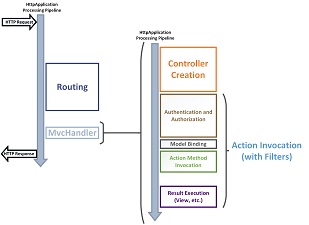
Here you can download a PDF document that charts the lifecycle of every ASP.NET MVC 5 application, from receiving the HTTP request to sending the HTTP response back to the client. It is designed both as an educational tool for those who are new to ASP.NET MVC and also as a reference for those who need to drill into specific aspects of the application. The PDF document has the following features:
- Relevant HttpApplication stages to help you understand where MVC integrates into the ASP.NET application lifecycle.
- A high-level view of the MVC application lifecycle, where you can
understand the major stages that every MVC application passes
through in the request processing pipeline.

- A detail view that shows drills down into the details of the
request processing pipeline. You can compare the high-level view and the detail
view to see how the lifecycles details are collected into the various
stages.
- Placement and purpose of all overridable methods on the Controller object in the request processing pipeline. You may or may not have the need to override any one method, but it is important for you to understand their role in the application lifecycle so that you can write code at the appropriate life cycle stage for the effect you intend.
- Blown-up diagrams showing how each of the filter types (authentication, authorization, action, and result) is invoked.
- Link to a useful article or blog from each point of interest in the detail view.

Next Steps
Does this document meet your need? We'd appreciate your feedback. If you have any question on the ASP.NET MVC lifecycle in your application, Stackoverflow and the ASP.NET MVC forums are great places to ask. Follow me on twitter so you can get updates on my latest tutorials.
This article was originally created on February 28, 2014
Author Information

Cephas Lin – Cephas Lin is a senior programming writer at Microsoft and writes content for ASP.NET technologies. He has previously written solutions content for Microsoft data and cloud platforms, including SQL Server, SharePoint, and Windows Azure.
Comments (0) RSS Feed