Jetpack Settings: Introduce a Publishing Tools card under Writing #10663
8 participants


| + <div className="publishing-tools__info-link-container"> | ||
| + <InfoPopover position={ 'left' }> | ||
| + <ExternalLink icon={ true } href={ 'https://jetpack.com/support/post-by-email/' } target="_blank"> | ||
| + { translate( 'Learn more about Post by Email' ) } |

Alternate string suggestion:
translate( 'Learn more about Email Forwarding' )— translations: 25.
| + > | ||
| + { isFormPending | ||
| + ? translate( 'Regenerating…' ) | ||
| + : translate( 'Regenerate address' ) |
| + disabled={ isFormPending } | ||
| + > | ||
| + { isFormPending | ||
| + ? translate( 'Regenerating…' ) |
| + } = this.props; | ||
| + | ||
| + return ( | ||
| + <SectionHeader label={ translate( 'Publishing Tools' ) }> |
Alternate string suggestion:
translate( 'Additional tools that make creating and publishing your content easy:' )— translations: 3.
| + <div className="publishing-tools__info-link-container"> | ||
| + <InfoPopover position={ 'left' }> | ||
| + <ExternalLink href={ 'https://jetpack.com/support/post-by-email/' } target="_blank"> | ||
| + { translate( 'Learn more about Post by Email' ) } |
Alternate string suggestion:
translate( 'Learn more about Email Forwarding' )— translations: 25.
| + > | ||
| + { regeneratingPostByEmail | ||
| + ? translate( 'Regenerating…' ) | ||
| + : translate( 'Regenerate address' ) |
| + disabled={ isFormPending || regeneratingPostByEmail } | ||
| + > | ||
| + { regeneratingPostByEmail | ||
| + ? translate( 'Regenerating…' ) |
 tyxla
added [Type] Task [Status] Needs Design Review [Status] Needs Review and removed [Status] In Progress labels
tyxla
requested review from ryelle, oskosk, MichaelArestad, johnHackworth, and roccotripaldi
tyxla
added [Type] Task [Status] Needs Design Review [Status] Needs Review and removed [Status] In Progress labels
tyxla
requested review from ryelle, oskosk, MichaelArestad, johnHackworth, and roccotripaldi 
A few things:
-
i haven't worked a lot with post-by-email, so i was a little surprised that it defaults to an empty field even though the module is active. but that seems to be expected, as it also happens
-
also, generating a new email address works as expected. BUT, when i switch to an other site using the site picker, the post-by-email settings load up with the same email generated for the previous site. we need to fix that.

|
Looks great! |

Yes, I realize this might be not the most intuitive UI for the case when the module is activated but there is no email generated yet. @MichaelArestad what can we do to improve this? I have several ideas - when you initially activate Post by Email, or it's activated but email is not generated:
We can use one or more of these, @MichaelArestad what do you think? Marking as "Needs Design Review" again.
Good catch, thanks for that! It appears we were handling null emails incorrectly. I've fixed this in 5067999 @roccotrip this one is ready for a new code review, too. |
tyxla
added [Status] Needs Design Review [Status] Needs Review and removed [Status] Needs Author Reply labels 
I'll wait for Michael's word on this, but... can't we just generate it automatically if the field is empty, showing a pulsating skeleton while the email gets generated? Maybe I'm missing some step here, but experience wise I would expect to just get the email. |
|
@folletto the problem with automatic generation upon activating is that it wouldn't help for a most of the cases. The Post by Email module is enabled by default with Jumpstart. So for most of the people who are not actively using that module, it will probably already be active, but without an email generated. |
Ok three things then...
|

|
Why is there a save button here? There's nothing to save. Clicking 'regenerate' creates the email, presumably it's already active and working at that point. I also feel like we could improve the button layout between 'copy' and 'regenerate'. Or at least we can create a standard for the 'copyable field' since I think there may be other implementations of that floating around. |
|
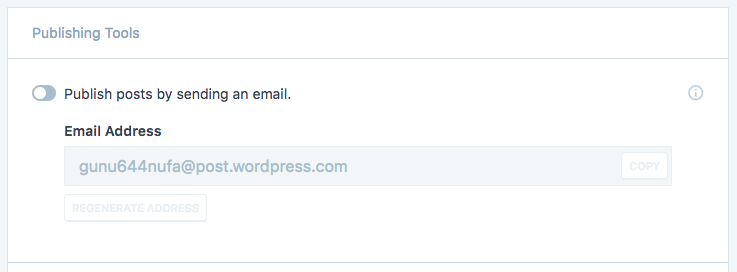
One other thought—we are 'hiding' rather than 'disabling' the post by email sub-settings. Since we've decided to disable the subsettings rather than hide for other settings cards, we should do the same here—display the email field in a disabled state. |
|
Thanks for the fix, looks good to me! |
@folletto I've chosen this solution - if there is no email, but the module is active, email not regenerating currently and it hasn't been generated yet, this will trigger a new regeneration of the email. Seems to be the painless solution for affected users, as it does not bother them at all. It appears to work fine for my tests, but I'd appreciate some more |
Good point, I've removed the "Save Settings" button completely.
@rickybanister I'm using a |
@rickybanister Thanks for the suggestion, sub-settings will now be disabled when the module is disabled, here is a preview: |
|
All concerns so far have been addressed. This one needs another design and code review. /cc |
|
|
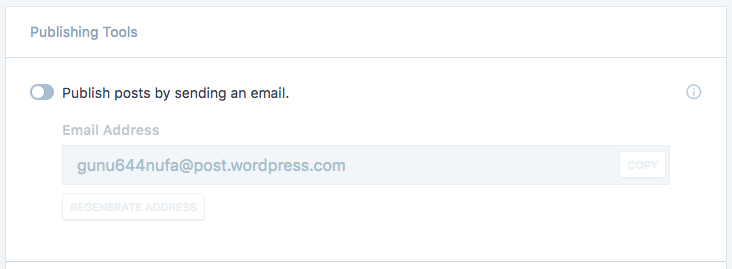
My only thought is whether the @MichaelArestad what do you think, should we dim everything that's disabled including labels and previews? |
|
LGTM! |

|
@rickybanister Not previews (there's only one, right), but definitely dim the labels. |
|
@MichaelArestad @rickybanister I've updated the label to be dimmed when the toggle is disabled, here is an updated preview of the disabled state: If you feel this is ready to go, you can mark it as "Ready to Merge", as code has already been approved. |
| + | ||
| + return ( | ||
| + <div> | ||
| + <SectionHeader label={ translate( 'Publishing Tools' ) } /> |
Alternate string suggestion:
translate( 'Additional tools that make creating and publishing your content easy:' )— translations: 3. ES Score: 5.05
| + > | ||
| + { regeneratingPostByEmail | ||
| + ? translate( 'Regenerating…' ) | ||
| + : translate( 'Regenerate address' ) |
Alternate string suggestion:
translate( 'Regenerate' )— translations: 38. ES Score: 9.10

Thanks for dropping by, @yoavf! Well, we can, but it will probably not be specific enough. @MichaelArestad do you think we can replace it with the suggested one? I'm fine with replacing it, but didn't want to deviate from the design mockups.

Oh, you definitely don't have to switch - I'm just hoping to use the
Sorry for the confusion @yoavf - it totally makes sense here, so removing the

@yoavf @tyxla This suggestion is close, but I think the full "Regenerate address" is needed for this one as it's kind of a confusing thing without it.
 MichaelArestad
added [Status] Ready to Merge and removed [Status] Needs Design Review labels
MichaelArestad
added [Status] Ready to Merge and removed [Status] Needs Design Review labels
|
LGTM @tyxla Nice work again! |
|
The dimmed label looks much better. Let's make sure we do that same treatment for all other settings with any sort of preview or example. |


|
CC @eliorivero and @zinigor |
Introduction
This PR is part of #9171. It introduces a Publishing Tools card under Writing Settings. This card will be used to manage the settings of the Post by Email module, and will also shelter the Press This block.
Preview
Post by Email disabled

Post by Email enabled

Post by Email enabled, regenerating

Testing
/settings/writing/$site, where$siteis the slug of your Jetpack site.Final notes
This PR has borrowed the Redux functionality from #10811, but I'll remove it once #10811 is merged.