

Твитови
- Твитови, тренутна страница.
- Твитови и одговори
- Медији
Блокирао/ла си корисника @rstudiotips
Да ли сигурно желиш да видиш ове твитове? Приказивање твитова неће одблокирати корисника @rstudiotips
-
RStudio Tips је ретвитовао/ла
Doh! I've been working at
@RStudio for 6 months, yet I just learned that I could drag the source pane in the RStudio IDE off the IDE canvas and have it become its own window.Хвала. Твитер ће користити ово да побољша твоју временску траку. ОпозовиОпозови -
RStudio Tips је ретвитовао/ла
#rstats Tip of the Day: Do you want to ZOOM IN on only one window at a time??? Use the@rstudio shortcuts layed out "clockwisey", Ctrl + Shift + 1 (Script) Ctrl + Shift + 2 (Console) Ctrl + Shift + 3 (File Viewer) Ctrl + Shift + 4 (Environment)pic.twitter.com/xINm7FSN8iПрикажи овај низХвала. Твитер ће користити ово да побољша твоју временску траку. ОпозовиОпозови -
RStudio Tips је ретвитовао/ла
Here's an
#rstats@rstudiotips to save you a few seconds a week! Open a folder containing a .Rproj file in RStudio will open the project! I've wasted seconds of my life every day navigating to the .Rproj file pic.twitter.com/h6dUOOz2VCХвала. Твитер ће користити ово да побољша твоју временску траку. ОпозовиОпозови
 -
RStudio Tips је ретвитовао/ла
If you're like me and would rather decorate your IDE than your cubicle for the holiday season, then I've got an
@rstudio theme for you! Yule RStudio
 https://www.garrickadenbuie.com/blog/2018/12/05/holiday-rstudio-theme/ …
 Merry
Merry #rstats Festivus!pic.twitter.com/bDaD01kFYm
 Прикажи овај низХвала. Твитер ће користити ово да побољша твоју временску траку. ОпозовиОпозови
 -
RStudio Tips је ретвитовао/ла
Discovered this beautiful
@rstudio#rstats hack a few days ago, wish I had known earlier.pic.twitter.com/b5vuB4l9HoХвала. Твитер ће користити ово да побољша твоју временску траку. ОпозовиОпозови -
RStudio Tips је ретвитовао/ла
 So long copy paste,
 Hello Command + Enter!
Did you know that you can run code from examples in help files with Command + Enter? Works in the
Hello Command + Enter!
Did you know that you can run code from examples in help files with Command + Enter? Works in the #rstats GUI and in@rstudio.pic.twitter.com/i704xzr91pХвала. Твитер ће користити ово да побољша твоју временску траку. ОпозовиОпозови -
RStudio Tips је ретвитовао/ла
I'm a stickler for the 80-characters-per-line rule when writing
#rstats code, so I'm a huge fan of the margin column line that is always there as a reminder of when I should consider jumping to the next line. RStudio Preferences
Code
Display
Show Marginpic.twitter.com/N8s19kg5uSПрикажи овај низХвала. Твитер ће користити ово да побољша твоју временску траку. ОпозовиОпозови
Preferences
Code
Display
Show Marginpic.twitter.com/N8s19kg5uSПрикажи овај низХвала. Твитер ће користити ово да побољша твоју временску траку. ОпозовиОпозови -
Just a few little things added in RStudio 1.2: detect missing R packages, filter with histograms, make PowerPoint presentations, show hidden files, customize the Source button, and more. https://blog.rstudio.com/2018/11/19/rstudio-1-2-preview-the-little-things/ …
#rstatsХвала. Твитер ће користити ово да побољша твоју временску траку. ОпозовиОпозови -
RStudio v1.2 adds support for custom colors. Learn how to make your own theme (or use an old favorite!) https://blog.rstudio.com/2018/10/29/rstudio-ide-custom-theme-support/ …
#rstatspic.twitter.com/gDczp1tZQs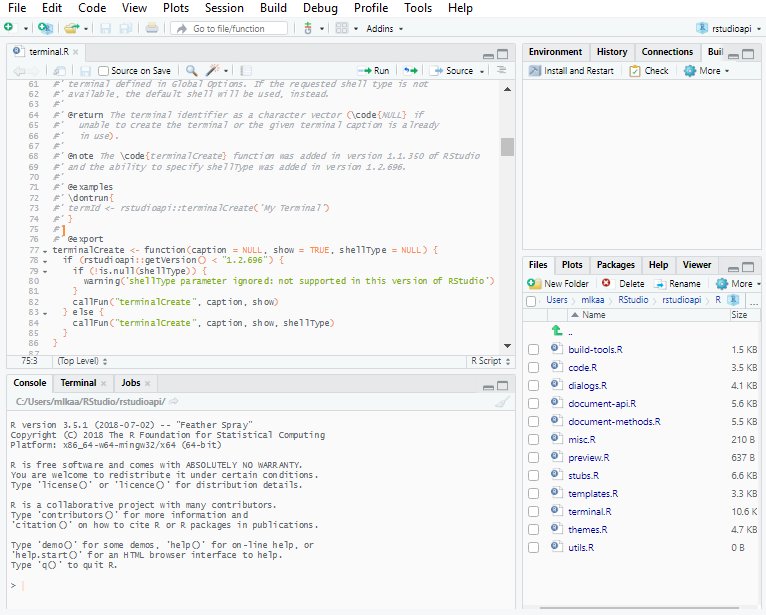 Хвала. Твитер ће користити ово да побољша твоју временску траку. ОпозовиОпозови
 -
Make your R functions into web APIs using the built-in Plumber tools in the
@rstudio 1.2 preview: https://blog.rstudio.com/2018/10/23/rstudio-1-2-preview-plumber-integration/ …#rstatspic.twitter.com/nWQNFJcBQN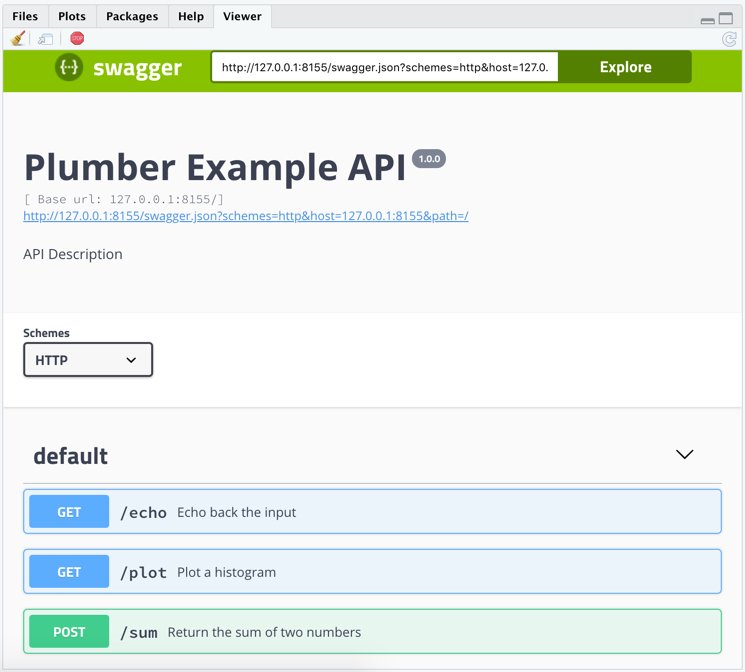 Хвала. Твитер ће користити ово да побољша твоју временску траку. ОпозовиОпозови
 -
New in RStudio 1.2: record and run tests for your Shiny code right inside the IDE with the shinytest package.
#rstats https://blog.rstudio.com/2018/10/18/shinytest-automated-testing-for-shiny-apps/ …pic.twitter.com/OTOxRGAeEj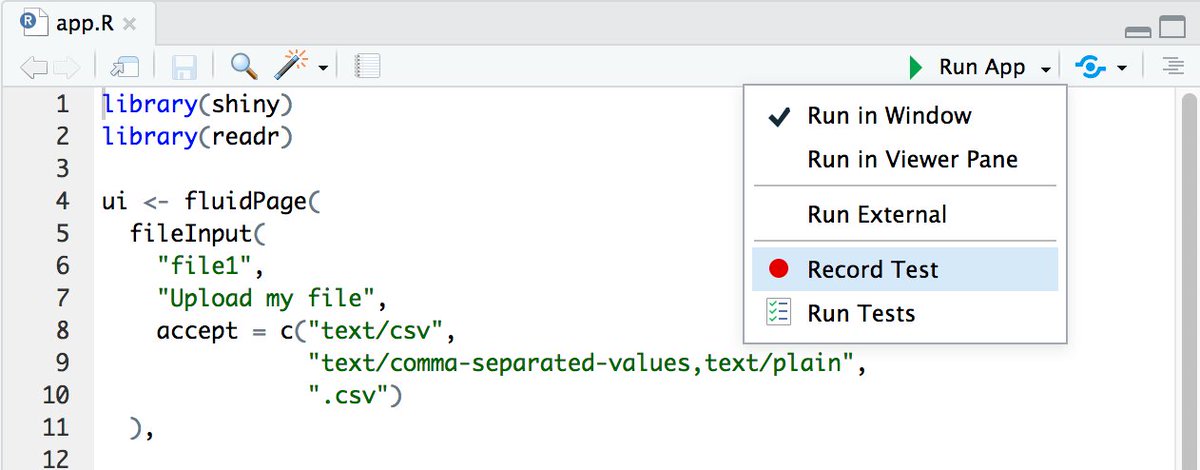 Хвала. Твитер ће користити ово да побољша твоју временску траку. ОпозовиОпозови
 -
RStudio Tips је ретвитовао/ла
RStudio v1.2 Preview: Enhanced
#rstats +#pydata interop with reticulate — https://blog.rstudio.com/2018/10/09/rstudio-1-2-preview-reticulated-python/ …Хвала. Твитер ће користити ово да побољша твоју временску траку. ОпозовиОпозови -
RStudio Tips је ретвитовао/ла
r2d3: R Interface to D3 Visualizations https://blog.rstudio.com/2018/10/05/r2d3-r-interface-to-d3-visualizations/ …
#rstats#D3pic.twitter.com/5MlJbxKo6i Хвала. Твитер ће користити ово да побољша твоју временску траку. ОпозовиОпозови
 -
RStudio Tips је ретвитовао/ла
Improved support for SQL in RStudio v1.2, including autocomplete and direct query execution from SQL files: https://blog.rstudio.com/2018/10/02/rstudio-1-2-preview-sql/ …
#rstats#sqlpic.twitter.com/K4boTL3B9a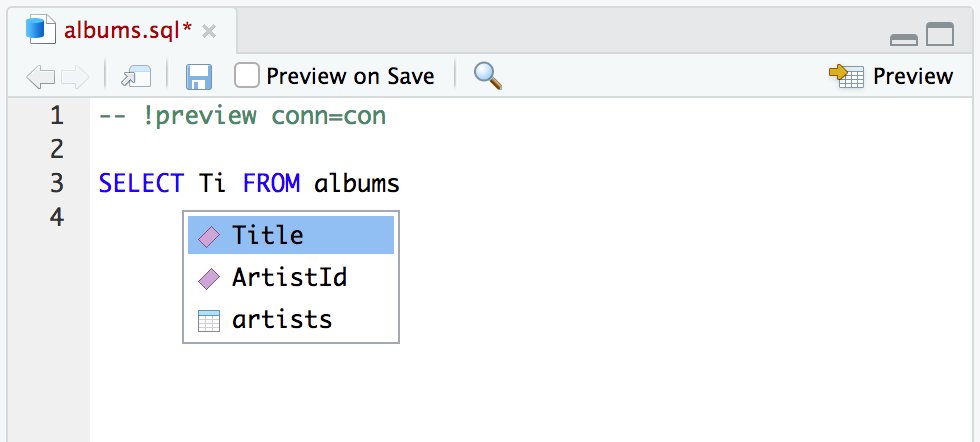 Хвала. Твитер ће користити ово да побољша твоју временску траку. ОпозовиОпозови
 -
PSA: Are your Git tools missing in
@rstudio after upgrading to MacOS Mojave? It's probably because git and friends are no longer installed. Run "xcode-select --install" in Terminal to install Apple's Command Line Tools. More info:https://github.com/rstudio/rstudio/issues/3550 …Хвала. Твитер ће користити ово да побољша твоју временску траку. ОпозовиОпозови -
It's true! View(function) will show that function's source code, or press F2 on the function's name in the source editor.https://twitter.com/marvin_dpr/status/1043053989540110336 …

 Best
Best@rstudio thing since colored R and terminal ... Clicking through function methods -


 pic.twitter.com/asVyDsji2tХвала. Твитер ће користити ово да побољша твоју временску траку. ОпозовиОпозови
 -
RStudio Tips је ретвитовао/ла
These are indeed handy! "RStudio IDE Easy Tricks You Might've Missed" by
@lopp_sean http://buff.ly/2f2hmZt via@rstudio#rstatspic.twitter.com/KpRiX124D7Хвала. Твитер ће користити ово да побољша твоју временску траку. ОпозовиОпозови -
RStudio Tips је ретвитовао/ла
TFW you learn about a package that does the *thing* that you couldn't articulate in a Google search.

 More gifs/info here: https://github.com/MilesMcBain/datapasta …
 @MilesMcBainpic.twitter.com/WBIrUeJSq5Прикажи овај низХвала. Твитер ће користити ово да побољша твоју временску траку. ОпозовиОпозови -
RStudio Tips је ретвитовао/ла
Oooo new favourite
#rstudio shortcut = “Crtl/Cmd + shift + r “ gives a pop up box, type in your new section name and it appears! Try it! “# new section name - - - -“
 #rstats#brickhackpic.twitter.com/0VuSbrCbcb Хвала. Твитер ће користити ово да побољша твоју временску траку. ОпозовиОпозови
 -
RStudio Tips је ретвитовао/ла
I keep .Rproj files pinned to the jump menu on the RStudio icon in Windows. Can easily drag up, select project file, and get to work.
Хвала. Твитер ће користити ово да побољша твоју временску траку. ОпозовиОпозови


Учитавање ће потрајати.
Твитер је можда премашио капацитет или је тренутно наишао на проблем. Покушај поново или посети статус Твитера за више информација.