
DocFly

About DocFly
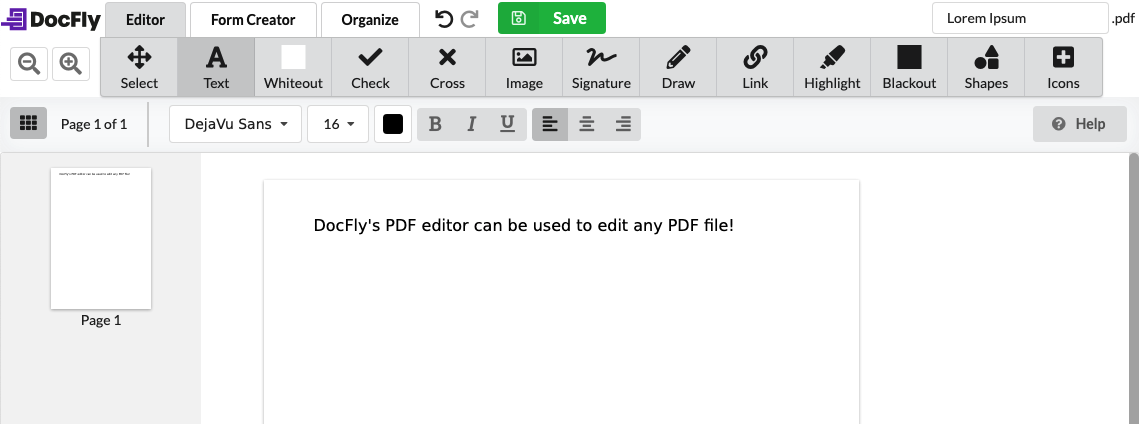
DocFly (formerly PDFPro) is an online PDF editor that allows users to create, convert, edit, and secure PDFs. It includes a set of editing tools designed to fully manipulate PDF files, such as reordering and extracting pages, merging and splitting files, editing PDF text, and more. DocFly is accessible from any modern browser and securely stores all files via Amazon Cloud hosting. Files can be deleted from the database at any time.
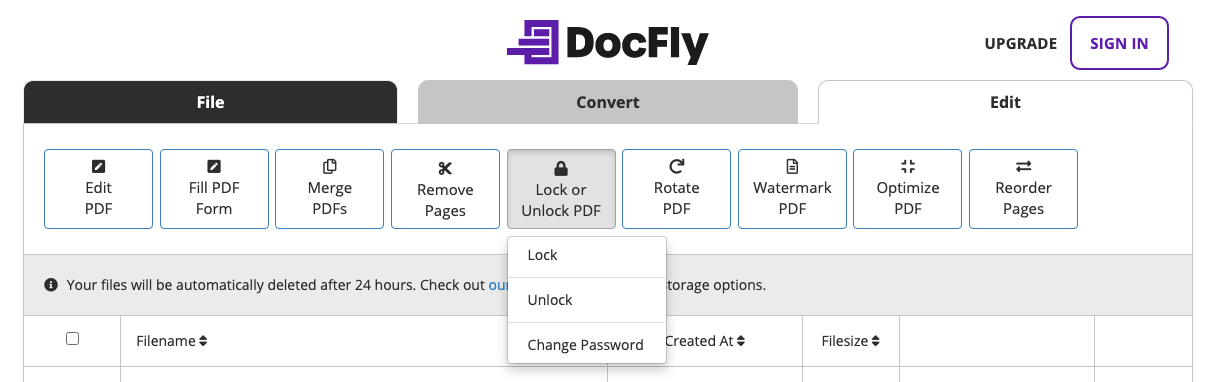
DocFly includes lock/unlock functionality to password-protect sensitive files. PDFs can be converted to and from Word, Excel, and PowerPoint files. The e-signature tool allows users to upload an image as well as type or draw signatures to use on PDFs. Other Docfly features include insert images, add icons/shapes, highlight text, create forms, organize pages, add watermarks, optimize PDFs, and more.
Images


Not sure about DocFly?
Compare with a popular alternative
Starting Price
Pricing Options
Features
Integrations
Ease of Use
Value for Money
Customer Service
Alternatives
PDFCreator

PDF Reader Pro
Adobe Acrobat Reader
WPS Office

Reviews
Already have DocFly?
Software buyers need your help! Product reviews help the rest of us make great decisions.
- Industry: Hospital & Health Care
- Company size: 1,001–5,000 Employees
- Used Weekly for 1+ year
-
Review Source
Overall rating
- Value for Money
- Ease of Use
- Customer Support Software
- Likelihood to recommend 8.0 /10
Makes documents easy to read!
Reviewed on 2019-04-07
Pros
This software makes document organization and presentation very easy and appealing, It's very easy to navigate and you can create documents to your liking. Great for sending out important documents via email
Cons
There wasn't anything that i disliked. it is a great product at a great value
- Industry: Information Services
- Company size: Self Employed
- Used Daily for 1+ year
-
Review Source
Overall rating
- Value for Money
- Ease of Use
- Customer Support Software
- Likelihood to recommend 9.0 /10
The Best PDF Option Around!
Reviewed on 2019-07-25
Pros
This is incredibly user friendly, even for an older computer user as I am. Help files are quick to load and explain in the simplest terms. I would love to gift this program to my colleges.
Cons
A little difficult to format but you just have to press through those help files to get where you need to be.
Alternatives Considered
PDF Reader ProReasons for Switching to DocFly
More fleshed out options.- Industry: Writing & Editing
- Company size: Self Employed
- Used Daily for 1-5 months
-
Review Source
Overall rating
- Value for Money
- Ease of Use
- Customer Support Software
- Likelihood to recommend 2.0 /10
Really disappointed.
Reviewed on 2020-10-02
None. Needed to copy and paste tables with formatting but it looses formatting.
None. Needed to copy and paste tables with formatting but it looses formatting.
Pros
That is was a possible alternative to Adobe Acrobat..
Cons
1. Usable screen space. Sent a suggestion to make the giant menu header smaller. Received No Valid reply.
2. Customer Service never answered my inquiries.
3. Copy/Paste does not take formatting with it. Makes the software not usable for me.
- Industry: Hospital & Health Care
- Company size: 51–200 Employees
- Used Daily for 6-12 months
-
Review Source
Overall rating
- Value for Money
- Ease of Use
- Likelihood to recommend 9.0 /10
What an incredible PDF editor!! Just so many features
Reviewed on 2022-11-02
I've had an overall great experience using DocFly and it's perfect for anyone looking for a PDF...
I've had an overall great experience using DocFly and it's perfect for anyone looking for a PDF editor in a business environment.
Pros
I love its ability to search through text with ease and converting almost anything into a PDF it just makes life working with documents easier
Cons
I do think it has an integration issue with Microsoft Office because I cannot export these PDFs into word documents
- Industry: Medical Practice
- Company size: 10,000+ Employees
- Used Weekly for 2+ years
-
Review Source
Overall rating
- Value for Money
- Ease of Use
- Customer Support Software
- Likelihood to recommend 8.0 /10
A must have application for anyone
Reviewed on 2019-08-13
A must have and I highly recommend it in today’s day and age!
A must have and I highly recommend it in today’s day and age!
Pros
This is a great resource and a must have for anyone that is working with document modification. Whether in the home, school, work, or socially, this is a great tool to create and adjust PDF files. It provides the user with plenty of options to make changes to PDFs and then change its formatting to match any platform. I have used this countless times in transferring files and reformatting class assignments and work files.
Cons
It really doesn’t have many issues from what I have found. But if I had to say something, I believe it would be more friendly to PC users because I’ve heard it doesn’t work as good if it’s not used on a Mac, but I have a Mac and it works excellently.
DocFly FAQs
Below are some frequently asked questions for DocFly.Q. What type of pricing plans does DocFly offer?
DocFly offers the following pricing plans:
- Starting from: US$3.99/month
- Pricing model: Free Version, Subscription
- Free Trial: Not Available
Subscription of $7.99/month or $47.88/year; Pay-as-you-go option
Q. Who are the typical users of DocFly?
DocFly has the following typical customers:
Self Employed, 2–10, 11–50, 51–200, 201–500, 501–1,000
Q. What languages does DocFly support?
DocFly supports the following languages:
English
Q. Does DocFly support mobile devices?
DocFly supports the following devices:
Q. What other apps does DocFly integrate with?
We do not have any information about what integrations DocFly has
Q. What level of support does DocFly offer?
DocFly offers the following support options:
Email/Help Desk, FAQs/Forum
Related categories
See all software categories found for DocFly.