

GoodSync
Cos'è GoodSync?
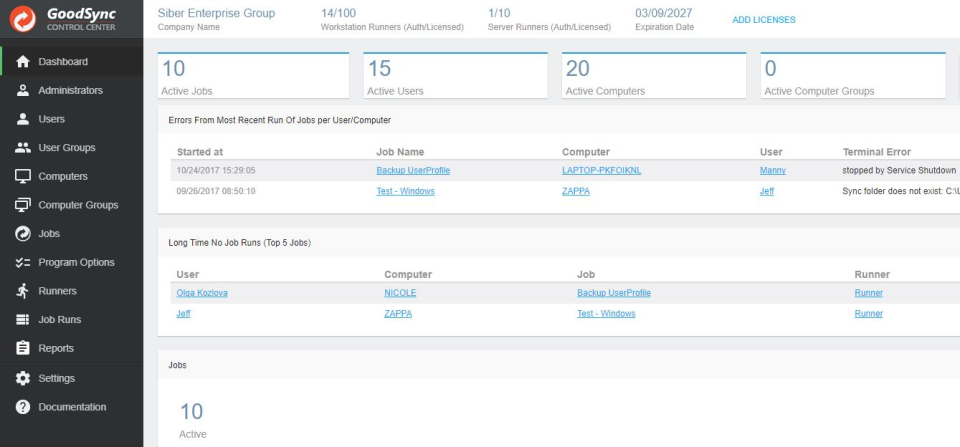
GoodSync for Business fornisce soluzioni complete di backup e sincronizzazione dei dati aziendali per qualsiasi fonte di dati, destinazione o sistema. Inoltre, il GoodSync Control Center fornisce Scopri di più gestione e creazione di report centralizzati per le attività di sincronizzazione, backup e pubblicazione dei file di workstation e server GoodSync. Mostra menoChi utilizza GoodSync?
Aziende/organizzazioni di qualsiasi dimensione.

Hai dubbi su GoodSync?
Confrontalo con una delle alternative più popolari
GoodSync

Altre alternative interessanti a GoodSync









Recensioni su GoodSync

Edward
GOOD sync is my favorite backup software!
Commenti: The great benefit to this backup software to others that I have tried is the level of customization. I have my main personal files in a separate location and those are the most important to have backed up in multiple locations. As for the operating system files, I have used my personal file back up more often, as if I have a problem with a computer, I do a fresh install of the Operating system (NOT from backup), and I have my personal files already backed up separately to install on the new install.
Aspetti positivi:
First, GOODSYNC actually copies files faster than windows explorer. I use the program to automatically backup various files to multiple backup hard drives, including cloud drives. I have multiple jobs running, so I can back up certain sets of files to one drive, and others to another drive, all VERY customizable. I have separate storage folders that back up separately, and I also have jobs that backup entire hard drives -- but only files that have changed, so it doesn't have to start from scratch each time. These jobs run automatically, set by the built in scheduler. I also like the option for the program to send an email after each backup, confirming the back up, and alerting me if there are any errors.
Aspetti negativi:
Infrequently, there are errors that I can't understand. (The error reporting may be a bit more complex for my needs.). However, I don't see that as a limit to the software, but a limit for me as a non-expert user. Either way, I can see the file that wasn't copied and can filter and/or fix the program so it can be copied, or by-passed if necessary. Usually this happens with temp files that I don't actually need backed up. (There is also a filter to keep from copying these, but I haven't used it. That would probably solve my problem before I would have one.)

Peter
I run all my backups for all my devices using GoodSync
Commenti: My over all experience is excellent and I would highly recommend this product.
Aspetti positivi:
It integrates well with all my NAS devices, Using the "goodsync explorer" program I am able to see all my backup locations including my Google Drive and BackBlaze B2 storage. And the price just can't be beat for what this program is capable of. My fav features are: Integration with all my cloud storage that's simple and easy. Integration with all my NAS devices Synology and WD. Precise control of when and what gets backed up. Ability to detect file changes on MY NAS, MY PC and my cloud service so everything is backed up nearly instantly. The GoodSync Explorer feature makes it easy to see the files on any of my devices or RDP into them if need be. I have recommended this to others and everyone that has taken my advice is very pleased with this program as well.
Aspetti negativi:
The only negative I have is that it does not run as a standalone program on the NAS, but since I use a dedicated PC as my backup controller that hasn't really been a hindrance.
David
Awful. Complete waste of money.
Commenti: I developed great experience with debugging and anger management. It inspired me to scout the market for other solutions, and it encouraged me to learn rsync as a substitute.
Aspetti positivi:
It's easy to delete. That's about the best thing I can say: it can be removed by simply dropping it in the trash.
Aspetti negativi:
I have used GoodSync on and off for several years. Here's my typical experience: * I install the latest version of GoodSync. * I encounter various intermittent errors. * I delete GoodSync and use another solution. Why do I keep going back? Because I paid for it, and I cling to the hope that they will eventually make it *minimally* effective. No dice. It remains as much garbage as it was when I purchased it. Examples: * Locks up while attempting to sync to a folder. Just becomes totally unresponsive. The process needs to be killed, and often the machine rebooted, to recover from the lockup. * "Undefined Error: 0." Constantly. This is GoodSync's version of "An error occurred." Don't bother emailing GoodSync customer support - they don't know and won't help you. * Sync jobs just fail, spontaneously, mid-sync. The sync is running perfectly, the volumes are both still available... and it abruptly stops. * The network browser is overdesigned and overcomplicated. All you want do is to specify a URL, a username, and a password. Sometimes it accepts the settings. Sometimes it just retains the old settings, and barfs out random error messages. I give up. They are never going to make this software to minimal usability. I have scoured all of my computer systems of this bloated trashware. Don't make the same mistake I did. Don't waste your time, and don't give this developer money. You will regret every dime and every moment you spend on this garbage.
Risposta di Siber Systems
5 anni fa
Hi David - We have escalated your support ticket and we have reached out in an attempt to resolve the issues listed in your feedback.

Joel
Very intelligent and feature rich syncing tool
Commenti: Syncing files is huge these days and GoodSync has provided me a solution to sync files without storing files in public cloud storage. As well, for the files I do keep in public cloud storage, I can back them up. Long time user and big fan.
Aspetti positivi:
I feel safe syncing files with GoodSync because of the smart algorythms for comparing files. As well there are fail-safes built in (optional) that will backup files that are deleted. I have never needed them but it is good to know they are there. The software comes in handy all the time. It integrates with your cloud accounts to back them up and via their GoodSync Connect I can easily sync files over the Internet. I have used it for years and it has provided an easy solution to many types of problems.
Aspetti negativi:
The server version of GoodSync is high priced.
Utente Verificato
Easy to use product that gets the job done
Commenti: saved us alot of time and actually worked better than expected for the doctor.
Aspetti positivi:
Using this product with the built in scheduler and it works very well now for several years. Implementation was simple as it does compare new to already existing files that you already have in the directories. I setup a simple task for the radiologist here and he was very happy with the way it synced up the data for him in both realtime and on a schedule. Overall I would recommend this product to anyone. Shows you a list of what was copied too that is quite nice.
Aspetti negativi:
Some of the tasks can be kind of complicated to setup. You have to think about the file extensions and how you want to setup the transfer and where it will reside. Takes some trial work to get things going sometimes that what I am saying.




































