


ಟ್ವೀಟ್ಗಳು
- ಟ್ವೀಟ್ಗಳು, ಪ್ರಸ್ತುತ ಪುಟ.
- ಟ್ವೀಟ್ಗಳು & ಪ್ರತಿಕ್ರಿಯೆಗಳು
- ಮಾಧ್ಯಮ
ನೀವು @AppleSupport ಅವರನ್ನು ತಡೆಹಿಡಿದಿರುವಿರಿ
ಈ ಟ್ವೀಟ್ಗಳನ್ನು ವೀಕ್ಷಿಸಲು ನೀವು ಖಚಿತವಾಗಿ ಬಯಸುವಿರಾ? ಟ್ವೀಟ್ ವೀಕ್ಷಣೆಯು @AppleSupport ಅವರ ತಡೆತೆರವುಗೊಳಿಸುವುದಿಲ್ಲ
-
ಪಿನ್ ಮಾಡಿದ ಟ್ವೀಟ್
Print photos from your iPhone with just a few taps. Here's how to print from the Photos app directly to an AirPrint printer: https://apple.co/2Y60VpE pic.twitter.com/eDSp2dF0So


 ಧನ್ಯವಾದಗಳು. Twitter ಇದನ್ನು ನಿಮ್ಮ ಕಾಲರೇಖೆಯನ್ನು ಉತ್ತಮಗೊಳಿಸಲು ಬಳಸುತ್ತದೆ. ರದ್ದುಗೊಳಿಸುರದ್ದುಗೊಳಿಸು
-
Your friends want to see your vacation photos. Just maybe not all of them. Here's how to search for photos to add to shared albums in the Photos app.pic.twitter.com/ByZXfbxNiy
ಧನ್ಯವಾದಗಳು. Twitter ಇದನ್ನು ನಿಮ್ಮ ಕಾಲರೇಖೆಯನ್ನು ಉತ್ತಮಗೊಳಿಸಲು ಬಳಸುತ್ತದೆ. ರದ್ದುಗೊಳಿಸುರದ್ದುಗೊಳಿಸು -
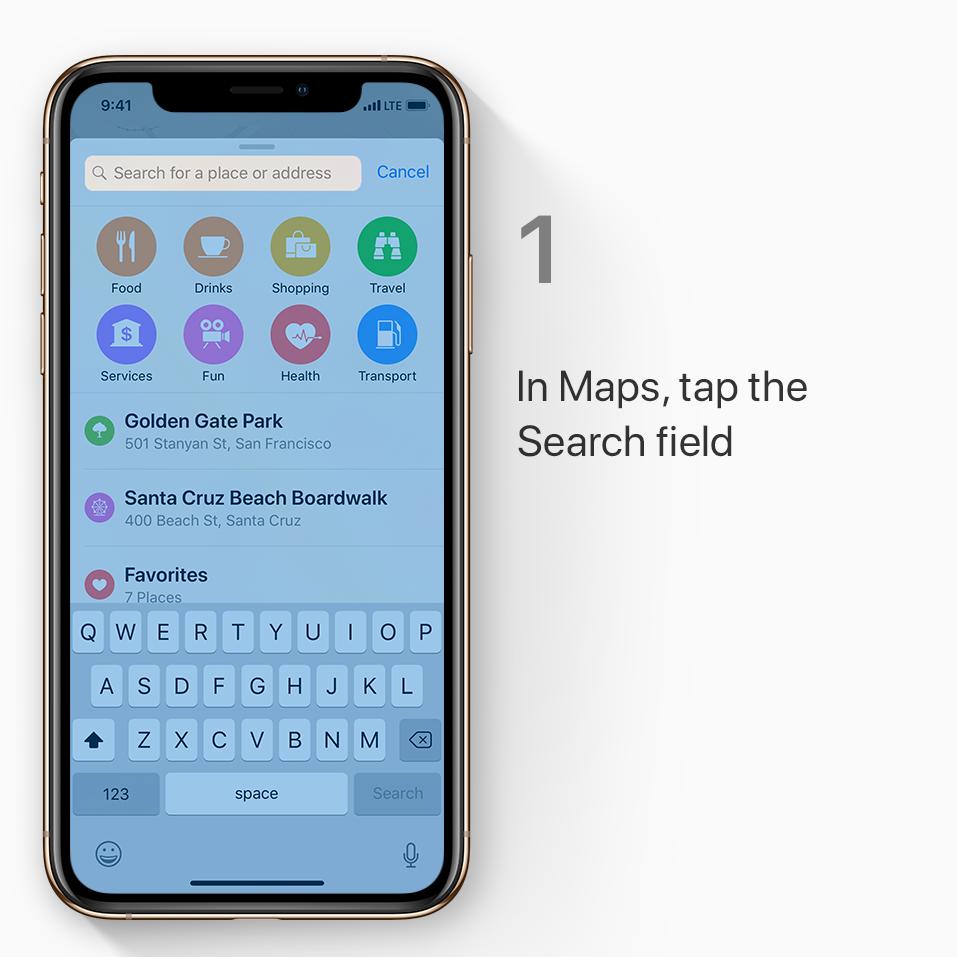
Wondering if a nearby store takes Apple Pay? There's an easy way to check. Just open Maps and search for “Apple Pay.”pic.twitter.com/2xooyBAnY6


 ಧನ್ಯವಾದಗಳು. Twitter ಇದನ್ನು ನಿಮ್ಮ ಕಾಲರೇಖೆಯನ್ನು ಉತ್ತಮಗೊಳಿಸಲು ಬಳಸುತ್ತದೆ. ರದ್ದುಗೊಳಿಸುರದ್ದುಗೊಳಿಸು
-
Experiment all you like with the smart adjustments in Photos. If you ever change your mind, reverting to the original is easy. Here's how.pic.twitter.com/l9deWZlRZY
ಧನ್ಯವಾದಗಳು. Twitter ಇದನ್ನು ನಿಮ್ಮ ಕಾಲರೇಖೆಯನ್ನು ಉತ್ತಮಗೊಳಿಸಲು ಬಳಸುತ್ತದೆ. ರದ್ದುಗೊಳಿಸುರದ್ದುಗೊಳಿಸು -
The right adjustments can make a big difference. Try using the smart sliders in Photos to change the look of an image until it's just right. Here's how.pic.twitter.com/nPiySolI19
ಧನ್ಯವಾದಗಳು. Twitter ಇದನ್ನು ನಿಮ್ಮ ಕಾಲರೇಖೆಯನ್ನು ಉತ್ತಮಗೊಳಿಸಲು ಬಳಸುತ್ತದೆ. ರದ್ದುಗೊಳಿಸುರದ್ದುಗೊಳಿಸು -
Wind noise
 Traffic noise


 Any kind of noise


 If you don't like the sound in a Live Photo, here's how to mute it.pic.twitter.com/ilkgG2Do5tಧನ್ಯವಾದಗಳು. Twitter ಇದನ್ನು ನಿಮ್ಮ ಕಾಲರೇಖೆಯನ್ನು ಉತ್ತಮಗೊಳಿಸಲು ಬಳಸುತ್ತದೆ. ರದ್ದುಗೊಳಿಸುರದ್ದುಗೊಳಿಸು
-


 Tap and hold certain emoji in the keyboard for a range of skin tone options.
#WorldEmojiDay pic.twitter.com/fAobkvY3DWಧನ್ಯವಾದಗಳು. Twitter ಇದನ್ನು ನಿಮ್ಮ ಕಾಲರೇಖೆಯನ್ನು ಉತ್ತಮಗೊಳಿಸಲು ಬಳಸುತ್ತದೆ. ರದ್ದುಗೊಳಿಸುರದ್ದುಗೊಳಿಸು
-
ಧನ್ಯವಾದಗಳು. Twitter ಇದನ್ನು ನಿಮ್ಮ ಕಾಲರೇಖೆಯನ್ನು ಉತ್ತಮಗೊಳಿಸಲು ಬಳಸುತ್ತದೆ. ರದ್ದುಗೊಳಿಸುರದ್ದುಗೊಳಿಸು
-
If you haven't played with Live Photos for a while, it's time to give them another spin. Or another bounce. Check out these tips for using Live Photo effects.pic.twitter.com/xEeCZYJyrk
ಧನ್ಯವಾದಗಳು. Twitter ಇದನ್ನು ನಿಮ್ಮ ಕಾಲರೇಖೆಯನ್ನು ಉತ್ತಮಗೊಳಿಸಲು ಬಳಸುತ್ತದೆ. ರದ್ದುಗೊಳಿಸುರದ್ದುಗೊಳಿಸು -
First rule of road trips: Don't lose the car.
 Maps marks the location of your car when you disconnect your iPhone from a Bluetooth or CarPlay stereo. Whew. Learn more: https://apple.co/30FBIzf pic.twitter.com/F7jav7c4WR
 ಧನ್ಯವಾದಗಳು. Twitter ಇದನ್ನು ನಿಮ್ಮ ಕಾಲರೇಖೆಯನ್ನು ಉತ್ತಮಗೊಳಿಸಲು ಬಳಸುತ್ತದೆ. ರದ್ದುಗೊಳಿಸುರದ್ದುಗೊಳಿಸು
-
It's foggy in the park but sunny by the beach. Just press and hold the temperature icon in Maps to see the forecast for that spot. Press more firmly to pop open the Weather app.pic.twitter.com/o8T2iCK3MG
ಧನ್ಯವಾದಗಳು. Twitter ಇದನ್ನು ನಿಮ್ಮ ಕಾಲರೇಖೆಯನ್ನು ಉತ್ತಮಗೊಳಿಸಲು ಬಳಸುತ್ತದೆ. ರದ್ದುಗೊಳಿಸುರದ್ದುಗೊಳಿಸು -
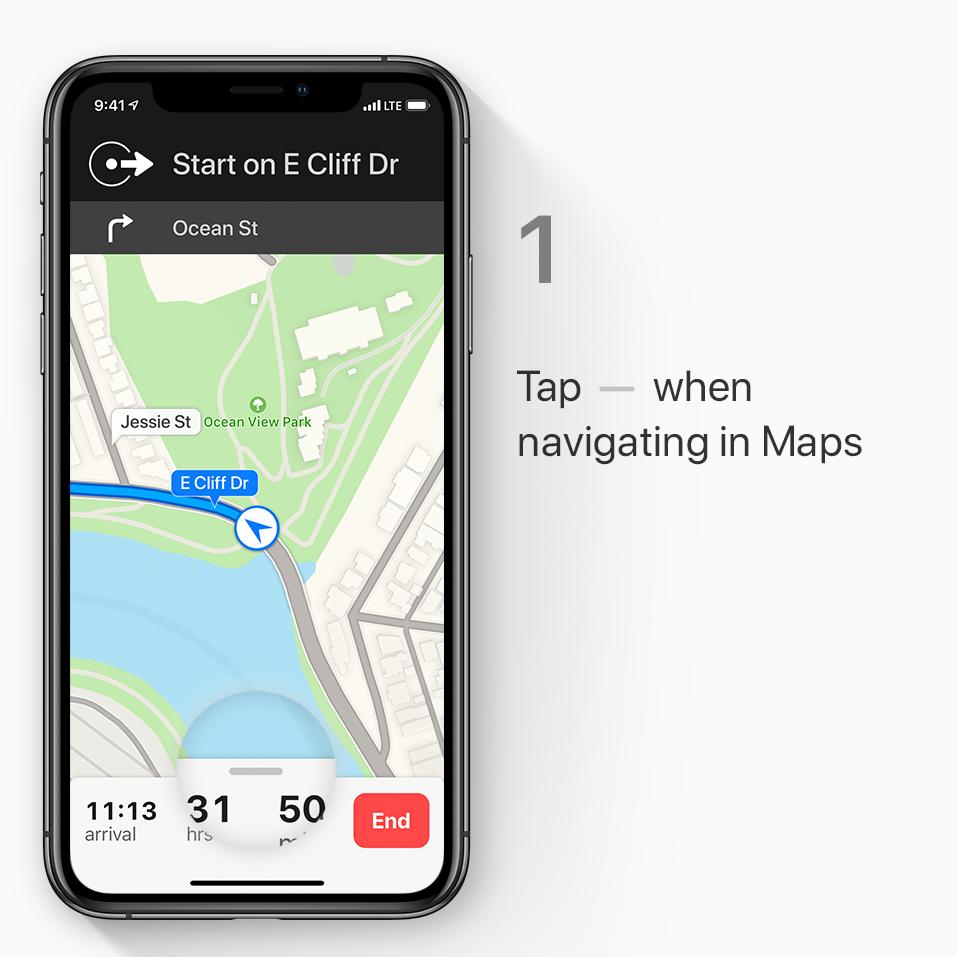
You're on an unfamiliar highway. The gas light just went on. Don't panic! Just open Maps. Here's how to find gas or food along your route.


 pic.twitter.com/8knuWuNleL


 ಧನ್ಯವಾದಗಳು. Twitter ಇದನ್ನು ನಿಮ್ಮ ಕಾಲರೇಖೆಯನ್ನು ಉತ್ತಮಗೊಳಿಸಲು ಬಳಸುತ್ತದೆ. ರದ್ದುಗೊಳಿಸುರದ್ದುಗೊಳಿಸು
-
You've played all your favorite albums and you still have two hours to drive. Just say, “Hey Siri, play some driving music,” so you can keep your eyes on the road and hands on the wheel.pic.twitter.com/gAukvFOlIS
ಧನ್ಯವಾದಗಳು. Twitter ಇದನ್ನು ನಿಮ್ಮ ಕಾಲರೇಖೆಯನ್ನು ಉತ್ತಮಗೊಳಿಸಲು ಬಳಸುತ್ತದೆ. ರದ್ದುಗೊಳಿಸುರದ್ದುಗೊಳಿಸು -
Low Power Mode can be a lifesaver on long travel days. Here's how to add it to Control Center so you can turn it on with a swipe and a tap.pic.twitter.com/lvsOO4kSqF
ಧನ್ಯವಾದಗಳು. Twitter ಇದನ್ನು ನಿಮ್ಮ ಕಾಲರೇಖೆಯನ್ನು ಉತ್ತಮಗೊಳಿಸಲು ಬಳಸುತ್ತದೆ. ರದ್ದುಗೊಳಿಸುರದ್ದುಗೊಳಿಸು -
Planning a trip? Keep important info organized by adding bookmarks to folders in Safari. Here's how.pic.twitter.com/EtRZZ0fgp0
ಧನ್ಯವಾದಗಳು. Twitter ಇದನ್ನು ನಿಮ್ಮ ಕಾಲರೇಖೆಯನ್ನು ಉತ್ತಮಗೊಳಿಸಲು ಬಳಸುತ್ತದೆ. ರದ್ದುಗೊಳಿಸುರದ್ದುಗೊಳಿಸು -
iPhone warning that you're low on storage? You've got options. Here's how to upgrade and manage your iCloud storage: https://apple.co/2xqtfDi pic.twitter.com/7cEPknFZGC
ಧನ್ಯವಾದಗಳು. Twitter ಇದನ್ನು ನಿಮ್ಮ ಕಾಲರೇಖೆಯನ್ನು ಉತ್ತಮಗೊಳಿಸಲು ಬಳಸುತ್ತದೆ. ರದ್ದುಗೊಳಿಸುರದ್ದುಗೊಳಿಸು -
 Beach blanket
Hiking poles
Water bottle
Here's how to create a checklist in Notes so you don't forget a thing: https://apple.co/2xw8Exe pic.twitter.com/Fx8pqT54bY


 ಧನ್ಯವಾದಗಳು. Twitter ಇದನ್ನು ನಿಮ್ಮ ಕಾಲರೇಖೆಯನ್ನು ಉತ್ತಮಗೊಳಿಸಲು ಬಳಸುತ್ತದೆ. ರದ್ದುಗೊಳಿಸುರದ್ದುಗೊಳಿಸು
-
Go off the grid.
 Without going silent.
 Here's how to download a playlist for offline listening: https://apple.co/2Lzt5lu pic.twitter.com/2wv7d4Ydo5
 ಧನ್ಯವಾದಗಳು. Twitter ಇದನ್ನು ನಿಮ್ಮ ಕಾಲರೇಖೆಯನ್ನು ಉತ್ತಮಗೊಳಿಸಲು ಬಳಸುತ್ತದೆ. ರದ್ದುಗೊಳಿಸುರದ್ದುಗೊಳಿಸು
-
Add your emergency contacts, allergies, and medical conditions to Medical ID on your iPhone, just in case anyone needs to access them without your passcode. Learn more: https://apple.co/2xvK2Vq pic.twitter.com/EmXuWKraJP
 ಧನ್ಯವಾದಗಳು. Twitter ಇದನ್ನು ನಿಮ್ಮ ಕಾಲರೇಖೆಯನ್ನು ಉತ್ತಮಗೊಳಿಸಲು ಬಳಸುತ್ತದೆ. ರದ್ದುಗೊಳಿಸುರದ್ದುಗೊಳಿಸು
-
Shoot photos on your iPhone, then edit them on your iPad. iCloud Photos makes your photo collection available on all your devices. Learn more: https://apple.co/2xpW1DU pic.twitter.com/99QKEroVDD
 ಧನ್ಯವಾದಗಳು. Twitter ಇದನ್ನು ನಿಮ್ಮ ಕಾಲರೇಖೆಯನ್ನು ಉತ್ತಮಗೊಳಿಸಲು ಬಳಸುತ್ತದೆ. ರದ್ದುಗೊಳಿಸುರದ್ದುಗೊಳಿಸು


 .
ಲೋಡಿಂಗ್ ಸಮಯ ಸ್ವಲ್ಪ ತೆಗೆದುಕೊಳ್ಳುತ್ತಿರುವಂತೆನಿಸುತ್ತದೆ.
Twitter ಸಾಮರ್ಥ್ಯ ಮೀರಿರಬಹುದು ಅಥವಾ ಕ್ಷಣಿಕವಾದ ತೊಂದರೆಯನ್ನು ಅನುಭವಿಸುತ್ತಿರಬಹುದು. ಮತ್ತೆ ಪ್ರಯತ್ನಿಸಿ ಅಥವಾ ಹೆಚ್ಚಿನ ಮಾಹಿತಿಗೆ Twitter ಸ್ಥಿತಿಗೆ ಭೇಟಿ ನೀಡಿ.