

Black Studio TinyMCE Widget
Contributors: black-studio, marcochiesi, thedarkmist
Donate link: http://www.blackstudio.it/en/wordpress-plugins/black-studio-tinymce-widget/
Tags: wysiwyg, visual, widget, tinymce, editor, rich text, visual editor, wysiwyg widget, text widget, tinymce widget, image widget, media widget
Requires at least: 3.1
Tested up to: 4.5
Stable tag: 2.2.9
License: GPLv3
License URI: http://www.gnu.org/licenses/gpl.html
The visual editor widget for Wordpress.
Description
This plugin adds a new Visual Editor widget type that allows you to insert rich text and media objects in your sidebars with no hassle. The default WordPress text widget lacks of functionalities and it requires HTML knowledge, this plugin was born to overcome these limitations. With Black Studio TinyMCE Widget you will be able to edit your widgets in a WYSIWYG manner using the native WordPress TinyMCE editor, just like you do in posts and pages. And if you are a developer you may still switch back and forth from Visual to HTML mode.
Features
- Add rich text widgets to your sidebars and edit them using the TinyMCE visual editor
- Switch between Visual mode and HTML mode (including Quicktags toolbar)
- Insert images, videos and other media from WordPress Media Library
- Insert links to existing WordPress pages/posts or external resources
- Option to "Automatically add paragraphs" to widget text
- Support for shortcodes, smilies and embeds in widget text
- Support for responsive images (requires WordPress 4.4 or later)
- Support for Customizer with live preview and quick edit
- Support for fullscreen editing mode
- Support for widgets accessibility mode
- Compatible with multi-site (WordPress networks)
- Compatible with common multi-language plugins (WPML, Polylang and WPGlobus)
- Compatible with plugins providing additional TinyMCE features (WP Edit, TinyMCE Advanced, etc)
- Compatible with Page Builder plugin by SiteOrigin
- Translations available in 20+ languages
Links
- Author's web site
- Plugin's page
- FAQ
- Support forum
- Follow us on Twitter, Facebook and LinkedIn
Get involved
- Developers can contribute to the source code on our GitHub repository.
- Translators can contribute through the Official WordPress Translation platform.
- Users can contribute by leaving a 5 stars review or making a donation.
Installation
This section describes how to install and use the plugin.
- You may install the plugin directly from your WordPress dasboard. Go to
Plugins=>Add Newand search forBlack Studio TinyMCE Widget, or pick it from the Popular plugins. Alternatively you may download the ZIP package and upload it using theUpload Pluginbutton in the same screen. You may also upload the files using FTP, just ensure that the entireblack-studio-tinymce-widgetfolder is copied into the/wp-content/plugins/directory). - Activate the plugin.
- In order to use the plugin, go to
Appearance=>Widgetsin your WordPress dashboard, or alternatively use theCustomizefeature. - Add as many
Visual Editorwidgets as you want to the desired sidebar(s). - Fill in title and (rich) text for your widgets.
Note: the plugin doesn't have nor requires any settings.
Screenshots
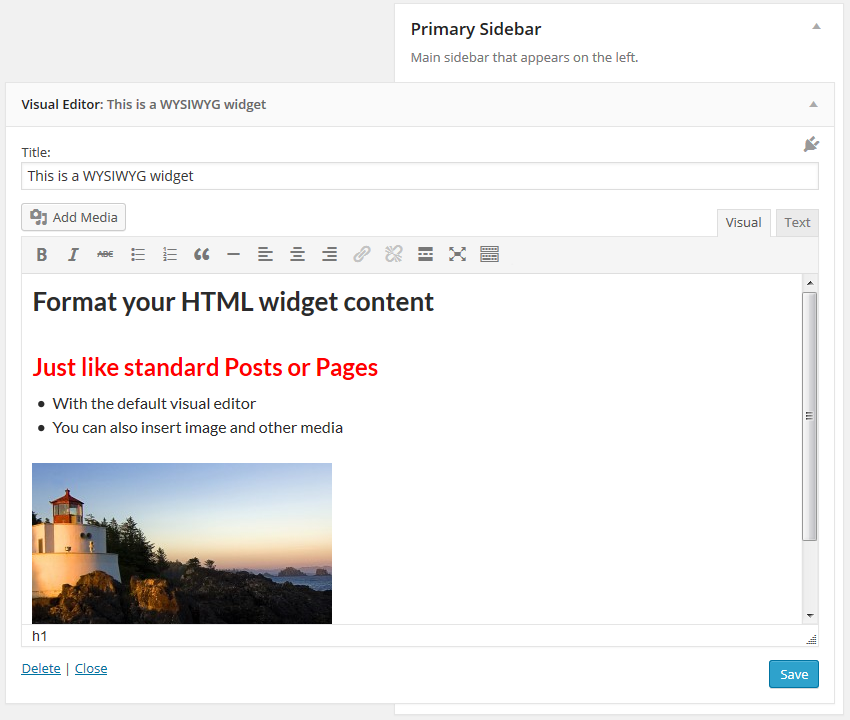
1. Black Studio TinyMCE Widget in Visual mode
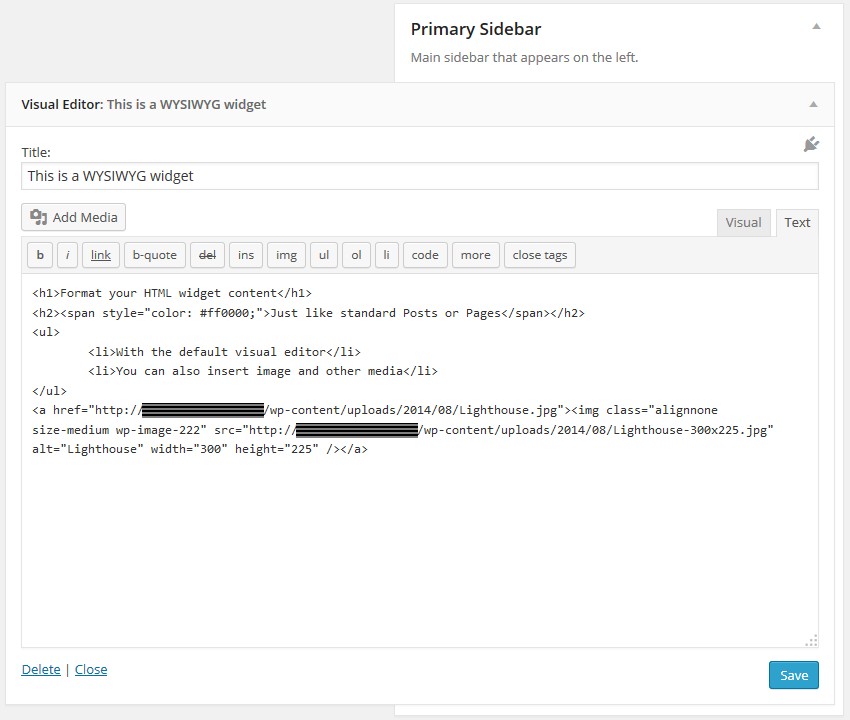
2. Black Studio TinyMCE Widget in HTML mode
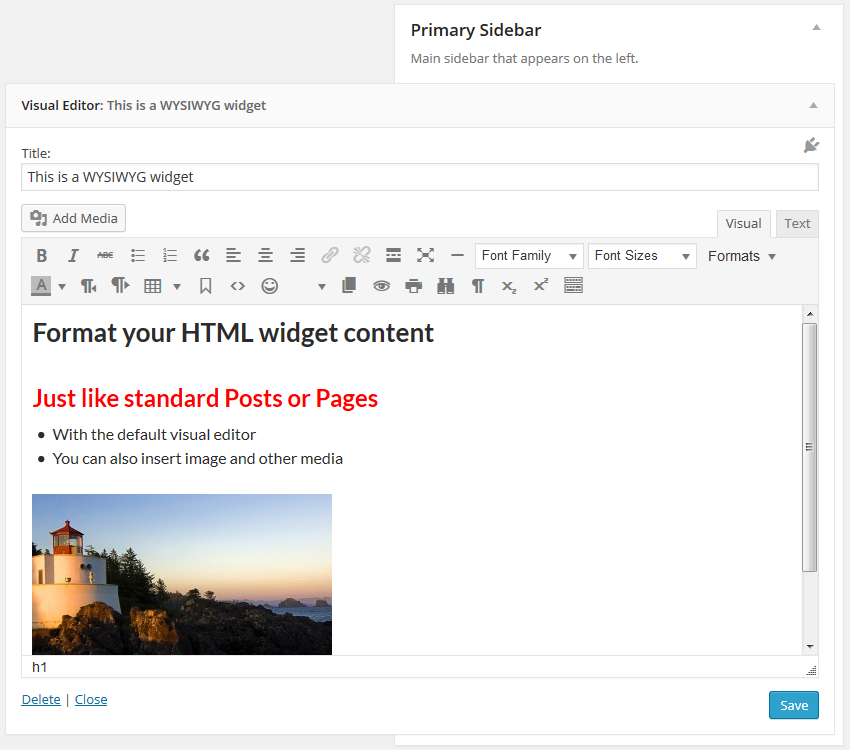
3. Black Studio TinyMCE Widget combined with WP Edit plugin
Frequently Asked Questions
Purpose of the plugin
This plugin gives you the ability to use the WordPress visual editor (TinyMCE) in widgets as you do in posts and pages, but it doesn't affect the editor behavior itself or its functionalities. If you are looking for additional editor features, take a look at plugins like WP Edit, TinyMCE Advanced or any other feature specific plugin you may need. Any additional TinyMCE plugin written following WordPress guidelines should work fine with Black Studio TinyMCE Widget.
Troubleshooting
If you are experiencing issues with the plugin please read entirely these FAQ before posting a new topic in our support forum. Most of the times issues are caused by incompatibility with other plugins or themes, which may prevent our plugin from working as expected. In order to troubleshoot issues please complete the following steps:
- First, ensure you have understood the purpose of the plugin (see above). If you are experiencing issues with the editor even when editing posts or pages, they're definitely not related to our plugin, which only works for widgets (unless you're using additional plugins that provides widgets support for pages, i.e. Page Builder by SiteOrigin).
- Ensure that you are running the latest versions of both WordPress and the plugin.
- Search in our support forum for threads with similar issues.
- Disable all other plugins and check if the problem is fixed. In that case enable the other plugins one by one and figure out which one is causing the issue. Please see Conflict Diagnosis Guide for WordPress plugins for further info.
- If the problem persists even with all other plugins disabled, try to switch to a WordPress default theme (i.e. Twenty Fifteen) and check if that fixes the issue.
If you found a conflict with a plugin or theme, or if your problem is still present after the steps above, open a topic in the support forum and provide the following information:
- Detailed description of the problem, including the steps to reproduce it
- Location(s) where the problem occurs (Appearance -> Widgets, Customizer, Accessibility mode, Page Builder, etc)
- Error messages, if any, in particular in browser's javascript console
- Browser and Operating System in use
- Plugin version in use
- WordPress version in use
- WordPress theme in use
- WordPress language in use, if other than english
- WordPress plugins causing conflicts, if any
- A link to a screenshot, if it can be useful to understand the problem
- A link to your website, if it can be useful to show the problem
Can't find it in available widgets
Since version 1.3.1 the name of the widget changed from Black Studio TinyMCE Widget to Visual Editor to enhance user friendliness. Black Studio TinyMCE Widget is still the name of the plugin, but it was a bit too long and not very intuitive for inexperienced users. You may find references to the old name in articles and videos on the web, so don't panic if you don't see the Black Studio TinyMCE Widget in your available widgets, just look for Visual Editor. Note: if you are using WordPress in a language other than english you may have a corresponding name translated in your language.
Widgets disappeared after migrating or changing the site URL
When dealing with a WordPress site URL change it is necessary to face the serialized fields issue: data may become corrupted if using a simple search/replace (see the Codex for further info). This is not an issue specifically related to our plugin, but it affects all the parts (plugins, themes and WordPress core files too) that use serialized data archiviation. When changing the site URL, the recommended way is to use the Search and Replace for WordPress Databases Script, as suggested by the Codex.
How to translate widgets in multi-language sites
The current version of Black Studio TinyMCE Widget supports the following multi-language plugins:
- WPML
- Polylang
- WPGlobus
WPML
WPML is the leading commercial plugin for WordPress multi-language sites. If you're using WPML, we recommend to install also the 3rd party WPML Widgets plugin, which will allow you to create widgets and assign them to specific languages, keeping th ability to work with the visual editor. Alternatively you may use the WPML String Translation plugin, provided by the WPML team. In this case, you'll have to create the widgets in the widgets admin panel, using the Visual Editor provided by the Black Studio TinyMCE Widget plugin, and then go to WPML => String Translation and translate title and body of widgets. If you installed WPML after the creation of the widgets, just re-save them and they will appear on the String Translation list. Unfortunately the WPML String Translation interface has no Visual Editor, that's why we no longer recommend this method. If you were using WPML String Translation, we recommend to switch to WPML Widgets and remove the entries in WPML String Translation list after you moved them to be real widgets.
Polylang
Polylang is a free alternative to WPML that allows you to create bilingual or multilingual WordPress sites. It provides natively the ability to assign languages to each widget (including the ones created with Black Studio TinyMCE Widget), so you won't need any additional plugin to have a multi-language widgets.
WPGlobus
WPGlobus is a new WordPress plugin for multi-language sites, with a different approach in comparison to WPML and Polylang. The WPGlobus team has also created the WPGlobus for Black Studio TinyMCE Widget addon plugin, that will allow you yo use it in conjunction with Black Studio TinyMCE Widget.
How to embed video and other contents
WordPress has a nice autoembed feature that allows you to embed videos and other stuff in an easy way, by just putting the URL in the content area. This is also possible for widgets created with this plugin.
If you are using a version of WordPress prior to 4.0 or a version of Black Studio TinyMCE Widget prior to 2.0, for best results it is recommended to put the URL inside an [embed] shortcode. Example:
[embed]http://www.youtube.com/watch?v=XXXXXXXXXXX[/embed]
Ensure that the URL has not an hyperlink on it.
Alternatively, if you don't want to use [embed] shortcode, ensure that the URL is not surrounded by a <p> tag.
How to customize widget appearance
The appearance of widgets in the frontend depends on both CSS and HTML. The plugin does not insert any additional CSS to your website frontend, so if you need to customize the styling of your widget elements, you'll have to do at theme level, or you have to explicitely insert <style> tags in your widget text using the the HTML mode (this method is not recommended).
If you need to add CSS classes to widgets we recommend the Widget CSS Classes plugin.
The HTML markup is controlled mainly by WordPress and by the theme, and in a smaller part by the plugin.
The HTML output of a widget includes the following parts:
{before_widget}
    {before_title}
        {widget_title}
    {after_title}
    {before_text}
        {widget_text}
    {after_text}
{after_widget}
These elements can be customized as follows:
- The
{widget_title}and{widget_text}are the values inserted into the widget fields. - The markup of
{before_widget},{after_widget},{before_title},{after_title}is usually defined by your theme when registering a sidebar with theregister_sidebarfunction. - The
{before_text}and{after_text}are the only pieces of HTML markup added by the plugin. The default markup is the same as native WordPress text widgets to ensure styling compatibility with CSS created for text widgets:<div class="textwidget"> {text} </div>. You may customize this markup using theblack_studio_tinymce_before_textandblack_studio_tinymce_after_textfilter hooks. They both take two parameters: the first is the default text and the second is the widget instance. See examples below.
Example 1: Custom markup for {before_text} and {after_text} elements
add_filter( 'black_studio_tinymce_before_text', 'my_widget_before_text', 10, 2 );
function my_widget_before_text( $before_text, $instance ) {
    return '<div class="mytextwidget">';
}
add_filter( 'black_studio_tinymce_after_text', 'my_widget_after_text', 10, 2 );
function my_widget_after_text( $after_text, $instance ) {
    return '</div>';
}
Example 2: Totally remove markup for [before_text] and [after_text] elements
add_filter( 'black_studio_tinymce_before_text', '__return_empty_string' );
add_filter( 'black_studio_tinymce_after_text', '__return_empty_string' );
There's also an additional hook, that you may use to specify to not display widgets if their content is empty:
add_filter( 'black_studio_tinymce_hide_empty', '__return_true' );
How to customize widget contents (using hooks)
You may alter widget title and text via code using the widget_title and widget_text filter hooks (see Codex for details).
The plugin also internally uses widget_text filter to apply specific WordPress native features:
autoembed(priority 4): converts embed urls to relevant embed codes.convert_smilies(priority 6): converts text equivalent of smilies to images.wpautop(priority 8): applies paragraphs automatically (if the relevant option is selected).do_shortcode(priority 10): processes the shortcodes.wp_make_content_images_responsive(priority 12): makes images responsive.
Moreover there are additional filters specific for 3rd party plugins:
icl_t(priority 2): applies WPML translation (used only if WPML + WPML String Translation are activated on the site and WPML Widgets is not activated - See FAQ about multi-language sites for further information).M_Attach_To_Post::substitute_placeholder_imgs: replaces NextGEN Gallery placeholder images with galleries/slideshows (used only if the NextGEN Gallery plugin is activated).
If for any reason you need to remove the filters above, you may use the following code snippets (or a customized version, depending on your needs):
add_action( 'init', 'remove_bstw_widget_text_filters' );
function remove_bstw_widget_text_filters() {
    if ( function_exists( 'bstw' ) ) {
        remove_filter( 'widget_text', array( bstw()->text_filters(), 'autoembed' ), 4 );
        remove_filter( 'widget_text', array( bstw()->text_filters(), 'convert_smilies' ), 6 );
        remove_filter( 'widget_text', array( bstw()->text_filters(), 'wpautop' ), 8 );
        remove_filter( 'widget_text', array( bstw()->text_filters(), 'do_shortcode' ), 10 );
        remove_filter( 'widget_text', array( bstw()->text_filters(), 'wp_make_content_images_responsive' ), 12 );
    }
}


add_action( 'init', 'remove_bstw_widget_text_plugin_filters' );
function remove_bstw_widget_text_plugin_filters() {
    if ( function_exists( 'bstw' ) ) {
        remove_filter( 'widget_text', array( bstw()->compatibility()->module( 'wpml' ), 'widget_text' ), 2 );
        remove_filter( 'widget_text', array( bstw()->compatibility()->module( 'nextgen_gallery' ), 'widget_text' ) );
    }
}
Plugin's data storage and cleanup
Plugin's data is stored in serialized format inside a record in the wp_options table having option_name = 'widget_black-studio-tinymce'. Data storage is handled by WordPress and not directly by the plugin. The widgets data is intentionally kept in the datatbase upon plugin deactivation / deletion to avoid content loss. If you want to totally remove the plugin including its data, just remove that record after plugin removal.
Changelog
2.2.9 (2016-04-22)
- Fixed compatibility issue with Page Builder + WPML String Translation
- Fixed minor z-index issue with new inline link dialog (WordPress 4.5)
2.2.8 (2015-09-16)
- Fixed link dialog z-index issue in Customizer
2.2.7 (2015-09-03)
- Fixed issue with Customizer when clicking on the widget title arrow (courtesy of Syhlver)
2.2.6 (2015-08-25)
- Fixed content duplication issue with Page Builder + WPML String Translation
2.2.5 (2015-07-11)
- Fixed z-index issue on Styles dropdown in Customizer
- Added workaround to avoid glitches in Customizer
- Fixed extra slashes in inclusions using plugin_dir_path
- Added Persian translation (courtesy of WP-Translation.org team on Transifex)
2.2.4 (2015-05-14)
- Fixed issue with WordPress Customizer
- For developers: added ability to create subclasses of WP_Widget_Black_Studio_TinyMCE class (courtesy of @andreamk)
- Added Khmer and updated Spanish translations (courtesy of WP-Translation.org team on Transifex)
2.2.3 (2015-02-17)
- Fixed bug on reordering gallery images
- Added Czech and Lithuanian translations (courtesy of WP-Translation.org team on Transifex)
2.2.2 (2014-12-24)
- Fixed bug on visual/text mode not being saved in WordPress 4.1
- Updated German and French translations (courtesy of WP-Translation.org team on Transifex)
- Added support for Composer dependency manager (courtesy of @cfoellmann)
2.2.1 (2014-11-18)
- Fixed paragraph formatting bug on saving
- Fixed real-time update bug in Customizer
- Enhanced editor initialization
- Simplified internal integration with Page Builder
- Simplified internal initialization for accessibility mode
- Minor changes for coding standard compliance
2.2.0 (2014-11-18)
- Added filter to hide empty widgets
- Added workaround for WordPress Core bug #28403
- Enhanced compatibility for widgets created with 1.x plugin versions
- Enhanced compatibility for editor instances used by other plugins
- Fixed bug on line breaks being stripped in text mode
- Updated translations (courtesy of WP-Translation.org team on Transifex)
2.1.6 (2014-10-23)
- Fixed bug on line breaks being changed on editor load
- Improved TinyMCE editor stuff loading
2.1.5 (2014-10-21)
- Fixed bug when saving in text mode
2.1.4 (2014-10-19)
- Fixed compatibility issue on TinyMCE initialization filtering
- Fixed z-index issue when both thickbox and media dialog windows were used (i.e. using Hover Effects Pack plugin)
2.1.3 (2014-10-18)
- Added ability to disable automatic addition of paragraphs when editing (i.e. using TinyMCE Advanced plugin option)
- Enhanced real time rendering in Customizer
- Fixed compatibility issue with Page Builder related to comment reply in admin
- Fixed compatibility issue with Styles plugin related to plugins_loaded hook
2.1.2 (2014-10-13)
- Hotfix for fullscreen mode when using Page Builder
2.1.1 (2014-10-13)
- Hotfix for CSS compatibility with Page Builder
2.1.0 (2014-10-13)
- Added option to automatically add paragraphs
- Added admin pointer to help new users identify the widget
- Added loading overlay when saving widget
- Added check for multiple instances of the plugin
- Fixed issue related to multiple line breaks not being saved
- Fixed issues with RTL locales
- Enhanced compatibility for widgets created with 1.x versions of the plugin
- Updated documentation about widget customization
2.0.4 (2014-10-07)
- Changed widget_text filters order to ensure better compatibility
2.0.3 (2014-10-07)
- Removed wp_kses_post filter on widget text to ensure better compatibility
2.0.2 (2014-10-06)
- Hotfix for Contact Form 7 compatibility
2.0.1 (2014-10-06)
- Hotfix for widget_text hook compatibility
2.0.0 (2014-10-06)
- Total refactoring of plugin's source code
- Enhanced integration with TinyMCE editor for better compatibility with other plugins
- Added support for QuickTags toolbar in HTML mode
- Added support for mobile devices (responsive width in widgets administration page)
- Added project to GitHub
- Added project to Transifex translation platform
- Added many new translations thanks to WP-Translation.org team
- Added several filter and action hooks
- Improved code quality and security thanks to Scrutinizer service
- Improved development workflow thanks to Grunt
- Improved performance and user experience
- A huge Thanks to @cfoellmann for his precious support and contributions
1.4.8 (2014-09-13)
- Fixed bug on image captions on WordPress 4.0 (part 2)
1.4.7 (2014-09-11)
- Fixed bug on image captions on WordPress 4.0
1.4.6 (2014-07-25)
- Bugfix on widget display
1.4.5 (2014-07-25)
- Fixed compatibility issue with Page Builder + WPML String Translation
1.4.4 (2014-07-16)
- Fixed z-index compatibility issue with Shortcodes Ultimate plugin
1.4.3 (2014-07-13)
- Added filter hooks to modify the markup before and after the widget text
- Fixed z-index issue in fullscreen mode
- Added widget icon for Customizer
- Updated danish translation
- Updated FAQ and readme.txt
1.4.2 (2014-07-07)
- Added support for
wp_enqueue_editorhook - Added compatibility with Advanced Image Styles plugin
- Added danish translation (Contributor: Mikkel Rommelhoff)
1.4.1 (2014-06-12)
- Enhanced HTML source code formatting
1.4 (2014-06-12)
- HTML and CSS optimization by using WordPress native editor markup and styles
- Adoption of WordPress JS minification conventions (
.minsuffix) - Integration with WordPress SCRIPT_DEBUG constant for javascript debugging purposes
- Enhanced compatibility with 3rd party media buttons provider (i.e. Shortcodes Ultimate)
- Enhanced plugin internal version handling
- Duplicated widget IDs detection
- Added Rate link
- Added compatibility with WordPress Language packs
- Added ukrainian translation (Contributor: Michael Yunat getvoip.com)
- Fixed notice on theme_advanced_buttons1 parameter
- Fixed z-index issue with WordPress 3.9 admin menu on small screens
1.3.3 (2014-04-04)
- Fixed visualization bug upon widget saving
- Enhanced support for WordPress 3.9 Customizer (live edit)
1.3.2 (2014-04-03)
- Fixed compatibility issue with WordPress 3.9 Beta 3
- Added support for WordPress 3.9 Customizer
- Added swedish translation (Contributor: macsolve)
- Updated installation documentation
- Updated FAQ
1.3.1 (2014-03-06)
- Renamed the widget to
Visual Editorfor better user friendliness - Fixed compatibility issue with FirmaSite Theme Enhancer plugin
1.3.0 (2014-01-29)
- Added support for smilies conversion (based on the general WordPress option)
- Updated styling to match the new default WordPress editor appearence
- Refactoring of PHP and JS code to be compliant to WordPress coding standard
- Fixed compatibility issue with WordPress 3.9 alpha and TinyMCE 4.0
- Fixed compatibility issue with Jetpack / After the Deadline plugin
- Fixed editor behavior on widget title clicks
- Fixed CSS issue affecting Firefox on WordPress 3.8
- Added finnish translation (Contributor: Timo Leiniö)
- Better handling of More tag button
- Included JS dev version
1.2.0 (2013-05-04)
- Fixed issue with WordPress widgets accessibility mode
- Fixed compatibility issue with WPML plugin generating an error in debug mode
- Fixed compatibility issue with WP Page Widget plugin
- Added slovak translation (Contributor: Branco Radenovich - WebHostingGeeks.com)
- Tested compatibility with Worpdress 3.6 beta
1.1.1 (2012-12-31)
- Fixed editor issue when dragging widgets from a sidebar to another
1.1.0 (2012-11-15)
- Compatibility fixes for upcoming WordPress 3.5
- Added support for the new WordPress media library dialog
- Enhanced javascript event handling using jquery .on(...) method
1.0.0 (2012-10-19)
- Added full image options when adding content from media library
- Added german translation (Contributor: Christian Foellmann)
- Overall Javascript code optimization
- Better Javascript compression
- Fixed editor background color
- Fixed compatibility issue with WP Page Widget plugin
- Fixed issue about editor partially hidden on narrow screens
0.9.5 (2012-10-01)
- Added support for autoembed urls (youtube, etc)
0.9.4 (2012-07-31)
- Bug fixes
0.9.3 (2012-07-31)
- Added support for accessibility mode
0.9.2 (2012-07-27)
- Optimized for use in conjunction with Ultimate TinyMCE plugin
0.9.1 (2012-06-07)
- Added spanish translation (Contributor: Lucia García Martínez)
- Increased width of editor window
0.9 (2012-01-20)
- Added support for WPML plugin (for multilanguage sites)
0.8.2 (2011-12-21)
- Added support for shortcodes in widget text
0.8.1 (2011-12-20)
- Fixed issue when inserting images on WordPress 3.3
0.8 (2011-11-29)
- Added support for WordPress networks (Multisite)
0.7 (2011-11-24)
- Added compatibility for upcoming WordPress 3.3
- Added compatibility for previous WordPress 3.0 and 3.1
- Optimization/compression of javascript code
0.6.5 (2011-11-17)
- Forced TinyMCE editor to not automatically add/remove paragraph tags when switching to HTML mode (you may need to re-edit your widgets to adjust linebreaks, if you were using multiple paragraphs)
0.6.4 (2011-11-14)
- Fixed compatibility issue with Jetpack / After the Deadline plugin
- Optimization of javascript/css loading
0.6.3 (2011-11-13)
- Fixed javascript issue preventing the plugin from working correctly with some browsers
0.6.2 (2011-11-12)
- Fixed javascript issue with WordPress Media Library inserts in HTML mode
0.6.1 (2011-11-12)
- Fixed javascript issue preventing editor to show up in some cases
0.6 (2011-11-11)
- Added support for WordPress Media Library
0.5 (2011-11-10)
- First Beta release
Upgrade Notice
2.2.9
Version 2.x is a major update. If you are upgrading from version 1.x please ensure to backup your database before upgrading.