No products in your shopping cart.
- Cart - $0.00


Co:Writer Universal for Google Chrome uses grammar- and vocabulary-smart word prediction to help students better express their ideas in writing across devices. And now built-in speech recognition adds an entirely new way of getting ideas out!


(No obligation and no credit card required)
NEW
Speech Recognition
NEW
iOS Keyboard

NEW
Make Worksheets Accessible
Vocabulary Support
NEW
Data Collection
Co:Writer Download Co:Writer Universal Resources Research & Case Studies Pricing Request A Quote

Only Co:Writer Universal gives students access to the most powerful word prediction on their favorite devices (Chromebooks, iPads, and Mac/Windows desktops), over 4 million Topic Dictionaries, built-in speech recognition in Google Chrome, and incredible privacy-safe data collection.
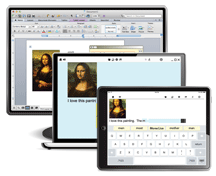 Whether on iPad, iPhone, Chromebook, or desktop, your students will have access to their favorite writing tool! Preferences and Dictionaries are stored in the cloud, so your students can access their personalized supports from anywhere, on any device—even offline.
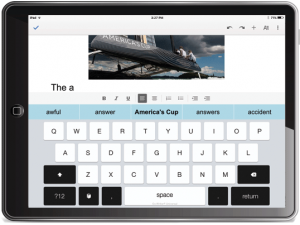 Co:Writer Universal includes a keyboard for your iPads (iTouch and iPhones too)! Use it anywhere you write like email, websites, and Google Drive. It works just like Apple’s stock keyboard, but the prediction is much better and it supports Topic Dictionaries and data collection. The data fully integrates with Educator Dashboard.
See it for yourself in this quick 2-min video.
 Co:Writer word prediction and speech recognition now go hand-in-hand to cover the widest range of student needs.
It’s built right into the Co:Writer Universal Chrome Extension, so students can speak their responses in Google Drive, email, and websites then go back and edit with Co:Writer!
See Co:Writer’s built-in speech recognition for yourself in this 2-min demo.
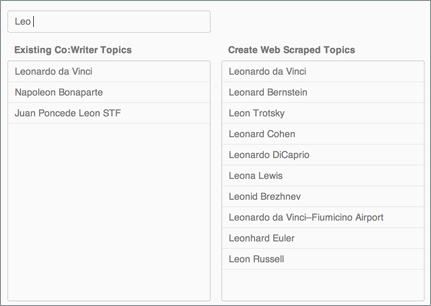 Over 4 million Topic Dictionaries supply vocabulary from every college and career-ready standard from Atomic Structure to Leonardo da Vinci. This helps students write with more academic and topic-specific vocabulary.
See how Co:Writer supports vocabulary in this 3-min video.
 Co:Writer data gives you a level of fidelity of implementation that you’ve never had before. Quickly see how much students are writing and their vocabulary usage while protecting student privacy.
See Co:Writer Data in this 3-min video.
Get all of this for one schoolwide price! Request a quote now.

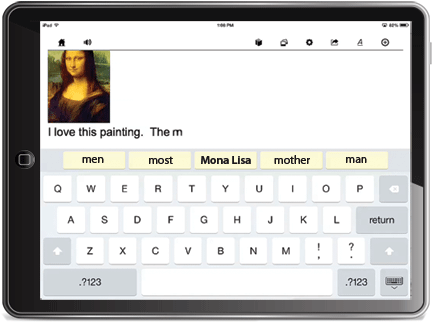
You may think you know the Co:Writer app for iPad. Co:Writer Universal brings it to the next level with new features. Settings and Topic Dictionaries carry over when using Co:Writer on other devices. Writings are saved to the cloud and available on other iPads or from the Chrome browser on desktop or Chromebook.
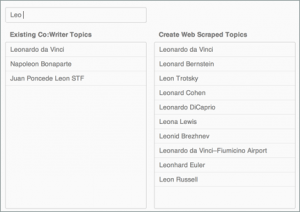
Over 4 million topic dictionaries are at your fingertips covering all curriculum subjects. Just type the first few letters of the topic name and choose the topic. The topic-specific words are automatically added to Co:Writer predictions.
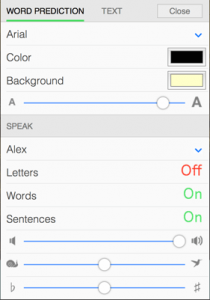
Customize Co:Writer to meet your specific needs. Change the look and feel, speech settings, and voices.

Co:Writer Universal includes a keyboard for your iPads (iTouch and iPhones too)! Use it anywhere you write like email, websites, and Google Drive. It works just like Apple’s stock keyboard, but the prediction is much better and it supports Topic Dictionaries and data collection. The data fully integrates with Educator Dashboard.
See it for yourself in this quick video (2 minutes)

Settings
Customize Co:Writer to meet your specific needs. Change the look and feel, number of guesses, speech settings, and voices.
 Topic Dictionaries
Over 4 million topic dictionaries are at your fingertips covering all curriculum subjects. Just type the first few letters of the topic name and choose the topic. The topic-specific words are automatically added to Co:Writer predictions.

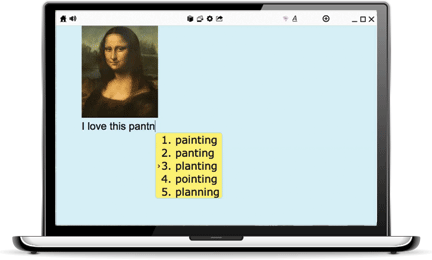
Co:Writer Universal seamlessly integrates into the Chrome browser on Mac, Windows, and Chromebooks. Both an app and extension are available for nearly any writing task. The app features a built-in word processor that shares writings over the cloud. The extension lets you use Co:Writer when writing on websites, blogs, and Google Drive! And now built-in speech recognition works anywhere you use Co:Writer!
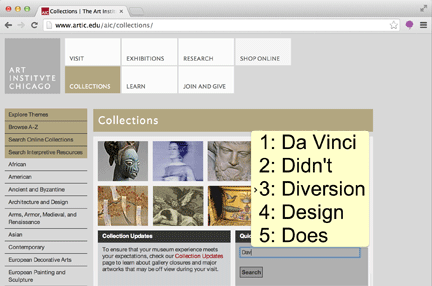
Get support from Co:Writer on just about any website. Whether updating your blog, writing an email, or writing a report in Google Drive, you’ll have access to Co:Writer’s grammar-smart word prediction and topic dictionaries.
Click on the microphone in the Co:Writer window and speak. It’s that easy. Co:Writer will turn it into text right before your eyes. Now word prediction and speech recognition truly go hand-in-hand! Co:Writer will even read the dictated response aloud.
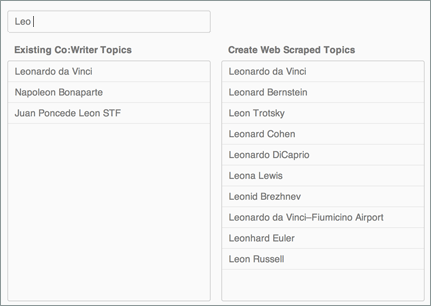
Over 4 million topic dictionaries are at your fingertips covering all curriculum subjects. Just type the first few letters of the topic name and choose the topic. The topic-specific words are automatically added to Co:Writer predictions.
Momentary Topic Dictionaries automatically scrape email contents and webpages for unique vocabulary and bring them into Co:Writer’s dictionaries. So if you’re replying to an email, you may be surprised to see the sender’s name and words from their email automatically appear in your guesses!
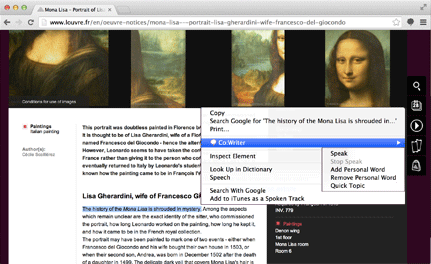
Co:Writer Universal adds speech capabilities to your Chrome browser. Simply select a passage of text and right click. Co:Writer can speak the text aloud or add words in the selection to your personal word dictionary or create a new Topic Dictionary from the passage.
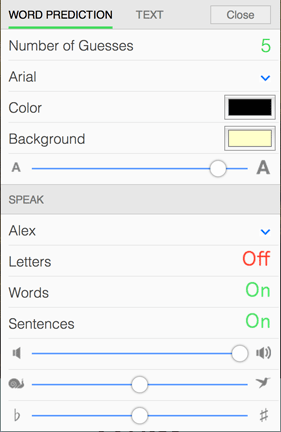
Settings allow you to customize Co:Writer to meet your specific needs. Change the look and feel, number of guesses, speech settings, and voices.
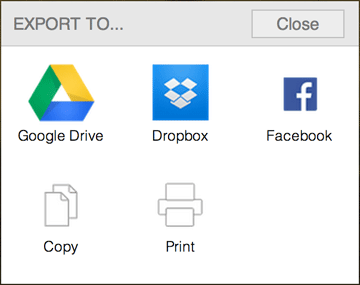
Take your writings and share send them to Google Drive, Dropbox, Facebook, and copy them to paste in other applications and word processors. Or print them out to hand in the traditional way.

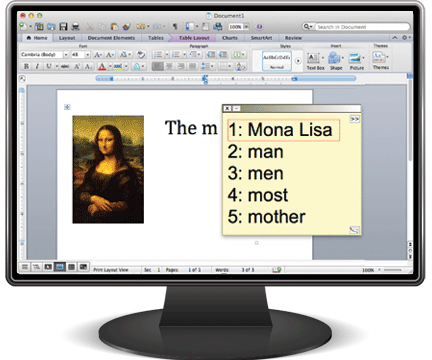
It’s the Co:Writer you’ve known for over 20 years. Whether on Mac or Windows, it works on top of just about any application.
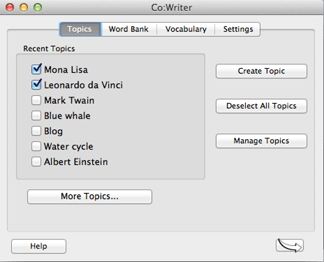
Over 4 million Topic Dictionaries are at your fingertips covering all curriculum subjects. In addition to accessing and creating Topic Dictionaries, when working on the desktop, you can also edit your dictionaries.
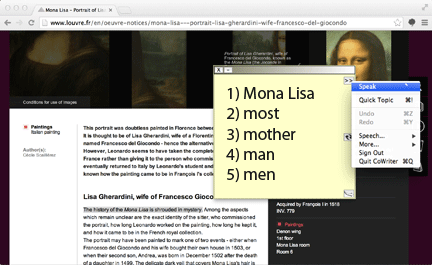
While in most applications or browsing the web, Co:Writer speaks selected text. It’s perfect for reading, then responding to emails and blogs.
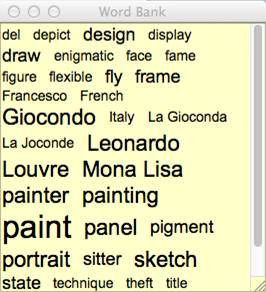
The word bank helps break writer’s block, it automatically presents a list of topic-specific words whenever a Topic Dictionary is selected. It’s available in both list and word cloud view.
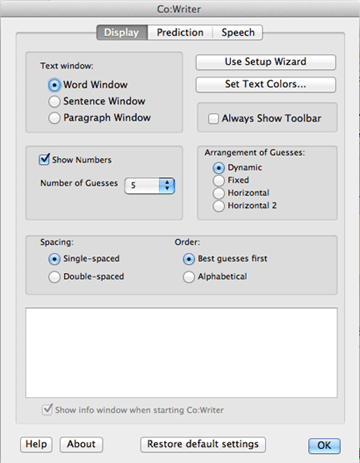
Co:Writer offers extensive options for most accessibility needs for display, prediction, and speech.

Co:Writer helps students turn this:
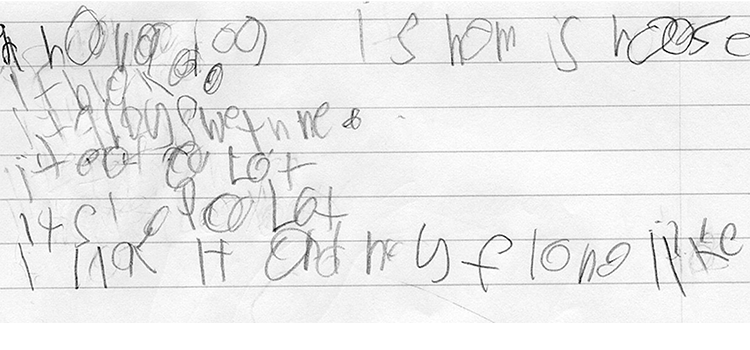
…into this:
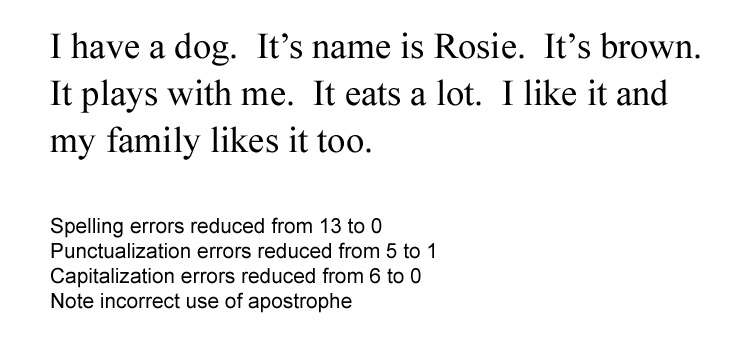
If students can write just 30% of what they want to say, Co:Writer will do the rest. As students write, Co:Writer “predicts” what they’re trying to say and offers word suggestions in real time. Even the most egregious spelling and grammar mistakes aren’t a problem for Co:Writer’s proprietary FlexSpell® technology. Co:Writer goes further, bringing in topic-specific vocabulary instantly when writing in the content areas. You have to try it with a student to believe the impact it has!
Read “Word Prediction—What’s Good Enough?” to learn the difference between Co:Writer and other word prediction programs.

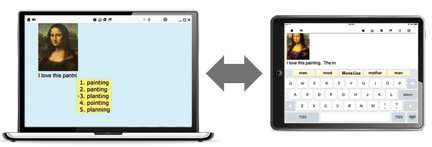
In the past, transferring files between school, home, and across computers was challenging at best, and sometimes impossible. Co:Writer Universal eliminates this obstacle entirely. Students simply write in Co:Writer’s built-in word processor for iPad or Chrome, and the writing is shared through the cloud!
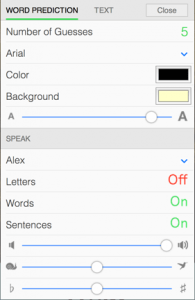
Create a Topic Dictionary in any platform and it automatically syncs in any other platform or device. Background color, and text size are also shared between platforms.

Watch a 2-min demo of Co:Writer’s speech recognition
Click on the microphone in the Co:Writer Chrome Extension window and speak. It’s that easy. Co:Writer will turn it into text right before your eyes. Now word prediction and speech recognition truly go hand-in-hand!
It’s not limited to Google Drive like most other speech recognition tools, it will work just as well in email and across the web—just about anywhere you need to put text!
After using the built-in speech recognition, Co:Writer will even read the dictated response aloud. Just add a period or bring up Co:Writer’s right click menu.

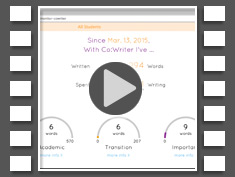
It’s hard to make good decisions without good data. Fortunately, Co:Writer Universal gives you access to the kind of data you need to make great decisions. It shows you how much students are writing with Co:Writer as well as their vocabulary acquisition and usage. This data gives you a level of fidelity of implementation that you’ve never had before!
Watch a 3-minute video on Co:Writer Data
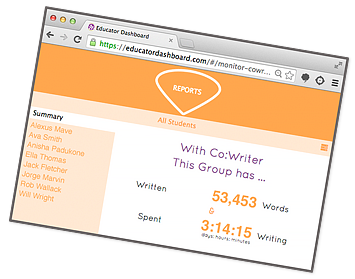
Simply log into the Educator Dashboard™ website from any device and get data on your students. Here’s what you’ll see…
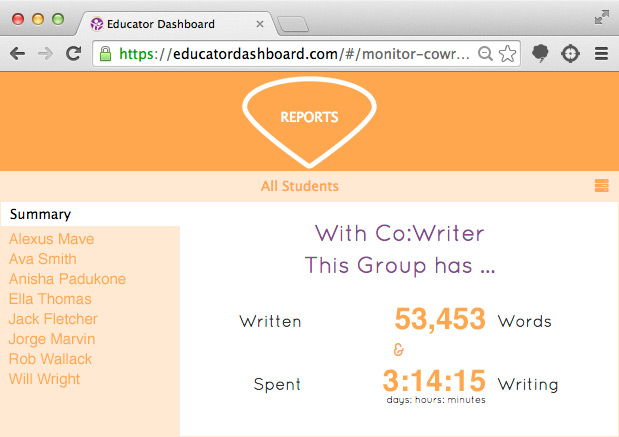
This is group data where you can see how much Co:Writer was used by your students collectively.
Click on a student’s name to see individual data.
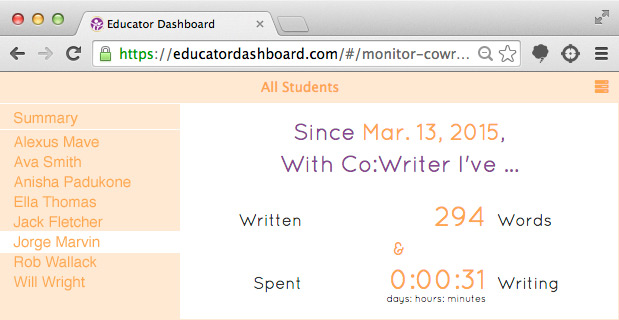
Here is Jorge’s usage data. First, you see the date the student was set up—a nice way to show he had access well ahead of the assessment.
Next you see how much the student wrote with the accommodation. In this case, he wrote 294 words and spent 31 minutes writing since March 13, 2015. Over the school year, you’ll see these numbers grow. You’ll know exactly how much students are writing with Co:Writer, down to the word and hour!

College and career readiness standards require that students acquire and accurately use a range of general academic and domain-specific words. One of the best ways to tell if students have mastered these words is when they use them in writing. Co:Writer shows you the words students use across three categories—academic, transition, and important words.
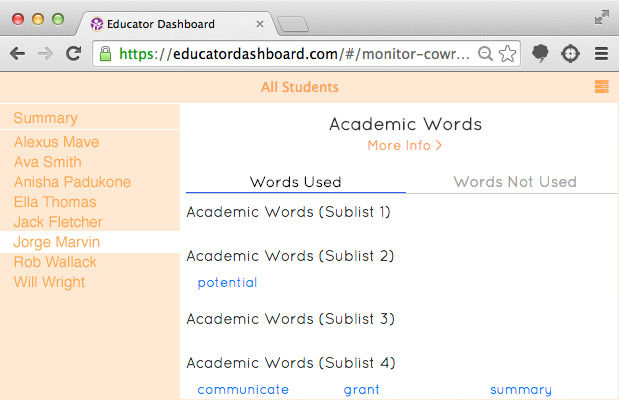
For academic words, we use a popular list that includes 570 word families divided into 10 sub-lists starting with more common words and progressing to less frequent words. You can see the specific words this student used from the list. Clicking the “Words Not Used” text will show the rest of the words on the list that the student hasn’t used yet.
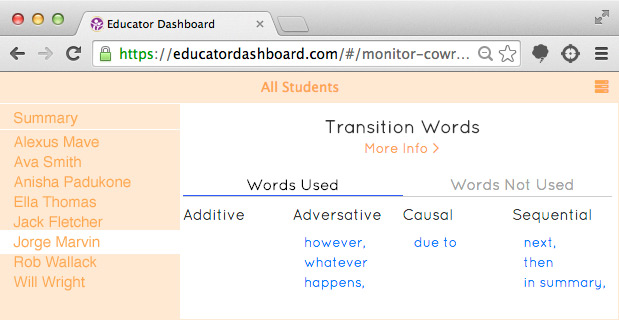
Transition words include 229 common transition words and phrases that show progression between one idea to the next. Co:Writer automatically shows you which of these words a student used in writing. These words are strongly supported by new college and career readiness standards. Students as early as 4th grade are required to “use a variety of transitional words and phrases to manage the sequence of events.” By 12th grade, students are expected to use “appropriate and varied transitions and syntax to link the major sections of the text, create cohesion, and clarify the relationships among complex ideas and concepts.” This aligns nicely to the transition words tracked by Co:Writer.
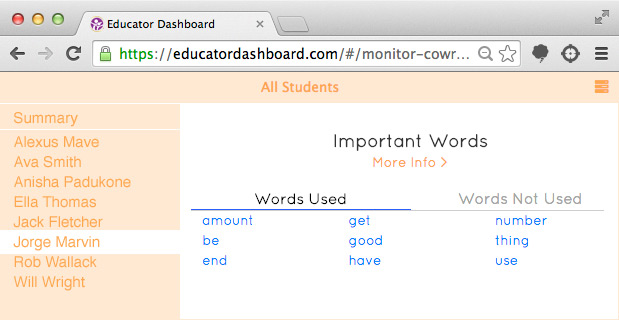
Important words help better understand other words. There are 103 of these “important words” in this list and our student used several including “use,” “amount,” and “have”.
Co:Writer gives you access to a level of data you’ve never had before. Using this data will help you know which students need a little encouragement and which need a pat on the back. It’ll also help give your teachers unprecedented access to college and career ready vocabulary acquisition. This data is all actionable and will go a long way to help you make great decisions!

Only Co:Writer Universal gives students access to over 4 million Topic Dictionaries covering just about any topic you can imagine from atomic structure to penguins. These topic areas cover all of the topics in the new rigorous college and career standards. When students write on any of these topics, they get unprecedented support to infuse academic and topic-specific vocabulary in their writings.
Watch a 3-min video to see how Co:Writer supports vocabulary.
It’s easy. Simply type the name of the topic. Topic options automatically populate.
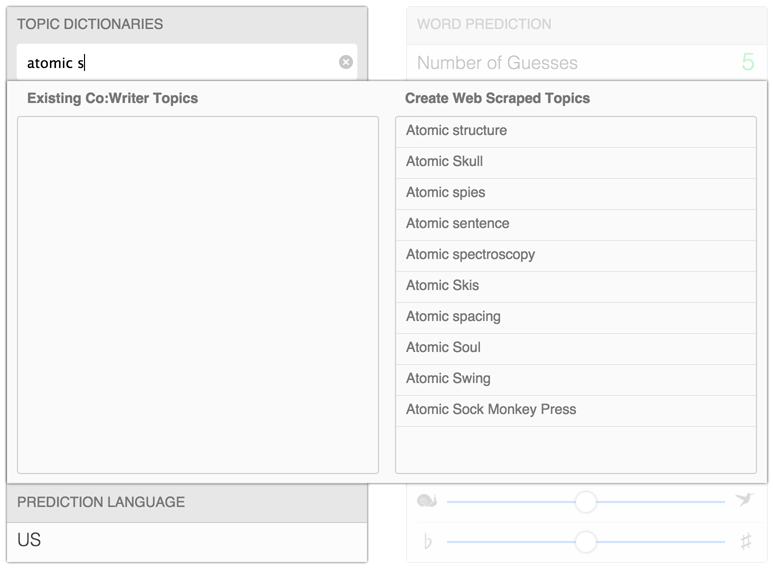
Select one and it will be activated.
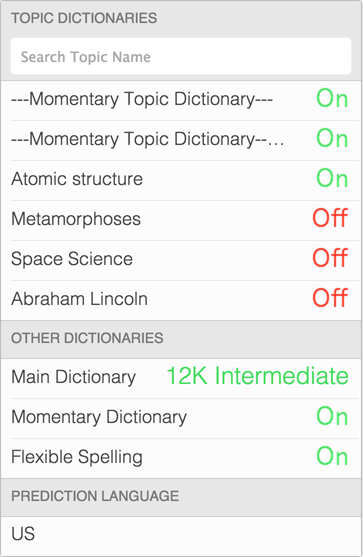
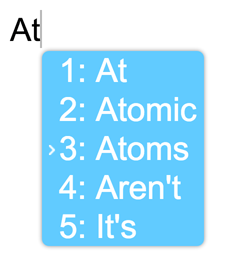
Now write with Co:Writer…

New state standards are making writing a top priority, and many states are making word prediction a standard testing accommodation. We made it really easy for you to administer Co:Writer during a testing situation by allowing you to change and lock settings centrally until the test is over. Co:Writer accessibility was also improved by supporting the built-in on-screen keyboards on both Mac and Windows computers.
PARCC Assessment UPDATE! Where the old assessments were simple multiple choice, 60% of the PARCC literacy assessment will involve writing. The good news is that PARCC recognizes the need for writing accommodations and included word prediction on the list of approved individualized accommodations. This is great news for your Co:Writer users. Co:Writer Universal includes new testing accommodation supports to comply with your state’s guidelines, and data collection will give you the evidence that students are using the tool instructionally. Request a quote to get the latest—Co:Writer Universal.
 Assessment Prep: Using Word Prediction as an Approved PARCC, STAAR and SOL Accommodation
Finally, word prediction is not considered cheating and is allowed on year-end assessments in PARCC states, Texas and Virginia.
For years, students have relied on word prediction as an essential writing accommodation. Yet, until now, only a few states allowed it to be used as a testing accommodation. The PARCC testing consortium (plus Texas and Virginia) is opening up word prediction as an individualized accommodation. This opens up an opportunity for you to give your students equitable access to show what they know on the test.
Ruth Ziolkowski will share the latest guidance so you don’t miss out on this opportunity. She will also demonstrate Co:Writer Universal word prediction, show student before and after assessment examples, and explain how the settings can be adjusted to comply with your state’s guidelines. Bring your team and join us to get a head-start on your preparations for this year’s assessments!
About the Presenter: Ruth Ziolkowski is President of Don Johnston Incorporated and the ATIA Board Member liaison between the assessment consortia and assistive technology field.
 Students in Texas are facing higher expectations in the STAAR testing. Which means it is more important than ever that students are prepared with the best accommodations.
In this webinar, Darren Avey will outline the programs he implemented in 32 Texas schools to prepare for testing accommodation changes in Texas. He will share stories about what worked well and what didn’t.
 About the Presenter: Over the past 20 years, Darren Avey has worked in the Texas area schools and education service centers in a variety of roles, including resource content mastery teacher, technology manager, and since 2005, has taken over all special education technology for the 32 schools in Tyler, Texas.

 In the early 1980s, when Paul Schwejda and Judy McDonald started making word-prediction tools, they felt that any word in the prediction list that was not appropriate was a potential waste of keystrokes. In looking for the best solution, they used grammar-based prediction, in addition to more traditional prediction methods, to make word lists more closely match their vision of perfect prediction. The original Co:Writer program was the first product to incorporate grammar when predicting words. This was the beginning of what is now Co:Writer 7.
Prediction for Struggling Writers
Over the years, Co:Writer became important not only to people with physical disabilities, but also to students struggling to write. When Co:Writer was introduced, Don Johnston Incorporated was active in the United Kingdom. British educators had long used word prediction as an approach for struggling writers. Word prediction with grammar was new, however. British schools adopted Co:Writer and saw the potential.
Word Prediction Affects Word Choice
Struggling writers often do not use the word they want because they do not know how to spell it. What teachers find when they use word prediction with grammar for struggling writers is that students attempt to write with words that they want. Students are also expanding their vocabulary because they are exposed to alternative word choices that are grammatically appropriate. Research continues, but picking out a word from a list of similar words seems to have very positive effects on phonemic awareness and spelling. Sentence composition appears to improve as students work with grammar prediction. This seems to help students create more grammatical sentences.