<?xml version="1.0" encoding="utf-8"?>
<feed xmlns="http://www.w3.org/2005/Atom">
    <id>https://www.rabbitmq.com/blog</id>
    <title>RabbitMQ Blog</title>
    <updated>2025-01-17T00:00:00.000Z</updated>
    <generator>https://github.com/jpmonette/feed</generator>
    <link rel="alternate" href="https://www.rabbitmq.com/blog"/>
    <subtitle>RabbitMQ Blog</subtitle>
    <icon>https://www.rabbitmq.com/img/rabbitmq-logo.svg</icon>
    <entry>
        <title type="html"><![CDATA[How Are The Messages Stored? Not in Memory!]]></title>
        <id>https://www.rabbitmq.com/blog/2025/01/17/how-are-the-messages-stored</id>
        <link href="https://www.rabbitmq.com/blog/2025/01/17/how-are-the-messages-stored"/>
        <updated>2025-01-17T00:00:00.000Z</updated>
        <summary type="html"><![CDATA[It's time to retire the myth that RabbitMQ stores messages in memory. While it was true in the early days of RabbitMQ,]]></summary>
        <content type="html"><![CDATA[<p>It's time to retire the myth that RabbitMQ stores messages in memory. While it was true in the early days of RabbitMQ,
and an option for the last 10 years, modern RabbitMQ versions almost always write messages
to disk right away. In this blog post we review how different queue types store messages but the short answer is: not in memory!</p>
<p>Let's start by clarifying what we mean by storing messages in memory, since it is not a precise statement.
If interpreted as "RabbitMQ uses memory to process messages", this phrase is certainly true.
When client applications send data to RabbitMQ, that data appears in memory buffers first (that's true for all
network-based software). It is also true, that RabbitMQ might cache some messages in memory,
for example to improve performance (again, true for virtually all software that needs to serve data).</p>
<p>However, I keep hearing this phrase used to express concerns about message durability - if you power off the server,
your messages will be lost! In this context, modern RabbitMQ versions almost never store messages in memory.</p>
<div class="theme-admonition theme-admonition-important admonition_xJq3 alert alert--info"><div class="admonitionHeading_Gvgb"><span class="admonitionIcon_Rf37"><svg viewBox="0 0 14 16"><path fill-rule="evenodd" d="M7 2.3c3.14 0 5.7 2.56 5.7 5.7s-2.56 5.7-5.7 5.7A5.71 5.71 0 0 1 1.3 8c0-3.14 2.56-5.7 5.7-5.7zM7 1C3.14 1 0 4.14 0 8s3.14 7 7 7 7-3.14 7-7-3.14-7-7-7zm1 3H6v5h2V4zm0 6H6v2h2v-2z"></path></svg></span>important</div><div class="admonitionContent_BuS1"><p>There is no configuration in which publishing 1GB of messages to RabbitMQ with no connected consumers,
would lead to 1GB of memory being used to store these messages. Some subset of messages can be cached in memory,
but messages are stored on disk.</p></div></div>
<p>We'll go through different queue types and discuss how the messages are processed, stored and when they are confirmed
to the publishers. Publisher confirmations are critical here - RabbitMQ doesn't offer guarantees for messages that
were not confirmed. If you haven't received the confirmation, you can't even know whether the message reached
RabbitMQ (the network connection could have failed for example). With that in mind, let's go through the different queue types.</p>
<h2 class="anchor anchorWithStickyNavbar_LWe7" id="classic-queues">Classic Queues<a href="https://www.rabbitmq.com/blog/2025/01/17/how-are-the-messages-stored#classic-queues" class="hash-link" aria-label="Direct link to Classic Queues" title="Direct link to Classic Queues">​</a></h2>
<p><a href="https://www.rabbitmq.com/docs/classic-queues" target="_blank" rel="noopener noreferrer">Classic queues</a> is the oldest kind of queues in RabbitMQ and the main source of "RabbitMQ stores messages in memory" misconception.
RabbitMQ was first released in 2007. Disks were significantly slower back then and therefore classic queues were designed
to try to avoid writing messages to disk. There was a whole bunch of settings to configure when RabbitMQ should
write messages to disk (a process called "paging") so it would not keep messages in memory indefinitely but indeed,
you could say RabbitMQ stored messages in memory back then. However, that was a long time ago.</p>
<p>In RabbitMQ 3.6, released in 2015, the "lazy mode" was introduced. A queue configured to be lazy, always
stored messages on disk and didn't keep them in memory at all. This means that "RabbitMQ stores messages in memory"
was not true 10 years ago. It'd still do this by default, but it was completely optional.</p>
<p>Lazy mode was removed in RabbitMQ in 3.12, released in 2023, but the default (and the only available) behaviour
changed and is similar to the lazy mode, although not exactly the same. Therefore, for over a year now, classic queues don't store
messages in memory and can't even be configured to do so. The myth is almost entirely false at this point.</p>
<p>Almost entirely? So here's how classic queues work right now: they accumulate incoming messages in a small in-memory buffer
and write them to disk as a batch, as soon as the in-memory buffer is full. Since we don't know if more messages will come,
there are additional triggers that flush that buffer, including a flush after a certain number of batched messages
(even if they are too small to use the whole buffer) and after
a certain number of operations on that batch is performed. Additionally, the queue monitors how quickly messages are consumed
and makes decisions based on that (if there are fast consumers, more messages will be cached in memory). Finally, there's the
last-resort trigger which will flush the buffer every 200ms. So the absolute maximum of how long a message can be stored in
memory is 200ms but in practice, I've never seen this happen. Publishers usually receive confirms within a few milliseconds
and they are sent only after the message was written to disk.</p>
<h3 class="anchor anchorWithStickyNavbar_LWe7" id="but-i-see-no-disk-activity-when-i-use-a-classic-queue">But I See No Disk Activity When I Use a Classic Queue!<a href="https://www.rabbitmq.com/blog/2025/01/17/how-are-the-messages-stored#but-i-see-no-disk-activity-when-i-use-a-classic-queue" class="hash-link" aria-label="Direct link to But I See No Disk Activity When I Use a Classic Queue!" title="Direct link to But I See No Disk Activity When I Use a Classic Queue!">​</a></h3>
<p>Indeed, it's entirely possible to publish messages to classic queues and see virtually no disk writes nor disk reads.
How is that possible? It's an optimisation for a very specific, but relatively common case. As explained above, messages
can be briefly kept in memory but if there are active consumers that are waiting for messages (their prefetch buffer is not full),
messages that reach the queue are dispatched to the consumers immediately, without waiting for their batch to be written to disk.
A message that gets acknowledged by the consumer before this message's batch is written to disk, will not be written to disk at all,
because it simply doesn't need to be. Queues don't store acknowledged messages, so if the message is acknowledged before it is written,
it doesn't get written. If it's acknowledged after it was written, it's deleted from the queue (the actual removal from disk
will happen later, asynchronously, but it is considered deleted immediately).</p>
<p>It's worth mentioning that classic queues have <a href="https://www.rabbitmq.com/blog/2024/01/11/3.13-release#classic-queues-storage-primer" target="_blank" rel="noopener noreferrer">two separate storage mechanisms</a>.
Messages below 4kb (configurable through <code>queue_index_embed_msgs_below</code>) are stored in a per-queue message store and messages above that threshold
are stored in a per-vhost message store. The optimisation mentioned above only works for messages that would be stored in the per-queue message store.</p>
<p>So here it is, in modern RabbitMQ versions, classic queues store messages in memory for a very short period of time (milliseconds)
and no more than 200ms for sure. They may not write messages to disk at all, if the messages are small,
and consumed quickly enough, but this is just a performance optimisation. I'll leave it up to you to decide if that
qualifies as "RabbitMQ stores messages in memory", but I think a more accurate statement would be "when a message is delivered to
a classic queue, RabbitMQ writes messages to disk with a short delay". But yes, that means that for a brief moment, they are only in memory.</p>
<h3 class="anchor anchorWithStickyNavbar_LWe7" id="surely-transient-messages-are-stored-in-memory">Surely, Transient Messages Are Stored in Memory?<a href="https://www.rabbitmq.com/blog/2025/01/17/how-are-the-messages-stored#surely-transient-messages-are-stored-in-memory" class="hash-link" aria-label="Direct link to Surely, Transient Messages Are Stored in Memory?" title="Direct link to Surely, Transient Messages Are Stored in Memory?">​</a></h3>
<p>No. Again, things were different in the past but as of RabbitMQ 4.0, the only difference between persistent and transient messages
is when RabbitMQ sends back the publisher confirm. The messages are stored the same way as described above.</p>
<p>For persistent messages, the confirm is sent when either of these two events takes place:</p>
<ol>
<li>The message is written to disk</li>
<li>The message is delivered and acknowledged by a consumer (if that happens before it's written to disk)</li>
</ol>
<p>For transient messages, the confirm is sent as soon as the message reaches the queue and enters the in-memory buffer.
Since the message is transient, the guarantees are lax: the queue received the message, the publisher can move on.</p>
<h3 class="anchor anchorWithStickyNavbar_LWe7" id="what-about-fsync">What About fsync?<a href="https://www.rabbitmq.com/blog/2025/01/17/how-are-the-messages-stored#what-about-fsync" class="hash-link" aria-label="Direct link to What About fsync?" title="Direct link to What About fsync?">​</a></h3>
<p><code>fsync</code> is a low-level file system operation that should ensure that messages are really written to disk.
There are multiple layers of I/O buffers between a user-space process such as RabbitMQ and actual hardware, including operating
system buffers and internal disk buffers. Performing a write without performing <code>fsync</code> doesn't guarantee that the data
will survive a sudden power loss. Unfortunately, <code>fsync</code> is a relatively slow operation, so any I/O intensive software has to
decide if, and when, to call it. While classic queues call <code>fsync</code> in some cases (for example, when RabbitMQ stops gracefully),
fsync is not performed before publisher confirms are sent. Therefore, even durable messages that a publisher received a confirmation for,
can technically be lost if the server crashes. If you need stronger guarantees, you can use <a href="https://www.rabbitmq.com/docs/quorum-queues">quorum queues</a>.</p>
<h2 class="anchor anchorWithStickyNavbar_LWe7" id="quorum-queues">Quorum Queues<a href="https://www.rabbitmq.com/blog/2025/01/17/how-are-the-messages-stored#quorum-queues" class="hash-link" aria-label="Direct link to Quorum Queues" title="Direct link to Quorum Queues">​</a></h2>
<p>From the initial release in RabbitMQ 3.8 (released in 2019), <a href="https://www.rabbitmq.com/docs/quorum-queues" target="_blank" rel="noopener noreferrer">quorum queues</a> always stored
messages on disk. While the initial versions had an additional in-memory <strong>cache</strong> for messages, it was removed in RabbitMQ 3.10.</p>
<p>The situation is therefore simple: if the publisher received a confirmation, this means the message had already been
written to disk and <code>fsync</code>-ed on the quorum of nodes (in the most common scenario of a 3-node cluster, that means
it was written and <code>fsync</code>-ed on at least 2 nodes).</p>
<p>Since RabbitMQ doesn't offer any guarantees for messages that have not been confirmed to publishers, we could pretty much stop here.
However, for the sake of completeness, I'll mention that some messages are technically in memory:</p>
<ol>
<li>The queue process has a mailbox (an Erlang/OTP concept) where requests to the queue process (such as enqueue/dequeue operations)
arrive for processing. The quorum queue process receives messages from the mailbox and processes them as a batch. When there's
a lot of requests, these operations may accumulate in the mailbox and therefore, assuming there are enqueue operations there, at this
point, some messages are only in-memory. However, this generally means RabbitMQ is at least briefly overloaded and
either way, these operations are usually processed within a few milliseconds. Plus, these messages are not confirmed yet.</li>
<li>Quorum queues rely on the <a href="https://raft.github.io/" target="_blank" rel="noopener noreferrer">Raft protocol</a> and our <a href="https://github.com/rabbitmq/ra/" target="_blank" rel="noopener noreferrer">Raft implementations</a>
stores the most recent Raft operations in memory. For enqueue operations this means that the message is in memory as well. However,
at this point the message is already written to disk and <code>fsync</code>-ed or it hasn't been confirmed yet.</li>
</ol>
<h2 class="anchor anchorWithStickyNavbar_LWe7" id="streams">Streams<a href="https://www.rabbitmq.com/blog/2025/01/17/how-are-the-messages-stored#streams" class="hash-link" aria-label="Direct link to Streams" title="Direct link to Streams">​</a></h2>
<p>With <a href="https://www.rabbitmq.com/docs/streams" target="_blank" rel="noopener noreferrer">Streams</a>, the situation is even simpler than with quorum queues: Streams never supported keeping messages in memory, period.
The main difference between queues and stream in general, is that streams can be read multiple times and therefore consuming
a message doesn't remove that message from a stream. There's no point in storing messages only in memory, if we need to be able
to deliver them to consumers multiple times, potentially long after they were published.</p>
<p>Streams do not perform <code>fsync</code>, since they were optimised for high message throughput.</p>
<p>For completeness, just like quorum queues (and any other Erlang process), the stream process has a mailbox where requests to the stream
process arrive. There's therefore a moment where the messages are stored in memory for a short time. Once again though,
these are messages that have not been confirmed yet and they rarely stay in memory for more than a few milliseconds.</p>
<h2 class="anchor anchorWithStickyNavbar_LWe7" id="mqtt-qos-0-queues">MQTT QoS 0 Queues<a href="https://www.rabbitmq.com/blog/2025/01/17/how-are-the-messages-stored#mqtt-qos-0-queues" class="hash-link" aria-label="Direct link to MQTT QoS 0 Queues" title="Direct link to MQTT QoS 0 Queues">​</a></h2>
<p>RabbitMQ 3.12 introduced <a href="https://www.rabbitmq.com/blog/2023/03/21/native-mqtt">Native MQTT support</a>, and as part of that work, a new queue type was introduced,
specifically for MQTT QoS 0 consumers (you can't explicitly declare a queue of this type, you have to create an MQTT QoS 0 subscription).
Since QoS 0 basically means best-effort but no guarantees, QoS 0 messages are not written to disk at all and are delivered directly to the
consumers that are present. Effectively, there's no queue at all (beyond the Erlang mailbox). Messages received from the publisher are
immediately delivered to the consumers and removed from memory.</p>
<p>Does this qualify as storing messages in memory? I'd say it doesn't - the messages are in memory initially, simply because
that's how computers work, and are removed from memory as soon as they are delivered to the consumers. We don't really store
them in memory - we just process them and never write them to disk in this case. You can disagree and say that this is exactly
what "storing messages in memory means" but even then - this only applies to MQTT QoS 0 usage and the messages will generally stay
in memory for no more than a fraction of second.</p>
<h2 class="anchor anchorWithStickyNavbar_LWe7" id="message-metadata">Message Metadata<a href="https://www.rabbitmq.com/blog/2025/01/17/how-are-the-messages-stored#message-metadata" class="hash-link" aria-label="Direct link to Message Metadata" title="Direct link to Message Metadata">​</a></h2>
<p>So far I focused on message bodies, since that's what people usually mean when talking about storing messages in memory. However,
RabbitMQ also needs to keep track of the messages that are currently present in the queues. For example, when a queues has a defined
<a href="https://www.rabbitmq.com/docs/maxlength" target="_blank" rel="noopener noreferrer"><code>x-max-length</code> limit</a>, RabbitMQ needs to keep track of the total size of all the messages in the queue,
so when it delivers a message, it keeps the message size (but not the message body itself) in memory, to just subtract it quickly
from the total size of the queue, once the consumer acknowledges the messages.</p>
<p>This kind of metadata is stored differently by different queue type, but even when stored in memory, it will consume
significantly less memory than the message bodies would and doesn't change any guarantees about the message durability.</p>
<p>Here's how we store the metadata for different queue types:</p>
<ul>
<li>Classic queues<!-- -->
<ul>
<li>for messages stored in the per-queue message store, no data is stored in memory</li>
<li>for messages stored in the per-vhost message store, there's some metadata in memory</li>
</ul>
</li>
<li>Quorum queues<!-- -->
<ul>
<li>metadata is stored in memory (at least 32 bytes per message, sometimes a bit more, for example when <a href="https://www.rabbitmq.com/docs/ttl" target="_blank" rel="noopener noreferrer">message TTL</a> is used)</li>
</ul>
</li>
<li>Streams<!-- -->
<ul>
<li>no message metadata is stored in memory</li>
</ul>
</li>
</ul>
<p>This basically means that for messages under 4KB stored in classic queues, as well as for streams, regardless of how many messages
there are in the queue/stream, the memory usage is constant. You will run out disk before you run out of memory (you should
configure <a href="https://www.rabbitmq.com/docs/streams#retention" target="_blank" rel="noopener noreferrer">retention</a>/<a href="https://www.rabbitmq.com/docs/maxlength" target="_blank" rel="noopener noreferrer">length</a> limits
to avoid running out disk, but that's a different story).</p>
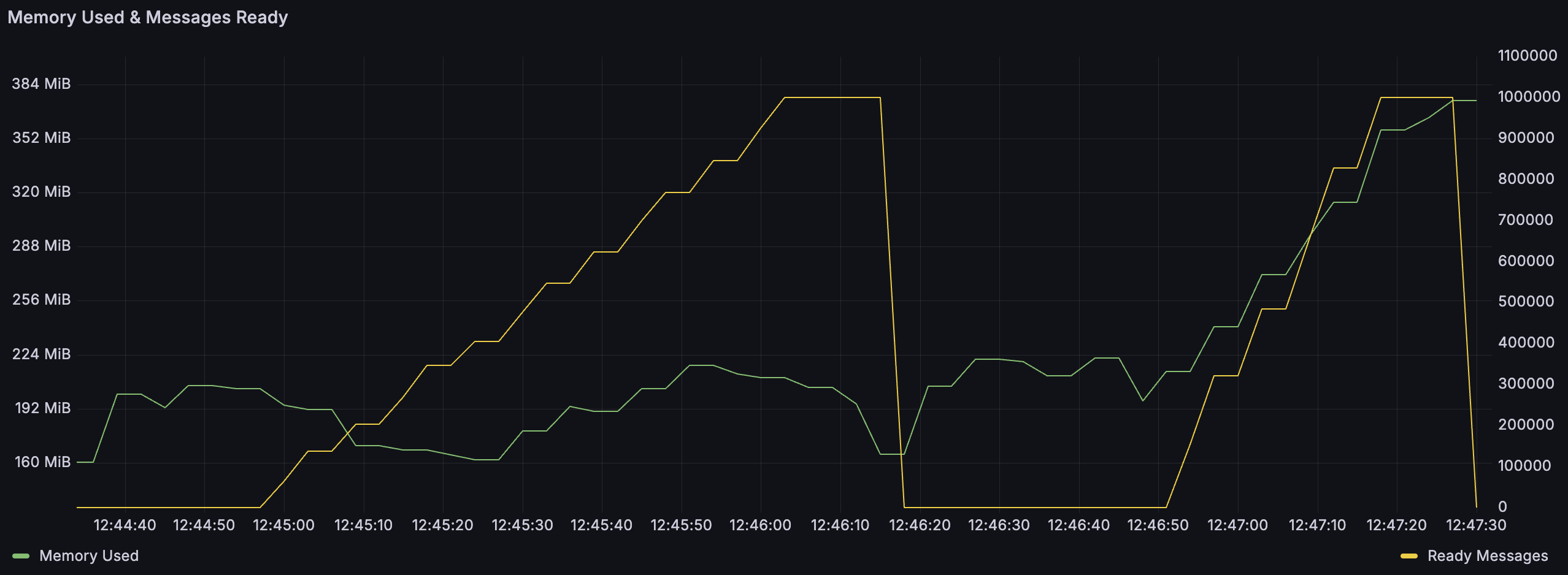
<p>Here's an illustration highlighting the difference between the two classic queue storage mechanisms. In this test,
I first published 1 million messages of 4000 bytes each, then deleted the queue and published 1 million messages of 4100 bytes
each. As you can see, the memory usage was stable in the first phase (small fluctuations notwithstanding), but when publishing
larger messages, we can see the memory usage grows as well. This is because 4100 bytes is above the threshold, so these
messages are stored in the per-vhost message store and the per-vhost message store keeps some metadata in memory. A million 4KB
messages would have taken up 4GB of memory to store, while the actual usage is still below 400MB.</p>
<p></p><figure><img decoding="async" loading="lazy" alt="Classic Queues: memory usage when publishing small and large messages" src="https://www.rabbitmq.com/assets/images/classic-queues-899b1a1caebc83614d77525cf6f9d800.png" width="2556" height="938" class="img_ev3q"><figcaption>Classic Queues: memory usage when publishing small and large messages</figcaption></figure><p></p>
<h2 class="anchor anchorWithStickyNavbar_LWe7" id="summary">Summary<a href="https://www.rabbitmq.com/blog/2025/01/17/how-are-the-messages-stored#summary" class="hash-link" aria-label="Direct link to Summary" title="Direct link to Summary">​</a></h2>
<p>Here's the summary of the key points.</p>
<table><thead><tr><th>Type</th><th>When are the messages written to disk?</th><th>fsync?</th><th>When is the publisher confirm sent?</th></tr></thead><tbody><tr><td>Classic</td><td>After a few milliseconds or as soon as the in-memory buffer is full (whichever happens first)</td><td>No</td><td><strong>Durable messages</strong>: when the message is written to disk or consumed &amp; acknowledged <br> <strong>Transient messages</strong>: as soon as batched in memory</td></tr><tr><td>Quorum</td><td>Immediately (except for unconfirmed messages waiting in the mailbox, see above for details)</td><td>Yes</td><td>When written to disk and fsynced by the quorum of nodes (most commonly 2 out of 3 nodes)</td></tr><tr><td>Streams</td><td>Immediately (except for unconfirmed messages waiting in the mailbox, see above for details)</td><td>No</td><td>When written to disk by the quorum of nodes (most commonly 2 out of 3 nodes)</td></tr></tbody></table>
<p>The flexibility provided by RabbitMQ, with support for multiple protocols, queue types and other configurations (eg. single node,
vs a cluster with queue replication), combined with 18 years of history and evolution, means that almost any "RabbitMQ does/doesn't do X"
statement is incorrect or at least imprecise. They should almost always be quantified with a specific version and configuration.</p>
<p>Going back to the title of this post, I think it's fair to say that "RabbitMQ doesn't store messages in memory" is much
closer to the truth, than the opposite claim, which still circulates in discussions involving RabbitMQ. Regardless of the queue type,
there is no configuration in which publishing, say, 1GB of messages to RabbitMQ with no connected consumers, would lead to 1GB of memory being
used to store these messages. Most importantly, if you want high data safety guarantees, quorum queues are available and store data safely
by default. If you publish a message to a quorum queue and receive the confirmation, it'd take a disastrous event for RabbitMQ to lose it
(and if you want to protect messages from disastrous events, you might be interested in the commercial
<a href="https://techdocs.broadcom.com/us/en/vmware-tanzu/data-solutions/tanzu-rabbitmq-on-kubernetes/4-0/tanzu-rabbitmq-kubernetes/standby-replication.html" target="_blank" rel="noopener noreferrer">Warm Standby Replication plugin</a>).</p>
<p>If you don't need such data safety guarantees, you don't have to pay the intrinsic overhead of data safety. Just use the right tool for the job.</p>]]></content>
        <author>
            <name>Michał Kuratczyk</name>
            <uri>https://github.com/mkuratczyk</uri>
        </author>
        <category label="Classic Queues" term="Classic Queues"/>
        <category label="Quorum Queues" term="Quorum Queues"/>
        <category label="Streams" term="Streams"/>
    </entry>
    <entry>
        <title type="html"><![CDATA[Security Best Practices: epmd]]></title>
        <id>https://www.rabbitmq.com/blog/2024/12/18/epmd-public-exposure</id>
        <link href="https://www.rabbitmq.com/blog/2024/12/18/epmd-public-exposure"/>
        <updated>2024-12-18T00:00:00.000Z</updated>
        <summary type="html"><![CDATA[Security Best Practices: epmd]]></summary>
        <content type="html"><![CDATA[<h2 class="anchor anchorWithStickyNavbar_LWe7" id="security-best-practices-epmd">Security Best Practices: epmd<a href="https://www.rabbitmq.com/blog/2024/12/18/epmd-public-exposure#security-best-practices-epmd" class="hash-link" aria-label="Direct link to Security Best Practices: epmd" title="Direct link to Security Best Practices: epmd">​</a></h2>
<p>The Erlang Port Mapper Daemon (<code>epmd</code>) is a built-in component that helps Erlang-based applications (including RabbitMQ) discover each other’s distribution ports.
Together with DNS for hostname resolution, <code>epmd</code> is a piece of infrastructure RabbitMQ nodes rely on for clustering, inter-node communication
and CLI tools connectivity.</p>
<p>While <code>epm</code> is very limited in scope, its exposure to the public Internet often means that Erlang distribution ports are also exposed.
This creates a potential security risk: if attackers find these distribution ports, they'd be one secret value away from being able to run
CLI commands against the node (or cluster).</p>
<p>Recent scans have revealed over 85,000 instances of publicly accessible <code>epmd</code>, with roughly half associated with RabbitMQ servers.</p>
<p>Fortunately, all it usually takes to mitigate this risk is limiting network access to a range of ports. <code>epmd</code> and inter-node communication
can also be limited to local network interfaces, in particular for single node clusters used for running tests.</p>
<p>Read the full article on the <a href="https://erlef.org/blog/eef/epmd-public-exposure" target="_blank" rel="noopener noreferrer">Erlang Ecosystem Foundation blog</a>.</p>]]></content>
        <author>
            <name>Erlang Ecosystem Foundation</name>
            <uri>https://github.com/erlef</uri>
        </author>
        <category label="security" term="security"/>
    </entry>
    <entry>
        <title type="html"><![CDATA[RabbitMQ 4.0.5 is released]]></title>
        <id>https://www.rabbitmq.com/blog/2024/12/16/rabbitmq-4.0.5-is-released</id>
        <link href="https://www.rabbitmq.com/blog/2024/12/16/rabbitmq-4.0.5-is-released"/>
        <updated>2024-12-16T00:00:00.000Z</updated>
        <summary type="html"><![CDATA[RabbitMQ 4.0.5]]></summary>
        <content type="html"><![CDATA[<h2 class="anchor anchorWithStickyNavbar_LWe7" id="rabbitmq-405">RabbitMQ 4.0.5<a href="https://www.rabbitmq.com/blog/2024/12/16/rabbitmq-4.0.5-is-released#rabbitmq-405" class="hash-link" aria-label="Direct link to RabbitMQ 4.0.5" title="Direct link to RabbitMQ 4.0.5">​</a></h2>
<p><a href="https://github.com/rabbitmq/rabbitmq-server/releases/tag/v4.0.5" target="_blank" rel="noopener noreferrer">RabbitMQ <code>4.0.5</code></a> is
a new patch release in the <code>4.0.x</code> series.</p>
<p>This series is currently covered by <a href="https://www.rabbitmq.com/release-information" target="_blank" rel="noopener noreferrer">community support</a>.</p>
<h2 class="anchor anchorWithStickyNavbar_LWe7" id="release-artifacts">Release Artifacts<a href="https://www.rabbitmq.com/blog/2024/12/16/rabbitmq-4.0.5-is-released#release-artifacts" class="hash-link" aria-label="Direct link to Release Artifacts" title="Direct link to Release Artifacts">​</a></h2>
<p>Release artifacts can be obtained on <a href="https://github.com/rabbitmq/rabbitmq-server/releases/tag/v4.0.5" target="_blank" rel="noopener noreferrer">GitHub</a> as well as <a href="https://www.rabbitmq.com/docs/install-rpm" target="_blank" rel="noopener noreferrer">RPM</a>, <a href="https://www.rabbitmq.com/docs/install-debian" target="_blank" rel="noopener noreferrer">Debian</a> package repositories.</p>
<h2 class="anchor anchorWithStickyNavbar_LWe7" id="upgrade-guidance">Upgrade Guidance<a href="https://www.rabbitmq.com/blog/2024/12/16/rabbitmq-4.0.5-is-released#upgrade-guidance" class="hash-link" aria-label="Direct link to Upgrade Guidance" title="Direct link to Upgrade Guidance">​</a></h2>
<p>If <a href="https://www.rabbitmq.com/docs/upgrade" target="_blank" rel="noopener noreferrer">upgrading</a> from a version prior to 4.0, please consult
the <a href="https://github.com/rabbitmq/rabbitmq-server/releases/tag/v4.0.1" target="_blank" rel="noopener noreferrer"><code>4.0</code> release notes</a>.</p>]]></content>
        <author>
            <name>Michael Klishin</name>
            <uri>https://github.com/michaelklishin</uri>
        </author>
        <category label="Releases" term="Releases"/>
        <category label="RabbitMQ 4.0" term="RabbitMQ 4.0"/>
    </entry>
    <entry>
        <title type="html"><![CDATA[AMQP 1.0 Filter Expressions]]></title>
        <id>https://www.rabbitmq.com/blog/2024/12/13/amqp-filter-expressions</id>
        <link href="https://www.rabbitmq.com/blog/2024/12/13/amqp-filter-expressions"/>
        <updated>2024-12-13T00:00:00.000Z</updated>
        <summary type="html"><![CDATA[RabbitMQ 4.1 introduces an exciting new feature: AMQP filter expressions for streams.]]></summary>
        <content type="html"><![CDATA[<p>RabbitMQ 4.1 <a href="https://github.com/rabbitmq/rabbitmq-server/pull/12415" target="_blank" rel="noopener noreferrer">introduces</a> an exciting new feature: AMQP filter expressions for <a href="https://www.rabbitmq.com/docs/streams">streams</a>.</p>
<p>This feature enables RabbitMQ to support multiple concurrent clients, each consuming only a specific subset of messages while preserving message order.
Additionally, it minimizes network traffic between RabbitMQ and its clients by dispatching only the messages that match the clients' interests.</p>
<p>In this blog post, we’ll explore what AMQP filter expressions are and walk through a simple Java example of how to use them.</p>
<h2 class="anchor anchorWithStickyNavbar_LWe7" id="specification">Specification<a href="https://www.rabbitmq.com/blog/2024/12/13/amqp-filter-expressions#specification" class="hash-link" aria-label="Direct link to Specification" title="Direct link to Specification">​</a></h2>
<p>As outlined in the <a href="https://www.rabbitmq.com/blog/2024/08/05/native-amqp">Native AMQP 1.0</a> blog post, one of AMQP 1.0's strengths is its extensibility, supported by numerous extension specifications.
RabbitMQ 4.1 takes advantage of the extension specification <a href="https://groups.oasis-open.org/higherlogic/ws/public/document?document_id=66227" target="_blank" rel="noopener noreferrer">AMQP Filter Expressions Version 1.0 Working Draft 09</a>.</p>
<p>This specification defines AMQP type definitions for message filter expressions.
Filter expressions are predicates evaluated against a message, returning either <code>true</code> or <code>false</code>.
If a predicate evaluates to <code>true</code>, the broker dispatches the message to the consumer.</p>
<p>RabbitMQ 4.1 implements a subset of this specification, including:</p>
<ul>
<li><strong>§ 4.2.4 properties filter</strong>: Applies to the immutable <a href="https://docs.oasis-open.org/amqp/core/v1.0/os/amqp-core-messaging-v1.0-os.html#type-properties" target="_blank" rel="noopener noreferrer">properties</a> section of the message.</li>
<li><strong>§ 4.2.5 application-properties filter</strong>: Applies to the immutable <a href="https://docs.oasis-open.org/amqp/core/v1.0/os/amqp-core-messaging-v1.0-os.html#type-application-properties" target="_blank" rel="noopener noreferrer">application-properties</a> section of the message.</li>
</ul>
<h2 class="anchor anchorWithStickyNavbar_LWe7" id="example">Example<a href="https://www.rabbitmq.com/blog/2024/12/13/amqp-filter-expressions#example" class="hash-link" aria-label="Direct link to Example" title="Direct link to Example">​</a></h2>
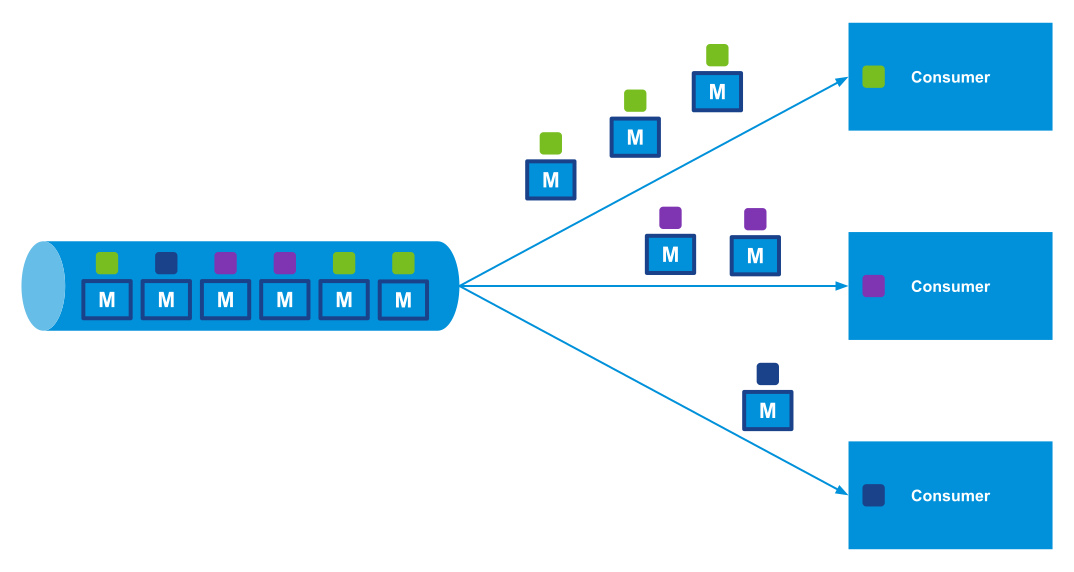
<p>Imagine each message carries metadata specifying a particular color.
Different consumers can subscribe to the same stream, filtering messages to receive only those matching the color they are interested in.</p>
<p></p><figure><img decoding="async" loading="lazy" alt="Consumers filtering messages from a stream" src="https://www.rabbitmq.com/assets/images/stream-filtering-consumers-cdb038faafdd400aa8bf6247996d5a82.svg" width="1074" height="572" class="img_ev3q"><figcaption>Consumers filtering messages from a stream</figcaption></figure><p></p>
<p>The first consumer receives all green messages.
The second consumer receives all purple messages.
The third consumer receives all blue messages.</p>
<details class="details_lb9f alert alert--info details_b_Ee" data-collapsed="true"><summary>Try this example.</summary><div><div class="collapsibleContent_i85q"><p>You can try this example using the <a href="https://github.com/ansd/amqp-filter-expressions/tree/v0.1.0" target="_blank" rel="noopener noreferrer">amqp-filter-expressions</a> sample app along with the <a href="https://github.com/rabbitmq/rabbitmq-amqp-java-client" target="_blank" rel="noopener noreferrer">RabbitMQ AMQP 1.0 Java Client</a> by following these steps:</p><ol>
<li>Start the RabbitMQ server with the following command:</li>
</ol><div class="language-bash codeBlockContainer_Ckt0 theme-code-block" style="--prism-color:#393A34;--prism-background-color:#f6f8fa"><div class="codeBlockContent_biex"><pre tabindex="0" class="prism-code language-bash codeBlock_bY9V thin-scrollbar" style="color:#393A34;background-color:#f6f8fa"><code class="codeBlockLines_e6Vv"><span class="token-line" style="color:#393A34"><span class="token function" style="color:#d73a49">docker</span><span class="token plain"> run </span><span class="token parameter variable" style="color:#36acaa">-it</span><span class="token plain"> </span><span class="token parameter variable" style="color:#36acaa">--rm</span><span class="token plain"> </span><span class="token parameter variable" style="color:#36acaa">--name</span><span class="token plain"> rabbitmq </span><span class="token punctuation" style="color:#393A34">\</span><span class="token plain"></span><br></span><span class="token-line" style="color:#393A34"><span class="token plain">    </span><span class="token parameter variable" style="color:#36acaa">-p</span><span class="token plain"> </span><span class="token number" style="color:#36acaa">5672</span><span class="token plain">:5672 </span><span class="token parameter variable" style="color:#36acaa">-p</span><span class="token plain"> </span><span class="token number" style="color:#36acaa">15672</span><span class="token plain">:15672 </span><span class="token punctuation" style="color:#393A34">\</span><span class="token plain"></span><br></span><span class="token-line" style="color:#393A34"><span class="token plain">    rabbitmq:4.1-rc-management</span><br></span></code></pre><div class="buttonGroup__atx"><button type="button" aria-label="Copy code to clipboard" title="Copy" class="clean-btn"><span class="copyButtonIcons_eSgA" aria-hidden="true"><svg viewBox="0 0 24 24" class="copyButtonIcon_y97N"><path fill="currentColor" d="M19,21H8V7H19M19,5H8A2,2 0 0,0 6,7V21A2,2 0 0,0 8,23H19A2,2 0 0,0 21,21V7A2,2 0 0,0 19,5M16,1H4A2,2 0 0,0 2,3V17H4V3H16V1Z"></path></svg><svg viewBox="0 0 24 24" class="copyButtonSuccessIcon_LjdS"><path fill="currentColor" d="M21,7L9,19L3.5,13.5L4.91,12.09L9,16.17L19.59,5.59L21,7Z"></path></svg></span></button></div></div></div><ol start="2">
<li>Navigate to the root directory of the sample app and start the client:</li>
</ol><div class="language-bash codeBlockContainer_Ckt0 theme-code-block" style="--prism-color:#393A34;--prism-background-color:#f6f8fa"><div class="codeBlockContent_biex"><pre tabindex="0" class="prism-code language-bash codeBlock_bY9V thin-scrollbar" style="color:#393A34;background-color:#f6f8fa"><code class="codeBlockLines_e6Vv"><span class="token-line" style="color:#393A34"><span class="token plain">mvn clean compile exec:java</span><br></span></code></pre><div class="buttonGroup__atx"><button type="button" aria-label="Copy code to clipboard" title="Copy" class="clean-btn"><span class="copyButtonIcons_eSgA" aria-hidden="true"><svg viewBox="0 0 24 24" class="copyButtonIcon_y97N"><path fill="currentColor" d="M19,21H8V7H19M19,5H8A2,2 0 0,0 6,7V21A2,2 0 0,0 8,23H19A2,2 0 0,0 21,21V7A2,2 0 0,0 19,5M16,1H4A2,2 0 0,0 2,3V17H4V3H16V1Z"></path></svg><svg viewBox="0 0 24 24" class="copyButtonSuccessIcon_LjdS"><path fill="currentColor" d="M21,7L9,19L3.5,13.5L4.91,12.09L9,16.17L19.59,5.59L21,7Z"></path></svg></span></button></div></div></div><p>Upon running the sample app, you should see the following output on the console:</p><div class="codeBlockContainer_Ckt0 theme-code-block" style="--prism-color:#393A34;--prism-background-color:#f6f8fa"><div class="codeBlockContent_biex"><pre tabindex="0" class="prism-code language-text codeBlock_bY9V thin-scrollbar" style="color:#393A34;background-color:#f6f8fa"><code class="codeBlockLines_e6Vv"><span class="token-line" style="color:#393A34"><span class="token plain">publisher sent message 0 with color green</span><br></span><span class="token-line" style="color:#393A34"><span class="token plain">publisher sent message 1 with color blue</span><br></span><span class="token-line" style="color:#393A34"><span class="token plain">publisher sent message 2 with color purple</span><br></span><span class="token-line" style="color:#393A34"><span class="token plain">publisher sent message 3 with color purple</span><br></span><span class="token-line" style="color:#393A34"><span class="token plain">publisher sent message 4 with color green</span><br></span><span class="token-line" style="color:#393A34"><span class="token plain">publisher sent message 5 with color green</span><br></span><span class="token-line" style="color:#393A34"><span class="token plain">consumer (filter green) received message 0</span><br></span><span class="token-line" style="color:#393A34"><span class="token plain">consumer (filter green) received message 4</span><br></span><span class="token-line" style="color:#393A34"><span class="token plain">consumer (filter green) received message 5</span><br></span><span class="token-line" style="color:#393A34"><span class="token plain">consumer (filter purple) received message 2</span><br></span><span class="token-line" style="color:#393A34"><span class="token plain">consumer (filter purple) received message 3</span><br></span><span class="token-line" style="color:#393A34"><span class="token plain">consumer (filter blue) received message 1</span><br></span><span class="token-line" style="color:#393A34"><span class="token plain">consumer (filter &amp;s:e) received message 1</span><br></span><span class="token-line" style="color:#393A34"><span class="token plain">consumer (filter &amp;s:e) received message 2</span><br></span><span class="token-line" style="color:#393A34"><span class="token plain">consumer (filter &amp;s:e) received message 3</span><br></span></code></pre><div class="buttonGroup__atx"><button type="button" aria-label="Copy code to clipboard" title="Copy" class="clean-btn"><span class="copyButtonIcons_eSgA" aria-hidden="true"><svg viewBox="0 0 24 24" class="copyButtonIcon_y97N"><path fill="currentColor" d="M19,21H8V7H19M19,5H8A2,2 0 0,0 6,7V21A2,2 0 0,0 8,23H19A2,2 0 0,0 21,21V7A2,2 0 0,0 19,5M16,1H4A2,2 0 0,0 2,3V17H4V3H16V1Z"></path></svg><svg viewBox="0 0 24 24" class="copyButtonSuccessIcon_LjdS"><path fill="currentColor" d="M21,7L9,19L3.5,13.5L4.91,12.09L9,16.17L19.59,5.59L21,7Z"></path></svg></span></button></div></div></div><p>In this example, the publisher sends six messages, assigning each a specific color in the application-properties section.</p><ul>
<li>The first consumer applies an application-properties filter for <code>color: green</code>, receiving all green messages in the order they were published to the stream.</li>
<li>Similarly, the second consumer filters for <code>color: purple</code>, receiving all purple messages, and the third consumer filters for <code>color: blue</code>, receiving all blue messages.</li>
</ul><p>Additionally, this sample app contains a fourth consumer (not shown in the picture above) with a filter that matches messages whose color ends with the letter <code>e</code>.
(As per the specification, the filter expression <code>&amp;s:suffix</code> matches values ending with the specified suffix.)
This fourth consumer therefore receives messages with colors blue and purple.</p></div></div></details>
<p>AMQP filter expressions enable multiple clients to concurrently consume specific subsets of messages from the same stream while preserving message order.
This feature also minimizes network traffic between RabbitMQ and its clients by dispatching only the messages that match each client’s interests.</p>
<h2 class="anchor anchorWithStickyNavbar_LWe7" id="stream-filtering-comparison">Stream Filtering Comparison<a href="https://www.rabbitmq.com/blog/2024/12/13/amqp-filter-expressions#stream-filtering-comparison" class="hash-link" aria-label="Direct link to Stream Filtering Comparison" title="Direct link to Stream Filtering Comparison">​</a></h2>
<p>The <strong>AMQP filter expressions</strong> feature described in this blog post should not be confused with the <a href="https://www.rabbitmq.com/blog/2023/10/16/stream-filtering"><strong>Bloom filter-based stream filtering</strong></a> introduced in RabbitMQ 3.13.</p>
<p>Both features serve the same purpose: filtering messages from a stream.
However, their implementations differ, resulting in distinct characteristics:</p>
<table><thead><tr><th>Feature</th><th>AMQP Filter Expressions</th><th>Bloom Filter Based-Stream Filtering</th></tr></thead><tbody><tr><td>Supported Protocols</td><td>AMQP 1.0</td><td>Primarily for the <a href="https://github.com/rabbitmq/rabbitmq-server/blob/main/deps/rabbitmq_stream/docs/PROTOCOL.adoc" target="_blank" rel="noopener noreferrer">RabbitMQ Streams protocol</a>, but also supports AMQP 1.0, AMQP 0.9.1, and STOMP.</td></tr><tr><td>False Positives</td><td>None</td><td>Possible: Requires additional per-message filtering on the client side.</td></tr><tr><td>Support for Multiple Values to Filter on (Publisher)</td><td>Yes: Publishers can define multiple values in the properties or application-properties sections.</td><td>No: Publishers can assign only one filter value per message.</td></tr><tr><td>Support for Multiple Filter Expressions (Consumer)</td><td>Yes: Consumers can provide multiple filter expressions, and a message is delivered if <em>all</em> filters match.</td><td>Yes: Consumers can specify multiple filter values, and a message is delivered if <em>any</em> filter matches.</td></tr><tr><td>Prefix and Suffix Matching</td><td>Yes: For string values, consumers can define expressions like: "Filter messages whose <a href="https://docs.oasis-open.org/amqp/core/v1.0/os/amqp-core-messaging-v1.0-os.html#type-properties" target="_blank" rel="noopener noreferrer">subject</a> starts with <code>emea.</code>" or "Filter messages whose <a href="https://docs.oasis-open.org/amqp/core/v1.0/os/amqp-core-messaging-v1.0-os.html#type-application-properties" target="_blank" rel="noopener noreferrer">application-properties</a> section has a key <code>color</code> and the value ends with <code>e</code>.</td><td>No</td></tr><tr><td>Broker Overhead</td><td>Implemented using efficient Erlang pattern matching or term equality operations. However, every message is read into memory for each consumer (unless combined with Bloom filter-based filtering).</td><td>Minimal: Bloom filter membership checks use constant time.  With the RabbitMQ Streams protocol, the <a href="https://man7.org/linux/man-pages/man2/sendfile.2.html" target="_blank" rel="noopener noreferrer"><code>sendfile</code> system call</a> optimizes chunk delivery without messages entering user space.</td></tr><tr><td>Network Overhead</td><td>Lower: Only messages matching the consumer's filters are transferred.</td><td>Higher: Entire <a href="https://www.rabbitmq.com/blog/2023/10/24/stream-filtering-internals#structure-of-a-stream">chunks</a> are transferred even if only one message matches.</td></tr></tbody></table>
<p>Both features can be used together when consuming via AMQP 1.0.</p>
<h2 class="anchor anchorWithStickyNavbar_LWe7" id="summary">Summary<a href="https://www.rabbitmq.com/blog/2024/12/13/amqp-filter-expressions#summary" class="hash-link" aria-label="Direct link to Summary" title="Direct link to Summary">​</a></h2>
<p>RabbitMQ 4.1 addresses the <a href="https://github.com/rabbitmq/rabbitmq-server/issues/262" target="_blank" rel="noopener noreferrer">challenge</a> of enabling multiple consumers on a single queue/stream while ensuring certain messages (e.g., those with the same subject or ID) are always processed by the same consumer, preserving in-order processing.</p>
<p>Although this feature is not available for <a href="https://www.rabbitmq.com/docs/classic-queues">classic queues</a> or <a href="https://www.rabbitmq.com/docs/quorum-queues">quorum queues</a>, AMQP filter expressions allow consumers to filter messages when consuming from a stream.
Since streams are immutable logs, total message order is maintained.</p>]]></content>
        <author>
            <name>David Ansari</name>
            <uri>https://github.com/ansd</uri>
        </author>
        <category label="AMQP 1.0" term="AMQP 1.0"/>
        <category label="Streams" term="Streams"/>
        <category label="RabbitMQ 4.1" term="RabbitMQ 4.1"/>
        <category label="New Features" term="New Features"/>
    </entry>
    <entry>
        <title type="html"><![CDATA[AMQP 1.0 Modified Outcome]]></title>
        <id>https://www.rabbitmq.com/blog/2024/10/11/modified-outcome</id>
        <link href="https://www.rabbitmq.com/blog/2024/10/11/modified-outcome"/>
        <updated>2024-10-11T00:00:00.000Z</updated>
        <summary type="html"><![CDATA[This blog post explores use cases of the AMQP 1.0 modified outcome.]]></summary>
        <content type="html"><![CDATA[<p>This blog post explores use cases of the AMQP 1.0 <a href="https://docs.oasis-open.org/amqp/core/v1.0/os/amqp-core-messaging-v1.0-os.html#type-modified" target="_blank" rel="noopener noreferrer">modified outcome</a>.</p>
<p>The modified outcome is a <a href="https://www.rabbitmq.com/docs/amqp#outcomes">feature</a> exclusive to AMQP 1.0 and not available in AMQP 0.9.1
It is supported in <a href="https://www.rabbitmq.com/docs/quorum-queues">quorum queues</a>, but not in <a href="https://www.rabbitmq.com/docs/classic-queues">classic queues</a>.</p>
<p>This feature enables consumers to add or update <a href="https://docs.oasis-open.org/amqp/core/v1.0/os/amqp-core-messaging-v1.0-os.html#type-message-annotations" target="_blank" rel="noopener noreferrer">message annotations</a> before requeueing or <a href="https://www.rabbitmq.com/docs/dlx">dead lettering</a> a message.</p>
<h2 class="anchor anchorWithStickyNavbar_LWe7" id="requeue">Requeue<a href="https://www.rabbitmq.com/blog/2024/10/11/modified-outcome#requeue" class="hash-link" aria-label="Direct link to Requeue" title="Direct link to Requeue">​</a></h2>
<p>Including additional metadata when requeuing a message can be valuable for improving traceability and debugging during message processing.</p>
<p>For example, an application using the <a href="https://github.com/rabbitmq/rabbitmq-amqp-java-client" target="_blank" rel="noopener noreferrer">RabbitMQ AMQP 1.0 Java Client</a> can set specific message annotations before requeuing the message at the head of a quorum queue, as shown below:</p>
<div class="language-java codeBlockContainer_Ckt0 theme-code-block" style="--prism-color:#393A34;--prism-background-color:#f6f8fa"><div class="codeBlockContent_biex"><pre tabindex="0" class="prism-code language-java codeBlock_bY9V thin-scrollbar" style="color:#393A34;background-color:#f6f8fa"><code class="codeBlockLines_e6Vv"><span class="token-line" style="color:#393A34"><span class="token class-name">Consumer</span><span class="token plain"> consumer </span><span class="token operator" style="color:#393A34">=</span><span class="token plain"> connection</span><span class="token punctuation" style="color:#393A34">.</span><span class="token function" style="color:#d73a49">consumerBuilder</span><span class="token punctuation" style="color:#393A34">(</span><span class="token punctuation" style="color:#393A34">)</span><span class="token plain"></span><br></span><span class="token-line" style="color:#393A34"><span class="token plain">    </span><span class="token punctuation" style="color:#393A34">.</span><span class="token function" style="color:#d73a49">queue</span><span class="token punctuation" style="color:#393A34">(</span><span class="token plain">ordersQueue</span><span class="token punctuation" style="color:#393A34">)</span><span class="token plain"></span><br></span><span class="token-line" style="color:#393A34"><span class="token plain">    </span><span class="token punctuation" style="color:#393A34">.</span><span class="token function" style="color:#d73a49">messageHandler</span><span class="token punctuation" style="color:#393A34">(</span><span class="token punctuation" style="color:#393A34">(</span><span class="token plain">context</span><span class="token punctuation" style="color:#393A34">,</span><span class="token plain"> message</span><span class="token punctuation" style="color:#393A34">)</span><span class="token plain"> </span><span class="token operator" style="color:#393A34">-&gt;</span><span class="token plain"> </span><span class="token punctuation" style="color:#393A34">{</span><span class="token plain"></span><br></span><span class="token-line" style="color:#393A34"><span class="token plain">        </span><span class="token class-name">Map</span><span class="token generics punctuation" style="color:#393A34">&lt;</span><span class="token generics class-name">String</span><span class="token generics punctuation" style="color:#393A34">,</span><span class="token generics"> </span><span class="token generics class-name">Object</span><span class="token generics punctuation" style="color:#393A34">&gt;</span><span class="token plain"> annotations </span><span class="token operator" style="color:#393A34">=</span><span class="token plain"> </span><span class="token keyword" style="color:#00009f">new</span><span class="token plain"> </span><span class="token class-name">HashMap</span><span class="token generics punctuation" style="color:#393A34">&lt;</span><span class="token generics punctuation" style="color:#393A34">&gt;</span><span class="token punctuation" style="color:#393A34">(</span><span class="token punctuation" style="color:#393A34">)</span><span class="token punctuation" style="color:#393A34">;</span><span class="token plain"></span><br></span><span class="token-line" style="color:#393A34"><span class="token plain">        annotations</span><span class="token punctuation" style="color:#393A34">.</span><span class="token function" style="color:#d73a49">put</span><span class="token punctuation" style="color:#393A34">(</span><span class="token string" style="color:#e3116c">"x-opt-requeue-reason"</span><span class="token punctuation" style="color:#393A34">,</span><span class="token plain"> </span><span class="token string" style="color:#e3116c">"external_service_unavailable"</span><span class="token punctuation" style="color:#393A34">)</span><span class="token punctuation" style="color:#393A34">;</span><span class="token plain"></span><br></span><span class="token-line" style="color:#393A34"><span class="token plain">        annotations</span><span class="token punctuation" style="color:#393A34">.</span><span class="token function" style="color:#d73a49">put</span><span class="token punctuation" style="color:#393A34">(</span><span class="token string" style="color:#e3116c">"x-opt-requeue-time"</span><span class="token punctuation" style="color:#393A34">,</span><span class="token plain"> </span><span class="token class-name">System</span><span class="token punctuation" style="color:#393A34">.</span><span class="token function" style="color:#d73a49">currentTimeMillis</span><span class="token punctuation" style="color:#393A34">(</span><span class="token punctuation" style="color:#393A34">)</span><span class="token punctuation" style="color:#393A34">)</span><span class="token punctuation" style="color:#393A34">;</span><span class="token plain"></span><br></span><span class="token-line" style="color:#393A34"><span class="token plain">        annotations</span><span class="token punctuation" style="color:#393A34">.</span><span class="token function" style="color:#d73a49">put</span><span class="token punctuation" style="color:#393A34">(</span><span class="token string" style="color:#e3116c">"x-opt-requeued-by"</span><span class="token punctuation" style="color:#393A34">,</span><span class="token plain"> </span><span class="token string" style="color:#e3116c">"consumer_1"</span><span class="token punctuation" style="color:#393A34">)</span><span class="token punctuation" style="color:#393A34">;</span><span class="token plain"></span><br></span><span class="token-line" style="color:#393A34"><span class="token plain">        context</span><span class="token punctuation" style="color:#393A34">.</span><span class="token function" style="color:#d73a49">requeue</span><span class="token punctuation" style="color:#393A34">(</span><span class="token plain">annotations</span><span class="token punctuation" style="color:#393A34">)</span><span class="token punctuation" style="color:#393A34">;</span><span class="token plain"></span><br></span><span class="token-line" style="color:#393A34"><span class="token plain">    </span><span class="token punctuation" style="color:#393A34">}</span><span class="token punctuation" style="color:#393A34">)</span><span class="token punctuation" style="color:#393A34">.</span><span class="token function" style="color:#d73a49">build</span><span class="token punctuation" style="color:#393A34">(</span><span class="token punctuation" style="color:#393A34">)</span><span class="token punctuation" style="color:#393A34">;</span><br></span></code></pre><div class="buttonGroup__atx"><button type="button" aria-label="Copy code to clipboard" title="Copy" class="clean-btn"><span class="copyButtonIcons_eSgA" aria-hidden="true"><svg viewBox="0 0 24 24" class="copyButtonIcon_y97N"><path fill="currentColor" d="M19,21H8V7H19M19,5H8A2,2 0 0,0 6,7V21A2,2 0 0,0 8,23H19A2,2 0 0,0 21,21V7A2,2 0 0,0 19,5M16,1H4A2,2 0 0,0 2,3V17H4V3H16V1Z"></path></svg><svg viewBox="0 0 24 24" class="copyButtonSuccessIcon_LjdS"><path fill="currentColor" d="M21,7L9,19L3.5,13.5L4.91,12.09L9,16.17L19.59,5.59L21,7Z"></path></svg></span></button></div></div></div>
<p>These annotations could use different types including <a href="https://docs.oasis-open.org/amqp/core/v1.0/os/amqp-core-types-v1.0-os.html#type-map" target="_blank" rel="noopener noreferrer">map</a>, <a href="https://docs.oasis-open.org/amqp/core/v1.0/os/amqp-core-types-v1.0-os.html#type-list" target="_blank" rel="noopener noreferrer">list</a>, or <a href="https://docs.oasis-open.org/amqp/core/v1.0/os/amqp-core-types-v1.0-os.html#type-array" target="_blank" rel="noopener noreferrer">array</a>.
This flexibility allows not only setting details like the last requeue reason, time, and consumer, but also tracking a history of requeue events.
Maintaining such a history can reveal patterns, such as identifying consumers that requeue messages more frequently or discovering common requeue reasons across the system.
However, keep in mind that quorum queues retain modified message annotations in memory, which increases the memory overhead per requeued message.</p>
<p>Setting custom headers before requeueing a message at the head of the queue is not supported in AMQP 0.9.1.</p>
<p>Whether requeuing a message to a quorum queue via AMQP 1.0 or AMQP 0.9.1, the <a href="https://www.rabbitmq.com/docs/quorum-queues#poison-message-handling" target="_blank" rel="noopener noreferrer">x-delivery-count</a> annotation will always be incremented.</p>
<h2 class="anchor anchorWithStickyNavbar_LWe7" id="dead-letter">Dead Letter<a href="https://www.rabbitmq.com/blog/2024/10/11/modified-outcome#dead-letter" class="hash-link" aria-label="Direct link to Dead Letter" title="Direct link to Dead Letter">​</a></h2>
<p>When dead lettering a message, the consumer can include a custom reason for the dead lettering in the message annotations:</p>
<div class="language-java codeBlockContainer_Ckt0 theme-code-block" style="--prism-color:#393A34;--prism-background-color:#f6f8fa"><div class="codeBlockContent_biex"><pre tabindex="0" class="prism-code language-java codeBlock_bY9V thin-scrollbar" style="color:#393A34;background-color:#f6f8fa"><code class="codeBlockLines_e6Vv"><span class="token-line" style="color:#393A34"><span class="token class-name">Consumer</span><span class="token plain"> consumer </span><span class="token operator" style="color:#393A34">=</span><span class="token plain"> connection</span><span class="token punctuation" style="color:#393A34">.</span><span class="token function" style="color:#d73a49">consumerBuilder</span><span class="token punctuation" style="color:#393A34">(</span><span class="token punctuation" style="color:#393A34">)</span><span class="token plain"></span><br></span><span class="token-line" style="color:#393A34"><span class="token plain">    </span><span class="token punctuation" style="color:#393A34">.</span><span class="token function" style="color:#d73a49">queue</span><span class="token punctuation" style="color:#393A34">(</span><span class="token plain">ordersQueue</span><span class="token punctuation" style="color:#393A34">)</span><span class="token plain"></span><br></span><span class="token-line" style="color:#393A34"><span class="token plain">    </span><span class="token punctuation" style="color:#393A34">.</span><span class="token function" style="color:#d73a49">messageHandler</span><span class="token punctuation" style="color:#393A34">(</span><span class="token punctuation" style="color:#393A34">(</span><span class="token plain">context</span><span class="token punctuation" style="color:#393A34">,</span><span class="token plain"> message</span><span class="token punctuation" style="color:#393A34">)</span><span class="token plain"> </span><span class="token operator" style="color:#393A34">-&gt;</span><span class="token plain"> </span><span class="token punctuation" style="color:#393A34">{</span><span class="token plain"></span><br></span><span class="token-line" style="color:#393A34"><span class="token plain">        </span><span class="token class-name">Map</span><span class="token generics punctuation" style="color:#393A34">&lt;</span><span class="token generics class-name">String</span><span class="token generics punctuation" style="color:#393A34">,</span><span class="token generics"> </span><span class="token generics class-name">Object</span><span class="token generics punctuation" style="color:#393A34">&gt;</span><span class="token plain"> annotations </span><span class="token operator" style="color:#393A34">=</span><span class="token plain"> </span><span class="token keyword" style="color:#00009f">new</span><span class="token plain"> </span><span class="token class-name">HashMap</span><span class="token generics punctuation" style="color:#393A34">&lt;</span><span class="token generics punctuation" style="color:#393A34">&gt;</span><span class="token punctuation" style="color:#393A34">(</span><span class="token punctuation" style="color:#393A34">)</span><span class="token punctuation" style="color:#393A34">;</span><span class="token plain"></span><br></span><span class="token-line" style="color:#393A34"><span class="token plain">        annotations</span><span class="token punctuation" style="color:#393A34">.</span><span class="token function" style="color:#d73a49">put</span><span class="token punctuation" style="color:#393A34">(</span><span class="token string" style="color:#e3116c">"x-opt-dead-letter-reason"</span><span class="token punctuation" style="color:#393A34">,</span><span class="token plain"> </span><span class="token string" style="color:#e3116c">"Incompatible Message Format"</span><span class="token punctuation" style="color:#393A34">)</span><span class="token punctuation" style="color:#393A34">;</span><span class="token plain"></span><br></span><span class="token-line" style="color:#393A34"><span class="token plain">        context</span><span class="token punctuation" style="color:#393A34">.</span><span class="token function" style="color:#d73a49">discard</span><span class="token punctuation" style="color:#393A34">(</span><span class="token plain">annotations</span><span class="token punctuation" style="color:#393A34">)</span><span class="token punctuation" style="color:#393A34">;</span><span class="token plain"></span><br></span><span class="token-line" style="color:#393A34"><span class="token plain">    </span><span class="token punctuation" style="color:#393A34">}</span><span class="token punctuation" style="color:#393A34">)</span><span class="token punctuation" style="color:#393A34">.</span><span class="token function" style="color:#d73a49">build</span><span class="token punctuation" style="color:#393A34">(</span><span class="token punctuation" style="color:#393A34">)</span><span class="token punctuation" style="color:#393A34">;</span><br></span></code></pre><div class="buttonGroup__atx"><button type="button" aria-label="Copy code to clipboard" title="Copy" class="clean-btn"><span class="copyButtonIcons_eSgA" aria-hidden="true"><svg viewBox="0 0 24 24" class="copyButtonIcon_y97N"><path fill="currentColor" d="M19,21H8V7H19M19,5H8A2,2 0 0,0 6,7V21A2,2 0 0,0 8,23H19A2,2 0 0,0 21,21V7A2,2 0 0,0 19,5M16,1H4A2,2 0 0,0 2,3V17H4V3H16V1Z"></path></svg><svg viewBox="0 0 24 24" class="copyButtonSuccessIcon_LjdS"><path fill="currentColor" d="M21,7L9,19L3.5,13.5L4.91,12.09L9,16.17L19.59,5.59L21,7Z"></path></svg></span></button></div></div></div>
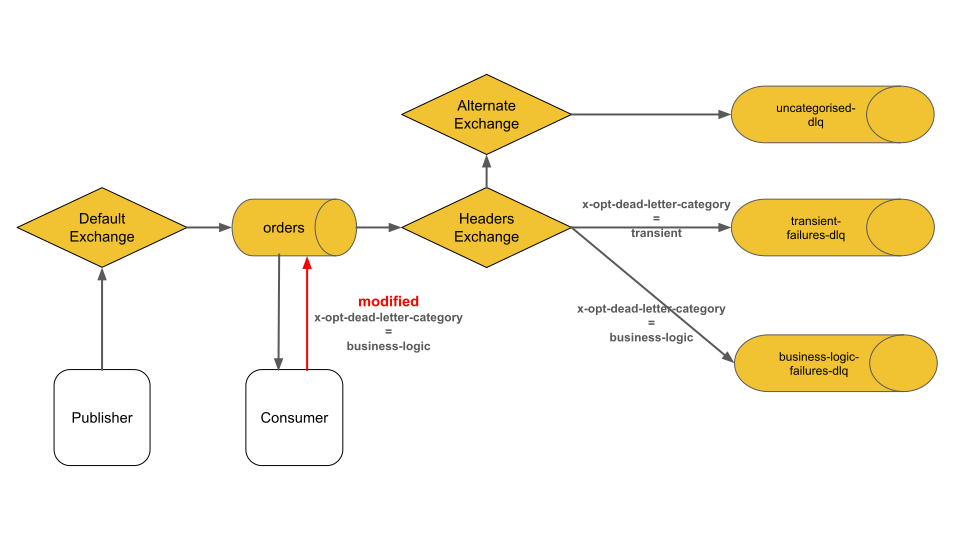
<p>When dead lettering to a <a href="https://www.rabbitmq.com/tutorials/amqp-concepts#exchange-headers">headers exchange</a>, the consumer can even decide which target queue the message will be routed to:</p>
<p></p><figure><img decoding="async" loading="lazy" alt="An AMQP 1.0 consumer can use the modified outcome to decide which dead letter queue a message is routed to." src="https://www.rabbitmq.com/assets/images/modified-outcome-1f1cee13e3c2f3aec685976bbfc338c3.svg" width="960" height="540" class="img_ev3q"><figcaption>An AMQP 1.0 consumer can use the modified outcome to decide which dead letter queue a message is routed to.</figcaption></figure><p></p>
<p>In this example, two dead letter quorum queues are bound to the dead letter headers exchange:</p>
<ol>
<li><code>transient-failures-dlq</code></li>
<li><code>business-logic-failures-dlq</code></li>
</ol>
<p>Different dead letter queues can be processed by different apps or teams, with varying actions taken depending on the nature of the failure.
For instance, all messages in the <code>transient-failures-dlq</code> could be re-published to the original <code>orders</code> queue, while messages in the <code>business-logic-failures-dlq</code> might require human intervention.</p>
<p>More dead letter queues could be added, such as:</p>
<ul>
<li><code>data-integrity-dlq</code> for messages with unknown schema</li>
<li><code>resource-limit-dlq</code> for cases where rate limits were exceeded</li>
<li><code>critical-errors-dlq</code> for situations that require administrator attention.</li>
</ul>
<p>It’s crucial that all messages dead lettered from the <code>orders</code> queue are routable.
The <a href="https://www.rabbitmq.com/docs/ae">alternate exchange</a> in the above diagram provides "or else" routing semantics, ensuring messages end up in the <code>uncategorised-dlq</code> if no <code>x-opt-dead-letter-category</code> annotation is set.
This might occur, for example, if the publisher sets a <code>ttl</code> <a href="https://docs.oasis-open.org/amqp/core/v1.0/os/amqp-core-messaging-v1.0-os.html#type-header" target="_blank" rel="noopener noreferrer">header</a> but no consumer grants <a href="https://www.rabbitmq.com/blog/2024/09/02/amqp-flow-control#link-credit">link credit</a>, causing the message to expire and be dead lettered.</p>
<p>The scenario depicted above is demonstrated in the <a href="https://github.com/ansd/modified-outcome/blob/v0.1.0/src/main/java/com/github/ansd/App.java" target="_blank" rel="noopener noreferrer">modified-outcome sample application</a>.</p>
<details class="details_lb9f alert alert--info details_b_Ee" data-collapsed="true"><summary>modified-outcome sample application</summary><div><div class="collapsibleContent_i85q"><p>The sample app uses the <a href="https://github.com/rabbitmq/rabbitmq-amqp-java-client" target="_blank" rel="noopener noreferrer">RabbitMQ AMQP 1.0 Java Client</a>.</p><p>You can run this sample application as follows:</p><ol>
<li>Start RabbitMQ server via <code>docker run -it --rm --name rabbitmq -p 5672:5672 -p 15672:15672 rabbitmq:4.0-management</code></li>
<li>In the root directory of <a href="https://github.com/ansd/modified-outcome/tree/v0.1.0" target="_blank" rel="noopener noreferrer">the sample app</a>, start the client via <code>mvn clean compile exec:java</code>.</li>
</ol><p>After publishing a message to the <code>orders</code> queue, the client app consumes the message and outputs the following on the console:</p><div class="codeBlockContainer_Ckt0 theme-code-block" style="--prism-color:#393A34;--prism-background-color:#f6f8fa"><div class="codeBlockContent_biex"><pre tabindex="0" class="prism-code language-text codeBlock_bY9V thin-scrollbar" style="color:#393A34;background-color:#f6f8fa"><code class="codeBlockLines_e6Vv"><span class="token-line" style="color:#393A34"><span class="token plain">publisher: received ACCEPTED outcome</span><br></span><span class="token-line" style="color:#393A34"><span class="token plain">consumer: setting annotations {x-opt-dead-letter-reason=Customer Not Eligible for Discount, x-opt-dead-letter-category=business-logic} and dead lettering...</span><br></span></code></pre><div class="buttonGroup__atx"><button type="button" aria-label="Copy code to clipboard" title="Copy" class="clean-btn"><span class="copyButtonIcons_eSgA" aria-hidden="true"><svg viewBox="0 0 24 24" class="copyButtonIcon_y97N"><path fill="currentColor" d="M19,21H8V7H19M19,5H8A2,2 0 0,0 6,7V21A2,2 0 0,0 8,23H19A2,2 0 0,0 21,21V7A2,2 0 0,0 19,5M16,1H4A2,2 0 0,0 2,3V17H4V3H16V1Z"></path></svg><svg viewBox="0 0 24 24" class="copyButtonSuccessIcon_LjdS"><path fill="currentColor" d="M21,7L9,19L3.5,13.5L4.91,12.09L9,16.17L19.59,5.59L21,7Z"></path></svg></span></button></div></div></div><p>The message will be dead lettered to the <code>business-logic-failures-dlq</code>.</p><p>To prevent message loss during dead lettering, the sample app uses <a href="https://www.rabbitmq.com/blog/2022/03/29/at-least-once-dead-lettering">at-least-once dead lettering</a>.</p></div></div></details>
<h2 class="anchor anchorWithStickyNavbar_LWe7" id="dead-letter-vs-re-publish">Dead Letter vs. Re-publish<a href="https://www.rabbitmq.com/blog/2024/10/11/modified-outcome#dead-letter-vs-re-publish" class="hash-link" aria-label="Direct link to Dead Letter vs. Re-publish" title="Direct link to Dead Letter vs. Re-publish">​</a></h2>
<p>An AMQP 0.9.1 consumer cannot set custom headers before dead lettering a message.
However, instead of using <code>basic.nack</code> or <code>basic.reject</code> with <code>requeue=false</code> to dead letter a message, an AMQP 0.9.1 client could follow this approach:</p>
<ol>
<li>Re-publish the message directly to a specific "dead letter" queue with new custom headers.</li>
<li>Wait for RabbitMQ to confirm the re-published message.</li>
<li>Acknowledge the original message via <code>basic.ack</code>.</li>
</ol>
<p>An AMQP 1.0 client can choose between dead lettering with custom message annotations or re-publishing the message.
Both approaches have their advantages and trade-offs:</p>
<table><thead><tr><th>Criteria</th><th>Dead Letter with Custom Reason</th><th>Re-publish with Custom Reason</th></tr></thead><tbody><tr><td>Simplicity</td><td>Easier for consumers.</td><td>More complex, as the consumer must handle the republishing process.</td></tr><tr><td>Overhead</td><td>Low overhead.</td><td>Higher overhead for the client: the message payload must be re-published from the client to RabbitMQ, with additional latency due to the extra publish and confirm steps.</td></tr><tr><td>Network Failure between client and RabbitMQ before settling the consumed message.</td><td>Message gets requeued.</td><td>The message might have been both re-published and requeued, resulting in one copy ending up in the "dead letter" queue and another in the original queue.</td></tr><tr><td>Flexibility</td><td>Can modify only message annotations and route based on dead letter headers exchange.</td><td>Allows modification of any part of the message and re-publishing to any exchange.</td></tr></tbody></table>
<h2 class="anchor anchorWithStickyNavbar_LWe7" id="wrapping-up">Wrapping Up<a href="https://www.rabbitmq.com/blog/2024/10/11/modified-outcome#wrapping-up" class="hash-link" aria-label="Direct link to Wrapping Up" title="Direct link to Wrapping Up">​</a></h2>
<p>AMQP 1.0's modified outcome feature allows consumers to modify message annotations before requeueing or dead lettering.</p>
<p>Rather than relying solely on RabbitMQ's built-in dead lettering tracking via <a href="https://www.rabbitmq.com/docs/dlx#effects">x-opt-deaths</a>, consumers can customise dead lettering event tracking and even choose which dead letter queue a message is sent to.</p>]]></content>
        <author>
            <name>David Ansari</name>
            <uri>https://github.com/ansd</uri>
        </author>
        <author>
            <name>Karl Nilsson</name>
            <uri>https://github.com/kjnilsson</uri>
        </author>
        <author>
            <name>Arnaud Cogoluègnes</name>
            <uri>https://github.com/acogoluegnes</uri>
        </author>
        <category label="AMQP 1.0" term="AMQP 1.0"/>
        <category label="RabbitMQ 4.0" term="RabbitMQ 4.0"/>
        <category label="New Features" term="New Features"/>
    </entry>
    <entry>
        <title type="html"><![CDATA[Ten Benefits of AMQP 1.0 Flow Control]]></title>
        <id>https://www.rabbitmq.com/blog/2024/09/02/amqp-flow-control</id>
        <link href="https://www.rabbitmq.com/blog/2024/09/02/amqp-flow-control"/>
        <updated>2024-09-02T00:00:00.000Z</updated>
        <summary type="html"><![CDATA[This blog post outlines ten advantages of AMQP 1.0 flow control over AMQP 0.9.1, supported by two benchmarks demonstrating significant performance gains.]]></summary>
        <content type="html"><![CDATA[<p>This blog post outlines ten advantages of AMQP 1.0 flow control over AMQP 0.9.1, supported by two benchmarks demonstrating significant performance gains.
Additionally, we delve into the powerful AMQP 1.0 flow control primitives and how they are used in RabbitMQ.</p>
<blockquote>
<p><a href="https://en.wikipedia.org/wiki/Flow_control_(data)" target="_blank" rel="noopener noreferrer">Flow control</a> is the process of managing the rate of data transmission between two nodes to prevent a fast sender from overwhelming a slow receiver.</p>
</blockquote>
<p>The AMQP 1.0 protocol defines flow control at two different levels:</p>
<ol>
<li><a href="https://docs.oasis-open.org/amqp/core/v1.0/os/amqp-core-transport-v1.0-os.html#doc-flow-control" target="_blank" rel="noopener noreferrer">Link Flow Control</a></li>
<li><a href="https://docs.oasis-open.org/amqp/core/v1.0/os/amqp-core-transport-v1.0-os.html#doc-session-flow-control" target="_blank" rel="noopener noreferrer">Session Flow Control</a></li>
</ol>
<h2 class="anchor anchorWithStickyNavbar_LWe7" id="link-flow-control">Link Flow Control<a href="https://www.rabbitmq.com/blog/2024/09/02/amqp-flow-control#link-flow-control" class="hash-link" aria-label="Direct link to Link Flow Control" title="Direct link to Link Flow Control">​</a></h2>
<p>In AMQP 1.0, messages are sent over a <a href="https://docs.oasis-open.org/amqp/core/v1.0/os/amqp-core-transport-v1.0-os.html#section-links" target="_blank" rel="noopener noreferrer">link</a>.
A link connects either a sending client application to an <a href="https://www.rabbitmq.com/tutorials/amqp-concepts#exchanges">exchange</a> in RabbitMQ or a <a href="https://www.rabbitmq.com/tutorials/amqp-concepts#queues">queue</a> in RabbitMQ to a consuming client application.</p>
<div class="theme-admonition theme-admonition-info admonition_xJq3 alert alert--info"><div class="admonitionHeading_Gvgb"><span class="admonitionIcon_Rf37"><svg viewBox="0 0 14 16"><path fill-rule="evenodd" d="M7 2.3c3.14 0 5.7 2.56 5.7 5.7s-2.56 5.7-5.7 5.7A5.71 5.71 0 0 1 1.3 8c0-3.14 2.56-5.7 5.7-5.7zM7 1C3.14 1 0 4.14 0 8s3.14 7 7 7 7-3.14 7-7-3.14-7-7-7zm1 3H6v5h2V4zm0 6H6v2h2v-2z"></path></svg></span>info</div><div class="admonitionContent_BuS1"><p>While the AMQP 1.0 specification uses the terms "senders" and "receivers", the RabbitMQ documentation refers to <a href="https://www.rabbitmq.com/docs/publishers">"publishers"</a> (or "producers") and <a href="https://www.rabbitmq.com/docs/consumers">"consumers"</a>.
When discussing client applications, these terms can be used interchangeably. Therefore, a client application instance that:</p><ul>
<li>Sends messages to RabbitMQ is a <strong>sender</strong> / <strong>publisher</strong> / <strong>producer</strong> (with RabbitMQ acting as the <strong>receiver</strong>).</li>
<li>Receives messages from RabbitMQ is a <strong>receiver</strong> / <strong>consumer</strong> (with RabbitMQ acting as the <strong>sender</strong>).</li>
</ul></div></div>
<h3 class="anchor anchorWithStickyNavbar_LWe7" id="link-credit">Link-Credit<a href="https://www.rabbitmq.com/blog/2024/09/02/amqp-flow-control#link-credit" class="hash-link" aria-label="Direct link to Link-Credit" title="Direct link to Link-Credit">​</a></h3>
<p>The central idea behind AMQP 1.0 link flow control is simple:
<strong>To receive messages, a consumer must grant credits to the sending queue.</strong></p>
<p>One credit corresponds to one message.
For example, when the consumer grants 10 credits, RabbitMQ is allowed to send 10 messages.
This straightforward principle, where the receiver provides <strong>feedback</strong> to the sender, ensures that the sender never overwhelms the receiver.</p>
<p>Both the receiver and sender maintain their own "link state".
Part of this state is the current link credit.
Link credit decreases by 1 each time a message is transferred.
Specifically, the sender reduces link credit by 1 when it sends a message, and the receiver reduces link credit by 1 when it receives a message.
When the sender's link credit reaches 0, it must stop sending messages.</p>
<p>Messages are sent in <a href="https://docs.oasis-open.org/amqp/core/v1.0/os/amqp-core-transport-v1.0-os.html#type-transfer" target="_blank" rel="noopener noreferrer">transfer</a> frames.</p>
<p>Credits are granted in <a href="https://docs.oasis-open.org/amqp/core/v1.0/os/amqp-core-transport-v1.0-os.html#type-flow" target="_blank" rel="noopener noreferrer">flow</a> frames:</p>
<div class="language-xml codeBlockContainer_Ckt0 theme-code-block" style="--prism-color:#393A34;--prism-background-color:#f6f8fa"><div class="codeBlockContent_biex"><pre tabindex="0" class="prism-code language-xml codeBlock_bY9V thin-scrollbar" style="color:#393A34;background-color:#f6f8fa"><code class="codeBlockLines_e6Vv"><span class="token-line" style="color:#393A34"><span class="token tag punctuation" style="color:#393A34">&lt;</span><span class="token tag" style="color:#00009f">field</span><span class="token tag" style="color:#00009f"> </span><span class="token tag attr-name" style="color:#00a4db">name</span><span class="token tag attr-value punctuation attr-equals" style="color:#393A34">=</span><span class="token tag attr-value punctuation" style="color:#393A34">"</span><span class="token tag attr-value" style="color:#e3116c">link-credit</span><span class="token tag attr-value punctuation" style="color:#393A34">"</span><span class="token tag" style="color:#00009f"> </span><span class="token tag attr-name" style="color:#00a4db">type</span><span class="token tag attr-value punctuation attr-equals" style="color:#393A34">=</span><span class="token tag attr-value punctuation" style="color:#393A34">"</span><span class="token tag attr-value" style="color:#e3116c">uint</span><span class="token tag attr-value punctuation" style="color:#393A34">"</span><span class="token tag punctuation" style="color:#393A34">/&gt;</span><br></span></code></pre><div class="buttonGroup__atx"><button type="button" aria-label="Copy code to clipboard" title="Copy" class="clean-btn"><span class="copyButtonIcons_eSgA" aria-hidden="true"><svg viewBox="0 0 24 24" class="copyButtonIcon_y97N"><path fill="currentColor" d="M19,21H8V7H19M19,5H8A2,2 0 0,0 6,7V21A2,2 0 0,0 8,23H19A2,2 0 0,0 21,21V7A2,2 0 0,0 19,5M16,1H4A2,2 0 0,0 2,3V17H4V3H16V1Z"></path></svg><svg viewBox="0 0 24 24" class="copyButtonSuccessIcon_LjdS"><path fill="currentColor" d="M21,7L9,19L3.5,13.5L4.91,12.09L9,16.17L19.59,5.59L21,7Z"></path></svg></span></button></div></div></div>
<p>As you might have guessed, they are called "flow" frames because these frames carry flow control information.
The type <a href="https://docs.oasis-open.org/amqp/core/v1.0/os/amqp-core-types-v1.0-os.html#type-uint" target="_blank" rel="noopener noreferrer">uint</a> stands for unsigned integer, a value between 0 and a large number (2^32 - 1).</p>
<p>Even after the link is successfully set up ("<a href="https://docs.oasis-open.org/amqp/core/v1.0/os/amqp-core-transport-v1.0-os.html#doc-idp315568" target="_blank" rel="noopener noreferrer">attached</a>" in AMQP 1.0 terms), RabbitMQ is not allowed to start sending messages to the consumer until the consumer sends its first <code>flow</code> frame, granting link credit to the sending queue.</p>
<p>In its simplest form, when a client (receiver) grants a single credit to the queue (sender), the queue will send a single message, as illustrated in <a href="https://docs.oasis-open.org/amqp/core/v1.0/os/amqp-core-transport-v1.0-os.html#doc-idp416352" target="_blank" rel="noopener noreferrer">Figure 2.43: Synchronous Get</a> of the AMQP 1.0 specification:</p>
<div class="codeBlockContainer_Ckt0 theme-code-block" style="--prism-color:#393A34;--prism-background-color:#f6f8fa"><div class="codeBlockContent_biex"><pre tabindex="0" class="prism-code language-text codeBlock_bY9V thin-scrollbar" style="color:#393A34;background-color:#f6f8fa"><code class="codeBlockLines_e6Vv"><span class="token-line" style="color:#393A34"><span class="token plain">Receiver                                      Sender</span><br></span><span class="token-line" style="color:#393A34"><span class="token plain">=================================================================</span><br></span><span class="token-line" style="color:#393A34"><span class="token plain">                                      ...</span><br></span><span class="token-line" style="color:#393A34"><span class="token plain">flow(link-credit=1)               ----------&gt;</span><br></span><span class="token-line" style="color:#393A34"><span class="token plain">                                        +---- transfer(...)</span><br></span><span class="token-line" style="color:#393A34"><span class="token plain">*block until transfer arrives*         /</span><br></span><span class="token-line" style="color:#393A34"><span class="token plain">                                  &lt;---+</span><br></span><span class="token-line" style="color:#393A34"><span class="token plain">                                      ...</span><br></span><span class="token-line" style="color:#393A34"><span class="token plain">-----------------------------------------------------------------</span><br></span></code></pre><div class="buttonGroup__atx"><button type="button" aria-label="Copy code to clipboard" title="Copy" class="clean-btn"><span class="copyButtonIcons_eSgA" aria-hidden="true"><svg viewBox="0 0 24 24" class="copyButtonIcon_y97N"><path fill="currentColor" d="M19,21H8V7H19M19,5H8A2,2 0 0,0 6,7V21A2,2 0 0,0 8,23H19A2,2 0 0,0 21,21V7A2,2 0 0,0 19,5M16,1H4A2,2 0 0,0 2,3V17H4V3H16V1Z"></path></svg><svg viewBox="0 0 24 24" class="copyButtonSuccessIcon_LjdS"><path fill="currentColor" d="M21,7L9,19L3.5,13.5L4.91,12.09L9,16.17L19.59,5.59L21,7Z"></path></svg></span></button></div></div></div>
<p>Synchronously getting a single message at a time will result in low throughput. Therefore, a client typically grants multiple credits to a queue, as shown in <a href="https://docs.oasis-open.org/amqp/core/v1.0/os/amqp-core-transport-v1.0-os.html#doc-idp424576" target="_blank" rel="noopener noreferrer">Figure 2.45: Asynchronous Notification</a> of the AMQP 1.0 specification:</p>
<div class="codeBlockContainer_Ckt0 theme-code-block" style="--prism-color:#393A34;--prism-background-color:#f6f8fa"><div class="codeBlockContent_biex"><pre tabindex="0" class="prism-code language-text codeBlock_bY9V thin-scrollbar" style="color:#393A34;background-color:#f6f8fa"><code class="codeBlockLines_e6Vv"><span class="token-line" style="color:#393A34"><span class="token plain">Receiver                                          Sender</span><br></span><span class="token-line" style="color:#393A34"><span class="token plain">=====================================================================</span><br></span><span class="token-line" style="color:#393A34"><span class="token plain">                                      ...</span><br></span><span class="token-line" style="color:#393A34"><span class="token plain">                                  &lt;----------     transfer(...)</span><br></span><span class="token-line" style="color:#393A34"><span class="token plain">                                  &lt;----------     transfer(...)</span><br></span><span class="token-line" style="color:#393A34"><span class="token plain">flow(link-credit=delta)           ---+   +---     transfer(...)</span><br></span><span class="token-line" style="color:#393A34"><span class="token plain">                                      \ /</span><br></span><span class="token-line" style="color:#393A34"><span class="token plain">                                       x</span><br></span><span class="token-line" style="color:#393A34"><span class="token plain">                                      / \</span><br></span><span class="token-line" style="color:#393A34"><span class="token plain">                                  &lt;--+   +--&gt;</span><br></span><span class="token-line" style="color:#393A34"><span class="token plain">                                  &lt;----------     transfer(...)</span><br></span><span class="token-line" style="color:#393A34"><span class="token plain">                                  &lt;----------     transfer(...)</span><br></span><span class="token-line" style="color:#393A34"><span class="token plain">flow(link-credit=delta)           ---+   +---     transfer(...)</span><br></span><span class="token-line" style="color:#393A34"><span class="token plain">                                      \ /</span><br></span><span class="token-line" style="color:#393A34"><span class="token plain">                                       x</span><br></span><span class="token-line" style="color:#393A34"><span class="token plain">                                      / \</span><br></span><span class="token-line" style="color:#393A34"><span class="token plain">                                  &lt;--+   +--&gt;</span><br></span><span class="token-line" style="color:#393A34"><span class="token plain">                                      ...</span><br></span><span class="token-line" style="color:#393A34"><span class="token plain">---------------------------------------------------------------------</span><br></span></code></pre><div class="buttonGroup__atx"><button type="button" aria-label="Copy code to clipboard" title="Copy" class="clean-btn"><span class="copyButtonIcons_eSgA" aria-hidden="true"><svg viewBox="0 0 24 24" class="copyButtonIcon_y97N"><path fill="currentColor" d="M19,21H8V7H19M19,5H8A2,2 0 0,0 6,7V21A2,2 0 0,0 8,23H19A2,2 0 0,0 21,21V7A2,2 0 0,0 19,5M16,1H4A2,2 0 0,0 2,3V17H4V3H16V1Z"></path></svg><svg viewBox="0 0 24 24" class="copyButtonSuccessIcon_LjdS"><path fill="currentColor" d="M21,7L9,19L3.5,13.5L4.91,12.09L9,16.17L19.59,5.59L21,7Z"></path></svg></span></button></div></div></div>
<p>If the receiver grants N credits and waits for <strong>all</strong> N messages to arrive before granting the next N credits, throughput will be higher compared to figure 2.43 where <code>N=1</code>.
However, if you look closely at figure 2.45, you will observe that the receiver grants more credits before receiving all previous messages.
This approach results in the highest throughput.
For example, in figure 2.45, the receiver might have granted 6 credits initially, and then sends another <code>flow</code> frame with <code>link-credit = 6</code> to RabbitMQ whenever it has received 3 messages.</p>
<div class="theme-admonition theme-admonition-note admonition_xJq3 alert alert--secondary"><div class="admonitionHeading_Gvgb"><span class="admonitionIcon_Rf37"><svg viewBox="0 0 14 16"><path fill-rule="evenodd" d="M6.3 5.69a.942.942 0 0 1-.28-.7c0-.28.09-.52.28-.7.19-.18.42-.28.7-.28.28 0 .52.09.7.28.18.19.28.42.28.7 0 .28-.09.52-.28.7a1 1 0 0 1-.7.3c-.28 0-.52-.11-.7-.3zM8 7.99c-.02-.25-.11-.48-.31-.69-.2-.19-.42-.3-.69-.31H6c-.27.02-.48.13-.69.31-.2.2-.3.44-.31.69h1v3c.02.27.11.5.31.69.2.2.42.31.69.31h1c.27 0 .48-.11.69-.31.2-.19.3-.42.31-.69H8V7.98v.01zM7 2.3c-3.14 0-5.7 2.54-5.7 5.68 0 3.14 2.56 5.7 5.7 5.7s5.7-2.55 5.7-5.7c0-3.15-2.56-5.69-5.7-5.69v.01zM7 .98c3.86 0 7 3.14 7 7s-3.14 7-7 7-7-3.12-7-7 3.14-7 7-7z"></path></svg></span>note</div><div class="admonitionContent_BuS1"><p>Granting link credit is not cumulative.</p><p>When the receiver sends a <code>flow</code> frame with <code>link-credit = N</code>, the receiver <strong>sets</strong> the current credit to N instead of adding N more credits.
For example, if a receiver sends two <code>flow</code> frames with <code>link-credit = 50</code> without any messages being transferred in between, the receiver will have 50 credits, not 100.</p></div></div>
<p>The receiver knows its current processing capacity and therefore it is always the receiver (and never the sender) that determines the current link credit.
The sender only "consumes" link credit granted by the receiver by sending more messages.</p>
<p>The receiver is allowed to dynamically increase or decrease the amount of link credit depending on its current processing capacity.</p>
<div class="theme-admonition theme-admonition-tip admonition_xJq3 alert alert--success"><div class="admonitionHeading_Gvgb"><span class="admonitionIcon_Rf37"><svg viewBox="0 0 12 16"><path fill-rule="evenodd" d="M6.5 0C3.48 0 1 2.19 1 5c0 .92.55 2.25 1 3 1.34 2.25 1.78 2.78 2 4v1h5v-1c.22-1.22.66-1.75 2-4 .45-.75 1-2.08 1-3 0-2.81-2.48-5-5.5-5zm3.64 7.48c-.25.44-.47.8-.67 1.11-.86 1.41-1.25 2.06-1.45 3.23-.02.05-.02.11-.02.17H5c0-.06 0-.13-.02-.17-.2-1.17-.59-1.83-1.45-3.23-.2-.31-.42-.67-.67-1.11C2.44 6.78 2 5.65 2 5c0-2.2 2.02-4 4.5-4 1.22 0 2.36.42 3.22 1.19C10.55 2.94 11 3.94 11 5c0 .66-.44 1.78-.86 2.48zM4 14h5c-.23 1.14-1.3 2-2.5 2s-2.27-.86-2.5-2z"></path></svg></span>Benefit #1</div><div class="admonitionContent_BuS1"><p><strong>A consuming client application can dynamically adjust how many messages it wants to receive from a specific queue.</strong></p><p>This is a great advantage of link flow control in AMQP 1.0 over <a href="https://www.rabbitmq.com/docs/consumer-prefetch">consumer prefetch</a> in AMQP 0.9.1.
In AMQP 0.9.1, the <a href="https://github.com/rabbitmq/amqp-0.9.1-spec/blob/main/pdf/amqp-xml-doc0-9-1.pdf" target="_blank" rel="noopener noreferrer">basic.qos</a> method applies to <strong>all</strong> consumers on the given <a href="https://www.rabbitmq.com/docs/channels">AMQP 0.9.1 channel</a>.
Furthermore, dynamically updating the consumer prefetch is not possible or convenient, as discussed in <a href="https://github.com/rabbitmq/rabbitmq-server/discussions/10174" target="_blank" rel="noopener noreferrer">#10174</a> and <a href="https://github.com/rabbitmq/rabbitmq-server/discussions/11955" target="_blank" rel="noopener noreferrer">#11955</a>.</p></div></div>
<div class="theme-admonition theme-admonition-tip admonition_xJq3 alert alert--success"><div class="admonitionHeading_Gvgb"><span class="admonitionIcon_Rf37"><svg viewBox="0 0 12 16"><path fill-rule="evenodd" d="M6.5 0C3.48 0 1 2.19 1 5c0 .92.55 2.25 1 3 1.34 2.25 1.78 2.78 2 4v1h5v-1c.22-1.22.66-1.75 2-4 .45-.75 1-2.08 1-3 0-2.81-2.48-5-5.5-5zm3.64 7.48c-.25.44-.47.8-.67 1.11-.86 1.41-1.25 2.06-1.45 3.23-.02.05-.02.11-.02.17H5c0-.06 0-.13-.02-.17-.2-1.17-.59-1.83-1.45-3.23-.2-.31-.42-.67-.67-1.11C2.44 6.78 2 5.65 2 5c0-2.2 2.02-4 4.5-4 1.22 0 2.36.42 3.22 1.19C10.55 2.94 11 3.94 11 5c0 .66-.44 1.78-.86 2.48zM4 14h5c-.23 1.14-1.3 2-2.5 2s-2.27-.86-2.5-2z"></path></svg></span>Benefit #2</div><div class="admonitionContent_BuS1"><p><strong>A consuming client application can dynamically prioritize which queue(s), out of multiple queues on the same session, it wants to receive messages from.</strong></p><p>This is another advantage of link flow control in AMQP 1.0 over <a href="https://www.rabbitmq.com/docs/consumer-prefetch">consumer prefetch</a> in AMQP 0.9.1.
Once an AMQP 0.9.1 client calls <code>basic.consume</code> on multiple queues, it will continuously receive messages from all these queues until it calls <code>basic.cancel</code>.</p></div></div>
<p>You might wonder: What are good values for link-credit and how often should the client top up link credit?
As is often the case, the answer is that you will need to benchmark your specific workload with different values to find out.</p>
<p>Instead of implementing fancy algorithms, I would recommend starting simple:
for example, the client could initially grant 200 link credits and send a flow with <code>link-credit = 200</code> whenever the remaining link credit falls below 100.</p>
<p>In fact, this is what RabbitMQ does the other way around:
The RabbitMQ AMQP 1.0 <a href="https://github.com/rabbitmq/rabbitmq-server/blob/v4.0.x/deps/rabbit/src/rabbit_amqp_session.erl" target="_blank" rel="noopener noreferrer">session process</a> grants initially <a href="https://github.com/rabbitmq/rabbitmq-server/blob/v4.0.x/deps/rabbit/src/rabbit_amqp_session.erl#L52" target="_blank" rel="noopener noreferrer">170 link credits</a> to the publisher, and grants again 170 link credits when the remaining link credit falls below half (i.e. 85) <strong>and</strong> the number of unconfirmed messages is less than 170.
(Internally on the broker, publisher confirms are always enabled between AMQP 1.0 session process and target queues, even when no confirms are sent to the publishing client.
This means that if the target queue does not confirm fast enough, RabbitMQ stops granting link credit to the sending application.)
Please note that these RabbitMQ implementation details can change at any time.</p>
<p>The value of <code>170</code> is configurable via <a href="https://www.rabbitmq.com/docs/configure#advanced-config-file">advanced.config</a> setting <code>rabbit.max_link_credit</code>.</p>
<div class="theme-admonition theme-admonition-tip admonition_xJq3 alert alert--success"><div class="admonitionHeading_Gvgb"><span class="admonitionIcon_Rf37"><svg viewBox="0 0 12 16"><path fill-rule="evenodd" d="M6.5 0C3.48 0 1 2.19 1 5c0 .92.55 2.25 1 3 1.34 2.25 1.78 2.78 2 4v1h5v-1c.22-1.22.66-1.75 2-4 .45-.75 1-2.08 1-3 0-2.81-2.48-5-5.5-5zm3.64 7.48c-.25.44-.47.8-.67 1.11-.86 1.41-1.25 2.06-1.45 3.23-.02.05-.02.11-.02.17H5c0-.06 0-.13-.02-.17-.2-1.17-.59-1.83-1.45-3.23-.2-.31-.42-.67-.67-1.11C2.44 6.78 2 5.65 2 5c0-2.2 2.02-4 4.5-4 1.22 0 2.36.42 3.22 1.19C10.55 2.94 11 3.94 11 5c0 .66-.44 1.78-.86 2.48zM4 14h5c-.23 1.14-1.3 2-2.5 2s-2.27-.86-2.5-2z"></path></svg></span>Benefit #3</div><div class="admonitionContent_BuS1"><p><strong>When one target queue is overloaded, the publisher can continue publishing at high speed to all other target queues.</strong></p><p>Applications can send to multiple queues on the same AMQP 1.0 connection or session (by attaching multiple links).
Let's assume a simple scenario where a client opens two links:</p><ul>
<li>Link 1 sends to a classic queue.</li>
<li>Link 2 sends to a 5-replica quorum queue.</li>
</ul><p>Before confirming a message, the quorum queue must have replicated the message to a majority of replicas, with each replica <a href="https://man7.org/linux/man-pages/man2/fsync.2.html" target="_blank" rel="noopener noreferrer">fsync</a>ing the message to its local disk.</p><p>In contrast, classic queues do not replicate messages.
Furthermore, when a message is consumed and acknowledged quickly enough, classic queues can (thereafter) confirm the message back to the publisher without ever writing it to disk.
Hence, in this scenario, throughput for the classic queue will be far higher than for the quorum queue.</p><p>The beauty of AMQP 1.0 link flow control is that RabbitMQ can slow down granting credits on Link 2 while continuing to grant credits on Link 1 at a high frequency.
Therefore, even when the 5-replica quorum queue does not process messages as quickly as the (single replica) classic queue, the client can continue to send at full speed to the classic queue.</p><p>The following picture is copied from a <a href="https://www.rabbitmq.com/blog/2020/05/04/quorum-queues-and-flow-control-the-concepts#quorum-queues">previous</a> AMQP 0.9.1 blog post:</p><p></p><figure><img decoding="async" loading="lazy" alt="Flow control in AMQP 0.9.1" src="https://www.rabbitmq.com/assets/images/credit-flow-quorum-queue-da23589562b76b48019f48ba8e1e2753.png" width="625" height="538" class="img_ev3q"><figcaption>Flow control in AMQP 0.9.1</figcaption></figure><p></p><p>The word "credit" in this picture refers to RabbitMQ's internal flow control for AMQP 0.9.1 connections and is unrelated to link credit in AMQP 1.0.</p><p>The <code>reader</code> in the above picture is the Erlang process that reads AMQP 0.9.1 frames from the socket.
The picture shows that for AMQP 0.9.1 connections, RabbitMQ will block the <code>reader</code>, causing TCP backpressure to be applied to the client.
Therefore, when a single target queue becomes overloaded, RabbitMQ throttles the AMQP 0.9.1 connection, affecting the publishing to all other target queues.</p><p>The following benchmark shows how AMQP 1.0 can provide multiple times higher throughput compared to AMQP 0.9.1 when a connection sends to more than one target queue.</p><details class="details_lb9f alert alert--info details_b_Ee" data-collapsed="true"><summary>Benchmark: Two senders</summary><div><div class="collapsibleContent_i85q"><p>To put the theory we just discussed into practice, the <a href="https://github.com/ansd/rabbitmq-amqp/blob/v0.1.0/two_senders/main.go" target="_blank" rel="noopener noreferrer">two_senders</a> program simulates a similar scenario.</p><p>This program opens a single AMQP 0.9.1 connection and channel, as well as a single AMQP 1.0 connection and session.</p><p>On both the AMQP 0.9.1 channel and the AMQP 1.0 session, there are two goroutines that publish as quickly as possible into a classic queue and a quorum queue.
This results in four target queues in total:</p><div class="codeBlockContainer_Ckt0 theme-code-block" style="--prism-color:#393A34;--prism-background-color:#f6f8fa"><div class="codeBlockContent_biex"><pre tabindex="0" class="prism-code language-text codeBlock_bY9V thin-scrollbar" style="color:#393A34;background-color:#f6f8fa"><code class="codeBlockLines_e6Vv"><span class="token-line" style="color:#393A34"><span class="token plain">    main.go                                                      RabbitMQ</span><br></span><span class="token-line" style="color:#393A34"><span class="token plain">+-------------+                                     +----------------------------------+</span><br></span><span class="token-line" style="color:#393A34"><span class="token plain">|             |        AMQP 0.9.1 connection        |                                  |</span><br></span><span class="token-line" style="color:#393A34"><span class="token plain">|             |#####################################|                                  |</span><br></span><span class="token-line" style="color:#393A34"><span class="token plain">|    +---+    |-------------------------------------|    +------------------------+    |</span><br></span><span class="token-line" style="color:#393A34"><span class="token plain">|    | P |                                               | classic-queue-amqp-091 |    |</span><br></span><span class="token-line" style="color:#393A34"><span class="token plain">|    +---+                                               +------------------------+    |</span><br></span><span class="token-line" style="color:#393A34"><span class="token plain">|                        AMQP 0.9.1 channel                                            |</span><br></span><span class="token-line" style="color:#393A34"><span class="token plain">|    +---+                                               +------------------------+    |</span><br></span><span class="token-line" style="color:#393A34"><span class="token plain">|    | P |                                               | quorum-queue-amqp-091  |    |</span><br></span><span class="token-line" style="color:#393A34"><span class="token plain">|    +---+    |-------------------------------------|    +------------------------+    |</span><br></span><span class="token-line" style="color:#393A34"><span class="token plain">|             |#####################################|                                  |</span><br></span><span class="token-line" style="color:#393A34"><span class="token plain">|             |                                     |                                  |</span><br></span><span class="token-line" style="color:#393A34"><span class="token plain">|             |                                     |                                  |</span><br></span><span class="token-line" style="color:#393A34"><span class="token plain">|             |                                     |                                  |</span><br></span><span class="token-line" style="color:#393A34"><span class="token plain">|             |#####################################|                                  |</span><br></span><span class="token-line" style="color:#393A34"><span class="token plain">|    +---+    |-------------------------------------|    +-----------------------+     |</span><br></span><span class="token-line" style="color:#393A34"><span class="token plain">|    | P |O============================================&gt;O| classic-queue-amqp-10 |     |</span><br></span><span class="token-line" style="color:#393A34"><span class="token plain">|    +---+                                               +-----------------------+     |</span><br></span><span class="token-line" style="color:#393A34"><span class="token plain">|                        AMQP 1.0 session                                              |</span><br></span><span class="token-line" style="color:#393A34"><span class="token plain">|    +---+                                               +-----------------------+     |</span><br></span><span class="token-line" style="color:#393A34"><span class="token plain">|    | P |O======================================+=====&gt;O| quorum-queue-amqp-10  |     |</span><br></span><span class="token-line" style="color:#393A34"><span class="token plain">|    +-+-+    |----------------------------------|--|    +-----------------------+     |</span><br></span><span class="token-line" style="color:#393A34"><span class="token plain">|      |      |##################################|##|                                  |</span><br></span><span class="token-line" style="color:#393A34"><span class="token plain">|      |      |        AMQP 1.0 connection       |  |                                  |</span><br></span><span class="token-line" style="color:#393A34"><span class="token plain">+------|------+                                  |  +----------------------------------+</span><br></span><span class="token-line" style="color:#393A34"><span class="token plain">       |                                         |</span><br></span><span class="token-line" style="color:#393A34"><span class="token plain">       |                                         |</span><br></span><span class="token-line" style="color:#393A34"><span class="token plain">   Publisher                               AMQP 1.0 link</span><br></span><span class="token-line" style="color:#393A34"><span class="token plain">   goroutine</span><br></span></code></pre><div class="buttonGroup__atx"><button type="button" aria-label="Copy code to clipboard" title="Copy" class="clean-btn"><span class="copyButtonIcons_eSgA" aria-hidden="true"><svg viewBox="0 0 24 24" class="copyButtonIcon_y97N"><path fill="currentColor" d="M19,21H8V7H19M19,5H8A2,2 0 0,0 6,7V21A2,2 0 0,0 8,23H19A2,2 0 0,0 21,21V7A2,2 0 0,0 19,5M16,1H4A2,2 0 0,0 2,3V17H4V3H16V1Z"></path></svg><svg viewBox="0 0 24 24" class="copyButtonSuccessIcon_LjdS"><path fill="currentColor" d="M21,7L9,19L3.5,13.5L4.91,12.09L9,16.17L19.59,5.59L21,7Z"></path></svg></span></button></div></div></div><p>Run the benchmark as follows:</p><ol>
<li>Start RabbitMQ server <a href="https://github.com/rabbitmq/rabbitmq-server/releases/tag/v4.0.0-beta.6" target="_blank" rel="noopener noreferrer">v4.0.0-beta.6</a> using <code>make run-broker</code> on an Ubuntu box. (On macOS, <code>fsync</code> does not write physically to the platters).</li>
<li>Execute the Go program with <code>go run two_senders/main.go</code>. After 10 seconds, the Go program will complete.</li>
<li>List the number of messages in each queue:</li>
</ol><div class="codeBlockContainer_Ckt0 theme-code-block" style="--prism-color:#393A34;--prism-background-color:#f6f8fa"><div class="codeBlockContent_biex"><pre tabindex="0" class="prism-code language-text codeBlock_bY9V thin-scrollbar" style="color:#393A34;background-color:#f6f8fa"><code class="codeBlockLines_e6Vv"><span class="token-line" style="color:#393A34"><span class="token plain">./sbin/rabbitmqctl --silent list_queues name type messages --formatter=pretty_table</span><br></span><span class="token-line" style="color:#393A34"><span class="token plain">┌────────────────────────┬─────────┬──────────┐</span><br></span><span class="token-line" style="color:#393A34"><span class="token plain">│ name                   │ type    │ messages │</span><br></span><span class="token-line" style="color:#393A34"><span class="token plain">├────────────────────────┼─────────┼──────────┤</span><br></span><span class="token-line" style="color:#393A34"><span class="token plain">│ classic-queue-amqp-091 │ classic │ 159077   │</span><br></span><span class="token-line" style="color:#393A34"><span class="token plain">├────────────────────────┼─────────┼──────────┤</span><br></span><span class="token-line" style="color:#393A34"><span class="token plain">│ quorum-queue-amqp-091  │ quorum  │ 155782   │</span><br></span><span class="token-line" style="color:#393A34"><span class="token plain">├────────────────────────┼─────────┼──────────┤</span><br></span><span class="token-line" style="color:#393A34"><span class="token plain">│ classic-queue-amqp-10  │ classic │ 1089075  │</span><br></span><span class="token-line" style="color:#393A34"><span class="token plain">├────────────────────────┼─────────┼──────────┤</span><br></span><span class="token-line" style="color:#393A34"><span class="token plain">│ quorum-queue-amqp-10   │ quorum  │ 148580   │</span><br></span><span class="token-line" style="color:#393A34"><span class="token plain">└────────────────────────┴─────────┴──────────┘</span><br></span></code></pre><div class="buttonGroup__atx"><button type="button" aria-label="Copy code to clipboard" title="Copy" class="clean-btn"><span class="copyButtonIcons_eSgA" aria-hidden="true"><svg viewBox="0 0 24 24" class="copyButtonIcon_y97N"><path fill="currentColor" d="M19,21H8V7H19M19,5H8A2,2 0 0,0 6,7V21A2,2 0 0,0 8,23H19A2,2 0 0,0 21,21V7A2,2 0 0,0 19,5M16,1H4A2,2 0 0,0 2,3V17H4V3H16V1Z"></path></svg><svg viewBox="0 0 24 24" class="copyButtonSuccessIcon_LjdS"><path fill="currentColor" d="M21,7L9,19L3.5,13.5L4.91,12.09L9,16.17L19.59,5.59L21,7Z"></path></svg></span></button></div></div></div><p>As explained in the <a href="https://www.rabbitmq.com/blog/2024/08/21/amqp-benchmarks#quorum-queues">AMQP 1.0 Benchmarks</a> blog post, quorum queues <a href="https://man7.org/linux/man-pages/man2/fsync.2.html" target="_blank" rel="noopener noreferrer">fsync</a> (<code>fdatasync</code> to be precise), whereas classic queues do not.
Therefore, even without replication, a quorum queue is significantly slower than a classic queue because I use a consumer-grade disk where each <code>fsync</code> takes at least 5 milliseconds.
For production clusters, it is recommended to use high-end, enterprise-grade disks that <code>fsync</code> faster.</p><p>The results show that the single AMQP 0.9.1 connection sends roughly the same number of messages to both the target classic queue and the target quorum queue.
This is because <code>quorum-queue-amqp-091</code> causes the entire AMQP 0.9.1 connection to be blocked (and unblocked) around 80 times per second in my benchmark.
As a result, the publishing rate to multiple target queues (<code>classic-queue-amqp-091</code> and <code>quorum-queue-amqp-091</code>) on a single AMQP 0.9.1 connection is constrained by the slowest target queue (<code>quorum-queue-amqp-091</code>).
In total, the AMQP 0.9.1 connection sends <code>159,077 + 155,782 = 314,859</code> messages.</p><p>In contrast, thanks to link flow control, RabbitMQ throttles only the link to the <code>quorum-queue-amqp-10</code> <a href="https://docs.oasis-open.org/amqp/core/v1.0/os/amqp-core-messaging-v1.0-os.html#type-target" target="_blank" rel="noopener noreferrer">target</a>, allowing the AMQP 1.0 client to continue publishing at full speed to the <code>classic-queue-amqp-10</code> target.
In total, the AMQP 1.0 connection sends <code>1,089,075 + 148,580 = 1,237,655</code> messages.</p><p>Therefore, in our simple benchmark, the total send throughput of AMQP 1.0 is four times (!) higher than that of AMQP 0.9.1.</p></div></div></details></div></div>
<div class="theme-admonition theme-admonition-tip admonition_xJq3 alert alert--success"><div class="admonitionHeading_Gvgb"><span class="admonitionIcon_Rf37"><svg viewBox="0 0 12 16"><path fill-rule="evenodd" d="M6.5 0C3.48 0 1 2.19 1 5c0 .92.55 2.25 1 3 1.34 2.25 1.78 2.78 2 4v1h5v-1c.22-1.22.66-1.75 2-4 .45-.75 1-2.08 1-3 0-2.81-2.48-5-5.5-5zm3.64 7.48c-.25.44-.47.8-.67 1.11-.86 1.41-1.25 2.06-1.45 3.23-.02.05-.02.11-.02.17H5c0-.06 0-.13-.02-.17-.2-1.17-.59-1.83-1.45-3.23-.2-.31-.42-.67-.67-1.11C2.44 6.78 2 5.65 2 5c0-2.2 2.02-4 4.5-4 1.22 0 2.36.42 3.22 1.19C10.55 2.94 11 3.94 11 5c0 .66-.44 1.78-.86 2.48zM4 14h5c-.23 1.14-1.3 2-2.5 2s-2.27-.86-2.5-2z"></path></svg></span>Benefit #4</div><div class="admonitionContent_BuS1"><p><strong>When one target queue is overloaded, the client can continue consuming at high speed from all source queues.
Therefore, AMQP 1.0 clients can use a single connection for both publishing and consuming at high throughput.</strong></p><p>Benefit #3 described how a single overloaded target queue causes RabbitMQ to block the reader process from reading any AMQP 0.9.1 frames.
This means that not only can the client no longer publish messages, but it also <strong>cannot consume</strong> messages.
This is because the client's message <a href="https://www.rabbitmq.com/docs/confirms#acknowledgement-modes">acknowledgements</a> are no longer processed by RabbitMQ, preventing the delivery of new messages to the consumer once its <a href="https://www.rabbitmq.com/docs/confirms#channel-qos-prefetch">prefetch</a> limit is reached.</p><p>Although this throttling in consumption is temporary (with the AMQP 0.9.1 <code>reader</code> process being blocked and unblocked many times per second), it can significantly reduce the consumption rate.</p><p>The RabbitMQ AMQP 0.9.1 <a href="https://www.rabbitmq.com/docs/connections#flow-control">documentation</a> advises:</p><blockquote>
<p>It is therefore recommended that, when possible, publishers and consumers use separate connections so that consumers are isolated from potential flow control that may be applied to publishing connections, affecting manual consumer acknowledgements.</p>
</blockquote><p>This has led to an entire ecosystem of AMQP 0.9.1 client libraries adopting this "best practice" of using separate connections for publishing and consuming.
For example the RabbitMQ AMQP 0.9.1 C++ library <a href="https://github.com/bloomberg/rmqcpp/blob/1.0.0/README.md#features" target="_blank" rel="noopener noreferrer">states</a>:</p><blockquote>
<p>Publishing and Consuming happens on different connections:</p>
<p>A common application pitfall is to consume &amp; produce on the same connection.
This can cause slow-downs in consumption rate, as RabbitMQ applies backpressure to fast publishers - depending on the exact queues being consumed/published from this can cause a vicious cycle.</p>
</blockquote><p>In contrast, AMQP 1.0 link flow control allows to slow down only the link sender in the client application.
All other links (whether sending or consuming) can continue to operate at full speed.</p><p>Therefore, in AMQP 1.0, clients can use a single connection for both publishing and consuming.</p><details class="details_lb9f alert alert--info details_b_Ee" data-collapsed="true"><summary>Benchmark: One sender, one receiver</summary><div><div class="collapsibleContent_i85q"><p>Program <a href="https://github.com/ansd/rabbitmq-amqp/blob/v0.1.0/one_sender_one_receiver/main.go" target="_blank" rel="noopener noreferrer">one_sender_one_receiver</a> simulates a scenario where a client opens two links:</p><ul>
<li>Link 1 receives from a classic queue.</li>
<li>Link 2 sends to a quorum queue.</li>
</ul><p>This program opens a single AMQP 0.9.1 connection and channel, as well as a single AMQP 1.0 connection and session.</p><p>To prepare for the benchmark, the program writes one million messages into each classic queue.</p><p>On both the AMQP 0.9.1 channel and the AMQP 1.0 session, there are two goroutines:</p><ul>
<li>One goroutine (Link 1) that receives messages with a prefetch of 200 from the classic queue and acknowledges each one.</li>
<li>One goroutine (Link 2) that publishes in batches of 10,000 messages to the quorum queue.
(After all 10,000 confirmations are received, the next batch is published.)</li>
</ul><div class="codeBlockContainer_Ckt0 theme-code-block" style="--prism-color:#393A34;--prism-background-color:#f6f8fa"><div class="codeBlockContent_biex"><pre tabindex="0" class="prism-code language-text codeBlock_bY9V thin-scrollbar" style="color:#393A34;background-color:#f6f8fa"><code class="codeBlockLines_e6Vv"><span class="token-line" style="color:#393A34"><span class="token plain">    main.go                                                      RabbitMQ</span><br></span><span class="token-line" style="color:#393A34"><span class="token plain">+-------------+                                     +----------------------------------+</span><br></span><span class="token-line" style="color:#393A34"><span class="token plain">|             |        AMQP 0.9.1 connection        |                                  |</span><br></span><span class="token-line" style="color:#393A34"><span class="token plain">|             |#####################################|                                  |</span><br></span><span class="token-line" style="color:#393A34"><span class="token plain">|    +---+    |-------------------------------------|    +------------------------+    |</span><br></span><span class="token-line" style="color:#393A34"><span class="token plain">|    | C |                                               | classic-queue-amqp-091 |    |</span><br></span><span class="token-line" style="color:#393A34"><span class="token plain">|    +---+                                               +------------------------+    |</span><br></span><span class="token-line" style="color:#393A34"><span class="token plain">|                        AMQP 0.9.1 channel                                            |</span><br></span><span class="token-line" style="color:#393A34"><span class="token plain">|    +---+                                               +------------------------+    |</span><br></span><span class="token-line" style="color:#393A34"><span class="token plain">|    | P |                                               | quorum-queue-amqp-091  |    |</span><br></span><span class="token-line" style="color:#393A34"><span class="token plain">|    +---+    |-------------------------------------|    +------------------------+    |</span><br></span><span class="token-line" style="color:#393A34"><span class="token plain">|             |#####################################|                                  |</span><br></span><span class="token-line" style="color:#393A34"><span class="token plain">|             |                                     |                                  |</span><br></span><span class="token-line" style="color:#393A34"><span class="token plain">|             |                                     |                                  |</span><br></span><span class="token-line" style="color:#393A34"><span class="token plain">|             |                                     |                                  |</span><br></span><span class="token-line" style="color:#393A34"><span class="token plain">|             |#####################################|                                  |</span><br></span><span class="token-line" style="color:#393A34"><span class="token plain">|    +---+    |-------------------------------------|    +-----------------------+     |</span><br></span><span class="token-line" style="color:#393A34"><span class="token plain">|    | C |O&lt;============================================O| classic-queue-amqp-10 |     |</span><br></span><span class="token-line" style="color:#393A34"><span class="token plain">|    +---+                                               +-----------------------+     |</span><br></span><span class="token-line" style="color:#393A34"><span class="token plain">|                        AMQP 1.0 session                                              |</span><br></span><span class="token-line" style="color:#393A34"><span class="token plain">|    +---+                                               +-----------------------+     |</span><br></span><span class="token-line" style="color:#393A34"><span class="token plain">|    | P |O======================================+=====&gt;O| quorum-queue-amqp-10  |     |</span><br></span><span class="token-line" style="color:#393A34"><span class="token plain">|    +-+-+    |----------------------------------|--|    +-----------------------+     |</span><br></span><span class="token-line" style="color:#393A34"><span class="token plain">|      |      |##################################|##|                                  |</span><br></span><span class="token-line" style="color:#393A34"><span class="token plain">|      |      |        AMQP 1.0 connection       |  |                                  |</span><br></span><span class="token-line" style="color:#393A34"><span class="token plain">+------|------+                                  |  +----------------------------------+</span><br></span><span class="token-line" style="color:#393A34"><span class="token plain">       |                                         |</span><br></span><span class="token-line" style="color:#393A34"><span class="token plain">       |                                         |</span><br></span><span class="token-line" style="color:#393A34"><span class="token plain">Publisher or Consumer                      AMQP 1.0 link</span><br></span><span class="token-line" style="color:#393A34"><span class="token plain">   goroutine</span><br></span></code></pre><div class="buttonGroup__atx"><button type="button" aria-label="Copy code to clipboard" title="Copy" class="clean-btn"><span class="copyButtonIcons_eSgA" aria-hidden="true"><svg viewBox="0 0 24 24" class="copyButtonIcon_y97N"><path fill="currentColor" d="M19,21H8V7H19M19,5H8A2,2 0 0,0 6,7V21A2,2 0 0,0 8,23H19A2,2 0 0,0 21,21V7A2,2 0 0,0 19,5M16,1H4A2,2 0 0,0 2,3V17H4V3H16V1Z"></path></svg><svg viewBox="0 0 24 24" class="copyButtonSuccessIcon_LjdS"><path fill="currentColor" d="M21,7L9,19L3.5,13.5L4.91,12.09L9,16.17L19.59,5.59L21,7Z"></path></svg></span></button></div></div></div><p>Run the benchmark as follows:</p><ol>
<li>Start RabbitMQ server <a href="https://github.com/rabbitmq/rabbitmq-server/releases/tag/v4.0.0-beta.6" target="_blank" rel="noopener noreferrer">v4.0.0-beta.6</a> using <code>make run-broker</code> on an Ubuntu box.</li>
<li>Execute the Go program with <code>go run one_sender_one_receiver/main.go</code></li>
<li>Once the program completes, list the number of messages in each queue:</li>
</ol><div class="codeBlockContainer_Ckt0 theme-code-block" style="--prism-color:#393A34;--prism-background-color:#f6f8fa"><div class="codeBlockContent_biex"><pre tabindex="0" class="prism-code language-text codeBlock_bY9V thin-scrollbar" style="color:#393A34;background-color:#f6f8fa"><code class="codeBlockLines_e6Vv"><span class="token-line" style="color:#393A34"><span class="token plain">./sbin/rabbitmqctl --silent list_queues name type messages --formatter=pretty_table</span><br></span><span class="token-line" style="color:#393A34"><span class="token plain">┌────────────────────────┬─────────┬──────────┐</span><br></span><span class="token-line" style="color:#393A34"><span class="token plain">│ name                   │ type    │ messages │</span><br></span><span class="token-line" style="color:#393A34"><span class="token plain">├────────────────────────┼─────────┼──────────┤</span><br></span><span class="token-line" style="color:#393A34"><span class="token plain">│ classic-queue-amqp-091 │ classic │ 990932   │</span><br></span><span class="token-line" style="color:#393A34"><span class="token plain">├────────────────────────┼─────────┼──────────┤</span><br></span><span class="token-line" style="color:#393A34"><span class="token plain">│ quorum-queue-amqp-091  │ quorum  │ 172800   │</span><br></span><span class="token-line" style="color:#393A34"><span class="token plain">├────────────────────────┼─────────┼──────────┤</span><br></span><span class="token-line" style="color:#393A34"><span class="token plain">│ classic-queue-amqp-10  │ classic │ 336229   │</span><br></span><span class="token-line" style="color:#393A34"><span class="token plain">├────────────────────────┼─────────┼──────────┤</span><br></span><span class="token-line" style="color:#393A34"><span class="token plain">│ quorum-queue-amqp-10   │ quorum  │ 130000   │</span><br></span><span class="token-line" style="color:#393A34"><span class="token plain">└────────────────────────┴─────────┴──────────┘</span><br></span></code></pre><div class="buttonGroup__atx"><button type="button" aria-label="Copy code to clipboard" title="Copy" class="clean-btn"><span class="copyButtonIcons_eSgA" aria-hidden="true"><svg viewBox="0 0 24 24" class="copyButtonIcon_y97N"><path fill="currentColor" d="M19,21H8V7H19M19,5H8A2,2 0 0,0 6,7V21A2,2 0 0,0 8,23H19A2,2 0 0,0 21,21V7A2,2 0 0,0 19,5M16,1H4A2,2 0 0,0 2,3V17H4V3H16V1Z"></path></svg><svg viewBox="0 0 24 24" class="copyButtonSuccessIcon_LjdS"><path fill="currentColor" d="M21,7L9,19L3.5,13.5L4.91,12.09L9,16.17L19.59,5.59L21,7Z"></path></svg></span></button></div></div></div><p>While the AMQP 0.9.1 client consumes only <code>1,000,000 - 990,932 = 9,068</code> messages, the AMQP 1.0 client consumes <code>1,000,000 - 336,229 = 663,771</code> messages.</p><p>Therefore, in this benchmark, the AMQP 1.0 client receives 73 times (!) more messages than the AMQP 0.9.1 client.</p></div></div></details></div></div>
<div class="theme-admonition theme-admonition-note admonition_xJq3 alert alert--secondary"><div class="admonitionHeading_Gvgb"><span class="admonitionIcon_Rf37"><svg viewBox="0 0 14 16"><path fill-rule="evenodd" d="M6.3 5.69a.942.942 0 0 1-.28-.7c0-.28.09-.52.28-.7.19-.18.42-.28.7-.28.28 0 .52.09.7.28.18.19.28.42.28.7 0 .28-.09.52-.28.7a1 1 0 0 1-.7.3c-.28 0-.52-.11-.7-.3zM8 7.99c-.02-.25-.11-.48-.31-.69-.2-.19-.42-.3-.69-.31H6c-.27.02-.48.13-.69.31-.2.2-.3.44-.31.69h1v3c.02.27.11.5.31.69.2.2.42.31.69.31h1c.27 0 .48-.11.69-.31.2-.19.3-.42.31-.69H8V7.98v.01zM7 2.3c-3.14 0-5.7 2.54-5.7 5.68 0 3.14 2.56 5.7 5.7 5.7s5.7-2.55 5.7-5.7c0-3.15-2.56-5.69-5.7-5.69v.01zM7 .98c3.86 0 7 3.14 7 7s-3.14 7-7 7-7-3.12-7-7 3.14-7 7-7z"></path></svg></span>note</div><div class="admonitionContent_BuS1"><p>In AMQP 0.9.1, <a href="https://www.rabbitmq.com/docs/consumer-prefetch">consumer prefetch</a> limits the number of unacknowledged messages.
When a consumer acknowledges messages by sending <code>basic.ack</code> frames, RabbitMQ delivers additional messages.</p><p>In AMQP 1.0, message acknowledgment is independent of link flow control.
A consumer acknowledging messages by sending <a href="https://docs.oasis-open.org/amqp/core/v1.0/os/amqp-core-transport-v1.0-os.html#type-disposition" target="_blank" rel="noopener noreferrer">disposition</a> frames will not prompt RabbitMQ to deliver more messages.
Instead, the client must replenish link credit by sending <code>flow</code> frames for RabbitMQ to continue sending messages.
For convenience, some AMQP 1.0 client libraries automatically send both <code>disposition</code> and <code>flow</code> frames when your application acknowledges messages.</p></div></div>
<h3 class="anchor anchorWithStickyNavbar_LWe7" id="delivery-count">Delivery-Count<a href="https://www.rabbitmq.com/blog/2024/09/02/amqp-flow-control#delivery-count" class="hash-link" aria-label="Direct link to Delivery-Count" title="Direct link to Delivery-Count">​</a></h3>
<p>So far, we understand only one field of the <a href="https://docs.oasis-open.org/amqp/core/v1.0/os/amqp-core-transport-v1.0-os.html#type-flow" target="_blank" rel="noopener noreferrer">flow</a> frame: <code>link-credit</code>.</p>
<p>What happens in the following scenario?</p>
<div class="codeBlockContainer_Ckt0 theme-code-block" style="--prism-color:#393A34;--prism-background-color:#f6f8fa"><div class="codeBlockContent_biex"><pre tabindex="0" class="prism-code language-text codeBlock_bY9V thin-scrollbar" style="color:#393A34;background-color:#f6f8fa"><code class="codeBlockLines_e6Vv"><span class="token-line" style="color:#393A34"><span class="token plain">Receiver                                  Sender</span><br></span><span class="token-line" style="color:#393A34"><span class="token plain">=======================================================================</span><br></span><span class="token-line" style="color:#393A34"><span class="token plain">                              ...</span><br></span><span class="token-line" style="color:#393A34"><span class="token plain">link state:                               link state:</span><br></span><span class="token-line" style="color:#393A34"><span class="token plain"> link-credit = 3                           link-credit = 3</span><br></span><span class="token-line" style="color:#393A34"><span class="token plain" style="display:inline-block"></span><br></span><span class="token-line" style="color:#393A34"><span class="token plain">flow(link-credit = 6)     ---+   +---     transfer(...)</span><br></span><span class="token-line" style="color:#393A34"><span class="token plain">                              \ /</span><br></span><span class="token-line" style="color:#393A34"><span class="token plain">                               x</span><br></span><span class="token-line" style="color:#393A34"><span class="token plain">                              / \</span><br></span><span class="token-line" style="color:#393A34"><span class="token plain">                          &lt;--+   +--&gt;</span><br></span><span class="token-line" style="color:#393A34"><span class="token plain" style="display:inline-block"></span><br></span><span class="token-line" style="color:#393A34"><span class="token plain">link state:                               link state:</span><br></span><span class="token-line" style="color:#393A34"><span class="token plain"> link-credit = 5                           link-credit = 6</span><br></span></code></pre><div class="buttonGroup__atx"><button type="button" aria-label="Copy code to clipboard" title="Copy" class="clean-btn"><span class="copyButtonIcons_eSgA" aria-hidden="true"><svg viewBox="0 0 24 24" class="copyButtonIcon_y97N"><path fill="currentColor" d="M19,21H8V7H19M19,5H8A2,2 0 0,0 6,7V21A2,2 0 0,0 8,23H19A2,2 0 0,0 21,21V7A2,2 0 0,0 19,5M16,1H4A2,2 0 0,0 2,3V17H4V3H16V1Z"></path></svg><svg viewBox="0 0 24 24" class="copyButtonSuccessIcon_LjdS"><path fill="currentColor" d="M21,7L9,19L3.5,13.5L4.91,12.09L9,16.17L19.59,5.59L21,7Z"></path></svg></span></button></div></div></div>
<p>Initially, <code>link-credit</code> is 3.
The receiver decides to send a <code>flow</code> frame, setting the new <code>link-credit</code> to 6.
In parallel, the sender sends a <code>transfer</code> frame.</p>
<p>Since the receiver received the <code>transfer</code> frame after it sent the <code>flow</code> frame, it will compute its new link-credit as <code>6 - 1 = 5</code>.
However, because the sender received the <code>flow</code> frame after it sent the <code>transfer</code> frame, it will set the credit to 6.
As a result, the state - and therefore the view of how many credits the link has left - becomes misaligned.
This is problematic because the sender could potentially overflow the receiver.</p>
<p>To prevent such misalignments, a second field is needed in both the link state and the <code>flow</code> frame:</p>
<div class="language-xml codeBlockContainer_Ckt0 theme-code-block" style="--prism-color:#393A34;--prism-background-color:#f6f8fa"><div class="codeBlockContent_biex"><pre tabindex="0" class="prism-code language-xml codeBlock_bY9V thin-scrollbar" style="color:#393A34;background-color:#f6f8fa"><code class="codeBlockLines_e6Vv"><span class="token-line" style="color:#393A34"><span class="token tag punctuation" style="color:#393A34">&lt;</span><span class="token tag" style="color:#00009f">field</span><span class="token tag" style="color:#00009f"> </span><span class="token tag attr-name" style="color:#00a4db">name</span><span class="token tag attr-value punctuation attr-equals" style="color:#393A34">=</span><span class="token tag attr-value punctuation" style="color:#393A34">"</span><span class="token tag attr-value" style="color:#e3116c">delivery-count</span><span class="token tag attr-value punctuation" style="color:#393A34">"</span><span class="token tag" style="color:#00009f"> </span><span class="token tag attr-name" style="color:#00a4db">type</span><span class="token tag attr-value punctuation attr-equals" style="color:#393A34">=</span><span class="token tag attr-value punctuation" style="color:#393A34">"</span><span class="token tag attr-value" style="color:#e3116c">sequence-no</span><span class="token tag attr-value punctuation" style="color:#393A34">"</span><span class="token tag punctuation" style="color:#393A34">/&gt;</span><br></span></code></pre><div class="buttonGroup__atx"><button type="button" aria-label="Copy code to clipboard" title="Copy" class="clean-btn"><span class="copyButtonIcons_eSgA" aria-hidden="true"><svg viewBox="0 0 24 24" class="copyButtonIcon_y97N"><path fill="currentColor" d="M19,21H8V7H19M19,5H8A2,2 0 0,0 6,7V21A2,2 0 0,0 8,23H19A2,2 0 0,0 21,21V7A2,2 0 0,0 19,5M16,1H4A2,2 0 0,0 2,3V17H4V3H16V1Z"></path></svg><svg viewBox="0 0 24 24" class="copyButtonSuccessIcon_LjdS"><path fill="currentColor" d="M21,7L9,19L3.5,13.5L4.91,12.09L9,16.17L19.59,5.59L21,7Z"></path></svg></span></button></div></div></div>
<p>The delivery-count is increased by 1 each time a message is transferred.
Specifically, the sender increments the delivery-count whenever it sends a message, and the receiver increments the delivery-count whenever it receives a message.</p>
<p>When the sender receives a <code>flow</code> frame (which contains both link-credit and delivery-count), the sender sets its link-credit according to this <a href="https://docs.oasis-open.org/amqp/core/v1.0/os/amqp-core-transport-v1.0-os.html#doc-flow-control" target="_blank" rel="noopener noreferrer">formula</a>:</p>
<div class="codeBlockContainer_Ckt0 theme-code-block" style="--prism-color:#393A34;--prism-background-color:#f6f8fa"><div class="codeBlockContent_biex"><pre tabindex="0" class="prism-code language-text codeBlock_bY9V thin-scrollbar" style="color:#393A34;background-color:#f6f8fa"><code class="codeBlockLines_e6Vv"><span class="token-line" style="color:#393A34"><span class="token plain">link-credit(snd) := delivery-count(rcv) + link-credit(rcv) - delivery-count(snd).</span><br></span></code></pre><div class="buttonGroup__atx"><button type="button" aria-label="Copy code to clipboard" title="Copy" class="clean-btn"><span class="copyButtonIcons_eSgA" aria-hidden="true"><svg viewBox="0 0 24 24" class="copyButtonIcon_y97N"><path fill="currentColor" d="M19,21H8V7H19M19,5H8A2,2 0 0,0 6,7V21A2,2 0 0,0 8,23H19A2,2 0 0,0 21,21V7A2,2 0 0,0 19,5M16,1H4A2,2 0 0,0 2,3V17H4V3H16V1Z"></path></svg><svg viewBox="0 0 24 24" class="copyButtonSuccessIcon_LjdS"><path fill="currentColor" d="M21,7L9,19L3.5,13.5L4.91,12.09L9,16.17L19.59,5.59L21,7Z"></path></svg></span></button></div></div></div>
<p><code>(snd)</code> refers to the link state at the sender, while the link state at the receiver <code>(rcv)</code> is sent within the <code>flow</code> frame to the sender.</p>
<p>At the sender, this formula means:
"Set the new link-credit to the link-credit I just received in the flow frame minus any in-flight deliveries."</p>
<p>The purpose of the delivery-count is to establish an order in the sequence of events, which are:</p>
<ul>
<li>Sender sends message</li>
<li>Receiver receives message</li>
<li>Receivers grants link-credit</li>
<li>Sender computes receiver's link-credit</li>
</ul>
<p>Using the delivery-count resolves the misalignment issue we discussed earlier.</p>
<p>Let’s assume the delivery-count is initially set to 20:</p>
<div class="codeBlockContainer_Ckt0 theme-code-block" style="--prism-color:#393A34;--prism-background-color:#f6f8fa"><div class="codeBlockContent_biex"><pre tabindex="0" class="prism-code language-text codeBlock_bY9V thin-scrollbar" style="color:#393A34;background-color:#f6f8fa"><code class="codeBlockLines_e6Vv"><span class="token-line" style="color:#393A34"><span class="token plain">Receiver                                      Sender</span><br></span><span class="token-line" style="color:#393A34"><span class="token plain">========================================================================================</span><br></span><span class="token-line" style="color:#393A34"><span class="token plain">                                  ...</span><br></span><span class="token-line" style="color:#393A34"><span class="token plain">link state:                                   link state:</span><br></span><span class="token-line" style="color:#393A34"><span class="token plain"> delivery-count = 20                           delivery-count = 20</span><br></span><span class="token-line" style="color:#393A34"><span class="token plain"> link-credit = 3                               link-credit = 3</span><br></span><span class="token-line" style="color:#393A34"><span class="token plain" style="display:inline-block"></span><br></span><span class="token-line" style="color:#393A34"><span class="token plain">flow(delivery-count = 20,</span><br></span><span class="token-line" style="color:#393A34"><span class="token plain">     link-credit = 6)         ---+   +---     transfer(...)</span><br></span><span class="token-line" style="color:#393A34"><span class="token plain">                                  \ /</span><br></span><span class="token-line" style="color:#393A34"><span class="token plain">                                   x</span><br></span><span class="token-line" style="color:#393A34"><span class="token plain">                                  / \</span><br></span><span class="token-line" style="color:#393A34"><span class="token plain">                              &lt;--+   +--&gt;</span><br></span><span class="token-line" style="color:#393A34"><span class="token plain" style="display:inline-block"></span><br></span><span class="token-line" style="color:#393A34"><span class="token plain">link state:                                   link state:</span><br></span><span class="token-line" style="color:#393A34"><span class="token plain"> delivery-count = 21                           delivery-count = 21</span><br></span><span class="token-line" style="color:#393A34"><span class="token plain"> link-credit = 5                               link-credit = 20+6-21 = 5 (above formula)</span><br></span></code></pre><div class="buttonGroup__atx"><button type="button" aria-label="Copy code to clipboard" title="Copy" class="clean-btn"><span class="copyButtonIcons_eSgA" aria-hidden="true"><svg viewBox="0 0 24 24" class="copyButtonIcon_y97N"><path fill="currentColor" d="M19,21H8V7H19M19,5H8A2,2 0 0,0 6,7V21A2,2 0 0,0 8,23H19A2,2 0 0,0 21,21V7A2,2 0 0,0 19,5M16,1H4A2,2 0 0,0 2,3V17H4V3H16V1Z"></path></svg><svg viewBox="0 0 24 24" class="copyButtonSuccessIcon_LjdS"><path fill="currentColor" d="M21,7L9,19L3.5,13.5L4.91,12.09L9,16.17L19.59,5.59L21,7Z"></path></svg></span></button></div></div></div>
<div class="theme-admonition theme-admonition-note admonition_xJq3 alert alert--secondary"><div class="admonitionHeading_Gvgb"><span class="admonitionIcon_Rf37"><svg viewBox="0 0 14 16"><path fill-rule="evenodd" d="M6.3 5.69a.942.942 0 0 1-.28-.7c0-.28.09-.52.28-.7.19-.18.42-.28.7-.28.28 0 .52.09.7.28.18.19.28.42.28.7 0 .28-.09.52-.28.7a1 1 0 0 1-.7.3c-.28 0-.52-.11-.7-.3zM8 7.99c-.02-.25-.11-.48-.31-.69-.2-.19-.42-.3-.69-.31H6c-.27.02-.48.13-.69.31-.2.2-.3.44-.31.69h1v3c.02.27.11.5.31.69.2.2.42.31.69.31h1c.27 0 .48-.11.69-.31.2-.19.3-.42.31-.69H8V7.98v.01zM7 2.3c-3.14 0-5.7 2.54-5.7 5.68 0 3.14 2.56 5.7 5.7 5.7s5.7-2.55 5.7-5.7c0-3.15-2.56-5.69-5.7-5.69v.01zM7 .98c3.86 0 7 3.14 7 7s-3.14 7-7 7-7-3.12-7-7 3.14-7 7-7z"></path></svg></span>note</div><div class="admonitionContent_BuS1"><p>Some AMQP 1.0 fields, including the delivery-count are of type <a href="https://docs.oasis-open.org/amqp/core/v1.0/os/amqp-core-transport-v1.0-os.html#type-sequence-no" target="_blank" rel="noopener noreferrer">sequence-no</a>.
These are 32-bit <a href="https://www.ietf.org/rfc/rfc1982.txt" target="_blank" rel="noopener noreferrer">RFC-1982</a> serial numbers that range from <code>[0 .. 4,294,967,295]</code> and wrap around: Adding 1 to 4,294,967,295 results in 0.</p></div></div>
<div class="theme-admonition theme-admonition-note admonition_xJq3 alert alert--secondary"><div class="admonitionHeading_Gvgb"><span class="admonitionIcon_Rf37"><svg viewBox="0 0 14 16"><path fill-rule="evenodd" d="M6.3 5.69a.942.942 0 0 1-.28-.7c0-.28.09-.52.28-.7.19-.18.42-.28.7-.28.28 0 .52.09.7.28.18.19.28.42.28.7 0 .28-.09.52-.28.7a1 1 0 0 1-.7.3c-.28 0-.52-.11-.7-.3zM8 7.99c-.02-.25-.11-.48-.31-.69-.2-.19-.42-.3-.69-.31H6c-.27.02-.48.13-.69.31-.2.2-.3.44-.31.69h1v3c.02.27.11.5.31.69.2.2.42.31.69.31h1c.27 0 .48-.11.69-.31.2-.19.3-.42.31-.69H8V7.98v.01zM7 2.3c-3.14 0-5.7 2.54-5.7 5.68 0 3.14 2.56 5.7 5.7 5.7s5.7-2.55 5.7-5.7c0-3.15-2.56-5.69-5.7-5.69v.01zM7 .98c3.86 0 7 3.14 7 7s-3.14 7-7 7-7-3.12-7-7 3.14-7 7-7z"></path></svg></span>note</div><div class="admonitionContent_BuS1"><p>The delivery-count is initialized by the sender, which sends its chosen value in the <code>initial-delivery-count</code> field of the <a href="https://docs.oasis-open.org/amqp/core/v1.0/os/amqp-core-transport-v1.0-os.html#type-attach" target="_blank" rel="noopener noreferrer">attach</a> frame.</p><p>The sender can initialize the delivery-count to any value it chooses, such as 0, 10, or 4,294,967,295.
This value has no intrinsic meaning beyond the purpose we discussed earlier: comparing the delivery-count of the receiver with that of the sender to determine how many messages are in-flight.</p></div></div>
<div class="theme-admonition theme-admonition-info admonition_xJq3 alert alert--info"><div class="admonitionHeading_Gvgb"><span class="admonitionIcon_Rf37"><svg viewBox="0 0 14 16"><path fill-rule="evenodd" d="M7 2.3c3.14 0 5.7 2.56 5.7 5.7s-2.56 5.7-5.7 5.7A5.71 5.71 0 0 1 1.3 8c0-3.14 2.56-5.7 5.7-5.7zM7 1C3.14 1 0 4.14 0 8s3.14 7 7 7 7-3.14 7-7-3.14-7-7-7zm1 3H6v5h2V4zm0 6H6v2h2v-2z"></path></svg></span>info</div><div class="admonitionContent_BuS1"><p>From what I can tell, the AMQP 1.0 link flow control seems to be based on the paper <a href="https://www.eecs.harvard.edu/~htk/publication/1995-ieee-network-kung-morris.pdf" target="_blank" rel="noopener noreferrer">Credit-Based Flow Control for ATM Networks</a> from 1995.</p><p>The formula</p><div class="codeBlockContainer_Ckt0 theme-code-block" style="--prism-color:#393A34;--prism-background-color:#f6f8fa"><div class="codeBlockContent_biex"><pre tabindex="0" class="prism-code language-text codeBlock_bY9V thin-scrollbar" style="color:#393A34;background-color:#f6f8fa"><code class="codeBlockLines_e6Vv"><span class="token-line" style="color:#393A34"><span class="token plain">link-credit(snd) := delivery-count(rcv) + link-credit(rcv) - delivery-count(snd).</span><br></span></code></pre><div class="buttonGroup__atx"><button type="button" aria-label="Copy code to clipboard" title="Copy" class="clean-btn"><span class="copyButtonIcons_eSgA" aria-hidden="true"><svg viewBox="0 0 24 24" class="copyButtonIcon_y97N"><path fill="currentColor" d="M19,21H8V7H19M19,5H8A2,2 0 0,0 6,7V21A2,2 0 0,0 8,23H19A2,2 0 0,0 21,21V7A2,2 0 0,0 19,5M16,1H4A2,2 0 0,0 2,3V17H4V3H16V1Z"></path></svg><svg viewBox="0 0 24 24" class="copyButtonSuccessIcon_LjdS"><path fill="currentColor" d="M21,7L9,19L3.5,13.5L4.91,12.09L9,16.17L19.59,5.59L21,7Z"></path></svg></span></button></div></div></div><p>from the AMQP 1.0 specification in section <a href="https://docs.oasis-open.org/amqp/core/v1.0/os/amqp-core-transport-v1.0-os.html#doc-flow-control" target="_blank" rel="noopener noreferrer">2.6.7</a> matches the formula</p><div class="codeBlockContainer_Ckt0 theme-code-block" style="--prism-color:#393A34;--prism-background-color:#f6f8fa"><div class="codeBlockContent_biex"><pre tabindex="0" class="prism-code language-text codeBlock_bY9V thin-scrollbar" style="color:#393A34;background-color:#f6f8fa"><code class="codeBlockLines_e6Vv"><span class="token-line" style="color:#393A34"><span class="token plain">Crd_Bal = Buf_Alloc - (Tx_Cnt - Fwd_Cnt)(1)</span><br></span></code></pre><div class="buttonGroup__atx"><button type="button" aria-label="Copy code to clipboard" title="Copy" class="clean-btn"><span class="copyButtonIcons_eSgA" aria-hidden="true"><svg viewBox="0 0 24 24" class="copyButtonIcon_y97N"><path fill="currentColor" d="M19,21H8V7H19M19,5H8A2,2 0 0,0 6,7V21A2,2 0 0,0 8,23H19A2,2 0 0,0 21,21V7A2,2 0 0,0 19,5M16,1H4A2,2 0 0,0 2,3V17H4V3H16V1Z"></path></svg><svg viewBox="0 0 24 24" class="copyButtonSuccessIcon_LjdS"><path fill="currentColor" d="M21,7L9,19L3.5,13.5L4.91,12.09L9,16.17L19.59,5.59L21,7Z"></path></svg></span></button></div></div></div><p>in the paper.</p><p>The AMQP 1.0 specification even adopts similar terminology from the paper, such as "link" and "node."
Furthermore, the specification likely refers to "delivery-count" because it is called "count" in the paper as well (even though the specification clarifies that in AMQP it's not actually a count, but rather a sequence number).</p><p>Figure 2 in the paper illustrates the concept nicely:</p><p></p><figure><img decoding="async" loading="lazy" alt="Credit-Based Flow Control for ATM Networks, Figure 2: Credit Update Protocol" src="https://www.rabbitmq.com/assets/images/figure-2-credit-update-protocol-a457495495711e1e2a6015597b64714e.png" width="1546" height="966" class="img_ev3q"><figcaption>Credit-Based Flow Control for ATM Networks, Figure 2: Credit Update Protocol</figcaption></figure><p></p><p>In this figure:</p><ul>
<li><code>Tx_Cnt</code> corresponds to <code>delivery-count(snd)</code></li>
<li><code>Fwd_Cnt</code> corresponds to <code>delivery-count(rcv)</code></li>
<li><code>Crd_Bal</code> corresponds to <code>link-credit(snd)</code></li>
<li><code>Buf_Alloc</code> corresponds to <code>link-credit(rcv)</code></li>
</ul><p>The paper explains in detail how frequently and by how much a receiver should top up link credit.
If you want to become an expert in AMQP 1.0 flow control, I recommend reading both the AMQP 1.0 specification and the paper.</p></div></div>
<h3 class="anchor anchorWithStickyNavbar_LWe7" id="drain">Drain<a href="https://www.rabbitmq.com/blog/2024/09/02/amqp-flow-control#drain" class="hash-link" aria-label="Direct link to Drain" title="Direct link to Drain">​</a></h3>
<p>Having understood the two most important link control fields of the <a href="https://docs.oasis-open.org/amqp/core/v1.0/os/amqp-core-transport-v1.0-os.html#type-flow" target="_blank" rel="noopener noreferrer">flow</a> frame (<code>link-credit</code> and <code>delivery-count</code>), let's move on to the <code>drain</code> field:</p>
<div class="language-xml codeBlockContainer_Ckt0 theme-code-block" style="--prism-color:#393A34;--prism-background-color:#f6f8fa"><div class="codeBlockContent_biex"><pre tabindex="0" class="prism-code language-xml codeBlock_bY9V thin-scrollbar" style="color:#393A34;background-color:#f6f8fa"><code class="codeBlockLines_e6Vv"><span class="token-line" style="color:#393A34"><span class="token tag punctuation" style="color:#393A34">&lt;</span><span class="token tag" style="color:#00009f">field</span><span class="token tag" style="color:#00009f"> </span><span class="token tag attr-name" style="color:#00a4db">name</span><span class="token tag attr-value punctuation attr-equals" style="color:#393A34">=</span><span class="token tag attr-value punctuation" style="color:#393A34">"</span><span class="token tag attr-value" style="color:#e3116c">drain</span><span class="token tag attr-value punctuation" style="color:#393A34">"</span><span class="token tag" style="color:#00009f"> </span><span class="token tag attr-name" style="color:#00a4db">type</span><span class="token tag attr-value punctuation attr-equals" style="color:#393A34">=</span><span class="token tag attr-value punctuation" style="color:#393A34">"</span><span class="token tag attr-value" style="color:#e3116c">boolean</span><span class="token tag attr-value punctuation" style="color:#393A34">"</span><span class="token tag" style="color:#00009f"> </span><span class="token tag attr-name" style="color:#00a4db">default</span><span class="token tag attr-value punctuation attr-equals" style="color:#393A34">=</span><span class="token tag attr-value punctuation" style="color:#393A34">"</span><span class="token tag attr-value" style="color:#e3116c">false</span><span class="token tag attr-value punctuation" style="color:#393A34">"</span><span class="token tag punctuation" style="color:#393A34">/&gt;</span><br></span></code></pre><div class="buttonGroup__atx"><button type="button" aria-label="Copy code to clipboard" title="Copy" class="clean-btn"><span class="copyButtonIcons_eSgA" aria-hidden="true"><svg viewBox="0 0 24 24" class="copyButtonIcon_y97N"><path fill="currentColor" d="M19,21H8V7H19M19,5H8A2,2 0 0,0 6,7V21A2,2 0 0,0 8,23H19A2,2 0 0,0 21,21V7A2,2 0 0,0 19,5M16,1H4A2,2 0 0,0 2,3V17H4V3H16V1Z"></path></svg><svg viewBox="0 0 24 24" class="copyButtonSuccessIcon_LjdS"><path fill="currentColor" d="M21,7L9,19L3.5,13.5L4.91,12.09L9,16.17L19.59,5.59L21,7Z"></path></svg></span></button></div></div></div>
<p>By default, the <code>drain</code> field is set to <code>false</code>.
The receiver decides whether drain mode is enabled, and the sender sets <code>drain</code> to the last known value from the receiver.</p>
<p>Draining means that the sender should use all link credit from the receiver by sending available messages.
If there are not enough messages to send, the sender must still exhaust all link credit as follows:</p>
<ol>
<li>Advance the delivery-count by the remaining link-credit.</li>
<li>Set link-credit to 0.</li>
<li>Send a <code>flow</code> frame to the receiver.</li>
</ol>
<p>By setting the <code>drain</code> field to <code>true</code>, the consumer requests RabbitMQ to "Either send a <a href="https://docs.oasis-open.org/amqp/core/v1.0/os/amqp-core-transport-v1.0-os.html#type-transfer" target="_blank" rel="noopener noreferrer">transfer</a> or a <a href="https://docs.oasis-open.org/amqp/core/v1.0/os/amqp-core-transport-v1.0-os.html#type-flow" target="_blank" rel="noopener noreferrer">flow</a> frame."
If the source queue is empty, RabbitMQ will promptly reply with only a <code>flow</code> frame.</p>
<p>Therefore, the <code>drain</code> field allows a consumer to set a timeout when synchronously getting messages, as shown in <a href="https://docs.oasis-open.org/amqp/core/v1.0/os/amqp-core-transport-v1.0-os.html#doc-idp416352" target="_blank" rel="noopener noreferrer">Figure 2.44: Synchronous Get with a Timeout</a> of the AMQP 1.0 specification:</p>
<div class="codeBlockContainer_Ckt0 theme-code-block" style="--prism-color:#393A34;--prism-background-color:#f6f8fa"><div class="codeBlockContent_biex"><pre tabindex="0" class="prism-code language-text codeBlock_bY9V thin-scrollbar" style="color:#393A34;background-color:#f6f8fa"><code class="codeBlockLines_e6Vv"><span class="token-line" style="color:#393A34"><span class="token plain">    Receiver                                      Sender</span><br></span><span class="token-line" style="color:#393A34"><span class="token plain">    =================================================================</span><br></span><span class="token-line" style="color:#393A34"><span class="token plain">                                          ...</span><br></span><span class="token-line" style="color:#393A34"><span class="token plain">    flow(link-credit=1)               ----------&gt;</span><br></span><span class="token-line" style="color:#393A34"><span class="token plain">  *wait for link-credit &lt;= 0*</span><br></span><span class="token-line" style="color:#393A34"><span class="token plain">    flow(drain=True)                  ---+   +--- transfer(...)</span><br></span><span class="token-line" style="color:#393A34"><span class="token plain">                                          \ /</span><br></span><span class="token-line" style="color:#393A34"><span class="token plain">                                           x</span><br></span><span class="token-line" style="color:#393A34"><span class="token plain">                                          / \</span><br></span><span class="token-line" style="color:#393A34"><span class="token plain">(1)                                   &lt;--+   +--&gt;</span><br></span><span class="token-line" style="color:#393A34"><span class="token plain">(2)                                   &lt;---------- flow(...)</span><br></span><span class="token-line" style="color:#393A34"><span class="token plain">                                          ...</span><br></span><span class="token-line" style="color:#393A34"><span class="token plain">    -----------------------------------------------------------------</span><br></span><span class="token-line" style="color:#393A34"><span class="token plain">      (1) If a message is available within the timeout, it will</span><br></span><span class="token-line" style="color:#393A34"><span class="token plain">          arrive at this point.</span><br></span><span class="token-line" style="color:#393A34"><span class="token plain">      (2) If a message is not available within the timeout, the</span><br></span><span class="token-line" style="color:#393A34"><span class="token plain">          drain flag will ensure that the sender promptly advances the</span><br></span><span class="token-line" style="color:#393A34"><span class="token plain">          delivery-count until link-credit is consumed.</span><br></span></code></pre><div class="buttonGroup__atx"><button type="button" aria-label="Copy code to clipboard" title="Copy" class="clean-btn"><span class="copyButtonIcons_eSgA" aria-hidden="true"><svg viewBox="0 0 24 24" class="copyButtonIcon_y97N"><path fill="currentColor" d="M19,21H8V7H19M19,5H8A2,2 0 0,0 6,7V21A2,2 0 0,0 8,23H19A2,2 0 0,0 21,21V7A2,2 0 0,0 19,5M16,1H4A2,2 0 0,0 2,3V17H4V3H16V1Z"></path></svg><svg viewBox="0 0 24 24" class="copyButtonSuccessIcon_LjdS"><path fill="currentColor" d="M21,7L9,19L3.5,13.5L4.91,12.09L9,16.17L19.59,5.59L21,7Z"></path></svg></span></button></div></div></div>
<p>Because the link-credit is consumed quickly, the consumer can unambiguously determine whether a message was received or if the operation timed out.</p>
<h3 class="anchor anchorWithStickyNavbar_LWe7" id="echo">Echo<a href="https://www.rabbitmq.com/blog/2024/09/02/amqp-flow-control#echo" class="hash-link" aria-label="Direct link to Echo" title="Direct link to Echo">​</a></h3>
<p>Similar to the <code>drain</code> field, the <code>echo</code> field is:</p>
<ul>
<li>set to <code>false</code> by default</li>
<li>determined by the consumer, as RabbitMQ does not set this field in its current implementation</li>
</ul>
<div class="language-xml codeBlockContainer_Ckt0 theme-code-block" style="--prism-color:#393A34;--prism-background-color:#f6f8fa"><div class="codeBlockContent_biex"><pre tabindex="0" class="prism-code language-xml codeBlock_bY9V thin-scrollbar" style="color:#393A34;background-color:#f6f8fa"><code class="codeBlockLines_e6Vv"><span class="token-line" style="color:#393A34"><span class="token tag punctuation" style="color:#393A34">&lt;</span><span class="token tag" style="color:#00009f">field</span><span class="token tag" style="color:#00009f"> </span><span class="token tag attr-name" style="color:#00a4db">name</span><span class="token tag attr-value punctuation attr-equals" style="color:#393A34">=</span><span class="token tag attr-value punctuation" style="color:#393A34">"</span><span class="token tag attr-value" style="color:#e3116c">echo</span><span class="token tag attr-value punctuation" style="color:#393A34">"</span><span class="token tag" style="color:#00009f"> </span><span class="token tag attr-name" style="color:#00a4db">type</span><span class="token tag attr-value punctuation attr-equals" style="color:#393A34">=</span><span class="token tag attr-value punctuation" style="color:#393A34">"</span><span class="token tag attr-value" style="color:#e3116c">boolean</span><span class="token tag attr-value punctuation" style="color:#393A34">"</span><span class="token tag" style="color:#00009f"> </span><span class="token tag attr-name" style="color:#00a4db">default</span><span class="token tag attr-value punctuation attr-equals" style="color:#393A34">=</span><span class="token tag attr-value punctuation" style="color:#393A34">"</span><span class="token tag attr-value" style="color:#e3116c">false</span><span class="token tag attr-value punctuation" style="color:#393A34">"</span><span class="token tag punctuation" style="color:#393A34">/&gt;</span><br></span></code></pre><div class="buttonGroup__atx"><button type="button" aria-label="Copy code to clipboard" title="Copy" class="clean-btn"><span class="copyButtonIcons_eSgA" aria-hidden="true"><svg viewBox="0 0 24 24" class="copyButtonIcon_y97N"><path fill="currentColor" d="M19,21H8V7H19M19,5H8A2,2 0 0,0 6,7V21A2,2 0 0,0 8,23H19A2,2 0 0,0 21,21V7A2,2 0 0,0 19,5M16,1H4A2,2 0 0,0 2,3V17H4V3H16V1Z"></path></svg><svg viewBox="0 0 24 24" class="copyButtonSuccessIcon_LjdS"><path fill="currentColor" d="M21,7L9,19L3.5,13.5L4.91,12.09L9,16.17L19.59,5.59L21,7Z"></path></svg></span></button></div></div></div>
<p>The consumer can set the <code>echo</code> field to request RabbitMQ to reply with a <code>flow</code> frame.
One use case is depicted in <a href="https://docs.oasis-open.org/amqp/core/v1.0/os/amqp-core-transport-v1.0-os.html#doc-idp429232" target="_blank" rel="noopener noreferrer">Figure 2.46: Stopping Incoming Messages</a> of the AMQP 1.0 specification:</p>
<div class="codeBlockContainer_Ckt0 theme-code-block" style="--prism-color:#393A34;--prism-background-color:#f6f8fa"><div class="codeBlockContent_biex"><pre tabindex="0" class="prism-code language-text codeBlock_bY9V thin-scrollbar" style="color:#393A34;background-color:#f6f8fa"><code class="codeBlockLines_e6Vv"><span class="token-line" style="color:#393A34"><span class="token plain">    Receiver                                       Sender</span><br></span><span class="token-line" style="color:#393A34"><span class="token plain">    ================================================================</span><br></span><span class="token-line" style="color:#393A34"><span class="token plain">                                           ...</span><br></span><span class="token-line" style="color:#393A34"><span class="token plain">                                       &lt;---------- transfer(...)</span><br></span><span class="token-line" style="color:#393A34"><span class="token plain">    flow(...,                          ---+   +--- transfer(...)</span><br></span><span class="token-line" style="color:#393A34"><span class="token plain">         link-credit=0,                    \ /</span><br></span><span class="token-line" style="color:#393A34"><span class="token plain">         echo=True)                         x</span><br></span><span class="token-line" style="color:#393A34"><span class="token plain">                                           / \</span><br></span><span class="token-line" style="color:#393A34"><span class="token plain">(1)                                    &lt;--+   +--&gt;</span><br></span><span class="token-line" style="color:#393A34"><span class="token plain">(2)                                    &lt;---------- flow(...)</span><br></span><span class="token-line" style="color:#393A34"><span class="token plain">                                           ...</span><br></span><span class="token-line" style="color:#393A34"><span class="token plain">    ----------------------------------------------------------------</span><br></span><span class="token-line" style="color:#393A34"><span class="token plain">      (1) In-flight transfers can still arrive until the flow state</span><br></span><span class="token-line" style="color:#393A34"><span class="token plain">          is updated at the sender.</span><br></span><span class="token-line" style="color:#393A34"><span class="token plain">      (2) At this point no further transfers will arrive.</span><br></span></code></pre><div class="buttonGroup__atx"><button type="button" aria-label="Copy code to clipboard" title="Copy" class="clean-btn"><span class="copyButtonIcons_eSgA" aria-hidden="true"><svg viewBox="0 0 24 24" class="copyButtonIcon_y97N"><path fill="currentColor" d="M19,21H8V7H19M19,5H8A2,2 0 0,0 6,7V21A2,2 0 0,0 8,23H19A2,2 0 0,0 21,21V7A2,2 0 0,0 19,5M16,1H4A2,2 0 0,0 2,3V17H4V3H16V1Z"></path></svg><svg viewBox="0 0 24 24" class="copyButtonSuccessIcon_LjdS"><path fill="currentColor" d="M21,7L9,19L3.5,13.5L4.91,12.09L9,16.17L19.59,5.59L21,7Z"></path></svg></span></button></div></div></div>
<div class="theme-admonition theme-admonition-tip admonition_xJq3 alert alert--success"><div class="admonitionHeading_Gvgb"><span class="admonitionIcon_Rf37"><svg viewBox="0 0 12 16"><path fill-rule="evenodd" d="M6.5 0C3.48 0 1 2.19 1 5c0 .92.55 2.25 1 3 1.34 2.25 1.78 2.78 2 4v1h5v-1c.22-1.22.66-1.75 2-4 .45-.75 1-2.08 1-3 0-2.81-2.48-5-5.5-5zm3.64 7.48c-.25.44-.47.8-.67 1.11-.86 1.41-1.25 2.06-1.45 3.23-.02.05-.02.11-.02.17H5c0-.06 0-.13-.02-.17-.2-1.17-.59-1.83-1.45-3.23-.2-.31-.42-.67-.67-1.11C2.44 6.78 2 5.65 2 5c0-2.2 2.02-4 4.5-4 1.22 0 2.36.42 3.22 1.19C10.55 2.94 11 3.94 11 5c0 .66-.44 1.78-.86 2.48zM4 14h5c-.23 1.14-1.3 2-2.5 2s-2.27-.86-2.5-2z"></path></svg></span>Benefit #5</div><div class="admonitionContent_BuS1"><p><strong>In AMQP 1.0, a consumer can be stopped/paused and later resumed.</strong></p><p>In AMQP 0.9.1, a consumer cannot be paused and resumed. Instead, the consumer must be cancelled using the <code>basic.cancel</code> method before registering a new consumer with <code>basic.consume</code>.</p></div></div>
<div class="theme-admonition theme-admonition-tip admonition_xJq3 alert alert--success"><div class="admonitionHeading_Gvgb"><span class="admonitionIcon_Rf37"><svg viewBox="0 0 12 16"><path fill-rule="evenodd" d="M6.5 0C3.48 0 1 2.19 1 5c0 .92.55 2.25 1 3 1.34 2.25 1.78 2.78 2 4v1h5v-1c.22-1.22.66-1.75 2-4 .45-.75 1-2.08 1-3 0-2.81-2.48-5-5.5-5zm3.64 7.48c-.25.44-.47.8-.67 1.11-.86 1.41-1.25 2.06-1.45 3.23-.02.05-.02.11-.02.17H5c0-.06 0-.13-.02-.17-.2-1.17-.59-1.83-1.45-3.23-.2-.31-.42-.67-.67-1.11C2.44 6.78 2 5.65 2 5c0-2.2 2.02-4 4.5-4 1.22 0 2.36.42 3.22 1.19C10.55 2.94 11 3.94 11 5c0 .66-.44 1.78-.86 2.48zM4 14h5c-.23 1.14-1.3 2-2.5 2s-2.27-.86-2.5-2z"></path></svg></span>Benefit #6</div><div class="admonitionContent_BuS1"><p><strong>AMQP 1.0 allows a graceful handoff from one <a href="https://www.rabbitmq.com/docs/consumers#single-active-consumer">single active consumer</a> to the next, while maintaining message order.</strong></p><p>In AMQP 1.0, the consumer can either stop the link first and acknowledge messages before <a href="https://docs.oasis-open.org/amqp/core/v1.0/os/amqp-core-transport-v1.0-os.html#type-detach" target="_blank" rel="noopener noreferrer">detach</a>ing the link (preferred), or detach the link directly.
Detaching the link directly will requeue any unacknowledged messages.
Either way, detaching the link causes the next consumer to be activated and to receive the messages in the original order.</p><p>In contrast, a single active consumer in AMQP 0.9.1 cannot gracefully and safely hand over to the next one.
When an AMQP 0.9.1 consumer cancels consumption via <code>basic.cancel</code> but still has unacknowledged messages, the queue will activate the next consumer.
If the AMQP 0.9.1 client crashes shortly after, messages checked out to the old consumer will be requeued, potentially violating message order.
To maintain message order, an AMQP 0.9.1 client must close the entire channel (without calling <code>basic.cancel</code> first) so that messages are requeued before the next consumer is activated.</p></div></div>
<h3 class="anchor anchorWithStickyNavbar_LWe7" id="available">Available<a href="https://www.rabbitmq.com/blog/2024/09/02/amqp-flow-control#available" class="hash-link" aria-label="Direct link to Available" title="Direct link to Available">​</a></h3>
<p>RabbitMQ sets the <code>available</code> field in the <a href="https://docs.oasis-open.org/amqp/core/v1.0/os/amqp-core-transport-v1.0-os.html#type-flow" target="_blank" rel="noopener noreferrer">flow</a> frame to inform the consumer how many messages are available:</p>
<div class="language-xml codeBlockContainer_Ckt0 theme-code-block" style="--prism-color:#393A34;--prism-background-color:#f6f8fa"><div class="codeBlockContent_biex"><pre tabindex="0" class="prism-code language-xml codeBlock_bY9V thin-scrollbar" style="color:#393A34;background-color:#f6f8fa"><code class="codeBlockLines_e6Vv"><span class="token-line" style="color:#393A34"><span class="token tag punctuation" style="color:#393A34">&lt;</span><span class="token tag" style="color:#00009f">field</span><span class="token tag" style="color:#00009f"> </span><span class="token tag attr-name" style="color:#00a4db">name</span><span class="token tag attr-value punctuation attr-equals" style="color:#393A34">=</span><span class="token tag attr-value punctuation" style="color:#393A34">"</span><span class="token tag attr-value" style="color:#e3116c">available</span><span class="token tag attr-value punctuation" style="color:#393A34">"</span><span class="token tag" style="color:#00009f"> </span><span class="token tag attr-name" style="color:#00a4db">type</span><span class="token tag attr-value punctuation attr-equals" style="color:#393A34">=</span><span class="token tag attr-value punctuation" style="color:#393A34">"</span><span class="token tag attr-value" style="color:#e3116c">uint</span><span class="token tag attr-value punctuation" style="color:#393A34">"</span><span class="token tag punctuation" style="color:#393A34">/&gt;</span><br></span></code></pre><div class="buttonGroup__atx"><button type="button" aria-label="Copy code to clipboard" title="Copy" class="clean-btn"><span class="copyButtonIcons_eSgA" aria-hidden="true"><svg viewBox="0 0 24 24" class="copyButtonIcon_y97N"><path fill="currentColor" d="M19,21H8V7H19M19,5H8A2,2 0 0,0 6,7V21A2,2 0 0,0 8,23H19A2,2 0 0,0 21,21V7A2,2 0 0,0 19,5M16,1H4A2,2 0 0,0 2,3V17H4V3H16V1Z"></path></svg><svg viewBox="0 0 24 24" class="copyButtonSuccessIcon_LjdS"><path fill="currentColor" d="M21,7L9,19L3.5,13.5L4.91,12.09L9,16.17L19.59,5.59L21,7Z"></path></svg></span></button></div></div></div>
<p>The <code>available</code> value is only an approximation because, from the time the queue emits this information until the <code>flow</code> frame arrives at the consumer, this information can already be outdated, for instance when other clients publish messages to or consume messages from this queue.</p>
<p>For <a href="https://www.rabbitmq.com/docs/classic-queues">classic queues</a> and <a href="https://www.rabbitmq.com/docs/quorum-queues">quorum queues</a>, <code>available</code> indicates the number of messages ready for delivery (i.e. the queue length excluding messages that are checked out to consumers).</p>
<p>For <a href="https://www.rabbitmq.com/docs/streams">streams</a>, <code>available</code> represents the difference between the committed offset and the last consumed <a href="https://www.rabbitmq.com/docs/streams#consuming">offset</a>.
Roughly, the committed offset is what the different stream <a href="https://www.rabbitmq.com/docs/streams#replication-factor">replicas</a> in the RabbitMQ cluster agree is the end of the stream.
The last consumed offset might be the same as the committed offset or lag behind it.
The <code>available</code> value is merely an estimate because <a href="https://www.rabbitmq.com/docs/streams#limitations-ui-metrics">a stream offset does not necessarily represent a message</a>.</p>
<p>If the <a href="https://www.rabbitmq.com/docs/consumers#single-active-consumer">Single Active Consumer</a> feature is enabled, quorum queues will return <code>available = 0</code> for all inactive (waiting) consumers.
This makes sense since no messages are available for inactive consumers, regardless of how much credit they have topped up.</p>
<p>In the <a href="https://www.rabbitmq.com/blog/2024/09/02/amqp-flow-control#echo">previous</a> section, we learned that one use case for the consumer setting the <code>echo</code> field is to stop a link.
Another use case is when a consumer wants to learn about the number of messages available in the queue it consumes from.</p>
<div class="theme-admonition theme-admonition-tip admonition_xJq3 alert alert--success"><div class="admonitionHeading_Gvgb"><span class="admonitionIcon_Rf37"><svg viewBox="0 0 12 16"><path fill-rule="evenodd" d="M6.5 0C3.48 0 1 2.19 1 5c0 .92.55 2.25 1 3 1.34 2.25 1.78 2.78 2 4v1h5v-1c.22-1.22.66-1.75 2-4 .45-.75 1-2.08 1-3 0-2.81-2.48-5-5.5-5zm3.64 7.48c-.25.44-.47.8-.67 1.11-.86 1.41-1.25 2.06-1.45 3.23-.02.05-.02.11-.02.17H5c0-.06 0-.13-.02-.17-.2-1.17-.59-1.83-1.45-3.23-.2-.31-.42-.67-.67-1.11C2.44 6.78 2 5.65 2 5c0-2.2 2.02-4 4.5-4 1.22 0 2.36.42 3.22 1.19C10.55 2.94 11 3.94 11 5c0 .66-.44 1.78-.86 2.48zM4 14h5c-.23 1.14-1.3 2-2.5 2s-2.27-.86-2.5-2z"></path></svg></span>Benefit #7</div><div class="admonitionContent_BuS1"><p><strong>AMQP 1.0 informs the consumer about the number of messages available in the queue.</strong></p><p>Including this information in every <code>flow</code> frame sent from RabbitMQ to the consumer is an advantage over AMQP 0.9.1.
In AMQP 0.9.1, methods to query available messages are more cumbersome and less efficient:</p><ul>
<li><code>queue.declare</code> with <code>passive=true</code>: The <code>queue.declare_ok</code> reply will contain a <code>message_count</code> field.</li>
<li><code>basic.get</code>: The <code>basic.get_ok</code> reply will contain a <code>message_count</code> field.</li>
</ul></div></div>
<p>The <code>available</code> field could also be set by a publisher to tell RabbitMQ how many messages the publisher has available to send.
Currently, RabbitMQ ignores this information.</p>
<h3 class="anchor anchorWithStickyNavbar_LWe7" id="properties">Properties<a href="https://www.rabbitmq.com/blog/2024/09/02/amqp-flow-control#properties" class="hash-link" aria-label="Direct link to Properties" title="Direct link to Properties">​</a></h3>
<p>The <code>properties</code> field of the <a href="https://docs.oasis-open.org/amqp/core/v1.0/os/amqp-core-transport-v1.0-os.html#type-flow" target="_blank" rel="noopener noreferrer">flow</a> frame can carry application specific link state properties:</p>
<div class="language-xml codeBlockContainer_Ckt0 theme-code-block" style="--prism-color:#393A34;--prism-background-color:#f6f8fa"><div class="codeBlockContent_biex"><pre tabindex="0" class="prism-code language-xml codeBlock_bY9V thin-scrollbar" style="color:#393A34;background-color:#f6f8fa"><code class="codeBlockLines_e6Vv"><span class="token-line" style="color:#393A34"><span class="token tag punctuation" style="color:#393A34">&lt;</span><span class="token tag" style="color:#00009f">field</span><span class="token tag" style="color:#00009f"> </span><span class="token tag attr-name" style="color:#00a4db">name</span><span class="token tag attr-value punctuation attr-equals" style="color:#393A34">=</span><span class="token tag attr-value punctuation" style="color:#393A34">"</span><span class="token tag attr-value" style="color:#e3116c">properties</span><span class="token tag attr-value punctuation" style="color:#393A34">"</span><span class="token tag" style="color:#00009f"> </span><span class="token tag attr-name" style="color:#00a4db">type</span><span class="token tag attr-value punctuation attr-equals" style="color:#393A34">=</span><span class="token tag attr-value punctuation" style="color:#393A34">"</span><span class="token tag attr-value" style="color:#e3116c">fields</span><span class="token tag attr-value punctuation" style="color:#393A34">"</span><span class="token tag punctuation" style="color:#393A34">/&gt;</span><br></span></code></pre><div class="buttonGroup__atx"><button type="button" aria-label="Copy code to clipboard" title="Copy" class="clean-btn"><span class="copyButtonIcons_eSgA" aria-hidden="true"><svg viewBox="0 0 24 24" class="copyButtonIcon_y97N"><path fill="currentColor" d="M19,21H8V7H19M19,5H8A2,2 0 0,0 6,7V21A2,2 0 0,0 8,23H19A2,2 0 0,0 21,21V7A2,2 0 0,0 19,5M16,1H4A2,2 0 0,0 2,3V17H4V3H16V1Z"></path></svg><svg viewBox="0 0 24 24" class="copyButtonSuccessIcon_LjdS"><path fill="currentColor" d="M21,7L9,19L3.5,13.5L4.91,12.09L9,16.17L19.59,5.59L21,7Z"></path></svg></span></button></div></div></div>
<p>Currently, RabbitMQ does not make use of this field.</p>
<div class="theme-admonition theme-admonition-tip admonition_xJq3 alert alert--success"><div class="admonitionHeading_Gvgb"><span class="admonitionIcon_Rf37"><svg viewBox="0 0 12 16"><path fill-rule="evenodd" d="M6.5 0C3.48 0 1 2.19 1 5c0 .92.55 2.25 1 3 1.34 2.25 1.78 2.78 2 4v1h5v-1c.22-1.22.66-1.75 2-4 .45-.75 1-2.08 1-3 0-2.81-2.48-5-5.5-5zm3.64 7.48c-.25.44-.47.8-.67 1.11-.86 1.41-1.25 2.06-1.45 3.23-.02.05-.02.11-.02.17H5c0-.06 0-.13-.02-.17-.2-1.17-.59-1.83-1.45-3.23-.2-.31-.42-.67-.67-1.11C2.44 6.78 2 5.65 2 5c0-2.2 2.02-4 4.5-4 1.22 0 2.36.42 3.22 1.19C10.55 2.94 11 3.94 11 5c0 .66-.44 1.78-.86 2.48zM4 14h5c-.23 1.14-1.3 2-2.5 2s-2.27-.86-2.5-2z"></path></svg></span>Benefit #8</div><div class="admonitionContent_BuS1"><p><strong>AMQP 1.0 link flow control is extensible.</strong></p><p>Imagine that RabbitMQ wants to enable publishers to send messages directly to the quorum queue leader.
Since all <a href="https://github.com/rabbitmq/ra" target="_blank" rel="noopener noreferrer">Ra</a> commands, including enqueuing a message, must go through the leader first, it would make sense for the client to connect directly to the RabbitMQ node that hosts the quorum queue leader.
This "queue locality" would reduce RabbitMQ intra-cluster traffic, thereby improving latency and throughput.
When the leader changes, instead of causing RabbitMQ to <a href="https://docs.oasis-open.org/amqp/core/v1.0/os/amqp-core-transport-v1.0-os.html#type-detach" target="_blank" rel="noopener noreferrer">detach</a> the link - which could be disruptive to the publishing application - RabbitMQ could push a leader change notification, including the new RabbitMQ node hosting the quorum queue leader, to the publisher via the <code>properties</code> field.
The application could then decide when it is convenient to detach the link and attach a new link on a different connection to continue publishing "locally".</p><p>Alternatively, RabbitMQ could send a boolean value for a key <code>local</code> in every <code>flow</code> frame's <code>properties</code> field to indicate whether the link is currently publishing or consuming locally.
If the <code>local</code> field flips from <code>true</code> to <code>false</code>, the client could query the new queue topology and leader via <a href="https://github.com/oasis-tcs/amqp-specs/blob/master/http-over-amqp-v1.0-wd06a.docx" target="_blank" rel="noopener noreferrer">HTTP over AMQP 1.0</a>.</p><p>These are just hypothetical examples showing how RabbitMQ could make use of link flow control extensibility in the future, which is an advantage over AMQP 0.9.1.</p></div></div>
<h3 class="anchor anchorWithStickyNavbar_LWe7" id="summary">Summary<a href="https://www.rabbitmq.com/blog/2024/09/02/amqp-flow-control#summary" class="hash-link" aria-label="Direct link to Summary" title="Direct link to Summary">​</a></h3>
<p>We learned that AMQP 1.0 link flow control protects individual consumers or queues from being overwhelmed with messages.
The receiver periodically provides feedback to the sender on how many messages it can currently handle.</p>
<p>Each link endpoint (sender and receiver) maintains full link flow control state and exchanges this state via <a href="https://docs.oasis-open.org/amqp/core/v1.0/os/amqp-core-transport-v1.0-os.html#type-flow" target="_blank" rel="noopener noreferrer">flow</a> frames with the other side.</p>
<p>The following link flow control fields are independently determined by the <strong>receiver</strong>:</p>
<ul>
<li><code>link-credit</code></li>
<li><code>drain</code></li>
</ul>
<p>The following link flow control fields are independently determined by the <strong>sender</strong>:</p>
<ul>
<li><code>delivery-count</code></li>
<li><code>available</code></li>
</ul>
<h2 class="anchor anchorWithStickyNavbar_LWe7" id="session-flow-control">Session Flow Control<a href="https://www.rabbitmq.com/blog/2024/09/02/amqp-flow-control#session-flow-control" class="hash-link" aria-label="Direct link to Session Flow Control" title="Direct link to Session Flow Control">​</a></h2>
<p>Before diving into <a href="https://docs.oasis-open.org/amqp/core/v1.0/os/amqp-core-transport-v1.0-os.html#doc-session-flow-control" target="_blank" rel="noopener noreferrer">session flow control</a>, let's recap what a <a href="https://docs.oasis-open.org/amqp/core/v1.0/os/amqp-core-transport-v1.0-os.html#section-sessions" target="_blank" rel="noopener noreferrer">session</a> actually is.</p>
<h3 class="anchor anchorWithStickyNavbar_LWe7" id="session">Session<a href="https://www.rabbitmq.com/blog/2024/09/02/amqp-flow-control#session" class="hash-link" aria-label="Direct link to Session" title="Direct link to Session">​</a></h3>
<p>A client library creates a single TCP connection per <a href="https://docs.oasis-open.org/amqp/core/v1.0/os/amqp-core-transport-v1.0-os.html#section-connections" target="_blank" rel="noopener noreferrer">AMQP connection</a>.
An AMQP 1.0 connection is established using the <a href="https://docs.oasis-open.org/amqp/core/v1.0/os/amqp-core-transport-v1.0-os.html#type-open" target="_blank" rel="noopener noreferrer">open</a> frame.</p>
<p>Within an AMQP 1.0 connection, the client can then start multiple AMQP 1.0 sessions.
This is <a href="https://www.rabbitmq.com/docs/connections#protocol-differences">analogous</a> to how an AMQP 0.9.1 client can open multiple <a href="https://www.rabbitmq.com/docs/channels">AMQP 0.9.1 channels</a> within an AMQP 0.9.1 connection.
An AMQP 1.0 session is started using the <a href="https://docs.oasis-open.org/amqp/core/v1.0/os/amqp-core-transport-v1.0-os.html#type-begin" target="_blank" rel="noopener noreferrer">begin</a> frame.</p>
<p>Within a session, a client can then create <a href="https://docs.oasis-open.org/amqp/core/v1.0/os/amqp-core-transport-v1.0-os.html#section-links" target="_blank" rel="noopener noreferrer">links</a> by sending the <a href="https://docs.oasis-open.org/amqp/core/v1.0/os/amqp-core-transport-v1.0-os.html#type-attach" target="_blank" rel="noopener noreferrer">attach</a> frame.</p>
<div class="codeBlockContainer_Ckt0 theme-code-block" style="--prism-color:#393A34;--prism-background-color:#f6f8fa"><div class="codeBlockContent_biex"><pre tabindex="0" class="prism-code language-text codeBlock_bY9V thin-scrollbar" style="color:#393A34;background-color:#f6f8fa"><code class="codeBlockLines_e6Vv"><span class="token-line" style="color:#393A34"><span class="token plain">  Client App                                       RabbitMQ</span><br></span><span class="token-line" style="color:#393A34"><span class="token plain">+-------------+                                +-------------+</span><br></span><span class="token-line" style="color:#393A34"><span class="token plain">|             |################################|             |</span><br></span><span class="token-line" style="color:#393A34"><span class="token plain">|   +---+     |--------------------------------|    +---+    |</span><br></span><span class="token-line" style="color:#393A34"><span class="token plain">|   | C |O&lt;===============================+========O| Q |    |</span><br></span><span class="token-line" style="color:#393A34"><span class="token plain">|   +-+-+ \   |-------------------+-------|----|   |+-+-+    |</span><br></span><span class="token-line" style="color:#393A34"><span class="token plain">|     |    \  |#######+###########|#######|####|   |  |      |</span><br></span><span class="token-line" style="color:#393A34"><span class="token plain">+-----|-----\-+       |           |       |    +---|--|------+</span><br></span><span class="token-line" style="color:#393A34"><span class="token plain">      |      \        |           |       |        |  |</span><br></span><span class="token-line" style="color:#393A34"><span class="token plain">      |     Target    |           |       |    Source |</span><br></span><span class="token-line" style="color:#393A34"><span class="token plain">      |               |           |       |           |</span><br></span><span class="token-line" style="color:#393A34"><span class="token plain">   Consumer           |           |     Link        Queue</span><br></span><span class="token-line" style="color:#393A34"><span class="token plain">                      |       Session</span><br></span><span class="token-line" style="color:#393A34"><span class="token plain">                 Connection</span><br></span></code></pre><div class="buttonGroup__atx"><button type="button" aria-label="Copy code to clipboard" title="Copy" class="clean-btn"><span class="copyButtonIcons_eSgA" aria-hidden="true"><svg viewBox="0 0 24 24" class="copyButtonIcon_y97N"><path fill="currentColor" d="M19,21H8V7H19M19,5H8A2,2 0 0,0 6,7V21A2,2 0 0,0 8,23H19A2,2 0 0,0 21,21V7A2,2 0 0,0 19,5M16,1H4A2,2 0 0,0 2,3V17H4V3H16V1Z"></path></svg><svg viewBox="0 0 24 24" class="copyButtonSuccessIcon_LjdS"><path fill="currentColor" d="M21,7L9,19L3.5,13.5L4.91,12.09L9,16.17L19.59,5.59L21,7Z"></path></svg></span></button></div></div></div>
<p>A client application could create, for example:</p>
<ul>
<li>A single connection with a single session, or</li>
<li>A single connection with multiple sessions, or</li>
<li>Multiple connections with one or more sessions each</li>
</ul>
<p>Usually, a single connection with a single session is sufficient.</p>
<p>Opening an AMQP connection comes with some overhead:
A TCP connection must be established, allocating operating system resources such as sockets and TCP buffers in both the client and server, and incurring latency for the TCP or TLS handshake.
Additionally, on the RabbitMQ node, a <a href="https://www.erlang.org/doc/apps/stdlib/supervisor.html" target="_blank" rel="noopener noreferrer">supervision tree</a> is created for each incoming AMQP connection.</p>
<p>A session can be thought of as a "lightweight" connection.
Each AMQP 1.0 session is currently implemented as its own <a href="https://www.erlang.org/doc/system/ref_man_processes.html" target="_blank" rel="noopener noreferrer">Erlang process</a>.
Hence, creating a session is inexpensive if the connection is already established.</p>
<p>Creating a second session within an AMQP connection might be useful in the following scenarios:</p>
<ul>
<li>Quickly and cheaply creating another "virtual connection" without incurring the aforementioned AMQP connection setup overhead.</li>
<li>Ensuring high-priority <a href="https://docs.oasis-open.org/amqp/core/v1.0/os/amqp-core-transport-v1.0-os.html#type-transfer" target="_blank" rel="noopener noreferrer">transfer</a> frames (requiring low latency) are not blocked by other transfer frames.</li>
<li>Increasing parallelism when the RabbitMQ <a href="https://github.com/rabbitmq/rabbitmq-server/blob/v4.0.0-beta.6/deps/rabbit/src/rabbit_amqp_session.erl" target="_blank" rel="noopener noreferrer">session process</a> becomes very busy (for example, routing messages to <a href="https://www.rabbitmq.com/tutorials/amqp-concepts#queues">queues</a>).</li>
</ul>
<h3 class="anchor anchorWithStickyNavbar_LWe7" id="flow-fields">Flow Fields<a href="https://www.rabbitmq.com/blog/2024/09/02/amqp-flow-control#flow-fields" class="hash-link" aria-label="Direct link to Flow Fields" title="Direct link to Flow Fields">​</a></h3>
<blockquote>
<p>Sessions provide a flow control scheme based on the number of transfer frames transmitted.
Since frames have a maximum size for a given connection, this provides flow control based on the number of bytes transmitted.</p>
</blockquote>
<p>Remember that a <a href="https://docs.oasis-open.org/amqp/core/v1.0/os/amqp-core-transport-v1.0-os.html#doc-idp484080" target="_blank" rel="noopener noreferrer">large message</a> is split into multiple transfer frames.</p>
<p><a href="https://docs.oasis-open.org/amqp/core/v1.0/os/amqp-core-transport-v1.0-os.html#doc-session-flow-control" target="_blank" rel="noopener noreferrer">Session flow control</a> in AMQP 1.0 operates at a higher layer than link flow control.
While link flow control protects individual consumers and queues, session flow control is designed to protect the entire client application and RabbitMQ as a whole.</p>
<p>Just as each link endpoint maintains link flow control state and exchanges this state via <code>flow</code> frames, each session endpoint maintains session flow control state and exchanges this state within the same <code>flow</code> frames.
The remaining fields in the <a href="https://docs.oasis-open.org/amqp/core/v1.0/os/amqp-core-transport-v1.0-os.html#type-flow" target="_blank" rel="noopener noreferrer">flow</a> frame are therefore used for session flow control:</p>
<div class="language-xml codeBlockContainer_Ckt0 theme-code-block" style="--prism-color:#393A34;--prism-background-color:#f6f8fa"><div class="codeBlockContent_biex"><pre tabindex="0" class="prism-code language-xml codeBlock_bY9V thin-scrollbar" style="color:#393A34;background-color:#f6f8fa"><code class="codeBlockLines_e6Vv"><span class="token-line" style="color:#393A34"><span class="token tag punctuation" style="color:#393A34">&lt;</span><span class="token tag" style="color:#00009f">field</span><span class="token tag" style="color:#00009f"> </span><span class="token tag attr-name" style="color:#00a4db">name</span><span class="token tag attr-value punctuation attr-equals" style="color:#393A34">=</span><span class="token tag attr-value punctuation" style="color:#393A34">"</span><span class="token tag attr-value" style="color:#e3116c">next-incoming-id</span><span class="token tag attr-value punctuation" style="color:#393A34">"</span><span class="token tag" style="color:#00009f"> </span><span class="token tag attr-name" style="color:#00a4db">type</span><span class="token tag attr-value punctuation attr-equals" style="color:#393A34">=</span><span class="token tag attr-value punctuation" style="color:#393A34">"</span><span class="token tag attr-value" style="color:#e3116c">transfer-number</span><span class="token tag attr-value punctuation" style="color:#393A34">"</span><span class="token tag punctuation" style="color:#393A34">/&gt;</span><span class="token plain"></span><br></span><span class="token-line" style="color:#393A34"><span class="token plain"></span><span class="token tag punctuation" style="color:#393A34">&lt;</span><span class="token tag" style="color:#00009f">field</span><span class="token tag" style="color:#00009f"> </span><span class="token tag attr-name" style="color:#00a4db">name</span><span class="token tag attr-value punctuation attr-equals" style="color:#393A34">=</span><span class="token tag attr-value punctuation" style="color:#393A34">"</span><span class="token tag attr-value" style="color:#e3116c">incoming-window</span><span class="token tag attr-value punctuation" style="color:#393A34">"</span><span class="token tag" style="color:#00009f"> </span><span class="token tag attr-name" style="color:#00a4db">type</span><span class="token tag attr-value punctuation attr-equals" style="color:#393A34">=</span><span class="token tag attr-value punctuation" style="color:#393A34">"</span><span class="token tag attr-value" style="color:#e3116c">uint</span><span class="token tag attr-value punctuation" style="color:#393A34">"</span><span class="token tag" style="color:#00009f"> </span><span class="token tag attr-name" style="color:#00a4db">mandatory</span><span class="token tag attr-value punctuation attr-equals" style="color:#393A34">=</span><span class="token tag attr-value punctuation" style="color:#393A34">"</span><span class="token tag attr-value" style="color:#e3116c">true</span><span class="token tag attr-value punctuation" style="color:#393A34">"</span><span class="token tag punctuation" style="color:#393A34">/&gt;</span><span class="token plain"></span><br></span><span class="token-line" style="color:#393A34"><span class="token plain"></span><span class="token tag punctuation" style="color:#393A34">&lt;</span><span class="token tag" style="color:#00009f">field</span><span class="token tag" style="color:#00009f"> </span><span class="token tag attr-name" style="color:#00a4db">name</span><span class="token tag attr-value punctuation attr-equals" style="color:#393A34">=</span><span class="token tag attr-value punctuation" style="color:#393A34">"</span><span class="token tag attr-value" style="color:#e3116c">next-outgoing-id</span><span class="token tag attr-value punctuation" style="color:#393A34">"</span><span class="token tag" style="color:#00009f"> </span><span class="token tag attr-name" style="color:#00a4db">type</span><span class="token tag attr-value punctuation attr-equals" style="color:#393A34">=</span><span class="token tag attr-value punctuation" style="color:#393A34">"</span><span class="token tag attr-value" style="color:#e3116c">transfer-number</span><span class="token tag attr-value punctuation" style="color:#393A34">"</span><span class="token tag" style="color:#00009f"> </span><span class="token tag attr-name" style="color:#00a4db">mandatory</span><span class="token tag attr-value punctuation attr-equals" style="color:#393A34">=</span><span class="token tag attr-value punctuation" style="color:#393A34">"</span><span class="token tag attr-value" style="color:#e3116c">true</span><span class="token tag attr-value punctuation" style="color:#393A34">"</span><span class="token tag punctuation" style="color:#393A34">/&gt;</span><span class="token plain"></span><br></span><span class="token-line" style="color:#393A34"><span class="token plain"></span><span class="token tag punctuation" style="color:#393A34">&lt;</span><span class="token tag" style="color:#00009f">field</span><span class="token tag" style="color:#00009f"> </span><span class="token tag attr-name" style="color:#00a4db">name</span><span class="token tag attr-value punctuation attr-equals" style="color:#393A34">=</span><span class="token tag attr-value punctuation" style="color:#393A34">"</span><span class="token tag attr-value" style="color:#e3116c">outgoing-window</span><span class="token tag attr-value punctuation" style="color:#393A34">"</span><span class="token tag" style="color:#00009f"> </span><span class="token tag attr-name" style="color:#00a4db">type</span><span class="token tag attr-value punctuation attr-equals" style="color:#393A34">=</span><span class="token tag attr-value punctuation" style="color:#393A34">"</span><span class="token tag attr-value" style="color:#e3116c">uint</span><span class="token tag attr-value punctuation" style="color:#393A34">"</span><span class="token tag" style="color:#00009f"> </span><span class="token tag attr-name" style="color:#00a4db">mandatory</span><span class="token tag attr-value punctuation attr-equals" style="color:#393A34">=</span><span class="token tag attr-value punctuation" style="color:#393A34">"</span><span class="token tag attr-value" style="color:#e3116c">true</span><span class="token tag attr-value punctuation" style="color:#393A34">"</span><span class="token tag punctuation" style="color:#393A34">/&gt;</span><br></span></code></pre><div class="buttonGroup__atx"><button type="button" aria-label="Copy code to clipboard" title="Copy" class="clean-btn"><span class="copyButtonIcons_eSgA" aria-hidden="true"><svg viewBox="0 0 24 24" class="copyButtonIcon_y97N"><path fill="currentColor" d="M19,21H8V7H19M19,5H8A2,2 0 0,0 6,7V21A2,2 0 0,0 8,23H19A2,2 0 0,0 21,21V7A2,2 0 0,0 19,5M16,1H4A2,2 0 0,0 2,3V17H4V3H16V1Z"></path></svg><svg viewBox="0 0 24 24" class="copyButtonSuccessIcon_LjdS"><path fill="currentColor" d="M21,7L9,19L3.5,13.5L4.91,12.09L9,16.17L19.59,5.59L21,7Z"></path></svg></span></button></div></div></div>
<p>The <code>incoming-window</code> is similar to the <a href="https://www.rabbitmq.com/blog/2024/09/02/amqp-flow-control#link-credit">link-credit</a> field in that the receiving side informs the sending side how many "units" it can tolerate receiving.
The difference is that for <code>link-credit</code>, the unit is a potentially large application message, while for <code>incoming-window</code>, the unit is a <code>transfer</code> frame.</p>
<p>To provide an extreme example for better understanding: if the negotiated <code>max-frame-size</code> on the connection is very low and a single message is very large, if the receiver grants one link credit to the sender, the sender might still be blocked by session flow control sending this message in its entirety.</p>
<p><code>next-incoming-id</code> and <code>next-outgoing-id</code> are sequence numbers and serve the same purpose as the <a href="https://www.rabbitmq.com/blog/2024/09/02/amqp-flow-control#delivery-count">delivery-count</a> in link flow control:
they ensure that the windows are computed correctly on the other side when <code>transfer</code> frames are sent in parallel with <code>flow</code> frames.
Two sequence numbers are needed for session flow control as opposed to one for link flow control because a session is bidirectional, while a link is unidirectional.</p>
<p>Initially, RabbitMQ allows the publisher to send <a href="https://github.com/rabbitmq/rabbitmq-server/blob/v4.0.0-beta.6/deps/rabbit/src/rabbit_amqp_session.erl#L60" target="_blank" rel="noopener noreferrer">400</a> transfer frames.
Whenever the RabbitMQ session process has processed half of that number (200 transfer frames), RabbitMQ expands this window by sending a <code>flow</code> frame to the publisher containing <code>incoming_window = 400</code>.</p>
<p>The value of <code>400</code> is configurable via <a href="https://www.rabbitmq.com/docs/configure#advanced-config-file">advanced.config</a> setting <code>rabbit.max_incoming_window</code>.</p>
<h3 class="anchor anchorWithStickyNavbar_LWe7" id="rabbitmq-alarms">RabbitMQ Alarms<a href="https://www.rabbitmq.com/blog/2024/09/02/amqp-flow-control#rabbitmq-alarms" class="hash-link" aria-label="Direct link to RabbitMQ Alarms" title="Direct link to RabbitMQ Alarms">​</a></h3>
<p>The only exception to this rule is when a <a href="https://www.rabbitmq.com/docs/alarms">memory or disk alarm</a> is triggered.
To protect RabbitMQ from running out of memory or disk space, each session will close its incoming window by sending a <code>flow</code> frame with <code>incoming_window = 0</code> to publishers, effectively preventing them from sending any further <code>transfer</code> frames.</p>
<div class="theme-admonition theme-admonition-tip admonition_xJq3 alert alert--success"><div class="admonitionHeading_Gvgb"><span class="admonitionIcon_Rf37"><svg viewBox="0 0 12 16"><path fill-rule="evenodd" d="M6.5 0C3.48 0 1 2.19 1 5c0 .92.55 2.25 1 3 1.34 2.25 1.78 2.78 2 4v1h5v-1c.22-1.22.66-1.75 2-4 .45-.75 1-2.08 1-3 0-2.81-2.48-5-5.5-5zm3.64 7.48c-.25.44-.47.8-.67 1.11-.86 1.41-1.25 2.06-1.45 3.23-.02.05-.02.11-.02.17H5c0-.06 0-.13-.02-.17-.2-1.17-.59-1.83-1.45-3.23-.2-.31-.42-.67-.67-1.11C2.44 6.78 2 5.65 2 5c0-2.2 2.02-4 4.5-4 1.22 0 2.36.42 3.22 1.19C10.55 2.94 11 3.94 11 5c0 .66-.44 1.78-.86 2.48zM4 14h5c-.23 1.14-1.3 2-2.5 2s-2.27-.86-2.5-2z"></path></svg></span>Benefit #9</div><div class="admonitionContent_BuS1"><p><strong>In the event of a cluster wide memory or disk alarm, RabbitMQ will block AMQP 1.0 clients only from publishing <code>transfer</code> frames.
Other operations, such as AMQP 1.0 clients consuming on the same session or creating new connections that only consume in order to empty queues in RabbitMQ (thereby reducing memory and disk usage), will still be allowed.</strong></p><p>In AMQP 0.9.1, RabbitMQ will block reading from the connection socket entirely and prevent opening new connections until the alarm clears.
AMQP 0.9.1 clients must use separate connections for publishing and consuming to continue consuming during an alarm.</p></div></div>
<div class="theme-admonition theme-admonition-tip admonition_xJq3 alert alert--success"><div class="admonitionHeading_Gvgb"><span class="admonitionIcon_Rf37"><svg viewBox="0 0 12 16"><path fill-rule="evenodd" d="M6.5 0C3.48 0 1 2.19 1 5c0 .92.55 2.25 1 3 1.34 2.25 1.78 2.78 2 4v1h5v-1c.22-1.22.66-1.75 2-4 .45-.75 1-2.08 1-3 0-2.81-2.48-5-5.5-5zm3.64 7.48c-.25.44-.47.8-.67 1.11-.86 1.41-1.25 2.06-1.45 3.23-.02.05-.02.11-.02.17H5c0-.06 0-.13-.02-.17-.2-1.17-.59-1.83-1.45-3.23-.2-.31-.42-.67-.67-1.11C2.44 6.78 2 5.65 2 5c0-2.2 2.02-4 4.5-4 1.22 0 2.36.42 3.22 1.19C10.55 2.94 11 3.94 11 5c0 .66-.44 1.78-.86 2.48zM4 14h5c-.23 1.14-1.3 2-2.5 2s-2.27-.86-2.5-2z"></path></svg></span>Benefit #10</div><div class="admonitionContent_BuS1"><p>As described in Benefits #4 and #9, <strong>because clients can safely and efficiently use a single AMQP 1.0 connection for both publishing and consuming, memory usage is reduced in RabbitMQ</strong>.</p><p>AMQP 0.9.1 practically requires twice the number of connections compared to AMQP 1.0.
The <a href="https://www.rabbitmq.com/blog/2024/08/21/amqp-benchmarks#many-connections">AMQP 1.0 Benchmarks</a> provide insights into how much memory could be saved.</p></div></div>
<h3 class="anchor anchorWithStickyNavbar_LWe7" id="incoming-window">Incoming-Window<a href="https://www.rabbitmq.com/blog/2024/09/02/amqp-flow-control#incoming-window" class="hash-link" aria-label="Direct link to Incoming-Window" title="Direct link to Incoming-Window">​</a></h3>
<p>The disadvantage of AMQP 1.0 flow control is its complexity.
While the ideas and motivations behind link flow control and session flow control are sound, implementing one layer (session flow control) on top of another layer (link flow control) can be challenging to get right and efficient in every scenario.
Consider that clients can:</p>
<ul>
<li>Modify session flow control and link flow control independently (either in the same <code>flow</code> frame or in separate <code>flow</code> frames).</li>
<li>Send a <code>flow</code> frame at any time and at different frequencies.</li>
<li>Dynamically increase or decrease either the session window or the link credit.</li>
<li>Grant a link-credit of 0 (causing the queue to stop sending) or a huge number of link credits (up to 4 billion).</li>
<li>Close its session <code>incoming-window</code> (causing the server session to stop sending) or open it widely (up to 4 billion).</li>
<li>Stop reading from its socket, applying TCP backpressure to the server.</li>
<li>Add other special logic, such as <code>drain=true</code>, into the mix.</li>
</ul>
<p>In AMQP 1.0 programs, concurrency is desirable.
Depending on the programming language, different parts of the client or broker are implemented by different threads or processes.</p>
<p>RabbitMQ achieves concurrency by running the <a href="https://github.com/rabbitmq/rabbitmq-server/blob/v4.0.0-beta.6/deps/rabbit/src/rabbit_amqp_reader.erl" target="_blank" rel="noopener noreferrer">connection reader process</a> (parsing frames), <a href="https://github.com/rabbitmq/rabbitmq-server/blob/v4.0.0-beta.6/deps/rabbit/src/rabbit_amqp_writer.erl" target="_blank" rel="noopener noreferrer">connection writer process</a> (serializing frames), <a href="https://github.com/rabbitmq/rabbitmq-server/blob/v4.0.0-beta.6/deps/rabbit/src/rabbit_amqp_session.erl" target="_blank" rel="noopener noreferrer">session process</a> (e.g. routing messages), and <a href="https://github.com/rabbitmq/rabbitmq-server/blob/v4.0.0-beta.6/deps/rabbit/src/rabbit_amqqueue_process.erl" target="_blank" rel="noopener noreferrer">queue process</a> (storing and forwarding messages) in different <a href="https://www.erlang.org/doc/system/ref_man_processes.html" target="_blank" rel="noopener noreferrer">Erlang processes</a>.</p>
<p>In a scenario where the client grants a huge number of <code>link-credit</code> to the sending queue but maintains a very small session <code>incoming-window</code>, queue processes are allowed to deliver messages, while the session process is not allowed to forward them to the client.
In this case, messages are buffered in the session process until the client's <code>incoming-window</code> allows them to be forwarded.</p>
<p>To guard against this scenario - where a large number of messages could be buffered in the session process - RabbitMQ, in its current implementation, internally grants link credits from the session process to the queue process in batches of at most 256 link credits.
Even if the client grants a large number of link credits, the queue will only ever see up to 256 credits for a given consumer.
Once these 256 messages have been sent out by the server session process, the server session process will grant the next batch of 256 credits to the queue.</p>
<p>The value of <code>256</code> is configurable via <a href="https://www.rabbitmq.com/docs/configure#advanced-config-file">advanced.config</a> setting <code>rabbit.max_queue_credit</code>.</p>
<h2 class="anchor anchorWithStickyNavbar_LWe7" id="wrapping-up">Wrapping Up<a href="https://www.rabbitmq.com/blog/2024/09/02/amqp-flow-control#wrapping-up" class="hash-link" aria-label="Direct link to Wrapping Up" title="Direct link to Wrapping Up">​</a></h2>
<p>This blog post explained how AMQP 1.0 link flow control and session flow control work.</p>
<p>We learned how individual processes within RabbitMQ protect themselves from overload:</p>
<ul>
<li>Queue processes are protected by link flow control.</li>
<li>Session processes and RabbitMQ as a whole are protected by session flow control.</li>
<li>Connection reader processes are protected by applying TCP backpressure when they cannot read frames quickly enough (which should be rare).</li>
</ul>
<p>This blog post also highlighted ten benefits of flow control in AMQP 1.0 over flow control in AMQP 0.9.1.
The main advantages include:</p>
<ul>
<li>Fine-grained control for consumers, allowing them to determine at any point in time the exact number of messages they want to consume from specific queue(s).</li>
<li>Higher throughput for publishing and consuming on a single AMQP connection when a target queue reaches its limits. We ran two benchmarks:<!-- -->
<ol>
<li>Total send throughput of AMQP 1.0 was four times higher than AMQP 0.9.1 when sending to two different target queues.</li>
<li>In an extreme case, consumption rate of AMQP 1.0 was 73 times higher than AMQP 0.9.1 when receiving from one queue while sending too fast to another queue.</li>
</ol>
</li>
<li>Safe and efficient usage of a single connection for both publishing and consuming.</li>
<li>The ability for consumers to stop and resume at any time.</li>
<li>Extensibility for future use cases.</li>
</ul>]]></content>
        <author>
            <name>David Ansari</name>
            <uri>https://github.com/ansd</uri>
        </author>
        <category label="AMQP 1.0" term="AMQP 1.0"/>
        <category label="RabbitMQ 4.0" term="RabbitMQ 4.0"/>
        <category label="Performance" term="Performance"/>
        <category label="Technical Deep Dive" term="Technical Deep Dive"/>
    </entry>
    <entry>
        <title type="html"><![CDATA[RabbitMQ 4.0: New Quorum Queue Features]]></title>
        <id>https://www.rabbitmq.com/blog/2024/08/28/quorum-queues-in-4.0</id>
        <link href="https://www.rabbitmq.com/blog/2024/08/28/quorum-queues-in-4.0"/>
        <updated>2024-08-28T00:00:00.000Z</updated>
        <summary type="html"><![CDATA[RabbitMQ 4.0 (currently in beta) includes new quorum queue features:]]></summary>
        <content type="html"><![CDATA[<p>RabbitMQ 4.0 (currently in beta) includes new quorum queue features:</p>
<ul>
<li>message priorities</li>
<li>consumer priorities combined with Single Active Consumer</li>
<li>default delivery limit is now 20 (breaking change!)</li>
<li>faster recovery of long queues</li>
</ul>
<h2 class="anchor anchorWithStickyNavbar_LWe7" id="message-priorities">Message Priorities<a href="https://www.rabbitmq.com/blog/2024/08/28/quorum-queues-in-4.0#message-priorities" class="hash-link" aria-label="Direct link to Message Priorities" title="Direct link to Message Priorities">​</a></h2>
<p>Support for message priorities has been probably the most demanded quorum queue feature,
mostly requested by existing classic mirrored queue users who wanted to migrate to quorum queues
(remember, <a href="https://www.rabbitmq.com/docs/3.13/ha" target="_blank" rel="noopener noreferrer">support for classic queue mirroring was removed for 4.0</a>).</p>
<p>However, the way priorities are supported is significantly different compared to how classic queues
handle them. Classic queues require <code>x-max-priority</code> argument to define the maximum
number of priorities for a given queue (if this argument is not provided, the queue will treat
all messages equally). Values from 0 to 255 are technically allowed, although
no more than a handful of priorities per queue should really be used. Quorum queues don't require
any upfront declaration (no need to enable priorities for a given queue), but there are exactly
two priorities per queue: normal and high. The behavior matches that of AMQP 1.0 specification
(see <a href="https://docs.oasis-open.org/amqp/core/v1.0/os/amqp-core-messaging-v1.0-os.html#type-header" target="_blank" rel="noopener noreferrer">chapter 3.2.1 of the AMQP 1.0 specification</a>):</p>
<ul>
<li>a priority value between 0 and 4 (inclusive) is treated as the normal priority</li>
<li>any value above 4 is considered a high priority</li>
<li>if the publisher doesn't specify the priority of a message, the value of <code>4</code> is assumed (normal priority)</li>
</ul>
<p>If a quorum queue contains both normal and high priority messages, consumers will receive a mix of
both, with a ratio of 2 high priority messages for every 1 normal priority message. This approach
avoids <a href="https://en.wikipedia.org/wiki/Starvation_(computer_science)" target="_blank" rel="noopener noreferrer">starvation</a>, since regardless
of the number of high priority messages, a progress is made on processing the normal priority messages as well.
This is in contrast with the classic queue implementation, which will always deliver higher priority
messages first, if there are any, and therefore the normal priority messages may never get delivered (or, more likely,
their delivery latency will be very high).</p>
<p>Here's a visual representation of how this works. In preparation for this test, we first published 100k
normal priority messages and then 100k high priority messages. Since quorum queues were not priority-aware until 4.0,
if we did that in an older version and then start a consumer, it would simply receive the normal priority messages first
(as they are older) and then all the high priority messages. With 4.0, we can see that the consumer
immediately starts receiving a mix of about 1500 normal priority messages per second and twice as many high priority
messages, for a total of ~4500 messages per second (the actual delivery rates are not important here,
they depend on many factors; the 2:1 high/normal priority ratio is what matters in the context of priorities).
Once the queue delivers all the high priority messages, the consumer starts receiving ~4500 normal priority
messages per second - as many as it can handle in this test scenario. The blue dotted line (with the axis
scale on the right) is the number of ready messages in the queue (total for both priorities) - we can see it
starts at 200k and ultimately drops to zero.</p>
<p></p><figure><img decoding="async" loading="lazy" alt="Consumer receives a mix of high (yellow) and normal priority (green) messages" src="https://www.rabbitmq.com/assets/images/message-priorities-low-first-cbcc506dfffd6ee8cabe48d2d4e31419.png" width="2630" height="932" class="img_ev3q"><figcaption>Consumer receives a mix of high (yellow) and normal priority (green) messages</figcaption></figure><p></p>
<p>Let's consider the opposite scenario - what if we publish all the high priority
messages first and only then all the normal priority messages? In this case, the consumer will receive the messages
in order of publishing. There's simply no reason for a normal priority message to overtake a higher priority message.</p>
<p></p><figure><img decoding="async" loading="lazy" alt="Normal priority messages (green) don&amp;#39;t overtake high priority (yellow) messages published first" src="https://www.rabbitmq.com/assets/images/message-priorities-high-first-8811c1a0c91be9947a40bdcca3ec0fff.png" width="2630" height="932" class="img_ev3q"><figcaption>Normal priority messages (green) don't overtake high priority (yellow) messages published first</figcaption></figure><p></p>
<details class="details_lb9f alert alert--info details_b_Ee" data-collapsed="true"><summary>How Was This Test Performed?</summary><div><div class="collapsibleContent_i85q"><p>For this test we used <a href="https://github.com/rabbitmq/omq" target="_blank" rel="noopener noreferrer">omq</a>, a testing client for AMQP 1.0, MQTT and STOMP.
The quorum queue behaviour doesn't depend on the protocol used - an AMQP 1.0 was simply used because
<code>omq</code> emits message consumption metrics by message priority.</p><div class="codeBlockContainer_Ckt0 theme-code-block" style="--prism-color:#393A34;--prism-background-color:#f6f8fa"><div class="codeBlockContent_biex"><pre tabindex="0" class="prism-code language-text codeBlock_bY9V thin-scrollbar" style="color:#393A34;background-color:#f6f8fa"><code class="codeBlockLines_e6Vv"><span class="token-line" style="color:#393A34"><span class="token plain"># declare a quorum queue (you can use the Management UI or any other method)</span><br></span><span class="token-line" style="color:#393A34"><span class="token plain">rabbitmqadmin declare queue name=qq queue_type=quorum</span><br></span><span class="token-line" style="color:#393A34"><span class="token plain"># publish normal priority messages (10 publishers, 10k messages each)</span><br></span><span class="token-line" style="color:#393A34"><span class="token plain">omq amqp --publishers 10 --consumers 0 --publish-to /queues/qq --message-priority 1 --pmessages 10000</span><br></span><span class="token-line" style="color:#393A34"><span class="token plain"># publish high priority messages</span><br></span><span class="token-line" style="color:#393A34"><span class="token plain">omq amqp --publishers 10 --consumers 0 --publish-to /queues/qq --message-priority 10 --pmessages 10000</span><br></span><span class="token-line" style="color:#393A34"><span class="token plain"># consume all messages from the queue</span><br></span><span class="token-line" style="color:#393A34"><span class="token plain">omq amqp --publishers 0 --consumers 1 --consume-from /queues/qq --consumer-credits 100</span><br></span></code></pre><div class="buttonGroup__atx"><button type="button" aria-label="Copy code to clipboard" title="Copy" class="clean-btn"><span class="copyButtonIcons_eSgA" aria-hidden="true"><svg viewBox="0 0 24 24" class="copyButtonIcon_y97N"><path fill="currentColor" d="M19,21H8V7H19M19,5H8A2,2 0 0,0 6,7V21A2,2 0 0,0 8,23H19A2,2 0 0,0 21,21V7A2,2 0 0,0 19,5M16,1H4A2,2 0 0,0 2,3V17H4V3H16V1Z"></path></svg><svg viewBox="0 0 24 24" class="copyButtonSuccessIcon_LjdS"><path fill="currentColor" d="M21,7L9,19L3.5,13.5L4.91,12.09L9,16.17L19.59,5.59L21,7Z"></path></svg></span></button></div></div></div><p>For the second scenario, just run the publishing commands in the reverse order.</p></div></div></details>
<h3 class="anchor anchorWithStickyNavbar_LWe7" id="what-if-i-need-more-control">What If I Need More Control?<a href="https://www.rabbitmq.com/blog/2024/08/28/quorum-queues-in-4.0#what-if-i-need-more-control" class="hash-link" aria-label="Direct link to What If I Need More Control?" title="Direct link to What If I Need More Control?">​</a></h3>
<p>If two priorities with a 2:1 delivery ratio doesn't meet your requirements, we can recommend two things:</p>
<ol>
<li>Reconsider your requirements. <!-- -->😄<!-- --> Reasoning about the message delivery order with many priorities
is really hard. It's probably easier to make sure that all your messages are delivered sufficiently quickly
and use the priorities just to make sure that in case of an occasional long backlog, important messages
can skip the queue.</li>
<li>If you really need more priorities and/or more control over how different priorities are handled,
using multiple queues is your best bet. You can develop a consumer that subscribes to multiple queues
and then decides which queue to consume from.</li>
</ol>
<h2 class="anchor anchorWithStickyNavbar_LWe7" id="consumer-priorities-combined-with-single-active-consumer">Consumer Priorities Combined with Single Active Consumer<a href="https://www.rabbitmq.com/blog/2024/08/28/quorum-queues-in-4.0#consumer-priorities-combined-with-single-active-consumer" class="hash-link" aria-label="Direct link to Consumer Priorities Combined with Single Active Consumer" title="Direct link to Consumer Priorities Combined with Single Active Consumer">​</a></h2>
<p>Starting with RabbitMQ 4.0, quorum queues will take the consumer priority into account when selecting the single active consumer.
If a higher priority becomes available (subscribes), a quorum queue will switch over to it.
This is particularly useful if you have multiple queues that should have a single consumer each, but you don't want
a single instance of your application to be the consumer for all of them, which is likely to happen when the first
application instance that starts, subscribes to all those single-active-consumer queues. Now you can pick a different priority
when subscribing to different queues, to make sure that each instance consumes only from its "favorite" queue and only serves
as a backup consumer for other queues.</p>
<p>To better explain this functionality, let's review all the moving parts.
A <a href="https://www.rabbitmq.com/docs/consumers#single-active-consumer">Single Active Consumer</a> is a queue argument which
prevents a queue from delivering messages to more than one consumer, regardless of how many
subscribed to the queue. One consumer is active, all other consumers are not. If the active
consumer disconnects, one of the other consumers is activated. This feature is used
if a strict message processing order needs to be maintained.</p>
<p><a href="https://www.rabbitmq.com/docs/consumers#priority">Consumer Priority</a> allows you to specify that rather than delivering
messages to all subscribed consumers in a fair round-robin fashion (which is the default behavior
of both classic and quorum queues), a certain consumer should be preferred.</p>
<p>Until version 4.0, these features were effectively mutually exclusive - if Single Active Consumer was enabled,
a new consumer would never become active, regardless of its priority, as long as the previous consumer remained active.
Starting with 4.0, if the new consumer's priority is higher than the currently active consumer's, the quorum queue
will switch over to the higher priority consumer: it will stop delivering messages to the current
consumer, wait for all the messages to be acknowledged, and then will deactivate the old consumer,
and activate the higher priority consumer instead.</p>
<p>The graph below shows this behavior. There are three metrics on this graph:</p>
<ul>
<li>the green line shows the number of messages consumed by the first (default priority) consumer (which happens to be configured to consume 10 msgs/s)</li>
<li>yellow, shows the same value but for the second, higher priority consumer</li>
<li>blue, shows the number of unacknowledged messages (axis scale on the right)</li>
</ul>
<p></p><figure><img decoding="async" loading="lazy" alt="Single Active Consumer switchover: the normal-priority consumer (green) gets deactivated after it has acknowledged its messages, then the higher-priority consumer (yellow) gets activated" src="https://www.rabbitmq.com/assets/images/sac-and-consumer-priority-9a3bc0d9bc799d2628fc85d3fac1e9f1.png" width="2634" height="792" class="img_ev3q"><figcaption>Single Active Consumer switchover: the normal-priority consumer (green) gets deactivated after it has acknowledged its messages, then the higher-priority consumer (yellow) gets activated</figcaption></figure><p></p>
<p>Initially, we only have one consumer and as expected, it consumes 9-10 msgs/s (these jumps between 9 and 10
are simply a result of how the metrics are emitted and then displayed). This consumer is configured with the prefetch
of 1000 messages and since there were many messages in the queue - the prefetch buffer is used to the maximum.
Then the yellow line appears, initially at 0 msgs/s. This is the higher priority consumer, which is already connected,
but not yet active. From the moment it connected, we can see the number of unacknowledged messages going down, since the
queue no longer delivers messages to the original consumer. Once all of them are acknowledged, the new consumer
becomes the single active consumer and receives 1000 messages, since that's its prefetch value. It then happily
consumes around 10 msgs/s as configured.</p>
<details class="details_lb9f alert alert--info details_b_Ee" data-collapsed="true"><summary>How Was This Test Performed?</summary><div><div class="collapsibleContent_i85q"><p>For this test we used <a href="https://perftest.rabbitmq.com/" target="_blank" rel="noopener noreferrer">perf-test</a>, a testing client for AMQP 0.9.1.</p><div class="codeBlockContainer_Ckt0 theme-code-block" style="--prism-color:#393A34;--prism-background-color:#f6f8fa"><div class="codeBlockContent_biex"><pre tabindex="0" class="prism-code language-text codeBlock_bY9V thin-scrollbar" style="color:#393A34;background-color:#f6f8fa"><code class="codeBlockLines_e6Vv"><span class="token-line" style="color:#393A34"><span class="token plain"># Publish 5000 messages to have a backlog (perf-test will declare a quorum queue `qq-sac`)</span><br></span><span class="token-line" style="color:#393A34"><span class="token plain">perf-test --quorum-queue --queue qq-sac --pmessages 5000 --confirm 100 -qa x-single-active-consumer=true --consumers 0</span><br></span><span class="token-line" style="color:#393A34"><span class="token plain"># Start a consumer with the default priority and prefetch of 1000; consume ~10 msgs/s</span><br></span><span class="token-line" style="color:#393A34"><span class="token plain">perf-test --producers 0 --predeclared --queue qq-sac --consumer-latency 100000 --qos 1000</span><br></span><span class="token-line" style="color:#393A34"><span class="token plain"># In another window, some time after starting the first consumer, start a higher priority consumer</span><br></span><span class="token-line" style="color:#393A34"><span class="token plain">perf-test --producers 0 --predeclared --queue qq-sac --consumer-latency 100000 --qos 1000 --consumer-args x-priority=10</span><br></span></code></pre><div class="buttonGroup__atx"><button type="button" aria-label="Copy code to clipboard" title="Copy" class="clean-btn"><span class="copyButtonIcons_eSgA" aria-hidden="true"><svg viewBox="0 0 24 24" class="copyButtonIcon_y97N"><path fill="currentColor" d="M19,21H8V7H19M19,5H8A2,2 0 0,0 6,7V21A2,2 0 0,0 8,23H19A2,2 0 0,0 21,21V7A2,2 0 0,0 19,5M16,1H4A2,2 0 0,0 2,3V17H4V3H16V1Z"></path></svg><svg viewBox="0 0 24 24" class="copyButtonSuccessIcon_LjdS"><path fill="currentColor" d="M21,7L9,19L3.5,13.5L4.91,12.09L9,16.17L19.59,5.59L21,7Z"></path></svg></span></button></div></div></div><p>After some time you should see that the first consumer stopped receiving messages (no more output from <code>perf-test</code>),
while the second one receives messages.</p></div></div></details>
<div class="theme-admonition theme-admonition-note admonition_xJq3 alert alert--secondary"><div class="admonitionHeading_Gvgb"><span class="admonitionIcon_Rf37"><svg viewBox="0 0 14 16"><path fill-rule="evenodd" d="M6.3 5.69a.942.942 0 0 1-.28-.7c0-.28.09-.52.28-.7.19-.18.42-.28.7-.28.28 0 .52.09.7.28.18.19.28.42.28.7 0 .28-.09.52-.28.7a1 1 0 0 1-.7.3c-.28 0-.52-.11-.7-.3zM8 7.99c-.02-.25-.11-.48-.31-.69-.2-.19-.42-.3-.69-.31H6c-.27.02-.48.13-.69.31-.2.2-.3.44-.31.69h1v3c.02.27.11.5.31.69.2.2.42.31.69.31h1c.27 0 .48-.11.69-.31.2-.19.3-.42.31-.69H8V7.98v.01zM7 2.3c-3.14 0-5.7 2.54-5.7 5.68 0 3.14 2.56 5.7 5.7 5.7s5.7-2.55 5.7-5.7c0-3.15-2.56-5.69-5.7-5.69v.01zM7 .98c3.86 0 7 3.14 7 7s-3.14 7-7 7-7-3.12-7-7 3.14-7 7-7z"></path></svg></span>note</div><div class="admonitionContent_BuS1"><p>The settings used in this example were chosen to highlight the switchover process and are not great for
real world scenarios. If a consumer can only process 10 msgs/s, there's usually no reason to configure
the prefetch value as high as 1000.</p></div></div>
<h2 class="anchor anchorWithStickyNavbar_LWe7" id="delivery-limit-is-now-20-by-default">Delivery Limit is Now 20 by Default<a href="https://www.rabbitmq.com/blog/2024/08/28/quorum-queues-in-4.0#delivery-limit-is-now-20-by-default" class="hash-link" aria-label="Direct link to Delivery Limit is Now 20 by Default" title="Direct link to Delivery Limit is Now 20 by Default">​</a></h2>
<div class="theme-admonition theme-admonition-warning admonition_xJq3 alert alert--warning"><div class="admonitionHeading_Gvgb"><span class="admonitionIcon_Rf37"><svg viewBox="0 0 16 16"><path fill-rule="evenodd" d="M8.893 1.5c-.183-.31-.52-.5-.887-.5s-.703.19-.886.5L.138 13.499a.98.98 0 0 0 0 1.001c.193.31.53.501.886.501h13.964c.367 0 .704-.19.877-.5a1.03 1.03 0 0 0 .01-1.002L8.893 1.5zm.133 11.497H6.987v-2.003h2.039v2.003zm0-3.004H6.987V5.987h2.039v4.006z"></path></svg></span>warning</div><div class="admonitionContent_BuS1"><p>This can be a breaking change for some applications</p></div></div>
<p>Quorum queues now have <a href="https://www.rabbitmq.com/docs/quorum-queues#poison-message-handling" target="_blank" rel="noopener noreferrer">the delivery limit</a> set to 20 by default.
In the past, the limit wasn't set and therefore was quorum queues would attempt the delivery forever,
until the message is either acknowledged or discarded by the consumer. This could lead to a situation
where a message is stuck in the queue and can never be delivered.</p>
<p>The downside of this change is that if dead lettering is not configured, messages will be dropped after 20 attempts.
Therfore, it is highly recommended to configure dead lettering for all quorum queues.</p>
<h2 class="anchor anchorWithStickyNavbar_LWe7" id="faster-recovery-of-long-queues">Faster Recovery of Long Queues<a href="https://www.rabbitmq.com/blog/2024/08/28/quorum-queues-in-4.0#faster-recovery-of-long-queues" class="hash-link" aria-label="Direct link to Faster Recovery of Long Queues" title="Direct link to Faster Recovery of Long Queues">​</a></h2>
<p>This is less of a feature and more an internal change, but certainly worth mentioning. Up until now,
if a RabbitMQ node was restarted, all quorum queues on that node had to read through all of their data
(the Raft log) since the last snapshot to re-build their in-memory state. For example, if you publish a few million
messages to a quorum queue right now and then restart a node, you will see that after the node is up, the queue
will report <code>0</code> ready messages for quite some time (at least a few seconds) and you won't be able
to start consuming these messages. The queue is simply not yet ready to serve traffic - it's still reading
the data from disk (note: this doesn't mean that all that data is then kept in memory, a vast majority
of it is not, but an index / summary of the queue data is). Starting with RabbitMQ 4.0, quorum queues create
checkpoint files which include the state of the queue at a certain point in time. Upon startup, the queue
can read the most recent checkpoint and only the part of the Raft log from that point in time. These means
that quorum queues take significantly less time to start.</p>
<p>For example, a RabbitMQ node with one quorum queue containing 10 million 12-byte messages, takes
about 30 seconds to start on my machine. With RabbitMQ 4.0, it just takes a fraction of a second.</p>
<p>You may wonder what the difference is between a snapshot and a checkpoint. In many ways, they are the same - they actually
share the code that writes them to disk. The difference is that a snapshot is only created when the Raft log is truncated.
For many common queue use cases, this all that is needed - older messages are consumed, we create a snapshot that no longer
contains them and we truncate the log. At this point the queue has no memory of those messages ever being present.
Checkpoints on the other hand, are created periodicailly when we can't truncate the log. The test case scenario is a good
example - since we didn't consume any messages, the oldest messages are still there, we can't just forget about them.
But a checkpoint still allows the queue to start more quickly. A checkpoint can be promoted to a snapshot when the log
is truncated (in this example - after some of the older messages are consumed).</p>
<details class="details_lb9f alert alert--info details_b_Ee" data-collapsed="true"><summary>How Can I Try This?</summary><div><div class="collapsibleContent_i85q"><p>Once again, we'll use <a href="https://perftest.rabbitmq.com/" target="_blank" rel="noopener noreferrer">perf-test</a> to declare the queue and publish messages</p><div class="codeBlockContainer_Ckt0 theme-code-block" style="--prism-color:#393A34;--prism-background-color:#f6f8fa"><div class="codeBlockContent_biex"><pre tabindex="0" class="prism-code language-text codeBlock_bY9V thin-scrollbar" style="color:#393A34;background-color:#f6f8fa"><code class="codeBlockLines_e6Vv"><span class="token-line" style="color:#393A34"><span class="token plain"># Publish 10 million 12-byte messages (feel free to play with other values)</span><br></span><span class="token-line" style="color:#393A34"><span class="token plain">perf-test --quorum-queue --queue qq --consumers 0 --pmessages 5000000 --confirm 1000 --producers 2</span><br></span><span class="token-line" style="color:#393A34"><span class="token plain"># restart the node</span><br></span><span class="token-line" style="color:#393A34"><span class="token plain">rabbitmqctl stop_app &amp;&amp; rabbitmqctl start_app</span><br></span><span class="token-line" style="color:#393A34"><span class="token plain"># list the queues (repeat this command until the number of messages is 10 million instead of 0)</span><br></span><span class="token-line" style="color:#393A34"><span class="token plain">rabbitmqctl list_queues</span><br></span></code></pre><div class="buttonGroup__atx"><button type="button" aria-label="Copy code to clipboard" title="Copy" class="clean-btn"><span class="copyButtonIcons_eSgA" aria-hidden="true"><svg viewBox="0 0 24 24" class="copyButtonIcon_y97N"><path fill="currentColor" d="M19,21H8V7H19M19,5H8A2,2 0 0,0 6,7V21A2,2 0 0,0 8,23H19A2,2 0 0,0 21,21V7A2,2 0 0,0 19,5M16,1H4A2,2 0 0,0 2,3V17H4V3H16V1Z"></path></svg><svg viewBox="0 0 24 24" class="copyButtonSuccessIcon_LjdS"><path fill="currentColor" d="M21,7L9,19L3.5,13.5L4.91,12.09L9,16.17L19.59,5.59L21,7Z"></path></svg></span></button></div></div></div></div></div></details>
<h2 class="anchor anchorWithStickyNavbar_LWe7" id="summary">Summary<a href="https://www.rabbitmq.com/blog/2024/08/28/quorum-queues-in-4.0#summary" class="hash-link" aria-label="Direct link to Summary" title="Direct link to Summary">​</a></h2>
<p>RabbitMQ 4.0 is a significant milestone for RabbitMQ. With the removal of classic queue mirroring, quorum queues
become the only option for highly available, replicated queues (note: <a href="https://www.rabbitmq.com/blog/2021/07/13/rabbitmq-streams-overview#what-are-rabbitmq-streams" target="_blank" rel="noopener noreferrer">streams are also highly available and replicated,
but technically not queues</a>;
nevertheless, they might still be a good choice for some use cases where classic mirrored queues were used in the past).
Quorum queues have offered higher data safety guarantees and much better performance than mirrored queues for years
and with these latest improvements, they become even more robust and performant in a wider range of scenarios.</p>
<p>You can play with RabbitMQ 4.0 beta now:
<a href="https://github.com/rabbitmq/rabbitmq-server/releases/tag/v4.0.0-beta.5" target="_blank" rel="noopener noreferrer">https://github.com/rabbitmq/rabbitmq-server/releases/tag/v4.0.0-beta.5</a></p>]]></content>
        <author>
            <name>Michał Kuratczyk</name>
            <uri>https://github.com/mkuratczyk</uri>
        </author>
        <category label="RabbitMQ 4.0" term="RabbitMQ 4.0"/>
        <category label="Quorum Queues" term="Quorum Queues"/>
    </entry>
    <entry>
        <title type="html"><![CDATA[AMQP 1.0 Benchmarks]]></title>
        <id>https://www.rabbitmq.com/blog/2024/08/21/amqp-benchmarks</id>
        <link href="https://www.rabbitmq.com/blog/2024/08/21/amqp-benchmarks"/>
        <updated>2024-08-21T00:00:00.000Z</updated>
        <summary type="html"><![CDATA[This blog post demonstrates that native AMQP 1.0 in RabbitMQ 4.0 provides significant performance and scalability improvements compared to AMQP 1.0 in RabbitMQ 3.13.]]></summary>
        <content type="html"><![CDATA[<p>This blog post demonstrates that <a href="https://www.rabbitmq.com/blog/2024/08/05/native-amqp">native AMQP 1.0</a> in RabbitMQ 4.0 provides significant performance and scalability improvements compared to AMQP 1.0 in RabbitMQ 3.13.</p>
<p>Additionally, this blog post suggests that AMQP 1.0 can perform slightly better than AMQP 0.9.1 in RabbitMQ 4.0.</p>
<details class="details_lb9f alert alert--info details_b_Ee" data-collapsed="true"><summary>Setup</summary><div><div class="collapsibleContent_i85q"><p>The following setup applies to all benchmarks in this blog post:</p><ul>
<li>Intel NUC 11</li>
<li>8 CPU cores</li>
<li>32 GB RAM</li>
<li>Ubuntu 22.04</li>
<li>Single node RabbitMQ server</li>
<li>Server runs with (only) 3 scheduler threads (set via <a href="https://www.erlang.org/doc/apps/erts/erl_cmd.html#emulator-flags" target="_blank" rel="noopener noreferrer">runtime flags</a> as <code>+S 3</code>)</li>
<li>Erlang/OTP 27.0.1</li>
<li>Clients and server run on the same box</li>
</ul><p>We use the latest RabbitMQ versions at the time of writing:</p><ul>
<li><a href="https://github.com/rabbitmq/rabbitmq-server/releases/tag/v4.0.0-beta.5" target="_blank" rel="noopener noreferrer">v4.0.0-beta.5</a></li>
<li><a href="https://github.com/rabbitmq/rabbitmq-server/releases/tag/v3.13.6" target="_blank" rel="noopener noreferrer">v3.13.6</a></li>
</ul><p>The following <a href="https://www.rabbitmq.com/docs/configure#advanced-config-file">advanced.config</a> is applied:</p><div class="language-erl codeBlockContainer_Ckt0 theme-code-block" style="--prism-color:#393A34;--prism-background-color:#f6f8fa"><div class="codeBlockContent_biex"><pre tabindex="0" class="prism-code language-erl codeBlock_bY9V thin-scrollbar" style="color:#393A34;background-color:#f6f8fa"><code class="codeBlockLines_e6Vv"><span class="token-line" style="color:#393A34"><span class="token plain">[</span><br></span><span class="token-line" style="color:#393A34"><span class="token plain"> {rabbit, [</span><br></span><span class="token-line" style="color:#393A34"><span class="token plain">  {loopback_users, []}</span><br></span><span class="token-line" style="color:#393A34"><span class="token plain"> ]},</span><br></span><span class="token-line" style="color:#393A34"><span class="token plain" style="display:inline-block"></span><br></span><span class="token-line" style="color:#393A34"><span class="token plain"> {rabbitmq_management_agent, [</span><br></span><span class="token-line" style="color:#393A34"><span class="token plain">  {disable_metrics_collector, true}</span><br></span><span class="token-line" style="color:#393A34"><span class="token plain"> ]}</span><br></span><span class="token-line" style="color:#393A34"><span class="token plain">].</span><br></span></code></pre><div class="buttonGroup__atx"><button type="button" aria-label="Copy code to clipboard" title="Copy" class="clean-btn"><span class="copyButtonIcons_eSgA" aria-hidden="true"><svg viewBox="0 0 24 24" class="copyButtonIcon_y97N"><path fill="currentColor" d="M19,21H8V7H19M19,5H8A2,2 0 0,0 6,7V21A2,2 0 0,0 8,23H19A2,2 0 0,0 21,21V7A2,2 0 0,0 19,5M16,1H4A2,2 0 0,0 2,3V17H4V3H16V1Z"></path></svg><svg viewBox="0 0 24 24" class="copyButtonSuccessIcon_LjdS"><path fill="currentColor" d="M21,7L9,19L3.5,13.5L4.91,12.09L9,16.17L19.59,5.59L21,7Z"></path></svg></span></button></div></div></div><p>Metrics collection is disabled in the <code>rabbitmq_management_agent</code> plugin.
For <a href="https://www.rabbitmq.com/docs/production-checklist" target="_blank" rel="noopener noreferrer">production environments</a>, <a href="https://www.rabbitmq.com/docs/prometheus" target="_blank" rel="noopener noreferrer">Prometheus</a> is the recommended option.</p><p>RabbitMQ server is started as follows:</p><div class="language-bash codeBlockContainer_Ckt0 theme-code-block" style="--prism-color:#393A34;--prism-background-color:#f6f8fa"><div class="codeBlockContent_biex"><pre tabindex="0" class="prism-code language-bash codeBlock_bY9V thin-scrollbar" style="color:#393A34;background-color:#f6f8fa"><code class="codeBlockLines_e6Vv"><span class="token-line" style="color:#393A34"><span class="token function" style="color:#d73a49">make</span><span class="token plain"> run-broker </span><span class="token punctuation" style="color:#393A34">\</span><span class="token plain"></span><br></span><span class="token-line" style="color:#393A34"><span class="token plain">    </span><span class="token assign-left variable" style="color:#36acaa">TEST_TMPDIR</span><span class="token operator" style="color:#393A34">=</span><span class="token string" style="color:#e3116c">"</span><span class="token string environment constant" style="color:#36acaa">$HOME</span><span class="token string" style="color:#e3116c">/scratch/rabbit/test"</span><span class="token plain"> </span><span class="token punctuation" style="color:#393A34">\</span><span class="token plain"></span><br></span><span class="token-line" style="color:#393A34"><span class="token plain">    </span><span class="token assign-left variable" style="color:#36acaa">RABBITMQ_CONFIG_FILE</span><span class="token operator" style="color:#393A34">=</span><span class="token string" style="color:#e3116c">"</span><span class="token string environment constant" style="color:#36acaa">$HOME</span><span class="token string" style="color:#e3116c">/scratch/rabbit/advanced.config"</span><span class="token plain"> </span><span class="token punctuation" style="color:#393A34">\</span><span class="token plain"></span><br></span><span class="token-line" style="color:#393A34"><span class="token plain">    </span><span class="token assign-left variable" style="color:#36acaa">PLUGINS</span><span class="token operator" style="color:#393A34">=</span><span class="token string" style="color:#e3116c">"rabbitmq_prometheus rabbitmq_management rabbitmq_amqp1_0"</span><span class="token plain"> </span><span class="token punctuation" style="color:#393A34">\</span><span class="token plain"></span><br></span><span class="token-line" style="color:#393A34"><span class="token plain">    </span><span class="token assign-left variable" style="color:#36acaa">RABBITMQ_SERVER_ADDITIONAL_ERL_ARGS</span><span class="token operator" style="color:#393A34">=</span><span class="token string" style="color:#e3116c">"+S 3"</span><br></span></code></pre><div class="buttonGroup__atx"><button type="button" aria-label="Copy code to clipboard" title="Copy" class="clean-btn"><span class="copyButtonIcons_eSgA" aria-hidden="true"><svg viewBox="0 0 24 24" class="copyButtonIcon_y97N"><path fill="currentColor" d="M19,21H8V7H19M19,5H8A2,2 0 0,0 6,7V21A2,2 0 0,0 8,23H19A2,2 0 0,0 21,21V7A2,2 0 0,0 19,5M16,1H4A2,2 0 0,0 2,3V17H4V3H16V1Z"></path></svg><svg viewBox="0 0 24 24" class="copyButtonSuccessIcon_LjdS"><path fill="currentColor" d="M21,7L9,19L3.5,13.5L4.91,12.09L9,16.17L19.59,5.59L21,7Z"></path></svg></span></button></div></div></div><p>The <code>rabbitmq_amqp1_0</code> plugin is a <a href="https://github.com/rabbitmq/rabbitmq-server/blob/v4.0.0-beta.5/deps/rabbitmq_amqp1_0/README.md" target="_blank" rel="noopener noreferrer">no-op plugin</a> in RabbitMQ 4.0.</p><p>The AMQP 1.0 benchmarks run <a href="https://github.com/ssorj/quiver" target="_blank" rel="noopener noreferrer">quiver</a> in a Docker container:</p><div class="codeBlockContainer_Ckt0 theme-code-block" style="--prism-color:#393A34;--prism-background-color:#f6f8fa"><div class="codeBlockContent_biex"><pre tabindex="0" class="prism-code language-text codeBlock_bY9V thin-scrollbar" style="color:#393A34;background-color:#f6f8fa"><code class="codeBlockLines_e6Vv"><span class="token-line" style="color:#393A34"><span class="token plain">$ docker run -it --rm --add-host host.docker.internal:host-gateway ssorj/quiver:latest</span><br></span><span class="token-line" style="color:#393A34"><span class="token plain">bash-5.1# quiver --version</span><br></span><span class="token-line" style="color:#393A34"><span class="token plain">quiver 0.4.0-SNAPSHOT</span><br></span></code></pre><div class="buttonGroup__atx"><button type="button" aria-label="Copy code to clipboard" title="Copy" class="clean-btn"><span class="copyButtonIcons_eSgA" aria-hidden="true"><svg viewBox="0 0 24 24" class="copyButtonIcon_y97N"><path fill="currentColor" d="M19,21H8V7H19M19,5H8A2,2 0 0,0 6,7V21A2,2 0 0,0 8,23H19A2,2 0 0,0 21,21V7A2,2 0 0,0 19,5M16,1H4A2,2 0 0,0 2,3V17H4V3H16V1Z"></path></svg><svg viewBox="0 0 24 24" class="copyButtonSuccessIcon_LjdS"><path fill="currentColor" d="M21,7L9,19L3.5,13.5L4.91,12.09L9,16.17L19.59,5.59L21,7Z"></path></svg></span></button></div></div></div></div></div></details>
<h2 class="anchor anchorWithStickyNavbar_LWe7" id="classic-queues">Classic Queues<a href="https://www.rabbitmq.com/blog/2024/08/21/amqp-benchmarks#classic-queues" class="hash-link" aria-label="Direct link to Classic Queues" title="Direct link to Classic Queues">​</a></h2>
<p>This section benchmarks <a href="https://www.rabbitmq.com/docs/classic-queues">classic queues</a>.</p>
<p>We declare a classic queue called <code>my-classic-queue</code>:</p>
<div class="language-bash codeBlockContainer_Ckt0 theme-code-block" style="--prism-color:#393A34;--prism-background-color:#f6f8fa"><div class="codeBlockContent_biex"><pre tabindex="0" class="prism-code language-bash codeBlock_bY9V thin-scrollbar" style="color:#393A34;background-color:#f6f8fa"><code class="codeBlockLines_e6Vv"><span class="token-line" style="color:#393A34"><span class="token plain">deps/rabbitmq_management/bin/rabbitmqadmin </span><span class="token builtin class-name">declare</span><span class="token plain"> queue </span><span class="token punctuation" style="color:#393A34">\</span><span class="token plain"></span><br></span><span class="token-line" style="color:#393A34"><span class="token plain">    </span><span class="token assign-left variable" style="color:#36acaa">name</span><span class="token operator" style="color:#393A34">=</span><span class="token plain">my-classic-queue </span><span class="token assign-left variable" style="color:#36acaa">queue_type</span><span class="token operator" style="color:#393A34">=</span><span class="token plain">classic </span><span class="token assign-left variable" style="color:#36acaa">durable</span><span class="token operator" style="color:#393A34">=</span><span class="token plain">true</span><br></span></code></pre><div class="buttonGroup__atx"><button type="button" aria-label="Copy code to clipboard" title="Copy" class="clean-btn"><span class="copyButtonIcons_eSgA" aria-hidden="true"><svg viewBox="0 0 24 24" class="copyButtonIcon_y97N"><path fill="currentColor" d="M19,21H8V7H19M19,5H8A2,2 0 0,0 6,7V21A2,2 0 0,0 8,23H19A2,2 0 0,0 21,21V7A2,2 0 0,0 19,5M16,1H4A2,2 0 0,0 2,3V17H4V3H16V1Z"></path></svg><svg viewBox="0 0 24 24" class="copyButtonSuccessIcon_LjdS"><path fill="currentColor" d="M21,7L9,19L3.5,13.5L4.91,12.09L9,16.17L19.59,5.59L21,7Z"></path></svg></span></button></div></div></div>
<h3 class="anchor anchorWithStickyNavbar_LWe7" id="amqp-10-in-40">AMQP 1.0 in 4.0<a href="https://www.rabbitmq.com/blog/2024/08/21/amqp-benchmarks#amqp-10-in-40" class="hash-link" aria-label="Direct link to AMQP 1.0 in 4.0" title="Direct link to AMQP 1.0 in 4.0">​</a></h3>
<p>The client sends and receives 1 million messages.
Each message contains a payload of 12 bytes.
The receiver repeatedly tops up 200 <a href="https://docs.oasis-open.org/amqp/core/v1.0/os/amqp-core-transport-v1.0-os.html#doc-flow-control" target="_blank" rel="noopener noreferrer">link credits</a> at a time.</p>
<div class="codeBlockContainer_Ckt0 theme-code-block" style="--prism-color:#393A34;--prism-background-color:#f6f8fa"><div class="codeBlockContent_biex"><pre tabindex="0" class="prism-code language-text codeBlock_bY9V thin-scrollbar" style="color:#393A34;background-color:#f6f8fa"><code class="codeBlockLines_e6Vv"><span class="token-line" style="color:#393A34"><span class="token plain"># quiver //host.docker.internal//queues/my-classic-queue \</span><br></span><span class="token-line" style="color:#393A34"><span class="token plain">    --durable --count 1m --duration 10m --body-size 12 --credit 200</span><br></span><span class="token-line" style="color:#393A34"><span class="token plain" style="display:inline-block"></span><br></span><span class="token-line" style="color:#393A34"><span class="token plain">RESULTS</span><br></span><span class="token-line" style="color:#393A34"><span class="token plain" style="display:inline-block"></span><br></span><span class="token-line" style="color:#393A34"><span class="token plain">Count ............................................. 1,000,000 messages</span><br></span><span class="token-line" style="color:#393A34"><span class="token plain">Duration ............................................... 10.1 seconds</span><br></span><span class="token-line" style="color:#393A34"><span class="token plain">Sender rate .......................................... 99,413 messages/s</span><br></span><span class="token-line" style="color:#393A34"><span class="token plain">Receiver rate ........................................ 99,423 messages/s</span><br></span><span class="token-line" style="color:#393A34"><span class="token plain">End-to-end rate ...................................... 99,413 messages/s</span><br></span><span class="token-line" style="color:#393A34"><span class="token plain" style="display:inline-block"></span><br></span><span class="token-line" style="color:#393A34"><span class="token plain">Latencies by percentile:</span><br></span><span class="token-line" style="color:#393A34"><span class="token plain" style="display:inline-block"></span><br></span><span class="token-line" style="color:#393A34"><span class="token plain">          0% ........ 0 ms       90.00% ........ 1 ms</span><br></span><span class="token-line" style="color:#393A34"><span class="token plain">         25% ........ 1 ms       99.00% ........ 2 ms</span><br></span><span class="token-line" style="color:#393A34"><span class="token plain">         50% ........ 1 ms       99.90% ........ 2 ms</span><br></span><span class="token-line" style="color:#393A34"><span class="token plain">        100% ........ 9 ms       99.99% ........ 9 ms</span><br></span></code></pre><div class="buttonGroup__atx"><button type="button" aria-label="Copy code to clipboard" title="Copy" class="clean-btn"><span class="copyButtonIcons_eSgA" aria-hidden="true"><svg viewBox="0 0 24 24" class="copyButtonIcon_y97N"><path fill="currentColor" d="M19,21H8V7H19M19,5H8A2,2 0 0,0 6,7V21A2,2 0 0,0 8,23H19A2,2 0 0,0 21,21V7A2,2 0 0,0 19,5M16,1H4A2,2 0 0,0 2,3V17H4V3H16V1Z"></path></svg><svg viewBox="0 0 24 24" class="copyButtonSuccessIcon_LjdS"><path fill="currentColor" d="M21,7L9,19L3.5,13.5L4.91,12.09L9,16.17L19.59,5.59L21,7Z"></path></svg></span></button></div></div></div>
<h3 class="anchor anchorWithStickyNavbar_LWe7" id="amqp-10-in-313">AMQP 1.0 in 3.13<a href="https://www.rabbitmq.com/blog/2024/08/21/amqp-benchmarks#amqp-10-in-313" class="hash-link" aria-label="Direct link to AMQP 1.0 in 3.13" title="Direct link to AMQP 1.0 in 3.13">​</a></h3>
<div class="codeBlockContainer_Ckt0 theme-code-block" style="--prism-color:#393A34;--prism-background-color:#f6f8fa"><div class="codeBlockContent_biex"><pre tabindex="0" class="prism-code language-text codeBlock_bY9V thin-scrollbar" style="color:#393A34;background-color:#f6f8fa"><code class="codeBlockLines_e6Vv"><span class="token-line" style="color:#393A34"><span class="token plain"># quiver //host.docker.internal//amq/queue/my-classic-queue \</span><br></span><span class="token-line" style="color:#393A34"><span class="token plain">    --durable --count 1m --duration 10m --body-size 12 --credit 200</span><br></span><span class="token-line" style="color:#393A34"><span class="token plain" style="display:inline-block"></span><br></span><span class="token-line" style="color:#393A34"><span class="token plain">RESULTS</span><br></span><span class="token-line" style="color:#393A34"><span class="token plain" style="display:inline-block"></span><br></span><span class="token-line" style="color:#393A34"><span class="token plain">Count ............................................. 1,000,000 messages</span><br></span><span class="token-line" style="color:#393A34"><span class="token plain">Duration ............................................... 45.9 seconds</span><br></span><span class="token-line" style="color:#393A34"><span class="token plain">Sender rate .......................................... 43,264 messages/s</span><br></span><span class="token-line" style="color:#393A34"><span class="token plain">Receiver rate ........................................ 21,822 messages/s</span><br></span><span class="token-line" style="color:#393A34"><span class="token plain">End-to-end rate ...................................... 21,790 messages/s</span><br></span><span class="token-line" style="color:#393A34"><span class="token plain" style="display:inline-block"></span><br></span><span class="token-line" style="color:#393A34"><span class="token plain">Latencies by percentile:</span><br></span><span class="token-line" style="color:#393A34"><span class="token plain" style="display:inline-block"></span><br></span><span class="token-line" style="color:#393A34"><span class="token plain">          0% ....... 67 ms       90.00% .... 24445 ms</span><br></span><span class="token-line" style="color:#393A34"><span class="token plain">         25% .... 23056 ms       99.00% .... 24780 ms</span><br></span><span class="token-line" style="color:#393A34"><span class="token plain">         50% .... 23433 ms       99.90% .... 24869 ms</span><br></span><span class="token-line" style="color:#393A34"><span class="token plain">        100% .... 24873 ms       99.99% .... 24873 ms</span><br></span></code></pre><div class="buttonGroup__atx"><button type="button" aria-label="Copy code to clipboard" title="Copy" class="clean-btn"><span class="copyButtonIcons_eSgA" aria-hidden="true"><svg viewBox="0 0 24 24" class="copyButtonIcon_y97N"><path fill="currentColor" d="M19,21H8V7H19M19,5H8A2,2 0 0,0 6,7V21A2,2 0 0,0 8,23H19A2,2 0 0,0 21,21V7A2,2 0 0,0 19,5M16,1H4A2,2 0 0,0 2,3V17H4V3H16V1Z"></path></svg><svg viewBox="0 0 24 24" class="copyButtonSuccessIcon_LjdS"><path fill="currentColor" d="M21,7L9,19L3.5,13.5L4.91,12.09L9,16.17L19.59,5.59L21,7Z"></path></svg></span></button></div></div></div>
<p>The same benchmark against RabbitMQ 3.13 results in 4.5 times lower throughput.</p>
<details class="details_lb9f alert alert--info details_b_Ee" data-collapsed="true"><summary>Detailed test execution</summary><div><div class="collapsibleContent_i85q"><div class="codeBlockContainer_Ckt0 theme-code-block" style="--prism-color:#393A34;--prism-background-color:#f6f8fa"><div class="codeBlockContent_biex"><pre tabindex="0" class="prism-code language-text codeBlock_bY9V thin-scrollbar" style="color:#393A34;background-color:#f6f8fa"><code class="codeBlockLines_e6Vv"><span class="token-line" style="color:#393A34"><span class="token plain">---------------------- Sender -----------------------  --------------------- Receiver ----------------------  --------</span><br></span><span class="token-line" style="color:#393A34"><span class="token plain">Time [s]      Count [m]  Rate [m/s]  CPU [%]  RSS [M]  Time [s]      Count [m]  Rate [m/s]  CPU [%]  RSS [M]  Lat [ms]</span><br></span><span class="token-line" style="color:#393A34"><span class="token plain">-----------------------------------------------------  -----------------------------------------------------  --------</span><br></span><span class="token-line" style="color:#393A34"><span class="token plain">     2.1        130,814      65,342        8     79.1       2.1          3,509       1,753        1      7.5       777</span><br></span><span class="token-line" style="color:#393A34"><span class="token plain">     4.1        206,588      37,849        6     79.1       4.1          5,995       1,242        0      7.5     2,458</span><br></span><span class="token-line" style="color:#393A34"><span class="token plain">     6.1        294,650      43,987        6     79.1       6.1          9,505       1,753        1      7.5     5,066</span><br></span><span class="token-line" style="color:#393A34"><span class="token plain">     8.1        360,184      32,734        5     79.4       8.1         13,893       2,194        0      7.5     6,190</span><br></span><span class="token-line" style="color:#393A34"><span class="token plain">    10.1        458,486      49,102        6     79.4      10.1         15,793         950        1      7.5     9,259</span><br></span><span class="token-line" style="color:#393A34"><span class="token plain">    12.1        524,020      32,734        5     79.4      12.1         21,644       2,923        1      7.5    11,163</span><br></span><span class="token-line" style="color:#393A34"><span class="token plain">    14.1        622,322      49,102        5     79.4      14.1         25,154       1,753        1      7.5    13,451</span><br></span><span class="token-line" style="color:#393A34"><span class="token plain">    16.1        687,856      32,734        4     79.4      16.1         27,639       1,241        1      7.5    15,246</span><br></span><span class="token-line" style="color:#393A34"><span class="token plain">    18.1        786,158      49,102        6     81.0      18.1         30,124       1,241        1      7.5    17,649</span><br></span><span class="token-line" style="color:#393A34"><span class="token plain">    20.1        884,460      49,102        6     81.0      20.1         32,610       1,242        1      7.5    19,408</span><br></span><span class="token-line" style="color:#393A34"><span class="token plain">    22.1        949,994      32,734        4     81.0      22.1         35,535       1,462        0      7.5    21,293</span><br></span><span class="token-line" style="color:#393A34"><span class="token plain">    24.1        999,912      24,934        4     81.8      24.1         38,167       1,315        1      7.5    23,321</span><br></span><span class="token-line" style="color:#393A34"><span class="token plain">    26.1        999,974          31        2      0.0      26.1        117,745      39,749       11      7.5    24,475</span><br></span><span class="token-line" style="color:#393A34"><span class="token plain">       -              -           -        -        -      28.1        202,589      42,380       11      7.5    24,364</span><br></span><span class="token-line" style="color:#393A34"><span class="token plain">       -              -           -        -        -      30.1        292,554      44,938       13      7.5    24,244</span><br></span><span class="token-line" style="color:#393A34"><span class="token plain">       -              -           -        -        -      32.1        377,691      42,526       15      7.5    23,955</span><br></span><span class="token-line" style="color:#393A34"><span class="token plain">       -              -           -        -        -      34.1        469,704      45,961       14      7.5    23,660</span><br></span><span class="token-line" style="color:#393A34"><span class="token plain">       -              -           -        -        -      36.1        555,719      42,965       12      7.5    23,463</span><br></span><span class="token-line" style="color:#393A34"><span class="token plain">       -              -           -        -        -      38.1        649,048      46,618       12      7.5    23,264</span><br></span><span class="token-line" style="color:#393A34"><span class="token plain">       -              -           -        -        -      40.1        737,696      44,280       15      7.5    23,140</span><br></span><span class="token-line" style="color:#393A34"><span class="token plain">       -              -           -        -        -      42.1        826,491      44,353       15      7.5    23,100</span><br></span><span class="token-line" style="color:#393A34"><span class="token plain">       -              -           -        -        -      44.1        917,187      45,303       16      7.5    23,066</span><br></span><span class="token-line" style="color:#393A34"><span class="token plain">       -              -           -        -        -      46.1        999,974      41,394       14      0.0    22,781</span><br></span></code></pre><div class="buttonGroup__atx"><button type="button" aria-label="Copy code to clipboard" title="Copy" class="clean-btn"><span class="copyButtonIcons_eSgA" aria-hidden="true"><svg viewBox="0 0 24 24" class="copyButtonIcon_y97N"><path fill="currentColor" d="M19,21H8V7H19M19,5H8A2,2 0 0,0 6,7V21A2,2 0 0,0 8,23H19A2,2 0 0,0 21,21V7A2,2 0 0,0 19,5M16,1H4A2,2 0 0,0 2,3V17H4V3H16V1Z"></path></svg><svg viewBox="0 0 24 24" class="copyButtonSuccessIcon_LjdS"><path fill="currentColor" d="M21,7L9,19L3.5,13.5L4.91,12.09L9,16.17L19.59,5.59L21,7Z"></path></svg></span></button></div></div></div></div></div></details>
<h3 class="anchor anchorWithStickyNavbar_LWe7" id="amqp-091-in-40">AMQP 0.9.1 in 4.0<a href="https://www.rabbitmq.com/blog/2024/08/21/amqp-benchmarks#amqp-091-in-40" class="hash-link" aria-label="Direct link to AMQP 0.9.1 in 4.0" title="Direct link to AMQP 0.9.1 in 4.0">​</a></h3>
<p>For our AMQP 0.9.1 benchmarks we use <a href="https://perftest.rabbitmq.com/" target="_blank" rel="noopener noreferrer">PerfTest</a>.
We try to run a somewhat fair comparison of our previous AMQP 1.0 benchmark.</p>
<p>Since an AMQP 1.0 <a href="https://www.rabbitmq.com/docs/amqp#target-address-v2">/queues/<!-- -->:queue</a> target address sends to the default exchange, we also send to the default exchange via AMQP 0.9.1.
Since we used <a href="https://docs.oasis-open.org/amqp/core/v1.0/os/amqp-core-messaging-v1.0-os.html#type-header" target="_blank" rel="noopener noreferrer">durable</a> messages with AMQP 1.0, we set the <code>persistent</code> flag in AMQP 0.9.1.
Since RabbitMQ settles with the <a href="https://docs.oasis-open.org/amqp/core/v1.0/os/amqp-core-messaging-v1.0-os.html#type-released" target="_blank" rel="noopener noreferrer">released</a> outcome when a message cannot be routed, we set the <code>mandatory</code> flag in AMQP 0.9.1.
Since RabbitMQ <code>v4.0.0-beta.5</code> uses a default <code>rabbit.max_link_credit</code> of 128 granting 128 more credits to the sending client when remaining credit falls below 0.5 * 128, we configure the AMQP 0.9.1 publisher to have at most 1.5 * 128 = 192 messages unconfirmed at a time.
Since we used 200 link credits in the previous run, we configure the AMQP 0.9.1 consumer with a <a href="https://www.rabbitmq.com/docs/consumer-prefetch">prefetch</a> of 200.</p>
<div class="codeBlockContainer_Ckt0 theme-code-block" style="--prism-color:#393A34;--prism-background-color:#f6f8fa"><div class="codeBlockContent_biex"><pre tabindex="0" class="prism-code language-text codeBlock_bY9V thin-scrollbar" style="color:#393A34;background-color:#f6f8fa"><code class="codeBlockLines_e6Vv"><span class="token-line" style="color:#393A34"><span class="token plain">$ java -jar target/perf-test.jar \</span><br></span><span class="token-line" style="color:#393A34"><span class="token plain">    --predeclared --exchange amq.default \</span><br></span><span class="token-line" style="color:#393A34"><span class="token plain">    --routing-key my-classic-queue --queue my-classic-queue \</span><br></span><span class="token-line" style="color:#393A34"><span class="token plain">    --flag persistent --flag mandatory \</span><br></span><span class="token-line" style="color:#393A34"><span class="token plain">    --pmessages 1000000 --size 12 --confirm 192 --qos 200 --multi-ack-every 200</span><br></span><span class="token-line" style="color:#393A34"><span class="token plain" style="display:inline-block"></span><br></span><span class="token-line" style="color:#393A34"><span class="token plain">id: test-151706-485, sending rate avg: 88534 msg/s</span><br></span><span class="token-line" style="color:#393A34"><span class="token plain">id: test-151706-485, receiving rate avg: 88534 msg/s</span><br></span><span class="token-line" style="color:#393A34"><span class="token plain">id: test-151706-485, consumer latency min/median/75th/95th/99th 99/975/1320/1900/2799 µs</span><br></span><span class="token-line" style="color:#393A34"><span class="token plain">id: test-151706-485, confirm latency min/median/75th/95th/99th 193/1691/2113/2887/3358 µs</span><br></span></code></pre><div class="buttonGroup__atx"><button type="button" aria-label="Copy code to clipboard" title="Copy" class="clean-btn"><span class="copyButtonIcons_eSgA" aria-hidden="true"><svg viewBox="0 0 24 24" class="copyButtonIcon_y97N"><path fill="currentColor" d="M19,21H8V7H19M19,5H8A2,2 0 0,0 6,7V21A2,2 0 0,0 8,23H19A2,2 0 0,0 21,21V7A2,2 0 0,0 19,5M16,1H4A2,2 0 0,0 2,3V17H4V3H16V1Z"></path></svg><svg viewBox="0 0 24 24" class="copyButtonSuccessIcon_LjdS"><path fill="currentColor" d="M21,7L9,19L3.5,13.5L4.91,12.09L9,16.17L19.59,5.59L21,7Z"></path></svg></span></button></div></div></div>
<h3 class="anchor anchorWithStickyNavbar_LWe7" id="summary-classic-queues">Summary<a href="https://www.rabbitmq.com/blog/2024/08/21/amqp-benchmarks#summary-classic-queues" class="hash-link" aria-label="Direct link to Summary" title="Direct link to Summary">​</a></h3>
<p></p><figure><img decoding="async" loading="lazy" alt="Figure 1: Classic queue end-to-end message rate" src="https://www.rabbitmq.com/assets/images/throughput-classic-queue-215d3f10d1e0213152fab2f26ca3921e.svg" width="600" height="371" class="img_ev3q"><figcaption>Figure 1: Classic queue end-to-end message rate</figcaption></figure><p></p>
<h2 class="anchor anchorWithStickyNavbar_LWe7" id="quorum-queues">Quorum Queues<a href="https://www.rabbitmq.com/blog/2024/08/21/amqp-benchmarks#quorum-queues" class="hash-link" aria-label="Direct link to Quorum Queues" title="Direct link to Quorum Queues">​</a></h2>
<p>This section benchmarks <a href="https://www.rabbitmq.com/docs/quorum-queues">quorum queues</a>.</p>
<p>We declare a quorum queue called <code>my-quorum-queue</code>:</p>
<div class="language-bash codeBlockContainer_Ckt0 theme-code-block" style="--prism-color:#393A34;--prism-background-color:#f6f8fa"><div class="codeBlockContent_biex"><pre tabindex="0" class="prism-code language-bash codeBlock_bY9V thin-scrollbar" style="color:#393A34;background-color:#f6f8fa"><code class="codeBlockLines_e6Vv"><span class="token-line" style="color:#393A34"><span class="token plain">deps/rabbitmq_management/bin/rabbitmqadmin </span><span class="token builtin class-name">declare</span><span class="token plain"> queue </span><span class="token punctuation" style="color:#393A34">\</span><span class="token plain"></span><br></span><span class="token-line" style="color:#393A34"><span class="token plain">    </span><span class="token assign-left variable" style="color:#36acaa">name</span><span class="token operator" style="color:#393A34">=</span><span class="token plain">my-quorum-queue </span><span class="token assign-left variable" style="color:#36acaa">queue_type</span><span class="token operator" style="color:#393A34">=</span><span class="token plain">quorum </span><span class="token assign-left variable" style="color:#36acaa">durable</span><span class="token operator" style="color:#393A34">=</span><span class="token plain">true</span><br></span></code></pre><div class="buttonGroup__atx"><button type="button" aria-label="Copy code to clipboard" title="Copy" class="clean-btn"><span class="copyButtonIcons_eSgA" aria-hidden="true"><svg viewBox="0 0 24 24" class="copyButtonIcon_y97N"><path fill="currentColor" d="M19,21H8V7H19M19,5H8A2,2 0 0,0 6,7V21A2,2 0 0,0 8,23H19A2,2 0 0,0 21,21V7A2,2 0 0,0 19,5M16,1H4A2,2 0 0,0 2,3V17H4V3H16V1Z"></path></svg><svg viewBox="0 0 24 24" class="copyButtonSuccessIcon_LjdS"><path fill="currentColor" d="M21,7L9,19L3.5,13.5L4.91,12.09L9,16.17L19.59,5.59L21,7Z"></path></svg></span></button></div></div></div>
<h4 class="anchor anchorWithStickyNavbar_LWe7" id="flow-control-configuration">Flow Control Configuration<a href="https://www.rabbitmq.com/blog/2024/08/21/amqp-benchmarks#flow-control-configuration" class="hash-link" aria-label="Direct link to Flow Control Configuration" title="Direct link to Flow Control Configuration">​</a></h4>
<p>For highest data safety, quorum queues <a href="https://man7.org/linux/man-pages/man2/fsync.2.html" target="_blank" rel="noopener noreferrer">fsync</a> all <a href="https://github.com/rabbitmq/ra" target="_blank" rel="noopener noreferrer">Ra</a> commands including:</p>
<ul>
<li><a href="https://github.com/rabbitmq/rabbitmq-server/blob/v4.0.0-beta.5/deps/rabbit/src/rabbit_fifo.erl#L144" target="_blank" rel="noopener noreferrer">enqueue</a>: sender enqueues a message</li>
<li><a href="https://github.com/rabbitmq/rabbitmq-server/blob/v4.0.0-beta.5/deps/rabbit/src/rabbit_fifo.erl#L149" target="_blank" rel="noopener noreferrer">settle</a>: receiver accepts a message</li>
<li><a href="https://github.com/rabbitmq/rabbitmq-server/blob/v4.0.0-beta.5/deps/rabbit/src/rabbit_fifo.erl#L152" target="_blank" rel="noopener noreferrer">credit</a>: receiver tops up link credit</li>
</ul>
<p>Before a quorum queue confirms receipt of a message to the publisher, it ensures that any file modifications are flushed to disk, making the data safe even if the RabbitMQ node crashes shortly after.</p>
<p>The SSD of my Linux box is slow, taking 5-15 ms per fsync.
Since we want to compare AMQP protocol implementations without being bottlenecked by a cheap disk, the tests in this section increase flow control settings:</p>
<details class="details_lb9f alert alert--info details_b_Ee" data-collapsed="true"><summary><code>advanced.config</code></summary><div><div class="collapsibleContent_i85q"><div class="codeBlockContainer_Ckt0 theme-code-block" style="--prism-color:#393A34;--prism-background-color:#f6f8fa"><div class="codeBlockContent_biex"><pre tabindex="0" class="prism-code language-text codeBlock_bY9V thin-scrollbar" style="color:#393A34;background-color:#f6f8fa"><code class="codeBlockLines_e6Vv"><span class="token-line" style="color:#393A34"><span class="token plain">[</span><br></span><span class="token-line" style="color:#393A34"><span class="token plain"> {rabbit, [</span><br></span><span class="token-line" style="color:#393A34"><span class="token plain">  {loopback_users, []},</span><br></span><span class="token-line" style="color:#393A34"><span class="token plain" style="display:inline-block"></span><br></span><span class="token-line" style="color:#393A34"><span class="token plain">  %% RabbitMQ internal flow control for AMQP 0.9.1</span><br></span><span class="token-line" style="color:#393A34"><span class="token plain">  %% Default: {400, 200}</span><br></span><span class="token-line" style="color:#393A34"><span class="token plain">  {credit_flow_default_credit, {5000, 2500}},</span><br></span><span class="token-line" style="color:#393A34"><span class="token plain" style="display:inline-block"></span><br></span><span class="token-line" style="color:#393A34"><span class="token plain">  %% Maximum incoming-window of AMQP 1.0 session.</span><br></span><span class="token-line" style="color:#393A34"><span class="token plain">  %% Default: 400</span><br></span><span class="token-line" style="color:#393A34"><span class="token plain">  {max_incoming_window, 5000},</span><br></span><span class="token-line" style="color:#393A34"><span class="token plain" style="display:inline-block"></span><br></span><span class="token-line" style="color:#393A34"><span class="token plain">  %% Maximum link-credit RabbitMQ grants to AMQP 1.0 sender.</span><br></span><span class="token-line" style="color:#393A34"><span class="token plain">  %% Default: 128</span><br></span><span class="token-line" style="color:#393A34"><span class="token plain">  {max_link_credit, 2000},</span><br></span><span class="token-line" style="color:#393A34"><span class="token plain" style="display:inline-block"></span><br></span><span class="token-line" style="color:#393A34"><span class="token plain">  %% Maximum link-credit RabbitMQ AMQP 1.0 session grants to sending queue.</span><br></span><span class="token-line" style="color:#393A34"><span class="token plain">  %% Default: 256</span><br></span><span class="token-line" style="color:#393A34"><span class="token plain">  {max_queue_credit, 5000}</span><br></span><span class="token-line" style="color:#393A34"><span class="token plain"> ]},</span><br></span><span class="token-line" style="color:#393A34"><span class="token plain" style="display:inline-block"></span><br></span><span class="token-line" style="color:#393A34"><span class="token plain"> {rabbitmq_management_agent, [</span><br></span><span class="token-line" style="color:#393A34"><span class="token plain">  {disable_metrics_collector, true}</span><br></span><span class="token-line" style="color:#393A34"><span class="token plain"> ]}</span><br></span><span class="token-line" style="color:#393A34"><span class="token plain">].</span><br></span></code></pre><div class="buttonGroup__atx"><button type="button" aria-label="Copy code to clipboard" title="Copy" class="clean-btn"><span class="copyButtonIcons_eSgA" aria-hidden="true"><svg viewBox="0 0 24 24" class="copyButtonIcon_y97N"><path fill="currentColor" d="M19,21H8V7H19M19,5H8A2,2 0 0,0 6,7V21A2,2 0 0,0 8,23H19A2,2 0 0,0 21,21V7A2,2 0 0,0 19,5M16,1H4A2,2 0 0,0 2,3V17H4V3H16V1Z"></path></svg><svg viewBox="0 0 24 24" class="copyButtonSuccessIcon_LjdS"><path fill="currentColor" d="M21,7L9,19L3.5,13.5L4.91,12.09L9,16.17L19.59,5.59L21,7Z"></path></svg></span></button></div></div></div></div></div></details>
<p>This configuration allows more Ra commands to be batched before RabbitMQ calls fsync.
<strong>For production use cases, we recommend enterprise-grade high performance disks that fsync faster</strong>, in which case there is likely no need to increase flow control settings.</p>
<p>RabbitMQ flow control settings present a trade-off:</p>
<ul>
<li>Low values ensure stability in production.</li>
<li>High values can result in higher performance for individual connections but may lead to higher memory spikes when many connections publish large messages concurrently.</li>
</ul>
<p>RabbitMQ uses conservative flow control default settings to favour stability in production over winning performance benchmarks.</p>
<h3 class="anchor anchorWithStickyNavbar_LWe7" id="amqp-10-in-40-1">AMQP 1.0 in 4.0<a href="https://www.rabbitmq.com/blog/2024/08/21/amqp-benchmarks#amqp-10-in-40-1" class="hash-link" aria-label="Direct link to AMQP 1.0 in 4.0" title="Direct link to AMQP 1.0 in 4.0">​</a></h3>
<div class="codeBlockContainer_Ckt0 theme-code-block" style="--prism-color:#393A34;--prism-background-color:#f6f8fa"><div class="codeBlockContent_biex"><pre tabindex="0" class="prism-code language-text codeBlock_bY9V thin-scrollbar" style="color:#393A34;background-color:#f6f8fa"><code class="codeBlockLines_e6Vv"><span class="token-line" style="color:#393A34"><span class="token plain"># quiver //host.docker.internal//queues/my-quorum-queue \</span><br></span><span class="token-line" style="color:#393A34"><span class="token plain">    --durable --count 1m --duration 10m --body-size 12 --credit 5000</span><br></span><span class="token-line" style="color:#393A34"><span class="token plain" style="display:inline-block"></span><br></span><span class="token-line" style="color:#393A34"><span class="token plain">RESULTS</span><br></span><span class="token-line" style="color:#393A34"><span class="token plain" style="display:inline-block"></span><br></span><span class="token-line" style="color:#393A34"><span class="token plain">Count ............................................. 1,000,000 messages</span><br></span><span class="token-line" style="color:#393A34"><span class="token plain">Duration ............................................... 12.0 seconds</span><br></span><span class="token-line" style="color:#393A34"><span class="token plain">Sender rate .......................................... 83,459 messages/s</span><br></span><span class="token-line" style="color:#393A34"><span class="token plain">Receiver rate ........................................ 83,396 messages/s</span><br></span><span class="token-line" style="color:#393A34"><span class="token plain">End-to-end rate ...................................... 83,181 messages/s</span><br></span><span class="token-line" style="color:#393A34"><span class="token plain" style="display:inline-block"></span><br></span><span class="token-line" style="color:#393A34"><span class="token plain">Latencies by percentile:</span><br></span><span class="token-line" style="color:#393A34"><span class="token plain" style="display:inline-block"></span><br></span><span class="token-line" style="color:#393A34"><span class="token plain">          0% ........ 9 ms       90.00% ....... 47 ms</span><br></span><span class="token-line" style="color:#393A34"><span class="token plain">         25% ....... 27 ms       99.00% ....... 61 ms</span><br></span><span class="token-line" style="color:#393A34"><span class="token plain">         50% ....... 35 ms       99.90% ....... 76 ms</span><br></span><span class="token-line" style="color:#393A34"><span class="token plain">        100% ....... 81 ms       99.99% ....... 81 ms</span><br></span></code></pre><div class="buttonGroup__atx"><button type="button" aria-label="Copy code to clipboard" title="Copy" class="clean-btn"><span class="copyButtonIcons_eSgA" aria-hidden="true"><svg viewBox="0 0 24 24" class="copyButtonIcon_y97N"><path fill="currentColor" d="M19,21H8V7H19M19,5H8A2,2 0 0,0 6,7V21A2,2 0 0,0 8,23H19A2,2 0 0,0 21,21V7A2,2 0 0,0 19,5M16,1H4A2,2 0 0,0 2,3V17H4V3H16V1Z"></path></svg><svg viewBox="0 0 24 24" class="copyButtonSuccessIcon_LjdS"><path fill="currentColor" d="M21,7L9,19L3.5,13.5L4.91,12.09L9,16.17L19.59,5.59L21,7Z"></path></svg></span></button></div></div></div>
<details class="details_lb9f alert alert--info details_b_Ee" data-collapsed="true"><summary>Default Flow Control Settings</summary><div><div class="collapsibleContent_i85q"><p>The previous benchmark calls fsync 1,244 times in the <a href="https://github.com/rabbitmq/ra/blob/e95ab7b9df1f8f4ffec8535d60185b3bc33a09bc/src/ra_log_wal.erl#L770" target="_blank" rel="noopener noreferrer">ra_log_wal</a> module (that implements the Raft write-ahead log).</p><p>The same benchmark with default flow control settings calls fsync 15,493 times resulting in significantly lower throughput:</p><div class="codeBlockContainer_Ckt0 theme-code-block" style="--prism-color:#393A34;--prism-background-color:#f6f8fa"><div class="codeBlockContent_biex"><pre tabindex="0" class="prism-code language-text codeBlock_bY9V thin-scrollbar" style="color:#393A34;background-color:#f6f8fa"><code class="codeBlockLines_e6Vv"><span class="token-line" style="color:#393A34"><span class="token plain"># quiver //host.docker.internal//queues/my-quorum-queue \</span><br></span><span class="token-line" style="color:#393A34"><span class="token plain">    --durable --count 1m --duration 10m --body-size 12 --credit 5000</span><br></span><span class="token-line" style="color:#393A34"><span class="token plain" style="display:inline-block"></span><br></span><span class="token-line" style="color:#393A34"><span class="token plain">RESULTS</span><br></span><span class="token-line" style="color:#393A34"><span class="token plain" style="display:inline-block"></span><br></span><span class="token-line" style="color:#393A34"><span class="token plain">Count ............................................. 1,000,000 messages</span><br></span><span class="token-line" style="color:#393A34"><span class="token plain">Duration .............................................. 100.2 seconds</span><br></span><span class="token-line" style="color:#393A34"><span class="token plain">Sender rate ........................................... 9,986 messages/s</span><br></span><span class="token-line" style="color:#393A34"><span class="token plain">Receiver rate ......................................... 9,987 messages/s</span><br></span><span class="token-line" style="color:#393A34"><span class="token plain">End-to-end rate ....................................... 9,983 messages/s</span><br></span><span class="token-line" style="color:#393A34"><span class="token plain" style="display:inline-block"></span><br></span><span class="token-line" style="color:#393A34"><span class="token plain">Latencies by percentile:</span><br></span><span class="token-line" style="color:#393A34"><span class="token plain" style="display:inline-block"></span><br></span><span class="token-line" style="color:#393A34"><span class="token plain">          0% ....... 10 ms       90.00% ....... 24 ms</span><br></span><span class="token-line" style="color:#393A34"><span class="token plain">         25% ....... 14 ms       99.00% ....... 30 ms</span><br></span><span class="token-line" style="color:#393A34"><span class="token plain">         50% ....... 18 ms       99.90% ....... 38 ms</span><br></span><span class="token-line" style="color:#393A34"><span class="token plain">        100% ....... 55 ms       99.99% ....... 47 ms</span><br></span></code></pre><div class="buttonGroup__atx"><button type="button" aria-label="Copy code to clipboard" title="Copy" class="clean-btn"><span class="copyButtonIcons_eSgA" aria-hidden="true"><svg viewBox="0 0 24 24" class="copyButtonIcon_y97N"><path fill="currentColor" d="M19,21H8V7H19M19,5H8A2,2 0 0,0 6,7V21A2,2 0 0,0 8,23H19A2,2 0 0,0 21,21V7A2,2 0 0,0 19,5M16,1H4A2,2 0 0,0 2,3V17H4V3H16V1Z"></path></svg><svg viewBox="0 0 24 24" class="copyButtonSuccessIcon_LjdS"><path fill="currentColor" d="M21,7L9,19L3.5,13.5L4.91,12.09L9,16.17L19.59,5.59L21,7Z"></path></svg></span></button></div></div></div><p>Each fsync took 5.9 ms on average.</p><div class="codeBlockContainer_Ckt0 theme-code-block" style="--prism-color:#393A34;--prism-background-color:#f6f8fa"><div class="codeBlockContent_biex"><pre tabindex="0" class="prism-code language-text codeBlock_bY9V thin-scrollbar" style="color:#393A34;background-color:#f6f8fa"><code class="codeBlockLines_e6Vv"><span class="token-line" style="color:#393A34"><span class="token plain">(15,493 - 1,244) * 5.9 ms = 84 seconds</span><br></span></code></pre><div class="buttonGroup__atx"><button type="button" aria-label="Copy code to clipboard" title="Copy" class="clean-btn"><span class="copyButtonIcons_eSgA" aria-hidden="true"><svg viewBox="0 0 24 24" class="copyButtonIcon_y97N"><path fill="currentColor" d="M19,21H8V7H19M19,5H8A2,2 0 0,0 6,7V21A2,2 0 0,0 8,23H19A2,2 0 0,0 21,21V7A2,2 0 0,0 19,5M16,1H4A2,2 0 0,0 2,3V17H4V3H16V1Z"></path></svg><svg viewBox="0 0 24 24" class="copyButtonSuccessIcon_LjdS"><path fill="currentColor" d="M21,7L9,19L3.5,13.5L4.91,12.09L9,16.17L19.59,5.59L21,7Z"></path></svg></span></button></div></div></div><p>Therefore, this benchmark with default flow control settings is blocked for 84 seconds longer executing <code>fsync</code> than the previous benchmark with increased flow control settings.
This shows how critical enterprise-grade high performance disks are to get the best results out of quorum queues.
For your production workloads, we recommend using disks with lower <code>fsync</code> latency rather than tweaking
RabbitMQ flow control settings.</p><p>It's worth noting that the Raft WAL log is shared by all quorum queue replicas on a given RabbitMQ node.
This means that <code>ra_log_wal</code> will automatically batch multiple Raft commands (operations) into a single <code>fsync</code>
call when there are dozens of quorum queues with hundreds of connections.
Consequently, flushing an individual Ra command to disk becomes cheaper on average when there is more traffic on the node.
Our benchmark ran somewhat artificially with a single connection as fast as possible.</p></div></div></details>
<h3 class="anchor anchorWithStickyNavbar_LWe7" id="amqp-10-in-313-1">AMQP 1.0 in 3.13<a href="https://www.rabbitmq.com/blog/2024/08/21/amqp-benchmarks#amqp-10-in-313-1" class="hash-link" aria-label="Direct link to AMQP 1.0 in 3.13" title="Direct link to AMQP 1.0 in 3.13">​</a></h3>
<div class="codeBlockContainer_Ckt0 theme-code-block" style="--prism-color:#393A34;--prism-background-color:#f6f8fa"><div class="codeBlockContent_biex"><pre tabindex="0" class="prism-code language-text codeBlock_bY9V thin-scrollbar" style="color:#393A34;background-color:#f6f8fa"><code class="codeBlockLines_e6Vv"><span class="token-line" style="color:#393A34"><span class="token plain"># quiver //host.docker.internal//amq/queue/my-quorum-queue \</span><br></span><span class="token-line" style="color:#393A34"><span class="token plain">    --durable --count 1m --duration 10m --body-size 12 --credit 5000</span><br></span><span class="token-line" style="color:#393A34"><span class="token plain" style="display:inline-block"></span><br></span><span class="token-line" style="color:#393A34"><span class="token plain">---------------------- Sender -----------------------  --------------------- Receiver ----------------------  --------</span><br></span><span class="token-line" style="color:#393A34"><span class="token plain">Time [s]      Count [m]  Rate [m/s]  CPU [%]  RSS [M]  Time [s]      Count [m]  Rate [m/s]  CPU [%]  RSS [M]  Lat [ms]</span><br></span><span class="token-line" style="color:#393A34"><span class="token plain">-----------------------------------------------------  -----------------------------------------------------  --------</span><br></span><span class="token-line" style="color:#393A34"><span class="token plain">     2.1        163,582      81,709       11     84.2       2.1         29,548      14,759        3      7.5       840</span><br></span><span class="token-line" style="color:#393A34"><span class="token plain">     4.1        336,380      86,356       12    185.3       4.1         29,840         146        0      7.5     2,331</span><br></span><span class="token-line" style="color:#393A34"><span class="token plain">     6.1        524,026      93,729       14    328.0       6.1         29,840           0        0      7.5         0</span><br></span><span class="token-line" style="color:#393A34"><span class="token plain">     8.1        687,864      81,837       11    462.3       8.1         31,302         730        1      7.5     6,780</span><br></span><span class="token-line" style="color:#393A34"><span class="token plain">    10.1        884,470      98,303       14    605.4      10.1         31,447          72        0      7.5     7,897</span><br></span><span class="token-line" style="color:#393A34"><span class="token plain">    12.1        999,924      57,669        7    687.5      12.1         31,447           0        0      7.5         0</span><br></span><span class="token-line" style="color:#393A34"><span class="token plain">    14.1        999,924           0        0    687.5      14.1         31,447           0        0      7.5         0</span><br></span><span class="token-line" style="color:#393A34"><span class="token plain">    16.1        999,924           0        0    687.5      16.1         31,447           0        1      7.5         0</span><br></span><span class="token-line" style="color:#393A34"><span class="token plain">    18.1        999,924           0        1    688.3      18.1         31,447           0        0      7.5         0</span><br></span><span class="token-line" style="color:#393A34"><span class="token plain">receiver timed out</span><br></span><span class="token-line" style="color:#393A34"><span class="token plain">    20.1        999,924           0        0    688.3      20.1         31,447           0        0      7.5         0</span><br></span></code></pre><div class="buttonGroup__atx"><button type="button" aria-label="Copy code to clipboard" title="Copy" class="clean-btn"><span class="copyButtonIcons_eSgA" aria-hidden="true"><svg viewBox="0 0 24 24" class="copyButtonIcon_y97N"><path fill="currentColor" d="M19,21H8V7H19M19,5H8A2,2 0 0,0 6,7V21A2,2 0 0,0 8,23H19A2,2 0 0,0 21,21V7A2,2 0 0,0 19,5M16,1H4A2,2 0 0,0 2,3V17H4V3H16V1Z"></path></svg><svg viewBox="0 0 24 24" class="copyButtonSuccessIcon_LjdS"><path fill="currentColor" d="M21,7L9,19L3.5,13.5L4.91,12.09L9,16.17L19.59,5.59L21,7Z"></path></svg></span></button></div></div></div>
<p>RabbitMQ 3.13 cannot handle this workload and the benchmark fails.</p>
<details class="details_lb9f alert alert--info details_b_Ee" data-collapsed="true"><summary>Default Flow Control Settings</summary><div><div class="collapsibleContent_i85q"><p>The benchmark also fails with default flow control settings:</p><div class="codeBlockContainer_Ckt0 theme-code-block" style="--prism-color:#393A34;--prism-background-color:#f6f8fa"><div class="codeBlockContent_biex"><pre tabindex="0" class="prism-code language-text codeBlock_bY9V thin-scrollbar" style="color:#393A34;background-color:#f6f8fa"><code class="codeBlockLines_e6Vv"><span class="token-line" style="color:#393A34"><span class="token plain"># quiver //host.docker.internal//amq/queue/my-quorum-queue \</span><br></span><span class="token-line" style="color:#393A34"><span class="token plain">    --durable --count 1m --duration 10m --body-size 12 --credit 5000</span><br></span><span class="token-line" style="color:#393A34"><span class="token plain" style="display:inline-block"></span><br></span><span class="token-line" style="color:#393A34"><span class="token plain">---------------------- Sender -----------------------  --------------------- Receiver ----------------------  --------</span><br></span><span class="token-line" style="color:#393A34"><span class="token plain">Time [s]      Count [m]  Rate [m/s]  CPU [%]  RSS [M]  Time [s]      Count [m]  Rate [m/s]  CPU [%]  RSS [M]  Lat [ms]</span><br></span><span class="token-line" style="color:#393A34"><span class="token plain">-----------------------------------------------------  -----------------------------------------------------  --------</span><br></span><span class="token-line" style="color:#393A34"><span class="token plain">     2.1        130,814      65,342        9     70.0       2.1         26,915      13,437        6      7.5     1,213</span><br></span><span class="token-line" style="color:#393A34"><span class="token plain">     4.1        196,348      32,718        5     70.2       4.1         28,084         584        0      7.5     3,093</span><br></span><span class="token-line" style="color:#393A34"><span class="token plain">     6.1        261,882      32,734        7     70.2       6.1         30,131       1,022        1      7.5     4,952</span><br></span><span class="token-line" style="color:#393A34"><span class="token plain">     8.1        360,184      49,126        6     70.2       8.1         32,325       1,096        0      7.5     6,637</span><br></span><span class="token-line" style="color:#393A34"><span class="token plain">    10.1        425,718      32,734        6     70.2      10.1         34,225         949        1      7.5     8,089</span><br></span><span class="token-line" style="color:#393A34"><span class="token plain">    12.1        491,252      32,734        5     70.2      12.1         34,225           0        0      7.5         0</span><br></span><span class="token-line" style="color:#393A34"><span class="token plain">    14.1        589,554      49,102        7     70.2      14.1         34,225           0        0      7.5         0</span><br></span><span class="token-line" style="color:#393A34"><span class="token plain">    16.1        655,088      32,734        5     70.2      16.1         34,225           0        0      7.5         0</span><br></span><span class="token-line" style="color:#393A34"><span class="token plain">    18.1        720,622      32,734        6     70.2      18.1         34,225           0        0      7.5         0</span><br></span><span class="token-line" style="color:#393A34"><span class="token plain">receiver timed out</span><br></span></code></pre><div class="buttonGroup__atx"><button type="button" aria-label="Copy code to clipboard" title="Copy" class="clean-btn"><span class="copyButtonIcons_eSgA" aria-hidden="true"><svg viewBox="0 0 24 24" class="copyButtonIcon_y97N"><path fill="currentColor" d="M19,21H8V7H19M19,5H8A2,2 0 0,0 6,7V21A2,2 0 0,0 8,23H19A2,2 0 0,0 21,21V7A2,2 0 0,0 19,5M16,1H4A2,2 0 0,0 2,3V17H4V3H16V1Z"></path></svg><svg viewBox="0 0 24 24" class="copyButtonSuccessIcon_LjdS"><path fill="currentColor" d="M21,7L9,19L3.5,13.5L4.91,12.09L9,16.17L19.59,5.59L21,7Z"></path></svg></span></button></div></div></div></div></div></details>
<h3 class="anchor anchorWithStickyNavbar_LWe7" id="amqp-091-in-40-1">AMQP 0.9.1 in 4.0<a href="https://www.rabbitmq.com/blog/2024/08/21/amqp-benchmarks#amqp-091-in-40-1" class="hash-link" aria-label="Direct link to AMQP 0.9.1 in 4.0" title="Direct link to AMQP 0.9.1 in 4.0">​</a></h3>
<p>Since we set <code>max_link_credit</code> to 2,000, we allow for a maximum of 2,000 * 1.5 = 3,000 unconfirmed messages in the publisher.</p>
<div class="codeBlockContainer_Ckt0 theme-code-block" style="--prism-color:#393A34;--prism-background-color:#f6f8fa"><div class="codeBlockContent_biex"><pre tabindex="0" class="prism-code language-text codeBlock_bY9V thin-scrollbar" style="color:#393A34;background-color:#f6f8fa"><code class="codeBlockLines_e6Vv"><span class="token-line" style="color:#393A34"><span class="token plain">$ java -jar target/perf-test.jar \</span><br></span><span class="token-line" style="color:#393A34"><span class="token plain">    --predeclared --exchange amq.default \</span><br></span><span class="token-line" style="color:#393A34"><span class="token plain">    --routing-key my-quorum-queue --queue my-quorum-queue \</span><br></span><span class="token-line" style="color:#393A34"><span class="token plain">    --flag persistent --flag mandatory \</span><br></span><span class="token-line" style="color:#393A34"><span class="token plain">    --pmessages 1000000 --size 12 --confirm 3000 --qos 5000 --multi-ack-every 5000</span><br></span><span class="token-line" style="color:#393A34"><span class="token plain" style="display:inline-block"></span><br></span><span class="token-line" style="color:#393A34"><span class="token plain">id: test-085526-136, sending rate avg: 70067 msg/s</span><br></span><span class="token-line" style="color:#393A34"><span class="token plain">id: test-085526-136, receiving rate avg: 70067 msg/s</span><br></span><span class="token-line" style="color:#393A34"><span class="token plain">id: test-085526-136, consumer latency min/median/75th/95th/99th 8803/33127/40424/53407/62883 µs</span><br></span><span class="token-line" style="color:#393A34"><span class="token plain">id: test-085526-136, confirm latency min/median/75th/95th/99th 8551/30323/38317/52103/63131 µs</span><br></span></code></pre><div class="buttonGroup__atx"><button type="button" aria-label="Copy code to clipboard" title="Copy" class="clean-btn"><span class="copyButtonIcons_eSgA" aria-hidden="true"><svg viewBox="0 0 24 24" class="copyButtonIcon_y97N"><path fill="currentColor" d="M19,21H8V7H19M19,5H8A2,2 0 0,0 6,7V21A2,2 0 0,0 8,23H19A2,2 0 0,0 21,21V7A2,2 0 0,0 19,5M16,1H4A2,2 0 0,0 2,3V17H4V3H16V1Z"></path></svg><svg viewBox="0 0 24 24" class="copyButtonSuccessIcon_LjdS"><path fill="currentColor" d="M21,7L9,19L3.5,13.5L4.91,12.09L9,16.17L19.59,5.59L21,7Z"></path></svg></span></button></div></div></div>
<details class="details_lb9f alert alert--info details_b_Ee" data-collapsed="true"><summary>Default Flow Control Settings</summary><div><div class="collapsibleContent_i85q"><div class="codeBlockContainer_Ckt0 theme-code-block" style="--prism-color:#393A34;--prism-background-color:#f6f8fa"><div class="codeBlockContent_biex"><pre tabindex="0" class="prism-code language-text codeBlock_bY9V thin-scrollbar" style="color:#393A34;background-color:#f6f8fa"><code class="codeBlockLines_e6Vv"><span class="token-line" style="color:#393A34"><span class="token plain">$ java -jar target/perf-test.jar \</span><br></span><span class="token-line" style="color:#393A34"><span class="token plain">    --predeclared --exchange amq.default \</span><br></span><span class="token-line" style="color:#393A34"><span class="token plain">    --routing-key my-quorum-queue --queue my-quorum-queue \</span><br></span><span class="token-line" style="color:#393A34"><span class="token plain">    --flag persistent --flag mandatory \</span><br></span><span class="token-line" style="color:#393A34"><span class="token plain">    --pmessages 1000000 --size 12 --confirm 192 --qos 5000 --multi-ack-every 5000</span><br></span><span class="token-line" style="color:#393A34"><span class="token plain" style="display:inline-block"></span><br></span><span class="token-line" style="color:#393A34"><span class="token plain">id: test-084359-441, sending rate avg: 9931 msg/s</span><br></span><span class="token-line" style="color:#393A34"><span class="token plain">id: test-084359-441, receiving rate avg: 9931 msg/s</span><br></span><span class="token-line" style="color:#393A34"><span class="token plain">id: test-084359-441, consumer latency min/median/75th/95th/99th 7512/17054/26256/34249/38641 µs</span><br></span><span class="token-line" style="color:#393A34"><span class="token plain">id: test-084359-441, confirm latency min/median/75th/95th/99th 9432/16586/23918/32636/36858 µs</span><br></span></code></pre><div class="buttonGroup__atx"><button type="button" aria-label="Copy code to clipboard" title="Copy" class="clean-btn"><span class="copyButtonIcons_eSgA" aria-hidden="true"><svg viewBox="0 0 24 24" class="copyButtonIcon_y97N"><path fill="currentColor" d="M19,21H8V7H19M19,5H8A2,2 0 0,0 6,7V21A2,2 0 0,0 8,23H19A2,2 0 0,0 21,21V7A2,2 0 0,0 19,5M16,1H4A2,2 0 0,0 2,3V17H4V3H16V1Z"></path></svg><svg viewBox="0 0 24 24" class="copyButtonSuccessIcon_LjdS"><path fill="currentColor" d="M21,7L9,19L3.5,13.5L4.91,12.09L9,16.17L19.59,5.59L21,7Z"></path></svg></span></button></div></div></div><p>These results are similar to the results of the default flow control settings in AMQP 1.0 in 4.0 because both benchmarks are bottlenecked by my slow disk.</p></div></div></details>
<h3 class="anchor anchorWithStickyNavbar_LWe7" id="summary-quorum-queues">Summary<a href="https://www.rabbitmq.com/blog/2024/08/21/amqp-benchmarks#summary-quorum-queues" class="hash-link" aria-label="Direct link to Summary" title="Direct link to Summary">​</a></h3>
<p></p><figure><img decoding="async" loading="lazy" alt="Figure 2: Quorum queue end-to-end message rate" src="https://www.rabbitmq.com/assets/images/throughput-quorum-queue-7f61bcd561f964e3e5318aefb455dec1.svg" width="600" height="371" class="img_ev3q"><figcaption>Figure 2: Quorum queue end-to-end message rate</figcaption></figure><p></p>
<h2 class="anchor anchorWithStickyNavbar_LWe7" id="streams">Streams<a href="https://www.rabbitmq.com/blog/2024/08/21/amqp-benchmarks#streams" class="hash-link" aria-label="Direct link to Streams" title="Direct link to Streams">​</a></h2>
<p>This sections benchmarks <a href="https://www.rabbitmq.com/docs/streams">streams</a>.</p>
<p>We declare a stream called <code>my-stream</code>:</p>
<div class="language-bash codeBlockContainer_Ckt0 theme-code-block" style="--prism-color:#393A34;--prism-background-color:#f6f8fa"><div class="codeBlockContent_biex"><pre tabindex="0" class="prism-code language-bash codeBlock_bY9V thin-scrollbar" style="color:#393A34;background-color:#f6f8fa"><code class="codeBlockLines_e6Vv"><span class="token-line" style="color:#393A34"><span class="token plain">deps/rabbitmq_management/bin/rabbitmqadmin </span><span class="token builtin class-name">declare</span><span class="token plain"> queue </span><span class="token punctuation" style="color:#393A34">\</span><span class="token plain"></span><br></span><span class="token-line" style="color:#393A34"><span class="token plain">    </span><span class="token assign-left variable" style="color:#36acaa">name</span><span class="token operator" style="color:#393A34">=</span><span class="token plain">my-stream </span><span class="token assign-left variable" style="color:#36acaa">queue_type</span><span class="token operator" style="color:#393A34">=</span><span class="token plain">stream </span><span class="token assign-left variable" style="color:#36acaa">durable</span><span class="token operator" style="color:#393A34">=</span><span class="token plain">true</span><br></span></code></pre><div class="buttonGroup__atx"><button type="button" aria-label="Copy code to clipboard" title="Copy" class="clean-btn"><span class="copyButtonIcons_eSgA" aria-hidden="true"><svg viewBox="0 0 24 24" class="copyButtonIcon_y97N"><path fill="currentColor" d="M19,21H8V7H19M19,5H8A2,2 0 0,0 6,7V21A2,2 0 0,0 8,23H19A2,2 0 0,0 21,21V7A2,2 0 0,0 19,5M16,1H4A2,2 0 0,0 2,3V17H4V3H16V1Z"></path></svg><svg viewBox="0 0 24 24" class="copyButtonSuccessIcon_LjdS"><path fill="currentColor" d="M21,7L9,19L3.5,13.5L4.91,12.09L9,16.17L19.59,5.59L21,7Z"></path></svg></span></button></div></div></div>
<p>(We run with default RabbitMQ flow control settings.)</p>
<p>We want the receiver to start consuming from the very beginning of the stream.
Quiver doesn't support passing a <code>filter</code> field to the <a href="https://docs.oasis-open.org/amqp/core/v1.0/os/amqp-core-messaging-v1.0-os.html#type-source" target="_blank" rel="noopener noreferrer">source</a> where we could specify a <code>rabbitmq:stream-offset-spec</code> value <code>first</code>.
Therefore, for this benchmark it's easier to patch RabbitMQ to use stream offset spec <code>first</code> by default instead of <code>next</code>:</p>
<details class="details_lb9f alert alert--info details_b_Ee" data-collapsed="true"><summary>git diff</summary><div><div class="collapsibleContent_i85q"><div class="codeBlockContainer_Ckt0 theme-code-block" style="--prism-color:#393A34;--prism-background-color:#f6f8fa"><div class="codeBlockContent_biex"><pre tabindex="0" class="prism-code language-text codeBlock_bY9V thin-scrollbar" style="color:#393A34;background-color:#f6f8fa"><code class="codeBlockLines_e6Vv"><span class="token-line" style="color:#393A34"><span class="token plain">diff --git a/deps/rabbit/src/rabbit_stream_queue.erl b/deps/rabbit/src/rabbit_stream_queue.erl</span><br></span><span class="token-line" style="color:#393A34"><span class="token plain">index e36ad708eb..acd193d76f 100644</span><br></span><span class="token-line" style="color:#393A34"><span class="token plain">--- a/deps/rabbit/src/rabbit_stream_queue.erl</span><br></span><span class="token-line" style="color:#393A34"><span class="token plain">+++ b/deps/rabbit/src/rabbit_stream_queue.erl</span><br></span><span class="token-line" style="color:#393A34"><span class="token plain">@@ -344,7 +344,7 @@ consume(Q, Spec, #stream_client{} = QState0)</span><br></span><span class="token-line" style="color:#393A34"><span class="token plain">                        {term(), non_neg_integer()}) -&gt;</span><br></span><span class="token-line" style="color:#393A34"><span class="token plain">     {ok, osiris:offset_spec()} | {error, term()}.</span><br></span><span class="token-line" style="color:#393A34"><span class="token plain"> parse_offset_arg(undefined) -&gt;</span><br></span><span class="token-line" style="color:#393A34"><span class="token plain">-    {ok, next};</span><br></span><span class="token-line" style="color:#393A34"><span class="token plain">+    {ok, first};</span><br></span><span class="token-line" style="color:#393A34"><span class="token plain"> parse_offset_arg({_, &lt;&lt;"first"&gt;&gt;}) -&gt;</span><br></span><span class="token-line" style="color:#393A34"><span class="token plain">     {ok, first};</span><br></span><span class="token-line" style="color:#393A34"><span class="token plain"> parse_offset_arg({_, &lt;&lt;"last"&gt;&gt;}) -&gt;</span><br></span></code></pre><div class="buttonGroup__atx"><button type="button" aria-label="Copy code to clipboard" title="Copy" class="clean-btn"><span class="copyButtonIcons_eSgA" aria-hidden="true"><svg viewBox="0 0 24 24" class="copyButtonIcon_y97N"><path fill="currentColor" d="M19,21H8V7H19M19,5H8A2,2 0 0,0 6,7V21A2,2 0 0,0 8,23H19A2,2 0 0,0 21,21V7A2,2 0 0,0 19,5M16,1H4A2,2 0 0,0 2,3V17H4V3H16V1Z"></path></svg><svg viewBox="0 0 24 24" class="copyButtonSuccessIcon_LjdS"><path fill="currentColor" d="M21,7L9,19L3.5,13.5L4.91,12.09L9,16.17L19.59,5.59L21,7Z"></path></svg></span></button></div></div></div></div></div></details>
<h3 class="anchor anchorWithStickyNavbar_LWe7" id="amqp-10-in-40-2">AMQP 1.0 in 4.0<a href="https://www.rabbitmq.com/blog/2024/08/21/amqp-benchmarks#amqp-10-in-40-2" class="hash-link" aria-label="Direct link to AMQP 1.0 in 4.0" title="Direct link to AMQP 1.0 in 4.0">​</a></h3>
<div class="codeBlockContainer_Ckt0 theme-code-block" style="--prism-color:#393A34;--prism-background-color:#f6f8fa"><div class="codeBlockContent_biex"><pre tabindex="0" class="prism-code language-text codeBlock_bY9V thin-scrollbar" style="color:#393A34;background-color:#f6f8fa"><code class="codeBlockLines_e6Vv"><span class="token-line" style="color:#393A34"><span class="token plain"># quiver //host.docker.internal//queues/my-stream \</span><br></span><span class="token-line" style="color:#393A34"><span class="token plain">    --durable --count 1m --duration 10m --body-size 12 --credit 5000</span><br></span><span class="token-line" style="color:#393A34"><span class="token plain">---------------------- Sender -----------------------  --------------------- Receiver ----------------------  --------</span><br></span><span class="token-line" style="color:#393A34"><span class="token plain">Time [s]      Count [m]  Rate [m/s]  CPU [%]  RSS [M]  Time [s]      Count [m]  Rate [m/s]  CPU [%]  RSS [M]  Lat [ms]</span><br></span><span class="token-line" style="color:#393A34"><span class="token plain">-----------------------------------------------------  -----------------------------------------------------  --------</span><br></span><span class="token-line" style="color:#393A34"><span class="token plain">     2.1        278,782     139,321       25      8.0       2.1        215,185     107,539       22      7.6       224</span><br></span><span class="token-line" style="color:#393A34"><span class="token plain">     4.1        554,492     137,717       25      8.0       4.1        434,027     109,312       24      7.6       651</span><br></span><span class="token-line" style="color:#393A34"><span class="token plain">     6.1        825,082     135,160       25      8.0       6.1        650,236     107,997       26      7.6     1,079</span><br></span><span class="token-line" style="color:#393A34"><span class="token plain">     8.1        999,992      87,368       17      0.0       8.1        888,973     119,249       29      7.6     1,469</span><br></span><span class="token-line" style="color:#393A34"><span class="token plain">       -              -           -        -        -      10.1        999,993      55,455       13      0.0     1,583</span><br></span><span class="token-line" style="color:#393A34"><span class="token plain" style="display:inline-block"></span><br></span><span class="token-line" style="color:#393A34"><span class="token plain">RESULTS</span><br></span><span class="token-line" style="color:#393A34"><span class="token plain" style="display:inline-block"></span><br></span><span class="token-line" style="color:#393A34"><span class="token plain">Count ............................................. 1,000,000 messages</span><br></span><span class="token-line" style="color:#393A34"><span class="token plain">Duration ................................................ 8.9 seconds</span><br></span><span class="token-line" style="color:#393A34"><span class="token plain">Sender rate ......................................... 136,705 messages/s</span><br></span><span class="token-line" style="color:#393A34"><span class="token plain">Receiver rate ....................................... 112,587 messages/s</span><br></span><span class="token-line" style="color:#393A34"><span class="token plain">End-to-end rate ..................................... 112,196 messages/s</span><br></span><span class="token-line" style="color:#393A34"><span class="token plain" style="display:inline-block"></span><br></span><span class="token-line" style="color:#393A34"><span class="token plain">Latencies by percentile:</span><br></span><span class="token-line" style="color:#393A34"><span class="token plain" style="display:inline-block"></span><br></span><span class="token-line" style="color:#393A34"><span class="token plain">          0% ........ 7 ms       90.00% ..... 1553 ms</span><br></span><span class="token-line" style="color:#393A34"><span class="token plain">         25% ...... 519 ms       99.00% ..... 1612 ms</span><br></span><span class="token-line" style="color:#393A34"><span class="token plain">         50% ..... 1011 ms       99.90% ..... 1615 ms</span><br></span><span class="token-line" style="color:#393A34"><span class="token plain">        100% ..... 1616 ms       99.99% ..... 1616 ms</span><br></span></code></pre><div class="buttonGroup__atx"><button type="button" aria-label="Copy code to clipboard" title="Copy" class="clean-btn"><span class="copyButtonIcons_eSgA" aria-hidden="true"><svg viewBox="0 0 24 24" class="copyButtonIcon_y97N"><path fill="currentColor" d="M19,21H8V7H19M19,5H8A2,2 0 0,0 6,7V21A2,2 0 0,0 8,23H19A2,2 0 0,0 21,21V7A2,2 0 0,0 19,5M16,1H4A2,2 0 0,0 2,3V17H4V3H16V1Z"></path></svg><svg viewBox="0 0 24 24" class="copyButtonSuccessIcon_LjdS"><path fill="currentColor" d="M21,7L9,19L3.5,13.5L4.91,12.09L9,16.17L19.59,5.59L21,7Z"></path></svg></span></button></div></div></div>
<p>It is easy to observe a substantially higher throughput.</p>
<p>Note that end-to-end latencies are very high just because the sender can write into the stream at a higher rate than RabbitMQ being able
to dispatch messages to the consumer ("receiver" in <code>quiver</code> terms).</p>
<h3 class="anchor anchorWithStickyNavbar_LWe7" id="amqp-10-in-313-2">AMQP 1.0 in 3.13<a href="https://www.rabbitmq.com/blog/2024/08/21/amqp-benchmarks#amqp-10-in-313-2" class="hash-link" aria-label="Direct link to AMQP 1.0 in 3.13" title="Direct link to AMQP 1.0 in 3.13">​</a></h3>
<div class="codeBlockContainer_Ckt0 theme-code-block" style="--prism-color:#393A34;--prism-background-color:#f6f8fa"><div class="codeBlockContent_biex"><pre tabindex="0" class="prism-code language-text codeBlock_bY9V thin-scrollbar" style="color:#393A34;background-color:#f6f8fa"><code class="codeBlockLines_e6Vv"><span class="token-line" style="color:#393A34"><span class="token plain"># quiver //host.docker.internal//amq/queue/my-stream \</span><br></span><span class="token-line" style="color:#393A34"><span class="token plain">    --durable --count 1m --duration 10m --body-size 12 --credit 5000</span><br></span><span class="token-line" style="color:#393A34"><span class="token plain" style="display:inline-block"></span><br></span><span class="token-line" style="color:#393A34"><span class="token plain">---------------------- Sender -----------------------  --------------------- Receiver ----------------------  --------</span><br></span><span class="token-line" style="color:#393A34"><span class="token plain">Time [s]      Count [m]  Rate [m/s]  CPU [%]  RSS [M]  Time [s]      Count [m]  Rate [m/s]  CPU [%]  RSS [M]  Lat [ms]</span><br></span><span class="token-line" style="color:#393A34"><span class="token plain">-----------------------------------------------------  -----------------------------------------------------  --------</span><br></span><span class="token-line" style="color:#393A34"><span class="token plain">     2.1        196,350      98,077       12     70.1       2.1          4,094       2,045        0      7.7       195</span><br></span><span class="token-line" style="color:#393A34"><span class="token plain">     4.1        392,956      98,205       13    138.5       4.1          4,094           0        0      7.7         0</span><br></span><span class="token-line" style="color:#393A34"><span class="token plain">     6.1        524,026      65,470       10    196.5       6.1          4,094           0        0      7.7         0</span><br></span><span class="token-line" style="color:#393A34"><span class="token plain">     8.1        655,096      65,470       11    259.4       8.1          4,094           0        0      7.7         0</span><br></span><span class="token-line" style="color:#393A34"><span class="token plain">    10.1        786,166      65,470       10    307.5      10.1          4,094           0        0      7.7         0</span><br></span><span class="token-line" style="color:#393A34"><span class="token plain">receiver timed out</span><br></span><span class="token-line" style="color:#393A34"><span class="token plain">    12.1        917,236      65,470        9    355.5      12.1          4,094           0        0      7.7         0</span><br></span></code></pre><div class="buttonGroup__atx"><button type="button" aria-label="Copy code to clipboard" title="Copy" class="clean-btn"><span class="copyButtonIcons_eSgA" aria-hidden="true"><svg viewBox="0 0 24 24" class="copyButtonIcon_y97N"><path fill="currentColor" d="M19,21H8V7H19M19,5H8A2,2 0 0,0 6,7V21A2,2 0 0,0 8,23H19A2,2 0 0,0 21,21V7A2,2 0 0,0 19,5M16,1H4A2,2 0 0,0 2,3V17H4V3H16V1Z"></path></svg><svg viewBox="0 0 24 24" class="copyButtonSuccessIcon_LjdS"><path fill="currentColor" d="M21,7L9,19L3.5,13.5L4.91,12.09L9,16.17L19.59,5.59L21,7Z"></path></svg></span></button></div></div></div>
<p>RabbitMQ 3.13 cannot handle this workload and the benchmark fails.</p>
<h3 class="anchor anchorWithStickyNavbar_LWe7" id="amqp-091-in-40-2">AMQP 0.9.1 in 4.0<a href="https://www.rabbitmq.com/blog/2024/08/21/amqp-benchmarks#amqp-091-in-40-2" class="hash-link" aria-label="Direct link to AMQP 0.9.1 in 4.0" title="Direct link to AMQP 0.9.1 in 4.0">​</a></h3>
<div class="codeBlockContainer_Ckt0 theme-code-block" style="--prism-color:#393A34;--prism-background-color:#f6f8fa"><div class="codeBlockContent_biex"><pre tabindex="0" class="prism-code language-text codeBlock_bY9V thin-scrollbar" style="color:#393A34;background-color:#f6f8fa"><code class="codeBlockLines_e6Vv"><span class="token-line" style="color:#393A34"><span class="token plain">$ java -jar target/perf-test.jar \</span><br></span><span class="token-line" style="color:#393A34"><span class="token plain">    --predeclared --exchange amq.default \</span><br></span><span class="token-line" style="color:#393A34"><span class="token plain">    --routing-key my-stream --queue my-stream \</span><br></span><span class="token-line" style="color:#393A34"><span class="token plain">    --flag persistent --flag mandatory \</span><br></span><span class="token-line" style="color:#393A34"><span class="token plain">    --pmessages 1000000 --size 12 --confirm 192 --qos 5000 --multi-ack-every 5000</span><br></span><span class="token-line" style="color:#393A34"><span class="token plain" style="display:inline-block"></span><br></span><span class="token-line" style="color:#393A34"><span class="token plain">id: test-104223-225, sending rate avg: 88912 msg/s</span><br></span><span class="token-line" style="color:#393A34"><span class="token plain">id: test-104223-225, receiving rate avg: 88912 msg/s</span><br></span><span class="token-line" style="color:#393A34"><span class="token plain">id: test-104223-225, consumer latency min/median/75th/95th/99th 701/1340/1523/2500/4524 µs</span><br></span><span class="token-line" style="color:#393A34"><span class="token plain">id: test-104223-225, confirm latency min/median/75th/95th/99th 788/1983/2130/2437/2970 µs</span><br></span></code></pre><div class="buttonGroup__atx"><button type="button" aria-label="Copy code to clipboard" title="Copy" class="clean-btn"><span class="copyButtonIcons_eSgA" aria-hidden="true"><svg viewBox="0 0 24 24" class="copyButtonIcon_y97N"><path fill="currentColor" d="M19,21H8V7H19M19,5H8A2,2 0 0,0 6,7V21A2,2 0 0,0 8,23H19A2,2 0 0,0 21,21V7A2,2 0 0,0 19,5M16,1H4A2,2 0 0,0 2,3V17H4V3H16V1Z"></path></svg><svg viewBox="0 0 24 24" class="copyButtonSuccessIcon_LjdS"><path fill="currentColor" d="M21,7L9,19L3.5,13.5L4.91,12.09L9,16.17L19.59,5.59L21,7Z"></path></svg></span></button></div></div></div>
<p>Since streams store messages in AMQP 1.0 format, this workload requires RabbitMQ to translate each message between AMQP 0.9.1 and AMQP 1.0.
This explains why stream throughput is lower when using AMQP 0.9.1 clients compared to AMQP 1.0 clients.</p>
<h3 class="anchor anchorWithStickyNavbar_LWe7" id="summary-streams">Summary<a href="https://www.rabbitmq.com/blog/2024/08/21/amqp-benchmarks#summary-streams" class="hash-link" aria-label="Direct link to Summary" title="Direct link to Summary">​</a></h3>
<p></p><figure><img decoding="async" loading="lazy" alt="Figure 3: Stream end-to-end message rate" src="https://www.rabbitmq.com/assets/images/throughput-stream-a6526579118b787eb9d281abc8b4ef9a.svg" width="600" height="371" class="img_ev3q"><figcaption>Figure 3: Stream end-to-end message rate</figcaption></figure><p></p>
<h2 class="anchor anchorWithStickyNavbar_LWe7" id="many-connections">Many Connections<a href="https://www.rabbitmq.com/blog/2024/08/21/amqp-benchmarks#many-connections" class="hash-link" aria-label="Direct link to Many Connections" title="Direct link to Many Connections">​</a></h2>
<p>This section compares memory usage of connecting 40,000 clients with two AMQP 1.0 sessions / AMQP 0.9.1 channels per connection.</p>
<details class="details_lb9f alert alert--info details_b_Ee" data-collapsed="true"><summary>Setup</summary><div><div class="collapsibleContent_i85q"><div class="language-bash codeBlockContainer_Ckt0 theme-code-block" style="--prism-color:#393A34;--prism-background-color:#f6f8fa"><div class="codeBlockContent_biex"><pre tabindex="0" class="prism-code language-bash codeBlock_bY9V thin-scrollbar" style="color:#393A34;background-color:#f6f8fa"><code class="codeBlockLines_e6Vv"><span class="token-line" style="color:#393A34"><span class="token function" style="color:#d73a49">make</span><span class="token plain"> run-broker </span><span class="token punctuation" style="color:#393A34">\</span><span class="token plain"></span><br></span><span class="token-line" style="color:#393A34"><span class="token plain">    </span><span class="token assign-left variable" style="color:#36acaa">TEST_TMPDIR</span><span class="token operator" style="color:#393A34">=</span><span class="token string" style="color:#e3116c">"</span><span class="token string environment constant" style="color:#36acaa">$HOME</span><span class="token string" style="color:#e3116c">/scratch/rabbit/test"</span><span class="token plain"> </span><span class="token punctuation" style="color:#393A34">\</span><span class="token plain"></span><br></span><span class="token-line" style="color:#393A34"><span class="token plain">    </span><span class="token assign-left variable" style="color:#36acaa">RABBITMQ_CONFIG_FILE</span><span class="token operator" style="color:#393A34">=</span><span class="token string" style="color:#e3116c">"</span><span class="token string environment constant" style="color:#36acaa">$HOME</span><span class="token string" style="color:#e3116c">/scratch/rabbit/rabbitmq.conf"</span><span class="token plain"> </span><span class="token punctuation" style="color:#393A34">\</span><span class="token plain"></span><br></span><span class="token-line" style="color:#393A34"><span class="token plain">    </span><span class="token assign-left variable" style="color:#36acaa">PLUGINS</span><span class="token operator" style="color:#393A34">=</span><span class="token string" style="color:#e3116c">"rabbitmq_amqp1_0"</span><span class="token plain"> </span><span class="token punctuation" style="color:#393A34">\</span><span class="token plain"></span><br></span><span class="token-line" style="color:#393A34"><span class="token plain">    </span><span class="token assign-left variable" style="color:#36acaa">RABBITMQ_SERVER_ADDITIONAL_ERL_ARGS</span><span class="token operator" style="color:#393A34">=</span><span class="token string" style="color:#e3116c">"+P 3000000 +S 6"</span><span class="token plain"> </span><span class="token punctuation" style="color:#393A34">\</span><span class="token plain"></span><br></span><span class="token-line" style="color:#393A34"><span class="token plain">    </span><span class="token assign-left variable" style="color:#36acaa">ERL_MAX_PORTS</span><span class="token operator" style="color:#393A34">=</span><span class="token number" style="color:#36acaa">3000000</span><span class="token plain"> </span><br></span></code></pre><div class="buttonGroup__atx"><button type="button" aria-label="Copy code to clipboard" title="Copy" class="clean-btn"><span class="copyButtonIcons_eSgA" aria-hidden="true"><svg viewBox="0 0 24 24" class="copyButtonIcon_y97N"><path fill="currentColor" d="M19,21H8V7H19M19,5H8A2,2 0 0,0 6,7V21A2,2 0 0,0 8,23H19A2,2 0 0,0 21,21V7A2,2 0 0,0 19,5M16,1H4A2,2 0 0,0 2,3V17H4V3H16V1Z"></path></svg><svg viewBox="0 0 24 24" class="copyButtonSuccessIcon_LjdS"><path fill="currentColor" d="M21,7L9,19L3.5,13.5L4.91,12.09L9,16.17L19.59,5.59L21,7Z"></path></svg></span></button></div></div></div><p>In the following <code>rabbitmq.conf</code>, we use small buffer sizes to better compare the memory usage of the protocol implementations.</p><div class="language-ini codeBlockContainer_Ckt0 theme-code-block" style="--prism-color:#393A34;--prism-background-color:#f6f8fa"><div class="codeBlockContent_biex"><pre tabindex="0" class="prism-code language-ini codeBlock_bY9V thin-scrollbar" style="color:#393A34;background-color:#f6f8fa"><code class="codeBlockLines_e6Vv"><span class="token-line" style="color:#393A34"><span class="token plain">tcp_listen_options.sndbuf = 2048</span><br></span><span class="token-line" style="color:#393A34"><span class="token plain">tcp_listen_options.recbuf = 2048</span><br></span><span class="token-line" style="color:#393A34"><span class="token plain">vm_memory_high_watermark.relative = 0.95</span><br></span><span class="token-line" style="color:#393A34"><span class="token plain">vm_memory_high_watermark_paging_ratio = 0.95</span><br></span><span class="token-line" style="color:#393A34"><span class="token plain">loopback_users = none</span><br></span></code></pre><div class="buttonGroup__atx"><button type="button" aria-label="Copy code to clipboard" title="Copy" class="clean-btn"><span class="copyButtonIcons_eSgA" aria-hidden="true"><svg viewBox="0 0 24 24" class="copyButtonIcon_y97N"><path fill="currentColor" d="M19,21H8V7H19M19,5H8A2,2 0 0,0 6,7V21A2,2 0 0,0 8,23H19A2,2 0 0,0 21,21V7A2,2 0 0,0 19,5M16,1H4A2,2 0 0,0 2,3V17H4V3H16V1Z"></path></svg><svg viewBox="0 0 24 24" class="copyButtonSuccessIcon_LjdS"><path fill="currentColor" d="M21,7L9,19L3.5,13.5L4.91,12.09L9,16.17L19.59,5.59L21,7Z"></path></svg></span></button></div></div></div><details class="details_lb9f alert alert--info details_b_Ee" data-collapsed="true"><summary>AMQP 1.0</summary><div><div class="collapsibleContent_i85q"><div class="language-go codeBlockContainer_Ckt0 theme-code-block" style="--prism-color:#393A34;--prism-background-color:#f6f8fa"><div class="codeBlockContent_biex"><pre tabindex="0" class="prism-code language-go codeBlock_bY9V thin-scrollbar" style="color:#393A34;background-color:#f6f8fa"><code class="codeBlockLines_e6Vv"><span class="token-line" style="color:#393A34"><span class="token keyword" style="color:#00009f">package</span><span class="token plain"> main</span><br></span><span class="token-line" style="color:#393A34"><span class="token plain" style="display:inline-block"></span><br></span><span class="token-line" style="color:#393A34"><span class="token plain"></span><span class="token keyword" style="color:#00009f">import</span><span class="token plain"> </span><span class="token punctuation" style="color:#393A34">(</span><span class="token plain"></span><br></span><span class="token-line" style="color:#393A34"><span class="token plain">	</span><span class="token string" style="color:#e3116c">"context"</span><span class="token plain"></span><br></span><span class="token-line" style="color:#393A34"><span class="token plain">	</span><span class="token string" style="color:#e3116c">"log"</span><span class="token plain"></span><br></span><span class="token-line" style="color:#393A34"><span class="token plain">	</span><span class="token string" style="color:#e3116c">"time"</span><span class="token plain"></span><br></span><span class="token-line" style="color:#393A34"><span class="token plain" style="display:inline-block"></span><br></span><span class="token-line" style="color:#393A34"><span class="token plain">	</span><span class="token string" style="color:#e3116c">"github.com/Azure/go-amqp"</span><span class="token plain"></span><br></span><span class="token-line" style="color:#393A34"><span class="token plain"></span><span class="token punctuation" style="color:#393A34">)</span><span class="token plain"></span><br></span><span class="token-line" style="color:#393A34"><span class="token plain" style="display:inline-block"></span><br></span><span class="token-line" style="color:#393A34"><span class="token plain"></span><span class="token keyword" style="color:#00009f">func</span><span class="token plain"> </span><span class="token function" style="color:#d73a49">main</span><span class="token punctuation" style="color:#393A34">(</span><span class="token punctuation" style="color:#393A34">)</span><span class="token plain"> </span><span class="token punctuation" style="color:#393A34">{</span><span class="token plain"></span><br></span><span class="token-line" style="color:#393A34"><span class="token plain">	</span><span class="token keyword" style="color:#00009f">for</span><span class="token plain"> i </span><span class="token operator" style="color:#393A34">:=</span><span class="token plain"> </span><span class="token number" style="color:#36acaa">0</span><span class="token punctuation" style="color:#393A34">;</span><span class="token plain"> i </span><span class="token operator" style="color:#393A34">&lt;</span><span class="token plain"> </span><span class="token number" style="color:#36acaa">40_000</span><span class="token punctuation" style="color:#393A34">;</span><span class="token plain"> i</span><span class="token operator" style="color:#393A34">++</span><span class="token plain"> </span><span class="token punctuation" style="color:#393A34">{</span><span class="token plain"></span><br></span><span class="token-line" style="color:#393A34"><span class="token plain">		</span><span class="token keyword" style="color:#00009f">if</span><span class="token plain"> i</span><span class="token operator" style="color:#393A34">%</span><span class="token number" style="color:#36acaa">1000</span><span class="token plain"> </span><span class="token operator" style="color:#393A34">==</span><span class="token plain"> </span><span class="token number" style="color:#36acaa">0</span><span class="token plain"> </span><span class="token punctuation" style="color:#393A34">{</span><span class="token plain"></span><br></span><span class="token-line" style="color:#393A34"><span class="token plain">			log</span><span class="token punctuation" style="color:#393A34">.</span><span class="token function" style="color:#d73a49">Printf</span><span class="token punctuation" style="color:#393A34">(</span><span class="token string" style="color:#e3116c">"opened %d connections"</span><span class="token punctuation" style="color:#393A34">,</span><span class="token plain"> i</span><span class="token punctuation" style="color:#393A34">)</span><span class="token plain"></span><br></span><span class="token-line" style="color:#393A34"><span class="token plain">		</span><span class="token punctuation" style="color:#393A34">}</span><span class="token plain"></span><br></span><span class="token-line" style="color:#393A34"><span class="token plain">		conn</span><span class="token punctuation" style="color:#393A34">,</span><span class="token plain"> err </span><span class="token operator" style="color:#393A34">:=</span><span class="token plain"> amqp</span><span class="token punctuation" style="color:#393A34">.</span><span class="token function" style="color:#d73a49">Dial</span><span class="token punctuation" style="color:#393A34">(</span><span class="token plain"></span><br></span><span class="token-line" style="color:#393A34"><span class="token plain">			context</span><span class="token punctuation" style="color:#393A34">.</span><span class="token function" style="color:#d73a49">TODO</span><span class="token punctuation" style="color:#393A34">(</span><span class="token punctuation" style="color:#393A34">)</span><span class="token punctuation" style="color:#393A34">,</span><span class="token plain"></span><br></span><span class="token-line" style="color:#393A34"><span class="token plain">			</span><span class="token string" style="color:#e3116c">"amqp://localhost"</span><span class="token punctuation" style="color:#393A34">,</span><span class="token plain"></span><br></span><span class="token-line" style="color:#393A34"><span class="token plain">			</span><span class="token operator" style="color:#393A34">&amp;</span><span class="token plain">amqp</span><span class="token punctuation" style="color:#393A34">.</span><span class="token plain">ConnOptions</span><span class="token punctuation" style="color:#393A34">{</span><span class="token plain">SASLType</span><span class="token punctuation" style="color:#393A34">:</span><span class="token plain"> amqp</span><span class="token punctuation" style="color:#393A34">.</span><span class="token function" style="color:#d73a49">SASLTypeAnonymous</span><span class="token punctuation" style="color:#393A34">(</span><span class="token punctuation" style="color:#393A34">)</span><span class="token punctuation" style="color:#393A34">}</span><span class="token punctuation" style="color:#393A34">)</span><span class="token plain"></span><br></span><span class="token-line" style="color:#393A34"><span class="token plain">		</span><span class="token keyword" style="color:#00009f">if</span><span class="token plain"> err </span><span class="token operator" style="color:#393A34">!=</span><span class="token plain"> </span><span class="token boolean" style="color:#36acaa">nil</span><span class="token plain"> </span><span class="token punctuation" style="color:#393A34">{</span><span class="token plain"></span><br></span><span class="token-line" style="color:#393A34"><span class="token plain">			log</span><span class="token punctuation" style="color:#393A34">.</span><span class="token function" style="color:#d73a49">Fatal</span><span class="token punctuation" style="color:#393A34">(</span><span class="token string" style="color:#e3116c">"open connection:"</span><span class="token punctuation" style="color:#393A34">,</span><span class="token plain"> err</span><span class="token punctuation" style="color:#393A34">)</span><span class="token plain"></span><br></span><span class="token-line" style="color:#393A34"><span class="token plain">		</span><span class="token punctuation" style="color:#393A34">}</span><span class="token plain"></span><br></span><span class="token-line" style="color:#393A34"><span class="token plain">		</span><span class="token boolean" style="color:#36acaa">_</span><span class="token punctuation" style="color:#393A34">,</span><span class="token plain"> err </span><span class="token operator" style="color:#393A34">=</span><span class="token plain"> conn</span><span class="token punctuation" style="color:#393A34">.</span><span class="token function" style="color:#d73a49">NewSession</span><span class="token punctuation" style="color:#393A34">(</span><span class="token plain">context</span><span class="token punctuation" style="color:#393A34">.</span><span class="token function" style="color:#d73a49">TODO</span><span class="token punctuation" style="color:#393A34">(</span><span class="token punctuation" style="color:#393A34">)</span><span class="token punctuation" style="color:#393A34">,</span><span class="token plain"> </span><span class="token boolean" style="color:#36acaa">nil</span><span class="token punctuation" style="color:#393A34">)</span><span class="token plain"></span><br></span><span class="token-line" style="color:#393A34"><span class="token plain">		</span><span class="token keyword" style="color:#00009f">if</span><span class="token plain"> err </span><span class="token operator" style="color:#393A34">!=</span><span class="token plain"> </span><span class="token boolean" style="color:#36acaa">nil</span><span class="token plain"> </span><span class="token punctuation" style="color:#393A34">{</span><span class="token plain"></span><br></span><span class="token-line" style="color:#393A34"><span class="token plain">			log</span><span class="token punctuation" style="color:#393A34">.</span><span class="token function" style="color:#d73a49">Fatal</span><span class="token punctuation" style="color:#393A34">(</span><span class="token string" style="color:#e3116c">"begin session:"</span><span class="token punctuation" style="color:#393A34">,</span><span class="token plain"> err</span><span class="token punctuation" style="color:#393A34">)</span><span class="token plain"></span><br></span><span class="token-line" style="color:#393A34"><span class="token plain">		</span><span class="token punctuation" style="color:#393A34">}</span><span class="token plain"></span><br></span><span class="token-line" style="color:#393A34"><span class="token plain">		</span><span class="token boolean" style="color:#36acaa">_</span><span class="token punctuation" style="color:#393A34">,</span><span class="token plain"> err </span><span class="token operator" style="color:#393A34">=</span><span class="token plain"> conn</span><span class="token punctuation" style="color:#393A34">.</span><span class="token function" style="color:#d73a49">NewSession</span><span class="token punctuation" style="color:#393A34">(</span><span class="token plain">context</span><span class="token punctuation" style="color:#393A34">.</span><span class="token function" style="color:#d73a49">TODO</span><span class="token punctuation" style="color:#393A34">(</span><span class="token punctuation" style="color:#393A34">)</span><span class="token punctuation" style="color:#393A34">,</span><span class="token plain"> </span><span class="token boolean" style="color:#36acaa">nil</span><span class="token punctuation" style="color:#393A34">)</span><span class="token plain"></span><br></span><span class="token-line" style="color:#393A34"><span class="token plain">		</span><span class="token keyword" style="color:#00009f">if</span><span class="token plain"> err </span><span class="token operator" style="color:#393A34">!=</span><span class="token plain"> </span><span class="token boolean" style="color:#36acaa">nil</span><span class="token plain"> </span><span class="token punctuation" style="color:#393A34">{</span><span class="token plain"></span><br></span><span class="token-line" style="color:#393A34"><span class="token plain">			log</span><span class="token punctuation" style="color:#393A34">.</span><span class="token function" style="color:#d73a49">Fatal</span><span class="token punctuation" style="color:#393A34">(</span><span class="token string" style="color:#e3116c">"begin session:"</span><span class="token punctuation" style="color:#393A34">,</span><span class="token plain"> err</span><span class="token punctuation" style="color:#393A34">)</span><span class="token plain"></span><br></span><span class="token-line" style="color:#393A34"><span class="token plain">		</span><span class="token punctuation" style="color:#393A34">}</span><span class="token plain"></span><br></span><span class="token-line" style="color:#393A34"><span class="token plain">	</span><span class="token punctuation" style="color:#393A34">}</span><span class="token plain"></span><br></span><span class="token-line" style="color:#393A34"><span class="token plain">	log</span><span class="token punctuation" style="color:#393A34">.</span><span class="token function" style="color:#d73a49">Println</span><span class="token punctuation" style="color:#393A34">(</span><span class="token string" style="color:#e3116c">"opened all connections"</span><span class="token punctuation" style="color:#393A34">)</span><span class="token plain"></span><br></span><span class="token-line" style="color:#393A34"><span class="token plain">	time</span><span class="token punctuation" style="color:#393A34">.</span><span class="token function" style="color:#d73a49">Sleep</span><span class="token punctuation" style="color:#393A34">(</span><span class="token number" style="color:#36acaa">5</span><span class="token plain"> </span><span class="token operator" style="color:#393A34">*</span><span class="token plain"> time</span><span class="token punctuation" style="color:#393A34">.</span><span class="token plain">Hour</span><span class="token punctuation" style="color:#393A34">)</span><span class="token plain"></span><br></span><span class="token-line" style="color:#393A34"><span class="token plain"></span><span class="token punctuation" style="color:#393A34">}</span><br></span></code></pre><div class="buttonGroup__atx"><button type="button" aria-label="Copy code to clipboard" title="Copy" class="clean-btn"><span class="copyButtonIcons_eSgA" aria-hidden="true"><svg viewBox="0 0 24 24" class="copyButtonIcon_y97N"><path fill="currentColor" d="M19,21H8V7H19M19,5H8A2,2 0 0,0 6,7V21A2,2 0 0,0 8,23H19A2,2 0 0,0 21,21V7A2,2 0 0,0 19,5M16,1H4A2,2 0 0,0 2,3V17H4V3H16V1Z"></path></svg><svg viewBox="0 0 24 24" class="copyButtonSuccessIcon_LjdS"><path fill="currentColor" d="M21,7L9,19L3.5,13.5L4.91,12.09L9,16.17L19.59,5.59L21,7Z"></path></svg></span></button></div></div></div></div></div></details><details class="details_lb9f alert alert--info details_b_Ee" data-collapsed="true"><summary>AMQP 0.9.1</summary><div><div class="collapsibleContent_i85q"><div class="language-go codeBlockContainer_Ckt0 theme-code-block" style="--prism-color:#393A34;--prism-background-color:#f6f8fa"><div class="codeBlockContent_biex"><pre tabindex="0" class="prism-code language-go codeBlock_bY9V thin-scrollbar" style="color:#393A34;background-color:#f6f8fa"><code class="codeBlockLines_e6Vv"><span class="token-line" style="color:#393A34"><span class="token keyword" style="color:#00009f">package</span><span class="token plain"> main</span><br></span><span class="token-line" style="color:#393A34"><span class="token plain" style="display:inline-block"></span><br></span><span class="token-line" style="color:#393A34"><span class="token plain"></span><span class="token keyword" style="color:#00009f">import</span><span class="token plain"> </span><span class="token punctuation" style="color:#393A34">(</span><span class="token plain"></span><br></span><span class="token-line" style="color:#393A34"><span class="token plain">	</span><span class="token string" style="color:#e3116c">"log"</span><span class="token plain"></span><br></span><span class="token-line" style="color:#393A34"><span class="token plain">	</span><span class="token string" style="color:#e3116c">"time"</span><span class="token plain"></span><br></span><span class="token-line" style="color:#393A34"><span class="token plain" style="display:inline-block"></span><br></span><span class="token-line" style="color:#393A34"><span class="token plain">	amqp </span><span class="token string" style="color:#e3116c">"github.com/rabbitmq/amqp091-go"</span><span class="token plain"></span><br></span><span class="token-line" style="color:#393A34"><span class="token plain"></span><span class="token punctuation" style="color:#393A34">)</span><span class="token plain"></span><br></span><span class="token-line" style="color:#393A34"><span class="token plain" style="display:inline-block"></span><br></span><span class="token-line" style="color:#393A34"><span class="token plain"></span><span class="token keyword" style="color:#00009f">func</span><span class="token plain"> </span><span class="token function" style="color:#d73a49">main</span><span class="token punctuation" style="color:#393A34">(</span><span class="token punctuation" style="color:#393A34">)</span><span class="token plain"> </span><span class="token punctuation" style="color:#393A34">{</span><span class="token plain"></span><br></span><span class="token-line" style="color:#393A34"><span class="token plain">	</span><span class="token keyword" style="color:#00009f">for</span><span class="token plain"> i </span><span class="token operator" style="color:#393A34">:=</span><span class="token plain"> </span><span class="token number" style="color:#36acaa">0</span><span class="token punctuation" style="color:#393A34">;</span><span class="token plain"> i </span><span class="token operator" style="color:#393A34">&lt;</span><span class="token plain"> </span><span class="token number" style="color:#36acaa">40_000</span><span class="token punctuation" style="color:#393A34">;</span><span class="token plain"> i</span><span class="token operator" style="color:#393A34">++</span><span class="token plain"> </span><span class="token punctuation" style="color:#393A34">{</span><span class="token plain"></span><br></span><span class="token-line" style="color:#393A34"><span class="token plain">		</span><span class="token keyword" style="color:#00009f">if</span><span class="token plain"> i</span><span class="token operator" style="color:#393A34">%</span><span class="token number" style="color:#36acaa">1000</span><span class="token plain"> </span><span class="token operator" style="color:#393A34">==</span><span class="token plain"> </span><span class="token number" style="color:#36acaa">0</span><span class="token plain"> </span><span class="token punctuation" style="color:#393A34">{</span><span class="token plain"></span><br></span><span class="token-line" style="color:#393A34"><span class="token plain">			log</span><span class="token punctuation" style="color:#393A34">.</span><span class="token function" style="color:#d73a49">Printf</span><span class="token punctuation" style="color:#393A34">(</span><span class="token string" style="color:#e3116c">"opened %d connections"</span><span class="token punctuation" style="color:#393A34">,</span><span class="token plain"> i</span><span class="token punctuation" style="color:#393A34">)</span><span class="token plain"></span><br></span><span class="token-line" style="color:#393A34"><span class="token plain">		</span><span class="token punctuation" style="color:#393A34">}</span><span class="token plain"></span><br></span><span class="token-line" style="color:#393A34"><span class="token plain">		conn</span><span class="token punctuation" style="color:#393A34">,</span><span class="token plain"> err </span><span class="token operator" style="color:#393A34">:=</span><span class="token plain"> amqp</span><span class="token punctuation" style="color:#393A34">.</span><span class="token function" style="color:#d73a49">Dial</span><span class="token punctuation" style="color:#393A34">(</span><span class="token string" style="color:#e3116c">"amqp://guest:guest@localhost"</span><span class="token punctuation" style="color:#393A34">)</span><span class="token plain"></span><br></span><span class="token-line" style="color:#393A34"><span class="token plain">		</span><span class="token keyword" style="color:#00009f">if</span><span class="token plain"> err </span><span class="token operator" style="color:#393A34">!=</span><span class="token plain"> </span><span class="token boolean" style="color:#36acaa">nil</span><span class="token plain"> </span><span class="token punctuation" style="color:#393A34">{</span><span class="token plain"></span><br></span><span class="token-line" style="color:#393A34"><span class="token plain">			log</span><span class="token punctuation" style="color:#393A34">.</span><span class="token function" style="color:#d73a49">Fatal</span><span class="token punctuation" style="color:#393A34">(</span><span class="token string" style="color:#e3116c">"open connection:"</span><span class="token punctuation" style="color:#393A34">,</span><span class="token plain"> err</span><span class="token punctuation" style="color:#393A34">)</span><span class="token plain"></span><br></span><span class="token-line" style="color:#393A34"><span class="token plain">		</span><span class="token punctuation" style="color:#393A34">}</span><span class="token plain"></span><br></span><span class="token-line" style="color:#393A34"><span class="token plain">		</span><span class="token boolean" style="color:#36acaa">_</span><span class="token punctuation" style="color:#393A34">,</span><span class="token plain"> err </span><span class="token operator" style="color:#393A34">=</span><span class="token plain"> conn</span><span class="token punctuation" style="color:#393A34">.</span><span class="token function" style="color:#d73a49">Channel</span><span class="token punctuation" style="color:#393A34">(</span><span class="token punctuation" style="color:#393A34">)</span><span class="token plain"></span><br></span><span class="token-line" style="color:#393A34"><span class="token plain">		</span><span class="token keyword" style="color:#00009f">if</span><span class="token plain"> err </span><span class="token operator" style="color:#393A34">!=</span><span class="token plain"> </span><span class="token boolean" style="color:#36acaa">nil</span><span class="token plain"> </span><span class="token punctuation" style="color:#393A34">{</span><span class="token plain"></span><br></span><span class="token-line" style="color:#393A34"><span class="token plain">			log</span><span class="token punctuation" style="color:#393A34">.</span><span class="token function" style="color:#d73a49">Fatal</span><span class="token punctuation" style="color:#393A34">(</span><span class="token string" style="color:#e3116c">"open channel:"</span><span class="token punctuation" style="color:#393A34">,</span><span class="token plain"> err</span><span class="token punctuation" style="color:#393A34">)</span><span class="token plain"></span><br></span><span class="token-line" style="color:#393A34"><span class="token plain">		</span><span class="token punctuation" style="color:#393A34">}</span><span class="token plain"></span><br></span><span class="token-line" style="color:#393A34"><span class="token plain">		</span><span class="token boolean" style="color:#36acaa">_</span><span class="token punctuation" style="color:#393A34">,</span><span class="token plain"> err </span><span class="token operator" style="color:#393A34">=</span><span class="token plain"> conn</span><span class="token punctuation" style="color:#393A34">.</span><span class="token function" style="color:#d73a49">Channel</span><span class="token punctuation" style="color:#393A34">(</span><span class="token punctuation" style="color:#393A34">)</span><span class="token plain"></span><br></span><span class="token-line" style="color:#393A34"><span class="token plain">		</span><span class="token keyword" style="color:#00009f">if</span><span class="token plain"> err </span><span class="token operator" style="color:#393A34">!=</span><span class="token plain"> </span><span class="token boolean" style="color:#36acaa">nil</span><span class="token plain"> </span><span class="token punctuation" style="color:#393A34">{</span><span class="token plain"></span><br></span><span class="token-line" style="color:#393A34"><span class="token plain">			log</span><span class="token punctuation" style="color:#393A34">.</span><span class="token function" style="color:#d73a49">Fatal</span><span class="token punctuation" style="color:#393A34">(</span><span class="token string" style="color:#e3116c">"open channel:"</span><span class="token punctuation" style="color:#393A34">,</span><span class="token plain"> err</span><span class="token punctuation" style="color:#393A34">)</span><span class="token plain"></span><br></span><span class="token-line" style="color:#393A34"><span class="token plain">		</span><span class="token punctuation" style="color:#393A34">}</span><span class="token plain"></span><br></span><span class="token-line" style="color:#393A34"><span class="token plain">	</span><span class="token punctuation" style="color:#393A34">}</span><span class="token plain"></span><br></span><span class="token-line" style="color:#393A34"><span class="token plain">	log</span><span class="token punctuation" style="color:#393A34">.</span><span class="token function" style="color:#d73a49">Println</span><span class="token punctuation" style="color:#393A34">(</span><span class="token string" style="color:#e3116c">"opened all connections"</span><span class="token punctuation" style="color:#393A34">)</span><span class="token plain"></span><br></span><span class="token-line" style="color:#393A34"><span class="token plain">	time</span><span class="token punctuation" style="color:#393A34">.</span><span class="token function" style="color:#d73a49">Sleep</span><span class="token punctuation" style="color:#393A34">(</span><span class="token number" style="color:#36acaa">5</span><span class="token plain"> </span><span class="token operator" style="color:#393A34">*</span><span class="token plain"> time</span><span class="token punctuation" style="color:#393A34">.</span><span class="token plain">Hour</span><span class="token punctuation" style="color:#393A34">)</span><span class="token plain"></span><br></span><span class="token-line" style="color:#393A34"><span class="token plain"></span><span class="token punctuation" style="color:#393A34">}</span><br></span></code></pre><div class="buttonGroup__atx"><button type="button" aria-label="Copy code to clipboard" title="Copy" class="clean-btn"><span class="copyButtonIcons_eSgA" aria-hidden="true"><svg viewBox="0 0 24 24" class="copyButtonIcon_y97N"><path fill="currentColor" d="M19,21H8V7H19M19,5H8A2,2 0 0,0 6,7V21A2,2 0 0,0 8,23H19A2,2 0 0,0 21,21V7A2,2 0 0,0 19,5M16,1H4A2,2 0 0,0 2,3V17H4V3H16V1Z"></path></svg><svg viewBox="0 0 24 24" class="copyButtonSuccessIcon_LjdS"><path fill="currentColor" d="M21,7L9,19L3.5,13.5L4.91,12.09L9,16.17L19.59,5.59L21,7Z"></path></svg></span></button></div></div></div></div></div></details></div></div></details>
<p>The examples below directly invoke <a href="https://www.erlang.org/doc/apps/erts/erlang.html#memory/0" target="_blank" rel="noopener noreferrer"><code>erlang:memory/0</code></a> on the node,
a function that returns the memory size in bytes for each memory type.</p>
<details class="details_lb9f alert alert--info details_b_Ee" data-collapsed="true"><summary><code>rabbitmq-diagnostics</code></summary><div><div class="collapsibleContent_i85q"><p>To retrieve the same information from a running node, use <a href="https://www.rabbitmq.com/docs/cli">CLI</a> command <a href="https://www.rabbitmq.com/docs/man/rabbitmq-diagnostics.8">rabbitmq-diagnostics</a> like so:</p><div class="language-shell codeBlockContainer_Ckt0 theme-code-block" style="--prism-color:#393A34;--prism-background-color:#f6f8fa"><div class="codeBlockContent_biex"><pre tabindex="0" class="prism-code language-shell codeBlock_bY9V thin-scrollbar" style="color:#393A34;background-color:#f6f8fa"><code class="codeBlockLines_e6Vv"><span class="token-line" style="color:#393A34"><span class="token plain">rabbitmq-diagnostics memory_breakdown</span><br></span></code></pre><div class="buttonGroup__atx"><button type="button" aria-label="Copy code to clipboard" title="Copy" class="clean-btn"><span class="copyButtonIcons_eSgA" aria-hidden="true"><svg viewBox="0 0 24 24" class="copyButtonIcon_y97N"><path fill="currentColor" d="M19,21H8V7H19M19,5H8A2,2 0 0,0 6,7V21A2,2 0 0,0 8,23H19A2,2 0 0,0 21,21V7A2,2 0 0,0 19,5M16,1H4A2,2 0 0,0 2,3V17H4V3H16V1Z"></path></svg><svg viewBox="0 0 24 24" class="copyButtonSuccessIcon_LjdS"><path fill="currentColor" d="M21,7L9,19L3.5,13.5L4.91,12.09L9,16.17L19.59,5.59L21,7Z"></path></svg></span></button></div></div></div><p>This command can format the numbers using different information units (e.g. MiB, GiB) and supports JSON
output with <code>--formatter=json</code>:</p><div class="language-shell codeBlockContainer_Ckt0 theme-code-block" style="--prism-color:#393A34;--prism-background-color:#f6f8fa"><div class="codeBlockContent_biex"><pre tabindex="0" class="prism-code language-shell codeBlock_bY9V thin-scrollbar" style="color:#393A34;background-color:#f6f8fa"><code class="codeBlockLines_e6Vv"><span class="token-line" style="color:#393A34"><span class="token comment" style="color:#999988;font-style:italic"># pipes the output to `jq` for more readable formatting</span><span class="token plain"></span><br></span><span class="token-line" style="color:#393A34"><span class="token plain">rabbitmq-diagnostics memory_breakdown </span><span class="token parameter variable" style="color:#36acaa">--formatter</span><span class="token operator" style="color:#393A34">=</span><span class="token plain">json </span><span class="token operator" style="color:#393A34">|</span><span class="token plain"> jq</span><br></span></code></pre><div class="buttonGroup__atx"><button type="button" aria-label="Copy code to clipboard" title="Copy" class="clean-btn"><span class="copyButtonIcons_eSgA" aria-hidden="true"><svg viewBox="0 0 24 24" class="copyButtonIcon_y97N"><path fill="currentColor" d="M19,21H8V7H19M19,5H8A2,2 0 0,0 6,7V21A2,2 0 0,0 8,23H19A2,2 0 0,0 21,21V7A2,2 0 0,0 19,5M16,1H4A2,2 0 0,0 2,3V17H4V3H16V1Z"></path></svg><svg viewBox="0 0 24 24" class="copyButtonSuccessIcon_LjdS"><path fill="currentColor" d="M21,7L9,19L3.5,13.5L4.91,12.09L9,16.17L19.59,5.59L21,7Z"></path></svg></span></button></div></div></div></div></div></details>
<h3 class="anchor anchorWithStickyNavbar_LWe7" id="amqp-10-in-40-3">AMQP 1.0 in 4.0<a href="https://www.rabbitmq.com/blog/2024/08/21/amqp-benchmarks#amqp-10-in-40-3" class="hash-link" aria-label="Direct link to AMQP 1.0 in 4.0" title="Direct link to AMQP 1.0 in 4.0">​</a></h3>
<p>Here are the runtime-reported memory footprint numbers:</p>
<div class="language-erlang codeBlockContainer_Ckt0 theme-code-block" style="--prism-color:#393A34;--prism-background-color:#f6f8fa"><div class="codeBlockContent_biex"><pre tabindex="0" class="prism-code language-erlang codeBlock_bY9V thin-scrollbar" style="color:#393A34;background-color:#f6f8fa"><code class="codeBlockLines_e6Vv"><span class="token-line" style="color:#393A34"><span class="token number" style="color:#36acaa">1</span><span class="token operator" style="color:#393A34">&gt;</span><span class="token plain"> </span><span class="token atom">erlang</span><span class="token punctuation" style="color:#393A34">:</span><span class="token function" style="color:#d73a49">memory</span><span class="token punctuation" style="color:#393A34">(</span><span class="token punctuation" style="color:#393A34">)</span><span class="token punctuation" style="color:#393A34">.</span><span class="token plain"></span><br></span><span class="token-line" style="color:#393A34"><span class="token plain"></span><span class="token punctuation" style="color:#393A34">[</span><span class="token punctuation" style="color:#393A34">{</span><span class="token atom">total</span><span class="token punctuation" style="color:#393A34">,</span><span class="token number" style="color:#36acaa">5330809208</span><span class="token punctuation" style="color:#393A34">}</span><span class="token punctuation" style="color:#393A34">,</span><span class="token plain"></span><br></span><span class="token-line" style="color:#393A34"><span class="token plain"> </span><span class="token punctuation" style="color:#393A34">{</span><span class="token atom">processes</span><span class="token punctuation" style="color:#393A34">,</span><span class="token number" style="color:#36acaa">4788022888</span><span class="token punctuation" style="color:#393A34">}</span><span class="token punctuation" style="color:#393A34">,</span><span class="token plain"></span><br></span><span class="token-line" style="color:#393A34"><span class="token plain"> </span><span class="token punctuation" style="color:#393A34">{</span><span class="token atom">processes_used</span><span class="token punctuation" style="color:#393A34">,</span><span class="token number" style="color:#36acaa">4787945960</span><span class="token punctuation" style="color:#393A34">}</span><span class="token punctuation" style="color:#393A34">,</span><span class="token plain"></span><br></span><span class="token-line" style="color:#393A34"><span class="token plain"> </span><span class="token punctuation" style="color:#393A34">{</span><span class="token atom">system</span><span class="token punctuation" style="color:#393A34">,</span><span class="token number" style="color:#36acaa">542786320</span><span class="token punctuation" style="color:#393A34">}</span><span class="token punctuation" style="color:#393A34">,</span><span class="token plain"></span><br></span><span class="token-line" style="color:#393A34"><span class="token plain"> </span><span class="token punctuation" style="color:#393A34">{</span><span class="token atom">atom</span><span class="token punctuation" style="color:#393A34">,</span><span class="token number" style="color:#36acaa">999681</span><span class="token punctuation" style="color:#393A34">}</span><span class="token punctuation" style="color:#393A34">,</span><span class="token plain"></span><br></span><span class="token-line" style="color:#393A34"><span class="token plain"> </span><span class="token punctuation" style="color:#393A34">{</span><span class="token atom">atom_used</span><span class="token punctuation" style="color:#393A34">,</span><span class="token number" style="color:#36acaa">974364</span><span class="token punctuation" style="color:#393A34">}</span><span class="token punctuation" style="color:#393A34">,</span><span class="token plain"></span><br></span><span class="token-line" style="color:#393A34"><span class="token plain"> </span><span class="token punctuation" style="color:#393A34">{</span><span class="token atom">binary</span><span class="token punctuation" style="color:#393A34">,</span><span class="token number" style="color:#36acaa">194810368</span><span class="token punctuation" style="color:#393A34">}</span><span class="token punctuation" style="color:#393A34">,</span><span class="token plain"></span><br></span><span class="token-line" style="color:#393A34"><span class="token plain"> </span><span class="token punctuation" style="color:#393A34">{</span><span class="token atom">code</span><span class="token punctuation" style="color:#393A34">,</span><span class="token number" style="color:#36acaa">19328950</span><span class="token punctuation" style="color:#393A34">}</span><span class="token punctuation" style="color:#393A34">,</span><span class="token plain"></span><br></span><span class="token-line" style="color:#393A34"><span class="token plain"> </span><span class="token punctuation" style="color:#393A34">{</span><span class="token atom">ets</span><span class="token punctuation" style="color:#393A34">,</span><span class="token number" style="color:#36acaa">94161808</span><span class="token punctuation" style="color:#393A34">}</span><span class="token punctuation" style="color:#393A34">]</span><span class="token plain"></span><br></span><span class="token-line" style="color:#393A34"><span class="token plain" style="display:inline-block"></span><br></span><span class="token-line" style="color:#393A34"><span class="token plain"></span><span class="token number" style="color:#36acaa">2</span><span class="token operator" style="color:#393A34">&gt;</span><span class="token plain"> </span><span class="token atom">erlang</span><span class="token punctuation" style="color:#393A34">:</span><span class="token function" style="color:#d73a49">system_info</span><span class="token punctuation" style="color:#393A34">(</span><span class="token atom">process_count</span><span class="token punctuation" style="color:#393A34">)</span><span class="token punctuation" style="color:#393A34">.</span><span class="token plain"></span><br></span><span class="token-line" style="color:#393A34"><span class="token plain"></span><span class="token number" style="color:#36acaa">360312</span><br></span></code></pre><div class="buttonGroup__atx"><button type="button" aria-label="Copy code to clipboard" title="Copy" class="clean-btn"><span class="copyButtonIcons_eSgA" aria-hidden="true"><svg viewBox="0 0 24 24" class="copyButtonIcon_y97N"><path fill="currentColor" d="M19,21H8V7H19M19,5H8A2,2 0 0,0 6,7V21A2,2 0 0,0 8,23H19A2,2 0 0,0 21,21V7A2,2 0 0,0 19,5M16,1H4A2,2 0 0,0 2,3V17H4V3H16V1Z"></path></svg><svg viewBox="0 0 24 24" class="copyButtonSuccessIcon_LjdS"><path fill="currentColor" d="M21,7L9,19L3.5,13.5L4.91,12.09L9,16.17L19.59,5.59L21,7Z"></path></svg></span></button></div></div></div>
<h3 class="anchor anchorWithStickyNavbar_LWe7" id="amqp-10-in-313-3">AMQP 1.0 in 3.13<a href="https://www.rabbitmq.com/blog/2024/08/21/amqp-benchmarks#amqp-10-in-313-3" class="hash-link" aria-label="Direct link to AMQP 1.0 in 3.13" title="Direct link to AMQP 1.0 in 3.13">​</a></h3>
<p>To compare, the runtime-reported memory footprint numbers in this test are:</p>
<div class="language-erlang codeBlockContainer_Ckt0 theme-code-block" style="--prism-color:#393A34;--prism-background-color:#f6f8fa"><div class="codeBlockContent_biex"><pre tabindex="0" class="prism-code language-erlang codeBlock_bY9V thin-scrollbar" style="color:#393A34;background-color:#f6f8fa"><code class="codeBlockLines_e6Vv"><span class="token-line" style="color:#393A34"><span class="token number" style="color:#36acaa">1</span><span class="token operator" style="color:#393A34">&gt;</span><span class="token plain"> </span><span class="token atom">erlang</span><span class="token punctuation" style="color:#393A34">:</span><span class="token function" style="color:#d73a49">memory</span><span class="token punctuation" style="color:#393A34">(</span><span class="token punctuation" style="color:#393A34">)</span><span class="token punctuation" style="color:#393A34">.</span><span class="token plain"></span><br></span><span class="token-line" style="color:#393A34"><span class="token plain"></span><span class="token punctuation" style="color:#393A34">[</span><span class="token punctuation" style="color:#393A34">{</span><span class="token atom">total</span><span class="token punctuation" style="color:#393A34">,</span><span class="token number" style="color:#36acaa">12066294144</span><span class="token punctuation" style="color:#393A34">}</span><span class="token punctuation" style="color:#393A34">,</span><span class="token plain"></span><br></span><span class="token-line" style="color:#393A34"><span class="token plain"> </span><span class="token punctuation" style="color:#393A34">{</span><span class="token atom">processes</span><span class="token punctuation" style="color:#393A34">,</span><span class="token number" style="color:#36acaa">11156497904</span><span class="token punctuation" style="color:#393A34">}</span><span class="token punctuation" style="color:#393A34">,</span><span class="token plain"></span><br></span><span class="token-line" style="color:#393A34"><span class="token plain"> </span><span class="token punctuation" style="color:#393A34">{</span><span class="token atom">processes_used</span><span class="token punctuation" style="color:#393A34">,</span><span class="token number" style="color:#36acaa">11156461208</span><span class="token punctuation" style="color:#393A34">}</span><span class="token punctuation" style="color:#393A34">,</span><span class="token plain"></span><br></span><span class="token-line" style="color:#393A34"><span class="token plain"> </span><span class="token punctuation" style="color:#393A34">{</span><span class="token atom">system</span><span class="token punctuation" style="color:#393A34">,</span><span class="token number" style="color:#36acaa">909796240</span><span class="token punctuation" style="color:#393A34">}</span><span class="token punctuation" style="color:#393A34">,</span><span class="token plain"></span><br></span><span class="token-line" style="color:#393A34"><span class="token plain"> </span><span class="token punctuation" style="color:#393A34">{</span><span class="token atom">atom</span><span class="token punctuation" style="color:#393A34">,</span><span class="token number" style="color:#36acaa">1089809</span><span class="token punctuation" style="color:#393A34">}</span><span class="token punctuation" style="color:#393A34">,</span><span class="token plain"></span><br></span><span class="token-line" style="color:#393A34"><span class="token plain"> </span><span class="token punctuation" style="color:#393A34">{</span><span class="token atom">atom_used</span><span class="token punctuation" style="color:#393A34">,</span><span class="token number" style="color:#36acaa">1062780</span><span class="token punctuation" style="color:#393A34">}</span><span class="token punctuation" style="color:#393A34">,</span><span class="token plain"></span><br></span><span class="token-line" style="color:#393A34"><span class="token plain"> </span><span class="token punctuation" style="color:#393A34">{</span><span class="token atom">binary</span><span class="token punctuation" style="color:#393A34">,</span><span class="token number" style="color:#36acaa">192784464</span><span class="token punctuation" style="color:#393A34">}</span><span class="token punctuation" style="color:#393A34">,</span><span class="token plain"></span><br></span><span class="token-line" style="color:#393A34"><span class="token plain"> </span><span class="token punctuation" style="color:#393A34">{</span><span class="token atom">code</span><span class="token punctuation" style="color:#393A34">,</span><span class="token number" style="color:#36acaa">22068126</span><span class="token punctuation" style="color:#393A34">}</span><span class="token punctuation" style="color:#393A34">,</span><span class="token plain"></span><br></span><span class="token-line" style="color:#393A34"><span class="token plain"> </span><span class="token punctuation" style="color:#393A34">{</span><span class="token atom">ets</span><span class="token punctuation" style="color:#393A34">,</span><span class="token number" style="color:#36acaa">318872128</span><span class="token punctuation" style="color:#393A34">}</span><span class="token punctuation" style="color:#393A34">]</span><span class="token plain"></span><br></span><span class="token-line" style="color:#393A34"><span class="token plain" style="display:inline-block"></span><br></span><span class="token-line" style="color:#393A34"><span class="token plain"></span><span class="token number" style="color:#36acaa">2</span><span class="token operator" style="color:#393A34">&gt;</span><span class="token plain"> </span><span class="token atom">erlang</span><span class="token punctuation" style="color:#393A34">:</span><span class="token function" style="color:#d73a49">system_info</span><span class="token punctuation" style="color:#393A34">(</span><span class="token atom">process_count</span><span class="token punctuation" style="color:#393A34">)</span><span class="token punctuation" style="color:#393A34">.</span><span class="token plain"></span><br></span><span class="token-line" style="color:#393A34"><span class="token plain"></span><span class="token number" style="color:#36acaa">1480318</span><br></span></code></pre><div class="buttonGroup__atx"><button type="button" aria-label="Copy code to clipboard" title="Copy" class="clean-btn"><span class="copyButtonIcons_eSgA" aria-hidden="true"><svg viewBox="0 0 24 24" class="copyButtonIcon_y97N"><path fill="currentColor" d="M19,21H8V7H19M19,5H8A2,2 0 0,0 6,7V21A2,2 0 0,0 8,23H19A2,2 0 0,0 21,21V7A2,2 0 0,0 19,5M16,1H4A2,2 0 0,0 2,3V17H4V3H16V1Z"></path></svg><svg viewBox="0 0 24 24" class="copyButtonSuccessIcon_LjdS"><path fill="currentColor" d="M21,7L9,19L3.5,13.5L4.91,12.09L9,16.17L19.59,5.59L21,7Z"></path></svg></span></button></div></div></div>
<p>We observe that the memory usage of <code>processes</code> in RabbitMQ 3.13 is 11.1 GB compared to only 4.8 GB in RabbitMQ 4.0 (a reduction of about 56%).
As explained in the <a href="https://www.rabbitmq.com/blog/2024/08/05/native-amqp#amqp-10-in-rabbitmq-313">previous</a> blog post, the RabbitMQ 3.13 implementation of AMQP 1.0 is resource heavy because each AMQP 1.0 session in the plugin includes an AMQP 0.9.1 client and maintains AMQP 0.9.1 state.</p>
<h3 class="anchor anchorWithStickyNavbar_LWe7" id="amqp-091-in-40-3">AMQP 0.9.1 in 4.0<a href="https://www.rabbitmq.com/blog/2024/08/21/amqp-benchmarks#amqp-091-in-40-3" class="hash-link" aria-label="Direct link to AMQP 0.9.1 in 4.0" title="Direct link to AMQP 0.9.1 in 4.0">​</a></h3>
<div class="language-erlang codeBlockContainer_Ckt0 theme-code-block" style="--prism-color:#393A34;--prism-background-color:#f6f8fa"><div class="codeBlockContent_biex"><pre tabindex="0" class="prism-code language-erlang codeBlock_bY9V thin-scrollbar" style="color:#393A34;background-color:#f6f8fa"><code class="codeBlockLines_e6Vv"><span class="token-line" style="color:#393A34"><span class="token number" style="color:#36acaa">1</span><span class="token operator" style="color:#393A34">&gt;</span><span class="token plain"> </span><span class="token atom">erlang</span><span class="token punctuation" style="color:#393A34">:</span><span class="token function" style="color:#d73a49">memory</span><span class="token punctuation" style="color:#393A34">(</span><span class="token punctuation" style="color:#393A34">)</span><span class="token punctuation" style="color:#393A34">.</span><span class="token plain"></span><br></span><span class="token-line" style="color:#393A34"><span class="token plain"></span><span class="token punctuation" style="color:#393A34">[</span><span class="token punctuation" style="color:#393A34">{</span><span class="token atom">total</span><span class="token punctuation" style="color:#393A34">,</span><span class="token number" style="color:#36acaa">5409763512</span><span class="token punctuation" style="color:#393A34">}</span><span class="token punctuation" style="color:#393A34">,</span><span class="token plain"></span><br></span><span class="token-line" style="color:#393A34"><span class="token plain"> </span><span class="token punctuation" style="color:#393A34">{</span><span class="token atom">processes</span><span class="token punctuation" style="color:#393A34">,</span><span class="token number" style="color:#36acaa">4716150248</span><span class="token punctuation" style="color:#393A34">}</span><span class="token punctuation" style="color:#393A34">,</span><span class="token plain"></span><br></span><span class="token-line" style="color:#393A34"><span class="token plain"> </span><span class="token punctuation" style="color:#393A34">{</span><span class="token atom">processes_used</span><span class="token punctuation" style="color:#393A34">,</span><span class="token number" style="color:#36acaa">4715945080</span><span class="token punctuation" style="color:#393A34">}</span><span class="token punctuation" style="color:#393A34">,</span><span class="token plain"></span><br></span><span class="token-line" style="color:#393A34"><span class="token plain"> </span><span class="token punctuation" style="color:#393A34">{</span><span class="token atom">system</span><span class="token punctuation" style="color:#393A34">,</span><span class="token number" style="color:#36acaa">693613264</span><span class="token punctuation" style="color:#393A34">}</span><span class="token punctuation" style="color:#393A34">,</span><span class="token plain"></span><br></span><span class="token-line" style="color:#393A34"><span class="token plain"> </span><span class="token punctuation" style="color:#393A34">{</span><span class="token atom">atom</span><span class="token punctuation" style="color:#393A34">,</span><span class="token number" style="color:#36acaa">991489</span><span class="token punctuation" style="color:#393A34">}</span><span class="token punctuation" style="color:#393A34">,</span><span class="token plain"></span><br></span><span class="token-line" style="color:#393A34"><span class="token plain"> </span><span class="token punctuation" style="color:#393A34">{</span><span class="token atom">atom_used</span><span class="token punctuation" style="color:#393A34">,</span><span class="token number" style="color:#36acaa">962578</span><span class="token punctuation" style="color:#393A34">}</span><span class="token punctuation" style="color:#393A34">,</span><span class="token plain"></span><br></span><span class="token-line" style="color:#393A34"><span class="token plain"> </span><span class="token punctuation" style="color:#393A34">{</span><span class="token atom">binary</span><span class="token punctuation" style="color:#393A34">,</span><span class="token number" style="color:#36acaa">187229040</span><span class="token punctuation" style="color:#393A34">}</span><span class="token punctuation" style="color:#393A34">,</span><span class="token plain"></span><br></span><span class="token-line" style="color:#393A34"><span class="token plain"> </span><span class="token punctuation" style="color:#393A34">{</span><span class="token atom">code</span><span class="token punctuation" style="color:#393A34">,</span><span class="token number" style="color:#36acaa">19118766</span><span class="token punctuation" style="color:#393A34">}</span><span class="token punctuation" style="color:#393A34">,</span><span class="token plain"></span><br></span><span class="token-line" style="color:#393A34"><span class="token plain"> </span><span class="token punctuation" style="color:#393A34">{</span><span class="token atom">ets</span><span class="token punctuation" style="color:#393A34">,</span><span class="token number" style="color:#36acaa">235605424</span><span class="token punctuation" style="color:#393A34">}</span><span class="token punctuation" style="color:#393A34">]</span><span class="token plain"></span><br></span><span class="token-line" style="color:#393A34"><span class="token plain" style="display:inline-block"></span><br></span><span class="token-line" style="color:#393A34"><span class="token plain"></span><span class="token number" style="color:#36acaa">2</span><span class="token operator" style="color:#393A34">&gt;</span><span class="token plain"> </span><span class="token atom">erlang</span><span class="token punctuation" style="color:#393A34">:</span><span class="token function" style="color:#d73a49">system_info</span><span class="token punctuation" style="color:#393A34">(</span><span class="token atom">process_count</span><span class="token punctuation" style="color:#393A34">)</span><span class="token punctuation" style="color:#393A34">.</span><span class="token plain"></span><br></span><span class="token-line" style="color:#393A34"><span class="token plain"></span><span class="token number" style="color:#36acaa">600314</span><br></span></code></pre><div class="buttonGroup__atx"><button type="button" aria-label="Copy code to clipboard" title="Copy" class="clean-btn"><span class="copyButtonIcons_eSgA" aria-hidden="true"><svg viewBox="0 0 24 24" class="copyButtonIcon_y97N"><path fill="currentColor" d="M19,21H8V7H19M19,5H8A2,2 0 0,0 6,7V21A2,2 0 0,0 8,23H19A2,2 0 0,0 21,21V7A2,2 0 0,0 19,5M16,1H4A2,2 0 0,0 2,3V17H4V3H16V1Z"></path></svg><svg viewBox="0 0 24 24" class="copyButtonSuccessIcon_LjdS"><path fill="currentColor" d="M21,7L9,19L3.5,13.5L4.91,12.09L9,16.17L19.59,5.59L21,7Z"></path></svg></span></button></div></div></div>
<h3 class="anchor anchorWithStickyNavbar_LWe7" id="summary-many-connections">Summary<a href="https://www.rabbitmq.com/blog/2024/08/21/amqp-benchmarks#summary-many-connections" class="hash-link" aria-label="Direct link to Summary" title="Direct link to Summary">​</a></h3>
<p></p><figure><img decoding="async" loading="lazy" alt="Figure 4: Memory usage of 40,000 connections and 80,000 sessions / channels" src="https://www.rabbitmq.com/assets/images/memory-many-connections-af340c0a7efe58d8b521dd3abb1117ba.svg" width="600" height="371" class="img_ev3q"><figcaption>Figure 4: Memory usage of 40,000 connections and 80,000 sessions / channels</figcaption></figure><p></p>
<h2 class="anchor anchorWithStickyNavbar_LWe7" id="conclusion">Conclusion<a href="https://www.rabbitmq.com/blog/2024/08/21/amqp-benchmarks#conclusion" class="hash-link" aria-label="Direct link to Conclusion" title="Direct link to Conclusion">​</a></h2>
<p>This blog post demonstrated that the new native AMQP 1.0 implementation in RabbitMQ 4.0 performs multiple times better than AMQP 1.0 in RabbitMQ 3.13.</p>
<p>We also observed that AMQP 1.0 can perform better than AMQP 0.9.1.
However, it’s challenging to provide a fair comparison.
This blog post used an AMQP 1.0 client written in C and an AMQP 0.9.1 client written in Java.
Therefore, we do not claim or promise that you will observe better throughput with your AMQP 1.0 workloads.
The AMQP 0.9.1 implementation in RabbitMQ performs well since it has been stable and optimized for over 15 years.</p>
<p>Use cases where AMQP 1.0 will likely outperform AMQP 0.9.1 include:</p>
<ul>
<li>Sending to or receiving from a stream because a stream encodes messages in AMQP 1.0 format (as covered in this blog post).</li>
<li>Leveraging queue locality using the <a href="https://github.com/rabbitmq/rabbitmq-amqp-java-client" target="_blank" rel="noopener noreferrer">RabbitMQ AMQP 1.0 Java client</a>. (This feature will be covered separately.)</li>
<li>Publishing to or consuming from other queues when one target queue reaches its limits on the same connection (as covered in the <a href="https://www.rabbitmq.com/blog/2024/09/02/amqp-flow-control">AMQP 1.0 flow control</a> blog post).</li>
</ul>]]></content>
        <author>
            <name>David Ansari</name>
            <uri>https://github.com/ansd</uri>
        </author>
        <category label="AMQP 1.0" term="AMQP 1.0"/>
        <category label="RabbitMQ 4.0" term="RabbitMQ 4.0"/>
        <category label="Performance" term="Performance"/>
    </entry>
    <entry>
        <title type="html"><![CDATA[Package Repository Updates]]></title>
        <id>https://www.rabbitmq.com/blog/2024/08/11/package-repository-updates</id>
        <link href="https://www.rabbitmq.com/blog/2024/08/11/package-repository-updates"/>
        <updated>2024-08-11T00:00:00.000Z</updated>
        <summary type="html"><![CDATA[Team RabbitMQ has two updates related to our Debian and RPM repositories:]]></summary>
        <content type="html"><![CDATA[<p>Team RabbitMQ has two updates related to our Debian and RPM repositories:</p>
<ol>
<li>On August 18, 2024, Team RabbitMQ's PackageCloud account will be discontinued</li>
<li>Cloudsmith mirror repositories now use <code>*.rabbitmq.com</code> domains, please update your repository definition files</li>
</ol>
<h2 class="anchor anchorWithStickyNavbar_LWe7" id="mirrors-now-use-rabbitmqcom-domains">Mirrors Now Use <code>*.rabbitmq.com</code> Domains<a href="https://www.rabbitmq.com/blog/2024/08/11/package-repository-updates#mirrors-now-use-rabbitmqcom-domains" class="hash-link" aria-label="Direct link to mirrors-now-use-rabbitmqcom-domains" title="Direct link to mirrors-now-use-rabbitmqcom-domains">​</a></h2>
<p>The docs were updated to use <code>*.rabbitmq.com</code> for mirror subdomains, please update your repository files.
The previously used domain names won't go away, however,
this migration would make your setup more future-proof for large infrastructure changes our team expects
to happen in the rest of 2024.</p>
<p>See <a href="https://www.rabbitmq.com/docs/install-debian" target="_blank" rel="noopener noreferrer">Debian</a> and <a href="https://www.rabbitmq.com/docs/install-rpm" target="_blank" rel="noopener noreferrer">RPM</a> installation guides.</p>
<h2 class="anchor anchorWithStickyNavbar_LWe7" id="packagecloud-will-be-discontinued-on-aug-18th-2024">PackageCloud Will Be Discontinued on Aug 18th, 2024<a href="https://www.rabbitmq.com/blog/2024/08/11/package-repository-updates#packagecloud-will-be-discontinued-on-aug-18th-2024" class="hash-link" aria-label="Direct link to PackageCloud Will Be Discontinued on Aug 18th, 2024" title="Direct link to PackageCloud Will Be Discontinued on Aug 18th, 2024">​</a></h2>
<p>PackageCloud, a great package distribution service we've been using since 2016 IIRC, will be discontinued on Aug 18, 2024.
This means that our PackageCloud repositories will become unavailable shortly after.</p>
<p>Please move to the mirrors used in <a href="https://www.rabbitmq.com/docs/install-debian" target="_blank" rel="noopener noreferrer">Debian</a> and <a href="https://www.rabbitmq.com/docs/install-rpm" target="_blank" rel="noopener noreferrer">RPM</a>
installation guides <strong>as soon as possible</strong>!</p>
<p>On behalf of the RabbitMQ Core Team I would like to thank the PackageCloud team for providing us
with a solid service over the last eight years, during which we only have experienced one minor outage.</p>
<p>This migration has nothing to do with the quality of the service but rather reflects the fact that the core team is
in a different corporate environment today compared to 2016-2023, plus we now have our own
mirrors for backup.</p>]]></content>
        <author>
            <name>Michael Klishin</name>
            <uri>https://github.com/michaelklishin</uri>
        </author>
        <category label="announcements" term="announcements"/>
        <category label="packages" term="packages"/>
    </entry>
    <entry>
        <title type="html"><![CDATA[Native AMQP 1.0]]></title>
        <id>https://www.rabbitmq.com/blog/2024/08/05/native-amqp</id>
        <link href="https://www.rabbitmq.com/blog/2024/08/05/native-amqp"/>
        <updated>2024-08-05T00:00:00.000Z</updated>
        <summary type="html"><![CDATA[We are pleased to announce that RabbitMQ 4.0 supports AMQP 1.0 as a core protocol, providing the following benefits:]]></summary>
        <content type="html"><![CDATA[<p>We are pleased to announce that RabbitMQ 4.0 supports <a href="https://docs.oasis-open.org/amqp/core/v1.0/os/amqp-core-overview-v1.0-os.html" target="_blank" rel="noopener noreferrer">AMQP 1.0</a> as a core protocol, providing the following benefits:</p>
<ul>
<li>Modernized RabbitMQ to natively support the latest AMQP standard</li>
<li>Support for more AMQP 1.0 features</li>
<li>Significantly better AMQP 1.0 performance and scalability compared to RabbitMQ 3.13</li>
<li>Greater interoperability with other AMQP 1.0 message brokers</li>
<li>AMQP 1.0 is enabled by default in RabbitMQ 4.0</li>
</ul>
<h2 class="anchor anchorWithStickyNavbar_LWe7" id="amqp-history">AMQP History<a href="https://www.rabbitmq.com/blog/2024/08/05/native-amqp#amqp-history" class="hash-link" aria-label="Direct link to AMQP History" title="Direct link to AMQP History">​</a></h2>
<p>The Advanced Message Queuing Protocol (AMQP) is an application layer protocol and a standard for business messaging.</p>
<p>AMQP was first developed by John O’Hara at JPMorgan in 2003.
In his article <a href="https://dl.acm.org/doi/pdf/10.1145/1255421.1255424" target="_blank" rel="noopener noreferrer">Toward a Commodity Enterprise Middleware</a> from 2007, John O’Hara describes the original motivation behind AMQP.</p>
<p>The financial services industry required a high performance messaging middleware (also known as service bus).
This middleware must provide durability to avoid message loss and allow for store-and-forward and publish-subscribe techniques.
Use cases include automated trading and buffering of market data events whose arrival rates temporarily exceed the transactional processing rate performed by backend services.</p>
<p>Some commercial third-party middleware providers were overly expensive.
At one point, every major investment bank on Wall Street was building its own custom messaging middleware solution.
However, they encountered the same problems repeatedly.
Banks were not software companies, and messaging middleware is complex software that is hard to get right.</p>
<p>Banks have managed to collaborate in creating open technical standards such as:</p>
<ul>
<li><a href="https://en.wikipedia.org/wiki/SWIFT" target="_blank" rel="noopener noreferrer">Society for Worldwide Interbank Financial Telecommunication</a> (SWIFT).</li>
<li><a href="https://en.wikipedia.org/wiki/Financial_Information_eXchange" target="_blank" rel="noopener noreferrer">Financial Information eXchange</a> (FIX) protocol</li>
<li><a href="https://en.wikipedia.org/wiki/FAST_protocol" target="_blank" rel="noopener noreferrer">FAST</a> protocol (FIX Adapted for STreaming)</li>
<li><a href="https://en.wikipedia.org/wiki/FpML" target="_blank" rel="noopener noreferrer">Financial products Markup Language</a> (FpML)</li>
</ul>
<p>Therefore, the same organizations should also be capable of creating an open standard for business messaging: That's how AMQP was born.</p>
<p>The requirements for the AMQP specification were:</p>
<ul>
<li>Open standard</li>
<li>Free of patents to enable anyone to implement a compatible implementation</li>
<li>Appealing for commercial implementations (otherwise, the AMQP specification would not succeed)</li>
<li>Should have more than one implementation (to qualify as a standard after all)</li>
<li>AMQP software had to be proven in live systems. Middleware is a critical piece of any system and must be trusted. This trust has to be earned.</li>
<li>Collective effort by many independent companies solving the same problem of connecting systems together</li>
</ul>
<p>Fast forward to today, AMQP is used in critical messaging infrastructure by most of the largest corporations in the world across all industries, and RabbitMQ is the most popular open-source AMQP message broker.</p>
<h2 class="anchor anchorWithStickyNavbar_LWe7" id="amqp-versions">AMQP Versions<a href="https://www.rabbitmq.com/blog/2024/08/05/native-amqp#amqp-versions" class="hash-link" aria-label="Direct link to AMQP Versions" title="Direct link to AMQP Versions">​</a></h2>
<p>The following table shows when different AMQP specifications were published:</p>
<table><thead><tr><th>AMQP version</th><th>Release date</th></tr></thead><tbody><tr><td><a href="https://www.rabbitmq.com/resources/specs/amqp0-8.pdf" target="_blank" rel="noopener noreferrer">0.8</a></td><td>June 2006</td></tr><tr><td><a href="https://www.rabbitmq.com/resources/specs/amqp0-9.pdf" target="_blank" rel="noopener noreferrer">0.9</a></td><td>December 2006</td></tr><tr><td><a href="https://www.amqp.org/specification/0-10/amqp-org-download" target="_blank" rel="noopener noreferrer">0.10</a></td><td>February 2008</td></tr><tr><td><a href="https://www.rabbitmq.com/resources/specs/amqp0-9-1.pdf" target="_blank" rel="noopener noreferrer">0.9.1</a></td><td>November 2008</td></tr><tr><td><a href="https://docs.oasis-open.org/amqp/core/v1.0/os/amqp-core-overview-v1.0-os.html" target="_blank" rel="noopener noreferrer">1.0</a></td><td>October 2011</td></tr></tbody></table>
<p>In his article from 2007, John O'Hara writes:</p>
<blockquote>
<p>The AMQP Working Group is rapidly evolving the protocol and hopes to reach version 1.0 during 2008</p>
</blockquote>
<p>Not only did the release of version 1.0 take three years longer than anticipated, but the protocol specification also changed completely.
The result is that AMQP 1.0 is a very different protocol compared to its pre-release versions such as AMQP 0.9.1.</p>
<p>When "AMQP" is mentioned in conversations or documentation, the version is often omitted, creating a lot of confusion about which protocol is meant.
Since RabbitMQ is the most popular message broker, many websites refer to AMQP 0.9.1.
Other documentation, in turn, refers to AMQP 1.0.</p>
<p>The rest of this blog post omits AMQP versions 0.8, 0.9, and 0.10 since they are old specifications that aren't used anymore.
Instead, we focus on the differences between AMQP versions 0.9.1 and 1.0, both of which are heavily used in today's message brokers.</p>
<p>On a very high level, the biggest difference between AMQP 0.9.1 and AMQP 1.0 is the following:</p>
<ul>
<li>AMQP 0.9.1 defines the protocol between client and server as well as server entities such as <a href="https://www.rabbitmq.com/tutorials/amqp-concepts#exchanges">exchanges</a>, <a href="https://www.rabbitmq.com/tutorials/amqp-concepts#queues">queues</a>, and <a href="https://www.rabbitmq.com/tutorials/amqp-concepts#bindings">bindings</a>.</li>
<li>AMQP 1.0 defines only the protocol between client and server.</li>
</ul>
<p></p><figure><img decoding="async" loading="lazy" alt="Figure 1: AMQP 0.9.1 vs AMQP 1.0" src="https://www.rabbitmq.com/assets/images/091-vs-10-301a67190ec7f6c431229df74c3bf008.png" width="3320" height="1290" class="img_ev3q"><figcaption>Figure 1: AMQP 0.9.1 vs AMQP 1.0</figcaption></figure><p></p>
<h2 class="anchor anchorWithStickyNavbar_LWe7" id="amqp-091">AMQP 0.9.1<a href="https://www.rabbitmq.com/blog/2024/08/05/native-amqp#amqp-091" class="hash-link" aria-label="Direct link to AMQP 0.9.1" title="Direct link to AMQP 0.9.1">​</a></h2>
<p>A client publishes a message to an exchange, which routes the message to a queue.
The queue stores the message until it gets consumed by a client.</p>
<p>More precisely, a publisher sends a message to an instance of an exchange type.
The exchange type defines the routing algorithm.
The AMQP 0.9.1 specification defines different types of exchanges which must be implemented by an AMQP 0.9.1 broker:</p>
<ul>
<li><a href="https://www.rabbitmq.com/tutorials/amqp-concepts#exchange-direct">Direct exchange</a></li>
<li><a href="https://www.rabbitmq.com/tutorials/amqp-concepts#exchange-fanout">Fanout exchange</a></li>
<li><a href="https://www.rabbitmq.com/tutorials/amqp-concepts#exchange-topic">Topic exchange</a></li>
<li><a href="https://www.rabbitmq.com/tutorials/amqp-concepts#exchange-headers">Headers exchange</a></li>
</ul>
<p>Exchanges also offer an extension point.
RabbitMQ provides various other exchange types, and third-party plugins can also easily be added to RabbitMQ.</p>
<p>Depending on the binding (including the binding key) from a queue to an exchange instance and the routing key (and possibly other headers) of the message, the exchange type algorithm decides to which queue(s) the message gets copied.</p>
<p>The model in AMQP 0.9.1 is therefore simple, yet flexible and powerful.
If needed, complex routing topologies can be created, including <a href="https://www.rabbitmq.com/docs/e2e">exchange to exchange bindings</a>.</p>
<p>Exchanges, queues, and bindings can be either pre-declared by an administrator or dynamically created via HTTP or, more commonly, directly by the client applications via AMQP 0.9.1.
Specifically, AMQP 0.9.1 defines protocol frames such as <code>exchange.declare</code>, <code>queue.declare</code>, and <code>queue.bind</code>.
Therefore, AMQP 0.9.1 client applications are aware of the server topology.</p>
<p>The RabbitMQ Summit 2023 talk <a href="https://youtu.be/pQEk5TIUCoc?feature=shared&amp;t=445" target="_blank" rel="noopener noreferrer">Serving millions of clients with Native MQTT and MQTT 5.0</a> explained that the AMQ 0.9.1 model is so powerful that it provides much of what an MQTT broker needs. RabbitMQ uses the AMQ 0.9.1 topic exchange type to match topics in incoming MQTT packets against topic filters of MQTT subscriptions.</p>
<h2 class="anchor anchorWithStickyNavbar_LWe7" id="amqp-10">AMQP 1.0<a href="https://www.rabbitmq.com/blog/2024/08/05/native-amqp#amqp-10" class="hash-link" aria-label="Direct link to AMQP 1.0" title="Direct link to AMQP 1.0">​</a></h2>
<p>AMQP 1.0 is more generic than AMQP 0.9.1.
AMQP 1.0 does not define a server model.
In fact, AMQP 1.0 is so generic that it does not even mandate a central broker to be present.
AMQP 1.0 defines peers exchanging messages with each other.
They do so by sending messages to a <a href="https://docs.oasis-open.org/amqp/core/v1.0/os/amqp-core-messaging-v1.0-os.html#type-target" target="_blank" rel="noopener noreferrer">target</a> and by consuming messages from a <a href="https://docs.oasis-open.org/amqp/core/v1.0/os/amqp-core-messaging-v1.0-os.html#type-source" target="_blank" rel="noopener noreferrer">source</a>.</p>
<p>Both targets and sources contain an <a href="https://docs.oasis-open.org/amqp/core/v1.0/os/amqp-core-messaging-v1.0-os.html#type-address-string" target="_blank" rel="noopener noreferrer">address</a>.
What internal object an AMQP 1.0 address refers to and how an address is resolved is not defined by the AMQP 1.0 specification because different AMQP 1.0 brokers have different models to receive, store, and send messages.</p>
<p>For example, in an AMQP 1.0 broker that implements the AMQP 0.9.1 model (such as RabbitMQ), an AMQP 1.0 target address refers to an AMQP 0.9.1 exchange, and an AMQP 1.0 source address refers to an AMQP 0.9.1 queue.
Other AMQP 1.0 brokers might choose that an address refers to an immutable log (a stream), a topic, some in-memory data structure, or a SQL database.
Yet another AMQP 1.0 implementation could be just a client library sending messages directly to another client without any central broker being involved where an address could refer to some operating system socket.
It's up to the AMQP 1.0 implementation which decides how it resolves an address and how it stores messages.</p>
<p>Because the AMQP 1.0 specification is so generic, it's easier for a wide range of brokers to add support for AMQP 1.0 independent of the model they use to store and forward messages.
That's why more AMQP 1.0 brokers exist compared to AMQP 0.9.1 brokers.</p>
<h2 class="anchor anchorWithStickyNavbar_LWe7" id="amqp-091-vs-amqp-10">AMQP 0.9.1 vs. AMQP 1.0<a href="https://www.rabbitmq.com/blog/2024/08/05/native-amqp#amqp-091-vs-amqp-10" class="hash-link" aria-label="Direct link to AMQP 0.9.1 vs. AMQP 1.0" title="Direct link to AMQP 0.9.1 vs. AMQP 1.0">​</a></h2>
<p>The following table compares AMQP 0.9.1 with AMQP 1.0:</p>
<table><thead><tr><th></th><th>AMQP 0.9.1</th><th>AMQP 1.0</th></tr></thead><tbody><tr><td><strong>Server model defined?</strong></td><td>Yes: exchanges, queues, bindings</td><td>No: implementation decides server model</td></tr><tr><td><strong>Standards</strong></td><td>-</td><td><a href="https://www.iso.org/standard/64955.html" target="_blank" rel="noopener noreferrer">ISO/IEC 19464</a> <br> <a href="https://www.amqp.org/node/102" target="_blank" rel="noopener noreferrer">OASIS</a></td></tr><tr><td><strong>Brokers</strong></td><td>RabbitMQ <br> SwiftMQ <br> LavinMQ <br> Apache Qpid Broker-J</td><td>RabbitMQ <br> Azure Service Bus <br> Azure Event Hubs <br> Apache ActiveMQ <br> Apache Qpid Broker-J <br> Apache Qpid C++ Broker <br> IBM MQ <br> Red Hat AMQ <br> SwiftMQ <br> Solace</td></tr><tr><td><strong>Client libraries</strong></td><td>large number of well maintained <a href="https://www.rabbitmq.com/client-libraries/devtools">client libraries and developer tools</a></td><td>smaller ecosystem, but well maintained client libraries for .NET and Java</td></tr><tr><td><strong>Complexity</strong></td><td>medium</td><td>high</td></tr><tr><td><strong>Modular architecture?</strong></td><td>No</td><td>Yes, layers are: <br> 1. <a href="https://docs.oasis-open.org/amqp/core/v1.0/os/amqp-core-types-v1.0-os.html" target="_blank" rel="noopener noreferrer">Types</a> <br> 2. <a href="https://docs.oasis-open.org/amqp/core/v1.0/os/amqp-core-transport-v1.0-os.html" target="_blank" rel="noopener noreferrer">Transport</a> <br> 3. <a href="https://docs.oasis-open.org/amqp/core/v1.0/os/amqp-core-messaging-v1.0-os.html" target="_blank" rel="noopener noreferrer">Messaging</a> <br> 4. <a href="https://docs.oasis-open.org/amqp/core/v1.0/os/amqp-core-transactions-v1.0-os.html" target="_blank" rel="noopener noreferrer">Transactions</a> <br> 5. <a href="https://docs.oasis-open.org/amqp/core/v1.0/os/amqp-core-security-v1.0-os.html" target="_blank" rel="noopener noreferrer">Security</a></td></tr><tr><td><strong>Extensibility</strong></td><td>Although the server model is <a href="https://www.rabbitmq.com/tutorials/amqp-concepts#amqp-extensibility">extensible</a> via exchange types (and queue types in RabbitMQ) and RabbitMQ itself can be extended with plugins, extensibility of the protocol itself is very limited: RabbitMQ had to define custom AMQP 0.9.1 <a href="https://www.rabbitmq.com/docs/extensions">protocol extensions</a>.</td><td>Designed for extensibility: <br> - Layered architecture allows higher layer to be (re)placed on top of lower layer  <br> - <code>properties</code> and <code>capabilities</code> fields in some frames allow for extensibility <br> - Numerous AMQP 1.0 <a href="https://github.com/oasis-tcs/amqp-specs/" target="_blank" rel="noopener noreferrer">extension specifications</a> exist. &nbsp; &nbsp; &nbsp; &nbsp; &nbsp; &nbsp; &nbsp; &nbsp; &nbsp; &nbsp; &nbsp; &nbsp; &nbsp; &nbsp; &nbsp;&nbsp; &nbsp; &nbsp; &nbsp; &nbsp; &nbsp; &nbsp; &nbsp; &nbsp; &nbsp; &nbsp; &nbsp; &nbsp; &nbsp; &nbsp; &nbsp; &nbsp; &nbsp; &nbsp; &nbsp; &nbsp;&nbsp; &nbsp; &nbsp; &nbsp; &nbsp; &nbsp; &nbsp; &nbsp; &nbsp; &nbsp; &nbsp; &nbsp; &nbsp; &nbsp; &nbsp; &nbsp; &nbsp; &nbsp; &nbsp; &nbsp; &nbsp;&nbsp; &nbsp; &nbsp; &nbsp; &nbsp; &nbsp; &nbsp; &nbsp; &nbsp; &nbsp; &nbsp; &nbsp; &nbsp; &nbsp; &nbsp; &nbsp; &nbsp; &nbsp; &nbsp; &nbsp; &nbsp;&nbsp; &nbsp; &nbsp; &nbsp; &nbsp; &nbsp;&nbsp; &nbsp; &nbsp; &nbsp; &nbsp; &nbsp; &nbsp; &nbsp; &nbsp; &nbsp; &nbsp; &nbsp; &nbsp; &nbsp; &nbsp;&nbsp; &nbsp; &nbsp; &nbsp; &nbsp; &nbsp; &nbsp; &nbsp; &nbsp; &nbsp; &nbsp; &nbsp; &nbsp; &nbsp; &nbsp; &nbsp; &nbsp; &nbsp; &nbsp; &nbsp; &nbsp; &nbsp; &nbsp; &nbsp; &nbsp; &nbsp; &nbsp; &nbsp; &nbsp; &nbsp; &nbsp;</td></tr><tr><td><strong>Type system</strong></td><td>limited and poorly defined</td><td>well defined <a href="https://docs.oasis-open.org/amqp/core/v1.0/os/amqp-core-types-v1.0-os.html" target="_blank" rel="noopener noreferrer">types</a></td></tr><tr><td><strong>Flow control</strong></td><td>simple: e.g. <a href="https://www.rabbitmq.com/docs/consumer-prefetch" target="_blank" rel="noopener noreferrer">consumer prefetch</a></td><td>sophisticated: <a href="https://docs.oasis-open.org/amqp/core/v1.0/os/amqp-core-transport-v1.0-os.html#doc-flow-control" target="_blank" rel="noopener noreferrer">link flow control</a> and <a href="https://docs.oasis-open.org/amqp/core/v1.0/os/amqp-core-transport-v1.0-os.html#doc-session-flow-control" target="_blank" rel="noopener noreferrer">session flow control</a></td></tr><tr><td><strong>Features</strong></td><td>defines most important business messaging features</td><td>more features compared to AMQP 0.9.1 including (but not limited to): <br> - <a href="https://www.rabbitmq.com/blog/2024/10/11/modified-outcome">modified outcome</a> <br> - <a href="https://docs.oasis-open.org/amqp/core/v1.0/os/amqp-core-transport-v1.0-os.html#doc-idp429232" target="_blank" rel="noopener noreferrer">pausing consumers</a> <br> - <a href="https://docs.oasis-open.org/amqp/core/v1.0/os/amqp-core-transport-v1.0-os.html#doc-idp484080" target="_blank" rel="noopener noreferrer">transferring large messages</a> <br> - <a href="https://docs.oasis-open.org/amqp/core/v1.0/os/amqp-core-transport-v1.0-os.html#doc-idp157520" target="_blank" rel="noopener noreferrer">pipelined connection establishment</a> <br> - <a href="https://docs.oasis-open.org/amqp/core/v1.0/os/amqp-core-transport-v1.0-os.html#type-sender-settle-mode" target="_blank" rel="noopener noreferrer">sender settle mode</a> <code>mixed</code> <br> - <a href="https://docs.oasis-open.org/amqp/core/v1.0/os/amqp-core-messaging-v1.0-os.html#section-message-format" target="_blank" rel="noopener noreferrer">better defined message header sections</a> with immutability of the bare message</td></tr></tbody></table>
<h4 class="anchor anchorWithStickyNavbar_LWe7" id="the-pervasiveness-of-amqp-091">The Pervasiveness of AMQP 0.9.1<a href="https://www.rabbitmq.com/blog/2024/08/05/native-amqp#the-pervasiveness-of-amqp-091" class="hash-link" aria-label="Direct link to The Pervasiveness of AMQP 0.9.1" title="Direct link to The Pervasiveness of AMQP 0.9.1">​</a></h4>
<p>Naively thinking, one might expect that the newer AMQP 1.0 protocol version is better, more feature-rich, and more performant, and therefore would obsolete and replace older AMQP 0.9.1 implementations.
However, this is not the case.
In fact, new AMQP 0.9.1 client libraries are still being created, such as the <a href="https://github.com/bloomberg/rmqcpp" target="_blank" rel="noopener noreferrer">C++ library</a> open-sourced by Bloomberg just last year.
Surprisingly, even entirely new AMQP 0.9.1 broker implementations, such as LavinMQ, have been developed from scratch years after AMQP 1.0 was released.</p>
<p>The reasons that AMQP 0.9.1 is so popular compared to AMQP 1.0 are RabbitMQ's strong ecosystem and community, and the fact that AMQP 0.9.1 is less complex.
Simplicity usually wins because simplicity leads to developers and users understanding the technology, which in turn results in more client libraries being developed and higher adoption.</p>
<p>As stated previously, AMQP 0.9.1 client applications are aware of exchanges, queues, and bindings.
John O’Hara even argued in his article from 2007 that interoperability cannot be achieved without the AMQP 0.9.1 protocol defining the model (exchanges, queues, and bindings):</p>
<blockquote>
<p>AMQP [0.9.1] is split into two main areas: transport model and queuing model.
AMQP [0.9.1] is unusual in that it thoroughly specifies the semantics of the services it provides within the queuing model;
since applications have a very intimate relationship with their middleware, this needs to be well defined or interoperability cannot be achieved.</p>
</blockquote>
<p>Seventeen years later, we can conclude that he was right.</p>
<p>Given that in 2024 AMQP 0.9.1 is still more pervasive compared to AMQP 1.0, has AMQP 1.0 failed?
As shown in the table above, many brokers have become AMQP 1.0 compliant.
Although no single broker implements the entire AMQP 1.0 specification due to its complexity, any AMQP 1.0 client can exchange messages with any of these AMQP 1.0 compliant brokers.
Therefore, arguably, we can conclude that both AMQP 0.9.1 and AMQP 1.0 have succeeded.</p>
<h4 class="anchor anchorWithStickyNavbar_LWe7" id="why-does-rabbitmq-40-get-an-amqp-10-upgrade">Why does RabbitMQ 4.0 get an AMQP 1.0 upgrade?<a href="https://www.rabbitmq.com/blog/2024/08/05/native-amqp#why-does-rabbitmq-40-get-an-amqp-10-upgrade" class="hash-link" aria-label="Direct link to Why does RabbitMQ 4.0 get an AMQP 1.0 upgrade?" title="Direct link to Why does RabbitMQ 4.0 get an AMQP 1.0 upgrade?">​</a></h4>
<p>There are several reasons why we have invested in first-class AMQP 1.0 support:</p>
<ol>
<li><strong>Customer Demand</strong>: Both commercial customers and open-source users have requested better AMQP 1.0 support. While not the primary reason for our investment, sometimes conversations occur at such a high, non-technical level that prospective customers prefer to base their central messaging infrastructure on the latest AMQP standard rather than a pre-release AMQP specification. An example can be found <a href="https://rabbitmq-users.narkive.com/GLjDgdl5/rabbitmq-discuss-pressured-to-move-to-amqp-1-0" target="_blank" rel="noopener noreferrer">here</a>.</li>
<li><strong>Protocol Features</strong>: The AMQP 1.0 specification has a better-defined type system and more protocol features, as partially shown in the table above. This blog post provides only an overview of AMQP 0.9.1 vs. AMQP 1.0, with subsequent posts covering AMQP 1.0 features in greater detail.</li>
<li><strong>Extensibility</strong>: AMQP 1.0 is designed for extensibility. More thought has been put into the protocol specification, and we believe we can leverage this extensibility in future RabbitMQ versions. For example, thanks to this extensibility, RabbitMQ can inform AMQP 1.0 clients about queue locality, allowing clients to publish and consume locally to the RabbitMQ node they are connected to.</li>
<li><strong>Improved Performance</strong>: The old RabbitMQ 3.13 plugin was limited in features, suboptimally designed, and slow due to its internal proxying via the AMQP 0.9.1 protocol. Numerous AMQP 1.0 implementation bugs have been fixed in RabbitMQ 4.0.</li>
<li><strong>Interoperability</strong>: An open source message broker such as RabbitMQ is all about interoperability. AMQP messages should be able to traverse different brokers and organizations. Since many brokers implement AMQP 1.0, users can more easily migrate to (and from) RabbitMQ. Another interoperability use case was demonstrated by Alvaro Videla in his RabbitMQ Summit 2023 <a href="https://youtu.be/WpG__E5zafQ?feature=shared&amp;t=2312" target="_blank" rel="noopener noreferrer">keynote</a>, where messages were moved from RabbitMQ to Real-Time Intelligence in Microsoft Fabric to analyze application messages using various Azure cloud services.</li>
<li><strong>Multi-Protocol Message Broker</strong>: RabbitMQ is the best multi-protocol message broker on the market. It supports AMQP 0.9.1, MQTT, Streams, and, since RabbitMQ 4.0, AMQP 1.0 natively. STOMP is supported via a plugin. RabbitMQ offers users full flexibility in how messages are published and consumed: Messages can be published to and consumed from the same queue using different protocols. RabbitMQ excels by performing <a href="https://www.rabbitmq.com/docs/conversions">well-documented</a> message protocol conversions. Natively supporting AMQP 1.0 provides even greater flexibility to users.</li>
</ol>
<h2 class="anchor anchorWithStickyNavbar_LWe7" id="amqp-10-in-rabbitmq-313">AMQP 1.0 in RabbitMQ 3.13<a href="https://www.rabbitmq.com/blog/2024/08/05/native-amqp#amqp-10-in-rabbitmq-313" class="hash-link" aria-label="Direct link to AMQP 1.0 in RabbitMQ 3.13" title="Direct link to AMQP 1.0 in RabbitMQ 3.13">​</a></h2>
<p>Since AMQP 1.0 was released in 2011, RabbitMQ has provided limited support for AMQP 1.0 via a plugin:</p>
<p></p><figure><img decoding="async" loading="lazy" alt="Figure 2: AMQP 1.0 plugin up to RabbitMQ 3.13" src="https://www.rabbitmq.com/assets/images/amqp10-plugin-09454396cadd95cf812a70748a008f39.png" width="3270" height="866" class="img_ev3q"><figcaption>Figure 2: AMQP 1.0 plugin up to RabbitMQ 3.13</figcaption></figure><p></p>
<p>The AMQP 1.0 plugin up to RabbitMQ 3.13 proxies AMQP 1.0 internally via AMQP 0.9.1.
In other words, the plugin translates each AMQP 1.0 message received from the client to an AMQP 0.9.1 message and then sends this translated message via the AMQP 0.9.1 protocol to RabbitMQ core.
This approach has major drawbacks:</p>
<ol>
<li><strong>Limited Feature Support:</strong> Support for AMQP 1.0 is limited to the subset of features provided by the AMQP 0.9.1 protocol.</li>
<li><strong>Slow Performance:</strong> Each message must be translated between AMQP 0.9.1 and AMQP 1.0.</li>
<li><strong>Resource Heavy:</strong> This approach is resource-intensive in terms of memory and CPU usage, as each AMQP 1.0 <a href="https://docs.oasis-open.org/amqp/core/v1.0/os/amqp-core-transport-v1.0-os.html#section-sessions" target="_blank" rel="noopener noreferrer">session</a> in the plugin includes an AMQP 0.9.1 client and maintains AMQP 0.9.1 state.</li>
</ol>
<p>As explained in the <a href="https://www.rabbitmq.com/blog/2023/03/21/native-mqtt#overview" target="_blank" rel="noopener noreferrer">Serving Millions of Clients with Native MQTT</a> blog post, the MQTT plugin worked conceptually the same way up to RabbitMQ 3.11:
it also proxied internally via the AMQP 0.9.1 protocol.</p>
<h2 class="anchor anchorWithStickyNavbar_LWe7" id="amqp-10-in-rabbitmq-40">AMQP 1.0 in RabbitMQ 4.0<a href="https://www.rabbitmq.com/blog/2024/08/05/native-amqp#amqp-10-in-rabbitmq-40" class="hash-link" aria-label="Direct link to AMQP 1.0 in RabbitMQ 4.0" title="Direct link to AMQP 1.0 in RabbitMQ 4.0">​</a></h2>
<p>With RabbitMQ 4.0, native AMQP 1.0 support replaces the AMQP 1.0 plugin:</p>
<p></p><figure><img decoding="async" loading="lazy" alt="Figure 3: Native AMQP 1.0 in RabbitMQ 4.0" src="https://www.rabbitmq.com/assets/images/native-amqp-af5ff1bf52524940d92e80e4663fbdf3.png" width="2622" height="852" class="img_ev3q"><figcaption>Figure 3: Native AMQP 1.0 in RabbitMQ 4.0</figcaption></figure><p></p>
<p>AMQP 1.0 clients send messages directly to exchanges (AMQP 1.0 targets) and receive messages directly from queues (AMQP 1.0 sources).
In other words, native AMQP 1.0 no longer proxies via the AMQP 0.9.1 <strong>protocol</strong> but continues to utilize the simple, flexible, and powerful AMQ 0.9.1 <strong>model</strong>.
This transition brings several benefits:</p>
<ol>
<li><strong>Enhanced Feature Support:</strong> More AMQP 1.0 features are supported. This mirrors how the introduction of Native MQTT in RabbitMQ 3.12 facilitated the addition of more protocol features, such as MQTT 5.0 in RabbitMQ 3.13.</li>
<li><strong>Fast Performance:</strong> Native AMQP 1.0 offers better throughput and lower latency.</li>
<li><strong>Resource Light:</strong> Lower memory and CPU usage on the broker, with a single Erlang process used per AMQP 1.0 session compared to 15 Erlang processes in RabbitMQ 3.13.</li>
</ol>
<p>Native AMQP 1.0 thus follows the success story of Native MQTT.</p>
<p>Obsoleting the AMQP 1.0 plugin, which seems straightforward in the diagram, actually required 12 months of engineering work.
This extensive effort was due to several factors:</p>
<ul>
<li><strong>Complexity of the AMQP 1.0 Protocol:</strong> AMQP 1.0 is the most complex protocol supported by RabbitMQ, more intricate than both AMQP 0.9.1 and MQTT.</li>
<li><strong>Queue modifications:</strong> AMQP 1.0 clients can directly consume from each queue type, necessitating changes to classic queues, quorum queues, and stream implementations.</li>
<li><strong>Rolling Upgrades:</strong> We support rolling upgrades from RabbitMQ 3.13 to 4.0, allowing you to upgrade your AMQP 1.0 workloads without downtime.</li>
</ul>
<p>Even though RabbitMQ 4.0 supports AMQP 1.0 natively, this does not imply that RabbitMQ supports all AMQP 1.0 features.
Like any other AMQP 1.0 broker, RabbitMQ's AMQP 1.0 implementation has <a href="https://www.rabbitmq.com/docs/amqp#limitations">documented limitations</a>.</p>
<h2 class="anchor anchorWithStickyNavbar_LWe7" id="rabbitmq-amqp-10-clients">RabbitMQ AMQP 1.0 clients<a href="https://www.rabbitmq.com/blog/2024/08/05/native-amqp#rabbitmq-amqp-10-clients" class="hash-link" aria-label="Direct link to RabbitMQ AMQP 1.0 clients" title="Direct link to RabbitMQ AMQP 1.0 clients">​</a></h2>
<p>We have developed two new AMQP 1.0 client libraries specifically for RabbitMQ:</p>
<ul>
<li><a href="https://github.com/rabbitmq/rabbitmq-amqp-java-client" target="_blank" rel="noopener noreferrer">RabbitMQ AMQP 1.0 <strong>Java</strong> client</a></li>
<li><a href="https://github.com/rabbitmq/rabbitmq-amqp-dotnet-client" target="_blank" rel="noopener noreferrer">RabbitMQ AMQP 1.0 <strong>.NET</strong> client</a></li>
</ul>
<p>These client libraries have the following characteristics:</p>
<ul>
<li><strong>Thin Wrappers:</strong> They are thin wrappers containing RabbitMQ-specific logic built around existing open-source AMQP 1.0 client libraries.</li>
<li><strong>Opinionated API:</strong> They offer a simple and safe API designed to help application developers easily get started with sending and receiving messages via AMQP 1.0.</li>
<li><strong>RabbitMQ Model Integration:</strong> They enable applications to manage RabbitMQ’s AMQ 0.9.1 model (such as declaring and deleting exchanges, queues, and bindings) through AMQP 1.0. This feature leverages the <a href="https://github.com/oasis-tcs/amqp-specs/blob/master/http-over-amqp-v1.0-wd06a.docx" target="_blank" rel="noopener noreferrer">HTTP over AMQP 1.0</a> extension specification.</li>
<li><strong>Best of Both Worlds:</strong> Applications can maintain an "intimate relationship with their middleware" by dynamically creating server topologies while enjoying a straightforward experience with the otherwise complex AMQP 1.0 protocol. Additionally, applications can optionally bypass the thin RabbitMQ-specific wrapper and interact directly with the underlying AMQP 1.0 client library to access more advanced AMQP 1.0 features.</li>
<li><strong>Reduced Network Traffic:</strong> In some scenarios, they can reduce intra-RabbitMQ cluster traffic by identifying the RabbitMQ nodes on which a given queue is located, allowing applications to publish and consume "locally" from these nodes.</li>
<li><strong>Optional:</strong> These client libraries are not required for interacting with RabbitMQ via AMQP 1.0. Any other AMQP 1.0 client should also be able to communicate with RabbitMQ.</li>
</ul>
<h2 class="anchor anchorWithStickyNavbar_LWe7" id="rabbitmq-modernizations">RabbitMQ Modernizations<a href="https://www.rabbitmq.com/blog/2024/08/05/native-amqp#rabbitmq-modernizations" class="hash-link" aria-label="Direct link to RabbitMQ Modernizations" title="Direct link to RabbitMQ Modernizations">​</a></h2>
<p>RabbitMQ 4.0 completes its modernization journey, which began with RabbitMQ 3.8 in 2019.
These modernizations include:</p>
<ul>
<li><a href="https://www.rabbitmq.com/docs/quorum-queues"><strong>Quorum Queues</strong></a>: Using the Raft consensus algorithm to provide a safe, replicated queue type resilient to network partitions.</li>
<li><a href="https://www.rabbitmq.com/docs/prometheus"><strong>Prometheus Metrics and Grafana Dashboards</strong></a>: Offering first-class observability integrations and <a href="https://www.rabbitmq.com/blog/2021/05/03/alerting">alerts</a>.</li>
<li><a href="https://youtu.be/GxdyQSUEj5U" target="_blank" rel="noopener noreferrer"><strong>RabbitMQ on Kubernetes</strong></a>: Operators to run RabbitMQ anywhere.</li>
<li><a href="https://www.rabbitmq.com/docs/streams"><strong>Streams</strong></a>: An immutable log providing message replay and high message throughput with the <a href="https://github.com/rabbitmq/rabbitmq-server/blob/main/deps/rabbitmq_stream/docs/PROTOCOL.adoc" target="_blank" rel="noopener noreferrer">stream protocol</a>.</li>
<li><strong><a href="https://www.rabbitmq.com/docs/classic-queues#classic-queue-implementation-version-2">Classic Queue Storage Version 2</a></strong>: Providing higher message throughput and lower memory usage.</li>
<li><strong>Commercial <a href="https://docs.vmware.com/en/VMware-Tanzu-RabbitMQ-for-Kubernetes/3.13/tanzu-rabbitmq-kubernetes/standby-replication.html" target="_blank" rel="noopener noreferrer">Disaster Recovery Solution</a></strong>: Ensuring business continuity when the entire data center goes down.</li>
<li><strong><a href="https://www.rabbitmq.com/blog/2023/03/21/native-mqtt">Native MQTT</a> and <a href="https://www.rabbitmq.com/blog/2023/07/21/mqtt5">MQTT 5.0</a></strong>: Transforming RabbitMQ into an IoT broker.</li>
<li><a href="https://rabbitmq.github.io/khepri/" target="_blank" rel="noopener noreferrer"><strong>Khepri</strong></a>: Using the Raft consensus algorithm to provide a safe and scalable metadata store resilient to network partitions.</li>
<li><strong>Native AMQP 1.0:</strong> Upgrading RabbitMQ's core protocol to the latest AMQP standard (as covered in this blog post).</li>
</ul>
<p>We encourage you to try and test AMQP 1.0 in RabbitMQ 4.0 and provide <a href="https://www.rabbitmq.com/contact">feedback</a>.
You can use the latest <a href="https://hub.docker.com/layers/library/rabbitmq/4.0/images/sha256-a1fb6ba3eff9a226074940f27beccfd2e4de989d3d4ebb0b1272e9f78aa44dd4" target="_blank" rel="noopener noreferrer"><code>rabbitmq:4.0</code></a> docker image.
While we encourage you to build new applications with AMQP 1.0, we will continue to support and maintain AMQP 0.9.1 in RabbitMQ 4.x.</p>
<p>Watch our <a href="https://youtu.be/LFu-kOOTLvs?feature=shared" target="_blank" rel="noopener noreferrer">RabbitMQ Summit 2024 talk on Native AMQP 1.0</a> and read more technical <a href="https://www.rabbitmq.com/blog/tags/amqp-1-0">blog posts on AMQP 1.0</a> features and performance benchmarks.</p>]]></content>
        <author>
            <name>David Ansari</name>
            <uri>https://github.com/ansd</uri>
        </author>
        <category label="AMQP 1.0" term="AMQP 1.0"/>
        <category label="RabbitMQ 4.0" term="RabbitMQ 4.0"/>
        <category label="New Features" term="New Features"/>
    </entry>
    <entry>
        <title type="html"><![CDATA[Announcing Changes to the Open Source RabbitMQ Release and Community Support Policy]]></title>
        <id>https://www.rabbitmq.com/blog/2024/05/31/new-community-support-policy</id>
        <link href="https://www.rabbitmq.com/blog/2024/05/31/new-community-support-policy"/>
        <updated>2024-05-31T00:00:00.000Z</updated>
        <summary type="html"><![CDATA[Effective June 1st, the RabbitMQ community support and release policies will change for the open source distributions of RabbitMQ.]]></summary>
        <content type="html"><![CDATA[<p>Effective June 1st, the RabbitMQ community support and release policies will change for the open source distributions of RabbitMQ.
The goal of these changes is to ensure that the RabbitMQ team has time to focus on developing new features for the Open Source and commercial versions of RabbitMQ.</p>
<h3 class="anchor anchorWithStickyNavbar_LWe7" id="what-is-community-support">What is Community Support?<a href="https://www.rabbitmq.com/blog/2024/05/31/new-community-support-policy#what-is-community-support" class="hash-link" aria-label="Direct link to What is Community Support?" title="Direct link to What is Community Support?">​</a></h3>
<p>Community support is defined as all questions, root cause analysis requests, issue reports, and other interactions the RabbitMQ core team
has with open source RabbitMQ users on GitHub and our <a href="https://www.rabbitmq.com/contact">community forums</a>.</p>
<h2 class="anchor anchorWithStickyNavbar_LWe7" id="community-support-policy-changes">Community Support Policy Changes<a href="https://www.rabbitmq.com/blog/2024/05/31/new-community-support-policy#community-support-policy-changes" class="hash-link" aria-label="Direct link to Community Support Policy Changes" title="Direct link to Community Support Policy Changes">​</a></h2>
<p>Effective immediately, a new community support policy is adopted for Open Source distributions of RabbitMQ.
The policy seeks to ensure that RabbitMQ remains a sustainable open source project.</p>
<p>Under the new policy, only the following groups of users will receive support directly from the RabbitMQ core team:</p>
<ul>
<li>Users with <a href="https://tanzu.vmware.com/rabbitmq" target="_blank" rel="noopener noreferrer">VMware Tanzu RabbitMQ commercial</a> licenses</li>
<li>Active RabbitMQ community contributors. A definition of a “Contribution" is provided in the <a href="https://github.com/rabbitmq/rabbitmq-server/blob/main/COMMUNITY_SUPPORT.md" target="_blank" rel="noopener noreferrer">community support eligibility document</a></li>
<li>Users and community members who report certain types of RabbitMQ issues and provide all the details necessary to reproduce the reported issue</li>
</ul>
<h2 class="anchor anchorWithStickyNavbar_LWe7" id="release-policy-changes">Release Policy Changes<a href="https://www.rabbitmq.com/blog/2024/05/31/new-community-support-policy#release-policy-changes" class="hash-link" aria-label="Direct link to Release Policy Changes" title="Direct link to Release Policy Changes">​</a></h2>
<p>Effective June 1st 2024, the RabbitMQ team will adopt a new release policy for the Open Source distribution.
The changes do not impact the current RabbitMQ Open Source License. The RabbitMQ core team will continue
developing Open Source RabbitMQ under the Mozilla Public License 2.0 on GitHub.</p>
<p>With the new policy, older <a href="https://www.rabbitmq.com/release-information">Open Source release</a> versions (for example, RabbitMQ 3.12.x and older)
will no longer receive patches through community support.
Patches for older versions of both the Open Source and Commercial versions will be available to customers that have VMware Tanzu RabbitMQ commercial licenses.</p>
<p>In practical terms this means that once RabbitMQ 4.x is released, all new contributions will eventually ship as part of</p>
<ul>
<li>Open Source RabbitMQ 4.x</li>
<li>VMware Tanzu RabbitMQ 4.x</li>
</ul>
<h2 class="anchor anchorWithStickyNavbar_LWe7" id="conclusion">Conclusion<a href="https://www.rabbitmq.com/blog/2024/05/31/new-community-support-policy#conclusion" class="hash-link" aria-label="Direct link to Conclusion" title="Direct link to Conclusion">​</a></h2>
<p>Users who contribute to the RabbitMQ open source distribution, and/or stay current with the latest RabbitMQ release will still
have the ability to collaborate with the RabbitMQ team.</p>
<p>All other users seeking assistance with the RabbitMQ Open Source distribution will be required to obtain commercial licenses
for RabbitMQ support or seek RabbitMQ-related help elsewhere.</p>]]></content>
        <author>
            <name>Michael Klishin</name>
            <uri>https://github.com/michaelklishin</uri>
        </author>
        <category label="Announcements" term="Announcements"/>
        <category label="RabbitMQ 3.13.x" term="RabbitMQ 3.13.x"/>
    </entry>
    <entry>
        <title type="html"><![CDATA[Erlang/OTP 27 Is Currently Not Supported]]></title>
        <id>https://www.rabbitmq.com/blog/2024/05/23/erlang27-support</id>
        <link href="https://www.rabbitmq.com/blog/2024/05/23/erlang27-support"/>
        <updated>2024-05-23T00:00:00.000Z</updated>
        <summary type="html"><![CDATA[Erlang/OTP 27.0 was released on May 20th, 2024.]]></summary>
        <content type="html"><![CDATA[<p><a href="https://www.erlang.org/blog/highlights-otp-27/" target="_blank" rel="noopener noreferrer">Erlang/OTP 27.0 was released on May 20th, 2024</a>.
While it contains a lot of exciting features and improvements, unfortunately RabbitMQ currently
doesn't work well with this version.</p>
<p>Our team has discovered significant performance regressions on Erlang 27,
as high as 30% lower message throughput in many common workloads.</p>
<p>We are investigating the root cause of the regressions.
Please do not use Erlang/OTP 27 with RabbitMQ at this time.</p>
<p>We will announce support for Erlang/OTP 27 when we are confident that it works well with RabbitMQ.</p>]]></content>
        <author>
            <name>Michał Kuratczyk</name>
            <uri>https://github.com/mkuratczyk</uri>
        </author>
        <category label="Announcements" term="Announcements"/>
        <category label="RabbitMQ 3.13.x" term="RabbitMQ 3.13.x"/>
    </entry>
    <entry>
        <title type="html"><![CDATA[RabbitMQ 3.13.0 Is Here!]]></title>
        <id>https://www.rabbitmq.com/blog/2024/03/11/rabbitmq-3.13.0-announcement</id>
        <link href="https://www.rabbitmq.com/blog/2024/03/11/rabbitmq-3.13.0-announcement"/>
        <updated>2024-03-11T00:00:00.000Z</updated>
        <summary type="html"><![CDATA[RabbitMQ 3.13 is now available]]></summary>
        <content type="html"><![CDATA[<p><a href="https://github.com/rabbitmq/rabbitmq-server/releases/tag/v3.13.0" target="_blank" rel="noopener noreferrer">RabbitMQ 3.13 is now available</a>
with support for MQTTv5, stream filtering and significant improvements to
classic queue performance, especially for larger messages.</p>
<p>Read dedicated blog posts for more details about these changes:</p>
<ul>
<li><a href="https://www.rabbitmq.com/blog/2023/07/21/mqtt5">support for version 5 of the MQTT protocol</a></li>
<li><a href="https://www.rabbitmq.com/blog/2023/10/16/stream-filtering">support for stream filtering</a></li>
<li><a href="https://www.rabbitmq.com/blog/2024/01/11/3.13-release">performance improvements</a></li>
</ul>
<p>RabbitMQ 3.13 is the final minor release in the 3.x series. The next release
will be 4.0!</p>
<h2 class="anchor anchorWithStickyNavbar_LWe7" id="experimental-support-for-khepri-mnesia-replacement">Experimental Support For Khepri (Mnesia Replacement)<a href="https://www.rabbitmq.com/blog/2024/03/11/rabbitmq-3.13.0-announcement#experimental-support-for-khepri-mnesia-replacement" class="hash-link" aria-label="Direct link to Experimental Support For Khepri (Mnesia Replacement)" title="Direct link to Experimental Support For Khepri (Mnesia Replacement)">​</a></h2>
<p>Apart from the new features mentioned in the first paragraph, RabbitMQ 3.13
includes experimental support for <a href="https://github.com/rabbitmq/khepri" target="_blank" rel="noopener noreferrer">Khepri</a>. Khepri is a new storage backend for
RabbitMQ metadata that is designed to replace Mnesia. It is not yet ready for
production use but we encourage users to try it out in test environments and
provide feedback.</p>
<p>Our plan is to completely remove Mnesia in the future. This should
significantly improve RabbitMQ's tolerance to network partitions. Once we switch
to Khepri, there will be no partition handling strategy configuration
(<code>pause_minority</code>, <code>autoheal</code>, etc) — Khepri is based on the Raft protocol,
just like quorum queues and therefore the semantics of what to do when a
partition occurs are well defined and not configurable.</p>
<p>A recorded talk about <a href="https://www.youtube.com/watch?v=whVqpgvep90" target="_blank" rel="noopener noreferrer">Khepri</a> is available.</p>
<div class="theme-admonition theme-admonition-warning admonition_xJq3 alert alert--warning"><div class="admonitionHeading_Gvgb"><span class="admonitionIcon_Rf37"><svg viewBox="0 0 16 16"><path fill-rule="evenodd" d="M8.893 1.5c-.183-.31-.52-.5-.887-.5s-.703.19-.886.5L.138 13.499a.98.98 0 0 0 0 1.001c.193.31.53.501.886.501h13.964c.367 0 .704-.19.877-.5a1.03 1.03 0 0 0 .01-1.002L8.893 1.5zm.133 11.497H6.987v-2.003h2.039v2.003zm0-3.004H6.987V5.987h2.039v4.006z"></path></svg></span>warning</div><div class="admonitionContent_BuS1"><p>The command below enables an experimental feature that cannot be disabled.
Do not use it in production unless you have tested it thoroughly!</p><p>To enable Khepri (<strong>experimental in 3.13 and non-reversible!</strong>) run:</p><div class="codeBlockContainer_Ckt0 theme-code-block" style="--prism-color:#393A34;--prism-background-color:#f6f8fa"><div class="codeBlockContent_biex"><pre tabindex="0" class="prism-code language-text codeBlock_bY9V thin-scrollbar" style="color:#393A34;background-color:#f6f8fa"><code class="codeBlockLines_e6Vv"><span class="token-line" style="color:#393A34"><span class="token plain">rabbitmqctl enable_feature_flag khepri_db</span><br></span></code></pre><div class="buttonGroup__atx"><button type="button" aria-label="Copy code to clipboard" title="Copy" class="clean-btn"><span class="copyButtonIcons_eSgA" aria-hidden="true"><svg viewBox="0 0 24 24" class="copyButtonIcon_y97N"><path fill="currentColor" d="M19,21H8V7H19M19,5H8A2,2 0 0,0 6,7V21A2,2 0 0,0 8,23H19A2,2 0 0,0 21,21V7A2,2 0 0,0 19,5M16,1H4A2,2 0 0,0 2,3V17H4V3H16V1Z"></path></svg><svg viewBox="0 0 24 24" class="copyButtonSuccessIcon_LjdS"><path fill="currentColor" d="M21,7L9,19L3.5,13.5L4.91,12.09L9,16.17L19.59,5.59L21,7Z"></path></svg></span></button></div></div></div></div></div>
<p>You shouldn't really notice any difference after enabling Khepri. The main
difference is what happens internally when you declare exchanges, queues,
bindings and so on. We encourage experimentation such as declaring your actual
topology first and then enabling Khepri (to validate that everything works as
expected), inducing failures to validate the cluster remains available (as long
as the majority of the nodes is up and connected) and so on. Please report any
issues you run into.</p>
<h2 class="anchor anchorWithStickyNavbar_LWe7" id="feature-flags">Feature Flags<a href="https://www.rabbitmq.com/blog/2024/03/11/rabbitmq-3.13.0-announcement#feature-flags" class="hash-link" aria-label="Direct link to Feature Flags" title="Direct link to Feature Flags">​</a></h2>
<p>RabbitMQ 3.13.0 includes a few new <a href="https://www.rabbitmq.com/docs/feature-flags">feature flags</a>. It doesn't however, set any
older flags as required (apart from those that were already required in 3.12 of
course). Therefore, if you have some feature flags disabled, upgrading from
3.12 to 3.13 will still work. In the 3.11 -&gt; 3.12 upgrade, some users ran into
issues if not all feature flags were enabled. Such issues won't happen when
moving from 3.12 to 3.13.</p>
<div class="theme-admonition theme-admonition-tip admonition_xJq3 alert alert--success"><div class="admonitionHeading_Gvgb"><span class="admonitionIcon_Rf37"><svg viewBox="0 0 12 16"><path fill-rule="evenodd" d="M6.5 0C3.48 0 1 2.19 1 5c0 .92.55 2.25 1 3 1.34 2.25 1.78 2.78 2 4v1h5v-1c.22-1.22.66-1.75 2-4 .45-.75 1-2.08 1-3 0-2.81-2.48-5-5.5-5zm3.64 7.48c-.25.44-.47.8-.67 1.11-.86 1.41-1.25 2.06-1.45 3.23-.02.05-.02.11-.02.17H5c0-.06 0-.13-.02-.17-.2-1.17-.59-1.83-1.45-3.23-.2-.31-.42-.67-.67-1.11C2.44 6.78 2 5.65 2 5c0-2.2 2.02-4 4.5-4 1.22 0 2.36.42 3.22 1.19C10.55 2.94 11 3.94 11 5c0 .66-.44 1.78-.86 2.48zM4 14h5c-.23 1.14-1.3 2-2.5 2s-2.27-.86-2.5-2z"></path></svg></span>tip</div><div class="admonitionContent_BuS1"><p>You should always enable all non-experimental feature flags after a successful
upgrade.</p></div></div>
<h2 class="anchor anchorWithStickyNavbar_LWe7" id="classic-queues-version-1-remains-the-default">Classic Queues: Version 1 Remains The Default<a href="https://www.rabbitmq.com/blog/2024/03/11/rabbitmq-3.13.0-announcement#classic-queues-version-1-remains-the-default" class="hash-link" aria-label="Direct link to Classic Queues: Version 1 Remains The Default" title="Direct link to Classic Queues: Version 1 Remains The Default">​</a></h2>
<p>We had intended to change the default version of classic queues to v2 in 3.13
but ultimately decided against it. Therefore, v1 is still the default and v2
remains an opt-in feature. However, <strong>classic queues v2 are highly
recommended</strong>! You can upgrade your queues by setting <code>x-queue-version=2</code> in a
policy. To make sure new queues are created as v2 by default, you can set</p>
<div class="language-ini codeBlockContainer_Ckt0 theme-code-block" style="--prism-color:#393A34;--prism-background-color:#f6f8fa"><div class="codeBlockContent_biex"><pre tabindex="0" class="prism-code language-ini codeBlock_bY9V thin-scrollbar" style="color:#393A34;background-color:#f6f8fa"><code class="codeBlockLines_e6Vv"><span class="token-line" style="color:#393A34"><span class="token plain">classic_queue.default_version = 2</span><br></span></code></pre><div class="buttonGroup__atx"><button type="button" aria-label="Copy code to clipboard" title="Copy" class="clean-btn"><span class="copyButtonIcons_eSgA" aria-hidden="true"><svg viewBox="0 0 24 24" class="copyButtonIcon_y97N"><path fill="currentColor" d="M19,21H8V7H19M19,5H8A2,2 0 0,0 6,7V21A2,2 0 0,0 8,23H19A2,2 0 0,0 21,21V7A2,2 0 0,0 19,5M16,1H4A2,2 0 0,0 2,3V17H4V3H16V1Z"></path></svg><svg viewBox="0 0 24 24" class="copyButtonSuccessIcon_LjdS"><path fill="currentColor" d="M21,7L9,19L3.5,13.5L4.91,12.09L9,16.17L19.59,5.59L21,7Z"></path></svg></span></button></div></div></div>
<p>in <a href="https://www.rabbitmq.com/docs/configure"><code>rabbitmq.conf</code></a>.</p>
<p>The reason v1 remains the default has nothing to do with any v2 shortcomings
but rather with the fact that changing the node default led to some back and
forth migrations between v1 and v2 in certain scenarios. In particular, a
mirrored queue would be upgraded and downgraded back and forth between v1 and
v2 during a rolling upgrade, since the default would be different on different
nodes. To avoid any risk of such scenarios, we decided against this change.</p>
<p>Classic queues v2 will become the only option in the future. By then, queue
mirroring will be removed and therefore there will be no risk of
mirroring-related issues.</p>
<h2 class="anchor anchorWithStickyNavbar_LWe7" id="message-containers">Message Containers<a href="https://www.rabbitmq.com/blog/2024/03/11/rabbitmq-3.13.0-announcement#message-containers" class="hash-link" aria-label="Direct link to Message Containers" title="Direct link to Message Containers">​</a></h2>
<p><a href="https://github.com/rabbitmq/rabbitmq-server/pull/5077" target="_blank" rel="noopener noreferrer">Message Containers</a> are
a mostly invisible change in how messages are handled internally. RabbitMQ was
originally built as an AMQP 0-9-1 broker. However, over the years, support for
AMQP 1.0, MQTT, STOMP and Streams was added. This led to some internal message
format conversions since different protocols have mostly similar concepts, but
differ in the details such as available data types.</p>
<p>Message containers are based on a message format from AMQP 1.0 and
modernize internal message representation with today's multi-protocol
assumptions and makes all the conversions between protocols explicit.</p>
<p>These conversions are now <a href="https://www.rabbitmq.com/docs/conversions" target="_blank" rel="noopener noreferrer">documented</a>.</p>
<h2 class="anchor anchorWithStickyNavbar_LWe7" id="thats-a-wrap-for-3x">That's A Wrap For 3.x!<a href="https://www.rabbitmq.com/blog/2024/03/11/rabbitmq-3.13.0-announcement#thats-a-wrap-for-3x" class="hash-link" aria-label="Direct link to That's A Wrap For 3.x!" title="Direct link to That's A Wrap For 3.x!">​</a></h2>
<p>RabbitMQ 3.0.0 was released in November 2012. For various historical reasons,
the major version has not been incremented since then. However, it's time to
say goodbye to the 3.x series and move on to 4.0 later this year. Version 4.0
will include a number of breaking changes but most importantly, it will no
longer support mirroring of classic queues. Policy keys related to mirroring
will be ignored and queues will become single-node queues. This is a final call
for users requiring highly available queues: migrate to quorum queues, or
streams if applicable, as soon as possible. You will enjoy much higher data
safety, reliability and better performance than mirrored queues ever offered.</p>]]></content>
        <author>
            <name>Michał Kuratczyk</name>
            <uri>https://github.com/mkuratczyk</uri>
        </author>
        <category label="Announcements" term="Announcements"/>
        <category label="RabbitMQ 3.13.x" term="RabbitMQ 3.13.x"/>
    </entry>
    <entry>
        <title type="html"><![CDATA[RabbitMQ 3.13: Classic Queues Changes]]></title>
        <id>https://www.rabbitmq.com/blog/2024/01/11/3.13-release</id>
        <link href="https://www.rabbitmq.com/blog/2024/01/11/3.13-release"/>
        <updated>2024-01-11T00:00:00.000Z</updated>
        <summary type="html"><![CDATA[We've already announced two major new features of 3.13 in separate blog posts:]]></summary>
        <content type="html"><![CDATA[<p>We've already announced two major new features of 3.13 in separate blog posts:</p>
<ul>
<li><a href="https://www.rabbitmq.com/blog/2023/07/21/mqtt5">support for version 5 of the MQTT protocol</a></li>
<li><a href="https://www.rabbitmq.com/blog/2023/10/16/stream-filtering">support for stream filtering</a></li>
</ul>
<p>This post focuses on the changes to the classic queues in this release:</p>
<ul>
<li>classic queue storage format version 1 is deprecated</li>
<li>new implementation of the classic queue message store</li>
</ul>
<h2 class="anchor anchorWithStickyNavbar_LWe7" id="classic-queues-storage-primer">Classic Queues Storage Primer<a href="https://www.rabbitmq.com/blog/2024/01/11/3.13-release#classic-queues-storage-primer" class="hash-link" aria-label="Direct link to Classic Queues Storage Primer" title="Direct link to Classic Queues Storage Primer">​</a></h2>
<p>Before we get into the changes, it's worth explaining briefly how classic queues store messages. For each message, we
need to store the message payload and some metadata about the message (eg. whether this message was delivered to a
consumer). It makes sense to separate the message data (an opaque binary blob, potentially of a significant size) from
the metadata (small key-value map). However, for small messages, performing two separate writes, one for metadata and
another one for the contents of the message, is wasteful. Therefore, classic queues handle small messages differently than
large messages.</p>
<p>Historically, in what we now refer to as version 1 of the classic queues, this process is called embedding the message
in the index and the property <code>queue_index_embed_msgs_below</code> controls what constitutes a small enough message to be
embedded (the default is 4kB). Messages above this threshold are stored separately in the message store - a separate
key-value structure with a different on-disk representation. For messages stored in the store, the index contains the
metadata and the message store ID, which allows to retrieve the payload when needed. There is one message store per
virtual host, while each queue has a separate index.</p>
<p>Version 2 of the classic queue storage, introduced in 3.10, is logically very similar: there's still the same per-vhost
message store and a separate per-queue message store for metadata and small messages. However, the structure of what we store
per-queue is completely different and therefore we don't call it just an index anymore - small messages are not embedded
in the index, but stored in separate files within the per-queue message store.</p>
<p>The per-vhost message store is still there for larger messages, but version 3.13 changes its behaviour significantly.</p>
<p>For backwards compatibility <code>queue_index_embed_msgs_below</code> still controls whether a message is large enough to be stored
in the per-vhost message store and the default is still 4kB.</p>
<h2 class="anchor anchorWithStickyNavbar_LWe7" id="classic-queues-version-2-cqv2">Classic Queues Version 2 (CQv2)<a href="https://www.rabbitmq.com/blog/2024/01/11/3.13-release#classic-queues-version-2-cqv2" class="hash-link" aria-label="Direct link to Classic Queues Version 2 (CQv2)" title="Direct link to Classic Queues Version 2 (CQv2)">​</a></h2>
<p>A few years ago, we started a journey to re-implement classic queues for better performance. A lot of things have
changed since the original implementation, which is now almost 20 years old! Here's a rundown of the steps
on this journey:</p>
<ol>
<li>Since 3.10, queues with <code>queue-version=2</code> use the new index storage format (we store per-queue data differently)</li>
<li>Since 3.12, classic queues (both v1 and v2) <a href="https://www.rabbitmq.com/blog/2023/05/17/rabbitmq-3.12-performance-improvements#classic-queues-changes-to-the-lazy-mode">never store more than a small set of messages in
memory</a></li>
<li>Since 3.12, messages below <code>queue_index_embed_msgs_below</code> (4kb by default) are handled much more efficiently</li>
</ol>
<p>With 3.13, we are getting close to the end of this journey:</p>
<ol>
<li>Starting from 3.13, messages above <code>queue_index_embed_msgs_below</code> are handled in a more efficient way</li>
<li>Starting from 3.13, classic queues v1 are deprecated</li>
</ol>
<p>In RabbitMQ 4.0 we will remove the mirroring feature of classic queues. As we've said many times before, if you need
highly available replicated queues, you should be using quorum queues that have been available since 3.8. Removing the
mirroring feature will enable further optimisations to the implementation.</p>
<p>Moreover, in 4.0 we'll most likely remove the v1 implementation of the queue index (this may be delayed based on your
feedback!). When you upgrade to 4.0 in the future, all the classic queues that are still using v1 will need to be
converted to v2 during startup. This can take a long time if there are many messages and/or many queues. It's therefore
a good idea to go through the conversion process deliberately.</p>
<h3 class="anchor anchorWithStickyNavbar_LWe7" id="what-if-i-dont-feel-ready-for-cqv2">What If I Don't Feel Ready for CQv2?<a href="https://www.rabbitmq.com/blog/2024/01/11/3.13-release#what-if-i-dont-feel-ready-for-cqv2" class="hash-link" aria-label="Direct link to What If I Don't Feel Ready for CQv2?" title="Direct link to What If I Don't Feel Ready for CQv2?">​</a></h3>
<p>Until version 1 of the index implementation is removed, you can still use it.</p>
<p>There's no such choice for the message store implementation - 3.13 contains significant improvements, especially when
used in combination with a v2 index. However, there may also be minor regressions when combined with v1. Users are
recommended to test their applications thoroughly and report situations where a v2 index is worse than v1.</p>
<h2 class="anchor anchorWithStickyNavbar_LWe7" id="cqv1---cqv2-conversion">CQv1 -&gt; CQv2 Conversion<a href="https://www.rabbitmq.com/blog/2024/01/11/3.13-release#cqv1---cqv2-conversion" class="hash-link" aria-label="Direct link to CQv1 -> CQv2 Conversion" title="Direct link to CQv1 -> CQv2 Conversion">​</a></h2>
<p>Since v1 and v2 use a different file format, a conversion is needed if a queue is changed from v1 to v2 (or vice versa -
downgrading is supported). If you have an existing classic queue v1 and apply a policy with <code>x-queue-version=2</code>, this
queue will become unavailable for the duration of the conversion - the queue needs to have a moment to rewrite the files
into the new format. Such conversions shouldn't take more than a few seconds - if you see it taking longer, please
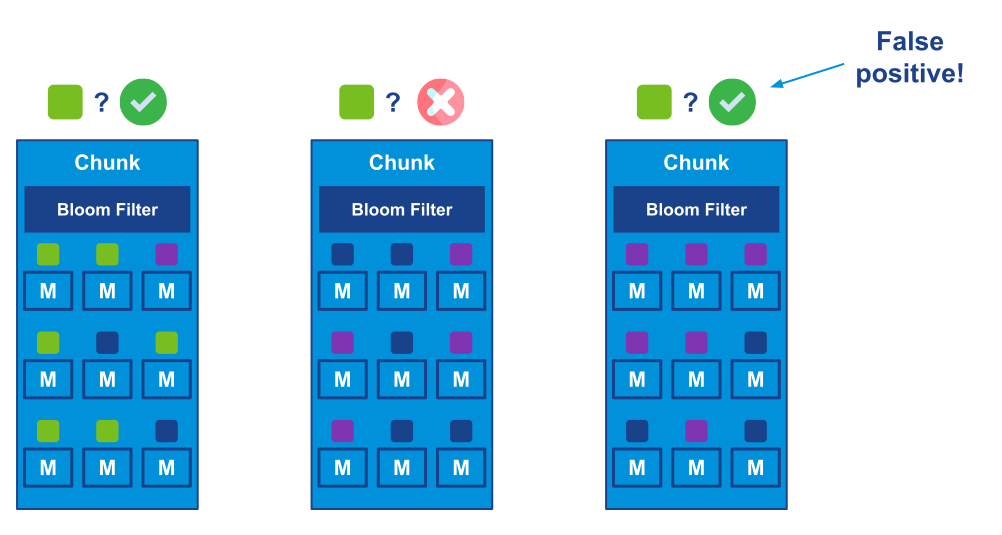
report this.</p>
<p>Since the queue version can be changed through a policy, it's also possible to gradually migrate from v1 to v2. You can
declare a policy that only matches a subset of the queues and once they are converted, you can either extend the regular
expression to match more queues or declare another policy matching a different subset of the queues. Even if the policy
matches a lot of queues, the migration is strictly a per-queue operation - any queue that completed the conversion
becomes available to serve client applications immediately after the conversion, even if other queues are still
rewriting their files.</p>
<p>You can go through this conversion already on 3.12 (or even 3.10 or 3.11). If you do, the removal of v1 in 4.0 won't
really affect you, since all your queues will be v2 already.</p>
<h2 class="anchor anchorWithStickyNavbar_LWe7" id="performance-comparison">Performance Comparison<a href="https://www.rabbitmq.com/blog/2024/01/11/3.13-release#performance-comparison" class="hash-link" aria-label="Direct link to Performance Comparison" title="Direct link to Performance Comparison">​</a></h2>
<p>Let's see the results comparing RabbitMQ 3.12.11 with 3.13.0-rc.4. Please refer to <a href="https://www.rabbitmq.com/blog/2023/05/17/rabbitmq-3.12-performance-improvements#the-environment">previous blog
posts</a> for details
about the benchmarking setup and the way we run these tests or check out the repository, where we keep
<a href="https://github.com/rabbitmq/testing/blob/main/main/scenario-3.12-vs-3.13.yaml" target="_blank" rel="noopener noreferrer">the environments configuration</a>
and <a href="https://github.com/rabbitmq/testing/blob/main/main/script.sh" target="_blank" rel="noopener noreferrer">the script</a> with the workloads.</p>
<p>All tests were performed with 100B and 5kB messages.</p>
<h3 class="anchor anchorWithStickyNavbar_LWe7" id="publishing-and-consuming">Publishing And Consuming<a href="https://www.rabbitmq.com/blog/2024/01/11/3.13-release#publishing-and-consuming" class="hash-link" aria-label="Direct link to Publishing And Consuming" title="Direct link to Publishing And Consuming">​</a></h3>
<p>In this test, we have a single publisher and a single consumer and just try to deliver messages as quickly as possible
through a single queue.</p>
<p>As you can see, classic queues v2 offer a significantly better performance compared with CQv1 and 3.13 improves the
performance of both versions. For the users still using CQv1, moving to CQv2 on 3.13 may almost double the throughput
for small messages!</p>
<p></p><figure><img decoding="async" loading="lazy" alt="1 publisher, 1 queue, 1 consumer, 100B messages" src="https://www.rabbitmq.com/assets/images/cq-publish-consume-100b-c759cdba39db38353152c75fd8fdc486.png" width="1120" height="438" class="img_ev3q"><figcaption>1 publisher, 1 queue, 1 consumer, 100B messages</figcaption></figure><p></p>
<p></p><figure><img decoding="async" loading="lazy" alt="1 publisher, 1 queue, 1 consumer, 5kB messages" src="https://www.rabbitmq.com/assets/images/cq-publish-consume-5kb-a1af8b7f5cec9a52d12c9a9087cf2505.png" width="1120" height="438" class="img_ev3q"><figcaption>1 publisher, 1 queue, 1 consumer, 5kB messages</figcaption></figure><p></p>
<h3 class="anchor anchorWithStickyNavbar_LWe7" id="publish-only">Publish Only<a href="https://www.rabbitmq.com/blog/2024/01/11/3.13-release#publish-only" class="hash-link" aria-label="Direct link to Publish Only" title="Direct link to Publish Only">​</a></h3>
<p>In this test, we publish to a queue at full speed, with 2 publishers, while not consuming the messages at all.
The queue grows from empty to 5 million messages.</p>
<p>With 100B messages, CQv2 blows CQv1 out of the water with more than 250% higher throughput compared to 3.12.</p>
<p></p><figure><img decoding="async" loading="lazy" alt="2 publishers, 1 queue, no consumers, 100B messages" src="https://www.rabbitmq.com/assets/images/cq-publish-only-100b-a001fb8d114c3ee254fff91714f1e3ed.png" width="1120" height="439" class="img_ev3q"><figcaption>2 publishers, 1 queue, no consumers, 100B messages</figcaption></figure><p></p>
<p>The 5kB test is more nuanced. 3.13 with CQv2 wins by a large margin and CQv2 superiority is visible even in 3.12.
However, the combination of the new message store with the old index doesn't perform consistently - it has a good
throughput most of the time, but with significant slow downs (latency spikes). This is unfortunate but something we
decided to keep this way, given the number of factors required to trigger this behaviour and the fact that users should
move to CQv2 anyway. We saw this behaviour only in this test, so the following conditions need to be met: a 3.13 node
running a CQv1 queue with messages larger than 4kb (or whatever the value of <code>queue_index_embed_msgs_below</code> is),
publishers significantly faster than consumers (or consumers not present at all) and a high throughput of messages.
If you have such a workload, moving to CQv2 should not only prevent this regression but give you a significantly better
performance than CQv1 could ever achieve.</p>
<p></p><figure><img decoding="async" loading="lazy" alt="2 publishers, 1 queue, no consumers, 5kB messages" src="https://www.rabbitmq.com/assets/images/cq-publish-only-5kb-ce56ff85ff2418dc2ad592bd8d4b0afe.png" width="1120" height="439" class="img_ev3q"><figcaption>2 publishers, 1 queue, no consumers, 5kB messages</figcaption></figure><p></p>
<h3 class="anchor anchorWithStickyNavbar_LWe7" id="consume-only">Consume Only<a href="https://www.rabbitmq.com/blog/2024/01/11/3.13-release#consume-only" class="hash-link" aria-label="Direct link to Consume Only" title="Direct link to Consume Only">​</a></h3>
<p>In this test we consume the long backlog of messages from the previous test. There are 5 million messages to consume
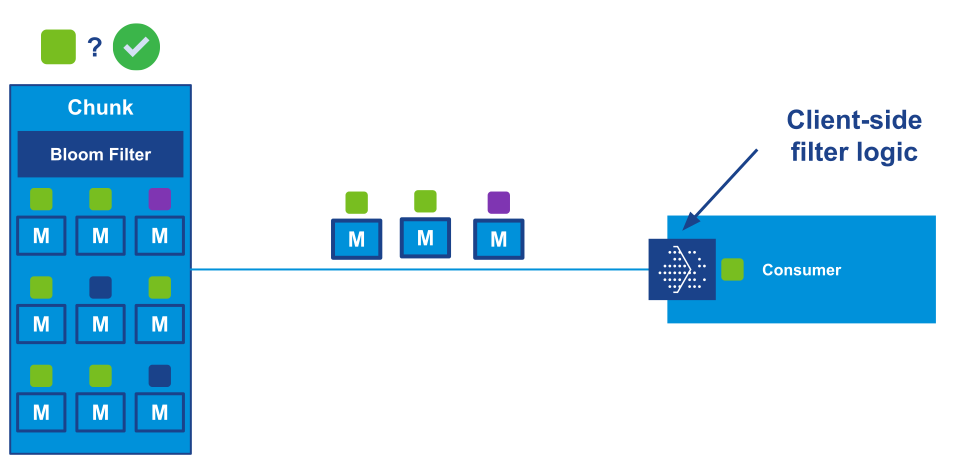
(hopefully your queues are much shorter!).</p>
<p>With 100B messages, you can see that CQv2 offers ~30% higher consumption rate early on. Over time, as the queue
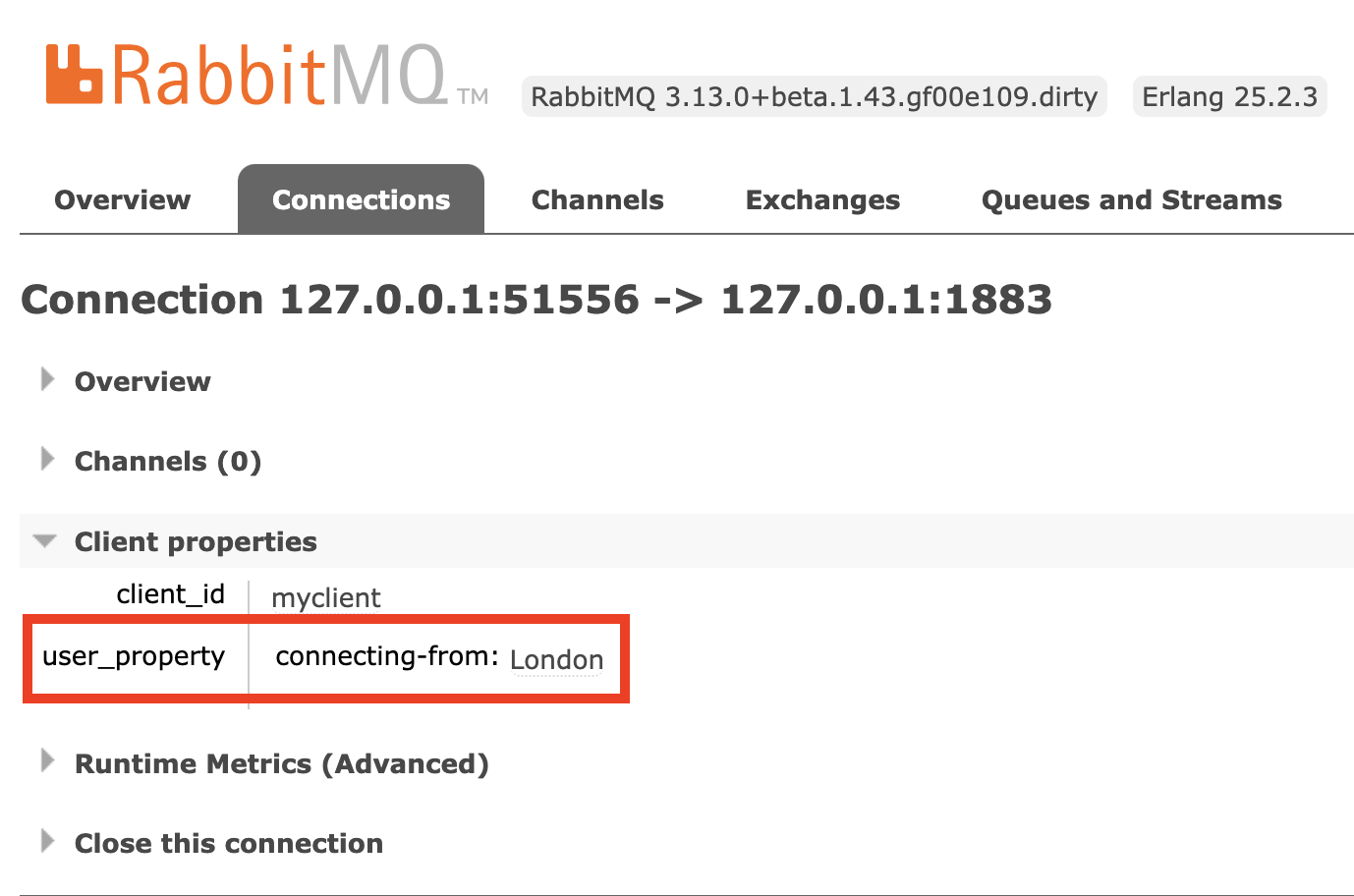
becomes shorter, CQv1 gets faster but CQv2 environment still empties the queue long before CQv1 (when
consumption rate goes down to zero, that means the queue is empty):</p>
<p></p><figure><img decoding="async" loading="lazy" alt="1 publisher, 1 queue, 1 consumer, 100B messages" src="https://www.rabbitmq.com/assets/images/cq-consume-backlog-100b-63a100252c091ca75888b53dbce2dc80.png" width="1120" height="438" class="img_ev3q"><figcaption>1 publisher, 1 queue, 1 consumer, 100B messages</figcaption></figure><p></p>
<p>With 5kB messages, handled by the per-vhost message store, you can see the main benefit of the 3.13 changes.
Since the message store implementation is shared by v1 and v2, in this test both 3.13 environments are significantly
ahead of 3.12, even a 3.12 with CQv2. We can see a ~50% higher throughput in 3.13:</p>
<p></p><figure><img decoding="async" loading="lazy" alt="1 publisher, 1 queue, 1 consumer, 5kB messages" src="https://www.rabbitmq.com/assets/images/cq-consume-backlog-5kb-ea340def5d1661b4604fd7031affe8d1.png" width="1120" height="438" class="img_ev3q"><figcaption>1 publisher, 1 queue, 1 consumer, 5kB messages</figcaption></figure><p></p>
<h3 class="anchor anchorWithStickyNavbar_LWe7" id="multiple-queues">Multiple Queues<a href="https://www.rabbitmq.com/blog/2024/01/11/3.13-release#multiple-queues" class="hash-link" aria-label="Direct link to Multiple Queues" title="Direct link to Multiple Queues">​</a></h3>
<p>In this test, rather than pushing a single queue to its limit, we have 5 concurrent message flows: 5 publishers,
each publishing to a different queue, and 5 consumers, one for each queue. Each publisher sends 10000 messages
per second so the total expected throughput is 50000 messages. With 100B messages, all environments reached the
expected throughput, while with 5kB messages, all oscillated around 27000 messages/s. The more interesting part here
is the end-to-end latency - how long does it take from the moment a message is sent until the message is consumed.</p>
<p>For 100B messages, we can see that the CQv2 environments can deliver the messages much faster. For users moving
from CQv1 on 3.12 to CQv2 on 3.13, that a 75% reduction of the mean latency <strong>and</strong> a 50% of reduction in
memory usage.</p>
<p></p><figure><img decoding="async" loading="lazy" alt="5 publishers, 5 queue, 5 consumers, 100B messages, 50k msgs/s achieved" src="https://www.rabbitmq.com/assets/images/cq-multiple-queues-100b-e18e81efcf427b1e50b8e045f467b295.png" width="1120" height="617" class="img_ev3q"><figcaption>5 publishers, 5 queue, 5 consumers, 100B messages, 50k msgs/s achieved</figcaption></figure><p></p>
<p>For 5kB messages, the results are much closer and in fact, 3.12 wins this particular test (something we may
look into in the future). However, 3.13 can still achieve similar results while using 100MB less memory:</p>
<p></p><figure><img decoding="async" loading="lazy" alt="5 publishers, 5 queue, 5 consumers, 5kB messages, 50k msgs/s attempted" src="https://www.rabbitmq.com/assets/images/cq-multiple-queues-5kb-68418ae003d62907acb986be9e00719a.png" width="1120" height="617" class="img_ev3q"><figcaption>5 publishers, 5 queue, 5 consumers, 5kB messages, 50k msgs/s attempted</figcaption></figure><p></p>
<h3 class="anchor anchorWithStickyNavbar_LWe7" id="publisher-confirm-latency">Publisher Confirm Latency<a href="https://www.rabbitmq.com/blog/2024/01/11/3.13-release#publisher-confirm-latency" class="hash-link" aria-label="Direct link to Publisher Confirm Latency" title="Direct link to Publisher Confirm Latency">​</a></h3>
<p>Lastly, let's take a look at a very different test. Rather than flooding queue(s) with messages, we only publish one
message at a time, wait for <a href="https://www.rabbitmq.com/docs/confirms">the publisher confirm</a> and then publish the
next one (a consumer is present but not really relevant here, since it can easily consume the incoming messages).</p>
<p>With 100B messages, we can once again see how much faster CQv2s are, with well over 200% speed up compared to
CQv1 on 3.12:</p>
<p></p><figure><img decoding="async" loading="lazy" alt="1 publishers, 1 queue, 1 consumer, 100B messages" src="https://www.rabbitmq.com/assets/images/cq-latency-100b-d86f82a02408aca51746e3245696774a.png" width="1120" height="857" class="img_ev3q"><figcaption>1 publishers, 1 queue, 1 consumer, 100B messages</figcaption></figure><p></p>
<p>With 5kB messages, the benefits of the new per-vhost message store implementation in 3.13 are apparent, with
more than 350% improvement:</p>
<p></p><figure><img decoding="async" loading="lazy" alt="1 publisher, 1 queue, 1 consumer, 5kB messages" src="https://www.rabbitmq.com/assets/images/cq-latency-5kb-d763b9ffdf93cb6754aa4bd83948975c.png" width="1120" height="857" class="img_ev3q"><figcaption>1 publisher, 1 queue, 1 consumer, 5kB messages</figcaption></figure><p></p>
<p>You may notice that the throughput is actually a bit higher with 5kB messages than it is with 100B messages.
This is counter-intuitive but actually not that strange. 5kB is still a tiny amount of data to send over the wire,
while the message store is designed to handle such messages better. As with everything else, this difference
may change in the future with further optimisations and perhaps a change to the default value of
<code>queue_index_embed_msgs_below</code> that we will consider.</p>
<h2 class="anchor anchorWithStickyNavbar_LWe7" id="caveat">Caveat<a href="https://www.rabbitmq.com/blog/2024/01/11/3.13-release#caveat" class="hash-link" aria-label="Direct link to Caveat" title="Direct link to Caveat">​</a></h2>
<p>Both version 2 of the index and the new message store implementation should provide significant benefits for most users.
However, these implementations already focus on non-mirrored use cases and the new message store implementation was
designed with the v2 of the index in mind. While it is backwards compatible and can be used with classic queues v1,
there are some cases where using v1 of the index with the new message store may provide worse performance or a different
performance profile than in the past, as seen in the publish-only test. It is therefore highly recommended to:</p>
<ol>
<li>Test and benchmark your application with 3.13</li>
<li>Compare performance with v1 and v2</li>
<li>If v1 behaves better <strong>without mirroring</strong>, please report that, so we can take a look</li>
</ol>
<p>Remaining on v1 can be a workaround for the cases where it provides better performance. However, that old implementation
will be removed in the future, so you can't rely on that workaround for long. Please report such cases so that you can
upgrade to v2 in the future.</p>
<h2 class="anchor anchorWithStickyNavbar_LWe7" id="final-word">Final Word<a href="https://www.rabbitmq.com/blog/2024/01/11/3.13-release#final-word" class="hash-link" aria-label="Direct link to Final Word" title="Direct link to Final Word">​</a></h2>
<p>Redesigning and replacing such a core component of a widely used piece of software is a very hard task.
Special thanks to <a href="https://github.com/essen" target="_blank" rel="noopener noreferrer">Loïc Hoguin</a> for embarking on this project, scavenging through the code,
sometimes dating all the way back to the very first release of RabbitMQ, before the world heard about iPhones.
As always, we welcome testing and feedback and we hope the upgrade will provide you similar benefits as shown above.</p>]]></content>
        <author>
            <name>Michał Kuratczyk</name>
            <uri>https://github.com/mkuratczyk</uri>
        </author>
        <category label="Performance" term="Performance"/>
        <category label="RabbitMQ 3.13.x" term="RabbitMQ 3.13.x"/>
    </entry>
    <entry>
        <title type="html"><![CDATA[New website for RabbitMQ 3.13.0]]></title>
        <id>https://www.rabbitmq.com/blog/2024/01/04/new-website</id>
        <link href="https://www.rabbitmq.com/blog/2024/01/04/new-website"/>
        <updated>2024-01-04T00:00:00.000Z</updated>
        <summary type="html"><![CDATA[We have been working for several weeks on a new website for RabbitMQ. We plan]]></summary>
        <content type="html"><![CDATA[<p>We have been working for several weeks on a new website for RabbitMQ. We plan
to release this significant upgrade shortly after RabbitMQ 3.13.0 is released!
At this point, we would love <strong>you to <a href="https://www.rabbitmq.com/">visit the new
website</a></strong> and tell us what you think :-)</p>
<p>In this blog post, I will go over the reasons we are doing this and what
improvements it will bring to you.</p>
<figure><p><a href="https://www.rabbitmq.com/"><img decoding="async" loading="lazy" alt="Screenshot of the new homepage" src="https://www.rabbitmq.com/assets/images/homepage-light-da934b14b247cb0eadb0f01d575b5fc5.png#gh-light-mode-only" width="1807" height="1080" class="img_ev3q"></a>
<a href="https://www.rabbitmq.com/?docusaurus-theme=dark"><img decoding="async" loading="lazy" alt="Screenshot of the new homepage" src="https://www.rabbitmq.com/assets/images/homepage-dark-f161bcb3e86887a78176816f2264e8a5.png#gh-dark-mode-only" width="1807" height="1080" class="img_ev3q"></a>
</p><figcaption>Screenshot of the new homepage</figcaption><p></p></figure>
<h2 class="anchor anchorWithStickyNavbar_LWe7" id="limitations-of-the-current-website">Limitations of the current website<a href="https://www.rabbitmq.com/blog/2024/01/04/new-website#limitations-of-the-current-website" class="hash-link" aria-label="Direct link to Limitations of the current website" title="Direct link to Limitations of the current website">​</a></h2>
<h3 class="anchor anchorWithStickyNavbar_LWe7" id="only-the-latest-rabbitmq-version-is-documented">Only the latest RabbitMQ version is documented<a href="https://www.rabbitmq.com/blog/2024/01/04/new-website#only-the-latest-rabbitmq-version-is-documented" class="hash-link" aria-label="Direct link to Only the latest RabbitMQ version is documented" title="Direct link to Only the latest RabbitMQ version is documented">​</a></h3>
<p>As of this writing, the <a href="http://www.rabbitmq.com/" target="_blank" rel="noopener noreferrer">www.rabbitmq.com</a> website contains the documentation of
the RabbitMQ server, some AMQP clients and it offers tutorials to get started
with RabbitMQ.</p>
<p>The documentation covers the latest version of RabbitMQ only ‑ currently
3.12.x. That was ok-ish so far because new releases series usually come with
new additions. However, with the upcoming RabbitMQ 4.0.x, significant
deprecated features will be removed! If we continue like this, it means the
documentation for these dropped features will go away. This is a real problem
for people who will still be running RabbitMQ 3.12.x for some time.</p>
<p>This is the first and main reason we want to upgrade the website: we want the
documentation to cover many versions of RabbitMQ: old, current and upcoming.</p>
<p>We could take a snapshot of the website and publish it somewhere else, like
<a href="https://previous.rabbitmq.com/" target="_blank" rel="noopener noreferrer">previous.rabbitmq.com</a> in the past. But the Git
repository/workflow and the home-grown framework don't make this easy, that's
why we stopped keeping snapshots of older versions. We would make a better job
if the workflow and the tooling had room for maintaining several versions
easily and all of them would be published to <a href="http://www.rabbitmq.com/" target="_blank" rel="noopener noreferrer">www.rabbitmq.com</a> in a way that it
is easy for users to switch to whatever version they are running.</p>
<p>This brings me to the second reason behind the big upgrade.</p>
<h3 class="anchor anchorWithStickyNavbar_LWe7" id="in-house-framework">In-house framework<a href="https://www.rabbitmq.com/blog/2024/01/04/new-website#in-house-framework" class="hash-link" aria-label="Direct link to In-house framework" title="Direct link to In-house framework">​</a></h3>
<p>The website is statically generated and published to a Cloudflare worker. The
static generator we used was developed by the RabbitMQ team a decade ago and
barely evolved ever since.</p>
<p>Making or maintaining a website framework is definitely not the best way to
invest our time. There is still plenty of work on RabbitMQ itself :-) So
instead of adding multiple versions support to it, we looked at existing FOSS
static website generators that had this feature built-in and evaluated a few of
them.</p>
<p>We chose <a href="https://docusaurus.io/" target="_blank" rel="noopener noreferrer">Docusaurus</a>. It supports multiple versions ‑
our primary criteria ‑ and it uses Markdown as the markup language, thus we
don't have to rewrite anything. This would make the conversion easier.</p>
<h2 class="anchor anchorWithStickyNavbar_LWe7" id="whats-in-it-for-me">“What's in it for me?”<a href="https://www.rabbitmq.com/blog/2024/01/04/new-website#whats-in-it-for-me" class="hash-link" aria-label="Direct link to “What's in it for me?”" title="Direct link to “What's in it for me?”">​</a></h2>
<p>With Docusaurus, we, the RabbitMQ team, make our life easier, yay \o/ But “are
there any benefits for you”, you may ask?</p>
<h3 class="anchor anchorWithStickyNavbar_LWe7" id="multiple-versions-documented">Multiple versions documented<a href="https://www.rabbitmq.com/blog/2024/01/04/new-website#multiple-versions-documented" class="hash-link" aria-label="Direct link to Multiple versions documented" title="Direct link to Multiple versions documented">​</a></h3>
<p>Of course, you will be able to read documentation of past and new versions of
RabbitMQ, even the future one while it is being worked on.</p>
<figure><p><img decoding="async" loading="lazy" alt="Screenshot of the version selection drop-down menu" src="https://www.rabbitmq.com/assets/images/versions-dropdown-light-564ed1c707d608200b783ba14870e2dd.png#gh-light-mode-only" width="191" height="199" class="img_ev3q">
<img decoding="async" loading="lazy" alt="Screenshot of the version selection drop-down menu" src="https://www.rabbitmq.com/assets/images/versions-dropdown-dark-2138b285969000c70e0c8531b2fdb15c.png#gh-dark-mode-only" width="191" height="199" class="img_ev3q">
</p><figcaption>Screenshot of the version selection drop-down menu</figcaption><p></p></figure>
<p>Initially, it will only cover RabbitMQ 3.13.x because we didn't convert
previous versions to Docusaurus. A snapshot of RabbitMQ 3.12.x documentation
will be published on previous.rabbitmq.com instead.</p>
<p>We plan to keep all supported RabbitMQ versions docs on the new website. When
an old release series reaches end-of-life, its documentation will also move to
previous.rabbitmq.com. This is to avoid that the version dropdown becomes too
cluttered or that the search feature brings too many results which are less
relevant.</p>
<p>Speaking of search...</p>
<h3 class="anchor anchorWithStickyNavbar_LWe7" id="integrated-search-feature">Integrated search feature<a href="https://www.rabbitmq.com/blog/2024/01/04/new-website#integrated-search-feature" class="hash-link" aria-label="Direct link to Integrated search feature" title="Direct link to Integrated search feature">​</a></h3>
<p>Docusaurus integrates several solutions to provide an internal search feature.
We picked Algolia because it is very efficient and works well with multiple
versions.</p>
<figure><p><img decoding="async" loading="lazy" alt="Screenshot of the search popup" src="https://www.rabbitmq.com/assets/images/search-light-1af47c992911dd9a157f507e8fc8da4e.png#gh-light-mode-only" width="624" height="665" class="img_ev3q">
<img decoding="async" loading="lazy" alt="Screenshot of the search popup" src="https://www.rabbitmq.com/assets/images/search-dark-ac37d6dc1eebe25537d41d383dc0e928.png#gh-dark-mode-only" width="624" height="665" class="img_ev3q">
</p><figcaption>Screenshot of the search popup</figcaption><p></p></figure>
<p>The entire website, including the blog, will be indexed and searchable. In the
example above, I searched "MQTT" and Algolia returns blog posts and
documentation pages in the results.</p>
<p>What is not obvious on the screenshot however is that it only returned docs
from the current version I'm browsing! So if I selected an hypothetical
RabbitMQ 5.2.x in the dropdown version menu, I would only get results relevant
to that version.</p>
<h3 class="anchor anchorWithStickyNavbar_LWe7" id="integrated-blog">Integrated blog<a href="https://www.rabbitmq.com/blog/2024/01/04/new-website#integrated-blog" class="hash-link" aria-label="Direct link to Integrated blog" title="Direct link to Integrated blog">​</a></h3>
<p>As mentionned above, Docusaurus provides a blog. We will switch to it and stop
using blog.rabbitmq.com. This way, all RabbitMQ-related content will be in a
single place:</p>
<ul>
<li>It will be easier for you to browse and move between blog posts and docs.</li>
<li>As said, the internal search will consider both docs and blog posts.</li>
<li>For content writers, it will be easier to cross-reference between blog posts
and docs.</li>
</ul>
<h3 class="anchor anchorWithStickyNavbar_LWe7" id="mobile-version-and-dark-mode">Mobile version and dark mode<a href="https://www.rabbitmq.com/blog/2024/01/04/new-website#mobile-version-and-dark-mode" class="hash-link" aria-label="Direct link to Mobile version and dark mode" title="Direct link to Mobile version and dark mode">​</a></h3>
<p>Docusaurus being <em>slightly</em> more modern than our in-house framework, the new
website should be browsable comfortably on a small screen and on mobile
devices.</p>
<p>It also comes with a dark mode!</p>
<figure><p><img decoding="async" loading="lazy" alt="Screenshot of the dark mode" src="https://www.rabbitmq.com/assets/images/dark-mode-a24c649d5dd0f087a1cf6be8abeb9369.png" width="1807" height="1080" class="img_ev3q">
</p><figcaption>Screenshot of the dark mode</figcaption><p></p></figure>
<h2 class="anchor anchorWithStickyNavbar_LWe7" id="conclusion">Conclusion<a href="https://www.rabbitmq.com/blog/2024/01/04/new-website#conclusion" class="hash-link" aria-label="Direct link to Conclusion" title="Direct link to Conclusion">​</a></h2>
<p>We are very excited with this move to Docusaurus and everything that the new
website will bring to you! Beside the conversion to a new framework, we also
plan many improvements to the content itself! Things like... No, let's talk
about this in a future blog post on the new website once we have something to
show :-)</p>
<div style="text-align:center"><p><img decoding="async" loading="lazy" src="https://www.rabbitmq.com/assets/images/under-construction-88a3d0343afb45101a457d9fb5948fe3.gif" width="110" height="70" class="img_ev3q"></p></div>
<p>Meanwhile, we would love your feedback! We know there are some rough edges
after the conversion, some parts we couldn't map easily to Docusaurus
alternatives. So, do you find the new website comfortable? Anything you lose
that you love on the old one?</p>
<p>Here are a couple links to help you with this:</p>
<ul>
<li><a href="https://www.rabbitmq.com/">The new website</a></li>
<li><a href="https://github.com/rabbitmq/rabbitmq-website/pull/1783" target="_blank" rel="noopener noreferrer">The pull request to share comments and feedback</a></li>
</ul>
<p>Thank you so much for any constructive positive or negative comments you might
share!</p>]]></content>
        <author>
            <name>Jean-Sébastien Pédron</name>
            <uri>https://github.com/dumbbell</uri>
        </author>
        <category label="Documentation" term="Documentation"/>
    </entry>
    <entry>
        <title type="html"><![CDATA[Stream Filtering Internals]]></title>
        <id>https://www.rabbitmq.com/blog/2023/10/24/stream-filtering-internals</id>
        <link href="https://www.rabbitmq.com/blog/2023/10/24/stream-filtering-internals"/>
        <updated>2023-10-24T00:00:00.000Z</updated>
        <summary type="html"><![CDATA[A previous post gave an introduction to stream filtering, a new and exciting feature in RabbitMQ 3.13.]]></summary>
        <content type="html"><![CDATA[<p>A <a href="https://www.rabbitmq.com/blog/2023/10/16/stream-filtering">previous post</a> gave an introduction to stream filtering, a new and exciting feature in RabbitMQ 3.13.
In this post we cover the internals of stream filtering.
Knowing the design and implementation will help you to configure and use stream filtering in the most optimal way for your use cases.</p>
<h2 class="anchor anchorWithStickyNavbar_LWe7" id="concepts">Concepts<a href="https://www.rabbitmq.com/blog/2023/10/24/stream-filtering-internals#concepts" class="hash-link" aria-label="Direct link to Concepts" title="Direct link to Concepts">​</a></h2>
<p>The idea of stream filtering is to provide a first level of efficient filtering on the broker side, <em>without</em> the broker needing to interpret messages.
This way consumers that need only a subset of the stream do not need to get all the data and handle all the filtering by themselves.
This can drastically reduce the data transmitted to consumers.</p>
<p>With filtering a <em>filter value</em> can be associated to each message.
It can be geographical information, like the region of the world each message comes from, as illustrated in the next figure:</p>
<p></p><figure><img decoding="async" loading="lazy" alt="Each message can have a filter value associated to it, like the region of the world it comes from." src="https://www.rabbitmq.com/assets/images/stream-filtering-stream-2974ecae7e2b7fc3b3881718c8088e21.svg" width="659" height="148" class="img_ev3q"><figcaption>Each message can have a filter value associated to it, like the region of the world it comes from.</figcaption></figure><p></p>
<p>So our stream has 1 <code>AMER</code> (green) message, 1 <code>APAC</code> (dark blue) message, 2 <code>EMEA</code> (purple) messages, then 2 <code>AMER</code> messages.</p>
<h3 class="anchor anchorWithStickyNavbar_LWe7" id="message-publishing">Message Publishing<a href="https://www.rabbitmq.com/blog/2023/10/24/stream-filtering-internals#message-publishing" class="hash-link" aria-label="Direct link to Message Publishing" title="Direct link to Message Publishing">​</a></h3>
<p>Publishers get to associate each outbound message with its filter value:</p>
<p></p><figure><img decoding="async" loading="lazy" alt="A publisher provides the filter value for each outbound message." src="https://www.rabbitmq.com/assets/images/stream-filtering-publisher-7f231afc5b9b711381b30a6218011881.svg" width="1024" height="189" class="img_ev3q"><figcaption>A publisher provides the filter value for each outbound message.</figcaption></figure><p></p>
<p>In the figure above, the publisher publishes 1 <code>AMER</code> (green) message and 2 <code>EMEA</code> (purple) messages that will be added to the stream.</p>
<h3 class="anchor anchorWithStickyNavbar_LWe7" id="message-consuming">Message Consuming<a href="https://www.rabbitmq.com/blog/2023/10/24/stream-filtering-internals#message-consuming" class="hash-link" aria-label="Direct link to Message Consuming" title="Direct link to Message Consuming">​</a></h3>
<p>When a consumer subscribes, it can specify one or several filter values and the broker is expected to dispatch only the messages with this or these filter value(s).
We will see soon this is a bit different in practice but this is enough to understand the concepts.</p>
<p>In the figure below, the consumer at the top specified it only wants <code>AMER</code> (green) messages and the broker dispatches only those.
Same thing for the consumer in the middle with <code>EMEA</code> messages and the consumer at the bottom with <code>APAC</code> messages.</p>
<p></p><figure><img decoding="async" loading="lazy" alt="A consumer can specify it only wants messages with given filter value(s) and the broker will do its best to dispatch messages accordingly." src="https://www.rabbitmq.com/assets/images/stream-filtering-consumers-cdb038faafdd400aa8bf6247996d5a82.svg" width="1074" height="572" class="img_ev3q"><figcaption>A consumer can specify it only wants messages with given filter value(s) and the broker will do its best to dispatch messages accordingly.</figcaption></figure><p></p>
<p>That's it for the concepts, let's discover the implementation details now.</p>
<h2 class="anchor anchorWithStickyNavbar_LWe7" id="structure-of-a-stream">Structure of a Stream<a href="https://www.rabbitmq.com/blog/2023/10/24/stream-filtering-internals#structure-of-a-stream" class="hash-link" aria-label="Direct link to Structure of a Stream" title="Direct link to Structure of a Stream">​</a></h2>
<p>We need to know how a stream is structured to understand stream filtering internals.
A stream is a directory with segment files in it.
Each segment file has an associated index file (used to know where to attach a consumer at a given offset in the segment file, among others).
Having several "small" segment files is better than having a large monolithic file for the whole stream: it is for example more efficient and safer to delete "old" segment files to truncate the stream than removing the beginning of a large file.</p>
<p>A segment file is made of chunks that contain messages.
The number of messages in a chunk depends on the ingress rate (high ingress rate means many messages in a chunk, low ingress rate means fewer messages in a chunk).
The number of messages in a chunk varies from a few (even 1) to a few thousands.</p>
<p>What is the deal with chunks?
Chunks are the unit of work in streams: they are used for replication and, more importantly for our topic, for <em>consumer delivery</em>.
The broker sends chunks to consumers, one at a time, using the <a href="https://man7.org/linux/man-pages/man2/sendfile.2.html" target="_blank" rel="noopener noreferrer"><code>sendfile</code> system call</a> (to send a whole chunk from the file system to the network socket, without copying the data into userspace).</p>
<p>The following figure illustrates the structure of a stream:</p>
<p></p><figure><img decoding="async" loading="lazy" alt="A stream is made of segment files. A segment file contains chunks, a chunk contains messages. The broker dispatches chunks to consumers, not individual messages." src="https://www.rabbitmq.com/assets/images/stream-filtering-segments-chunks-messages-4f07a7c7d5ac04e5be77f44c802acb02.svg" width="544" height="340" class="img_ev3q"><figcaption>A stream is made of segment files. A segment file contains chunks, a chunk contains messages. The broker dispatches chunks to consumers, not individual messages.</figcaption></figure><p></p>
<p>With this in place, let's see how the broker can know whether to dispatch a chunk or not.</p>
<h2 class="anchor anchorWithStickyNavbar_LWe7" id="filtering-on-the-broker-side">Filtering On The Broker Side<a href="https://www.rabbitmq.com/blog/2023/10/24/stream-filtering-internals#filtering-on-the-broker-side" class="hash-link" aria-label="Direct link to Filtering On The Broker Side" title="Direct link to Filtering On The Broker Side">​</a></h2>
<p>Imagine we have a consumer that wants only <code>AMER</code> (green) messages.
When a broker is about to dispatch a chunk, it needs to know whether the chunk contains <code>AMER</code> messages or not.
If it does, it can send the chunk to the consumer, if it does not, the broker can skip the chunk, move on to the next one, and re-iterate.</p>
<p>Each chunk has a header that can contain a <em>Bloom filter</em>, which tells the broker whether the chunk contains a message with a given filter value.
A <a href="https://en.wikipedia.org/wiki/Bloom_filter" target="_blank" rel="noopener noreferrer">Bloom filter</a> is <em>a space-efficient probabilistic data structure, used to test whether an element is a member of a set</em>.
In our example the set contains <code>AMER</code>, <code>EMEA</code>, and <code>APAC</code> and the element is <code>AMER</code>.</p>
<p>The following figure illustrates the broker-side filtering process for our 3 chunks:</p>
<p></p><figure><img decoding="async" loading="lazy" alt="Filtering on the broker side. The broker uses a Bloom filter contained in each chunk to know whether it contains messages with a given filter value. A Bloom filter is efficient but it can return false positives, so the broker may return chunks that do not contain messages with the requested filter value(s)." src="https://www.rabbitmq.com/assets/images/stream-filtering-dispatch-d830ea980fb8c232991d5bd445431b0c.svg" width="1002" height="535" class="img_ev3q"><figcaption>Filtering on the broker side. The broker uses a Bloom filter contained in each chunk to know whether it contains messages with a given filter value. A Bloom filter is efficient but it can return false positives, so the broker may return chunks that do not contain messages with the requested filter value(s).</figcaption></figure><p></p>
<p>As shown in the figure above, the filter can return false positives, that is chunks that do not contain messages with the expected filter value(s).
This is normal, as Bloom filters are probabilistic.
They do not return false negative though: if the filter says there is no <code>AMER</code> (green) messages, we can be sure it is true.
We have to live with this uncertainty: we may dispatch some chunks for nothing sometimes, but it is better than dispatching <em>all</em> the chunks.</p>
<p>Something certain is that a consumer can receive messages it does not want: look at our first chunk on the left, it contains <code>AMER</code> (green) messages that the consumer asked for, but also <code>EMEA</code> (purple), and <code>APAC</code> (dark blue) messages.
This is why there must be filtering on the client side as well.</p>
<h2 class="anchor anchorWithStickyNavbar_LWe7" id="filtering-on-the-client-side">Filtering On The Client Side<a href="https://www.rabbitmq.com/blog/2023/10/24/stream-filtering-internals#filtering-on-the-client-side" class="hash-link" aria-label="Direct link to Filtering On The Client Side" title="Direct link to Filtering On The Client Side">​</a></h2>
<p>The broker handles a first level of filtering when delivering messages, but as the unit of delivery is the chunk, the consumer can still receive messages it does not want.
So the client must do some filtering as well, which obviously must be consistent with the filter value(s) set at subscription time.</p>
<p>The following figure illustrates a consumer that wants only <code>AMER</code> (green) messages and that must do a last step of filtering:</p>
<p></p><figure><img decoding="async" loading="lazy" alt="As a chunk can contain unwanted messages, the client must filter out messages as well." src="https://www.rabbitmq.com/assets/images/stream-filtering-client-side-filtering-c1453ccc708918e5f0cbe1fa618eab97.svg" width="955" height="470" class="img_ev3q"><figcaption>As a chunk can contain unwanted messages, the client must filter out messages as well.</figcaption></figure><p></p>
<p>Let's see how this translates into application code.</p>
<h2 class="anchor anchorWithStickyNavbar_LWe7" id="api-examples">API Examples<a href="https://www.rabbitmq.com/blog/2023/10/24/stream-filtering-internals#api-examples" class="hash-link" aria-label="Direct link to API Examples" title="Direct link to API Examples">​</a></h2>
<p>Filtering is not intrusive and can be handled as a cross-cutting concern, minimizing the impact on application code.
Here is how to set the logic to extract the filter value from a message when declaring a producer with the <a href="https://github.com/rabbitmq/rabbitmq-stream-java-client/" target="_blank" rel="noopener noreferrer">stream Java client</a> (<code>filterValue(Function&lt;Message,String&gt;)</code> method):</p>
<div class="language-java codeBlockContainer_Ckt0 theme-code-block" style="--prism-color:#393A34;--prism-background-color:#f6f8fa"><div class="codeBlockContent_biex"><pre tabindex="0" class="prism-code language-java codeBlock_bY9V thin-scrollbar" style="color:#393A34;background-color:#f6f8fa"><code class="codeBlockLines_e6Vv"><span class="token-line" style="color:#393A34"><span class="token class-name">Producer</span><span class="token plain"> producer </span><span class="token operator" style="color:#393A34">=</span><span class="token plain"> environment</span><span class="token punctuation" style="color:#393A34">.</span><span class="token function" style="color:#d73a49">producerBuilder</span><span class="token punctuation" style="color:#393A34">(</span><span class="token punctuation" style="color:#393A34">)</span><span class="token plain"></span><br></span><span class="token-line" style="color:#393A34"><span class="token plain">  </span><span class="token punctuation" style="color:#393A34">.</span><span class="token function" style="color:#d73a49">stream</span><span class="token punctuation" style="color:#393A34">(</span><span class="token string" style="color:#e3116c">"invoices"</span><span class="token punctuation" style="color:#393A34">)</span><span class="token plain"></span><br></span><span class="token-line" style="color:#393A34"><span class="token plain">  </span><span class="token punctuation" style="color:#393A34">.</span><span class="token function" style="color:#d73a49">filterValue</span><span class="token punctuation" style="color:#393A34">(</span><span class="token plain">msg </span><span class="token operator" style="color:#393A34">-&gt;</span><span class="token plain"> msg</span><span class="token punctuation" style="color:#393A34">.</span><span class="token function" style="color:#d73a49">getApplicationProperties</span><span class="token punctuation" style="color:#393A34">(</span><span class="token punctuation" style="color:#393A34">)</span><span class="token punctuation" style="color:#393A34">.</span><span class="token function" style="color:#d73a49">get</span><span class="token punctuation" style="color:#393A34">(</span><span class="token string" style="color:#e3116c">"region"</span><span class="token punctuation" style="color:#393A34">)</span><span class="token punctuation" style="color:#393A34">.</span><span class="token function" style="color:#d73a49">toString</span><span class="token punctuation" style="color:#393A34">(</span><span class="token punctuation" style="color:#393A34">)</span><span class="token punctuation" style="color:#393A34">)</span><span class="token plain">  </span><br></span><span class="token-line" style="color:#393A34"><span class="token plain">  </span><span class="token punctuation" style="color:#393A34">.</span><span class="token function" style="color:#d73a49">build</span><span class="token punctuation" style="color:#393A34">(</span><span class="token punctuation" style="color:#393A34">)</span><span class="token punctuation" style="color:#393A34">;</span><br></span></code></pre><div class="buttonGroup__atx"><button type="button" aria-label="Copy code to clipboard" title="Copy" class="clean-btn"><span class="copyButtonIcons_eSgA" aria-hidden="true"><svg viewBox="0 0 24 24" class="copyButtonIcon_y97N"><path fill="currentColor" d="M19,21H8V7H19M19,5H8A2,2 0 0,0 6,7V21A2,2 0 0,0 8,23H19A2,2 0 0,0 21,21V7A2,2 0 0,0 19,5M16,1H4A2,2 0 0,0 2,3V17H4V3H16V1Z"></path></svg><svg viewBox="0 0 24 24" class="copyButtonSuccessIcon_LjdS"><path fill="currentColor" d="M21,7L9,19L3.5,13.5L4.91,12.09L9,16.17L19.59,5.59L21,7Z"></path></svg></span></button></div></div></div>
<p>On the consuming side, the stream Java client provides the <code>filter().values(String... filterValues)</code> method to set the filter value(s) and the <code>filter().postFilter(Predicate&lt;Message&gt; filter)</code> method to set the client-side filtering logic.
Both methods must be called when declaring the consumer:</p>
<div class="language-java codeBlockContainer_Ckt0 theme-code-block" style="--prism-color:#393A34;--prism-background-color:#f6f8fa"><div class="codeBlockContent_biex"><pre tabindex="0" class="prism-code language-java codeBlock_bY9V thin-scrollbar" style="color:#393A34;background-color:#f6f8fa"><code class="codeBlockLines_e6Vv"><span class="token-line" style="color:#393A34"><span class="token class-name">Consumer</span><span class="token plain"> consumer </span><span class="token operator" style="color:#393A34">=</span><span class="token plain"> environment</span><span class="token punctuation" style="color:#393A34">.</span><span class="token function" style="color:#d73a49">consumerBuilder</span><span class="token punctuation" style="color:#393A34">(</span><span class="token punctuation" style="color:#393A34">)</span><span class="token plain"></span><br></span><span class="token-line" style="color:#393A34"><span class="token plain">  </span><span class="token punctuation" style="color:#393A34">.</span><span class="token function" style="color:#d73a49">stream</span><span class="token punctuation" style="color:#393A34">(</span><span class="token string" style="color:#e3116c">"invoices"</span><span class="token punctuation" style="color:#393A34">)</span><span class="token plain"></span><br></span><span class="token-line" style="color:#393A34"><span class="token plain">  </span><span class="token punctuation" style="color:#393A34">.</span><span class="token function" style="color:#d73a49">filter</span><span class="token punctuation" style="color:#393A34">(</span><span class="token punctuation" style="color:#393A34">)</span><span class="token plain"></span><br></span><span class="token-line" style="color:#393A34"><span class="token plain">    </span><span class="token punctuation" style="color:#393A34">.</span><span class="token function" style="color:#d73a49">values</span><span class="token punctuation" style="color:#393A34">(</span><span class="token string" style="color:#e3116c">"AMER"</span><span class="token punctuation" style="color:#393A34">)</span><span class="token plain">  </span><br></span><span class="token-line" style="color:#393A34"><span class="token plain">    </span><span class="token punctuation" style="color:#393A34">.</span><span class="token function" style="color:#d73a49">postFilter</span><span class="token punctuation" style="color:#393A34">(</span><span class="token plain">msg </span><span class="token operator" style="color:#393A34">-&gt;</span><span class="token plain"> </span><span class="token string" style="color:#e3116c">"AMER"</span><span class="token punctuation" style="color:#393A34">.</span><span class="token function" style="color:#d73a49">equals</span><span class="token punctuation" style="color:#393A34">(</span><span class="token plain">msg</span><span class="token punctuation" style="color:#393A34">.</span><span class="token function" style="color:#d73a49">getApplicationProperties</span><span class="token punctuation" style="color:#393A34">(</span><span class="token punctuation" style="color:#393A34">)</span><span class="token punctuation" style="color:#393A34">.</span><span class="token function" style="color:#d73a49">get</span><span class="token punctuation" style="color:#393A34">(</span><span class="token string" style="color:#e3116c">"region"</span><span class="token punctuation" style="color:#393A34">)</span><span class="token punctuation" style="color:#393A34">)</span><span class="token punctuation" style="color:#393A34">)</span><span class="token plain">  </span><br></span><span class="token-line" style="color:#393A34"><span class="token plain">  </span><span class="token punctuation" style="color:#393A34">.</span><span class="token function" style="color:#d73a49">builder</span><span class="token punctuation" style="color:#393A34">(</span><span class="token punctuation" style="color:#393A34">)</span><span class="token plain"></span><br></span><span class="token-line" style="color:#393A34"><span class="token plain">  </span><span class="token punctuation" style="color:#393A34">.</span><span class="token function" style="color:#d73a49">messageHandler</span><span class="token punctuation" style="color:#393A34">(</span><span class="token punctuation" style="color:#393A34">(</span><span class="token plain">ctx</span><span class="token punctuation" style="color:#393A34">,</span><span class="token plain"> msg</span><span class="token punctuation" style="color:#393A34">)</span><span class="token plain"> </span><span class="token operator" style="color:#393A34">-&gt;</span><span class="token plain"> </span><span class="token punctuation" style="color:#393A34">{</span><span class="token plain"></span><br></span><span class="token-line" style="color:#393A34"><span class="token plain">    </span><span class="token comment" style="color:#999988;font-style:italic">// message processing code</span><span class="token plain"></span><br></span><span class="token-line" style="color:#393A34"><span class="token plain">  </span><span class="token punctuation" style="color:#393A34">}</span><span class="token punctuation" style="color:#393A34">)</span><span class="token plain"></span><br></span><span class="token-line" style="color:#393A34"><span class="token plain">  </span><span class="token punctuation" style="color:#393A34">.</span><span class="token function" style="color:#d73a49">build</span><span class="token punctuation" style="color:#393A34">(</span><span class="token punctuation" style="color:#393A34">)</span><span class="token punctuation" style="color:#393A34">;</span><br></span></code></pre><div class="buttonGroup__atx"><button type="button" aria-label="Copy code to clipboard" title="Copy" class="clean-btn"><span class="copyButtonIcons_eSgA" aria-hidden="true"><svg viewBox="0 0 24 24" class="copyButtonIcon_y97N"><path fill="currentColor" d="M19,21H8V7H19M19,5H8A2,2 0 0,0 6,7V21A2,2 0 0,0 8,23H19A2,2 0 0,0 21,21V7A2,2 0 0,0 19,5M16,1H4A2,2 0 0,0 2,3V17H4V3H16V1Z"></path></svg><svg viewBox="0 0 24 24" class="copyButtonSuccessIcon_LjdS"><path fill="currentColor" d="M21,7L9,19L3.5,13.5L4.91,12.09L9,16.17L19.59,5.59L21,7Z"></path></svg></span></button></div></div></div>
<p>As you can see, filtering does not change the publishing and consuming code, just the declaration of producers and consumers.</p>
<p>Let's see now how to configure stream filtering in the most appropriate way for a use case.</p>
<h2 class="anchor anchorWithStickyNavbar_LWe7" id="stream-filtering-configuration">Stream Filtering Configuration<a href="https://www.rabbitmq.com/blog/2023/10/24/stream-filtering-internals#stream-filtering-configuration" class="hash-link" aria-label="Direct link to Stream Filtering Configuration" title="Direct link to Stream Filtering Configuration">​</a></h2>
<p>The <a href="https://www.rabbitmq.com/blog/2023/10/16/stream-filtering#trying-it-out">first post on stream filtering</a> provided some numbers (about 80% bandwidth savings with filtering compared to no filtering).
Benefits of stream filtering depend heavily on the use case: ingress rate, cardinality and distribution of filter values, but also <em>filter size</em>.
The larger the filter, the better (error rate gets smaller).
It is possible to set a value between 16 and 255 bytes for the size of the filter used in chunks, the default being 16 bytes.</p>
<p>The stream Java client provides the <code>filterSize(int)</code> method to set the filter size when creating a stream (it sets the <code>stream-filter-size-bytes</code> parameter internally):</p>
<div class="language-java codeBlockContainer_Ckt0 theme-code-block" style="--prism-color:#393A34;--prism-background-color:#f6f8fa"><div class="codeBlockContent_biex"><pre tabindex="0" class="prism-code language-java codeBlock_bY9V thin-scrollbar" style="color:#393A34;background-color:#f6f8fa"><code class="codeBlockLines_e6Vv"><span class="token-line" style="color:#393A34"><span class="token plain">environment</span><span class="token punctuation" style="color:#393A34">.</span><span class="token function" style="color:#d73a49">streamCreator</span><span class="token punctuation" style="color:#393A34">(</span><span class="token punctuation" style="color:#393A34">)</span><span class="token plain"></span><br></span><span class="token-line" style="color:#393A34"><span class="token plain">  </span><span class="token punctuation" style="color:#393A34">.</span><span class="token function" style="color:#d73a49">stream</span><span class="token punctuation" style="color:#393A34">(</span><span class="token string" style="color:#e3116c">"invoices"</span><span class="token punctuation" style="color:#393A34">)</span><span class="token plain"></span><br></span><span class="token-line" style="color:#393A34"><span class="token plain">  </span><span class="token punctuation" style="color:#393A34">.</span><span class="token function" style="color:#d73a49">filterSize</span><span class="token punctuation" style="color:#393A34">(</span><span class="token number" style="color:#36acaa">32</span><span class="token punctuation" style="color:#393A34">)</span><span class="token plain"></span><br></span><span class="token-line" style="color:#393A34"><span class="token plain">  </span><span class="token punctuation" style="color:#393A34">.</span><span class="token function" style="color:#d73a49">create</span><span class="token punctuation" style="color:#393A34">(</span><span class="token punctuation" style="color:#393A34">)</span><br></span></code></pre><div class="buttonGroup__atx"><button type="button" aria-label="Copy code to clipboard" title="Copy" class="clean-btn"><span class="copyButtonIcons_eSgA" aria-hidden="true"><svg viewBox="0 0 24 24" class="copyButtonIcon_y97N"><path fill="currentColor" d="M19,21H8V7H19M19,5H8A2,2 0 0,0 6,7V21A2,2 0 0,0 8,23H19A2,2 0 0,0 21,21V7A2,2 0 0,0 19,5M16,1H4A2,2 0 0,0 2,3V17H4V3H16V1Z"></path></svg><svg viewBox="0 0 24 24" class="copyButtonSuccessIcon_LjdS"><path fill="currentColor" d="M21,7L9,19L3.5,13.5L4.91,12.09L9,16.17L19.59,5.59L21,7Z"></path></svg></span></button></div></div></div>
<p>How to estimate the size of the filter?
There are many Bloom filter calculators available online.
The parameters are the number of hash functions (2 for RabbitMQ stream filtering), the number of expected elements, the error rate, and the size.
You usually have an idea of the number of elements, so you need to find a trade-off between the error rate and the filter size.</p>
<p>Here are some examples:</p>
<ul>
<li>10 values, 16 bytes =&gt; 2 % error rate</li>
<li>30 values, 16 bytes =&gt; 14 % error rate</li>
<li>200 values, 128 bytes =&gt; 10 % error rate</li>
</ul>
<p>So, the larger the filter, the better?
Not exactly: even though a Bloom filter is very efficient in terms of storage, as it does not store elements, just whether elements are in the set, the filter size is pre-allocated.
If you set the filter size to 255 and each chunk contains at least one message with a filter value, there will be 255 bytes allocated in each chunk header.
This is fine if chunks contain many large messages, as the filter size is negligible compared to the chunk size.
But with a degenerated case like a single-message chunk with a 10-byte message and a 10-byte filter value, you end up with a filter larger than the actual data.</p>
<p>You'll have to experiment with your own use cases to estimate the impact of the filter size on your stream size.
The <a href="https://www.rabbitmq.com/blog/2023/10/16/stream-filtering#trying-it-out">first post on stream filtering</a> provides a trick to estimate the size of a stream with Stream PerfTest (read the whole stream without filtering and consult the <code>rabbitmq_stream_read_bytes_total</code> metric).</p>
<h2 class="anchor anchorWithStickyNavbar_LWe7" id="bonus-stream-filtering-on-amqp">Bonus: Stream Filtering On AMQP<a href="https://www.rabbitmq.com/blog/2023/10/24/stream-filtering-internals#bonus-stream-filtering-on-amqp" class="hash-link" aria-label="Direct link to Bonus: Stream Filtering On AMQP" title="Direct link to Bonus: Stream Filtering On AMQP">​</a></h2>
<p>Even though the preferred way to access streams is the stream protocol, other protocols are supported, like AMQP.
Stream filtering is also supported with any AMQP client library:</p>
<ul>
<li>Declaration: set the <code>x-queue-type</code> argument to <code>stream</code> and use the <code>x-stream-filter-size-bytes</code> to set the filter size when you declare a stream.</li>
<li>Publishing: use the <code>x-stream-filter-value</code> header to set the filter value for outbound messages.</li>
<li>Consuming: use the <code>x-stream-filter</code> consumer argument to set the expected filter value(s) (string or array of strings) and optionally the <code>x-stream-match-unfiltered</code> consumer argument to receive messages without any filter value as well (default is <code>false</code>). Client-side filtering is still necessary!</li>
</ul>
<h2 class="anchor anchorWithStickyNavbar_LWe7" id="wrapping-up">Wrapping Up<a href="https://www.rabbitmq.com/blog/2023/10/24/stream-filtering-internals#wrapping-up" class="hash-link" aria-label="Direct link to Wrapping Up" title="Direct link to Wrapping Up">​</a></h2>
<p>This blog post provided an in-depth description of stream filtering in RabbitMQ 3.13.
It complements a <a href="https://www.rabbitmq.com/blog/2023/10/16/stream-filtering">first post</a> that gives an introduction on the usage and a demonstration of stream filtering.</p>
<p>Stream filtering is easy to use and to benefit from, but some knowledge on the internals can be useful to optimize its usage, especially for tricky use cases.
Remember that client-side filtering is necessary and must be consistent with the configured filter value(s).
This is usually straightforward to implement.
It is also possible to set the filter size in the most appropriate way for a given use case.</p>]]></content>
        <author>
            <name>Arnaud Cogoluègnes</name>
            <uri>https://github.com/acogoluegnes</uri>
        </author>
        <category label="Streams" term="Streams"/>
        <category label="Programming Languages" term="Programming Languages"/>
        <category label="New Features" term="New Features"/>
        <category label="RabbitMQ 3.13.x" term="RabbitMQ 3.13.x"/>
    </entry>
    <entry>
        <title type="html"><![CDATA[Stream Filtering]]></title>
        <id>https://www.rabbitmq.com/blog/2023/10/16/stream-filtering</id>
        <link href="https://www.rabbitmq.com/blog/2023/10/16/stream-filtering"/>
        <updated>2023-10-16T00:00:00.000Z</updated>
        <summary type="html"><![CDATA[Stream filtering is a new feature in RabbitMQ 3.13.]]></summary>
        <content type="html"><![CDATA[<p>Stream filtering is a new feature in RabbitMQ 3.13.
It allows to save bandwidth between the broker and consuming applications when those applications need only a subset of the messages of a stream.</p>
<p>Keep reading to find out how stream filtering works and see it in action.</p>
<h2 class="anchor anchorWithStickyNavbar_LWe7" id="concepts-of-stream-filtering">Concepts of Stream Filtering<a href="https://www.rabbitmq.com/blog/2023/10/16/stream-filtering#concepts-of-stream-filtering" class="hash-link" aria-label="Direct link to Concepts of Stream Filtering" title="Direct link to Concepts of Stream Filtering">​</a></h2>
<p>Imagine you have a stream containing data from all around the world and an application that needs to process only a subset of this data, let's say messages for a given region.
The application can read the whole stream and filter out the data to only process the messages it is interested in.
This works but it means the whole stream content will go through the network.</p>
<p>Stream filtering provides a first level of efficient filtering on the broker side, <em>without</em> the broker needing to interpret messages.
It can dramatically reduce the amount of data exchanged on the network for some use cases.
Let's discover the semantics of this new exciting feature.</p>
<h2 class="anchor anchorWithStickyNavbar_LWe7" id="on-the-publishing-side">On The Publishing Side<a href="https://www.rabbitmq.com/blog/2023/10/16/stream-filtering#on-the-publishing-side" class="hash-link" aria-label="Direct link to On The Publishing Side" title="Direct link to On The Publishing Side">​</a></h2>
<p>Stream filtering is based on a <em>filter value</em>: a publishing application can associate each message with a string value.
Filter values can be anything, but they should meet some criteria for filtering to work properly.
A defined set of values shared across the messages is a good candidate: geographical locations (e.g. countries, states), document types in a stream that stores document information (e.g. payslip, invoice, order), categories of products (e.g. book, luggage, toy).</p>
<p>How a message is associated to a filter value depends on the client library.
Here is an example with the <a href="https://github.com/rabbitmq/rabbitmq-stream-java-client/" target="_blank" rel="noopener noreferrer">stream Java client</a>:</p>
<div class="language-java codeBlockContainer_Ckt0 theme-code-block" style="--prism-color:#393A34;--prism-background-color:#f6f8fa"><div class="codeBlockContent_biex"><pre tabindex="0" class="prism-code language-java codeBlock_bY9V thin-scrollbar" style="color:#393A34;background-color:#f6f8fa"><code class="codeBlockLines_e6Vv"><span class="token-line" style="color:#393A34"><span class="token class-name">Producer</span><span class="token plain"> producer </span><span class="token operator" style="color:#393A34">=</span><span class="token plain"> environment</span><span class="token punctuation" style="color:#393A34">.</span><span class="token function" style="color:#d73a49">producerBuilder</span><span class="token punctuation" style="color:#393A34">(</span><span class="token punctuation" style="color:#393A34">)</span><span class="token plain"></span><br></span><span class="token-line" style="color:#393A34"><span class="token plain">  </span><span class="token punctuation" style="color:#393A34">.</span><span class="token function" style="color:#d73a49">stream</span><span class="token punctuation" style="color:#393A34">(</span><span class="token string" style="color:#e3116c">"invoices"</span><span class="token punctuation" style="color:#393A34">)</span><span class="token plain"></span><br></span><span class="token-line" style="color:#393A34"><span class="token plain">  </span><span class="token punctuation" style="color:#393A34">.</span><span class="token function" style="color:#d73a49">filterValue</span><span class="token punctuation" style="color:#393A34">(</span><span class="token plain">msg </span><span class="token operator" style="color:#393A34">-&gt;</span><span class="token plain"> msg</span><span class="token punctuation" style="color:#393A34">.</span><span class="token function" style="color:#d73a49">getApplicationProperties</span><span class="token punctuation" style="color:#393A34">(</span><span class="token punctuation" style="color:#393A34">)</span><span class="token punctuation" style="color:#393A34">.</span><span class="token function" style="color:#d73a49">get</span><span class="token punctuation" style="color:#393A34">(</span><span class="token string" style="color:#e3116c">"region"</span><span class="token punctuation" style="color:#393A34">)</span><span class="token punctuation" style="color:#393A34">.</span><span class="token function" style="color:#d73a49">toString</span><span class="token punctuation" style="color:#393A34">(</span><span class="token punctuation" style="color:#393A34">)</span><span class="token punctuation" style="color:#393A34">)</span><span class="token plain">  </span><br></span><span class="token-line" style="color:#393A34"><span class="token plain">  </span><span class="token punctuation" style="color:#393A34">.</span><span class="token function" style="color:#d73a49">build</span><span class="token punctuation" style="color:#393A34">(</span><span class="token punctuation" style="color:#393A34">)</span><span class="token punctuation" style="color:#393A34">;</span><br></span></code></pre><div class="buttonGroup__atx"><button type="button" aria-label="Copy code to clipboard" title="Copy" class="clean-btn"><span class="copyButtonIcons_eSgA" aria-hidden="true"><svg viewBox="0 0 24 24" class="copyButtonIcon_y97N"><path fill="currentColor" d="M19,21H8V7H19M19,5H8A2,2 0 0,0 6,7V21A2,2 0 0,0 8,23H19A2,2 0 0,0 21,21V7A2,2 0 0,0 19,5M16,1H4A2,2 0 0,0 2,3V17H4V3H16V1Z"></path></svg><svg viewBox="0 0 24 24" class="copyButtonSuccessIcon_LjdS"><path fill="currentColor" d="M21,7L9,19L3.5,13.5L4.91,12.09L9,16.17L19.59,5.59L21,7Z"></path></svg></span></button></div></div></div>
<p>In this example the application developer provides some logic to extract the filter value from the message application properties.
Using filtering is as simple as this: no need to change the actual message publishing code, you just need to provide the filter value logic when creating a <code>Producer</code>.</p>
<p>Let's see now how it works for consumers.</p>
<h2 class="anchor anchorWithStickyNavbar_LWe7" id="on-the-consumer-side">On The Consumer Side<a href="https://www.rabbitmq.com/blog/2023/10/16/stream-filtering#on-the-consumer-side" class="hash-link" aria-label="Direct link to On The Consumer Side" title="Direct link to On The Consumer Side">​</a></h2>
<p>Here is a Java code snippet to declare a consumer that is only interested in messages from the <code>emea</code> region:</p>
<div class="language-java codeBlockContainer_Ckt0 theme-code-block" style="--prism-color:#393A34;--prism-background-color:#f6f8fa"><div class="codeBlockContent_biex"><pre tabindex="0" class="prism-code language-java codeBlock_bY9V thin-scrollbar" style="color:#393A34;background-color:#f6f8fa"><code class="codeBlockLines_e6Vv"><span class="token-line" style="color:#393A34"><span class="token class-name">Consumer</span><span class="token plain"> consumer </span><span class="token operator" style="color:#393A34">=</span><span class="token plain"> environment</span><span class="token punctuation" style="color:#393A34">.</span><span class="token function" style="color:#d73a49">consumerBuilder</span><span class="token punctuation" style="color:#393A34">(</span><span class="token punctuation" style="color:#393A34">)</span><span class="token plain"></span><br></span><span class="token-line" style="color:#393A34"><span class="token plain">  </span><span class="token punctuation" style="color:#393A34">.</span><span class="token function" style="color:#d73a49">stream</span><span class="token punctuation" style="color:#393A34">(</span><span class="token string" style="color:#e3116c">"invoices"</span><span class="token punctuation" style="color:#393A34">)</span><span class="token plain"></span><br></span><span class="token-line" style="color:#393A34"><span class="token plain">  </span><span class="token punctuation" style="color:#393A34">.</span><span class="token function" style="color:#d73a49">filter</span><span class="token punctuation" style="color:#393A34">(</span><span class="token punctuation" style="color:#393A34">)</span><span class="token plain"></span><br></span><span class="token-line" style="color:#393A34"><span class="token plain">    </span><span class="token punctuation" style="color:#393A34">.</span><span class="token function" style="color:#d73a49">values</span><span class="token punctuation" style="color:#393A34">(</span><span class="token string" style="color:#e3116c">"emea"</span><span class="token punctuation" style="color:#393A34">)</span><span class="token plain">  </span><br></span><span class="token-line" style="color:#393A34"><span class="token plain">    </span><span class="token punctuation" style="color:#393A34">.</span><span class="token function" style="color:#d73a49">postFilter</span><span class="token punctuation" style="color:#393A34">(</span><span class="token plain">msg </span><span class="token operator" style="color:#393A34">-&gt;</span><span class="token plain"> </span><span class="token string" style="color:#e3116c">"emea"</span><span class="token punctuation" style="color:#393A34">.</span><span class="token function" style="color:#d73a49">equals</span><span class="token punctuation" style="color:#393A34">(</span><span class="token plain">msg</span><span class="token punctuation" style="color:#393A34">.</span><span class="token function" style="color:#d73a49">getApplicationProperties</span><span class="token punctuation" style="color:#393A34">(</span><span class="token punctuation" style="color:#393A34">)</span><span class="token punctuation" style="color:#393A34">.</span><span class="token function" style="color:#d73a49">get</span><span class="token punctuation" style="color:#393A34">(</span><span class="token string" style="color:#e3116c">"region"</span><span class="token punctuation" style="color:#393A34">)</span><span class="token punctuation" style="color:#393A34">)</span><span class="token punctuation" style="color:#393A34">)</span><span class="token plain">  </span><br></span><span class="token-line" style="color:#393A34"><span class="token plain">  </span><span class="token punctuation" style="color:#393A34">.</span><span class="token function" style="color:#d73a49">builder</span><span class="token punctuation" style="color:#393A34">(</span><span class="token punctuation" style="color:#393A34">)</span><span class="token plain"></span><br></span><span class="token-line" style="color:#393A34"><span class="token plain">  </span><span class="token punctuation" style="color:#393A34">.</span><span class="token function" style="color:#d73a49">messageHandler</span><span class="token punctuation" style="color:#393A34">(</span><span class="token punctuation" style="color:#393A34">(</span><span class="token plain">ctx</span><span class="token punctuation" style="color:#393A34">,</span><span class="token plain"> msg</span><span class="token punctuation" style="color:#393A34">)</span><span class="token plain"> </span><span class="token operator" style="color:#393A34">-&gt;</span><span class="token plain"> </span><span class="token punctuation" style="color:#393A34">{</span><span class="token plain"></span><br></span><span class="token-line" style="color:#393A34"><span class="token plain">    </span><span class="token comment" style="color:#999988;font-style:italic">// message processing code</span><span class="token plain"></span><br></span><span class="token-line" style="color:#393A34"><span class="token plain">  </span><span class="token punctuation" style="color:#393A34">}</span><span class="token punctuation" style="color:#393A34">)</span><span class="token plain"></span><br></span><span class="token-line" style="color:#393A34"><span class="token plain">  </span><span class="token punctuation" style="color:#393A34">.</span><span class="token function" style="color:#d73a49">build</span><span class="token punctuation" style="color:#393A34">(</span><span class="token punctuation" style="color:#393A34">)</span><span class="token punctuation" style="color:#393A34">;</span><br></span></code></pre><div class="buttonGroup__atx"><button type="button" aria-label="Copy code to clipboard" title="Copy" class="clean-btn"><span class="copyButtonIcons_eSgA" aria-hidden="true"><svg viewBox="0 0 24 24" class="copyButtonIcon_y97N"><path fill="currentColor" d="M19,21H8V7H19M19,5H8A2,2 0 0,0 6,7V21A2,2 0 0,0 8,23H19A2,2 0 0,0 21,21V7A2,2 0 0,0 19,5M16,1H4A2,2 0 0,0 2,3V17H4V3H16V1Z"></path></svg><svg viewBox="0 0 24 24" class="copyButtonSuccessIcon_LjdS"><path fill="currentColor" d="M21,7L9,19L3.5,13.5L4.91,12.09L9,16.17L19.59,5.59L21,7Z"></path></svg></span></button></div></div></div>
<p>Filtering is configured in two places:</p>
<ul>
<li><code>filter().values(String... filterValues)</code> tells the broker we are interested in messages associated with these values (we can specify several values, not only one)</li>
<li><code>filter().postFilter(Predicate&lt;Message&gt; filter)</code> provides some client-side logic to filter out messages that would <em>not</em> be associated with the expected filter value(s)</li>
</ul>
<p>Why the need for this client-side filtering logic?
The broker-side filtering logic uses a <a href="https://en.wikipedia.org/wiki/Bloom_filter" target="_blank" rel="noopener noreferrer">Bloom filter</a>:</p>
<blockquote>
<p>A Bloom filter is a space-efficient probabilistic data structure, used to test whether an element is a member of a set.</p>
</blockquote>
<p>A Bloom filter is very efficient in terms of storage and speed, but it is probabilistic: it can return <em>false positives</em>.
Because of this, the broker can send messages it believes match the expected filter values whereas they do not.
That's why some client-side filtering logic is necessary.</p>
<p>This is something to be aware of, but that is a minor caveat compared to the benefits stream filtering brings.</p>
<p>A <a href="https://www.rabbitmq.com/blog/2023/10/24/stream-filtering-internals">subsequent blog post</a> covers the internals of stream filtering for those interested in technical details.
You can also have a look at the <a href="https://rabbitmq.github.io/rabbitmq-stream-java-client/stable/htmlsingle/#filtering" target="_blank" rel="noopener noreferrer">stream Java client documentation on filtering</a> for more information.
It covers among others that a message does not always have to be associated to a filter value and a consumer can choose to receive messages with given filter value(s) <em>and</em> messages <em>without</em> a filter value (with <code>filter().matchUnfiltered()</code>).</p>
<h2 class="anchor anchorWithStickyNavbar_LWe7" id="trying-it-out">Trying It Out<a href="https://www.rabbitmq.com/blog/2023/10/16/stream-filtering#trying-it-out" class="hash-link" aria-label="Direct link to Trying It Out" title="Direct link to Trying It Out">​</a></h2>
<p>Let's see stream filtering in action.
Start a RabbitMQ 3.13+ node:</p>
<div class="language-shell codeBlockContainer_Ckt0 theme-code-block" style="--prism-color:#393A34;--prism-background-color:#f6f8fa"><div class="codeBlockContent_biex"><pre tabindex="0" class="prism-code language-shell codeBlock_bY9V thin-scrollbar" style="color:#393A34;background-color:#f6f8fa"><code class="codeBlockLines_e6Vv"><span class="token-line" style="color:#393A34"><span class="token function" style="color:#d73a49">docker</span><span class="token plain"> run </span><span class="token parameter variable" style="color:#36acaa">-it</span><span class="token plain"> </span><span class="token parameter variable" style="color:#36acaa">--rm</span><span class="token plain"> </span><span class="token parameter variable" style="color:#36acaa">--name</span><span class="token plain"> rabbitmq </span><span class="token parameter variable" style="color:#36acaa">-p</span><span class="token plain"> </span><span class="token number" style="color:#36acaa">5552</span><span class="token plain">:5552 </span><span class="token punctuation" style="color:#393A34">\</span><span class="token plain"></span><br></span><span class="token-line" style="color:#393A34"><span class="token plain">    </span><span class="token parameter variable" style="color:#36acaa">-e</span><span class="token plain"> </span><span class="token assign-left variable" style="color:#36acaa">RABBITMQ_SERVER_ADDITIONAL_ERL_ARGS</span><span class="token operator" style="color:#393A34">=</span><span class="token string" style="color:#e3116c">'-rabbitmq_stream advertised_host localhost'</span><span class="token plain"> </span><span class="token punctuation" style="color:#393A34">\</span><span class="token plain"></span><br></span><span class="token-line" style="color:#393A34"><span class="token plain">    rabbitmq:3.13</span><br></span></code></pre><div class="buttonGroup__atx"><button type="button" aria-label="Copy code to clipboard" title="Copy" class="clean-btn"><span class="copyButtonIcons_eSgA" aria-hidden="true"><svg viewBox="0 0 24 24" class="copyButtonIcon_y97N"><path fill="currentColor" d="M19,21H8V7H19M19,5H8A2,2 0 0,0 6,7V21A2,2 0 0,0 8,23H19A2,2 0 0,0 21,21V7A2,2 0 0,0 19,5M16,1H4A2,2 0 0,0 2,3V17H4V3H16V1Z"></path></svg><svg viewBox="0 0 24 24" class="copyButtonSuccessIcon_LjdS"><path fill="currentColor" d="M21,7L9,19L3.5,13.5L4.91,12.09L9,16.17L19.59,5.59L21,7Z"></path></svg></span></button></div></div></div>
<p>Enable the stream plugin:</p>
<div class="language-shell codeBlockContainer_Ckt0 theme-code-block" style="--prism-color:#393A34;--prism-background-color:#f6f8fa"><div class="codeBlockContent_biex"><pre tabindex="0" class="prism-code language-shell codeBlock_bY9V thin-scrollbar" style="color:#393A34;background-color:#f6f8fa"><code class="codeBlockLines_e6Vv"><span class="token-line" style="color:#393A34"><span class="token function" style="color:#d73a49">docker</span><span class="token plain"> </span><span class="token builtin class-name">exec</span><span class="token plain"> rabbitmq rabbitmq-plugins </span><span class="token builtin class-name">enable</span><span class="token plain"> rabbitmq_stream</span><br></span></code></pre><div class="buttonGroup__atx"><button type="button" aria-label="Copy code to clipboard" title="Copy" class="clean-btn"><span class="copyButtonIcons_eSgA" aria-hidden="true"><svg viewBox="0 0 24 24" class="copyButtonIcon_y97N"><path fill="currentColor" d="M19,21H8V7H19M19,5H8A2,2 0 0,0 6,7V21A2,2 0 0,0 8,23H19A2,2 0 0,0 21,21V7A2,2 0 0,0 19,5M16,1H4A2,2 0 0,0 2,3V17H4V3H16V1Z"></path></svg><svg viewBox="0 0 24 24" class="copyButtonSuccessIcon_LjdS"><path fill="currentColor" d="M21,7L9,19L3.5,13.5L4.91,12.09L9,16.17L19.59,5.59L21,7Z"></path></svg></span></button></div></div></div>
<p>Download <a href="https://github.com/rabbitmq/rabbitmq-stream-perf-test/" target="_blank" rel="noopener noreferrer">Stream PerfTest</a> (it requires Java 11 or more to run):</p>
<div class="language-shell codeBlockContainer_Ckt0 theme-code-block" style="--prism-color:#393A34;--prism-background-color:#f6f8fa"><div class="codeBlockContent_biex"><pre tabindex="0" class="prism-code language-shell codeBlock_bY9V thin-scrollbar" style="color:#393A34;background-color:#f6f8fa"><code class="codeBlockLines_e6Vv"><span class="token-line" style="color:#393A34"><span class="token builtin class-name">cd</span><span class="token plain"> /tmp</span><br></span><span class="token-line" style="color:#393A34"><span class="token plain"></span><span class="token function" style="color:#d73a49">wget</span><span class="token plain"> </span><span class="token parameter variable" style="color:#36acaa">-O</span><span class="token plain"> stream-perf-test.jar </span><span class="token punctuation" style="color:#393A34">\</span><span class="token plain"></span><br></span><span class="token-line" style="color:#393A34"><span class="token plain">  https://github.com/rabbitmq/rabbitmq-java-tools-binaries-dev/releases/download/v-stream-perf-test-latest/stream-perf-test-latest.jar</span><br></span></code></pre><div class="buttonGroup__atx"><button type="button" aria-label="Copy code to clipboard" title="Copy" class="clean-btn"><span class="copyButtonIcons_eSgA" aria-hidden="true"><svg viewBox="0 0 24 24" class="copyButtonIcon_y97N"><path fill="currentColor" d="M19,21H8V7H19M19,5H8A2,2 0 0,0 6,7V21A2,2 0 0,0 8,23H19A2,2 0 0,0 21,21V7A2,2 0 0,0 19,5M16,1H4A2,2 0 0,0 2,3V17H4V3H16V1Z"></path></svg><svg viewBox="0 0 24 24" class="copyButtonSuccessIcon_LjdS"><path fill="currentColor" d="M21,7L9,19L3.5,13.5L4.91,12.09L9,16.17L19.59,5.59L21,7Z"></path></svg></span></button></div></div></div>
<p>Let's publish messages for 10 seconds:</p>
<div class="language-shell codeBlockContainer_Ckt0 theme-code-block" style="--prism-color:#393A34;--prism-background-color:#f6f8fa"><div class="codeBlockContent_biex"><pre tabindex="0" class="prism-code language-shell codeBlock_bY9V thin-scrollbar" style="color:#393A34;background-color:#f6f8fa"><code class="codeBlockLines_e6Vv"><span class="token-line" style="color:#393A34"><span class="token function" style="color:#d73a49">java</span><span class="token plain"> </span><span class="token parameter variable" style="color:#36acaa">-jar</span><span class="token plain"> stream-perf-test.jar </span><span class="token parameter variable" style="color:#36acaa">--producers</span><span class="token plain"> </span><span class="token number" style="color:#36acaa">1</span><span class="token plain"> </span><span class="token parameter variable" style="color:#36acaa">--consumers</span><span class="token plain"> </span><span class="token number" style="color:#36acaa">0</span><span class="token plain"> </span><span class="token parameter variable" style="color:#36acaa">--rate</span><span class="token plain"> </span><span class="token number" style="color:#36acaa">100</span><span class="token plain"> --filter-value-set </span><span class="token number" style="color:#36acaa">1</span><span class="token punctuation" style="color:#393A34">..</span><span class="token number" style="color:#36acaa">50</span><span class="token plain"> </span><span class="token parameter variable" style="color:#36acaa">--size</span><span class="token plain"> </span><span class="token number" style="color:#36acaa">10000</span><span class="token plain"> </span><span class="token parameter variable" style="color:#36acaa">--time</span><span class="token plain"> </span><span class="token number" style="color:#36acaa">10</span><br></span></code></pre><div class="buttonGroup__atx"><button type="button" aria-label="Copy code to clipboard" title="Copy" class="clean-btn"><span class="copyButtonIcons_eSgA" aria-hidden="true"><svg viewBox="0 0 24 24" class="copyButtonIcon_y97N"><path fill="currentColor" d="M19,21H8V7H19M19,5H8A2,2 0 0,0 6,7V21A2,2 0 0,0 8,23H19A2,2 0 0,0 21,21V7A2,2 0 0,0 19,5M16,1H4A2,2 0 0,0 2,3V17H4V3H16V1Z"></path></svg><svg viewBox="0 0 24 24" class="copyButtonSuccessIcon_LjdS"><path fill="currentColor" d="M21,7L9,19L3.5,13.5L4.91,12.09L9,16.17L19.59,5.59L21,7Z"></path></svg></span></button></div></div></div>
<p>The messages are 10 KB long and <code>--filter-value-set 1..50</code> means a random filter value between <code>"1"</code> and <code>"50"</code> is associated with each message.</p>
<p>Let's consume all the messages (without any filtering):</p>
<div class="language-shell codeBlockContainer_Ckt0 theme-code-block" style="--prism-color:#393A34;--prism-background-color:#f6f8fa"><div class="codeBlockContent_biex"><pre tabindex="0" class="prism-code language-shell codeBlock_bY9V thin-scrollbar" style="color:#393A34;background-color:#f6f8fa"><code class="codeBlockLines_e6Vv"><span class="token-line" style="color:#393A34"><span class="token function" style="color:#d73a49">java</span><span class="token plain"> </span><span class="token parameter variable" style="color:#36acaa">-jar</span><span class="token plain"> stream-perf-test.jar </span><span class="token parameter variable" style="color:#36acaa">--producers</span><span class="token plain"> </span><span class="token number" style="color:#36acaa">0</span><span class="token plain"> </span><span class="token parameter variable" style="color:#36acaa">--consumers</span><span class="token plain"> </span><span class="token number" style="color:#36acaa">1</span><span class="token plain"> </span><span class="token parameter variable" style="color:#36acaa">--offset</span><span class="token plain"> first </span><span class="token parameter variable" style="color:#36acaa">--prometheus</span><br></span></code></pre><div class="buttonGroup__atx"><button type="button" aria-label="Copy code to clipboard" title="Copy" class="clean-btn"><span class="copyButtonIcons_eSgA" aria-hidden="true"><svg viewBox="0 0 24 24" class="copyButtonIcon_y97N"><path fill="currentColor" d="M19,21H8V7H19M19,5H8A2,2 0 0,0 6,7V21A2,2 0 0,0 8,23H19A2,2 0 0,0 21,21V7A2,2 0 0,0 19,5M16,1H4A2,2 0 0,0 2,3V17H4V3H16V1Z"></path></svg><svg viewBox="0 0 24 24" class="copyButtonSuccessIcon_LjdS"><path fill="currentColor" d="M21,7L9,19L3.5,13.5L4.91,12.09L9,16.17L19.59,5.59L21,7Z"></path></svg></span></button></div></div></div>
<p>The output should stop after a few seconds, when the consumer reaches the end of the stream.
Do not stop the application, open another terminal tab instead, and query Stream PerfTest metrics to see how much data it read:</p>
<div class="language-shell codeBlockContainer_Ckt0 theme-code-block" style="--prism-color:#393A34;--prism-background-color:#f6f8fa"><div class="codeBlockContent_biex"><pre tabindex="0" class="prism-code language-shell codeBlock_bY9V thin-scrollbar" style="color:#393A34;background-color:#f6f8fa"><code class="codeBlockLines_e6Vv"><span class="token-line" style="color:#393A34"><span class="token function" style="color:#d73a49">curl</span><span class="token plain"> </span><span class="token parameter variable" style="color:#36acaa">--silent</span><span class="token plain"> localhost:8080/metrics </span><span class="token operator" style="color:#393A34">|</span><span class="token plain"> </span><span class="token function" style="color:#d73a49">grep</span><span class="token plain"> rabbitmq_stream_read_bytes_total</span><br></span></code></pre><div class="buttonGroup__atx"><button type="button" aria-label="Copy code to clipboard" title="Copy" class="clean-btn"><span class="copyButtonIcons_eSgA" aria-hidden="true"><svg viewBox="0 0 24 24" class="copyButtonIcon_y97N"><path fill="currentColor" d="M19,21H8V7H19M19,5H8A2,2 0 0,0 6,7V21A2,2 0 0,0 8,23H19A2,2 0 0,0 21,21V7A2,2 0 0,0 19,5M16,1H4A2,2 0 0,0 2,3V17H4V3H16V1Z"></path></svg><svg viewBox="0 0 24 24" class="copyButtonSuccessIcon_LjdS"><path fill="currentColor" d="M21,7L9,19L3.5,13.5L4.91,12.09L9,16.17L19.59,5.59L21,7Z"></path></svg></span></button></div></div></div>
<p>You should get something like the following:</p>
<div class="language-properties codeBlockContainer_Ckt0 theme-code-block" style="--prism-color:#393A34;--prism-background-color:#f6f8fa"><div class="codeBlockContent_biex"><pre tabindex="0" class="prism-code language-properties codeBlock_bY9V thin-scrollbar" style="color:#393A34;background-color:#f6f8fa"><code class="codeBlockLines_e6Vv"><span class="token-line" style="color:#393A34"><span class="token plain"># HELP rabbitmq_stream_read_bytes_total</span><br></span><span class="token-line" style="color:#393A34"><span class="token plain"># TYPE rabbitmq_stream_read_bytes_total counter</span><br></span><span class="token-line" style="color:#393A34"><span class="token plain">rabbitmq_stream_read_bytes_total 1.0046894E7</span><br></span></code></pre><div class="buttonGroup__atx"><button type="button" aria-label="Copy code to clipboard" title="Copy" class="clean-btn"><span class="copyButtonIcons_eSgA" aria-hidden="true"><svg viewBox="0 0 24 24" class="copyButtonIcon_y97N"><path fill="currentColor" d="M19,21H8V7H19M19,5H8A2,2 0 0,0 6,7V21A2,2 0 0,0 8,23H19A2,2 0 0,0 21,21V7A2,2 0 0,0 19,5M16,1H4A2,2 0 0,0 2,3V17H4V3H16V1Z"></path></svg><svg viewBox="0 0 24 24" class="copyButtonSuccessIcon_LjdS"><path fill="currentColor" d="M21,7L9,19L3.5,13.5L4.91,12.09L9,16.17L19.59,5.59L21,7Z"></path></svg></span></button></div></div></div>
<p>This is about 10 MB.
The client had to transfer the entire stream.</p>
<p>Now stop Stream PerfTest (<code>Ctrl-C</code>) and start it again, this time with filtering enabled:</p>
<div class="language-shell codeBlockContainer_Ckt0 theme-code-block" style="--prism-color:#393A34;--prism-background-color:#f6f8fa"><div class="codeBlockContent_biex"><pre tabindex="0" class="prism-code language-shell codeBlock_bY9V thin-scrollbar" style="color:#393A34;background-color:#f6f8fa"><code class="codeBlockLines_e6Vv"><span class="token-line" style="color:#393A34"><span class="token function" style="color:#d73a49">java</span><span class="token plain"> </span><span class="token parameter variable" style="color:#36acaa">-jar</span><span class="token plain"> stream-perf-test.jar </span><span class="token parameter variable" style="color:#36acaa">--producers</span><span class="token plain"> </span><span class="token number" style="color:#36acaa">0</span><span class="token plain"> </span><span class="token parameter variable" style="color:#36acaa">--consumers</span><span class="token plain"> </span><span class="token number" style="color:#36acaa">1</span><span class="token plain"> </span><span class="token parameter variable" style="color:#36acaa">--offset</span><span class="token plain"> first </span><span class="token parameter variable" style="color:#36acaa">--prometheus</span><span class="token plain"> --filter-values </span><span class="token number" style="color:#36acaa">5</span><br></span></code></pre><div class="buttonGroup__atx"><button type="button" aria-label="Copy code to clipboard" title="Copy" class="clean-btn"><span class="copyButtonIcons_eSgA" aria-hidden="true"><svg viewBox="0 0 24 24" class="copyButtonIcon_y97N"><path fill="currentColor" d="M19,21H8V7H19M19,5H8A2,2 0 0,0 6,7V21A2,2 0 0,0 8,23H19A2,2 0 0,0 21,21V7A2,2 0 0,0 19,5M16,1H4A2,2 0 0,0 2,3V17H4V3H16V1Z"></path></svg><svg viewBox="0 0 24 24" class="copyButtonSuccessIcon_LjdS"><path fill="currentColor" d="M21,7L9,19L3.5,13.5L4.91,12.09L9,16.17L19.59,5.59L21,7Z"></path></svg></span></button></div></div></div>
<p>Here we ask to get only messages with the <code>"5"</code> filter value (<code>--filter-values 5</code>).
Again, wait for the output to stop and check the number of bytes read:</p>
<div class="language-shell codeBlockContainer_Ckt0 theme-code-block" style="--prism-color:#393A34;--prism-background-color:#f6f8fa"><div class="codeBlockContent_biex"><pre tabindex="0" class="prism-code language-shell codeBlock_bY9V thin-scrollbar" style="color:#393A34;background-color:#f6f8fa"><code class="codeBlockLines_e6Vv"><span class="token-line" style="color:#393A34"><span class="token function" style="color:#d73a49">curl</span><span class="token plain"> </span><span class="token parameter variable" style="color:#36acaa">--silent</span><span class="token plain"> localhost:8080/metrics </span><span class="token operator" style="color:#393A34">|</span><span class="token plain"> </span><span class="token function" style="color:#d73a49">grep</span><span class="token plain"> rabbitmq_stream_read_bytes_total</span><br></span></code></pre><div class="buttonGroup__atx"><button type="button" aria-label="Copy code to clipboard" title="Copy" class="clean-btn"><span class="copyButtonIcons_eSgA" aria-hidden="true"><svg viewBox="0 0 24 24" class="copyButtonIcon_y97N"><path fill="currentColor" d="M19,21H8V7H19M19,5H8A2,2 0 0,0 6,7V21A2,2 0 0,0 8,23H19A2,2 0 0,0 21,21V7A2,2 0 0,0 19,5M16,1H4A2,2 0 0,0 2,3V17H4V3H16V1Z"></path></svg><svg viewBox="0 0 24 24" class="copyButtonSuccessIcon_LjdS"><path fill="currentColor" d="M21,7L9,19L3.5,13.5L4.91,12.09L9,16.17L19.59,5.59L21,7Z"></path></svg></span></button></div></div></div>
<p>You should get something like:</p>
<div class="language-properties codeBlockContainer_Ckt0 theme-code-block" style="--prism-color:#393A34;--prism-background-color:#f6f8fa"><div class="codeBlockContent_biex"><pre tabindex="0" class="prism-code language-properties codeBlock_bY9V thin-scrollbar" style="color:#393A34;background-color:#f6f8fa"><code class="codeBlockLines_e6Vv"><span class="token-line" style="color:#393A34"><span class="token plain"># HELP rabbitmq_stream_read_bytes_total</span><br></span><span class="token-line" style="color:#393A34"><span class="token plain"># TYPE rabbitmq_stream_read_bytes_total counter</span><br></span><span class="token-line" style="color:#393A34"><span class="token plain">rabbitmq_stream_read_bytes_total 1957641.0</span><br></span></code></pre><div class="buttonGroup__atx"><button type="button" aria-label="Copy code to clipboard" title="Copy" class="clean-btn"><span class="copyButtonIcons_eSgA" aria-hidden="true"><svg viewBox="0 0 24 24" class="copyButtonIcon_y97N"><path fill="currentColor" d="M19,21H8V7H19M19,5H8A2,2 0 0,0 6,7V21A2,2 0 0,0 8,23H19A2,2 0 0,0 21,21V7A2,2 0 0,0 19,5M16,1H4A2,2 0 0,0 2,3V17H4V3H16V1Z"></path></svg><svg viewBox="0 0 24 24" class="copyButtonSuccessIcon_LjdS"><path fill="currentColor" d="M21,7L9,19L3.5,13.5L4.91,12.09L9,16.17L19.59,5.59L21,7Z"></path></svg></span></button></div></div></div>
<p>This is less than 2 MB.
It is 8 MB of bandwidth saved, about 80%, not bad!</p>
<p>Of course this is somewhat artificial: Stream PerfTest is not a real application and it is unlikely it distributes messages and filter values the way real applications do.
But still, it gives an idea of what the bandwidth savings can be with stream filtering.</p>
<h2 class="anchor anchorWithStickyNavbar_LWe7" id="wrapping-up">Wrapping Up<a href="https://www.rabbitmq.com/blog/2023/10/16/stream-filtering#wrapping-up" class="hash-link" aria-label="Direct link to Wrapping Up" title="Direct link to Wrapping Up">​</a></h2>
<p>We had a quick overview of stream filtering in RabbitMQ 3.13.
It allows to save bandwidth when messages are dispatched from the broker to consuming applications.
Not all use cases can benefit from stream filtering, but the benefits in terms of bandwidth for those that can are quite compelling.</p>
<p>Stay tuned for a <a href="https://www.rabbitmq.com/blog/2023/10/24/stream-filtering-internals">subsequent blog post</a> that will cover the internal details of stream filtering to help you use it and configure it in the most optimal way.</p>]]></content>
        <author>
            <name>Arnaud Cogoluègnes</name>
            <uri>https://github.com/acogoluegnes</uri>
        </author>
        <category label="Streams" term="Streams"/>
        <category label="Programming Languages" term="Programming Languages"/>
        <category label="New Features" term="New Features"/>
        <category label="RabbitMQ 3.13.x" term="RabbitMQ 3.13.x"/>
    </entry>
    <entry>
        <title type="html"><![CDATA[MQTT 5.0 support is coming in RabbitMQ 3.13]]></title>
        <id>https://www.rabbitmq.com/blog/2023/07/21/mqtt5</id>
        <link href="https://www.rabbitmq.com/blog/2023/07/21/mqtt5"/>
        <updated>2023-07-21T00:00:00.000Z</updated>
        <summary type="html"><![CDATA[Native MQTT released in RabbitMQ 3.12 has delivered substantial scalability and performance improvements for IoT use cases.]]></summary>
        <content type="html"><![CDATA[<p><a href="https://www.rabbitmq.com/blog/2023/03/21/native-mqtt">Native MQTT</a> released in RabbitMQ 3.12 has delivered substantial scalability and performance improvements for IoT use cases.</p>
<p>RabbitMQ 3.13 will support <a href="https://docs.oasis-open.org/mqtt/mqtt/v5.0/os/mqtt-v5.0-os.html" target="_blank" rel="noopener noreferrer">MQTT 5.0</a> and will therefore be the next big step in our journey to make RabbitMQ one of the leading MQTT brokers.</p>
<p>This blog post explains how the new MQTT 5.0 features are used in RabbitMQ.</p>
<h2 class="anchor anchorWithStickyNavbar_LWe7" id="mqtt-overview">MQTT Overview<a href="https://www.rabbitmq.com/blog/2023/07/21/mqtt5#mqtt-overview" class="hash-link" aria-label="Direct link to MQTT Overview" title="Direct link to MQTT Overview">​</a></h2>
<p>MQTT is the standard protocol for the Internet of Things (IoT).</p>
<p>IoT remote devices can have a poor network quality when connecting to the broker.
Therefore, MQTT is lightweight: MQTT protocol headers are small to save network bandwidth.</p>
<p>Since IoT devices might often disconnect and reconnect - imagine a car driving through a tunnel - MQTT is also efficient: Clients are connected and authenticated with a handshake that is shorter compared to other messaging protocols.</p>
<p>The MQTT protocol has been around for many years.
As shown in the following table, the latest MQTT protocol version is 5.0.</p>
<table><thead><tr><th>MQTT version</th><th>Protocol version in CONNECT packet</th><th>MQTT spec release year</th><th>RabbitMQ support since year (version)</th></tr></thead><tbody><tr><td><a href="https://public.dhe.ibm.com/software/dw/webservices/ws-mqtt/mqtt-v3r1.html" target="_blank" rel="noopener noreferrer">3.1</a></td><td>3</td><td>2010</td><td>2012 (3.0)</td></tr><tr><td><a href="https://docs.oasis-open.org/mqtt/mqtt/v3.1.1/os/mqtt-v3.1.1-os.html" target="_blank" rel="noopener noreferrer">3.1.1</a></td><td>4</td><td>2014</td><td>2014 (3.3)</td></tr><tr><td><a href="https://docs.oasis-open.org/mqtt/mqtt/v5.0/os/mqtt-v5.0-os.html" target="_blank" rel="noopener noreferrer">5.0</a></td><td><a href="https://docs.oasis-open.org/mqtt/mqtt/v5.0/os/mqtt-v5.0-os.html#_Toc3901037" target="_blank" rel="noopener noreferrer">5</a></td><td>2019</td><td>2024 (3.13)</td></tr></tbody></table>
<p>It is worth mentioning that there is a difference between the user facing protocol version and the "internal" protocol version (also known as the protocol level).
The latter is sent from client to server in the <a href="https://docs.oasis-open.org/mqtt/mqtt/v5.0/os/mqtt-v5.0-os.html#_Toc3901033" target="_blank" rel="noopener noreferrer">CONNECT</a> packet.
Because user facing protocol version 3.1.1 maps to internal protocol version 4, to avoid further confusion, the MQTT committee decided to skip user facing version 4.0 such that user facing version 5.0 maps to internal protocol version 5.</p>
<h2 class="anchor anchorWithStickyNavbar_LWe7" id="mqtt-50-features">MQTT 5.0 Features<a href="https://www.rabbitmq.com/blog/2023/07/21/mqtt5#mqtt-50-features" class="hash-link" aria-label="Direct link to MQTT 5.0 Features" title="Direct link to MQTT 5.0 Features">​</a></h2>
<p><a href="https://docs.oasis-open.org/mqtt/mqtt/v5.0/os/mqtt-v5.0-os.html#_Toc3901293" target="_blank" rel="noopener noreferrer">Appendix C. Summary of new features in MQTT v5.0</a> provides a complete list of new MQTT 5.0 features.</p>
<p>Since you find great MQTT 5.0 resources including illustrative diagrams and usage patterns on the web, this blog post focuses solely on RabbitMQ specifics.
This section explains the most significant features implemented in PR <a href="https://github.com/rabbitmq/rabbitmq-server/pull/7263" target="_blank" rel="noopener noreferrer">#7263</a>.
For each feature, we provide an example how it is used with RabbitMQ or outline a high level description of how it is implemented in RabbitMQ.</p>
<p>To run the examples by yourself, start RabbitMQ server 3.13,
for example, using <a href="https://hub.docker.com/layers/library/rabbitmq/3.13.0-management/images/sha256-ba26f50715029bb709cbe8831cfd07a5473da00557a0720269fa69c1fb66c6d6?context=explore" target="_blank" rel="noopener noreferrer">this Docker image tag</a>:</p>
<div class="language-bash codeBlockContainer_Ckt0 theme-code-block" style="--prism-color:#393A34;--prism-background-color:#f6f8fa"><div class="codeBlockContent_biex"><pre tabindex="0" class="prism-code language-bash codeBlock_bY9V thin-scrollbar" style="color:#393A34;background-color:#f6f8fa"><code class="codeBlockLines_e6Vv"><span class="token-line" style="color:#393A34"><span class="token function" style="color:#d73a49">docker</span><span class="token plain"> run </span><span class="token parameter variable" style="color:#36acaa">-it</span><span class="token plain"> </span><span class="token parameter variable" style="color:#36acaa">--rm</span><span class="token plain"> </span><span class="token parameter variable" style="color:#36acaa">--name</span><span class="token plain"> rabbitmq </span><span class="token parameter variable" style="color:#36acaa">-p</span><span class="token plain"> </span><span class="token number" style="color:#36acaa">1883</span><span class="token plain">:1883 </span><span class="token parameter variable" style="color:#36acaa">-p</span><span class="token plain"> </span><span class="token number" style="color:#36acaa">15672</span><span class="token plain">:15672 </span><span class="token parameter variable" style="color:#36acaa">-p</span><span class="token plain"> </span><span class="token number" style="color:#36acaa">15692</span><span class="token plain">:15692 rabbitmq:3.13.0-management</span><br></span></code></pre><div class="buttonGroup__atx"><button type="button" aria-label="Copy code to clipboard" title="Copy" class="clean-btn"><span class="copyButtonIcons_eSgA" aria-hidden="true"><svg viewBox="0 0 24 24" class="copyButtonIcon_y97N"><path fill="currentColor" d="M19,21H8V7H19M19,5H8A2,2 0 0,0 6,7V21A2,2 0 0,0 8,23H19A2,2 0 0,0 21,21V7A2,2 0 0,0 19,5M16,1H4A2,2 0 0,0 2,3V17H4V3H16V1Z"></path></svg><svg viewBox="0 0 24 24" class="copyButtonSuccessIcon_LjdS"><path fill="currentColor" d="M21,7L9,19L3.5,13.5L4.91,12.09L9,16.17L19.59,5.59L21,7Z"></path></svg></span></button></div></div></div>
<p>In another terminal window, enable the <a href="https://www.rabbitmq.com/docs/mqtt">MQTT plugin</a>:</p>
<div class="language-bash codeBlockContainer_Ckt0 theme-code-block" style="--prism-color:#393A34;--prism-background-color:#f6f8fa"><div class="codeBlockContent_biex"><pre tabindex="0" class="prism-code language-bash codeBlock_bY9V thin-scrollbar" style="color:#393A34;background-color:#f6f8fa"><code class="codeBlockLines_e6Vv"><span class="token-line" style="color:#393A34"><span class="token function" style="color:#d73a49">docker</span><span class="token plain"> </span><span class="token builtin class-name">exec</span><span class="token plain"> rabbitmq rabbitmq-plugins </span><span class="token builtin class-name">enable</span><span class="token plain"> rabbitmq_mqtt</span><br></span></code></pre><div class="buttonGroup__atx"><button type="button" aria-label="Copy code to clipboard" title="Copy" class="clean-btn"><span class="copyButtonIcons_eSgA" aria-hidden="true"><svg viewBox="0 0 24 24" class="copyButtonIcon_y97N"><path fill="currentColor" d="M19,21H8V7H19M19,5H8A2,2 0 0,0 6,7V21A2,2 0 0,0 8,23H19A2,2 0 0,0 21,21V7A2,2 0 0,0 19,5M16,1H4A2,2 0 0,0 2,3V17H4V3H16V1Z"></path></svg><svg viewBox="0 0 24 24" class="copyButtonSuccessIcon_LjdS"><path fill="currentColor" d="M21,7L9,19L3.5,13.5L4.91,12.09L9,16.17L19.59,5.59L21,7Z"></path></svg></span></button></div></div></div>
<p>Since the MQTT plugin got enabled dynamically, <a href="https://www.rabbitmq.com/docs/feature-flags#rabbitmq_mqtt-feature-flags">feature flags defined by the MQTT plugin</a> are disabled.
Enable all feature flags including feature flag <code>mqtt_v5</code>:</p>
<div class="language-bash codeBlockContainer_Ckt0 theme-code-block" style="--prism-color:#393A34;--prism-background-color:#f6f8fa"><div class="codeBlockContent_biex"><pre tabindex="0" class="prism-code language-bash codeBlock_bY9V thin-scrollbar" style="color:#393A34;background-color:#f6f8fa"><code class="codeBlockLines_e6Vv"><span class="token-line" style="color:#393A34"><span class="token function" style="color:#d73a49">docker</span><span class="token plain"> </span><span class="token builtin class-name">exec</span><span class="token plain"> rabbitmq rabbitmqctl enable_feature_flag all</span><br></span></code></pre><div class="buttonGroup__atx"><button type="button" aria-label="Copy code to clipboard" title="Copy" class="clean-btn"><span class="copyButtonIcons_eSgA" aria-hidden="true"><svg viewBox="0 0 24 24" class="copyButtonIcon_y97N"><path fill="currentColor" d="M19,21H8V7H19M19,5H8A2,2 0 0,0 6,7V21A2,2 0 0,0 8,23H19A2,2 0 0,0 21,21V7A2,2 0 0,0 19,5M16,1H4A2,2 0 0,0 2,3V17H4V3H16V1Z"></path></svg><svg viewBox="0 0 24 24" class="copyButtonSuccessIcon_LjdS"><path fill="currentColor" d="M21,7L9,19L3.5,13.5L4.91,12.09L9,16.17L19.59,5.59L21,7Z"></path></svg></span></button></div></div></div>
<p>Listing the feature flags should now show that all feature flags are enabled:</p>
<div class="language-bash codeBlockContainer_Ckt0 theme-code-block" style="--prism-color:#393A34;--prism-background-color:#f6f8fa"><div class="codeBlockContent_biex"><pre tabindex="0" class="prism-code language-bash codeBlock_bY9V thin-scrollbar" style="color:#393A34;background-color:#f6f8fa"><code class="codeBlockLines_e6Vv"><span class="token-line" style="color:#393A34"><span class="token function" style="color:#d73a49">docker</span><span class="token plain"> </span><span class="token builtin class-name">exec</span><span class="token plain"> rabbitmq rabbitmqctl list_feature_flags </span><span class="token parameter variable" style="color:#36acaa">--formatter</span><span class="token operator" style="color:#393A34">=</span><span class="token plain">pretty_table</span><br></span></code></pre><div class="buttonGroup__atx"><button type="button" aria-label="Copy code to clipboard" title="Copy" class="clean-btn"><span class="copyButtonIcons_eSgA" aria-hidden="true"><svg viewBox="0 0 24 24" class="copyButtonIcon_y97N"><path fill="currentColor" d="M19,21H8V7H19M19,5H8A2,2 0 0,0 6,7V21A2,2 0 0,0 8,23H19A2,2 0 0,0 21,21V7A2,2 0 0,0 19,5M16,1H4A2,2 0 0,0 2,3V17H4V3H16V1Z"></path></svg><svg viewBox="0 0 24 24" class="copyButtonSuccessIcon_LjdS"><path fill="currentColor" d="M21,7L9,19L3.5,13.5L4.91,12.09L9,16.17L19.59,5.59L21,7Z"></path></svg></span></button></div></div></div>
<p>Below examples use <a href="https://mqttx.app/cli" target="_blank" rel="noopener noreferrer">MQTTX CLI</a> version 1.9.4.
We use a CLI rather than a graphical UI so that you can easily run the examples by copy pasting the commands.</p>
<p>All new features also apply to the <a href="https://www.rabbitmq.com/docs/web-mqtt">RabbitMQ Web MQTT Plugin</a>.</p>
<p>Here is the list of MQTT 5.0 features covered in this blog post:</p>
<ul>
<li><a href="https://www.rabbitmq.com/blog/2023/07/21/mqtt5#feature-1-message-expiry">Feature 1: Message Expiry</a></li>
<li><a href="https://www.rabbitmq.com/blog/2023/07/21/mqtt5#feature-2-subscription-identifier">Feature 2: Subscription Identifier</a></li>
<li><a href="https://www.rabbitmq.com/blog/2023/07/21/mqtt5#feature-3-subscription-options">Feature 3: Subscription Options</a></li>
<li><a href="https://www.rabbitmq.com/blog/2023/07/21/mqtt5#feature-4-reason-code-on-all-acks">Feature 4: Reason code on all ACKs</a></li>
<li><a href="https://www.rabbitmq.com/blog/2023/07/21/mqtt5#feature-5-user-properties">Feature 5: User properties</a></li>
<li><a href="https://www.rabbitmq.com/blog/2023/07/21/mqtt5#feature-6-payload-format-and-content-type">Feature 6: Payload Format and Content Type</a></li>
<li><a href="https://www.rabbitmq.com/blog/2023/07/21/mqtt5#feature-7-request--response">Feature 7: Request / Response</a></li>
<li><a href="https://www.rabbitmq.com/blog/2023/07/21/mqtt5#feature-8-assigned-client-identifier">Feature 8: Assigned Client Identifier</a></li>
<li><a href="https://www.rabbitmq.com/blog/2023/07/21/mqtt5#feature-9-topic-alias">Feature 9: Topic Alias</a></li>
<li><a href="https://www.rabbitmq.com/blog/2023/07/21/mqtt5#feature-10-flow-control">Feature 10: Flow control</a></li>
<li><a href="https://www.rabbitmq.com/blog/2023/07/21/mqtt5#feature-11-maximum-packet-size">Feature 11: Maximum Packet Size</a></li>
<li><a href="https://www.rabbitmq.com/blog/2023/07/21/mqtt5#feature-12-server-initiated-disconnect">Feature 12: Server initiated DISCONNECT</a></li>
<li><a href="https://www.rabbitmq.com/blog/2023/07/21/mqtt5#feature-13-session-expiry">Feature 13: Session Expiry</a></li>
<li><a href="https://www.rabbitmq.com/blog/2023/07/21/mqtt5#feature-14-will-delay">Feature 14: Will delay</a></li>
<li><a href="https://www.rabbitmq.com/blog/2023/07/21/mqtt5#feature-15-optional-server-feature-availability">Feature 15: Optional Server feature availability</a></li>
</ul>
<h3 class="anchor anchorWithStickyNavbar_LWe7" id="feature-1-message-expiry">Feature 1: <a href="https://docs.oasis-open.org/mqtt/mqtt/v5.0/os/mqtt-v5.0-os.html#_Toc3901112" target="_blank" rel="noopener noreferrer">Message Expiry</a><a href="https://www.rabbitmq.com/blog/2023/07/21/mqtt5#feature-1-message-expiry" class="hash-link" aria-label="Direct link to feature-1-message-expiry" title="Direct link to feature-1-message-expiry">​</a></h3>
<h4 class="anchor anchorWithStickyNavbar_LWe7" id="description">Description<a href="https://www.rabbitmq.com/blog/2023/07/21/mqtt5#description" class="hash-link" aria-label="Direct link to Description" title="Direct link to Description">​</a></h4>
<p>An expiry interval in seconds can be set for each message being published to the broker.
If the message is not consumed within that expiry interval, the message is discarded or dead lettered.</p>
<h4 class="anchor anchorWithStickyNavbar_LWe7" id="example">Example<a href="https://www.rabbitmq.com/blog/2023/07/21/mqtt5#example" class="hash-link" aria-label="Direct link to Example" title="Direct link to Example">​</a></h4>
<p>Create a subscription for topic <code>t/1</code>.
This creates a queue in RabbitMQ.
Disconnect the client by typing <code>Ctrl+C</code> in the terminal.
Since we use a <a href="https://docs.oasis-open.org/mqtt/mqtt/v5.0/os/mqtt-v5.0-os.html#_Toc3901048" target="_blank" rel="noopener noreferrer">Session Expiry Interval</a> of 600 seconds, this queue will exist for 10 more minutes.</p>
<div class="language-bash codeBlockContainer_Ckt0 theme-code-block" style="--prism-color:#393A34;--prism-background-color:#f6f8fa"><div class="codeBlockContent_biex"><pre tabindex="0" class="prism-code language-bash codeBlock_bY9V thin-scrollbar" style="color:#393A34;background-color:#f6f8fa"><code class="codeBlockLines_e6Vv"><span class="token-line" style="color:#393A34"><span class="token plain">mqttx sub --client-id sub-1 </span><span class="token parameter variable" style="color:#36acaa">--topic</span><span class="token plain"> t/1 --session-expiry-interval </span><span class="token number" style="color:#36acaa">600</span><span class="token plain"> </span><span class="token parameter variable" style="color:#36acaa">--qos</span><span class="token plain"> </span><span class="token number" style="color:#36acaa">1</span><span class="token plain"></span><br></span><span class="token-line" style="color:#393A34"><span class="token plain">…  Connecting</span><span class="token punctuation" style="color:#393A34">..</span><span class="token plain">.</span><br></span><span class="token-line" style="color:#393A34"><span class="token plain">✔  Connected</span><br></span><span class="token-line" style="color:#393A34"><span class="token plain">…  Subscribing to t/1</span><span class="token punctuation" style="color:#393A34">..</span><span class="token plain">.</span><br></span><span class="token-line" style="color:#393A34"><span class="token plain">✔  Subscribed to t/1</span><br></span><span class="token-line" style="color:#393A34"><span class="token plain">^C</span><br></span></code></pre><div class="buttonGroup__atx"><button type="button" aria-label="Copy code to clipboard" title="Copy" class="clean-btn"><span class="copyButtonIcons_eSgA" aria-hidden="true"><svg viewBox="0 0 24 24" class="copyButtonIcon_y97N"><path fill="currentColor" d="M19,21H8V7H19M19,5H8A2,2 0 0,0 6,7V21A2,2 0 0,0 8,23H19A2,2 0 0,0 21,21V7A2,2 0 0,0 19,5M16,1H4A2,2 0 0,0 2,3V17H4V3H16V1Z"></path></svg><svg viewBox="0 0 24 24" class="copyButtonSuccessIcon_LjdS"><path fill="currentColor" d="M21,7L9,19L3.5,13.5L4.91,12.09L9,16.17L19.59,5.59L21,7Z"></path></svg></span></button></div></div></div>
<p>Publish a message to the same topic with a message expiry interval of 30 seconds:</p>
<div class="language-bash codeBlockContainer_Ckt0 theme-code-block" style="--prism-color:#393A34;--prism-background-color:#f6f8fa"><div class="codeBlockContent_biex"><pre tabindex="0" class="prism-code language-bash codeBlock_bY9V thin-scrollbar" style="color:#393A34;background-color:#f6f8fa"><code class="codeBlockLines_e6Vv"><span class="token-line" style="color:#393A34"><span class="token plain">mqttx pub </span><span class="token parameter variable" style="color:#36acaa">--topic</span><span class="token plain"> t/1 </span><span class="token parameter variable" style="color:#36acaa">--message</span><span class="token plain"> m1 --message-expiry-interval </span><span class="token number" style="color:#36acaa">30</span><span class="token plain"> </span><span class="token parameter variable" style="color:#36acaa">--qos</span><span class="token plain"> </span><span class="token number" style="color:#36acaa">1</span><span class="token plain"></span><br></span><span class="token-line" style="color:#393A34"><span class="token plain">…  Connecting</span><span class="token punctuation" style="color:#393A34">..</span><span class="token plain">.</span><br></span><span class="token-line" style="color:#393A34"><span class="token plain">✔  Connected</span><br></span><span class="token-line" style="color:#393A34"><span class="token plain">…  Message publishing</span><span class="token punctuation" style="color:#393A34">..</span><span class="token plain">.</span><br></span><span class="token-line" style="color:#393A34"><span class="token plain">✔  Message published</span><br></span></code></pre><div class="buttonGroup__atx"><button type="button" aria-label="Copy code to clipboard" title="Copy" class="clean-btn"><span class="copyButtonIcons_eSgA" aria-hidden="true"><svg viewBox="0 0 24 24" class="copyButtonIcon_y97N"><path fill="currentColor" d="M19,21H8V7H19M19,5H8A2,2 0 0,0 6,7V21A2,2 0 0,0 8,23H19A2,2 0 0,0 21,21V7A2,2 0 0,0 19,5M16,1H4A2,2 0 0,0 2,3V17H4V3H16V1Z"></path></svg><svg viewBox="0 0 24 24" class="copyButtonSuccessIcon_LjdS"><path fill="currentColor" d="M21,7L9,19L3.5,13.5L4.91,12.09L9,16.17L19.59,5.59L21,7Z"></path></svg></span></button></div></div></div>
<p>Within the next 30 seconds, list the queues:</p>
<div class="language-bash codeBlockContainer_Ckt0 theme-code-block" style="--prism-color:#393A34;--prism-background-color:#f6f8fa"><div class="codeBlockContent_biex"><pre tabindex="0" class="prism-code language-bash codeBlock_bY9V thin-scrollbar" style="color:#393A34;background-color:#f6f8fa"><code class="codeBlockLines_e6Vv"><span class="token-line" style="color:#393A34"><span class="token function" style="color:#d73a49">docker</span><span class="token plain"> </span><span class="token builtin class-name">exec</span><span class="token plain"> rabbitmq rabbitmqctl </span><span class="token parameter variable" style="color:#36acaa">--quiet</span><span class="token plain"> </span><span class="token parameter variable" style="color:#36acaa">--formatter</span><span class="token operator" style="color:#393A34">=</span><span class="token plain">pretty_table list_queues name </span><span class="token builtin class-name">type</span><span class="token plain"> messages</span><br></span><span class="token-line" style="color:#393A34"><span class="token plain">┌─────────────────────────────┬─────────┬──────────┐</span><br></span><span class="token-line" style="color:#393A34"><span class="token plain">│ name                        │ </span><span class="token builtin class-name">type</span><span class="token plain">    │ messages │</span><br></span><span class="token-line" style="color:#393A34"><span class="token plain">├─────────────────────────────┼─────────┼──────────┤</span><br></span><span class="token-line" style="color:#393A34"><span class="token plain">│ mqtt-subscription-sub-1qos1 │ classic │ </span><span class="token number" style="color:#36acaa">1</span><span class="token plain">        │</span><br></span><span class="token-line" style="color:#393A34"><span class="token plain">└─────────────────────────────┴─────────┴──────────┘</span><br></span></code></pre><div class="buttonGroup__atx"><button type="button" aria-label="Copy code to clipboard" title="Copy" class="clean-btn"><span class="copyButtonIcons_eSgA" aria-hidden="true"><svg viewBox="0 0 24 24" class="copyButtonIcon_y97N"><path fill="currentColor" d="M19,21H8V7H19M19,5H8A2,2 0 0,0 6,7V21A2,2 0 0,0 8,23H19A2,2 0 0,0 21,21V7A2,2 0 0,0 19,5M16,1H4A2,2 0 0,0 2,3V17H4V3H16V1Z"></path></svg><svg viewBox="0 0 24 24" class="copyButtonSuccessIcon_LjdS"><path fill="currentColor" d="M21,7L9,19L3.5,13.5L4.91,12.09L9,16.17L19.59,5.59L21,7Z"></path></svg></span></button></div></div></div>
<p>Wait for 30 seconds, and list the queues again:</p>
<div class="language-bash codeBlockContainer_Ckt0 theme-code-block" style="--prism-color:#393A34;--prism-background-color:#f6f8fa"><div class="codeBlockContent_biex"><pre tabindex="0" class="prism-code language-bash codeBlock_bY9V thin-scrollbar" style="color:#393A34;background-color:#f6f8fa"><code class="codeBlockLines_e6Vv"><span class="token-line" style="color:#393A34"><span class="token function" style="color:#d73a49">docker</span><span class="token plain"> </span><span class="token builtin class-name">exec</span><span class="token plain"> rabbitmq rabbitmqctl </span><span class="token parameter variable" style="color:#36acaa">--quiet</span><span class="token plain"> </span><span class="token parameter variable" style="color:#36acaa">--formatter</span><span class="token operator" style="color:#393A34">=</span><span class="token plain">pretty_table list_queues</span><br></span><span class="token-line" style="color:#393A34"><span class="token plain">┌─────────────────────────────┬─────────┬──────────┐</span><br></span><span class="token-line" style="color:#393A34"><span class="token plain">│ name                        │ </span><span class="token builtin class-name">type</span><span class="token plain">    │ messages │</span><br></span><span class="token-line" style="color:#393A34"><span class="token plain">├─────────────────────────────┼─────────┼──────────┤</span><br></span><span class="token-line" style="color:#393A34"><span class="token plain">│ mqtt-subscription-sub-1qos1 │ classic │ </span><span class="token number" style="color:#36acaa">0</span><span class="token plain">        │</span><br></span><span class="token-line" style="color:#393A34"><span class="token plain">└─────────────────────────────┴─────────┴──────────┘</span><br></span></code></pre><div class="buttonGroup__atx"><button type="button" aria-label="Copy code to clipboard" title="Copy" class="clean-btn"><span class="copyButtonIcons_eSgA" aria-hidden="true"><svg viewBox="0 0 24 24" class="copyButtonIcon_y97N"><path fill="currentColor" d="M19,21H8V7H19M19,5H8A2,2 0 0,0 6,7V21A2,2 0 0,0 8,23H19A2,2 0 0,0 21,21V7A2,2 0 0,0 19,5M16,1H4A2,2 0 0,0 2,3V17H4V3H16V1Z"></path></svg><svg viewBox="0 0 24 24" class="copyButtonSuccessIcon_LjdS"><path fill="currentColor" d="M21,7L9,19L3.5,13.5L4.91,12.09L9,16.17L19.59,5.59L21,7Z"></path></svg></span></button></div></div></div>
<p>The message expired since client <code>sub-1</code> has not connected to the broker to consume the message.
If a <a href="https://www.rabbitmq.com/docs/dlx">dead lettering</a> policy is set up, the message will be dead lettered to an exchange.
In our case, dead lettering is disabled.
Querying the Prometheus endpoint proves that 1 message expired from a classic queue.</p>
<div class="language-bash codeBlockContainer_Ckt0 theme-code-block" style="--prism-color:#393A34;--prism-background-color:#f6f8fa"><div class="codeBlockContent_biex"><pre tabindex="0" class="prism-code language-bash codeBlock_bY9V thin-scrollbar" style="color:#393A34;background-color:#f6f8fa"><code class="codeBlockLines_e6Vv"><span class="token-line" style="color:#393A34"><span class="token function" style="color:#d73a49">curl</span><span class="token plain"> </span><span class="token parameter variable" style="color:#36acaa">--silent</span><span class="token plain"> localhost:15692/metrics </span><span class="token operator" style="color:#393A34">|</span><span class="token plain"> </span><span class="token function" style="color:#d73a49">grep</span><span class="token plain"> rabbitmq_global_messages_dead_lettered_expired_total</span><br></span><span class="token-line" style="color:#393A34"><span class="token plain"></span><span class="token comment" style="color:#999988;font-style:italic"># TYPE rabbitmq_global_messages_dead_lettered_expired_total counter</span><span class="token plain"></span><br></span><span class="token-line" style="color:#393A34"><span class="token plain"></span><span class="token comment" style="color:#999988;font-style:italic"># HELP rabbitmq_global_messages_dead_lettered_expired_total Total number of messages dead-lettered due to message TTL exceeded</span><span class="token plain"></span><br></span><span class="token-line" style="color:#393A34"><span class="token plain">rabbitmq_global_messages_dead_lettered_expired_total</span><span class="token punctuation" style="color:#393A34">{</span><span class="token plain">queue_type</span><span class="token operator" style="color:#393A34">=</span><span class="token string" style="color:#e3116c">"rabbit_classic_queue"</span><span class="token plain">,dead_letter_strategy</span><span class="token operator" style="color:#393A34">=</span><span class="token string" style="color:#e3116c">"at_most_once"</span><span class="token punctuation" style="color:#393A34">}</span><span class="token plain"> </span><span class="token number" style="color:#36acaa">0</span><span class="token plain"></span><br></span><span class="token-line" style="color:#393A34"><span class="token plain">rabbitmq_global_messages_dead_lettered_expired_total</span><span class="token punctuation" style="color:#393A34">{</span><span class="token plain">queue_type</span><span class="token operator" style="color:#393A34">=</span><span class="token string" style="color:#e3116c">"rabbit_classic_queue"</span><span class="token plain">,dead_letter_strategy</span><span class="token operator" style="color:#393A34">=</span><span class="token string" style="color:#e3116c">"disabled"</span><span class="token punctuation" style="color:#393A34">}</span><span class="token plain"> </span><span class="token number" style="color:#36acaa">1</span><span class="token plain"></span><br></span><span class="token-line" style="color:#393A34"><span class="token plain">rabbitmq_global_messages_dead_lettered_expired_total</span><span class="token punctuation" style="color:#393A34">{</span><span class="token plain">queue_type</span><span class="token operator" style="color:#393A34">=</span><span class="token string" style="color:#e3116c">"rabbit_quorum_queue"</span><span class="token plain">,dead_letter_strategy</span><span class="token operator" style="color:#393A34">=</span><span class="token string" style="color:#e3116c">"at_least_once"</span><span class="token punctuation" style="color:#393A34">}</span><span class="token plain"> </span><span class="token number" style="color:#36acaa">0</span><span class="token plain"></span><br></span><span class="token-line" style="color:#393A34"><span class="token plain">rabbitmq_global_messages_dead_lettered_expired_total</span><span class="token punctuation" style="color:#393A34">{</span><span class="token plain">queue_type</span><span class="token operator" style="color:#393A34">=</span><span class="token string" style="color:#e3116c">"rabbit_quorum_queue"</span><span class="token plain">,dead_letter_strategy</span><span class="token operator" style="color:#393A34">=</span><span class="token string" style="color:#e3116c">"at_most_once"</span><span class="token punctuation" style="color:#393A34">}</span><span class="token plain"> </span><span class="token number" style="color:#36acaa">0</span><span class="token plain"></span><br></span><span class="token-line" style="color:#393A34"><span class="token plain">rabbitmq_global_messages_dead_lettered_expired_total</span><span class="token punctuation" style="color:#393A34">{</span><span class="token plain">queue_type</span><span class="token operator" style="color:#393A34">=</span><span class="token string" style="color:#e3116c">"rabbit_quorum_queue"</span><span class="token plain">,dead_letter_strategy</span><span class="token operator" style="color:#393A34">=</span><span class="token string" style="color:#e3116c">"disabled"</span><span class="token punctuation" style="color:#393A34">}</span><span class="token plain"> </span><span class="token number" style="color:#36acaa">0</span><br></span></code></pre><div class="buttonGroup__atx"><button type="button" aria-label="Copy code to clipboard" title="Copy" class="clean-btn"><span class="copyButtonIcons_eSgA" aria-hidden="true"><svg viewBox="0 0 24 24" class="copyButtonIcon_y97N"><path fill="currentColor" d="M19,21H8V7H19M19,5H8A2,2 0 0,0 6,7V21A2,2 0 0,0 8,23H19A2,2 0 0,0 21,21V7A2,2 0 0,0 19,5M16,1H4A2,2 0 0,0 2,3V17H4V3H16V1Z"></path></svg><svg viewBox="0 0 24 24" class="copyButtonSuccessIcon_LjdS"><path fill="currentColor" d="M21,7L9,19L3.5,13.5L4.91,12.09L9,16.17L19.59,5.59L21,7Z"></path></svg></span></button></div></div></div>
<p>Another interesting feature is the following requirement:</p>
<blockquote>
<p>The PUBLISH packet sent to a Client by the Server MUST contain a Message Expiry Interval set to the received value minus the time that the Application Message has been waiting in the Server.</p>
</blockquote>
<p>Send a second message to the broker with a Message Expiry Interval of 60 seconds:</p>
<div class="language-bash codeBlockContainer_Ckt0 theme-code-block" style="--prism-color:#393A34;--prism-background-color:#f6f8fa"><div class="codeBlockContent_biex"><pre tabindex="0" class="prism-code language-bash codeBlock_bY9V thin-scrollbar" style="color:#393A34;background-color:#f6f8fa"><code class="codeBlockLines_e6Vv"><span class="token-line" style="color:#393A34"><span class="token plain">mqttx pub </span><span class="token parameter variable" style="color:#36acaa">--topic</span><span class="token plain"> t/1 </span><span class="token parameter variable" style="color:#36acaa">--message</span><span class="token plain"> m2 --message-expiry-interval </span><span class="token number" style="color:#36acaa">60</span><span class="token plain"> </span><span class="token parameter variable" style="color:#36acaa">--qos</span><span class="token plain"> </span><span class="token number" style="color:#36acaa">1</span><br></span></code></pre><div class="buttonGroup__atx"><button type="button" aria-label="Copy code to clipboard" title="Copy" class="clean-btn"><span class="copyButtonIcons_eSgA" aria-hidden="true"><svg viewBox="0 0 24 24" class="copyButtonIcon_y97N"><path fill="currentColor" d="M19,21H8V7H19M19,5H8A2,2 0 0,0 6,7V21A2,2 0 0,0 8,23H19A2,2 0 0,0 21,21V7A2,2 0 0,0 19,5M16,1H4A2,2 0 0,0 2,3V17H4V3H16V1Z"></path></svg><svg viewBox="0 0 24 24" class="copyButtonSuccessIcon_LjdS"><path fill="currentColor" d="M21,7L9,19L3.5,13.5L4.91,12.09L9,16.17L19.59,5.59L21,7Z"></path></svg></span></button></div></div></div>
<p>Wait for 20 seconds before reconnecting the subscribing client:</p>
<div class="language-bash codeBlockContainer_Ckt0 theme-code-block" style="--prism-color:#393A34;--prism-background-color:#f6f8fa"><div class="codeBlockContent_biex"><pre tabindex="0" class="prism-code language-bash codeBlock_bY9V thin-scrollbar" style="color:#393A34;background-color:#f6f8fa"><code class="codeBlockLines_e6Vv"><span class="token-line" style="color:#393A34"><span class="token plain">mqttx sub --client-id sub-1 </span><span class="token parameter variable" style="color:#36acaa">--topic</span><span class="token plain"> t/1 --no-clean --session-expiry-interval </span><span class="token number" style="color:#36acaa">0</span><span class="token plain">  </span><span class="token parameter variable" style="color:#36acaa">--qos</span><span class="token plain"> </span><span class="token number" style="color:#36acaa">1</span><span class="token plain"> --output-mode clean</span><br></span><span class="token-line" style="color:#393A34"><span class="token plain"></span><span class="token punctuation" style="color:#393A34">{</span><span class="token plain"></span><br></span><span class="token-line" style="color:#393A34"><span class="token plain">  </span><span class="token string" style="color:#e3116c">"topic"</span><span class="token builtin class-name">:</span><span class="token plain"> </span><span class="token string" style="color:#e3116c">"t/1"</span><span class="token plain">,</span><br></span><span class="token-line" style="color:#393A34"><span class="token plain">  </span><span class="token string" style="color:#e3116c">"payload"</span><span class="token builtin class-name">:</span><span class="token plain"> </span><span class="token string" style="color:#e3116c">"m2"</span><span class="token plain">,</span><br></span><span class="token-line" style="color:#393A34"><span class="token plain">  </span><span class="token string" style="color:#e3116c">"packet"</span><span class="token builtin class-name">:</span><span class="token plain"> </span><span class="token punctuation" style="color:#393A34">{</span><span class="token plain"></span><br></span><span class="token-line" style="color:#393A34"><span class="token plain">    </span><span class="token punctuation" style="color:#393A34">..</span><span class="token plain">.</span><br></span><span class="token-line" style="color:#393A34"><span class="token plain">    </span><span class="token string" style="color:#e3116c">"properties"</span><span class="token builtin class-name">:</span><span class="token plain"> </span><span class="token punctuation" style="color:#393A34">{</span><span class="token plain"></span><br></span><span class="token-line" style="color:#393A34"><span class="token plain">      </span><span class="token string" style="color:#e3116c">"messageExpiryInterval"</span><span class="token builtin class-name">:</span><span class="token plain"> </span><span class="token number" style="color:#36acaa">40</span><span class="token plain"></span><br></span><span class="token-line" style="color:#393A34"><span class="token plain">    </span><span class="token punctuation" style="color:#393A34">}</span><span class="token plain"></span><br></span><span class="token-line" style="color:#393A34"><span class="token plain">  </span><span class="token punctuation" style="color:#393A34">}</span><span class="token plain"></span><br></span><span class="token-line" style="color:#393A34"><span class="token plain"></span><span class="token punctuation" style="color:#393A34">}</span><br></span></code></pre><div class="buttonGroup__atx"><button type="button" aria-label="Copy code to clipboard" title="Copy" class="clean-btn"><span class="copyButtonIcons_eSgA" aria-hidden="true"><svg viewBox="0 0 24 24" class="copyButtonIcon_y97N"><path fill="currentColor" d="M19,21H8V7H19M19,5H8A2,2 0 0,0 6,7V21A2,2 0 0,0 8,23H19A2,2 0 0,0 21,21V7A2,2 0 0,0 19,5M16,1H4A2,2 0 0,0 2,3V17H4V3H16V1Z"></path></svg><svg viewBox="0 0 24 24" class="copyButtonSuccessIcon_LjdS"><path fill="currentColor" d="M21,7L9,19L3.5,13.5L4.91,12.09L9,16.17L19.59,5.59L21,7Z"></path></svg></span></button></div></div></div>
<p>As mandated by the MQTT 5.0 protocol specification, the client receives the second message with a Message Expiry Interval set to 40 seconds:
60 seconds as received by the broker minus the 20 seconds the message has been waiting in the broker.</p>
<h4 class="anchor anchorWithStickyNavbar_LWe7" id="implementation">Implementation<a href="https://www.rabbitmq.com/blog/2023/07/21/mqtt5#implementation" class="hash-link" aria-label="Direct link to Implementation" title="Direct link to Implementation">​</a></h4>
<p>MQTT 5.0 Message Expiry is implemented in RabbitMQ using <a href="https://www.rabbitmq.com/docs/ttl#per-message-ttl-in-publishers">per-message TTL</a> similar to the <code>expiration</code> field in AMQP 0.9.1 publishers.</p>
<h3 class="anchor anchorWithStickyNavbar_LWe7" id="feature-2-subscription-identifier">Feature 2: <a href="https://docs.oasis-open.org/mqtt/mqtt/v5.0/os/mqtt-v5.0-os.html#_Toc3901166" target="_blank" rel="noopener noreferrer">Subscription Identifier</a><a href="https://www.rabbitmq.com/blog/2023/07/21/mqtt5#feature-2-subscription-identifier" class="hash-link" aria-label="Direct link to feature-2-subscription-identifier" title="Direct link to feature-2-subscription-identifier">​</a></h3>
<h4 class="anchor anchorWithStickyNavbar_LWe7" id="description-1">Description<a href="https://www.rabbitmq.com/blog/2023/07/21/mqtt5#description-1" class="hash-link" aria-label="Direct link to Description" title="Direct link to Description">​</a></h4>
<p>A client can set a subscription identifier in a <a href="https://docs.oasis-open.org/mqtt/mqtt/v5.0/os/mqtt-v5.0-os.html#_Toc3901161" target="_blank" rel="noopener noreferrer">SUBSCRIBE</a> packet.
If the client is being sent a message due to that subscription, the broker will include that subscription identifier into the <a href="https://docs.oasis-open.org/mqtt/mqtt/v5.0/os/mqtt-v5.0-os.html#_Toc3901100" target="_blank" rel="noopener noreferrer">PUBLISH</a> packet.</p>
<p>Use cases for subscription identifiers are listed in section <a href="https://docs.oasis-open.org/mqtt/mqtt/v5.0/os/mqtt-v5.0-os.html#_Toc3901170" target="_blank" rel="noopener noreferrer">SUBSCRIBE Actions</a>.</p>
<h4 class="anchor anchorWithStickyNavbar_LWe7" id="example-1">Example<a href="https://www.rabbitmq.com/blog/2023/07/21/mqtt5#example-1" class="hash-link" aria-label="Direct link to Example" title="Direct link to Example">​</a></h4>
<p>Send 3 separate SUBSCRIBE packets from the same client to the server, each with a different topic filter and different subscription identifier:</p>
<div class="language-bash codeBlockContainer_Ckt0 theme-code-block" style="--prism-color:#393A34;--prism-background-color:#f6f8fa"><div class="codeBlockContent_biex"><pre tabindex="0" class="prism-code language-bash codeBlock_bY9V thin-scrollbar" style="color:#393A34;background-color:#f6f8fa"><code class="codeBlockLines_e6Vv"><span class="token-line" style="color:#393A34"><span class="token plain">mqttx sub --client-id sub-2 </span><span class="token parameter variable" style="color:#36acaa">--topic</span><span class="token plain"> t/1 --subscription-identifier </span><span class="token number" style="color:#36acaa">1</span><span class="token plain"> --session-expiry-interval </span><span class="token number" style="color:#36acaa">600</span><span class="token plain"></span><br></span><span class="token-line" style="color:#393A34"><span class="token plain">^C</span><br></span><span class="token-line" style="color:#393A34"><span class="token plain">mqttx sub --client-id sub-2 </span><span class="token parameter variable" style="color:#36acaa">--topic</span><span class="token plain"> t/2 --subscription-identifier </span><span class="token number" style="color:#36acaa">2</span><span class="token plain"> --session-expiry-interval </span><span class="token number" style="color:#36acaa">600</span><span class="token plain"> --no-clean</span><br></span><span class="token-line" style="color:#393A34"><span class="token plain">^C</span><br></span><span class="token-line" style="color:#393A34"><span class="token plain">mqttx sub --client-id sub-2 </span><span class="token parameter variable" style="color:#36acaa">--topic</span><span class="token plain"> </span><span class="token string" style="color:#e3116c">"t/#"</span><span class="token plain"> --subscription-identifier </span><span class="token number" style="color:#36acaa">3</span><span class="token plain"> --session-expiry-interval </span><span class="token number" style="color:#36acaa">0</span><span class="token plain"> --no-clean --output-mode clean</span><br></span></code></pre><div class="buttonGroup__atx"><button type="button" aria-label="Copy code to clipboard" title="Copy" class="clean-btn"><span class="copyButtonIcons_eSgA" aria-hidden="true"><svg viewBox="0 0 24 24" class="copyButtonIcon_y97N"><path fill="currentColor" d="M19,21H8V7H19M19,5H8A2,2 0 0,0 6,7V21A2,2 0 0,0 8,23H19A2,2 0 0,0 21,21V7A2,2 0 0,0 19,5M16,1H4A2,2 0 0,0 2,3V17H4V3H16V1Z"></path></svg><svg viewBox="0 0 24 24" class="copyButtonSuccessIcon_LjdS"><path fill="currentColor" d="M21,7L9,19L3.5,13.5L4.91,12.09L9,16.17L19.59,5.59L21,7Z"></path></svg></span></button></div></div></div>
<p>In a 2nd terminal window, we see 3 bindings from the same queue to the same topic exchange, each with a different routing key:</p>
<div class="language-bash codeBlockContainer_Ckt0 theme-code-block" style="--prism-color:#393A34;--prism-background-color:#f6f8fa"><div class="codeBlockContent_biex"><pre tabindex="0" class="prism-code language-bash codeBlock_bY9V thin-scrollbar" style="color:#393A34;background-color:#f6f8fa"><code class="codeBlockLines_e6Vv"><span class="token-line" style="color:#393A34"><span class="token function" style="color:#d73a49">docker</span><span class="token plain"> </span><span class="token builtin class-name">exec</span><span class="token plain"> rabbitmq rabbitmqctl </span><span class="token parameter variable" style="color:#36acaa">--quiet</span><span class="token plain"> </span><span class="token parameter variable" style="color:#36acaa">--formatter</span><span class="token operator" style="color:#393A34">=</span><span class="token plain">pretty_table list_bindings </span><span class="token punctuation" style="color:#393A34">\</span><span class="token plain"></span><br></span><span class="token-line" style="color:#393A34"><span class="token plain">    source_name source_kind destination_name destination_kind routing_key</span><br></span><span class="token-line" style="color:#393A34"><span class="token plain">┌─────────────┬─────────────┬─────────────────────────────┬──────────────────┬─────────────────────────────┐</span><br></span><span class="token-line" style="color:#393A34"><span class="token plain">│ source_name │ source_kind │ destination_name            │ destination_kind │ routing_key                 │</span><br></span><span class="token-line" style="color:#393A34"><span class="token plain">├─────────────┼─────────────┼─────────────────────────────┼──────────────────┼─────────────────────────────┤</span><br></span><span class="token-line" style="color:#393A34"><span class="token plain">│             │ exchange    │ mqtt-subscription-sub-2qos0 │ queue            │ mqtt-subscription-sub-2qos0 │</span><br></span><span class="token-line" style="color:#393A34"><span class="token plain">├─────────────┼─────────────┼─────────────────────────────┼──────────────────┼─────────────────────────────┤</span><br></span><span class="token-line" style="color:#393A34"><span class="token plain">│ amq.topic   │ exchange    │ mqtt-subscription-sub-2qos0 │ queue            │ t.</span><span class="token comment" style="color:#999988;font-style:italic">#                         │</span><span class="token plain"></span><br></span><span class="token-line" style="color:#393A34"><span class="token plain">├─────────────┼─────────────┼─────────────────────────────┼──────────────────┼─────────────────────────────┤</span><br></span><span class="token-line" style="color:#393A34"><span class="token plain">│ amq.topic   │ exchange    │ mqtt-subscription-sub-2qos0 │ queue            │ t.1                         │</span><br></span><span class="token-line" style="color:#393A34"><span class="token plain">├─────────────┼─────────────┼─────────────────────────────┼──────────────────┼─────────────────────────────┤</span><br></span><span class="token-line" style="color:#393A34"><span class="token plain">│ amq.topic   │ exchange    │ mqtt-subscription-sub-2qos0 │ queue            │ t.2                         │</span><br></span><span class="token-line" style="color:#393A34"><span class="token plain">└─────────────┴─────────────┴─────────────────────────────┴──────────────────┴─────────────────────────────┘</span><br></span></code></pre><div class="buttonGroup__atx"><button type="button" aria-label="Copy code to clipboard" title="Copy" class="clean-btn"><span class="copyButtonIcons_eSgA" aria-hidden="true"><svg viewBox="0 0 24 24" class="copyButtonIcon_y97N"><path fill="currentColor" d="M19,21H8V7H19M19,5H8A2,2 0 0,0 6,7V21A2,2 0 0,0 8,23H19A2,2 0 0,0 21,21V7A2,2 0 0,0 19,5M16,1H4A2,2 0 0,0 2,3V17H4V3H16V1Z"></path></svg><svg viewBox="0 0 24 24" class="copyButtonSuccessIcon_LjdS"><path fill="currentColor" d="M21,7L9,19L3.5,13.5L4.91,12.09L9,16.17L19.59,5.59L21,7Z"></path></svg></span></button></div></div></div>
<p>The first entry is the implicit binding to the default exchange.</p>
<p>Each MQTT subscription with its MQTT topic filter corresponds to one AMQP 0.9.1 binding with a binding key.
To be precise, table column <code>routing_key</code> is misnamed: It should be called <code>binding_key</code> instead.
The topic level separator in MQTT is the "<code>/</code>" character whereas the topic level separator in AMQP 0.9.1 topic exchanges is the "<code>.</code>" character.</p>
<p>Again in the 2nd terminal window, send a message to topic <code>t/1</code>:</p>
<div class="language-bash codeBlockContainer_Ckt0 theme-code-block" style="--prism-color:#393A34;--prism-background-color:#f6f8fa"><div class="codeBlockContent_biex"><pre tabindex="0" class="prism-code language-bash codeBlock_bY9V thin-scrollbar" style="color:#393A34;background-color:#f6f8fa"><code class="codeBlockLines_e6Vv"><span class="token-line" style="color:#393A34"><span class="token plain">mqttx pub </span><span class="token parameter variable" style="color:#36acaa">--topic</span><span class="token plain"> t/1 </span><span class="token parameter variable" style="color:#36acaa">--message</span><span class="token plain"> m1</span><br></span></code></pre><div class="buttonGroup__atx"><button type="button" aria-label="Copy code to clipboard" title="Copy" class="clean-btn"><span class="copyButtonIcons_eSgA" aria-hidden="true"><svg viewBox="0 0 24 24" class="copyButtonIcon_y97N"><path fill="currentColor" d="M19,21H8V7H19M19,5H8A2,2 0 0,0 6,7V21A2,2 0 0,0 8,23H19A2,2 0 0,0 21,21V7A2,2 0 0,0 19,5M16,1H4A2,2 0 0,0 2,3V17H4V3H16V1Z"></path></svg><svg viewBox="0 0 24 24" class="copyButtonSuccessIcon_LjdS"><path fill="currentColor" d="M21,7L9,19L3.5,13.5L4.91,12.09L9,16.17L19.59,5.59L21,7Z"></path></svg></span></button></div></div></div>
<p>The 1st terminal window (of the subscribing client) receives the following PUBLISH packet:</p>
<div class="language-bash codeBlockContainer_Ckt0 theme-code-block" style="--prism-color:#393A34;--prism-background-color:#f6f8fa"><div class="codeBlockContent_biex"><pre tabindex="0" class="prism-code language-bash codeBlock_bY9V thin-scrollbar" style="color:#393A34;background-color:#f6f8fa"><code class="codeBlockLines_e6Vv"><span class="token-line" style="color:#393A34"><span class="token punctuation" style="color:#393A34">{</span><span class="token plain"></span><br></span><span class="token-line" style="color:#393A34"><span class="token plain">  </span><span class="token string" style="color:#e3116c">"topic"</span><span class="token builtin class-name">:</span><span class="token plain"> </span><span class="token string" style="color:#e3116c">"t/1"</span><span class="token plain">,</span><br></span><span class="token-line" style="color:#393A34"><span class="token plain">  </span><span class="token string" style="color:#e3116c">"payload"</span><span class="token builtin class-name">:</span><span class="token plain"> </span><span class="token string" style="color:#e3116c">"m1"</span><span class="token plain">,</span><br></span><span class="token-line" style="color:#393A34"><span class="token plain">  </span><span class="token string" style="color:#e3116c">"packet"</span><span class="token builtin class-name">:</span><span class="token plain"> </span><span class="token punctuation" style="color:#393A34">{</span><span class="token plain"></span><br></span><span class="token-line" style="color:#393A34"><span class="token plain">    </span><span class="token punctuation" style="color:#393A34">..</span><span class="token plain">.</span><br></span><span class="token-line" style="color:#393A34"><span class="token plain">    </span><span class="token string" style="color:#e3116c">"properties"</span><span class="token builtin class-name">:</span><span class="token plain"> </span><span class="token punctuation" style="color:#393A34">{</span><span class="token plain"></span><br></span><span class="token-line" style="color:#393A34"><span class="token plain">      </span><span class="token string" style="color:#e3116c">"subscriptionIdentifier"</span><span class="token builtin class-name">:</span><span class="token plain"> </span><span class="token punctuation" style="color:#393A34">[</span><span class="token plain"></span><br></span><span class="token-line" style="color:#393A34"><span class="token plain">        </span><span class="token number" style="color:#36acaa">1</span><span class="token plain">,</span><br></span><span class="token-line" style="color:#393A34"><span class="token plain">        </span><span class="token number" style="color:#36acaa">3</span><span class="token plain"></span><br></span><span class="token-line" style="color:#393A34"><span class="token plain">      </span><span class="token punctuation" style="color:#393A34">]</span><span class="token plain"></span><br></span><span class="token-line" style="color:#393A34"><span class="token plain">    </span><span class="token punctuation" style="color:#393A34">}</span><span class="token plain"></span><br></span><span class="token-line" style="color:#393A34"><span class="token plain">  </span><span class="token punctuation" style="color:#393A34">}</span><span class="token plain"></span><br></span><span class="token-line" style="color:#393A34"><span class="token plain"></span><span class="token punctuation" style="color:#393A34">}</span><br></span></code></pre><div class="buttonGroup__atx"><button type="button" aria-label="Copy code to clipboard" title="Copy" class="clean-btn"><span class="copyButtonIcons_eSgA" aria-hidden="true"><svg viewBox="0 0 24 24" class="copyButtonIcon_y97N"><path fill="currentColor" d="M19,21H8V7H19M19,5H8A2,2 0 0,0 6,7V21A2,2 0 0,0 8,23H19A2,2 0 0,0 21,21V7A2,2 0 0,0 19,5M16,1H4A2,2 0 0,0 2,3V17H4V3H16V1Z"></path></svg><svg viewBox="0 0 24 24" class="copyButtonSuccessIcon_LjdS"><path fill="currentColor" d="M21,7L9,19L3.5,13.5L4.91,12.09L9,16.17L19.59,5.59L21,7Z"></path></svg></span></button></div></div></div>
<p>It contains subscription identifiers 1 and 3 because both topic filters <code>t/1</code> and <code>t/#</code> match topic <code>t/1</code>.</p>
<p>Likewise, if you send a 2nd message to topic <code>t/2</code>, the subscribing client will receive a PUBLISH packet containing subscription identifiers 2 and 3.</p>
<h4 class="anchor anchorWithStickyNavbar_LWe7" id="implementation-1">Implementation<a href="https://www.rabbitmq.com/blog/2023/07/21/mqtt5#implementation-1" class="hash-link" aria-label="Direct link to Implementation" title="Direct link to Implementation">​</a></h4>
<p>Subscription identifiers are part of the MQTT session state.
Therefore, subscription identifiers must be persisted in the server's database while the client is disconnected and until the MQTT session ends.
RabbitMQ stores the subscription identifiers in the binding arguments:</p>
<div class="language-bash codeBlockContainer_Ckt0 theme-code-block" style="--prism-color:#393A34;--prism-background-color:#f6f8fa"><div class="codeBlockContent_biex"><pre tabindex="0" class="prism-code language-bash codeBlock_bY9V thin-scrollbar" style="color:#393A34;background-color:#f6f8fa"><code class="codeBlockLines_e6Vv"><span class="token-line" style="color:#393A34"><span class="token function" style="color:#d73a49">docker</span><span class="token plain"> </span><span class="token builtin class-name">exec</span><span class="token plain"> rabbitmq rabbitmqctl </span><span class="token parameter variable" style="color:#36acaa">--quiet</span><span class="token plain"> </span><span class="token parameter variable" style="color:#36acaa">--formatter</span><span class="token operator" style="color:#393A34">=</span><span class="token plain">pretty_table list_bindings routing_key arguments</span><br></span><span class="token-line" style="color:#393A34"><span class="token plain">┌─────────────────────────────┬───────────────────────────────────────────────────────────────────────────────────┐</span><br></span><span class="token-line" style="color:#393A34"><span class="token plain">│ routing_key                 │ arguments                                                                         │</span><br></span><span class="token-line" style="color:#393A34"><span class="token plain">├─────────────────────────────┼───────────────────────────────────────────────────────────────────────────────────┤</span><br></span><span class="token-line" style="color:#393A34"><span class="token plain">│ mqtt-subscription-sub-2qos0 │                                                                                   │</span><br></span><span class="token-line" style="color:#393A34"><span class="token plain">├─────────────────────────────┼───────────────────────────────────────────────────────────────────────────────────┤</span><br></span><span class="token-line" style="color:#393A34"><span class="token plain">│ t.</span><span class="token comment" style="color:#999988;font-style:italic">#                         │ {mqtt_subscription_opts,0,false,false,0,3}{&lt;&lt;"x-binding-key"&gt;&gt;,longstr,&lt;&lt;"t.#"&gt;&gt;} │</span><span class="token plain"></span><br></span><span class="token-line" style="color:#393A34"><span class="token plain">├─────────────────────────────┼───────────────────────────────────────────────────────────────────────────────────┤</span><br></span><span class="token-line" style="color:#393A34"><span class="token plain">│ t.1                         │ </span><span class="token punctuation" style="color:#393A34">{</span><span class="token plain">mqtt_subscription_opts,0,false,false,0,1</span><span class="token punctuation" style="color:#393A34">}</span><span class="token punctuation" style="color:#393A34">{</span><span class="token operator" style="color:#393A34">&lt;&lt;</span><span class="token string" style="color:#e3116c">"x-binding-key"</span><span class="token operator" style="color:#393A34">&gt;&gt;</span><span class="token plain">,longstr,</span><span class="token operator" style="color:#393A34">&lt;&lt;</span><span class="token string" style="color:#e3116c">"t.1"</span><span class="token operator" style="color:#393A34">&gt;&gt;</span><span class="token punctuation" style="color:#393A34">}</span><span class="token plain"> │</span><br></span><span class="token-line" style="color:#393A34"><span class="token plain">├─────────────────────────────┼───────────────────────────────────────────────────────────────────────────────────┤</span><br></span><span class="token-line" style="color:#393A34"><span class="token plain">│ t.2                         │ </span><span class="token punctuation" style="color:#393A34">{</span><span class="token plain">mqtt_subscription_opts,0,false,false,0,2</span><span class="token punctuation" style="color:#393A34">}</span><span class="token punctuation" style="color:#393A34">{</span><span class="token operator" style="color:#393A34">&lt;&lt;</span><span class="token string" style="color:#e3116c">"x-binding-key"</span><span class="token operator" style="color:#393A34">&gt;&gt;</span><span class="token plain">,longstr,</span><span class="token operator" style="color:#393A34">&lt;&lt;</span><span class="token string" style="color:#e3116c">"t.2"</span><span class="token operator" style="color:#393A34">&gt;&gt;</span><span class="token punctuation" style="color:#393A34">}</span><span class="token plain"> │</span><br></span><span class="token-line" style="color:#393A34"><span class="token plain">└─────────────────────────────┴───────────────────────────────────────────────────────────────────────────────────┘</span><br></span></code></pre><div class="buttonGroup__atx"><button type="button" aria-label="Copy code to clipboard" title="Copy" class="clean-btn"><span class="copyButtonIcons_eSgA" aria-hidden="true"><svg viewBox="0 0 24 24" class="copyButtonIcon_y97N"><path fill="currentColor" d="M19,21H8V7H19M19,5H8A2,2 0 0,0 6,7V21A2,2 0 0,0 8,23H19A2,2 0 0,0 21,21V7A2,2 0 0,0 19,5M16,1H4A2,2 0 0,0 2,3V17H4V3H16V1Z"></path></svg><svg viewBox="0 0 24 24" class="copyButtonSuccessIcon_LjdS"><path fill="currentColor" d="M21,7L9,19L3.5,13.5L4.91,12.09L9,16.17L19.59,5.59L21,7Z"></path></svg></span></button></div></div></div>
<p>The exact structure of the binding arguments is not important and will likely change in a future RabbitMQ version.
However, you can see integers 1, 2, and 3 in the binding arguments which correspond to the subscription identifiers.</p>
<p>When the topic exchange routes a message, the publishing Erlang process will include all matched binding keys into the message.
The Erlang process of the subscribing MQTT client compares the matched binding keys with the MQTT topic filters it knows about and includes the subscription identifiers into the PUBLISH packet sent to the MQTT client.</p>
<p>The publishing Erlang process can be an MQTT connection process or a AMQP 0.9.1 channel process.
As always, RabbitMQ excels in cross protocol interoperability: When an AMQP 0.9.1 (or STOMP or AMQP 1.0) client sends a message to the topic exchange,
the correct subscription identifier will be included in the PUBLISH packet sent to the MQTT client.</p>
<h3 class="anchor anchorWithStickyNavbar_LWe7" id="feature-3-subscription-options">Feature 3: <a href="https://docs.oasis-open.org/mqtt/mqtt/v5.0/os/mqtt-v5.0-os.html#_Toc3901169" target="_blank" rel="noopener noreferrer">Subscription Options</a><a href="https://www.rabbitmq.com/blog/2023/07/21/mqtt5#feature-3-subscription-options" class="hash-link" aria-label="Direct link to feature-3-subscription-options" title="Direct link to feature-3-subscription-options">​</a></h3>
<h4 class="anchor anchorWithStickyNavbar_LWe7" id="description-2">Description<a href="https://www.rabbitmq.com/blog/2023/07/21/mqtt5#description-2" class="hash-link" aria-label="Direct link to Description" title="Direct link to Description">​</a></h4>
<p>MQTT 5.0 comes with 3 new subscription options:</p>
<ol>
<li>No Local</li>
<li>Retain as Published</li>
<li>Retain Handling</li>
</ol>
<p>All subscription options are implemented by RabbitMQ.
Here, we focus only on the Retain Handling option:</p>
<blockquote>
<p>This option specifies whether retained messages are sent when the subscription is established.<br>
<!-- -->The values are:<br>
<!-- -->0 = Send retained messages at the time of the subscribe<br>
<!-- -->1 = Send retained messages at subscribe only if the subscription does not currently exist<br>
<!-- -->2 = Do not send retained messages at the time of the subscribe</p>
</blockquote>
<h4 class="anchor anchorWithStickyNavbar_LWe7" id="example-2">Example<a href="https://www.rabbitmq.com/blog/2023/07/21/mqtt5#example-2" class="hash-link" aria-label="Direct link to Example" title="Direct link to Example">​</a></h4>
<p>Send a retained message:</p>
<div class="language-bash codeBlockContainer_Ckt0 theme-code-block" style="--prism-color:#393A34;--prism-background-color:#f6f8fa"><div class="codeBlockContent_biex"><pre tabindex="0" class="prism-code language-bash codeBlock_bY9V thin-scrollbar" style="color:#393A34;background-color:#f6f8fa"><code class="codeBlockLines_e6Vv"><span class="token-line" style="color:#393A34"><span class="token plain">mqttx pub </span><span class="token parameter variable" style="color:#36acaa">--topic</span><span class="token plain"> mytopic </span><span class="token parameter variable" style="color:#36acaa">--message</span><span class="token plain"> m </span><span class="token parameter variable" style="color:#36acaa">--retain</span><br></span></code></pre><div class="buttonGroup__atx"><button type="button" aria-label="Copy code to clipboard" title="Copy" class="clean-btn"><span class="copyButtonIcons_eSgA" aria-hidden="true"><svg viewBox="0 0 24 24" class="copyButtonIcon_y97N"><path fill="currentColor" d="M19,21H8V7H19M19,5H8A2,2 0 0,0 6,7V21A2,2 0 0,0 8,23H19A2,2 0 0,0 21,21V7A2,2 0 0,0 19,5M16,1H4A2,2 0 0,0 2,3V17H4V3H16V1Z"></path></svg><svg viewBox="0 0 24 24" class="copyButtonSuccessIcon_LjdS"><path fill="currentColor" d="M21,7L9,19L3.5,13.5L4.91,12.09L9,16.17L19.59,5.59L21,7Z"></path></svg></span></button></div></div></div>
<p>Retain Handling value 0 will receive the retained message while value 2 will not:</p>
<div class="language-bash codeBlockContainer_Ckt0 theme-code-block" style="--prism-color:#393A34;--prism-background-color:#f6f8fa"><div class="codeBlockContent_biex"><pre tabindex="0" class="prism-code language-bash codeBlock_bY9V thin-scrollbar" style="color:#393A34;background-color:#f6f8fa"><code class="codeBlockLines_e6Vv"><span class="token-line" style="color:#393A34"><span class="token plain">mqttx sub </span><span class="token parameter variable" style="color:#36acaa">--topic</span><span class="token plain"> mytopic --retain-handling </span><span class="token number" style="color:#36acaa">0</span><span class="token plain"></span><br></span><span class="token-line" style="color:#393A34"><span class="token plain">…  Connecting</span><span class="token punctuation" style="color:#393A34">..</span><span class="token plain">.</span><br></span><span class="token-line" style="color:#393A34"><span class="token plain">✔  Connected</span><br></span><span class="token-line" style="color:#393A34"><span class="token plain">…  Subscribing to mytopic</span><span class="token punctuation" style="color:#393A34">..</span><span class="token plain">.</span><br></span><span class="token-line" style="color:#393A34"><span class="token plain">✔  Subscribed to mytopic</span><br></span><span class="token-line" style="color:#393A34"><span class="token plain">payload: m</span><br></span><span class="token-line" style="color:#393A34"><span class="token plain">retain: </span><span class="token boolean" style="color:#36acaa">true</span><span class="token plain"></span><br></span><span class="token-line" style="color:#393A34"><span class="token plain">^C</span><br></span><span class="token-line" style="color:#393A34"><span class="token plain" style="display:inline-block"></span><br></span><span class="token-line" style="color:#393A34"><span class="token plain">mqttx sub </span><span class="token parameter variable" style="color:#36acaa">--topic</span><span class="token plain"> mytopic --retain-handling </span><span class="token number" style="color:#36acaa">2</span><span class="token plain"></span><br></span><span class="token-line" style="color:#393A34"><span class="token plain">…  Connecting</span><span class="token punctuation" style="color:#393A34">..</span><span class="token plain">.</span><br></span><span class="token-line" style="color:#393A34"><span class="token plain">✔  Connected</span><br></span><span class="token-line" style="color:#393A34"><span class="token plain">…  Subscribing to mytopic</span><span class="token punctuation" style="color:#393A34">..</span><span class="token plain">.</span><br></span><span class="token-line" style="color:#393A34"><span class="token plain">✔  Subscribed to mytopic</span><br></span></code></pre><div class="buttonGroup__atx"><button type="button" aria-label="Copy code to clipboard" title="Copy" class="clean-btn"><span class="copyButtonIcons_eSgA" aria-hidden="true"><svg viewBox="0 0 24 24" class="copyButtonIcon_y97N"><path fill="currentColor" d="M19,21H8V7H19M19,5H8A2,2 0 0,0 6,7V21A2,2 0 0,0 8,23H19A2,2 0 0,0 21,21V7A2,2 0 0,0 19,5M16,1H4A2,2 0 0,0 2,3V17H4V3H16V1Z"></path></svg><svg viewBox="0 0 24 24" class="copyButtonSuccessIcon_LjdS"><path fill="currentColor" d="M21,7L9,19L3.5,13.5L4.91,12.09L9,16.17L19.59,5.59L21,7Z"></path></svg></span></button></div></div></div>
<h3 class="anchor anchorWithStickyNavbar_LWe7" id="feature-4-reason-code-on-all-acks">Feature 4: Reason code on all ACKs<a href="https://www.rabbitmq.com/blog/2023/07/21/mqtt5#feature-4-reason-code-on-all-acks" class="hash-link" aria-label="Direct link to Feature 4: Reason code on all ACKs" title="Direct link to Feature 4: Reason code on all ACKs">​</a></h3>
<h4 class="anchor anchorWithStickyNavbar_LWe7" id="description-3">Description<a href="https://www.rabbitmq.com/blog/2023/07/21/mqtt5#description-3" class="hash-link" aria-label="Direct link to Description" title="Direct link to Description">​</a></h4>
<p>Packets CONNACK, PUBACK, SUBACK, UNSUBACK, and DISCONNECT contain a reason code.</p>
<h4 class="anchor anchorWithStickyNavbar_LWe7" id="implementation-2">Implementation<a href="https://www.rabbitmq.com/blog/2023/07/21/mqtt5#implementation-2" class="hash-link" aria-label="Direct link to Implementation" title="Direct link to Implementation">​</a></h4>
<p>One implementation example is that RabbitMQ will reply with a reason code <code>No matching subscribers</code> in the PUBACK packet if the message is not routed to any queues.
MQTT 5.0 reason code <code>No matching subscribers</code> corresponds conceptually to the <a href="https://www.rabbitmq.com/docs/publishers#unroutable">mandatory</a> message property and <code>BasicReturn</code> handler in AMQP 0.9.1.</p>
<h3 class="anchor anchorWithStickyNavbar_LWe7" id="feature-5-user-properties">Feature 5: User properties<a href="https://www.rabbitmq.com/blog/2023/07/21/mqtt5#feature-5-user-properties" class="hash-link" aria-label="Direct link to Feature 5: User properties" title="Direct link to Feature 5: User properties">​</a></h3>
<h4 class="anchor anchorWithStickyNavbar_LWe7" id="description-4">Description<a href="https://www.rabbitmq.com/blog/2023/07/21/mqtt5#description-4" class="hash-link" aria-label="Direct link to Description" title="Direct link to Description">​</a></h4>
<p>Most MQTT packets can contain user properties.
The meaning of user properties is not defined by the MQTT specification.</p>
<h4 class="anchor anchorWithStickyNavbar_LWe7" id="example-publish-packet">Example PUBLISH packet<a href="https://www.rabbitmq.com/blog/2023/07/21/mqtt5#example-publish-packet" class="hash-link" aria-label="Direct link to Example PUBLISH packet" title="Direct link to Example PUBLISH packet">​</a></h4>
<p>User properties in the PUBLISH packet are defined by client applications and forwarded unaltered by the server.</p>
<p>Subscribe in the 1st terminal window:</p>
<div class="language-bash codeBlockContainer_Ckt0 theme-code-block" style="--prism-color:#393A34;--prism-background-color:#f6f8fa"><div class="codeBlockContent_biex"><pre tabindex="0" class="prism-code language-bash codeBlock_bY9V thin-scrollbar" style="color:#393A34;background-color:#f6f8fa"><code class="codeBlockLines_e6Vv"><span class="token-line" style="color:#393A34"><span class="token plain">mqttx sub </span><span class="token parameter variable" style="color:#36acaa">--topic</span><span class="token plain"> t/5</span><br></span></code></pre><div class="buttonGroup__atx"><button type="button" aria-label="Copy code to clipboard" title="Copy" class="clean-btn"><span class="copyButtonIcons_eSgA" aria-hidden="true"><svg viewBox="0 0 24 24" class="copyButtonIcon_y97N"><path fill="currentColor" d="M19,21H8V7H19M19,5H8A2,2 0 0,0 6,7V21A2,2 0 0,0 8,23H19A2,2 0 0,0 21,21V7A2,2 0 0,0 19,5M16,1H4A2,2 0 0,0 2,3V17H4V3H16V1Z"></path></svg><svg viewBox="0 0 24 24" class="copyButtonSuccessIcon_LjdS"><path fill="currentColor" d="M21,7L9,19L3.5,13.5L4.91,12.09L9,16.17L19.59,5.59L21,7Z"></path></svg></span></button></div></div></div>
<p>Publish a message with user properties in the 2nd terminal window:</p>
<div class="language-bash codeBlockContainer_Ckt0 theme-code-block" style="--prism-color:#393A34;--prism-background-color:#f6f8fa"><div class="codeBlockContent_biex"><pre tabindex="0" class="prism-code language-bash codeBlock_bY9V thin-scrollbar" style="color:#393A34;background-color:#f6f8fa"><code class="codeBlockLines_e6Vv"><span class="token-line" style="color:#393A34"><span class="token plain">mqttx pub </span><span class="token parameter variable" style="color:#36acaa">--topic</span><span class="token plain"> t/5 </span><span class="token parameter variable" style="color:#36acaa">--message</span><span class="token plain"> m --user-properties </span><span class="token string" style="color:#e3116c">"key1: value1"</span><br></span></code></pre><div class="buttonGroup__atx"><button type="button" aria-label="Copy code to clipboard" title="Copy" class="clean-btn"><span class="copyButtonIcons_eSgA" aria-hidden="true"><svg viewBox="0 0 24 24" class="copyButtonIcon_y97N"><path fill="currentColor" d="M19,21H8V7H19M19,5H8A2,2 0 0,0 6,7V21A2,2 0 0,0 8,23H19A2,2 0 0,0 21,21V7A2,2 0 0,0 19,5M16,1H4A2,2 0 0,0 2,3V17H4V3H16V1Z"></path></svg><svg viewBox="0 0 24 24" class="copyButtonSuccessIcon_LjdS"><path fill="currentColor" d="M21,7L9,19L3.5,13.5L4.91,12.09L9,16.17L19.59,5.59L21,7Z"></path></svg></span></button></div></div></div>
<p>The 1st terminal window will receive the user properties unaltered:</p>
<div class="language-bash codeBlockContainer_Ckt0 theme-code-block" style="--prism-color:#393A34;--prism-background-color:#f6f8fa"><div class="codeBlockContent_biex"><pre tabindex="0" class="prism-code language-bash codeBlock_bY9V thin-scrollbar" style="color:#393A34;background-color:#f6f8fa"><code class="codeBlockLines_e6Vv"><span class="token-line" style="color:#393A34"><span class="token plain">payload: m</span><br></span><span class="token-line" style="color:#393A34"><span class="token plain">userProperties: </span><span class="token punctuation" style="color:#393A34">[</span><span class="token plain"> </span><span class="token punctuation" style="color:#393A34">{</span><span class="token plain"> key: </span><span class="token string" style="color:#e3116c">'key1'</span><span class="token plain">, value: </span><span class="token string" style="color:#e3116c">'value1'</span><span class="token plain"> </span><span class="token punctuation" style="color:#393A34">}</span><span class="token plain"> </span><span class="token punctuation" style="color:#393A34">]</span><br></span></code></pre><div class="buttonGroup__atx"><button type="button" aria-label="Copy code to clipboard" title="Copy" class="clean-btn"><span class="copyButtonIcons_eSgA" aria-hidden="true"><svg viewBox="0 0 24 24" class="copyButtonIcon_y97N"><path fill="currentColor" d="M19,21H8V7H19M19,5H8A2,2 0 0,0 6,7V21A2,2 0 0,0 8,23H19A2,2 0 0,0 21,21V7A2,2 0 0,0 19,5M16,1H4A2,2 0 0,0 2,3V17H4V3H16V1Z"></path></svg><svg viewBox="0 0 24 24" class="copyButtonSuccessIcon_LjdS"><path fill="currentColor" d="M21,7L9,19L3.5,13.5L4.91,12.09L9,16.17L19.59,5.59L21,7Z"></path></svg></span></button></div></div></div>
<p>User properties in an MQTT 5.0 PUBLISH packet are similar to the <code>headers</code> message property in AMQP 0.9.1.</p>
<h4 class="anchor anchorWithStickyNavbar_LWe7" id="example-connect-packet">Example CONNECT packet<a href="https://www.rabbitmq.com/blog/2023/07/21/mqtt5#example-connect-packet" class="hash-link" aria-label="Direct link to Example CONNECT packet" title="Direct link to Example CONNECT packet">​</a></h4>
<p>Connect with a user property:</p>
<div class="language-bash codeBlockContainer_Ckt0 theme-code-block" style="--prism-color:#393A34;--prism-background-color:#f6f8fa"><div class="codeBlockContent_biex"><pre tabindex="0" class="prism-code language-bash codeBlock_bY9V thin-scrollbar" style="color:#393A34;background-color:#f6f8fa"><code class="codeBlockLines_e6Vv"><span class="token-line" style="color:#393A34"><span class="token plain">mqttx conn --client-id myclient --user-properties </span><span class="token string" style="color:#e3116c">"connecting-from: London"</span><br></span></code></pre><div class="buttonGroup__atx"><button type="button" aria-label="Copy code to clipboard" title="Copy" class="clean-btn"><span class="copyButtonIcons_eSgA" aria-hidden="true"><svg viewBox="0 0 24 24" class="copyButtonIcon_y97N"><path fill="currentColor" d="M19,21H8V7H19M19,5H8A2,2 0 0,0 6,7V21A2,2 0 0,0 8,23H19A2,2 0 0,0 21,21V7A2,2 0 0,0 19,5M16,1H4A2,2 0 0,0 2,3V17H4V3H16V1Z"></path></svg><svg viewBox="0 0 24 24" class="copyButtonSuccessIcon_LjdS"><path fill="currentColor" d="M21,7L9,19L3.5,13.5L4.91,12.09L9,16.17L19.59,5.59L21,7Z"></path></svg></span></button></div></div></div>
<p>Open the Management UI <a href="http://localhost:15672/#/connections" target="_blank" rel="noopener noreferrer">http://localhost:15672/#/connections</a> in your browser (both username and password is <code>guest</code>) and click on the MQTT connection:</p>
<p></p><figure><img decoding="async" loading="lazy" alt="Figure 1: User Property in the CONNECT packet" src="https://www.rabbitmq.com/assets/images/user-property-f80dc42ffff478805a03c7dc9b23f99e.png" width="1378" height="912" class="img_ev3q"><figcaption>Figure 1: User Property in the CONNECT packet</figcaption></figure><p></p>
<p>RabbitMQ will display the user property from the CONNECT packet in the Management UI.</p>
<h3 class="anchor anchorWithStickyNavbar_LWe7" id="feature-6-payload-format-and-content-type">Feature 6: <a href="https://docs.oasis-open.org/mqtt/mqtt/v5.0/os/mqtt-v5.0-os.html#_Toc3901111" target="_blank" rel="noopener noreferrer">Payload Format</a> and <a href="https://docs.oasis-open.org/mqtt/mqtt/v5.0/os/mqtt-v5.0-os.html#_Toc3901118" target="_blank" rel="noopener noreferrer">Content Type</a><a href="https://www.rabbitmq.com/blog/2023/07/21/mqtt5#feature-6-payload-format-and-content-type" class="hash-link" aria-label="Direct link to feature-6-payload-format-and-content-type" title="Direct link to feature-6-payload-format-and-content-type">​</a></h3>
<h4 class="anchor anchorWithStickyNavbar_LWe7" id="description-5">Description<a href="https://www.rabbitmq.com/blog/2023/07/21/mqtt5#description-5" class="hash-link" aria-label="Direct link to Description" title="Direct link to Description">​</a></h4>
<p>The publisher can specify a MIME content type.
It can also set a payload format indicator indicating whether the payload consists of UTF-8 encoded character data or unspecified binary data.</p>
<h4 class="anchor anchorWithStickyNavbar_LWe7" id="example-3">Example<a href="https://www.rabbitmq.com/blog/2023/07/21/mqtt5#example-3" class="hash-link" aria-label="Direct link to Example" title="Direct link to Example">​</a></h4>
<p>In the 1st terminal window, subscribe to a topic:</p>
<div class="language-bash codeBlockContainer_Ckt0 theme-code-block" style="--prism-color:#393A34;--prism-background-color:#f6f8fa"><div class="codeBlockContent_biex"><pre tabindex="0" class="prism-code language-bash codeBlock_bY9V thin-scrollbar" style="color:#393A34;background-color:#f6f8fa"><code class="codeBlockLines_e6Vv"><span class="token-line" style="color:#393A34"><span class="token plain">mqttx sub </span><span class="token parameter variable" style="color:#36acaa">--topic</span><span class="token plain"> t/6 --output-mode clean</span><br></span></code></pre><div class="buttonGroup__atx"><button type="button" aria-label="Copy code to clipboard" title="Copy" class="clean-btn"><span class="copyButtonIcons_eSgA" aria-hidden="true"><svg viewBox="0 0 24 24" class="copyButtonIcon_y97N"><path fill="currentColor" d="M19,21H8V7H19M19,5H8A2,2 0 0,0 6,7V21A2,2 0 0,0 8,23H19A2,2 0 0,0 21,21V7A2,2 0 0,0 19,5M16,1H4A2,2 0 0,0 2,3V17H4V3H16V1Z"></path></svg><svg viewBox="0 0 24 24" class="copyButtonSuccessIcon_LjdS"><path fill="currentColor" d="M21,7L9,19L3.5,13.5L4.91,12.09L9,16.17L19.59,5.59L21,7Z"></path></svg></span></button></div></div></div>
<p>In the 2nd terminal window, send a message with a content type and payload format indicator:</p>
<div class="language-bash codeBlockContainer_Ckt0 theme-code-block" style="--prism-color:#393A34;--prism-background-color:#f6f8fa"><div class="codeBlockContent_biex"><pre tabindex="0" class="prism-code language-bash codeBlock_bY9V thin-scrollbar" style="color:#393A34;background-color:#f6f8fa"><code class="codeBlockLines_e6Vv"><span class="token-line" style="color:#393A34"><span class="token plain">mqttx pub </span><span class="token parameter variable" style="color:#36acaa">--topic</span><span class="token plain"> t/6 </span><span class="token parameter variable" style="color:#36acaa">--message</span><span class="token plain"> </span><span class="token string" style="color:#e3116c">"my UTF-8 encoded data 🙂"</span><span class="token plain"> --content-type text/plain --payload-format-indicator</span><br></span></code></pre><div class="buttonGroup__atx"><button type="button" aria-label="Copy code to clipboard" title="Copy" class="clean-btn"><span class="copyButtonIcons_eSgA" aria-hidden="true"><svg viewBox="0 0 24 24" class="copyButtonIcon_y97N"><path fill="currentColor" d="M19,21H8V7H19M19,5H8A2,2 0 0,0 6,7V21A2,2 0 0,0 8,23H19A2,2 0 0,0 21,21V7A2,2 0 0,0 19,5M16,1H4A2,2 0 0,0 2,3V17H4V3H16V1Z"></path></svg><svg viewBox="0 0 24 24" class="copyButtonSuccessIcon_LjdS"><path fill="currentColor" d="M21,7L9,19L3.5,13.5L4.91,12.09L9,16.17L19.59,5.59L21,7Z"></path></svg></span></button></div></div></div>
<p>The 1st terminal window will receive the content type and payload format indicator unaltered:</p>
<div class="language-bash codeBlockContainer_Ckt0 theme-code-block" style="--prism-color:#393A34;--prism-background-color:#f6f8fa"><div class="codeBlockContent_biex"><pre tabindex="0" class="prism-code language-bash codeBlock_bY9V thin-scrollbar" style="color:#393A34;background-color:#f6f8fa"><code class="codeBlockLines_e6Vv"><span class="token-line" style="color:#393A34"><span class="token punctuation" style="color:#393A34">{</span><span class="token plain"></span><br></span><span class="token-line" style="color:#393A34"><span class="token plain">  </span><span class="token string" style="color:#e3116c">"topic"</span><span class="token builtin class-name">:</span><span class="token plain"> </span><span class="token string" style="color:#e3116c">"t/6"</span><span class="token plain">,</span><br></span><span class="token-line" style="color:#393A34"><span class="token plain">  </span><span class="token string" style="color:#e3116c">"payload"</span><span class="token builtin class-name">:</span><span class="token plain"> </span><span class="token string" style="color:#e3116c">"my UTF-8 encoded data 🙂"</span><span class="token plain">,</span><br></span><span class="token-line" style="color:#393A34"><span class="token plain">  </span><span class="token string" style="color:#e3116c">"packet"</span><span class="token builtin class-name">:</span><span class="token plain"> </span><span class="token punctuation" style="color:#393A34">{</span><span class="token plain"></span><br></span><span class="token-line" style="color:#393A34"><span class="token plain">    </span><span class="token punctuation" style="color:#393A34">..</span><span class="token plain">.</span><br></span><span class="token-line" style="color:#393A34"><span class="token plain">    </span><span class="token string" style="color:#e3116c">"properties"</span><span class="token builtin class-name">:</span><span class="token plain"> </span><span class="token punctuation" style="color:#393A34">{</span><span class="token plain"></span><br></span><span class="token-line" style="color:#393A34"><span class="token plain">      </span><span class="token string" style="color:#e3116c">"payloadFormatIndicator"</span><span class="token builtin class-name">:</span><span class="token plain"> true,</span><br></span><span class="token-line" style="color:#393A34"><span class="token plain">      </span><span class="token string" style="color:#e3116c">"contentType"</span><span class="token builtin class-name">:</span><span class="token plain"> </span><span class="token string" style="color:#e3116c">"text/plain"</span><span class="token plain"></span><br></span><span class="token-line" style="color:#393A34"><span class="token plain">    </span><span class="token punctuation" style="color:#393A34">}</span><span class="token plain"></span><br></span><span class="token-line" style="color:#393A34"><span class="token plain">  </span><span class="token punctuation" style="color:#393A34">}</span><span class="token plain"></span><br></span><span class="token-line" style="color:#393A34"><span class="token plain"></span><span class="token punctuation" style="color:#393A34">}</span><br></span></code></pre><div class="buttonGroup__atx"><button type="button" aria-label="Copy code to clipboard" title="Copy" class="clean-btn"><span class="copyButtonIcons_eSgA" aria-hidden="true"><svg viewBox="0 0 24 24" class="copyButtonIcon_y97N"><path fill="currentColor" d="M19,21H8V7H19M19,5H8A2,2 0 0,0 6,7V21A2,2 0 0,0 8,23H19A2,2 0 0,0 21,21V7A2,2 0 0,0 19,5M16,1H4A2,2 0 0,0 2,3V17H4V3H16V1Z"></path></svg><svg viewBox="0 0 24 24" class="copyButtonSuccessIcon_LjdS"><path fill="currentColor" d="M21,7L9,19L3.5,13.5L4.91,12.09L9,16.17L19.59,5.59L21,7Z"></path></svg></span></button></div></div></div>
<h3 class="anchor anchorWithStickyNavbar_LWe7" id="feature-7-request--response">Feature 7: <a href="https://docs.oasis-open.org/mqtt/mqtt/v5.0/os/mqtt-v5.0-os.html#_Toc3901253" target="_blank" rel="noopener noreferrer">Request / Response</a><a href="https://www.rabbitmq.com/blog/2023/07/21/mqtt5#feature-7-request--response" class="hash-link" aria-label="Direct link to feature-7-request--response" title="Direct link to feature-7-request--response">​</a></h3>
<h4 class="anchor anchorWithStickyNavbar_LWe7" id="description-6">Description<a href="https://www.rabbitmq.com/blog/2023/07/21/mqtt5#description-6" class="hash-link" aria-label="Direct link to Description" title="Direct link to Description">​</a></h4>
<p>MQTT 5.0 formalizes the Request / Response pattern.</p>
<p>Before publishing a message, an MQTT client (the requester) subscribes to a response topic.
The requester includes the response topic and some correlation data into the request message.</p>
<p>Another MQTT client (the responder) receives the request message, takes some action, and publishes a response message with the same correlation data to the response topic.</p>
<p>The MQTT 5.0 Request / Response feature corresponds to <a href="https://www.rabbitmq.com/tutorials/tutorial-six-go">Remote Procedure Calls in AMQP 0.9.1</a>.
However, in AMQP 0.9.1 the requester will include the name of a callback queue in the AMQP 0.9.1 message property <code>reply_to</code>.
The MQTT protocol does not define the concept of queues. Therefore, in MQTT the "address" being replied to is a topic name.</p>
<p>Despite the incompatibilities between the protocol specifications, RabbitMQ shines at protocol interoperability:
Request / Response interactions are therefore supported by RabbitMQ across protocols.</p>
<p>For example an MQTT client can include a response topic and correlation data in the request message.
If an AMQP 0.9.1 client created a queue bound to the topic exchange <code>amq.topic</code> with a binding key matching the topic of the request message, it will receive an AMQP 0.9.1 message with property <code>correlation_id</code> set to the
correlation data sent by the MQTT client and a header called <code>x-opt-reply-to-topic</code>.
The AMQP 0.9.1 client can then respond to the MQTT 5.0 client by using the same <code>correlation_id</code> and publishing the response message to the topic exchange <code>amq.topic</code> with the topic that was present in the <code>x-opt-reply-to-topic</code> header.</p>
<h4 class="anchor anchorWithStickyNavbar_LWe7" id="example-4">Example<a href="https://www.rabbitmq.com/blog/2023/07/21/mqtt5#example-4" class="hash-link" aria-label="Direct link to Example" title="Direct link to Example">​</a></h4>
<p>This example focuses solely on MQTT clients.</p>
<p>In the 1st terminal window, the responding MQTT client subscribes to topic <code>t/7</code>;</p>
<div class="language-bash codeBlockContainer_Ckt0 theme-code-block" style="--prism-color:#393A34;--prism-background-color:#f6f8fa"><div class="codeBlockContent_biex"><pre tabindex="0" class="prism-code language-bash codeBlock_bY9V thin-scrollbar" style="color:#393A34;background-color:#f6f8fa"><code class="codeBlockLines_e6Vv"><span class="token-line" style="color:#393A34"><span class="token plain">mqttx sub --client-id responder </span><span class="token parameter variable" style="color:#36acaa">--topic</span><span class="token plain"> t/7 --session-expiry-interval </span><span class="token number" style="color:#36acaa">600</span><span class="token plain"> --output-mode clean </span><span class="token parameter variable" style="color:#36acaa">--qos</span><span class="token plain"> </span><span class="token number" style="color:#36acaa">1</span><br></span></code></pre><div class="buttonGroup__atx"><button type="button" aria-label="Copy code to clipboard" title="Copy" class="clean-btn"><span class="copyButtonIcons_eSgA" aria-hidden="true"><svg viewBox="0 0 24 24" class="copyButtonIcon_y97N"><path fill="currentColor" d="M19,21H8V7H19M19,5H8A2,2 0 0,0 6,7V21A2,2 0 0,0 8,23H19A2,2 0 0,0 21,21V7A2,2 0 0,0 19,5M16,1H4A2,2 0 0,0 2,3V17H4V3H16V1Z"></path></svg><svg viewBox="0 0 24 24" class="copyButtonSuccessIcon_LjdS"><path fill="currentColor" d="M21,7L9,19L3.5,13.5L4.91,12.09L9,16.17L19.59,5.59L21,7Z"></path></svg></span></button></div></div></div>
<p>In the 2nd terminal window, the requesting MQTT client subscribes to a topic called <code>my/response/topic</code>:</p>
<div class="language-bash codeBlockContainer_Ckt0 theme-code-block" style="--prism-color:#393A34;--prism-background-color:#f6f8fa"><div class="codeBlockContent_biex"><pre tabindex="0" class="prism-code language-bash codeBlock_bY9V thin-scrollbar" style="color:#393A34;background-color:#f6f8fa"><code class="codeBlockLines_e6Vv"><span class="token-line" style="color:#393A34"><span class="token plain">mqttx sub --client-id requester </span><span class="token parameter variable" style="color:#36acaa">--topic</span><span class="token plain"> my/response/topic --session-expiry-interval </span><span class="token number" style="color:#36acaa">600</span><span class="token plain"> </span><span class="token parameter variable" style="color:#36acaa">--qos</span><span class="token plain"> </span><span class="token number" style="color:#36acaa">1</span><span class="token plain"></span><br></span><span class="token-line" style="color:#393A34"><span class="token plain">…  Connecting</span><span class="token punctuation" style="color:#393A34">..</span><span class="token plain">.</span><br></span><span class="token-line" style="color:#393A34"><span class="token plain">✔  Connected</span><br></span><span class="token-line" style="color:#393A34"><span class="token plain">…  Subscribing to my/response/topic</span><span class="token punctuation" style="color:#393A34">..</span><span class="token plain">.</span><br></span><span class="token-line" style="color:#393A34"><span class="token plain">✔  Subscribed to my/response/topic</span><br></span><span class="token-line" style="color:#393A34"><span class="token plain">^C</span><br></span></code></pre><div class="buttonGroup__atx"><button type="button" aria-label="Copy code to clipboard" title="Copy" class="clean-btn"><span class="copyButtonIcons_eSgA" aria-hidden="true"><svg viewBox="0 0 24 24" class="copyButtonIcon_y97N"><path fill="currentColor" d="M19,21H8V7H19M19,5H8A2,2 0 0,0 6,7V21A2,2 0 0,0 8,23H19A2,2 0 0,0 21,21V7A2,2 0 0,0 19,5M16,1H4A2,2 0 0,0 2,3V17H4V3H16V1Z"></path></svg><svg viewBox="0 0 24 24" class="copyButtonSuccessIcon_LjdS"><path fill="currentColor" d="M21,7L9,19L3.5,13.5L4.91,12.09L9,16.17L19.59,5.59L21,7Z"></path></svg></span></button></div></div></div>
<p>In the 2nd terminal window, the requester then publishes a request message:</p>
<div class="language-bash codeBlockContainer_Ckt0 theme-code-block" style="--prism-color:#393A34;--prism-background-color:#f6f8fa"><div class="codeBlockContent_biex"><pre tabindex="0" class="prism-code language-bash codeBlock_bY9V thin-scrollbar" style="color:#393A34;background-color:#f6f8fa"><code class="codeBlockLines_e6Vv"><span class="token-line" style="color:#393A34"><span class="token plain">mqttx pub --client-id requester </span><span class="token parameter variable" style="color:#36acaa">--topic</span><span class="token plain"> t/7 </span><span class="token parameter variable" style="color:#36acaa">--message</span><span class="token plain"> </span><span class="token string" style="color:#e3116c">"my request"</span><span class="token plain"> </span><span class="token punctuation" style="color:#393A34">\</span><span class="token plain"></span><br></span><span class="token-line" style="color:#393A34"><span class="token plain">    --correlation-data abc-123 --response-topic my/response/topic </span><span class="token punctuation" style="color:#393A34">\</span><span class="token plain"></span><br></span><span class="token-line" style="color:#393A34"><span class="token plain">    --session-expiry-interval </span><span class="token number" style="color:#36acaa">600</span><span class="token plain"> --no-clean</span><br></span></code></pre><div class="buttonGroup__atx"><button type="button" aria-label="Copy code to clipboard" title="Copy" class="clean-btn"><span class="copyButtonIcons_eSgA" aria-hidden="true"><svg viewBox="0 0 24 24" class="copyButtonIcon_y97N"><path fill="currentColor" d="M19,21H8V7H19M19,5H8A2,2 0 0,0 6,7V21A2,2 0 0,0 8,23H19A2,2 0 0,0 21,21V7A2,2 0 0,0 19,5M16,1H4A2,2 0 0,0 2,3V17H4V3H16V1Z"></path></svg><svg viewBox="0 0 24 24" class="copyButtonSuccessIcon_LjdS"><path fill="currentColor" d="M21,7L9,19L3.5,13.5L4.91,12.09L9,16.17L19.59,5.59L21,7Z"></path></svg></span></button></div></div></div>
<p>In the 1st terminal window, the responder receives the request message:</p>
<div class="language-bash codeBlockContainer_Ckt0 theme-code-block" style="--prism-color:#393A34;--prism-background-color:#f6f8fa"><div class="codeBlockContent_biex"><pre tabindex="0" class="prism-code language-bash codeBlock_bY9V thin-scrollbar" style="color:#393A34;background-color:#f6f8fa"><code class="codeBlockLines_e6Vv"><span class="token-line" style="color:#393A34"><span class="token punctuation" style="color:#393A34">{</span><span class="token plain"></span><br></span><span class="token-line" style="color:#393A34"><span class="token plain">  </span><span class="token string" style="color:#e3116c">"topic"</span><span class="token builtin class-name">:</span><span class="token plain"> </span><span class="token string" style="color:#e3116c">"t/7"</span><span class="token plain">,</span><br></span><span class="token-line" style="color:#393A34"><span class="token plain">  </span><span class="token string" style="color:#e3116c">"payload"</span><span class="token builtin class-name">:</span><span class="token plain"> </span><span class="token string" style="color:#e3116c">"my request"</span><span class="token plain">,</span><br></span><span class="token-line" style="color:#393A34"><span class="token plain">  </span><span class="token string" style="color:#e3116c">"packet"</span><span class="token builtin class-name">:</span><span class="token plain"> </span><span class="token punctuation" style="color:#393A34">{</span><span class="token plain"></span><br></span><span class="token-line" style="color:#393A34"><span class="token plain">    </span><span class="token punctuation" style="color:#393A34">..</span><span class="token plain">.</span><br></span><span class="token-line" style="color:#393A34"><span class="token plain">    </span><span class="token string" style="color:#e3116c">"properties"</span><span class="token builtin class-name">:</span><span class="token plain"> </span><span class="token punctuation" style="color:#393A34">{</span><span class="token plain"></span><br></span><span class="token-line" style="color:#393A34"><span class="token plain">      </span><span class="token string" style="color:#e3116c">"responseTopic"</span><span class="token builtin class-name">:</span><span class="token plain"> </span><span class="token string" style="color:#e3116c">"my/response/topic"</span><span class="token plain">,</span><br></span><span class="token-line" style="color:#393A34"><span class="token plain">      </span><span class="token string" style="color:#e3116c">"correlationData"</span><span class="token builtin class-name">:</span><span class="token plain"> </span><span class="token punctuation" style="color:#393A34">{</span><span class="token plain"></span><br></span><span class="token-line" style="color:#393A34"><span class="token plain">        </span><span class="token string" style="color:#e3116c">"type"</span><span class="token builtin class-name">:</span><span class="token plain"> </span><span class="token string" style="color:#e3116c">"Buffer"</span><span class="token plain">,</span><br></span><span class="token-line" style="color:#393A34"><span class="token plain">        </span><span class="token string" style="color:#e3116c">"data"</span><span class="token builtin class-name">:</span><span class="token plain"> </span><span class="token punctuation" style="color:#393A34">[</span><span class="token plain"></span><br></span><span class="token-line" style="color:#393A34"><span class="token plain">          </span><span class="token number" style="color:#36acaa">97</span><span class="token plain">,</span><br></span><span class="token-line" style="color:#393A34"><span class="token plain">          </span><span class="token number" style="color:#36acaa">98</span><span class="token plain">,</span><br></span><span class="token-line" style="color:#393A34"><span class="token plain">          </span><span class="token number" style="color:#36acaa">99</span><span class="token plain">,</span><br></span><span class="token-line" style="color:#393A34"><span class="token plain">          </span><span class="token number" style="color:#36acaa">45</span><span class="token plain">,</span><br></span><span class="token-line" style="color:#393A34"><span class="token plain">          </span><span class="token number" style="color:#36acaa">49</span><span class="token plain">,</span><br></span><span class="token-line" style="color:#393A34"><span class="token plain">          </span><span class="token number" style="color:#36acaa">50</span><span class="token plain">,</span><br></span><span class="token-line" style="color:#393A34"><span class="token plain">          </span><span class="token number" style="color:#36acaa">51</span><span class="token plain"></span><br></span><span class="token-line" style="color:#393A34"><span class="token plain">        </span><span class="token punctuation" style="color:#393A34">]</span><span class="token plain"></span><br></span><span class="token-line" style="color:#393A34"><span class="token plain">      </span><span class="token punctuation" style="color:#393A34">}</span><span class="token plain"></span><br></span><span class="token-line" style="color:#393A34"><span class="token plain">    </span><span class="token punctuation" style="color:#393A34">}</span><span class="token plain"></span><br></span><span class="token-line" style="color:#393A34"><span class="token plain">  </span><span class="token punctuation" style="color:#393A34">}</span><span class="token plain"></span><br></span><span class="token-line" style="color:#393A34"><span class="token plain"></span><span class="token punctuation" style="color:#393A34">}</span><span class="token plain"></span><br></span><span class="token-line" style="color:#393A34"><span class="token plain">^C</span><br></span></code></pre><div class="buttonGroup__atx"><button type="button" aria-label="Copy code to clipboard" title="Copy" class="clean-btn"><span class="copyButtonIcons_eSgA" aria-hidden="true"><svg viewBox="0 0 24 24" class="copyButtonIcon_y97N"><path fill="currentColor" d="M19,21H8V7H19M19,5H8A2,2 0 0,0 6,7V21A2,2 0 0,0 8,23H19A2,2 0 0,0 21,21V7A2,2 0 0,0 19,5M16,1H4A2,2 0 0,0 2,3V17H4V3H16V1Z"></path></svg><svg viewBox="0 0 24 24" class="copyButtonSuccessIcon_LjdS"><path fill="currentColor" d="M21,7L9,19L3.5,13.5L4.91,12.09L9,16.17L19.59,5.59L21,7Z"></path></svg></span></button></div></div></div>
<p>In the 1st terminal window, the responder responds to the requester by copying the correlation data and publishing to the response topic:</p>
<div class="language-bash codeBlockContainer_Ckt0 theme-code-block" style="--prism-color:#393A34;--prism-background-color:#f6f8fa"><div class="codeBlockContent_biex"><pre tabindex="0" class="prism-code language-bash codeBlock_bY9V thin-scrollbar" style="color:#393A34;background-color:#f6f8fa"><code class="codeBlockLines_e6Vv"><span class="token-line" style="color:#393A34"><span class="token plain">mqttx pub --client-id responder </span><span class="token parameter variable" style="color:#36acaa">--topic</span><span class="token plain"> my/response/topic </span><span class="token parameter variable" style="color:#36acaa">--message</span><span class="token plain"> </span><span class="token string" style="color:#e3116c">"my response"</span><span class="token plain"> --correlation-data abc-123</span><br></span></code></pre><div class="buttonGroup__atx"><button type="button" aria-label="Copy code to clipboard" title="Copy" class="clean-btn"><span class="copyButtonIcons_eSgA" aria-hidden="true"><svg viewBox="0 0 24 24" class="copyButtonIcon_y97N"><path fill="currentColor" d="M19,21H8V7H19M19,5H8A2,2 0 0,0 6,7V21A2,2 0 0,0 8,23H19A2,2 0 0,0 21,21V7A2,2 0 0,0 19,5M16,1H4A2,2 0 0,0 2,3V17H4V3H16V1Z"></path></svg><svg viewBox="0 0 24 24" class="copyButtonSuccessIcon_LjdS"><path fill="currentColor" d="M21,7L9,19L3.5,13.5L4.91,12.09L9,16.17L19.59,5.59L21,7Z"></path></svg></span></button></div></div></div>
<p>In the 2nd terminal window, the requester receives the response.</p>
<div class="language-bash codeBlockContainer_Ckt0 theme-code-block" style="--prism-color:#393A34;--prism-background-color:#f6f8fa"><div class="codeBlockContent_biex"><pre tabindex="0" class="prism-code language-bash codeBlock_bY9V thin-scrollbar" style="color:#393A34;background-color:#f6f8fa"><code class="codeBlockLines_e6Vv"><span class="token-line" style="color:#393A34"><span class="token plain">mqttx sub --client-id requester </span><span class="token parameter variable" style="color:#36acaa">--topic</span><span class="token plain"> my/response/topic --no-clean </span><span class="token parameter variable" style="color:#36acaa">--qos</span><span class="token plain"> </span><span class="token number" style="color:#36acaa">1</span><span class="token plain"> --output-mode clean</span><br></span><span class="token-line" style="color:#393A34"><span class="token plain"></span><span class="token punctuation" style="color:#393A34">{</span><span class="token plain"></span><br></span><span class="token-line" style="color:#393A34"><span class="token plain">  </span><span class="token string" style="color:#e3116c">"topic"</span><span class="token builtin class-name">:</span><span class="token plain"> </span><span class="token string" style="color:#e3116c">"my/response/topic"</span><span class="token plain">,</span><br></span><span class="token-line" style="color:#393A34"><span class="token plain">  </span><span class="token string" style="color:#e3116c">"payload"</span><span class="token builtin class-name">:</span><span class="token plain"> </span><span class="token string" style="color:#e3116c">"my response"</span><span class="token plain">,</span><br></span><span class="token-line" style="color:#393A34"><span class="token plain">  </span><span class="token string" style="color:#e3116c">"packet"</span><span class="token builtin class-name">:</span><span class="token plain"> </span><span class="token punctuation" style="color:#393A34">{</span><span class="token plain"></span><br></span><span class="token-line" style="color:#393A34"><span class="token plain">    </span><span class="token punctuation" style="color:#393A34">..</span><span class="token plain">.</span><br></span><span class="token-line" style="color:#393A34"><span class="token plain">    </span><span class="token string" style="color:#e3116c">"properties"</span><span class="token builtin class-name">:</span><span class="token plain"> </span><span class="token punctuation" style="color:#393A34">{</span><span class="token plain"></span><br></span><span class="token-line" style="color:#393A34"><span class="token plain">      </span><span class="token string" style="color:#e3116c">"correlationData"</span><span class="token builtin class-name">:</span><span class="token plain"> </span><span class="token punctuation" style="color:#393A34">{</span><span class="token plain"></span><br></span><span class="token-line" style="color:#393A34"><span class="token plain">        </span><span class="token string" style="color:#e3116c">"type"</span><span class="token builtin class-name">:</span><span class="token plain"> </span><span class="token string" style="color:#e3116c">"Buffer"</span><span class="token plain">,</span><br></span><span class="token-line" style="color:#393A34"><span class="token plain">        </span><span class="token string" style="color:#e3116c">"data"</span><span class="token builtin class-name">:</span><span class="token plain"> </span><span class="token punctuation" style="color:#393A34">[</span><span class="token plain"></span><br></span><span class="token-line" style="color:#393A34"><span class="token plain">          </span><span class="token number" style="color:#36acaa">97</span><span class="token plain">,</span><br></span><span class="token-line" style="color:#393A34"><span class="token plain">          </span><span class="token number" style="color:#36acaa">98</span><span class="token plain">,</span><br></span><span class="token-line" style="color:#393A34"><span class="token plain">          </span><span class="token number" style="color:#36acaa">99</span><span class="token plain">,</span><br></span><span class="token-line" style="color:#393A34"><span class="token plain">          </span><span class="token number" style="color:#36acaa">45</span><span class="token plain">,</span><br></span><span class="token-line" style="color:#393A34"><span class="token plain">          </span><span class="token number" style="color:#36acaa">49</span><span class="token plain">,</span><br></span><span class="token-line" style="color:#393A34"><span class="token plain">          </span><span class="token number" style="color:#36acaa">50</span><span class="token plain">,</span><br></span><span class="token-line" style="color:#393A34"><span class="token plain">          </span><span class="token number" style="color:#36acaa">51</span><span class="token plain"></span><br></span><span class="token-line" style="color:#393A34"><span class="token plain">        </span><span class="token punctuation" style="color:#393A34">]</span><span class="token plain"></span><br></span><span class="token-line" style="color:#393A34"><span class="token plain">      </span><span class="token punctuation" style="color:#393A34">}</span><span class="token plain"></span><br></span><span class="token-line" style="color:#393A34"><span class="token plain">    </span><span class="token punctuation" style="color:#393A34">}</span><span class="token plain"></span><br></span><span class="token-line" style="color:#393A34"><span class="token plain">  </span><span class="token punctuation" style="color:#393A34">}</span><span class="token plain"></span><br></span><span class="token-line" style="color:#393A34"><span class="token plain"></span><span class="token punctuation" style="color:#393A34">}</span><br></span></code></pre><div class="buttonGroup__atx"><button type="button" aria-label="Copy code to clipboard" title="Copy" class="clean-btn"><span class="copyButtonIcons_eSgA" aria-hidden="true"><svg viewBox="0 0 24 24" class="copyButtonIcon_y97N"><path fill="currentColor" d="M19,21H8V7H19M19,5H8A2,2 0 0,0 6,7V21A2,2 0 0,0 8,23H19A2,2 0 0,0 21,21V7A2,2 0 0,0 19,5M16,1H4A2,2 0 0,0 2,3V17H4V3H16V1Z"></path></svg><svg viewBox="0 0 24 24" class="copyButtonSuccessIcon_LjdS"><path fill="currentColor" d="M21,7L9,19L3.5,13.5L4.91,12.09L9,16.17L19.59,5.59L21,7Z"></path></svg></span></button></div></div></div>
<p>The correlation data is useful to correlate the response to the request.
The requester usually picks unique correlation data per request it publishes.</p>
<h3 class="anchor anchorWithStickyNavbar_LWe7" id="feature-8-assigned-client-identifier">Feature 8: <a href="https://docs.oasis-open.org/mqtt/mqtt/v5.0/os/mqtt-v5.0-os.html#_Toc3901087" target="_blank" rel="noopener noreferrer">Assigned Client Identifier</a><a href="https://www.rabbitmq.com/blog/2023/07/21/mqtt5#feature-8-assigned-client-identifier" class="hash-link" aria-label="Direct link to feature-8-assigned-client-identifier" title="Direct link to feature-8-assigned-client-identifier">​</a></h3>
<h4 class="anchor anchorWithStickyNavbar_LWe7" id="description-7">Description<a href="https://www.rabbitmq.com/blog/2023/07/21/mqtt5#description-7" class="hash-link" aria-label="Direct link to Description" title="Direct link to Description">​</a></h4>
<blockquote>
<p>If the Client connects using a zero length Client Identifier, the Server MUST respond with a CONNACK containing an Assigned Client Identifier.</p>
</blockquote>
<p>Compared to MQTT 3.1.1 this lifts the restriction that server assigned client IDs can only be used with <code>Clean Session = 1</code> connections.</p>
<h4 class="anchor anchorWithStickyNavbar_LWe7" id="implementation-3">Implementation<a href="https://www.rabbitmq.com/blog/2023/07/21/mqtt5#implementation-3" class="hash-link" aria-label="Direct link to Implementation" title="Direct link to Implementation">​</a></h4>
<p>RabbitMQ will generate some random client ID (for example <code>dcGB2kSwS0JlXnaBa1A6QA</code>) and return it in the CONNACK packet.</p>
<h3 class="anchor anchorWithStickyNavbar_LWe7" id="feature-9-topic-alias">Feature 9: <a href="https://docs.oasis-open.org/mqtt/mqtt/v5.0/os/mqtt-v5.0-os.html#_Toc3901113" target="_blank" rel="noopener noreferrer">Topic Alias</a><a href="https://www.rabbitmq.com/blog/2023/07/21/mqtt5#feature-9-topic-alias" class="hash-link" aria-label="Direct link to feature-9-topic-alias" title="Direct link to feature-9-topic-alias">​</a></h3>
<h4 class="anchor anchorWithStickyNavbar_LWe7" id="description-8">Description<a href="https://www.rabbitmq.com/blog/2023/07/21/mqtt5#description-8" class="hash-link" aria-label="Direct link to Description" title="Direct link to Description">​</a></h4>
<blockquote>
<p>A Topic Alias is an integer value that is used to identify the Topic instead of using the Topic Name.
This reduces the size of the PUBLISH packet, and is useful when the Topic Names are long and the same Topic Names are used repetitively within a Network Connection.</p>
</blockquote>
<h4 class="anchor anchorWithStickyNavbar_LWe7" id="implementation-4">Implementation<a href="https://www.rabbitmq.com/blog/2023/07/21/mqtt5#implementation-4" class="hash-link" aria-label="Direct link to Implementation" title="Direct link to Implementation">​</a></h4>
<p>The default <a href="https://docs.oasis-open.org/mqtt/mqtt/v5.0/os/mqtt-v5.0-os.html#_Toc3901088" target="_blank" rel="noopener noreferrer">Topic Alias Maximum</a> in RabbitMQ is 16.
You can configure this value in <code>rabbitmq.conf</code>, for example:</p>
<div class="language-ini codeBlockContainer_Ckt0 theme-code-block" style="--prism-color:#393A34;--prism-background-color:#f6f8fa"><div class="codeBlockContent_biex"><pre tabindex="0" class="prism-code language-ini codeBlock_bY9V thin-scrollbar" style="color:#393A34;background-color:#f6f8fa"><code class="codeBlockLines_e6Vv"><span class="token-line" style="color:#393A34"><span class="token plain">mqtt.topic_alias_maximum = 32</span><br></span></code></pre><div class="buttonGroup__atx"><button type="button" aria-label="Copy code to clipboard" title="Copy" class="clean-btn"><span class="copyButtonIcons_eSgA" aria-hidden="true"><svg viewBox="0 0 24 24" class="copyButtonIcon_y97N"><path fill="currentColor" d="M19,21H8V7H19M19,5H8A2,2 0 0,0 6,7V21A2,2 0 0,0 8,23H19A2,2 0 0,0 21,21V7A2,2 0 0,0 19,5M16,1H4A2,2 0 0,0 2,3V17H4V3H16V1Z"></path></svg><svg viewBox="0 0 24 24" class="copyButtonSuccessIcon_LjdS"><path fill="currentColor" d="M21,7L9,19L3.5,13.5L4.91,12.09L9,16.17L19.59,5.59L21,7Z"></path></svg></span></button></div></div></div>
<p>This configured value maps to the Topic Alias Maximum in the CONNACK packet sent from RabbitMQ to the client.
It limits the number of topic aliases in either direction, that is from client to RabbitMQ and RabbitMQ to client.
Setting a higher value will require more memory usage in RabbitMQ if clients send to or receive from many different topics.</p>
<p>A RabbitMQ operator can disallow the usage of Topic Aliases by setting:</p>
<div class="language-ini codeBlockContainer_Ckt0 theme-code-block" style="--prism-color:#393A34;--prism-background-color:#f6f8fa"><div class="codeBlockContent_biex"><pre tabindex="0" class="prism-code language-ini codeBlock_bY9V thin-scrollbar" style="color:#393A34;background-color:#f6f8fa"><code class="codeBlockLines_e6Vv"><span class="token-line" style="color:#393A34"><span class="token plain">mqtt.topic_alias_maximum = 0</span><br></span></code></pre><div class="buttonGroup__atx"><button type="button" aria-label="Copy code to clipboard" title="Copy" class="clean-btn"><span class="copyButtonIcons_eSgA" aria-hidden="true"><svg viewBox="0 0 24 24" class="copyButtonIcon_y97N"><path fill="currentColor" d="M19,21H8V7H19M19,5H8A2,2 0 0,0 6,7V21A2,2 0 0,0 8,23H19A2,2 0 0,0 21,21V7A2,2 0 0,0 19,5M16,1H4A2,2 0 0,0 2,3V17H4V3H16V1Z"></path></svg><svg viewBox="0 0 24 24" class="copyButtonSuccessIcon_LjdS"><path fill="currentColor" d="M21,7L9,19L3.5,13.5L4.91,12.09L9,16.17L19.59,5.59L21,7Z"></path></svg></span></button></div></div></div>
<h3 class="anchor anchorWithStickyNavbar_LWe7" id="feature-10-flow-control">Feature 10: <a href="https://docs.oasis-open.org/mqtt/mqtt/v5.0/os/mqtt-v5.0-os.html#_Toc3901251" target="_blank" rel="noopener noreferrer">Flow control</a><a href="https://www.rabbitmq.com/blog/2023/07/21/mqtt5#feature-10-flow-control" class="hash-link" aria-label="Direct link to feature-10-flow-control" title="Direct link to feature-10-flow-control">​</a></h3>
<h4 class="anchor anchorWithStickyNavbar_LWe7" id="description-9">Description<a href="https://www.rabbitmq.com/blog/2023/07/21/mqtt5#description-9" class="hash-link" aria-label="Direct link to Description" title="Direct link to Description">​</a></h4>
<p>The MQTT 5.0 property Receive Maximum defines an upper limit of unacknowledged QoS 1 PUBLISH packets.</p>
<h4 class="anchor anchorWithStickyNavbar_LWe7" id="implementation-5">Implementation<a href="https://www.rabbitmq.com/blog/2023/07/21/mqtt5#implementation-5" class="hash-link" aria-label="Direct link to Implementation" title="Direct link to Implementation">​</a></h4>
<p>The maximum number of unacknowledged QoS 1 PUBLISH packets sent from RabbitMQ to the client is determined by the minimum value of
the Receive Maximum sent from client to RabbitMQ in the CONNECT packet and the configured <code>mqtt.prefetch</code> value:</p>
<div class="language-ini codeBlockContainer_Ckt0 theme-code-block" style="--prism-color:#393A34;--prism-background-color:#f6f8fa"><div class="codeBlockContent_biex"><pre tabindex="0" class="prism-code language-ini codeBlock_bY9V thin-scrollbar" style="color:#393A34;background-color:#f6f8fa"><code class="codeBlockLines_e6Vv"><span class="token-line" style="color:#393A34"><span class="token plain">mqtt.prefetch = 10</span><br></span></code></pre><div class="buttonGroup__atx"><button type="button" aria-label="Copy code to clipboard" title="Copy" class="clean-btn"><span class="copyButtonIcons_eSgA" aria-hidden="true"><svg viewBox="0 0 24 24" class="copyButtonIcon_y97N"><path fill="currentColor" d="M19,21H8V7H19M19,5H8A2,2 0 0,0 6,7V21A2,2 0 0,0 8,23H19A2,2 0 0,0 21,21V7A2,2 0 0,0 19,5M16,1H4A2,2 0 0,0 2,3V17H4V3H16V1Z"></path></svg><svg viewBox="0 0 24 24" class="copyButtonSuccessIcon_LjdS"><path fill="currentColor" d="M21,7L9,19L3.5,13.5L4.91,12.09L9,16.17L19.59,5.59L21,7Z"></path></svg></span></button></div></div></div>
<p>The default value of <code>mqtt.prefetch</code> is 10.</p>
<p>The <code>mqtt.prefetch</code> value has already existed before RabbitMQ 3.13 for MQTT 3.1 and 3.1.1.
It maps to <a href="https://www.rabbitmq.com/docs/consumer-prefetch">consumer prefetch</a> in RabbitMQ.
In other words, it defines how many in-flight messages the queue sends to its MQTT connection process.</p>
<h3 class="anchor anchorWithStickyNavbar_LWe7" id="feature-11-maximum-packet-size">Feature 11: Maximum Packet Size<a href="https://www.rabbitmq.com/blog/2023/07/21/mqtt5#feature-11-maximum-packet-size" class="hash-link" aria-label="Direct link to Feature 11: Maximum Packet Size" title="Direct link to Feature 11: Maximum Packet Size">​</a></h3>
<h4 class="anchor anchorWithStickyNavbar_LWe7" id="description-10">Description<a href="https://www.rabbitmq.com/blog/2023/07/21/mqtt5#description-10" class="hash-link" aria-label="Direct link to Description" title="Direct link to Description">​</a></h4>
<p>Client and server can independently specify the maximum packet size they support.</p>
<h4 class="anchor anchorWithStickyNavbar_LWe7" id="example-5">Example<a href="https://www.rabbitmq.com/blog/2023/07/21/mqtt5#example-5" class="hash-link" aria-label="Direct link to Example" title="Direct link to Example">​</a></h4>
<p>This example demonstrates how to limit the maximum MQTT packet size sent from a client to RabbitMQ.</p>
<p>Let's assume that after successful authentication a RabbitMQ operator does not want RabbitMQ to accept any MQTT packets larger than 1 KiB.
Write the following configuration to <a href="https://www.rabbitmq.com/docs/configure#config-file">rabbitmq.conf</a> (in your current working directory):</p>
<div class="language-ini codeBlockContainer_Ckt0 theme-code-block" style="--prism-color:#393A34;--prism-background-color:#f6f8fa"><div class="codeBlockContent_biex"><pre tabindex="0" class="prism-code language-ini codeBlock_bY9V thin-scrollbar" style="color:#393A34;background-color:#f6f8fa"><code class="codeBlockLines_e6Vv"><span class="token-line" style="color:#393A34"><span class="token plain">mqtt.max_packet_size_authenticated = 1024</span><br></span></code></pre><div class="buttonGroup__atx"><button type="button" aria-label="Copy code to clipboard" title="Copy" class="clean-btn"><span class="copyButtonIcons_eSgA" aria-hidden="true"><svg viewBox="0 0 24 24" class="copyButtonIcon_y97N"><path fill="currentColor" d="M19,21H8V7H19M19,5H8A2,2 0 0,0 6,7V21A2,2 0 0,0 8,23H19A2,2 0 0,0 21,21V7A2,2 0 0,0 19,5M16,1H4A2,2 0 0,0 2,3V17H4V3H16V1Z"></path></svg><svg viewBox="0 0 24 24" class="copyButtonSuccessIcon_LjdS"><path fill="currentColor" d="M21,7L9,19L3.5,13.5L4.91,12.09L9,16.17L19.59,5.59L21,7Z"></path></svg></span></button></div></div></div>
<p>After stopping RabbitMQ server, start RabbitMQ server with the new configuration being applied:</p>
<div class="language-bash codeBlockContainer_Ckt0 theme-code-block" style="--prism-color:#393A34;--prism-background-color:#f6f8fa"><div class="codeBlockContent_biex"><pre tabindex="0" class="prism-code language-bash codeBlock_bY9V thin-scrollbar" style="color:#393A34;background-color:#f6f8fa"><code class="codeBlockLines_e6Vv"><span class="token-line" style="color:#393A34"><span class="token function" style="color:#d73a49">docker</span><span class="token plain"> run </span><span class="token parameter variable" style="color:#36acaa">-it</span><span class="token plain"> </span><span class="token parameter variable" style="color:#36acaa">--rm</span><span class="token plain"> </span><span class="token parameter variable" style="color:#36acaa">--name</span><span class="token plain"> rabbitmq </span><span class="token parameter variable" style="color:#36acaa">-p</span><span class="token plain"> </span><span class="token number" style="color:#36acaa">1883</span><span class="token plain">:1883 </span><span class="token parameter variable" style="color:#36acaa">-p</span><span class="token plain"> </span><span class="token number" style="color:#36acaa">15672</span><span class="token plain">:15672 </span><span class="token parameter variable" style="color:#36acaa">-p</span><span class="token plain"> </span><span class="token number" style="color:#36acaa">15692</span><span class="token plain">:15692 </span><span class="token punctuation" style="color:#393A34">\</span><span class="token plain"></span><br></span><span class="token-line" style="color:#393A34"><span class="token plain">    </span><span class="token parameter variable" style="color:#36acaa">--mount</span><span class="token plain"> </span><span class="token assign-left variable" style="color:#36acaa">type</span><span class="token operator" style="color:#393A34">=</span><span class="token plain">bind,source</span><span class="token operator" style="color:#393A34">=</span><span class="token string" style="color:#e3116c">"</span><span class="token string variable" style="color:#36acaa">$(</span><span class="token string variable builtin class-name" style="color:#36acaa">pwd</span><span class="token string variable" style="color:#36acaa">)</span><span class="token string" style="color:#e3116c">"</span><span class="token plain">/rabbitmq.conf,target</span><span class="token operator" style="color:#393A34">=</span><span class="token plain">/etc/rabbitmq/conf.d/11-blog-post.conf </span><span class="token punctuation" style="color:#393A34">\</span><span class="token plain"></span><br></span><span class="token-line" style="color:#393A34"><span class="token plain">    rabbitmq:3.13.0-beta.2-management</span><br></span><span class="token-line" style="color:#393A34"><span class="token plain"></span><span class="token function" style="color:#d73a49">docker</span><span class="token plain"> </span><span class="token builtin class-name">exec</span><span class="token plain"> rabbitmq rabbitmq-plugins </span><span class="token builtin class-name">enable</span><span class="token plain"> rabbitmq_mqtt</span><br></span><span class="token-line" style="color:#393A34"><span class="token plain"></span><span class="token function" style="color:#d73a49">docker</span><span class="token plain"> </span><span class="token builtin class-name">exec</span><span class="token plain"> rabbitmq rabbitmqctl enable_feature_flag all</span><br></span></code></pre><div class="buttonGroup__atx"><button type="button" aria-label="Copy code to clipboard" title="Copy" class="clean-btn"><span class="copyButtonIcons_eSgA" aria-hidden="true"><svg viewBox="0 0 24 24" class="copyButtonIcon_y97N"><path fill="currentColor" d="M19,21H8V7H19M19,5H8A2,2 0 0,0 6,7V21A2,2 0 0,0 8,23H19A2,2 0 0,0 21,21V7A2,2 0 0,0 19,5M16,1H4A2,2 0 0,0 2,3V17H4V3H16V1Z"></path></svg><svg viewBox="0 0 24 24" class="copyButtonSuccessIcon_LjdS"><path fill="currentColor" d="M21,7L9,19L3.5,13.5L4.91,12.09L9,16.17L19.59,5.59L21,7Z"></path></svg></span></button></div></div></div>
<p>In the 1st terminal window, subscribe to a topic:</p>
<div class="language-bash codeBlockContainer_Ckt0 theme-code-block" style="--prism-color:#393A34;--prism-background-color:#f6f8fa"><div class="codeBlockContent_biex"><pre tabindex="0" class="prism-code language-bash codeBlock_bY9V thin-scrollbar" style="color:#393A34;background-color:#f6f8fa"><code class="codeBlockLines_e6Vv"><span class="token-line" style="color:#393A34"><span class="token plain">mqttx sub </span><span class="token parameter variable" style="color:#36acaa">--topic</span><span class="token plain"> t/11</span><br></span></code></pre><div class="buttonGroup__atx"><button type="button" aria-label="Copy code to clipboard" title="Copy" class="clean-btn"><span class="copyButtonIcons_eSgA" aria-hidden="true"><svg viewBox="0 0 24 24" class="copyButtonIcon_y97N"><path fill="currentColor" d="M19,21H8V7H19M19,5H8A2,2 0 0,0 6,7V21A2,2 0 0,0 8,23H19A2,2 0 0,0 21,21V7A2,2 0 0,0 19,5M16,1H4A2,2 0 0,0 2,3V17H4V3H16V1Z"></path></svg><svg viewBox="0 0 24 24" class="copyButtonSuccessIcon_LjdS"><path fill="currentColor" d="M21,7L9,19L3.5,13.5L4.91,12.09L9,16.17L19.59,5.59L21,7Z"></path></svg></span></button></div></div></div>
<p>In the 2nd terminal window, send a message with a payload of 3 bytes to that topic:</p>
<div class="language-bash codeBlockContainer_Ckt0 theme-code-block" style="--prism-color:#393A34;--prism-background-color:#f6f8fa"><div class="codeBlockContent_biex"><pre tabindex="0" class="prism-code language-bash codeBlock_bY9V thin-scrollbar" style="color:#393A34;background-color:#f6f8fa"><code class="codeBlockLines_e6Vv"><span class="token-line" style="color:#393A34"><span class="token assign-left variable" style="color:#36acaa">payload</span><span class="token operator" style="color:#393A34">=</span><span class="token variable" style="color:#36acaa">$(</span><span class="token variable function" style="color:#d73a49">head</span><span class="token variable" style="color:#36acaa"> </span><span class="token variable parameter variable" style="color:#36acaa">--bytes</span><span class="token variable" style="color:#36acaa"> </span><span class="token variable number" style="color:#36acaa">3</span><span class="token variable" style="color:#36acaa"> </span><span class="token variable operator" style="color:#393A34">&lt;</span><span class="token variable" style="color:#36acaa"> /dev/zero </span><span class="token variable operator" style="color:#393A34">|</span><span class="token variable" style="color:#36acaa"> </span><span class="token variable function" style="color:#d73a49">tr</span><span class="token variable" style="color:#36acaa"> </span><span class="token variable string" style="color:#e3116c">'\0'</span><span class="token variable" style="color:#36acaa"> x</span><span class="token variable" style="color:#36acaa">)</span><span class="token plain"></span><br></span><span class="token-line" style="color:#393A34"><span class="token plain">mqttx pub </span><span class="token parameter variable" style="color:#36acaa">--topic</span><span class="token plain"> t/11 </span><span class="token parameter variable" style="color:#36acaa">-m</span><span class="token plain"> </span><span class="token string" style="color:#e3116c">"</span><span class="token string variable" style="color:#36acaa">$payload</span><span class="token string" style="color:#e3116c">"</span><br></span></code></pre><div class="buttonGroup__atx"><button type="button" aria-label="Copy code to clipboard" title="Copy" class="clean-btn"><span class="copyButtonIcons_eSgA" aria-hidden="true"><svg viewBox="0 0 24 24" class="copyButtonIcon_y97N"><path fill="currentColor" d="M19,21H8V7H19M19,5H8A2,2 0 0,0 6,7V21A2,2 0 0,0 8,23H19A2,2 0 0,0 21,21V7A2,2 0 0,0 19,5M16,1H4A2,2 0 0,0 2,3V17H4V3H16V1Z"></path></svg><svg viewBox="0 0 24 24" class="copyButtonSuccessIcon_LjdS"><path fill="currentColor" d="M21,7L9,19L3.5,13.5L4.91,12.09L9,16.17L19.59,5.59L21,7Z"></path></svg></span></button></div></div></div>
<p>The first line reads 3 bytes (3 null characters) from the special file <code>/dev/zero</code>, translates each null character to ASCII character <code>x</code> and saves the result <code>xxx</code> in the variable <code>payload</code>.</p>
<p>The 1st terminal window will receive that message:</p>
<div class="language-bash codeBlockContainer_Ckt0 theme-code-block" style="--prism-color:#393A34;--prism-background-color:#f6f8fa"><div class="codeBlockContent_biex"><pre tabindex="0" class="prism-code language-bash codeBlock_bY9V thin-scrollbar" style="color:#393A34;background-color:#f6f8fa"><code class="codeBlockLines_e6Vv"><span class="token-line" style="color:#393A34"><span class="token plain">payload: xxx</span><br></span></code></pre><div class="buttonGroup__atx"><button type="button" aria-label="Copy code to clipboard" title="Copy" class="clean-btn"><span class="copyButtonIcons_eSgA" aria-hidden="true"><svg viewBox="0 0 24 24" class="copyButtonIcon_y97N"><path fill="currentColor" d="M19,21H8V7H19M19,5H8A2,2 0 0,0 6,7V21A2,2 0 0,0 8,23H19A2,2 0 0,0 21,21V7A2,2 0 0,0 19,5M16,1H4A2,2 0 0,0 2,3V17H4V3H16V1Z"></path></svg><svg viewBox="0 0 24 24" class="copyButtonSuccessIcon_LjdS"><path fill="currentColor" d="M21,7L9,19L3.5,13.5L4.91,12.09L9,16.17L19.59,5.59L21,7Z"></path></svg></span></button></div></div></div>
<p>Next, in the 2nd terminal window, send a message with a payload of 2,000 bytes:</p>
<div class="language-bash codeBlockContainer_Ckt0 theme-code-block" style="--prism-color:#393A34;--prism-background-color:#f6f8fa"><div class="codeBlockContent_biex"><pre tabindex="0" class="prism-code language-bash codeBlock_bY9V thin-scrollbar" style="color:#393A34;background-color:#f6f8fa"><code class="codeBlockLines_e6Vv"><span class="token-line" style="color:#393A34"><span class="token assign-left variable" style="color:#36acaa">payload</span><span class="token operator" style="color:#393A34">=</span><span class="token variable" style="color:#36acaa">$(</span><span class="token variable function" style="color:#d73a49">head</span><span class="token variable" style="color:#36acaa"> </span><span class="token variable parameter variable" style="color:#36acaa">--bytes</span><span class="token variable" style="color:#36acaa"> </span><span class="token variable number" style="color:#36acaa">2000</span><span class="token variable" style="color:#36acaa"> </span><span class="token variable operator" style="color:#393A34">&lt;</span><span class="token variable" style="color:#36acaa"> /dev/zero </span><span class="token variable operator" style="color:#393A34">|</span><span class="token variable" style="color:#36acaa"> </span><span class="token variable function" style="color:#d73a49">tr</span><span class="token variable" style="color:#36acaa"> </span><span class="token variable string" style="color:#e3116c">'\0'</span><span class="token variable" style="color:#36acaa"> x</span><span class="token variable" style="color:#36acaa">)</span><span class="token plain"></span><br></span><span class="token-line" style="color:#393A34"><span class="token plain">mqttx pub </span><span class="token parameter variable" style="color:#36acaa">--topic</span><span class="token plain"> t/11 </span><span class="token parameter variable" style="color:#36acaa">-m</span><span class="token plain"> </span><span class="token string" style="color:#e3116c">"</span><span class="token string variable" style="color:#36acaa">$payload</span><span class="token string" style="color:#e3116c">"</span><br></span></code></pre><div class="buttonGroup__atx"><button type="button" aria-label="Copy code to clipboard" title="Copy" class="clean-btn"><span class="copyButtonIcons_eSgA" aria-hidden="true"><svg viewBox="0 0 24 24" class="copyButtonIcon_y97N"><path fill="currentColor" d="M19,21H8V7H19M19,5H8A2,2 0 0,0 6,7V21A2,2 0 0,0 8,23H19A2,2 0 0,0 21,21V7A2,2 0 0,0 19,5M16,1H4A2,2 0 0,0 2,3V17H4V3H16V1Z"></path></svg><svg viewBox="0 0 24 24" class="copyButtonSuccessIcon_LjdS"><path fill="currentColor" d="M21,7L9,19L3.5,13.5L4.91,12.09L9,16.17L19.59,5.59L21,7Z"></path></svg></span></button></div></div></div>
<p>This time, the 1st terminal window does not receive the message because the PUBLISH packet sent from client to RabbitMQ is larger than the configured maximum packet size of 1024 bytes.</p>
<p>Instead, RabbitMQ logs a descriptive error message:</p>
<div class="codeBlockContainer_Ckt0 theme-code-block" style="--prism-color:#393A34;--prism-background-color:#f6f8fa"><div class="codeBlockContent_biex"><pre tabindex="0" class="prism-code language-text codeBlock_bY9V thin-scrollbar" style="color:#393A34;background-color:#f6f8fa"><code class="codeBlockLines_e6Vv"><span class="token-line" style="color:#393A34"><span class="token plain">[error] &lt;0.836.0&gt; MQTT packet size (2007 bytes, type 3) exceeds mqtt.max_packet_size_authenticated (1024 bytes)</span><br></span></code></pre><div class="buttonGroup__atx"><button type="button" aria-label="Copy code to clipboard" title="Copy" class="clean-btn"><span class="copyButtonIcons_eSgA" aria-hidden="true"><svg viewBox="0 0 24 24" class="copyButtonIcon_y97N"><path fill="currentColor" d="M19,21H8V7H19M19,5H8A2,2 0 0,0 6,7V21A2,2 0 0,0 8,23H19A2,2 0 0,0 21,21V7A2,2 0 0,0 19,5M16,1H4A2,2 0 0,0 2,3V17H4V3H16V1Z"></path></svg><svg viewBox="0 0 24 24" class="copyButtonSuccessIcon_LjdS"><path fill="currentColor" d="M21,7L9,19L3.5,13.5L4.91,12.09L9,16.17L19.59,5.59L21,7Z"></path></svg></span></button></div></div></div>
<p>The log message states 2,007 bytes because 7 bytes are needed for the fixed and variable headers of the PUBLISH packet (out of which 4 bytes are needed for the topic name <code>t/11</code>).</p>
<h3 class="anchor anchorWithStickyNavbar_LWe7" id="feature-12-server-initiated-disconnect">Feature 12: Server initiated <a href="https://docs.oasis-open.org/mqtt/mqtt/v5.0/os/mqtt-v5.0-os.html#_Toc3901205" target="_blank" rel="noopener noreferrer">DISCONNECT</a><a href="https://www.rabbitmq.com/blog/2023/07/21/mqtt5#feature-12-server-initiated-disconnect" class="hash-link" aria-label="Direct link to feature-12-server-initiated-disconnect" title="Direct link to feature-12-server-initiated-disconnect">​</a></h3>
<h4 class="anchor anchorWithStickyNavbar_LWe7" id="description-11">Description<a href="https://www.rabbitmq.com/blog/2023/07/21/mqtt5#description-11" class="hash-link" aria-label="Direct link to Description" title="Direct link to Description">​</a></h4>
<p>In MQTT 5.0, the DISCONNECT packet can not only be sent from client to server, but also from server to client.</p>
<h4 class="anchor anchorWithStickyNavbar_LWe7" id="implementation-6">Implementation<a href="https://www.rabbitmq.com/blog/2023/07/21/mqtt5#implementation-6" class="hash-link" aria-label="Direct link to Implementation" title="Direct link to Implementation">​</a></h4>
<p>Prior to terminating the connection, RabbitMQ will send a DISCONNECT packet to the client in the following situations:</p>
<table><thead><tr><th>DISCONNECT Reason Code Name</th><th>Situation</th></tr></thead><tbody><tr><td>Session taken over</td><td>Another client connected with the same client ID.</td></tr><tr><td>Server shutting down</td><td>RabbitMQ enters <a href="https://www.rabbitmq.com/docs/upgrade#maintenance-mode">maintenance mode</a>.</td></tr><tr><td>Keep Alive timeout</td><td>The Client fails to communicate within the <a href="https://docs.oasis-open.org/mqtt/mqtt/v5.0/os/mqtt-v5.0-os.html#_Toc3901045" target="_blank" rel="noopener noreferrer">Keep Alive</a> time.</td></tr><tr><td>Packet too large</td><td>RabbitMQ receives a packet whose size exceeds <code>mqtt.max_packet_size_authenticated</code></td></tr></tbody></table>
<h3 class="anchor anchorWithStickyNavbar_LWe7" id="feature-13-session-expiry">Feature 13: <a href="https://docs.oasis-open.org/mqtt/mqtt/v5.0/os/mqtt-v5.0-os.html#_Toc3901048" target="_blank" rel="noopener noreferrer">Session Expiry</a><a href="https://www.rabbitmq.com/blog/2023/07/21/mqtt5#feature-13-session-expiry" class="hash-link" aria-label="Direct link to feature-13-session-expiry" title="Direct link to feature-13-session-expiry">​</a></h3>
<h4 class="anchor anchorWithStickyNavbar_LWe7" id="description-12">Description<a href="https://www.rabbitmq.com/blog/2023/07/21/mqtt5#description-12" class="hash-link" aria-label="Direct link to Description" title="Direct link to Description">​</a></h4>
<p>In MQTT 5.0, the client can suggest a Session Expiry Interval to the server in the CONNECT packet.
The server can accept the proposed Session Expiry Interval or mandate a different one in the CONNACK packet.</p>
<blockquote>
<p>The session can continue across a sequence of Network Connections. It lasts as long as the latest Network Connection plus the Session Expiry Interval.</p>
</blockquote>
<p>When the Session Expiry Interval expires, both client and server will delete any session state.</p>
<h4 class="anchor anchorWithStickyNavbar_LWe7" id="implementation-7">Implementation<a href="https://www.rabbitmq.com/blog/2023/07/21/mqtt5#implementation-7" class="hash-link" aria-label="Direct link to Implementation" title="Direct link to Implementation">​</a></h4>
<p>Client and server keep session state for as long as the session lasts.</p>
<p>Session state in the server includes messages that have been sent to the client but not yet acknowledged, messages that are pending to be sent to the client, and a client's subscriptions.
RabbitMQ models this MQTT session state in the form of queues and bindings.</p>
<p>Therefore, Session Expiry Interval maps to <a href="https://www.rabbitmq.com/docs/ttl#queue-ttl">queue TTL</a> in RabbitMQ.
When an MQTT session expires, the queue and therefore its messages and bindings will be deleted.</p>
<h4 class="anchor anchorWithStickyNavbar_LWe7" id="example-6">Example<a href="https://www.rabbitmq.com/blog/2023/07/21/mqtt5#example-6" class="hash-link" aria-label="Direct link to Example" title="Direct link to Example">​</a></h4>
<p>By default the maximum session expiry interval allowed by the server is 1 day.
If an MQTT client does not reconnect within 1 day, its session state will be deleted in RabbitMQ.</p>
<p>This value is configurable.
For the purpose of this example, let's set a very low Session Expiry Interval of 1 minute in <code>rabbitmq.conf</code>:</p>
<div class="language-ini codeBlockContainer_Ckt0 theme-code-block" style="--prism-color:#393A34;--prism-background-color:#f6f8fa"><div class="codeBlockContent_biex"><pre tabindex="0" class="prism-code language-ini codeBlock_bY9V thin-scrollbar" style="color:#393A34;background-color:#f6f8fa"><code class="codeBlockLines_e6Vv"><span class="token-line" style="color:#393A34"><span class="token plain">mqtt.max_session_expiry_interval_seconds = 60</span><br></span></code></pre><div class="buttonGroup__atx"><button type="button" aria-label="Copy code to clipboard" title="Copy" class="clean-btn"><span class="copyButtonIcons_eSgA" aria-hidden="true"><svg viewBox="0 0 24 24" class="copyButtonIcon_y97N"><path fill="currentColor" d="M19,21H8V7H19M19,5H8A2,2 0 0,0 6,7V21A2,2 0 0,0 8,23H19A2,2 0 0,0 21,21V7A2,2 0 0,0 19,5M16,1H4A2,2 0 0,0 2,3V17H4V3H16V1Z"></path></svg><svg viewBox="0 0 24 24" class="copyButtonSuccessIcon_LjdS"><path fill="currentColor" d="M21,7L9,19L3.5,13.5L4.91,12.09L9,16.17L19.59,5.59L21,7Z"></path></svg></span></button></div></div></div>
<p>The setting name contains the prefix <code>max</code> because an MQTT 5.0 client can choose a lower value by sending a Session Expiry Interval in the CONNECT packet.
As done in the <a href="https://www.rabbitmq.com/blog/2023/07/21/mqtt5#example-5">example of Maximum Packet Size</a> restart the RabbitMQ node such that the new setting gets applied.</p>
<p>Connect to RabbitMQ with a Session Expiry Interval of 20 seconds and create a subscription:</p>
<div class="language-bash codeBlockContainer_Ckt0 theme-code-block" style="--prism-color:#393A34;--prism-background-color:#f6f8fa"><div class="codeBlockContent_biex"><pre tabindex="0" class="prism-code language-bash codeBlock_bY9V thin-scrollbar" style="color:#393A34;background-color:#f6f8fa"><code class="codeBlockLines_e6Vv"><span class="token-line" style="color:#393A34"><span class="token plain">mqttx sub --client-id sub-13 </span><span class="token parameter variable" style="color:#36acaa">--topic</span><span class="token plain"> t/13 --session-expiry-interval </span><span class="token number" style="color:#36acaa">20</span><span class="token plain"> </span><span class="token parameter variable" style="color:#36acaa">--qos</span><span class="token plain"> </span><span class="token number" style="color:#36acaa">1</span><span class="token plain"></span><br></span><span class="token-line" style="color:#393A34"><span class="token plain">…  Connecting</span><span class="token punctuation" style="color:#393A34">..</span><span class="token plain">.</span><br></span><span class="token-line" style="color:#393A34"><span class="token plain">✔  Connected</span><br></span><span class="token-line" style="color:#393A34"><span class="token plain">…  Subscribing to t/13</span><span class="token punctuation" style="color:#393A34">..</span><span class="token plain">.</span><br></span><span class="token-line" style="color:#393A34"><span class="token plain">✔  Subscribed to t/13</span><br></span><span class="token-line" style="color:#393A34"><span class="token plain">^C</span><br></span></code></pre><div class="buttonGroup__atx"><button type="button" aria-label="Copy code to clipboard" title="Copy" class="clean-btn"><span class="copyButtonIcons_eSgA" aria-hidden="true"><svg viewBox="0 0 24 24" class="copyButtonIcon_y97N"><path fill="currentColor" d="M19,21H8V7H19M19,5H8A2,2 0 0,0 6,7V21A2,2 0 0,0 8,23H19A2,2 0 0,0 21,21V7A2,2 0 0,0 19,5M16,1H4A2,2 0 0,0 2,3V17H4V3H16V1Z"></path></svg><svg viewBox="0 0 24 24" class="copyButtonSuccessIcon_LjdS"><path fill="currentColor" d="M21,7L9,19L3.5,13.5L4.91,12.09L9,16.17L19.59,5.59L21,7Z"></path></svg></span></button></div></div></div>
<p>Type <code>Ctrl+C</code> into the terminal to disconnect the client.</p>
<p>Within the next 20 seconds, list queues and bindings:</p>
<div class="language-bash codeBlockContainer_Ckt0 theme-code-block" style="--prism-color:#393A34;--prism-background-color:#f6f8fa"><div class="codeBlockContent_biex"><pre tabindex="0" class="prism-code language-bash codeBlock_bY9V thin-scrollbar" style="color:#393A34;background-color:#f6f8fa"><code class="codeBlockLines_e6Vv"><span class="token-line" style="color:#393A34"><span class="token function" style="color:#d73a49">docker</span><span class="token plain"> </span><span class="token builtin class-name">exec</span><span class="token plain"> rabbitmq rabbitmqctl list_queues name</span><br></span><span class="token-line" style="color:#393A34"><span class="token plain">Timeout: </span><span class="token number" style="color:#36acaa">60.0</span><span class="token plain"> seconds </span><span class="token punctuation" style="color:#393A34">..</span><span class="token plain">.</span><br></span><span class="token-line" style="color:#393A34"><span class="token plain">Listing queues </span><span class="token keyword" style="color:#00009f">for</span><span class="token plain"> vhost / </span><span class="token punctuation" style="color:#393A34">..</span><span class="token plain">.</span><br></span><span class="token-line" style="color:#393A34"><span class="token plain">name</span><br></span><span class="token-line" style="color:#393A34"><span class="token plain">mqtt-subscription-sub-13qos1</span><br></span><span class="token-line" style="color:#393A34"><span class="token plain" style="display:inline-block"></span><br></span><span class="token-line" style="color:#393A34"><span class="token plain"></span><span class="token function" style="color:#d73a49">docker</span><span class="token plain"> </span><span class="token builtin class-name">exec</span><span class="token plain"> rabbitmq rabbitmqctl list_bindings source_name destination_name routing_key </span><span class="token parameter variable" style="color:#36acaa">--formatter</span><span class="token operator" style="color:#393A34">=</span><span class="token plain">pretty_table</span><br></span><span class="token-line" style="color:#393A34"><span class="token plain">Listing bindings </span><span class="token keyword" style="color:#00009f">for</span><span class="token plain"> vhost /</span><span class="token punctuation" style="color:#393A34">..</span><span class="token plain">.</span><br></span><span class="token-line" style="color:#393A34"><span class="token plain">┌─────────────┬──────────────────────────────┬──────────────────────────────┐</span><br></span><span class="token-line" style="color:#393A34"><span class="token plain">│ source_name │ destination_name             │ routing_key                  │</span><br></span><span class="token-line" style="color:#393A34"><span class="token plain">├─────────────┼──────────────────────────────┼──────────────────────────────┤</span><br></span><span class="token-line" style="color:#393A34"><span class="token plain">│             │ mqtt-subscription-sub-13qos1 │ mqtt-subscription-sub-13qos1 │</span><br></span><span class="token-line" style="color:#393A34"><span class="token plain">├─────────────┼──────────────────────────────┼──────────────────────────────┤</span><br></span><span class="token-line" style="color:#393A34"><span class="token plain">│ amq.topic   │ mqtt-subscription-sub-13qos1 │ t.13                         │</span><br></span><span class="token-line" style="color:#393A34"><span class="token plain">└─────────────┴──────────────────────────────┴──────────────────────────────┘</span><br></span></code></pre><div class="buttonGroup__atx"><button type="button" aria-label="Copy code to clipboard" title="Copy" class="clean-btn"><span class="copyButtonIcons_eSgA" aria-hidden="true"><svg viewBox="0 0 24 24" class="copyButtonIcon_y97N"><path fill="currentColor" d="M19,21H8V7H19M19,5H8A2,2 0 0,0 6,7V21A2,2 0 0,0 8,23H19A2,2 0 0,0 21,21V7A2,2 0 0,0 19,5M16,1H4A2,2 0 0,0 2,3V17H4V3H16V1Z"></path></svg><svg viewBox="0 0 24 24" class="copyButtonSuccessIcon_LjdS"><path fill="currentColor" d="M21,7L9,19L3.5,13.5L4.91,12.09L9,16.17L19.59,5.59L21,7Z"></path></svg></span></button></div></div></div>
<p>After 20 seconds, list queues and bindings again:</p>
<div class="language-bash codeBlockContainer_Ckt0 theme-code-block" style="--prism-color:#393A34;--prism-background-color:#f6f8fa"><div class="codeBlockContent_biex"><pre tabindex="0" class="prism-code language-bash codeBlock_bY9V thin-scrollbar" style="color:#393A34;background-color:#f6f8fa"><code class="codeBlockLines_e6Vv"><span class="token-line" style="color:#393A34"><span class="token function" style="color:#d73a49">docker</span><span class="token plain"> </span><span class="token builtin class-name">exec</span><span class="token plain"> rabbitmq rabbitmqctl list_queues name</span><br></span><span class="token-line" style="color:#393A34"><span class="token plain">Timeout: </span><span class="token number" style="color:#36acaa">60.0</span><span class="token plain"> seconds </span><span class="token punctuation" style="color:#393A34">..</span><span class="token plain">.</span><br></span><span class="token-line" style="color:#393A34"><span class="token plain">Listing queues </span><span class="token keyword" style="color:#00009f">for</span><span class="token plain"> vhost / </span><span class="token punctuation" style="color:#393A34">..</span><span class="token plain">.</span><br></span><span class="token-line" style="color:#393A34"><span class="token plain" style="display:inline-block"></span><br></span><span class="token-line" style="color:#393A34"><span class="token plain"></span><span class="token function" style="color:#d73a49">docker</span><span class="token plain"> </span><span class="token builtin class-name">exec</span><span class="token plain"> rabbitmq rabbitmqctl list_bindings source_name destination_name routing_key </span><span class="token parameter variable" style="color:#36acaa">--formatter</span><span class="token operator" style="color:#393A34">=</span><span class="token plain">pretty_table</span><br></span><span class="token-line" style="color:#393A34"><span class="token plain">Listing bindings </span><span class="token keyword" style="color:#00009f">for</span><span class="token plain"> vhost /</span><span class="token punctuation" style="color:#393A34">..</span><span class="token plain">.</span><br></span></code></pre><div class="buttonGroup__atx"><button type="button" aria-label="Copy code to clipboard" title="Copy" class="clean-btn"><span class="copyButtonIcons_eSgA" aria-hidden="true"><svg viewBox="0 0 24 24" class="copyButtonIcon_y97N"><path fill="currentColor" d="M19,21H8V7H19M19,5H8A2,2 0 0,0 6,7V21A2,2 0 0,0 8,23H19A2,2 0 0,0 21,21V7A2,2 0 0,0 19,5M16,1H4A2,2 0 0,0 2,3V17H4V3H16V1Z"></path></svg><svg viewBox="0 0 24 24" class="copyButtonSuccessIcon_LjdS"><path fill="currentColor" d="M21,7L9,19L3.5,13.5L4.91,12.09L9,16.17L19.59,5.59L21,7Z"></path></svg></span></button></div></div></div>
<p>The queue and its bindings were deleted by RabbitMQ because our client did not connect to RabbitMQ with <code>Clean Session = 0</code> within the Session Expiry Interval of 20 seconds.</p>
<p>Next, do the same test, but with a high Session Expiry Interval, e.g. 1 hour:</p>
<div class="language-bash codeBlockContainer_Ckt0 theme-code-block" style="--prism-color:#393A34;--prism-background-color:#f6f8fa"><div class="codeBlockContent_biex"><pre tabindex="0" class="prism-code language-bash codeBlock_bY9V thin-scrollbar" style="color:#393A34;background-color:#f6f8fa"><code class="codeBlockLines_e6Vv"><span class="token-line" style="color:#393A34"><span class="token plain">mqttx sub --client-id sub-13 </span><span class="token parameter variable" style="color:#36acaa">--topic</span><span class="token plain"> t/13 --session-expiry-interval </span><span class="token number" style="color:#36acaa">3600</span><span class="token plain"> </span><span class="token parameter variable" style="color:#36acaa">--qos</span><span class="token plain"> </span><span class="token number" style="color:#36acaa">1</span><span class="token plain"></span><br></span><span class="token-line" style="color:#393A34"><span class="token plain">…  Connecting</span><span class="token punctuation" style="color:#393A34">..</span><span class="token plain">.</span><br></span><span class="token-line" style="color:#393A34"><span class="token plain">✔  Connected</span><br></span><span class="token-line" style="color:#393A34"><span class="token plain">…  Subscribing to t/13</span><span class="token punctuation" style="color:#393A34">..</span><span class="token plain">.</span><br></span><span class="token-line" style="color:#393A34"><span class="token plain">✔  Subscribed to t/13</span><br></span><span class="token-line" style="color:#393A34"><span class="token plain">^C</span><br></span></code></pre><div class="buttonGroup__atx"><button type="button" aria-label="Copy code to clipboard" title="Copy" class="clean-btn"><span class="copyButtonIcons_eSgA" aria-hidden="true"><svg viewBox="0 0 24 24" class="copyButtonIcon_y97N"><path fill="currentColor" d="M19,21H8V7H19M19,5H8A2,2 0 0,0 6,7V21A2,2 0 0,0 8,23H19A2,2 0 0,0 21,21V7A2,2 0 0,0 19,5M16,1H4A2,2 0 0,0 2,3V17H4V3H16V1Z"></path></svg><svg viewBox="0 0 24 24" class="copyButtonSuccessIcon_LjdS"><path fill="currentColor" d="M21,7L9,19L3.5,13.5L4.91,12.09L9,16.17L19.59,5.59L21,7Z"></path></svg></span></button></div></div></div>
<p>You should observe that the queue and its bindings will be deleted after 1 minute because the effective Session Expiry Interval
is the minimum of what the client requested (1 hour) and the value of <code>mqtt.max_session_expiry_interval_seconds</code> configured in RabbitMQ (1 minute).</p>
<h3 class="anchor anchorWithStickyNavbar_LWe7" id="feature-14-will-delay">Feature 14: <a href="https://docs.oasis-open.org/mqtt/mqtt/v5.0/os/mqtt-v5.0-os.html#_Toc3901062" target="_blank" rel="noopener noreferrer">Will delay</a><a href="https://www.rabbitmq.com/blog/2023/07/21/mqtt5#feature-14-will-delay" class="hash-link" aria-label="Direct link to feature-14-will-delay" title="Direct link to feature-14-will-delay">​</a></h3>
<h4 class="anchor anchorWithStickyNavbar_LWe7" id="description-13">Description<a href="https://www.rabbitmq.com/blog/2023/07/21/mqtt5#description-13" class="hash-link" aria-label="Direct link to Description" title="Direct link to Description">​</a></h4>
<p>The client can define a Will Delay Interval in the CONNECT packet.</p>
<blockquote>
<p>The Server delays publishing the Client’s Will Message until the Will Delay Interval has passed or the Session ends, whichever happens first.
If a new Network Connection to this Session is made before the Will Delay Interval has passed, the Server MUST NOT send the Will Message.
One use of this is to avoid publishing Will Messages if there is a temporary network disconnection and the Client succeeds in reconnecting and continuing its Session before the Will Message is published.</p>
</blockquote>
<p>Another use case of Will Delay Interval is to notify about session expiry:</p>
<blockquote>
<p>The Client can arrange for the Will Message to notify that Session Expiry has occurred by setting the Will Delay Interval to be longer than the Session Expiry Interval and sending DISCONNECT with Reason Code 0x04 (Disconnect with Will Message).</p>
</blockquote>
<h4 class="anchor anchorWithStickyNavbar_LWe7" id="implementation-8">Implementation<a href="https://www.rabbitmq.com/blog/2023/07/21/mqtt5#implementation-8" class="hash-link" aria-label="Direct link to Implementation" title="Direct link to Implementation">​</a></h4>
<p>Although the will message payload is usually small, the MQTT specification allows a will message payload size of up to 64 KiB.</p>
<p>To avoid storing large binary data in <a href="https://rabbitmq.github.io/khepri/" target="_blank" rel="noopener noreferrer">Khepri</a> (RabbitMQ's future meta data store), RabbitMQ creates a classic queue containing this single will message.
We call this queue the Will queue.
This message has a <a href="https://www.rabbitmq.com/docs/ttl#per-message-ttl-in-publishers">per-message TTL</a> set which is defined in milliseconds and corresponds to the Will Delay Interval in seconds.
Additionally, the Will queue has a <a href="https://www.rabbitmq.com/docs/ttl#queue-ttl">queue TTL</a> set which is defined in milliseconds and corresponds to the Session Expiry Interval in seconds.
The effective per-message TTL is at least a few milliseconds lower than the queue TTL such that the message will be published shortly before the queue (session) expires.</p>
<p>The Will queue also defines <code>amq.topic</code> (the default topic exchange used by the MQTT plugin) to be the <a href="https://www.rabbitmq.com/docs/dlx">dead letter exchange</a> and the <a href="https://docs.oasis-open.org/mqtt/mqtt/v5.0/os/mqtt-v5.0-os.html#_Toc3901069" target="_blank" rel="noopener noreferrer">will topic</a>
to be the <a href="https://www.rabbitmq.com/docs/dlx#routing">dead letter routing key</a>.</p>
<p>If the MQTT client does not reconnect within its Will Delay Interval, the message in the Will queue will be dead lettered to the topic exchange.</p>
<p>Let's illustrate this with an example.</p>
<h4 class="anchor anchorWithStickyNavbar_LWe7" id="example-7">Example<a href="https://www.rabbitmq.com/blog/2023/07/21/mqtt5#example-7" class="hash-link" aria-label="Direct link to Example" title="Direct link to Example">​</a></h4>
<p>In the 1st terminal window, create a subscription that will consume the will message:</p>
<div class="language-bash codeBlockContainer_Ckt0 theme-code-block" style="--prism-color:#393A34;--prism-background-color:#f6f8fa"><div class="codeBlockContent_biex"><pre tabindex="0" class="prism-code language-bash codeBlock_bY9V thin-scrollbar" style="color:#393A34;background-color:#f6f8fa"><code class="codeBlockLines_e6Vv"><span class="token-line" style="color:#393A34"><span class="token plain">mqttx sub --client-id sub-14 </span><span class="token parameter variable" style="color:#36acaa">--topic</span><span class="token plain"> t/14</span><br></span></code></pre><div class="buttonGroup__atx"><button type="button" aria-label="Copy code to clipboard" title="Copy" class="clean-btn"><span class="copyButtonIcons_eSgA" aria-hidden="true"><svg viewBox="0 0 24 24" class="copyButtonIcon_y97N"><path fill="currentColor" d="M19,21H8V7H19M19,5H8A2,2 0 0,0 6,7V21A2,2 0 0,0 8,23H19A2,2 0 0,0 21,21V7A2,2 0 0,0 19,5M16,1H4A2,2 0 0,0 2,3V17H4V3H16V1Z"></path></svg><svg viewBox="0 0 24 24" class="copyButtonSuccessIcon_LjdS"><path fill="currentColor" d="M21,7L9,19L3.5,13.5L4.91,12.09L9,16.17L19.59,5.59L21,7Z"></path></svg></span></button></div></div></div>
<p>In the 2nd terminal window, create a connection with a Will Delay Interval of 20 seconds:</p>
<div class="language-bash codeBlockContainer_Ckt0 theme-code-block" style="--prism-color:#393A34;--prism-background-color:#f6f8fa"><div class="codeBlockContent_biex"><pre tabindex="0" class="prism-code language-bash codeBlock_bY9V thin-scrollbar" style="color:#393A34;background-color:#f6f8fa"><code class="codeBlockLines_e6Vv"><span class="token-line" style="color:#393A34"><span class="token plain">mqttx conn --client-id conn-14 --will-topic t/14 --will-message my-will-message --will-delay-interval </span><span class="token number" style="color:#36acaa">20</span><span class="token plain"> --session-expiry-interval </span><span class="token number" style="color:#36acaa">40</span><br></span></code></pre><div class="buttonGroup__atx"><button type="button" aria-label="Copy code to clipboard" title="Copy" class="clean-btn"><span class="copyButtonIcons_eSgA" aria-hidden="true"><svg viewBox="0 0 24 24" class="copyButtonIcon_y97N"><path fill="currentColor" d="M19,21H8V7H19M19,5H8A2,2 0 0,0 6,7V21A2,2 0 0,0 8,23H19A2,2 0 0,0 21,21V7A2,2 0 0,0 19,5M16,1H4A2,2 0 0,0 2,3V17H4V3H16V1Z"></path></svg><svg viewBox="0 0 24 24" class="copyButtonSuccessIcon_LjdS"><path fill="currentColor" d="M21,7L9,19L3.5,13.5L4.91,12.09L9,16.17L19.59,5.59L21,7Z"></path></svg></span></button></div></div></div>
<p>In the 3rd terminal window, we see that so far a single queue got created by the subscribing MQTT client:</p>
<div class="language-bash codeBlockContainer_Ckt0 theme-code-block" style="--prism-color:#393A34;--prism-background-color:#f6f8fa"><div class="codeBlockContent_biex"><pre tabindex="0" class="prism-code language-bash codeBlock_bY9V thin-scrollbar" style="color:#393A34;background-color:#f6f8fa"><code class="codeBlockLines_e6Vv"><span class="token-line" style="color:#393A34"><span class="token function" style="color:#d73a49">docker</span><span class="token plain"> </span><span class="token builtin class-name">exec</span><span class="token plain"> rabbitmq rabbitmqctl </span><span class="token parameter variable" style="color:#36acaa">--quiet</span><span class="token plain"> </span><span class="token parameter variable" style="color:#36acaa">--formatter</span><span class="token operator" style="color:#393A34">=</span><span class="token plain">pretty_table list_queues name </span><span class="token builtin class-name">type</span><span class="token plain"> messages arguments</span><br></span><span class="token-line" style="color:#393A34"><span class="token plain">┌──────────────────────────────┬────────────┬──────────┬───────────┐</span><br></span><span class="token-line" style="color:#393A34"><span class="token plain">│ name                         │ </span><span class="token builtin class-name">type</span><span class="token plain">       │ messages │ arguments │</span><br></span><span class="token-line" style="color:#393A34"><span class="token plain">├──────────────────────────────┼────────────┼──────────┼───────────┤</span><br></span><span class="token-line" style="color:#393A34"><span class="token plain">│ mqtt-subscription-sub-14qos0 │ MQTT QoS </span><span class="token number" style="color:#36acaa">0</span><span class="token plain"> │ </span><span class="token number" style="color:#36acaa">0</span><span class="token plain">        │           │</span><br></span><span class="token-line" style="color:#393A34"><span class="token plain">└──────────────────────────────┴────────────┴──────────┴───────────┘</span><br></span></code></pre><div class="buttonGroup__atx"><button type="button" aria-label="Copy code to clipboard" title="Copy" class="clean-btn"><span class="copyButtonIcons_eSgA" aria-hidden="true"><svg viewBox="0 0 24 24" class="copyButtonIcon_y97N"><path fill="currentColor" d="M19,21H8V7H19M19,5H8A2,2 0 0,0 6,7V21A2,2 0 0,0 8,23H19A2,2 0 0,0 21,21V7A2,2 0 0,0 19,5M16,1H4A2,2 0 0,0 2,3V17H4V3H16V1Z"></path></svg><svg viewBox="0 0 24 24" class="copyButtonSuccessIcon_LjdS"><path fill="currentColor" d="M21,7L9,19L3.5,13.5L4.91,12.09L9,16.17L19.59,5.59L21,7Z"></path></svg></span></button></div></div></div>
<p>In the 2nd terminal window, type <code>Ctrl+C</code> to disconnect the MQTT connection with client ID <code>conn-14</code>.</p>
<p>This time, listing the queues shows that the Will queue got created:</p>
<div class="language-bash codeBlockContainer_Ckt0 theme-code-block" style="--prism-color:#393A34;--prism-background-color:#f6f8fa"><div class="codeBlockContent_biex"><pre tabindex="0" class="prism-code language-bash codeBlock_bY9V thin-scrollbar" style="color:#393A34;background-color:#f6f8fa"><code class="codeBlockLines_e6Vv"><span class="token-line" style="color:#393A34"><span class="token function" style="color:#d73a49">docker</span><span class="token plain"> </span><span class="token builtin class-name">exec</span><span class="token plain"> rabbitmq rabbitmqctl </span><span class="token parameter variable" style="color:#36acaa">--quiet</span><span class="token plain"> </span><span class="token parameter variable" style="color:#36acaa">--formatter</span><span class="token operator" style="color:#393A34">=</span><span class="token plain">pretty_table list_queues name </span><span class="token builtin class-name">type</span><span class="token plain"> messages arguments</span><br></span><span class="token-line" style="color:#393A34"><span class="token plain">┌──────────────────────────────┬────────────┬──────────┬────────────────────────────────────────────────────────────┐</span><br></span><span class="token-line" style="color:#393A34"><span class="token plain">│ name                         │ </span><span class="token builtin class-name">type</span><span class="token plain">       │ messages │ arguments                                                  │</span><br></span><span class="token-line" style="color:#393A34"><span class="token plain">├──────────────────────────────┼────────────┼──────────┼────────────────────────────────────────────────────────────┤</span><br></span><span class="token-line" style="color:#393A34"><span class="token plain">│ mqtt-subscription-sub-14qos0 │ MQTT QoS </span><span class="token number" style="color:#36acaa">0</span><span class="token plain"> │ </span><span class="token number" style="color:#36acaa">0</span><span class="token plain">        │                                                            │</span><br></span><span class="token-line" style="color:#393A34"><span class="token plain">├──────────────────────────────┼────────────┼──────────┼────────────────────────────────────────────────────────────┤</span><br></span><span class="token-line" style="color:#393A34"><span class="token plain">│ mqtt-will-conn-14            │ classic    │ </span><span class="token number" style="color:#36acaa">1</span><span class="token plain">        │ </span><span class="token punctuation" style="color:#393A34">{</span><span class="token operator" style="color:#393A34">&lt;&lt;</span><span class="token string" style="color:#e3116c">"x-expires"</span><span class="token operator" style="color:#393A34">&gt;&gt;</span><span class="token plain">,long,40000</span><span class="token punctuation" style="color:#393A34">}</span><span class="token plain">                               │</span><br></span><span class="token-line" style="color:#393A34"><span class="token plain">│                              │            │          │ </span><span class="token punctuation" style="color:#393A34">{</span><span class="token operator" style="color:#393A34">&lt;&lt;</span><span class="token string" style="color:#e3116c">"x-dead-letter-exchange"</span><span class="token operator" style="color:#393A34">&gt;&gt;</span><span class="token plain">,longstr,</span><span class="token operator" style="color:#393A34">&lt;&lt;</span><span class="token string" style="color:#e3116c">"amq.topic"</span><span class="token operator" style="color:#393A34">&gt;&gt;</span><span class="token punctuation" style="color:#393A34">}</span><span class="token plain">     │</span><br></span><span class="token-line" style="color:#393A34"><span class="token plain">│                              │            │          │ </span><span class="token punctuation" style="color:#393A34">{</span><span class="token operator" style="color:#393A34">&lt;&lt;</span><span class="token string" style="color:#e3116c">"x-dead-letter-routing-key"</span><span class="token operator" style="color:#393A34">&gt;&gt;</span><span class="token plain">,longstr,</span><span class="token operator" style="color:#393A34">&lt;&lt;</span><span class="token string" style="color:#e3116c">"t.14"</span><span class="token operator" style="color:#393A34">&gt;&gt;</span><span class="token punctuation" style="color:#393A34">}</span><span class="token plain">       │</span><br></span><span class="token-line" style="color:#393A34"><span class="token plain">└──────────────────────────────┴────────────┴──────────┴────────────────────────────────────────────────────────────┘</span><br></span></code></pre><div class="buttonGroup__atx"><button type="button" aria-label="Copy code to clipboard" title="Copy" class="clean-btn"><span class="copyButtonIcons_eSgA" aria-hidden="true"><svg viewBox="0 0 24 24" class="copyButtonIcon_y97N"><path fill="currentColor" d="M19,21H8V7H19M19,5H8A2,2 0 0,0 6,7V21A2,2 0 0,0 8,23H19A2,2 0 0,0 21,21V7A2,2 0 0,0 19,5M16,1H4A2,2 0 0,0 2,3V17H4V3H16V1Z"></path></svg><svg viewBox="0 0 24 24" class="copyButtonSuccessIcon_LjdS"><path fill="currentColor" d="M21,7L9,19L3.5,13.5L4.91,12.09L9,16.17L19.59,5.59L21,7Z"></path></svg></span></button></div></div></div>
<p>The Will queue has the naming pattern <code>mqtt-will-&lt;MQTT Client ID&gt;</code>.
It contains a single message: the will message.</p>
<p>As explained in the previous section, the queue TTL (<code>x-expires</code>) is 40,000 ms and therefore matches the 40 seconds Session Expiry Interval from our command above.
If you wait for 20 seconds, your 1st terminal window should receive the will message because our client did not reconnect within the Will Delay Interval:</p>
<div class="language-bash codeBlockContainer_Ckt0 theme-code-block" style="--prism-color:#393A34;--prism-background-color:#f6f8fa"><div class="codeBlockContent_biex"><pre tabindex="0" class="prism-code language-bash codeBlock_bY9V thin-scrollbar" style="color:#393A34;background-color:#f6f8fa"><code class="codeBlockLines_e6Vv"><span class="token-line" style="color:#393A34"><span class="token plain">› payload: my-will-message</span><br></span></code></pre><div class="buttonGroup__atx"><button type="button" aria-label="Copy code to clipboard" title="Copy" class="clean-btn"><span class="copyButtonIcons_eSgA" aria-hidden="true"><svg viewBox="0 0 24 24" class="copyButtonIcon_y97N"><path fill="currentColor" d="M19,21H8V7H19M19,5H8A2,2 0 0,0 6,7V21A2,2 0 0,0 8,23H19A2,2 0 0,0 21,21V7A2,2 0 0,0 19,5M16,1H4A2,2 0 0,0 2,3V17H4V3H16V1Z"></path></svg><svg viewBox="0 0 24 24" class="copyButtonSuccessIcon_LjdS"><path fill="currentColor" d="M21,7L9,19L3.5,13.5L4.91,12.09L9,16.17L19.59,5.59L21,7Z"></path></svg></span></button></div></div></div>
<h3 class="anchor anchorWithStickyNavbar_LWe7" id="feature-15-optional-server-feature-availability">Feature 15: Optional Server feature availability<a href="https://www.rabbitmq.com/blog/2023/07/21/mqtt5#feature-15-optional-server-feature-availability" class="hash-link" aria-label="Direct link to Feature 15: Optional Server feature availability" title="Direct link to Feature 15: Optional Server feature availability">​</a></h3>
<h4 class="anchor anchorWithStickyNavbar_LWe7" id="description-14">Description<a href="https://www.rabbitmq.com/blog/2023/07/21/mqtt5#description-14" class="hash-link" aria-label="Direct link to Description" title="Direct link to Description">​</a></h4>
<blockquote>
<p>Define a set of features which the Server does not allow and provide a mechanism for the Server to specify this to the Client.
The features which can be specified in this way are:</p>
</blockquote>
<ul>
<li>Maximum QoS</li>
<li>Retain Available</li>
<li>Wildcard Subscription Available</li>
<li>Subscription Identifier Available</li>
<li>Shared Subscription Available</li>
</ul>
<blockquote>
<p>It is an error for the Client to use features that the Server has declared are not available.</p>
</blockquote>
<h4 class="anchor anchorWithStickyNavbar_LWe7" id="implementation-9">Implementation<a href="https://www.rabbitmq.com/blog/2023/07/21/mqtt5#implementation-9" class="hash-link" aria-label="Direct link to Implementation" title="Direct link to Implementation">​</a></h4>
<p>RabbitMQ 3.13 includes <a href="https://docs.oasis-open.org/mqtt/mqtt/v5.0/os/mqtt-v5.0-os.html#_Toc3901084" target="_blank" rel="noopener noreferrer">Maximum QoS</a> = 1 and <a href="https://docs.oasis-open.org/mqtt/mqtt/v5.0/os/mqtt-v5.0-os.html#_Toc3901093" target="_blank" rel="noopener noreferrer">Shared Subscription Available</a> = 0 in the <a href="https://docs.oasis-open.org/mqtt/mqtt/v5.0/os/mqtt-v5.0-os.html#_Toc3901080" target="_blank" rel="noopener noreferrer">CONNACK properties</a>.</p>
<p><a href="https://docs.oasis-open.org/mqtt/mqtt/v5.0/os/mqtt-v5.0-os.html#_Toc3901237" target="_blank" rel="noopener noreferrer">QoS 2</a> has not been supported by RabbitMQ.</p>
<p>As described in the next section, <a href="https://docs.oasis-open.org/mqtt/mqtt/v5.0/os/mqtt-v5.0-os.html#_Toc3901250" target="_blank" rel="noopener noreferrer">shared subscriptions</a> will be supported in a future RabbitMQ release.</p>
<h2 class="anchor anchorWithStickyNavbar_LWe7" id="limitations">Limitations<a href="https://www.rabbitmq.com/blog/2023/07/21/mqtt5#limitations" class="hash-link" aria-label="Direct link to Limitations" title="Direct link to Limitations">​</a></h2>
<p>This section lists limitations of the RabbitMQ MQTT implementation.</p>
<h3 class="anchor anchorWithStickyNavbar_LWe7" id="mqtt-50-specific-limitations">MQTT 5.0 specific limitations<a href="https://www.rabbitmq.com/blog/2023/07/21/mqtt5#mqtt-50-specific-limitations" class="hash-link" aria-label="Direct link to MQTT 5.0 specific limitations" title="Direct link to MQTT 5.0 specific limitations">​</a></h3>
<h4 class="anchor anchorWithStickyNavbar_LWe7" id="shared-subscriptions">Shared Subscriptions<a href="https://www.rabbitmq.com/blog/2023/07/21/mqtt5#shared-subscriptions" class="hash-link" aria-label="Direct link to Shared Subscriptions" title="Direct link to Shared Subscriptions">​</a></h4>
<p><a href="https://docs.oasis-open.org/mqtt/mqtt/v5.0/os/mqtt-v5.0-os.html#_Toc3901250" target="_blank" rel="noopener noreferrer">Shared subscriptions</a> will be added in a future RabbitMQ release.
Although this feature maps nicely to a queue in RabbitMQ, shared subscriptions are part of the session state and some RabbitMQ database migrations are necessary to efficiently query shared subscriptions for a given MQTT client ID.</p>
<h4 class="anchor anchorWithStickyNavbar_LWe7" id="delayed-and-retained-will-message">Delayed and retained Will Message<a href="https://www.rabbitmq.com/blog/2023/07/21/mqtt5#delayed-and-retained-will-message" class="hash-link" aria-label="Direct link to Delayed and retained Will Message" title="Direct link to Delayed and retained Will Message">​</a></h4>
<p>A Will Message that is both <a href="https://docs.oasis-open.org/mqtt/mqtt/v5.0/os/mqtt-v5.0-os.html#_Toc3901062" target="_blank" rel="noopener noreferrer">delayed</a> and <a href="https://docs.oasis-open.org/mqtt/mqtt/v5.0/os/mqtt-v5.0-os.html#_Toc3901042" target="_blank" rel="noopener noreferrer">retained</a> will not be retained.
This is because the delayed will message will be dead lettered to the topic exchange, but the retainer process does currently not consume from a queue.
This limitation can be resolved in the future with a new store for retained messages.</p>
<h3 class="anchor anchorWithStickyNavbar_LWe7" id="non-mqtt-50-specific-limitations">Non-MQTT 5.0 specific limitations<a href="https://www.rabbitmq.com/blog/2023/07/21/mqtt5#non-mqtt-50-specific-limitations" class="hash-link" aria-label="Direct link to Non-MQTT 5.0 specific limitations" title="Direct link to Non-MQTT 5.0 specific limitations">​</a></h3>
<p>For completeness, this section lists limitations that have existed before supporting MQTT 5.0 in RabbitMQ 3.13 and before Native MQTT shipped in RabbitMQ 3.12.</p>
<h4 class="anchor anchorWithStickyNavbar_LWe7" id="retained-messages">Retained messages<a href="https://www.rabbitmq.com/blog/2023/07/21/mqtt5#retained-messages" class="hash-link" aria-label="Direct link to Retained messages" title="Direct link to Retained messages">​</a></h4>
<p>The feature of retained messages is <a href="https://www.rabbitmq.com/docs/mqtt#retained">limited</a> in RabbitMQ.</p>
<p>Retained messages are stored and queried only node local.</p>
<p>An example that works is the following:
An MQTT Client publishes a retained message to node A with topic <code>topic/1</code>. Thereafter another client subscribes with topic filter <code>topic/1</code> on node A. The new subscriber will receive the retained message.</p>
<p>However, if the topic filter contains wildcards (the multi-level wildcard character "<code>#</code>" or the single-level wildcard character "<code>+</code>"), no retained messages are sent (issue <a href="https://github.com/rabbitmq/rabbitmq-server/issues/8824" target="_blank" rel="noopener noreferrer">#8824</a>).</p>
<p>Furthermore, if a client publishes a retained message on node A and another client subsequently subscribes on node B, that subscribing client will not receive any retained message stored on node A (issue <a href="https://github.com/rabbitmq/rabbitmq-server/issues/8096" target="_blank" rel="noopener noreferrer">#8096</a>).</p>
<p>A future RabbitMQ release will replicate retained messages in the cluster and also send retained messages matching topic filters containing wildcards.</p>
<h2 class="anchor anchorWithStickyNavbar_LWe7" id="wrapping-up">Wrapping Up<a href="https://www.rabbitmq.com/blog/2023/07/21/mqtt5#wrapping-up" class="hash-link" aria-label="Direct link to Wrapping Up" title="Direct link to Wrapping Up">​</a></h2>
<p>To sum up, RabbitMQ</p>
<ul>
<li>is the leading AMQP 0.9.1 broker</li>
<li>is a <a href="https://www.rabbitmq.com/docs/streams">streaming</a> broker</li>
<li>excels in cross-protocol interoperability</li>
<li>is becoming one of the leading MQTT brokers thanks to support for MQTT 5.0 released in 3.13 and <a href="https://www.rabbitmq.com/blog/2023/03/21/native-mqtt">Native MQTT</a> released in 3.12</li>
</ul>
<p>Our journey to turn RabbitMQ into a full-fledged IoT broker is not yet finished and more development efforts are planned to be done in the upcoming months and years.
Stay tuned!</p>]]></content>
        <author>
            <name>David Ansari</name>
            <uri>https://github.com/ansd</uri>
        </author>
        <category label="New Features" term="New Features"/>
        <category label="Technical Deep Dive" term="Technical Deep Dive"/>
        <category label="MQTT" term="MQTT"/>
        <category label="RabbitMQ 3.13.x" term="RabbitMQ 3.13.x"/>
    </entry>
    <entry>
        <title type="html"><![CDATA[RabbitMQ 3.12 Performance Improvements]]></title>
        <id>https://www.rabbitmq.com/blog/2023/05/17/rabbitmq-3.12-performance-improvements</id>
        <link href="https://www.rabbitmq.com/blog/2023/05/17/rabbitmq-3.12-performance-improvements"/>
        <updated>2023-05-17T00:00:00.000Z</updated>
        <summary type="html"><![CDATA[RabbitMQ 3.12 will be released soon with many new features and improvements.]]></summary>
        <content type="html"><![CDATA[<p>RabbitMQ 3.12 will be released soon with many new features and improvements.
This blog post focuses on the the performance-related differences.
The most important change is that the <code>lazy</code> mode for classic queues is now the standard behavior (more on this below).
The new implementation should be even more memory efficient
while proving higher throughput and lower latency than both <code>lazy</code> or <code>non-lazy</code> implementations did in earlier versions.</p>
<p>For even better performance, we highly recommend switching to classic queues version 2 (CQv2).</p>
<h2 class="anchor anchorWithStickyNavbar_LWe7" id="overview">Overview<a href="https://www.rabbitmq.com/blog/2023/05/17/rabbitmq-3.12-performance-improvements#overview" class="hash-link" aria-label="Direct link to Overview" title="Direct link to Overview">​</a></h2>
<p>Let's quickly go through the most important performance-related improvements in RabbitMQ 3.12.</p>
<h3 class="anchor anchorWithStickyNavbar_LWe7" id="classic-queues-changes-to-the-lazy-mode">Classic Queues: Changes to the Lazy Mode<a href="https://www.rabbitmq.com/blog/2023/05/17/rabbitmq-3.12-performance-improvements#classic-queues-changes-to-the-lazy-mode" class="hash-link" aria-label="Direct link to Classic Queues: Changes to the Lazy Mode" title="Direct link to Classic Queues: Changes to the Lazy Mode">​</a></h3>
<p>Starting with 3.12, the <code>x-queue-mode=lazy</code> argument is ignored. All classic queues will now behave similarly to the way lazy queues behaved previously.
That is, messages tend to be written to disk and only a small subset is kept in memory. The number of messages in memory depends on the consumption rate.
This change affects all users of classic queues. Based on our testing, for the vast majority of them,
the new implementation should bring significant improvements in performance and should lower the memory usage. Keep reading for some benchmark results,
but also make sure to test your system <a href="https://rabbitmq.github.io/rabbitmq-perf-test/stable/htmlsingle/" target="_blank" rel="noopener noreferrer">using PerfTest</a> before upgrading.</p>
<h3 class="anchor anchorWithStickyNavbar_LWe7" id="classic-queues-massively-improved-classic-queues-v2-cqv2">Classic Queues: Massively Improved Classic Queues v2 (CQv2)<a href="https://www.rabbitmq.com/blog/2023/05/17/rabbitmq-3.12-performance-improvements#classic-queues-massively-improved-classic-queues-v2-cqv2" class="hash-link" aria-label="Direct link to Classic Queues: Massively Improved Classic Queues v2 (CQv2)" title="Direct link to Classic Queues: Massively Improved Classic Queues v2 (CQv2)">​</a></h3>
<div class="theme-admonition theme-admonition-note admonition_xJq3 alert alert--secondary"><div class="admonitionHeading_Gvgb"><span class="admonitionIcon_Rf37"><svg viewBox="0 0 14 16"><path fill-rule="evenodd" d="M6.3 5.69a.942.942 0 0 1-.28-.7c0-.28.09-.52.28-.7.19-.18.42-.28.7-.28.28 0 .52.09.7.28.18.19.28.42.28.7 0 .28-.09.52-.28.7a1 1 0 0 1-.7.3c-.28 0-.52-.11-.7-.3zM8 7.99c-.02-.25-.11-.48-.31-.69-.2-.19-.42-.3-.69-.31H6c-.27.02-.48.13-.69.31-.2.2-.3.44-.31.69h1v3c.02.27.11.5.31.69.2.2.42.31.69.31h1c.27 0 .48-.11.69-.31.2-.19.3-.42.31-.69H8V7.98v.01zM7 2.3c-3.14 0-5.7 2.54-5.7 5.68 0 3.14 2.56 5.7 5.7 5.7s5.7-2.55 5.7-5.7c0-3.15-2.56-5.69-5.7-5.69v.01zM7 .98c3.86 0 7 3.14 7 7s-3.14 7-7 7-7-3.12-7-7 3.14-7 7-7z"></path></svg></span>note</div><div class="admonitionContent_BuS1"><p>This paragraph was updated to reflect the changes to the roadmap. Classic queues version 2 will become the
default and only option in RabbitMQ 4.0 (perviously we planned to make it the default in 3.13).</p></div></div>
<p>Since RabbitMQ 3.10, we have had <a href="https://www.rabbitmq.com/docs/persistence-conf#queue-version">two implementation of classic queues</a>: the original
one (CQv1) and a new one (CQv2). The difference between them is mostly around on-disk storage.</p>
<p>Most users still use CQv1, but starting with 3.12 we highly recommend switching to,
or at least evaluating, CQv2. Version 2 will become the the only implementation available in RabbitMQ 4.0.</p>
<p>The migration process is easy: add a new policy key or an optional queue argument, <code>x-queue-version=2</code>, when declaring the queue.
To switch to CQv2 globally, set <code>classic_queue.default_version</code> to <code>2</code> in the config file:</p>
<div class="codeBlockContainer_Ckt0 theme-code-block" style="--prism-color:#393A34;--prism-background-color:#f6f8fa"><div class="codeBlockContent_biex"><pre tabindex="0" class="prism-code language-text codeBlock_bY9V thin-scrollbar" style="color:#393A34;background-color:#f6f8fa"><code class="codeBlockLines_e6Vv"><span class="token-line" style="color:#393A34"><span class="token plain">classic_queue.default_version = 2</span><br></span></code></pre><div class="buttonGroup__atx"><button type="button" aria-label="Copy code to clipboard" title="Copy" class="clean-btn"><span class="copyButtonIcons_eSgA" aria-hidden="true"><svg viewBox="0 0 24 24" class="copyButtonIcon_y97N"><path fill="currentColor" d="M19,21H8V7H19M19,5H8A2,2 0 0,0 6,7V21A2,2 0 0,0 8,23H19A2,2 0 0,0 21,21V7A2,2 0 0,0 19,5M16,1H4A2,2 0 0,0 2,3V17H4V3H16V1Z"></path></svg><svg viewBox="0 0 24 24" class="copyButtonSuccessIcon_LjdS"><path fill="currentColor" d="M21,7L9,19L3.5,13.5L4.91,12.09L9,16.17L19.59,5.59L21,7Z"></path></svg></span></button></div></div></div>
<p>It is possible to go back by setting the version back to 1. Every time the value changes, RabbitMQ will convert the on-disk representation of the queue.
For mostly empty queues, the process is instantaneous. For reasonable backlogs, it can take a few seconds.</p>
<p>In many use cases, switching to CQv2 will result in a 20-40% throughput improvement
and lower memory usage at the same time. Those who still use classic queue mirroring (<a href="https://www.rabbitmq.com/blog/2023/03/02/quorum-queues-migration">you shouldn't, it'll be removed soon!</a>),
need to test your system more thoroughly as there are a few cases where version 1 works better with mirrored classic queues,
but there are also many scenarios where version 2 is much better, despite not having any mirroring-specific code optimizations.</p>
<h3 class="anchor anchorWithStickyNavbar_LWe7" id="new-mqtt-implementation-significant-memory-savings-per-connection-supports-millions-of-connections-per-node">New MQTT implementation: Significant Memory Savings Per Connection, Supports Millions of Connections per Node<a href="https://www.rabbitmq.com/blog/2023/05/17/rabbitmq-3.12-performance-improvements#new-mqtt-implementation-significant-memory-savings-per-connection-supports-millions-of-connections-per-node" class="hash-link" aria-label="Direct link to New MQTT implementation: Significant Memory Savings Per Connection, Supports Millions of Connections per Node" title="Direct link to New MQTT implementation: Significant Memory Savings Per Connection, Supports Millions of Connections per Node">​</a></h3>
<p>The <a href="https://www.rabbitmq.com/docs/mqtt">MQTT plugin</a> has been completely reworked and provides much lower memory usage,
lower latency and can handle many more connections than before.</p>
<p>We've published <a href="https://www.rabbitmq.com/blog/2023/03/21/native-mqtt">a separate blog post about the MQTT-related improvements</a>.</p>
<h3 class="anchor anchorWithStickyNavbar_LWe7" id="significant-improvements-to-quorum-queues">Significant improvements to quorum queues<a href="https://www.rabbitmq.com/blog/2023/05/17/rabbitmq-3.12-performance-improvements#significant-improvements-to-quorum-queues" class="hash-link" aria-label="Direct link to Significant improvements to quorum queues" title="Direct link to Significant improvements to quorum queues">​</a></h3>
<p>The work on making quorum queues more efficient continues. RabbitMQ 3.12 brings a number of improvements so all quorum queue users should see better performance.
The biggest change will be observed in the environments with long quorum queues.
Previously, as the queue got longer, its throughput decreased. This should no longer be a problem.</p>
<h3 class="anchor anchorWithStickyNavbar_LWe7" id="nodes-should-stop-and-start-faster">Nodes Should Stop and Start Faster<a href="https://www.rabbitmq.com/blog/2023/05/17/rabbitmq-3.12-performance-improvements#nodes-should-stop-and-start-faster" class="hash-link" aria-label="Direct link to Nodes Should Stop and Start Faster" title="Direct link to Nodes Should Stop and Start Faster">​</a></h3>
<p>RabbitMQ nodes with many classic queues (tens of thousands or more) should stop and start faster. That means shorter node unavailability during an upgrade
and other maintenance operations.</p>
<h2 class="anchor anchorWithStickyNavbar_LWe7" id="benchmarking-setup">Benchmarking Setup<a href="https://www.rabbitmq.com/blog/2023/05/17/rabbitmq-3.12-performance-improvements#benchmarking-setup" class="hash-link" aria-label="Direct link to Benchmarking Setup" title="Direct link to Benchmarking Setup">​</a></h2>
<p>All the data present below compares 3.11.7 and 3.12-rc.2. Some, mostly smaller, optimizations have been backported to more recent 3.11 patch releases,
which is why this comparison does not use the latest 3.11 patch release.</p>
<h2 class="anchor anchorWithStickyNavbar_LWe7" id="benchmark-tests">Benchmark Tests<a href="https://www.rabbitmq.com/blog/2023/05/17/rabbitmq-3.12-performance-improvements#benchmark-tests" class="hash-link" aria-label="Direct link to Benchmark Tests" title="Direct link to Benchmark Tests">​</a></h2>
<p>At the moment of writing, Team RabbitMQ's standard performance test suite contains 14 tests. Each test runs for 5 minutes.
Separate environments go through the same tests at the same time with different message sizes,
so that it is easy to see the impact of the message size and/or to compare different queue types or versions under the same workload.</p>
<p>Here is a list of the tests, in the order they appear in the Grafana dashboard:</p>
<ol>
<li>One publisher publishes as fast as it can, while one consumer consumes as fast as it can</li>
<li>Two publishers and no consumers (performance as the queue gets longer)</li>
<li>One consumer consumes a long queue from the previous test (performance of consumers unaffected by publishers)</li>
<li>Five queues, each has 1 publisher publishing at 10k messages/s and 1 consumer (the total expected throughput is 50k/s, we look at the latency)</li>
<li>Fanout to 10 queues - 1 publishers and 10 consumers, a fanout exchange</li>
<li>One publisher, one consumer, but only 1 unconfirmed message (the publisher waits for the confirmation of the previous message before sending the next one)</li>
<li>Fan-in: 7000 publishers publishing 1 message per second, to a single queue</li>
<li>1000 publishers publish 10 messages/s, each to a different queue; each queue has a consumer as well (total expected throughput: 10k/s)</li>
<li>One publisher without consumers creates a backlog of messages, then 10 consumers join to drain the queue</li>
<li>Similar to the previous one, but 50 consumers join, but a single-active-consumer is set (so only one starts draining the queue)</li>
<li>Similar to the first test, but multi-ack of 1000 is used on the consumer-side</li>
<li>Messages with TTL are published and expire quickly (they never get consumed)</li>
<li>Messages get published to be negatively acknowledged later (this is just a setup for the next test)</li>
<li>Messages from the previous test are negatively acknowledged</li>
</ol>
<p>The last few tests are less interesting. They were introduced to look for issues in some specific areas.</p>
<h3 class="anchor anchorWithStickyNavbar_LWe7" id="the-environment">The Environment<a href="https://www.rabbitmq.com/blog/2023/05/17/rabbitmq-3.12-performance-improvements#the-environment" class="hash-link" aria-label="Direct link to The Environment" title="Direct link to The Environment">​</a></h3>
<p>These tests were conducted using the following environment:</p>
<ul>
<li>A GKE cluster with e2-standard-16 nodes</li>
<li>RabbitMQ clusters deployed using <a href="https://www.rabbitmq.com/kubernetes/operator/operator-overview">our Kubernetes Operator</a> with the following resources and configuration</li>
</ul>
<div class="language-yaml codeBlockContainer_Ckt0 theme-code-block" style="--prism-color:#393A34;--prism-background-color:#f6f8fa"><div class="codeBlockContent_biex"><pre tabindex="0" class="prism-code language-yaml codeBlock_bY9V thin-scrollbar" style="color:#393A34;background-color:#f6f8fa"><code class="codeBlockLines_e6Vv"><span class="token-line" style="color:#393A34"><span class="token key atrule" style="color:#00a4db">apiVersion</span><span class="token punctuation" style="color:#393A34">:</span><span class="token plain"> rabbitmq.com/v1beta1</span><br></span><span class="token-line" style="color:#393A34"><span class="token plain"></span><span class="token key atrule" style="color:#00a4db">kind</span><span class="token punctuation" style="color:#393A34">:</span><span class="token plain"> RabbitmqCluster</span><br></span><span class="token-line" style="color:#393A34"><span class="token plain"></span><span class="token key atrule" style="color:#00a4db">metadata</span><span class="token punctuation" style="color:#393A34">:</span><span class="token plain"></span><br></span><span class="token-line" style="color:#393A34"><span class="token plain">  </span><span class="token key atrule" style="color:#00a4db">name</span><span class="token punctuation" style="color:#393A34">:</span><span class="token plain"> </span><span class="token punctuation" style="color:#393A34">...</span><span class="token plain"></span><br></span><span class="token-line" style="color:#393A34"><span class="token plain"></span><span class="token key atrule" style="color:#00a4db">spec</span><span class="token punctuation" style="color:#393A34">:</span><span class="token plain"></span><br></span><span class="token-line" style="color:#393A34"><span class="token plain">  </span><span class="token key atrule" style="color:#00a4db">replicas</span><span class="token punctuation" style="color:#393A34">:</span><span class="token plain"> </span><span class="token number" style="color:#36acaa">1</span><span class="token plain"> </span><span class="token comment" style="color:#999988;font-style:italic"># or 3 for mirrored and quorum queues</span><span class="token plain"></span><br></span><span class="token-line" style="color:#393A34"><span class="token plain">  </span><span class="token key atrule" style="color:#00a4db">image</span><span class="token punctuation" style="color:#393A34">:</span><span class="token plain"> rabbitmq</span><span class="token punctuation" style="color:#393A34">:</span><span class="token plain">3.11.7</span><span class="token punctuation" style="color:#393A34">-</span><span class="token plain">management </span><span class="token comment" style="color:#999988;font-style:italic"># or rabbitmq:3.12.0-rc.2-management</span><span class="token plain"></span><br></span><span class="token-line" style="color:#393A34"><span class="token plain">  </span><span class="token key atrule" style="color:#00a4db">resources</span><span class="token punctuation" style="color:#393A34">:</span><span class="token plain"></span><br></span><span class="token-line" style="color:#393A34"><span class="token plain">    </span><span class="token key atrule" style="color:#00a4db">requests</span><span class="token punctuation" style="color:#393A34">:</span><span class="token plain"></span><br></span><span class="token-line" style="color:#393A34"><span class="token plain">      </span><span class="token key atrule" style="color:#00a4db">cpu</span><span class="token punctuation" style="color:#393A34">:</span><span class="token plain"> </span><span class="token number" style="color:#36acaa">14</span><span class="token plain"></span><br></span><span class="token-line" style="color:#393A34"><span class="token plain">      </span><span class="token key atrule" style="color:#00a4db">memory</span><span class="token punctuation" style="color:#393A34">:</span><span class="token plain"> 12Gi</span><br></span><span class="token-line" style="color:#393A34"><span class="token plain">    </span><span class="token key atrule" style="color:#00a4db">limits</span><span class="token punctuation" style="color:#393A34">:</span><span class="token plain"></span><br></span><span class="token-line" style="color:#393A34"><span class="token plain">      </span><span class="token key atrule" style="color:#00a4db">cpu</span><span class="token punctuation" style="color:#393A34">:</span><span class="token plain"> </span><span class="token number" style="color:#36acaa">14</span><span class="token plain"></span><br></span><span class="token-line" style="color:#393A34"><span class="token plain">      </span><span class="token key atrule" style="color:#00a4db">memory</span><span class="token punctuation" style="color:#393A34">:</span><span class="token plain"> 12Gi</span><br></span><span class="token-line" style="color:#393A34"><span class="token plain">  </span><span class="token key atrule" style="color:#00a4db">persistence</span><span class="token punctuation" style="color:#393A34">:</span><span class="token plain"></span><br></span><span class="token-line" style="color:#393A34"><span class="token plain">    </span><span class="token key atrule" style="color:#00a4db">storageClassName</span><span class="token punctuation" style="color:#393A34">:</span><span class="token plain"> premium</span><span class="token punctuation" style="color:#393A34">-</span><span class="token plain">rwo</span><br></span><span class="token-line" style="color:#393A34"><span class="token plain">    </span><span class="token key atrule" style="color:#00a4db">storage</span><span class="token punctuation" style="color:#393A34">:</span><span class="token plain"> </span><span class="token string" style="color:#e3116c">"150Gi"</span><span class="token plain"></span><br></span><span class="token-line" style="color:#393A34"><span class="token plain">  </span><span class="token key atrule" style="color:#00a4db">rabbitmq</span><span class="token punctuation" style="color:#393A34">:</span><span class="token plain"></span><br></span><span class="token-line" style="color:#393A34"><span class="token plain">    </span><span class="token key atrule" style="color:#00a4db">advancedConfig</span><span class="token punctuation" style="color:#393A34">:</span><span class="token plain"> </span><span class="token punctuation" style="color:#393A34">|</span><span class="token scalar string" style="color:#e3116c"></span><br></span><span class="token-line" style="color:#393A34"><span class="token scalar string" style="color:#e3116c">      [</span><br></span><span class="token-line" style="color:#393A34"><span class="token scalar string" style="color:#e3116c">      {rabbit, [</span><br></span><span class="token-line" style="color:#393A34"><span class="token scalar string" style="color:#e3116c">          {credit_flow_default_credit,{0,0}}</span><br></span><span class="token-line" style="color:#393A34"><span class="token scalar string" style="color:#e3116c">      ]}</span><br></span><span class="token-line" style="color:#393A34"><span class="token scalar string" style="color:#e3116c">      ].</span><br></span></code></pre><div class="buttonGroup__atx"><button type="button" aria-label="Copy code to clipboard" title="Copy" class="clean-btn"><span class="copyButtonIcons_eSgA" aria-hidden="true"><svg viewBox="0 0 24 24" class="copyButtonIcon_y97N"><path fill="currentColor" d="M19,21H8V7H19M19,5H8A2,2 0 0,0 6,7V21A2,2 0 0,0 8,23H19A2,2 0 0,0 21,21V7A2,2 0 0,0 19,5M16,1H4A2,2 0 0,0 2,3V17H4V3H16V1Z"></path></svg><svg viewBox="0 0 24 24" class="copyButtonSuccessIcon_LjdS"><path fill="currentColor" d="M21,7L9,19L3.5,13.5L4.91,12.09L9,16.17L19.59,5.59L21,7Z"></path></svg></span></button></div></div></div>
<p>Some notes on the environment:</p>
<ol>
<li>For many tests (or even production workloads), these resource settings are excessive. This is simply a configuration we happen to use for performance testing, it is not a recommendation</li>
<li>You should be able to reach higher values with better hardware. <code>e2-standard-16</code> is far from the best hardware money can buy/rent</li>
<li>The credit flow was disabled because otherwise a single fast publisher will be throttled (to prevent overload and to give a fair chance to other publishers);
flow control is important in systems with many users/connections, but usually not something we want when benchmarking</li>
</ol>
<h2 class="anchor anchorWithStickyNavbar_LWe7" id="test-results">Test Results<a href="https://www.rabbitmq.com/blog/2023/05/17/rabbitmq-3.12-performance-improvements#test-results" class="hash-link" aria-label="Direct link to Test Results" title="Direct link to Test Results">​</a></h2>
<h3 class="anchor anchorWithStickyNavbar_LWe7" id="new-lazy-like-default-behavior-of-classic-queues-and-classic-queues-v2">New Lazy-like Default Behavior of Classic Queues and Classic Queues v2<a href="https://www.rabbitmq.com/blog/2023/05/17/rabbitmq-3.12-performance-improvements#new-lazy-like-default-behavior-of-classic-queues-and-classic-queues-v2" class="hash-link" aria-label="Direct link to New Lazy-like Default Behavior of Classic Queues and Classic Queues v2" title="Direct link to New Lazy-like Default Behavior of Classic Queues and Classic Queues v2">​</a></h3>
<p>Initial version of RabbitMQ was released in 2007. Back then, disk access was very slow compared to any other operation.
However, as the storage technology evolved over the years, there was less and less need to avoid writing data to disk. In version 3.6.0, back in 2015,
<a href="https://www.rabbitmq.com/docs/lazy-queues">lazy queues</a> were added as an option. Lazy queues store all messages on disk to save memory, which is particularly important for queues that can become long.
These days, writing messages to disk is a pretty cheap operation (unless you perform <code>fsync</code> to guarantee high data safety, as quorum queues do).
By storing messages on disk, we can use much less memory. That means lower costs, fewer memory alarms and fewer headaches caused by sudden memory spikes in your cluster.
We've therefore made this the only option for classic queues going forward.</p>
<h4 class="anchor anchorWithStickyNavbar_LWe7" id="311-non-lazy-vs-312">3.11 non-lazy vs 3.12<a href="https://www.rabbitmq.com/blog/2023/05/17/rabbitmq-3.12-performance-improvements#311-non-lazy-vs-312" class="hash-link" aria-label="Direct link to 3.11 non-lazy vs 3.12" title="Direct link to 3.11 non-lazy vs 3.12">​</a></h4>
<p>Let's start by looking at what we expect to happen for users that currently use non-lazy classic queues version 1 (CQv1), after the upgrade.
The screenshot was taken from 12 bytes message sizes test.</p>
<p></p><figure><img decoding="async" loading="lazy" alt="Classic queues: non-lazy classic queues in 3.11 vs 3.12" src="https://www.rabbitmq.com/assets/images/lazy-3.11-vs-3.12-ab2560a083634ee8816e7e5632e8d420.png" width="1958" height="1800" class="img_ev3q"><figcaption>Classic queues: non-lazy classic queues in 3.11 vs 3.12</figcaption></figure><p></p>
<p>As you can see, 3.12 performs better in every single test: higher throughput, lower latency, less variability (fewer spikes in rates).
At the same time, 3.12 has a much lower memory usage (similar to lazy queues). On the last panel you can see 3.11 memory spikes whenever the queues get longer,
while 3.12 only exceeds 1GB memory usage in the tests that involve many connections (it's the connections that use the memory, not the queues).</p>
<h4 class="anchor anchorWithStickyNavbar_LWe7" id="312-cqv1-vs-cqv2">3.12 CQv1 vs CQv2<a href="https://www.rabbitmq.com/blog/2023/05/17/rabbitmq-3.12-performance-improvements#312-cqv1-vs-cqv2" class="hash-link" aria-label="Direct link to 3.12 CQv1 vs CQv2" title="Direct link to 3.12 CQv1 vs CQv2">​</a></h4>
<p>Above, we saw some of the benefits that most users should get after upgrading to RabbitMQ 3.12, but we are just getting started! Let's add classic queues version 2
to the comparison:</p>
<p></p><figure><img decoding="async" loading="lazy" alt="Classic queues: non-lazy classic queues in 3.11 vs 3.12 v1 and v2" src="https://www.rabbitmq.com/assets/images/lazy-3.11-vs-3.12-v1-and-v2-2aac60d554f8b218f064b6c38ea6d4b5.png" width="1974" height="1794" class="img_ev3q"><figcaption>Classic queues: non-lazy classic queues in 3.11 vs 3.12 v1 and v2</figcaption></figure><p></p>
<p>With CQv2, we observe even higher throughput and even lower latency. Especially in the second test when the queue gets long, version 2 doesn't exceed 50ms latency,
while 3.11 can spike into multiple seconds.</p>
<p>Please do not hesitate to give classic queues version 2 a try. All you need to do is set the <code>x-queue-version=2</code> policy key.
To switch to CQv2 globally, set <code>classic_queue.default_version</code> to <code>2</code> in the config file:</p>
<div class="codeBlockContainer_Ckt0 theme-code-block" style="--prism-color:#393A34;--prism-background-color:#f6f8fa"><div class="codeBlockContent_biex"><pre tabindex="0" class="prism-code language-text codeBlock_bY9V thin-scrollbar" style="color:#393A34;background-color:#f6f8fa"><code class="codeBlockLines_e6Vv"><span class="token-line" style="color:#393A34"><span class="token plain">classic_queue.default_version = 2</span><br></span></code></pre><div class="buttonGroup__atx"><button type="button" aria-label="Copy code to clipboard" title="Copy" class="clean-btn"><span class="copyButtonIcons_eSgA" aria-hidden="true"><svg viewBox="0 0 24 24" class="copyButtonIcon_y97N"><path fill="currentColor" d="M19,21H8V7H19M19,5H8A2,2 0 0,0 6,7V21A2,2 0 0,0 8,23H19A2,2 0 0,0 21,21V7A2,2 0 0,0 19,5M16,1H4A2,2 0 0,0 2,3V17H4V3H16V1Z"></path></svg><svg viewBox="0 0 24 24" class="copyButtonSuccessIcon_LjdS"><path fill="currentColor" d="M21,7L9,19L3.5,13.5L4.91,12.09L9,16.17L19.59,5.59L21,7Z"></path></svg></span></button></div></div></div>
<p>Version 2 will become the default version starting with RabbitMQ 3.13.</p>
<h3 class="anchor anchorWithStickyNavbar_LWe7" id="classic-mirrored-queues">Classic Mirrored Queues<a href="https://www.rabbitmq.com/blog/2023/05/17/rabbitmq-3.12-performance-improvements#classic-mirrored-queues" class="hash-link" aria-label="Direct link to Classic Mirrored Queues" title="Direct link to Classic Mirrored Queues">​</a></h3>
<p>As mentioned above, classic queues version 1 contain a few optimizations specifically implemented to improve the behaviour when a queue is mirrored.
As we prepare to <a href="https://blog.rabbitmq.com/blog/2023/03/21/quorum-queues-migration" target="_blank" rel="noopener noreferrer">remove the mirroring feature</a>, version 2 no longer performs any special mirroring tricks.
Therefore, the results are mixed, but version 2 is so efficient that even without special considerations, it can outperform version 1 in most scenarios, even with mirroring.</p>
<p></p><figure><img decoding="async" loading="lazy" alt="Mirrored queues: 3.11 lazy and non-lazy vs 3.12 v2; 1kb messages" src="https://www.rabbitmq.com/assets/images/mirrored-3.11-vs-3.12-91abd7246f7a44fb779a09efcdd45bf9.png" width="1936" height="1796" class="img_ev3q"><figcaption>Mirrored queues: 3.11 lazy and non-lazy vs 3.12 v2; 1kb messages</figcaption></figure><p></p>
<p>You can see whether version 2 works better for you but more importantly, please <a href="https://blog.rabbitmq.com/blog/2023/03/21/quorum-queues-migration" target="_blank" rel="noopener noreferrer">start migrating to quorum queues</a>
and <a href="https://www.rabbitmq.com/docs/streams">streams</a> ASAP.</p>
<h3 class="anchor anchorWithStickyNavbar_LWe7" id="quorum-queues">Quorum Queues<a href="https://www.rabbitmq.com/blog/2023/05/17/rabbitmq-3.12-performance-improvements#quorum-queues" class="hash-link" aria-label="Direct link to Quorum Queues" title="Direct link to Quorum Queues">​</a></h3>
<p><a href="https://www.rabbitmq.com/docs/quorum-queues">Quorum queues</a> have offered much better performance and data safety than queue mirroring for several years now,
and they only get better.</p>
<p>The biggest improvement in 3.12 is in how quorum queues handle long backlogs.</p>
<p></p><figure><img decoding="async" loading="lazy" alt="Quorum queues: 3.11 vs 3.12; 5kb messages" src="https://www.rabbitmq.com/assets/images/qq-3.11-vs-3.12-5kb-4460bd73d32064069d18c73397c21711.png" width="1974" height="1794" class="img_ev3q"><figcaption>Quorum queues: 3.11 vs 3.12; 5kb messages</figcaption></figure><p></p>
<h4 class="anchor anchorWithStickyNavbar_LWe7" id="publishing-to-a-long-quorum-queue">Publishing to a Long Quorum Queue<a href="https://www.rabbitmq.com/blog/2023/05/17/rabbitmq-3.12-performance-improvements#publishing-to-a-long-quorum-queue" class="hash-link" aria-label="Direct link to Publishing to a Long Quorum Queue" title="Direct link to Publishing to a Long Quorum Queue">​</a></h4>
<p>Prior to RabbitMQ 3.12, if a quorum queue had a long backlog, publishing latency could increase significantly, lowering throughput.
Starting with 3.12, the length of the queue should no longer matter much for latency and throughput.</p>
<p>You can see this in the second test: while both versions start at about 25k messages/s,
3.11 quickly degrades to 10k/s or so. Meanwhile, 3.12 remains above 20k/s.</p>
<p>The 3.12 performance is not as smooth as we wish it was, but it's
much better already and could be improved further. It's also important to remember that in these tests, we are effectively overloading
the queues: the messages keep flowing in as fast as possible and therefore any garbage collection or periodic operation (eg. Raft write-ahead log
roll-over) will be observable as a latency spike.</p>
<h4 class="anchor anchorWithStickyNavbar_LWe7" id="consumption-throughput">Consumption Throughput<a href="https://www.rabbitmq.com/blog/2023/05/17/rabbitmq-3.12-performance-improvements#consumption-throughput" class="hash-link" aria-label="Direct link to Consumption Throughput" title="Direct link to Consumption Throughput">​</a></h4>
<p>Consuming messages from quorum queues is also much faster than it used to be. In particular, consuming messages from a very long queue can up to 10 times faster in our tests.
Queues are still meant to be kept relatively short (you can use <a href="https://www.rabbitmq.com/docs/streams">streams</a> if you need to store a lot of messages),
but with these improvements, quorum queues should cope well with all kinds of message backlogs.</p>
<p>Take a look at the third test on the last panel (Messages consumed / s). 3.12 starts at over 15k messages/s and gets even faster as the queue
gets shorter. Meanwhile, 3.11 can hardly exceed 1000 messages per second. In this test, we are consuming a queue with a backlog of 5 million messages,
so you have hopefully never seen quorum queues struggle like this, but the good news is: even in these situations,
quorum queues should now perform better and more predictably.</p>
<p>A more likely scenario is a situation where the consumers were unavailable for some time and need to catch up. Let's focus on these tests:</p>
<p></p><figure><img decoding="async" loading="lazy" alt="Quorum queues: 3.11 vs 3.12" src="https://www.rabbitmq.com/assets/images/qq-3.11-vs-3.12-consumption-53940cfd6c2b2c34a4acfa8de1b55a74.png" width="1946" height="1188" class="img_ev3q"><figcaption>Quorum queues: 3.11 vs 3.12</figcaption></figure><p></p>
<p>In the first phase of each test, consumers are off and a backlog of messages is created. Then the consumers start. In the first test 10 of them,
in the second test 50, but only one is active (as a <a href="https://www.rabbitmq.com/docs/consumers#single-active-consumer">Single Active Consumer</a>).
In both cases, 3.12 offers a significantly higher consumption
rate and the queue is drained much more quickly. In the case of 3.11, we can see that it gets progressively faster as the queue backlog gets shorter.</p>
<h3 class="anchor anchorWithStickyNavbar_LWe7" id="faster-node-restarts">Faster Node Restarts<a href="https://www.rabbitmq.com/blog/2023/05/17/rabbitmq-3.12-performance-improvements#faster-node-restarts" class="hash-link" aria-label="Direct link to Faster Node Restarts" title="Direct link to Faster Node Restarts">​</a></h3>
<p>This one shouldn't affect most users, but should be very good news for users with many classic queues (eg. MQTT users with many subscriptions).
In our test, we started a node, imported 100,000 classic queues version 2 and then restarted the node. 3.12 was up and running within 3 minutes,
while 3.11 needed 15 minutes to start serving clients again. 3.11 hit a memory alarm on startup, which made the boot
process particularly slow. There was a client running just to see when it loses the connection and can establish it again.</p>
<p></p><figure><img decoding="async" loading="lazy" alt="Node restart with 100k classic queues v2: 3.11 vs 3.12" src="https://www.rabbitmq.com/assets/images/100k-queues-restart-d746048c4c9757add94aa9698ab19f4e.png" width="1936" height="578" class="img_ev3q"><figcaption>Node restart with 100k classic queues v2: 3.11 vs 3.12</figcaption></figure><p></p>
<h3 class="anchor anchorWithStickyNavbar_LWe7" id="no-more-periodic-resource-usage-spikes-with-many-idle-queues">No More Periodic Resource Usage Spikes With Many Idle Queues<a href="https://www.rabbitmq.com/blog/2023/05/17/rabbitmq-3.12-performance-improvements#no-more-periodic-resource-usage-spikes-with-many-idle-queues" class="hash-link" aria-label="Direct link to No More Periodic Resource Usage Spikes With Many Idle Queues" title="Direct link to No More Periodic Resource Usage Spikes With Many Idle Queues">​</a></h3>
<p>You may have noticed on the screenshot above, that 3.11 not only took much longer to restart, but also that the publishing rate was spiky, even
though it was a very light workload (just 100 messages a second). The spikes are caused by an internal process which checks the health of the queues
to prevent stale queue metrics being emitted. Before 3.12, it'd query each queue for its status to decide if the queue is healthy. However,
idle classic queues hibernate (their Erlang process is stopped and its memory compacted) and need to be awaken just to reply that they are healthy.
Starting with 3.12, hibernated queues are considered healthy without waking them up, so CPU and memory usage should be lower and more consistent,
even on nodes with many queues.</p>
<h2 class="anchor anchorWithStickyNavbar_LWe7" id="conclusion">Conclusion<a href="https://www.rabbitmq.com/blog/2023/05/17/rabbitmq-3.12-performance-improvements#conclusion" class="hash-link" aria-label="Direct link to Conclusion" title="Direct link to Conclusion">​</a></h2>
<p>RabbitMQ 3.12 should improve the performance for virtually all users, often significantly. As always, we wholeheartedly recommend
testing release candidates and new versions before you upgrade. We are also always interested in learning how people use RabbitMQ
in <a href="https://github.com/rabbitmq/rabbitmq-server/discussions" target="_blank" rel="noopener noreferrer">GitHub Discussions</a> and our <a href="https://www.rabbitmq.com/discord" target="_blank" rel="noopener noreferrer">community Discord server</a>.</p>
<p>If you can share information about your workload, <a href="https://perftest.rabbitmq.com/" target="_blank" rel="noopener noreferrer">ideally as a perf-test command</a>, it will help
us make RabbitMQ better for you.</p>]]></content>
        <author>
            <name>Michał Kuratczyk</name>
            <uri>https://github.com/mkuratczyk</uri>
        </author>
        <category label="Performance" term="Performance"/>
    </entry>
    <entry>
        <title type="html"><![CDATA[Announcing RabbitMQ Community Discord Server]]></title>
        <id>https://www.rabbitmq.com/blog/2023/04/04/announcing-rabbitmq-community-discord-server</id>
        <link href="https://www.rabbitmq.com/blog/2023/04/04/announcing-rabbitmq-community-discord-server"/>
        <updated>2023-04-04T00:00:00.000Z</updated>
        <summary type="html"><![CDATA[RabbitMQ now has an official Discord server started by the core team.]]></summary>
        <content type="html"><![CDATA[<p>RabbitMQ now has an official <a href="https://www.rabbitmq.com/discord" target="_blank" rel="noopener noreferrer">Discord server</a> started by the core team.
If you prefer Discord to <a href="https://www.rabbitmq.com/slack" target="_blank" rel="noopener noreferrer">Slack</a>, feel free to join it and discuss all things RabbitMQ!</p>
<h2 class="anchor anchorWithStickyNavbar_LWe7" id="introducing-rabbitmq-community-discord-server">Introducing RabbitMQ Community Discord Server<a href="https://www.rabbitmq.com/blog/2023/04/04/announcing-rabbitmq-community-discord-server#introducing-rabbitmq-community-discord-server" class="hash-link" aria-label="Direct link to Introducing RabbitMQ Community Discord Server" title="Direct link to Introducing RabbitMQ Community Discord Server">​</a></h2>
<p>Thanks to Gavin Roy, the RabbitMQ community has had a place to communicate, help each other and collaborate:
our <a href="https://www.rabbitmq.com/slack" target="_blank" rel="noopener noreferrer">community Slack</a>.</p>
<p>Today we introduce an official Discord server. It will be an alternative to Slack.</p>
<h2 class="anchor anchorWithStickyNavbar_LWe7" id="why-come-up-with-an-alternative">Why come up with an alternative?<a href="https://www.rabbitmq.com/blog/2023/04/04/announcing-rabbitmq-community-discord-server#why-come-up-with-an-alternative" class="hash-link" aria-label="Direct link to Why come up with an alternative?" title="Direct link to Why come up with an alternative?">​</a></h2>
<p>Slack is a great tool that works for many teams and companies. However, open source project communities
operate differently from how corporations operate.</p>
<p>Most importantly for us, open source community members
decide to join or leave at will. The process of joining a chat platform should be quick
and involve the core team of the project as little as possible.
Slack was built around the idea of a tightly controlled environment where a small group of people invites others.
This approach has its merits but not how open source communities work.</p>
<p>Over the years, open source projects have come up with several applications and strategies for
users to invite themselves to Slack. This usually works reasonably well but said applications have
to be deployed, monitored, maintained. For a small core team with a several orders of magnitude larger
community this can become a pain point.</p>
<h2 class="anchor anchorWithStickyNavbar_LWe7" id="why-discord">Why Discord?<a href="https://www.rabbitmq.com/blog/2023/04/04/announcing-rabbitmq-community-discord-server#why-discord" class="hash-link" aria-label="Direct link to Why Discord?" title="Direct link to Why Discord?">​</a></h2>
<p><a href="https://discord.com/" target="_blank" rel="noopener noreferrer">Discord</a> is a community platform successfully used by various open source projects,
for example, Elixir and Rust.</p>
<p>There is no need to maintain a self-invitation app and invitation links can be configured to never expire.</p>
<p>On top of that, Discord has several features that make a lot of sense for open source communities:
a public catalog of server, tools that help you describe and communicate code of conduct to the new members,
a very flexible member permission system, and more.</p>
<p>This sounded like an exciting alternative to try, so our team decided to set up an <a href="https://www.rabbitmq.com/discord" target="_blank" rel="noopener noreferrer">official server for RabbitMQ</a>.</p>
<h2 class="anchor anchorWithStickyNavbar_LWe7" id="when-will-community-slack-be-shut-down">When will community Slack be shut down?<a href="https://www.rabbitmq.com/blog/2023/04/04/announcing-rabbitmq-community-discord-server#when-will-community-slack-be-shut-down" class="hash-link" aria-label="Direct link to When will community Slack be shut down?" title="Direct link to When will community Slack be shut down?">​</a></h2>
<p>Assuming that Slack does not limit the free tier plan in ways incompatible with our needs,
there are no plans to shut down our community Slack.
It will co-exist with Discord, just like it co-exists with the official RabbitMQ IRC channel on <a href="https://libera.chat/" target="_blank" rel="noopener noreferrer">Libera Chat</a>.</p>]]></content>
        <author>
            <name>Michael Klishin</name>
            <uri>https://github.com/michaelklishin</uri>
        </author>
        <category label="announcements" term="announcements"/>
    </entry>
</feed>