Quick setup
-
Adding a logo image
01
-
Style editor
02
-
Google fonts
03
-
Hero section
04
-
Style guide
05
-
Media library
06
-
Questions and Answers
07
01. Logo image
The logo image in Matrix Themes can be changed with drag&drop tools.
Add a module 'Columns' to your footer section with only one column
Inside the column, add a module 'Widget/HTML' with the following code:
<var> draggable-logo </var>
Click the button "apply the styles" of the style editor or just reload the page to see the column in header section where you can add your logo using the module 'Photo'. Instead of the Photo, you can add a module "Text" with a title. Please don't forget to add a link to it of your homepage;)
In previous Matrix Themes, the logo image is edited directly in HTML.In this case you need to upload your own image with the name logo.png ( Design > Custom template > Files ). Every new uploaded file will automatically overwrite the old one. It is suggested to use an image with maximum width of 400px.
02. Advanced style editor
Matrix themes come with an Advanced Style Editor, which allows you to set up global colors, fonts, and template design options.
Here’s how to install it:
In the Matrix themes admin menu, navigate to "Design Library" (or "Templates" in previous theme versions). Choose the design for your website by clicking the Copy button next to the selected design.
Add a module 'Columns' to your footer with only one column(!). Inside the 'Columns' add the module 'Tables', Click on 'Edit HTML' button and replace the existing code with the one you copied and at the end click the save button.
Opening agan the "Design Library" section, locate the "JS Code Editor" and copy it. Paste the code inside the "Widget/HTML" module just below the "Tables" you added to your website. Ensure that both the Tables and Widget/HTML modules are placed within the same column module.
Refresh the page to see the "Columns" module appear at the top of the style editor. Once it's visible, you can start editing your website using the Advanced Style Editor
For a more detailed tutorial, complete with screenshots on installing and editing the style editor, please visit the documentation page.
Documentation
03. Adding A Google Font
01. Copy the below preset font and paste it to Edit Head section ( in Admin menu> Settings> Edit Head )
 <link href="https://fonts.jimstatic.com/css?family=Poppins:400,500,600,700,800" rel="stylesheet" type="text/css"/>

<style>
/* <![CDATA[ */
:root {
--primary-font: 'Poppins', sans-serif;
}

/*]]>*/
</style>
For the previous version of Matrix themes, you should use the following code:
 <link href="https://fonts.jimstatic.com/css?family=Poppins:400,500,600,700,800" rel="stylesheet" type="text/css"/>

<style>
/* <![CDATA[ */
.g-font .j-nav-variant-nested,.g-font .j-nav-variant-standard,#cc-inner .j-product .cc-shop-product-desc .cc-shop-addtocard,#cc-inner span.fn,.hs-mega a,body .has-custom-text,#cc-inner h2.j-blog-post--headline,.g-font #cc-checkout-wrapper #cc-checkout-gutter .cc-checkout-btn,#hs-container .j-downloadDocument .cc-m-download-link,#hs-container .commententry input[type="submit"],.has-custom-text #contentfooter,#hs-container .has-custom-text .j-module,#cc-inner h1.g-font,#cc-inner h2.g-font,#cc-inner h3.g-font,
#hs-container.g-font,#hs-container.g-font h1,#hs-container.g-font h2,#hs-container.g-font h3,#hs-container.g-font h4,#hs-container.g-font span.fn,#hs-container.g-font p, #hs-container.g-font table, #hs-container.g-font td,#hs-container.g-font .hs-menu .nav li a,#hs-container.g-font .j-nav-variant-nested,#hs-container.g-font .j-nav-variant-standard,#hs-container.g-font .j-nav-variant-breadcrumb,#hs-container.g-font .slicknav_nav a,#hs-container.g-font ul.slimmenu li a,#hs-container.g-font .j-formnew input,#hs-container.g-font .hs-button,#hs-container.g-font a.j-calltoaction-link,#hs-container.g-font .cc-shop-addtocard,#cc-inner nav.g-font a,#cc-inner .j-formnew input.g-font,#cc-inner a.j-calltoaction-link.g-font,#cc-inner .hs-button.g-font {
    font-family: 'Poppins', sans-serif;
}

/*]]>*/
</style>
To change the preset google font, just change the font name (yellow color) for your own one.
Use the style editor > template configuration to apply the google font for the whole website or just specific section
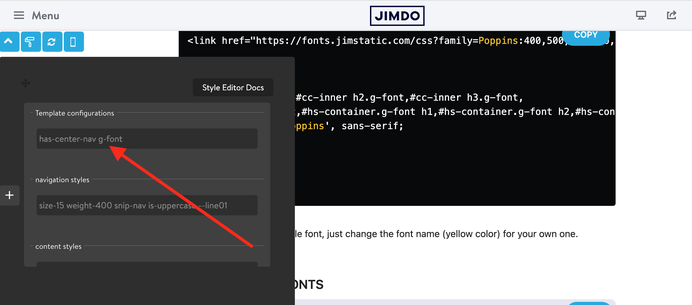
Preset Google fonts
02. Open the Style Editor and add the class 'g-font' for the main elements of your website:
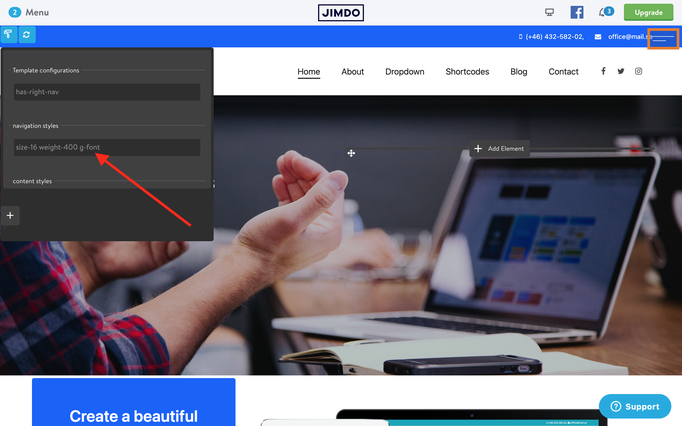
In case you wanted to apply the google font for all elements of your website, use the first line of 'Template configurations'

General Font settings
In admin menu, navigate Design> Font Settings and here you setup the following elements:
- the headings size and colors
- the global link color
- the style of horizontal line in content section

Additional tutorials:
https://www.matrix-themes.com/2015/04/17/matrix-themes-typography-options/
04. Hero section
The hero section is a background image, slideshow or simple background color that can be added to your website in Admin menu> Design> Background
This section will be displayed on the top of your website between the header and content.
How to activate
1. In admin menu > Design> Background select an image to display on your page.
2. On the top of content section add the module 'Columns' and inside of it display 'widget/HTML' with the following code:
<var> draggable-hero color-white g-font </var>
3. Click the 'Refresh' button or reload the page to see the columns module inside the hero section.
4. Adding the module 'Spacing' you can resize the hero section for your own preference.
| color-white | adds white color text |
| has-transparent-header | adds transparent background to the header |
| has-fullscreen-hero | adds fullscreen hero image |
| has-primary-overlay | adds the primary color for the hero overlay |
| has-secondary-overlay | adds the secondary color for the hero overlay |
| has-gradient-overlay | adds the gradient color for the hero overlay |
| has-no-gutter | removes the top padding between content and hero |
| has-btm-arrow | adds the arrow to the hero |
| has-nav-inverted | makes nav color white ( with transparent header) |
| has-logo-inverted | makes logo image white ( with transparent header) |
Useful links and tutorials:
https://support.jimdo.com/design/backgrounds/ (English)
https://de.jimdo.com/magazin/das-richtige-hintergrundbild/ ( Deutsch)
https://de.jimdo.com/magazin/hintergrundbilder-fur-eure-unterseiten/ ( Deutsch)
How to edit the hero section ( Matrix Themes )
05.Style guide
After installing the Style editor, you can paste the code below into Widget/HTML to see the general design styles.
<div class="is-matrix bg-white g-font add-20 br5" style="border:3px solid #F4F5F9;">
    <h3 style="color:#333;">
        Style Guide
    </h3>

    <div class="hr">
    </div>
    <br />

    <div class="color-white">
        <div class="tagcloud mid-round cc-clearover is--flex is--center no-padding no-margin">
            <div class="w-100 bg-primary add-10">
                bg-primary
            </div>
        </div>

        <div class="tagcloud mid-round cc-clearover is--flex is--center no-padding no-margin">
            <div class="w-100 bg-primary-light add-10" style="color:#333;">
                bg-primary-light
            </div>
        </div>

        <div class="tagcloud mid-round cc-clearover is--flex is--center no-padding no-margin">
            <div class="w-100 bg-primary-dark add-10">
                bg-primary-dark
            </div>
        </div>

        <div class="tagcloud mid-round cc-clearover is--flex is--center no-padding no-margin">
            <div class="w-100 bg-secondary add-10">
                bg-secondary
            </div>
        </div>

        <div class="tagcloud mid-round cc-clearover is--flex is--center no-padding no-margin">
            <div class="w-100 bg-secondary-dark add-10">
                bg-secondary-dark
            </div>
        </div>
    </div>
    <br />

    <h3 style="color:#333;">
        Button styles
    </h3>

    <div class="hr">
    </div>
    <br />
    <a class="j-calltoaction-link j-calltoaction-link-style-1" data-action="button" href="/" data-title="Style 1">Style 1</a>
    <div class="c">
    </div>
    <a class="j-calltoaction-link j-calltoaction-link-style-2" data-action="button" href="/" data-title="Style 2">Style 2</a>
    <div class="c">
    </div>
    <a class="j-calltoaction-link j-calltoaction-link-style-3" data-action="button" href="/" data-title="Style 3">Style 3</a>
    <div class="c">
    </div>
    <br />

    <h3 style="color:#333;">
        Typography
    </h3>

    <div class="hr">
    </div>
    <br />

    <h1>
        Large Heading H1
    </h1>

    <div class="c">
    </div>

    <h2>
        Medium Heading H2
    </h2>

    <div class="c">
    </div>

    <h3>
        Small Heading
    </h3>

    <div class="c">
    </div>

    <p>
        This is a simple text, Vivamus quis mi. Curabitur a felis in nunc fringilla tristique. Donec posuere vulputate arcu. Nunc sed turpis. Praesent porttitor, nulla vitae posuere iaculis, arcu
        nisl dignissim dolor, a pretium mi sem ut ipsum.
    </p>

    <p>
        This is a <a href="/" title="Home">simple link</a>.
    </p>
    <br />

    <h3 style="color:#333;">
        Custom widgets
    </h3>

    <div class="hr">
    </div>
    <br />

    <div class="is-matrix is-card content-teaser bg-primary-light is--flex is-flex-block cc-clearover">
        <div class="left-align col-8 add-20 cc-box">
            <h3>
                Make it Stand Out
            </h3>

            <p>
                Premium Jimdo Theme coupled with advanced functionality and awesome support Aenean imperdiet. Aenean posuere, tortor sed cursus feugiat, nunc augue blandit nunc, eu sollicitudin urna
                dolor sagittis lacus.
            </p>
        </div>

        <div class="right-align col-4 add-20 cc-box">
            <a class="hs-button mid-round right-align" href="https://www.matrix-themes.com/" target="">learn more</a>
        </div>
    </div>
    <br />
</div>
Do you have any further questions?
You can ask here!

Resources
Documentation

| bg-primary | |
| bg-primary-light | |
| bg-primary-dark | |
| bg-secondary | |
| bg-secondary-dark |
| body | |
| top-header | |
| top-header-inner | |
| header | |
| header-inner | |
| navigation-inner | |
| navigation color | |
| dropdown background color | |
| content |
| background | |
| text color | |
| link color | |
| horizontal line |
| style 1 | |
| style 2 | |
| style 3 | |
| text color |
| background color | |
| navigation color |
| social icons | |
| top header border | |
| header border | |
| nav inner border |
| Template configurations | |
|
|
| Top header inner | |
| Header inner | |
| Navigation inner | |
| Navigation styles | |
| size-15 weight-400 snip-nav --line01 | |
| Sub-menu (breadcrumbs) styles | |
| size-15 | |
| Mobile Navigation styles | |
| size-30 | |
| Content styles | |
| form-white | |
| Footer styles | |
| o-form color-white | |
| Footer background image | |
|
Typography |
|
| Heading H1 | |
| weight-400 | |
| Heading H2 | |
| weight-400 | |
| Heading H3 | |
| weight-400 | |
| Buttons | |
| weight-400 | |
| Advanced settings | |
| Custom CSS | |
|
#cc-inner .my-class { color:#f0f0f0; }
|
Note: All changes made here will be applied to your entire website.
Serhiy (Friday, 06 November 2020 17:22)
@Janina please get in touch from support page indicating all details.
Thank you
Janina (Friday, 06 November 2020 13:18)
Hi Serhiy,
how can I change the colours of the main menu of my website. I would like to have a white background and a black font. Thanks and sorry for my bad English!
Matrix themes (Monday, 06 July 2020)
@Frederic in Matrix themes menu > documentation> theme features
Frederic (Monday, 06 July 2020 18:33)
Ok thanks. Coockie Message Styles are changed. Do i have an chance to Put a Video as the background on The Startpage of my Website ? (Fullscreen)
Thanks
www.kopfkinomedia.de
Matrix themes (Thursday, 18 June 2020 23:01)
@Frederic first of all, you need to update the cookie message styles:
https://www.matrix-themes.com/support/help/cookies/
The template you're using has a transparent header with absolute position. I don't suggest you to change the background because you will need to change other elements too.
Frederic (Thursday, 18 June 2020 19:50)
https://www.kopfkinomedia.com
Matrix themes (Thursday, 18 June 2020 19:28)
@Frederic please add the url of your website
Frederic (Thursday, 18 June 2020 19:23)
Hey Serhiy,
How can I make the taskbar appear instantly after I opened the website and not after the first scroll downwards. I would like to have the black bar constantly on the top of my website.
Thanks :)
Matrix themes (Friday, 28 February 2020 14:37)
@Kevin the template has been customized by werbragentur.
You can add a simple buttom with link like they did:
<a class="hs-button mid-round left-align" href="*#scroll" target="">zum Leistungsangebot</a>
or contact directly them asking for further questions.
Keivn (Friday, 28 February 2020 14:25)
Sorry I Mean the Lemberg Templete
Kevin (Friday, 28 February 2020 14:24)
https://www.steinmetz-werbeagentur.de/
Kevin (Friday, 28 February 2020 14:23)
I found this page. This is the Lviv theme. Here was a button with a label. How was that heard?
Matrix themes (Friday, 28 February 2020 13:57)
@Kevin probably not in Matrix themes
Kevin Redmann (Friday, 28 February 2020 12:57)
@Matrix Theme
Thank you! But how can I program a button in the header to be a scroll down button. The button should be labeled. I've seen it on another website before
Matrix themes (Friday, 28 February 2020 00:07)
@Kevin the scrolldown button is displayed in all themes having the section 100% height " hero" image
Kevin Redmann (Thursday, 27 February 2020 21:00)
How can I insert a scroll button down in the header
Matrix themes (Tuesday, 11 February 2020 10:00)
@Peter please check the section "documentation" of Matrix themes menu or visit this page:
https://www.matrix-themes.com/2015/07/26/common-jimdo-support-issues/
Peter (Tuesday, 11 February 2020 09:58)
Hi, how can I change the phonenummber and the E-Mail in the header (Bergen)
Serhiy (Saturday, 09 November 2019 13:18)
@sparton this option is not available.
sparton (Saturday, 09 November 2019 13:15)
Sorry, yes that is clear but I need to move it more to the top
Serhiy (Saturday, 09 November 2019 12:38)
@sparton in section "shortocodes" you can find 3 different styles for hero title ( left, center and right align)
sparton (Saturday, 09 November 2019 12:10)
Hi how I can change the position of my hero text ?
Thank you
Karlyn (Tuesday, 15 October 2019 15:20)
Hi my website is www.poweruponplants.com
And i did as you mentioned above.
Serhiy (Tuesday, 15 October 2019 15:01)
@Karlyn go to Design> custom templates> files and make sure that image with the name logo.png exists in your directory.
P.S. Leaving a comment here, it would be great to add the URL of the website, otherwise it's difficult to solve the problem without seeing an example.
Thank you.
Karlyn (Tuesday, 15 October 2019 14:46)
Hi Serhiy,
I tried changing my logo i named the new file logo.png and uploaded it. But somehow it did remove the old one but the new one doesn't show.
Hope you can help
Thanks
Serhiy (Wednesday, 07 August 2019 21:30)
@Martin in Altona theme the hero section has class 'brand-gradient'. You can remove it using a default overlay dark background:
<div class="hs-overlay opacity-8 brand-gradient">
Martin Braun (Wednesday, 07 August 2019 14:42)
Hello Serhiy,
I'm sorry for this question now! I'm quite sure that you explained it somewhere but I'm looking for it for ages now without success.
How can I change the color of the overlay over the JAB. In http://altona-template.jimdo.com it's a kind of blue-to-violett. I'd like to have a red-to-yellow. However, as standard, it is just a grey overlay.
Thanks indeed for your help and sorry again that I'm such a stupid guy... :-D
Serhiy (Thursday, 04 July 2019 00:18)
@Bruno You cannot change bg-color of content for the bg image. You can change the color but anyway it should be a white/grey one.
Bruno Matter (Wednesday, 03 July 2019 23:25)
Hi, how do I change the bg color for the content or replace it with a picture?
thanks!
Tian (Wednesday, 01 May 2019 19:46)
Hi,
how can I change the color of the textbox of an overlay teaser?
Thanks!
Serhiy (Friday, 22 February 2019 18:08)
@Daniel please check the documentation of Matrix Themes menu or this post:
https://www.matrix-themes.com/2015/07/26/common-jimdo-support-issues/
Daniel (Friday, 22 February 2019 11:29)
The Images of the header are darker than the original. Where i can change this?
Serhiy (Friday, 18 January 2019 23:51)
@Karsten I cannot see any website.Please fill out the form from this page indicating all details:
https://www.matrix-themes.com/support/
Karsten (Friday, 18 January 2019 20:18)
Hello,
when you look on my homepage you see a white space between the hero pic and the Fullwidth bg section. Also you see a big space after the Fullwidth bg and the footer.
How can I reduce the space?
Thank you!
Serhiy (Friday, 19 October 2018 21:52)
@Michael, you can edit it directly in HTML ( design>custom templates> HTML tab)
Michael Lindfield (Friday, 19 October 2018 21:50)
Hi,
i have proabably overlooked it but how can i change the telephone number and email address on the header \top of page?
thanks
Serhiy (Tuesday, 07 August 2018 10:59)
@Michael The body class height depends on the content itself and you can't set up the height for it.
If I missed something or misunderstood, please get in touch from Support page indicating all details.
Michael Siegle (Tuesday, 07 August 2018)
Hello Serhiy,
how can I reduce the height of the body class from 702px to 300px?
Serhiy (Friday, 18 May 2018 15:47)
@Claudia, this section about general Matrix themes setup. Regarding your website, I cannot see anything,- it's under constructio mode. Please get in touch from support page indication also the website access. Thank you
https://www.matrix-themes.com/support/
Claudia Paz (Friday, 18 May 2018 14:42)
something is working wrong with the new layout. From the administrator area everything works perfect, the links, the photos, the presentation, but once I want to see the page from the phone or directly from the internet, the problems begin.
From the phone you can not see the buttons, so I can not click on them. When I want to go to some category, he asks me to enter my jimdo data. Being that I am using the phone navigator. From the website itself, clicking on any button directs me immediately to the administrator area, that is, enters my protected area. My webseite is www.mamalanas.de
Serhiy (Monday, 14 May 2018 22:36)
@Clara you chan use the following helper classes for icon colors:
link-dark, link-white, link-grey
for example:
<div class="hs-social left-align link-white">
Clara (Monday, 14 May 2018 17:35)
Hi Serhiy.
How can I change the color of the Fa icons? I need them in white or some light color.
Best regards,
Clara
Serhiy (Sunday, 13 May 2018 20:29)
@Nacho please check the section "documentation>theme features"
Nacho (Sunday, 13 May 2018 18:10)
Hello, how do you put a video-hero on the Altona theme?
Serhiy (Saturday, 12 May 2018 06:18)
@Claudia just remove the following line:
<div class="hs-overlay bg-primary white-solid-border">
</div>
Claudia (Friday, 11 May 2018 23:35)
Hi Serhiy,
how can I place a button on a photo, such as: "Overlay teaser style 3" but only a simple photo, without effect on it.
Serhiy (Sunday, 26 November 2017 11:05)
Hi Andreas,
as I wrote before, you need to remove everything you added to the caption and just the correct code caption from documentation. The caption of hero image should have only the title and button.
Andreas Schmidt (Sunday, 26 November 2017 11:02)
Hi Serhiy,
when you look at my website, you see there´s a lot of free space between the navigation and the first button on the fullwidth image. (I placed a table on the caption and that´s the highest position I can get.) When I go to the website with my Android mobile phone, the last two buttons are cut off.
Is it possible to reduce the upper free space so I can see the lower buttons as well?
Best regards,
Andreas
Ignacio (Sunday, 10 September 2017 19:58)
Hi, I would like to add this resource to my website.
I do not know if you could help me put it on my website.
I sent you the resource link:
https://demo.accesspressthemes.com/parallaxsome/#section-services
Thank you very much!!