What Is Asana?

With Asana, you can orchestrate work across teams at scale–from daily tasks to strategic cross-functional initiatives. Asana is the only work management platform that turns goals into action and breaks down silos between teams. More than 135,000 paying customers and millions of free organizations across 190 countries rely on Asana to manage everything from company objectives to digital transformation to product launches and marketing campaigns.

Who Uses Asana?

Why do 11,000+ customers give Asana 4.5/5 stars? Asana is the easiest way to manage projects, processes, and tasks across teams at scale. Asana helps teams be more productive and deliver better work.

Where can Asana be deployed?

Cloud-based
On-premise

About the vendor

  • Asana
  • Located in San Francisco, US
  • Founded in 2008

Asana support

  • Chat

Countries available

Albania, Algeria, Andorra, Antigua & Barbuda, Argentina and 125 others

Languages

Dutch, English, French, German, Japanese and 7 others

Asana pricing

Starting Price:

$13.49/month
  • Yes, has free trial
  • Yes, has free version

Asana has a free version and offers a free trial. Asana paid version starts at $13.49/month.

Pricing plans get a free trial

About the vendor

  • Asana
  • Located in San Francisco, US
  • Founded in 2008

Asana support

  • Chat

Countries available

Albania, Algeria, Andorra, Antigua & Barbuda, Argentina and 125 others

Languages

Dutch, English, French, German, Japanese and 7 others

Asana videos and images

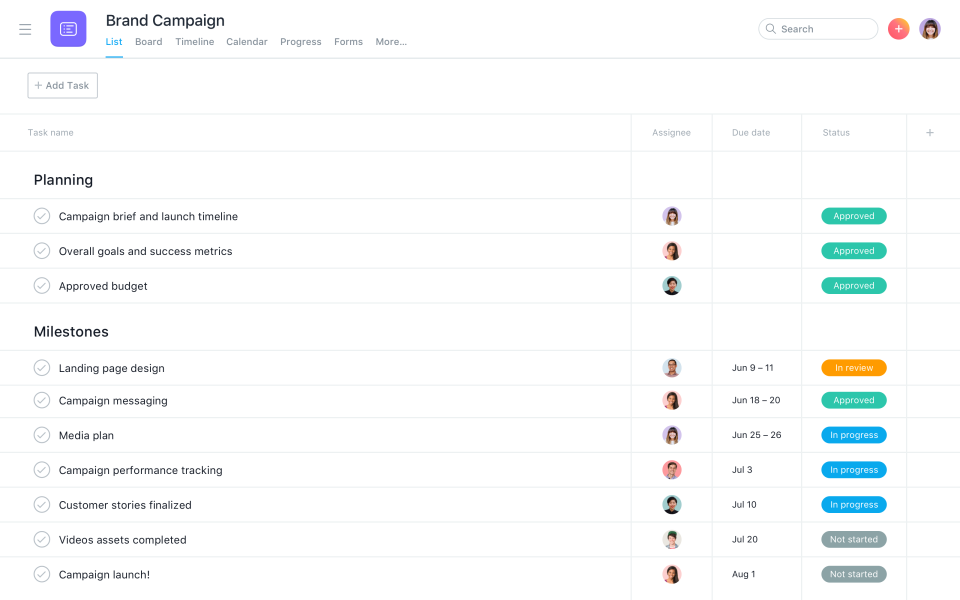
Asana Software - Create Task Lists
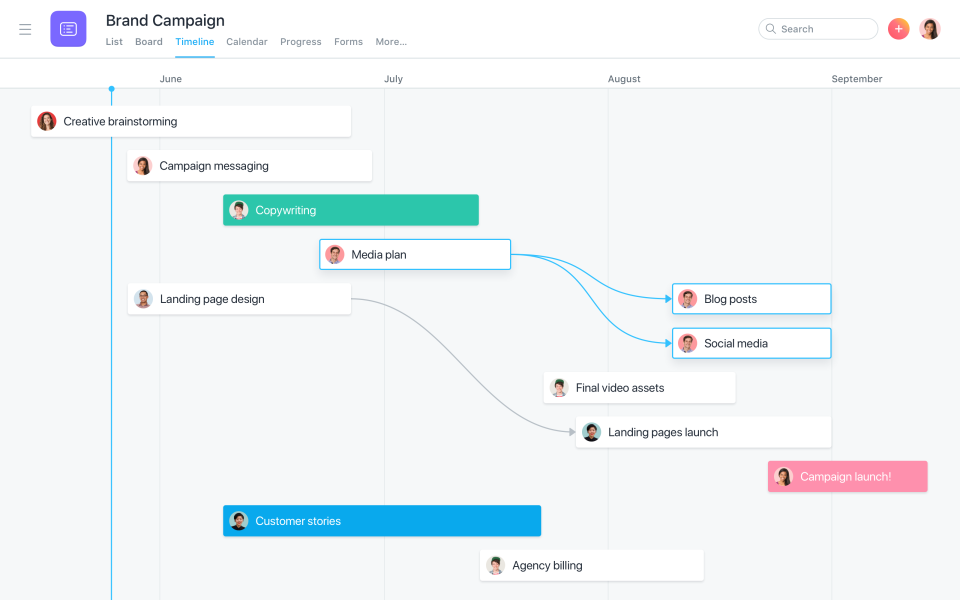
Asana Software - Plan Work with Timeline
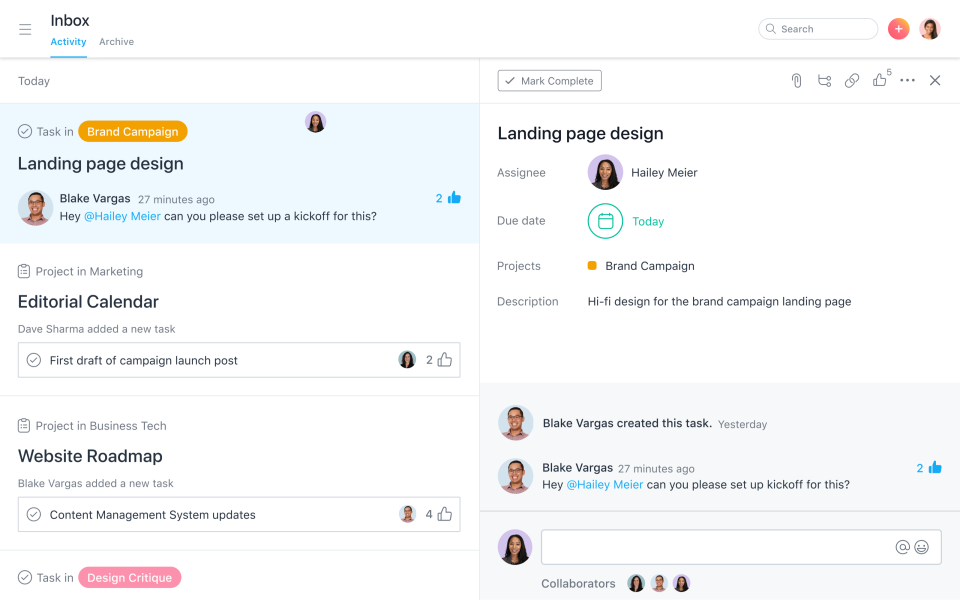
Asana Software - Use Inbox to Collaborate
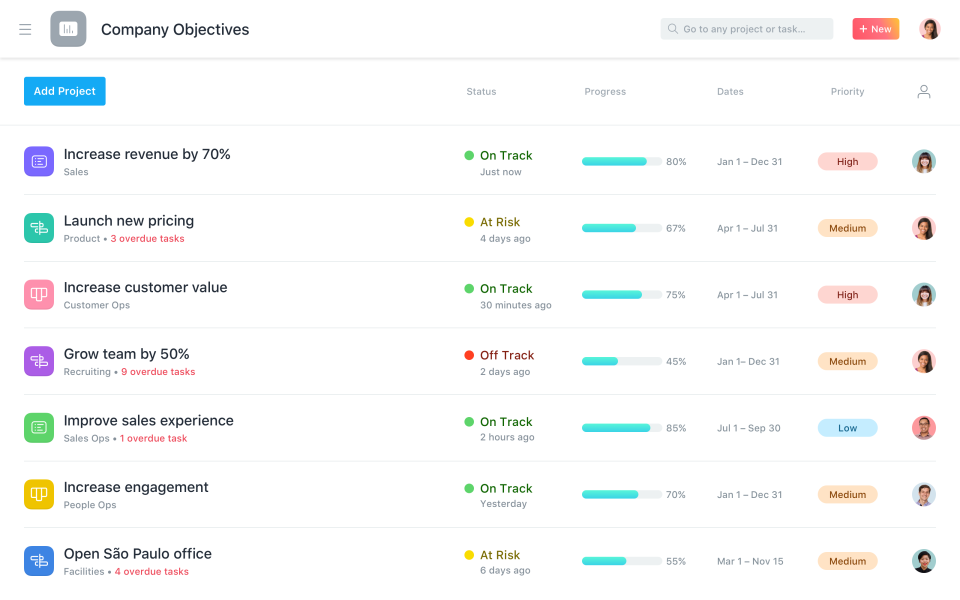
Asana Software - Monitor Project Progress
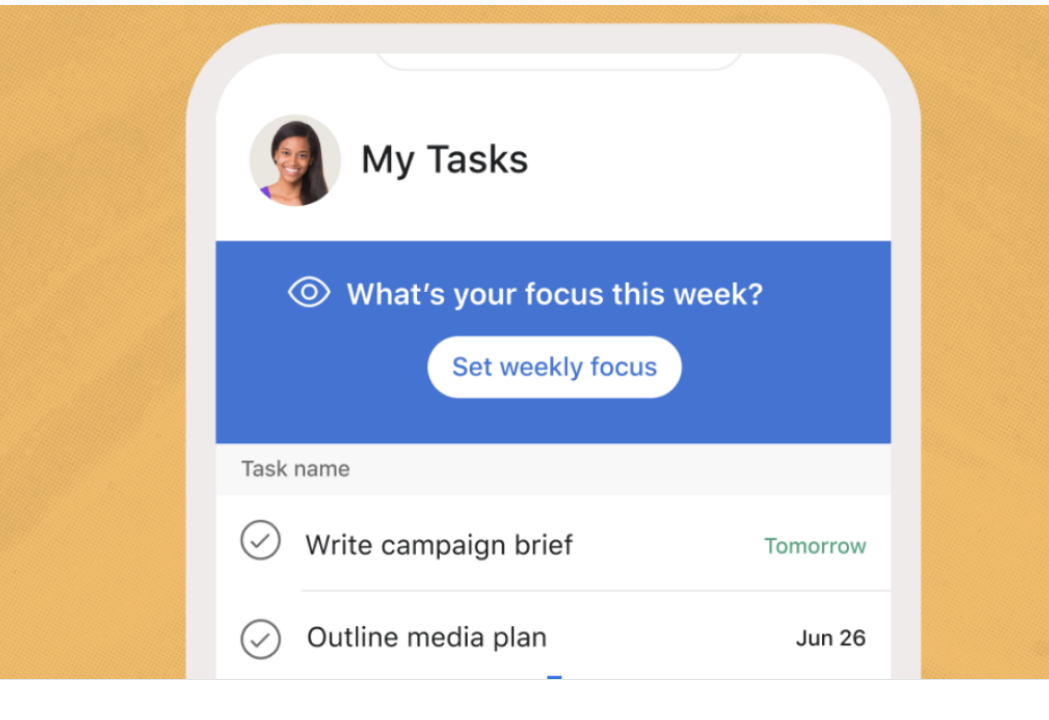
Asana Software - Asana mobile interface
View 6 more
Asana video
Asana Software - Create Task Lists
Asana Software - Plan Work with Timeline
Asana Software - Use Inbox to Collaborate
Asana Software - Monitor Project Progress
Asana Software - Asana mobile interface

Features of Asana

  • Access Controls/Permissions
  • Activity Dashboard
  • Activity Tracking
  • Activity/News Feed
  • Ad hoc Reporting
  • Agile Methodologies
  • Alerts/Notifications
  • Approval Process Control
  • Approval Workflow
  • Assignment Management
  • Audit Trail
  • Automated Scheduling
  • Backlog Management
  • Bar Chart
  • Brainstorming
  • Budget Management
  • Budgeting/Forecasting
  • Bug/Issue Capture
  • Business Process Automation
  • CRM Software
  • Calendar Management
  • Campaign Analytics
  • Campaign Management Software
  • Campaign Planning
  • Capacity Management
  • Change Management Software
  • Channel Management Software
  • Client Management
  • Client Portal
  • Collaboration Tools
  • Color Codes/Icons
  • Commenting/Notes
  • Communication Management
  • Compliance Tracking
  • Contact Management Software
  • Content Management System (CMS) Software
  • Cost-to-Completion Tracking
  • Create Subtasks
  • Customizable Dashboard
  • Customizable Templates
  • Dashboard Software
  • Data Import/Export
  • Data Visualization Software
  • Dependency Tracking
  • Discussions / Forums
  • Display Ad Management
  • Document Management Software
  • Document Storage
  • Drag & Drop
  • Email Management Software
  • Email Marketing Software
  • Email-to-Task Conversion
  • Employee Database
  • Employee Management
  • Employee Scheduling Software
  • Event Triggered Actions
  • File Management
  • File Sharing Software
  • For Creative Agencies
  • For IT Project Management
  • For Small Businesses
  • Forecasting
  • Forms Automation Software
  • Forms Management
  • Gantt/Timeline View
  • Goal Management
  • Goal Setting / Tracking
  • Graphical Workflow Editor
  • Guest Access
  • Idea Management Software
  • Ideation
  • Import Tasks
  • Innovation Management
  • Issue Management
  • KPI Monitoring
  • Kanban Board
  • Knowledge Management Software
  • Labor Forecasting
  • Lead Management Software
  • Live Chat Software
  • Marketing Calendar
  • Media Planning
  • Meeting Management
  • Messaging
  • Milestone Tracking
  • Mobile Access
  • Multi-Campaign
  • Multi-Channel Marketing
  • No-Code
  • Notes Management
  • Percent-Complete Tracking
  • Performance Review Management
  • Personalization and Behavioral Targeting Software
  • Polls/Voting
  • Portfolio Management
  • Presentation Tools
  • Prioritization
  • Process Modeling & Designing
  • Product Lifecycle Management Software
  • Product Roadmapping
  • Productivity Tools
  • Progress Tracking
  • Project Management Software
  • Project Planning Software
  • Project Planning/Scheduling
  • Project Scheduling
  • Project Tracking Software
  • ROI Tracking
  • Real Time Editing
  • Real Time Notifications
  • Real-Time Chat
  • Recurring Tasks
  • Remote Access/Control
  • Remote Support Software
  • Reporting & Statistics
  • Reporting/Analytics
  • Reporting/Project Tracking
  • Requirements Management Software
  • Resource Management Software
  • Resource Request
  • Resource Scheduling
  • Risk Management Software
  • Roadmapping
  • Role-Based Permissions
  • Rules-Based Workflow
  • Scenario Planning
  • Screen Sharing Software
  • Search/Filter
  • Single Sign On Software
  • Status Tracking
  • Strategic Planning Software
  • Surveys & Feedback
  • Tagging
  • Task Editing/Updating
  • Task Management Software
  • Task Progress Tracking
  • Task Scheduling
  • Task Tagging
  • Template Management
  • Templates
  • Third Party Integrations
  • Ticket Management
  • Time & Attendance
  • Time Tracking Software
  • Transcripts/Chat History
  • User Management
  • Version Control
  • Visual Workflow Management
  • Visualization
  • Web-based Deployment
  • Workflow Configuration
  • Workflow Management Software

Asana Alternatives

Drive growth with Sales Cloud 360, the best-in-class sales solution that drives rep productivity on the world's #1 CRM platform.
A completely reimagined UI, enhanced search and filters, easywork allocation, new portfolio dashboard, and more to transform your work.
Airtable is the database that anyone can use with a beautiful spreadsheet interface.
Task management app that allows users to share to-do lists among themselves, set reminders, and add notes.
Teamwork is the only platform built for scaling client work. The best balance of functionality, price, and ease of use. Start today.
Smartsheet is an online work execution platform empowering organizations of all sizes to plan, manage, automate, and report on work.
Start, Run and Grow Your Business from Anywhere.
Podio is the new way for teams to communicate, organize and get work done. Free for up to 10 users.
Confluence is a team workspace where knowledge and collaboration meet. Create, collaborate, and organize your work all in one place. Learn more about Confluence

Reviews of Asana

Average score

Overall
4.5
Ease of Use
4.3
Customer Service
4.3
Features
4.3
Value for Money
4.4

Reviews by company size (employees)

  • <50
  • 51-200
  • 201-1,000
  • >1,001
Jeremy
Jeremy
Owner in Canada
Verified LinkedIn User
Media Production, 2-10 Employees
Used the Software for: 2+ years
Reviewer Source

Asana: A Seasoned Project Management App

5.0 2 weeks ago New

Comments: I've been using Asana on and off since its inception, and it is a very attractive solution for project management.

Pros:

Asana has a gorgeous, modern interface that features multiple project views, including List, Calendar, Kanban, and Timeline for maximum project management. Tasks can be assigned, tracked and even bug-tracking is featured. There's a reason Asana has lasted for over a decade now.

Cons:

Asana's methods can take a little getting used to. The interface is much more clear than it used to be, when all task details were hidden behind animated sidebars, with better visual cues for sub-tasks. So that makes Asana much better now. Unfortunately, there are no markup tools for things like graphic design projects.

Alternatives Considered: Swift To-Do list

Reasons for Choosing Asana: Asana was feature-rich and widely adopted.

Switched From: Evernote Teams

Reasons for Switching to Asana: More mature product with sub-tasks.

Vinod
Vinod
Project Manager in Canada
Verified LinkedIn User
Construction, 10,000+ Employees
Used the Software for: 2+ years
Reviewer Source

Good starter for Agile Project Management

4.0 last month New

Comments: Excellent for small company managed projects.

Pros:

If you want to learn Agile with Kanban, Asana is good for you. Its easy to use product for IT, HR , finance and non tech people. UI UX is great. Easy deployment on cloud. Free to try and good for small company.

Cons:

It has basic features and good for small projects and small team. Software management projects are easy. It is not for waterfall method.

Alternatives Considered: Microsoft Project

Reasons for Choosing Asana: MS project has limited feature and not agile.

Switched From: Microsoft Project

Reasons for Switching to Asana: Asana is cloud based, scalable and good for small team.

Verified Reviewer
Administor in United Arab Emirates
Verified LinkedIn User
Government Administration, 11-50 Employees
Used the Software for: 6-12 months
Reviewer Source

It's very useful and has many communication skills

3.0 2 months ago New

Pros:

It's very exciting to use I mange tasks and milestone

Cons:

We need be free for 4 users and I can use all features software

Roldan
Roldan
Web UX/UI Designer/Developer in Philippines
Verified LinkedIn User
Design, 11-50 Employees
Used the Software for: 1-5 months
Reviewer Source

Best choice or good alternative

4.0 3 months ago

Comments: Good! Asana is not as difficult to get the hand out with. I did manage to set-up all my tasks and projects personally. Though, I haven't used it for a long time when I did tested Monday.com.

Pros:

I can bet in all of Asana's features from Task management, Scheduling, Materials management, Gantt Charts, Collaborations and the likes. Save for time tracking which is not (yet) available. The Free Pricing however, is generous enough to collaborate with up to 10 or 15 more individuals. Other top PMS has less to nothing - or just one user allowed.

Cons:

User Interface. Asana needs to improve on there user interface to be at par with Monday.com. I've been using Monday and never looked back (except maybe if someday they will overrun Monday with features. Time Tracking. This one matters for some users, specially freelancers and online nomads alike. Just wondering why this wasn't integrated just yet. Set-up. It wasn't that easy to get started for non-techie users. So patience a virtue. Though PMS are understandably complicated, Monday take the pie in this domain.

Alternatives Considered: monday.com

Reasons for Choosing Asana: Well, upon company decision and me as consultant. Monday duly meets our startup company's needs and wants.

Switched From: monday.com

Reasons for Switching to Asana: I choose Asana the first time. But upon testing other PMS, it seems the other weighs more than Asana.

Maite
Project Manager in Spain
Entertainment, 2-10 Employees
Used the Software for: 6-12 months
Reviewer Source

Asana is the best Project manager app that's the end of the discussion

5.0 2 months ago New

Comments: From the moment I knew Asana existed I understand right away how this would simplify not only my work but my live routine. It's such an amazing app and it's free to use! Many apps have a free version that doesn't work properly or have too many limitations to understand it properly.. with asana you can you use the free version to do the basics 100% right and helps you develop a organizational habit most of us don't know we need.

Pros:

I love how easy and intuitive it is to use. Im able to manage projects with different templates and manager integrated task how ever I want. I love that i'm able to integrate other apps such as google calendar or google drive and have a workflow kind of automated. What i love the most is that anything can be done by reading all the available options and everyone in my team has learned really fast by understanding all the benefits this software brings to our workflow.

Cons:

I haven't found something i don't like but this may be due to the fact im only using the Free version until my whole team gets around Asana usage with the basics. I'm definitely planning on upgrading!

Alternatives Considered: Trello

Reasons for Switching to Asana: Asana works best for big teams and remote work. Compare to Trello, Asana is further more complete when talking about functionality