<?xml version="1.0" encoding="utf-8"?>
<feed xmlns="http://www.w3.org/2005/Atom">
    <id>https://verdaccio.org/blog</id>
    <title>Verdaccio Blog</title>
    <updated>2021-04-14T00:00:00.000Z</updated>
    <generator>https://github.com/jpmonette/feed</generator>
    <link rel="alternate" href="https://verdaccio.org/blog"/>
    <subtitle>Verdaccio Blog</subtitle>
    <icon>https://verdaccio.org/img/logo/uk/verdaccio-tiny-uk-no-bg.svg</icon>
    <entry>
        <title type="html"><![CDATA[Verdaccio 5 migration guidelines]]></title>
        <id>https://verdaccio.org/blog/2021/04/14/verdaccio-5-migration-guide</id>
        <link href="https://verdaccio.org/blog/2021/04/14/verdaccio-5-migration-guide"/>
        <updated>2021-04-14T00:00:00.000Z</updated>
        <summary type="html"><![CDATA[Verdaccio 5 will introduce a few breaking changes, either way the migration should be light for the most of the users, here the big details.]]></summary>
        <content type="html"><![CDATA[<p><strong>Verdaccio 5</strong> will introduce a few breaking changes, either way the migration should be light for the most of the users, here the big details.</p>
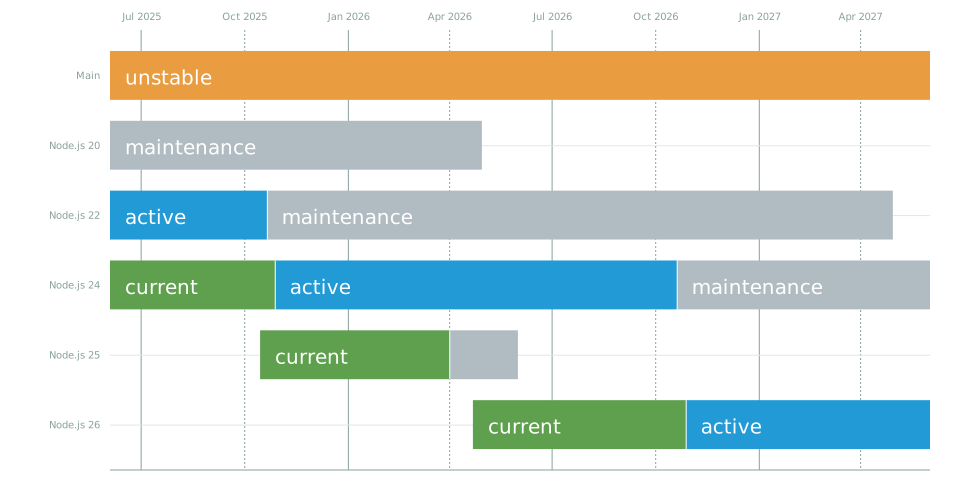
<p>The latest Node.js v12 is required to run verdaccio. The upgrade only affects those are not using the Docker.</p>
<blockquote>
<p>Verdaccio goes hand to hand with the official Node.js releases roadmap.</p>
</blockquote>
<p><img decoding="async" loading="lazy" src="https://raw.githubusercontent.com/nodejs/Release/master/schedule.svg?sanitize=true" alt="noderelease" class="img_b8G6"></p>
<p>We recommend, always try to use the latest LTS version to avoid next major forces you to upgrade Node.js again.</p>
<h1>Pino.js is the new logger</h1>
<p>Verdaccio replaces Bunyan by <a href="https://github.com/pinojs/pino" target="_blank" rel="noopener noreferrer">Pino.js</a> as logger, with the objective to improve the performance and delegate some features to the external tools. The new logger configuration does not support multiple streams, thus the configuration must contain one single object.</p>
<h3 class="anchor anchorWithStickyNavbar_jdH6" id="pretty-loggin">Pretty logging<a href="https://verdaccio.org/blog/2021/04/14/verdaccio-5-migration-guide#pretty-loggin" class="hash-link" aria-label="Direct link to Pretty logging" title="Direct link to Pretty logging">​</a></h3>
<p>Verdaccio logging pretty print is a distinguished feature the very first time <code>verdaccio</code> commands runs.</p>
<div class="codeBlockContainer_lE38 theme-code-block" style="--prism-color:#393A34;--prism-background-color:#f6f8fa"><div class="codeBlockContent_cWTV"><pre tabindex="0" class="prism-code language-text codeBlock_ne8l thin-scrollbar" style="color:#393A34;background-color:#f6f8fa"><code class="codeBlockLines_u57s"><span class="token-line" style="color:#393A34"><span class="token plain"> http &lt;-- 200, user: test(127.0.0.1), req: 'GET /is-accessor-descriptor/-/is-accessor-descriptor-1.0.0.tgz', bytes: 0/3250</span><br></span><span class="token-line" style="color:#393A34"><span class="token plain"> http &lt;-- 200, user: test(127.0.0.1), req: 'GET /extend-shallow/-/extend-shallow-3.0.2.tgz', bytes: 0/3210</span><br></span><span class="token-line" style="color:#393A34"><span class="token plain"> http &lt;-- 200, user: test(127.0.0.1), req: 'GET /define-property/-/define-property-2.0.2.tgz', bytes: 0/4047</span><br></span><span class="token-line" style="color:#393A34"><span class="token plain"> http &lt;-- 200, user: test(127.0.0.1), req: 'GET /mute-stream/-/mute-stream-0.0.8.tgz', bytes: 0/2663</span><br></span><span class="token-line" style="color:#393A34"><span class="token plain"> http &lt;-- 200, user: test(127.0.0.1), req: 'GET /ms/-/ms-2.1.2.tgz', bytes: 0/3017</span><br></span><span class="token-line" style="color:#393A34"><span class="token plain"> http &lt;-- 200, user: test(127.0.0.1), req: 'GET /mkdirp/-/mkdirp-0.5.1.tgz', bytes: 0/4991</span><br></span></code></pre><div class="buttonGroup_GLLO"><button type="button" aria-label="Copy code to clipboard" title="Copy" class="clean-btn"><span class="copyButtonIcons_dPM8" aria-hidden="true"><svg viewBox="0 0 24 24" class="copyButtonIcon_TQjY"><path fill="currentColor" d="M19,21H8V7H19M19,5H8A2,2 0 0,0 6,7V21A2,2 0 0,0 8,23H19A2,2 0 0,0 21,21V7A2,2 0 0,0 19,5M16,1H4A2,2 0 0,0 2,3V17H4V3H16V1Z"></path></svg><svg viewBox="0 0 24 24" class="copyButtonSuccessIcon_k4Gw"><path fill="currentColor" d="M21,7L9,19L3.5,13.5L4.91,12.09L9,16.17L19.59,5.59L21,7Z"></path></svg></span></button></div></div></div>
<p>But is expensive in and not recommended to using in production environment, thus, if the environment variable <code>NODE_ENV=production</code> is detected, it will fall back automatically to <code>json</code> format.</p>
<p>One tecnical reasons is that <code>pino.final</code> <a href="https://github.com/pinojs/pino-pretty/issues/37" target="_blank" rel="noopener noreferrer">does not work with prettier option</a>.</p>
<p>To improve the performance of your registry, always use <code>format: json</code> in production.</p>
<h3 class="anchor anchorWithStickyNavbar_jdH6" id="multiple-streams">Multiple streams<a href="https://verdaccio.org/blog/2021/04/14/verdaccio-5-migration-guide#multiple-streams" class="hash-link" aria-label="Direct link to Multiple streams" title="Direct link to Multiple streams">​</a></h3>
<p>Even if is <a href="https://getpino.io/#/docs/help?id=log-to-different-streams" target="_blank" rel="noopener noreferrer">supported by Pino.js</a> is not recommended for performance reasons. The log property only recognize one single option. If you were using this feature and want it back, <a href="https://github.com/verdaccio/verdaccio/discussions/new?category=ideas" target="_blank" rel="noopener noreferrer">feel free to open a discussion</a> or contribute as opt-in feature.</p>
<div class="language-yaml codeBlockContainer_lE38 theme-code-block" style="--prism-color:#393A34;--prism-background-color:#f6f8fa"><div class="codeBlockContent_cWTV"><pre tabindex="0" class="prism-code language-yaml codeBlock_ne8l thin-scrollbar" style="color:#393A34;background-color:#f6f8fa"><code class="codeBlockLines_u57s"><span class="token-line" style="color:#393A34"><span class="token key atrule" style="color:#00a4db">logs</span><span class="token punctuation" style="color:#393A34">:</span><span class="token plain"> </span><span class="token punctuation" style="color:#393A34">{</span><span class="token plain"> </span><span class="token key atrule" style="color:#00a4db">type</span><span class="token punctuation" style="color:#393A34">:</span><span class="token plain"> stdout</span><span class="token punctuation" style="color:#393A34">,</span><span class="token plain"> </span><span class="token key atrule" style="color:#00a4db">format</span><span class="token punctuation" style="color:#393A34">:</span><span class="token plain"> pretty</span><span class="token punctuation" style="color:#393A34">,</span><span class="token plain"> </span><span class="token key atrule" style="color:#00a4db">level</span><span class="token punctuation" style="color:#393A34">:</span><span class="token plain"> http </span><span class="token punctuation" style="color:#393A34">}</span><br></span></code></pre><div class="buttonGroup_GLLO"><button type="button" aria-label="Copy code to clipboard" title="Copy" class="clean-btn"><span class="copyButtonIcons_dPM8" aria-hidden="true"><svg viewBox="0 0 24 24" class="copyButtonIcon_TQjY"><path fill="currentColor" d="M19,21H8V7H19M19,5H8A2,2 0 0,0 6,7V21A2,2 0 0,0 8,23H19A2,2 0 0,0 21,21V7A2,2 0 0,0 19,5M16,1H4A2,2 0 0,0 2,3V17H4V3H16V1Z"></path></svg><svg viewBox="0 0 24 24" class="copyButtonSuccessIcon_k4Gw"><path fill="currentColor" d="M21,7L9,19L3.5,13.5L4.91,12.09L9,16.17L19.59,5.59L21,7Z"></path></svg></span></button></div></div></div>
<blockquote>
<p>FYI: pino v7 might bring back a good performant multi-streams support, this feature might be restored in the future.</p>
</blockquote>
<h3 class="anchor anchorWithStickyNavbar_jdH6" id="rotating-file-is-not-longer-supported">Rotating file is not longer supported<a href="https://verdaccio.org/blog/2021/04/14/verdaccio-5-migration-guide#rotating-file-is-not-longer-supported" class="hash-link" aria-label="Direct link to Rotating file is not longer supported" title="Direct link to Rotating file is not longer supported">​</a></h3>
<p>Pino.js does not support log rotation, thus if you were using this feature is recommended use an <a href="https://getpino.io/#/docs/help?id=log-rotation" target="_blank" rel="noopener noreferrer">external tool</a>.</p>
<div class="codeBlockContainer_lE38 theme-code-block" style="--prism-color:#393A34;--prism-background-color:#f6f8fa"><div class="codeBlockContent_cWTV"><pre tabindex="0" class="prism-code language-text codeBlock_ne8l thin-scrollbar" style="color:#393A34;background-color:#f6f8fa"><code class="codeBlockLines_u57s"><span class="token-line" style="color:#393A34"><span class="token plain"> // this is not longer valid</span><br></span><span class="token-line" style="color:#393A34"><span class="token plain"> {type: rotating-file, format: json, path: /path/to/log.jsonl, level: http, options: {period: 1d}}</span><br></span></code></pre><div class="buttonGroup_GLLO"><button type="button" aria-label="Copy code to clipboard" title="Copy" class="clean-btn"><span class="copyButtonIcons_dPM8" aria-hidden="true"><svg viewBox="0 0 24 24" class="copyButtonIcon_TQjY"><path fill="currentColor" d="M19,21H8V7H19M19,5H8A2,2 0 0,0 6,7V21A2,2 0 0,0 8,23H19A2,2 0 0,0 21,21V7A2,2 0 0,0 19,5M16,1H4A2,2 0 0,0 2,3V17H4V3H16V1Z"></path></svg><svg viewBox="0 0 24 24" class="copyButtonSuccessIcon_k4Gw"><path fill="currentColor" d="M21,7L9,19L3.5,13.5L4.91,12.09L9,16.17L19.59,5.59L21,7Z"></path></svg></span></button></div></div></div>
<h3 class="anchor anchorWithStickyNavbar_jdH6" id="deprecation">Deprecation<a href="https://verdaccio.org/blog/2021/04/14/verdaccio-5-migration-guide#deprecation" class="hash-link" aria-label="Direct link to Deprecation" title="Direct link to Deprecation">​</a></h3>
<p><strong>Old configuration won't crash the application</strong>, rather will display a deprecation warning and will use the very first option in your configuration as fallback. Consider update your configuration due in the next major will throw an error.</p>
<div class="language-bash codeBlockContainer_lE38 theme-code-block" style="--prism-color:#393A34;--prism-background-color:#f6f8fa"><div class="codeBlockContent_cWTV"><pre tabindex="0" class="prism-code language-bash codeBlock_ne8l thin-scrollbar" style="color:#393A34;background-color:#f6f8fa"><code class="codeBlockLines_u57s"><span class="token-line" style="color:#393A34"><span class="token plain">➜  verdaccio</span><br></span><span class="token-line" style="color:#393A34"><span class="token plain"> warn --- config file  - /home/xxxx/.config/verdaccio/config.yaml</span><br></span><span class="token-line" style="color:#393A34"><span class="token plain">(node:22047) Warning: deprecate: multiple logger configuration is deprecated, please check the migration guide.</span><br></span><span class="token-line" style="color:#393A34"><span class="token plain">(Use `node --trace-warnings ...` to show where the warning was created)</span><br></span><span class="token-line" style="color:#393A34"><span class="token plain"> warn --- Plugin successfully loaded: verdaccio-htpasswd</span><br></span><span class="token-line" style="color:#393A34"><span class="token plain"> warn --- Plugin successfully loaded: verdaccio-audit</span><br></span><span class="token-line" style="color:#393A34"><span class="token plain"> warn --- http address - http://localhost:4873/ - verdaccio/5.0.0-alpha.0</span><br></span></code></pre><div class="buttonGroup_GLLO"><button type="button" aria-label="Copy code to clipboard" title="Copy" class="clean-btn"><span class="copyButtonIcons_dPM8" aria-hidden="true"><svg viewBox="0 0 24 24" class="copyButtonIcon_TQjY"><path fill="currentColor" d="M19,21H8V7H19M19,5H8A2,2 0 0,0 6,7V21A2,2 0 0,0 8,23H19A2,2 0 0,0 21,21V7A2,2 0 0,0 19,5M16,1H4A2,2 0 0,0 2,3V17H4V3H16V1Z"></path></svg><svg viewBox="0 0 24 24" class="copyButtonSuccessIcon_k4Gw"><path fill="currentColor" d="M21,7L9,19L3.5,13.5L4.91,12.09L9,16.17L19.59,5.59L21,7Z"></path></svg></span></button></div></div></div>
<h2 class="anchor anchorWithStickyNavbar_jdH6" id="npm-token"><code>npm token</code><a href="https://verdaccio.org/blog/2021/04/14/verdaccio-5-migration-guide#npm-token" class="hash-link" aria-label="Direct link to npm-token" title="Direct link to npm-token">​</a></h2>
<p>The command <code>npm token</code> has been an experiment in Verdaccio 4 and on this major release is enabled by default, but was based on <em>LevelDB</em> which requires a C and Python compiler on install to make it work. By <a href="https://github.com/verdaccio/verdaccio/issues/1925" target="_blank" rel="noopener noreferrer">request</a> has been removed and replaced by a pure JS solution.</p>
<p>The default token database now is plain json file <code>.token-db.json</code> and is located in the same directory as <code>.verdaccio-db.json</code>, with this format:</p>
<div class="codeBlockContainer_lE38 theme-code-block" style="--prism-color:#393A34;--prism-background-color:#f6f8fa"><div class="codeBlockContent_cWTV"><pre tabindex="0" class="prism-code language-text codeBlock_ne8l thin-scrollbar" style="color:#393A34;background-color:#f6f8fa"><code class="codeBlockLines_u57s"><span class="token-line" style="color:#393A34"><span class="token plain">{</span><br></span><span class="token-line" style="color:#393A34"><span class="token plain">  "jpicado": [</span><br></span><span class="token-line" style="color:#393A34"><span class="token plain">    {</span><br></span><span class="token-line" style="color:#393A34"><span class="token plain">      "user": "jpicado",</span><br></span><span class="token-line" style="color:#393A34"><span class="token plain">      "token": "MWFlM...yZDBl",</span><br></span><span class="token-line" style="color:#393A34"><span class="token plain">      "key": "4201e4bc47c31b3434034e40b5c35175",</span><br></span><span class="token-line" style="color:#393A34"><span class="token plain">      "cidr": [],</span><br></span><span class="token-line" style="color:#393A34"><span class="token plain">      "readonly": false,</span><br></span><span class="token-line" style="color:#393A34"><span class="token plain">      "created": 1609512433710</span><br></span><span class="token-line" style="color:#393A34"><span class="token plain">    },</span><br></span><span class="token-line" style="color:#393A34"><span class="token plain">    {</span><br></span><span class="token-line" style="color:#393A34"><span class="token plain">      "user": "jpicado",</span><br></span><span class="token-line" style="color:#393A34"><span class="token plain">      "token": "ZjQwZ...wYTE1",</span><br></span><span class="token-line" style="color:#393A34"><span class="token plain">      "key": "cc249bc2f4d248308733d70291acdc2a",</span><br></span><span class="token-line" style="color:#393A34"><span class="token plain">      "cidr": [],</span><br></span><span class="token-line" style="color:#393A34"><span class="token plain">      "readonly": false,</span><br></span><span class="token-line" style="color:#393A34"><span class="token plain">      "created": 1609512441024</span><br></span><span class="token-line" style="color:#393A34"><span class="token plain">    }</span><br></span><span class="token-line" style="color:#393A34"><span class="token plain">  ],</span><br></span><span class="token-line" style="color:#393A34"><span class="token plain">  "test": [</span><br></span><span class="token-line" style="color:#393A34"><span class="token plain">    {</span><br></span><span class="token-line" style="color:#393A34"><span class="token plain">      "user": "test",</span><br></span><span class="token-line" style="color:#393A34"><span class="token plain">      "token": "M2RiM...0Mzhj",</span><br></span><span class="token-line" style="color:#393A34"><span class="token plain">      "key": "2ae85deba977e00fb099d323173c925a",</span><br></span><span class="token-line" style="color:#393A34"><span class="token plain">      "cidr": [],</span><br></span><span class="token-line" style="color:#393A34"><span class="token plain">      "readonly": false,</span><br></span><span class="token-line" style="color:#393A34"><span class="token plain">      "created": 1609533131779</span><br></span><span class="token-line" style="color:#393A34"><span class="token plain">    }</span><br></span><span class="token-line" style="color:#393A34"><span class="token plain">  ]</span><br></span><span class="token-line" style="color:#393A34"><span class="token plain">}</span><br></span><span class="token-line" style="color:#393A34"><span class="token plain" style="display:inline-block"></span><br></span></code></pre><div class="buttonGroup_GLLO"><button type="button" aria-label="Copy code to clipboard" title="Copy" class="clean-btn"><span class="copyButtonIcons_dPM8" aria-hidden="true"><svg viewBox="0 0 24 24" class="copyButtonIcon_TQjY"><path fill="currentColor" d="M19,21H8V7H19M19,5H8A2,2 0 0,0 6,7V21A2,2 0 0,0 8,23H19A2,2 0 0,0 21,21V7A2,2 0 0,0 19,5M16,1H4A2,2 0 0,0 2,3V17H4V3H16V1Z"></path></svg><svg viewBox="0 0 24 24" class="copyButtonSuccessIcon_k4Gw"><path fill="currentColor" d="M21,7L9,19L3.5,13.5L4.91,12.09L9,16.17L19.59,5.59L21,7Z"></path></svg></span></button></div></div></div>
<p>Tokens are not being storage, just small part of it, the <code>key</code> is just a random <code>uuid</code>.</p>
<h3 class="anchor anchorWithStickyNavbar_jdH6" id="breaking-changes">Breaking Changes<a href="https://verdaccio.org/blog/2021/04/14/verdaccio-5-migration-guide#breaking-changes" class="hash-link" aria-label="Direct link to Breaking Changes" title="Direct link to Breaking Changes">​</a></h3>
<p>If you were using <code>npm token</code> in verdaccio 4, most likely the database would need to be removed and created from scratch. Remove the old database and on restart Verdaccio will generate a new one.</p>
<h2 class="anchor anchorWithStickyNavbar_jdH6" id="url_prefix-improved-behavior"><code>url_prefix</code> improved behavior<a href="https://verdaccio.org/blog/2021/04/14/verdaccio-5-migration-guide#url_prefix-improved-behavior" class="hash-link" aria-label="Direct link to url_prefix-improved-behavior" title="Direct link to url_prefix-improved-behavior">​</a></h2>
<p>The new internal logic builds correctly the public url, validates the <code>host</code> header and and bad shaped <code>url_prefix</code>.</p>
<p>eg: <code>url_prefix: /verdaccio</code>, <code>url_prefix: verdaccio/</code>, <code>url_prefix: verdaccio</code> would be <code>/verdaccio/</code></p>
<h3 class="anchor anchorWithStickyNavbar_jdH6" id="a-new-public-url-environment-variable">A new public url environment variable<a href="https://verdaccio.org/blog/2021/04/14/verdaccio-5-migration-guide#a-new-public-url-environment-variable" class="hash-link" aria-label="Direct link to A new public url environment variable" title="Direct link to A new public url environment variable">​</a></h3>
<p>The new <code>VERDACCIO_PUBLIC_URL</code> is intended to be used behind proxies, this variable will be used for:</p>
<ul>
<li>Used as base path to serve UI resources as (js, favicon, etc)</li>
<li>Used on return metadata <code>dist</code> base path</li>
<li>Ignores <code>host</code> and <code>X-Forwarded-Proto</code> headers</li>
<li>If <code>url_prefix</code> is defined would be appened to the env variable.</li>
</ul>
<div class="codeBlockContainer_lE38 theme-code-block" style="--prism-color:#393A34;--prism-background-color:#f6f8fa"><div class="codeBlockContent_cWTV"><pre tabindex="0" class="prism-code language-text codeBlock_ne8l thin-scrollbar" style="color:#393A34;background-color:#f6f8fa"><code class="codeBlockLines_u57s"><span class="token-line" style="color:#393A34"><span class="token plain">VERDACCIO_PUBLIC_URL='https://somedomain.org';</span><br></span><span class="token-line" style="color:#393A34"><span class="token plain">url_prefix: '/my_prefix'</span><br></span><span class="token-line" style="color:#393A34"><span class="token plain" style="display:inline-block"></span><br></span><span class="token-line" style="color:#393A34"><span class="token plain">// url -&gt; https://somedomain.org/my_prefix/</span><br></span><span class="token-line" style="color:#393A34"><span class="token plain" style="display:inline-block"></span><br></span><span class="token-line" style="color:#393A34"><span class="token plain">VERDACCIO_PUBLIC_URL='https://somedomain.org';</span><br></span><span class="token-line" style="color:#393A34"><span class="token plain">url_prefix: '/'</span><br></span><span class="token-line" style="color:#393A34"><span class="token plain" style="display:inline-block"></span><br></span><span class="token-line" style="color:#393A34"><span class="token plain">// url -&gt; https://somedomain.org/</span><br></span><span class="token-line" style="color:#393A34"><span class="token plain" style="display:inline-block"></span><br></span><span class="token-line" style="color:#393A34"><span class="token plain">VERDACCIO_PUBLIC_URL='https://somedomain.org/first_prefix';</span><br></span><span class="token-line" style="color:#393A34"><span class="token plain">url_prefix: '/second_prefix'</span><br></span><span class="token-line" style="color:#393A34"><span class="token plain" style="display:inline-block"></span><br></span><span class="token-line" style="color:#393A34"><span class="token plain">// url -&gt; https://somedomain.org/second_prefix/'</span><br></span></code></pre><div class="buttonGroup_GLLO"><button type="button" aria-label="Copy code to clipboard" title="Copy" class="clean-btn"><span class="copyButtonIcons_dPM8" aria-hidden="true"><svg viewBox="0 0 24 24" class="copyButtonIcon_TQjY"><path fill="currentColor" d="M19,21H8V7H19M19,5H8A2,2 0 0,0 6,7V21A2,2 0 0,0 8,23H19A2,2 0 0,0 21,21V7A2,2 0 0,0 19,5M16,1H4A2,2 0 0,0 2,3V17H4V3H16V1Z"></path></svg><svg viewBox="0 0 24 24" class="copyButtonSuccessIcon_k4Gw"><path fill="currentColor" d="M21,7L9,19L3.5,13.5L4.91,12.09L9,16.17L19.59,5.59L21,7Z"></path></svg></span></button></div></div></div>
<p><img decoding="async" loading="lazy" src="https://user-images.githubusercontent.com/558752/112371003-5fa1ce00-8cde-11eb-888c-70c4e9776c57.png" alt="Screenshot from 2021-03-24 20-20-11" class="img_b8G6"></p>
<h2 class="anchor anchorWithStickyNavbar_jdH6" id="custom-favicon-the-new-webfavicon-property">Custom favicon, the new <code>web.favicon</code> property<a href="https://verdaccio.org/blog/2021/04/14/verdaccio-5-migration-guide#custom-favicon-the-new-webfavicon-property" class="hash-link" aria-label="Direct link to custom-favicon-the-new-webfavicon-property" title="Direct link to custom-favicon-the-new-webfavicon-property">​</a></h2>
<p>The <em>favicon</em> can be set either as url or absolute path in your system.</p>
<h3 class="anchor anchorWithStickyNavbar_jdH6" id="local-absolute-path">Local absolute path<a href="https://verdaccio.org/blog/2021/04/14/verdaccio-5-migration-guide#local-absolute-path" class="hash-link" aria-label="Direct link to Local absolute path" title="Direct link to Local absolute path">​</a></h3>
<div class="codeBlockContainer_lE38 theme-code-block" style="--prism-color:#393A34;--prism-background-color:#f6f8fa"><div class="codeBlockContent_cWTV"><pre tabindex="0" class="prism-code language-text codeBlock_ne8l thin-scrollbar" style="color:#393A34;background-color:#f6f8fa"><code class="codeBlockLines_u57s"><span class="token-line" style="color:#393A34"><span class="token plain">web:</span><br></span><span class="token-line" style="color:#393A34"><span class="token plain">  title: Verdaccio</span><br></span><span class="token-line" style="color:#393A34"><span class="token plain">  favicon: /home/user/favicon.ico</span><br></span></code></pre><div class="buttonGroup_GLLO"><button type="button" aria-label="Copy code to clipboard" title="Copy" class="clean-btn"><span class="copyButtonIcons_dPM8" aria-hidden="true"><svg viewBox="0 0 24 24" class="copyButtonIcon_TQjY"><path fill="currentColor" d="M19,21H8V7H19M19,5H8A2,2 0 0,0 6,7V21A2,2 0 0,0 8,23H19A2,2 0 0,0 21,21V7A2,2 0 0,0 19,5M16,1H4A2,2 0 0,0 2,3V17H4V3H16V1Z"></path></svg><svg viewBox="0 0 24 24" class="copyButtonSuccessIcon_k4Gw"><path fill="currentColor" d="M21,7L9,19L3.5,13.5L4.91,12.09L9,16.17L19.59,5.59L21,7Z"></path></svg></span></button></div></div></div>
<p>Ensure the same user that runs the server also has permissions to access the resource you define here.</p>
<h3 class="anchor anchorWithStickyNavbar_jdH6" id="by-url">By URL<a href="https://verdaccio.org/blog/2021/04/14/verdaccio-5-migration-guide#by-url" class="hash-link" aria-label="Direct link to By URL" title="Direct link to By URL">​</a></h3>
<div class="codeBlockContainer_lE38 theme-code-block" style="--prism-color:#393A34;--prism-background-color:#f6f8fa"><div class="codeBlockContent_cWTV"><pre tabindex="0" class="prism-code language-text codeBlock_ne8l thin-scrollbar" style="color:#393A34;background-color:#f6f8fa"><code class="codeBlockLines_u57s"><span class="token-line" style="color:#393A34"><span class="token plain">web:</span><br></span><span class="token-line" style="color:#393A34"><span class="token plain">  title: Verdaccio</span><br></span><span class="token-line" style="color:#393A34"><span class="token plain">  favicon: https://somedomain.org/favicon.ico</span><br></span></code></pre><div class="buttonGroup_GLLO"><button type="button" aria-label="Copy code to clipboard" title="Copy" class="clean-btn"><span class="copyButtonIcons_dPM8" aria-hidden="true"><svg viewBox="0 0 24 24" class="copyButtonIcon_TQjY"><path fill="currentColor" d="M19,21H8V7H19M19,5H8A2,2 0 0,0 6,7V21A2,2 0 0,0 8,23H19A2,2 0 0,0 21,21V7A2,2 0 0,0 19,5M16,1H4A2,2 0 0,0 2,3V17H4V3H16V1Z"></path></svg><svg viewBox="0 0 24 24" class="copyButtonSuccessIcon_k4Gw"><path fill="currentColor" d="M21,7L9,19L3.5,13.5L4.91,12.09L9,16.17L19.59,5.59L21,7Z"></path></svg></span></button></div></div></div>
<p>If the logo is not defined, will fetch (and bundled in) the custom verdaccio favicon</p>
<h2 class="anchor anchorWithStickyNavbar_jdH6" id="ui-changes-to-consider">UI changes to consider<a href="https://verdaccio.org/blog/2021/04/14/verdaccio-5-migration-guide#ui-changes-to-consider" class="hash-link" aria-label="Direct link to UI changes to consider" title="Direct link to UI changes to consider">​</a></h2>
<p>The new UI may looks the same, but under the hood has consideriable changes:</p>
<ul>
<li>Does not contain any CSS, SVG or Fonts anymore: The UI is JS 100% based.</li>
<li>It uses emotion and <code>&lt;styles&gt;</code> are generated on runtime by JS.</li>
<li>Fonts now depends of your system, by default define a set of the most common ones.</li>
</ul>
<h2 class="anchor anchorWithStickyNavbar_jdH6" id="web-new-properties-for-dynamic-template">Web new properties for dynamic template<a href="https://verdaccio.org/blog/2021/04/14/verdaccio-5-migration-guide#web-new-properties-for-dynamic-template" class="hash-link" aria-label="Direct link to Web new properties for dynamic template" title="Direct link to Web new properties for dynamic template">​</a></h2>
<p>The new set of properties are made in order allow inject <em>html</em> and <em>JavaScript</em> scripts within the template. This
might be useful for scenarios like Google Analytics scripts or custom html in any part of the body.</p>
<ul>
<li>metaScripts: html injected before close the <code>head</code> element.</li>
<li>scriptsbodyBefore: html injected before close the <code>body</code> element.</li>
<li>scriptsBodyAfter: html injected after <em>verdaccio</em> JS scripts.</li>
</ul>
<div class="language-yaml codeBlockContainer_lE38 theme-code-block" style="--prism-color:#393A34;--prism-background-color:#f6f8fa"><div class="codeBlockContent_cWTV"><pre tabindex="0" class="prism-code language-yaml codeBlock_ne8l thin-scrollbar" style="color:#393A34;background-color:#f6f8fa"><code class="codeBlockLines_u57s"><span class="token-line" style="color:#393A34"><span class="token key atrule" style="color:#00a4db">web</span><span class="token punctuation" style="color:#393A34">:</span><span class="token plain"></span><br></span><span class="token-line" style="color:#393A34"><span class="token plain">  </span><span class="token key atrule" style="color:#00a4db">scriptsBodyAfter</span><span class="token punctuation" style="color:#393A34">:</span><span class="token plain"></span><br></span><span class="token-line" style="color:#393A34"><span class="token plain">    </span><span class="token punctuation" style="color:#393A34">-</span><span class="token plain"> </span><span class="token string" style="color:#e3116c">'&lt;script type="text/javascript" src="https://my.company.com/customJS.min.js"&gt;&lt;/script&gt;'</span><span class="token plain"></span><br></span><span class="token-line" style="color:#393A34"><span class="token plain">  </span><span class="token key atrule" style="color:#00a4db">metaScripts</span><span class="token punctuation" style="color:#393A34">:</span><span class="token plain"></span><br></span><span class="token-line" style="color:#393A34"><span class="token plain">    </span><span class="token punctuation" style="color:#393A34">-</span><span class="token plain"> </span><span class="token string" style="color:#e3116c">'&lt;script type="text/javascript" src="https://code.jquery.com/jquery-3.5.1.slim.min.js"&gt;&lt;/script&gt;'</span><span class="token plain"></span><br></span><span class="token-line" style="color:#393A34"><span class="token plain">    </span><span class="token punctuation" style="color:#393A34">-</span><span class="token plain"> </span><span class="token string" style="color:#e3116c">'&lt;script type="text/javascript" src="https://browser.sentry-cdn.com/5.15.5/bundle.min.js"&gt;&lt;/script&gt;'</span><span class="token plain"></span><br></span><span class="token-line" style="color:#393A34"><span class="token plain">    </span><span class="token punctuation" style="color:#393A34">-</span><span class="token plain"> </span><span class="token string" style="color:#e3116c">'&lt;meta name="robots" content="noindex" /&gt;'</span><span class="token plain"></span><br></span><span class="token-line" style="color:#393A34"><span class="token plain">  </span><span class="token key atrule" style="color:#00a4db">scriptsbodyBefore</span><span class="token punctuation" style="color:#393A34">:</span><span class="token plain"></span><br></span><span class="token-line" style="color:#393A34"><span class="token plain">    </span><span class="token punctuation" style="color:#393A34">-</span><span class="token plain"> </span><span class="token string" style="color:#e3116c">'&lt;div id="myId"&gt;html before webpack scripts&lt;/div&gt;'</span><br></span></code></pre><div class="buttonGroup_GLLO"><button type="button" aria-label="Copy code to clipboard" title="Copy" class="clean-btn"><span class="copyButtonIcons_dPM8" aria-hidden="true"><svg viewBox="0 0 24 24" class="copyButtonIcon_TQjY"><path fill="currentColor" d="M19,21H8V7H19M19,5H8A2,2 0 0,0 6,7V21A2,2 0 0,0 8,23H19A2,2 0 0,0 21,21V7A2,2 0 0,0 19,5M16,1H4A2,2 0 0,0 2,3V17H4V3H16V1Z"></path></svg><svg viewBox="0 0 24 24" class="copyButtonSuccessIcon_k4Gw"><path fill="currentColor" d="M21,7L9,19L3.5,13.5L4.91,12.09L9,16.17L19.59,5.59L21,7Z"></path></svg></span></button></div></div></div>
<h3 class="anchor anchorWithStickyNavbar_jdH6" id="ui-custom-plugins-themes">UI custom plugins themes<a href="https://verdaccio.org/blog/2021/04/14/verdaccio-5-migration-guide#ui-custom-plugins-themes" class="hash-link" aria-label="Direct link to UI custom plugins themes" title="Direct link to UI custom plugins themes">​</a></h3>
<p>If you have a custom UI plugin for the them you will need to adapt your build to the new requirements.</p>
<p>The previous version you only need to return a function with a string and the path of the directory.</p>
<div class="codeBlockContainer_lE38 theme-code-block" style="--prism-color:#393A34;--prism-background-color:#f6f8fa"><div class="codeBlockContent_cWTV"><pre tabindex="0" class="prism-code language-text codeBlock_ne8l thin-scrollbar" style="color:#393A34;background-color:#f6f8fa"><code class="codeBlockLines_u57s"><span class="token-line" style="color:#393A34"><span class="token plain">const path = require('path');</span><br></span><span class="token-line" style="color:#393A34"><span class="token plain" style="display:inline-block"></span><br></span><span class="token-line" style="color:#393A34"><span class="token plain">module.exports = () =&gt; {</span><br></span><span class="token-line" style="color:#393A34"><span class="token plain">  return path.join(__dirname, 'static');</span><br></span><span class="token-line" style="color:#393A34"><span class="token plain">};</span><br></span></code></pre><div class="buttonGroup_GLLO"><button type="button" aria-label="Copy code to clipboard" title="Copy" class="clean-btn"><span class="copyButtonIcons_dPM8" aria-hidden="true"><svg viewBox="0 0 24 24" class="copyButtonIcon_TQjY"><path fill="currentColor" d="M19,21H8V7H19M19,5H8A2,2 0 0,0 6,7V21A2,2 0 0,0 8,23H19A2,2 0 0,0 21,21V7A2,2 0 0,0 19,5M16,1H4A2,2 0 0,0 2,3V17H4V3H16V1Z"></path></svg><svg viewBox="0 0 24 24" class="copyButtonSuccessIcon_k4Gw"><path fill="currentColor" d="M21,7L9,19L3.5,13.5L4.91,12.09L9,16.17L19.59,5.59L21,7Z"></path></svg></span></button></div></div></div>
<p>Since Verdaccio 5 the module must return an object and the <code>index.html</code> is ignored since support dynamic rendering, eg:</p>
<div class="codeBlockContainer_lE38 theme-code-block" style="--prism-color:#393A34;--prism-background-color:#f6f8fa"><div class="codeBlockContent_cWTV"><pre tabindex="0" class="prism-code language-text codeBlock_ne8l thin-scrollbar" style="color:#393A34;background-color:#f6f8fa"><code class="codeBlockLines_u57s"><span class="token-line" style="color:#393A34"><span class="token plain">  staticPath: '/somePath/node_modules/verdaccio-theme-custom/static',</span><br></span><span class="token-line" style="color:#393A34"><span class="token plain">  manifest: {</span><br></span><span class="token-line" style="color:#393A34"><span class="token plain">    'main.js': '-/static/main.c21a97b1dbe8456a9c76.js',</span><br></span><span class="token-line" style="color:#393A34"><span class="token plain">    'runtime.js': '-/static/runtime.c21a97b1dbe8456a9c76.js',</span><br></span><span class="token-line" style="color:#393A34"><span class="token plain">    'NotFound.js': '-/static/NotFound.c21a97b1dbe8456a9c76.js',</span><br></span><span class="token-line" style="color:#393A34"><span class="token plain">    'Provider.js': '-/static/Provider.c21a97b1dbe8456a9c76.js',</span><br></span><span class="token-line" style="color:#393A34"><span class="token plain">    'Version.js': '-/static/Version.c21a97b1dbe8456a9c76.js',</span><br></span><span class="token-line" style="color:#393A34"><span class="token plain">    'Home.js': '-/static/Home.c21a97b1dbe8456a9c76.js',</span><br></span><span class="token-line" style="color:#393A34"><span class="token plain">    'Versions.js': '-/static/Versions.c21a97b1dbe8456a9c76.js',</span><br></span><span class="token-line" style="color:#393A34"><span class="token plain">    'UpLinks.js': '-/static/UpLinks.c21a97b1dbe8456a9c76.js',</span><br></span><span class="token-line" style="color:#393A34"><span class="token plain">    'Dependencies.js': '-/static/Dependencies.c21a97b1dbe8456a9c76.js',</span><br></span><span class="token-line" style="color:#393A34"><span class="token plain">    'Engines.js': '-/static/Engines.c21a97b1dbe8456a9c76.js',</span><br></span><span class="token-line" style="color:#393A34"><span class="token plain">    'Dist.js': '-/static/Dist.c21a97b1dbe8456a9c76.js',</span><br></span><span class="token-line" style="color:#393A34"><span class="token plain">    'Install.js': '-/static/Install.c21a97b1dbe8456a9c76.js',</span><br></span><span class="token-line" style="color:#393A34"><span class="token plain">    'Repository.js': '-/static/Repository.c21a97b1dbe8456a9c76.js',</span><br></span><span class="token-line" style="color:#393A34"><span class="token plain">    'vendors.js': '-/static/vendors.c21a97b1dbe8456a9c76.js',</span><br></span><span class="token-line" style="color:#393A34"><span class="token plain">    '718.c21a97b1dbe8456a9c76.js': '-/static/718.c21a97b1dbe8456a9c76.js',</span><br></span><span class="token-line" style="color:#393A34"><span class="token plain">    '238.c21a97b1dbe8456a9c76.js': '-/static/238.c21a97b1dbe8456a9c76.js',</span><br></span><span class="token-line" style="color:#393A34"><span class="token plain">    '73.c21a97b1dbe8456a9c76.js': '-/static/73.c21a97b1dbe8456a9c76.js'</span><br></span><span class="token-line" style="color:#393A34"><span class="token plain">  },</span><br></span><span class="token-line" style="color:#393A34"><span class="token plain">  manifestFiles: { js: [ 'runtime.js', 'vendors.js', 'main.js' ] }</span><br></span></code></pre><div class="buttonGroup_GLLO"><button type="button" aria-label="Copy code to clipboard" title="Copy" class="clean-btn"><span class="copyButtonIcons_dPM8" aria-hidden="true"><svg viewBox="0 0 24 24" class="copyButtonIcon_TQjY"><path fill="currentColor" d="M19,21H8V7H19M19,5H8A2,2 0 0,0 6,7V21A2,2 0 0,0 8,23H19A2,2 0 0,0 21,21V7A2,2 0 0,0 19,5M16,1H4A2,2 0 0,0 2,3V17H4V3H16V1Z"></path></svg><svg viewBox="0 0 24 24" class="copyButtonSuccessIcon_k4Gw"><path fill="currentColor" d="M21,7L9,19L3.5,13.5L4.91,12.09L9,16.17L19.59,5.59L21,7Z"></path></svg></span></button></div></div></div>
<ul>
<li><code>staticPath</code>: is the same data returned in Verdaccio 4.</li>
<li><code>manifest</code>: A webpack manifest object.</li>
<li><code>manifestFiles</code>: A object with one property <code>js</code> and the array (order matters) of the manifest id to be loaded in the template dynamically.</li>
</ul>
<h4 class="anchor anchorWithStickyNavbar_jdH6" id="manifest-and-webpack">Manifest and Webpack<a href="https://verdaccio.org/blog/2021/04/14/verdaccio-5-migration-guide#manifest-and-webpack" class="hash-link" aria-label="Direct link to Manifest and Webpack" title="Direct link to Manifest and Webpack">​</a></h4>
<p>Verdaccio uses the webpack <a href="https://webpack.js.org/concepts/manifest/" target="_blank" rel="noopener noreferrer">manifest</a> object to render the html dynamically, in combination with the <code>manifestFiles</code> the application understand what to render.</p>
<blockquote>
<p>Currently only support <code>js</code> but if you also need <code>css</code>, we are open to discuss it and further improvements.</p>
</blockquote>
<div class="codeBlockContainer_lE38 theme-code-block" style="--prism-color:#393A34;--prism-background-color:#f6f8fa"><div class="codeBlockContent_cWTV"><pre tabindex="0" class="prism-code language-text codeBlock_ne8l thin-scrollbar" style="color:#393A34;background-color:#f6f8fa"><code class="codeBlockLines_u57s"><span class="token-line" style="color:#393A34"><span class="token plain">const { WebpackManifestPlugin } = require('webpack-manifest-plugin');</span><br></span><span class="token-line" style="color:#393A34"><span class="token plain" style="display:inline-block"></span><br></span><span class="token-line" style="color:#393A34"><span class="token plain">  plugins: [</span><br></span><span class="token-line" style="color:#393A34"><span class="token plain">    ...</span><br></span><span class="token-line" style="color:#393A34"><span class="token plain">    new WebpackManifestPlugin({</span><br></span><span class="token-line" style="color:#393A34"><span class="token plain">      removeKeyHash: true,</span><br></span><span class="token-line" style="color:#393A34"><span class="token plain">    }),</span><br></span><span class="token-line" style="color:#393A34"><span class="token plain">    ...</span><br></span><span class="token-line" style="color:#393A34"><span class="token plain">  ],</span><br></span><span class="token-line" style="color:#393A34"><span class="token plain" style="display:inline-block"></span><br></span></code></pre><div class="buttonGroup_GLLO"><button type="button" aria-label="Copy code to clipboard" title="Copy" class="clean-btn"><span class="copyButtonIcons_dPM8" aria-hidden="true"><svg viewBox="0 0 24 24" class="copyButtonIcon_TQjY"><path fill="currentColor" d="M19,21H8V7H19M19,5H8A2,2 0 0,0 6,7V21A2,2 0 0,0 8,23H19A2,2 0 0,0 21,21V7A2,2 0 0,0 19,5M16,1H4A2,2 0 0,0 2,3V17H4V3H16V1Z"></path></svg><svg viewBox="0 0 24 24" class="copyButtonSuccessIcon_k4Gw"><path fill="currentColor" d="M21,7L9,19L3.5,13.5L4.91,12.09L9,16.17L19.59,5.59L21,7Z"></path></svg></span></button></div></div></div>
<h1>Troubleshooting</h1>
<h3 class="anchor anchorWithStickyNavbar_jdH6" id="after-upgrade-i-dont-see-packages-on-the-ui">After upgrade I don't see packages on the UI<a href="https://verdaccio.org/blog/2021/04/14/verdaccio-5-migration-guide#after-upgrade-i-dont-see-packages-on-the-ui" class="hash-link" aria-label="Direct link to After upgrade I don't see packages on the UI" title="Direct link to After upgrade I don't see packages on the UI">​</a></h3>
<p>This migth be the storage is not being located, if you are using this format in your <code>config.yaml</code></p>
<div class="codeBlockContainer_lE38 theme-code-block" style="--prism-color:#393A34;--prism-background-color:#f6f8fa"><div class="codeBlockContent_cWTV"><pre tabindex="0" class="prism-code language-text codeBlock_ne8l thin-scrollbar" style="color:#393A34;background-color:#f6f8fa"><code class="codeBlockLines_u57s"><span class="token-line" style="color:#393A34"><span class="token plain">storage: ./storage</span><br></span></code></pre><div class="buttonGroup_GLLO"><button type="button" aria-label="Copy code to clipboard" title="Copy" class="clean-btn"><span class="copyButtonIcons_dPM8" aria-hidden="true"><svg viewBox="0 0 24 24" class="copyButtonIcon_TQjY"><path fill="currentColor" d="M19,21H8V7H19M19,5H8A2,2 0 0,0 6,7V21A2,2 0 0,0 8,23H19A2,2 0 0,0 21,21V7A2,2 0 0,0 19,5M16,1H4A2,2 0 0,0 2,3V17H4V3H16V1Z"></path></svg><svg viewBox="0 0 24 24" class="copyButtonSuccessIcon_k4Gw"><path fill="currentColor" d="M21,7L9,19L3.5,13.5L4.91,12.09L9,16.17L19.59,5.59L21,7Z"></path></svg></span></button></div></div></div>
<p>Use an absolute path instead, more info <a href="https://github.com/verdaccio/verdaccio/issues/2204" target="_blank" rel="noopener noreferrer">here</a>.</p>]]></content>
        <author>
            <name>Juan Picado</name>
            <uri>https://twitter.com/jotadeveloper</uri>
        </author>
    </entry>
    <entry>
        <title type="html"><![CDATA[Upgrade from v3.x to verdaccio 4.x with LDAP and Docker]]></title>
        <id>https://verdaccio.org/blog/2019/10/05/verdaccio-4-with-ldap-and-docker</id>
        <link href="https://verdaccio.org/blog/2019/10/05/verdaccio-4-with-ldap-and-docker"/>
        <updated>2019-10-05T00:00:00.000Z</updated>
        <summary type="html"><![CDATA[I am Dimitri and I am a user and contributor of Verdaccio.]]></summary>
        <content type="html"><![CDATA[<p>I am Dimitri and I am a user and contributor of Verdaccio.</p>
<p>Today, I will explain how I migrated my private dockerized <img height="16px" src="https://github.githubassets.com/images/icons/emoji/unicode/1f433.png" title="docker"> Verdaccio registry from <code>v3.x</code> to <code>v4.x</code>.</p>
<p>I will also configure <a href="https://www.npmjs.com/package/verdaccio-ldap" target="_blank" rel="noopener noreferrer"><code>verdaccio-ldap</code></a> to authenticate my users against LDAP.</p>
<p><a href="https://github.com/verdaccio/verdaccio/tree/5.x/docker-examples/ldap-verdaccio-v4" target="_blank" rel="noopener noreferrer">Working demo here</a></p>
<p>First of all, I wante to congratulate everyone who tested, contributed to Verdaccio <img height="16px" src="https://github.githubassets.com/images/icons/emoji/unicode/1f389.png" title="congrats"> v4 <img height="16px" src="https://github.githubassets.com/images/icons/emoji/unicode/1f388.png" title="congrats">.</p>
<p>V4 include bunch of improvment, optimization, starting with the Web UI made completely redesigned with ReactJS and MaterialUI.</p>
<p>Not only that security has been improved with the introduction of the optional <code>JWT</code>, but <code>v4</code> also bring a new feature to <code>unpublish</code> packages.</p>
<p>Let's upgrade it!</p>
<h2 class="anchor anchorWithStickyNavbar_jdH6" id="prerequisite">Prerequisite<a href="https://verdaccio.org/blog/2019/10/05/verdaccio-4-with-ldap-and-docker#prerequisite" class="hash-link" aria-label="Direct link to Prerequisite" title="Direct link to Prerequisite">​</a></h2>
<ul>
<li>Read <a href="https://verdaccio.org/docs/en/installation" target="_blank" rel="noopener noreferrer">verdaccio documentation</a>.</li>
<li>Read <a href="https://www.npmjs.com/package/verdaccio-ldap" target="_blank" rel="noopener noreferrer">verdaccio-ldap documentation</a>.</li>
<li>A backup of your v3 <code>storage</code> directory (just in case).</li>
<li>A running LDAP database (such as OpenLDAP).</li>
<li><a href="https://docs.docker.com/v17.09/engine/installation/" target="_blank" rel="noopener noreferrer">Docker installed</a>.</li>
</ul>
<h2 class="anchor anchorWithStickyNavbar_jdH6" id="goal">Goal<a href="https://verdaccio.org/blog/2019/10/05/verdaccio-4-with-ldap-and-docker#goal" class="hash-link" aria-label="Direct link to Goal" title="Direct link to Goal">​</a></h2>
<ul>
<li>Update Verdaccio from <code>v3.x</code> to <code>v4.x.</code></li>
<li>Configure LDAP.</li>
<li>Configure JWT. (<a href="https://medium.com/verdaccio/diving-into-jwt-support-for-verdaccio-4-88df2cf23ddc" target="_blank" rel="noopener noreferrer">Read more</a>)</li>
</ul>
<h2 class="anchor anchorWithStickyNavbar_jdH6" id="dockerfile">Dockerfile<a href="https://verdaccio.org/blog/2019/10/05/verdaccio-4-with-ldap-and-docker#dockerfile" class="hash-link" aria-label="Direct link to Dockerfile" title="Direct link to Dockerfile">​</a></h2>
<p>This is my tree structure:</p>
<div class="codeBlockContainer_lE38 theme-code-block" style="--prism-color:#393A34;--prism-background-color:#f6f8fa"><div class="codeBlockContent_cWTV"><pre tabindex="0" class="prism-code language-text codeBlock_ne8l thin-scrollbar" style="color:#393A34;background-color:#f6f8fa"><code class="codeBlockLines_u57s"><span class="token-line" style="color:#393A34"><span class="token plain">├── conf</span><br></span><span class="token-line" style="color:#393A34"><span class="token plain">│&nbsp;&nbsp; └── config.yaml</span><br></span><span class="token-line" style="color:#393A34"><span class="token plain">└── Dockerfile</span><br></span></code></pre><div class="buttonGroup_GLLO"><button type="button" aria-label="Copy code to clipboard" title="Copy" class="clean-btn"><span class="copyButtonIcons_dPM8" aria-hidden="true"><svg viewBox="0 0 24 24" class="copyButtonIcon_TQjY"><path fill="currentColor" d="M19,21H8V7H19M19,5H8A2,2 0 0,0 6,7V21A2,2 0 0,0 8,23H19A2,2 0 0,0 21,21V7A2,2 0 0,0 19,5M16,1H4A2,2 0 0,0 2,3V17H4V3H16V1Z"></path></svg><svg viewBox="0 0 24 24" class="copyButtonSuccessIcon_k4Gw"><path fill="currentColor" d="M21,7L9,19L3.5,13.5L4.91,12.09L9,16.17L19.59,5.59L21,7Z"></path></svg></span></button></div></div></div>
<p>First thing I had to do was to update my <code>Dockerfile</code>, this is what I have done:</p>
<div class="language-Dockerfile language-dockerfile codeBlockContainer_lE38 theme-code-block" style="--prism-color:#393A34;--prism-background-color:#f6f8fa"><div class="codeBlockContent_cWTV"><pre tabindex="0" class="prism-code language-dockerfile codeBlock_ne8l thin-scrollbar" style="color:#393A34;background-color:#f6f8fa"><code class="codeBlockLines_u57s"><span class="token-line" style="color:#393A34"><span class="token plain">FROM verdaccio/verdaccio:4.3</span><br></span><span class="token-line" style="color:#393A34"><span class="token plain">USER root</span><br></span><span class="token-line" style="color:#393A34"><span class="token plain">RUN npm i &amp;&amp; npm i verdaccio-ldap</span><br></span><span class="token-line" style="color:#393A34"><span class="token plain">COPY conf /verdaccio/conf</span><br></span><span class="token-line" style="color:#393A34"><span class="token plain">RUN chown -R $VERDACCIO_USER_UID /verdaccio</span><br></span><span class="token-line" style="color:#393A34"><span class="token plain">USER verdaccio</span><br></span></code></pre><div class="buttonGroup_GLLO"><button type="button" aria-label="Copy code to clipboard" title="Copy" class="clean-btn"><span class="copyButtonIcons_dPM8" aria-hidden="true"><svg viewBox="0 0 24 24" class="copyButtonIcon_TQjY"><path fill="currentColor" d="M19,21H8V7H19M19,5H8A2,2 0 0,0 6,7V21A2,2 0 0,0 8,23H19A2,2 0 0,0 21,21V7A2,2 0 0,0 19,5M16,1H4A2,2 0 0,0 2,3V17H4V3H16V1Z"></path></svg><svg viewBox="0 0 24 24" class="copyButtonSuccessIcon_k4Gw"><path fill="currentColor" d="M21,7L9,19L3.5,13.5L4.91,12.09L9,16.17L19.59,5.59L21,7Z"></path></svg></span></button></div></div></div>
<ul>
<li><code>v3.x</code> is now using by default <code>verdaccio</code> user for security reason. This is why need to switch to <code>root</code> user to use <code>npm</code>.</li>
<li>We install <code>verdaccio-ldap</code> but you can install any plugin. <em>(Only if you don't want the <code>verdaccio-htaccess</code> builtin solution to be your user database)</em></li>
<li>Later, you <strong>MUST</strong> solve the <code>storage</code> directory <strong>permissions</strong> and <strong>ownership</strong>.</li>
</ul>
<h2 class="anchor anchorWithStickyNavbar_jdH6" id="configuration">Configuration<a href="https://verdaccio.org/blog/2019/10/05/verdaccio-4-with-ldap-and-docker#configuration" class="hash-link" aria-label="Direct link to Configuration" title="Direct link to Configuration">​</a></h2>
<p>This is my <code>config.yaml</code>:</p>
<div class="language-yaml codeBlockContainer_lE38 theme-code-block" style="--prism-color:#393A34;--prism-background-color:#f6f8fa"><div class="codeBlockContent_cWTV"><pre tabindex="0" class="prism-code language-yaml codeBlock_ne8l thin-scrollbar" style="color:#393A34;background-color:#f6f8fa"><code class="codeBlockLines_u57s"><span class="token-line" style="color:#393A34"><span class="token key atrule" style="color:#00a4db">storage</span><span class="token punctuation" style="color:#393A34">:</span><span class="token plain"> /verdaccio/storage</span><br></span><span class="token-line" style="color:#393A34"><span class="token plain"></span><span class="token key atrule" style="color:#00a4db">max_body_size</span><span class="token punctuation" style="color:#393A34">:</span><span class="token plain"> 100mb</span><br></span><span class="token-line" style="color:#393A34"><span class="token plain" style="display:inline-block"></span><br></span><span class="token-line" style="color:#393A34"><span class="token plain"></span><span class="token key atrule" style="color:#00a4db">web</span><span class="token punctuation" style="color:#393A34">:</span><span class="token plain"></span><br></span><span class="token-line" style="color:#393A34"><span class="token plain">  </span><span class="token key atrule" style="color:#00a4db">enable</span><span class="token punctuation" style="color:#393A34">:</span><span class="token plain"> </span><span class="token boolean important" style="color:#36acaa">true</span><span class="token plain"></span><br></span><span class="token-line" style="color:#393A34"><span class="token plain">  </span><span class="token key atrule" style="color:#00a4db">title</span><span class="token punctuation" style="color:#393A34">:</span><span class="token plain"> My private NPM registry</span><br></span><span class="token-line" style="color:#393A34"><span class="token plain">  </span><span class="token key atrule" style="color:#00a4db">gravatar</span><span class="token punctuation" style="color:#393A34">:</span><span class="token plain"> </span><span class="token boolean important" style="color:#36acaa">true</span><span class="token plain"></span><br></span><span class="token-line" style="color:#393A34"><span class="token plain">  </span><span class="token key atrule" style="color:#00a4db">sort_packages</span><span class="token punctuation" style="color:#393A34">:</span><span class="token plain"> asc</span><br></span><span class="token-line" style="color:#393A34"><span class="token plain" style="display:inline-block"></span><br></span><span class="token-line" style="color:#393A34"><span class="token plain"></span><span class="token key atrule" style="color:#00a4db">security</span><span class="token punctuation" style="color:#393A34">:</span><span class="token plain"></span><br></span><span class="token-line" style="color:#393A34"><span class="token plain">  </span><span class="token key atrule" style="color:#00a4db">legacy</span><span class="token punctuation" style="color:#393A34">:</span><span class="token plain"> </span><span class="token boolean important" style="color:#36acaa">false</span><span class="token plain"></span><br></span><span class="token-line" style="color:#393A34"><span class="token plain">  </span><span class="token key atrule" style="color:#00a4db">api</span><span class="token punctuation" style="color:#393A34">:</span><span class="token plain"></span><br></span><span class="token-line" style="color:#393A34"><span class="token plain">    </span><span class="token key atrule" style="color:#00a4db">jwt</span><span class="token punctuation" style="color:#393A34">:</span><span class="token plain"></span><br></span><span class="token-line" style="color:#393A34"><span class="token plain">      </span><span class="token key atrule" style="color:#00a4db">sign</span><span class="token punctuation" style="color:#393A34">:</span><span class="token plain"></span><br></span><span class="token-line" style="color:#393A34"><span class="token plain">        </span><span class="token key atrule" style="color:#00a4db">expiresIn</span><span class="token punctuation" style="color:#393A34">:</span><span class="token plain"> 30d</span><br></span><span class="token-line" style="color:#393A34"><span class="token plain">        </span><span class="token key atrule" style="color:#00a4db">notBefore</span><span class="token punctuation" style="color:#393A34">:</span><span class="token plain"> </span><span class="token number" style="color:#36acaa">0</span><span class="token plain"></span><br></span><span class="token-line" style="color:#393A34"><span class="token plain">  </span><span class="token key atrule" style="color:#00a4db">web</span><span class="token punctuation" style="color:#393A34">:</span><span class="token plain"></span><br></span><span class="token-line" style="color:#393A34"><span class="token plain">    </span><span class="token key atrule" style="color:#00a4db">sign</span><span class="token punctuation" style="color:#393A34">:</span><span class="token plain"></span><br></span><span class="token-line" style="color:#393A34"><span class="token plain">      </span><span class="token key atrule" style="color:#00a4db">expiresIn</span><span class="token punctuation" style="color:#393A34">:</span><span class="token plain"> 7d</span><br></span><span class="token-line" style="color:#393A34"><span class="token plain">      </span><span class="token key atrule" style="color:#00a4db">notBefore</span><span class="token punctuation" style="color:#393A34">:</span><span class="token plain"> </span><span class="token number" style="color:#36acaa">1</span><span class="token plain"></span><br></span><span class="token-line" style="color:#393A34"><span class="token plain" style="display:inline-block"></span><br></span><span class="token-line" style="color:#393A34"><span class="token plain"></span><span class="token key atrule" style="color:#00a4db">auth</span><span class="token punctuation" style="color:#393A34">:</span><span class="token plain"></span><br></span><span class="token-line" style="color:#393A34"><span class="token plain">  </span><span class="token key atrule" style="color:#00a4db">ldap</span><span class="token punctuation" style="color:#393A34">:</span><span class="token plain"></span><br></span><span class="token-line" style="color:#393A34"><span class="token plain">    </span><span class="token key atrule" style="color:#00a4db">type</span><span class="token punctuation" style="color:#393A34">:</span><span class="token plain"> ldap</span><br></span><span class="token-line" style="color:#393A34"><span class="token plain">    </span><span class="token key atrule" style="color:#00a4db">client_options</span><span class="token punctuation" style="color:#393A34">:</span><span class="token plain"></span><br></span><span class="token-line" style="color:#393A34"><span class="token plain">      </span><span class="token key atrule" style="color:#00a4db">url</span><span class="token punctuation" style="color:#393A34">:</span><span class="token plain"> </span><span class="token string" style="color:#e3116c">'ldap://ldap.verdaccio.private.rocks'</span><span class="token plain"></span><br></span><span class="token-line" style="color:#393A34"><span class="token plain">      </span><span class="token comment" style="color:#999988;font-style:italic"># Only required if you need auth to bind</span><span class="token plain"></span><br></span><span class="token-line" style="color:#393A34"><span class="token plain">      </span><span class="token key atrule" style="color:#00a4db">adminDn</span><span class="token punctuation" style="color:#393A34">:</span><span class="token plain"> </span><span class="token string" style="color:#e3116c">'cn=readonly,dc=verdaccio.private,dc=rocks'</span><span class="token plain"></span><br></span><span class="token-line" style="color:#393A34"><span class="token plain">      </span><span class="token key atrule" style="color:#00a4db">adminPassword</span><span class="token punctuation" style="color:#393A34">:</span><span class="token plain"> </span><span class="token string" style="color:#e3116c">'********'</span><span class="token plain"></span><br></span><span class="token-line" style="color:#393A34"><span class="token plain">      </span><span class="token comment" style="color:#999988;font-style:italic"># Search base for users</span><span class="token plain"></span><br></span><span class="token-line" style="color:#393A34"><span class="token plain">      </span><span class="token key atrule" style="color:#00a4db">searchBase</span><span class="token punctuation" style="color:#393A34">:</span><span class="token plain"> </span><span class="token string" style="color:#e3116c">'dc=verdaccio.private,dc=rocks'</span><span class="token plain"></span><br></span><span class="token-line" style="color:#393A34"><span class="token plain">      </span><span class="token key atrule" style="color:#00a4db">searchFilter</span><span class="token punctuation" style="color:#393A34">:</span><span class="token plain"> </span><span class="token string" style="color:#e3116c">'(&amp;(uid={{username}})(memberOf=cn=npm_users,ou=npm,ou=groups,ou=developers,dc=verdaccio.private,dc=rocks))'</span><span class="token plain"></span><br></span><span class="token-line" style="color:#393A34"><span class="token plain">      </span><span class="token comment" style="color:#999988;font-style:italic"># # If you are using groups, this is also needed</span><span class="token plain"></span><br></span><span class="token-line" style="color:#393A34"><span class="token plain">      </span><span class="token key atrule" style="color:#00a4db">groupDnProperty</span><span class="token punctuation" style="color:#393A34">:</span><span class="token plain"> </span><span class="token string" style="color:#e3116c">'cn'</span><span class="token plain"></span><br></span><span class="token-line" style="color:#393A34"><span class="token plain">      </span><span class="token key atrule" style="color:#00a4db">groupSearchBase</span><span class="token punctuation" style="color:#393A34">:</span><span class="token plain"> </span><span class="token string" style="color:#e3116c">'ou=npm,ou=groups,ou=developers,dc=verdaccio.private,dc=rocks'</span><span class="token plain"></span><br></span><span class="token-line" style="color:#393A34"><span class="token plain">      </span><span class="token comment" style="color:#999988;font-style:italic"># If you have memberOf support on your ldap</span><span class="token plain"></span><br></span><span class="token-line" style="color:#393A34"><span class="token plain">      </span><span class="token key atrule" style="color:#00a4db">searchAttributes</span><span class="token punctuation" style="color:#393A34">:</span><span class="token plain"> </span><span class="token punctuation" style="color:#393A34">[</span><span class="token string" style="color:#e3116c">'*'</span><span class="token punctuation" style="color:#393A34">,</span><span class="token plain"> </span><span class="token string" style="color:#e3116c">'memberOf'</span><span class="token punctuation" style="color:#393A34">]</span><span class="token plain"></span><br></span><span class="token-line" style="color:#393A34"><span class="token plain">      </span><span class="token comment" style="color:#999988;font-style:italic"># Else, if you don't (use one or the other):</span><span class="token plain"></span><br></span><span class="token-line" style="color:#393A34"><span class="token plain">      </span><span class="token comment" style="color:#999988;font-style:italic"># groupSearchFilter: '(memberUid={{dn}})'</span><span class="token plain"></span><br></span><span class="token-line" style="color:#393A34"><span class="token plain">      </span><span class="token comment" style="color:#999988;font-style:italic">#</span><span class="token plain"></span><br></span><span class="token-line" style="color:#393A34"><span class="token plain">      </span><span class="token comment" style="color:#999988;font-style:italic"># Optional, default false.</span><span class="token plain"></span><br></span><span class="token-line" style="color:#393A34"><span class="token plain">      </span><span class="token comment" style="color:#999988;font-style:italic"># If true, then up to 100 credentials at a time will be cached for 5 minutes.</span><span class="token plain"></span><br></span><span class="token-line" style="color:#393A34"><span class="token plain">      </span><span class="token key atrule" style="color:#00a4db">cache</span><span class="token punctuation" style="color:#393A34">:</span><span class="token plain"> </span><span class="token boolean important" style="color:#36acaa">false</span><span class="token plain"></span><br></span><span class="token-line" style="color:#393A34"><span class="token plain">      </span><span class="token comment" style="color:#999988;font-style:italic"># Optional</span><span class="token plain"></span><br></span><span class="token-line" style="color:#393A34"><span class="token plain">      </span><span class="token key atrule" style="color:#00a4db">reconnect</span><span class="token punctuation" style="color:#393A34">:</span><span class="token plain"> </span><span class="token boolean important" style="color:#36acaa">true</span><span class="token plain"></span><br></span><span class="token-line" style="color:#393A34"><span class="token plain" style="display:inline-block"></span><br></span><span class="token-line" style="color:#393A34"><span class="token plain"></span><span class="token comment" style="color:#999988;font-style:italic"># a list of other known repositories we can talk to</span><span class="token plain"></span><br></span><span class="token-line" style="color:#393A34"><span class="token plain"></span><span class="token key atrule" style="color:#00a4db">uplinks</span><span class="token punctuation" style="color:#393A34">:</span><span class="token plain"></span><br></span><span class="token-line" style="color:#393A34"><span class="token plain">  </span><span class="token key atrule" style="color:#00a4db">npmjs</span><span class="token punctuation" style="color:#393A34">:</span><span class="token plain"></span><br></span><span class="token-line" style="color:#393A34"><span class="token plain">    </span><span class="token key atrule" style="color:#00a4db">url</span><span class="token punctuation" style="color:#393A34">:</span><span class="token plain"> https</span><span class="token punctuation" style="color:#393A34">:</span><span class="token plain">//registry.npmjs.org/</span><br></span><span class="token-line" style="color:#393A34"><span class="token plain" style="display:inline-block"></span><br></span><span class="token-line" style="color:#393A34"><span class="token plain"></span><span class="token key atrule" style="color:#00a4db">packages</span><span class="token punctuation" style="color:#393A34">:</span><span class="token plain"></span><br></span><span class="token-line" style="color:#393A34"><span class="token plain">  </span><span class="token key atrule" style="color:#00a4db">'@scope-*/*'</span><span class="token punctuation" style="color:#393A34">:</span><span class="token plain"></span><br></span><span class="token-line" style="color:#393A34"><span class="token plain">    </span><span class="token comment" style="color:#999988;font-style:italic"># scoped packages</span><span class="token plain"></span><br></span><span class="token-line" style="color:#393A34"><span class="token plain">    </span><span class="token key atrule" style="color:#00a4db">access</span><span class="token punctuation" style="color:#393A34">:</span><span class="token plain"> npm_access</span><br></span><span class="token-line" style="color:#393A34"><span class="token plain">    </span><span class="token key atrule" style="color:#00a4db">publish</span><span class="token punctuation" style="color:#393A34">:</span><span class="token plain"> npm_publisher</span><br></span><span class="token-line" style="color:#393A34"><span class="token plain">    </span><span class="token key atrule" style="color:#00a4db">unpublish</span><span class="token punctuation" style="color:#393A34">:</span><span class="token plain"> npm_publisher</span><br></span><span class="token-line" style="color:#393A34"><span class="token plain" style="display:inline-block"></span><br></span><span class="token-line" style="color:#393A34"><span class="token plain">  </span><span class="token key atrule" style="color:#00a4db">'@scope/*'</span><span class="token punctuation" style="color:#393A34">:</span><span class="token plain"></span><br></span><span class="token-line" style="color:#393A34"><span class="token plain">    </span><span class="token comment" style="color:#999988;font-style:italic"># scoped packages</span><span class="token plain"></span><br></span><span class="token-line" style="color:#393A34"><span class="token plain">    </span><span class="token key atrule" style="color:#00a4db">access</span><span class="token punctuation" style="color:#393A34">:</span><span class="token plain"> npm_access</span><br></span><span class="token-line" style="color:#393A34"><span class="token plain">    </span><span class="token key atrule" style="color:#00a4db">publish</span><span class="token punctuation" style="color:#393A34">:</span><span class="token plain"> npm_publisher</span><br></span><span class="token-line" style="color:#393A34"><span class="token plain">    </span><span class="token key atrule" style="color:#00a4db">unpublish</span><span class="token punctuation" style="color:#393A34">:</span><span class="token plain"> npm_publisher</span><br></span><span class="token-line" style="color:#393A34"><span class="token plain" style="display:inline-block"></span><br></span><span class="token-line" style="color:#393A34"><span class="token plain">  </span><span class="token key atrule" style="color:#00a4db">'@*/*'</span><span class="token punctuation" style="color:#393A34">:</span><span class="token plain"></span><br></span><span class="token-line" style="color:#393A34"><span class="token plain">    </span><span class="token comment" style="color:#999988;font-style:italic"># scoped packages</span><span class="token plain"></span><br></span><span class="token-line" style="color:#393A34"><span class="token plain">    </span><span class="token key atrule" style="color:#00a4db">access</span><span class="token punctuation" style="color:#393A34">:</span><span class="token plain"> $all</span><br></span><span class="token-line" style="color:#393A34"><span class="token plain">    </span><span class="token key atrule" style="color:#00a4db">publish</span><span class="token punctuation" style="color:#393A34">:</span><span class="token plain"> $authenticated</span><br></span><span class="token-line" style="color:#393A34"><span class="token plain">    </span><span class="token key atrule" style="color:#00a4db">proxy</span><span class="token punctuation" style="color:#393A34">:</span><span class="token plain"> npmjs</span><br></span><span class="token-line" style="color:#393A34"><span class="token plain">  </span><span class="token key atrule" style="color:#00a4db">'**'</span><span class="token punctuation" style="color:#393A34">:</span><span class="token plain"></span><br></span><span class="token-line" style="color:#393A34"><span class="token plain">    </span><span class="token comment" style="color:#999988;font-style:italic"># allow all users (including non-authenticated users) to read and</span><span class="token plain"></span><br></span><span class="token-line" style="color:#393A34"><span class="token plain">    </span><span class="token comment" style="color:#999988;font-style:italic"># publish all packages</span><span class="token plain"></span><br></span><span class="token-line" style="color:#393A34"><span class="token plain">    </span><span class="token comment" style="color:#999988;font-style:italic">#</span><span class="token plain"></span><br></span><span class="token-line" style="color:#393A34"><span class="token plain">    </span><span class="token comment" style="color:#999988;font-style:italic"># you can specify usernames/groupnames (depending on your auth plugin)</span><span class="token plain"></span><br></span><span class="token-line" style="color:#393A34"><span class="token plain">    </span><span class="token comment" style="color:#999988;font-style:italic"># and three keywords: "$all", "$anonymous", "$authenticated"</span><span class="token plain"></span><br></span><span class="token-line" style="color:#393A34"><span class="token plain">    </span><span class="token key atrule" style="color:#00a4db">access</span><span class="token punctuation" style="color:#393A34">:</span><span class="token plain"> $all</span><br></span><span class="token-line" style="color:#393A34"><span class="token plain" style="display:inline-block"></span><br></span><span class="token-line" style="color:#393A34"><span class="token plain">    </span><span class="token comment" style="color:#999988;font-style:italic"># allow all known users to publish packages</span><span class="token plain"></span><br></span><span class="token-line" style="color:#393A34"><span class="token plain">    </span><span class="token comment" style="color:#999988;font-style:italic"># (anyone can register by default, remember?)</span><span class="token plain"></span><br></span><span class="token-line" style="color:#393A34"><span class="token plain">    </span><span class="token key atrule" style="color:#00a4db">publish</span><span class="token punctuation" style="color:#393A34">:</span><span class="token plain"> $authenticated</span><br></span><span class="token-line" style="color:#393A34"><span class="token plain" style="display:inline-block"></span><br></span><span class="token-line" style="color:#393A34"><span class="token plain">    </span><span class="token comment" style="color:#999988;font-style:italic"># if package is not available locally, proxy requests to 'npmjs' registry</span><span class="token plain"></span><br></span><span class="token-line" style="color:#393A34"><span class="token plain">    </span><span class="token key atrule" style="color:#00a4db">proxy</span><span class="token punctuation" style="color:#393A34">:</span><span class="token plain"> npmjs</span><br></span><span class="token-line" style="color:#393A34"><span class="token plain" style="display:inline-block"></span><br></span><span class="token-line" style="color:#393A34"><span class="token plain"></span><span class="token comment" style="color:#999988;font-style:italic"># log settings</span><span class="token plain"></span><br></span><span class="token-line" style="color:#393A34"><span class="token plain"></span><span class="token key atrule" style="color:#00a4db">logs</span><span class="token punctuation" style="color:#393A34">:</span><span class="token plain"></span><br></span><span class="token-line" style="color:#393A34"><span class="token plain">  </span><span class="token punctuation" style="color:#393A34">-</span><span class="token plain"> </span><span class="token punctuation" style="color:#393A34">{</span><span class="token plain"> </span><span class="token key atrule" style="color:#00a4db">type</span><span class="token punctuation" style="color:#393A34">:</span><span class="token plain"> stdout</span><span class="token punctuation" style="color:#393A34">,</span><span class="token plain"> </span><span class="token key atrule" style="color:#00a4db">format</span><span class="token punctuation" style="color:#393A34">:</span><span class="token plain"> pretty</span><span class="token punctuation" style="color:#393A34">,</span><span class="token plain"> </span><span class="token key atrule" style="color:#00a4db">level</span><span class="token punctuation" style="color:#393A34">:</span><span class="token plain"> trace </span><span class="token punctuation" style="color:#393A34">}</span><span class="token plain"></span><br></span><span class="token-line" style="color:#393A34"><span class="token plain"></span><span class="token comment" style="color:#999988;font-style:italic">#  - {type: file, path: verdaccio.log, level: info}</span><span class="token plain"></span><br></span><span class="token-line" style="color:#393A34"><span class="token plain" style="display:inline-block"></span><br></span><span class="token-line" style="color:#393A34"><span class="token plain"></span><span class="token key atrule" style="color:#00a4db">listen</span><span class="token punctuation" style="color:#393A34">:</span><span class="token plain"></span><br></span><span class="token-line" style="color:#393A34"><span class="token plain">  </span><span class="token punctuation" style="color:#393A34">-</span><span class="token plain"> 0.0.0.0</span><span class="token punctuation" style="color:#393A34">:</span><span class="token number" style="color:#36acaa">4873</span><br></span></code></pre><div class="buttonGroup_GLLO"><button type="button" aria-label="Copy code to clipboard" title="Copy" class="clean-btn"><span class="copyButtonIcons_dPM8" aria-hidden="true"><svg viewBox="0 0 24 24" class="copyButtonIcon_TQjY"><path fill="currentColor" d="M19,21H8V7H19M19,5H8A2,2 0 0,0 6,7V21A2,2 0 0,0 8,23H19A2,2 0 0,0 21,21V7A2,2 0 0,0 19,5M16,1H4A2,2 0 0,0 2,3V17H4V3H16V1Z"></path></svg><svg viewBox="0 0 24 24" class="copyButtonSuccessIcon_k4Gw"><path fill="currentColor" d="M21,7L9,19L3.5,13.5L4.91,12.09L9,16.17L19.59,5.59L21,7Z"></path></svg></span></button></div></div></div>
<p>Available options are explained in details in <a href="https://verdaccio.org/docs/en/configuration" target="_blank" rel="noopener noreferrer">Configuration File documentation</a>.</p>
<p>I will describe the most important here.</p>
<h3 class="anchor anchorWithStickyNavbar_jdH6" id="ldap">LDAP<a href="https://verdaccio.org/blog/2019/10/05/verdaccio-4-with-ldap-and-docker#ldap" class="hash-link" aria-label="Direct link to LDAP" title="Direct link to LDAP">​</a></h3>
<p>We use <a href="https://www.npmjs.com/package/verdaccio-ldap" target="_blank" rel="noopener noreferrer"><code>verdacio-ldap</code></a> plugin to authenticate with LDAP.</p>
<p><strong><code>searchFilter</code></strong></p>
<p>I use the <code>memberOf</code> overlay, and this LDAP query will allow to connect only users present in a defined LDAP group.</p>
<p>If you are not using the <code>memberOf</code> overlay, you can allow all users to login as follow:</p>
<div class="language-yaml codeBlockContainer_lE38 theme-code-block" style="--prism-color:#393A34;--prism-background-color:#f6f8fa"><div class="codeBlockContent_cWTV"><pre tabindex="0" class="prism-code language-yaml codeBlock_ne8l thin-scrollbar" style="color:#393A34;background-color:#f6f8fa"><code class="codeBlockLines_u57s"><span class="token-line" style="color:#393A34"><span class="token key atrule" style="color:#00a4db">searchFilter</span><span class="token punctuation" style="color:#393A34">:</span><span class="token plain"> </span><span class="token string" style="color:#e3116c">'(&amp;(uid={{username}}))'</span><br></span></code></pre><div class="buttonGroup_GLLO"><button type="button" aria-label="Copy code to clipboard" title="Copy" class="clean-btn"><span class="copyButtonIcons_dPM8" aria-hidden="true"><svg viewBox="0 0 24 24" class="copyButtonIcon_TQjY"><path fill="currentColor" d="M19,21H8V7H19M19,5H8A2,2 0 0,0 6,7V21A2,2 0 0,0 8,23H19A2,2 0 0,0 21,21V7A2,2 0 0,0 19,5M16,1H4A2,2 0 0,0 2,3V17H4V3H16V1Z"></path></svg><svg viewBox="0 0 24 24" class="copyButtonSuccessIcon_k4Gw"><path fill="currentColor" d="M21,7L9,19L3.5,13.5L4.91,12.09L9,16.17L19.59,5.59L21,7Z"></path></svg></span></button></div></div></div>
<p><strong><code>groupSearchBase</code></strong></p>
<p>I use an organization unit to store all my group for verdaccio-ldap security.</p>
<div class="language-yaml codeBlockContainer_lE38 theme-code-block" style="--prism-color:#393A34;--prism-background-color:#f6f8fa"><div class="codeBlockContent_cWTV"><pre tabindex="0" class="prism-code language-yaml codeBlock_ne8l thin-scrollbar" style="color:#393A34;background-color:#f6f8fa"><code class="codeBlockLines_u57s"><span class="token-line" style="color:#393A34"><span class="token key atrule" style="color:#00a4db">groupSearchBase</span><span class="token punctuation" style="color:#393A34">:</span><span class="token plain"> </span><span class="token string" style="color:#e3116c">'ou=npm,ou=groups,ou=developers,dc=verdaccio.private,dc=rocks'</span><br></span></code></pre><div class="buttonGroup_GLLO"><button type="button" aria-label="Copy code to clipboard" title="Copy" class="clean-btn"><span class="copyButtonIcons_dPM8" aria-hidden="true"><svg viewBox="0 0 24 24" class="copyButtonIcon_TQjY"><path fill="currentColor" d="M19,21H8V7H19M19,5H8A2,2 0 0,0 6,7V21A2,2 0 0,0 8,23H19A2,2 0 0,0 21,21V7A2,2 0 0,0 19,5M16,1H4A2,2 0 0,0 2,3V17H4V3H16V1Z"></path></svg><svg viewBox="0 0 24 24" class="copyButtonSuccessIcon_k4Gw"><path fill="currentColor" d="M21,7L9,19L3.5,13.5L4.91,12.09L9,16.17L19.59,5.59L21,7Z"></path></svg></span></button></div></div></div>
<h3 class="anchor anchorWithStickyNavbar_jdH6" id="security">Security<a href="https://verdaccio.org/blog/2019/10/05/verdaccio-4-with-ldap-and-docker#security" class="hash-link" aria-label="Direct link to Security" title="Direct link to Security">​</a></h3>
<p><strong><code>packages</code></strong></p>
<p>You SHOULD use scope for all your privates packages, in this scenario, we use LDAP groups for <code>access</code>, <code>publish</code> and <code>unpublish</code>.</p>
<p>Note that we do not use <code>proxy: npmjs</code> because they only exist on our private registry.</p>
<p>I recommend you to create scope for all of your private packages, and reserve the group on npmjs registry so no one will be able to publish publicly in it in the futur.</p>
<div class="language-yaml codeBlockContainer_lE38 theme-code-block" style="--prism-color:#393A34;--prism-background-color:#f6f8fa"><div class="codeBlockContent_cWTV"><pre tabindex="0" class="prism-code language-yaml codeBlock_ne8l thin-scrollbar" style="color:#393A34;background-color:#f6f8fa"><code class="codeBlockLines_u57s"><span class="token-line" style="color:#393A34"><span class="token key atrule" style="color:#00a4db">'@scope-*/*'</span><span class="token punctuation" style="color:#393A34">:</span><span class="token plain"></span><br></span><span class="token-line" style="color:#393A34"><span class="token plain">  </span><span class="token key atrule" style="color:#00a4db">access</span><span class="token punctuation" style="color:#393A34">:</span><span class="token plain"> npm_access</span><br></span><span class="token-line" style="color:#393A34"><span class="token plain">  </span><span class="token key atrule" style="color:#00a4db">publish</span><span class="token punctuation" style="color:#393A34">:</span><span class="token plain"> npm_publisher</span><br></span><span class="token-line" style="color:#393A34"><span class="token plain">  </span><span class="token key atrule" style="color:#00a4db">unpublish</span><span class="token punctuation" style="color:#393A34">:</span><span class="token plain"> npm_publisher</span><br></span><span class="token-line" style="color:#393A34"><span class="token plain" style="display:inline-block"></span><br></span><span class="token-line" style="color:#393A34"><span class="token plain"></span><span class="token key atrule" style="color:#00a4db">'@scope/*'</span><span class="token punctuation" style="color:#393A34">:</span><span class="token plain"></span><br></span><span class="token-line" style="color:#393A34"><span class="token plain">  </span><span class="token comment" style="color:#999988;font-style:italic"># scoped packages</span><span class="token plain"></span><br></span><span class="token-line" style="color:#393A34"><span class="token plain">  </span><span class="token key atrule" style="color:#00a4db">access</span><span class="token punctuation" style="color:#393A34">:</span><span class="token plain"> npm_access</span><br></span><span class="token-line" style="color:#393A34"><span class="token plain">  </span><span class="token key atrule" style="color:#00a4db">publish</span><span class="token punctuation" style="color:#393A34">:</span><span class="token plain"> npm_publisher</span><br></span><span class="token-line" style="color:#393A34"><span class="token plain">  </span><span class="token key atrule" style="color:#00a4db">unpublish</span><span class="token punctuation" style="color:#393A34">:</span><span class="token plain"> npm_publisher</span><br></span></code></pre><div class="buttonGroup_GLLO"><button type="button" aria-label="Copy code to clipboard" title="Copy" class="clean-btn"><span class="copyButtonIcons_dPM8" aria-hidden="true"><svg viewBox="0 0 24 24" class="copyButtonIcon_TQjY"><path fill="currentColor" d="M19,21H8V7H19M19,5H8A2,2 0 0,0 6,7V21A2,2 0 0,0 8,23H19A2,2 0 0,0 21,21V7A2,2 0 0,0 19,5M16,1H4A2,2 0 0,0 2,3V17H4V3H16V1Z"></path></svg><svg viewBox="0 0 24 24" class="copyButtonSuccessIcon_k4Gw"><path fill="currentColor" d="M21,7L9,19L3.5,13.5L4.91,12.09L9,16.17L19.59,5.59L21,7Z"></path></svg></span></button></div></div></div>
<p>They are some public package on npmjs registry which are scoped, this will proxy all the request to npmjs registry.</p>
<p>I recommend not to change this, otherwise you might get issue to download them.</p>
<div class="language-yaml codeBlockContainer_lE38 theme-code-block" style="--prism-color:#393A34;--prism-background-color:#f6f8fa"><div class="codeBlockContent_cWTV"><pre tabindex="0" class="prism-code language-yaml codeBlock_ne8l thin-scrollbar" style="color:#393A34;background-color:#f6f8fa"><code class="codeBlockLines_u57s"><span class="token-line" style="color:#393A34"><span class="token key atrule" style="color:#00a4db">'@*/*'</span><span class="token punctuation" style="color:#393A34">:</span><span class="token plain"></span><br></span><span class="token-line" style="color:#393A34"><span class="token plain">  </span><span class="token comment" style="color:#999988;font-style:italic"># scoped packages</span><span class="token plain"></span><br></span><span class="token-line" style="color:#393A34"><span class="token plain">  </span><span class="token key atrule" style="color:#00a4db">access</span><span class="token punctuation" style="color:#393A34">:</span><span class="token plain"> $all</span><br></span><span class="token-line" style="color:#393A34"><span class="token plain">  </span><span class="token key atrule" style="color:#00a4db">publish</span><span class="token punctuation" style="color:#393A34">:</span><span class="token plain"> $authenticated</span><br></span><span class="token-line" style="color:#393A34"><span class="token plain">  </span><span class="token key atrule" style="color:#00a4db">proxy</span><span class="token punctuation" style="color:#393A34">:</span><span class="token plain"> npmjs</span><br></span></code></pre><div class="buttonGroup_GLLO"><button type="button" aria-label="Copy code to clipboard" title="Copy" class="clean-btn"><span class="copyButtonIcons_dPM8" aria-hidden="true"><svg viewBox="0 0 24 24" class="copyButtonIcon_TQjY"><path fill="currentColor" d="M19,21H8V7H19M19,5H8A2,2 0 0,0 6,7V21A2,2 0 0,0 8,23H19A2,2 0 0,0 21,21V7A2,2 0 0,0 19,5M16,1H4A2,2 0 0,0 2,3V17H4V3H16V1Z"></path></svg><svg viewBox="0 0 24 24" class="copyButtonSuccessIcon_k4Gw"><path fill="currentColor" d="M21,7L9,19L3.5,13.5L4.91,12.09L9,16.17L19.59,5.59L21,7Z"></path></svg></span></button></div></div></div>
<p>For all other packages, to prevent anyone to use our registry, we just allow <code>$authenticated</code> to publish.
We also use <code>proxy: npmjs</code> so we also serve all the public package on npmjs registry.</p>
<p>We allow <code>$all</code> to download from our registry, because it is public, but if you want to preserve your bandwidth or just forbid unknown user to authenticate, just use <code>$authenticated</code> as well.</p>
<div class="language-yaml codeBlockContainer_lE38 theme-code-block" style="--prism-color:#393A34;--prism-background-color:#f6f8fa"><div class="codeBlockContent_cWTV"><pre tabindex="0" class="prism-code language-yaml codeBlock_ne8l thin-scrollbar" style="color:#393A34;background-color:#f6f8fa"><code class="codeBlockLines_u57s"><span class="token-line" style="color:#393A34"><span class="token key atrule" style="color:#00a4db">'**'</span><span class="token punctuation" style="color:#393A34">:</span><span class="token plain"></span><br></span><span class="token-line" style="color:#393A34"><span class="token plain">  </span><span class="token key atrule" style="color:#00a4db">access</span><span class="token punctuation" style="color:#393A34">:</span><span class="token plain"> $all</span><br></span><span class="token-line" style="color:#393A34"><span class="token plain">  </span><span class="token key atrule" style="color:#00a4db">publish</span><span class="token punctuation" style="color:#393A34">:</span><span class="token plain"> $authenticated</span><br></span><span class="token-line" style="color:#393A34"><span class="token plain">  </span><span class="token key atrule" style="color:#00a4db">proxy</span><span class="token punctuation" style="color:#393A34">:</span><span class="token plain"> npmjs</span><br></span></code></pre><div class="buttonGroup_GLLO"><button type="button" aria-label="Copy code to clipboard" title="Copy" class="clean-btn"><span class="copyButtonIcons_dPM8" aria-hidden="true"><svg viewBox="0 0 24 24" class="copyButtonIcon_TQjY"><path fill="currentColor" d="M19,21H8V7H19M19,5H8A2,2 0 0,0 6,7V21A2,2 0 0,0 8,23H19A2,2 0 0,0 21,21V7A2,2 0 0,0 19,5M16,1H4A2,2 0 0,0 2,3V17H4V3H16V1Z"></path></svg><svg viewBox="0 0 24 24" class="copyButtonSuccessIcon_k4Gw"><path fill="currentColor" d="M21,7L9,19L3.5,13.5L4.91,12.09L9,16.17L19.59,5.59L21,7Z"></path></svg></span></button></div></div></div>
<p><strong><code>security</code></strong></p>
<p>You should (and I recommend it) use <code>JWT</code> security, otherwise your LDAP server will received an authentication request for each request.</p>
<p>If you don't mind, you can keep <code>legacy: true</code>.</p>
<p>If you do use the JWT authentication, then <strong>all your users</strong> will have to re-authenticate with <code>npm adduser</code>.</p>
<div class="language-yaml codeBlockContainer_lE38 theme-code-block" style="--prism-color:#393A34;--prism-background-color:#f6f8fa"><div class="codeBlockContent_cWTV"><pre tabindex="0" class="prism-code language-yaml codeBlock_ne8l thin-scrollbar" style="color:#393A34;background-color:#f6f8fa"><code class="codeBlockLines_u57s"><span class="token-line" style="color:#393A34"><span class="token key atrule" style="color:#00a4db">security</span><span class="token punctuation" style="color:#393A34">:</span><span class="token plain"></span><br></span><span class="token-line" style="color:#393A34"><span class="token plain">  </span><span class="token key atrule" style="color:#00a4db">legacy</span><span class="token punctuation" style="color:#393A34">:</span><span class="token plain"> </span><span class="token boolean important" style="color:#36acaa">false</span><span class="token plain"></span><br></span><span class="token-line" style="color:#393A34"><span class="token plain">  </span><span class="token key atrule" style="color:#00a4db">api</span><span class="token punctuation" style="color:#393A34">:</span><span class="token plain"></span><br></span><span class="token-line" style="color:#393A34"><span class="token plain">    </span><span class="token key atrule" style="color:#00a4db">jwt</span><span class="token punctuation" style="color:#393A34">:</span><span class="token plain"></span><br></span><span class="token-line" style="color:#393A34"><span class="token plain">      </span><span class="token key atrule" style="color:#00a4db">sign</span><span class="token punctuation" style="color:#393A34">:</span><span class="token plain"></span><br></span><span class="token-line" style="color:#393A34"><span class="token plain">        </span><span class="token key atrule" style="color:#00a4db">expiresIn</span><span class="token punctuation" style="color:#393A34">:</span><span class="token plain"> 30d</span><br></span><span class="token-line" style="color:#393A34"><span class="token plain">        </span><span class="token key atrule" style="color:#00a4db">notBefore</span><span class="token punctuation" style="color:#393A34">:</span><span class="token plain"> </span><span class="token number" style="color:#36acaa">0</span><span class="token plain"></span><br></span><span class="token-line" style="color:#393A34"><span class="token plain">  </span><span class="token key atrule" style="color:#00a4db">web</span><span class="token punctuation" style="color:#393A34">:</span><span class="token plain"></span><br></span><span class="token-line" style="color:#393A34"><span class="token plain">    </span><span class="token key atrule" style="color:#00a4db">sign</span><span class="token punctuation" style="color:#393A34">:</span><span class="token plain"></span><br></span><span class="token-line" style="color:#393A34"><span class="token plain">      </span><span class="token key atrule" style="color:#00a4db">expiresIn</span><span class="token punctuation" style="color:#393A34">:</span><span class="token plain"> 7d</span><br></span><span class="token-line" style="color:#393A34"><span class="token plain">      </span><span class="token key atrule" style="color:#00a4db">notBefore</span><span class="token punctuation" style="color:#393A34">:</span><span class="token plain"> </span><span class="token number" style="color:#36acaa">0</span><br></span></code></pre><div class="buttonGroup_GLLO"><button type="button" aria-label="Copy code to clipboard" title="Copy" class="clean-btn"><span class="copyButtonIcons_dPM8" aria-hidden="true"><svg viewBox="0 0 24 24" class="copyButtonIcon_TQjY"><path fill="currentColor" d="M19,21H8V7H19M19,5H8A2,2 0 0,0 6,7V21A2,2 0 0,0 8,23H19A2,2 0 0,0 21,21V7A2,2 0 0,0 19,5M16,1H4A2,2 0 0,0 2,3V17H4V3H16V1Z"></path></svg><svg viewBox="0 0 24 24" class="copyButtonSuccessIcon_k4Gw"><path fill="currentColor" d="M21,7L9,19L3.5,13.5L4.91,12.09L9,16.17L19.59,5.59L21,7Z"></path></svg></span></button></div></div></div>
<ul>
<li><code>expiresIn</code>: You will have to reauthenticate after <code>30 days</code>, and <code>7 days</code> on the web UI.</li>
<li><code>notBefore</code>: Just set it to <code>0</code>, it is the time to wait before the JWT starts it's validity.</li>
</ul>
<h2 class="anchor anchorWithStickyNavbar_jdH6" id="build-the-image">Build the image<a href="https://verdaccio.org/blog/2019/10/05/verdaccio-4-with-ldap-and-docker#build-the-image" class="hash-link" aria-label="Direct link to Build the image" title="Direct link to Build the image">​</a></h2>
<p>Use <a href="https://docs.docker.com/engine/reference/commandline/build/" target="_blank" rel="noopener noreferrer"><code>docker build</code></a> to build the new image.</p>
<ul>
<li><code>-t</code> will give the name <code>verdaccio-3-ldap</code> to the new image</li>
<li><code>.</code> means that the Dockerfile is in the current working directory.</li>
</ul>
<div class="language-bash codeBlockContainer_lE38 theme-code-block" style="--prism-color:#393A34;--prism-background-color:#f6f8fa"><div class="codeBlockContent_cWTV"><pre tabindex="0" class="prism-code language-bash codeBlock_ne8l thin-scrollbar" style="color:#393A34;background-color:#f6f8fa"><code class="codeBlockLines_u57s"><span class="token-line" style="color:#393A34"><span class="token plain">$ docker build -t verdaccio-3-ldap .</span><br></span><span class="token-line" style="color:#393A34"><span class="token plain" style="display:inline-block"></span><br></span><span class="token-line" style="color:#393A34"><span class="token plain">Sending build context to Docker daemon  14.34kB</span><br></span><span class="token-line" style="color:#393A34"><span class="token plain">Step 1/7 : FROM verdaccio/verdaccio:4.3</span><br></span><span class="token-line" style="color:#393A34"><span class="token plain">4.3: Pulling from verdaccio/verdaccio</span><br></span><span class="token-line" style="color:#393A34"><span class="token plain">e7c96db7181b: Already exists</span><br></span><span class="token-line" style="color:#393A34"><span class="token plain">50958466d97a: Already exists</span><br></span><span class="token-line" style="color:#393A34"><span class="token plain">56174ae7ed1d: Already exists</span><br></span><span class="token-line" style="color:#393A34"><span class="token plain">284842a36c0d: Already exists</span><br></span><span class="token-line" style="color:#393A34"><span class="token plain">38829697cf41: Pull complete</span><br></span><span class="token-line" style="color:#393A34"><span class="token plain">67d4be407dc1: Pull complete</span><br></span><span class="token-line" style="color:#393A34"><span class="token plain">75921a7a709e: Pull complete</span><br></span><span class="token-line" style="color:#393A34"><span class="token plain">27621c093247: Pull complete</span><br></span><span class="token-line" style="color:#393A34"><span class="token plain">b5dd63eea3d5: Pull complete</span><br></span><span class="token-line" style="color:#393A34"><span class="token plain">3d5fd2ab9d4d: Pull complete</span><br></span><span class="token-line" style="color:#393A34"><span class="token plain">Digest: sha256:2a79d82601596f1889f2fe99d397c8900bf473c6682624cc0c37288896617e99</span><br></span><span class="token-line" style="color:#393A34"><span class="token plain">Status: Downloaded newer image for verdaccio/verdaccio:4.3</span><br></span><span class="token-line" style="color:#393A34"><span class="token plain"> ---&gt; 03eefd251eef</span><br></span><span class="token-line" style="color:#393A34"><span class="token plain"># etc...</span><br></span><span class="token-line" style="color:#393A34"><span class="token plain">Step 7/7 : USER verdaccio</span><br></span><span class="token-line" style="color:#393A34"><span class="token plain"> ---&gt; Running in 2426b01499b8</span><br></span><span class="token-line" style="color:#393A34"><span class="token plain">Removing intermediate container 2426b01499b8</span><br></span><span class="token-line" style="color:#393A34"><span class="token plain"> ---&gt; 5e36f29f5374</span><br></span><span class="token-line" style="color:#393A34"><span class="token plain">Successfully built 5e36f29f5374</span><br></span><span class="token-line" style="color:#393A34"><span class="token plain">Successfully tagged verdaccio-3-ldap:latest</span><br></span></code></pre><div class="buttonGroup_GLLO"><button type="button" aria-label="Copy code to clipboard" title="Copy" class="clean-btn"><span class="copyButtonIcons_dPM8" aria-hidden="true"><svg viewBox="0 0 24 24" class="copyButtonIcon_TQjY"><path fill="currentColor" d="M19,21H8V7H19M19,5H8A2,2 0 0,0 6,7V21A2,2 0 0,0 8,23H19A2,2 0 0,0 21,21V7A2,2 0 0,0 19,5M16,1H4A2,2 0 0,0 2,3V17H4V3H16V1Z"></path></svg><svg viewBox="0 0 24 24" class="copyButtonSuccessIcon_k4Gw"><path fill="currentColor" d="M21,7L9,19L3.5,13.5L4.91,12.09L9,16.17L19.59,5.59L21,7Z"></path></svg></span></button></div></div></div>
<p>Your image is ready, you can push it to your private docker registry, or on Docker Hub if you can host private images.</p>
<p>Do not publish it publicly unless you remove all your LDAP credentials in the configuration.</p>
<p>To do so, remove the <code>config.yaml</code> within the <code>Dockerfile</code>:</p>
<div class="language-diff codeBlockContainer_lE38 theme-code-block" style="--prism-color:#393A34;--prism-background-color:#f6f8fa"><div class="codeBlockContent_cWTV"><pre tabindex="0" class="prism-code language-diff codeBlock_ne8l thin-scrollbar" style="color:#393A34;background-color:#f6f8fa"><code class="codeBlockLines_u57s"><span class="token-line" style="color:#393A34"><span class="token plain">FROM verdaccio/verdaccio:4.3</span><br></span><span class="token-line" style="color:#393A34"><span class="token plain">USER root</span><br></span><span class="token-line" style="color:#393A34"><span class="token plain">RUN npm i &amp;&amp; npm i verdaccio-ldap</span><br></span><span class="token-line" style="color:#393A34"><span class="token plain">- COPY conf /verdaccio/conf</span><br></span><span class="token-line" style="color:#393A34"><span class="token plain">RUN chown -R $VERDACCIO_USER_UID /verdaccio</span><br></span><span class="token-line" style="color:#393A34"><span class="token plain">USER verdaccio</span><br></span></code></pre><div class="buttonGroup_GLLO"><button type="button" aria-label="Copy code to clipboard" title="Copy" class="clean-btn"><span class="copyButtonIcons_dPM8" aria-hidden="true"><svg viewBox="0 0 24 24" class="copyButtonIcon_TQjY"><path fill="currentColor" d="M19,21H8V7H19M19,5H8A2,2 0 0,0 6,7V21A2,2 0 0,0 8,23H19A2,2 0 0,0 21,21V7A2,2 0 0,0 19,5M16,1H4A2,2 0 0,0 2,3V17H4V3H16V1Z"></path></svg><svg viewBox="0 0 24 24" class="copyButtonSuccessIcon_k4Gw"><path fill="currentColor" d="M21,7L9,19L3.5,13.5L4.91,12.09L9,16.17L19.59,5.59L21,7Z"></path></svg></span></button></div></div></div>
<p>And mount the configuration on startup with a volume:</p>
<div class="language-bash codeBlockContainer_lE38 theme-code-block" style="--prism-color:#393A34;--prism-background-color:#f6f8fa"><div class="codeBlockContent_cWTV"><pre tabindex="0" class="prism-code language-bash codeBlock_ne8l thin-scrollbar" style="color:#393A34;background-color:#f6f8fa"><code class="codeBlockLines_u57s"><span class="token-line" style="color:#393A34"><span class="token plain">docker run -v $(pwd)/config.yaml:/verdaccio/conf/config.yaml verdaccio-3-ldap</span><br></span></code></pre><div class="buttonGroup_GLLO"><button type="button" aria-label="Copy code to clipboard" title="Copy" class="clean-btn"><span class="copyButtonIcons_dPM8" aria-hidden="true"><svg viewBox="0 0 24 24" class="copyButtonIcon_TQjY"><path fill="currentColor" d="M19,21H8V7H19M19,5H8A2,2 0 0,0 6,7V21A2,2 0 0,0 8,23H19A2,2 0 0,0 21,21V7A2,2 0 0,0 19,5M16,1H4A2,2 0 0,0 2,3V17H4V3H16V1Z"></path></svg><svg viewBox="0 0 24 24" class="copyButtonSuccessIcon_k4Gw"><path fill="currentColor" d="M21,7L9,19L3.5,13.5L4.91,12.09L9,16.17L19.59,5.59L21,7Z"></path></svg></span></button></div></div></div>
<h2 class="anchor anchorWithStickyNavbar_jdH6" id="run-the-service">Run the service<a href="https://verdaccio.org/blog/2019/10/05/verdaccio-4-with-ldap-and-docker#run-the-service" class="hash-link" aria-label="Direct link to Run the service" title="Direct link to Run the service">​</a></h2>
<p>You will have to mount the <code>storage</code> volume when using <code>Docker</code>, to do that, just use <code>-v</code> with <code>docker run</code> command:</p>
<div class="language-bash codeBlockContainer_lE38 theme-code-block" style="--prism-color:#393A34;--prism-background-color:#f6f8fa"><div class="codeBlockContent_cWTV"><pre tabindex="0" class="prism-code language-bash codeBlock_ne8l thin-scrollbar" style="color:#393A34;background-color:#f6f8fa"><code class="codeBlockLines_u57s"><span class="token-line" style="color:#393A34"><span class="token plain">docker run -v /srv/verdaccio/storage:/verdaccio/storage verdaccio-3-ldap</span><br></span></code></pre><div class="buttonGroup_GLLO"><button type="button" aria-label="Copy code to clipboard" title="Copy" class="clean-btn"><span class="copyButtonIcons_dPM8" aria-hidden="true"><svg viewBox="0 0 24 24" class="copyButtonIcon_TQjY"><path fill="currentColor" d="M19,21H8V7H19M19,5H8A2,2 0 0,0 6,7V21A2,2 0 0,0 8,23H19A2,2 0 0,0 21,21V7A2,2 0 0,0 19,5M16,1H4A2,2 0 0,0 2,3V17H4V3H16V1Z"></path></svg><svg viewBox="0 0 24 24" class="copyButtonSuccessIcon_k4Gw"><path fill="currentColor" d="M21,7L9,19L3.5,13.5L4.91,12.09L9,16.17L19.59,5.59L21,7Z"></path></svg></span></button></div></div></div>
<p>Remember, you have made a backup of your storage directory, now let's fix <code>permissions</code> and <code>ownership</code> to finish verdaccio migration.</p>
<p>Because within the docker container, the user is <code>verdaccio</code>, you can't run <code>chown</code> and <code>chmod</code> commands. Just do it directly from your host as <code>root</code>:</p>
<div class="language-bash codeBlockContainer_lE38 theme-code-block" style="--prism-color:#393A34;--prism-background-color:#f6f8fa"><div class="codeBlockContent_cWTV"><pre tabindex="0" class="prism-code language-bash codeBlock_ne8l thin-scrollbar" style="color:#393A34;background-color:#f6f8fa"><code class="codeBlockLines_u57s"><span class="token-line" style="color:#393A34"><span class="token plain">cd /srv/verdaccio/ # the location depend of your installation</span><br></span><span class="token-line" style="color:#393A34"><span class="token plain">chmod -R 777 storage</span><br></span><span class="token-line" style="color:#393A34"><span class="token plain">VERDACCIO_USER_UID=10001 # unless you have changed it</span><br></span><span class="token-line" style="color:#393A34"><span class="token plain">chown -R $VERDACCIO_USER_UID storage</span><br></span></code></pre><div class="buttonGroup_GLLO"><button type="button" aria-label="Copy code to clipboard" title="Copy" class="clean-btn"><span class="copyButtonIcons_dPM8" aria-hidden="true"><svg viewBox="0 0 24 24" class="copyButtonIcon_TQjY"><path fill="currentColor" d="M19,21H8V7H19M19,5H8A2,2 0 0,0 6,7V21A2,2 0 0,0 8,23H19A2,2 0 0,0 21,21V7A2,2 0 0,0 19,5M16,1H4A2,2 0 0,0 2,3V17H4V3H16V1Z"></path></svg><svg viewBox="0 0 24 24" class="copyButtonSuccessIcon_k4Gw"><path fill="currentColor" d="M21,7L9,19L3.5,13.5L4.91,12.09L9,16.17L19.59,5.59L21,7Z"></path></svg></span></button></div></div></div>
<h2 class="anchor anchorWithStickyNavbar_jdH6" id="test-the-service">Test the service<a href="https://verdaccio.org/blog/2019/10/05/verdaccio-4-with-ldap-and-docker#test-the-service" class="hash-link" aria-label="Direct link to Test the service" title="Direct link to Test the service">​</a></h2>
<p>First, fill appropriate LDAP group for all your LDAP users that should have access to the private npm registry.</p>
<blockquote>
<p>We call <code>$IP</code> the IP address of the server. If you serve it over <code>https</code> behind a reverse proxy or directly, then fix all the following command to use the right protocol.</p>
</blockquote>
<p>This is all the test I have done while configurating verdaccio, before going to production:</p>
<h3 class="anchor anchorWithStickyNavbar_jdH6" id="plugin">plugin<a href="https://verdaccio.org/blog/2019/10/05/verdaccio-4-with-ldap-and-docker#plugin" class="hash-link" aria-label="Direct link to plugin" title="Direct link to plugin">​</a></h3>
<ul>
<li><code>[x]</code> it should work with <code>verdaccio-htaccess</code> when <code>verdaccio-ldap</code> is <strong>not</strong> installed. <img src="https://github.githubassets.com/images/icons/emoji/unicode/2714.png" title="OK" name="OK" height="16px"></li>
<li><code>[x]</code> it should work with <code>verdaccio-htaccess</code> when <code>auth.ldap</code> is disabled and <code>verdaccio-ldap</code> is installed. <img src="https://github.githubassets.com/images/icons/emoji/unicode/2714.png" title="OK" name="OK" height="16px"></li>
<li><code>[x]</code> it should work with one <code>verdaccio-ldap</code>. <img src="https://github.githubassets.com/images/icons/emoji/unicode/2714.png" title="OK" name="OK" height="16px"></li>
<li><code>[x]</code> it should work with <code>verdaccio-htaccess</code> and fallback to <code>verdaccio-ldap</code> through <strong>web</strong>. <img src="https://github.githubassets.com/images/icons/emoji/unicode/2714.png" title="OK" name="OK" height="16px"></li>
<li><code>[x]</code> it should work with <code>verdaccio-htaccess</code> and fallback to <code>verdaccio-ldap</code> through <strong>npm</strong>. <img src="https://github.githubassets.com/images/icons/emoji/unicode/274c.png" title="NOK" name="NOK" height="16px"> <em>Either use <code>verdaccio-htaccess</code> or <code>verdaccio-ldap</code>, it is useless to use both, even if the web work with the two, the <code>npm --add-user</code> command will fail.</em></li>
</ul>
<h3 class="anchor anchorWithStickyNavbar_jdH6" id="npm"><code>npm</code><a href="https://verdaccio.org/blog/2019/10/05/verdaccio-4-with-ldap-and-docker#npm" class="hash-link" aria-label="Direct link to npm" title="Direct link to npm">​</a></h3>
<ul>
<li><code>[x]</code> <code>npm --adduser</code> should work with different users. <img src="https://github.githubassets.com/images/icons/emoji/unicode/2714.png" title="OK" name="OK" height="16px"></li>
<li><code>[x]</code> <code>npm --adduser</code> should fail with wrong user/password. <img src="https://github.githubassets.com/images/icons/emoji/unicode/2714.png" title="OK" name="OK" height="16px"></li>
<li><code>[x]</code> it should auth with JWT and the <code>verdaccio-ldap</code> plugin. <img src="https://github.githubassets.com/images/icons/emoji/unicode/2714.png" title="OK" name="OK" height="16px"></li>
<li><code>[x]</code> it should auth with legacy and the <code>verdaccio-ldap</code> plugin. <img src="https://github.githubassets.com/images/icons/emoji/unicode/2714.png" title="OK" name="OK" height="16px"></li>
<li><code>[x]</code> <code>npm i</code> in CI that download from the registry <strong>should spam</strong> the LDAP with authentication requests with legaxy. <img src="https://github.githubassets.com/images/icons/emoji/unicode/2714.png" title="OK" name="OK" height="16px"></li>
<li><code>[x]</code> <code>npm i</code> in CI that download from the registry should not spam the LDAP with authentication requests with JWT. <img src="https://github.githubassets.com/images/icons/emoji/unicode/2714.png" title="OK" name="OK" height="16px"></li>
</ul>
<h3 class="anchor anchorWithStickyNavbar_jdH6" id="web">Web<a href="https://verdaccio.org/blog/2019/10/05/verdaccio-4-with-ldap-and-docker#web" class="hash-link" aria-label="Direct link to Web" title="Direct link to Web">​</a></h3>
<p>The new design with material-UI is super nice btw.</p>
<ul>
<li><code>[x]</code> it should authenticate with different users. <img src="https://github.githubassets.com/images/icons/emoji/unicode/2714.png" title="OK" name="OK" height="16px"></li>
<li><code>[x]</code> it should fail to authenticate with different users and wrong password. <img src="https://github.githubassets.com/images/icons/emoji/unicode/2714.png" title="OK" name="OK" height="16px"></li>
<li><code>[x]</code> it should show packages to users with <code>access</code> permissions. <img src="https://github.githubassets.com/images/icons/emoji/unicode/2714.png" title="OK" name="OK" height="16px"></li>
<li><code>[x]</code> it should hide packages to users without <code>access</code> permissions. <img src="https://github.githubassets.com/images/icons/emoji/unicode/2714.png" title="OK" name="OK" height="16px"></li>
</ul>
<h3 class="anchor anchorWithStickyNavbar_jdH6" id="packages-permissions">Packages permissions<a href="https://verdaccio.org/blog/2019/10/05/verdaccio-4-with-ldap-and-docker#packages-permissions" class="hash-link" aria-label="Direct link to Packages permissions" title="Direct link to Packages permissions">​</a></h3>
<ul>
<li><code>[x]</code> <code>access</code> should work with a user with perms. <img src="https://github.githubassets.com/images/icons/emoji/unicode/2714.png" title="OK" name="OK" height="16px"></li>
<li><code>[x]</code> <code>access</code> should fail with a user without perms.. <img src="https://github.githubassets.com/images/icons/emoji/unicode/2714.png" title="OK" name="OK" height="16px"></li>
<li><code>[x]</code> <code>access</code> should work with a user in ldap group with perms. <img src="https://github.githubassets.com/images/icons/emoji/unicode/2714.png" title="OK" name="OK" height="16px"></li>
<li><code>[x]</code> <code>access</code> should fail with a user not in ldap group with perms. <img src="https://github.githubassets.com/images/icons/emoji/unicode/2714.png" title="OK" name="OK" height="16px"></li>
<li><code>[x]</code> <code>publish</code> should work with a user with perms. <img src="https://github.githubassets.com/images/icons/emoji/unicode/2714.png" title="OK" name="OK" height="16px"></li>
<li><code>[x]</code> <code>publish</code> should work with a user in ldap group with perms. <img src="https://github.githubassets.com/images/icons/emoji/unicode/2714.png" title="OK" name="OK" height="16px"></li>
<li><code>[x]</code> <code>publish</code> should fail with a user not in ldap group without perms. <img src="https://github.githubassets.com/images/icons/emoji/unicode/2714.png" title="OK" name="OK" height="16px"></li>
<li><code>[x]</code> <code>unpublish</code> should work with a user with perms. <img src="https://github.githubassets.com/images/icons/emoji/unicode/2714.png" title="OK" name="OK" height="16px"></li>
<li><code>[x]</code> <code>unpublish</code> should fail with a user without perms. <img src="https://github.githubassets.com/images/icons/emoji/unicode/2714.png" title="OK" name="OK" height="16px"></li>
<li><code>[x]</code> <code>unpublish</code> should work with a ldap group with perms. <img src="https://github.githubassets.com/images/icons/emoji/unicode/2714.png" title="OK" name="OK" height="16px"></li>
<li><code>[x]</code> <code>unpublish</code> should fail with a user not in ldap group with perms. <img src="https://github.githubassets.com/images/icons/emoji/unicode/2714.png" title="OK" name="OK" height="16px"></li>
</ul>
<h3 class="anchor anchorWithStickyNavbar_jdH6" id="web-1">Web<a href="https://verdaccio.org/blog/2019/10/05/verdaccio-4-with-ldap-and-docker#web-1" class="hash-link" aria-label="Direct link to Web" title="Direct link to Web">​</a></h3>
<ul>
<li>Test the web interface, generally <code>http://$IP:4873</code> if you are not using a reverse proxy.</li>
</ul>
<p>After login, you won't be able to see private scopped package if you don't have the <code>access</code> group.</p>
<h3 class="anchor anchorWithStickyNavbar_jdH6" id="npm-1">npm<a href="https://verdaccio.org/blog/2019/10/05/verdaccio-4-with-ldap-and-docker#npm-1" class="hash-link" aria-label="Direct link to npm" title="Direct link to npm">​</a></h3>
<p>Because we use the JWT, you must re-authenticate, this is how we do:</p>
<div class="language-bash codeBlockContainer_lE38 theme-code-block" style="--prism-color:#393A34;--prism-background-color:#f6f8fa"><div class="codeBlockContent_cWTV"><pre tabindex="0" class="prism-code language-bash codeBlock_ne8l thin-scrollbar" style="color:#393A34;background-color:#f6f8fa"><code class="codeBlockLines_u57s"><span class="token-line" style="color:#393A34"><span class="token plain">npm adduser --registry http://$IP --always-auth</span><br></span></code></pre><div class="buttonGroup_GLLO"><button type="button" aria-label="Copy code to clipboard" title="Copy" class="clean-btn"><span class="copyButtonIcons_dPM8" aria-hidden="true"><svg viewBox="0 0 24 24" class="copyButtonIcon_TQjY"><path fill="currentColor" d="M19,21H8V7H19M19,5H8A2,2 0 0,0 6,7V21A2,2 0 0,0 8,23H19A2,2 0 0,0 21,21V7A2,2 0 0,0 19,5M16,1H4A2,2 0 0,0 2,3V17H4V3H16V1Z"></path></svg><svg viewBox="0 0 24 24" class="copyButtonSuccessIcon_k4Gw"><path fill="currentColor" d="M21,7L9,19L3.5,13.5L4.91,12.09L9,16.17L19.59,5.59L21,7Z"></path></svg></span></button></div></div></div>
<p>If you want to use it just for a specific scope:</p>
<div class="language-bash codeBlockContainer_lE38 theme-code-block" style="--prism-color:#393A34;--prism-background-color:#f6f8fa"><div class="codeBlockContent_cWTV"><pre tabindex="0" class="prism-code language-bash codeBlock_ne8l thin-scrollbar" style="color:#393A34;background-color:#f6f8fa"><code class="codeBlockLines_u57s"><span class="token-line" style="color:#393A34"><span class="token plain">npm set @scope:registry http://$IP</span><br></span></code></pre><div class="buttonGroup_GLLO"><button type="button" aria-label="Copy code to clipboard" title="Copy" class="clean-btn"><span class="copyButtonIcons_dPM8" aria-hidden="true"><svg viewBox="0 0 24 24" class="copyButtonIcon_TQjY"><path fill="currentColor" d="M19,21H8V7H19M19,5H8A2,2 0 0,0 6,7V21A2,2 0 0,0 8,23H19A2,2 0 0,0 21,21V7A2,2 0 0,0 19,5M16,1H4A2,2 0 0,0 2,3V17H4V3H16V1Z"></path></svg><svg viewBox="0 0 24 24" class="copyButtonSuccessIcon_k4Gw"><path fill="currentColor" d="M21,7L9,19L3.5,13.5L4.91,12.09L9,16.17L19.59,5.59L21,7Z"></path></svg></span></button></div></div></div>
<p>If you want to use it as your default proxy for npm:</p>
<div class="language-bash codeBlockContainer_lE38 theme-code-block" style="--prism-color:#393A34;--prism-background-color:#f6f8fa"><div class="codeBlockContent_cWTV"><pre tabindex="0" class="prism-code language-bash codeBlock_ne8l thin-scrollbar" style="color:#393A34;background-color:#f6f8fa"><code class="codeBlockLines_u57s"><span class="token-line" style="color:#393A34"><span class="token plain">npm set registry http://$IP</span><br></span></code></pre><div class="buttonGroup_GLLO"><button type="button" aria-label="Copy code to clipboard" title="Copy" class="clean-btn"><span class="copyButtonIcons_dPM8" aria-hidden="true"><svg viewBox="0 0 24 24" class="copyButtonIcon_TQjY"><path fill="currentColor" d="M19,21H8V7H19M19,5H8A2,2 0 0,0 6,7V21A2,2 0 0,0 8,23H19A2,2 0 0,0 21,21V7A2,2 0 0,0 19,5M16,1H4A2,2 0 0,0 2,3V17H4V3H16V1Z"></path></svg><svg viewBox="0 0 24 24" class="copyButtonSuccessIcon_k4Gw"><path fill="currentColor" d="M21,7L9,19L3.5,13.5L4.91,12.09L9,16.17L19.59,5.59L21,7Z"></path></svg></span></button></div></div></div>
<h2 class="anchor anchorWithStickyNavbar_jdH6" id="conclusion-and-thanks">Conclusion and thanks<a href="https://verdaccio.org/blog/2019/10/05/verdaccio-4-with-ldap-and-docker#conclusion-and-thanks" class="hash-link" aria-label="Direct link to Conclusion and thanks" title="Direct link to Conclusion and thanks">​</a></h2>
<p>Docker, LDAP are a great way to authenticate users from your organization. In this article, you have learned how to setup verdaccion with LDAP and Docker.</p>
<p>I have to thank the teams and community behind verdaccio projects, specially <a href="https://twitter.com/jotadeveloper" target="_blank" rel="noopener noreferrer">Juan Picado</a>, <a href="https://twitter.com/DanielRufde" target="_blank" rel="noopener noreferrer">Daniel Refde</a> and <a href="https://github.com/sergiohgz" target="_blank" rel="noopener noreferrer">Sergio Hg</a> for their help on the GitHub issues and the discord <a href="http://chat.verdaccio.org/" target="_blank" rel="noopener noreferrer">chat</a>.</p>
<p>Also, but not less important, I want to thank all the people that makes Verdaccio possible, contributing, donating, documenting, and more.</p>
<p>I hope it is well explained and you people of verdaccio are able to reproduce a configuration that fit with your LDAP.</p>
<p>To me it took a while to figure out the different errors I had and the most annoying things was those manual step to fix the permissions and access.</p>
<p>If you have any question, please check at the FAQ below, or feel free to reply to this blog post.</p>
<blockquote>
<p>If you 😍 Verdaccio as I do, helps them to grow by donating to the project via <a href="https://opencollective.com/verdaccio" target="_blank" rel="noopener noreferrer">OpenCollective</a>.</p>
</blockquote>
<p>Thanks for reading and long life to Verdaccio !</p>
<h2 class="anchor anchorWithStickyNavbar_jdH6" id="faq">FAQ<a href="https://verdaccio.org/blog/2019/10/05/verdaccio-4-with-ldap-and-docker#faq" class="hash-link" aria-label="Direct link to FAQ" title="Direct link to FAQ">​</a></h2>
<ul>
<li>Can we use two authentication plugin together such as <code>verdaccio-htaccess</code>?</li>
</ul>
<p>No you can't, but pull request are welcome.</p>
<ul>
<li>Does my registry users need to re-authenticate?</li>
</ul>
<p>If you use <code>JWT</code> for authentication, which I recommend, they will all have to re-authenticate.</p>
<ul>
<li>I have <code>404</code> or <code>401</code> errors with good credentials.</li>
</ul>
<p>This is due to wrong permissions or ownership in <code>storage</code> directory, dont forget to <code>chmod -R 777 /verdaccio/storage</code> and <code>chown -R $VERDACCIO_USER_UID /verdaccio</code>.</p>
<ul>
<li>When should I use <code>--always-auth</code> when running <code>--add-user</code>?</li>
</ul>
<p>Since npm 7.10, the config option <code>always-auth</code> has no effect. You can safely remove it from your configuration.</p>]]></content>
        <author>
            <name>Dimitri Kopriwa</name>
            <uri>https://twitter.com/DimitriKopriwa</uri>
        </author>
    </entry>
    <entry>
        <title type="html"><![CDATA[Release 4.3.0]]></title>
        <id>https://verdaccio.org/blog/2019/09/30/verdaccio-430-release</id>
        <link href="https://verdaccio.org/blog/2019/09/30/verdaccio-430-release"/>
        <updated>2019-09-30T00:00:00.000Z</updated>
        <summary type="html"><![CDATA[Verdaccio keeps growing thanks to their users. This release is a minor one we do every month, further]]></summary>
        <content type="html"><![CDATA[<p>Verdaccio keeps growing thanks to their users. This release is a minor one we do every month, further
<a href="https://github.com/verdaccio/contributing/blob/master/RELEASES.md" target="_blank" rel="noopener noreferrer">information about our releases can be read here</a>.</p>
<p>Furthermore, the info about the release is also available at the <a href="https://github.com/verdaccio/verdaccio/releases/tag/v4.3.0" target="_blank" rel="noopener noreferrer">GitHub releases page</a>.</p>
<p>We have some highlights to share:</p>
<ul>
<li>At this stage, Docker 🐳 pulls <a href="https://dockeri.co/image/verdaccio/verdaccio" target="_blank" rel="noopener noreferrer">have grown to <strong>5.7 million pulls</strong></a>.</li>
<li>We just reached <strong>7.9k 🌟</strong>, <em>would you help us to reach 10k?</em> Give us your star ⭐️!</li>
<li><strong>Blog</strong> 🗒: Don't miss our new entry <a href="https://verdaccio.org/blog/2019/09/07/managing-multiples-projects-with-lerna-and-yarn-workspaces" target="_blank" rel="noopener noreferrer"><strong>Managing multiple projects with Lerna and Yarn Workspaces</strong></a> by <a href="https://github.com/sergiohgz" target="_blank" rel="noopener noreferrer">@sergiohgz</a>.</li>
<li><strong><a href="https://github.com/verdaccio/monorepo" target="_blank" rel="noopener noreferrer">Monorepo</a></strong>: Along the last months we have crafted our monorepo for grouping all our ecosystem, plugin, core and tooling packages. This does not mean Verdaccio will become a monorepo, rather it will help us to grow without affecting the main repository and do easy updates or respond fast to mistakes in any release.</li>
<li><strong>Hacktoberfest 🎃 is here</strong>: We have prepared a guide if you want to contribute to Verdaccio, feel free to <a href="https://github.com/verdaccio/verdaccio/issues/1461" target="_blank" rel="noopener noreferrer">read it</a> and give us feedback.</li>
</ul>
<blockquote>
<p>If you 😍 Verdaccio as we do, help us to grow more by donating to the project via <a href="https://opencollective.com/verdaccio" target="_blank" rel="noopener noreferrer">OpenCollective</a>.</p>
</blockquote>
<p>Thanks for supporting Verdaccio ! 👏👏👏👏.</p>
<h2 class="anchor anchorWithStickyNavbar_jdH6" id="use-this-version">Use this version<a href="https://verdaccio.org/blog/2019/09/30/verdaccio-430-release#use-this-version" class="hash-link" aria-label="Direct link to Use this version" title="Direct link to Use this version">​</a></h2>
<h3 class="anchor anchorWithStickyNavbar_jdH6" id="docker">Docker<a href="https://verdaccio.org/blog/2019/09/30/verdaccio-430-release#docker" class="hash-link" aria-label="Direct link to Docker" title="Direct link to Docker">​</a></h3>
<div class="language-bash codeBlockContainer_lE38 theme-code-block" style="--prism-color:#393A34;--prism-background-color:#f6f8fa"><div class="codeBlockContent_cWTV"><pre tabindex="0" class="prism-code language-bash codeBlock_ne8l thin-scrollbar" style="color:#393A34;background-color:#f6f8fa"><code class="codeBlockLines_u57s"><span class="token-line" style="color:#393A34"><span class="token plain">docker pull verdaccio/verdaccio:4.3.0</span><br></span></code></pre><div class="buttonGroup_GLLO"><button type="button" aria-label="Copy code to clipboard" title="Copy" class="clean-btn"><span class="copyButtonIcons_dPM8" aria-hidden="true"><svg viewBox="0 0 24 24" class="copyButtonIcon_TQjY"><path fill="currentColor" d="M19,21H8V7H19M19,5H8A2,2 0 0,0 6,7V21A2,2 0 0,0 8,23H19A2,2 0 0,0 21,21V7A2,2 0 0,0 19,5M16,1H4A2,2 0 0,0 2,3V17H4V3H16V1Z"></path></svg><svg viewBox="0 0 24 24" class="copyButtonSuccessIcon_k4Gw"><path fill="currentColor" d="M21,7L9,19L3.5,13.5L4.91,12.09L9,16.17L19.59,5.59L21,7Z"></path></svg></span></button></div></div></div>
<h3 class="anchor anchorWithStickyNavbar_jdH6" id="npmjs">npmjs<a href="https://verdaccio.org/blog/2019/09/30/verdaccio-430-release#npmjs" class="hash-link" aria-label="Direct link to npmjs" title="Direct link to npmjs">​</a></h3>
<div class="language-bash codeBlockContainer_lE38 theme-code-block" style="--prism-color:#393A34;--prism-background-color:#f6f8fa"><div class="codeBlockContent_cWTV"><pre tabindex="0" class="prism-code language-bash codeBlock_ne8l thin-scrollbar" style="color:#393A34;background-color:#f6f8fa"><code class="codeBlockLines_u57s"><span class="token-line" style="color:#393A34"><span class="token plain">npm install -g verdaccio@4.3.0</span><br></span></code></pre><div class="buttonGroup_GLLO"><button type="button" aria-label="Copy code to clipboard" title="Copy" class="clean-btn"><span class="copyButtonIcons_dPM8" aria-hidden="true"><svg viewBox="0 0 24 24" class="copyButtonIcon_TQjY"><path fill="currentColor" d="M19,21H8V7H19M19,5H8A2,2 0 0,0 6,7V21A2,2 0 0,0 8,23H19A2,2 0 0,0 21,21V7A2,2 0 0,0 19,5M16,1H4A2,2 0 0,0 2,3V17H4V3H16V1Z"></path></svg><svg viewBox="0 0 24 24" class="copyButtonSuccessIcon_k4Gw"><path fill="currentColor" d="M21,7L9,19L3.5,13.5L4.91,12.09L9,16.17L19.59,5.59L21,7Z"></path></svg></span></button></div></div></div>
<h2 class="anchor anchorWithStickyNavbar_jdH6" id="experiment-flags">Experiment Flags<a href="https://verdaccio.org/blog/2019/09/30/verdaccio-430-release#experiment-flags" class="hash-link" aria-label="Direct link to Experiment Flags" title="Direct link to Experiment Flags">​</a></h2>
<p>This release includes a new property named <code>experiments</code> that can be placed in the <code>config.yaml</code> and is completely optional.</p>
<p>We want to be able to ship new things without affecting production environments. This flag allows us to add new features and get feedback from the community that wants to use them.</p>
<p>The features that are under this flag might not be stable or might be removed in future releases.</p>
<h2 class="anchor anchorWithStickyNavbar_jdH6" id="new-features">New Features<a href="https://verdaccio.org/blog/2019/09/30/verdaccio-430-release#new-features" class="hash-link" aria-label="Direct link to New Features" title="Direct link to New Features">​</a></h2>
<h3 class="anchor anchorWithStickyNavbar_jdH6" id="browse-web-packages-by-version-by-juanpicado"><a href="https://github.com/verdaccio/verdaccio/issues/1457" target="_blank" rel="noopener noreferrer">Browse web packages by version</a> by @juanpicado<a href="https://verdaccio.org/blog/2019/09/30/verdaccio-430-release#browse-web-packages-by-version-by-juanpicado" class="hash-link" aria-label="Direct link to browse-web-packages-by-version-by-juanpicado" title="Direct link to browse-web-packages-by-version-by-juanpicado">​</a></h3>
<p>When you publish a new version of your package, you want to be able to access the previous ones, that's exactly what you can do with this new release.</p>
<p><img decoding="async" loading="lazy" src="https://cdn.verdaccio.dev/verdaccio/blog/4.3.0/version_ui_navigation.gif" alt="verdaccio browse by version" class="img_b8G6"></p>
<blockquote>
<p>Note the README always points to the latest release, Verdaccio does not persist the readme on each publish. This might change in the future, file a ticket if you are interested and might be considered if there is enough 👍🏻 votes.</p>
</blockquote>
<h3 class="anchor anchorWithStickyNavbar_jdH6" id="npm-token-command-support--by-juanpicado-eomm-and-juangabreil"><a href="https://github.com/verdaccio/verdaccio/issues/1427" target="_blank" rel="noopener noreferrer">npm token command support </a> by @juanpicado, @Eomm and @juangabreil.<a href="https://verdaccio.org/blog/2019/09/30/verdaccio-430-release#npm-token-command-support--by-juanpicado-eomm-and-juangabreil" class="hash-link" aria-label="Direct link to npm-token-command-support--by-juanpicado-eomm-and-juangabreil" title="Direct link to npm-token-command-support--by-juanpicado-eomm-and-juangabreil">​</a></h3>
<p>The command <code>npm token</code> is really useful to generate multiple tokens. This release ships some partial support for it and is flagged as <strong>experiment</strong>, to enable it you must do the following in your config file.</p>
<div class="language-yaml codeBlockContainer_lE38 theme-code-block" style="--prism-color:#393A34;--prism-background-color:#f6f8fa"><div class="codeBlockContent_cWTV"><pre tabindex="0" class="prism-code language-yaml codeBlock_ne8l thin-scrollbar" style="color:#393A34;background-color:#f6f8fa"><code class="codeBlockLines_u57s"><span class="token-line" style="color:#393A34"><span class="token key atrule" style="color:#00a4db">experiments</span><span class="token punctuation" style="color:#393A34">:</span><span class="token plain"></span><br></span><span class="token-line" style="color:#393A34"><span class="token plain">  </span><span class="token key atrule" style="color:#00a4db">token</span><span class="token punctuation" style="color:#393A34">:</span><span class="token plain"> </span><span class="token boolean important" style="color:#36acaa">true</span><br></span></code></pre><div class="buttonGroup_GLLO"><button type="button" aria-label="Copy code to clipboard" title="Copy" class="clean-btn"><span class="copyButtonIcons_dPM8" aria-hidden="true"><svg viewBox="0 0 24 24" class="copyButtonIcon_TQjY"><path fill="currentColor" d="M19,21H8V7H19M19,5H8A2,2 0 0,0 6,7V21A2,2 0 0,0 8,23H19A2,2 0 0,0 21,21V7A2,2 0 0,0 19,5M16,1H4A2,2 0 0,0 2,3V17H4V3H16V1Z"></path></svg><svg viewBox="0 0 24 24" class="copyButtonSuccessIcon_k4Gw"><path fill="currentColor" d="M21,7L9,19L3.5,13.5L4.91,12.09L9,16.17L19.59,5.59L21,7Z"></path></svg></span></button></div></div></div>
<p><img decoding="async" loading="lazy" src="https://cdn.verdaccio.dev/verdaccio/blog/4.3.0/token_list.png" alt="npm token list" class="img_b8G6"></p>
<p>You can find further technical information <a href="https://github.com/verdaccio/verdaccio/pull/1427" target="_blank" rel="noopener noreferrer">here</a>.</p>
<h3 class="anchor anchorWithStickyNavbar_jdH6" id="other-updates">Other updates<a href="https://verdaccio.org/blog/2019/09/30/verdaccio-430-release#other-updates" class="hash-link" aria-label="Direct link to Other updates" title="Direct link to Other updates">​</a></h3>
<ul>
<li>(Docker) Node.js update to v10.16.3 <a href="https://github.com/verdaccio/verdaccio/issues/1473" target="_blank" rel="noopener noreferrer">#1473</a> by <a href="https://github.com/juanpicado" target="_blank" rel="noopener noreferrer">@juanpicado</a></li>
<li>(Logging) Ensure every log file has at least one record <a href="https://github.com/verdaccio/verdaccio/issues/1414" target="_blank" rel="noopener noreferrer">#1414</a> by <a href="https://github.com/mlucool" target="_blank" rel="noopener noreferrer">@mlucool</a></li>
<li><strong>UI</strong>: fix: correctly load font files - closes <a href="https://github.com/verdaccio/ui/pull/134" target="_blank" rel="noopener noreferrer">#134</a> by <a href="https://github.com/DanielRuf" target="_blank" rel="noopener noreferrer">@DanielRuf</a></li>
<li><strong>UI</strong>: fix(ui): fix the hover effect on the packageItem's author area <a href="https://github.com/verdaccio/ui/pull/137" target="_blank" rel="noopener noreferrer">#137</a> by <a href="https://github.com/FilipMessa" target="_blank" rel="noopener noreferrer">@FilipMessa</a></li>
<li><strong>UI</strong>: chore: pumped mui version <a href="https://github.com/verdaccio/ui/pull/131" target="_blank" rel="noopener noreferrer">#131</a> by <a href="https://github.com/priscilawebdev" target="_blank" rel="noopener noreferrer">@priscilawebdev</a></li>
<li><strong>UI</strong>: fix: sidebar view on small screens <a href="https://github.com/verdaccio/ui/pull/136" target="_blank" rel="noopener noreferrer">#136</a> by <a href="https://github.com/juanpicado" target="_blank" rel="noopener noreferrer">@juanpicado</a></li>
<li><strong>Monorepo</strong>: fix(security): Cross-site Scripting (XSS) for readme <a href="https://github.com/verdaccio/monorepo/pull/145" target="_blank" rel="noopener noreferrer">#145</a> by <a href="https://github.com/juanpicado" target="_blank" rel="noopener noreferrer">@juanpicado</a></li>
<li><strong>Monorepo</strong>: remove eslint warnings <a href="https://github.com/verdaccio/monorepo/pull/112" target="_blank" rel="noopener noreferrer">#112</a> by <a href="https://github.com/sergiohgz" target="_blank" rel="noopener noreferrer">@sergiohgz</a></li>
<li><strong>Monorepo</strong>: chore: use Alpine image in DevContainers <a href="https://github.com/verdaccio/monorepo/pull/100" target="_blank" rel="noopener noreferrer">#100</a> by <a href="https://github.com/sergiohgz" target="_blank" rel="noopener noreferrer">@sergiohgz</a></li>
<li><strong>Monorepo</strong>: ci: publish every commit in a temporal in-memory registry <a href="https://github.com/verdaccio/monorepo/pull/74" target="_blank" rel="noopener noreferrer">#74</a> by <a href="https://github.com/sergiohgz" target="_blank" rel="noopener noreferrer">@sergiohgz</a></li>
</ul>
<h1>Verdaccio v3</h1>
<p>Verdaccio 3 is still under our <strong>security maintenance state</strong>, thus we just shipped a minor update <code>v3.13.1</code>.</p>
<ul>
<li>Docker image updated to Node.js <strong>v10.16.3</strong></li>
<li>Update core dependencies</li>
</ul>
<blockquote>
<p>We update as much as possible without breaking the current implementation, thus storage or htpasswd are not part of this update.</p>
</blockquote>
<h2 class="anchor anchorWithStickyNavbar_jdH6" id="use-this-version-1">Use this version<a href="https://verdaccio.org/blog/2019/09/30/verdaccio-430-release#use-this-version-1" class="hash-link" aria-label="Direct link to Use this version" title="Direct link to Use this version">​</a></h2>
<h3 class="anchor anchorWithStickyNavbar_jdH6" id="docker-1">Docker<a href="https://verdaccio.org/blog/2019/09/30/verdaccio-430-release#docker-1" class="hash-link" aria-label="Direct link to Docker" title="Direct link to Docker">​</a></h3>
<div class="language-bash codeBlockContainer_lE38 theme-code-block" style="--prism-color:#393A34;--prism-background-color:#f6f8fa"><div class="codeBlockContent_cWTV"><pre tabindex="0" class="prism-code language-bash codeBlock_ne8l thin-scrollbar" style="color:#393A34;background-color:#f6f8fa"><code class="codeBlockLines_u57s"><span class="token-line" style="color:#393A34"><span class="token plain">docker pull verdaccio/verdaccio:3.13.1</span><br></span></code></pre><div class="buttonGroup_GLLO"><button type="button" aria-label="Copy code to clipboard" title="Copy" class="clean-btn"><span class="copyButtonIcons_dPM8" aria-hidden="true"><svg viewBox="0 0 24 24" class="copyButtonIcon_TQjY"><path fill="currentColor" d="M19,21H8V7H19M19,5H8A2,2 0 0,0 6,7V21A2,2 0 0,0 8,23H19A2,2 0 0,0 21,21V7A2,2 0 0,0 19,5M16,1H4A2,2 0 0,0 2,3V17H4V3H16V1Z"></path></svg><svg viewBox="0 0 24 24" class="copyButtonSuccessIcon_k4Gw"><path fill="currentColor" d="M21,7L9,19L3.5,13.5L4.91,12.09L9,16.17L19.59,5.59L21,7Z"></path></svg></span></button></div></div></div>
<h3 class="anchor anchorWithStickyNavbar_jdH6" id="npmjs-1">npmjs<a href="https://verdaccio.org/blog/2019/09/30/verdaccio-430-release#npmjs-1" class="hash-link" aria-label="Direct link to npmjs" title="Direct link to npmjs">​</a></h3>
<div class="language-bash codeBlockContainer_lE38 theme-code-block" style="--prism-color:#393A34;--prism-background-color:#f6f8fa"><div class="codeBlockContent_cWTV"><pre tabindex="0" class="prism-code language-bash codeBlock_ne8l thin-scrollbar" style="color:#393A34;background-color:#f6f8fa"><code class="codeBlockLines_u57s"><span class="token-line" style="color:#393A34"><span class="token plain">npm install -g verdaccio@3.13.1</span><br></span></code></pre><div class="buttonGroup_GLLO"><button type="button" aria-label="Copy code to clipboard" title="Copy" class="clean-btn"><span class="copyButtonIcons_dPM8" aria-hidden="true"><svg viewBox="0 0 24 24" class="copyButtonIcon_TQjY"><path fill="currentColor" d="M19,21H8V7H19M19,5H8A2,2 0 0,0 6,7V21A2,2 0 0,0 8,23H19A2,2 0 0,0 21,21V7A2,2 0 0,0 19,5M16,1H4A2,2 0 0,0 2,3V17H4V3H16V1Z"></path></svg><svg viewBox="0 0 24 24" class="copyButtonSuccessIcon_k4Gw"><path fill="currentColor" d="M21,7L9,19L3.5,13.5L4.91,12.09L9,16.17L19.59,5.59L21,7Z"></path></svg></span></button></div></div></div>
<p>or</p>
<div class="language-bash codeBlockContainer_lE38 theme-code-block" style="--prism-color:#393A34;--prism-background-color:#f6f8fa"><div class="codeBlockContent_cWTV"><pre tabindex="0" class="prism-code language-bash codeBlock_ne8l thin-scrollbar" style="color:#393A34;background-color:#f6f8fa"><code class="codeBlockLines_u57s"><span class="token-line" style="color:#393A34"><span class="token plain">npm i -g verdaccio@previous</span><br></span></code></pre><div class="buttonGroup_GLLO"><button type="button" aria-label="Copy code to clipboard" title="Copy" class="clean-btn"><span class="copyButtonIcons_dPM8" aria-hidden="true"><svg viewBox="0 0 24 24" class="copyButtonIcon_TQjY"><path fill="currentColor" d="M19,21H8V7H19M19,5H8A2,2 0 0,0 6,7V21A2,2 0 0,0 8,23H19A2,2 0 0,0 21,21V7A2,2 0 0,0 19,5M16,1H4A2,2 0 0,0 2,3V17H4V3H16V1Z"></path></svg><svg viewBox="0 0 24 24" class="copyButtonSuccessIcon_k4Gw"><path fill="currentColor" d="M21,7L9,19L3.5,13.5L4.91,12.09L9,16.17L19.59,5.59L21,7Z"></path></svg></span></button></div></div></div>]]></content>
        <author>
            <name>Juan Picado</name>
            <uri>https://twitter.com/jotadeveloper</uri>
        </author>
    </entry>
    <entry>
        <title type="html"><![CDATA[Managing multiples projects with Lerna and Yarn Workspaces]]></title>
        <id>https://verdaccio.org/blog/2019/09/07/managing-multiples-projects-with-lerna-and-yarn-workspaces</id>
        <link href="https://verdaccio.org/blog/2019/09/07/managing-multiples-projects-with-lerna-and-yarn-workspaces"/>
        <updated>2019-09-07T00:00:00.000Z</updated>
        <summary type="html"><![CDATA[Verdaccio is a project with a big ecosystem, composed by several projects, each one with its own configurations and ways to manage. This fact transforms a simple maintenance operation, like updating a common dependency, into a real hard work.]]></summary>
        <content type="html"><![CDATA[<p>Verdaccio is a project with a big ecosystem, composed by several projects, each one with its own configurations and ways to manage. This fact transforms a simple maintenance operation, like updating a common dependency, into a real hard work.</p>
<p>We saw a problem, these configurations entropy made harder to work with all the projects. So, we needed to simplify and unify them to make it easier. We need a <strong>monorepo</strong>.</p>
<p>A monorepo is a project configuration to manage a collection of dependencies in a simple and unified way. There are many examples out there that Javascript developer use nowadays, like <a href="https://babeljs.io/" target="_blank" rel="noopener noreferrer">Babel</a>, <a href="https://create-react-app.dev/" target="_blank" rel="noopener noreferrer">Create React App</a> or <a href="https://material-ui.com/" target="_blank" rel="noopener noreferrer">Material UI</a>.</p>
<p>Now, we are proud to announce our <a href="https://github.com/verdaccio/monorepo" target="_blank" rel="noopener noreferrer">monorepo</a>, our big ecosystem joined in only one repository. This article is the first part of a series of articles where we will try to explain our motivation about to set up by your own, improve the management and workflows (CI, code quality, etc).</p>
<h2 class="anchor anchorWithStickyNavbar_jdH6" id="background-and-tools">Background and tools<a href="https://verdaccio.org/blog/2019/09/07/managing-multiples-projects-with-lerna-and-yarn-workspaces#background-and-tools" class="hash-link" aria-label="Direct link to Background and tools" title="Direct link to Background and tools">​</a></h2>
<p>A year ago, <a href="https://twitter.com/jotadeveloper" target="_blank" rel="noopener noreferrer">Juan</a> and I met in Madrid, Spain, and were talking about the roadmap for Verdaccio 4, the scope of the projects and more. We had some concerns about the Verdaccio ecosystem we want to build, such amount of repositories requires hard work for maintenance by each one with their own dependencies, scripts, configurations, etc.</p>
<p>We decided to unify all configurations, because handle several repositories would not be realistic and would have all things replicated in all repositories. In order to achieve our goal, and we found <a href="https://lerna.js.org/" target="_blank" rel="noopener noreferrer">Lerna</a> and <a href="https://yarnpkg.com/lang/en/docs/workspaces/" target="_blank" rel="noopener noreferrer">Yarn Workspaces</a>.</p>
<p>As a first step, we created the basic architecture of the monorepo and moved the first dependencies in, an ESLint config and a Babel preset.</p>
<p>After Verdaccio 4 release, Typescript migration and more, we saw that many projects shares the same architecture, so it could be a good moment to achieve our goals.</p>
<p>There are more tools for this purpose, but we will focus on Lerna and Yarn Workspaces.</p>
<h3 class="anchor anchorWithStickyNavbar_jdH6" id="lerna">Lerna<a href="https://verdaccio.org/blog/2019/09/07/managing-multiples-projects-with-lerna-and-yarn-workspaces#lerna" class="hash-link" aria-label="Direct link to Lerna" title="Direct link to Lerna">​</a></h3>
<p><strong>Lerna</strong> is a tool to manage several Javascript projects with multiple packages (called <em>monorepos</em>), optimizing the workflows around them.</p>
<p>You can install it globally with <code>npm install --global lerna</code>, <code>yarn global add lerna</code> or your favourite package manager, to run commands with <code>lerna &lt;command&gt;</code>. Also, if you don't want to install it, you can use package runners such as <code>npx</code>.</p>
<h3 class="anchor anchorWithStickyNavbar_jdH6" id="yarn-workspaces">Yarn Workspaces<a href="https://verdaccio.org/blog/2019/09/07/managing-multiples-projects-with-lerna-and-yarn-workspaces#yarn-workspaces" class="hash-link" aria-label="Direct link to Yarn Workspaces" title="Direct link to Yarn Workspaces">​</a></h3>
<p><strong>Yarn Workspaces</strong> is a way to setup package architecture where all packages dependencies are installed together with a single <code>yarn install</code>.</p>
<p>This involves two things that you could not see at the first moment.</p>
<ul>
<li>All the packages in the workspace uses a common lockfile as a <em>single source of truth</em>.</li>
<li>If a package has a dependency on other package in the workspace, they are linked <em>without affecting your global environment</em>.</li>
</ul>
<p>Since Yarn 1.0, this feature is enabled by default, you only need a root <code>package.json</code> to setup them.</p>
<h2 class="anchor anchorWithStickyNavbar_jdH6" id="creating-the-monorepo">Creating the monorepo<a href="https://verdaccio.org/blog/2019/09/07/managing-multiples-projects-with-lerna-and-yarn-workspaces#creating-the-monorepo" class="hash-link" aria-label="Direct link to Creating the monorepo" title="Direct link to Creating the monorepo">​</a></h2>
<p>The initial setup is really simple, you only need to create a new repository and run <code>lerna init</code> to initialize the monorepo. This will generate files like <code>package.json</code> or <code>lerna.json</code> (packages structure is shown as example, but not generated).</p>
<div class="codeBlockContainer_lE38 theme-code-block" style="--prism-color:#393A34;--prism-background-color:#f6f8fa"><div class="codeBlockContent_cWTV"><pre tabindex="0" class="prism-code language-text codeBlock_ne8l thin-scrollbar" style="color:#393A34;background-color:#f6f8fa"><code class="codeBlockLines_u57s"><span class="token-line" style="color:#393A34"><span class="token plain">lerna.json</span><br></span><span class="token-line" style="color:#393A34"><span class="token plain">package.json</span><br></span><span class="token-line" style="color:#393A34"><span class="token plain">packages/</span><br></span><span class="token-line" style="color:#393A34"><span class="token plain">├── pkg1</span><br></span><span class="token-line" style="color:#393A34"><span class="token plain">│   └── package.json</span><br></span><span class="token-line" style="color:#393A34"><span class="token plain">├── pkg2</span><br></span><span class="token-line" style="color:#393A34"><span class="token plain">│   └── package.json</span><br></span><span class="token-line" style="color:#393A34"><span class="token plain">└── pkg3</span><br></span><span class="token-line" style="color:#393A34"><span class="token plain">    └── package.json</span><br></span></code></pre><div class="buttonGroup_GLLO"><button type="button" aria-label="Copy code to clipboard" title="Copy" class="clean-btn"><span class="copyButtonIcons_dPM8" aria-hidden="true"><svg viewBox="0 0 24 24" class="copyButtonIcon_TQjY"><path fill="currentColor" d="M19,21H8V7H19M19,5H8A2,2 0 0,0 6,7V21A2,2 0 0,0 8,23H19A2,2 0 0,0 21,21V7A2,2 0 0,0 19,5M16,1H4A2,2 0 0,0 2,3V17H4V3H16V1Z"></path></svg><svg viewBox="0 0 24 24" class="copyButtonSuccessIcon_k4Gw"><path fill="currentColor" d="M21,7L9,19L3.5,13.5L4.91,12.09L9,16.17L19.59,5.59L21,7Z"></path></svg></span></button></div></div></div>
<p>Let's see the main configuration for <code>lerna.json</code> and root <code>package.json</code>.</p>
<h3 class="anchor anchorWithStickyNavbar_jdH6" id="lernajson">lerna.json<a href="https://verdaccio.org/blog/2019/09/07/managing-multiples-projects-with-lerna-and-yarn-workspaces#lernajson" class="hash-link" aria-label="Direct link to lerna.json" title="Direct link to lerna.json">​</a></h3>
<p>After initial setup, this file will looks like:</p>
<div class="language-json codeBlockContainer_lE38 theme-code-block" style="--prism-color:#393A34;--prism-background-color:#f6f8fa"><div class="codeBlockContent_cWTV"><pre tabindex="0" class="prism-code language-json codeBlock_ne8l thin-scrollbar" style="color:#393A34;background-color:#f6f8fa"><code class="codeBlockLines_u57s"><span class="token-line" style="color:#393A34"><span class="token punctuation" style="color:#393A34">{</span><span class="token plain"></span><br></span><span class="token-line" style="color:#393A34"><span class="token plain">  </span><span class="token property" style="color:#36acaa">"packages"</span><span class="token operator" style="color:#393A34">:</span><span class="token plain"> </span><span class="token punctuation" style="color:#393A34">[</span><span class="token string" style="color:#e3116c">"packages/*"</span><span class="token punctuation" style="color:#393A34">]</span><span class="token punctuation" style="color:#393A34">,</span><span class="token plain"></span><br></span><span class="token-line" style="color:#393A34"><span class="token plain">  </span><span class="token property" style="color:#36acaa">"version"</span><span class="token operator" style="color:#393A34">:</span><span class="token plain"> </span><span class="token string" style="color:#e3116c">"0.0.0"</span><span class="token plain"></span><br></span><span class="token-line" style="color:#393A34"><span class="token plain"></span><span class="token punctuation" style="color:#393A34">}</span><br></span></code></pre><div class="buttonGroup_GLLO"><button type="button" aria-label="Copy code to clipboard" title="Copy" class="clean-btn"><span class="copyButtonIcons_dPM8" aria-hidden="true"><svg viewBox="0 0 24 24" class="copyButtonIcon_TQjY"><path fill="currentColor" d="M19,21H8V7H19M19,5H8A2,2 0 0,0 6,7V21A2,2 0 0,0 8,23H19A2,2 0 0,0 21,21V7A2,2 0 0,0 19,5M16,1H4A2,2 0 0,0 2,3V17H4V3H16V1Z"></path></svg><svg viewBox="0 0 24 24" class="copyButtonSuccessIcon_k4Gw"><path fill="currentColor" d="M21,7L9,19L3.5,13.5L4.91,12.09L9,16.17L19.59,5.59L21,7Z"></path></svg></span></button></div></div></div>
<ul>
<li>packages: this array defines the location for all packages that conforms the monorepo. They could be explicit (<code>packages/pkg1</code>) or, if a folder has several packages, you can use <code>*</code> wildcard. In our case, we use <code>core/*</code>, <code>plugins/*</code> and <code>tools/*</code>.</li>
<li>version: the version of the packages. It could be a semver value (called <em>fixed mode</em>) or <code>independent</code> if you want to let packages define their own version. Take care that <em>independent mode</em> will create one tag for each package that will be published with its own version. We prefer <em>fixed mode</em> to keep all packages with the same version and reduce headaches to users.</li>
</ul>
<p>Other interesting settings are:</p>
<ul>
<li>npmClient: you can define in you want to use Yarn, Npm or your favourite client.</li>
<li>useWorkspaces: if you want to enable Yarn Workspaces, you will have to tell it to Lerna, setting this option to <code>true</code>.</li>
<li>stream: if you want to have the output of a child process inmediately in the console, you have to enable this option. Also, this will prefix each line with the package name that generate them.</li>
</ul>
<h3 class="anchor anchorWithStickyNavbar_jdH6" id="packagejson">package.json<a href="https://verdaccio.org/blog/2019/09/07/managing-multiples-projects-with-lerna-and-yarn-workspaces#packagejson" class="hash-link" aria-label="Direct link to package.json" title="Direct link to package.json">​</a></h3>
<p>After initial setup, you need some configuration to allow <em>Lerna</em> work with <em>Yarn Workspaces</em>:</p>
<ul>
<li>workspaces: this is the array where we define the packages that are part of the workspace. In a simple way, this is the same you have defined in <code>lerna.json</code> under the <em>packages</em> key.</li>
<li>private: as the root package should be a simple container, you should keep it with <code>true</code> value to not publish it.</li>
</ul>
<p>Later, you will learn how to define more settings in the root <code>package.json</code>.</p>
<h2 class="anchor anchorWithStickyNavbar_jdH6" id="creating-and-importing-packages">Creating and importing packages<a href="https://verdaccio.org/blog/2019/09/07/managing-multiples-projects-with-lerna-and-yarn-workspaces#creating-and-importing-packages" class="hash-link" aria-label="Direct link to Creating and importing packages" title="Direct link to Creating and importing packages">​</a></h2>
<p>You have a monorepo, but it's not useful at this moment. Let's create and import some packages.</p>
<h3 class="anchor anchorWithStickyNavbar_jdH6" id="lerna-create">lerna create<a href="https://verdaccio.org/blog/2019/09/07/managing-multiples-projects-with-lerna-and-yarn-workspaces#lerna-create" class="hash-link" aria-label="Direct link to lerna create" title="Direct link to lerna create">​</a></h3>
<p>To create new packages, you can use <code>lerna create &lt;package_name&gt;</code> like you would do with <code>npm init</code> or <code>yarn init</code>. The wizard will ask you for some fields like package description, author or license. Other way to give that information is using command options (<code>--description</code>, <code>--author</code>, etc).</p>
<p>Then, you have the package ready for work with it, add stuff like Babel or ESLint, dependencies and scripts to <code>package.json</code>...</p>
<p>It's important to say that if your package is a scoped package, you have to add the next codeblock in <code>package.json</code>, but do not add it if your package is not scoped, because <code>lerna publish</code> will fail in this case:</p>
<div class="language-json codeBlockContainer_lE38 theme-code-block" style="--prism-color:#393A34;--prism-background-color:#f6f8fa"><div class="codeBlockContent_cWTV"><pre tabindex="0" class="prism-code language-json codeBlock_ne8l thin-scrollbar" style="color:#393A34;background-color:#f6f8fa"><code class="codeBlockLines_u57s"><span class="token-line" style="color:#393A34"><span class="token property" style="color:#36acaa">"publishConfig"</span><span class="token operator" style="color:#393A34">:</span><span class="token plain"> </span><span class="token punctuation" style="color:#393A34">{</span><span class="token plain"></span><br></span><span class="token-line" style="color:#393A34"><span class="token plain">  </span><span class="token property" style="color:#36acaa">"access"</span><span class="token operator" style="color:#393A34">:</span><span class="token plain"> </span><span class="token string" style="color:#e3116c">"public"</span><span class="token plain"></span><br></span><span class="token-line" style="color:#393A34"><span class="token plain"></span><span class="token punctuation" style="color:#393A34">}</span><br></span></code></pre><div class="buttonGroup_GLLO"><button type="button" aria-label="Copy code to clipboard" title="Copy" class="clean-btn"><span class="copyButtonIcons_dPM8" aria-hidden="true"><svg viewBox="0 0 24 24" class="copyButtonIcon_TQjY"><path fill="currentColor" d="M19,21H8V7H19M19,5H8A2,2 0 0,0 6,7V21A2,2 0 0,0 8,23H19A2,2 0 0,0 21,21V7A2,2 0 0,0 19,5M16,1H4A2,2 0 0,0 2,3V17H4V3H16V1Z"></path></svg><svg viewBox="0 0 24 24" class="copyButtonSuccessIcon_k4Gw"><path fill="currentColor" d="M21,7L9,19L3.5,13.5L4.91,12.09L9,16.17L19.59,5.59L21,7Z"></path></svg></span></button></div></div></div>
<h3 class="anchor anchorWithStickyNavbar_jdH6" id="lerna-import">lerna import<a href="https://verdaccio.org/blog/2019/09/07/managing-multiples-projects-with-lerna-and-yarn-workspaces#lerna-import" class="hash-link" aria-label="Direct link to lerna import" title="Direct link to lerna import">​</a></h3>
<p>If you have a project you want to import, you don't have to create a new one in the monorepo, you can import it using <code>lerna import &lt;path_to_project&gt;</code>.</p>
<p>This command will read all the Git history from the project specified and apply commit-by-commit into your monorepo to avoid losing the original history. If there were commits with conflicts, the import process will fail, but CLI propose you to use the <code>--flatten</code> option to bypass it. Also, if you want to keep original authors and committers, you can pass <code>--preserve-commit</code> option.</p>
<p>After the import completes, you can remove unnecessary stuff like CI settings, old scripts, hoisted devDependencies...</p>
<h2 class="anchor anchorWithStickyNavbar_jdH6" id="managing-dependencies-and-devdependencies">Managing dependencies and devDependencies<a href="https://verdaccio.org/blog/2019/09/07/managing-multiples-projects-with-lerna-and-yarn-workspaces#managing-dependencies-and-devdependencies" class="hash-link" aria-label="Direct link to Managing dependencies and devDependencies" title="Direct link to Managing dependencies and devDependencies">​</a></h2>
<p>Each package will contain their own <em>dependencies</em> and <em>devDependencies</em> like if the package is not in a monorepo, but there are some interesting things you can do with <em>devDependencies</em>, hoist them in the root <code>package.json</code>.</p>
<p>Let's see with an example, <em>pkg1</em> and <em>pkg2</em> defines ESLint as devDependency, so you have defined that in two packages, duplicating the definition and management. You can extract it from both and set it as devDependency in the root <code>package.json</code>. This way, all the projects that need it will have it available. Now, we are going to add ESLint to <em>pkg3</em>, you only have to add its own configuration, because package has been hoisted right now.</p>
<p>But the same doesn't work with <em>dependencies</em>, because they are needed when the package is published.</p>
<p>A good practice is to hoist every devDependency so they will be available for every package, except in two cases:</p>
<ul>
<li>A package needs a specific version of the package. In this case, you can have a root definition for all the packages and the specific version for the package that requires it. This will create a <code>node_modules</code> for the specific package, but not another <code>yarn.lock</code>.</li>
<li>Those <em>devDependencies</em> that are part of the workspace must not be defined in the root <code>package.json</code>, because if you do that, you will create a cycle. An example is if <em>pkg1</em> and <em>pkg2</em> define <em>pkg3</em> as devDependency, it could not be defined in the root because <em>pkg3</em> will depend with itself.</li>
</ul>
<h2 class="anchor anchorWithStickyNavbar_jdH6" id="running-scripts">Running scripts<a href="https://verdaccio.org/blog/2019/09/07/managing-multiples-projects-with-lerna-and-yarn-workspaces#running-scripts" class="hash-link" aria-label="Direct link to Running scripts" title="Direct link to Running scripts">​</a></h2>
<p>Like <em>dependencies</em>, each package will have their own <em>scripts</em>, so you should define them in their specific <code>package.json</code>.</p>
<p>But what happens when you want to run scripts for many packages at the same time? You don't need to extract them to the root <code>package.json</code> because they will contain specific arguments/options for each project. You can invoke scripts or commands from the root package using two <em>Lerna</em> commands, <code>lerna run</code> and <code>lerna exec</code>.</p>
<p>The first, <code>lerna run &lt;script&gt;</code>, will perform the script provided looking for what packages have it defined in their <code>packages.json</code>. This command is useful when you want to build package or run tests, because not all packages would have them defined.</p>
<center><p><img decoding="async" loading="lazy" src="https://cdn.verdaccio.dev/blog/managing-multiples-projects-with-lerna-and-yarn-workspaces/lerna_run_example.png" alt="lerna-run-example" class="img_b8G6"></p></center>
<p>The second, <code>lerna exec &lt;command&gt;</code>, will execute the command (not script) in all the packages. This is useful if you want to run tools like ESLint in all the packages and you have it installed globally. In this case, the command invoked must be in your <em>system PATH</em> (<code>ls</code>, <code>cat</code>, npm binaries, etc).</p>
<center><p><img decoding="async" loading="lazy" src="https://cdn.verdaccio.dev/blog/managing-multiples-projects-with-lerna-and-yarn-workspaces/lerna_exec_example.png" alt="lerna-exec-example" class="img_b8G6"></p></center>
<p>Both commands shares options like <code>--scope=&lt;packages&gt;</code> and <code>--ignore=&lt;packages&gt;</code>, where the first will run only in packages specified and the last will ignore them.</p>
<h2 class="anchor anchorWithStickyNavbar_jdH6" id="versioning-the-monorepo">Versioning the monorepo<a href="https://verdaccio.org/blog/2019/09/07/managing-multiples-projects-with-lerna-and-yarn-workspaces#versioning-the-monorepo" class="hash-link" aria-label="Direct link to Versioning the monorepo" title="Direct link to Versioning the monorepo">​</a></h2>
<p>As we mentioned in <a href="https://verdaccio.org/blog/2019/09/07/managing-multiples-projects-with-lerna-and-yarn-workspaces#lerna.json">lerna.json</a> section there are two versioning ways for packages in monorepos: <em>fixed mode</em> and <em>independent mode</em>.</p>
<p>We will focus in <em>fixed mode</em> because:</p>
<ul>
<li>We want to use the same version for all the packages in the ecosystem.</li>
<li>Independent mode creates one <em>git tag</em> for each package and version in each release. With the example before, in a release we will create three tags, <em>pkg1@0.1.0</em>, <em>pkg2@2.1.0</em>, <em>pkg3@0.5.2</em>. In larger codebases you will create more than 10 tags at the same time.</li>
</ul>
<p>In <em>fixed mode</em>, the version set in the <em>lerna.json</em> is a reference for all the packages but, if a package has no changes between releases, that package will not be published except when the version bump is major (from <em>X.Y.Z</em> to <em>X+1.0.0</em>).</p>
<p>Because Lerna is going to manage the versioning, you should change your mind to use <code>lerna version</code> and <code>lerna publish</code> commands.</p>
<ul>
<li><code>lerna version</code> will update version for the packages that has changes from the release (you can review with <code>lerna changed</code>). This will launch a wizard except if you pass the version or a semver keyword (<em>major</em>, <em>minor</em>, <em>patch</em>, etc) as the first argument or use Conventional Commits (see below). This command updates version in all affected packages, commit changes, create tags and pushes to the remote automatically.<br>
<!-- -->Also, you can use <code>--conventional-commits</code> option if your commits follows <a href="https://www.conventionalcommits.org/" target="_blank" rel="noopener noreferrer">Conventional Commits spec</a>, automating the changelog generation. Additionally, for Github and Gitlab users, you can use <code>--create-release &lt;github | gitlab&gt;</code> to create release with changes. Keep in mind that you have to provide an auth token (<em>GH_TOKEN</em> or <em>GL_TOKEN</em>).</li>
<li><code>lerna publish</code> will act as <code>lerna version</code> and publish packages if you don't provide <code>from-git</code> or <code>from-package</code> arguments, or only publish if provide one. You would like to use <code>from-git</code> to version first, using Git as a <strong>single source of truth</strong>.</li>
</ul>
<h2 class="anchor anchorWithStickyNavbar_jdH6" id="conclusion-and-thanks">Conclusion and thanks<a href="https://verdaccio.org/blog/2019/09/07/managing-multiples-projects-with-lerna-and-yarn-workspaces#conclusion-and-thanks" class="hash-link" aria-label="Direct link to Conclusion and thanks" title="Direct link to Conclusion and thanks">​</a></h2>
<p>Lerna and Yarn Workspaces are a great combination for creating monorepos. In this first part, you have learned how to setup a monorepo, add packages, improve dependency management, scripts and versioning. In the next chapters, you will see more configuration and tooling (and their settings for monorepos), and how to automate some things using Continuous Integration tools.</p>
<p>We have to thank the teams and community behind both projects, specially <a href="https://twitter.com/left_pad" target="_blank" rel="noopener noreferrer">Henry Zhu</a> and <a href="https://twitter.com/evocateur" target="_blank" rel="noopener noreferrer">Daniel Stockman</a> for Lerna, and <a href="https://twitter.com/arcanis" target="_blank" rel="noopener noreferrer">Maël Nison</a> for Yarn. Also, but not less important, we want to thank all the people that makes Verdaccio possible, contributing, donating, documenting, and more.</p>
<blockquote>
<p>If you 😍 Verdaccio as we do, helps us to grow more donating to the project via <a href="https://opencollective.com/verdaccio" target="_blank" rel="noopener noreferrer">OpenCollective</a>.</p>
</blockquote>
<p>Thanks for support Verdaccio ! 👏👏👏👏.</p>]]></content>
        <author>
            <name>Sergio Herrera</name>
            <uri>https://github.com/sergiohgz</uri>
        </author>
    </entry>
    <entry>
        <title type="html"><![CDATA[Release 4.2.0]]></title>
        <id>https://verdaccio.org/blog/2019/07/30/verdaccio-420-release</id>
        <link href="https://verdaccio.org/blog/2019/07/30/verdaccio-420-release"/>
        <updated>2019-07-30T00:00:00.000Z</updated>
        <summary type="html"><![CDATA[Verdaccio keeps growing, thanks to their users. This release is a minor one we do every month, for further]]></summary>
        <content type="html"><![CDATA[<p>Verdaccio keeps growing, thanks to their users. This release is a minor one we do every month, for further
<a href="https://github.com/verdaccio/contributing/blob/master/RELEASES.md" target="_blank" rel="noopener noreferrer">information about our releases, it can be read here</a>.</p>
<p>We have some highlights to share:</p>
<ul>
<li>At this stage, Docker downloads <a href="https://dockeri.co/image/verdaccio/verdaccio" target="_blank" rel="noopener noreferrer">have grown to 5.1 million pulls</a>.</li>
<li><strong>New Verdaccio Monorepo</strong> development has begun early this month, we are migrating small repositories, plugins and other tools to create a unique ecosystem, <a href="https://github.com/verdaccio/monorepo" target="_blank" rel="noopener noreferrer">feel free to contribute</a>. This first steps are developed by <a href="https://github.com/sergiohgz" target="_blank" rel="noopener noreferrer"><strong>@sergiohgz</strong></a> with the contributions of <a href="https://github.com/griffithtp" target="_blank" rel="noopener noreferrer">@griffithtp</a>.</li>
<li>We finally migrated all repositories to <strong>Typescript</strong>, we do not support Flow types anymore.</li>
</ul>
<p>If you 😍 Verdaccio as we do, helps us to grow more donating to the project via <a href="https://opencollective.com/verdaccio" target="_blank" rel="noopener noreferrer">OpenCollective</a>, this project is addressed by <strong>voluntaries</strong>, help us to be sustainable.</p>
<p>Thanks for support Verdaccio ! 👏👏👏👏.</p>
<h2 class="anchor anchorWithStickyNavbar_jdH6" id="use-this-version">Use this version<a href="https://verdaccio.org/blog/2019/07/30/verdaccio-420-release#use-this-version" class="hash-link" aria-label="Direct link to Use this version" title="Direct link to Use this version">​</a></h2>
<h3 class="anchor anchorWithStickyNavbar_jdH6" id="docker">Docker<a href="https://verdaccio.org/blog/2019/07/30/verdaccio-420-release#docker" class="hash-link" aria-label="Direct link to Docker" title="Direct link to Docker">​</a></h3>
<div class="language-bash codeBlockContainer_lE38 theme-code-block" style="--prism-color:#393A34;--prism-background-color:#f6f8fa"><div class="codeBlockContent_cWTV"><pre tabindex="0" class="prism-code language-bash codeBlock_ne8l thin-scrollbar" style="color:#393A34;background-color:#f6f8fa"><code class="codeBlockLines_u57s"><span class="token-line" style="color:#393A34"><span class="token plain">docker pull verdaccio/verdaccio:4.2.0</span><br></span></code></pre><div class="buttonGroup_GLLO"><button type="button" aria-label="Copy code to clipboard" title="Copy" class="clean-btn"><span class="copyButtonIcons_dPM8" aria-hidden="true"><svg viewBox="0 0 24 24" class="copyButtonIcon_TQjY"><path fill="currentColor" d="M19,21H8V7H19M19,5H8A2,2 0 0,0 6,7V21A2,2 0 0,0 8,23H19A2,2 0 0,0 21,21V7A2,2 0 0,0 19,5M16,1H4A2,2 0 0,0 2,3V17H4V3H16V1Z"></path></svg><svg viewBox="0 0 24 24" class="copyButtonSuccessIcon_k4Gw"><path fill="currentColor" d="M21,7L9,19L3.5,13.5L4.91,12.09L9,16.17L19.59,5.59L21,7Z"></path></svg></span></button></div></div></div>
<h3 class="anchor anchorWithStickyNavbar_jdH6" id="npmjs">npmjs<a href="https://verdaccio.org/blog/2019/07/30/verdaccio-420-release#npmjs" class="hash-link" aria-label="Direct link to npmjs" title="Direct link to npmjs">​</a></h3>
<div class="language-bash codeBlockContainer_lE38 theme-code-block" style="--prism-color:#393A34;--prism-background-color:#f6f8fa"><div class="codeBlockContent_cWTV"><pre tabindex="0" class="prism-code language-bash codeBlock_ne8l thin-scrollbar" style="color:#393A34;background-color:#f6f8fa"><code class="codeBlockLines_u57s"><span class="token-line" style="color:#393A34"><span class="token plain">npm install -g verdaccio@4.2.0</span><br></span></code></pre><div class="buttonGroup_GLLO"><button type="button" aria-label="Copy code to clipboard" title="Copy" class="clean-btn"><span class="copyButtonIcons_dPM8" aria-hidden="true"><svg viewBox="0 0 24 24" class="copyButtonIcon_TQjY"><path fill="currentColor" d="M19,21H8V7H19M19,5H8A2,2 0 0,0 6,7V21A2,2 0 0,0 8,23H19A2,2 0 0,0 21,21V7A2,2 0 0,0 19,5M16,1H4A2,2 0 0,0 2,3V17H4V3H16V1Z"></path></svg><svg viewBox="0 0 24 24" class="copyButtonSuccessIcon_k4Gw"><path fill="currentColor" d="M21,7L9,19L3.5,13.5L4.91,12.09L9,16.17L19.59,5.59L21,7Z"></path></svg></span></button></div></div></div>
<h2 class="anchor anchorWithStickyNavbar_jdH6" id="new-features">New Features<a href="https://verdaccio.org/blog/2019/07/30/verdaccio-420-release#new-features" class="hash-link" aria-label="Direct link to New Features" title="Direct link to New Features">​</a></h2>
<h3 class="anchor anchorWithStickyNavbar_jdH6" id="typescript-migration-by-juanpicado-priscilawebdev-and-griffithtp">Typescript migration by @juanpicado, @priscilawebdev and @griffithtp<a href="https://verdaccio.org/blog/2019/07/30/verdaccio-420-release#typescript-migration-by-juanpicado-priscilawebdev-and-griffithtp" class="hash-link" aria-label="Direct link to Typescript migration by @juanpicado, @priscilawebdev and @griffithtp" title="Direct link to Typescript migration by @juanpicado, @priscilawebdev and @griffithtp">​</a></h3>
<p>Now, Verdaccio is built entirely in <strong>Typescript</strong>, the last phase was convert the <a href="https://github.com/verdaccio/verdaccio/issues/1166" target="_blank" rel="noopener noreferrer">main project</a>.</p>
<p>The UI-Theme was also <a href="https://github.com/verdaccio/ui/pull/47" target="_blank" rel="noopener noreferrer">migrated to Typescript</a> by <a href="https://github.com/priscilawebdev" target="_blank" rel="noopener noreferrer"><strong>@priscilawebdev</strong></a> with the help of <a href="https://github.com/verdaccio/ui/pulls?q=is%3Apr+author%3Agriffithtp" target="_blank" rel="noopener noreferrer"><strong>@griffithtp</strong></a> for finishing the refactor and make ESLint looks great again.</p>
<h3 class="anchor anchorWithStickyNavbar_jdH6" id="audit-module-doesnt-support-strict_ssl-flag-by-dfrencham">audit module doesn't support strict_ssl flag by @dfrencham<a href="https://verdaccio.org/blog/2019/07/30/verdaccio-420-release#audit-module-doesnt-support-strict_ssl-flag-by-dfrencham" class="hash-link" aria-label="Direct link to audit module doesn't support strict_ssl flag by @dfrencham" title="Direct link to audit module doesn't support strict_ssl flag by @dfrencham">​</a></h3>
<p>There are some scenarios where Verdaccio runs behind company proxy with self-certificates. Now the audit middleware supports the flag <code>strict_ssl</code>, replicating the same <a href="https://verdaccio.org/docs/en/uplinks#configuration" target="_blank" rel="noopener noreferrer">feature availabe in uplinks</a>.</p>
<div class="codeBlockContainer_lE38 theme-code-block" style="--prism-color:#393A34;--prism-background-color:#f6f8fa"><div class="codeBlockContent_cWTV"><pre tabindex="0" class="prism-code language-text codeBlock_ne8l thin-scrollbar" style="color:#393A34;background-color:#f6f8fa"><code class="codeBlockLines_u57s"><span class="token-line" style="color:#393A34"><span class="token plain">middlewares:</span><br></span><span class="token-line" style="color:#393A34"><span class="token plain">  audit:</span><br></span><span class="token-line" style="color:#393A34"><span class="token plain">    enabled: true</span><br></span><span class="token-line" style="color:#393A34"><span class="token plain">    strict_ssl: true # optional, defaults to true</span><br></span></code></pre><div class="buttonGroup_GLLO"><button type="button" aria-label="Copy code to clipboard" title="Copy" class="clean-btn"><span class="copyButtonIcons_dPM8" aria-hidden="true"><svg viewBox="0 0 24 24" class="copyButtonIcon_TQjY"><path fill="currentColor" d="M19,21H8V7H19M19,5H8A2,2 0 0,0 6,7V21A2,2 0 0,0 8,23H19A2,2 0 0,0 21,21V7A2,2 0 0,0 19,5M16,1H4A2,2 0 0,0 2,3V17H4V3H16V1Z"></path></svg><svg viewBox="0 0 24 24" class="copyButtonSuccessIcon_k4Gw"><path fill="currentColor" d="M21,7L9,19L3.5,13.5L4.91,12.09L9,16.17L19.59,5.59L21,7Z"></path></svg></span></button></div></div></div>
<h2 class="anchor anchorWithStickyNavbar_jdH6" id="development">Development<a href="https://verdaccio.org/blog/2019/07/30/verdaccio-420-release#development" class="hash-link" aria-label="Direct link to Development" title="Direct link to Development">​</a></h2>
<h3 class="anchor anchorWithStickyNavbar_jdH6" id="prevent-secrets-from-leaking-to-source-control-by-lirantal"><a href="https://github.com/verdaccio/verdaccio/pull/1373" target="_blank" rel="noopener noreferrer">prevent secrets from leaking to source control</a> by @lirantal<a href="https://verdaccio.org/blog/2019/07/30/verdaccio-420-release#prevent-secrets-from-leaking-to-source-control-by-lirantal" class="hash-link" aria-label="Direct link to prevent-secrets-from-leaking-to-source-control-by-lirantal" title="Direct link to prevent-secrets-from-leaking-to-source-control-by-lirantal">​</a></h3>
<p>Adds support through <a href="https://github.com/Yelp/detect-secrets" target="_blank" rel="noopener noreferrer">detect-secrets</a> which wraps Yelp's generic detect-secrets tool, to test for secrets being committed to source control using the pre-commit Git hook the project already has, and as a result prevent secrets like passwords, tokens and others to leak into source control.</p>
<p>The detect-secrets npm package will try different methods of invoking the detect-secrets-hook tool to run the secrets test for each file, and if it isn't able to find it will silently fail to not interrupt developer workflow. In a future re-visit of this capability we can update this to be a breaking change and fail the commit (or perhaps fail the CI, which might be a bit late, but better than never).</p>
<h3 class="anchor anchorWithStickyNavbar_jdH6" id="storage-plugins-can-throw-http-status-codes-by-juanpicado"><a href="https://github.com/verdaccio/verdaccio/pull/1360" target="_blank" rel="noopener noreferrer">storage plugins can throw http status codes</a> by @juanpicado<a href="https://verdaccio.org/blog/2019/07/30/verdaccio-420-release#storage-plugins-can-throw-http-status-codes-by-juanpicado" class="hash-link" aria-label="Direct link to storage-plugins-can-throw-http-status-codes-by-juanpicado" title="Direct link to storage-plugins-can-throw-http-status-codes-by-juanpicado">​</a></h3>
<p>The storage plugins were forced to return some specific error codes that are not part of Node.js. Now we allow storage plugins to return the same error codes that Verdaccio returns to the Node Package Manager. Read more context in the PR.</p>
<h2 class="anchor anchorWithStickyNavbar_jdH6" id="bugs">Bugs<a href="https://verdaccio.org/blog/2019/07/30/verdaccio-420-release#bugs" class="hash-link" aria-label="Direct link to Bugs" title="Direct link to Bugs">​</a></h2>
<ul>
<li><a href="https://github.com/verdaccio/ui/issues/76" target="_blank" rel="noopener noreferrer"><strong>Download button is not displayed if the tarball dist URI has localhost as domain</strong></a> by @juanpicado</li>
<li><a href="https://github.com/verdaccio/ui/pull/101" target="_blank" rel="noopener noreferrer"><strong>download button hidden for localhost</strong></a> by @griffithtp</li>
</ul>]]></content>
        <author>
            <name>Juan Picado</name>
            <uri>https://twitter.com/jotadeveloper</uri>
        </author>
    </entry>
    <entry>
        <title type="html"><![CDATA[Release 4.1.0]]></title>
        <id>https://verdaccio.org/blog/2019/07/08/verdaccio-410-release</id>
        <link href="https://verdaccio.org/blog/2019/07/08/verdaccio-410-release"/>
        <updated>2019-07-08T00:00:00.000Z</updated>
        <summary type="html"><![CDATA[Verdaccio keeps growing thanks to their users. This release is a minor one we do every month, for further]]></summary>
        <content type="html"><![CDATA[<p>Verdaccio keeps growing thanks to their users. This release is a minor one we do every month, for further
<a href="https://github.com/verdaccio/contributing/blob/master/RELEASES.md" target="_blank" rel="noopener noreferrer">information about our releases can be read here</a>.</p>
<p>Furthermore, the info about the release is also available <a href="https://github.com/verdaccio/verdaccio/releases/tag/v4.1.0" target="_blank" rel="noopener noreferrer">at GitHub releases page</a>.</p>
<p>We have some highlights to share:</p>
<ul>
<li>At this stage, Docker downloads <a href="https://dockeri.co/image/verdaccio/verdaccio" target="_blank" rel="noopener noreferrer">have grown to 4.8 million pulls</a>.</li>
<li><strong>Angular CLI</strong> just started to uses <a href="https://twitter.com/jotadeveloper/status/1146415913396318208" target="_blank" rel="noopener noreferrer">Verdaccio 4 for E2E testing</a>. For
further read about this topic, <a href="https://verdaccio.org/docs/en/e2e" target="_blank" rel="noopener noreferrer">check our docs</a>.</li>
<li>This release <strong>has been fully developed by contributors</strong>, kudos to them.</li>
<li>We just reached 7k stars, <strong>would you help us to reach 10k?</strong> Give us your star ⭐️!</li>
<li>We have a new <a href="https://github.com/verdaccio/verdaccio/security/policy" target="_blank" rel="noopener noreferrer">Security Policy Document</a> 🛡, helps us to keep Verdaccio secure for their users.</li>
</ul>
<blockquote>
<p>If you 😍 Verdaccio as we do, helps us to grow more donating to the project via <a href="https://opencollective.com/verdaccio" target="_blank" rel="noopener noreferrer">OpenCollective</a>.</p>
</blockquote>
<p>Thanks for support Verdaccio ! 👏👏👏👏.</p>
<h2 class="anchor anchorWithStickyNavbar_jdH6" id="use-this-version">Use this version<a href="https://verdaccio.org/blog/2019/07/08/verdaccio-410-release#use-this-version" class="hash-link" aria-label="Direct link to Use this version" title="Direct link to Use this version">​</a></h2>
<h3 class="anchor anchorWithStickyNavbar_jdH6" id="docker">Docker<a href="https://verdaccio.org/blog/2019/07/08/verdaccio-410-release#docker" class="hash-link" aria-label="Direct link to Docker" title="Direct link to Docker">​</a></h3>
<div class="language-bash codeBlockContainer_lE38 theme-code-block" style="--prism-color:#393A34;--prism-background-color:#f6f8fa"><div class="codeBlockContent_cWTV"><pre tabindex="0" class="prism-code language-bash codeBlock_ne8l thin-scrollbar" style="color:#393A34;background-color:#f6f8fa"><code class="codeBlockLines_u57s"><span class="token-line" style="color:#393A34"><span class="token plain">docker pull verdaccio/verdaccio:4.1.0</span><br></span></code></pre><div class="buttonGroup_GLLO"><button type="button" aria-label="Copy code to clipboard" title="Copy" class="clean-btn"><span class="copyButtonIcons_dPM8" aria-hidden="true"><svg viewBox="0 0 24 24" class="copyButtonIcon_TQjY"><path fill="currentColor" d="M19,21H8V7H19M19,5H8A2,2 0 0,0 6,7V21A2,2 0 0,0 8,23H19A2,2 0 0,0 21,21V7A2,2 0 0,0 19,5M16,1H4A2,2 0 0,0 2,3V17H4V3H16V1Z"></path></svg><svg viewBox="0 0 24 24" class="copyButtonSuccessIcon_k4Gw"><path fill="currentColor" d="M21,7L9,19L3.5,13.5L4.91,12.09L9,16.17L19.59,5.59L21,7Z"></path></svg></span></button></div></div></div>
<h3 class="anchor anchorWithStickyNavbar_jdH6" id="npmjs">npmjs<a href="https://verdaccio.org/blog/2019/07/08/verdaccio-410-release#npmjs" class="hash-link" aria-label="Direct link to npmjs" title="Direct link to npmjs">​</a></h3>
<div class="language-bash codeBlockContainer_lE38 theme-code-block" style="--prism-color:#393A34;--prism-background-color:#f6f8fa"><div class="codeBlockContent_cWTV"><pre tabindex="0" class="prism-code language-bash codeBlock_ne8l thin-scrollbar" style="color:#393A34;background-color:#f6f8fa"><code class="codeBlockLines_u57s"><span class="token-line" style="color:#393A34"><span class="token plain">npm install -g verdaccio@4.1.0</span><br></span></code></pre><div class="buttonGroup_GLLO"><button type="button" aria-label="Copy code to clipboard" title="Copy" class="clean-btn"><span class="copyButtonIcons_dPM8" aria-hidden="true"><svg viewBox="0 0 24 24" class="copyButtonIcon_TQjY"><path fill="currentColor" d="M19,21H8V7H19M19,5H8A2,2 0 0,0 6,7V21A2,2 0 0,0 8,23H19A2,2 0 0,0 21,21V7A2,2 0 0,0 19,5M16,1H4A2,2 0 0,0 2,3V17H4V3H16V1Z"></path></svg><svg viewBox="0 0 24 24" class="copyButtonSuccessIcon_k4Gw"><path fill="currentColor" d="M21,7L9,19L3.5,13.5L4.91,12.09L9,16.17L19.59,5.59L21,7Z"></path></svg></span></button></div></div></div>
<h2 class="anchor anchorWithStickyNavbar_jdH6" id="new-features">New Features<a href="https://verdaccio.org/blog/2019/07/08/verdaccio-410-release#new-features" class="hash-link" aria-label="Direct link to New Features" title="Direct link to New Features">​</a></h2>
<h3 class="anchor anchorWithStickyNavbar_jdH6" id="filter-plugin-for-packages-by-mlucool"><a href="https://github.com/verdaccio/verdaccio/pull/1161" target="_blank" rel="noopener noreferrer">Filter plugin for packages</a> by @mlucool<a href="https://verdaccio.org/blog/2019/07/08/verdaccio-410-release#filter-plugin-for-packages-by-mlucool" class="hash-link" aria-label="Direct link to filter-plugin-for-packages-by-mlucool" title="Direct link to filter-plugin-for-packages-by-mlucool">​</a></h3>
<p>Verdaccio now support plugin filters, we are just starting with filter metadata.</p>
<blockquote>
<p>It gets a current copy of a package metadata and may choose to modify it as required.
For example, this may be used to block a bad version of a package or
add a time delay from when new packages can be used from your
registry. Errors in a filter will cause a 404, similar to upLinkErrors
as it is not safe to recover gracefully from them.</p>
</blockquote>
<p>The configuration would looks like</p>
<div class="language-yaml codeBlockContainer_lE38 theme-code-block" style="--prism-color:#393A34;--prism-background-color:#f6f8fa"><div class="codeBlockContent_cWTV"><pre tabindex="0" class="prism-code language-yaml codeBlock_ne8l thin-scrollbar" style="color:#393A34;background-color:#f6f8fa"><code class="codeBlockLines_u57s"><span class="token-line" style="color:#393A34"><span class="token key atrule" style="color:#00a4db">filters</span><span class="token punctuation" style="color:#393A34">:</span><span class="token plain"></span><br></span><span class="token-line" style="color:#393A34"><span class="token plain">  </span><span class="token key atrule" style="color:#00a4db">storage-filter-blackwhitelist</span><span class="token punctuation" style="color:#393A34">:</span><span class="token plain"></span><br></span><span class="token-line" style="color:#393A34"><span class="token plain">    </span><span class="token key atrule" style="color:#00a4db">filter_file</span><span class="token punctuation" style="color:#393A34">:</span><span class="token plain"> /path/to/file</span><br></span></code></pre><div class="buttonGroup_GLLO"><button type="button" aria-label="Copy code to clipboard" title="Copy" class="clean-btn"><span class="copyButtonIcons_dPM8" aria-hidden="true"><svg viewBox="0 0 24 24" class="copyButtonIcon_TQjY"><path fill="currentColor" d="M19,21H8V7H19M19,5H8A2,2 0 0,0 6,7V21A2,2 0 0,0 8,23H19A2,2 0 0,0 21,21V7A2,2 0 0,0 19,5M16,1H4A2,2 0 0,0 2,3V17H4V3H16V1Z"></path></svg><svg viewBox="0 0 24 24" class="copyButtonSuccessIcon_k4Gw"><path fill="currentColor" d="M21,7L9,19L3.5,13.5L4.91,12.09L9,16.17L19.59,5.59L21,7Z"></path></svg></span></button></div></div></div>
<p>The current API for the plugin is</p>
<div class="language-javascript codeBlockContainer_lE38 theme-code-block" style="--prism-color:#393A34;--prism-background-color:#f6f8fa"><div class="codeBlockContent_cWTV"><pre tabindex="0" class="prism-code language-javascript codeBlock_ne8l thin-scrollbar" style="color:#393A34;background-color:#f6f8fa"><code class="codeBlockLines_u57s"><span class="token-line" style="color:#393A34"><span class="token keyword" style="color:#00009f">interface</span><span class="token plain"> </span><span class="token class-name">IPluginStorageFilter</span><span class="token operator" style="color:#393A34">&lt;</span><span class="token constant" style="color:#36acaa">T</span><span class="token operator" style="color:#393A34">&gt;</span><span class="token plain"> </span><span class="token keyword" style="color:#00009f">extends</span><span class="token plain"> </span><span class="token class-name">IPlugin</span><span class="token operator" style="color:#393A34">&lt;</span><span class="token constant" style="color:#36acaa">T</span><span class="token operator" style="color:#393A34">&gt;</span><span class="token plain"> </span><span class="token punctuation" style="color:#393A34">{</span><span class="token plain"></span><br></span><span class="token-line" style="color:#393A34"><span class="token plain">  </span><span class="token function" style="color:#d73a49">filter_metadata</span><span class="token punctuation" style="color:#393A34">(</span><span class="token plain">packageInfo</span><span class="token operator" style="color:#393A34">:</span><span class="token plain"> </span><span class="token maybe-class-name">Package</span><span class="token punctuation" style="color:#393A34">)</span><span class="token operator" style="color:#393A34">:</span><span class="token plain"> </span><span class="token known-class-name class-name">Promise</span><span class="token operator" style="color:#393A34">&lt;</span><span class="token maybe-class-name">Package</span><span class="token operator" style="color:#393A34">&gt;</span><span class="token punctuation" style="color:#393A34">;</span><span class="token plain"></span><br></span><span class="token-line" style="color:#393A34"><span class="token plain"></span><span class="token punctuation" style="color:#393A34">}</span><br></span></code></pre><div class="buttonGroup_GLLO"><button type="button" aria-label="Copy code to clipboard" title="Copy" class="clean-btn"><span class="copyButtonIcons_dPM8" aria-hidden="true"><svg viewBox="0 0 24 24" class="copyButtonIcon_TQjY"><path fill="currentColor" d="M19,21H8V7H19M19,5H8A2,2 0 0,0 6,7V21A2,2 0 0,0 8,23H19A2,2 0 0,0 21,21V7A2,2 0 0,0 19,5M16,1H4A2,2 0 0,0 2,3V17H4V3H16V1Z"></path></svg><svg viewBox="0 0 24 24" class="copyButtonSuccessIcon_k4Gw"><path fill="currentColor" d="M21,7L9,19L3.5,13.5L4.91,12.09L9,16.17L19.59,5.59L21,7Z"></path></svg></span></button></div></div></div>
<p>This system might be extended in the future, we are trying this approach at this stage.</p>
<h3 class="anchor anchorWithStickyNavbar_jdH6" id="parse-yamljsonjs-config-file-by-honzahommer"><a href="https://github.com/verdaccio/verdaccio/pull/1258" target="_blank" rel="noopener noreferrer">parse YAML/JSON/JS config file</a> by @honzahommer<a href="https://verdaccio.org/blog/2019/07/08/verdaccio-410-release#parse-yamljsonjs-config-file-by-honzahommer" class="hash-link" aria-label="Direct link to parse-yamljsonjs-config-file-by-honzahommer" title="Direct link to parse-yamljsonjs-config-file-by-honzahommer">​</a></h3>
<p>Now, Verdaccio is able to understand JSON format for configuration files.</p>
<div class="language-bash codeBlockContainer_lE38 theme-code-block" style="--prism-color:#393A34;--prism-background-color:#f6f8fa"><div class="codeBlockContent_cWTV"><pre tabindex="0" class="prism-code language-bash codeBlock_ne8l thin-scrollbar" style="color:#393A34;background-color:#f6f8fa"><code class="codeBlockLines_u57s"><span class="token-line" style="color:#393A34"><span class="token plain">verdaccio --config /myPath/verdaccio.json</span><br></span></code></pre><div class="buttonGroup_GLLO"><button type="button" aria-label="Copy code to clipboard" title="Copy" class="clean-btn"><span class="copyButtonIcons_dPM8" aria-hidden="true"><svg viewBox="0 0 24 24" class="copyButtonIcon_TQjY"><path fill="currentColor" d="M19,21H8V7H19M19,5H8A2,2 0 0,0 6,7V21A2,2 0 0,0 8,23H19A2,2 0 0,0 21,21V7A2,2 0 0,0 19,5M16,1H4A2,2 0 0,0 2,3V17H4V3H16V1Z"></path></svg><svg viewBox="0 0 24 24" class="copyButtonSuccessIcon_k4Gw"><path fill="currentColor" d="M21,7L9,19L3.5,13.5L4.91,12.09L9,16.17L19.59,5.59L21,7Z"></path></svg></span></button></div></div></div>
<h3 class="anchor anchorWithStickyNavbar_jdH6" id="new-cli-command-verdaccio---info-by-jamesgeorge007"><a href="https://github.com/verdaccio/verdaccio/pull/1365" target="_blank" rel="noopener noreferrer">New CLI command <code>verdaccio --info</code></a> by @jamesgeorge007<a href="https://verdaccio.org/blog/2019/07/08/verdaccio-410-release#new-cli-command-verdaccio---info-by-jamesgeorge007" class="hash-link" aria-label="Direct link to new-cli-command-verdaccio---info-by-jamesgeorge007" title="Direct link to new-cli-command-verdaccio---info-by-jamesgeorge007">​</a></h3>
<p>The new <code>verdaccio --info</code> command will display information of your environment, this sort of information is handy in order to report any bug.</p>
<div class="language-bash codeBlockContainer_lE38 theme-code-block" style="--prism-color:#393A34;--prism-background-color:#f6f8fa"><div class="codeBlockContent_cWTV"><pre tabindex="0" class="prism-code language-bash codeBlock_ne8l thin-scrollbar" style="color:#393A34;background-color:#f6f8fa"><code class="codeBlockLines_u57s"><span class="token-line" style="color:#393A34"><span class="token plain">$ verdaccio --info</span><br></span><span class="token-line" style="color:#393A34"><span class="token plain" style="display:inline-block"></span><br></span><span class="token-line" style="color:#393A34"><span class="token plain">Environment Info:</span><br></span><span class="token-line" style="color:#393A34"><span class="token plain" style="display:inline-block"></span><br></span><span class="token-line" style="color:#393A34"><span class="token plain">  System:</span><br></span><span class="token-line" style="color:#393A34"><span class="token plain">    OS: macOS 10.14</span><br></span><span class="token-line" style="color:#393A34"><span class="token plain">    CPU: (4) x64 Intel(R) Core(TM) i5-6267U CPU @ 2.90GHz</span><br></span><span class="token-line" style="color:#393A34"><span class="token plain">  Binaries:</span><br></span><span class="token-line" style="color:#393A34"><span class="token plain">    Node: 10.15.0 - ~/.nvm/versions/node/v10.15.0/bin/node</span><br></span><span class="token-line" style="color:#393A34"><span class="token plain">    Yarn: 1.16.0 - ~/.nvm/versions/node/v10.15.0/bin/yarn</span><br></span><span class="token-line" style="color:#393A34"><span class="token plain">    npm: 6.9.0 - ~/.nvm/versions/node/v10.15.0/bin/npm</span><br></span><span class="token-line" style="color:#393A34"><span class="token plain">  Virtualization:</span><br></span><span class="token-line" style="color:#393A34"><span class="token plain">    Docker: 19.03.0 - /usr/local/bin/docker</span><br></span><span class="token-line" style="color:#393A34"><span class="token plain">  Browsers:</span><br></span><span class="token-line" style="color:#393A34"><span class="token plain">    Chrome: 75.0.3770.100</span><br></span><span class="token-line" style="color:#393A34"><span class="token plain">    Firefox: 67.0.3</span><br></span><span class="token-line" style="color:#393A34"><span class="token plain">    Safari: 12.0</span><br></span><span class="token-line" style="color:#393A34"><span class="token plain">  npmGlobalPackages:</span><br></span><span class="token-line" style="color:#393A34"><span class="token plain">    verdaccio: 4.0.0</span><br></span></code></pre><div class="buttonGroup_GLLO"><button type="button" aria-label="Copy code to clipboard" title="Copy" class="clean-btn"><span class="copyButtonIcons_dPM8" aria-hidden="true"><svg viewBox="0 0 24 24" class="copyButtonIcon_TQjY"><path fill="currentColor" d="M19,21H8V7H19M19,5H8A2,2 0 0,0 6,7V21A2,2 0 0,0 8,23H19A2,2 0 0,0 21,21V7A2,2 0 0,0 19,5M16,1H4A2,2 0 0,0 2,3V17H4V3H16V1Z"></path></svg><svg viewBox="0 0 24 24" class="copyButtonSuccessIcon_k4Gw"><path fill="currentColor" d="M21,7L9,19L3.5,13.5L4.91,12.09L9,16.17L19.59,5.59L21,7Z"></path></svg></span></button></div></div></div>]]></content>
        <author>
            <name>Juan Picado</name>
            <uri>https://twitter.com/jotadeveloper</uri>
        </author>
    </entry>
    <entry>
        <title type="html"><![CDATA[Verdaccio 4 released !!!]]></title>
        <id>https://verdaccio.org/blog/2019/05/19/15-verdaccio-4-release</id>
        <link href="https://verdaccio.org/blog/2019/05/19/15-verdaccio-4-release"/>
        <updated>2019-05-19T00:00:00.000Z</updated>
        <summary type="html"><![CDATA[Verdaccio is a free open source javascript package proxy registry. It is fully compatible with pnpm, yarn and npm package management clients. It follows the CommonJS compliant package specifications.]]></summary>
        <content type="html"><![CDATA[<p>Verdaccio is a free open source javascript package proxy registry. It is fully compatible with <a href="https://pnpm.js.org/" target="_blank" rel="noopener noreferrer">pnpm</a>, <a href="https://yarnpkg.com/" target="_blank" rel="noopener noreferrer">yarn</a> and <a href="https://www.npmjs.com/" target="_blank" rel="noopener noreferrer">npm</a> package management clients. It follows the CommonJS compliant package specifications.</p>
<p>You can install and upgrade to the latest version by following commands:</p>
<p>using <strong>npm</strong></p>
<div class="codeBlockContainer_lE38 theme-code-block" style="--prism-color:#393A34;--prism-background-color:#f6f8fa"><div class="codeBlockContent_cWTV"><pre tabindex="0" class="prism-code language-text codeBlock_ne8l thin-scrollbar" style="color:#393A34;background-color:#f6f8fa"><code class="codeBlockLines_u57s"><span class="token-line" style="color:#393A34"><span class="token plain">npm install -g verdaccio@4.0.0</span><br></span></code></pre><div class="buttonGroup_GLLO"><button type="button" aria-label="Copy code to clipboard" title="Copy" class="clean-btn"><span class="copyButtonIcons_dPM8" aria-hidden="true"><svg viewBox="0 0 24 24" class="copyButtonIcon_TQjY"><path fill="currentColor" d="M19,21H8V7H19M19,5H8A2,2 0 0,0 6,7V21A2,2 0 0,0 8,23H19A2,2 0 0,0 21,21V7A2,2 0 0,0 19,5M16,1H4A2,2 0 0,0 2,3V17H4V3H16V1Z"></path></svg><svg viewBox="0 0 24 24" class="copyButtonSuccessIcon_k4Gw"><path fill="currentColor" d="M21,7L9,19L3.5,13.5L4.91,12.09L9,16.17L19.59,5.59L21,7Z"></path></svg></span></button></div></div></div>
<p>or using <strong>Yarn</strong></p>
<div class="codeBlockContainer_lE38 theme-code-block" style="--prism-color:#393A34;--prism-background-color:#f6f8fa"><div class="codeBlockContent_cWTV"><pre tabindex="0" class="prism-code language-text codeBlock_ne8l thin-scrollbar" style="color:#393A34;background-color:#f6f8fa"><code class="codeBlockLines_u57s"><span class="token-line" style="color:#393A34"><span class="token plain">yarn global add verdaccio@4.0.0</span><br></span></code></pre><div class="buttonGroup_GLLO"><button type="button" aria-label="Copy code to clipboard" title="Copy" class="clean-btn"><span class="copyButtonIcons_dPM8" aria-hidden="true"><svg viewBox="0 0 24 24" class="copyButtonIcon_TQjY"><path fill="currentColor" d="M19,21H8V7H19M19,5H8A2,2 0 0,0 6,7V21A2,2 0 0,0 8,23H19A2,2 0 0,0 21,21V7A2,2 0 0,0 19,5M16,1H4A2,2 0 0,0 2,3V17H4V3H16V1Z"></path></svg><svg viewBox="0 0 24 24" class="copyButtonSuccessIcon_k4Gw"><path fill="currentColor" d="M21,7L9,19L3.5,13.5L4.91,12.09L9,16.17L19.59,5.59L21,7Z"></path></svg></span></button></div></div></div>
<p>or using <strong>pnpm</strong></p>
<div class="codeBlockContainer_lE38 theme-code-block" style="--prism-color:#393A34;--prism-background-color:#f6f8fa"><div class="codeBlockContent_cWTV"><pre tabindex="0" class="prism-code language-text codeBlock_ne8l thin-scrollbar" style="color:#393A34;background-color:#f6f8fa"><code class="codeBlockLines_u57s"><span class="token-line" style="color:#393A34"><span class="token plain">pnpm install -g verdaccio@4.0.0</span><br></span></code></pre><div class="buttonGroup_GLLO"><button type="button" aria-label="Copy code to clipboard" title="Copy" class="clean-btn"><span class="copyButtonIcons_dPM8" aria-hidden="true"><svg viewBox="0 0 24 24" class="copyButtonIcon_TQjY"><path fill="currentColor" d="M19,21H8V7H19M19,5H8A2,2 0 0,0 6,7V21A2,2 0 0,0 8,23H19A2,2 0 0,0 21,21V7A2,2 0 0,0 19,5M16,1H4A2,2 0 0,0 2,3V17H4V3H16V1Z"></path></svg><svg viewBox="0 0 24 24" class="copyButtonSuccessIcon_k4Gw"><path fill="currentColor" d="M21,7L9,19L3.5,13.5L4.91,12.09L9,16.17L19.59,5.59L21,7Z"></path></svg></span></button></div></div></div>
<p>You can find detailed installation instructions <a href="https://verdaccio.org/docs/en/installation" target="_blank" rel="noopener noreferrer">here</a></p>
<h2 class="anchor anchorWithStickyNavbar_jdH6" id="why-freedom-">Why 'Freedom' ?<a href="https://verdaccio.org/blog/2019/05/19/15-verdaccio-4-release#why-freedom-" class="hash-link" aria-label="Direct link to Why 'Freedom' ?" title="Direct link to Why 'Freedom' ?">​</a></h2>
<p>Verdaccio originated from <a href="https://github.com/rlidwka/sinopia" target="_blank" rel="noopener noreferrer">Sinopia</a> almost three years ago and since then the <a href="https://verdaccio.org/en/team" target="_blank" rel="noopener noreferrer">Verdaccio Team</a> maintaining and releasing major release every year. Since the fork, the project has evolved in many ways, making the project’s code base modern, easier to debug and more straightforward to contribute.</p>
<p>The name Freedom holds true meaning for <a href="mailto:Verdaccio@4.x" target="_blank" rel="noopener noreferrer">Verdaccio@4.x</a> release. Verdaccio is a strong community of many contributors and developers from across the world, providing an ideal platform for everyone to give control of their code. Also, <a href="mailto:Verdaccio@4.x" target="_blank" rel="noopener noreferrer">Verdaccio@4.x</a> is free from tech debt of legacy code and stands on design patterns of the modern era which consist <a href="https://reactjs.org/" target="_blank" rel="noopener noreferrer">React</a>, <a href="https://www.typescriptlang.org/" target="_blank" rel="noopener noreferrer">Typescript</a>, <a href="https://jwt.io/" target="_blank" rel="noopener noreferrer">JWT</a>, <a href="https://www.docker.com/" target="_blank" rel="noopener noreferrer">Docker</a> &amp; <a href="https://kubernetes.io/" target="_blank" rel="noopener noreferrer">Kubernetes</a>. We can call it Freedom in true sense.</p>
<p>Let's take a quick look at the life cycle and development of Verdaccio community:</p>
<ul>
<li>
<p><strong>Verdaccio (version 2 - Release name: Birth)</strong> - Focused on stability, code quality, improvement in architecture of the old <a href="https://github.com/rlidwka/sinopia" target="_blank" rel="noopener noreferrer">Sinopia</a> project and community development.</p>
</li>
<li>
<p><strong>Verdaccio (version 3 - Release name: Hope)</strong> - Redesigned the user interface in <a href="https://reactjs.org/" target="_blank" rel="noopener noreferrer">React</a> and introduced the simplicity of the plugins development. The <a href="https://verdaccio.org/en/team" target="_blank" rel="noopener noreferrer">Verdaccio Team</a> and many contributors made the project almost bug free and robust. This was the time the project started to grow and other projects started using it.</p>
</li>
</ul>
<p><a href="mailto:Verdaccio@4.x" target="_blank" rel="noopener noreferrer">Verdaccio@4.x</a> is coming up with many exciting new CLI commands for package management, Fast and responsive user interface, security upgrades and easy deployments.</p>
<p>Excited?? Yes !!! Let's go !!</p>
<h2 class="anchor anchorWithStickyNavbar_jdH6" id="so-whats-changed-tldr">So what's changed? TL;DR<a href="https://verdaccio.org/blog/2019/05/19/15-verdaccio-4-release#so-whats-changed-tldr" class="hash-link" aria-label="Direct link to So what's changed? TL;DR" title="Direct link to So what's changed? TL;DR">​</a></h2>
<ul>
<li><a href="https://verdaccio.org/blog/2019/05/19/15-verdaccio-4-release#new-user-interface">New User Interface</a>
<ul>
<li><a href="https://verdaccio.org/blog/2019/05/19/15-verdaccio-4-release#new-search-process">New search Process</a></li>
<li><a href="https://verdaccio.org/blog/2019/05/19/15-verdaccio-4-release#register-information">Register Information</a></li>
<li><a href="https://verdaccio.org/blog/2019/05/19/15-verdaccio-4-release#packages">Packages</a></li>
<li><a href="https://verdaccio.org/blog/2019/05/19/15-verdaccio-4-release#detailed-page">Detailed Page</a></li>
<li><a href="https://verdaccio.org/blog/2019/05/19/15-verdaccio-4-release#package-sidebar">Package Sidebar</a></li>
</ul>
</li>
<li><a href="https://verdaccio.org/blog/2019/05/19/15-verdaccio-4-release#new-browser-router">New Browser Router APIs</a></li>
<li><a href="https://verdaccio.org/blog/2019/05/19/15-verdaccio-4-release#unpublish-role">Unpublish Role</a></li>
<li><a href="https://verdaccio.org/blog/2019/05/19/15-verdaccio-4-release#disable-gravatar">Disable Gravatar</a></li>
<li><a href="https://verdaccio.org/blog/2019/05/19/15-verdaccio-4-release#new-cli-commands">New CLI Commands</a>
<ul>
<li><a href="https://verdaccio.org/blog/2019/05/19/15-verdaccio-4-release#npm-star">npm star</a></li>
<li><a href="https://verdaccio.org/blog/2019/05/19/15-verdaccio-4-release#npm-profile">npm profile</a></li>
</ul>
</li>
<li><a href="https://verdaccio.org/blog/2019/05/19/15-verdaccio-4-release#jwt-token">JWT Token</a></li>
<li><a href="https://verdaccio.org/blog/2019/05/19/15-verdaccio-4-release#docker-improvements">Docker Improvements</a></li>
<li><a href="https://verdaccio.org/blog/2019/05/19/15-verdaccio-4-release#drop-node-6-support">Drop Node 6 Support</a></li>
<li><a href="https://verdaccio.org/blog/2019/05/19/15-verdaccio-4-release#plugins">Plugins</a></li>
<li><a href="https://verdaccio.org/blog/2019/05/19/15-verdaccio-4-release#tech-updates">Tech Updates</a>
<ul>
<li><a href="https://verdaccio.org/blog/2019/05/19/15-verdaccio-4-release#verdaccio-eslint-config">Verdaccio ESLint Config</a></li>
<li><a href="https://verdaccio.org/blog/2019/05/19/15-verdaccio-4-release#verdaccio-babel-preset">Verdaccio Babel Preset</a></li>
<li><a href="https://verdaccio.org/blog/2019/05/19/15-verdaccio-4-release#vedaccio-ui-plugin">Verdaccio UI Plugin</a></li>
<li><a href="https://verdaccio.org/blog/2019/05/19/15-verdaccio-4-release#meetup-&amp;-conferences">Meetup &amp; Conferences</a></li>
</ul>
</li>
<li><a href="https://verdaccio.org/blog/2019/05/19/15-verdaccio-4-release#trusted-by-many">Trusted by Many</a></li>
<li><a href="https://verdaccio.org/blog/2019/05/19/15-verdaccio-4-release#new-to-verdaccio-/-faq-/-contact-/-troubleshoot">New to Verdaccio / FAQ / Contact / Troubleshoot</a></li>
</ul>
<h2 class="anchor anchorWithStickyNavbar_jdH6" id="new-user-interface">New User Interface<a href="https://verdaccio.org/blog/2019/05/19/15-verdaccio-4-release#new-user-interface" class="hash-link" aria-label="Direct link to New User Interface" title="Direct link to New User Interface">​</a></h2>
<p><a href="mailto:Verdaccio@4.x" target="_blank" rel="noopener noreferrer">Verdaccio@4.x</a> comes with a new shiny appealing user interface, providing more details to show and easy to navigate. We did major changes in Verdaccio web application and everything is designed from scratch.</p>
<p><img decoding="async" loading="lazy" src="https://cdn.verdaccio.dev/blog/4.x-release/verdaccio-main-page.png" alt="verdaccio-main-page" class="img_b8G6"></p>
<h3 class="anchor anchorWithStickyNavbar_jdH6" id="new-search-process">New Search Process<a href="https://verdaccio.org/blog/2019/05/19/15-verdaccio-4-release#new-search-process" class="hash-link" aria-label="Direct link to New Search Process" title="Direct link to New Search Process">​</a></h3>
<p><a href="mailto:Verdaccio@3.x" target="_blank" rel="noopener noreferrer">Verdaccio@3.x</a> has a limited search functionality and it was implemented on the browser side. <a href="mailto:Verdaccio@4.x" target="_blank" rel="noopener noreferrer">Verdaccio@4.x</a> provides fast and quick search results from the backend.</p>
<p><img decoding="async" loading="lazy" src="https://cdn.verdaccio.dev/blog/4.x-release/search.png" alt="new-search-process" class="img_b8G6"></p>
<h3 class="anchor anchorWithStickyNavbar_jdH6" id="register-information">Register Information<a href="https://verdaccio.org/blog/2019/05/19/15-verdaccio-4-release#register-information" class="hash-link" aria-label="Direct link to Register Information" title="Direct link to Register Information">​</a></h3>
<p>The Register information is easily accessible and can be seen by clicking on <code>information</code> icon in header.</p>
<p><img decoding="async" loading="lazy" src="https://cdn.verdaccio.dev/blog/4.x-release/register-info.png" alt="register-info-modal-image" class="img_b8G6"></p>
<h3 class="anchor anchorWithStickyNavbar_jdH6" id="packages">Packages<a href="https://verdaccio.org/blog/2019/05/19/15-verdaccio-4-release#packages" class="hash-link" aria-label="Direct link to Packages" title="Direct link to Packages">​</a></h3>
<p>The new Package card provides more information about a package, easy to open issues and documentation link without navigating into package details.</p>
<p><strong>Order</strong>: <a href="mailto:Verdaccio@4.x" target="_blank" rel="noopener noreferrer">Verdaccio@4.x</a> has basic support for package ordering from <code>config.yaml</code>. The package list can be sorted ascending &amp; descending. <a href="https://verdaccio.org/docs/en/webui#configuration" target="_blank" rel="noopener noreferrer">Find out more</a></p>
<h3 class="anchor anchorWithStickyNavbar_jdH6" id="detailed-page">Detailed Page<a href="https://verdaccio.org/blog/2019/05/19/15-verdaccio-4-release#detailed-page" class="hash-link" aria-label="Direct link to Detailed Page" title="Direct link to Detailed Page">​</a></h3>
<p>The new Detailed package in a more categorized manner for readme, dependencies, version and uplinks.</p>
<p><img decoding="async" loading="lazy" src="https://cdn.verdaccio.dev/blog/4.x-release/detail-page.png" alt="verdaccio-detail-page" class="img_b8G6"></p>
<h3 class="anchor anchorWithStickyNavbar_jdH6" id="package-sidebar">Package Sidebar<a href="https://verdaccio.org/blog/2019/05/19/15-verdaccio-4-release#package-sidebar" class="hash-link" aria-label="Direct link to Package Sidebar" title="Direct link to Package Sidebar">​</a></h3>
<p>The Package Sidebar includes most relevant information from package metadata. You can open an issue, see Readme and download the package tarball. It also clearly shows the package's minimum requirements on node and npm.</p>
<p>Also, The package sidebar shows <em>Author</em>, <em>Maintainers</em> and <em>Contributors</em> in different sections. When you click on person avatar, you'll be able to contact that person via email.</p>
<h2 class="anchor anchorWithStickyNavbar_jdH6" id="new-browser-router">New Browser Router<a href="https://verdaccio.org/blog/2019/05/19/15-verdaccio-4-release#new-browser-router" class="hash-link" aria-label="Direct link to New Browser Router" title="Direct link to New Browser Router">​</a></h2>
<p>Till, <a href="mailto:verdaccio@3.x" target="_blank" rel="noopener noreferrer">verdaccio@3.x</a> we have Hash Router implementation on frontend application routes. We faced a lot of problem with hash router in the Readme section. The Readme also uses (#) hash for the heading tags and anchor elements.</p>
<p>In <a href="mailto:Verdaccio@4.x" target="_blank" rel="noopener noreferrer">Verdaccio@4.x</a>, we migrated the Hash Router to Browser Router with a more cleaner look. (No more hashes in URLs).</p>
<h2 class="anchor anchorWithStickyNavbar_jdH6" id="unpublish-role">Unpublish Role<a href="https://verdaccio.org/blog/2019/05/19/15-verdaccio-4-release#unpublish-role" class="hash-link" aria-label="Direct link to Unpublish Role" title="Direct link to Unpublish Role">​</a></h2>
<p><a href="mailto:Verdaccio@4.x" target="_blank" rel="noopener noreferrer">Verdaccio@4.x</a> improves package management by adding an access layer to publish and unpublish. Now you can have restrictions to some of the users for publishing and unpublishing. <a href="https://verdaccio.org/docs/en/packages#unpublishing-packages" target="_blank" rel="noopener noreferrer">Find out more</a></p>
<h2 class="anchor anchorWithStickyNavbar_jdH6" id="disable-gravatar">Disable Gravatar<a href="https://verdaccio.org/blog/2019/05/19/15-verdaccio-4-release#disable-gravatar" class="hash-link" aria-label="Direct link to Disable Gravatar" title="Direct link to Disable Gravatar">​</a></h2>
<p>Verdaccio uses <a href="https://en.gravatar.com/" target="_blank" rel="noopener noreferrer">Gravatar</a> to show the images of authors, contributors and maintainers. Now, gravatar support can be disabled from Verdaccio <code>config.yaml</code>.</p>
<div class="language-yaml codeBlockContainer_lE38 theme-code-block" style="--prism-color:#393A34;--prism-background-color:#f6f8fa"><div class="codeBlockContent_cWTV"><pre tabindex="0" class="prism-code language-yaml codeBlock_ne8l thin-scrollbar" style="color:#393A34;background-color:#f6f8fa"><code class="codeBlockLines_u57s"><span class="token-line" style="color:#393A34"><span class="token key atrule" style="color:#00a4db">web</span><span class="token punctuation" style="color:#393A34">:</span><span class="token plain"></span><br></span><span class="token-line" style="color:#393A34"><span class="token plain">  </span><span class="token key atrule" style="color:#00a4db">title</span><span class="token punctuation" style="color:#393A34">:</span><span class="token plain"> Verdaccio</span><br></span><span class="token-line" style="color:#393A34"><span class="token plain">  </span><span class="token key atrule" style="color:#00a4db">gravatar</span><span class="token punctuation" style="color:#393A34">:</span><span class="token plain"> </span><span class="token boolean important" style="color:#36acaa">false</span><br></span></code></pre><div class="buttonGroup_GLLO"><button type="button" aria-label="Copy code to clipboard" title="Copy" class="clean-btn"><span class="copyButtonIcons_dPM8" aria-hidden="true"><svg viewBox="0 0 24 24" class="copyButtonIcon_TQjY"><path fill="currentColor" d="M19,21H8V7H19M19,5H8A2,2 0 0,0 6,7V21A2,2 0 0,0 8,23H19A2,2 0 0,0 21,21V7A2,2 0 0,0 19,5M16,1H4A2,2 0 0,0 2,3V17H4V3H16V1Z"></path></svg><svg viewBox="0 0 24 24" class="copyButtonSuccessIcon_k4Gw"><path fill="currentColor" d="M21,7L9,19L3.5,13.5L4.91,12.09L9,16.17L19.59,5.59L21,7Z"></path></svg></span></button></div></div></div>
<p>In order to be fully offline, The fallback support is a generic user face SVG based on base64.</p>
<h2 class="anchor anchorWithStickyNavbar_jdH6" id="new-cli-commands">New CLI Commands<a href="https://verdaccio.org/blog/2019/05/19/15-verdaccio-4-release#new-cli-commands" class="hash-link" aria-label="Direct link to New CLI Commands" title="Direct link to New CLI Commands">​</a></h2>
<p>We are really excited to add some npm cli commands to Verdaccio. Now you can use <code>npm star</code>, and <code>npm profile</code>.</p>
<h3 class="anchor anchorWithStickyNavbar_jdH6" id="npm-star">npm star<a href="https://verdaccio.org/blog/2019/05/19/15-verdaccio-4-release#npm-star" class="hash-link" aria-label="Direct link to npm star" title="Direct link to npm star">​</a></h3>
<p>Now a user can mark their favorite package.</p>
<div class="codeBlockContainer_lE38 theme-code-block" style="--prism-color:#393A34;--prism-background-color:#f6f8fa"><div class="codeBlockContent_cWTV"><pre tabindex="0" class="prism-code language-text codeBlock_ne8l thin-scrollbar" style="color:#393A34;background-color:#f6f8fa"><code class="codeBlockLines_u57s"><span class="token-line" style="color:#393A34"><span class="token plain">npm star [&lt;package&gt;..]</span><br></span></code></pre><div class="buttonGroup_GLLO"><button type="button" aria-label="Copy code to clipboard" title="Copy" class="clean-btn"><span class="copyButtonIcons_dPM8" aria-hidden="true"><svg viewBox="0 0 24 24" class="copyButtonIcon_TQjY"><path fill="currentColor" d="M19,21H8V7H19M19,5H8A2,2 0 0,0 6,7V21A2,2 0 0,0 8,23H19A2,2 0 0,0 21,21V7A2,2 0 0,0 19,5M16,1H4A2,2 0 0,0 2,3V17H4V3H16V1Z"></path></svg><svg viewBox="0 0 24 24" class="copyButtonSuccessIcon_k4Gw"><path fill="currentColor" d="M21,7L9,19L3.5,13.5L4.91,12.09L9,16.17L19.59,5.59L21,7Z"></path></svg></span></button></div></div></div>
<h3 class="anchor anchorWithStickyNavbar_jdH6" id="npm-profile">npm profile<a href="https://verdaccio.org/blog/2019/05/19/15-verdaccio-4-release#npm-profile" class="hash-link" aria-label="Direct link to npm profile" title="Direct link to npm profile">​</a></h3>
<p>With npm profile, a user can change their profile settings.</p>
<p><em>Note:</em> Verdaccio does not support two-factor authentication yet.</p>
<div class="codeBlockContainer_lE38 theme-code-block" style="--prism-color:#393A34;--prism-background-color:#f6f8fa"><div class="codeBlockContent_cWTV"><pre tabindex="0" class="prism-code language-text codeBlock_ne8l thin-scrollbar" style="color:#393A34;background-color:#f6f8fa"><code class="codeBlockLines_u57s"><span class="token-line" style="color:#393A34"><span class="token plain">npm profile get [--json|--parseable] [&lt;property&gt;]</span><br></span><span class="token-line" style="color:#393A34"><span class="token plain">npm profile set [--json|--parseable] &lt;property&gt; &lt;value&gt;</span><br></span><span class="token-line" style="color:#393A34"><span class="token plain">npm profile set password</span><br></span></code></pre><div class="buttonGroup_GLLO"><button type="button" aria-label="Copy code to clipboard" title="Copy" class="clean-btn"><span class="copyButtonIcons_dPM8" aria-hidden="true"><svg viewBox="0 0 24 24" class="copyButtonIcon_TQjY"><path fill="currentColor" d="M19,21H8V7H19M19,5H8A2,2 0 0,0 6,7V21A2,2 0 0,0 8,23H19A2,2 0 0,0 21,21V7A2,2 0 0,0 19,5M16,1H4A2,2 0 0,0 2,3V17H4V3H16V1Z"></path></svg><svg viewBox="0 0 24 24" class="copyButtonSuccessIcon_k4Gw"><path fill="currentColor" d="M21,7L9,19L3.5,13.5L4.91,12.09L9,16.17L19.59,5.59L21,7Z"></path></svg></span></button></div></div></div>
<p>Check out more at <a href="https://docs.npmjs.com/cli/profile" target="_blank" rel="noopener noreferrer">https://docs.npmjs.com/cli/profile</a></p>
<h2 class="anchor anchorWithStickyNavbar_jdH6" id="jwt-token">JWT Token<a href="https://verdaccio.org/blog/2019/05/19/15-verdaccio-4-release#jwt-token" class="hash-link" aria-label="Direct link to JWT Token" title="Direct link to JWT Token">​</a></h2>
<p>Verdaccio supports <a href="https://jwt.io/" target="_blank" rel="noopener noreferrer">JSON Web Tokens</a> for the authentication. The previous version of Verdaccio used <code>AES</code> token generator. The new JWT token standardizes the process and provides an additional mechanism for token generation. <a href="mailto:Verdaccio@4.x" target="_blank" rel="noopener noreferrer">Verdaccio@4.x</a> still supports the <code>AES</code> token generator.</p>
<p><a href="https://medium.com/verdaccio/diving-into-jwt-support-for-verdaccio-4-88df2cf23ddc" target="_blank" rel="noopener noreferrer">Click here for more information on new JWT tokens</a></p>
<h2 class="anchor anchorWithStickyNavbar_jdH6" id="docker-improvements">Docker Improvements<a href="https://verdaccio.org/blog/2019/05/19/15-verdaccio-4-release#docker-improvements" class="hash-link" aria-label="Direct link to Docker Improvements" title="Direct link to Docker Improvements">​</a></h2>
<p>There is no doubt that Docker has been a major breakthrough for this project, it's by far the most popular way to download Verdaccio, we have more than <a href="https://dockeri.co/image/verdaccio/verdaccio" target="_blank" rel="noopener noreferrer">4.200.000 downloads at this writing</a> and for such reason, we care about improving the developer experience adding new features.</p>
<p><a href="https://verdaccio.org/blog/2019/05/13/the-new-docker-image-verdaccio-4" target="_blank" rel="noopener noreferrer">Please click here more information on the new Docker Image.</a></p>
<h2 class="anchor anchorWithStickyNavbar_jdH6" id="drop-node-6-support">Drop Node 6 Support<a href="https://verdaccio.org/blog/2019/05/19/15-verdaccio-4-release#drop-node-6-support" class="hash-link" aria-label="Direct link to Drop Node 6 Support" title="Direct link to Drop Node 6 Support">​</a></h2>
<p>NodeJS 6 went to <a href="https://github.com/nodejs/Release" target="_blank" rel="noopener noreferrer">end of life on April 30, 2019</a>. <a href="mailto:Verdaccio@4.x" target="_blank" rel="noopener noreferrer">Verdaccio@4.x</a> drops the support for Node 6 &amp; npm 3. Now on, Node 8 &amp; npm 5 will be the minimum requirement. <a href="mailto:Verdaccio@4.x" target="_blank" rel="noopener noreferrer">Verdaccio@4.x</a> also checks for the minimum node version. <a href="https://github.com/verdaccio/verdaccio/pull/968" target="_blank" rel="noopener noreferrer">https://github.com/verdaccio/verdaccio/pull/968</a></p>
<h2 class="anchor anchorWithStickyNavbar_jdH6" id="plugins">Plugins<a href="https://verdaccio.org/blog/2019/05/19/15-verdaccio-4-release#plugins" class="hash-link" aria-label="Direct link to Plugins" title="Direct link to Plugins">​</a></h2>
<p>Verdaccio extends its functionalities with a set of plugins. You can find detailed information in <a href="https://verdaccio.org/docs/en/plugins#verdaccio-plugins" target="_blank" rel="noopener noreferrer">Plugins Documentation</a></p>
<h2 class="anchor anchorWithStickyNavbar_jdH6" id="tech-updates">Tech Updates<a href="https://verdaccio.org/blog/2019/05/19/15-verdaccio-4-release#tech-updates" class="hash-link" aria-label="Direct link to Tech Updates" title="Direct link to Tech Updates">​</a></h2>
<p>Verdaccio 4 heavily relies on plugins and provides APIs for developers to build their own plugins. We introduced few major changes in the development environment to adapt code modularity, decoupling and typed system.</p>
<p>Now the main Verdaccio module is a powerful CLI to package management and a plugin system to introduce new functionalities.</p>
<h3 class="anchor anchorWithStickyNavbar_jdH6" id="verdaccio-eslint-config">Verdaccio ESLint config<a href="https://verdaccio.org/blog/2019/05/19/15-verdaccio-4-release#verdaccio-eslint-config" class="hash-link" aria-label="Direct link to Verdaccio ESLint config" title="Direct link to Verdaccio ESLint config">​</a></h3>
<p>Now on, <a href="https://verdaccio.org/en/team" target="_blank" rel="noopener noreferrer">Verdaccio Team</a> uses <a href="https://github.com/verdaccio/eslint-config-verdaccio" target="_blank" rel="noopener noreferrer">@verdaccio/eslint-config</a> across all the repositories to maintain the same coding style.</p>
<h3 class="anchor anchorWithStickyNavbar_jdH6" id="verdaccio-babel-preset">Verdaccio Babel Preset<a href="https://verdaccio.org/blog/2019/05/19/15-verdaccio-4-release#verdaccio-babel-preset" class="hash-link" aria-label="Direct link to Verdaccio Babel Preset" title="Direct link to Verdaccio Babel Preset">​</a></h3>
<p>As Babel@7 released in 2018, <a href="https://verdaccio.org/en/team" target="_blank" rel="noopener noreferrer">Verdaccio Team</a> updated babel dependencies to the latest. We also created a central repository for the Babel preset <a href="https://github.com/verdaccio/babel-preset" target="_blank" rel="noopener noreferrer">@verdaccio/babel-preset</a></p>
<h3 class="anchor anchorWithStickyNavbar_jdH6" id="verdaccio-ui-plugin">Verdaccio UI Plugin<a href="https://verdaccio.org/blog/2019/05/19/15-verdaccio-4-release#verdaccio-ui-plugin" class="hash-link" aria-label="Direct link to Verdaccio UI Plugin" title="Direct link to Verdaccio UI Plugin">​</a></h3>
<p>Verdaccio provides an easy configuration system to enable/disable of web application. Verdaccio is used as End-to-End(E2E) tooling system in many platforms and shipping UI along with Verdaccio is a non-beneficial overhead. So we separated the UI module and it's repository for simple &amp; easy development and maintainability.</p>
<p>You can find UI repository <a href="https://github.com/verdaccio/ui" target="_blank" rel="noopener noreferrer">here</a>.</p>
<h3 class="anchor anchorWithStickyNavbar_jdH6" id="meetup--conferences">Meetup &amp; Conferences<a href="https://verdaccio.org/blog/2019/05/19/15-verdaccio-4-release#meetup--conferences" class="hash-link" aria-label="Direct link to Meetup &amp; Conferences" title="Direct link to Meetup &amp; Conferences">​</a></h3>
<p>Since <a href="mailto:Verdaccio@3.x" target="_blank" rel="noopener noreferrer">Verdaccio@3.x</a> release, Verdaccio contributors are actively participating in community activities, conferences, meetup and on twitter.</p>
<ul>
<li><a href="https://twitter.com/ayusharma_/status/1060224341768572928" target="_blank" rel="noopener noreferrer">Dot Conference 2018, Paris</a></li>
<li><a href="https://twitter.com/verdaccio_npm/status/1067420167867695105" target="_blank" rel="noopener noreferrer">React day 2018, Berlin</a></li>
<li>JS Heroes 2019, Cluj Napoca ∙ <a href="https://twitter.com/jotadeveloper/status/1116314948962004992" target="_blank" rel="noopener noreferrer">Small talk</a> ∙ <a href="https://twitter.com/verdaccio_npm/status/1116608322700857344" target="_blank" rel="noopener noreferrer">Presence</a></li>
<li><a href="https://www.youtube.com/watch?v=hDIFKzmoCaA" target="_blank" rel="noopener noreferrer">ViennaJS Meetup</a></li>
<li><a href="https://www.todojs.com/introduccion-a-verdaccio/" target="_blank" rel="noopener noreferrer">Madrid NodeJS Meetup</a></li>
<li><a href="https://github.com/verdaccio/verdaccio/issues/973" target="_blank" rel="noopener noreferrer">Hacktober Fest 2018</a></li>
</ul>
<h3 class="anchor anchorWithStickyNavbar_jdH6" id="trusted-by-many">Trusted by Many<a href="https://verdaccio.org/blog/2019/05/19/15-verdaccio-4-release#trusted-by-many" class="hash-link" aria-label="Direct link to Trusted by Many" title="Direct link to Trusted by Many">​</a></h3>
<p><a href="https://verdaccio.org/en/team" target="_blank" rel="noopener noreferrer">Verdaccio Team</a> is very happy to share that following projects are using Verdaccio as their End-to-End (E2E) testing tool.</p>
<ul>
<li><a href="https://github.com/facebook/create-react-app/blob/master/CONTRIBUTING.md#contributing-to-e2e-end-to-end-tests" target="_blank" rel="noopener noreferrer">create-react-app</a></li>
<li><a href="https://github.com/storybooks/storybook" target="_blank" rel="noopener noreferrer">Storybook</a></li>
<li><a href="https://github.com/gatsbyjs/gatsby" target="_blank" rel="noopener noreferrer">Gatsby</a></li>
<li><a href="https://github.com/transloadit/uppy" target="_blank" rel="noopener noreferrer">Uppy</a></li>
<li><a href="https://github.com/aurelia" target="_blank" rel="noopener noreferrer">Aurelia Framework</a></li>
<li><a href="https://github.com/teambit/bit" target="_blank" rel="noopener noreferrer">bit</a></li>
<li><a href="https://github.com/pnpm/pnpm" target="_blank" rel="noopener noreferrer">pnpm</a></li>
<li><a href="https://github.com/neutrinojs/neutrino" target="_blank" rel="noopener noreferrer">Mozilla Neutrino</a></li>
<li><a href="https://github.com/hyperledger/composer" target="_blank" rel="noopener noreferrer">Hyperledger Composer</a></li>
</ul>
<h3 class="anchor anchorWithStickyNavbar_jdH6" id="new-to-verdaccio--faq--contact--troubleshoot">New to Verdaccio / FAQ / Contact / Troubleshoot<a href="https://verdaccio.org/blog/2019/05/19/15-verdaccio-4-release#new-to-verdaccio--faq--contact--troubleshoot" class="hash-link" aria-label="Direct link to New to Verdaccio / FAQ / Contact / Troubleshoot" title="Direct link to New to Verdaccio / FAQ / Contact / Troubleshoot">​</a></h3>
<p>We welcome you in Verdaccio community and we look forward for your feedback and contribution to the project.</p>
<p>If you have any issue you can try the following options, do no desist to ask or check our issues database, perhaps someone has asked already what you are looking for.</p>
<ul>
<li><a href="https://medium.com/verdaccio" target="_blank" rel="noopener noreferrer">Blog</a></li>
<li><a href="https://opencollective.com/verdaccio" target="_blank" rel="noopener noreferrer">Donations</a></li>
<li><a href="https://github.com/verdaccio/verdaccio/projects" target="_blank" rel="noopener noreferrer">Roadmap</a></li>
<li><a href="https://github.com/verdaccio/verdaccio/blob/master/CONTRIBUTING.md#reporting-a-bug" target="_blank" rel="noopener noreferrer">Reporting an issue</a></li>
<li><a href="https://github.com/verdaccio/verdaccio/issues?q=is%3Aissue+is%3Aopen+label%3Adiscuss" target="_blank" rel="noopener noreferrer">Running discussions</a></li>
<li><a href="https://discord.gg/7qWJxBf" target="_blank" rel="noopener noreferrer">Chat</a></li>
<li><a href="https://verdaccio.org/docs/en/logo" target="_blank" rel="noopener noreferrer">Logos</a></li>
<li><a href="https://github.com/verdaccio/verdaccio/issues?utf8=%E2%9C%93&amp;q=is%3Aissue%20label%3Aquestion%20" target="_blank" rel="noopener noreferrer">FAQ</a></li>
<li><a href="https://github.com/verdaccio/docker-examples" target="_blank" rel="noopener noreferrer">Docker Examples</a></li>
</ul>]]></content>
        <author>
            <name>Ayush Sharma</name>
            <uri>https://twitter.com/ayusharma_</uri>
        </author>
    </entry>
    <entry>
        <title type="html"><![CDATA[The new Docker image for Verdaccio 4]]></title>
        <id>https://verdaccio.org/blog/2019/05/13/the-new-docker-image-verdaccio-4</id>
        <link href="https://verdaccio.org/blog/2019/05/13/the-new-docker-image-verdaccio-4"/>
        <updated>2019-05-13T00:00:00.000Z</updated>
        <summary type="html"><![CDATA[Docker has been a key part of success for Verdaccio. At the time of this writing, we have more than 4 million image pulls and this number is growing rapidly. The image provides an easy way to use Verdaccio in combination with tools like Kubernetes, Docker Compose or any other container orchestration system, simplifying deployment and integration with existing infrastructure.]]></summary>
        <content type="html"><![CDATA[<p>Docker has been a key part of success for Verdaccio. At the time of this writing, we have more than 4 million image pulls and this number is growing rapidly. The image provides an easy way to use Verdaccio in combination with tools like Kubernetes, Docker Compose or any other container orchestration system, simplifying deployment and integration with existing infrastructure.</p>
<p>This article will describe what has changed, all the improvements and benefits you will enjoy from migrating to the latest version.</p>
<h2 class="anchor anchorWithStickyNavbar_jdH6" id="whats-new">What’s new?<a href="https://verdaccio.org/blog/2019/05/13/the-new-docker-image-verdaccio-4#whats-new" class="hash-link" aria-label="Direct link to What’s new?" title="Direct link to What’s new?">​</a></h2>
<h3 class="anchor anchorWithStickyNavbar_jdH6" id="keep-it-small">Keep it small<a href="https://verdaccio.org/blog/2019/05/13/the-new-docker-image-verdaccio-4#keep-it-small" class="hash-link" aria-label="Direct link to Keep it small" title="Direct link to Keep it small">​</a></h3>
<p>The new image is three times smaller than the previous, shrinking down from 500MB to 150MB. We achieved this level of optimization by using <a href="https://medium.com/capital-one-tech/multi-stage-builds-and-dockerfile-b5866d9e2f84" target="_blank" rel="noopener noreferrer">multi-stage build</a> which allows excluding dependencies and assets not required for the runtime.</p>
<h3 class="anchor anchorWithStickyNavbar_jdH6" id="environment-variables">Environment Variables<a href="https://verdaccio.org/blog/2019/05/13/the-new-docker-image-verdaccio-4#environment-variables" class="hash-link" aria-label="Direct link to Environment Variables" title="Direct link to Environment Variables">​</a></h3>
<p>To avoid mistakes we have renamed all environment variables to be prefixed with <code>VERDACCIO_</code>. This will avoid future collisions and give a better understanding of the origin of the variable. Here is the full list of the new variables available in the new image.</p>
<table><thead><tr><th>Property</th><th>Default value</th><th>Description</th></tr></thead><tbody><tr><td><code>VERDACCIO_APPDIR</code></td><td><code>/opt/verdaccio-build</code></td><td>the docker working directory</td></tr><tr><td><code>VERDACCIO_USER_NAME</code></td><td><code>verdaccio</code></td><td>the user to run the server</td></tr><tr><td><code>VERDACCIO_USER_UID</code></td><td><code>10001</code></td><td>the user ID being</td></tr><tr><td><code>VERDACCIO_PORT</code></td><td><code>4873</code></td><td>the verdaccio port</td></tr><tr><td><code>VERDACCIO_PROTOCOL</code></td><td><code>http</code></td><td>the default web scheme</td></tr></tbody></table>
<h3 class="anchor anchorWithStickyNavbar_jdH6" id="support-arbitrary-user-ids">Support Arbitrary User IDs<a href="https://verdaccio.org/blog/2019/05/13/the-new-docker-image-verdaccio-4#support-arbitrary-user-ids" class="hash-link" aria-label="Direct link to Support Arbitrary User IDs" title="Direct link to Support Arbitrary User IDs">​</a></h3>
<p>The previous image runs the container with the verdaccio user and group by default, being the UID created randomly within the image. Some users were experiencing issues since some environments require the usage of custom user IDs for security reasons. To support this, we have introduced the environment variable <code>VERDACCIO_USER_ID</code>.</p>
<p>Furthermore, other optimizations can be possible, as for instance, define a different username using <code>VERDACCIO_USER_NAME</code> and such user won’t have permissions to log in by default.</p>
<h3 class="anchor anchorWithStickyNavbar_jdH6" id="security">Security<a href="https://verdaccio.org/blog/2019/05/13/the-new-docker-image-verdaccio-4#security" class="hash-link" aria-label="Direct link to Security" title="Direct link to Security">​</a></h3>
<p>We have followed security recommendations to remove write permissions to those locations that do not need to be modified for the default user.</p>
<p>For instance, the code written to <code>/opt/verdaccio</code>. The verdaccio run user cannot modify the compiled resources, nor config. Only the <code>/verdaccio/storage</code> volume. The image only assigns executable permissions to the binary executable required to run verdaccio.</p>
<p>If you are not using volumes, the <code>VERDACCIO_USER_NAME</code> will only have permissions to write in the storage folder and the source code. The configuration and plugins will be read only.</p>
<p>To provide your own configuration file, the recommended way is using Docker volumes like so:</p>
<div class="language-bash codeBlockContainer_lE38 theme-code-block" style="--prism-color:#393A34;--prism-background-color:#f6f8fa"><div class="codeBlockContent_cWTV"><pre tabindex="0" class="prism-code language-bash codeBlock_ne8l thin-scrollbar" style="color:#393A34;background-color:#f6f8fa"><code class="codeBlockLines_u57s"><span class="token-line" style="color:#393A34"><span class="token plain">V_PATH=/path/for/verdaccio; docker run -it --rm --name verdaccio \</span><br></span><span class="token-line" style="color:#393A34"><span class="token plain">  -p 4873:4873 \</span><br></span><span class="token-line" style="color:#393A34"><span class="token plain">  -v $V_PATH/conf:/verdaccio/conf \</span><br></span><span class="token-line" style="color:#393A34"><span class="token plain">  -v $V_PATH/storage:/verdaccio/storage \</span><br></span><span class="token-line" style="color:#393A34"><span class="token plain">  -v $V_PATH/plugins:/verdaccio/plugins \</span><br></span><span class="token-line" style="color:#393A34"><span class="token plain">  verdaccio/verdaccio:4</span><br></span></code></pre><div class="buttonGroup_GLLO"><button type="button" aria-label="Copy code to clipboard" title="Copy" class="clean-btn"><span class="copyButtonIcons_dPM8" aria-hidden="true"><svg viewBox="0 0 24 24" class="copyButtonIcon_TQjY"><path fill="currentColor" d="M19,21H8V7H19M19,5H8A2,2 0 0,0 6,7V21A2,2 0 0,0 8,23H19A2,2 0 0,0 21,21V7A2,2 0 0,0 19,5M16,1H4A2,2 0 0,0 2,3V17H4V3H16V1Z"></path></svg><svg viewBox="0 0 24 24" class="copyButtonSuccessIcon_k4Gw"><path fill="currentColor" d="M21,7L9,19L3.5,13.5L4.91,12.09L9,16.17L19.59,5.59L21,7Z"></path></svg></span></button></div></div></div>
<p>We use the user ID <strong>10001</strong> for the run user and assign the root group to the locations that need to be written to by the run user. If running in a normal environment, the specific ID is used and permissions are correct. If running on a randomized user ID environment like openshift, the non-existent user gets assigned the root group and is allowed write access to relevant locations.</p>
<p>The entrypoint will add the user to <code>/etc/passwd</code> in case the user is running as a random uid (openshift). That way, the typical tools like whoami and so can still work.</p>
<h2 class="anchor anchorWithStickyNavbar_jdH6" id="conclusions">Conclusions<a href="https://verdaccio.org/blog/2019/05/13/the-new-docker-image-verdaccio-4#conclusions" class="hash-link" aria-label="Direct link to Conclusions" title="Direct link to Conclusions">​</a></h2>
<p>This new image has been tested in production for months and is quite stable, thus there is no need to worry about giving it a try. We have improved in several areas but there is still a lot to do and for that we need you. If you are DevOps do not hesitate to give us your feedback or contribute directly in discussions and future PRs to take the Verdaccio Docker image to the next level. We count on you.</p>
<h2 class="anchor anchorWithStickyNavbar_jdH6" id="contributions">Contributions<a href="https://verdaccio.org/blog/2019/05/13/the-new-docker-image-verdaccio-4#contributions" class="hash-link" aria-label="Direct link to Contributions" title="Direct link to Contributions">​</a></h2>
<p>We want to thank <strong><a href="https://github.com/dlouzan" target="_blank" rel="noopener noreferrer">Diego Louzán</a></strong>, <strong><a href="https://github.com/kopax" target="_blank" rel="noopener noreferrer">Dimitri Kopriwa</a></strong>, <strong><a href="https://twitter.com/sergiohgz" target="_blank" rel="noopener noreferrer">Sergio Herrera</a></strong>, <a href="https://github.com/btucker" target="_blank" rel="noopener noreferrer">Ben Tucker</a>, <a href="https://github.com/MichielDeMey" target="_blank" rel="noopener noreferrer">Michiel De Mey</a> and me <a href="https://github.com/juanpicado" target="_blank" rel="noopener noreferrer">Juan Picado</a> for this amazing job improving the Docker image.</p>
<p>Without forgetting the Helm Chart contributors, <a href="https://github.com/sidhuko" target="_blank" rel="noopener noreferrer">James Sidhu</a>, <a href="https://github.com/cpanato" target="_blank" rel="noopener noreferrer">Carlos Tadeu Panato Junior</a>, <a href="https://github.com/verwilst" target="_blank" rel="noopener noreferrer">Bort Verwilst</a>, <a href="https://github.com/ercanucan" target="_blank" rel="noopener noreferrer">ercanucan</a> and <a href="https://github.com/kimxogus" target="_blank" rel="noopener noreferrer">Taehyun Kim</a> that have keep the Kubernetes integration alive during the last year.</p>
<hr>]]></content>
        <author>
            <name>Juan Picado</name>
            <uri>https://twitter.com/jotadeveloper</uri>
        </author>
    </entry>
    <entry>
        <title type="html"><![CDATA[Diving into JWT support for Verdaccio 4]]></title>
        <id>https://verdaccio.org/blog/2019/04/19/diving-into-jwt-support-for-verdaccio-4</id>
        <link href="https://verdaccio.org/blog/2019/04/19/diving-into-jwt-support-for-verdaccio-4"/>
        <updated>2019-04-19T00:00:00.000Z</updated>
        <summary type="html"><![CDATA[If you are already using Verdaccio 4 you are can immediately use the new token signature support with JWT or JSON Web Tokens.]]></summary>
        <content type="html"><![CDATA[<p><img decoding="async" loading="lazy" src="https://cdn.verdaccio.dev/blog/1_t9d16DIcJg_-dEg0X_qTWg.png" alt="" class="img_b8G6"></p>
<p>If you are already using <a href="https://github.com/verdaccio/verdaccio" target="_blank" rel="noopener noreferrer">Verdaccio 4</a> you are can immediately use the new token signature support with JWT or <a href="https://github.com/auth0/node-jsonwebtoken" target="_blank" rel="noopener noreferrer">JSON Web Tokens</a>.</p>
<div class="codeBlockContainer_lE38 theme-code-block" style="--prism-color:#393A34;--prism-background-color:#f6f8fa"><div class="codeBlockContent_cWTV"><pre tabindex="0" class="prism-code language-text codeBlock_ne8l thin-scrollbar" style="color:#393A34;background-color:#f6f8fa"><code class="codeBlockLines_u57s"><span class="token-line" style="color:#393A34"><span class="token plain">npm install -g verdaccio@next</span><br></span></code></pre><div class="buttonGroup_GLLO"><button type="button" aria-label="Copy code to clipboard" title="Copy" class="clean-btn"><span class="copyButtonIcons_dPM8" aria-hidden="true"><svg viewBox="0 0 24 24" class="copyButtonIcon_TQjY"><path fill="currentColor" d="M19,21H8V7H19M19,5H8A2,2 0 0,0 6,7V21A2,2 0 0,0 8,23H19A2,2 0 0,0 21,21V7A2,2 0 0,0 19,5M16,1H4A2,2 0 0,0 2,3V17H4V3H16V1Z"></path></svg><svg viewBox="0 0 24 24" class="copyButtonSuccessIcon_k4Gw"><path fill="currentColor" d="M21,7L9,19L3.5,13.5L4.91,12.09L9,16.17L19.59,5.59L21,7Z"></path></svg></span></button></div></div></div>
<p>This article will explain what are the advantages of using JWT instead of the traditional or <em>legacy</em> token signature used by Verdaccio. But before that, we need to be int he same page about ** JWT.**</p>
<p>I’d recommend reading the following article before continue the reading.</p>
<p><a href="https://medium.com/vandium-software/5-easy-steps-to-understanding-json-web-tokens-jwt-1164c0adfcec" target="_blank" rel="noopener noreferrer">5 Easy Steps to Understanding JSON Web Tokens (JWT)</a></p>
<h3 class="anchor anchorWithStickyNavbar_jdH6" id="context">Context<a href="https://verdaccio.org/blog/2019/04/19/diving-into-jwt-support-for-verdaccio-4#context" class="hash-link" aria-label="Direct link to Context" title="Direct link to Context">​</a></h3>
<p><strong>Verdaccio 3</strong> uses by default a token signature are based on <a href="https://en.wikipedia.org/wiki/Advanced_Encryption_Standard" target="_blank" rel="noopener noreferrer">AES192 encryption</a>, that has been a legacy implementation inherited by <a href="https://www.npmjs.com/package/sinopia" target="_blank" rel="noopener noreferrer">Sinopia</a>.</p>
<p>This token signature consists of the combination of user<!-- -->:password<!-- --> signed using a <strong>SALT secret key</strong>. Every time a resource is requested, the client package manager will send this token within the request if the user is logged in and will decrypt and send it through the authentication plugin to validate the credentials.</p>
<p>This might create a bit of spamming due Verdaccio is a stateless RESTful API and it is likely no caching involved in the authentication process.</p>
<p>This has been working fine so far, but, some <strong>users do not need to check credentials for every request</strong> , for such reason, we decided to ship on a new way to sign tokens giving a different set of rules the users can structure their authentication process.</p>
<p><strong>JWT</strong> does not replace the current token signature system, thus, <strong>no breaking changes come on Verdaccio 4,</strong> both systems are completely different and by demand, but you need to decide to use only one of them.</p>
<h3 class="anchor anchorWithStickyNavbar_jdH6" id="setup">Setup<a href="https://verdaccio.org/blog/2019/04/19/diving-into-jwt-support-for-verdaccio-4#setup" class="hash-link" aria-label="Direct link to Setup" title="Direct link to Setup">​</a></h3>
<p>By default, the <strong>AES192</strong> or <em>legacy</em> system is being used by default and we do not have plans to remove it.</p>
<p>If you want to enable JWT, just add into your configuration file the new property security .</p>
<div class="codeBlockContainer_lE38 theme-code-block" style="--prism-color:#393A34;--prism-background-color:#f6f8fa"><div class="codeBlockContent_cWTV"><pre tabindex="0" class="prism-code language-text codeBlock_ne8l thin-scrollbar" style="color:#393A34;background-color:#f6f8fa"><code class="codeBlockLines_u57s"><span class="token-line" style="color:#393A34"><span class="token plain">security:</span><br></span><span class="token-line" style="color:#393A34"><span class="token plain">  api:</span><br></span><span class="token-line" style="color:#393A34"><span class="token plain">    legacy: false</span><br></span><span class="token-line" style="color:#393A34"><span class="token plain">    jwt:</span><br></span><span class="token-line" style="color:#393A34"><span class="token plain">      sign:</span><br></span><span class="token-line" style="color:#393A34"><span class="token plain">        expiresIn: 60d</span><br></span><span class="token-line" style="color:#393A34"><span class="token plain">        notBefore: 1</span><br></span><span class="token-line" style="color:#393A34"><span class="token plain">      verify:</span><br></span><span class="token-line" style="color:#393A34"><span class="token plain">        algorithm:</span><br></span><span class="token-line" style="color:#393A34"><span class="token plain">        expiresIn:</span><br></span><span class="token-line" style="color:#393A34"><span class="token plain">        notBefore:</span><br></span><span class="token-line" style="color:#393A34"><span class="token plain">        ignoreExpiration:</span><br></span><span class="token-line" style="color:#393A34"><span class="token plain">        maxAge:</span><br></span><span class="token-line" style="color:#393A34"><span class="token plain">        clockTimestamp:</span><br></span><span class="token-line" style="color:#393A34"><span class="token plain">  web:</span><br></span><span class="token-line" style="color:#393A34"><span class="token plain">    sign:</span><br></span><span class="token-line" style="color:#393A34"><span class="token plain">      expiresIn: 7d</span><br></span></code></pre><div class="buttonGroup_GLLO"><button type="button" aria-label="Copy code to clipboard" title="Copy" class="clean-btn"><span class="copyButtonIcons_dPM8" aria-hidden="true"><svg viewBox="0 0 24 24" class="copyButtonIcon_TQjY"><path fill="currentColor" d="M19,21H8V7H19M19,5H8A2,2 0 0,0 6,7V21A2,2 0 0,0 8,23H19A2,2 0 0,0 21,21V7A2,2 0 0,0 19,5M16,1H4A2,2 0 0,0 2,3V17H4V3H16V1Z"></path></svg><svg viewBox="0 0 24 24" class="copyButtonSuccessIcon_k4Gw"><path fill="currentColor" d="M21,7L9,19L3.5,13.5L4.91,12.09L9,16.17L19.59,5.59L21,7Z"></path></svg></span></button></div></div></div>
<h4 class="anchor anchorWithStickyNavbar_jdH6" id="api-and-web">api and web<a href="https://verdaccio.org/blog/2019/04/19/diving-into-jwt-support-for-verdaccio-4#api-and-web" class="hash-link" aria-label="Direct link to api and web" title="Direct link to api and web">​</a></h4>
<p>The security section is composed by in two main sections. Each section will use same <em>JWT properties</em> but the configuration structure is different. The web section does not have to deal with <strong>legacy</strong> support, thus, will group <strong>sign</strong> and <strong>verify</strong> properties directly as children.</p>
<p>While the <strong>api</strong> section contains a different level of properties, we will go through them in the next sections.</p>
<h4 class="anchor anchorWithStickyNavbar_jdH6" id="legacy">legacy<a href="https://verdaccio.org/blog/2019/04/19/diving-into-jwt-support-for-verdaccio-4#legacy" class="hash-link" aria-label="Direct link to legacy" title="Direct link to legacy">​</a></h4>
<p>Legacy property means that <strong>explicitly you want to use the legacy token system signature</strong>. You might not like to do not remove the whole security section in order to disable JWT and for such reason, this property exists.</p>
<blockquote>
<p>The rule is simple, if <em>legacy</em> is <em>true</em>, will be enabled it even if the <em>jwt</em> exist. But, if you do not want to use <em>legacy</em> just do not declare it or just set it as <em>false</em> .</p>
</blockquote>
<h4 class="anchor anchorWithStickyNavbar_jdH6" id="jwt">jwt<a href="https://verdaccio.org/blog/2019/04/19/diving-into-jwt-support-for-verdaccio-4#jwt" class="hash-link" aria-label="Direct link to jwt" title="Direct link to jwt">​</a></h4>
<p>To enable <em>JWT</em> you need to append the property jwt within the api section.</p>
<p>Similar as the <strong>web</strong> section inside of security also contains different options for <em>sign</em> and <em>verify</em>.</p>
<h4 class="anchor anchorWithStickyNavbar_jdH6" id="signature-and-verify">Signature and Verify<a href="https://verdaccio.org/blog/2019/04/19/diving-into-jwt-support-for-verdaccio-4#signature-and-verify" class="hash-link" aria-label="Direct link to Signature and Verify" title="Direct link to Signature and Verify">​</a></h4>
<p>The options for <strong>sign</strong> or <strong>verify</strong> defined inside of either web or apiare well explained in the section by the <a href="https://github.com/auth0/node-jsonwebtoken#usage" target="_blank" rel="noopener noreferrer">jsonwebtoken</a> library from <strong>Auth0</strong>.</p>
<p>You can use them freely according to your needs, Verdaccio will just delegate whatever you define within such sections directly to the jsonwebtoken library.</p>
<h3 class="anchor anchorWithStickyNavbar_jdH6" id="legacy-vs-jwt">Legacy vs JWT<a href="https://verdaccio.org/blog/2019/04/19/diving-into-jwt-support-for-verdaccio-4#legacy-vs-jwt" class="hash-link" aria-label="Direct link to Legacy vs JWT" title="Direct link to Legacy vs JWT">​</a></h3>
<p>If you are happy with the current signature, we recommend keeping it, but if there are some differences you might need to know.</p>
<p>If you are interested to <strong>expire tokens</strong> , use a <strong>different algorithm</strong> , JWT fits more in your needs.</p>
<p>JWT also contains an immutable payload, meaning that, once the token is being signed, <strong>we store the list of assigned user groups within the payload</strong>. Thus, for each request the API does not verify credentials against the authentication provider, it just verifies whether the token is valid and provides access to the resource. It is important to highlight that the JWT <strong>payload does not contain sensitive information as email or password.</strong></p>
<p>In the other side, if you are interested to have full control of the credentials, the <strong>legacy</strong> signature might be better for you. In such a case, it is important to remind <strong>the token delivered is the combination of sensitive information signed with a SALT key</strong> and the authentication provider will be hit for each resource requested.</p>
<h3 class="anchor anchorWithStickyNavbar_jdH6" id="conclusion">Conclusion<a href="https://verdaccio.org/blog/2019/04/19/diving-into-jwt-support-for-verdaccio-4#conclusion" class="hash-link" aria-label="Direct link to Conclusion" title="Direct link to Conclusion">​</a></h3>
<p>We have tried to provide different methods of the token signature according to your needs, the JWT looks promising and will be an optional feature for <strong>Verdaccio 4.</strong></p>
<p>Let us your feedback, any concern or advice is very welcome.</p>
<p><a href="https://github.com/verdaccio/verdaccio" target="_blank" rel="noopener noreferrer">verdaccio/verdaccio</a></p>
<p>I would like to finish with a reminder that Verdaccio is a FOSS product which has as a unique backup the community of developers working in their spare time.</p>
<p>If you are willing to support the project, feel free donate over OpenCollective.</p>
<p><a href="https://opencollective.com/verdaccio" target="_blank" rel="noopener noreferrer">https://opencollective.com/verdaccio</a></p>
<p><strong>Enjoy</strong> <a href="https://github.com/verdaccio/verdaccio" target="_blank" rel="noopener noreferrer"><strong>Verdaccio 4</strong></a> ** 🤓**</p>
<p>Thanks, <a href="https://medium.com/u/34137e4bcaf7" target="_blank" rel="noopener noreferrer">Luiz Filipe Machado Barni</a> for the contribution to this article.</p>
<hr>]]></content>
        <author>
            <name>Juan Picado</name>
            <uri>https://twitter.com/jotadeveloper</uri>
        </author>
    </entry>
    <entry>
        <title type="html"><![CDATA[Verdaccio Migration Guides]]></title>
        <id>https://verdaccio.org/blog/2019/02/24/migrating-verdaccio</id>
        <link href="https://verdaccio.org/blog/2019/02/24/migrating-verdaccio"/>
        <updated>2019-02-24T00:00:00.000Z</updated>
        <summary type="html"><![CDATA[Verdaccio keeps backward compatibility with all versions since the first release (v2.0.0), but there are some considerations you need to know before start a migration.]]></summary>
        <content type="html"><![CDATA[<p>Verdaccio keeps backward compatibility with all versions since the first release <code>(v2.0.0)</code>, but there are some considerations you need to know before start a migration.</p>
<h2 class="anchor anchorWithStickyNavbar_jdH6" id="migrating-from-sinopia140-to-verdaccio-2x3x">Migrating from <code>sinopia@1.4.0</code> to Verdaccio 2.x/3.x<a href="https://verdaccio.org/blog/2019/02/24/migrating-verdaccio#migrating-from-sinopia140-to-verdaccio-2x3x" class="hash-link" aria-label="Direct link to migrating-from-sinopia140-to-verdaccio-2x3x" title="Direct link to migrating-from-sinopia140-to-verdaccio-2x3x">​</a></h2>
<blockquote>
<p>If you are using still using Sinopia, <strong>we encourage you to migrate as soon as possible</strong> due to Sinopia <a href="https://github.com/rlidwka/sinopia/issues/376" target="_blank" rel="noopener noreferrer">has been abandoned</a>.</p>
</blockquote>
<h3 class="anchor anchorWithStickyNavbar_jdH6" id="installation-with-npm">Installation with <code>npm</code><a href="https://verdaccio.org/blog/2019/02/24/migrating-verdaccio#installation-with-npm" class="hash-link" aria-label="Direct link to installation-with-npm" title="Direct link to installation-with-npm">​</a></h3>
<p>Using as example UNIX environments, the local storage is located within <code>~/.local/share/</code> folder.</p>
<p>We support only <code>sinopia@1.4.0</code> as minimum version, these are the steps:</p>
<ol>
<li>The folder <code>~/.local/share/sinopia</code> must be renamed to <code>~/.local/share/verdaccio</code></li>
<li>The folder <code>~/.config/sinopia</code> must be renamed to <code>~/.config/verdaccio</code></li>
</ol>
<p>There is an aditional step, not required, but recommended:</p>
<ol start="3">
<li>The file <code>~/.config/sinopia/storage/.sinopia-db.json</code> must be renamed to <code>~/.local/share/verdaccio/storage/.verdaccio-db.json</code></li>
</ol>
<p>To find the Windows location, <a href="https://verdaccio.org/docs/en/cli#default-storage-location" target="_blank" rel="noopener noreferrer">check the following link</a>.</p>
<h3 class="anchor anchorWithStickyNavbar_jdH6" id="using-docker">Using Docker<a href="https://verdaccio.org/blog/2019/02/24/migrating-verdaccio#using-docker" class="hash-link" aria-label="Direct link to Using Docker" title="Direct link to Using Docker">​</a></h3>
<p>This might depends of your own configuration, but, if you are using external volumes we recommend following the step 3 in the previous section.</p>
<h2 class="anchor anchorWithStickyNavbar_jdH6" id="migrating-from-verdaccio2x-to-verdaccio3x">Migrating from <code>verdaccio@2.x</code> to <code>verdaccio@3.x</code><a href="https://verdaccio.org/blog/2019/02/24/migrating-verdaccio#migrating-from-verdaccio2x-to-verdaccio3x" class="hash-link" aria-label="Direct link to migrating-from-verdaccio2x-to-verdaccio3x" title="Direct link to migrating-from-verdaccio2x-to-verdaccio3x">​</a></h2>
<p>Those versions are fully compatible, so there is not a specific step for migrating between both of them.
But we recommend the following considerations:</p>
<ul>
<li>Try to update first to the latest <code>v2.x</code> as possible. There were a lot of fixes and you might hit a corner case migrating from a very old version.</li>
<li>We recommend using the latest <code>v3.x</code> available version.</li>
</ul>
<h2 class="anchor anchorWithStickyNavbar_jdH6" id="migrating-from-verdaccio3x-to-verdaccio4x">Migrating from <code>verdaccio@3.x</code> to <code>verdaccio@4.x</code><a href="https://verdaccio.org/blog/2019/02/24/migrating-verdaccio#migrating-from-verdaccio3x-to-verdaccio4x" class="hash-link" aria-label="Direct link to migrating-from-verdaccio3x-to-verdaccio4x" title="Direct link to migrating-from-verdaccio3x-to-verdaccio4x">​</a></h2>
<p><a href="https://github.com/verdaccio/verdaccio/issues/836#issuecomment-408477496" target="_blank" rel="noopener noreferrer">Here you can read</a> more about summary o of changes by <strong>Diego Louzán</strong>.</p>
<h3 class="anchor anchorWithStickyNavbar_jdH6" id="installation-with-npm-1">Installation with <code>npm</code><a href="https://verdaccio.org/blog/2019/02/24/migrating-verdaccio#installation-with-npm-1" class="hash-link" aria-label="Direct link to installation-with-npm-1" title="Direct link to installation-with-npm-1">​</a></h3>
<p>There are no differences between both major releases if you install with <code>npm</code>. The migration should be clean and painless.</p>
<blockquote>
<p>If you decided to use the <code>JWT</code> token signature instead of the <code>legacy</code> one, all the client side tokens will be invalidated.</p>
</blockquote>
<h3 class="anchor anchorWithStickyNavbar_jdH6" id="installation-with-docker">Installation with Docker<a href="https://verdaccio.org/blog/2019/02/24/migrating-verdaccio#installation-with-docker" class="hash-link" aria-label="Direct link to Installation with Docker" title="Direct link to Installation with Docker">​</a></h3>
<h4 class="anchor anchorWithStickyNavbar_jdH6" id="environment-variables">Environment Variables<a href="https://verdaccio.org/blog/2019/02/24/migrating-verdaccio#environment-variables" class="hash-link" aria-label="Direct link to Environment Variables" title="Direct link to Environment Variables">​</a></h4>
<p>The Docker image for version <code>3</code> allows the following environment variables:</p>
<table><thead><tr><th>Property</th><th>default</th><th>Description</th></tr></thead><tbody><tr><td>APPDIR</td><td><code>/usr/local/app</code></td><td>the docker working directory</td></tr><tr><td>PORT</td><td><code>4873</code></td><td>the verdaccio port</td></tr><tr><td>PROTOCOL</td><td><code>http</code></td><td>the default http protocol</td></tr></tbody></table>
<p>Version 4 brings more control over the environment variables and provides a namespace to avoid collisions and new additions.</p>
<table><thead><tr><th>Property</th><th>default</th><th>Description</th></tr></thead><tbody><tr><td>VERDACCIO_APPDIR</td><td><code>/opt/verdaccio-build</code></td><td>the docker working directory</td></tr><tr><td>VERDACCIO_USER_NAME</td><td><code>verdaccio</code></td><td>the system user</td></tr><tr><td>VERDACCIO_USER_UID</td><td><code>10001</code></td><td>the user id being used to apply folder permissions</td></tr><tr><td>VERDACCIO_PORT</td><td><code>4873</code></td><td>the verdaccio port</td></tr><tr><td>VERDACCIO_PROTOCOL</td><td><code>http</code></td><td>the default http protocol</td></tr></tbody></table>
<h2 class="anchor anchorWithStickyNavbar_jdH6" id="docker-and-plugins">Docker and Plugins<a href="https://verdaccio.org/blog/2019/02/24/migrating-verdaccio#docker-and-plugins" class="hash-link" aria-label="Direct link to Docker and Plugins" title="Direct link to Docker and Plugins">​</a></h2>
<p>If you are using the Docker image as base with the purpose of installing plugins, there are some differences you need to keep on mind.</p>
<p>In <em>Verdaccio 3</em> was really easy to install plugins, for instance:</p>
<div class="language-docker codeBlockContainer_lE38 theme-code-block" style="--prism-color:#393A34;--prism-background-color:#f6f8fa"><div class="codeBlockContent_cWTV"><pre tabindex="0" class="prism-code language-docker codeBlock_ne8l thin-scrollbar" style="color:#393A34;background-color:#f6f8fa"><code class="codeBlockLines_u57s"><span class="token-line" style="color:#393A34"><span class="token plain">FROM verdaccio/verdaccio:3</span><br></span><span class="token-line" style="color:#393A34"><span class="token plain" style="display:inline-block"></span><br></span><span class="token-line" style="color:#393A34"><span class="token plain">RUN npm i &amp;&amp; npm install verdaccio-ldap</span><br></span></code></pre><div class="buttonGroup_GLLO"><button type="button" aria-label="Copy code to clipboard" title="Copy" class="clean-btn"><span class="copyButtonIcons_dPM8" aria-hidden="true"><svg viewBox="0 0 24 24" class="copyButtonIcon_TQjY"><path fill="currentColor" d="M19,21H8V7H19M19,5H8A2,2 0 0,0 6,7V21A2,2 0 0,0 8,23H19A2,2 0 0,0 21,21V7A2,2 0 0,0 19,5M16,1H4A2,2 0 0,0 2,3V17H4V3H16V1Z"></path></svg><svg viewBox="0 0 24 24" class="copyButtonSuccessIcon_k4Gw"><path fill="currentColor" d="M21,7L9,19L3.5,13.5L4.91,12.09L9,16.17L19.59,5.59L21,7Z"></path></svg></span></button></div></div></div>
<p>Rather in Verdaccio 4, the image has changed considerably and now you need to deal with the right folder permissions.</p>
<p>You can find more info about this in <a href="https://github.com/verdaccio/verdaccio/issues/1324" target="_blank" rel="noopener noreferrer">this ticket</a>.</p>
<p>To install plugins, you need to use the right users for it, which is <code>root</code>.</p>
<blockquote>
<p>⚠️ This approach works, but perhaps is no the best one, feel free to suggest modifications.</p>
</blockquote>
<div class="language-docker codeBlockContainer_lE38 theme-code-block" style="--prism-color:#393A34;--prism-background-color:#f6f8fa"><div class="codeBlockContent_cWTV"><pre tabindex="0" class="prism-code language-docker codeBlock_ne8l thin-scrollbar" style="color:#393A34;background-color:#f6f8fa"><code class="codeBlockLines_u57s"><span class="token-line" style="color:#393A34"><span class="token plain">FROM verdaccio/verdaccio:4</span><br></span><span class="token-line" style="color:#393A34"><span class="token plain" style="display:inline-block"></span><br></span><span class="token-line" style="color:#393A34"><span class="token plain">## switch to root user</span><br></span><span class="token-line" style="color:#393A34"><span class="token plain">USER root</span><br></span><span class="token-line" style="color:#393A34"><span class="token plain" style="display:inline-block"></span><br></span><span class="token-line" style="color:#393A34"><span class="token plain">ENV NODE_ENV=production</span><br></span><span class="token-line" style="color:#393A34"><span class="token plain" style="display:inline-block"></span><br></span><span class="token-line" style="color:#393A34"><span class="token plain">## perhaps all of this is not fully required</span><br></span><span class="token-line" style="color:#393A34"><span class="token plain">RUN apk --no-cache add openssl ca-certificates wget &amp;&amp; \</span><br></span><span class="token-line" style="color:#393A34"><span class="token plain">    apk --no-cache add g++ gcc libgcc libstdc++ linux-headers make python &amp;&amp; \</span><br></span><span class="token-line" style="color:#393A34"><span class="token plain">    wget -q -O /etc/apk/keys/sgerrand.rsa.pub https://alpine-pkgs.sgerrand.com/sgerrand.rsa.pub &amp;&amp; \</span><br></span><span class="token-line" style="color:#393A34"><span class="token plain">    wget -q https://github.com/sgerrand/alpine-pkg-glibc/releases/download/2.25-r0/glibc-2.25-r0.apk &amp;&amp; \</span><br></span><span class="token-line" style="color:#393A34"><span class="token plain">    apk add glibc-2.25-r0.apk</span><br></span><span class="token-line" style="color:#393A34"><span class="token plain" style="display:inline-block"></span><br></span><span class="token-line" style="color:#393A34"><span class="token plain" style="display:inline-block"></span><br></span><span class="token-line" style="color:#393A34"><span class="token plain">RUN npm i &amp;&amp; npm install verdaccio-[YOUR-PLUGIN-HERE]</span><br></span><span class="token-line" style="color:#393A34"><span class="token plain" style="display:inline-block"></span><br></span><span class="token-line" style="color:#393A34"><span class="token plain"># switch back to the verdaccio user</span><br></span><span class="token-line" style="color:#393A34"><span class="token plain">USER verdaccio</span><br></span></code></pre><div class="buttonGroup_GLLO"><button type="button" aria-label="Copy code to clipboard" title="Copy" class="clean-btn"><span class="copyButtonIcons_dPM8" aria-hidden="true"><svg viewBox="0 0 24 24" class="copyButtonIcon_TQjY"><path fill="currentColor" d="M19,21H8V7H19M19,5H8A2,2 0 0,0 6,7V21A2,2 0 0,0 8,23H19A2,2 0 0,0 21,21V7A2,2 0 0,0 19,5M16,1H4A2,2 0 0,0 2,3V17H4V3H16V1Z"></path></svg><svg viewBox="0 0 24 24" class="copyButtonSuccessIcon_k4Gw"><path fill="currentColor" d="M21,7L9,19L3.5,13.5L4.91,12.09L9,16.17L19.59,5.59L21,7Z"></path></svg></span></button></div></div></div>
<p>Once you have installed the plugin, it needs to restore the user, either the default one <code>verdaccio</code> or the one defined under the environment variable <code>VERDACCIO_USER_NAME</code>.</p>]]></content>
        <author>
            <name>Juan Picado</name>
            <uri>https://twitter.com/jotadeveloper</uri>
        </author>
    </entry>
    <entry>
        <title type="html"><![CDATA[The crazy story of Verdaccio]]></title>
        <id>https://verdaccio.org/blog/2019/02/08/the-crazy-story-of-verdaccio</id>
        <link href="https://verdaccio.org/blog/2019/02/08/the-crazy-story-of-verdaccio"/>
        <updated>2019-02-08T00:00:00.000Z</updated>
        <summary type="html"><![CDATA[It’s not the first time that I’ve heard the following expression “Thanks for creating Verdaccio”, which actually flatters me, but is really hard to explain in a couple of words that I haven’t created Verdaccio. Perhaps I might be responsible for what is Verdaccio today, but that is a different story. Today I’d like to share the whole story behind this project and how I ended up working on it.]]></summary>
        <content type="html"><![CDATA[<p>It’s not the first time that I’ve heard the following expression “Thanks for creating Verdaccio”, which actually flatters me, but is really hard to explain in a couple of words that <strong>I haven’t created Verdaccio</strong>. Perhaps I might be responsible for what is Verdaccio today, but that is a different story. Today I’d like to share the whole story behind this project and how I ended up working on it.</p>
<h3 class="anchor anchorWithStickyNavbar_jdH6" id="sinopia-the-origin">Sinopia “The Origin”<a href="https://verdaccio.org/blog/2019/02/08/the-crazy-story-of-verdaccio#sinopia-the-origin" class="hash-link" aria-label="Direct link to Sinopia “The Origin”" title="Direct link to Sinopia “The Origin”">​</a></h3>
<p>A few years ago in 2013, the main registry <em>(npmjs)</em> was running for a while and at the same time, <a href="https://github.com/rlidwka" target="_blank" rel="noopener noreferrer">Alex Kocharin</a> decided to create Sinopia.</p>
<p>The original objective was to create a Private registry and Cache to reduce latency between <strong>npmjs</strong> and the private registry. By that time <strong>npmjs</strong> was starting to <a href="https://blog.npmjs.org/post/97261727560/npm-inc-and-scalenpm" target="_blank" rel="noopener noreferrer">struggle with their own performance issues</a> and be able to host private packages were <em>not supported yet</em>.</p>
<!-- -->
<div></div>
<p>In fact <strong>, Sinopia was created before</strong> <a href="https://nodejs.org/en/blog/npm/2013-outage-postmortem/#what-went-wrong-and-how-was-it-fixed" target="_blank" rel="noopener noreferrer"><strong>the big npm fall</strong></a> <strong>of November 4th</strong> and much after the first registry was running. That incident put on the spotlight that having a packages <em>proxy/cache</em> registry in-house makes total sense, at the same time the project evolved adding interesting features as <em>scopes packages, search on UI, plugins, override public packages</em> etc.</p>
<p>It was clear the project was growing, but something happened in <strong>October 2015</strong> where is the date of the latest commit and Alex which is still the current owner decided do not reply to anyone anymore, the reasons are unknown and seem will remain like that forever <em>(he has recent activity in other projects)</em> and <strong>since is the unique owner the project remains frozen.</strong></p>
<h3 class="anchor anchorWithStickyNavbar_jdH6" id="post-sinopia-era">Post-sinopia Era<a href="https://verdaccio.org/blog/2019/02/08/the-crazy-story-of-verdaccio#post-sinopia-era" class="hash-link" aria-label="Direct link to Post-sinopia Era" title="Direct link to Post-sinopia Era">​</a></h3>
<p><img decoding="async" loading="lazy" src="https://cdn-images-1.medium.com/max/779/1*t8GSq1qq6RC4iQsx1bYDgg.png" alt="" class="img_b8G6"></p>
<p>Early 2016 <a href="https://github.com/rlidwka/sinopia/issues/376" target="_blank" rel="noopener noreferrer">the Sinopia community started to wonder</a> why so that such good idea with good support just stopped for no reason.</p>
<p>A few months later forks did not take long to appear. The most prominent forks were the following <em>(I’m aware there were much more than these)</em>:</p>
<p><img decoding="async" loading="lazy" src="https://cdn-images-1.medium.com/max/700/1*AlByG_WIbkxp6W9OH0JYzQ.png" alt="" class="img_b8G6"></p>
<ul>
<li><a href="https://github.com/fl4re/sinopia" target="_blank" rel="noopener noreferrer"><strong>Sinopia2</strong></a>: Maybe the most affordable and updated fork which seems to be intended with the idea to merge some <a href="https://github.com/rlidwka/sinopia/issues?utf8=%E2%9C%93&amp;q=is%3Aissue+is%3Aopen+dead#issuecomment-197239368" target="_blank" rel="noopener noreferrer">PR were in the queue</a>. Still, today seems on having some development but no further new features.</li>
<li><a href="https://github.com/shimmerjs/sinopia" target="_blank" rel="noopener noreferrer"><strong>shimmerjs/sinopia</strong></a>: A try from IBM team contributors to provide sinopia with CouchDB support. They did a couple of releases but no much development since the fork <em>(this idea was a PR at Verdaccio for a long time but never was merged)</em>.</li>
<li><a href="https://github.com/jdxcode/npm-register" target="_blank" rel="noopener noreferrer"><strong>npm-register</strong></a>: A inspired sinopia fork but created from scratch focused as to be hosted on PaaS services.</li>
<li><strong>verdaccio</strong> : And here is where all started, the 0 km started on 5 April 2016 which the “baptism” by <a href="https://github.com/cuzzinz" target="_blank" rel="noopener noreferrer"><strong>cuzzinz</strong></a> suggesting the name that he read on Wikipedia.</li>
</ul>
<blockquote>
<p>Since it will be a fork, follow the subject the original project used but a new “color.” …. verdaccio</p>
</blockquote>
<h3 class="anchor anchorWithStickyNavbar_jdH6" id="verdaccio-as-fork">Verdaccio as fork<a href="https://verdaccio.org/blog/2019/02/08/the-crazy-story-of-verdaccio#verdaccio-as-fork" class="hash-link" aria-label="Direct link to Verdaccio as fork" title="Direct link to Verdaccio as fork">​</a></h3>
<p>After a couple of months without anyone taking the wheel of the ship <a href="https://github.com/jmwilkinson" target="_blank" rel="noopener noreferrer">John Wilkinson</a> and <a href="https://github.com/trentearl" target="_blank" rel="noopener noreferrer">Trent Earl</a> created the Verdaccio organization on <strong>April 2016</strong>.</p>
<p><img decoding="async" loading="lazy" src="https://cdn-images-1.medium.com/max/797/1*AIbetKbnOhE9lVJIJO7ZnQ.png" alt="" class="img_b8G6"></p><figcaption>Trend Earl announcing the fork of Sinopia</figcaption><p></p>
<p>Originally the project was just another fork but soon started to receive the updates from the PR were in hold in <em>sinopia</em> for a long time and even changes committed on <em>Sinopia2</em>. There was a feeling of lack of commitment and confusion with all the forks, somehow this issue was well addressed by the Verdaccio authors providing a second breath to the project.</p>
<p><strong>And here is where I came in.</strong> August 2016 is where I started to contribute as anyone else, my initial role was to fix the unit testing on Node 6 and stabilize the project in a couple of areas helping <em>Trend</em> to answer questions on the forum and work side to side to release the first stable version of Verdaccio <strong>v2.0.0</strong> which was the first try to put some order in the project.</p>
<blockquote>
<p>If you ask me why I decided to contribute Verdaccio. The reason is I liked the name.</p>
</blockquote>
<p>During the <em>fall of 2016</em> and beginning of 2017, we noticed more adoption and bug reports, but in February 2017 <strong>the original authors gave me the ownership of Verdaccio</strong> just before v2.1.1 release and they have stepped away of development and currently are just watcher. Nowadays I still feel super happy and grateful for the opportunity to drive this project.</p>
<blockquote>
<p>As a side note, in that time, my experience with Node.js was not far away from beginner level even if I had good JS background (I’m a front-end developer until today in my private work experience), I’ve never had the chance to work with Node.js in any workplace, funny huh 😅?. What I learnt about real Node.js development is 100% due Verdaccio and reading open source code.</p>
</blockquote>
<p>During early <strong>2017</strong> the project had only ~600 stars and I started to coordinate new contributions and a progressive migration to a modern codebase. I have to highlight the new ideas <a href="https://github.com/Meeeeow" target="_blank" rel="noopener noreferrer">Meeeeow</a> that brought to the project as semantic commits, the new UI based on React and other interesting things.</p>
<p>When you fork a project GitHub <strong>reduces the visibility on Google and Github searches</strong> , for that reason <a href="https://github.com/verdaccio/verdaccio/issues/75#issuecomment-290631295" target="_blank" rel="noopener noreferrer">I asked Github about it</a>. They kindly removed the fork label that we had for 1 year in our main repository.</p>
<p><img decoding="async" loading="lazy" src="https://cdn-images-1.medium.com/max/301/1*EF5a7ODsYd3OLMWbVQk37A.png" alt="" class="img_b8G6"></p><figcaption>The official logo provided by the community</figcaption><p></p>
<p>2017 ended with a decent amount of stars (~1,200), thousands of downloads and a <a href="https://github.com/verdaccio/verdaccio/issues/328" target="_blank" rel="noopener noreferrer">new logo</a>, but still, <em>we were not able to do a major release</em>. There were too much to do and lack of knowledge in many areas.</p>
<h4 class="anchor anchorWithStickyNavbar_jdH6" id="docker">Docker<a href="https://verdaccio.org/blog/2019/02/08/the-crazy-story-of-verdaccio#docker" class="hash-link" aria-label="Direct link to Docker" title="Direct link to Docker">​</a></h4>
<p>By that time, Docker was new for me until I saw the first time the Dockerfile and was getting so many tickets related with such topic that forced me to learn really quick to be able to merge contributions which were Chinese for me, what did I do?. <strong>Go to Docker meetups and read books. Problem solved.</strong> Thankfully the community has a lot of knowledge to share in this area thus I had the opportunity to learn from amazing contributions. <strong>Nowadays Docker is the most popular way to use Verdaccio</strong> even over the <em>npm</em> installation.</p>
<h3 class="anchor anchorWithStickyNavbar_jdH6" id="2018-the-year">2018 “the year”<a href="https://verdaccio.org/blog/2019/02/08/the-crazy-story-of-verdaccio#2018-the-year" class="hash-link" aria-label="Direct link to 2018 “the year”" title="Direct link to 2018 “the year”">​</a></h3>
<p><img decoding="async" loading="lazy" src="https://cdn-images-1.medium.com/max/804/1*77nCfVH9qaQbP1dBkAXBMg.png" alt="" class="img_b8G6"></p><figcaption>Verdaccio overpass sinopia on stars December 2018</figcaption><p></p>
<p>I have to admit 2018 was super crazy since the first month the project got really good news and advertised by someone really popular (yeah, that helps a lot) Thanks <a href="https://medium.com/u/a3a8af6addc1" target="_blank" rel="noopener noreferrer">Dan Abramov</a>. <strong>create-react-app</strong> started to use as E2E tooling, which was totally new for me that scenario and changed our perspective of this project, later on, followed by another projects as <strong>Storybook, pnpm, Eclipse Theia, Hyperledger or Modzilla Neutrino</strong>.</p>
<p>At the same time, we released a <a href="https://verdaccio.org/" target="_blank" rel="noopener noreferrer">new website</a> at the beginning of the year which nowadays is insanely popular and has reduced the questions over Github being for users the first line of information, by the way, we were one of the early adopters of <strong>Docusaurus</strong>. Thanks to <a href="https://crowdin.com/project/verdaccio" target="_blank" rel="noopener noreferrer">Crowdin</a> that have provided a platform for translation and nowadays the community has released 7 full translations of our documentation.</p>
<p><img decoding="async" loading="lazy" src="https://cdn-images-1.medium.com/max/867/1*v-dZShJE4VVgF4fbKMtkBA.png" alt="" class="img_b8G6"></p><figcaption>the rate of visits by country on google analytics</figcaption><p></p>
<p>By that time a new contributor was getting super active since 2017, <a href="https://medium.com/u/ffdb15785e37" target="_blank" rel="noopener noreferrer">Ayush</a> which was using Verdaccio at work. In the beginning, his feedback was useful for real-time usage and nowadays <strong>he is also one of the authors for the success of this project in 2018</strong>.</p>
<p>After some crazy months working really hard, we manage at May to <a href="https://dev.to/verdaccio/verdaccio-3-released--4m8d-temp-slug-2596361" target="_blank" rel="noopener noreferrer">release Verdaccio 3</a>. That gave us a small pause to rethink what to do as future steps and how to improve our community.</p>
<p>Also, we have boarded <a href="https://medium.com/u/5609d55238ab" target="_blank" rel="noopener noreferrer">Sergio Herrera Guzmán</a> and <a href="https://medium.com/u/c1899129305b" target="_blank" rel="noopener noreferrer">Priscila Oliveira</a> that have demonstrated a lot of interest about Verdaccio contributing with awesome features as the new release pipeline and the new UI which will be released in 2019. <strong>The project currently has ~150 contributors and we are welcoming the new ones with open arms</strong>.</p>
<p>I’ve seen <a href="https://github.com/verdaccio/verdaccio/wiki#articles" target="_blank" rel="noopener noreferrer">written articles about Verdaccio in multiple languages</a>, <a href="https://youtu.be/q4XmAy6_ucw" target="_blank" rel="noopener noreferrer">conference speakers recommending</a> the usage of Verdaccio, generous <a href="https://opencollective.com/verdaccio" target="_blank" rel="noopener noreferrer">donations</a> and our <a href="http://chat.verdaccio.org/" target="_blank" rel="noopener noreferrer">chat</a> at Discord more active than ever.</p>
<p>To finish the story and ending 2018 we have created what we defined as the core team, a small group of developers trying to work together in <a href="https://dev.to/verdaccio/verdaccio-4-alpha-release-1d7p-temp-slug-4609102" target="_blank" rel="noopener noreferrer">the development of Verdaccio 4</a>.</p>
<h3 class="anchor anchorWithStickyNavbar_jdH6" id="current-status">Current Status<a href="https://verdaccio.org/blog/2019/02/08/the-crazy-story-of-verdaccio#current-status" class="hash-link" aria-label="Direct link to Current Status" title="Direct link to Current Status">​</a></h3>
<p>If you wonder how the “governance” works at Verdaccio, we do it in the following way. <strong>We have 4 owners</strong> (the founders, <a href="https://medium.com/u/a6a7b0f6a9e4" target="_blank" rel="noopener noreferrer">Juan Picado</a>, <a href="https://medium.com/u/ffdb15785e37" target="_blank" rel="noopener noreferrer">Ayush</a>) which we open communication when something important should take place and we ship an internal report every 6 months at GitHub teams threads. We have decided this structure in order to avoid what happened with Sinopia do not happen again. The development decisions are taking at the core team level based on democracy and common sense.</p>
<p>The development communication happens over Discord and <strong>we started to encourage code reviews and open discussions about everything</strong>. For now, it works, but we are trying to evolve the process and improve it.</p>
<p>Currently, we are working on improving the documentation and create a clean ecosystem of plugins, integrations and new ways to inform, teach new adopters about the usage of the registry and helping to board new contributors that want to be part of the development.</p>
<h3 class="anchor anchorWithStickyNavbar_jdH6" id="wrapping-up">Wrapping Up<a href="https://verdaccio.org/blog/2019/02/08/the-crazy-story-of-verdaccio#wrapping-up" class="hash-link" aria-label="Direct link to Wrapping Up" title="Direct link to Wrapping Up">​</a></h3>
<p>As you have read, Verdaccio is not a one author project. <strong>It’s a collaboration of many developers that decided don’t let this project die</strong>. I always like to think the following if you allow me <a href="https://en.wikipedia.org/wiki/Gettysburg_Address" target="_blank" rel="noopener noreferrer">to quote a simile famous words of Abraham Lincoln</a></p>
<blockquote>
<p>Verdaccio is a project of the community, by the community and for the community.</p>
</blockquote>
<p>I’m driving this project today, but does not means I’ll do it forever. I like to share responsibilities with others because <strong>nobody is working on Verdaccio full time</strong> as it happens with other open source projects.</p>
<p><strong>We want this project alive, updated and as reliable, open source and free option for everybody</strong>. Following the principles of sinopia stablished as simplicity, zero configuration and with the possibility to extend it.</p>
<p>Even if some initial developers are not contributing anymore <em>(all we have a life)</em>, I’m really grateful for the time they have invested and hoped they back in some point.</p>
<h3 class="anchor anchorWithStickyNavbar_jdH6" id="disclaimer">Disclaimer<a href="https://verdaccio.org/blog/2019/02/08/the-crazy-story-of-verdaccio#disclaimer" class="hash-link" aria-label="Direct link to Disclaimer" title="Direct link to Disclaimer">​</a></h3>
<p>I’m telling this story based on my own research and all the information collected along the latest 2 years, comments, private chats, and social networks.</p>
<hr>]]></content>
        <author>
            <name>Juan Picado</name>
            <uri>https://twitter.com/jotadeveloper</uri>
        </author>
    </entry>
    <entry>
        <title type="html"><![CDATA[Setting up Verdaccio on DigitalOcean]]></title>
        <id>https://verdaccio.org/blog/2018/11/19/setting-up-verdaccio-on-digitalocean</id>
        <link href="https://verdaccio.org/blog/2018/11/19/setting-up-verdaccio-on-digitalocean"/>
        <updated>2018-11-19T00:00:00.000Z</updated>
        <summary type="html"><![CDATA[This one of the multiple articles I will write about running Verdaccio on multiple platforms.]]></summary>
        <content type="html"><![CDATA[<p>This one of the multiple articles I will write about running Verdaccio on multiple platforms.</p>
<p>This time for simplicity I’ve chosen <a href="https://www.digitalocean.com/" target="_blank" rel="noopener noreferrer">DigitalOcean</a> that provides affordable base prices and if you want to run your own registry, it’s a good option.</p>
<h3 class="anchor anchorWithStickyNavbar_jdH6" id="create-a-droplet">Create a Droplet<a href="https://verdaccio.org/blog/2018/11/19/setting-up-verdaccio-on-digitalocean#create-a-droplet" class="hash-link" aria-label="Direct link to Create a Droplet" title="Direct link to Create a Droplet">​</a></h3>
<p><img decoding="async" loading="lazy" src="https://cdn-images-1.medium.com/max/1024/1*04T_T0af4mEZrJq4QBKKcQ.png" alt="" class="img_b8G6"></p><figcaption>Choosing an image before creating a droplet</figcaption><p></p>
<p>Create a droplet is fairly easy, it just matters to choose an image and click on create, <strong>I personally selected a Node.js 8.10.0 version</strong> to simplify the setup.</p>
<p><img decoding="async" loading="lazy" src="https://cdn-images-1.medium.com/max/1024/1*V1GIMttiMPYuX8FLKuumRg.png" alt="" class="img_b8G6"></p><figcaption>A view of the droplet panel</figcaption><p></p>
<p>While the droplet is created, which takes a matter of seconds the next step is to find a way to log in via SSH, you can find credentials in your email. <em>Keep on mind the droplet provides root access and the next steps I won’t use sudo</em>.</p>
<h3 class="anchor anchorWithStickyNavbar_jdH6" id="installing-requirements">Installing Requirements<a href="https://verdaccio.org/blog/2018/11/19/setting-up-verdaccio-on-digitalocean#installing-requirements" class="hash-link" aria-label="Direct link to Installing Requirements" title="Direct link to Installing Requirements">​</a></h3>
<p>As first step we have to install <a href="https://verdaccio.org/" target="_blank" rel="noopener noreferrer">Verdaccio</a> with the following command.</p>
<div class="codeBlockContainer_lE38 theme-code-block" style="--prism-color:#393A34;--prism-background-color:#f6f8fa"><div class="codeBlockContent_cWTV"><pre tabindex="0" class="prism-code language-text codeBlock_ne8l thin-scrollbar" style="color:#393A34;background-color:#f6f8fa"><code class="codeBlockLines_u57s"><span class="token-line" style="color:#393A34"><span class="token plain">npm install --global verdaccio</span><br></span></code></pre><div class="buttonGroup_GLLO"><button type="button" aria-label="Copy code to clipboard" title="Copy" class="clean-btn"><span class="copyButtonIcons_dPM8" aria-hidden="true"><svg viewBox="0 0 24 24" class="copyButtonIcon_TQjY"><path fill="currentColor" d="M19,21H8V7H19M19,5H8A2,2 0 0,0 6,7V21A2,2 0 0,0 8,23H19A2,2 0 0,0 21,21V7A2,2 0 0,0 19,5M16,1H4A2,2 0 0,0 2,3V17H4V3H16V1Z"></path></svg><svg viewBox="0 0 24 24" class="copyButtonSuccessIcon_k4Gw"><path fill="currentColor" d="M21,7L9,19L3.5,13.5L4.91,12.09L9,16.17L19.59,5.59L21,7Z"></path></svg></span></button></div></div></div>
<blockquote>
<p>We will use npm for simplicity, but I’d recommend using other tools as <a href="https://pnpm.js.org/" target="_blank" rel="noopener noreferrer">pnpm</a> or <a href="https://yarnpkg.com/en/" target="_blank" rel="noopener noreferrer">yarn</a>.</p>
</blockquote>
<p>We will handle the <strong>verdaccio</strong> process using the <em>pm2</em> tool that provides handy tools for restarting and monitoring.</p>
<div class="codeBlockContainer_lE38 theme-code-block" style="--prism-color:#393A34;--prism-background-color:#f6f8fa"><div class="codeBlockContent_cWTV"><pre tabindex="0" class="prism-code language-text codeBlock_ne8l thin-scrollbar" style="color:#393A34;background-color:#f6f8fa"><code class="codeBlockLines_u57s"><span class="token-line" style="color:#393A34"><span class="token plain">npm install -g pm2</span><br></span></code></pre><div class="buttonGroup_GLLO"><button type="button" aria-label="Copy code to clipboard" title="Copy" class="clean-btn"><span class="copyButtonIcons_dPM8" aria-hidden="true"><svg viewBox="0 0 24 24" class="copyButtonIcon_TQjY"><path fill="currentColor" d="M19,21H8V7H19M19,5H8A2,2 0 0,0 6,7V21A2,2 0 0,0 8,23H19A2,2 0 0,0 21,21V7A2,2 0 0,0 19,5M16,1H4A2,2 0 0,0 2,3V17H4V3H16V1Z"></path></svg><svg viewBox="0 0 24 24" class="copyButtonSuccessIcon_k4Gw"><path fill="currentColor" d="M21,7L9,19L3.5,13.5L4.91,12.09L9,16.17L19.59,5.59L21,7Z"></path></svg></span></button></div></div></div>
<h4 class="anchor anchorWithStickyNavbar_jdH6" id="nginx-configuration">Nginx Configuration<a href="https://verdaccio.org/blog/2018/11/19/setting-up-verdaccio-on-digitalocean#nginx-configuration" class="hash-link" aria-label="Direct link to Nginx Configuration" title="Direct link to Nginx Configuration">​</a></h4>
<p>To handle the request we will set up <em>ngnix</em> which is really easy to install. I won’t include in this article all steps to setup the web but you can <a href="https://www.digitalocean.com/community/tutorials/how-to-install-nginx-on-ubuntu-16-04" target="_blank" rel="noopener noreferrer">follow this article</a>.</p>
<p>Once <em>nginx</em> is running in the port 80, we have to modify lightly the configuration file as follow</p>
<div class="codeBlockContainer_lE38 theme-code-block" style="--prism-color:#393A34;--prism-background-color:#f6f8fa"><div class="codeBlockContent_cWTV"><pre tabindex="0" class="prism-code language-text codeBlock_ne8l thin-scrollbar" style="color:#393A34;background-color:#f6f8fa"><code class="codeBlockLines_u57s"><span class="token-line" style="color:#393A34"><span class="token plain">vi /etc/nginx/sites-available/default</span><br></span><span class="token-line" style="color:#393A34"><span class="token plain" style="display:inline-block"></span><br></span><span class="token-line" style="color:#393A34"><span class="token plain">location / {</span><br></span><span class="token-line" style="color:#393A34"><span class="token plain"> proxy\_pass [http://127.0.0.1:4873/](http://127.0.0.1:4873/);</span><br></span><span class="token-line" style="color:#393A34"><span class="token plain"> proxy\_set\_header Host $http\_host;</span><br></span><span class="token-line" style="color:#393A34"><span class="token plain">}</span><br></span></code></pre><div class="buttonGroup_GLLO"><button type="button" aria-label="Copy code to clipboard" title="Copy" class="clean-btn"><span class="copyButtonIcons_dPM8" aria-hidden="true"><svg viewBox="0 0 24 24" class="copyButtonIcon_TQjY"><path fill="currentColor" d="M19,21H8V7H19M19,5H8A2,2 0 0,0 6,7V21A2,2 0 0,0 8,23H19A2,2 0 0,0 21,21V7A2,2 0 0,0 19,5M16,1H4A2,2 0 0,0 2,3V17H4V3H16V1Z"></path></svg><svg viewBox="0 0 24 24" class="copyButtonSuccessIcon_k4Gw"><path fill="currentColor" d="M21,7L9,19L3.5,13.5L4.91,12.09L9,16.17L19.59,5.59L21,7Z"></path></svg></span></button></div></div></div>
<p><em>You might pimp this configuration if you wish, but, for simplicity this is good enough for the purpose of this article.</em></p>
<p>Don’t forget restart <em>nginx</em> in order the changes take affect.</p>
<div class="codeBlockContainer_lE38 theme-code-block" style="--prism-color:#393A34;--prism-background-color:#f6f8fa"><div class="codeBlockContent_cWTV"><pre tabindex="0" class="prism-code language-text codeBlock_ne8l thin-scrollbar" style="color:#393A34;background-color:#f6f8fa"><code class="codeBlockLines_u57s"><span class="token-line" style="color:#393A34"><span class="token plain">systemctl restart nginx</span><br></span></code></pre><div class="buttonGroup_GLLO"><button type="button" aria-label="Copy code to clipboard" title="Copy" class="clean-btn"><span class="copyButtonIcons_dPM8" aria-hidden="true"><svg viewBox="0 0 24 24" class="copyButtonIcon_TQjY"><path fill="currentColor" d="M19,21H8V7H19M19,5H8A2,2 0 0,0 6,7V21A2,2 0 0,0 8,23H19A2,2 0 0,0 21,21V7A2,2 0 0,0 19,5M16,1H4A2,2 0 0,0 2,3V17H4V3H16V1Z"></path></svg><svg viewBox="0 0 24 24" class="copyButtonSuccessIcon_k4Gw"><path fill="currentColor" d="M21,7L9,19L3.5,13.5L4.91,12.09L9,16.17L19.59,5.59L21,7Z"></path></svg></span></button></div></div></div>
<p>Since we are using a proxy, we must update the default configuration provided by <strong>verdaccio</strong> to define our proxy pass domain. Edit the file and add the your domain or IP.</p>
<div class="codeBlockContainer_lE38 theme-code-block" style="--prism-color:#393A34;--prism-background-color:#f6f8fa"><div class="codeBlockContent_cWTV"><pre tabindex="0" class="prism-code language-text codeBlock_ne8l thin-scrollbar" style="color:#393A34;background-color:#f6f8fa"><code class="codeBlockLines_u57s"><span class="token-line" style="color:#393A34"><span class="token plain">vi /root/verdaccio//config.yaml</span><br></span><span class="token-line" style="color:#393A34"><span class="token plain" style="display:inline-block"></span><br></span><span class="token-line" style="color:#393A34"><span class="token plain">http\_proxy: http://xxx.xxx.xxx.xxx/</span><br></span></code></pre><div class="buttonGroup_GLLO"><button type="button" aria-label="Copy code to clipboard" title="Copy" class="clean-btn"><span class="copyButtonIcons_dPM8" aria-hidden="true"><svg viewBox="0 0 24 24" class="copyButtonIcon_TQjY"><path fill="currentColor" d="M19,21H8V7H19M19,5H8A2,2 0 0,0 6,7V21A2,2 0 0,0 8,23H19A2,2 0 0,0 21,21V7A2,2 0 0,0 19,5M16,1H4A2,2 0 0,0 2,3V17H4V3H16V1Z"></path></svg><svg viewBox="0 0 24 24" class="copyButtonSuccessIcon_k4Gw"><path fill="currentColor" d="M21,7L9,19L3.5,13.5L4.91,12.09L9,16.17L19.59,5.59L21,7Z"></path></svg></span></button></div></div></div>
<h3 class="anchor anchorWithStickyNavbar_jdH6" id="running-verdaccio">Running Verdaccio<a href="https://verdaccio.org/blog/2018/11/19/setting-up-verdaccio-on-digitalocean#running-verdaccio" class="hash-link" aria-label="Direct link to Running Verdaccio" title="Direct link to Running Verdaccio">​</a></h3>
<p>Previously we installed pm2 and now is the moment to run <em>verdaccio</em> with the following command.</p>
<div class="codeBlockContainer_lE38 theme-code-block" style="--prism-color:#393A34;--prism-background-color:#f6f8fa"><div class="codeBlockContent_cWTV"><pre tabindex="0" class="prism-code language-text codeBlock_ne8l thin-scrollbar" style="color:#393A34;background-color:#f6f8fa"><code class="codeBlockLines_u57s"><span class="token-line" style="color:#393A34"><span class="token plain">pm2 start `which verdaccio`</span><br></span></code></pre><div class="buttonGroup_GLLO"><button type="button" aria-label="Copy code to clipboard" title="Copy" class="clean-btn"><span class="copyButtonIcons_dPM8" aria-hidden="true"><svg viewBox="0 0 24 24" class="copyButtonIcon_TQjY"><path fill="currentColor" d="M19,21H8V7H19M19,5H8A2,2 0 0,0 6,7V21A2,2 0 0,0 8,23H19A2,2 0 0,0 21,21V7A2,2 0 0,0 19,5M16,1H4A2,2 0 0,0 2,3V17H4V3H16V1Z"></path></svg><svg viewBox="0 0 24 24" class="copyButtonSuccessIcon_k4Gw"><path fill="currentColor" d="M21,7L9,19L3.5,13.5L4.91,12.09L9,16.17L19.59,5.59L21,7Z"></path></svg></span></button></div></div></div>
<p><em>Note: notice we are using which due pm2 seems not to be able to run a node global command.</em></p>
<h3 class="anchor anchorWithStickyNavbar_jdH6" id="using-verdaccio">Using Verdaccio<a href="https://verdaccio.org/blog/2018/11/19/setting-up-verdaccio-on-digitalocean#using-verdaccio" class="hash-link" aria-label="Direct link to Using Verdaccio" title="Direct link to Using Verdaccio">​</a></h3>
<p>Verdaccio provides a nice UI to browse your packages you can access via URL, in our case get the IP from the DigitalOcean control panel and access <em>verdaccio</em> like <a href="http://xxx.xxx.xxx.xxx/" target="_blank" rel="noopener noreferrer">http://xxx.xxx.xxx.xxx/</a> .</p>
<p><img decoding="async" loading="lazy" src="https://cdn-images-1.medium.com/max/1024/1*l5oyR93jMLDOJnYUv88IZg.png" alt="" class="img_b8G6"></p>
<h4 class="anchor anchorWithStickyNavbar_jdH6" id="install-packages">Install packages<a href="https://verdaccio.org/blog/2018/11/19/setting-up-verdaccio-on-digitalocean#install-packages" class="hash-link" aria-label="Direct link to Install packages" title="Direct link to Install packages">​</a></h4>
<p>npm will use the default registry on install, but we are willing to use our own registry, to achieve that use the --registry argument to provide a different location.</p>
<div class="codeBlockContainer_lE38 theme-code-block" style="--prism-color:#393A34;--prism-background-color:#f6f8fa"><div class="codeBlockContent_cWTV"><pre tabindex="0" class="prism-code language-text codeBlock_ne8l thin-scrollbar" style="color:#393A34;background-color:#f6f8fa"><code class="codeBlockLines_u57s"><span class="token-line" style="color:#393A34"><span class="token plain">npm install --registry http://xxx.xxx.xxx.xxx</span><br></span></code></pre><div class="buttonGroup_GLLO"><button type="button" aria-label="Copy code to clipboard" title="Copy" class="clean-btn"><span class="copyButtonIcons_dPM8" aria-hidden="true"><svg viewBox="0 0 24 24" class="copyButtonIcon_TQjY"><path fill="currentColor" d="M19,21H8V7H19M19,5H8A2,2 0 0,0 6,7V21A2,2 0 0,0 8,23H19A2,2 0 0,0 21,21V7A2,2 0 0,0 19,5M16,1H4A2,2 0 0,0 2,3V17H4V3H16V1Z"></path></svg><svg viewBox="0 0 24 24" class="copyButtonSuccessIcon_k4Gw"><path fill="currentColor" d="M21,7L9,19L3.5,13.5L4.91,12.09L9,16.17L19.59,5.59L21,7Z"></path></svg></span></button></div></div></div>
<p>Other options I’d suggest if you need to switch between registries is using nrm, to install it just do</p>
<div class="codeBlockContainer_lE38 theme-code-block" style="--prism-color:#393A34;--prism-background-color:#f6f8fa"><div class="codeBlockContent_cWTV"><pre tabindex="0" class="prism-code language-text codeBlock_ne8l thin-scrollbar" style="color:#393A34;background-color:#f6f8fa"><code class="codeBlockLines_u57s"><span class="token-line" style="color:#393A34"><span class="token plain">npm install --global nrm</span><br></span><span class="token-line" style="color:#393A34"><span class="token plain">nrm add company-registry [http://xxx.xxx.xxx:4873](http://xxx.xxx.xxx:4873/)</span><br></span><span class="token-line" style="color:#393A34"><span class="token plain">nrm use company-registry</span><br></span></code></pre><div class="buttonGroup_GLLO"><button type="button" aria-label="Copy code to clipboard" title="Copy" class="clean-btn"><span class="copyButtonIcons_dPM8" aria-hidden="true"><svg viewBox="0 0 24 24" class="copyButtonIcon_TQjY"><path fill="currentColor" d="M19,21H8V7H19M19,5H8A2,2 0 0,0 6,7V21A2,2 0 0,0 8,23H19A2,2 0 0,0 21,21V7A2,2 0 0,0 19,5M16,1H4A2,2 0 0,0 2,3V17H4V3H16V1Z"></path></svg><svg viewBox="0 0 24 24" class="copyButtonSuccessIcon_k4Gw"><path fill="currentColor" d="M21,7L9,19L3.5,13.5L4.91,12.09L9,16.17L19.59,5.59L21,7Z"></path></svg></span></button></div></div></div>
<p>With the steps above, you can switch back to other registries in an easy way, for more information just type nrm --help .</p>
<h4 class="anchor anchorWithStickyNavbar_jdH6" id="publishing-packages">Publishing Packages<a href="https://verdaccio.org/blog/2018/11/19/setting-up-verdaccio-on-digitalocean#publishing-packages" class="hash-link" aria-label="Direct link to Publishing Packages" title="Direct link to Publishing Packages">​</a></h4>
<p>By default verdaccio requires authentication for publishing, thus we need to log in.</p>
<div class="codeBlockContainer_lE38 theme-code-block" style="--prism-color:#393A34;--prism-background-color:#f6f8fa"><div class="codeBlockContent_cWTV"><pre tabindex="0" class="prism-code language-text codeBlock_ne8l thin-scrollbar" style="color:#393A34;background-color:#f6f8fa"><code class="codeBlockLines_u57s"><span class="token-line" style="color:#393A34"><span class="token plain">npm adduser --registry http://xxx.xxx.xxx.xxx</span><br></span></code></pre><div class="buttonGroup_GLLO"><button type="button" aria-label="Copy code to clipboard" title="Copy" class="clean-btn"><span class="copyButtonIcons_dPM8" aria-hidden="true"><svg viewBox="0 0 24 24" class="copyButtonIcon_TQjY"><path fill="currentColor" d="M19,21H8V7H19M19,5H8A2,2 0 0,0 6,7V21A2,2 0 0,0 8,23H19A2,2 0 0,0 21,21V7A2,2 0 0,0 19,5M16,1H4A2,2 0 0,0 2,3V17H4V3H16V1Z"></path></svg><svg viewBox="0 0 24 24" class="copyButtonSuccessIcon_k4Gw"><path fill="currentColor" d="M21,7L9,19L3.5,13.5L4.91,12.09L9,16.17L19.59,5.59L21,7Z"></path></svg></span></button></div></div></div>
<p>Once you are logged, it’s the moment to publish.</p>
<div class="codeBlockContainer_lE38 theme-code-block" style="--prism-color:#393A34;--prism-background-color:#f6f8fa"><div class="codeBlockContent_cWTV"><pre tabindex="0" class="prism-code language-text codeBlock_ne8l thin-scrollbar" style="color:#393A34;background-color:#f6f8fa"><code class="codeBlockLines_u57s"><span class="token-line" style="color:#393A34"><span class="token plain">npm publish --registry http://xxx.xxx.xxx.xxx</span><br></span></code></pre><div class="buttonGroup_GLLO"><button type="button" aria-label="Copy code to clipboard" title="Copy" class="clean-btn"><span class="copyButtonIcons_dPM8" aria-hidden="true"><svg viewBox="0 0 24 24" class="copyButtonIcon_TQjY"><path fill="currentColor" d="M19,21H8V7H19M19,5H8A2,2 0 0,0 6,7V21A2,2 0 0,0 8,23H19A2,2 0 0,0 21,21V7A2,2 0 0,0 19,5M16,1H4A2,2 0 0,0 2,3V17H4V3H16V1Z"></path></svg><svg viewBox="0 0 24 24" class="copyButtonSuccessIcon_k4Gw"><path fill="currentColor" d="M21,7L9,19L3.5,13.5L4.91,12.09L9,16.17L19.59,5.59L21,7Z"></path></svg></span></button></div></div></div>
<h3 class="anchor anchorWithStickyNavbar_jdH6" id="wrapping-up">Wrapping Up<a href="https://verdaccio.org/blog/2018/11/19/setting-up-verdaccio-on-digitalocean#wrapping-up" class="hash-link" aria-label="Direct link to Wrapping Up" title="Direct link to Wrapping Up">​</a></h3>
<p>As you can see, <strong>host a registry is quite cheap and the initial set up might take fairly short time if you have some skills with UNIX</strong>.</p>
<blockquote>
<p>Verdaccio provides you good performance for a small middle team with the default plugins, you might scale for bigger teams if is need it, but I will write about those topics in future articles.</p>
</blockquote>
<p>If you are willing to share your experience in our blog writing about <strong><em>verdaccio</em></strong> being installed on other platforms, just <a href="http://chat.verdaccio.org/" target="_blank" rel="noopener noreferrer">send me a message over our chat at Discord</a> for easy coordination.</p>
<hr>]]></content>
        <author>
            <name>Juan Picado</name>
            <uri>https://twitter.com/jotadeveloper</uri>
        </author>
    </entry>
    <entry>
        <title type="html"><![CDATA[Verdaccio 4 alpha release]]></title>
        <id>https://verdaccio.org/blog/2018/10/21/verdaccio-4-alpha-release</id>
        <link href="https://verdaccio.org/blog/2018/10/21/verdaccio-4-alpha-release"/>
        <updated>2018-10-21T00:00:00.000Z</updated>
        <summary type="html"><![CDATA[Since a couple of months ago, verdaccio@4.0.0 is under development, we want to give you a first update of the current list of features ready to be tested and incoming ones.]]></summary>
        <content type="html"><![CDATA[<p>Since a couple of months ago, <strong>verdaccio@4.0.0</strong> is under development, we want to give you a first update of the current list of features ready to be tested and incoming ones.</p>
<p><img decoding="async" loading="lazy" src="https://cdn-images-1.medium.com/max/1024/1*GK9U1wZmB0JUN2XGhu5LjA.png" alt="" class="img_b8G6"></p>
<h3 class="anchor anchorWithStickyNavbar_jdH6" id="whats-new-in-verdaccio-4-alpha-">What’s new in Verdaccio 4 Alpha? 🐣<a href="https://verdaccio.org/blog/2018/10/21/verdaccio-4-alpha-release#whats-new-in-verdaccio-4-alpha-" class="hash-link" aria-label="Direct link to What’s new in Verdaccio 4 Alpha? 🐣" title="Direct link to What’s new in Verdaccio 4 Alpha? 🐣">​</a></h3>
<h4 class="anchor anchorWithStickyNavbar_jdH6" id="tokens-">Tokens 🛡<a href="https://verdaccio.org/blog/2018/10/21/verdaccio-4-alpha-release#tokens-" class="hash-link" aria-label="Direct link to Tokens 🛡" title="Direct link to Tokens 🛡">​</a></h4>
<p>Improve security is one of our main goals, we have wanted to improve in one of the most important areas for the users, <strong>tokens</strong>. Currently the token verification is based on unpack the token for each request and ask the plugin whether the author is authorized. This might be a bit overwhelming if the authentication’s provider is not good handling a big amount of request or is totally unnecessary.</p>
<p>For that reason we are shipping a <strong>new way to generate token based on JSON Web Token (JWT)</strong> standard. This feature does not replace the current implementation and will remains as optional. To enable JWT on API is quite simple as we show in the following example.</p>
<div class="codeBlockContainer_lE38 theme-code-block" style="--prism-color:#393A34;--prism-background-color:#f6f8fa"><div class="codeBlockContent_cWTV"><pre tabindex="0" class="prism-code language-text codeBlock_ne8l thin-scrollbar" style="color:#393A34;background-color:#f6f8fa"><code class="codeBlockLines_u57s"><span class="token-line" style="color:#393A34"><span class="token plain">security:</span><br></span><span class="token-line" style="color:#393A34"><span class="token plain"> api:</span><br></span><span class="token-line" style="color:#393A34"><span class="token plain"> jwt:</span><br></span><span class="token-line" style="color:#393A34"><span class="token plain"> sign:</span><br></span><span class="token-line" style="color:#393A34"><span class="token plain"> expiresIn: 60d</span><br></span><span class="token-line" style="color:#393A34"><span class="token plain"> notBefore: 1</span><br></span><span class="token-line" style="color:#393A34"><span class="token plain"> web:</span><br></span><span class="token-line" style="color:#393A34"><span class="token plain"> sign:</span><br></span><span class="token-line" style="color:#393A34"><span class="token plain"> expiresIn: 7d</span><br></span></code></pre><div class="buttonGroup_GLLO"><button type="button" aria-label="Copy code to clipboard" title="Copy" class="clean-btn"><span class="copyButtonIcons_dPM8" aria-hidden="true"><svg viewBox="0 0 24 24" class="copyButtonIcon_TQjY"><path fill="currentColor" d="M19,21H8V7H19M19,5H8A2,2 0 0,0 6,7V21A2,2 0 0,0 8,23H19A2,2 0 0,0 21,21V7A2,2 0 0,0 19,5M16,1H4A2,2 0 0,0 2,3V17H4V3H16V1Z"></path></svg><svg viewBox="0 0 24 24" class="copyButtonSuccessIcon_k4Gw"><path fill="currentColor" d="M21,7L9,19L3.5,13.5L4.91,12.09L9,16.17L19.59,5.59L21,7Z"></path></svg></span></button></div></div></div>
<p>We will allow to customize JWT by demand, for instance, <strong>allowing to expire tokens</strong>. <em>We will go deep into the new JWT system in future articles</em>.</p>
<h4 class="anchor anchorWithStickyNavbar_jdH6" id="change-password-">Change Password 🔐<a href="https://verdaccio.org/blog/2018/10/21/verdaccio-4-alpha-release#change-password-" class="hash-link" aria-label="Direct link to Change Password 🔐" title="Direct link to Change Password 🔐">​</a></h4>
<p>Perhaps the most asked question in our forum and a so trivial action that might be no a problem nowadays. We have listen the community and invested time in this important feature.</p>
<div class="codeBlockContainer_lE38 theme-code-block" style="--prism-color:#393A34;--prism-background-color:#f6f8fa"><div class="codeBlockContent_cWTV"><pre tabindex="0" class="prism-code language-text codeBlock_ne8l thin-scrollbar" style="color:#393A34;background-color:#f6f8fa"><code class="codeBlockLines_u57s"><span class="token-line" style="color:#393A34"><span class="token plain">npm profile set password -ddd --registry http://localhost:4873/</span><br></span></code></pre><div class="buttonGroup_GLLO"><button type="button" aria-label="Copy code to clipboard" title="Copy" class="clean-btn"><span class="copyButtonIcons_dPM8" aria-hidden="true"><svg viewBox="0 0 24 24" class="copyButtonIcon_TQjY"><path fill="currentColor" d="M19,21H8V7H19M19,5H8A2,2 0 0,0 6,7V21A2,2 0 0,0 8,23H19A2,2 0 0,0 21,21V7A2,2 0 0,0 19,5M16,1H4A2,2 0 0,0 2,3V17H4V3H16V1Z"></path></svg><svg viewBox="0 0 24 24" class="copyButtonSuccessIcon_k4Gw"><path fill="currentColor" d="M21,7L9,19L3.5,13.5L4.91,12.09L9,16.17L19.59,5.59L21,7Z"></path></svg></span></button></div></div></div>
<p>We allow change password via CLI using the npm profile . Currently the support is limited to the htpasswd <a href="https://github.com/verdaccio/verdaccio-htpasswd" target="_blank" rel="noopener noreferrer">built-in plugin</a>, but in some point the plugin developers will take advance of this support.</p>
<h4 class="anchor anchorWithStickyNavbar_jdH6" id="keep-it-update-">Keep it update 🛰<a href="https://verdaccio.org/blog/2018/10/21/verdaccio-4-alpha-release#keep-it-update-" class="hash-link" aria-label="Direct link to Keep it update 🛰" title="Direct link to Keep it update 🛰">​</a></h4>
<p>We want to help you to keep it updated, for that reason we are shipping a CLI notification that display the latest stable version available.</p>
<p><img decoding="async" loading="lazy" src="https://cdn-images-1.medium.com/max/1024/1*Yw0NdQlZgm46s5cAgew1VQ.png" alt="" class="img_b8G6"></p>
<h4 class="anchor anchorWithStickyNavbar_jdH6" id="new-ui-">New UI 💅🏻<a href="https://verdaccio.org/blog/2018/10/21/verdaccio-4-alpha-release#new-ui-" class="hash-link" aria-label="Direct link to New UI 💅🏻" title="Direct link to New UI 💅🏻">​</a></h4>
<p>We are aware that our UI has been simple, but we decided it is the time to scale it up in order to add new features. For that reason we planed a migration to a new UI toolkit that will help ups to achieve that goal, <strong>Material-UI</strong>.</p>
<p>As a first step we migrated the current UI improving the header. But that’s not all is coming, we have big incoming plans in the next alpha releases, for instance:</p>
<ul>
<li>Change password from UI</li>
<li>i18n</li>
<li>Improvements in the detail page</li>
</ul>
<p>We are open to new ideas, feel free to suggest or share your thoughts during this development phase.</p>
<h4 class="anchor anchorWithStickyNavbar_jdH6" id="docker-">Docker 🐳<a href="https://verdaccio.org/blog/2018/10/21/verdaccio-4-alpha-release#docker-" class="hash-link" aria-label="Direct link to Docker 🐳" title="Direct link to Docker 🐳">​</a></h4>
<p>We have reduced the size of the image and following the best practices adding a namespace VERDACCIO_XXX_XXX for environment variables. Many other new things are planned for our popular image that <strong>to this day we have almost 2,5 millions pulls</strong>.</p>
<h4 class="anchor anchorWithStickyNavbar_jdH6" id="future-">Future 🔮<a href="https://verdaccio.org/blog/2018/10/21/verdaccio-4-alpha-release#future-" class="hash-link" aria-label="Direct link to Future 🔮" title="Direct link to Future 🔮">​</a></h4>
<p>I’d like to share our roadmap wether you are interested to know what is in our TODO list and you invite you to contribute or drop your thoughts in any of our channels, we like to listen feedbacks.</p>
<p><a href="https://github.com/verdaccio/verdaccio/projects/10" target="_blank" rel="noopener noreferrer">verdaccio/verdaccio</a></p>
<h3 class="anchor anchorWithStickyNavbar_jdH6" id="how-to-install">How to install<a href="https://verdaccio.org/blog/2018/10/21/verdaccio-4-alpha-release#how-to-install" class="hash-link" aria-label="Direct link to How to install" title="Direct link to How to install">​</a></h3>
<div class="codeBlockContainer_lE38 theme-code-block" style="--prism-color:#393A34;--prism-background-color:#f6f8fa"><div class="codeBlockContent_cWTV"><pre tabindex="0" class="prism-code language-text codeBlock_ne8l thin-scrollbar" style="color:#393A34;background-color:#f6f8fa"><code class="codeBlockLines_u57s"><span class="token-line" style="color:#393A34"><span class="token plain">npm install -g verdaccio@next</span><br></span></code></pre><div class="buttonGroup_GLLO"><button type="button" aria-label="Copy code to clipboard" title="Copy" class="clean-btn"><span class="copyButtonIcons_dPM8" aria-hidden="true"><svg viewBox="0 0 24 24" class="copyButtonIcon_TQjY"><path fill="currentColor" d="M19,21H8V7H19M19,5H8A2,2 0 0,0 6,7V21A2,2 0 0,0 8,23H19A2,2 0 0,0 21,21V7A2,2 0 0,0 19,5M16,1H4A2,2 0 0,0 2,3V17H4V3H16V1Z"></path></svg><svg viewBox="0 0 24 24" class="copyButtonSuccessIcon_k4Gw"><path fill="currentColor" d="M21,7L9,19L3.5,13.5L4.91,12.09L9,16.17L19.59,5.59L21,7Z"></path></svg></span></button></div></div></div>
<p>or using Docker</p>
<div class="codeBlockContainer_lE38 theme-code-block" style="--prism-color:#393A34;--prism-background-color:#f6f8fa"><div class="codeBlockContent_cWTV"><pre tabindex="0" class="prism-code language-text codeBlock_ne8l thin-scrollbar" style="color:#393A34;background-color:#f6f8fa"><code class="codeBlockLines_u57s"><span class="token-line" style="color:#393A34"><span class="token plain">docker pull verdaccio/verdaccio:4.x-next</span><br></span></code></pre><div class="buttonGroup_GLLO"><button type="button" aria-label="Copy code to clipboard" title="Copy" class="clean-btn"><span class="copyButtonIcons_dPM8" aria-hidden="true"><svg viewBox="0 0 24 24" class="copyButtonIcon_TQjY"><path fill="currentColor" d="M19,21H8V7H19M19,5H8A2,2 0 0,0 6,7V21A2,2 0 0,0 8,23H19A2,2 0 0,0 21,21V7A2,2 0 0,0 19,5M16,1H4A2,2 0 0,0 2,3V17H4V3H16V1Z"></path></svg><svg viewBox="0 0 24 24" class="copyButtonSuccessIcon_k4Gw"><path fill="currentColor" d="M21,7L9,19L3.5,13.5L4.91,12.09L9,16.17L19.59,5.59L21,7Z"></path></svg></span></button></div></div></div>
<p>⚠️We highly recommend don’t use alpha versions 🚧in production, but if you are willing to test, <strong>always do a backup of your storage and config files</strong>. In any case, we are really careful with our deployments and are always highly reliable, but, we are humans after all.</p>
<p>However, if you are using Verdaccio 3, there are some small breaking changes you should keep on mind, specially for those are using environment variables with Docker, <a href="https://github.com/verdaccio/verdaccio/pull/924" target="_blank" rel="noopener noreferrer">all details here</a>.</p>
<h3 class="anchor anchorWithStickyNavbar_jdH6" id="contributions-and-community-">Contributions and Community 🌍<a href="https://verdaccio.org/blog/2018/10/21/verdaccio-4-alpha-release#contributions-and-community-" class="hash-link" aria-label="Direct link to Contributions and Community 🌍" title="Direct link to Contributions and Community 🌍">​</a></h3>
<p>Verdaccio is an open source project, but also we aims to be a nice community and I’d like to introduce you <strong>the team that grain by grain is crafting this amazing project</strong>.</p>
<p><a href="https://verdaccio.org/en/team" target="_blank" rel="noopener noreferrer">Verdaccio · A lightweight private npm proxy registry</a></p>
<p>We thanks all contributors, either via GitHub or translations, <strong>any contribution is gold for us.</strong></p>
<h3 class="anchor anchorWithStickyNavbar_jdH6" id="donations-">Donations 👍🏻<a href="https://verdaccio.org/blog/2018/10/21/verdaccio-4-alpha-release#donations-" class="hash-link" aria-label="Direct link to Donations 👍🏻" title="Direct link to Donations 👍🏻">​</a></h3>
<p>I’d like to reminder our readers that there are other ways to contribute to this project <strong>becoming a backer</strong>. Furthermore, all contributors are voluntaries and nobody is working full time on this project, but we are aware is getting bigger and deserves some promotion.</p>
<p><a href="https://opencollective.com/verdaccio" target="_blank" rel="noopener noreferrer">verdaccio - Open Collective</a></p>
<p>For those are already backers and sponsors, thanks so much 👏👏👏.</p>
<p>If you have the chance to meet any of our team members, feel free to ask for stickers (hopefully they will carry some), we use our budget mostly for promotion and you can help us to spread the voice, give your start or just recommend with your colleagues how great is Verdaccio.</p>
<h3 class="anchor anchorWithStickyNavbar_jdH6" id="wrapping-up-">Wrapping Up 👋🏼<a href="https://verdaccio.org/blog/2018/10/21/verdaccio-4-alpha-release#wrapping-up-" class="hash-link" aria-label="Direct link to Wrapping Up 👋🏼" title="Direct link to Wrapping Up 👋🏼">​</a></h3>
<p>If you live near Vienna (Austria), <strong>we will have a presentation in early next year (January 2019) at ViennaJS meetup</strong>, feel free to join us if you want to know more about this project.</p>
<p><a href="https://viennajs.org/en/meetup/2019-01" target="_blank" rel="noopener noreferrer">ViennaJS January 2019 - Meetups - ViennaJS Monthly Meetups</a></p>
<p>A future core team meeting will take place between 29th and 30th November at <strong>Berlin</strong> , we are attending <a href="https://reactday.berlin/" target="_blank" rel="noopener noreferrer">React Day Berlin</a>, feel free to DM if you want to have a chat to any of us.</p>
<hr>]]></content>
        <author>
            <name>Juan Picado</name>
            <uri>https://twitter.com/jotadeveloper</uri>
        </author>
    </entry>
    <entry>
        <title type="html"><![CDATA[Verdaccio and deterministic lock files]]></title>
        <id>https://verdaccio.org/blog/2018/09/06/verdaccio-and-deterministic-lock-files</id>
        <link href="https://verdaccio.org/blog/2018/09/06/verdaccio-and-deterministic-lock-files"/>
        <updated>2018-09-06T00:00:00.000Z</updated>
        <summary type="html"><![CDATA[Snippet of some random lock file]]></summary>
        <content type="html"><![CDATA[<p><img decoding="async" loading="lazy" src="https://cdn-images-1.medium.com/max/1024/1*igz5Q878nju28EAa6RJ_Xg.png" alt="" class="img_b8G6"></p><figcaption>Snippet of some random lock file</figcaption><p></p>
<p><strong>Lockfiles</strong> on node package manager (npm) clients are not a new topic, yarn broke the node package managers world with a term called <a href="https://yarnpkg.com/blog/2017/05/31/determinism/" target="_blank" rel="noopener noreferrer"><strong>determinism</strong></a> providing a new file generated after install called yarn.lock to pin and freeze dependencies with the objective to avoid inconstancies across multiple installations.</p>
<p>If you are using a private registry as <a href="https://verdaccio.org/" target="_blank" rel="noopener noreferrer">Verdaccio</a>, it might be a concern committing the lock file in the repo using the private or local domain as registry URL and then someone else due his environment is not able to fetch the tarballs defined in the lock file.</p>
<p>This is merely an issue that all package managers have to resolve, nowadays is not hard to see companies using their own registry to host private packages or using the <strong>Verdaccio</strong> the power feature <a href="https://verdaccio.org/docs/en/uplinks" target="_blank" rel="noopener noreferrer">uplinks</a> to resolve dependencies from more than one registry using one single endpoint.</p>
<h3 class="anchor anchorWithStickyNavbar_jdH6" id="how-does-a-lock-file-look-like">How does a lock file look like?<a href="https://verdaccio.org/blog/2018/09/06/verdaccio-and-deterministic-lock-files#how-does-a-lock-file-look-like" class="hash-link" aria-label="Direct link to How does a lock file look like?" title="Direct link to How does a lock file look like?">​</a></h3>
<p>Lock file looks different based on the package manager you are using, in the case of npm as an example looks like this</p>
<div class="codeBlockContainer_lE38 theme-code-block" style="--prism-color:#393A34;--prism-background-color:#f6f8fa"><div class="codeBlockContent_cWTV"><pre tabindex="0" class="prism-code language-text codeBlock_ne8l thin-scrollbar" style="color:#393A34;background-color:#f6f8fa"><code class="codeBlockLines_u57s"><span class="token-line" style="color:#393A34"><span class="token plain">"[@babel/code-frame](http://twitter.com/babel/code-frame)@7.0.0-beta.44":</span><br></span><span class="token-line" style="color:#393A34"><span class="token plain"> version "7.0.0-beta.44"</span><br></span><span class="token-line" style="color:#393A34"><span class="token plain"> resolved "[http://localhost:4873/@babel%2fcode-frame/-/code-frame-7.0.0-beta.44.tgz#2a02643368de80916162be70865c97774f3adbd9](http://localhost:4873/@babel%2fcode-frame/-/code-frame-7.0.0-beta.44.tgz#2a02643368de80916162be70865c97774f3adbd9)"</span><br></span><span class="token-line" style="color:#393A34"><span class="token plain"> dependencies:</span><br></span><span class="token-line" style="color:#393A34"><span class="token plain"> "[@babel/highlight](http://twitter.com/babel/highlight)" "7.0.0-beta.44"</span><br></span></code></pre><div class="buttonGroup_GLLO"><button type="button" aria-label="Copy code to clipboard" title="Copy" class="clean-btn"><span class="copyButtonIcons_dPM8" aria-hidden="true"><svg viewBox="0 0 24 24" class="copyButtonIcon_TQjY"><path fill="currentColor" d="M19,21H8V7H19M19,5H8A2,2 0 0,0 6,7V21A2,2 0 0,0 8,23H19A2,2 0 0,0 21,21V7A2,2 0 0,0 19,5M16,1H4A2,2 0 0,0 2,3V17H4V3H16V1Z"></path></svg><svg viewBox="0 0 24 24" class="copyButtonSuccessIcon_k4Gw"><path fill="currentColor" d="M21,7L9,19L3.5,13.5L4.91,12.09L9,16.17L19.59,5.59L21,7Z"></path></svg></span></button></div></div></div>
<p>The snippet above is just a small part of this huge file which nobody dares to deal when conflicts arise. However, I just want you to focus on a field called <strong>resolved</strong>.</p>
<h4 class="anchor anchorWithStickyNavbar_jdH6" id="simple-example-with-verdaccio-as-localhost">Simple example with Verdaccio as localhost<a href="https://verdaccio.org/blog/2018/09/06/verdaccio-and-deterministic-lock-files#simple-example-with-verdaccio-as-localhost" class="hash-link" aria-label="Direct link to Simple example with Verdaccio as localhost" title="Direct link to Simple example with Verdaccio as localhost">​</a></h4>
<p>Let’s imagine you are using <strong>Verdaccio</strong> and <strong>yarn</strong> for local purposes and your registry configuration points to.</p>
<div class="codeBlockContainer_lE38 theme-code-block" style="--prism-color:#393A34;--prism-background-color:#f6f8fa"><div class="codeBlockContent_cWTV"><pre tabindex="0" class="prism-code language-text codeBlock_ne8l thin-scrollbar" style="color:#393A34;background-color:#f6f8fa"><code class="codeBlockLines_u57s"><span class="token-line" style="color:#393A34"><span class="token plain">yarn config set registry http://localhost:4873/</span><br></span></code></pre><div class="buttonGroup_GLLO"><button type="button" aria-label="Copy code to clipboard" title="Copy" class="clean-btn"><span class="copyButtonIcons_dPM8" aria-hidden="true"><svg viewBox="0 0 24 24" class="copyButtonIcon_TQjY"><path fill="currentColor" d="M19,21H8V7H19M19,5H8A2,2 0 0,0 6,7V21A2,2 0 0,0 8,23H19A2,2 0 0,0 21,21V7A2,2 0 0,0 19,5M16,1H4A2,2 0 0,0 2,3V17H4V3H16V1Z"></path></svg><svg viewBox="0 0 24 24" class="copyButtonSuccessIcon_k4Gw"><path fill="currentColor" d="M21,7L9,19L3.5,13.5L4.91,12.09L9,16.17L19.59,5.59L21,7Z"></path></svg></span></button></div></div></div>
<p>After running an installation, yarn install, a lock file is generated and each dependency will have a field called resolved that points exactly the URI where tarball should be downloaded in a future install. That meaning the package manager will rely on such URI no matter what.</p>
<p><em>In the case of pnpm the lock file looks a bit different, we will see that in detail later on this article.</em></p>
<div class="codeBlockContainer_lE38 theme-code-block" style="--prism-color:#393A34;--prism-background-color:#f6f8fa"><div class="codeBlockContent_cWTV"><pre tabindex="0" class="prism-code language-text codeBlock_ne8l thin-scrollbar" style="color:#393A34;background-color:#f6f8fa"><code class="codeBlockLines_u57s"><span class="token-line" style="color:#393A34"><span class="token plain">// yarn.lock</span><br></span><span class="token-line" style="color:#393A34"><span class="token plain" style="display:inline-block"></span><br></span><span class="token-line" style="color:#393A34"><span class="token plain">math-random@^1.0.1:</span><br></span><span class="token-line" style="color:#393A34"><span class="token plain"> version "1.0.1"</span><br></span><span class="token-line" style="color:#393A34"><span class="token plain"> resolved "[http://localhost:4873/math-random/-/math-random-1.0.1.tgz#8b3aac588b8a66e4975e3cdea67f7bb329601fac](http://localhost:4873/math-random/-/math-random-1.0.1.tgz#8b3aac588b8a66e4975e3cdea67f7bb329601fac)"</span><br></span></code></pre><div class="buttonGroup_GLLO"><button type="button" aria-label="Copy code to clipboard" title="Copy" class="clean-btn"><span class="copyButtonIcons_dPM8" aria-hidden="true"><svg viewBox="0 0 24 24" class="copyButtonIcon_TQjY"><path fill="currentColor" d="M19,21H8V7H19M19,5H8A2,2 0 0,0 6,7V21A2,2 0 0,0 8,23H19A2,2 0 0,0 21,21V7A2,2 0 0,0 19,5M16,1H4A2,2 0 0,0 2,3V17H4V3H16V1Z"></path></svg><svg viewBox="0 0 24 24" class="copyButtonSuccessIcon_k4Gw"><path fill="currentColor" d="M21,7L9,19L3.5,13.5L4.91,12.09L9,16.17L19.59,5.59L21,7Z"></path></svg></span></button></div></div></div>
<p>Let’s imagine you that might want to change your domain where your registry is hosted and the resolved field still points to the previous location and your package manager won’t be able to resolve the project dependencies anymore.</p>
<p><strong>A usual solution is to delete the whole lock file and generate a new one</strong> , but, this is not practical for large teams since will drive you to conflicts between branch hard to solve.</p>
<p>So, <em>How can I use a private registry avoiding the</em> <em>resolved field issue?</em>. All clients handle this issue in a different way, let’s see how they do it.</p>
<h3 class="anchor anchorWithStickyNavbar_jdH6" id="how-does-the-resolved-field-is-being-used-by-">How does the resolved field is being used by …?<a href="https://verdaccio.org/blog/2018/09/06/verdaccio-and-deterministic-lock-files#how-does-the-resolved-field-is-being-used-by-" class="hash-link" aria-label="Direct link to How does the resolved field is being used by …?" title="Direct link to How does the resolved field is being used by …?">​</a></h3>
<p><img decoding="async" loading="lazy" src="https://cdn-images-1.medium.com/max/1024/1*kafHawK1RCt-LDsdGz6iUA.png" alt="" class="img_b8G6"></p>
<p>npm uses a JSON as a format for the lock file. The good news is since <strong>npm@5.0.0</strong> <a href="http://blog.npmjs.org/post/161081169345/v500" target="_blank" rel="noopener noreferrer">ignores the resolved field</a> on package-lock.json file and basically fallback to the one defined in the .npmrc or via --registry argument using the CLI in case is exist, otherwise, it will use the defined in the resolved field.</p>
<!-- -->
<div></div>
<p>Nowadays you can use the npm cli with lock file safely with Verdaccio independently the URL where tarball was served. But, I’d recommend to share a local .npmrc file with the registry set by default locally or notify your team about it.</p>
<p><img decoding="async" loading="lazy" src="https://cdn-images-1.medium.com/max/1024/1*0pWUcgRyhax5KVJKsnbgkA.png" alt="" class="img_b8G6"></p>
<p>If you are using Yarn the story is a bit different. Until the version 1.9.4, it tries to resolve what lock file defines as a first option.</p>
<p>There are some references on PR, RFCs or tickets opened were they discuss how to address this problem properly and if you are willing to dive into this topic allow me to share the most interesting threads you might follow:</p>
<ul>
<li>Replace resolved field by hash <a href="https://github.com/yarnpkg/rfcs/pull/64#issuecomment-414649518" target="_blank" rel="noopener noreferrer">https://github.com/yarnpkg/rfcs/pull/64#issuecomment-414649518</a></li>
<li>yarn.lock should not include base domain registry <a href="https://github.com/yarnpkg/yarn/issues/3330" target="_blank" rel="noopener noreferrer">https://github.com/yarnpkg/yarn/issues/3330</a></li>
<li>Remove hostname from the lock files <a href="https://github.com/yarnpkg/yarn/issues/5892" target="_blank" rel="noopener noreferrer">https://github.com/yarnpkg/yarn/issues/5892</a></li>
</ul>
<blockquote>
<p>TDLR; Yarn 2.0 <a href="https://github.com/yarnpkg/yarn/projects/4#card-10080906" target="_blank" rel="noopener noreferrer">has planned to solve this issue</a> in the next major version, to this day sill <a href="https://github.com/yarnpkg/rfcs/pull/64#issuecomment-414163196" target="_blank" rel="noopener noreferrer">discussing what approach to take</a>.</p>
</blockquote>
<p><img decoding="async" loading="lazy" src="https://cdn-images-1.medium.com/max/1012/1*Y3jjekoNQiujCccP3bNvTg.png" alt="" class="img_b8G6"></p><figcaption><a href="https://pnpm.js.org/"></a><a href="https://pnpm.js.org/" target="_blank" rel="noopener noreferrer">https://pnpm.js.org/</a></figcaption><p></p>
<p><a href="https://pnpm.js.org/" target="_blank" rel="noopener noreferrer"><strong>pnpm</strong></a> follows the same approach as other package managers generating a lock file but, in this case, the file is being called shrinkwrap.yaml that is based in <strong>yaml format.</strong></p>
<div class="codeBlockContainer_lE38 theme-code-block" style="--prism-color:#393A34;--prism-background-color:#f6f8fa"><div class="codeBlockContent_cWTV"><pre tabindex="0" class="prism-code language-text codeBlock_ne8l thin-scrollbar" style="color:#393A34;background-color:#f6f8fa"><code class="codeBlockLines_u57s"><span class="token-line" style="color:#393A34"><span class="token plain">dependencies:</span><br></span><span class="token-line" style="color:#393A34"><span class="token plain"> jquery: 3.3.1</span><br></span><span class="token-line" style="color:#393A34"><span class="token plain"> parcel: 1.9.7</span><br></span><span class="token-line" style="color:#393A34"><span class="token plain">packages:</span><br></span><span class="token-line" style="color:#393A34"><span class="token plain"> /@mrmlnc/readdir-enhanced/2.2.1:</span><br></span><span class="token-line" style="color:#393A34"><span class="token plain"> dependencies:</span><br></span><span class="token-line" style="color:#393A34"><span class="token plain"> call-me-maybe: 1.0.1</span><br></span><span class="token-line" style="color:#393A34"><span class="token plain"> glob-to-regexp: 0.3.0</span><br></span><span class="token-line" style="color:#393A34"><span class="token plain"> dev: false</span><br></span><span class="token-line" style="color:#393A34"><span class="token plain"> engines:</span><br></span><span class="token-line" style="color:#393A34"><span class="token plain"> node: '\&gt;=4'</span><br></span><span class="token-line" style="color:#393A34"><span class="token plain"> resolution:</span><br></span><span class="token-line" style="color:#393A34"><span class="token plain"> integrity: sha512-bPHp6Ji8b41szTOcaP63VlnbbO5Ny6dwAATtY6JTjh5N2OLrb5Qk/Th5cRkRQhkWCt+EJsYrNB0MiL+Gpn6e3g==</span><br></span><span class="token-line" style="color:#393A34"><span class="token plain"> tarball: /@mrmlnc%2freaddir-enhanced/-/readdir-enhanced-2.2.1.tgz</span><br></span><span class="token-line" style="color:#393A34"><span class="token plain" style="display:inline-block"></span><br></span><span class="token-line" style="color:#393A34"><span class="token plain">....</span><br></span><span class="token-line" style="color:#393A34"><span class="token plain" style="display:inline-block"></span><br></span><span class="token-line" style="color:#393A34"><span class="token plain">registry: '[http://localhost:4873/'](http://localhost:4873/')</span><br></span><span class="token-line" style="color:#393A34"><span class="token plain">shrinkwrapMinorVersion: 9</span><br></span><span class="token-line" style="color:#393A34"><span class="token plain">shrinkwrapVersion: 3</span><br></span><span class="token-line" style="color:#393A34"><span class="token plain">specifiers:</span><br></span><span class="token-line" style="color:#393A34"><span class="token plain"> jquery: ^3.3.1</span><br></span><span class="token-line" style="color:#393A34"><span class="token plain"> parcel: ^1.9.7</span><br></span></code></pre><div class="buttonGroup_GLLO"><button type="button" aria-label="Copy code to clipboard" title="Copy" class="clean-btn"><span class="copyButtonIcons_dPM8" aria-hidden="true"><svg viewBox="0 0 24 24" class="copyButtonIcon_TQjY"><path fill="currentColor" d="M19,21H8V7H19M19,5H8A2,2 0 0,0 6,7V21A2,2 0 0,0 8,23H19A2,2 0 0,0 21,21V7A2,2 0 0,0 19,5M16,1H4A2,2 0 0,0 2,3V17H4V3H16V1Z"></path></svg><svg viewBox="0 0 24 24" class="copyButtonSuccessIcon_k4Gw"><path fill="currentColor" d="M21,7L9,19L3.5,13.5L4.91,12.09L9,16.17L19.59,5.59L21,7Z"></path></svg></span></button></div></div></div>
<p>The example above is just a small snippet of how this long file looks like and you might observe that there is a field called <a href="https://github.com/pnpm/spec/blob/master/shrinkwrap/3.8.md#registry" target="_blank" rel="noopener noreferrer">registry</a> added at the bottom of the lock file which <a href="https://github.com/pnpm/pnpm/issues/1072" target="_blank" rel="noopener noreferrer">was introduced to reduce the file size of the lock file</a>, in some scenarios pnpm decides to set <a href="https://github.com/josephschmitt/pnpm-406-npmE" target="_blank" rel="noopener noreferrer">the domain is part of the tarball field</a>.</p>
<p><strong>pnpm</strong> will try to fetch dependencies using the registry defined within the lockfile as yarn <strong>does</strong>. However, as a workaround, if the domain changes you must update the registry field manually, it’s not hard to do but, is better than nothing.</p>
<p>pnpm has already opened a ticket to drive this issue, I’ll let below the link to it.</p>
<p><a href="https://github.com/pnpm/pnpm/issues/1353" target="_blank" rel="noopener noreferrer">Remove the "registry" field from "shrinkwrap.yaml" · Issue #1353 · pnpm/pnpm</a></p>
<h3 class="anchor anchorWithStickyNavbar_jdH6" id="scoped-registry-workaround">Scoped Registry Workaround<a href="https://verdaccio.org/blog/2018/09/06/verdaccio-and-deterministic-lock-files#scoped-registry-workaround" class="hash-link" aria-label="Direct link to Scoped Registry Workaround" title="Direct link to Scoped Registry Workaround">​</a></h3>
<p>A common way to route private packages is route scoped dependencies through a different registry. This works on npm and pnpm</p>
<div class="codeBlockContainer_lE38 theme-code-block" style="--prism-color:#393A34;--prism-background-color:#f6f8fa"><div class="codeBlockContent_cWTV"><pre tabindex="0" class="prism-code language-text codeBlock_ne8l thin-scrollbar" style="color:#393A34;background-color:#f6f8fa"><code class="codeBlockLines_u57s"><span class="token-line" style="color:#393A34"><span class="token plain">registry=[https://registry.npmjs.org](https://registry.npmjs.org/)</span><br></span><span class="token-line" style="color:#393A34"><span class="token plain">@mycompany:registry=http://verdaccio-domain:4873/</span><br></span></code></pre><div class="buttonGroup_GLLO"><button type="button" aria-label="Copy code to clipboard" title="Copy" class="clean-btn"><span class="copyButtonIcons_dPM8" aria-hidden="true"><svg viewBox="0 0 24 24" class="copyButtonIcon_TQjY"><path fill="currentColor" d="M19,21H8V7H19M19,5H8A2,2 0 0,0 6,7V21A2,2 0 0,0 8,23H19A2,2 0 0,0 21,21V7A2,2 0 0,0 19,5M16,1H4A2,2 0 0,0 2,3V17H4V3H16V1Z"></path></svg><svg viewBox="0 0 24 24" class="copyButtonSuccessIcon_k4Gw"><path fill="currentColor" d="M21,7L9,19L3.5,13.5L4.91,12.09L9,16.17L19.59,5.59L21,7Z"></path></svg></span></button></div></div></div>
<blockquote>
<p>It does exist any support for at the time of this writing.</p>
</blockquote>
<p>In my opinion, this is just a workaround, which depends on the number or scopes you handle to decide whether or not worth it. Furthermore, the package manager will bypass those packages that do not match with the scope and won’t be resolved by your private registry.</p>
<h3 class="anchor anchorWithStickyNavbar_jdH6" id="conclusion">Conclusion<a href="https://verdaccio.org/blog/2018/09/06/verdaccio-and-deterministic-lock-files#conclusion" class="hash-link" aria-label="Direct link to Conclusion" title="Direct link to Conclusion">​</a></h3>
<p><strong>package managers</strong> are working to solve this issues with backward compatibility and with good performance.</p>
<p>For now, the best solution if you share this concern is <strong>using npm until the other clients decide what to do</strong> or <strong>following the recommendations above for each client</strong>.</p>
<hr>]]></content>
        <author>
            <name>Juan Picado</name>
            <uri>https://twitter.com/jotadeveloper</uri>
        </author>
    </entry>
</feed>