

PhotoDirector - Photo Editor
Contains adsIn-app purchases

4.4star
925K reviews
50M+
Downloads

Everyone
info


About this app
PhotoDirector allows you to animate your photos with a range of AI-powered effects all in one place. Also, with a few taps, easily remove unwanted objects , change any background , and edit photos with out-of-this-world effects. Get ready to use bokeh and dispersion, and let your photo edits go bigger and bolder.
🌟 The best all-in-one free photo editor and collage maker to enhance, stylize, and animate your images
Edit your photos all in one easy-to-use photo editor and collage maker. With precision editing tools, you can make essential lighting and color adjustments, crop, and add one-touch looks to transform your photos. Plus, with powerful Photo Animation tools, you can easily bring your images to life. Use Animated Decorations, Sky Replacement, and Object Removal tools and create anything you can think of! Turn heads on social media to create incredible works of art – PhotoDirector is the best free photo editor to let your imagination run wild with hundreds of styles, effects, templates, and tools.
🌟 Incredible Photo Animation Tools
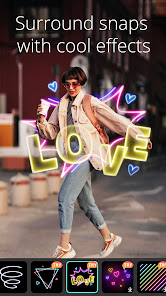
• Animated Decorations – Your editing app should let your photo edits burst with personality. Choose from dozens of animated elements, including animals, seasonal specials, flowers, moods, and more!
• Animated Overlay - Add movement, mood, & emotion to your still images with realistic and fun animated overlays.
• Animated Dispersion - Manipulate particles in your image to create dramatic pictures popping with different shapes and motion.
• Use AI to Create Powerful Edits - Sky Replacement, Style Effects, and Object Removal tools are designed to work perfectly with our Photo Animation tools. Mix, match, and try them all together! Animate any element, alter or change any object, and completely redesign your snap.
📸Creative Editing Tools:
• Object Removal – Quickly remove any object with a click, and retry until perfect
• Face Shaper - Make subtle, natural changes to your face
• Sky Replacement - Completely change the sky in your snaps
• Change background- Edit any background in your snap by replacing them with new images
• Light Rays- An incredible lighting tool to add light-ray effects to any image
• Easy-to-use White Balance, HDR, and Vignette tools
• Magic Brush – Brush over your image to completely change the style
• Photo Retouch, Selfie Editor, Red-eye Removal tools
• Blur Photo Editor
Incredible AI-Powered Tools:
• AI Style – Generate creative anime & well-known painting style photography with one tap. Use AI art to turn your photo into a cartoon version in no time.
• Sky Replacement – Enhance or completely transform the sky of your images with a single click using stunning templates.
• Cutout - Automatically detect the outline of any object for perfect results, every time.
🎀 Thousands of stickers, filters, frames, and effects!
• NEW content updated monthly!
• Unique seasonal stickers, frames, filters, and effects!
• FREE community content!
💎Unlimited updates, features and content packs with PREMIUM
• Unlock all premium content - effects, filters, stickers, and frames!
• Save images in Ultra HD 4K camera resolution
• Ad-free and distraction-free
✨Powered by Shutterstock
Create captivating photo projects with unlimited access to our premium stock images.
Premium subscription is billed annually and auto-renews every year, unless canceled 24 hours prior to the renewal date. You may manage your subscription and turn off auto-renewal by going to your Account Settings after purchase. In accordance with the store policy, no cancellation of the current subscription is allowed during the active subscription period. Once purchased, refunds will not be provided for any unused portion of the term.
Find inspiration on Instagram: @photodirector_app
Have a problem? Talk to us: support.cyberlink.com
🌟 The best all-in-one free photo editor and collage maker to enhance, stylize, and animate your images
Edit your photos all in one easy-to-use photo editor and collage maker. With precision editing tools, you can make essential lighting and color adjustments, crop, and add one-touch looks to transform your photos. Plus, with powerful Photo Animation tools, you can easily bring your images to life. Use Animated Decorations, Sky Replacement, and Object Removal tools and create anything you can think of! Turn heads on social media to create incredible works of art – PhotoDirector is the best free photo editor to let your imagination run wild with hundreds of styles, effects, templates, and tools.
🌟 Incredible Photo Animation Tools
• Animated Decorations – Your editing app should let your photo edits burst with personality. Choose from dozens of animated elements, including animals, seasonal specials, flowers, moods, and more!
• Animated Overlay - Add movement, mood, & emotion to your still images with realistic and fun animated overlays.
• Animated Dispersion - Manipulate particles in your image to create dramatic pictures popping with different shapes and motion.
• Use AI to Create Powerful Edits - Sky Replacement, Style Effects, and Object Removal tools are designed to work perfectly with our Photo Animation tools. Mix, match, and try them all together! Animate any element, alter or change any object, and completely redesign your snap.
📸Creative Editing Tools:
• Object Removal – Quickly remove any object with a click, and retry until perfect
• Face Shaper - Make subtle, natural changes to your face
• Sky Replacement - Completely change the sky in your snaps
• Change background- Edit any background in your snap by replacing them with new images
• Light Rays- An incredible lighting tool to add light-ray effects to any image
• Easy-to-use White Balance, HDR, and Vignette tools
• Magic Brush – Brush over your image to completely change the style
• Photo Retouch, Selfie Editor, Red-eye Removal tools
• Blur Photo Editor
Incredible AI-Powered Tools:
• AI Style – Generate creative anime & well-known painting style photography with one tap. Use AI art to turn your photo into a cartoon version in no time.
• Sky Replacement – Enhance or completely transform the sky of your images with a single click using stunning templates.
• Cutout - Automatically detect the outline of any object for perfect results, every time.
🎀 Thousands of stickers, filters, frames, and effects!
• NEW content updated monthly!
• Unique seasonal stickers, frames, filters, and effects!
• FREE community content!
💎Unlimited updates, features and content packs with PREMIUM
• Unlock all premium content - effects, filters, stickers, and frames!
• Save images in Ultra HD 4K camera resolution
• Ad-free and distraction-free
✨Powered by Shutterstock
Create captivating photo projects with unlimited access to our premium stock images.
Premium subscription is billed annually and auto-renews every year, unless canceled 24 hours prior to the renewal date. You may manage your subscription and turn off auto-renewal by going to your Account Settings after purchase. In accordance with the store policy, no cancellation of the current subscription is allowed during the active subscription period. Once purchased, refunds will not be provided for any unused portion of the term.
Find inspiration on Instagram: @photodirector_app
Have a problem? Talk to us: support.cyberlink.com
Updated on
Safety starts with understanding how developers collect and share your data. Data privacy and security practices may vary based on your use, region, and age. The developer provided this information and may update it over time.

No data shared with third parties
Learn more about how developers declare sharing

This app may collect these data types
App activity, App info and performance, and Device or other IDs

Data is encrypted in transit

You can request that data be deleted
4.4
925K reviews

Melissa H
- Flag inappropriate
November 24, 2022
I wish the Cutout feature... worked. I should have tested the features out before buying. I bought it because it had the ability to autoselect an item in a pic to isolate (and shade in anything it missed) and remove everything around it. The Cutout feature places a small transparent space in-between the cutout item and the design chosen to highlight its edges. I really don't understand how an entire feature remains broken... Should be a REALLY easy fix.
103 people found this review helpful
Cyberlink Corp
November 25, 2022
Hi Melissa, have you tried: Tapping the "Eraser" icon at the upper right -> Turn on/off the "Smart Brush" as you like & use the brush/eraser tool to adjust the area? If you have concerns, please use the "Send Feedback" in-app Settings to send more details & issue screenshots for our support team to check and assist you better! 😃

M O'Connor
- Flag inappropriate
- Show review history
September 23, 2022
Don't waste your $$. In all the ads leading to this app, the ability to change colors of an object was highly touted. Once I paid for the "free" app, I was unable to find how to change colors. So then I went about the long process of trying to find help or instructions. When I couldn't find either easily accessible in the app I went to the web. The 100+ page instruction manuals I found didn't provide info on what I was seeking. False advertising, or incompetently written help guides?
161 people found this review helpful
Cyberlink Corp
September 26, 2022
Hi there, thank you for the feedback. 😃 Our support team has received your email and will reply to you within a day. Welcome to get back to us if you still have concerns after receiving the reply. The team is happy to assist. 💪

Janice Richards
- Flag inappropriate
- Show review history
September 14, 2022
Simple to use for a newbie to do some editing. I wish they had more detailed instructions for some of the more complicated edit options they offer. Would def get into trying them out but being new to editing, their instructions aren't step-by-step. And that's pretty much what I need at this point. That being said, the easier options are just that-- easy peasy!!
172 people found this review helpful
Cyberlink Corp
September 16, 2022
Hi Janice, if you'd like to know more editing skills, you may refer to "Watch Tutorials" in the app or check on our YouTube channel!🙌
https://www.youtube.com/playlist?list=PL1udkW91RTi3PvgGySrEH34DxCZ0OPJkH
If you have further questions, please contact us via "Send Feedback" in-app Settings. We are happy to help. 😃
What's new
Perfect your photos with brand new features in our portrait tool! Now you can enlarge your eyes and enjoy more reshape features to reach your beauty preferences.
We've also got newly added phone interface stickers & 3D text desgins releasing. Check them out now.
We've also got newly added phone interface stickers & 3D text desgins releasing. Check them out now.


