Manage editors and writers
If you are the owner or editor of a publication, you can manage the people associated with a publication: its editors and writers.
While creating a new publication, or editing an existing publication, scroll down to the tab marked "People":
Whoever creates a publication is automatically the owner of that publication, and also an editor. Only publication owners can delete a publication and add editors.
You can add editors by typing their username into the "Add editor..." box and double clicking on the user.
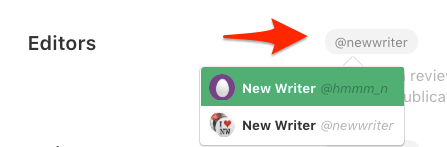
When you add other editors, they will be able to write and publish their own stories in the publication. They will also be able to request and accept stories by other writers in a publication. Editors can also add and manage writers associated with a publication.

Note: Writers' stories may be edited by an editor prior to being published in a publication.
When you've finished adding editors and writers to your publication, go back to the top of the page and click "Save".

To remove a writer
Click on a username from the list of existing writers:

The username will turn green when it is selected. Press "Delete" on your keyboard to remove that writer.