<?xml version="1.0" encoding="utf-8"?>
<feed xmlns="http://www.w3.org/2005/Atom">
    <id>https://docs.getdbt.com/blog</id>
    <title>dbt Developer Hub Blog</title>
    <updated>2024-12-09T00:00:00.000Z</updated>
    <generator>https://github.com/jpmonette/feed</generator>
    <link rel="alternate" href="https://docs.getdbt.com/blog"/>
    <subtitle>dbt Developer Hub Blog</subtitle>
    <entry>
        <title type="html"><![CDATA[Test smarter not harder: Where should tests go in your pipeline?]]></title>
        <id>https://docs.getdbt.com/blog/test-smarter-where-tests-should-go</id>
        <link href="https://docs.getdbt.com/blog/test-smarter-where-tests-should-go"/>
        <updated>2024-12-09T00:00:00.000Z</updated>
        <summary type="html"><![CDATA[Testing your data should drive action, not accumulate alerts. We take our testing framework developed in our last post and make recommendations for where tests ought to go at each transformation stage.]]></summary>
        <content type="html"><![CDATA[<p>👋&nbsp;Greetings, dbt’ers! It’s Faith &amp; Jerrie, back again to offer tactical advice on <em>where</em> to put tests in your pipeline.</p>
<p>In <a href="https://docs.getdbt.com/blog/test-smarter-not-harder">our first post</a> on refining testing best practices, we developed a prioritized list of data quality concerns. We also documented first steps for debugging each concern. This post will guide you on where specific tests should go in your data pipeline.</p>
<p><em>Note that we are constructing this guidance based on how we <a href="https://docs.getdbt.com/best-practices/how-we-structure/1-guide-overview#guide-structure-overview">structure data at dbt Labs.</a></em> You may use a different modeling approach—that’s okay! Translate our guidance to your data’s shape, and let us know in the comments section what modifications you made.</p>
<p>First, here’s our opinions on where specific tests should go:</p>
<ul>
<li>Source tests should be fixable data quality concerns. See the <a href="https://docs.getdbt.com/blog/test-smarter-where-tests-should-go#sources">callout box below</a> for what we mean by “fixable”.</li>
<li>Staging tests should be business-focused anomalies specific to individual tables, such as accepted ranges or ensuring sequential values. In addition to these tests, your staging layer should clean up any nulls, duplicates, or outliers that you can’t fix in your source system. You generally don’t need to test your cleanup efforts.</li>
<li>Intermediate and marts layer tests should be business-focused anomalies resulting specifically from joins or calculations.  You also may consider adding additional primary key and not null tests on columns where it’s especially important to protect the grain.</li>
</ul>
<h2 class="anchor anchorWithHideOnScrollNavbar_WYt5" id="where-should-tests-go-in-your-pipeline">Where should tests go in your pipeline?<a class="hash-link" aria-label="Direct link to Where should tests go in your pipeline?" title="Direct link to Where should tests go in your pipeline?" href="https://docs.getdbt.com/blog/test-smarter-where-tests-should-go#where-should-tests-go-in-your-pipeline">​</a></h2>
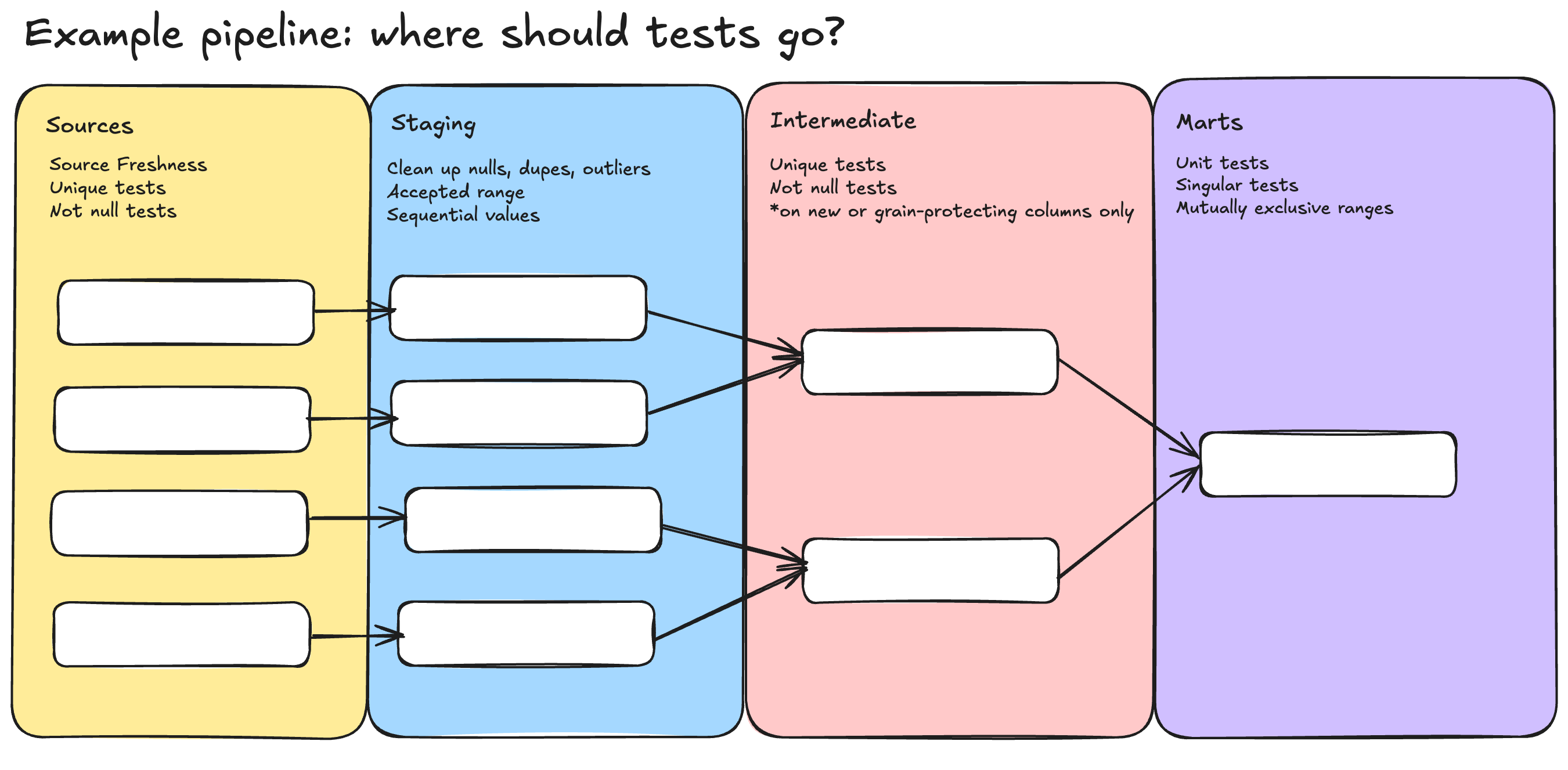
<p><img decoding="async" loading="lazy" alt="A horizontal, multicolored diagram that shows examples of where tests ought to be placed in a data pipeline." src="https://docs.getdbt.com/assets/images/testing_pipeline-5654a8c833a4fe25846d9b32605b7d09.png" width="2701" height="1327" class="img_ev3q"></p>
<p>This diagram above outlines where you might put specific data tests in your pipeline. Let’s expand on it and discuss where each type of data quality issue should be tested.</p>
<h3 class="anchor anchorWithHideOnScrollNavbar_WYt5" id="sources">Sources<a class="hash-link" aria-label="Direct link to Sources" title="Direct link to Sources" href="https://docs.getdbt.com/blog/test-smarter-where-tests-should-go#sources">​</a></h3>
<p>Tests applied to your sources should indicate <em>fixable-at-the-source-system</em> issues. If your source tests flag source system issues that aren’t fixable, remove the test and mitigate the problem in your staging layer instead.</p>
<div class="theme-admonition theme-admonition-tip admonition_xJq3 alert alert--success"><div class="admonitionHeading_Gvgb"><span class="admonitionIcon_Rf37"><svg viewBox="0 0 12 16"><path fill-rule="evenodd" d="M6.5 0C3.48 0 1 2.19 1 5c0 .92.55 2.25 1 3 1.34 2.25 1.78 2.78 2 4v1h5v-1c.22-1.22.66-1.75 2-4 .45-.75 1-2.08 1-3 0-2.81-2.48-5-5.5-5zm3.64 7.48c-.25.44-.47.8-.67 1.11-.86 1.41-1.25 2.06-1.45 3.23-.02.05-.02.11-.02.17H5c0-.06 0-.13-.02-.17-.2-1.17-.59-1.83-1.45-3.23-.2-.31-.42-.67-.67-1.11C2.44 6.78 2 5.65 2 5c0-2.2 2.02-4 4.5-4 1.22 0 2.36.42 3.22 1.19C10.55 2.94 11 3.94 11 5c0 .66-.44 1.78-.86 2.48zM4 14h5c-.23 1.14-1.3 2-2.5 2s-2.27-.86-2.5-2z"></path></svg></span>What does fixable mean?</div><div class="admonitionContent_BuS1"><p>We consider a "fixable-at-the-source-system" issue to be something that:</p><ul>
<li>You yourself can fix in the source system.</li>
<li>You know the right person to fix it and have a good enough relationship with them that you know you can <em>get it fixed.</em></li>
</ul><p>You may have issues that can <em>technically</em> get fixed at the source, but it won't happen till the next planning cycle, or you need to develop better relationships to get the issue fixed, or something similar. This demands a more nuanced approach than we'll cover in this post. If you have thoughts on this type of situation, let us know!</p></div></div>
<p>Here’s our recommendation for what tests belong on your sources.</p>
<ul>
<li>Source freshness: testing data freshness for sources that are critical to your pipelines.<!-- -->
<ul>
<li>If any sources feed into any of the “top 3” <a href="https://docs.getdbt.com/blog/test-smarter-not-harder#how-to-prioritize-data-quality-concerns-in-your-pipeline" target="_blank" rel="noopener noreferrer">priority categories</a> in our last post, use <a href="https://docs.getdbt.com/docs/deploy/source-freshness" target="_blank" rel="noopener noreferrer"><code>dbt source freshness</code></a> in your job execution commands and set the severity to <code>error</code>. That way, if source freshness fails, so does your job.</li>
<li>If none of your sources feed into high priority categories, set your source freshness severity to <code>warn</code> and add source freshness to your job execution commands. That way, you still get source freshness information but stale data won't fail your pipeline.</li>
</ul>
</li>
<li>Data hygiene: tests that are <em>fixable</em> in the source system (see our note above on “fixability”).<!-- -->
<ul>
<li>Examples:<!-- -->
<ul>
<li>Duplicate customer records that can be deleted in the source system</li>
<li>Null records, such as a customer name or email address, that can be entered into the source system</li>
<li>Primary key testing where duplicates are removable in the source system</li>
</ul>
</li>
</ul>
</li>
</ul>
<h3 class="anchor anchorWithHideOnScrollNavbar_WYt5" id="staging">Staging<a class="hash-link" aria-label="Direct link to Staging" title="Direct link to Staging" href="https://docs.getdbt.com/blog/test-smarter-where-tests-should-go#staging">​</a></h3>
<p>In the staging layer, your models should be cleaning up or mitigating data issues that can't be fixed at the source. Your tests should be focused on business anomaly detection.</p>
<ul>
<li>Data cleanup and issue mitigation: Use our <a href="https://docs.getdbt.com/best-practices/how-we-structure/2-staging" target="_blank" rel="noopener noreferrer">best practices around staging layers</a> to clean things up. Don’t add tests to your cleanup efforts. If you’re filtering out nulls in a column, adding a not_null test is repetitive!  🌶️</li>
<li>Business-focused anomaly examples: these are data quality issues you <em>should</em> test for in your staging layer, because they fall outside of your business’s defined norms. These might be:<!-- -->
<ul>
<li>Values inside a single column that fall outside of an acceptable range. For example, a store selling a greater quantity of limited-edition items than they received in their stock delivery.</li>
<li>Values that should always be positive, are positive. This might look like a negative transaction amount that isn’t classified as a return. This failing test would then spur further investigation into the offending transaction.</li>
<li>An unexpected uptick in volume of a quantity column beyond a pre-defined percentage. This might look like a store’s customer volume spiking unexpectedly and outside of expected seasonal norms. This is an anomaly that could indicate a bug or modeling issue.</li>
</ul>
</li>
</ul>
<h3 class="anchor anchorWithHideOnScrollNavbar_WYt5" id="intermediate-if-applicable">Intermediate (if applicable)<a class="hash-link" aria-label="Direct link to Intermediate (if applicable)" title="Direct link to Intermediate (if applicable)" href="https://docs.getdbt.com/blog/test-smarter-where-tests-should-go#intermediate-if-applicable">​</a></h3>
<p>In your intermediate layer, focus on data hygiene and anomaly tests for new columns. Don’t re-test passthrough columns from sources or staging. Here are some examples of tests you might put in your intermediate layer based on the use cases of intermediate models we <a href="https://docs.getdbt.com/best-practices/how-we-structure/3-intermediate#intermediate-models">outline in this guide</a>.</p>
<ul>
<li>Intermediate models often re-grain models to prepare them for marts.<!-- -->
<ul>
<li>Add a primary key test to any re-grained models.</li>
<li>Additionally, consider adding a primary key test to models where the grain <em>has remained the same</em> but has been <em>enriched.</em> This helps future-proof your enriched models against future developers who may not be able to glean your intention from SQL alone.</li>
</ul>
</li>
<li>Intermediate models may perform a first set of joins or aggregations to reduce complexity in a final mart.<!-- -->
<ul>
<li>Add simple anomaly tests to verify the behavior of your sets of joins and aggregations. This may look like:<!-- -->
<ul>
<li>An <a href="https://docs.getdbt.com/reference/resource-properties/data-tests#accepted_values">accepted_values</a> test on a newly calculated categorical column.</li>
<li>A <a href="https://github.com/dbt-labs/dbt-utils#mutually_exclusive_ranges-source" target="_blank" rel="noopener noreferrer">mutually_exclusive_ranges</a> test on two columns whose values behave in relation to one another (ex: asserting age ranges do not overlap).</li>
<li>A <a href="https://github.com/dbt-labs/dbt-utils#not_constant-source" target="_blank" rel="noopener noreferrer">not_constant</a> test on a column whose value should be continually changing (ex: page view counts on website analytics).</li>
</ul>
</li>
</ul>
</li>
<li>Intermediate models may isolate complex operations.<!-- -->
<ul>
<li>The anomaly tests we list above may suffice here.</li>
<li>You might also consider <a href="https://docs.getdbt.com/docs/build/unit-tests">unit testing</a> any particularly complex pieces of SQL logic.</li>
</ul>
</li>
</ul>
<h3 class="anchor anchorWithHideOnScrollNavbar_WYt5" id="marts">Marts<a class="hash-link" aria-label="Direct link to Marts" title="Direct link to Marts" href="https://docs.getdbt.com/blog/test-smarter-where-tests-should-go#marts">​</a></h3>
<p>Marts layer testing will follow the same hygiene-or-anomaly pattern as staging and intermediate. Similar to your intermediate layer, you should focus your testing on net-new columns in your marts layer. This might look like:</p>
<ul>
<li>Unit tests: validate especially complex transformation logic. For example:<!-- -->
<ul>
<li>Calculating dates in a way that feeds into forecasting.</li>
<li>Customer segmentation logic, especially logic that has a lot of CASE-WHEN statements.</li>
</ul>
</li>
<li>Primary key tests: focus on where where your mart's granularity has changed from its staging/intermediate inputs.<!-- -->
<ul>
<li>Similar to the intermediate models above, you may also want to add primary key tests to models whose grain hasn’t changed, but have been enriched with other data. Primary key tests here communicate your intent.</li>
</ul>
</li>
<li>Business focused anomaly tests: focus on <em>new</em> calculated fields, such as:<!-- -->
<ul>
<li>Singular tests on high-priority, high-impact tables where you have a specific problem you want forewarning about.<!-- -->
<ul>
<li>This might be something like fuzzy matching logic to detect when the same person is making multiple emails to extend a free trial beyond its acceptable end date.</li>
</ul>
</li>
<li>A test for calculated numerical fields that shouldn’t vary by more than certain percentage in a week.</li>
<li>A calculated ledger table that follows certain business rules, i.e. today’s running total of spend must always be greater than yesterday’s.</li>
</ul>
</li>
</ul>
<h3 class="anchor anchorWithHideOnScrollNavbar_WYt5" id="cicd">CI/CD<a class="hash-link" aria-label="Direct link to CI/CD" title="Direct link to CI/CD" href="https://docs.getdbt.com/blog/test-smarter-where-tests-should-go#cicd">​</a></h3>
<p>All of the testing you’ve applied in your different layers is the manual work of constructing your framework. CI/CD is where it gets automated.</p>
<p>You should run a <a href="https://docs.getdbt.com/best-practices/best-practice-workflows#run-only-modified-models-to-test-changes-slim-ci">slim CI</a> to optimize your resource consumption.</p>
<p>With CI/CD and your regular production runs, your testing framework can be on autopilot. 😎</p>
<p>If and when you encounter failures, consult your trusty testing framework doc you built in our <a href="https://docs.getdbt.com/blog/test-smarter-not-harder">earlier post</a>.</p>
<h3 class="anchor anchorWithHideOnScrollNavbar_WYt5" id="advanced-ci">Advanced CI<a class="hash-link" aria-label="Direct link to Advanced CI" title="Direct link to Advanced CI" href="https://docs.getdbt.com/blog/test-smarter-where-tests-should-go#advanced-ci">​</a></h3>
<p>In the early stages of your smarter testing journey, start with dbt Cloud’s built-in flags for <a href="https://docs.getdbt.com/docs/deploy/advanced-ci">advanced CI</a>. In PRs with advanced CI enabled, dbt Cloud will flag what has been modified, added, or removed in the “compare changes” section. These three flags offer confidence and evidence that your changes are what you expect. Then, hand them off for peer review. Advanced CI helps jump start your colleague’s review of your work by bringing all of the implications of the change into one place.</p>
<p>We consider usage of Advanced CI beyond the modified, added, or changed gut checks to be an advanced (heh) testing strategy, and look forward to hearing how you use it.</p>
<h2 class="anchor anchorWithHideOnScrollNavbar_WYt5" id="wrapping-it-all-up">Wrapping it all up<a class="hash-link" aria-label="Direct link to Wrapping it all up" title="Direct link to Wrapping it all up" href="https://docs.getdbt.com/blog/test-smarter-where-tests-should-go#wrapping-it-all-up">​</a></h2>
<p>Judicious data testing is like training for a marathon. It’s not productive to go run 20 miles a day and hope that you’ll be marathon-ready and uninjured. Similarly, throwing data tests randomly at your data pipeline without careful thought is not going to tell you much about your data quality.</p>
<p>Runners go into marathons with training plans. Analytics engineers who care about data quality approach the issue with a plan, too.</p>
<p>As you try out some of the guidance above here, remember that your testing needs are going to evolve over time. Don’t be afraid to revise your original testing strategy.</p>
<p>Let us know your thoughts on these strategies in the comments section. Try them out, and share your thoughts to help us refine them.</p>]]></content>
        <author>
            <name>Faith McKenna</name>
        </author>
        <author>
            <name>Jerrie Kumalah Kenney</name>
        </author>
        <category label="analytics craft" term="analytics craft"/>
    </entry>
    <entry>
        <title type="html"><![CDATA[Test smarter not harder: add the right tests to your dbt project]]></title>
        <id>https://docs.getdbt.com/blog/test-smarter-not-harder</id>
        <link href="https://docs.getdbt.com/blog/test-smarter-not-harder"/>
        <updated>2024-11-11T00:00:00.000Z</updated>
        <summary type="html"><![CDATA[Testing your data should drive action, not accumulate alerts. We synthesized countless customer experiences to build a repeatable testing framework.]]></summary>
        <content type="html"><![CDATA[<p>The <a href="https://www.getdbt.com/resources/guides/the-analytics-development-lifecycle" target="_blank" rel="noopener noreferrer">Analytics Development Lifecycle (ADLC)</a> is a workflow for improving data maturity and velocity. Testing is a key phase here. Many dbt developers tend to focus on <a href="https://www.getdbt.com/blog/building-a-data-quality-framework-with-dbt-and-dbt-cloud" target="_blank" rel="noopener noreferrer">primary keys and source freshness.</a> We think there is a more holistic and in-depth path to tread. Testing is a key piece of the ADLC, and it should drive data quality.</p>
<p>In this blog, we’ll walk through a plan to define data quality. This will look like:</p>
<ul>
<li>identifying <em>data hygiene</em>  issues</li>
<li>identifying <em>business-focused anomaly</em>  issues</li>
<li>identifying <em>stats-focused anomaly</em>  issues</li>
</ul>
<p>Once we have <em>defined</em> data quality, we’ll move on to <em>prioritize</em> those concerns. We will:</p>
<ul>
<li>think through each concern in terms of the breadth of impact</li>
<li>decide if each concern should be at error or warning severity</li>
</ul>
<h3 class="anchor anchorWithHideOnScrollNavbar_WYt5" id="who-are-we">Who are we?<a class="hash-link" aria-label="Direct link to Who are we?" title="Direct link to Who are we?" href="https://docs.getdbt.com/blog/test-smarter-not-harder#who-are-we">​</a></h3>
<p>Let’s start with introductions - we’re Faith and Jerrie, and we work on dbt Labs’s training and services teams, respectively. By working closely with countless companies using dbt, we’ve gained unique perspectives of the landscape.</p>
<p>The training team collates problems organizations think about today and gauge how our solutions fit. These are shorter engagements, which means we see the data world shift and change in real time. Resident Architects spend much more time with teams to craft much more in-depth solutions, figure out where those solutions are helping, and where problems still need to be addressed. Trainers help identify patterns in the problems data teams face, and Resident Architects dive deep on solutions.</p>
<p>Today, we’ll guide you through a particularly thorny problem: testing.</p>
<h2 class="anchor anchorWithHideOnScrollNavbar_WYt5" id="why-testing">Why testing?<a class="hash-link" aria-label="Direct link to Why testing?" title="Direct link to Why testing?" href="https://docs.getdbt.com/blog/test-smarter-not-harder#why-testing">​</a></h2>
<p>Mariah Rogers broke early ground on data quality and testing in her <a href="https://www.youtube.com/watch?v=hxvVhmhWRJA" target="_blank" rel="noopener noreferrer">Coalesce 2022 talk</a>. We’ve seen similar talks again at Coalesce 2024, like <a href="https://www.youtube.com/watch?v=iCG-5vqMRAo" target="_blank" rel="noopener noreferrer">this one</a> from the data team at Aiven and <a href="https://www.youtube.com/watch?v=5bRG3y9IM4Q&amp;list=PL0QYlrC86xQnWJ72sJlzDqPS0peE7j9Ed&amp;index=71" target="_blank" rel="noopener noreferrer">this one</a> from the co-founder at Omni Analytics. These talks share a common theme: testing your dbt project too much can get out of control quickly, leading to alert fatigue.</p>
<p>In our customer engagements, we see <em>wildly different approaches</em> to testing data. We’ve definitely seen what Mariah, the Aiven team, and the Omni team have described, which is so many tests that errors and alerts just become noise. We’ve also seen the opposite end of the spectrum—only primary keys being tested. From our field experiences, we believe there’s room for a middle path.
A desire for a better approach to data quality and testing isn’t just anecdotal to Coalesce, or to dbt’s training and services. The dbt community has long called for a more intentional approach to data quality and testing - data quality is on the industry’s mind! In fact, <a href="https://www.getdbt.com/resources/reports/state-of-analytics-engineering-2024" target="_blank" rel="noopener noreferrer">57% of respondents</a> to dbt’s 2024 State of Analytics Engineering survey said that data quality is a predominant issue facing their day-to-day work.</p>
<h3 class="anchor anchorWithHideOnScrollNavbar_WYt5" id="what-does-dta-qual1ty-even-mean">What does d@tA qUaL1Ty even mean?!<a class="hash-link" aria-label="Direct link to What does d@tA qUaL1Ty even mean?!" title="Direct link to What does d@tA qUaL1Ty even mean?!" href="https://docs.getdbt.com/blog/test-smarter-not-harder#what-does-dta-qual1ty-even-mean">​</a></h3>
<p>High-quality data is <em>trusted</em> and <em>used frequently.</em> It doesn’t get argued over or endlessly scrutinized for matching to other data. Data <em>testing</em> should lead to higher data <em>quality</em> and insights, period.</p>
<p>Best practices in data quality are still nascent. That said, a lot of important baseline work has been done here. There are <a href="https://medium.com/@AtheonAnalytics/mastering-data-testing-with-dbt-part-1-689b2a025675" target="_blank" rel="noopener noreferrer">case</a> <a href="https://medium.com/@AtheonAnalytics/mastering-data-testing-with-dbt-part-2-c4031af3df18" target="_blank" rel="noopener noreferrer">studies</a> on implementing dbt testing well. dbt Labs also has an <a href="https://learn.getdbt.com/courses/advanced-testing" target="_blank" rel="noopener noreferrer">Advanced Testing</a> course, emphasizing that testing should spur action and be focused and informative enough to help address failures. You can even enforce testing best practices and dbt Labs’s own best practices using the <a href="https://hub.getdbt.com/tnightengale/dbt_meta_testing/latest/" target="_blank" rel="noopener noreferrer">dbt_meta_testing</a> or <a href="https://github.com/dbt-labs/dbt-project-evaluator" target="_blank" rel="noopener noreferrer">dbt_project_evaluator</a> packages and dbt Explorer’s <a href="https://docs.getdbt.com/docs/collaborate/project-recommendations" target="_blank" rel="noopener noreferrer">Recommendations</a> page.</p>
<p>The missing piece is still cohesion and guidance for everyday practitioners to help develop their testing framework.</p>
<p>To recap, we’re going to start with:</p>
<ul>
<li>identifying <em>data hygiene</em> issues</li>
<li>identifying <em>business-focused anomaly</em> issues</li>
<li>identifying <em>stats-focused anomaly</em> issues</li>
</ul>
<p>Next, we’ll prioritize. We will:</p>
<ul>
<li>think through each concern in terms of the breadth of impact</li>
<li>decide if each concern should be at error or warning severity</li>
</ul>
<p>Get a pen and paper (or a google doc) and join us in constructing your own testing framework.</p>
<h2 class="anchor anchorWithHideOnScrollNavbar_WYt5" id="identifying-data-quality-issues-in-your-pipeline">Identifying data quality issues in your pipeline<a class="hash-link" aria-label="Direct link to Identifying data quality issues in your pipeline" title="Direct link to Identifying data quality issues in your pipeline" href="https://docs.getdbt.com/blog/test-smarter-not-harder#identifying-data-quality-issues-in-your-pipeline">​</a></h2>
<p>Let’s start our framework by <em>identifying</em> types of data quality issues.</p>
<p>In our daily work with customers, we find that data quality issues tend to fall into one of three broad buckets: <em>data hygiene, business-focused anomalies,</em> and <em>stats-focused anomalies.</em> Read the bucket descriptions below, and list 2-3 data quality concerns in your own business context that fall into each bucket.</p>
<h3 class="anchor anchorWithHideOnScrollNavbar_WYt5" id="bucket-1-data-hygiene">Bucket 1: Data hygiene<a class="hash-link" aria-label="Direct link to Bucket 1: Data hygiene" title="Direct link to Bucket 1: Data hygiene" href="https://docs.getdbt.com/blog/test-smarter-not-harder#bucket-1-data-hygiene">​</a></h3>
<p><em>Data hygiene</em> issues are concerns you address in your <a href="https://docs.getdbt.com/best-practices/how-we-structure/2-staging" target="_blank" rel="noopener noreferrer">staging layer.</a> Hygienic data meets your expectations around formatting, completeness, and granularity requirements. Here are a few examples.</p>
<ul>
<li><em>Granularity:</em> primary keys are unique and not null. Duplicates throw off calculations.</li>
<li><em>Completeness:</em> columns that should always contain text, <em>do.</em> Incomplete data often has to get excluded, reducing your overall analytical power.</li>
<li><em>Formatting:</em> email addresses always have a valid domain. Incorrect emails may affect things like marketing outreach.</li>
</ul>
<h3 class="anchor anchorWithHideOnScrollNavbar_WYt5" id="bucket-2-business-focused-anomalies">Bucket 2: Business-focused anomalies<a class="hash-link" aria-label="Direct link to Bucket 2: Business-focused anomalies" title="Direct link to Bucket 2: Business-focused anomalies" href="https://docs.getdbt.com/blog/test-smarter-not-harder#bucket-2-business-focused-anomalies">​</a></h3>
<p><em>Business-focused anomalies</em> catch unexpected behavior. You can flag unexpected behavior by clearly defining <em>expected</em> behavior. <em>Business-focused anomalies</em> are when aspects of the data differ from what you know to be typical in your business. You’ll know what’s typical either through your own analyses, your colleagues’ analyses, or things your stakeholder homies point out to you.</p>
<p>Since business-focused anomaly testing is set by a human, it will be fluid and need to be adjusted periodically. Here’s an example.</p>
<p>Imagine you’re a sales analyst. Generally, you know that if your daily sales amount goes up or down by more than 20% daily, that’s bad. Specifically, it’s usually a warning sign for fraud or the order management system (OMS) dropping orders. You set a test in dbt to fail if any given day’s sales amount is a delta of 20% from the previous day. This works for a while.</p>
<p>Then, you have a stretch of 3 months where your test fails 5 times a week! Every time you investigate, it turns out to be valid consumer behavior. You’re suddenly in hypergrowth, and sales are legitimately increasing that much.</p>
<p>Your 20%-change fraud and OMS failure detector is no longer valid. You need to investigate anew which sales spikes or drops indicate fraud or OMS problems. Once you figure out a new threshold, you’ll go back and adjust your testing criteria.</p>
<p>Although your data’s expected behavior will shift over time, you should still commit to defining business-focused anomalies to grow your understanding of what is normal for your data.</p>
<p>Here’s how to identify potential anomalies.</p>
<p>Start at your business intelligence (BI) layer. Pick 1-3 dashboards or tables that you <em>know</em> are used frequently. List these 1-3 dashboards or tables. For each dashboard or table you have, identify 1-3 “expected” behaviors that your end-users rely on.  Here are a few examples to get you thinking:</p>
<ul>
<li>Revenue numbers should not change by more than X% in Y amount of time. This could indicate fraud or OMS problems.</li>
<li>Monthly active users should not decline more than X% after the initial onboarding period. This might indicate user dissatisfaction, usability issues, or that users not finding a feature valuable.</li>
<li>Exam passing rates should stay above Y%.  A decline below that threshold may indicate recent content changes or technical issues are affecting understanding or accessibility.</li>
</ul>
<p>You should also consider what data issues you have had in the past! Look through recent data incidents and pick out 3 or 4 to guard against next time. These might be in a #data-questions channel or perhaps a DM from a stakeholder.</p>
<h3 class="anchor anchorWithHideOnScrollNavbar_WYt5" id="bucket-3-stats-focused-anomalies">Bucket 3: Stats-focused anomalies<a class="hash-link" aria-label="Direct link to Bucket 3: Stats-focused anomalies" title="Direct link to Bucket 3: Stats-focused anomalies" href="https://docs.getdbt.com/blog/test-smarter-not-harder#bucket-3-stats-focused-anomalies">​</a></h3>
<p><em>Stats-focused anomalies</em> are fluctuations that go against your expected volumes or metrics.  Some examples include:</p>
<ul>
<li>Volume anomalies. This could be site traffic amounts that may indicate illicit behavior, or perhaps site traffic dropping one day then doubling the next, indicating that a chunk of data were not loaded properly.</li>
<li>Dimensional anomalies, like too many product types underneath a particular product line that may indicate incorrect barcodes.</li>
<li>Column anomalies, like sale values more than a certain number of standard deviations from a mean, that may indicate improper discounting.</li>
</ul>
<p>Overall, stats-focused anomalies can indicate system flaws, illicit site behavior, or fraud, depending on your industry. They also tend to require more advanced testing practices than we are covering in this blog. We feel stats-based anomalies are worth exploring once you have a good handle on your data hygiene and business-focused anomalies. We won’t give recommendations on stats-focused anomalies in this post.</p>
<h2 class="anchor anchorWithHideOnScrollNavbar_WYt5" id="how-to-prioritize-data-quality-concerns-in-your-pipeline">How to prioritize data quality concerns in your pipeline<a class="hash-link" aria-label="Direct link to How to prioritize data quality concerns in your pipeline" title="Direct link to How to prioritize data quality concerns in your pipeline" href="https://docs.getdbt.com/blog/test-smarter-not-harder#how-to-prioritize-data-quality-concerns-in-your-pipeline">​</a></h2>
<p>Now, you have a written and categorized list of data hygiene concerns and business-focused anomalies to guard against. It’s time to <em>prioritize</em> which quality issues deserve to fail your pipelines.</p>
<p>To prioritize your data quality concerns, think about real-life impact. A couple of guiding questions to consider are:</p>
<ul>
<li>Are your numbers <em>customer-facing?</em> For example, maybe you work with temperature-tracking devices. Your customers rely on these devices to show them average temperatures on perishable goods like strawberries in-transit. What happens if the temperature of the strawberries reads as 300C when they know their refrigerated truck was working just fine? How is your brand perception impacted when the numbers are wrong?</li>
<li>Are your numbers <em>used to make financial decisions?</em> For example, is the marketing team relying on your numbers to choose how to spend campaign funds?</li>
<li>Are your numbers <em>executive-facing?</em> Will executives use these numbers to reallocate funds or shift priorities?</li>
</ul>
<p>We think these 3 categories above constitute high-impact, pipeline-failing events, and should be your top priorities. Of course, adjust priority order if your business context calls for it.</p>
<p>Consult your list of data quality issues in the categories we mention above. Decide and mark if any are customer facing, used for financial decisions, or are executive-facing. Mark any data quality issues in those categories as “error”. These are your pipeline-failing events.</p>
<p>If any data quality concerns fall outside of these 3 categories, we classify them as <strong>nice-to-knows</strong>. <strong>Nice-to-know</strong> data quality testing <em>can</em> be helpful. But if you don’t have a <em>specific action you can immediately take</em> when a nice-to-know quality test fails, the test <em>should be a warning, not an error.</em></p>
<p>You could also remove nice-to-know tests altogether. Data testing should drive action. The more alerts you have in your pipeline, the less action you will take. Configure alerts with care!</p>
<p>However, we do think nice-to-know tests are worth keeping <em>if and only if</em> you are gathering evidence for action you plan to take within the next 6 months, like product feature research. In a scenario like that, those tests should still be set to warning.</p>
<h3 class="anchor anchorWithHideOnScrollNavbar_WYt5" id="start-your-action-plan">Start your action plan<a class="hash-link" aria-label="Direct link to Start your action plan" title="Direct link to Start your action plan" href="https://docs.getdbt.com/blog/test-smarter-not-harder#start-your-action-plan">​</a></h3>
<p>Now, your data quality concerns are listed and prioritized. Next, add 1 or 2 initial debugging steps you will take if/when the issues surface. These steps should get added to your framework document. Additionally, consider adding them to a <a href="https://discourse.getdbt.com/t/is-it-possible-to-add-a-description-to-singular-tests/5472/4" target="_blank" rel="noopener noreferrer">test’s description.</a></p>
<p>This step is <em>important.</em> Data quality testing should spur action, not accumulate alerts. Listing initial debugging steps for each concern will refine your list to the most critical elements.</p>
<p>If you can't identify an action step for any quality issue, <em>remove it</em>. Put it on a backlog and research what you can do when it surfaces later.</p>
<p>Here’s a few examples from our list of unexpected behaviors above.</p>
<ul>
<li>For calculated field X, a value above Y or below Z is not possible.<!-- -->
<ul>
<li><em>Debugging initial steps</em>
<ul>
<li>Use dbt test SQL or recent test results in dbt Explorer to find problematic rows</li>
<li>Check these rows in staging and first transformed model</li>
<li>Pinpoint where unusual values first appear</li>
</ul>
</li>
</ul>
</li>
<li>Revenue shouldn’t change by more than X% in Y amount of time.<!-- -->
<ul>
<li><em>Debugging initial steps:</em>
<ul>
<li>Check recent revenue values in staging model</li>
<li>Identify transactions near min/max values</li>
<li>Discuss outliers with sales ops team</li>
</ul>
</li>
</ul>
</li>
</ul>
<p>You now have written out a prioritized list of data quality concerns, as well as action steps to take when each concern surfaces. Next, consult <a href="http://hub.getdbt.com/" target="_blank" rel="noopener noreferrer">hub.getdbt.com</a> and find tests that address each of your highest priority concerns. <a href="https://hub.getdbt.com/calogica/dbt_expectations/latest/" target="_blank" rel="noopener noreferrer">dbt-expectations</a> and <a href="https://hub.getdbt.com/dbt-labs/dbt_utils/latest/" target="_blank" rel="noopener noreferrer">dbt_utils</a> are great places to start.</p>
<p>The data tests you’ve marked as “errors” above should get error-level severity. Any concerns falling into that nice-to-know category should either <em>not get tested</em> or have their tests <em>set to warning.</em></p>
<p>Your data quality priorities list is a living reference document. We recommend linking it in your project’s README so that you can go back and edit it as your testing needs evolve. Additionally, developers in your project should have easy access to this document. Maintaining good data quality is everyone’s responsibility!</p>
<p>As you try these ideas out, come to the dbt Community Slack and let us know what works and what doesn’t. Data is a community of practice, and we are eager to hear what comes out of yours.</p>]]></content>
        <author>
            <name>Faith McKenna</name>
        </author>
        <author>
            <name>Jerrie Kumalah Kenney</name>
        </author>
        <category label="analytics craft" term="analytics craft"/>
    </entry>
    <entry>
        <title type="html"><![CDATA[Snowflake feature store and dbt: A bridge between data pipelines and ML]]></title>
        <id>https://docs.getdbt.com/blog/snowflake-feature-store</id>
        <link href="https://docs.getdbt.com/blog/snowflake-feature-store"/>
        <updated>2024-10-08T00:00:00.000Z</updated>
        <summary type="html"><![CDATA[A deep-dive into the workflow steps you can take to build and deploy ML models within a single platform.]]></summary>
        <content type="html"><![CDATA[<p>Flying home into Detroit this past week working on this blog post on a plane and saw for the first time, the newly connected deck of the Gordie Howe International <a href="https://www.freep.com/story/news/local/michigan/detroit/2024/07/24/gordie-howe-bridge-deck-complete-work-moves-to-next-phase/74528258007/" target="_blank" rel="noopener noreferrer">bridge</a> spanning the Detroit River and connecting the U.S. and Canada. The image stuck out because, in one sense, a feature store is a bridge between the clean, consistent datasets and the machine learning models that rely upon this data. But, more interesting than the bridge itself is the massive process of coordination needed to build it. This construction effort — I think — can teach us more about processes and the need for feature stores in machine learning (ML).</p>
<p>Think of the manufacturing materials needed as our data and the building of the bridge as the building of our ML models. There are thousands of engineers and construction workers taking materials from all over the world, pulling only the specific pieces needed for each part of the project. However, to make this project truly work at this scale, we need the warehousing and logistics to ensure that each load of concrete rebar and steel meets the standards for quality and safety needed and is available to the right people at the right time — as even a single fault can have catastrophic consequences or cause serious delays in project success. This warehouse and the associated logistics play the role of the feature store, ensuring that data is delivered consistently where and when it is needed to train and run ML models.</p>
<h2 class="anchor anchorWithHideOnScrollNavbar_WYt5" id="what-is-a-feature">What is a feature?<a class="hash-link" aria-label="Direct link to What is a feature?" title="Direct link to What is a feature?" href="https://docs.getdbt.com/blog/snowflake-feature-store#what-is-a-feature">​</a></h2>
<p>A feature is a transformed or enriched data that serves as an input into a machine learning model to make predictions.  In machine learning, a data scientist derives features from various data sources to build a model that makes predictions based on historical data. To capture the value from this model, the enterprise must operationalize the data pipeline, ensuring that the features being used in production at inference time match those being used in training and development.</p>
<h2 class="anchor anchorWithHideOnScrollNavbar_WYt5" id="what-role-does-dbt-play-in-getting-data-ready-for-ml-models">What role does dbt play in getting data ready for ML models?<a class="hash-link" aria-label="Direct link to What role does dbt play in getting data ready for ML models?" title="Direct link to What role does dbt play in getting data ready for ML models?" href="https://docs.getdbt.com/blog/snowflake-feature-store#what-role-does-dbt-play-in-getting-data-ready-for-ml-models">​</a></h2>
<p>dbt is the standard for data transformation in the enterprise. Organizations leverage dbt at scale to deliver clean and well-governed datasets wherever and whenever they are needed. Using dbt to manage the data transformation processes to cleanse and prepare datasets used in feature development will ensure consistent datasets of guaranteed data quality — meaning that feature development will be consistent and reliable.</p>
<h2 class="anchor anchorWithHideOnScrollNavbar_WYt5" id="who-is-going-to-use-this-and-what-benefits-will-they-see">Who is going to use this and what benefits will they see?<a class="hash-link" aria-label="Direct link to Who is going to use this and what benefits will they see?" title="Direct link to Who is going to use this and what benefits will they see?" href="https://docs.getdbt.com/blog/snowflake-feature-store#who-is-going-to-use-this-and-what-benefits-will-they-see">​</a></h2>
<p>Snowflake and dbt are already a well-established and trusted combination for delivering data excellence across the enterprise. The ability to register dbt pipelines in the Snowflake Feature Store further extends this combination for ML and AI workloads, while fitting naturally into the data engineering and feature pipelines already present in dbt.</p>
<p>Some of the key benefits are:</p>
<ul>
<li><strong>Feature collaboration</strong> — Data scientists, data analysts, data engineers, and machine learning engineers collaborate on features used in machine learning models in both Python and SQL, enabling teams to share and reuse features. As a result, teams can improve the time to value of models while improving the understanding of their components. This is all backed by Snowflake’s role-based access control (RBAC) and governance.</li>
<li><strong>Feature consistency</strong> — Teams are assured that features generated for training sets and those served for model inference are consistent. This can especially be a concern for large organizations where multiple versions of the truth might persist. Much like how dbt and Snowflake help enterprises have a single source of data truth, now they can have a single source of truth for features.</li>
<li><strong>Feature visibility and use</strong> — The Snowflake Feature Store provides an intuitive SDK to work with ML features and their associated metadata. In addition, users can browse and search for features in the Snowflake UI, providing an easy way to identify features</li>
<li><strong>Point-in-time correctness</strong> — Snowflake retrieves point-in-time correct features using ASOF Joins, removing the significant complexity in generating the right feature value for a given time period whether for training or batch prediction retrieval.</li>
<li><strong>Integration with data pipelines</strong> — Teams that have already built data pipelines in dbt can continue to use these with the Snowflake Feature Store. No additional migration or feature re-creation is necessary as teams plug into the same pipelines.</li>
</ul>
<h2 class="anchor anchorWithHideOnScrollNavbar_WYt5" id="why-did-we-integratebuild-this-with-snowflake">Why did we integrate/build this with Snowflake?<a class="hash-link" aria-label="Direct link to Why did we integrate/build this with Snowflake?" title="Direct link to Why did we integrate/build this with Snowflake?" href="https://docs.getdbt.com/blog/snowflake-feature-store#why-did-we-integratebuild-this-with-snowflake">​</a></h2>
<p>How does dbt help with ML workloads today? dbt plays a pivotal role in preparing data for ML models by transforming raw data into a format suitable for feature engineering. It helps orchestrate and automate these transformations, ensuring that data is clean, consistent, and ready for ML applications. The combination of Snowflake’s powerful AI Data Cloud and dbt’s transformation prowess makes it an unbeatable pair for organizations aiming to scale their ML operations efficiently.</p>
<h2 class="anchor anchorWithHideOnScrollNavbar_WYt5" id="making-it-easier-for-mldata-engineers-to-both-build--deploy-ml-data--models">Making it easier for ML/Data Engineers to both build &amp; deploy ML data &amp; models<a class="hash-link" aria-label="Direct link to Making it easier for ML/Data Engineers to both build &amp; deploy ML data &amp; models" title="Direct link to Making it easier for ML/Data Engineers to both build &amp; deploy ML data &amp; models" href="https://docs.getdbt.com/blog/snowflake-feature-store#making-it-easier-for-mldata-engineers-to-both-build--deploy-ml-data--models">​</a></h2>
<p>dbt is a perfect tool to promote collaboration between data engineers, ML engineers, and data scientists. dbt is designed to support collaboration and quality of data pipelines through features including version control, environments and development life cycles, as well as built-in data and pipeline testing. Leveraging dbt means that data engineers and data scientists can collaborate and develop new models and features while maintaining the rigorous governance and high quality that's needed.</p>
<p>Additionally, dbt Mesh makes maintaining domain ownership extremely easy by breaking up portions of our data projects and pipelines into connected projects where critical models can be published for consumption by others with strict data contracts enforcing quality and governance. This paradigm supports rapid development as each project can be kept to a maintainable size for its contributors and developers. Contracting on published models used between these projects ensures the consistency of the integration points between them.</p>
<p>Finally, dbt Cloud also provides <a href="https://docs.getdbt.com/docs/collaborate/explore-projects">dbt Explorer</a> — a perfect tool to catalog and share knowledge about organizational data across disparate teams. dbt Explorer provides a central place for information on data pipelines, including lineage information, data freshness, and quality. Best of all, dbt Explorer updates every time dbt jobs run, ensuring this information is always up-to-date and relevant.</p>
<h2 class="anchor anchorWithHideOnScrollNavbar_WYt5" id="what-tech-is-at-play">What tech is at play?<a class="hash-link" aria-label="Direct link to What tech is at play?" title="Direct link to What tech is at play?" href="https://docs.getdbt.com/blog/snowflake-feature-store#what-tech-is-at-play">​</a></h2>
<p>Here’s what you need from dbt. dbt should be used to manage data transformation pipelines and generate the datasets needed by ML engineers and data scientists maintaining the Snowflake Feature Store. dbt Cloud Enterprise users should leverage dbt Mesh to create different projects with clear owners for these different domains of data pipelines. This Mesh design will promote easier collaboration by keeping each dbt project smaller and more manageable for the people building and maintaining it. dbt also supports both SQL and Python-based transformations making it an ideal fit for AI/ML workflows, which commonly leverage both languages.</p>
<p>Using dbt for the data transformation pipelines will also ensure the quality and consistency of data products, which is critical for ensuring successful AI/ML efforts.</p>
<h2 class="anchor anchorWithHideOnScrollNavbar_WYt5" id="snowflake-ml-overview">Snowflake ML overview<a class="hash-link" aria-label="Direct link to Snowflake ML overview" title="Direct link to Snowflake ML overview" href="https://docs.getdbt.com/blog/snowflake-feature-store#snowflake-ml-overview">​</a></h2>
<p>The Feature Store is one component of <a href="https://www.snowflake.com/en/data-cloud/snowflake-ml/" target="_blank" rel="noopener noreferrer">Snowflake ML’s</a> integrated suite of machine learning features that powers end-to-end machine learning within a single platform. Data scientists and ML engineers leverage ready-to-use ML functions or build custom ML workflows all without any data movement or without sacrificing governance. Snowflake ML includes scalable feature engineering and model training capabilities. Meanwhile, the Feature Store and Model Registry allow teams to store and use features and models in production, providing an end-to-end suite for operating ML workloads at scale.</p>
<h2 class="anchor anchorWithHideOnScrollNavbar_WYt5" id="what-do-you-need-to-do-to-make-it-all-work">What do you need to do to make it all work?<a class="hash-link" aria-label="Direct link to What do you need to do to make it all work?" title="Direct link to What do you need to do to make it all work?" href="https://docs.getdbt.com/blog/snowflake-feature-store#what-do-you-need-to-do-to-make-it-all-work">​</a></h2>
<p>dbt Cloud offers the fastest and easiest way to run dbt. It offers a Cloud-based IDE, Cloud-attached CLI, and even a low-code visual editor option (currently in beta), meaning it’s perfect for connecting users across different teams with different workflows and tooling preferences, which is very common in AI/ML workflows. This is the tool you will use to prepare and manage data for AI/ML, promote collaboration across the different teams needed for a successful AI/ML workflow, and ensure the quality and consistency of the underlying data that will be used to create features and train models.</p>
<p>Organizations interested in AI/ML workflows through Snowflake should also look at the new dbt Snowflake Native App — a Snowflake Native Application that extends the functionality of dbt Cloud into Snowflake. Of particular interest is Ask dbt — a chatbot that integrates directly with Snowflake Cortex and the dbt Semantic Layer to allow natural language questions of Snowflake data.</p>
<h2 class="anchor anchorWithHideOnScrollNavbar_WYt5" id="how-to-power-ml-pipelines-with-dbt-and-snowflakes-feature-store">How to power ML pipelines with dbt and Snowflake’s Feature Store<a class="hash-link" aria-label="Direct link to How to power ML pipelines with dbt and Snowflake’s Feature Store" title="Direct link to How to power ML pipelines with dbt and Snowflake’s Feature Store" href="https://docs.getdbt.com/blog/snowflake-feature-store#how-to-power-ml-pipelines-with-dbt-and-snowflakes-feature-store">​</a></h2>
<p>Let’s provide a brief example of what this workflow looks like in dbt and Snowflake to build and use the powerful capabilities of a Feature Store. For this example, consider that we have a data pipeline in dbt to process customer transaction data. Various data science teams in the organization need to derive features from these transactions to use in various models, including to predict fraud and perform customer segmentation and personalization. These different use cases all benefit from having related features, such as the count of transactions or purchased amounts over different periods of time (for example, the last day, 7 days, or 30 days) for a given customer.</p>
<p>Instead of the data scientists building out their own workflows to derive these features, let’s look at the flow of using dbt to manage the feature pipeline and Snowflake’s Feature Store to solve this problem. The following subsections describe the workflow step by step.</p>
<h3 class="anchor anchorWithHideOnScrollNavbar_WYt5" id="create-feature-tables-as-dbt-models">Create feature tables as dbt models<a class="hash-link" aria-label="Direct link to Create feature tables as dbt models" title="Direct link to Create feature tables as dbt models" href="https://docs.getdbt.com/blog/snowflake-feature-store#create-feature-tables-as-dbt-models">​</a></h3>
<p>The first step consists of building out a feature table as a dbt model. Data scientists and data engineers plug in to existing dbt pipelines and derive a table that includes the underlying entity (for example, customer id, timestamp and feature values). The feature table aggregates the needed features at the appropriate timestamp for a given entity. Note that Snowflake provides various common feature and query patterns available <a href="https://docs.snowflake.com/en/developer-guide/snowflake-ml/feature-store/examples" target="_blank" rel="noopener noreferrer">here</a>. So, in our example, we would see a given customer, timestamp, and features representing transaction counts and sums over various periods. Data scientists can use SQL or Python directly in dbt to build this table, which will push down the logic into Snowflake, allowing data scientists to use their existing skill set.</p>
<p>Window aggregations play an important role in the creation of features. Because the logic for these aggregations is often complex, let’s see how Snowflake and dbt make this process easier by leveraging Don’t Repeat Yourself (DRY) principles. We’ll create a macro that will allow us to use Snowflake’s <code>range between</code> syntax in a repeatable way:</p>
<div class="language-sql codeBlockContainer_Ckt0 theme-code-block" style="--prism-color:#d6deeb;--prism-background-color:#011627"><div class="codeBlockContent_m3Ux"><pre tabindex="0" class="prism-code language-sql codeBlock_qGQc thin-scrollbar" style="color:#d6deeb;background-color:#011627"><code class="codeBlockLines_p187"><span class="token-line" style="color:#d6deeb"><span class="token plain">{</span><span class="token operator" style="color:rgb(127, 219, 202)">%</span><span class="token plain"> macro rolling_agg</span><span class="token punctuation" style="color:rgb(199, 146, 234)">(</span><span class="token keyword" style="color:rgb(127, 219, 202)">column</span><span class="token punctuation" style="color:rgb(199, 146, 234)">,</span><span class="token plain"> partition_by</span><span class="token punctuation" style="color:rgb(199, 146, 234)">,</span><span class="token plain"> order_by</span><span class="token punctuation" style="color:rgb(199, 146, 234)">,</span><span class="token plain"> </span><span class="token keyword" style="color:rgb(127, 219, 202)">interval</span><span class="token operator" style="color:rgb(127, 219, 202)">=</span><span class="token string" style="color:rgb(173, 219, 103)">'30 days'</span><span class="token punctuation" style="color:rgb(199, 146, 234)">,</span><span class="token plain"> agg_function</span><span class="token operator" style="color:rgb(127, 219, 202)">=</span><span class="token string" style="color:rgb(173, 219, 103)">'sum'</span><span class="token punctuation" style="color:rgb(199, 146, 234)">)</span><span class="token plain"> </span><span class="token operator" style="color:rgb(127, 219, 202)">%</span><span class="token plain">}</span><br></span><span class="token-line" style="color:#d6deeb"><span class="token plain">   {{ agg_function }}</span><span class="token punctuation" style="color:rgb(199, 146, 234)">(</span><span class="token plain">{{ </span><span class="token keyword" style="color:rgb(127, 219, 202)">column</span><span class="token plain"> }}</span><span class="token punctuation" style="color:rgb(199, 146, 234)">)</span><span class="token plain"> </span><span class="token keyword" style="color:rgb(127, 219, 202)">over</span><span class="token plain"> </span><span class="token punctuation" style="color:rgb(199, 146, 234)">(</span><span class="token plain"></span><br></span><span class="token-line" style="color:#d6deeb"><span class="token plain">       </span><span class="token keyword" style="color:rgb(127, 219, 202)">partition</span><span class="token plain"> </span><span class="token keyword" style="color:rgb(127, 219, 202)">by</span><span class="token plain"> {{ partition_by }}</span><br></span><span class="token-line" style="color:#d6deeb"><span class="token plain">       </span><span class="token keyword" style="color:rgb(127, 219, 202)">order</span><span class="token plain"> </span><span class="token keyword" style="color:rgb(127, 219, 202)">by</span><span class="token plain"> {{ order_by }}</span><br></span><span class="token-line" style="color:#d6deeb"><span class="token plain">       range </span><span class="token operator" style="color:rgb(127, 219, 202)">between</span><span class="token plain"> </span><span class="token keyword" style="color:rgb(127, 219, 202)">interval</span><span class="token plain"> </span><span class="token string" style="color:rgb(173, 219, 103)">'{{ interval }}'</span><span class="token plain"> </span><span class="token keyword" style="color:rgb(127, 219, 202)">preceding</span><span class="token plain"> </span><span class="token operator" style="color:rgb(127, 219, 202)">and</span><span class="token plain"> </span><span class="token keyword" style="color:rgb(127, 219, 202)">current</span><span class="token plain"> </span><span class="token keyword" style="color:rgb(127, 219, 202)">row</span><span class="token plain"></span><br></span><span class="token-line" style="color:#d6deeb"><span class="token plain">   </span><span class="token punctuation" style="color:rgb(199, 146, 234)">)</span><span class="token plain"></span><br></span><span class="token-line" style="color:#d6deeb"><span class="token plain">{</span><span class="token operator" style="color:rgb(127, 219, 202)">%</span><span class="token plain"> endmacro </span><span class="token operator" style="color:rgb(127, 219, 202)">%</span><span class="token plain">}</span><br></span><span class="token-line" style="color:#d6deeb"><span class="token plain" style="display:inline-block"></span><br></span></code></pre><div class="buttonGroup_6DOT"><button type="button" aria-label="Copy code to clipboard" title="Copy" class="clean-btn"><span class="copyButtonIcons_eSgA" aria-hidden="true"><svg viewBox="0 0 24 24" class="copyButtonIcon_y97N"><path fill="currentColor" d="M19,21H8V7H19M19,5H8A2,2 0 0,0 6,7V21A2,2 0 0,0 8,23H19A2,2 0 0,0 21,21V7A2,2 0 0,0 19,5M16,1H4A2,2 0 0,0 2,3V17H4V3H16V1Z"></path></svg><svg viewBox="0 0 24 24" class="copyButtonSuccessIcon_LjdS"><path fill="currentColor" d="M21,7L9,19L3.5,13.5L4.91,12.09L9,16.17L19.59,5.59L21,7Z"></path></svg></span></button></div></div></div>
<p>Now, we use this macro in our feature table to build out various aggregations of customer transactions over the last day, 7 days, and 30 days. Snowflake has just taken significant complexity away in generating appropriate feature values and dbt has just made the code even more readable and repeatable. While the following example is built in SQL, teams can also build these pipelines using Python directly.</p>
<div class="language-sql codeBlockContainer_Ckt0 theme-code-block" style="--prism-color:#d6deeb;--prism-background-color:#011627"><div class="codeBlockContent_m3Ux"><pre tabindex="0" class="prism-code language-sql codeBlock_qGQc thin-scrollbar" style="color:#d6deeb;background-color:#011627"><code class="codeBlockLines_p187"><span class="token-line" style="color:#d6deeb"><span class="token plain" style="display:inline-block"></span><br></span><span class="token-line" style="color:#d6deeb"><span class="token plain"></span><span class="token keyword" style="color:rgb(127, 219, 202)">select</span><span class="token plain"></span><br></span><span class="token-line" style="color:#d6deeb"><span class="token plain">   tx_datetime</span><span class="token punctuation" style="color:rgb(199, 146, 234)">,</span><span class="token plain"></span><br></span><span class="token-line" style="color:#d6deeb"><span class="token plain">   customer_id</span><span class="token punctuation" style="color:rgb(199, 146, 234)">,</span><span class="token plain"></span><br></span><span class="token-line" style="color:#d6deeb"><span class="token plain">   tx_amount</span><span class="token punctuation" style="color:rgb(199, 146, 234)">,</span><span class="token plain"></span><br></span><span class="token-line" style="color:#d6deeb"><span class="token plain">   {{ rolling_agg</span><span class="token punctuation" style="color:rgb(199, 146, 234)">(</span><span class="token string" style="color:rgb(173, 219, 103)">"TX_AMOUNT"</span><span class="token punctuation" style="color:rgb(199, 146, 234)">,</span><span class="token plain"> </span><span class="token string" style="color:rgb(173, 219, 103)">"CUSTOMER_ID"</span><span class="token punctuation" style="color:rgb(199, 146, 234)">,</span><span class="token plain"> </span><span class="token string" style="color:rgb(173, 219, 103)">"TX_DATETIME"</span><span class="token punctuation" style="color:rgb(199, 146, 234)">,</span><span class="token plain"> </span><span class="token string" style="color:rgb(173, 219, 103)">"1 days"</span><span class="token punctuation" style="color:rgb(199, 146, 234)">,</span><span class="token plain"> </span><span class="token string" style="color:rgb(173, 219, 103)">"sum"</span><span class="token punctuation" style="color:rgb(199, 146, 234)">)</span><span class="token plain"> }}</span><br></span><span class="token-line" style="color:#d6deeb"><span class="token plain">   </span><span class="token keyword" style="color:rgb(127, 219, 202)">as</span><span class="token plain"> tx_amount_1d</span><span class="token punctuation" style="color:rgb(199, 146, 234)">,</span><span class="token plain"></span><br></span><span class="token-line" style="color:#d6deeb"><span class="token plain">   {{ rolling_agg</span><span class="token punctuation" style="color:rgb(199, 146, 234)">(</span><span class="token string" style="color:rgb(173, 219, 103)">"TX_AMOUNT"</span><span class="token punctuation" style="color:rgb(199, 146, 234)">,</span><span class="token plain"> </span><span class="token string" style="color:rgb(173, 219, 103)">"CUSTOMER_ID"</span><span class="token punctuation" style="color:rgb(199, 146, 234)">,</span><span class="token plain"> </span><span class="token string" style="color:rgb(173, 219, 103)">"TX_DATETIME"</span><span class="token punctuation" style="color:rgb(199, 146, 234)">,</span><span class="token plain"> </span><span class="token string" style="color:rgb(173, 219, 103)">"7 days"</span><span class="token punctuation" style="color:rgb(199, 146, 234)">,</span><span class="token plain"> </span><span class="token string" style="color:rgb(173, 219, 103)">"sum"</span><span class="token punctuation" style="color:rgb(199, 146, 234)">)</span><span class="token plain"> }}</span><br></span><span class="token-line" style="color:#d6deeb"><span class="token plain">   </span><span class="token keyword" style="color:rgb(127, 219, 202)">as</span><span class="token plain"> tx_amount_7d</span><span class="token punctuation" style="color:rgb(199, 146, 234)">,</span><span class="token plain"></span><br></span><span class="token-line" style="color:#d6deeb"><span class="token plain">   {{ rolling_agg</span><span class="token punctuation" style="color:rgb(199, 146, 234)">(</span><span class="token string" style="color:rgb(173, 219, 103)">"TX_AMOUNT"</span><span class="token punctuation" style="color:rgb(199, 146, 234)">,</span><span class="token plain"> </span><span class="token string" style="color:rgb(173, 219, 103)">"CUSTOMER_ID"</span><span class="token punctuation" style="color:rgb(199, 146, 234)">,</span><span class="token plain"> </span><span class="token string" style="color:rgb(173, 219, 103)">"TX_DATETIME"</span><span class="token punctuation" style="color:rgb(199, 146, 234)">,</span><span class="token plain"> </span><span class="token string" style="color:rgb(173, 219, 103)">"30 days"</span><span class="token punctuation" style="color:rgb(199, 146, 234)">,</span><span class="token plain"> </span><span class="token string" style="color:rgb(173, 219, 103)">"sum"</span><span class="token punctuation" style="color:rgb(199, 146, 234)">)</span><span class="token plain"> }}</span><br></span><span class="token-line" style="color:#d6deeb"><span class="token plain">   </span><span class="token keyword" style="color:rgb(127, 219, 202)">as</span><span class="token plain"> tx_amount_30d</span><span class="token punctuation" style="color:rgb(199, 146, 234)">,</span><span class="token plain"></span><br></span><span class="token-line" style="color:#d6deeb"><span class="token plain">   {{ rolling_agg</span><span class="token punctuation" style="color:rgb(199, 146, 234)">(</span><span class="token string" style="color:rgb(173, 219, 103)">"TX_AMOUNT"</span><span class="token punctuation" style="color:rgb(199, 146, 234)">,</span><span class="token plain"> </span><span class="token string" style="color:rgb(173, 219, 103)">"CUSTOMER_ID"</span><span class="token punctuation" style="color:rgb(199, 146, 234)">,</span><span class="token plain"> </span><span class="token string" style="color:rgb(173, 219, 103)">"TX_DATETIME"</span><span class="token punctuation" style="color:rgb(199, 146, 234)">,</span><span class="token plain"> </span><span class="token string" style="color:rgb(173, 219, 103)">"1 days"</span><span class="token punctuation" style="color:rgb(199, 146, 234)">,</span><span class="token plain"> </span><span class="token string" style="color:rgb(173, 219, 103)">"avg"</span><span class="token punctuation" style="color:rgb(199, 146, 234)">)</span><span class="token plain"> }}</span><br></span><span class="token-line" style="color:#d6deeb"><span class="token plain">   </span><span class="token keyword" style="color:rgb(127, 219, 202)">as</span><span class="token plain"> tx_amount_avg_1d</span><span class="token punctuation" style="color:rgb(199, 146, 234)">,</span><span class="token plain"></span><br></span><span class="token-line" style="color:#d6deeb"><span class="token plain">   {{ rolling_agg</span><span class="token punctuation" style="color:rgb(199, 146, 234)">(</span><span class="token string" style="color:rgb(173, 219, 103)">"TX_AMOUNT"</span><span class="token punctuation" style="color:rgb(199, 146, 234)">,</span><span class="token plain"> </span><span class="token string" style="color:rgb(173, 219, 103)">"CUSTOMER_ID"</span><span class="token punctuation" style="color:rgb(199, 146, 234)">,</span><span class="token plain"> </span><span class="token string" style="color:rgb(173, 219, 103)">"TX_DATETIME"</span><span class="token punctuation" style="color:rgb(199, 146, 234)">,</span><span class="token plain"> </span><span class="token string" style="color:rgb(173, 219, 103)">"7 days"</span><span class="token punctuation" style="color:rgb(199, 146, 234)">,</span><span class="token plain"> </span><span class="token string" style="color:rgb(173, 219, 103)">"avg"</span><span class="token punctuation" style="color:rgb(199, 146, 234)">)</span><span class="token plain"> }}</span><br></span><span class="token-line" style="color:#d6deeb"><span class="token plain">   </span><span class="token keyword" style="color:rgb(127, 219, 202)">as</span><span class="token plain"> tx_amount_avg_7d</span><span class="token punctuation" style="color:rgb(199, 146, 234)">,</span><span class="token plain"></span><br></span><span class="token-line" style="color:#d6deeb"><span class="token plain">   {{ rolling_agg</span><span class="token punctuation" style="color:rgb(199, 146, 234)">(</span><span class="token string" style="color:rgb(173, 219, 103)">"TX_AMOUNT"</span><span class="token punctuation" style="color:rgb(199, 146, 234)">,</span><span class="token plain"> </span><span class="token string" style="color:rgb(173, 219, 103)">"CUSTOMER_ID"</span><span class="token punctuation" style="color:rgb(199, 146, 234)">,</span><span class="token plain"> </span><span class="token string" style="color:rgb(173, 219, 103)">"TX_DATETIME"</span><span class="token punctuation" style="color:rgb(199, 146, 234)">,</span><span class="token plain"> </span><span class="token string" style="color:rgb(173, 219, 103)">"30 days"</span><span class="token punctuation" style="color:rgb(199, 146, 234)">,</span><span class="token plain"> </span><span class="token string" style="color:rgb(173, 219, 103)">"avg"</span><span class="token punctuation" style="color:rgb(199, 146, 234)">)</span><span class="token plain"> }}</span><br></span><span class="token-line" style="color:#d6deeb"><span class="token plain">   </span><span class="token keyword" style="color:rgb(127, 219, 202)">as</span><span class="token plain"> tx_amount_avg_30d</span><span class="token punctuation" style="color:rgb(199, 146, 234)">,</span><span class="token plain"></span><br></span><span class="token-line" style="color:#d6deeb"><span class="token plain">   {{ rolling_agg</span><span class="token punctuation" style="color:rgb(199, 146, 234)">(</span><span class="token string" style="color:rgb(173, 219, 103)">"*"</span><span class="token punctuation" style="color:rgb(199, 146, 234)">,</span><span class="token plain"> </span><span class="token string" style="color:rgb(173, 219, 103)">"CUSTOMER_ID"</span><span class="token punctuation" style="color:rgb(199, 146, 234)">,</span><span class="token plain"> </span><span class="token string" style="color:rgb(173, 219, 103)">"TX_DATETIME"</span><span class="token punctuation" style="color:rgb(199, 146, 234)">,</span><span class="token plain"> </span><span class="token string" style="color:rgb(173, 219, 103)">"1 days"</span><span class="token punctuation" style="color:rgb(199, 146, 234)">,</span><span class="token plain"> </span><span class="token string" style="color:rgb(173, 219, 103)">"count"</span><span class="token punctuation" style="color:rgb(199, 146, 234)">)</span><span class="token plain"> }}</span><br></span><span class="token-line" style="color:#d6deeb"><span class="token plain">   </span><span class="token keyword" style="color:rgb(127, 219, 202)">as</span><span class="token plain"> tx_cnt_1d</span><span class="token punctuation" style="color:rgb(199, 146, 234)">,</span><span class="token plain"></span><br></span><span class="token-line" style="color:#d6deeb"><span class="token plain">   {{ rolling_agg</span><span class="token punctuation" style="color:rgb(199, 146, 234)">(</span><span class="token string" style="color:rgb(173, 219, 103)">"*"</span><span class="token punctuation" style="color:rgb(199, 146, 234)">,</span><span class="token plain"> </span><span class="token string" style="color:rgb(173, 219, 103)">"CUSTOMER_ID"</span><span class="token punctuation" style="color:rgb(199, 146, 234)">,</span><span class="token plain"> </span><span class="token string" style="color:rgb(173, 219, 103)">"TX_DATETIME"</span><span class="token punctuation" style="color:rgb(199, 146, 234)">,</span><span class="token plain"> </span><span class="token string" style="color:rgb(173, 219, 103)">"7 days"</span><span class="token punctuation" style="color:rgb(199, 146, 234)">,</span><span class="token plain"> </span><span class="token string" style="color:rgb(173, 219, 103)">"count"</span><span class="token punctuation" style="color:rgb(199, 146, 234)">)</span><span class="token plain"> }}</span><br></span><span class="token-line" style="color:#d6deeb"><span class="token plain">   </span><span class="token keyword" style="color:rgb(127, 219, 202)">as</span><span class="token plain"> tx_cnt_7d</span><span class="token punctuation" style="color:rgb(199, 146, 234)">,</span><span class="token plain"></span><br></span><span class="token-line" style="color:#d6deeb"><span class="token plain">   {{ rolling_agg</span><span class="token punctuation" style="color:rgb(199, 146, 234)">(</span><span class="token string" style="color:rgb(173, 219, 103)">"*"</span><span class="token punctuation" style="color:rgb(199, 146, 234)">,</span><span class="token plain"> </span><span class="token string" style="color:rgb(173, 219, 103)">"CUSTOMER_ID"</span><span class="token punctuation" style="color:rgb(199, 146, 234)">,</span><span class="token plain"> </span><span class="token string" style="color:rgb(173, 219, 103)">"TX_DATETIME"</span><span class="token punctuation" style="color:rgb(199, 146, 234)">,</span><span class="token plain"> </span><span class="token string" style="color:rgb(173, 219, 103)">"30 days"</span><span class="token punctuation" style="color:rgb(199, 146, 234)">,</span><span class="token plain"> </span><span class="token string" style="color:rgb(173, 219, 103)">"count"</span><span class="token punctuation" style="color:rgb(199, 146, 234)">)</span><span class="token plain"> }}</span><br></span><span class="token-line" style="color:#d6deeb"><span class="token plain">   </span><span class="token keyword" style="color:rgb(127, 219, 202)">as</span><span class="token plain"> tx_cnt_30d</span><br></span><span class="token-line" style="color:#d6deeb"><span class="token plain"></span><span class="token keyword" style="color:rgb(127, 219, 202)">from</span><span class="token plain"> {{ ref</span><span class="token punctuation" style="color:rgb(199, 146, 234)">(</span><span class="token string" style="color:rgb(173, 219, 103)">"stg_transactions"</span><span class="token punctuation" style="color:rgb(199, 146, 234)">)</span><span class="token plain"> }}</span><br></span><span class="token-line" style="color:#d6deeb"><span class="token plain" style="display:inline-block"></span><br></span></code></pre><div class="buttonGroup_6DOT"><button type="button" aria-label="Copy code to clipboard" title="Copy" class="clean-btn"><span class="copyButtonIcons_eSgA" aria-hidden="true"><svg viewBox="0 0 24 24" class="copyButtonIcon_y97N"><path fill="currentColor" d="M19,21H8V7H19M19,5H8A2,2 0 0,0 6,7V21A2,2 0 0,0 8,23H19A2,2 0 0,0 21,21V7A2,2 0 0,0 19,5M16,1H4A2,2 0 0,0 2,3V17H4V3H16V1Z"></path></svg><svg viewBox="0 0 24 24" class="copyButtonSuccessIcon_LjdS"><path fill="currentColor" d="M21,7L9,19L3.5,13.5L4.91,12.09L9,16.17L19.59,5.59L21,7Z"></path></svg></span></button></div></div></div>
<h3 class="anchor anchorWithHideOnScrollNavbar_WYt5" id="create-or-connect-to-a-snowflake-feature-store">Create or connect to a Snowflake Feature Store<a class="hash-link" aria-label="Direct link to Create or connect to a Snowflake Feature Store" title="Direct link to Create or connect to a Snowflake Feature Store" href="https://docs.getdbt.com/blog/snowflake-feature-store#create-or-connect-to-a-snowflake-feature-store">​</a></h3>
<p>Once a feature table is built in dbt, data scientists use Snowflake’s <a href="https://docs.snowflake.com/en/developer-guide/snowflake-ml/snowpark-ml" target="_blank" rel="noopener noreferrer">snowflake-ml-python</a> package to create or connect to an existing Feature Store in Snowflake. Data scientists can do this all in Python, including in Jupyter Notebooks or directly in Snowflake using <a href="https://docs.snowflake.com/en/user-guide/ui-snowsight/notebooks" target="_blank" rel="noopener noreferrer">Snowflake Notebooks</a>.</p>
<p>Let’s go ahead and create the Feature Store in Snowflake:</p>
<div class="language-sql codeBlockContainer_Ckt0 theme-code-block" style="--prism-color:#d6deeb;--prism-background-color:#011627"><div class="codeBlockContent_m3Ux"><pre tabindex="0" class="prism-code language-sql codeBlock_qGQc thin-scrollbar" style="color:#d6deeb;background-color:#011627"><code class="codeBlockLines_p187"><span class="token-line" style="color:#d6deeb"><span class="token keyword" style="color:rgb(127, 219, 202)">from</span><span class="token plain"> snowflake</span><span class="token punctuation" style="color:rgb(199, 146, 234)">.</span><span class="token plain">ml</span><span class="token punctuation" style="color:rgb(199, 146, 234)">.</span><span class="token plain">feature_store </span><span class="token keyword" style="color:rgb(127, 219, 202)">import</span><span class="token plain"> </span><span class="token punctuation" style="color:rgb(199, 146, 234)">(</span><span class="token plain"></span><br></span><span class="token-line" style="color:#d6deeb"><span class="token plain">    FeatureStore</span><span class="token punctuation" style="color:rgb(199, 146, 234)">,</span><span class="token plain"></span><br></span><span class="token-line" style="color:#d6deeb"><span class="token plain">    FeatureView</span><span class="token punctuation" style="color:rgb(199, 146, 234)">,</span><span class="token plain"></span><br></span><span class="token-line" style="color:#d6deeb"><span class="token plain">    Entity</span><span class="token punctuation" style="color:rgb(199, 146, 234)">,</span><span class="token plain"></span><br></span><span class="token-line" style="color:#d6deeb"><span class="token plain">    CreationMode</span><br></span><span class="token-line" style="color:#d6deeb"><span class="token plain"></span><span class="token punctuation" style="color:rgb(199, 146, 234)">)</span><span class="token plain"></span><br></span><span class="token-line" style="color:#d6deeb"><span class="token plain" style="display:inline-block"></span><br></span><span class="token-line" style="color:#d6deeb"><span class="token plain">fs </span><span class="token operator" style="color:rgb(127, 219, 202)">=</span><span class="token plain"> FeatureStore</span><span class="token punctuation" style="color:rgb(199, 146, 234)">(</span><span class="token plain"></span><br></span><span class="token-line" style="color:#d6deeb"><span class="token plain">    </span><span class="token keyword" style="color:rgb(127, 219, 202)">session</span><span class="token operator" style="color:rgb(127, 219, 202)">=</span><span class="token keyword" style="color:rgb(127, 219, 202)">session</span><span class="token punctuation" style="color:rgb(199, 146, 234)">,</span><span class="token plain"> </span><br></span><span class="token-line" style="color:#d6deeb"><span class="token plain">    </span><span class="token keyword" style="color:rgb(127, 219, 202)">database</span><span class="token operator" style="color:rgb(127, 219, 202)">=</span><span class="token plain">fs_db</span><span class="token punctuation" style="color:rgb(199, 146, 234)">,</span><span class="token plain"> </span><br></span><span class="token-line" style="color:#d6deeb"><span class="token plain">    name</span><span class="token operator" style="color:rgb(127, 219, 202)">=</span><span class="token plain">fs_schema</span><span class="token punctuation" style="color:rgb(199, 146, 234)">,</span><span class="token plain"> </span><br></span><span class="token-line" style="color:#d6deeb"><span class="token plain">    default_warehouse</span><span class="token operator" style="color:rgb(127, 219, 202)">=</span><span class="token string" style="color:rgb(173, 219, 103)">'WH_DBT'</span><span class="token punctuation" style="color:rgb(199, 146, 234)">,</span><span class="token plain"></span><br></span><span class="token-line" style="color:#d6deeb"><span class="token plain">    creation_mode</span><span class="token operator" style="color:rgb(127, 219, 202)">=</span><span class="token plain">CreationMode</span><span class="token punctuation" style="color:rgb(199, 146, 234)">.</span><span class="token plain">CREATE_IF_NOT_EXIST</span><span class="token punctuation" style="color:rgb(199, 146, 234)">,</span><span class="token plain"></span><br></span><span class="token-line" style="color:#d6deeb"><span class="token plain"></span><span class="token punctuation" style="color:rgb(199, 146, 234)">)</span><span class="token plain"></span><br></span><span class="token-line" style="color:#d6deeb"><span class="token plain" style="display:inline-block"></span><br></span></code></pre><div class="buttonGroup_6DOT"><button type="button" aria-label="Copy code to clipboard" title="Copy" class="clean-btn"><span class="copyButtonIcons_eSgA" aria-hidden="true"><svg viewBox="0 0 24 24" class="copyButtonIcon_y97N"><path fill="currentColor" d="M19,21H8V7H19M19,5H8A2,2 0 0,0 6,7V21A2,2 0 0,0 8,23H19A2,2 0 0,0 21,21V7A2,2 0 0,0 19,5M16,1H4A2,2 0 0,0 2,3V17H4V3H16V1Z"></path></svg><svg viewBox="0 0 24 24" class="copyButtonSuccessIcon_LjdS"><path fill="currentColor" d="M21,7L9,19L3.5,13.5L4.91,12.09L9,16.17L19.59,5.59L21,7Z"></path></svg></span></button></div></div></div>
<h3 class="anchor anchorWithHideOnScrollNavbar_WYt5" id="create-and-register-feature-entities">Create and register feature entities<a class="hash-link" aria-label="Direct link to Create and register feature entities" title="Direct link to Create and register feature entities" href="https://docs.getdbt.com/blog/snowflake-feature-store#create-and-register-feature-entities">​</a></h3>
<p>The next step consists of creating and registering <a href="https://docs.snowflake.com/en/developer-guide/snowflake-ml/feature-store/entities" target="_blank" rel="noopener noreferrer">entities</a>. These represent the underlying objects that features are associated with, forming the join keys used for feature lookups. In our example, the data scientist can register various entities, including for the customer, a transaction id, or other necessary attributes.</p>
<p>Let’s create some example entities.</p>
<div class="language-python codeBlockContainer_Ckt0 theme-code-block" style="--prism-color:#d6deeb;--prism-background-color:#011627"><div class="codeBlockContent_m3Ux"><pre tabindex="0" class="prism-code language-python codeBlock_qGQc thin-scrollbar" style="color:#d6deeb;background-color:#011627"><code class="codeBlockLines_p187"><span class="token-line" style="color:#d6deeb"><span class="token plain">customer </span><span class="token operator" style="color:rgb(127, 219, 202)">=</span><span class="token plain"> Entity</span><span class="token punctuation" style="color:rgb(199, 146, 234)">(</span><span class="token plain">name</span><span class="token operator" style="color:rgb(127, 219, 202)">=</span><span class="token string" style="color:rgb(173, 219, 103)">"CUSTOMER"</span><span class="token punctuation" style="color:rgb(199, 146, 234)">,</span><span class="token plain"> join_keys</span><span class="token operator" style="color:rgb(127, 219, 202)">=</span><span class="token punctuation" style="color:rgb(199, 146, 234)">[</span><span class="token string" style="color:rgb(173, 219, 103)">"CUSTOMER_ID"</span><span class="token punctuation" style="color:rgb(199, 146, 234)">]</span><span class="token punctuation" style="color:rgb(199, 146, 234)">)</span><span class="token plain"></span><br></span><span class="token-line" style="color:#d6deeb"><span class="token plain">transaction </span><span class="token operator" style="color:rgb(127, 219, 202)">=</span><span class="token plain"> Entity</span><span class="token punctuation" style="color:rgb(199, 146, 234)">(</span><span class="token plain">name</span><span class="token operator" style="color:rgb(127, 219, 202)">=</span><span class="token string" style="color:rgb(173, 219, 103)">"TRANSACTION"</span><span class="token punctuation" style="color:rgb(199, 146, 234)">,</span><span class="token plain"> join_keys</span><span class="token operator" style="color:rgb(127, 219, 202)">=</span><span class="token punctuation" style="color:rgb(199, 146, 234)">[</span><span class="token string" style="color:rgb(173, 219, 103)">"TRANSACTION_ID"</span><span class="token punctuation" style="color:rgb(199, 146, 234)">]</span><span class="token punctuation" style="color:rgb(199, 146, 234)">)</span><span class="token plain"></span><br></span><span class="token-line" style="color:#d6deeb"><span class="token plain">fs</span><span class="token punctuation" style="color:rgb(199, 146, 234)">.</span><span class="token plain">register_entity</span><span class="token punctuation" style="color:rgb(199, 146, 234)">(</span><span class="token plain">customer</span><span class="token punctuation" style="color:rgb(199, 146, 234)">)</span><span class="token plain"></span><br></span><span class="token-line" style="color:#d6deeb"><span class="token plain">fs</span><span class="token punctuation" style="color:rgb(199, 146, 234)">.</span><span class="token plain">register_entity</span><span class="token punctuation" style="color:rgb(199, 146, 234)">(</span><span class="token plain">transaction</span><span class="token punctuation" style="color:rgb(199, 146, 234)">)</span><span class="token plain"></span><br></span><span class="token-line" style="color:#d6deeb"><span class="token plain" style="display:inline-block"></span><br></span></code></pre><div class="buttonGroup_6DOT"><button type="button" aria-label="Copy code to clipboard" title="Copy" class="clean-btn"><span class="copyButtonIcons_eSgA" aria-hidden="true"><svg viewBox="0 0 24 24" class="copyButtonIcon_y97N"><path fill="currentColor" d="M19,21H8V7H19M19,5H8A2,2 0 0,0 6,7V21A2,2 0 0,0 8,23H19A2,2 0 0,0 21,21V7A2,2 0 0,0 19,5M16,1H4A2,2 0 0,0 2,3V17H4V3H16V1Z"></path></svg><svg viewBox="0 0 24 24" class="copyButtonSuccessIcon_LjdS"><path fill="currentColor" d="M21,7L9,19L3.5,13.5L4.91,12.09L9,16.17L19.59,5.59L21,7Z"></path></svg></span></button></div></div></div>
<h3 class="anchor anchorWithHideOnScrollNavbar_WYt5" id="register-feature-tables-as-feature-views">Register feature tables as feature views<a class="hash-link" aria-label="Direct link to Register feature tables as feature views" title="Direct link to Register feature tables as feature views" href="https://docs.getdbt.com/blog/snowflake-feature-store#register-feature-tables-as-feature-views">​</a></h3>
<p>After registering entities, the next step is to register a <a href="https://docs.snowflake.com/en/developer-guide/snowflake-ml/feature-store/feature-views" target="_blank" rel="noopener noreferrer">feature view</a>. This represents a group of related features that stem from the features tables created in the dbt model. In this case, note that the feature logic, refresh, and consistency is managed by the dbt pipeline. The feature view in Snowflake enables versioning of the features while providing discoverability among teams.</p>
<div class="language-python codeBlockContainer_Ckt0 theme-code-block" style="--prism-color:#d6deeb;--prism-background-color:#011627"><div class="codeBlockContent_m3Ux"><pre tabindex="0" class="prism-code language-python codeBlock_qGQc thin-scrollbar" style="color:#d6deeb;background-color:#011627"><code class="codeBlockLines_p187"><span class="token-line" style="color:#d6deeb"><span class="token comment" style="color:rgb(99, 119, 119);font-style:italic"># Create a dataframe from our feature table produced in dbt</span><span class="token plain"></span><br></span><span class="token-line" style="color:#d6deeb"><span class="token plain">customers_transactions_df </span><span class="token operator" style="color:rgb(127, 219, 202)">=</span><span class="token plain"> session</span><span class="token punctuation" style="color:rgb(199, 146, 234)">.</span><span class="token plain">sql</span><span class="token punctuation" style="color:rgb(199, 146, 234)">(</span><span class="token string-interpolation string" style="color:rgb(173, 219, 103)">f"""</span><br></span><span class="token-line" style="color:#d6deeb"><span class="token string-interpolation string" style="color:rgb(173, 219, 103)">    SELECT </span><br></span><span class="token-line" style="color:#d6deeb"><span class="token string-interpolation string" style="color:rgb(173, 219, 103)">        CUSTOMER_ID,</span><br></span><span class="token-line" style="color:#d6deeb"><span class="token string-interpolation string" style="color:rgb(173, 219, 103)">        TX_DATETIME,</span><br></span><span class="token-line" style="color:#d6deeb"><span class="token string-interpolation string" style="color:rgb(173, 219, 103)">        TX_AMOUNT_1D,</span><br></span><span class="token-line" style="color:#d6deeb"><span class="token string-interpolation string" style="color:rgb(173, 219, 103)">        TX_AMOUNT_7D,</span><br></span><span class="token-line" style="color:#d6deeb"><span class="token string-interpolation string" style="color:rgb(173, 219, 103)">        TX_AMOUNT_30D,</span><br></span><span class="token-line" style="color:#d6deeb"><span class="token string-interpolation string" style="color:rgb(173, 219, 103)">        TX_AMOUNT_AVG_1D,</span><br></span><span class="token-line" style="color:#d6deeb"><span class="token string-interpolation string" style="color:rgb(173, 219, 103)">        TX_AMOUNT_AVG_7D,</span><br></span><span class="token-line" style="color:#d6deeb"><span class="token string-interpolation string" style="color:rgb(173, 219, 103)">        TX_AMOUNT_AVG_30D,</span><br></span><span class="token-line" style="color:#d6deeb"><span class="token string-interpolation string" style="color:rgb(173, 219, 103)">        TX_CNT_1D,</span><br></span><span class="token-line" style="color:#d6deeb"><span class="token string-interpolation string" style="color:rgb(173, 219, 103)">        TX_CNT_7D,</span><br></span><span class="token-line" style="color:#d6deeb"><span class="token string-interpolation string" style="color:rgb(173, 219, 103)">        TX_CNT_30D     </span><br></span><span class="token-line" style="color:#d6deeb"><span class="token string-interpolation string" style="color:rgb(173, 219, 103)">    FROM </span><span class="token string-interpolation interpolation punctuation" style="color:rgb(199, 146, 234)">{</span><span class="token string-interpolation interpolation">fs_db</span><span class="token string-interpolation interpolation punctuation" style="color:rgb(199, 146, 234)">}</span><span class="token string-interpolation string" style="color:rgb(173, 219, 103)">.</span><span class="token string-interpolation interpolation punctuation" style="color:rgb(199, 146, 234)">{</span><span class="token string-interpolation interpolation">fs_data_schema</span><span class="token string-interpolation interpolation punctuation" style="color:rgb(199, 146, 234)">}</span><span class="token string-interpolation string" style="color:rgb(173, 219, 103)">.ft_customer_transactions</span><br></span><span class="token-line" style="color:#d6deeb"><span class="token string-interpolation string" style="color:rgb(173, 219, 103)">    """</span><span class="token punctuation" style="color:rgb(199, 146, 234)">)</span><span class="token plain"></span><br></span><span class="token-line" style="color:#d6deeb"><span class="token plain" style="display:inline-block"></span><br></span><span class="token-line" style="color:#d6deeb"><span class="token plain"></span><span class="token comment" style="color:rgb(99, 119, 119);font-style:italic"># Create a feature view on top of these features</span><span class="token plain"></span><br></span><span class="token-line" style="color:#d6deeb"><span class="token plain">customer_transactions_fv </span><span class="token operator" style="color:rgb(127, 219, 202)">=</span><span class="token plain"> FeatureView</span><span class="token punctuation" style="color:rgb(199, 146, 234)">(</span><span class="token plain"></span><br></span><span class="token-line" style="color:#d6deeb"><span class="token plain">    name</span><span class="token operator" style="color:rgb(127, 219, 202)">=</span><span class="token string" style="color:rgb(173, 219, 103)">"customer_transactions_fv"</span><span class="token punctuation" style="color:rgb(199, 146, 234)">,</span><span class="token plain"> </span><br></span><span class="token-line" style="color:#d6deeb"><span class="token plain">    entities</span><span class="token operator" style="color:rgb(127, 219, 202)">=</span><span class="token punctuation" style="color:rgb(199, 146, 234)">[</span><span class="token plain">customer</span><span class="token punctuation" style="color:rgb(199, 146, 234)">]</span><span class="token punctuation" style="color:rgb(199, 146, 234)">,</span><span class="token plain"></span><br></span><span class="token-line" style="color:#d6deeb"><span class="token plain">    feature_df</span><span class="token operator" style="color:rgb(127, 219, 202)">=</span><span class="token plain">customers_transactions_df</span><span class="token punctuation" style="color:rgb(199, 146, 234)">,</span><span class="token plain"></span><br></span><span class="token-line" style="color:#d6deeb"><span class="token plain">    timestamp_col</span><span class="token operator" style="color:rgb(127, 219, 202)">=</span><span class="token string" style="color:rgb(173, 219, 103)">"TX_DATETIME"</span><span class="token punctuation" style="color:rgb(199, 146, 234)">,</span><span class="token plain"></span><br></span><span class="token-line" style="color:#d6deeb"><span class="token plain">    refresh_freq</span><span class="token operator" style="color:rgb(127, 219, 202)">=</span><span class="token boolean" style="color:rgb(255, 88, 116)">None</span><span class="token punctuation" style="color:rgb(199, 146, 234)">,</span><span class="token plain"></span><br></span><span class="token-line" style="color:#d6deeb"><span class="token plain">    desc</span><span class="token operator" style="color:rgb(127, 219, 202)">=</span><span class="token string" style="color:rgb(173, 219, 103)">"Customer transaction features with window aggregates"</span><span class="token punctuation" style="color:rgb(199, 146, 234)">)</span><span class="token plain"></span><br></span><span class="token-line" style="color:#d6deeb"><span class="token plain" style="display:inline-block"></span><br></span><span class="token-line" style="color:#d6deeb"><span class="token plain"></span><span class="token comment" style="color:rgb(99, 119, 119);font-style:italic"># Register the feature view for use beyond the session</span><span class="token plain"></span><br></span><span class="token-line" style="color:#d6deeb"><span class="token plain">customer_transactions_fv </span><span class="token operator" style="color:rgb(127, 219, 202)">=</span><span class="token plain"> fs</span><span class="token punctuation" style="color:rgb(199, 146, 234)">.</span><span class="token plain">register_feature_view</span><span class="token punctuation" style="color:rgb(199, 146, 234)">(</span><span class="token plain"></span><br></span><span class="token-line" style="color:#d6deeb"><span class="token plain">    feature_view</span><span class="token operator" style="color:rgb(127, 219, 202)">=</span><span class="token plain">customer_transactions_fv</span><span class="token punctuation" style="color:rgb(199, 146, 234)">,</span><span class="token plain"></span><br></span><span class="token-line" style="color:#d6deeb"><span class="token plain">    version</span><span class="token operator" style="color:rgb(127, 219, 202)">=</span><span class="token string" style="color:rgb(173, 219, 103)">"1"</span><span class="token punctuation" style="color:rgb(199, 146, 234)">,</span><span class="token plain"></span><br></span><span class="token-line" style="color:#d6deeb"><span class="token plain">    </span><span class="token comment" style="color:rgb(99, 119, 119);font-style:italic">#overwrite=True,</span><span class="token plain"></span><br></span><span class="token-line" style="color:#d6deeb"><span class="token plain">    block</span><span class="token operator" style="color:rgb(127, 219, 202)">=</span><span class="token boolean" style="color:rgb(255, 88, 116)">True</span><span class="token punctuation" style="color:rgb(199, 146, 234)">)</span><span class="token plain"></span><br></span><span class="token-line" style="color:#d6deeb"><span class="token plain" style="display:inline-block"></span><br></span></code></pre><div class="buttonGroup_6DOT"><button type="button" aria-label="Copy code to clipboard" title="Copy" class="clean-btn"><span class="copyButtonIcons_eSgA" aria-hidden="true"><svg viewBox="0 0 24 24" class="copyButtonIcon_y97N"><path fill="currentColor" d="M19,21H8V7H19M19,5H8A2,2 0 0,0 6,7V21A2,2 0 0,0 8,23H19A2,2 0 0,0 21,21V7A2,2 0 0,0 19,5M16,1H4A2,2 0 0,0 2,3V17H4V3H16V1Z"></path></svg><svg viewBox="0 0 24 24" class="copyButtonSuccessIcon_LjdS"><path fill="currentColor" d="M21,7L9,19L3.5,13.5L4.91,12.09L9,16.17L19.59,5.59L21,7Z"></path></svg></span></button></div></div></div>
<h3 class="anchor anchorWithHideOnScrollNavbar_WYt5" id="search-and-discover-features-in-the-snowflake-ui">Search and discover features in the Snowflake UI<a class="hash-link" aria-label="Direct link to Search and discover features in the Snowflake UI" title="Direct link to Search and discover features in the Snowflake UI" href="https://docs.getdbt.com/blog/snowflake-feature-store#search-and-discover-features-in-the-snowflake-ui">​</a></h3>
<p>Now, with features created, teams can view their features directly in the Snowflake UI, as shown below. This enables teams to easily search and browse features, all governed through Snowflake’s role-based access control (RBAC).</p>
<link href="/css/featherlight-styles.css" rel="stylesheet"><div class="docImage_EYbW"><span><a href="https://docs.getdbt.com/blog/snowflake-feature-store#" data-featherlight="/img/blog/example-snowflake-ui.png"><img data-toggle="lightbox" alt="Example of Snowflake UI" title="Example of Snowflake UI" src="https://docs.getdbt.com/img/blog/example-snowflake-ui.png?v=2"></a></span><span class="title_aGrV">Example of Snowflake UI</span></div>
<h3 class="anchor anchorWithHideOnScrollNavbar_WYt5" id="generate-training-dataset">Generate training dataset<a class="hash-link" aria-label="Direct link to Generate training dataset" title="Direct link to Generate training dataset" href="https://docs.getdbt.com/blog/snowflake-feature-store#generate-training-dataset">​</a></h3>
<p>Now that the feature view is created, data scientists produce a <a href="https://docs.snowflake.com/en/developer-guide/snowflake-ml/feature-store/modeling#generating-tables-for-training" target="_blank" rel="noopener noreferrer">training dataset</a> that uses the feature view. In our example, whether the data scientist is building a fraud or segmentation model, they will retrieve point-in-time correct features for a customer at a specific point in time using the Feature Store’s <code>generate_training_set</code> method.</p>
<p>To generate the training set, we need to supply a spine dataframe, representing the entities and timestamp values that we will need to retrieve features for. The following example shows this using a few records, although teams can leverage other tables to produce this spine.</p>
<div class="language-python codeBlockContainer_Ckt0 theme-code-block" style="--prism-color:#d6deeb;--prism-background-color:#011627"><div class="codeBlockContent_m3Ux"><pre tabindex="0" class="prism-code language-python codeBlock_qGQc thin-scrollbar" style="color:#d6deeb;background-color:#011627"><code class="codeBlockLines_p187"><span class="token-line" style="color:#d6deeb"><span class="token plain">spine_df </span><span class="token operator" style="color:rgb(127, 219, 202)">=</span><span class="token plain"> session</span><span class="token punctuation" style="color:rgb(199, 146, 234)">.</span><span class="token plain">create_dataframe</span><span class="token punctuation" style="color:rgb(199, 146, 234)">(</span><span class="token plain"></span><br></span><span class="token-line" style="color:#d6deeb"><span class="token plain">    </span><span class="token punctuation" style="color:rgb(199, 146, 234)">[</span><span class="token plain"></span><br></span><span class="token-line" style="color:#d6deeb"><span class="token plain">        </span><span class="token punctuation" style="color:rgb(199, 146, 234)">(</span><span class="token string" style="color:rgb(173, 219, 103)">'1'</span><span class="token punctuation" style="color:rgb(199, 146, 234)">,</span><span class="token plain"> </span><span class="token string" style="color:rgb(173, 219, 103)">'3937'</span><span class="token punctuation" style="color:rgb(199, 146, 234)">,</span><span class="token plain"> </span><span class="token string" style="color:rgb(173, 219, 103)">"2019-05-01 00:00"</span><span class="token punctuation" style="color:rgb(199, 146, 234)">)</span><span class="token punctuation" style="color:rgb(199, 146, 234)">,</span><span class="token plain"> </span><br></span><span class="token-line" style="color:#d6deeb"><span class="token plain">        </span><span class="token punctuation" style="color:rgb(199, 146, 234)">(</span><span class="token string" style="color:rgb(173, 219, 103)">'2'</span><span class="token punctuation" style="color:rgb(199, 146, 234)">,</span><span class="token plain"> </span><span class="token string" style="color:rgb(173, 219, 103)">'2'</span><span class="token punctuation" style="color:rgb(199, 146, 234)">,</span><span class="token plain"> </span><span class="token string" style="color:rgb(173, 219, 103)">"2019-05-01 00:00"</span><span class="token punctuation" style="color:rgb(199, 146, 234)">)</span><span class="token punctuation" style="color:rgb(199, 146, 234)">,</span><span class="token plain"></span><br></span><span class="token-line" style="color:#d6deeb"><span class="token plain">        </span><span class="token punctuation" style="color:rgb(199, 146, 234)">(</span><span class="token string" style="color:rgb(173, 219, 103)">'3'</span><span class="token punctuation" style="color:rgb(199, 146, 234)">,</span><span class="token plain"> </span><span class="token string" style="color:rgb(173, 219, 103)">'927'</span><span class="token punctuation" style="color:rgb(199, 146, 234)">,</span><span class="token plain"> </span><span class="token string" style="color:rgb(173, 219, 103)">"2019-05-01 00:00"</span><span class="token punctuation" style="color:rgb(199, 146, 234)">)</span><span class="token punctuation" style="color:rgb(199, 146, 234)">,</span><span class="token plain"></span><br></span><span class="token-line" style="color:#d6deeb"><span class="token plain">    </span><span class="token punctuation" style="color:rgb(199, 146, 234)">]</span><span class="token punctuation" style="color:rgb(199, 146, 234)">,</span><span class="token plain"> </span><br></span><span class="token-line" style="color:#d6deeb"><span class="token plain">    schema</span><span class="token operator" style="color:rgb(127, 219, 202)">=</span><span class="token punctuation" style="color:rgb(199, 146, 234)">[</span><span class="token string" style="color:rgb(173, 219, 103)">"INSTANCE_ID"</span><span class="token punctuation" style="color:rgb(199, 146, 234)">,</span><span class="token plain"> </span><span class="token string" style="color:rgb(173, 219, 103)">"CUSTOMER_ID"</span><span class="token punctuation" style="color:rgb(199, 146, 234)">,</span><span class="token plain"> </span><span class="token string" style="color:rgb(173, 219, 103)">"EVENT_TIMESTAMP"</span><span class="token punctuation" style="color:rgb(199, 146, 234)">]</span><span class="token punctuation" style="color:rgb(199, 146, 234)">)</span><span class="token plain"></span><br></span><span class="token-line" style="color:#d6deeb"><span class="token plain" style="display:inline-block"></span><br></span><span class="token-line" style="color:#d6deeb"><span class="token plain">train_dataset </span><span class="token operator" style="color:rgb(127, 219, 202)">=</span><span class="token plain"> fs</span><span class="token punctuation" style="color:rgb(199, 146, 234)">.</span><span class="token plain">generate_dataset</span><span class="token punctuation" style="color:rgb(199, 146, 234)">(</span><span class="token plain"></span><br></span><span class="token-line" style="color:#d6deeb"><span class="token plain">    name</span><span class="token operator" style="color:rgb(127, 219, 202)">=</span><span class="token plain"> </span><span class="token string" style="color:rgb(173, 219, 103)">"customers_fv"</span><span class="token punctuation" style="color:rgb(199, 146, 234)">,</span><span class="token plain"></span><br></span><span class="token-line" style="color:#d6deeb"><span class="token plain">    version</span><span class="token operator" style="color:rgb(127, 219, 202)">=</span><span class="token plain"> </span><span class="token string" style="color:rgb(173, 219, 103)">"1_0"</span><span class="token punctuation" style="color:rgb(199, 146, 234)">,</span><span class="token plain"></span><br></span><span class="token-line" style="color:#d6deeb"><span class="token plain">    spine_df</span><span class="token operator" style="color:rgb(127, 219, 202)">=</span><span class="token plain">spine_df</span><span class="token punctuation" style="color:rgb(199, 146, 234)">,</span><span class="token plain"></span><br></span><span class="token-line" style="color:#d6deeb"><span class="token plain">    features</span><span class="token operator" style="color:rgb(127, 219, 202)">=</span><span class="token punctuation" style="color:rgb(199, 146, 234)">[</span><span class="token plain">customer_transactions_fv</span><span class="token punctuation" style="color:rgb(199, 146, 234)">]</span><span class="token punctuation" style="color:rgb(199, 146, 234)">,</span><span class="token plain"></span><br></span><span class="token-line" style="color:#d6deeb"><span class="token plain">    spine_timestamp_col</span><span class="token operator" style="color:rgb(127, 219, 202)">=</span><span class="token plain"> </span><span class="token string" style="color:rgb(173, 219, 103)">"EVENT_TIMESTAMP"</span><span class="token punctuation" style="color:rgb(199, 146, 234)">,</span><span class="token plain"></span><br></span><span class="token-line" style="color:#d6deeb"><span class="token plain">    spine_label_cols </span><span class="token operator" style="color:rgb(127, 219, 202)">=</span><span class="token plain"> </span><span class="token punctuation" style="color:rgb(199, 146, 234)">[</span><span class="token punctuation" style="color:rgb(199, 146, 234)">]</span><span class="token plain"></span><br></span><span class="token-line" style="color:#d6deeb"><span class="token plain"></span><span class="token punctuation" style="color:rgb(199, 146, 234)">)</span><span class="token plain"></span><br></span><span class="token-line" style="color:#d6deeb"><span class="token plain" style="display:inline-block"></span><br></span></code></pre><div class="buttonGroup_6DOT"><button type="button" aria-label="Copy code to clipboard" title="Copy" class="clean-btn"><span class="copyButtonIcons_eSgA" aria-hidden="true"><svg viewBox="0 0 24 24" class="copyButtonIcon_y97N"><path fill="currentColor" d="M19,21H8V7H19M19,5H8A2,2 0 0,0 6,7V21A2,2 0 0,0 8,23H19A2,2 0 0,0 21,21V7A2,2 0 0,0 19,5M16,1H4A2,2 0 0,0 2,3V17H4V3H16V1Z"></path></svg><svg viewBox="0 0 24 24" class="copyButtonSuccessIcon_LjdS"><path fill="currentColor" d="M21,7L9,19L3.5,13.5L4.91,12.09L9,16.17L19.59,5.59L21,7Z"></path></svg></span></button></div></div></div>
<p>Now that we have produced the training dataset, let’s see what it looks like.</p>
<link href="/css/featherlight-styles.css" rel="stylesheet"><div class="docImage_EYbW"><span><a href="https://docs.getdbt.com/blog/snowflake-feature-store#" data-featherlight="/img/blog/example-training-data-set.png"><img data-toggle="lightbox" alt="Example of training dataset" title="Example of training dataset" src="https://docs.getdbt.com/img/blog/example-training-data-set.png?v=2"></a></span><span class="title_aGrV">Example of training dataset</span></div>
<h3 class="anchor anchorWithHideOnScrollNavbar_WYt5" id="train-and-deploy-a-model">Train and deploy a model<a class="hash-link" aria-label="Direct link to Train and deploy a model" title="Direct link to Train and deploy a model" href="https://docs.getdbt.com/blog/snowflake-feature-store#train-and-deploy-a-model">​</a></h3>
<p>Now with this training set, data scientists can use <a href="https://docs.snowflake.com/en/developer-guide/snowpark/index" target="_blank" rel="noopener noreferrer">Snowflake Snowpark</a> and <a href="https://docs.snowflake.com/en/developer-guide/snowflake-ml/modeling" target="_blank" rel="noopener noreferrer">Snowpark ML Modeling</a> to use familiar Python frameworks for additional preprocessing, feature engineering, and model training all within Snowflake. The model can be registered in the Snowflake <a href="https://docs.snowflake.com/en/developer-guide/snowflake-ml/model-registry/overview" target="_blank" rel="noopener noreferrer">Model Registry</a> for secure model management. Note that we will leave the model training for you as part of this exercise.</p>
<h3 class="anchor anchorWithHideOnScrollNavbar_WYt5" id="retrieve-features-for-predictions">Retrieve features for predictions<a class="hash-link" aria-label="Direct link to Retrieve features for predictions" title="Direct link to Retrieve features for predictions" href="https://docs.getdbt.com/blog/snowflake-feature-store#retrieve-features-for-predictions">​</a></h3>
<p>For inference, data pipelines retrieve feature values using the <a href="https://docs.snowflake.com/en/developer-guide/snowflake-ml/feature-store/modeling#retrieving-features-and-making-predictions" target="_blank" rel="noopener noreferrer">retrieve_feature_values</a> method. These retrieved values can be fed directly to a model’s predict capability in your Python session using a developed model or by invoking a model’s predict method from Snowflake’s Model Registry. For batch scoring purposes, teams can build this entire pipeline using <a href="https://docs.snowflake.com/en/developer-guide/snowflake-ml/overview" target="_blank" rel="noopener noreferrer">Snowflake ML</a>. The following code demonstrates how the features are retrieved using this method.</p>
<div class="language-python codeBlockContainer_Ckt0 theme-code-block" style="--prism-color:#d6deeb;--prism-background-color:#011627"><div class="codeBlockContent_m3Ux"><pre tabindex="0" class="prism-code language-python codeBlock_qGQc thin-scrollbar" style="color:#d6deeb;background-color:#011627"><code class="codeBlockLines_p187"><span class="token-line" style="color:#d6deeb"><span class="token plain">infernce_spine </span><span class="token operator" style="color:rgb(127, 219, 202)">=</span><span class="token plain"> session</span><span class="token punctuation" style="color:rgb(199, 146, 234)">.</span><span class="token plain">create_dataframe</span><span class="token punctuation" style="color:rgb(199, 146, 234)">(</span><span class="token plain"></span><br></span><span class="token-line" style="color:#d6deeb"><span class="token plain">    </span><span class="token punctuation" style="color:rgb(199, 146, 234)">[</span><span class="token plain"></span><br></span><span class="token-line" style="color:#d6deeb"><span class="token plain">        </span><span class="token punctuation" style="color:rgb(199, 146, 234)">(</span><span class="token string" style="color:rgb(173, 219, 103)">'1'</span><span class="token punctuation" style="color:rgb(199, 146, 234)">,</span><span class="token plain"> </span><span class="token string" style="color:rgb(173, 219, 103)">'3937'</span><span class="token punctuation" style="color:rgb(199, 146, 234)">,</span><span class="token plain"> </span><span class="token string" style="color:rgb(173, 219, 103)">"2019-07-01 00:00"</span><span class="token punctuation" style="color:rgb(199, 146, 234)">)</span><span class="token punctuation" style="color:rgb(199, 146, 234)">,</span><span class="token plain"> </span><br></span><span class="token-line" style="color:#d6deeb"><span class="token plain">        </span><span class="token punctuation" style="color:rgb(199, 146, 234)">(</span><span class="token string" style="color:rgb(173, 219, 103)">'2'</span><span class="token punctuation" style="color:rgb(199, 146, 234)">,</span><span class="token plain"> </span><span class="token string" style="color:rgb(173, 219, 103)">'2'</span><span class="token punctuation" style="color:rgb(199, 146, 234)">,</span><span class="token plain"> </span><span class="token string" style="color:rgb(173, 219, 103)">"2019-07-01 00:00"</span><span class="token punctuation" style="color:rgb(199, 146, 234)">)</span><span class="token punctuation" style="color:rgb(199, 146, 234)">,</span><span class="token plain"></span><br></span><span class="token-line" style="color:#d6deeb"><span class="token plain">        </span><span class="token punctuation" style="color:rgb(199, 146, 234)">(</span><span class="token string" style="color:rgb(173, 219, 103)">'3'</span><span class="token punctuation" style="color:rgb(199, 146, 234)">,</span><span class="token plain"> </span><span class="token string" style="color:rgb(173, 219, 103)">'927'</span><span class="token punctuation" style="color:rgb(199, 146, 234)">,</span><span class="token plain"> </span><span class="token string" style="color:rgb(173, 219, 103)">"2019-07-01 00:00"</span><span class="token punctuation" style="color:rgb(199, 146, 234)">)</span><span class="token punctuation" style="color:rgb(199, 146, 234)">,</span><span class="token plain"></span><br></span><span class="token-line" style="color:#d6deeb"><span class="token plain">    </span><span class="token punctuation" style="color:rgb(199, 146, 234)">]</span><span class="token punctuation" style="color:rgb(199, 146, 234)">,</span><span class="token plain"> </span><br></span><span class="token-line" style="color:#d6deeb"><span class="token plain">    schema</span><span class="token operator" style="color:rgb(127, 219, 202)">=</span><span class="token punctuation" style="color:rgb(199, 146, 234)">[</span><span class="token string" style="color:rgb(173, 219, 103)">"INSTANCE_ID"</span><span class="token punctuation" style="color:rgb(199, 146, 234)">,</span><span class="token plain"> </span><span class="token string" style="color:rgb(173, 219, 103)">"CUSTOMER_ID"</span><span class="token punctuation" style="color:rgb(199, 146, 234)">,</span><span class="token plain"> </span><span class="token string" style="color:rgb(173, 219, 103)">"EVENT_TIMESTAMP"</span><span class="token punctuation" style="color:rgb(199, 146, 234)">]</span><span class="token punctuation" style="color:rgb(199, 146, 234)">)</span><span class="token plain"></span><br></span><span class="token-line" style="color:#d6deeb"><span class="token plain" style="display:inline-block"></span><br></span><span class="token-line" style="color:#d6deeb"><span class="token plain">inference_dataset </span><span class="token operator" style="color:rgb(127, 219, 202)">=</span><span class="token plain"> fs</span><span class="token punctuation" style="color:rgb(199, 146, 234)">.</span><span class="token plain">retrieve_feature_values</span><span class="token punctuation" style="color:rgb(199, 146, 234)">(</span><span class="token plain"></span><br></span><span class="token-line" style="color:#d6deeb"><span class="token plain">    spine_df</span><span class="token operator" style="color:rgb(127, 219, 202)">=</span><span class="token plain">infernce_spine</span><span class="token punctuation" style="color:rgb(199, 146, 234)">,</span><span class="token plain"></span><br></span><span class="token-line" style="color:#d6deeb"><span class="token plain">    features</span><span class="token operator" style="color:rgb(127, 219, 202)">=</span><span class="token punctuation" style="color:rgb(199, 146, 234)">[</span><span class="token plain">customer_transactions_fv</span><span class="token punctuation" style="color:rgb(199, 146, 234)">]</span><span class="token punctuation" style="color:rgb(199, 146, 234)">,</span><span class="token plain"></span><br></span><span class="token-line" style="color:#d6deeb"><span class="token plain">    spine_timestamp_col</span><span class="token operator" style="color:rgb(127, 219, 202)">=</span><span class="token string" style="color:rgb(173, 219, 103)">"EVENT_TIMESTAMP"</span><span class="token punctuation" style="color:rgb(199, 146, 234)">,</span><span class="token plain"></span><br></span><span class="token-line" style="color:#d6deeb"><span class="token plain"></span><span class="token punctuation" style="color:rgb(199, 146, 234)">)</span><span class="token plain"></span><br></span><span class="token-line" style="color:#d6deeb"><span class="token plain" style="display:inline-block"></span><br></span><span class="token-line" style="color:#d6deeb"><span class="token plain">inference_dataset</span><span class="token punctuation" style="color:rgb(199, 146, 234)">.</span><span class="token plain">to_pandas</span><span class="token punctuation" style="color:rgb(199, 146, 234)">(</span><span class="token punctuation" style="color:rgb(199, 146, 234)">)</span><span class="token plain"></span><br></span><span class="token-line" style="color:#d6deeb"><span class="token plain" style="display:inline-block"></span><br></span></code></pre><div class="buttonGroup_6DOT"><button type="button" aria-label="Copy code to clipboard" title="Copy" class="clean-btn"><span class="copyButtonIcons_eSgA" aria-hidden="true"><svg viewBox="0 0 24 24" class="copyButtonIcon_y97N"><path fill="currentColor" d="M19,21H8V7H19M19,5H8A2,2 0 0,0 6,7V21A2,2 0 0,0 8,23H19A2,2 0 0,0 21,21V7A2,2 0 0,0 19,5M16,1H4A2,2 0 0,0 2,3V17H4V3H16V1Z"></path></svg><svg viewBox="0 0 24 24" class="copyButtonSuccessIcon_LjdS"><path fill="currentColor" d="M21,7L9,19L3.5,13.5L4.91,12.09L9,16.17L19.59,5.59L21,7Z"></path></svg></span></button></div></div></div>
<p>Here’s an example view of our features produced for model inferencing.</p>
<link href="/css/featherlight-styles.css" rel="stylesheet"><div class="docImage_EYbW"><span><a href="https://docs.getdbt.com/blog/snowflake-feature-store#" data-featherlight="/img/blog/example-features-produced.png"><img data-toggle="lightbox" alt="Example of training data set" title="Example of training data set" src="https://docs.getdbt.com/img/blog/example-features-produced.png?v=2"></a></span><span class="title_aGrV">Example of training data set</span></div>
<h2 class="anchor anchorWithHideOnScrollNavbar_WYt5" id="conclusion">Conclusion<a class="hash-link" aria-label="Direct link to Conclusion" title="Direct link to Conclusion" href="https://docs.getdbt.com/blog/snowflake-feature-store#conclusion">​</a></h2>
<p>We’ve just seen how quickly and easily you can begin to develop features through dbt and leverage the Snowflake Feature Store to deliver predictive modeling as part of your data pipelines. The ability to build and deploy ML models, including integrating feature storage, data transformation, and ML logic within a single platform, simplifies the entire ML life cycle. Combining this new power with the well-established partnership of dbt and Snowflake unlocks even more potential for organizations to safely build and explore new AI/ML use cases and drive further collaboration in the organization.</p>
<p>The code used in the examples above is publicly available on <a href="https://github.com/sfc-gh-rpettus/dbt-feature-store" target="_blank" rel="noopener noreferrer">GitHub</a>. Also, you can run a full example yourself in this <a href="https://quickstarts.snowflake.com/guide/getting-started-with-feature-store-and-dbt/index.html?index=..%2F..index#0" target="_blank" rel="noopener noreferrer">quickstart guide</a> from the Snowflake docs.</p>]]></content>
        <author>
            <name>Randy Pettus</name>
        </author>
        <author>
            <name>Luis Leon</name>
        </author>
        <category label="snowflake ML" term="snowflake ML"/>
    </entry>
    <entry>
        <title type="html"><![CDATA[Iceberg Is An Implementation Detail]]></title>
        <id>https://docs.getdbt.com/blog/icebeg-is-an-implementation-detail</id>
        <link href="https://docs.getdbt.com/blog/icebeg-is-an-implementation-detail"/>
        <updated>2024-10-04T00:00:00.000Z</updated>
        <summary type="html"><![CDATA[This blog will talk about iceberg table support and why it both matters and doesn't]]></summary>
        <content type="html"><![CDATA[<p>If you haven’t paid attention to the data industry news cycle, you might have missed the recent excitement centered around an open table format called Apache Iceberg™. It’s one of many open table formats like Delta Lake, Hudi, and Hive. These formats are changing the way data is stored and metadata accessed. They are groundbreaking in many ways.</p>
<p>But I have to be honest: <strong>I don’t care</strong>. But not for the reasons you think.</p>
<h2 class="anchor anchorWithHideOnScrollNavbar_WYt5" id="what-is-iceberg">What is Iceberg?<a class="hash-link" aria-label="Direct link to What is Iceberg?" title="Direct link to What is Iceberg?" href="https://docs.getdbt.com/blog/icebeg-is-an-implementation-detail#what-is-iceberg">​</a></h2>
<p>To have this conversation, we need to start with the same foundational understanding of Iceberg. Apache Iceberg is a high-performance open table format developed for modern data lakes. It was designed for large-scale datasets, and within the project, there are many ways to interact with it. When people talk about Iceberg, it often means multiple components including but not limited to:</p>
<ol>
<li>Iceberg Table Format - an open-source table format with large-scale data. Tables materialized in iceberg table format are stored on a user’s infrastructure, such as S3 Bucket.</li>
<li>Iceberg Data Catalog - an open-source metadata management system that tracks the schema, partition, and versions of Iceberg tables.</li>
<li>Iceberg REST Protocol (also called Iceberg REST API) is how engines can support and speak to other Iceberg-compatible catalogs.</li>
</ol>
<p>If you have been in the industry, you also know that everything I just wrote above about Iceberg could easily be replaced by <code>Hive,</code> <code>Hudi,</code> or <code>Delta.</code> This is because they were all designed to solve essentially the same problem. Ryan Blue (creator of Iceberg) and Michael Armbrust (creator of Delta Lake) recently sat down for this <a href="https://vimeo.com/1012543474" target="_blank" rel="noopener noreferrer">fantastic chat</a> and said two points that resonated with me:</p>
<ul>
<li>“We never intended for people to pay attention to this area. It’s something we wanted to fix, but people should be able to not pay attention and just work with their data. Storage systems should just work.”</li>
<li>“We solve the same challenges with different approaches.”</li>
</ul>
<p>At the same time, the industry is converging on Apache Iceberg. <a href="https://medium.com/sundeck/2024-lakehouse-format-rundown-7edd75015428" target="_blank" rel="noopener noreferrer">Iceberg has the highest availability of read and write support</a>.</p>
<link href="/css/featherlight-styles.css" rel="stylesheet"><div class="docImage_EYbW" style="max-width:85%"><span><a href="https://docs.getdbt.com/blog/icebeg-is-an-implementation-detail#" data-featherlight="/img/blog/2024-10-04-iceberg-blog/2024-10-03-iceberg-support.png"><img data-toggle="lightbox" alt="Credit to Jacques at Sundeck for creating this fantastic chart of all the Iceberg Support" title="Credit to Jacques at Sundeck for creating this fantastic chart of all the Iceberg Support" src="https://docs.getdbt.com/img/blog/2024-10-04-iceberg-blog/2024-10-03-iceberg-support.png?v=2"></a></span><span class="title_aGrV">Credit to Jacques at Sundeck for creating this fantastic chart of all the Iceberg Support</span></div>
<p>Snowflake launched Iceberg support in 2022. Databricks launched Iceberg support via Uniform last year. Microsoft announced Fabric support for Iceberg in September 2024 at Fabric Con. <strong>Customers are demanding interoperability, and vendors are listening</strong>.</p>
<p>Why does this matter? Standardization of the industry benefits customers. When the industry standardizes - customers have the gift of flexibility. Everyone has a preferred way of working, and with standardization — they can always bring their preferred tools to their organization’s data.</p>
<h2 class="anchor anchorWithHideOnScrollNavbar_WYt5" id="just-another-implementation-detail">Just another implementation detail<a class="hash-link" aria-label="Direct link to Just another implementation detail" title="Direct link to Just another implementation detail" href="https://docs.getdbt.com/blog/icebeg-is-an-implementation-detail#just-another-implementation-detail">​</a></h2>
<p>I’m not saying open table formats aren't important. The metadata management and performance make them very meaningful and should be paid attention to.  Our users are already excited to use it to create data lakes to save on storage costs, create more abstraction from their computing, etc.</p>
<p>But when building data models or focusing on delivering business value through analytics, my primary concern is not <em>how</em> the data is stored—it's <em>how</em> I can leverage it to generate insights and drive decisions. The analytics development lifecycle is hard enough without having to take into every detail. dbt abstracts the underlying platform and lets me focus on writing SQL and orchestrating my transformations. It’s a feature that I don’t need to think about how tables are stored or optimized—I just need to know that when I reference dim_customers or fct_sales, the correct data is there and ready to use. <strong>It should just work.</strong></p>
<h2 class="anchor anchorWithHideOnScrollNavbar_WYt5" id="sometimes-the-details-do-matter">Sometimes the details do matter<a class="hash-link" aria-label="Direct link to Sometimes the details do matter" title="Direct link to Sometimes the details do matter" href="https://docs.getdbt.com/blog/icebeg-is-an-implementation-detail#sometimes-the-details-do-matter">​</a></h2>
<p>While table formats are an implementation detail for data transformation — Iceberg can impact dbt developers when the implementation details aren’t seamless. Currently, using Iceberg requires a significant amount of upfront configuration and integration work beyond just creating tables to get started.</p>
<p>One of the biggest hurdles is managing Iceberg’s metadata layer. This metadata often needs to be synced with external catalogs, which requires careful setup and ongoing maintenance to prevent inconsistencies. Permissions and access controls add another layer of complexity—because multiple engines can access Iceberg tables, you have to ensure that all systems have the correct access to both the data files and the metadata catalog. Currently, setting up integrations between these engines is also far from seamless; while some engines natively support Iceberg, others require brittle workarounds to ensure the metadata is synced correctly. This fragmented landscape means you could land with a web of interconnected components.</p>
<h2 class="anchor anchorWithHideOnScrollNavbar_WYt5" id="fixing-it">Fixing it<a class="hash-link" aria-label="Direct link to Fixing it" title="Direct link to Fixing it" href="https://docs.getdbt.com/blog/icebeg-is-an-implementation-detail#fixing-it">​</a></h2>
<p><strong>Today, we announced official support for the Iceberg table format in dbt.</strong> By supporting the Iceberg table format, it’s one less thing you have to worry about on your journey to adopting Iceberg.</p>
<p>With support for Iceberg Table Format, it is now easier to convert your dbt models using proprietary table formats to Iceberg by updating your configuration. After you have set up your external storage for Iceberg and connected it to your platforms, you will be able to jump into your dbt model and update the configuration to look something like this:</p>
<link href="/css/featherlight-styles.css" rel="stylesheet"><div class="docImage_EYbW" style="max-width:85%"><span><a href="https://docs.getdbt.com/blog/icebeg-is-an-implementation-detail#" data-featherlight="/img/blog/2024-10-04-iceberg-blog/iceberg_materialization.png"><img data-toggle="lightbox" alt="Iceberg Table Format Support on dbt for Snowflake" title="Iceberg Table Format Support on dbt for Snowflake" src="https://docs.getdbt.com/img/blog/2024-10-04-iceberg-blog/iceberg_materialization.png?v=2"></a></span><span class="title_aGrV">Iceberg Table Format Support on dbt for Snowflake</span></div>
<p>It is available on these adapters:</p>
<ul>
<li>Athena</li>
<li>Databricks</li>
<li>Snowflake</li>
<li>Spark</li>
<li>Starburst/Trino</li>
<li>Dremio</li>
</ul>
<p>As with the beauty of any open-source project, Iceberg support grew organically, so the implementations vary. However, this will change in the coming months as we converge onto one dbt standard. This way, no matter which adapter you jump into, the configuration will always be the same.</p>
<h2 class="anchor anchorWithHideOnScrollNavbar_WYt5" id="dbt-the-abstraction-layer">dbt the Abstraction Layer<a class="hash-link" aria-label="Direct link to dbt the Abstraction Layer" title="Direct link to dbt the Abstraction Layer" href="https://docs.getdbt.com/blog/icebeg-is-an-implementation-detail#dbt-the-abstraction-layer">​</a></h2>
<p>dbt is more than about abstracting away the DDL to create and manage objects. It’s also about ensuring an opinionated approach to managing and optimizing your data. That remains true for our strategy around Iceberg Support.</p>
<p>In our dbt-snowflake implementation, we have already started to <a href="https://docs.getdbt.com/reference/resource-configs/snowflake-configs#base-location" target="_blank" rel="noopener noreferrer">enforce best practices centered around how to manage the base location</a> to ensure you don’t create technical debt accidentally, ensuring your Iceberg implementation scales over time. And we aren’t done yet.</p>
<p>That said, while we can create the models, there is a <em>lot</em> of initial work to get to that stage.  dbt developers must still consider the implementation, like how their external volume has been set up or where dbt can access the metadata. We have to make this better.</p>
<p>Given the friction of getting launched on Iceberg, over the coming months, we will enable more capabilities to empower users to adopt Iceberg. It should be easier to read from foreign Iceberg catalogs. It should be easier to mount your volume. It should be easier to manage refreshes. And you should also trust that permissions and governance are consistently enforced.</p>
<p>And this work doesn’t stop at Iceberg. The framework we are building is also compatible with other table formats, ensuring that whatever table format works for you is supported on dbt. This way — dbt users can also stop caring about table formats. <strong>It’s just another implementation detail.</strong></p>]]></content>
        <author>
            <name>Amy Chen</name>
        </author>
        <category label="table formats" term="table formats"/>
        <category label="iceberg" term="iceberg"/>
    </entry>
    <entry>
        <title type="html"><![CDATA[How Hybrid Mesh unlocks dbt collaboration at scale]]></title>
        <id>https://docs.getdbt.com/blog/hybrid-mesh</id>
        <link href="https://docs.getdbt.com/blog/hybrid-mesh"/>
        <updated>2024-09-30T00:00:00.000Z</updated>
        <summary type="html"><![CDATA[A deep-dive into the Hybrid Mesh pattern for enabling collaboration between domain teams using dbt Core and dbt Cloud.]]></summary>
        <content type="html"><![CDATA[<p>One of the most important things that dbt does is unlock the ability for teams to collaborate on creating and disseminating organizational knowledge.</p>
<p>In the past, this primarily looked like a team working in one dbt Project to create a set of transformed objects in their data platform.</p>
<p>As dbt was adopted by larger organizations and began to drive workloads at a global scale, it became clear that we needed mechanisms to allow teams to operate independently from each other, creating and sharing data models across teams — <a href="https://docs.getdbt.com/best-practices/how-we-mesh/mesh-1-intro">dbt Mesh</a>.</p>
<p>dbt Mesh is powerful because it allows teams to operate <em>independently</em> and <em>collaboratively</em>, each team free to build on their own but contributing to a larger, shared set of data outputs.</p>
<p>The flexibility of dbt Mesh means that it can support <a href="https://docs.getdbt.com/best-practices/how-we-mesh/mesh-3-structures">a wide variety of patterns and designs</a>. Today, let’s dive into one pattern that is showing promise as a way to enable teams working on very different dbt deployments to work together.</p>
<h2 class="anchor anchorWithHideOnScrollNavbar_WYt5" id="how-hybrid-mesh-enables-collaboration-between-dbt-core-and-dbt-cloud-teams">How Hybrid Mesh enables collaboration between dbt Core and dbt Cloud teams<a class="hash-link" aria-label="Direct link to How Hybrid Mesh enables collaboration between dbt Core and dbt Cloud teams" title="Direct link to How Hybrid Mesh enables collaboration between dbt Core and dbt Cloud teams" href="https://docs.getdbt.com/blog/hybrid-mesh#how-hybrid-mesh-enables-collaboration-between-dbt-core-and-dbt-cloud-teams">​</a></h2>
<p><strong><em>Scenario</em></strong> — A company with a central data team uses dbt Core. The setup is working well for that team. They want to scale their impact to enable faster decision-making, organization-wide. The current dbt Core setup isn't well suited for onboarding a larger number of less-technical, nontechnical, or less-frequent contributors.</p>
<p><strong><em>The goal</em></strong> — Enable three domain teams of less-technical users to leverage and extend the central data models, with full ownership over their domain-specific dbt models.</p>
<ul>
<li>
<p><strong>Central data team:</strong> Data engineers comfortable using dbt Core and the command line interface (CLI), building and maintaining foundational data models for the entire organization.</p>
</li>
<li>
<p><strong>Domain teams:</strong> Data analysts comfortable working in SQL but not using the CLI and prefer to start working right away without managing local dbt Core installations or updates. The team needs to build transformations specific to their business context. Some of these users may have tried dbt in the past, but they were not able to successfully onboard to the central team's setup.</p>
</li>
</ul>
<p><strong><em>Solution: Hybrid Mesh</em></strong> — Data teams can use dbt Mesh to connect projects <em>across</em> dbt Core and dbt Cloud, creating a workflow where everyone gets to work in their preferred environment while creating a shared lineage that allows for visibility, validation, and ownership across the data pipeline.</p>
<p>Each team will fully own its dbt code, from development through deployment, using the product that is appropriate to their needs and capabilities <em>while sharing data products across teams using both dbt Core and dbt Cloud.</em></p>
<link href="/css/featherlight-styles.css" rel="stylesheet"><div class="docImage_EYbW" style="max-width:75%"><span><a href="https://docs.getdbt.com/blog/hybrid-mesh#" data-featherlight="/img/blog/2024-09-30-hybrid-mesh/hybrid-mesh.png"><img data-toggle="lightbox" alt="A before and after diagram highlighting how a Hybrid Mesh allows central data teams using dbt Core to work with domain data teams using dbt Cloud." title="A before and after diagram highlighting how a Hybrid Mesh allows central data teams using dbt Core to work with domain data teams using dbt Cloud." src="https://docs.getdbt.com/img/blog/2024-09-30-hybrid-mesh/hybrid-mesh.png?v=2"></a></span><span class="title_aGrV">A before and after diagram highlighting how a Hybrid Mesh allows central data teams using dbt Core to work with domain data teams using dbt Cloud.</span></div>
<p>Creating a Hybrid Mesh is mostly the same as creating any other <a href="https://docs.getdbt.com/guides/mesh-qs?step=1">dbt Mesh</a> workflow — there are a few considerations but mostly <em>it just works</em>. We anticipate it will continue to see adoption as more central data teams look to onboard their downstream domain teams.</p>
<p>A Hybrid Mesh can be adopted as a stable long-term pattern, or as an intermediary while you perform a <a href="https://docs.getdbt.com/guides/core-cloud-2?step=1">migration from dbt Core to dbt Cloud</a>.</p>
<h2 class="anchor anchorWithHideOnScrollNavbar_WYt5" id="how-to-build-a-hybrid-mesh">How to build a Hybrid Mesh<a class="hash-link" aria-label="Direct link to How to build a Hybrid Mesh" title="Direct link to How to build a Hybrid Mesh" href="https://docs.getdbt.com/blog/hybrid-mesh#how-to-build-a-hybrid-mesh">​</a></h2>
<p>Enabling a Hybrid Mesh is as simple as a few additional steps to import the metadata from your Core project into dbt Cloud. Once you’ve done this, you should be able to operate your dbt Mesh like normal and all of our <a href="https://docs.getdbt.com/best-practices/how-we-mesh/mesh-1-intro">standard recommendations</a> still apply.</p>
<h3 class="anchor anchorWithHideOnScrollNavbar_WYt5" id="step-1-prepare-your-core-project-for-access-through-dbt-mesh">Step 1: Prepare your Core project for access through dbt Mesh<a class="hash-link" aria-label="Direct link to Step 1: Prepare your Core project for access through dbt Mesh" title="Direct link to Step 1: Prepare your Core project for access through dbt Mesh" href="https://docs.getdbt.com/blog/hybrid-mesh#step-1-prepare-your-core-project-for-access-through-dbt-mesh">​</a></h3>
<p>Configure public models to serve as stable interfaces for downstream dbt Projects.</p>
<ul>
<li>Decide which models from your Core project will be accessible in your Mesh. For more information on how to configure public access for those models, refer to the <a href="https://docs.getdbt.com/docs/collaborate/govern/model-access">model access page.</a></li>
<li>Optionally set up a <a href="https://docs.getdbt.com/docs/collaborate/govern/model-contracts">model contract</a> for all public models for better governance.</li>
<li>Keep dbt Core and dbt Cloud projects in separate repositories to allow for a clear separation between upstream models managed by the dbt Core team and the downstream models handled by the dbt Cloud team.</li>
</ul>
<h3 class="anchor anchorWithHideOnScrollNavbar_WYt5" id="step-2-mirror-each-producer-core-project-in-dbt-cloud">Step 2: Mirror each "producer" Core project in dbt Cloud<a class="hash-link" aria-label="Direct link to Step 2: Mirror each &quot;producer&quot; Core project in dbt Cloud" title="Direct link to Step 2: Mirror each &quot;producer&quot; Core project in dbt Cloud" href="https://docs.getdbt.com/blog/hybrid-mesh#step-2-mirror-each-producer-core-project-in-dbt-cloud">​</a></h3>
<p>This allows dbt Cloud to know about the contents and metadata of your project, which in turn allows for other projects to access its models.</p>
<ul>
<li><a href="https://www.getdbt.com/signup/" target="_blank" rel="noopener noreferrer">Create a dbt Cloud account</a> and a dbt project for each upstream Core project.<!-- -->
<ul>
<li>Note: If you have <a href="https://docs.getdbt.com/docs/build/environment-variables">environment variables</a> in your project, dbt Cloud environment variables must be prefixed with <code>DBT_ </code>(including <code>DBT_ENV_CUSTOM_ENV_</code> or <code>DBT_ENV_SECRET</code>). Follow the instructions in <a href="https://docs.getdbt.com/guides/core-to-cloud-1?step=8#environment-variables" target="_blank" rel="noopener noreferrer">this guide</a> to convert them for dbt Cloud.</li>
</ul>
</li>
<li>Each upstream Core project has to have a production <a href="https://docs.getdbt.com/docs/dbt-cloud-environments">environment</a> in dbt Cloud. You need to configure credentials and environment variables in dbt Cloud just so that it will resolve relation names to the same places where your dbt Core workflows are deploying those models.</li>
<li>Set up a <a href="https://docs.getdbt.com/docs/deploy/merge-jobs">merge job</a> in a production environment to run <code>dbt parse</code>. This will enable connecting downstream projects in dbt Mesh by producing the necessary <a href="https://docs.getdbt.com/reference/artifacts/dbt-artifacts">artifacts</a> for cross-project referencing.<!-- -->
<ul>
<li>Optional: Set up a regular job to run <code>dbt build</code> instead of using a merge job for <code>dbt parse</code>, and centralize your dbt orchestration by moving production runs to dbt Cloud. Check out&nbsp;<a href="https://docs.getdbt.com/guides/core-to-cloud-1?step=9">this guide</a>&nbsp;for more details on converting your production runs to dbt Cloud.</li>
</ul>
</li>
<li>Optional: Set up a regular job (for example, daily) to run <code>source freshness</code> and <code>docs generate</code>. This will hydrate dbt Cloud with additional metadata and enable features in <a href="https://docs.getdbt.com/docs/collaborate/explore-projects">dbt Explorer</a> that will benefit both teams, including <a href="https://docs.getdbt.com/docs/collaborate/column-level-lineage">Column-level lineage</a>.</li>
</ul>
<h3 class="anchor anchorWithHideOnScrollNavbar_WYt5" id="step-3-create-and-connect-your-downstream-projects-to-your-core-project-using-dbt-mesh">Step 3: Create and connect your downstream projects to your Core project using dbt Mesh<a class="hash-link" aria-label="Direct link to Step 3: Create and connect your downstream projects to your Core project using dbt Mesh" title="Direct link to Step 3: Create and connect your downstream projects to your Core project using dbt Mesh" href="https://docs.getdbt.com/blog/hybrid-mesh#step-3-create-and-connect-your-downstream-projects-to-your-core-project-using-dbt-mesh">​</a></h3>
<p>Now that dbt Cloud has the necessary information about your Core project, you can begin setting up your downstream projects, building on top of the public models from the project you brought into Cloud in <a href="https://docs.getdbt.com/blog/hybrid-mesh#step-2-mirror-each-producer-core-project-in-dbt-cloud">Step 2</a>. To do this:</p>
<ul>
<li>
<p>Initialize each new downstream dbt Cloud project and create a <a href="https://docs.getdbt.com/docs/collaborate/govern/project-dependencies#use-cases"><code>dependencies.yml</code> file</a>.</p>
</li>
<li>
<p>In that <code>dependencies.yml</code> file, add the dbt project name from the <code>dbt_project.yml</code>&nbsp;of the upstream project(s). This sets up cross-project references between different dbt projects:</p>
<div class="language-yaml codeBlockContainer_Ckt0 theme-code-block" style="--prism-color:#d6deeb;--prism-background-color:#011627"><div class="codeBlockContent_m3Ux"><pre tabindex="0" class="prism-code language-yaml codeBlock_qGQc thin-scrollbar" style="color:#d6deeb;background-color:#011627"><code class="codeBlockLines_p187"><span class="token-line" style="color:#d6deeb"><span class="token comment" style="color:rgb(99, 119, 119);font-style:italic"># dependencies.yml file in dbt Cloud downstream project</span><span class="token plain"></span><br></span><span class="token-line" style="color:#d6deeb"><span class="token plain"></span><span class="token key atrule" style="color:rgb(255, 203, 139)">projects</span><span class="token punctuation" style="color:rgb(199, 146, 234)">:</span><span class="token plain"></span><br></span><span class="token-line" style="color:#d6deeb"><span class="token plain"></span><span class="token punctuation" style="color:rgb(199, 146, 234)">-</span><span class="token plain"> </span><span class="token key atrule" style="color:rgb(255, 203, 139)">name</span><span class="token punctuation" style="color:rgb(199, 146, 234)">:</span><span class="token plain"> upstream_project_name</span><br></span></code></pre><div class="buttonGroup_6DOT"><button type="button" aria-label="Copy code to clipboard" title="Copy" class="clean-btn"><span class="copyButtonIcons_eSgA" aria-hidden="true"><svg viewBox="0 0 24 24" class="copyButtonIcon_y97N"><path fill="currentColor" d="M19,21H8V7H19M19,5H8A2,2 0 0,0 6,7V21A2,2 0 0,0 8,23H19A2,2 0 0,0 21,21V7A2,2 0 0,0 19,5M16,1H4A2,2 0 0,0 2,3V17H4V3H16V1Z"></path></svg><svg viewBox="0 0 24 24" class="copyButtonSuccessIcon_LjdS"><path fill="currentColor" d="M21,7L9,19L3.5,13.5L4.91,12.09L9,16.17L19.59,5.59L21,7Z"></path></svg></span></button></div></div></div>
</li>
<li>
<p>Use&nbsp;<a href="https://docs.getdbt.com/reference/dbt-jinja-functions/ref#ref-project-specific-models">cross-project references</a>&nbsp;for public models in upstream project. Add&nbsp;<a href="https://docs.getdbt.com/reference/dbt-jinja-functions/ref#versioned-ref">version</a>&nbsp;to references of versioned models:</p>
<div class="language-yaml codeBlockContainer_Ckt0 theme-code-block" style="--prism-color:#d6deeb;--prism-background-color:#011627"><div class="codeBlockContent_m3Ux"><pre tabindex="0" class="prism-code language-yaml codeBlock_qGQc thin-scrollbar" style="color:#d6deeb;background-color:#011627"><code class="codeBlockLines_p187"><span class="token-line" style="color:#d6deeb"><span class="token plain">select * from </span><span class="token punctuation" style="color:rgb(199, 146, 234)">{</span><span class="token punctuation" style="color:rgb(199, 146, 234)">{</span><span class="token plain"> ref('upstream_project_name'</span><span class="token punctuation" style="color:rgb(199, 146, 234)">,</span><span class="token plain"> 'monthly_revenue') </span><span class="token punctuation" style="color:rgb(199, 146, 234)">}</span><span class="token punctuation" style="color:rgb(199, 146, 234)">}</span><br></span></code></pre><div class="buttonGroup_6DOT"><button type="button" aria-label="Copy code to clipboard" title="Copy" class="clean-btn"><span class="copyButtonIcons_eSgA" aria-hidden="true"><svg viewBox="0 0 24 24" class="copyButtonIcon_y97N"><path fill="currentColor" d="M19,21H8V7H19M19,5H8A2,2 0 0,0 6,7V21A2,2 0 0,0 8,23H19A2,2 0 0,0 21,21V7A2,2 0 0,0 19,5M16,1H4A2,2 0 0,0 2,3V17H4V3H16V1Z"></path></svg><svg viewBox="0 0 24 24" class="copyButtonSuccessIcon_LjdS"><path fill="currentColor" d="M21,7L9,19L3.5,13.5L4.91,12.09L9,16.17L19.59,5.59L21,7Z"></path></svg></span></button></div></div></div>
</li>
</ul>
<p>And that’s all it takes! From here, the domain teams that own each dbt Project can build out their models to fit their own use cases. You can now build out your Hybrid Mesh however you want, accessing the full suite of dbt Cloud features.</p>
<ul>
<li>Orchestrate your Mesh to ensure timely delivery of data products and make them available to downstream consumers.</li>
<li>Use <a href="https://docs.getdbt.com/docs/collaborate/explore-projects">dbt Explorer</a> to trace the lineage of your data back to its source.</li>
<li>Onboard more teams and connect them to your Mesh.</li>
<li>Build <a href="https://docs.getdbt.com/docs/build/semantic-models">semantic models</a> and <a href="https://docs.getdbt.com/docs/build/metrics-overview">metrics</a> into your projects to query them with the <a href="https://www.getdbt.com/product/semantic-layer" target="_blank" rel="noopener noreferrer">dbt Semantic Layer</a>.</li>
</ul>
<h2 class="anchor anchorWithHideOnScrollNavbar_WYt5" id="conclusion">Conclusion<a class="hash-link" aria-label="Direct link to Conclusion" title="Direct link to Conclusion" href="https://docs.getdbt.com/blog/hybrid-mesh#conclusion">​</a></h2>
<p>In a world where organizations have complex and ever-changing data needs, there is no one-size fits all solution. Instead, data practitioners need flexible tooling that meets them where they are. The Hybrid Mesh presents a model for this approach, where teams that are comfortable and getting value out of dbt Core can collaborate frictionlessly with domain teams on dbt Cloud.</p>]]></content>
        <author>
            <name>Jason Ganz</name>
        </author>
        <category label="analytics craft" term="analytics craft"/>
    </entry>
    <entry>
        <title type="html"><![CDATA[How to build a Semantic Layer in pieces: step-by-step for busy analytics engineers]]></title>
        <id>https://docs.getdbt.com/blog/semantic-layer-in-pieces</id>
        <link href="https://docs.getdbt.com/blog/semantic-layer-in-pieces"/>
        <updated>2024-07-10T00:00:00.000Z</updated>
        <summary type="html"><![CDATA[A deep-dive into the steps you can take to start building your dbt Semantic Layer _today_, without doing a big migration.]]></summary>
        <content type="html"><![CDATA[<p>The <a href="https://docs.getdbt.com/docs/use-dbt-semantic-layer/dbt-sl">dbt Semantic Layer</a> is founded on the idea that data transformation should be both <em>flexible</em>, allowing for on-the-fly aggregations grouped and filtered by definable dimensions and <em>version-controlled and tested</em>. Like any other codebase, you should have confidence that your transformations express your organization’s business logic correctly. Historically, you had to choose between these options, but the dbt Semantic Layer brings them together. This has required new paradigms for <em>how</em> you express your transformations though.</p>
<p>Because of this, we’ve noticed when talking to dbt users that they <em>want</em> to adopt the Semantic Layer, but feel daunted by the idea of migrating their transformations to this new paradigm. The good news is that you do <em>not</em> need to make a huge one-time migration.</p>
<p>We’re here to discuss another way: building a Semantic Layer in pieces. Our goal is to make sure you derive increased leverage and velocity from each step on your journey. If you’re eager to start building but have limited bandwidth (like most busy analytics engineers), this one is especially for you.</p>
<h2 class="anchor anchorWithHideOnScrollNavbar_WYt5" id="system-of-a-noun-deciding-what-happens-where">System of a noun: deciding what happens where<a class="hash-link" aria-label="Direct link to System of a noun: deciding what happens where" title="Direct link to System of a noun: deciding what happens where" href="https://docs.getdbt.com/blog/semantic-layer-in-pieces#system-of-a-noun-deciding-what-happens-where">​</a></h2>
<p>When you’re using the dbt Semantic Layer, you want to <em>minimize</em> <em>the modeling that exists outside of dbt</em>. Eliminate it completely if you can. Why?</p>
<ul>
<li>It’s <strong>duplicative, patchy, and confusing</strong> as discussed above.</li>
<li>It’s <strong>less powerful</strong>.</li>
<li>You <strong>can’t</strong> <strong>test</strong> it.</li>
<li>Depending on the tool, oftentimes you <strong>can’t</strong> <strong>version control</strong> it.</li>
</ul>
<p>What you want is a unified development flow that handles <strong>normalized transformation in dbt models</strong> and <strong>dynamic denormalization in the dbt Semantic Layer</strong> (meaning it dynamically combines and reshapes normalized data models into different formats whenever you need them).</p>
<div class="theme-admonition theme-admonition-info admonition_xJq3 alert alert--info"><div class="admonitionHeading_Gvgb"><span class="admonitionIcon_Rf37"><svg viewBox="0 0 14 16"><path fill-rule="evenodd" d="M7 2.3c3.14 0 5.7 2.56 5.7 5.7s-2.56 5.7-5.7 5.7A5.71 5.71 0 0 1 1.3 8c0-3.14 2.56-5.7 5.7-5.7zM7 1C3.14 1 0 4.14 0 8s3.14 7 7 7 7-3.14 7-7-3.14-7-7-7zm1 3H6v5h2V4zm0 6H6v2h2v-2z"></path></svg></span>info</div><div class="admonitionContent_BuS1"><p>🏎️ <strong>The Semantic Layer is a denormalization engine.</strong> dbt transforms your data into clean, normalized marts. The dbt Semantic Layer is a denormalization engine that dynamically connects and molds these building blocks into the maximum amount of shapes available <em>dynamically</em>.</p></div></div>
<p>This enables a more <strong>flexible consumption layer</strong>, meaning downstream tools (like AI or dashboards) can sit as directly on top of Semantic Layer-generated artifacts and APIs as possible, and focus on what makes them shine instead of being burdened by basic dynamic modeling and aggregation tasks. Any tool-specific constructs should typically operate as close to <strong>transparent pass-throughs</strong> as you can make them, primarily serving to surface metrics and dimensions from the Semantic Layer in your downstream tool. There may be exceptions of course, but as a general guiding principle this gets you the most dynamic denormalization ability, and thus value, from your Semantic Layer code.</p>
<p>So now we’ve established the system, let’s dig into the <em>plan</em> for how we can get there iteratively.</p>
<h2 class="anchor anchorWithHideOnScrollNavbar_WYt5" id="the-plan-towards-iterative-velocity">The plan: towards iterative velocity<a class="hash-link" aria-label="Direct link to The plan: towards iterative velocity" title="Direct link to The plan: towards iterative velocity" href="https://docs.getdbt.com/blog/semantic-layer-in-pieces#the-plan-towards-iterative-velocity">​</a></h2>
<ol>
<li>
<p><strong>Identify a Data Product that is impactful</strong> Find something that is in heavy use and high value, but fairly narrow scope. <strong>Don’t start with a broad executive dashboard</strong> that shows metrics from across the company because you’re looking to optimize for migrating the <strong>smallest amount of modeling for the highest amount of impact</strong> that you can.</p>
<p>For example, a good starting place would be a dashboard focused on Customer Acquisition Cost (CAC) that relies on a narrow set of metrics and underlying tables that are nonetheless critical for your company.</p>
</li>
<li>
<p><strong>Catalog the models and their columns that service the Data Product</strong>, both <strong>in dbt <em>and</em> the BI tool</strong>, including rollups, metrics tables, and marts that support those. Pay special attention to aggregations as these will constitute <em>metrics</em>. You can reference <a href="https://docs.google.com/spreadsheets/d/1BR62C5jY6L5f5NvieMcA7OVldSFxu03Y07TG3waq0As/edit?usp=sharing" target="_blank" rel="noopener noreferrer">this example Google Sheet</a> for one-way you might track this.</p>
</li>
<li>
<p><a href="https://docs.getdbt.com/best-practices/how-we-build-our-metrics/semantic-layer-6-terminology" target="_blank" rel="noopener noreferrer"><strong>Melt the frozen rollups</strong></a> in your dbt project, as well as variations modeled in your BI tool, <strong>into Semantic Layer code.</strong> We’ll go much more in-depth on this process, and we encourage you to read more about this tactical terminology (frozen, rollup, etc) in the link — it will be used throughout this article!</p>
</li>
<li>
<p><strong>Create a parallel version of your data product that points to Semantic Layer artifacts, audit, and then publish.</strong> Creating in parallel takes the pressure off, allowing you to fix any issues and publish gracefully. You’ll keep the existing Data Product as-is while swapping the clone to be supplied with data from the Semantic Layer.</p>
</li>
</ol>
<link href="/css/featherlight-styles.css" rel="stylesheet"><div class="docImage_EYbW"><span><a href="https://docs.getdbt.com/blog/semantic-layer-in-pieces#" data-featherlight="/img/blog/2024-07-09-semantic-layer-in-pieces/elsa_meme.jpg"><img data-toggle="lightbox" alt="Elsa iterates rapidly." title="Elsa iterates rapidly." src="https://docs.getdbt.com/img/blog/2024-07-09-semantic-layer-in-pieces/elsa_meme.jpg?v=2"></a></span><span class="title_aGrV">Elsa iterates rapidly.</span></div>
<p>These steps constitute an <strong>iterative piece</strong> you will ship as you <strong>progressively</strong> move code into your Semantic Layer. As we dig into how to do this, we’ll discuss the <strong>immediate value</strong> this provides to your team and stakeholders. Broadly, it enables you to drastically increase <a href="https://www.linkedin.com/posts/rauchg_iteration-velocity-is-the-right-metric-to-activity-7087498430226313216-BVIP?utm_source=share&amp;utm_medium=member_desktop" target="_blank" rel="noopener noreferrer"><strong>iteration velocity</strong></a>.</p>
<p>The process of <strong>melting static, frozen tables</strong> into more flexible, fluid, <strong>dynamic Semantic Layer code</strong> is not complex, but it’s helpful to dig into the specific steps in the process. In the next section, we’ll dive into what this looks like in practice so you have a solid understanding of the "what’s required".</p>
<p>This is the most <strong>technical, detailed, and specific section of this article</strong>, so make sure to bookmark it and <strong>reference it</strong> as often as you can until the process becomes as intuitive as regular modeling in dbt!</p>
<h2 class="anchor anchorWithHideOnScrollNavbar_WYt5" id="migrating-a-chunk-step-by-step">Migrating a chunk: step-by-step<a class="hash-link" aria-label="Direct link to Migrating a chunk: step-by-step" title="Direct link to Migrating a chunk: step-by-step" href="https://docs.getdbt.com/blog/semantic-layer-in-pieces#migrating-a-chunk-step-by-step">​</a></h2>
<h3 class="anchor anchorWithHideOnScrollNavbar_WYt5" id="1-identify-target">1. Identify target<a class="hash-link" aria-label="Direct link to 1. Identify target" title="Direct link to 1. Identify target" href="https://docs.getdbt.com/blog/semantic-layer-in-pieces#1-identify-target">​</a></h3>
<ol>
<li><strong>Identify a relatively normalized mart that is powering rollups in dbt</strong>. If you do your rollups in your BI tool, start there. But we recommend starting with the frozen tables in dbt <em>first</em> and moving through the flow of the DAG progressively, bringing logic in your BI tool into play last. This is because we want to iteratively break up these frozen concepts in such a way that we benefit from earlier parts of the chain being migrated already. Think "moving left-to-right in a big DAG" that spans all your tools.<!-- -->
<ul>
<li>✅&nbsp;<code>orders</code>, <code>customers</code> — these are basic concepts powering your business, so should be marts models materialized via dbt.</li>
<li>❌&nbsp;<code>active_accounts_per_week</code> — this is built on top of the above, and something we want to generate dynamically in the dbt Semantic Layer.</li>
<li>Put another way: <code>customers</code> and <code>orders</code> are <strong>normalized building blocks</strong>, <code>active_accounts_per_week</code> is a <strong>rollup</strong> and we always want to <em>migrate those to the Semantic Layer</em>.<!-- -->
<link href="/css/featherlight-styles.css" rel="stylesheet"><div class="docImage_EYbW"><span><a href="https://docs.getdbt.com/blog/semantic-layer-in-pieces#" data-featherlight="/img/blog/2024-07-09-semantic-layer-in-pieces/rollup_dag.png"><img data-toggle="lightbox" alt="A frozen rollup built on normalized marts." title="A frozen rollup built on normalized marts." src="https://docs.getdbt.com/img/blog/2024-07-09-semantic-layer-in-pieces/rollup_dag.png?v=2"></a></span><span class="title_aGrV">A frozen rollup built on normalized marts.</span></div>
</li>
</ul>
</li>
</ol>
<h3 class="anchor anchorWithHideOnScrollNavbar_WYt5" id="2-catalog-the-inputs">2. Catalog the inputs<a class="hash-link" aria-label="Direct link to 2. Catalog the inputs" title="Direct link to 2. Catalog the inputs" href="https://docs.getdbt.com/blog/semantic-layer-in-pieces#2-catalog-the-inputs">​</a></h3>
<ol>
<li>Identify <strong>normalized columns</strong> and <strong>ignore any aggregation columns</strong> for now. For example, <code>order_id</code>, <code>ordered_at</code>, <code>customer_id</code>, <code>order_total</code> are fields we want to put in our semantic model, a window function that sums <code>customer_cac</code> <em>statically</em> in the dbt model is <em>not</em> a field we want in our semantic model because we want to <em>dynamically</em> codify that calculation as a metric in the Semantic Layer.<!-- -->
<ol>
<li>If you find in the next step that you can’t express a certain calculation in the Semantic Layer yet, use dbt to model it**.** This is the beauty of having your Semantic Layer code integrated in your dbt codebase, it’s easy to manage the push and pull of the line between the Transformation and Semantic Layers because you’re managing <strong>a cohesive set of code and tooling.</strong></li>
</ol>
</li>
</ol>
<h3 class="anchor anchorWithHideOnScrollNavbar_WYt5" id="3-write-semantic-layer-code">3. Write Semantic Layer code<a class="hash-link" aria-label="Direct link to 3. Write Semantic Layer code" title="Direct link to 3. Write Semantic Layer code" href="https://docs.getdbt.com/blog/semantic-layer-in-pieces#3-write-semantic-layer-code">​</a></h3>
<ol>
<li><strong>Start with the semantic model</strong> going through column by column and putting all identified columns from Step 2 into the 3 semantic buckets:<!-- -->
<ol>
<li><a href="https://docs.getdbt.com/docs/build/entities"><strong>Entities</strong></a> — these are the spine of your semantic concepts or objects, you can think of them as roughly correlating to IDs or keys that form the grain.</li>
<li><a href="https://docs.getdbt.com/docs/build/dimensions"><strong>Dimensions</strong></a> — these are ways of grouping and bucketing these objects or concepts, such as time and categories.</li>
<li><a href="https://docs.getdbt.com/docs/build/measures"><strong>Measures</strong></a> — these are numeric values that you want to aggregate such as an order total or number of times a user clicked an ad.</li>
</ol>
</li>
<li><strong>Create metrics for the aggregation columns</strong> we didn’t encode into the semantic model.</li>
<li>Now, <strong>identify a rollup you want to melt</strong>. Refer to the <a href="https://docs.getdbt.com/blog/semantic-layer-in-pieces#1-identify-target">earlier example</a> to help distinguish these types of models.</li>
<li><strong>Repeat these steps for any</strong> <strong>other concepts</strong> that you need to create that rollup e.g. <code>active_accounts_per_week</code> may need <strong>both <code>customers</code> and <code>orders</code>.</strong></li>
<li><strong>Create metrics for the aggregation columns present in the rollup</strong>. If your rollup references multiple models, put metrics in the YAML file that is most closely related to the grain or key aggregation of the table. For example, <code>active_accounts_per_week</code> is aggregated at a weekly time grain, but the key metric counts customer accounts, so we’d want to put that metric in the <code>customers.yml</code> or <code>sem_customers.yml</code> file (depending on <a href="https://docs.getdbt.com/best-practices/how-we-build-our-metrics/semantic-layer-7-semantic-structure">the naming system</a> you prefer). If it also contained a metric aggregating total orders in a given week, we’d put that metric into <code>orders.yml</code> or <code>sem_orders.yml</code>.</li>
<li><strong>Create <a href="https://docs.getdbt.com/docs/build/saved-queries">saved queries with exports</a></strong> configured to materialize your new Semantic Layer-based artifacts into the warehouse in parallel with the frozen rollup. This will allow us to shift consumption tools and audit results.</li>
</ol>
<h3 class="anchor anchorWithHideOnScrollNavbar_WYt5" id="4-connect-external-tools-in-parallel">4. Connect external tools in parallel<a class="hash-link" aria-label="Direct link to 4. Connect external tools in parallel" title="Direct link to 4. Connect external tools in parallel" href="https://docs.getdbt.com/blog/semantic-layer-in-pieces#4-connect-external-tools-in-parallel">​</a></h3>
<ol>
<li>Now, <strong>shift your external analysis tool to point at the Semantic Layer exports instead of the rollup</strong>. Remember, we only want to shift the pointers for the rollup that we’ve migrated, everything else should stay pointing to frozen rollups. We’re migrating iteratively in pieces!<!-- -->
<ol>
<li>If your downstream tools have an integration with the Semantic Layer, you’ll want to set that up as well. This will allow not only <a href="https://docs.getdbt.com/docs/use-dbt-semantic-layer/sl-cache#declarative-caching">declarative caching</a> of common query patterns with exports but also easy, totally dynamic on-the-fly queries.</li>
</ol>
</li>
<li>Once you’ve replicated the previous state of things, with the Semantic Layer providing the data instead of frozen rollups, now you’re ready to <strong>shift the transformations happening in your BI tool into the Semantic Layer</strong>, following the same process.</li>
<li>Finally, to <strong>feel the new speed and power you’ve unlocked</strong>, ask a stakeholder for a dimension or metric that’s on their wishlist for the data product you’re working with. Then, bask in the glory of amazing them when you ship it an hour later!</li>
</ol>
<div class="theme-admonition theme-admonition-tip admonition_xJq3 alert alert--success"><div class="admonitionHeading_Gvgb"><span class="admonitionIcon_Rf37"><svg viewBox="0 0 12 16"><path fill-rule="evenodd" d="M6.5 0C3.48 0 1 2.19 1 5c0 .92.55 2.25 1 3 1.34 2.25 1.78 2.78 2 4v1h5v-1c.22-1.22.66-1.75 2-4 .45-.75 1-2.08 1-3 0-2.81-2.48-5-5.5-5zm3.64 7.48c-.25.44-.47.8-.67 1.11-.86 1.41-1.25 2.06-1.45 3.23-.02.05-.02.11-.02.17H5c0-.06 0-.13-.02-.17-.2-1.17-.59-1.83-1.45-3.23-.2-.31-.42-.67-.67-1.11C2.44 6.78 2 5.65 2 5c0-2.2 2.02-4 4.5-4 1.22 0 2.36.42 3.22 1.19C10.55 2.94 11 3.94 11 5c0 .66-.44 1.78-.86 2.48zM4 14h5c-.23 1.14-1.3 2-2.5 2s-2.27-.86-2.5-2z"></path></svg></span>tip</div><div class="admonitionContent_BuS1"><p>💁🏻‍♀️ If your BI tool allows it, make sure to do the BI-related steps above <strong>in a development environment</strong>. If it doesn’t have these capabilities, stick with duplicating the data product you’re re-building and perform this there so you can swap it later after you’ve tested it thoroughly.</p></div></div>
<h2 class="anchor anchorWithHideOnScrollNavbar_WYt5" id="deep-impact">Deep impact<a class="hash-link" aria-label="Direct link to Deep impact" title="Direct link to Deep impact" href="https://docs.getdbt.com/blog/semantic-layer-in-pieces#deep-impact">​</a></h2>
<p>The first time you turn around a newly sliced, diced, filtered, and rolled up metric table for a stakeholder in under an hour instead of a week, not only you, but the stakeholder will immediately feel the value and power of the Semantic Layer.</p>
<p>dbt Labs’ mission is to create and disseminate organizational knowledge. This process, and building a Semantic Layer generally, is about encoding organizational knowledge in such a way that it creates and disseminates <em>leverage</em>. Enabled by this process, you can start building your Semantic Layer <em>today</em>, without waiting for the magical capacity for a giant overhaul to materialize. Building iterative velocity as you progress, your team can finally make any BI tool deliver the way you need it to.</p>]]></content>
        <author>
            <name>Gwen Windflower</name>
        </author>
        <category label="analytics craft" term="analytics craft"/>
    </entry>
    <entry>
        <title type="html"><![CDATA[Putting Your DAG on the internet]]></title>
        <id>https://docs.getdbt.com/blog/dag-on-the-internet</id>
        <link href="https://docs.getdbt.com/blog/dag-on-the-internet"/>
        <updated>2024-06-14T00:00:00.000Z</updated>
        <summary type="html"><![CDATA[Use dbt and Snowflake's external access integrations to allow Snowflake Python models access the internet.]]></summary>
        <content type="html"><![CDATA[<h2 class="anchor anchorWithHideOnScrollNavbar_WYt5" id="new-in-dbt-allow-snowflake-python-models-to-access-the-internet">New in dbt: allow Snowflake Python models to access the internet<a class="hash-link" aria-label="Direct link to New in dbt: allow Snowflake Python models to access the internet" title="Direct link to New in dbt: allow Snowflake Python models to access the internet" href="https://docs.getdbt.com/blog/dag-on-the-internet#new-in-dbt-allow-snowflake-python-models-to-access-the-internet">​</a></h2>
<p>With dbt 1.8, dbt released support for Snowflake’s <a href="https://docs.snowflake.com/en/developer-guide/external-network-access/external-network-access-overview" target="_blank" rel="noopener noreferrer">external access integrations</a> further enabling the use of dbt + AI to enrich your data. This allows querying of external APIs within dbt Python models, a functionality that was required for dbt Cloud customer, <a href="https://eqtgroup.com/" target="_blank" rel="noopener noreferrer">EQT AB</a>. Learn about why they needed it and how they helped build the feature and get it shipped!</p>
<h2 class="anchor anchorWithHideOnScrollNavbar_WYt5" id="why-did-eqt-require-this-functionality">Why did EQT require this functionality?<a class="hash-link" aria-label="Direct link to Why did EQT require this functionality?" title="Direct link to Why did EQT require this functionality?" href="https://docs.getdbt.com/blog/dag-on-the-internet#why-did-eqt-require-this-functionality">​</a></h2>
<p>by Filip Bryén, VP and Software Architect (EQT) and Sebastian Stan, Data Engineer (EQT)</p>
<p><em>EQT AB is a global investment organization and as a long-term customer of dbt Cloud, presented at dbt’s Coalesce <a href="https://www.getdbt.com/coalesce-2020/seven-use-cases-for-dbt" target="_blank" rel="noopener noreferrer">2020</a> and <a href="https://www.youtube.com/watch?v=-9hIUziITtU" target="_blank" rel="noopener noreferrer">2023</a>.</em></p>
<p><em>Motherbrain Labs is EQT’s bespoke AI team, primarily focused on accelerating our portfolio companies' roadmaps through hands-on data and AI work. Due to the high demand for our time, we are constantly exploring mechanisms for simplifying our processes and increasing our own throughput. Integration of workflow components directly in dbt has been a major efficiency gain and helped us rapidly deliver across a global portfolio.</em></p>
<p>Motherbrain Labs is focused on creating measurable AI impact in our portfolio. We work hand-in-hand with leadership from our deal teams and portfolio company leadership but our starting approach is always the same: identify which data matters.</p>
<p>While we have access to reams of proprietary information, we believe the greatest effect happens when we combine that information with external datasets like geolocation, demographics, or competitor traction.</p>
<p>These valuable datasets often come from third-party vendors who operate on a pay-per-use model; a single charge for every piece of information we want. To avoid overspending, we focus on enriching only the specific subset of data that is relevant to an individual company's strategic question.</p>
<p>In response to this recurring need, we have partnered with Snowflake and dbt to introduce new functionality that facilitates communication with external endpoints and manages secrets within dbt. This new integration enables us to incorporate enrichment processes directly into our DAGs, similar to how current Python models are utilized within dbt environments. We’ve found that this augmented approach allows us to reduce complexity and enable external communications before materialization.</p>
<h2 class="anchor anchorWithHideOnScrollNavbar_WYt5" id="an-example-with-carbon-intensity-how-does-it-work">An example with Carbon Intensity: How does it work?<a class="hash-link" aria-label="Direct link to An example with Carbon Intensity: How does it work?" title="Direct link to An example with Carbon Intensity: How does it work?" href="https://docs.getdbt.com/blog/dag-on-the-internet#an-example-with-carbon-intensity-how-does-it-work">​</a></h2>
<p>In this section, we will demonstrate how to integrate an external API to retrieve the current Carbon Intensity of the UK power grid. The goal is to illustrate how the feature works, and perhaps explore how the scheduling of data transformations at different times can potentially reduce their carbon footprint, making them a greener choice. We will be leveraging the API from the <a href="https://www.nationalgrideso.com/" target="_blank" rel="noopener noreferrer">UK National Grid ESO</a> to achieve this.</p>
<p>To start, we need to set up a network rule (Snowflake instructions <a href="https://docs.snowflake.com/en/user-guide/network-rules" target="_blank" rel="noopener noreferrer">here</a>) to allow access to the external API. Specifically, we'll create an egress rule to permit Snowflake to communicate with api.carbonintensity.org.</p>
<p>Next, to access network locations outside of Snowflake, you need to define an external access integration first and reference it within a dbt Python model. You can find an overview of Snowflake's external network access <a href="https://docs.snowflake.com/en/developer-guide/external-network-access/external-network-access-overview" target="_blank" rel="noopener noreferrer">here</a>.</p>
<p>This API is open and if it requires an API key, handle it similarly to managing secrets. More information on API authentication in Snowflake is available <a href="https://docs.snowflake.com/en/user-guide/api-authentication" target="_blank" rel="noopener noreferrer">here</a>.</p>
<p>For simplicity’s sake, we will show how to create them using <a href="https://docs.getdbt.com/reference/resource-configs/pre-hook-post-hook">pre-hooks</a> in a model configuration yml file:</p>
<div class="language-yml codeBlockContainer_Ckt0 theme-code-block" style="--prism-color:#d6deeb;--prism-background-color:#011627"><div class="codeBlockContent_m3Ux"><pre tabindex="0" class="prism-code language-yml codeBlock_qGQc thin-scrollbar" style="color:#d6deeb;background-color:#011627"><code class="codeBlockLines_p187"><span class="token-line" style="color:#d6deeb"><span class="token key atrule" style="color:rgb(255, 203, 139)">models</span><span class="token punctuation" style="color:rgb(199, 146, 234)">:</span><span class="token plain"></span><br></span><span class="token-line" style="color:#d6deeb"><span class="token plain">  </span><span class="token punctuation" style="color:rgb(199, 146, 234)">-</span><span class="token plain"> </span><span class="token key atrule" style="color:rgb(255, 203, 139)">name</span><span class="token punctuation" style="color:rgb(199, 146, 234)">:</span><span class="token plain"> external_access_sample</span><br></span><span class="token-line" style="color:#d6deeb"><span class="token plain">    </span><span class="token key atrule" style="color:rgb(255, 203, 139)">config</span><span class="token punctuation" style="color:rgb(199, 146, 234)">:</span><span class="token plain"></span><br></span><span class="token-line" style="color:#d6deeb"><span class="token plain">      </span><span class="token key atrule" style="color:rgb(255, 203, 139)">pre_hook</span><span class="token punctuation" style="color:rgb(199, 146, 234)">:</span><span class="token plain"> </span><br></span><span class="token-line" style="color:#d6deeb"><span class="token plain">        </span><span class="token punctuation" style="color:rgb(199, 146, 234)">-</span><span class="token plain"> </span><span class="token string" style="color:rgb(173, 219, 103)">"create or replace network rule test_network_rule type = host_port mode = egress value_list= ('api.carbonintensity.org.uk:443');"</span><span class="token plain"></span><br></span><span class="token-line" style="color:#d6deeb"><span class="token plain">        </span><span class="token punctuation" style="color:rgb(199, 146, 234)">-</span><span class="token plain"> </span><span class="token string" style="color:rgb(173, 219, 103)">"create or replace external access integration test_external_access_integration allowed_network_rules = (test_network_rule) enabled = true;"</span><br></span></code></pre><div class="buttonGroup_6DOT"><button type="button" aria-label="Copy code to clipboard" title="Copy" class="clean-btn"><span class="copyButtonIcons_eSgA" aria-hidden="true"><svg viewBox="0 0 24 24" class="copyButtonIcon_y97N"><path fill="currentColor" d="M19,21H8V7H19M19,5H8A2,2 0 0,0 6,7V21A2,2 0 0,0 8,23H19A2,2 0 0,0 21,21V7A2,2 0 0,0 19,5M16,1H4A2,2 0 0,0 2,3V17H4V3H16V1Z"></path></svg><svg viewBox="0 0 24 24" class="copyButtonSuccessIcon_LjdS"><path fill="currentColor" d="M21,7L9,19L3.5,13.5L4.91,12.09L9,16.17L19.59,5.59L21,7Z"></path></svg></span></button></div></div></div>
<p>Then we can simply use the new external_access_integrations configuration parameter to use our network rule within a Python model (called external_access_sample.py):</p>
<div class="language-python codeBlockContainer_Ckt0 theme-code-block" style="--prism-color:#d6deeb;--prism-background-color:#011627"><div class="codeBlockContent_m3Ux"><pre tabindex="0" class="prism-code language-python codeBlock_qGQc thin-scrollbar" style="color:#d6deeb;background-color:#011627"><code class="codeBlockLines_p187"><span class="token-line" style="color:#d6deeb"><span class="token keyword" style="color:rgb(127, 219, 202)">import</span><span class="token plain"> snowflake</span><span class="token punctuation" style="color:rgb(199, 146, 234)">.</span><span class="token plain">snowpark </span><span class="token keyword" style="color:rgb(127, 219, 202)">as</span><span class="token plain"> snowpark</span><br></span><span class="token-line" style="color:#d6deeb"><span class="token plain"></span><span class="token keyword" style="color:rgb(127, 219, 202)">def</span><span class="token plain"> </span><span class="token function" style="color:rgb(130, 170, 255)">model</span><span class="token punctuation" style="color:rgb(199, 146, 234)">(</span><span class="token plain">dbt</span><span class="token punctuation" style="color:rgb(199, 146, 234)">,</span><span class="token plain"> session</span><span class="token punctuation" style="color:rgb(199, 146, 234)">:</span><span class="token plain"> snowpark</span><span class="token punctuation" style="color:rgb(199, 146, 234)">.</span><span class="token plain">Session</span><span class="token punctuation" style="color:rgb(199, 146, 234)">)</span><span class="token punctuation" style="color:rgb(199, 146, 234)">:</span><span class="token plain"></span><br></span><span class="token-line" style="color:#d6deeb"><span class="token plain">    dbt</span><span class="token punctuation" style="color:rgb(199, 146, 234)">.</span><span class="token plain">config</span><span class="token punctuation" style="color:rgb(199, 146, 234)">(</span><span class="token plain"></span><br></span><span class="token-line" style="color:#d6deeb"><span class="token plain">        materialized</span><span class="token operator" style="color:rgb(127, 219, 202)">=</span><span class="token string" style="color:rgb(173, 219, 103)">"table"</span><span class="token punctuation" style="color:rgb(199, 146, 234)">,</span><span class="token plain"></span><br></span><span class="token-line" style="color:#d6deeb"><span class="token plain">        external_access_integrations</span><span class="token operator" style="color:rgb(127, 219, 202)">=</span><span class="token punctuation" style="color:rgb(199, 146, 234)">[</span><span class="token string" style="color:rgb(173, 219, 103)">"test_external_access_integration"</span><span class="token punctuation" style="color:rgb(199, 146, 234)">]</span><span class="token punctuation" style="color:rgb(199, 146, 234)">,</span><span class="token plain"></span><br></span><span class="token-line" style="color:#d6deeb"><span class="token plain">        packages</span><span class="token operator" style="color:rgb(127, 219, 202)">=</span><span class="token punctuation" style="color:rgb(199, 146, 234)">[</span><span class="token string" style="color:rgb(173, 219, 103)">"httpx==0.26.0"</span><span class="token punctuation" style="color:rgb(199, 146, 234)">]</span><span class="token plain"></span><br></span><span class="token-line" style="color:#d6deeb"><span class="token plain">    </span><span class="token punctuation" style="color:rgb(199, 146, 234)">)</span><span class="token plain"></span><br></span><span class="token-line" style="color:#d6deeb"><span class="token plain">    </span><span class="token keyword" style="color:rgb(127, 219, 202)">import</span><span class="token plain"> httpx</span><br></span><span class="token-line" style="color:#d6deeb"><span class="token plain">    </span><span class="token keyword" style="color:rgb(127, 219, 202)">return</span><span class="token plain"> session</span><span class="token punctuation" style="color:rgb(199, 146, 234)">.</span><span class="token plain">create_dataframe</span><span class="token punctuation" style="color:rgb(199, 146, 234)">(</span><span class="token plain"></span><br></span><span class="token-line" style="color:#d6deeb"><span class="token plain">            </span><span class="token punctuation" style="color:rgb(199, 146, 234)">[</span><span class="token punctuation" style="color:rgb(199, 146, 234)">{</span><span class="token string" style="color:rgb(173, 219, 103)">"carbon_intensity"</span><span class="token punctuation" style="color:rgb(199, 146, 234)">:</span><span class="token plain"> httpx</span><span class="token punctuation" style="color:rgb(199, 146, 234)">.</span><span class="token plain">get</span><span class="token punctuation" style="color:rgb(199, 146, 234)">(</span><span class="token plain">url</span><span class="token operator" style="color:rgb(127, 219, 202)">=</span><span class="token string" style="color:rgb(173, 219, 103)">"https://api.carbonintensity.org.uk/intensity"</span><span class="token punctuation" style="color:rgb(199, 146, 234)">)</span><span class="token punctuation" style="color:rgb(199, 146, 234)">.</span><span class="token plain">text</span><span class="token punctuation" style="color:rgb(199, 146, 234)">}</span><span class="token punctuation" style="color:rgb(199, 146, 234)">]</span><span class="token plain"></span><br></span><span class="token-line" style="color:#d6deeb"><span class="token plain">    </span><span class="token punctuation" style="color:rgb(199, 146, 234)">)</span><br></span></code></pre><div class="buttonGroup_6DOT"><button type="button" aria-label="Copy code to clipboard" title="Copy" class="clean-btn"><span class="copyButtonIcons_eSgA" aria-hidden="true"><svg viewBox="0 0 24 24" class="copyButtonIcon_y97N"><path fill="currentColor" d="M19,21H8V7H19M19,5H8A2,2 0 0,0 6,7V21A2,2 0 0,0 8,23H19A2,2 0 0,0 21,21V7A2,2 0 0,0 19,5M16,1H4A2,2 0 0,0 2,3V17H4V3H16V1Z"></path></svg><svg viewBox="0 0 24 24" class="copyButtonSuccessIcon_LjdS"><path fill="currentColor" d="M21,7L9,19L3.5,13.5L4.91,12.09L9,16.17L19.59,5.59L21,7Z"></path></svg></span></button></div></div></div>
<p>The result is a model with some json I can parse, for example, in a SQL model to extract some information:</p>
<div class="language-sql codeBlockContainer_Ckt0 theme-code-block" style="--prism-color:#d6deeb;--prism-background-color:#011627"><div class="codeBlockContent_m3Ux"><pre tabindex="0" class="prism-code language-sql codeBlock_qGQc thin-scrollbar" style="color:#d6deeb;background-color:#011627"><code class="codeBlockLines_p187"><span class="token-line" style="color:#d6deeb"><span class="token plain">{{</span><br></span><span class="token-line" style="color:#d6deeb"><span class="token plain">    config</span><span class="token punctuation" style="color:rgb(199, 146, 234)">(</span><span class="token plain"></span><br></span><span class="token-line" style="color:#d6deeb"><span class="token plain">        materialized</span><span class="token operator" style="color:rgb(127, 219, 202)">=</span><span class="token string" style="color:rgb(173, 219, 103)">'incremental'</span><span class="token punctuation" style="color:rgb(199, 146, 234)">,</span><span class="token plain"></span><br></span><span class="token-line" style="color:#d6deeb"><span class="token plain">        unique_key</span><span class="token operator" style="color:rgb(127, 219, 202)">=</span><span class="token string" style="color:rgb(173, 219, 103)">'dbt_invocation_id'</span><span class="token plain"></span><br></span><span class="token-line" style="color:#d6deeb"><span class="token plain">    </span><span class="token punctuation" style="color:rgb(199, 146, 234)">)</span><span class="token plain"></span><br></span><span class="token-line" style="color:#d6deeb"><span class="token plain">}}</span><br></span><span class="token-line" style="color:#d6deeb"><span class="token plain" style="display:inline-block"></span><br></span><span class="token-line" style="color:#d6deeb"><span class="token plain"></span><span class="token keyword" style="color:rgb(127, 219, 202)">with</span><span class="token plain"> raw </span><span class="token keyword" style="color:rgb(127, 219, 202)">as</span><span class="token plain"> </span><span class="token punctuation" style="color:rgb(199, 146, 234)">(</span><span class="token plain"></span><br></span><span class="token-line" style="color:#d6deeb"><span class="token plain">    </span><span class="token keyword" style="color:rgb(127, 219, 202)">select</span><span class="token plain"> parse_json</span><span class="token punctuation" style="color:rgb(199, 146, 234)">(</span><span class="token plain">carbon_intensity</span><span class="token punctuation" style="color:rgb(199, 146, 234)">)</span><span class="token plain"> </span><span class="token keyword" style="color:rgb(127, 219, 202)">as</span><span class="token plain"> carbon_intensity_json</span><br></span><span class="token-line" style="color:#d6deeb"><span class="token plain">    </span><span class="token keyword" style="color:rgb(127, 219, 202)">from</span><span class="token plain"> {{ ref</span><span class="token punctuation" style="color:rgb(199, 146, 234)">(</span><span class="token string" style="color:rgb(173, 219, 103)">'external_access_demo'</span><span class="token punctuation" style="color:rgb(199, 146, 234)">)</span><span class="token plain"> }}</span><br></span><span class="token-line" style="color:#d6deeb"><span class="token plain"></span><span class="token punctuation" style="color:rgb(199, 146, 234)">)</span><span class="token plain"></span><br></span><span class="token-line" style="color:#d6deeb"><span class="token plain" style="display:inline-block"></span><br></span><span class="token-line" style="color:#d6deeb"><span class="token plain"></span><span class="token keyword" style="color:rgb(127, 219, 202)">select</span><span class="token plain"></span><br></span><span class="token-line" style="color:#d6deeb"><span class="token plain">    </span><span class="token string" style="color:rgb(173, 219, 103)">'{{ invocation_id }}'</span><span class="token plain"> </span><span class="token keyword" style="color:rgb(127, 219, 202)">as</span><span class="token plain"> dbt_invocation_id</span><span class="token punctuation" style="color:rgb(199, 146, 234)">,</span><span class="token plain"></span><br></span><span class="token-line" style="color:#d6deeb"><span class="token plain">    </span><span class="token keyword" style="color:rgb(127, 219, 202)">value</span><span class="token plain">:</span><span class="token keyword" style="color:rgb(127, 219, 202)">from</span><span class="token plain">::TIMESTAMP_NTZ </span><span class="token keyword" style="color:rgb(127, 219, 202)">as</span><span class="token plain"> start_time</span><span class="token punctuation" style="color:rgb(199, 146, 234)">,</span><span class="token plain"></span><br></span><span class="token-line" style="color:#d6deeb"><span class="token plain">    </span><span class="token keyword" style="color:rgb(127, 219, 202)">value</span><span class="token plain">:</span><span class="token keyword" style="color:rgb(127, 219, 202)">to</span><span class="token plain">::TIMESTAMP_NTZ </span><span class="token keyword" style="color:rgb(127, 219, 202)">as</span><span class="token plain"> end_time</span><span class="token punctuation" style="color:rgb(199, 146, 234)">,</span><span class="token plain"></span><br></span><span class="token-line" style="color:#d6deeb"><span class="token plain">    </span><span class="token keyword" style="color:rgb(127, 219, 202)">value</span><span class="token plain">:intensity</span><span class="token punctuation" style="color:rgb(199, 146, 234)">.</span><span class="token plain">actual::NUMBER </span><span class="token keyword" style="color:rgb(127, 219, 202)">as</span><span class="token plain"> actual_intensity</span><span class="token punctuation" style="color:rgb(199, 146, 234)">,</span><span class="token plain"></span><br></span><span class="token-line" style="color:#d6deeb"><span class="token plain">    </span><span class="token keyword" style="color:rgb(127, 219, 202)">value</span><span class="token plain">:intensity</span><span class="token punctuation" style="color:rgb(199, 146, 234)">.</span><span class="token plain">forecast::NUMBER </span><span class="token keyword" style="color:rgb(127, 219, 202)">as</span><span class="token plain"> forecast_intensity</span><span class="token punctuation" style="color:rgb(199, 146, 234)">,</span><span class="token plain"></span><br></span><span class="token-line" style="color:#d6deeb"><span class="token plain">    </span><span class="token keyword" style="color:rgb(127, 219, 202)">value</span><span class="token plain">:intensity</span><span class="token punctuation" style="color:rgb(199, 146, 234)">.</span><span class="token keyword" style="color:rgb(127, 219, 202)">index</span><span class="token plain">::STRING </span><span class="token keyword" style="color:rgb(127, 219, 202)">as</span><span class="token plain"> intensity_index</span><br></span><span class="token-line" style="color:#d6deeb"><span class="token plain"></span><span class="token keyword" style="color:rgb(127, 219, 202)">from</span><span class="token plain"> raw</span><span class="token punctuation" style="color:rgb(199, 146, 234)">,</span><span class="token plain"></span><br></span><span class="token-line" style="color:#d6deeb"><span class="token plain">    lateral flatten</span><span class="token punctuation" style="color:rgb(199, 146, 234)">(</span><span class="token plain">input </span><span class="token operator" style="color:rgb(127, 219, 202)">=</span><span class="token operator" style="color:rgb(127, 219, 202)">&gt;</span><span class="token plain"> raw</span><span class="token punctuation" style="color:rgb(199, 146, 234)">.</span><span class="token plain">carbon_intensity_json:</span><span class="token keyword" style="color:rgb(127, 219, 202)">data</span><span class="token punctuation" style="color:rgb(199, 146, 234)">)</span><br></span></code></pre><div class="buttonGroup_6DOT"><button type="button" aria-label="Copy code to clipboard" title="Copy" class="clean-btn"><span class="copyButtonIcons_eSgA" aria-hidden="true"><svg viewBox="0 0 24 24" class="copyButtonIcon_y97N"><path fill="currentColor" d="M19,21H8V7H19M19,5H8A2,2 0 0,0 6,7V21A2,2 0 0,0 8,23H19A2,2 0 0,0 21,21V7A2,2 0 0,0 19,5M16,1H4A2,2 0 0,0 2,3V17H4V3H16V1Z"></path></svg><svg viewBox="0 0 24 24" class="copyButtonSuccessIcon_LjdS"><path fill="currentColor" d="M21,7L9,19L3.5,13.5L4.91,12.09L9,16.17L19.59,5.59L21,7Z"></path></svg></span></button></div></div></div>
<p>The result is a model that will keep track of dbt invocations, and the current UK carbon intensity levels.</p>
<link href="/css/featherlight-styles.css" rel="stylesheet"><div class="docImage_EYbW"><span><a href="https://docs.getdbt.com/blog/dag-on-the-internet#" data-featherlight="/img/blog/2024-06-12-putting-your-dag-on-the-internet/image1.png"><img data-toggle="lightbox" alt="Preview in dbt Cloud IDE of output" title="Preview in dbt Cloud IDE of output" src="https://docs.getdbt.com/img/blog/2024-06-12-putting-your-dag-on-the-internet/image1.png?v=2"></a></span><span class="title_aGrV">Preview in dbt Cloud IDE of output</span></div>
<h2 class="anchor anchorWithHideOnScrollNavbar_WYt5" id="dbt-best-practices">dbt best practices<a class="hash-link" aria-label="Direct link to dbt best practices" title="Direct link to dbt best practices" href="https://docs.getdbt.com/blog/dag-on-the-internet#dbt-best-practices">​</a></h2>
<p>This is a very new area to Snowflake and dbt -- something special about SQL and dbt is that it’s very resistant to external entropy. The second we rely on API calls, Python packages and other external dependencies, we open up to a lot more external entropy. APIs will change, break, and your models could fail.</p>
<p>Traditionally dbt is the T in ELT (dbt overview <a href="https://docs.getdbt.com/terms/elt" target="_blank" rel="noopener noreferrer">here</a>), and this functionality unlocks brand new EL capabilities for which best practices do not yet exist. What’s clear is that EL workloads should be separated from T workloads, perhaps in a different modeling layer. Note also that unless using incremental models, your historical data can easily be deleted. dbt has seen a lot of use cases for this, including this AI example as outlined in this external <a href="https://klimmy.hashnode.dev/enhancing-your-dbt-project-with-large-language-models" target="_blank" rel="noopener noreferrer">engineering blog post</a>.</p>
<h2 class="anchor anchorWithHideOnScrollNavbar_WYt5" id="a-few-words-about-the-power-of-commercial-open-source-software">A few words about the power of Commercial Open Source Software<a class="hash-link" aria-label="Direct link to A few words about the power of Commercial Open Source Software" title="Direct link to A few words about the power of Commercial Open Source Software" href="https://docs.getdbt.com/blog/dag-on-the-internet#a-few-words-about-the-power-of-commercial-open-source-software">​</a></h2>
<p>In order to get this functionality shipped quickly, EQT opened a pull request, Snowflake helped with some problems we had with CI and a member of dbt Labs helped write the tests and merge the code in!</p>
<p>dbt now features this functionality in dbt 1.8+ and all <a href="https://docs.getdbt.com/docs/dbt-versions/cloud-release-tracks">Release tracks</a> in dbt Cloud.</p>
<p>dbt Labs staff and community members would love to chat more about it in the <a href="https://getdbt.slack.com/archives/CJN7XRF1B" target="_blank" rel="noopener noreferrer">#db-snowflake</a> slack channel.</p>]]></content>
        <author>
            <name>Ernesto Ongaro</name>
        </author>
        <author>
            <name>Sebastian Stan</name>
        </author>
        <author>
            <name>Filip Byrén</name>
        </author>
        <category label="analytics craft" term="analytics craft"/>
        <category label="APIs" term="APIs"/>
        <category label="data ecosystem" term="data ecosystem"/>
    </entry>
    <entry>
        <title type="html"><![CDATA[Up and Running with Azure Synapse on dbt Cloud]]></title>
        <id>https://docs.getdbt.com/blog/synapse-best-practices</id>
        <link href="https://docs.getdbt.com/blog/synapse-best-practices"/>
        <updated>2024-05-17T00:00:00.000Z</updated>
        <summary type="html"><![CDATA[Some tips for getting started with Azure Synapse on dbt Cloud]]></summary>
        <content type="html"><![CDATA[<p>At dbt Labs, we’ve always believed in meeting analytics engineers where they are. That’s why we’re so excited to announce that today, analytics engineers within the Microsoft Ecosystem can use dbt Cloud with not only Microsoft Fabric but also Azure Synapse Analytics Dedicated SQL Pools (ASADSP).</p>
<p>Since the early days of dbt, folks have been interested having MSFT data platforms. Huge shoutout to <a href="https://github.com/mikaelene" target="_blank" rel="noopener noreferrer">Mikael Ene</a> and <a href="https://github.com/jacobm001" target="_blank" rel="noopener noreferrer">Jacob Mastel</a> for their efforts back in 2019 on the original SQL Server adapters (<a href="https://github.com/dbt-msft/dbt-sqlserver" target="_blank" rel="noopener noreferrer">dbt-sqlserver</a> and <a href="https://github.com/jacobm001/dbt-mssql" target="_blank" rel="noopener noreferrer">dbt-mssql</a>, respectively)</p>
<p>The journey for the Azure Synapse dbt adapter, dbt-synapse, is closely tied to my journey with dbt. I was the one who forked dbt-sqlserver into dbt-synapse in April of 2020. I had first learned of dbt only a month earlier and knew immediately that my team needed the tool. With a great deal of assistance from Jeremy and experts at Microsoft, my team and I got it off the ground and started using it. When I left my team at Avanade in early 2022 to join dbt Labs, I joked that I wasn’t actually leaving the team; I was just temporarily embedding at dbt Labs to expedite dbt Labs getting into Cloud. Two years later, I can tell my team that the mission has been accomplished! Kudos to all the folks who have contributed to the TSQL adapters either directly in GitHub or in the community Slack channels. The integration would not exist if not for you!</p>
<h2 class="anchor anchorWithHideOnScrollNavbar_WYt5" id="fabric-best-practices">Fabric Best Practices<a class="hash-link" aria-label="Direct link to Fabric Best Practices" title="Direct link to Fabric Best Practices" href="https://docs.getdbt.com/blog/synapse-best-practices#fabric-best-practices">​</a></h2>
<p>With the introduction of dbt Cloud support for Microsoft Fabric and Azure Synapse Analytics Dedicated SQL Pools, we're opening up new possibilities for analytics engineers in the Microsoft Ecosystem.</p>
<p>The goal of this blog is to ensure a great experience for both</p>
<ul>
<li>end-user data analysts who rely upon the data products built with dbt and</li>
<li>the analytics engineers, who should predominately spend time creating and maintaining data products instead of maintaining and spinning up infrastructure</li>
<li>data engineers who focus on data movement and ingestion into Synapse</li>
</ul>
<p>To achieve this goal, this post will cover four main areas</p>
<ul>
<li>Microsoft Fabric: the future of data warehousing in the Microsoft/Azure stack</li>
<li>strategic recommendations for provisioning Synapse environment</li>
<li>data modeling in dbt: Synapse style</li>
<li>Considerations for upstream and downstream of a Synapse-backed dbt project</li>
</ul>
<p>With that, let’s dive in!</p>
<h2 class="anchor anchorWithHideOnScrollNavbar_WYt5" id="fabric-is-the-future">Fabric is the future<a class="hash-link" aria-label="Direct link to Fabric is the future" title="Direct link to Fabric is the future" href="https://docs.getdbt.com/blog/synapse-best-practices#fabric-is-the-future">​</a></h2>
<p>Many data teams currently use Azure Synapse dedicated pools. However, Fabric Synapse Data Warehouse is the future of data warehousing in the Microsoft Ecosystem.  Azure Synapse Analytics will remain available for a few more years, but Microsoft’s main focus is on Fabric as we can see in their roadmap and launches.</p>
<p>Because data platform migrations are complex and time-consuming, it’s perfectly reasonable to still be using dbt with Azure Synapse for the next two years while the migration is under way. Thankfully, if your team already is using ASADSP, transitioning to the new Cloud offering will be much more straightforward than the migration from on-premise databases to the Cloud.</p>
<p>In addition, if you're already managing your Synapse warehouse with a dbt project, you'll benefit from an even smoother migration process. Your DDL statements will be automatically handled, reducing the need for manual refactoring.</p>
<p>Bottom line, Fabric is the future of data warehousing for Microsoft customers, and Synapse is will be deprecated at an as-of-yet undeclared End-of-Life.</p>
<p>There’s undeniable potential offered by Fabric with it’s:</p>
<ul>
<li>fully-separated storage and compute, and</li>
<li>pay-per-second compute.</li>
</ul>
<p>These two things alone greatly simplify the below section on Resource Provisioning.</p>
<p>For more information, see:</p>
<ul>
<li>the official guide: <a href="https://learn.microsoft.com/en-us/fabric/data-warehouse/migration-synapse-dedicated-sql-pool-warehouse" target="_blank" rel="noopener noreferrer">Migration: Azure Synapse Analytics dedicated SQL pools to Fabric</a>.</li>
<li>this blog about <a href="https://blog.fabric.microsoft.com/en-us/blog/microsoft-fabric-explained-for-existing-synapse-users/" target="_blank" rel="noopener noreferrer">the Future of Azure Synapse Analytics</a></li>
</ul>
<h2 class="anchor anchorWithHideOnScrollNavbar_WYt5" id="resource-provisioning">Resource Provisioning<a class="hash-link" aria-label="Direct link to Resource Provisioning" title="Direct link to Resource Provisioning" href="https://docs.getdbt.com/blog/synapse-best-practices#resource-provisioning">​</a></h2>
<p>Here are some considerations if you’re setting up an environment from scratch. If the infrastructure of multiple Synapse dedicated SQL pools and a Git repo already exist, you can skip to the next section, though a review of the below as a refresher wouldn’t hurt.</p>
<h3 class="anchor anchorWithHideOnScrollNavbar_WYt5" id="minimize-pools-maximize-dwus">minimize pools; maximize DWUs<a class="hash-link" aria-label="Direct link to minimize pools; maximize DWUs" title="Direct link to minimize pools; maximize DWUs" href="https://docs.getdbt.com/blog/synapse-best-practices#minimize-pools-maximize-dwus">​</a></h3>
<h4 class="anchor anchorWithHideOnScrollNavbar_WYt5" id="definitions">definitions<a class="hash-link" aria-label="Direct link to definitions" title="Direct link to definitions" href="https://docs.getdbt.com/blog/synapse-best-practices#definitions">​</a></h4>
<ul>
<li>dedicated SQL pools: effectively one data warehouse</li>
<li>Data warehouse units (DWUs): the size of the cluster</li>
</ul>
<h4 class="anchor anchorWithHideOnScrollNavbar_WYt5" id="number-of-pools">number of pools<a class="hash-link" aria-label="Direct link to number of pools" title="Direct link to number of pools" href="https://docs.getdbt.com/blog/synapse-best-practices#number-of-pools">​</a></h4>
<p>With Synapse, a warehouse is both storage and compute. That is to say, to access data, the cluster needs to be on and warmed up.</p>
<p>If you only have one team of analytics engineers, you should have two SQL pools: one for development and one for production. If you have multiple distinct teams that will be modeling data in Synapse using dbt, consider using dbt Cloud’s Mesh paradigm to enable cross team collaboration.</p>
<p>Each should be at the highest tier that you can afford. You should also consider purchasing “year-long reservations” for a steep discount.</p>
<p>Some folks will recommend looking into scaling up and down pools based on demand. However, I’ve learned from personal experience that this optimization is not a free lunch and will require significant investment to not only build out but maintain. A large enough instance that is on whenever needed, keeps at least half an engineers time free to work on actual data modeling rather than platform maintenance.</p>
<h4 class="anchor anchorWithHideOnScrollNavbar_WYt5" id="dwus">DWUs<a class="hash-link" aria-label="Direct link to DWUs" title="Direct link to DWUs" href="https://docs.getdbt.com/blog/synapse-best-practices#dwus">​</a></h4>
<p>The starting tier is <code>DW100c</code>, which costs $1.20/hour, has limitations such as only allowing 4 concurrent queries. To add 4  concurrent queries, you must increase the DWH tier. For every increase in 100 <code>c</code>'s, you gain an additional 4 concurrent queries.</p>
<p>If this warehouse is intended to be the single source of truth for data analysts, you should design it to perform for that use case. In all likelihood, that means paying for a higher tier. Just like the above discussed potential for saving money by turning the cluster on and off as needed, paying for a lower tier, introduces another host of problems. If the limitation of 4 concurrent queries becomes a bottleneck, your choice is to either</p>
<ul>
<li>design infrastructure to push the data out of Synapse and into a Azure SQL db or elsewhere</li>
<li>increase the tier of service paid (i.e. increase the <code>DWU</code>s)</li>
</ul>
<p>I’m of the opinion that minimizing Cloud spend should not come at the expense of developer productivity — both sides of the equation need to be considered. As such, I advocate predominately for the latter of the above two choices.</p>
<h3 class="anchor anchorWithHideOnScrollNavbar_WYt5" id="deployment-resources">Deployment Resources<a class="hash-link" aria-label="Direct link to Deployment Resources" title="Direct link to Deployment Resources" href="https://docs.getdbt.com/blog/synapse-best-practices#deployment-resources">​</a></h3>
<p>In the Microsoft ecosystem, data warehouse deployments are more commonly conducted with Azure Data Factory instead of Azure DevOps pipelines or GitHub Actions. We recommend separating dbt project deployments from any ingestion pipeline defined in ADF.</p>
<p>However, if you must use ADF as the deployment pipeline, it is possible to use dbt Cloud APIs. Running dbt Core within Azure Data Factory can be challenging as there’s no easy way to install and invoke dbt Core, because there’s no easy way to install and run Python. The workarounds aren’t great, for example: Setting up dbt calls via Azure Serverless Functions and invoking them  from ADF.</p>
<h3 class="anchor anchorWithHideOnScrollNavbar_WYt5" id="access-control">access control<a class="hash-link" aria-label="Direct link to access control" title="Direct link to access control" href="https://docs.getdbt.com/blog/synapse-best-practices#access-control">​</a></h3>
<h4 class="anchor anchorWithHideOnScrollNavbar_WYt5" id="permissions-for-analytics-engineers">permissions for analytics engineers<a class="hash-link" aria-label="Direct link to permissions for analytics engineers" title="Direct link to permissions for analytics engineers" href="https://docs.getdbt.com/blog/synapse-best-practices#permissions-for-analytics-engineers">​</a></h4>
<div class="theme-admonition theme-admonition-caution admonition_xJq3 alert alert--warning"><div class="admonitionHeading_Gvgb"><span class="admonitionIcon_Rf37"><svg viewBox="0 0 16 16"><path fill-rule="evenodd" d="M8.893 1.5c-.183-.31-.52-.5-.887-.5s-.703.19-.886.5L.138 13.499a.98.98 0 0 0 0 1.001c.193.31.53.501.886.501h13.964c.367 0 .704-.19.877-.5a1.03 1.03 0 0 0 .01-1.002L8.893 1.5zm.133 11.497H6.987v-2.003h2.039v2.003zm0-3.004H6.987V5.987h2.039v4.006z"></path></svg></span>caution</div><div class="admonitionContent_BuS1"><p>⚠️ User-based Azure Active Directory authentication is not yet supported in dbt Cloud. As a workaround, consider having a <a href="https://learn.microsoft.com/en-us/entra/identity-platform/app-objects-and-service-principals?tabs=browser" target="_blank" rel="noopener noreferrer">Service Principal</a> made for each contributing Analytics Engineer for use in dbt Cloud</p></div></div>
<p>In the development warehouse, each user should have the following privileges: <code>EXECUTE</code>, <code>SELECT</code>, <code>INSERT</code>, <code>UPDATE</code>, and <code>DELETE</code>.</p>
<h4 class="anchor anchorWithHideOnScrollNavbar_WYt5" id="service-principal-permissions">service principal permissions<a class="hash-link" aria-label="Direct link to service principal permissions" title="Direct link to service principal permissions" href="https://docs.getdbt.com/blog/synapse-best-practices#service-principal-permissions">​</a></h4>
<p>In addition, a service principal is required for dbt Cloud to directly interact with both the warehouse and your Git service provider (e.g. GitHub or Azure DevOps).</p>
<p>Only the Service Principal in charge of deployment has the above permissions in production. End users have only <code>SELECT</code> access to this environment.</p>
<h2 class="anchor anchorWithHideOnScrollNavbar_WYt5" id="model-considerations">Model Considerations<a class="hash-link" aria-label="Direct link to Model Considerations" title="Direct link to Model Considerations" href="https://docs.getdbt.com/blog/synapse-best-practices#model-considerations">​</a></h2>
<p>The magic begins when the environments are provisioned and dbt Cloud is connected.</p>
<p>With dbt on Synapse, you can own the entire data transformation workflow from raw data to modeled data that data analysts and end users rely upon. The end product of which will be documented and tested.</p>
<p>With dbt Cloud, things are even more streamlined. The dbt Cloud CLI allows developers to build only the models they need for a PR, deferring to the production environment for dependencies. There’s also dbt Explorer, which now has column-level lineage.</p>
<p>While there are already platform-agnostic best practice guides that still apply for Synapse, there are some additional factors related to data distribution and indexing.</p>
<h3 class="anchor anchorWithHideOnScrollNavbar_WYt5" id="distributions--indices">distributions &amp; indices<a class="hash-link" aria-label="Direct link to distributions &amp; indices" title="Direct link to distributions &amp; indices" href="https://docs.getdbt.com/blog/synapse-best-practices#distributions--indices">​</a></h3>
<p>Working in ASADSP, it is important to remember that you’re working in a <a href="https://www.indicative.com/resource/what-is-massively-parallel-processing-mpp/" target="_blank" rel="noopener noreferrer">Massively-Parallel Processing (MPP) architecture</a>.</p>
<p>What this means for an analytics engineer working using dedicated SQL pools is that for every table model, it must have an <code>index</code> and <code>distribution</code> configured. In <code>dbt-synapse</code> the defaults are:</p>
<ul>
<li>index: <code>CLUSTERED COLUMNSTORE INDEX</code></li>
<li>distribution <code>ROUND_ROBIN</code></li>
</ul>
<p>If you want something different, you can define it like below. For more information, see <a href="https://docs.getdbt.com/reference/resource-configs/azuresynapse-configs#indices-and-distributions" target="_blank" rel="noopener noreferrer">dbt docs: configurations for Azure Synapse DWH: Indices and distributions</a>.</p>
<div class="language-sql codeBlockContainer_Ckt0 theme-code-block" style="--prism-color:#d6deeb;--prism-background-color:#011627"><div class="codeBlockContent_m3Ux"><pre tabindex="0" class="prism-code language-sql codeBlock_qGQc thin-scrollbar" style="color:#d6deeb;background-color:#011627"><code class="codeBlockLines_p187"><span class="token-line" style="color:#d6deeb"><span class="token plain">{{</span><br></span><span class="token-line" style="color:#d6deeb"><span class="token plain">    config</span><span class="token punctuation" style="color:rgb(199, 146, 234)">(</span><span class="token plain"></span><br></span><span class="token-line" style="color:#d6deeb"><span class="token plain">        </span><span class="token keyword" style="color:rgb(127, 219, 202)">index</span><span class="token operator" style="color:rgb(127, 219, 202)">=</span><span class="token string" style="color:rgb(173, 219, 103)">'HEAP'</span><span class="token punctuation" style="color:rgb(199, 146, 234)">,</span><span class="token plain"></span><br></span><span class="token-line" style="color:#d6deeb"><span class="token plain">        dist</span><span class="token operator" style="color:rgb(127, 219, 202)">=</span><span class="token string" style="color:rgb(173, 219, 103)">'ROUND_ROBIN'</span><span class="token plain"></span><br></span><span class="token-line" style="color:#d6deeb"><span class="token plain">        </span><span class="token punctuation" style="color:rgb(199, 146, 234)">)</span><span class="token plain"></span><br></span><span class="token-line" style="color:#d6deeb"><span class="token plain">}}</span><br></span><span class="token-line" style="color:#d6deeb"><span class="token plain"></span><span class="token keyword" style="color:rgb(127, 219, 202)">SELECT</span><span class="token plain"> </span><span class="token operator" style="color:rgb(127, 219, 202)">*</span><span class="token plain"> </span><span class="token keyword" style="color:rgb(127, 219, 202)">FROM</span><span class="token plain"> {{ ref</span><span class="token punctuation" style="color:rgb(199, 146, 234)">(</span><span class="token string" style="color:rgb(173, 219, 103)">'some_model'</span><span class="token punctuation" style="color:rgb(199, 146, 234)">)</span><span class="token plain"> }}</span><br></span></code></pre><div class="buttonGroup_6DOT"><button type="button" aria-label="Copy code to clipboard" title="Copy" class="clean-btn"><span class="copyButtonIcons_eSgA" aria-hidden="true"><svg viewBox="0 0 24 24" class="copyButtonIcon_y97N"><path fill="currentColor" d="M19,21H8V7H19M19,5H8A2,2 0 0,0 6,7V21A2,2 0 0,0 8,23H19A2,2 0 0,0 21,21V7A2,2 0 0,0 19,5M16,1H4A2,2 0 0,0 2,3V17H4V3H16V1Z"></path></svg><svg viewBox="0 0 24 24" class="copyButtonSuccessIcon_LjdS"><path fill="currentColor" d="M21,7L9,19L3.5,13.5L4.91,12.09L9,16.17L19.59,5.59L21,7Z"></path></svg></span></button></div></div></div>
<p>A distribution specifies how the table rows should be stored across the 60 nodes of the cluster. The goal is to provide a configuration that both:</p>
<ol>
<li>ensures data is split evenly across the nodes of the cluster, and</li>
<li>minimizes inter-node movement of data.</li>
</ol>
<p>For example, imagine querying a 100-row seed table in a downstream model. Using <code>distribution=ROUND_ROBIN</code> instructs the pool to evenly distribute the rows between the 60 node, which equates to  having only one or two rows in each node. This <code>SELECT</code>-ing all these an operation that touches all 60 nodes. The end result is that the query will run much slower than you might expect.</p>
<p>The optimal distribution is <code>REPLICATE</code> which will load a full copy of the table to every node. In this scenario, any node can return the 100 rows without coordination from the others. This is ideal for a lookup table which could limit the result set within each node before aggregating each nodes results.</p>
<h4 class="anchor anchorWithHideOnScrollNavbar_WYt5" id="more-information">more information<a class="hash-link" aria-label="Direct link to more information" title="Direct link to more information" href="https://docs.getdbt.com/blog/synapse-best-practices#more-information">​</a></h4>
<ul>
<li><a href="https://learn.microsoft.com/en-us/azure/synapse-analytics/sql-data-warehouse/sql-data-warehouse-tables-distribute" target="_blank" rel="noopener noreferrer">Guidance for designing distributed tables using dedicated SQL pool in Azure Synapse Analytics</a></li>
<li><a href="https://github.com/microsoft/dbt-synapse/blob/master/dbt/include/synapse/macros/materializations/models/table/create_table_as.sql" target="_blank" rel="noopener noreferrer">source code for <code>synapse__create_table_as()</code> macro</a></li>
</ul>
<h2 class="anchor anchorWithHideOnScrollNavbar_WYt5" id="deployments--ecosystem">Deployments &amp; Ecosystem<a class="hash-link" aria-label="Direct link to Deployments &amp; Ecosystem" title="Direct link to Deployments &amp; Ecosystem" href="https://docs.getdbt.com/blog/synapse-best-practices#deployments--ecosystem">​</a></h2>
<p>With the infrastructure in place and the analytics engineers enabled with best practices, the final piece is to think through how a dbt project sits in the larger data stack of your organization both upstream and downstream.</p>
<h3 class="anchor anchorWithHideOnScrollNavbar_WYt5" id="upstream">Upstream<a class="hash-link" aria-label="Direct link to Upstream" title="Direct link to Upstream" href="https://docs.getdbt.com/blog/synapse-best-practices#upstream">​</a></h3>
<p>In dbt, we assume the data has already been ingested into the warehouse raw. This follows a broader paradigm known as Extract-Load-Transform (ELT). The same goes for dbt with Azure Synapse. The goal should be to have the data ingested into Synapse that is as “untouched” as possible from when it came from the upstream source system. It’s common for data teams using Azure Data Factory to continue to imploy an ETL-paradigm where data is transformed before it even lands in the warehouse. We do not recommend this, as it results in critical data transformation living outside of the dbt project, and therefore undocumented.</p>
<p>If you have not already, engage the central/upstream data engineering team to devise a plan to integrate data extraction and movement in tools such as SSIS and Azure Data Factory with the transformation performed via dbt Cloud.</p>
<h3 class="anchor anchorWithHideOnScrollNavbar_WYt5" id="downstream-consumers-power-bi">Downstream Consumers (Power BI)<a class="hash-link" aria-label="Direct link to Downstream Consumers (Power BI)" title="Direct link to Downstream Consumers (Power BI)" href="https://docs.getdbt.com/blog/synapse-best-practices#downstream-consumers-power-bi">​</a></h3>
<p>It is extremely common in MSFT data ecosystem to have significant amounts of data modeling live within Power BI reports and/or datasets. This is ok up to a certain point.</p>
<p>The correct approach is not to mandate that all data modeling should be done in dbt with <code>SQL</code>. Instead seek out the most business critical Power BI datasets and reports. Any modeling done in those reports should be upstreamed into the dbt project where it can be properly tested and documented.</p>
<p>There should be a continuous effort to take and Power Query code written in PBI as transformation code and to upstream it into the data warehouse where the modeling can be tested, documented, reused by others and deployed with confidence.</p>
<h2 class="anchor anchorWithHideOnScrollNavbar_WYt5" id="conclusion">Conclusion<a class="hash-link" aria-label="Direct link to Conclusion" title="Direct link to Conclusion" href="https://docs.getdbt.com/blog/synapse-best-practices#conclusion">​</a></h2>
<p>There’s great opportunity in dbt Cloud today for data teams using Azure Synapse. While Fabric is the future, there’s meaningful considerations when it comes to resource provisioning, model design, and deployments within the larger ecosystem.</p>
<p>As we look ahead, we're excited about the possibilities that Microsoft Fabric holds for the future of data analytics. With dbt Cloud and Azure Synapse, analytics engineers can be disseminate knowledge with confidence to the rest of their organization.</p>]]></content>
        <author>
            <name>Anders Swanson</name>
        </author>
        <category label="Synapse" term="Synapse"/>
        <category label="Azure" term="Azure"/>
        <category label="Microsoft" term="Microsoft"/>
        <category label="dbt Core" term="dbt Core"/>
        <category label="dbt Cloud" term="dbt Cloud"/>
    </entry>
    <entry>
        <title type="html"><![CDATA[Unit testing in dbt for test-driven development]]></title>
        <id>https://docs.getdbt.com/blog/announcing-unit-testing</id>
        <link href="https://docs.getdbt.com/blog/announcing-unit-testing"/>
        <updated>2024-05-07T00:00:00.000Z</updated>
        <summary type="html"><![CDATA[In dbt v1.8, we introduce support for unit testing. In this blog post, Doug will show how to use them]]></summary>
        <content type="html"><![CDATA[<p>Do you ever have "bad data" dreams? Or am I the only one that has recurring nightmares? 😱</p>
<p>Here's the one I had last night:</p>
<p>It began with a midnight bug hunt. A menacing insect creature has locked my colleagues in a dungeon, and they are pleading for my help to escape . Finding the key is elusive and always seems just beyond my grasp. The stress is palpable, a physical weight on my chest, as I raced against time to unlock them.</p>
<p>Of course I wake up without actually having saved them, but I am relieved nonetheless. And I've had similar nightmares involving a heroic code refactor or the launch of a new model or feature.</p>
<p>Good news: beginning in dbt v1.8, we're introducing a first-class unit testing framework that can handle each of the scenarios from my data nightmares.</p>
<p>Before we dive into the details, let's take a quick look at how we got here.</p>
<h2 class="anchor anchorWithHideOnScrollNavbar_WYt5" id="story-of-data-quality-in-dbt">Story of data quality in dbt<a class="hash-link" aria-label="Direct link to Story of data quality in dbt" title="Direct link to Story of data quality in dbt" href="https://docs.getdbt.com/blog/announcing-unit-testing#story-of-data-quality-in-dbt">​</a></h2>
<p>The underlying reason behind my bad dreams is worry about unfortunate data quality that affects shared outcomes.</p>
<p>One of the things I loved right away when I first started using dbt was that it had a first-class mechanism for asserting data quality on our full production data in the form of <a href="https://docs.getdbt.com/docs/build/data-tests" target="_blank" rel="noopener noreferrer">data tests</a>.</p>
<p>I no longer had to worry about whether or not my primary key was actually unique, I could just add a dbt data test to assert that expectation!</p>
<p><code>dbt test</code> quickly became a beloved command, allowing me to run our full suite of data quality tests in production each day. And these same tests would run in CI and development.</p>
<p>But while this mechanism is tremendously useful at a holistic level, it doesn't lend itself as well at the granular level. It was not designed to handle minimal test cases for a model with with fixed inputs and the expected output from those inputs. Nor was it designed to handle isolated test cases that can run simultaneously for the same model.</p>
<p>So it doesn't meet the standard software engineering use-case of setting up and running individual test cases and other <a href="https://tidyfirst.substack.com/p/desirable-unit-tests" target="_blank" rel="noopener noreferrer">desireable properties</a>.</p>
<h2 class="anchor anchorWithHideOnScrollNavbar_WYt5" id="introducing-unit-testing-in-dbt">Introducing unit testing in dbt<a class="hash-link" aria-label="Direct link to Introducing unit testing in dbt" title="Direct link to Introducing unit testing in dbt" href="https://docs.getdbt.com/blog/announcing-unit-testing#introducing-unit-testing-in-dbt">​</a></h2>
<p>dbt version 1.8 marks the introduction of a built-in unit testing framework to extend the capabilities of software engineering best practices for analytics engineers. It allows for crafting isolated and repeatable <a href="https://en.wikipedia.org/wiki/Unit_testing" target="_blank" rel="noopener noreferrer">unit tests</a> that are well-suited to execute during development and CI. They are useful in a variety of scenarios like responding to <strong>bug reports</strong>, confident <strong>code refactoring,</strong> and using <a href="https://en.wikipedia.org/wiki/Test-driven_development" target="_blank" rel="noopener noreferrer">test-driven development</a> when adding <strong>new features</strong>.</p>
<p>Let's dive into the details...</p>
<h2 class="anchor anchorWithHideOnScrollNavbar_WYt5" id="hello-unit-testing-world">Hello, unit testing world<a class="hash-link" aria-label="Direct link to Hello, unit testing world" title="Direct link to Hello, unit testing world" href="https://docs.getdbt.com/blog/announcing-unit-testing#hello-unit-testing-world">​</a></h2>
<link href="/css/featherlight-styles.css" rel="stylesheet"><div class="docImage_EYbW" style="max-width:50%"><span><a href="https://docs.getdbt.com/blog/announcing-unit-testing#" data-featherlight="/img/blog/2024-05-07-unit-testing/hello-world.png"><img data-toggle="lightbox" alt="Hello unit testing world" title="Hello unit testing world" src="https://docs.getdbt.com/img/blog/2024-05-07-unit-testing/hello-world.png?v=2"></a></span><span class="title_aGrV">Hello unit testing world</span></div>
<p>A key way that I build self-confidence is starting out with the <a href="https://en.wikipedia.org/wiki/%22Hello,_World!%22_program" target="_blank" rel="noopener noreferrer">simplest example possible</a>. Once I've gotten the initial thing to work, then I can tweak it to take on more complicated use-cases (scroll down to the <a href="https://docs.getdbt.com/blog/announcing-unit-testing#real-world-example">"real world example"</a> section below for something more realistic!). So here's a super simple example that you can use to get your feet wet. Afterwards, I'll explain more about each of the main components and how you can apply them to your own test cases.</p>
<p>First, create this trivial model:</p>
<div class="language-sql codeBlockContainer_Ckt0 theme-code-block" style="--prism-color:#d6deeb;--prism-background-color:#011627"><div class="codeBlockContent_m3Ux"><pre tabindex="0" class="prism-code language-sql codeBlock_qGQc thin-scrollbar" style="color:#d6deeb;background-color:#011627"><code class="codeBlockLines_p187"><span class="token-line" style="color:#d6deeb"><span class="token comment" style="color:rgb(99, 119, 119);font-style:italic">-- models/hello_world.sql</span><span class="token plain"></span><br></span><span class="token-line" style="color:#d6deeb"><span class="token plain" style="display:inline-block"></span><br></span><span class="token-line" style="color:#d6deeb"><span class="token plain"></span><span class="token keyword" style="color:rgb(127, 219, 202)">select</span><span class="token plain"> </span><span class="token string" style="color:rgb(173, 219, 103)">'world'</span><span class="token plain"> </span><span class="token keyword" style="color:rgb(127, 219, 202)">as</span><span class="token plain"> hello</span><br></span></code></pre><div class="buttonGroup_6DOT"><button type="button" aria-label="Copy code to clipboard" title="Copy" class="clean-btn"><span class="copyButtonIcons_eSgA" aria-hidden="true"><svg viewBox="0 0 24 24" class="copyButtonIcon_y97N"><path fill="currentColor" d="M19,21H8V7H19M19,5H8A2,2 0 0,0 6,7V21A2,2 0 0,0 8,23H19A2,2 0 0,0 21,21V7A2,2 0 0,0 19,5M16,1H4A2,2 0 0,0 2,3V17H4V3H16V1Z"></path></svg><svg viewBox="0 0 24 24" class="copyButtonSuccessIcon_LjdS"><path fill="currentColor" d="M21,7L9,19L3.5,13.5L4.91,12.09L9,16.17L19.59,5.59L21,7Z"></path></svg></span></button></div></div></div>
<p>Then, add a simple unit test for that model:</p>
<div class="language-yaml codeBlockContainer_Ckt0 theme-code-block" style="--prism-color:#d6deeb;--prism-background-color:#011627"><div class="codeBlockContent_m3Ux"><pre tabindex="0" class="prism-code language-yaml codeBlock_qGQc thin-scrollbar" style="color:#d6deeb;background-color:#011627"><code class="codeBlockLines_p187"><span class="token-line" style="color:#d6deeb"><span class="token comment" style="color:rgb(99, 119, 119);font-style:italic"># models/_properties.yml</span><span class="token plain"></span><br></span><span class="token-line" style="color:#d6deeb"><span class="token plain" style="display:inline-block"></span><br></span><span class="token-line" style="color:#d6deeb"><span class="token plain"></span><span class="token key atrule" style="color:rgb(255, 203, 139)">unit_tests</span><span class="token punctuation" style="color:rgb(199, 146, 234)">:</span><span class="token plain"></span><br></span><span class="token-line" style="color:#d6deeb"><span class="token plain">  </span><span class="token punctuation" style="color:rgb(199, 146, 234)">-</span><span class="token plain"> </span><span class="token key atrule" style="color:rgb(255, 203, 139)">name</span><span class="token punctuation" style="color:rgb(199, 146, 234)">:</span><span class="token plain"> test_hello_world</span><br></span><span class="token-line" style="color:#d6deeb"><span class="token plain" style="display:inline-block"></span><br></span><span class="token-line" style="color:#d6deeb"><span class="token plain">    </span><span class="token comment" style="color:rgb(99, 119, 119);font-style:italic"># Always only one transformation to test</span><span class="token plain"></span><br></span><span class="token-line" style="color:#d6deeb"><span class="token plain">    </span><span class="token key atrule" style="color:rgb(255, 203, 139)">model</span><span class="token punctuation" style="color:rgb(199, 146, 234)">:</span><span class="token plain"> hello_world</span><br></span><span class="token-line" style="color:#d6deeb"><span class="token plain" style="display:inline-block"></span><br></span><span class="token-line" style="color:#d6deeb"><span class="token plain">    </span><span class="token comment" style="color:rgb(99, 119, 119);font-style:italic"># No inputs needed this time!</span><span class="token plain"></span><br></span><span class="token-line" style="color:#d6deeb"><span class="token plain">    </span><span class="token comment" style="color:rgb(99, 119, 119);font-style:italic"># Most unit tests will have inputs -- see the "real world example" section below</span><span class="token plain"></span><br></span><span class="token-line" style="color:#d6deeb"><span class="token plain">    </span><span class="token key atrule" style="color:rgb(255, 203, 139)">given</span><span class="token punctuation" style="color:rgb(199, 146, 234)">:</span><span class="token plain"> </span><span class="token punctuation" style="color:rgb(199, 146, 234)">[</span><span class="token punctuation" style="color:rgb(199, 146, 234)">]</span><span class="token plain"></span><br></span><span class="token-line" style="color:#d6deeb"><span class="token plain" style="display:inline-block"></span><br></span><span class="token-line" style="color:#d6deeb"><span class="token plain">    </span><span class="token comment" style="color:rgb(99, 119, 119);font-style:italic"># Expected output can have zero to many rows</span><span class="token plain"></span><br></span><span class="token-line" style="color:#d6deeb"><span class="token plain">    </span><span class="token key atrule" style="color:rgb(255, 203, 139)">expect</span><span class="token punctuation" style="color:rgb(199, 146, 234)">:</span><span class="token plain"></span><br></span><span class="token-line" style="color:#d6deeb"><span class="token plain">      </span><span class="token key atrule" style="color:rgb(255, 203, 139)">rows</span><span class="token punctuation" style="color:rgb(199, 146, 234)">:</span><span class="token plain"></span><br></span><span class="token-line" style="color:#d6deeb"><span class="token plain">        </span><span class="token punctuation" style="color:rgb(199, 146, 234)">-</span><span class="token plain"> </span><span class="token punctuation" style="color:rgb(199, 146, 234)">{</span><span class="token key atrule" style="color:rgb(255, 203, 139)">hello</span><span class="token punctuation" style="color:rgb(199, 146, 234)">:</span><span class="token plain"> world</span><span class="token punctuation" style="color:rgb(199, 146, 234)">}</span><br></span></code></pre><div class="buttonGroup_6DOT"><button type="button" aria-label="Copy code to clipboard" title="Copy" class="clean-btn"><span class="copyButtonIcons_eSgA" aria-hidden="true"><svg viewBox="0 0 24 24" class="copyButtonIcon_y97N"><path fill="currentColor" d="M19,21H8V7H19M19,5H8A2,2 0 0,0 6,7V21A2,2 0 0,0 8,23H19A2,2 0 0,0 21,21V7A2,2 0 0,0 19,5M16,1H4A2,2 0 0,0 2,3V17H4V3H16V1Z"></path></svg><svg viewBox="0 0 24 24" class="copyButtonSuccessIcon_LjdS"><path fill="currentColor" d="M21,7L9,19L3.5,13.5L4.91,12.09L9,16.17L19.59,5.59L21,7Z"></path></svg></span></button></div></div></div>
<p>Finally, run the model and all its tests in a single command like this:</p>
<div class="language-shell codeBlockContainer_Ckt0 theme-code-block" style="--prism-color:#d6deeb;--prism-background-color:#011627"><div class="codeBlockContent_m3Ux"><pre tabindex="0" class="prism-code language-shell codeBlock_qGQc thin-scrollbar" style="color:#d6deeb;background-color:#011627"><code class="codeBlockLines_p187"><span class="token-line" style="color:#d6deeb"><span class="token plain">dbt build </span><span class="token parameter variable" style="color:rgb(214, 222, 235)">--select</span><span class="token plain"> hello_world</span><br></span></code></pre><div class="buttonGroup_6DOT"><button type="button" aria-label="Copy code to clipboard" title="Copy" class="clean-btn"><span class="copyButtonIcons_eSgA" aria-hidden="true"><svg viewBox="0 0 24 24" class="copyButtonIcon_y97N"><path fill="currentColor" d="M19,21H8V7H19M19,5H8A2,2 0 0,0 6,7V21A2,2 0 0,0 8,23H19A2,2 0 0,0 21,21V7A2,2 0 0,0 19,5M16,1H4A2,2 0 0,0 2,3V17H4V3H16V1Z"></path></svg><svg viewBox="0 0 24 24" class="copyButtonSuccessIcon_LjdS"><path fill="currentColor" d="M21,7L9,19L3.5,13.5L4.91,12.09L9,16.17L19.59,5.59L21,7Z"></path></svg></span></button></div></div></div>
<link href="/css/featherlight-styles.css" rel="stylesheet"><div class="docImage_EYbW"><span><a href="https://docs.getdbt.com/blog/announcing-unit-testing#" data-featherlight="/img/blog/2024-05-07-unit-testing/unit-test-terminal-output.png"><img data-toggle="lightbox" alt="Terminal output of hello world unit test" title="Terminal output of hello world unit test" src="https://docs.getdbt.com/img/blog/2024-05-07-unit-testing/unit-test-terminal-output.png?v=2"></a></span><span class="title_aGrV">Terminal output of hello world unit test</span></div>
<p>Voilà! We can see that a single unit test ran and it passed.</p>
<h2 class="anchor anchorWithHideOnScrollNavbar_WYt5" id="crafting-unit-tests">Crafting Unit Tests<a class="hash-link" aria-label="Direct link to Crafting Unit Tests" title="Direct link to Crafting Unit Tests" href="https://docs.getdbt.com/blog/announcing-unit-testing#crafting-unit-tests">​</a></h2>
<p>After you've run your first "hello, world" unit test, you'll want to get started writing your own. There's two things that will help you be successful:</p>
<ol>
<li>How to think about a unit test conceptually</li>
<li>How to actually craft your unit tests in YAML</li>
</ol>
<p>Here's a step-by-step guide for you to follow:</p>
<h3 class="anchor anchorWithHideOnScrollNavbar_WYt5" id="organizing-your-thoughts">Organizing your thoughts<a class="hash-link" aria-label="Direct link to Organizing your thoughts" title="Direct link to Organizing your thoughts" href="https://docs.getdbt.com/blog/announcing-unit-testing#organizing-your-thoughts">​</a></h3>
<ol>
<li><strong>Identify your scenarios:</strong> Which scenarios do you want to be more confident about? For each scenario, what is the relevant model? Consider edge cases: which inputs might be tricky for that model to handle correctly? This will identify your <em>model</em> and <em>given inputs</em>.</li>
<li><strong>Define the success criteria:</strong> What is the expected output for each scenario? Be specific. This will identify your <em>expected output</em>.</li>
</ol>
<h3 class="anchor anchorWithHideOnScrollNavbar_WYt5" id="writing-your-unit-tests">Writing your unit tests<a class="hash-link" aria-label="Direct link to Writing your unit tests" title="Direct link to Writing your unit tests" href="https://docs.getdbt.com/blog/announcing-unit-testing#writing-your-unit-tests">​</a></h3>
<ol>
<li><strong>Start with a "model-inputs-output" structure:</strong> When running this <em>model</em>, given these test <em>inputs</em>, then expect this <em>output</em>.</li>
<li><strong>Use meaningful descriptions:</strong> They should clearly explain what the test is doing so collaborators and future developers can understand the purpose.</li>
<li><strong>Test one behavior per test case:</strong> This keeps tests focused and easier to debug.</li>
</ol>
<p><strong>Additional tips:</strong></p>
<ul>
<li><strong>Think about maintainability:</strong> Write tests that are easy to understand and update.</li>
<li><strong>Refactor tests as needed:</strong> Keep them up-to-date with code changes.</li>
<li><strong>Practice test-driven development (TDD):</strong> Write tests before writing code to guide your development process.</li>
<li><strong>Remember, unit testing is just one part of quality assurance.</strong> Combine it with other testing methods like data tests and model contracts for a comprehensive approach.</li>
</ul>
<p>Next, I'll show you a brief example from the "real" world.</p>
<h2 class="anchor anchorWithHideOnScrollNavbar_WYt5" id="real-world-example">Real world example<a class="hash-link" aria-label="Direct link to Real world example" title="Direct link to Real world example" href="https://docs.getdbt.com/blog/announcing-unit-testing#real-world-example">​</a></h2>
<p>When we were trying out the developer experience and ergonomics of unit testing in dbt, we went to our trusty <a href="https://github.com/dbt-labs/jaffle-shop" target="_blank" rel="noopener noreferrer">Jaffle Shop repo</a>. We began to follow the framework above to <strong>identify scenarios</strong> and then define the <strong>success criteria</strong>.</p>
<p>The first scenario we considered was counting the number of food items and drink items within an order. One natural edge case is an order without any drinks. Our success criteria in this case is for <code>count_drink_items</code> to be 0 in the <code>order_items_summary</code> model.</p>
<p>To implement the unit test, we started by starting with a "model-inputs-output" (MIO) structure above. The relevant <strong>model</strong> was <code>orders</code> with <strong>given</strong> inputs were from <code>order_items</code> and <code>stg_orders</code>. In this case, we <strong>expect</strong> our output for order_id 2 to be <code>count_drink_items: 0</code>.</p>
<p>Here's what the unit test YAML looked like:</p>
<h3 class="anchor anchorWithHideOnScrollNavbar_WYt5" id="unit-test-yaml">Unit test YAML<a class="hash-link" aria-label="Direct link to Unit test YAML" title="Direct link to Unit test YAML" href="https://docs.getdbt.com/blog/announcing-unit-testing#unit-test-yaml">​</a></h3>
<div class="language-yaml codeBlockContainer_Ckt0 theme-code-block" style="--prism-color:#d6deeb;--prism-background-color:#011627"><div class="codeBlockContent_m3Ux"><pre tabindex="0" class="prism-code language-yaml codeBlock_qGQc thin-scrollbar" style="color:#d6deeb;background-color:#011627"><code class="codeBlockLines_p187"><span class="token-line" style="color:#d6deeb"><span class="token key atrule" style="color:rgb(255, 203, 139)">unit_tests</span><span class="token punctuation" style="color:rgb(199, 146, 234)">:</span><span class="token plain"></span><br></span><span class="token-line" style="color:#d6deeb"><span class="token plain" style="display:inline-block"></span><br></span><span class="token-line" style="color:#d6deeb"><span class="token plain">  </span><span class="token punctuation" style="color:rgb(199, 146, 234)">-</span><span class="token plain"> </span><span class="token key atrule" style="color:rgb(255, 203, 139)">name</span><span class="token punctuation" style="color:rgb(199, 146, 234)">:</span><span class="token plain"> test_order_items_count_drink_items_with_zero_drinks</span><br></span><span class="token-line" style="color:#d6deeb"><span class="token plain">    </span><span class="token key atrule" style="color:rgb(255, 203, 139)">description</span><span class="token punctuation" style="color:rgb(199, 146, 234)">:</span><span class="token plain"> </span><span class="token punctuation" style="color:rgb(199, 146, 234)">&gt;</span><span class="token scalar string" style="color:rgb(173, 219, 103)"></span><br></span><span class="token-line" style="color:#d6deeb"><span class="token scalar string" style="color:rgb(173, 219, 103)">      Scenario: Order without any drinks</span><br></span><span class="token-line" style="color:#d6deeb"><span class="token scalar string" style="color:rgb(173, 219, 103)">        When the `order_items_summary` table is built</span><br></span><span class="token-line" style="color:#d6deeb"><span class="token scalar string" style="color:rgb(173, 219, 103)">        Given an order with nothing but 1 food item</span><br></span><span class="token-line" style="color:#d6deeb"><span class="token scalar string" style="color:rgb(173, 219, 103)">        Then the count of drink items is 0</span><span class="token plain"></span><br></span><span class="token-line" style="color:#d6deeb"><span class="token plain" style="display:inline-block"></span><br></span><span class="token-line" style="color:#d6deeb"><span class="token plain">    </span><span class="token comment" style="color:rgb(99, 119, 119);font-style:italic"># Model</span><span class="token plain"></span><br></span><span class="token-line" style="color:#d6deeb"><span class="token plain">    </span><span class="token key atrule" style="color:rgb(255, 203, 139)">model</span><span class="token punctuation" style="color:rgb(199, 146, 234)">:</span><span class="token plain"> order_items_summary</span><br></span><span class="token-line" style="color:#d6deeb"><span class="token plain" style="display:inline-block"></span><br></span><span class="token-line" style="color:#d6deeb"><span class="token plain">    </span><span class="token comment" style="color:rgb(99, 119, 119);font-style:italic"># Inputs</span><span class="token plain"></span><br></span><span class="token-line" style="color:#d6deeb"><span class="token plain">    </span><span class="token key atrule" style="color:rgb(255, 203, 139)">given</span><span class="token punctuation" style="color:rgb(199, 146, 234)">:</span><span class="token plain"></span><br></span><span class="token-line" style="color:#d6deeb"><span class="token plain">      </span><span class="token punctuation" style="color:rgb(199, 146, 234)">-</span><span class="token plain"> </span><span class="token key atrule" style="color:rgb(255, 203, 139)">input</span><span class="token punctuation" style="color:rgb(199, 146, 234)">:</span><span class="token plain"> ref('order_items')</span><br></span><span class="token-line" style="color:#d6deeb"><span class="token plain">        </span><span class="token key atrule" style="color:rgb(255, 203, 139)">rows</span><span class="token punctuation" style="color:rgb(199, 146, 234)">:</span><span class="token plain"></span><br></span><span class="token-line" style="color:#d6deeb"><span class="token plain">          </span><span class="token punctuation" style="color:rgb(199, 146, 234)">-</span><span class="token plain"> </span><span class="token punctuation" style="color:rgb(199, 146, 234)">{</span><span class="token plain"></span><br></span><span class="token-line" style="color:#d6deeb"><span class="token plain">              </span><span class="token key atrule" style="color:rgb(255, 203, 139)">order_id</span><span class="token punctuation" style="color:rgb(199, 146, 234)">:</span><span class="token plain"> </span><span class="token number" style="color:rgb(247, 140, 108)">76</span><span class="token punctuation" style="color:rgb(199, 146, 234)">,</span><span class="token plain"></span><br></span><span class="token-line" style="color:#d6deeb"><span class="token plain">              </span><span class="token key atrule" style="color:rgb(255, 203, 139)">order_item_id</span><span class="token punctuation" style="color:rgb(199, 146, 234)">:</span><span class="token plain"> </span><span class="token number" style="color:rgb(247, 140, 108)">3</span><span class="token punctuation" style="color:rgb(199, 146, 234)">,</span><span class="token plain"></span><br></span><span class="token-line" style="color:#d6deeb"><span class="token plain">              </span><span class="token key atrule" style="color:rgb(255, 203, 139)">is_drink_item</span><span class="token punctuation" style="color:rgb(199, 146, 234)">:</span><span class="token plain"> </span><span class="token boolean important" style="color:rgb(255, 88, 116)">false</span><span class="token punctuation" style="color:rgb(199, 146, 234)">,</span><span class="token plain"></span><br></span><span class="token-line" style="color:#d6deeb"><span class="token plain">            </span><span class="token punctuation" style="color:rgb(199, 146, 234)">}</span><span class="token plain"></span><br></span><span class="token-line" style="color:#d6deeb"><span class="token plain">      </span><span class="token punctuation" style="color:rgb(199, 146, 234)">-</span><span class="token plain"> </span><span class="token key atrule" style="color:rgb(255, 203, 139)">input</span><span class="token punctuation" style="color:rgb(199, 146, 234)">:</span><span class="token plain"> ref('stg_orders')</span><br></span><span class="token-line" style="color:#d6deeb"><span class="token plain">        </span><span class="token key atrule" style="color:rgb(255, 203, 139)">rows</span><span class="token punctuation" style="color:rgb(199, 146, 234)">:</span><span class="token plain"></span><br></span><span class="token-line" style="color:#d6deeb"><span class="token plain">          </span><span class="token punctuation" style="color:rgb(199, 146, 234)">-</span><span class="token plain"> </span><span class="token punctuation" style="color:rgb(199, 146, 234)">{</span><span class="token plain"> </span><span class="token key atrule" style="color:rgb(255, 203, 139)">order_id</span><span class="token punctuation" style="color:rgb(199, 146, 234)">:</span><span class="token plain"> </span><span class="token number" style="color:rgb(247, 140, 108)">76</span><span class="token plain"> </span><span class="token punctuation" style="color:rgb(199, 146, 234)">}</span><span class="token plain"></span><br></span><span class="token-line" style="color:#d6deeb"><span class="token plain" style="display:inline-block"></span><br></span><span class="token-line" style="color:#d6deeb"><span class="token plain">    </span><span class="token comment" style="color:rgb(99, 119, 119);font-style:italic"># Output</span><span class="token plain"></span><br></span><span class="token-line" style="color:#d6deeb"><span class="token plain">    </span><span class="token key atrule" style="color:rgb(255, 203, 139)">expect</span><span class="token punctuation" style="color:rgb(199, 146, 234)">:</span><span class="token plain"></span><br></span><span class="token-line" style="color:#d6deeb"><span class="token plain">      </span><span class="token key atrule" style="color:rgb(255, 203, 139)">rows</span><span class="token punctuation" style="color:rgb(199, 146, 234)">:</span><span class="token plain"></span><br></span><span class="token-line" style="color:#d6deeb"><span class="token plain">        </span><span class="token punctuation" style="color:rgb(199, 146, 234)">-</span><span class="token plain"> </span><span class="token punctuation" style="color:rgb(199, 146, 234)">{</span><span class="token plain"></span><br></span><span class="token-line" style="color:#d6deeb"><span class="token plain">            </span><span class="token key atrule" style="color:rgb(255, 203, 139)">order_id</span><span class="token punctuation" style="color:rgb(199, 146, 234)">:</span><span class="token plain"> </span><span class="token number" style="color:rgb(247, 140, 108)">76</span><span class="token punctuation" style="color:rgb(199, 146, 234)">,</span><span class="token plain"></span><br></span><span class="token-line" style="color:#d6deeb"><span class="token plain">            </span><span class="token key atrule" style="color:rgb(255, 203, 139)">count_drink_items</span><span class="token punctuation" style="color:rgb(199, 146, 234)">:</span><span class="token plain"> </span><span class="token number" style="color:rgb(247, 140, 108)">0</span><span class="token punctuation" style="color:rgb(199, 146, 234)">,</span><span class="token plain"></span><br></span><span class="token-line" style="color:#d6deeb"><span class="token plain">          </span><span class="token punctuation" style="color:rgb(199, 146, 234)">}</span><br></span></code></pre><div class="buttonGroup_6DOT"><button type="button" aria-label="Copy code to clipboard" title="Copy" class="clean-btn"><span class="copyButtonIcons_eSgA" aria-hidden="true"><svg viewBox="0 0 24 24" class="copyButtonIcon_y97N"><path fill="currentColor" d="M19,21H8V7H19M19,5H8A2,2 0 0,0 6,7V21A2,2 0 0,0 8,23H19A2,2 0 0,0 21,21V7A2,2 0 0,0 19,5M16,1H4A2,2 0 0,0 2,3V17H4V3H16V1Z"></path></svg><svg viewBox="0 0 24 24" class="copyButtonSuccessIcon_LjdS"><path fill="currentColor" d="M21,7L9,19L3.5,13.5L4.91,12.09L9,16.17L19.59,5.59L21,7Z"></path></svg></span></button></div></div></div>
<p>Suffice it to say that when we ran the unit test for the first time, it failed! 💥</p>
<p>But it wasn't because we defined the unit test incorrectly – it was because we found a bug that we didn't know about previously. To get things back on the right path, we <a href="https://github.com/dbt-labs/jaffle-shop/pull/12" target="_blank" rel="noopener noreferrer">opened a PR</a> that added the relevant unit test to confirm the bug as well as the bug fix. The good news is that by implementing the unit test, we were able to find a bug before someone else did. 😎</p>
<p>If you're curious about what the model looked like before and the code changes for the fix, here you go:</p>
<h3 class="anchor anchorWithHideOnScrollNavbar_WYt5" id="original-sql-code">Original SQL code<a class="hash-link" aria-label="Direct link to Original SQL code" title="Direct link to Original SQL code" href="https://docs.getdbt.com/blog/announcing-unit-testing#original-sql-code">​</a></h3>
<div class="language-sql codeBlockContainer_Ckt0 theme-code-block" style="--prism-color:#d6deeb;--prism-background-color:#011627"><div class="codeBlockContent_m3Ux"><pre tabindex="0" class="prism-code language-sql codeBlock_qGQc thin-scrollbar" style="color:#d6deeb;background-color:#011627"><code class="codeBlockLines_p187"><span class="token-line" style="color:#d6deeb"><span class="token keyword" style="color:rgb(127, 219, 202)">with</span><span class="token plain"></span><br></span><span class="token-line" style="color:#d6deeb"><span class="token plain" style="display:inline-block"></span><br></span><span class="token-line" style="color:#d6deeb"><span class="token plain">order_items </span><span class="token keyword" style="color:rgb(127, 219, 202)">as</span><span class="token plain"> </span><span class="token punctuation" style="color:rgb(199, 146, 234)">(</span><span class="token plain"></span><br></span><span class="token-line" style="color:#d6deeb"><span class="token plain" style="display:inline-block"></span><br></span><span class="token-line" style="color:#d6deeb"><span class="token plain">    </span><span class="token keyword" style="color:rgb(127, 219, 202)">select</span><span class="token plain"> </span><span class="token operator" style="color:rgb(127, 219, 202)">*</span><span class="token plain"> </span><span class="token keyword" style="color:rgb(127, 219, 202)">from</span><span class="token plain"> {{ ref</span><span class="token punctuation" style="color:rgb(199, 146, 234)">(</span><span class="token string" style="color:rgb(173, 219, 103)">'order_items'</span><span class="token punctuation" style="color:rgb(199, 146, 234)">)</span><span class="token plain"> }}</span><br></span><span class="token-line" style="color:#d6deeb"><span class="token plain" style="display:inline-block"></span><br></span><span class="token-line" style="color:#d6deeb"><span class="token plain"></span><span class="token punctuation" style="color:rgb(199, 146, 234)">)</span><span class="token plain"></span><br></span><span class="token-line" style="color:#d6deeb"><span class="token plain" style="display:inline-block"></span><br></span><span class="token-line" style="color:#d6deeb"><span class="token plain"></span><span class="token keyword" style="color:rgb(127, 219, 202)">select</span><span class="token plain"></span><br></span><span class="token-line" style="color:#d6deeb"><span class="token plain">    order_id</span><span class="token punctuation" style="color:rgb(199, 146, 234)">,</span><span class="token plain"></span><br></span><span class="token-line" style="color:#d6deeb"><span class="token plain" style="display:inline-block"></span><br></span><span class="token-line" style="color:#d6deeb"><span class="token plain">    </span><span class="token function" style="color:rgb(130, 170, 255)">sum</span><span class="token punctuation" style="color:rgb(199, 146, 234)">(</span><span class="token plain">supply_cost</span><span class="token punctuation" style="color:rgb(199, 146, 234)">)</span><span class="token plain"> </span><span class="token keyword" style="color:rgb(127, 219, 202)">as</span><span class="token plain"> order_cost</span><span class="token punctuation" style="color:rgb(199, 146, 234)">,</span><span class="token plain"></span><br></span><span class="token-line" style="color:#d6deeb"><span class="token plain">    </span><span class="token function" style="color:rgb(130, 170, 255)">sum</span><span class="token punctuation" style="color:rgb(199, 146, 234)">(</span><span class="token plain">product_price</span><span class="token punctuation" style="color:rgb(199, 146, 234)">)</span><span class="token plain"> </span><span class="token keyword" style="color:rgb(127, 219, 202)">as</span><span class="token plain"> order_items_subtotal</span><span class="token punctuation" style="color:rgb(199, 146, 234)">,</span><span class="token plain"></span><br></span><span class="token-line" style="color:#d6deeb"><span class="token plain">    </span><span class="token function" style="color:rgb(130, 170, 255)">count</span><span class="token punctuation" style="color:rgb(199, 146, 234)">(</span><span class="token plain">order_item_id</span><span class="token punctuation" style="color:rgb(199, 146, 234)">)</span><span class="token plain"> </span><span class="token keyword" style="color:rgb(127, 219, 202)">as</span><span class="token plain"> count_order_items</span><span class="token punctuation" style="color:rgb(199, 146, 234)">,</span><span class="token plain"></span><br></span><span class="token-line" style="color:#d6deeb"><span class="token plain">    </span><span class="token function" style="color:rgb(130, 170, 255)">count</span><span class="token punctuation" style="color:rgb(199, 146, 234)">(</span><span class="token plain"></span><br></span><span class="token-line" style="color:#d6deeb"><span class="token plain">        </span><span class="token keyword" style="color:rgb(127, 219, 202)">case</span><span class="token plain"></span><br></span><span class="token-line" style="color:#d6deeb"><span class="token plain">            </span><span class="token keyword" style="color:rgb(127, 219, 202)">when</span><span class="token plain"> is_food_item </span><span class="token keyword" style="color:rgb(127, 219, 202)">then</span><span class="token plain"> </span><span class="token number" style="color:rgb(247, 140, 108)">1</span><span class="token plain"></span><br></span><span class="token-line" style="color:#d6deeb"><span class="token plain">            </span><span class="token keyword" style="color:rgb(127, 219, 202)">else</span><span class="token plain"> </span><span class="token number" style="color:rgb(247, 140, 108)">0</span><span class="token plain"></span><br></span><span class="token-line" style="color:#d6deeb"><span class="token plain">        </span><span class="token keyword" style="color:rgb(127, 219, 202)">end</span><span class="token plain"></span><br></span><span class="token-line" style="color:#d6deeb"><span class="token plain">    </span><span class="token punctuation" style="color:rgb(199, 146, 234)">)</span><span class="token plain"> </span><span class="token keyword" style="color:rgb(127, 219, 202)">as</span><span class="token plain"> count_food_items</span><span class="token punctuation" style="color:rgb(199, 146, 234)">,</span><span class="token plain"></span><br></span><span class="token-line" style="color:#d6deeb"><span class="token plain">    </span><span class="token function" style="color:rgb(130, 170, 255)">count</span><span class="token punctuation" style="color:rgb(199, 146, 234)">(</span><span class="token plain"></span><br></span><span class="token-line" style="color:#d6deeb"><span class="token plain">        </span><span class="token keyword" style="color:rgb(127, 219, 202)">case</span><span class="token plain"></span><br></span><span class="token-line" style="color:#d6deeb"><span class="token plain">            </span><span class="token keyword" style="color:rgb(127, 219, 202)">when</span><span class="token plain"> is_drink_item </span><span class="token keyword" style="color:rgb(127, 219, 202)">then</span><span class="token plain"> </span><span class="token number" style="color:rgb(247, 140, 108)">1</span><span class="token plain"></span><br></span><span class="token-line" style="color:#d6deeb"><span class="token plain">            </span><span class="token keyword" style="color:rgb(127, 219, 202)">else</span><span class="token plain"> </span><span class="token number" style="color:rgb(247, 140, 108)">0</span><span class="token plain"></span><br></span><span class="token-line" style="color:#d6deeb"><span class="token plain">        </span><span class="token keyword" style="color:rgb(127, 219, 202)">end</span><span class="token plain"></span><br></span><span class="token-line" style="color:#d6deeb"><span class="token plain">    </span><span class="token punctuation" style="color:rgb(199, 146, 234)">)</span><span class="token plain"> </span><span class="token keyword" style="color:rgb(127, 219, 202)">as</span><span class="token plain"> count_drink_items</span><br></span><span class="token-line" style="color:#d6deeb"><span class="token plain" style="display:inline-block"></span><br></span><span class="token-line" style="color:#d6deeb"><span class="token plain"></span><span class="token keyword" style="color:rgb(127, 219, 202)">from</span><span class="token plain"> order_items</span><br></span><span class="token-line" style="color:#d6deeb"><span class="token plain" style="display:inline-block"></span><br></span><span class="token-line" style="color:#d6deeb"><span class="token plain"></span><span class="token keyword" style="color:rgb(127, 219, 202)">group</span><span class="token plain"> </span><span class="token keyword" style="color:rgb(127, 219, 202)">by</span><span class="token plain"> </span><span class="token number" style="color:rgb(247, 140, 108)">1</span><br></span></code></pre><div class="buttonGroup_6DOT"><button type="button" aria-label="Copy code to clipboard" title="Copy" class="clean-btn"><span class="copyButtonIcons_eSgA" aria-hidden="true"><svg viewBox="0 0 24 24" class="copyButtonIcon_y97N"><path fill="currentColor" d="M19,21H8V7H19M19,5H8A2,2 0 0,0 6,7V21A2,2 0 0,0 8,23H19A2,2 0 0,0 21,21V7A2,2 0 0,0 19,5M16,1H4A2,2 0 0,0 2,3V17H4V3H16V1Z"></path></svg><svg viewBox="0 0 24 24" class="copyButtonSuccessIcon_LjdS"><path fill="currentColor" d="M21,7L9,19L3.5,13.5L4.91,12.09L9,16.17L19.59,5.59L21,7Z"></path></svg></span></button></div></div></div>
<h3 class="anchor anchorWithHideOnScrollNavbar_WYt5" id="sql-code-fix">SQL Code fix<a class="hash-link" aria-label="Direct link to SQL Code fix" title="Direct link to SQL Code fix" href="https://docs.getdbt.com/blog/announcing-unit-testing#sql-code-fix">​</a></h3>
<div class="language-diff codeBlockContainer_Ckt0 theme-code-block" style="--prism-color:#d6deeb;--prism-background-color:#011627"><div class="codeBlockContent_m3Ux"><pre tabindex="0" class="prism-code language-diff codeBlock_qGQc thin-scrollbar" style="color:#d6deeb;background-color:#011627"><code class="codeBlockLines_p187"><span class="token-line" style="color:#d6deeb"><span class="token plain">17c17</span><br></span><span class="token-line" style="color:#d6deeb"><span class="token plain">&lt;     count(</span><br></span><span class="token-line" style="color:#d6deeb"><span class="token plain">---</span><br></span><span class="token-line" style="color:#d6deeb"><span class="token plain">&gt;     sum(</span><br></span><span class="token-line" style="color:#d6deeb"><span class="token plain">23c23</span><br></span><span class="token-line" style="color:#d6deeb"><span class="token plain">&lt;     count(</span><br></span><span class="token-line" style="color:#d6deeb"><span class="token plain">---</span><br></span><span class="token-line" style="color:#d6deeb"><span class="token plain">&gt;     sum(</span><br></span></code></pre><div class="buttonGroup_6DOT"><button type="button" aria-label="Copy code to clipboard" title="Copy" class="clean-btn"><span class="copyButtonIcons_eSgA" aria-hidden="true"><svg viewBox="0 0 24 24" class="copyButtonIcon_y97N"><path fill="currentColor" d="M19,21H8V7H19M19,5H8A2,2 0 0,0 6,7V21A2,2 0 0,0 8,23H19A2,2 0 0,0 21,21V7A2,2 0 0,0 19,5M16,1H4A2,2 0 0,0 2,3V17H4V3H16V1Z"></path></svg><svg viewBox="0 0 24 24" class="copyButtonSuccessIcon_LjdS"><path fill="currentColor" d="M21,7L9,19L3.5,13.5L4.91,12.09L9,16.17L19.59,5.59L21,7Z"></path></svg></span></button></div></div></div>
<h3 class="anchor anchorWithHideOnScrollNavbar_WYt5" id="caveats-and-pro-tips">Caveats and pro-tips<a class="hash-link" aria-label="Direct link to Caveats and pro-tips" title="Direct link to Caveats and pro-tips" href="https://docs.getdbt.com/blog/announcing-unit-testing#caveats-and-pro-tips">​</a></h3>
<p>See the docs for <a href="https://docs.getdbt.com/docs/build/unit-tests#before-you-begin" target="_blank" rel="noopener noreferrer">helpful information before you begin</a>, including unit testing <a href="https://docs.getdbt.com/docs/build/unit-tests#unit-testing-incremental-models" target="_blank" rel="noopener noreferrer">incremental models</a>, <a href="https://docs.getdbt.com/docs/build/unit-tests#unit-testing-a-model-that-depends-on-ephemeral-models" target="_blank" rel="noopener noreferrer">models that depend on ephemeral model(s)</a>, and platform-specific considerations like <code>STRUCT</code>s in BigQuery. In many cases, the <a href="https://docs.getdbt.com/reference/resource-properties/data-formats#sql" target="_blank" rel="noopener noreferrer"><code>sql</code> format</a> can help solve tricky edge cases that come up.</p>
<p>Another advanced topic is overcoming issues when non-deterministic factors are involved, such as a current timestamp. To ensure that the output remains consistent regardless of when the test is run, you can set a fixed, predetermined value by using the <a href="https://docs.getdbt.com/reference/resource-properties/unit-test-overrides" target="_blank" rel="noopener noreferrer"><code>overrides</code></a> configuration.</p>
<p>Before we wrap up, let's do a brief comparison of the different data quality capabilties in dbt and identify the situations where each would be most effective.</p>
<h2 class="anchor anchorWithHideOnScrollNavbar_WYt5" id="unit-tests-vs-model-contracts-vs-data-tests">Unit tests vs. model contracts vs. data tests<a class="hash-link" aria-label="Direct link to Unit tests vs. model contracts vs. data tests" title="Direct link to Unit tests vs. model contracts vs. data tests" href="https://docs.getdbt.com/blog/announcing-unit-testing#unit-tests-vs-model-contracts-vs-data-tests">​</a></h2>
<p>dbt has multiple complementary features that support data quality including <a href="https://docs.getdbt.com/docs/build/unit-tests" target="_blank" rel="noopener noreferrer">unit tests</a>, <a href="https://docs.getdbt.com/docs/collaborate/govern/model-contracts" target="_blank" rel="noopener noreferrer">model contracts</a>, and <a href="https://docs.getdbt.com/docs/build/data-tests" target="_blank" rel="noopener noreferrer">data tests</a>. Here's a table of how they compare and when you might use each:</p>
<table><thead><tr><th>Unit tests</th><th>Model contracts</th><th>Data tests</th></tr></thead><tbody><tr><td>Enforced before a resource node is materialized</td><td>Enforced while the resource node is materialized</td><td>Enforced after a resource node is materialized</td></tr><tr><td>Blocks the attempt to build the resource</td><td>Blocks the building the resource node and downstream nodes</td><td>Blocks building of downstream nodes</td></tr><tr><td>Rigid tests of the exact expected output for a single transformation</td><td>Tests the "shape" of the container (column names and data types) for a single data set</td><td>Flexible and can test assertions across multiple data sets, ranges of values, etc.</td></tr><tr><td>Good for testing the precise values expected in the output</td><td>Good for enforcing the column names and data types that describe the "shape" of the data and specifying constraints like primary and foreign keys</td><td>Good for testing assertions other than equality (like ranges of acceptable values) or source data whose transformation is a black box</td></tr></tbody></table>
<h2 class="anchor anchorWithHideOnScrollNavbar_WYt5" id="summary">Summary<a class="hash-link" aria-label="Direct link to Summary" title="Direct link to Summary" href="https://docs.getdbt.com/blog/announcing-unit-testing#summary">​</a></h2>
<p>You're now ready to build your first unit tests with this new feature coming to dbt in v1.8! We're eager for you to try this out – let us know how it works for you by commenting in <a href="https://github.com/dbt-labs/dbt-core/discussions/8275" target="_blank" rel="noopener noreferrer">this discussion</a> or <a href="https://github.com/dbt-labs/dbt-core/issues/new/choose" target="_blank" rel="noopener noreferrer">opening an issue</a>.</p>
<p>There's more details about the syntax which you can access in our <a href="https://docs.getdbt.com/docs/build/unit-tests" target="_blank" rel="noopener noreferrer">documentation</a>. We hope this gives you the tools to boost your confidence in your data pipelines and sleep easier at night 😴</p>]]></content>
        <author>
            <name>Doug Beatty</name>
        </author>
        <category label="analytics craft" term="analytics craft"/>
    </entry>
    <entry>
        <title type="html"><![CDATA[Conversational Analytics: A Natural Language Interface to your Snowflake Data]]></title>
        <id>https://docs.getdbt.com/blog/semantic-layer-cortex</id>
        <link href="https://docs.getdbt.com/blog/semantic-layer-cortex"/>
        <updated>2024-05-02T00:00:00.000Z</updated>
        <summary type="html"><![CDATA[A tutorial on building a natural language interface to your Snowflake data using dbt Cloud Semantic Layer with Snowflake Cortex and Streamlit]]></summary>
        <content type="html"><![CDATA[<h2 class="anchor anchorWithHideOnScrollNavbar_WYt5" id="introduction">Introduction<a class="hash-link" aria-label="Direct link to Introduction" title="Direct link to Introduction" href="https://docs.getdbt.com/blog/semantic-layer-cortex#introduction">​</a></h2>
<p>As a solutions architect at dbt Labs, my role is to help our customers and prospects understand how to best utilize the dbt Cloud platform to solve their unique data challenges.  That uniqueness presents itself in different ways - organizational maturity, data stack, team size and composition, technical capability, use case, or some combination of those.  With all those differences though, there has been one common thread throughout most of my engagements:  Generative AI and Large Language Models (LLMs).  Data teams are either 1) proactively thinking about applications for it in the context of their work or 2) being pushed to think about it by their stakeholders.  It has become the elephant in every single (zoom) room I find myself in.</p>
<link href="/css/featherlight-styles.css" rel="stylesheet"><div class="docImage_EYbW" style="max-width:85%"><span><a href="https://docs.getdbt.com/blog/semantic-layer-cortex#" data-featherlight="/img/blog/2024-05-02-semantic-layer-llm/gen-ai-everywhere.png"><img data-toggle="lightbox" alt="Gen AI Everywhere!" title="Gen AI Everywhere!" src="https://docs.getdbt.com/img/blog/2024-05-02-semantic-layer-llm/gen-ai-everywhere.png?v=2"></a></span><span class="title_aGrV">Gen AI Everywhere!</span></div>
<p>Clearly, this technology is not going away. There are already countless number of use cases and applications already showing very real improvements to efficiency, productivity, and creativity. Inspired by the common problem faced by data teams I'm talking to, I built a <a href="https://dbt-semantic-layer.streamlit.app/" target="_blank" rel="noopener noreferrer">Streamlit app</a> which uses Snowflake Cortex and the dbt Semantic Layer to answer free-text questions accurately and consistently. You can preview examples of the questions it's able to answer below:</p>
<div style="margin:40px 10px"><div class="loomWrapper_TTvb"><iframe width="640" class="loomFrame_B61a" height="400" src="https://www.loom.com/embed/3b5cc878ef53488583691c390159007d?t=0" frameborder="0" allowfullscreen="" webkitallowfullscreen="true" mozallowfullscreen="true"></iframe></div></div>
<h2 class="anchor anchorWithHideOnScrollNavbar_WYt5" id="why-build-this">Why Build This<a class="hash-link" aria-label="Direct link to Why Build This" title="Direct link to Why Build This" href="https://docs.getdbt.com/blog/semantic-layer-cortex#why-build-this">​</a></h2>
<p>So, why build this and what makes it different?</p>
<ul>
<li>The outcome of an application like this aligns incredibly well with the mandate of most data teams - empower stakeholders by providing them with the data they need, in a medium they can consume, all while considering aspects of trust, governance, and accuracy</li>
<li>The accuracy component is the very unique value proposition of an application like this relative to any other solution out there that purports to write SQL from a text prompt (check out some early benchmarks <a href="https://www.getdbt.com/blog/semantic-layer-as-the-data-interface-for-llms" target="_blank" rel="noopener noreferrer">here</a>).  The reason for that is we’re not asking the LLM to write a SQL query, which is prone to hallucinating tables, columns, or just SQL that’s not valid. Instead, it generates a highly structured <a href="https://docs.getdbt.com/docs/build/about-metricflow" target="_blank" rel="noopener noreferrer">MetricFlow</a> request. MetricFlow is the underlying piece of technology in the semantic layer that will translate that request to SQL based on the semantics you’ve defined in your dbt project.</li>
<li>If I’m being honest, it’s also an incredibly valuable tool to show our customers and prospects!</li>
</ul>
<h2 class="anchor anchorWithHideOnScrollNavbar_WYt5" id="the-tech">The Tech<a class="hash-link" aria-label="Direct link to The Tech" title="Direct link to The Tech" href="https://docs.getdbt.com/blog/semantic-layer-cortex#the-tech">​</a></h2>
<p>The application uses <a href="https://docs.getdbt.com/docs/use-dbt-semantic-layer/dbt-sl" target="_blank" rel="noopener noreferrer">dbt Cloud’s Semantic Layer</a> alongside <a href="https://docs.snowflake.com/en/user-guide/snowflake-cortex/overview" target="_blank" rel="noopener noreferrer">Snowflake Cortex</a> and <a href="https://docs.snowflake.com/en/developer-guide/streamlit/about-streamlit" target="_blank" rel="noopener noreferrer">Streamlit</a> to power a natural language interface that enables users to retrieve data from their Snowflake platforms by simply asking questions like “What is total revenue by month in 2024?”.  Before we go too deep, let’s review what these tools are:</p>
<table><thead><tr><th></th><th><strong>Semantic Layer</strong></th><th><strong>Snowflake Cortex</strong></th><th><strong>Streamlit</strong></th></tr></thead><tbody><tr><td>What Is it?</td><td>Acts as an intermediary between a customer’s data platform and the various consumption points within their organization taking in requests and translating them into SQL.</td><td>Fully managed Snowflake service that offers machine learning and AI solutions, including LLM Functions and ML Functions.</td><td>Open-source Python framework that enables the rapid development of interactive web application</td></tr><tr><td>Why Use It?</td><td>Ensure consistent self-service access to metrics in downstream data tools and applications, eliminating the need for duplicate coding and, more importantly, ensuring that any stakeholder is working from the same, trusted metric definitions, regardless of their tool of  choice or technical capability.</td><td>Provides a seamless experience for interacting with LLMs, all from within your Snowflake account.</td><td>Declarative approach to building data-driven applications, allowing developers to focus on the core functionality rather than spending excessive time on frontend development.</td></tr></tbody></table>
<h2 class="anchor anchorWithHideOnScrollNavbar_WYt5" id="prerequisites">Prerequisites<a class="hash-link" aria-label="Direct link to Prerequisites" title="Direct link to Prerequisites" href="https://docs.getdbt.com/blog/semantic-layer-cortex#prerequisites">​</a></h2>
<h3 class="anchor anchorWithHideOnScrollNavbar_WYt5" id="snowflake">Snowflake<a class="hash-link" aria-label="Direct link to Snowflake" title="Direct link to Snowflake" href="https://docs.getdbt.com/blog/semantic-layer-cortex#snowflake">​</a></h3>
<p>Within Snowflake, you’ll need the following:</p>
<p>The required privileges for Snowflake Cortex are laid out in detail <a href="https://docs.snowflake.com/en/user-guide/snowflake-cortex/llm-functions#required-privileges" target="_blank" rel="noopener noreferrer">here</a>, but at a high level you’ll need to grant the <code>SNOWFLAKE.CORTEX_USER</code> database role to the user(s) accessing any of the functions available via Cortex.  For example:</p>
<div class="language-sql codeBlockContainer_Ckt0 theme-code-block" style="--prism-color:#d6deeb;--prism-background-color:#011627"><div class="codeBlockContent_m3Ux"><pre tabindex="0" class="prism-code language-sql codeBlock_qGQc thin-scrollbar" style="color:#d6deeb;background-color:#011627"><code class="codeBlockLines_p187"><span class="token-line" style="color:#d6deeb"><span class="token keyword" style="color:rgb(127, 219, 202)">use</span><span class="token plain"> role accountadmin</span><span class="token punctuation" style="color:rgb(199, 146, 234)">;</span><span class="token plain"></span><br></span><span class="token-line" style="color:#d6deeb"><span class="token plain" style="display:inline-block"></span><br></span><span class="token-line" style="color:#d6deeb"><span class="token plain"></span><span class="token keyword" style="color:rgb(127, 219, 202)">create</span><span class="token plain"> role cortex_user_role</span><span class="token punctuation" style="color:rgb(199, 146, 234)">;</span><span class="token plain"></span><br></span><span class="token-line" style="color:#d6deeb"><span class="token plain"></span><span class="token keyword" style="color:rgb(127, 219, 202)">grant</span><span class="token plain"> </span><span class="token keyword" style="color:rgb(127, 219, 202)">database</span><span class="token plain"> role snowflake</span><span class="token punctuation" style="color:rgb(199, 146, 234)">.</span><span class="token plain">cortex_user </span><span class="token keyword" style="color:rgb(127, 219, 202)">to</span><span class="token plain"> role cortex_user_role</span><span class="token punctuation" style="color:rgb(199, 146, 234)">;</span><span class="token plain"></span><br></span><span class="token-line" style="color:#d6deeb"><span class="token plain" style="display:inline-block"></span><br></span><span class="token-line" style="color:#d6deeb"><span class="token plain"></span><span class="token keyword" style="color:rgb(127, 219, 202)">grant</span><span class="token plain"> role cortex_user_role </span><span class="token keyword" style="color:rgb(127, 219, 202)">to</span><span class="token plain"> </span><span class="token keyword" style="color:rgb(127, 219, 202)">user</span><span class="token plain"> some_user</span><span class="token punctuation" style="color:rgb(199, 146, 234)">;</span><br></span></code></pre><div class="buttonGroup_6DOT"><button type="button" aria-label="Copy code to clipboard" title="Copy" class="clean-btn"><span class="copyButtonIcons_eSgA" aria-hidden="true"><svg viewBox="0 0 24 24" class="copyButtonIcon_y97N"><path fill="currentColor" d="M19,21H8V7H19M19,5H8A2,2 0 0,0 6,7V21A2,2 0 0,0 8,23H19A2,2 0 0,0 21,21V7A2,2 0 0,0 19,5M16,1H4A2,2 0 0,0 2,3V17H4V3H16V1Z"></path></svg><svg viewBox="0 0 24 24" class="copyButtonSuccessIcon_LjdS"><path fill="currentColor" d="M21,7L9,19L3.5,13.5L4.91,12.09L9,16.17L19.59,5.59L21,7Z"></path></svg></span></button></div></div></div>
<p>To create streamlit apps within Snowflake, you need to grant the <code>CREATE STREAMLIT</code> privilege.  An example script is below:</p>
<div class="language-sql codeBlockContainer_Ckt0 theme-code-block" style="--prism-color:#d6deeb;--prism-background-color:#011627"><div class="codeBlockContent_m3Ux"><pre tabindex="0" class="prism-code language-sql codeBlock_qGQc thin-scrollbar" style="color:#d6deeb;background-color:#011627"><code class="codeBlockLines_p187"><span class="token-line" style="color:#d6deeb"><span class="token comment" style="color:rgb(99, 119, 119);font-style:italic">-- If you want all roles to create Streamlit apps, run</span><span class="token plain"></span><br></span><span class="token-line" style="color:#d6deeb"><span class="token plain"></span><span class="token keyword" style="color:rgb(127, 219, 202)">grant</span><span class="token plain"> </span><span class="token keyword" style="color:rgb(127, 219, 202)">usage</span><span class="token plain"> </span><span class="token keyword" style="color:rgb(127, 219, 202)">on</span><span class="token plain"> </span><span class="token keyword" style="color:rgb(127, 219, 202)">database</span><span class="token plain"> </span><span class="token operator" style="color:rgb(127, 219, 202)">&lt;</span><span class="token plain">database_name</span><span class="token operator" style="color:rgb(127, 219, 202)">&gt;</span><span class="token plain"> </span><span class="token keyword" style="color:rgb(127, 219, 202)">to</span><span class="token plain"> role </span><span class="token keyword" style="color:rgb(127, 219, 202)">public</span><span class="token punctuation" style="color:rgb(199, 146, 234)">;</span><span class="token plain"></span><br></span><span class="token-line" style="color:#d6deeb"><span class="token plain"></span><span class="token keyword" style="color:rgb(127, 219, 202)">grant</span><span class="token plain"> </span><span class="token keyword" style="color:rgb(127, 219, 202)">usage</span><span class="token plain"> </span><span class="token keyword" style="color:rgb(127, 219, 202)">on</span><span class="token plain"> </span><span class="token keyword" style="color:rgb(127, 219, 202)">schema</span><span class="token plain"> </span><span class="token operator" style="color:rgb(127, 219, 202)">&lt;</span><span class="token plain">database_name</span><span class="token operator" style="color:rgb(127, 219, 202)">&gt;</span><span class="token punctuation" style="color:rgb(199, 146, 234)">.</span><span class="token operator" style="color:rgb(127, 219, 202)">&lt;</span><span class="token plain">schema_name</span><span class="token operator" style="color:rgb(127, 219, 202)">&gt;</span><span class="token plain"> </span><span class="token keyword" style="color:rgb(127, 219, 202)">to</span><span class="token plain"> role </span><span class="token keyword" style="color:rgb(127, 219, 202)">public</span><span class="token punctuation" style="color:rgb(199, 146, 234)">;</span><span class="token plain"></span><br></span><span class="token-line" style="color:#d6deeb"><span class="token plain"></span><span class="token keyword" style="color:rgb(127, 219, 202)">grant</span><span class="token plain"> </span><span class="token keyword" style="color:rgb(127, 219, 202)">create</span><span class="token plain"> streamlit </span><span class="token keyword" style="color:rgb(127, 219, 202)">on</span><span class="token plain"> </span><span class="token keyword" style="color:rgb(127, 219, 202)">schema</span><span class="token plain"> </span><span class="token operator" style="color:rgb(127, 219, 202)">&lt;</span><span class="token plain">database_name</span><span class="token operator" style="color:rgb(127, 219, 202)">&gt;</span><span class="token punctuation" style="color:rgb(199, 146, 234)">.</span><span class="token operator" style="color:rgb(127, 219, 202)">&lt;</span><span class="token plain">schema_name</span><span class="token operator" style="color:rgb(127, 219, 202)">&gt;</span><span class="token plain"> </span><span class="token keyword" style="color:rgb(127, 219, 202)">to</span><span class="token plain"> role </span><span class="token keyword" style="color:rgb(127, 219, 202)">public</span><span class="token punctuation" style="color:rgb(199, 146, 234)">;</span><span class="token plain"></span><br></span><span class="token-line" style="color:#d6deeb"><span class="token plain"></span><span class="token keyword" style="color:rgb(127, 219, 202)">grant</span><span class="token plain"> </span><span class="token keyword" style="color:rgb(127, 219, 202)">create</span><span class="token plain"> stage </span><span class="token keyword" style="color:rgb(127, 219, 202)">on</span><span class="token plain"> </span><span class="token keyword" style="color:rgb(127, 219, 202)">schema</span><span class="token plain"> </span><span class="token operator" style="color:rgb(127, 219, 202)">&lt;</span><span class="token plain">database_name</span><span class="token operator" style="color:rgb(127, 219, 202)">&gt;</span><span class="token punctuation" style="color:rgb(199, 146, 234)">.</span><span class="token operator" style="color:rgb(127, 219, 202)">&lt;</span><span class="token plain">schema_name</span><span class="token operator" style="color:rgb(127, 219, 202)">&gt;</span><span class="token plain"> </span><span class="token keyword" style="color:rgb(127, 219, 202)">to</span><span class="token plain"> role </span><span class="token keyword" style="color:rgb(127, 219, 202)">public</span><span class="token punctuation" style="color:rgb(199, 146, 234)">;</span><span class="token plain"></span><br></span><span class="token-line" style="color:#d6deeb"><span class="token plain" style="display:inline-block"></span><br></span><span class="token-line" style="color:#d6deeb"><span class="token plain"></span><span class="token comment" style="color:rgb(99, 119, 119);font-style:italic">-- Don't forget to grant USAGE on a warehouse (if you can).</span><span class="token plain"></span><br></span><span class="token-line" style="color:#d6deeb"><span class="token plain"></span><span class="token keyword" style="color:rgb(127, 219, 202)">grant</span><span class="token plain"> </span><span class="token keyword" style="color:rgb(127, 219, 202)">usage</span><span class="token plain"> </span><span class="token keyword" style="color:rgb(127, 219, 202)">on</span><span class="token plain"> warehouse </span><span class="token operator" style="color:rgb(127, 219, 202)">&lt;</span><span class="token plain">warehouse_name</span><span class="token operator" style="color:rgb(127, 219, 202)">&gt;</span><span class="token plain"> </span><span class="token keyword" style="color:rgb(127, 219, 202)">to</span><span class="token plain"> role </span><span class="token keyword" style="color:rgb(127, 219, 202)">public</span><span class="token punctuation" style="color:rgb(199, 146, 234)">;</span><span class="token plain"></span><br></span><span class="token-line" style="color:#d6deeb"><span class="token plain" style="display:inline-block"></span><br></span><span class="token-line" style="color:#d6deeb"><span class="token plain"></span><span class="token comment" style="color:rgb(99, 119, 119);font-style:italic">-- If you only want certain roles to create Streamlit apps, </span><span class="token plain"></span><br></span><span class="token-line" style="color:#d6deeb"><span class="token plain"></span><span class="token comment" style="color:rgb(99, 119, 119);font-style:italic">-- change the role name in the above commands.</span><br></span></code></pre><div class="buttonGroup_6DOT"><button type="button" aria-label="Copy code to clipboard" title="Copy" class="clean-btn"><span class="copyButtonIcons_eSgA" aria-hidden="true"><svg viewBox="0 0 24 24" class="copyButtonIcon_y97N"><path fill="currentColor" d="M19,21H8V7H19M19,5H8A2,2 0 0,0 6,7V21A2,2 0 0,0 8,23H19A2,2 0 0,0 21,21V7A2,2 0 0,0 19,5M16,1H4A2,2 0 0,0 2,3V17H4V3H16V1Z"></path></svg><svg viewBox="0 0 24 24" class="copyButtonSuccessIcon_LjdS"><path fill="currentColor" d="M21,7L9,19L3.5,13.5L4.91,12.09L9,16.17L19.59,5.59L21,7Z"></path></svg></span></button></div></div></div>
<p>Additionally, you’ll need to set up a network rule, an external access integration, and a UDF that makes a request to the dbt Cloud Semantic Layer.  Be mindful of the values you have in your network rule and UDF - they'll need to correspond to the host where your dbt Cloud account is <a href="https://docs.getdbt.com/docs/dbt-cloud-apis/sl-graphql#dbt-semantic-layer-graphql-api" target="_blank" rel="noopener noreferrer">deployed</a>.</p>
<div class="language-sql codeBlockContainer_Ckt0 theme-code-block" style="--prism-color:#d6deeb;--prism-background-color:#011627"><div class="codeBlockContent_m3Ux"><pre tabindex="0" class="prism-code language-sql codeBlock_qGQc thin-scrollbar" style="color:#d6deeb;background-color:#011627"><code class="codeBlockLines_p187"><span class="token-line" style="color:#d6deeb"><span class="token keyword" style="color:rgb(127, 219, 202)">grant</span><span class="token plain"> </span><span class="token keyword" style="color:rgb(127, 219, 202)">create</span><span class="token plain"> network </span><span class="token keyword" style="color:rgb(127, 219, 202)">rule</span><span class="token plain"> </span><span class="token keyword" style="color:rgb(127, 219, 202)">on</span><span class="token plain"> </span><span class="token keyword" style="color:rgb(127, 219, 202)">schema</span><span class="token plain"> </span><span class="token operator" style="color:rgb(127, 219, 202)">&lt;</span><span class="token plain">database_name</span><span class="token operator" style="color:rgb(127, 219, 202)">&gt;</span><span class="token punctuation" style="color:rgb(199, 146, 234)">.</span><span class="token operator" style="color:rgb(127, 219, 202)">&lt;</span><span class="token plain">schema_name</span><span class="token operator" style="color:rgb(127, 219, 202)">&gt;</span><span class="token plain"> </span><span class="token keyword" style="color:rgb(127, 219, 202)">to</span><span class="token plain"> role </span><span class="token keyword" style="color:rgb(127, 219, 202)">public</span><span class="token punctuation" style="color:rgb(199, 146, 234)">;</span><span class="token plain"></span><br></span><span class="token-line" style="color:#d6deeb"><span class="token plain"></span><span class="token keyword" style="color:rgb(127, 219, 202)">grant</span><span class="token plain"> </span><span class="token keyword" style="color:rgb(127, 219, 202)">create</span><span class="token plain"> secret </span><span class="token keyword" style="color:rgb(127, 219, 202)">on</span><span class="token plain"> </span><span class="token keyword" style="color:rgb(127, 219, 202)">schema</span><span class="token plain"> </span><span class="token operator" style="color:rgb(127, 219, 202)">&lt;</span><span class="token plain">database_name</span><span class="token operator" style="color:rgb(127, 219, 202)">&gt;</span><span class="token punctuation" style="color:rgb(199, 146, 234)">.</span><span class="token operator" style="color:rgb(127, 219, 202)">&lt;</span><span class="token plain">schema_name</span><span class="token operator" style="color:rgb(127, 219, 202)">&gt;</span><span class="token plain"> </span><span class="token keyword" style="color:rgb(127, 219, 202)">to</span><span class="token plain"> role </span><span class="token keyword" style="color:rgb(127, 219, 202)">public</span><span class="token punctuation" style="color:rgb(199, 146, 234)">;</span><span class="token plain"></span><br></span><span class="token-line" style="color:#d6deeb"><span class="token plain" style="display:inline-block"></span><br></span><span class="token-line" style="color:#d6deeb"><span class="token plain"></span><span class="token keyword" style="color:rgb(127, 219, 202)">use</span><span class="token plain"> </span><span class="token keyword" style="color:rgb(127, 219, 202)">database</span><span class="token plain"> </span><span class="token operator" style="color:rgb(127, 219, 202)">&lt;</span><span class="token plain">database_name</span><span class="token operator" style="color:rgb(127, 219, 202)">&gt;</span><span class="token punctuation" style="color:rgb(199, 146, 234)">;</span><span class="token plain"></span><br></span><span class="token-line" style="color:#d6deeb"><span class="token plain"></span><span class="token keyword" style="color:rgb(127, 219, 202)">use</span><span class="token plain"> </span><span class="token keyword" style="color:rgb(127, 219, 202)">schema</span><span class="token plain"> </span><span class="token operator" style="color:rgb(127, 219, 202)">&lt;</span><span class="token plain">schema_name</span><span class="token operator" style="color:rgb(127, 219, 202)">&gt;</span><span class="token punctuation" style="color:rgb(199, 146, 234)">;</span><span class="token plain"></span><br></span><span class="token-line" style="color:#d6deeb"><span class="token plain" style="display:inline-block"></span><br></span><span class="token-line" style="color:#d6deeb"><span class="token plain"></span><span class="token keyword" style="color:rgb(127, 219, 202)">create</span><span class="token plain"> </span><span class="token operator" style="color:rgb(127, 219, 202)">or</span><span class="token plain"> </span><span class="token keyword" style="color:rgb(127, 219, 202)">replace</span><span class="token plain"> network </span><span class="token keyword" style="color:rgb(127, 219, 202)">rule</span><span class="token plain"> dbt_cloud_semantic_layer_rule</span><br></span><span class="token-line" style="color:#d6deeb"><span class="token plain">    </span><span class="token keyword" style="color:rgb(127, 219, 202)">mode</span><span class="token plain"> </span><span class="token operator" style="color:rgb(127, 219, 202)">=</span><span class="token plain"> egress</span><br></span><span class="token-line" style="color:#d6deeb"><span class="token plain">    </span><span class="token keyword" style="color:rgb(127, 219, 202)">type</span><span class="token plain"> </span><span class="token operator" style="color:rgb(127, 219, 202)">=</span><span class="token plain"> host_port</span><br></span><span class="token-line" style="color:#d6deeb"><span class="token plain">    value_list </span><span class="token operator" style="color:rgb(127, 219, 202)">=</span><span class="token plain"> </span><span class="token punctuation" style="color:rgb(199, 146, 234)">(</span><span class="token plain"></span><br></span><span class="token-line" style="color:#d6deeb"><span class="token plain">        </span><span class="token string" style="color:rgb(173, 219, 103)">'semantic-layer.cloud.getdbt.com'</span><span class="token punctuation" style="color:rgb(199, 146, 234)">,</span><span class="token plain"></span><br></span><span class="token-line" style="color:#d6deeb"><span class="token plain">        </span><span class="token string" style="color:rgb(173, 219, 103)">'semantic-layer.emea.dbt.com'</span><span class="token punctuation" style="color:rgb(199, 146, 234)">,</span><span class="token plain"></span><br></span><span class="token-line" style="color:#d6deeb"><span class="token plain">        </span><span class="token string" style="color:rgb(173, 219, 103)">'semantic-layer.au.dbt.com'</span><span class="token plain"></span><br></span><span class="token-line" style="color:#d6deeb"><span class="token plain">    </span><span class="token punctuation" style="color:rgb(199, 146, 234)">)</span><span class="token punctuation" style="color:rgb(199, 146, 234)">;</span><span class="token plain"></span><br></span><span class="token-line" style="color:#d6deeb"><span class="token plain" style="display:inline-block"></span><br></span><span class="token-line" style="color:#d6deeb"><span class="token plain"></span><span class="token keyword" style="color:rgb(127, 219, 202)">create</span><span class="token plain"> </span><span class="token operator" style="color:rgb(127, 219, 202)">or</span><span class="token plain"> </span><span class="token keyword" style="color:rgb(127, 219, 202)">replace</span><span class="token plain"> secret dbt_cloud_service_token</span><br></span><span class="token-line" style="color:#d6deeb"><span class="token plain">    </span><span class="token keyword" style="color:rgb(127, 219, 202)">type</span><span class="token plain"> </span><span class="token operator" style="color:rgb(127, 219, 202)">=</span><span class="token plain"> generic_string</span><br></span><span class="token-line" style="color:#d6deeb"><span class="token plain">    secret_string </span><span class="token operator" style="color:rgb(127, 219, 202)">=</span><span class="token plain"> </span><span class="token string" style="color:rgb(173, 219, 103)">'&lt;service_token&gt;'</span><span class="token punctuation" style="color:rgb(199, 146, 234)">;</span><span class="token plain"></span><br></span><span class="token-line" style="color:#d6deeb"><span class="token plain" style="display:inline-block"></span><br></span><span class="token-line" style="color:#d6deeb"><span class="token plain"></span><span class="token keyword" style="color:rgb(127, 219, 202)">create</span><span class="token plain"> </span><span class="token operator" style="color:rgb(127, 219, 202)">or</span><span class="token plain"> </span><span class="token keyword" style="color:rgb(127, 219, 202)">replace</span><span class="token plain"> external access integration dbt_cloud_semantic_layer_integration</span><br></span><span class="token-line" style="color:#d6deeb"><span class="token plain">    allowed_network_rules </span><span class="token operator" style="color:rgb(127, 219, 202)">=</span><span class="token plain"> </span><span class="token punctuation" style="color:rgb(199, 146, 234)">(</span><span class="token plain">dbt_cloud_semantic_layer_rule</span><span class="token punctuation" style="color:rgb(199, 146, 234)">)</span><span class="token plain"></span><br></span><span class="token-line" style="color:#d6deeb"><span class="token plain">    allowed_authentication_secrets </span><span class="token operator" style="color:rgb(127, 219, 202)">=</span><span class="token plain"> </span><span class="token punctuation" style="color:rgb(199, 146, 234)">(</span><span class="token plain">dbt_cloud_service_token</span><span class="token punctuation" style="color:rgb(199, 146, 234)">)</span><span class="token plain"></span><br></span><span class="token-line" style="color:#d6deeb"><span class="token plain">    enabled </span><span class="token operator" style="color:rgb(127, 219, 202)">=</span><span class="token plain"> </span><span class="token boolean" style="color:rgb(255, 88, 116)">true</span><span class="token punctuation" style="color:rgb(199, 146, 234)">;</span><span class="token plain"></span><br></span><span class="token-line" style="color:#d6deeb"><span class="token plain" style="display:inline-block"></span><br></span><span class="token-line" style="color:#d6deeb"><span class="token plain"></span><span class="token keyword" style="color:rgb(127, 219, 202)">grant</span><span class="token plain"> </span><span class="token keyword" style="color:rgb(127, 219, 202)">usage</span><span class="token plain"> </span><span class="token keyword" style="color:rgb(127, 219, 202)">on</span><span class="token plain"> integration dbt_cloud_semantic_layer_integration </span><span class="token keyword" style="color:rgb(127, 219, 202)">to</span><span class="token plain"> role </span><span class="token keyword" style="color:rgb(127, 219, 202)">public</span><span class="token punctuation" style="color:rgb(199, 146, 234)">;</span><span class="token plain"></span><br></span><span class="token-line" style="color:#d6deeb"><span class="token plain"></span><span class="token keyword" style="color:rgb(127, 219, 202)">grant</span><span class="token plain"> ownership </span><span class="token keyword" style="color:rgb(127, 219, 202)">on</span><span class="token plain"> secret dbt_cloud_service_token </span><span class="token keyword" style="color:rgb(127, 219, 202)">to</span><span class="token plain"> role </span><span class="token keyword" style="color:rgb(127, 219, 202)">public</span><span class="token punctuation" style="color:rgb(199, 146, 234)">;</span><span class="token plain"></span><br></span><span class="token-line" style="color:#d6deeb"><span class="token plain"></span><span class="token keyword" style="color:rgb(127, 219, 202)">grant</span><span class="token plain"> </span><span class="token keyword" style="color:rgb(127, 219, 202)">usage</span><span class="token plain"> </span><span class="token keyword" style="color:rgb(127, 219, 202)">on</span><span class="token plain"> secret dbt_cloud_service_token </span><span class="token keyword" style="color:rgb(127, 219, 202)">to</span><span class="token plain"> role </span><span class="token keyword" style="color:rgb(127, 219, 202)">public</span><span class="token punctuation" style="color:rgb(199, 146, 234)">;</span><br></span></code></pre><div class="buttonGroup_6DOT"><button type="button" aria-label="Copy code to clipboard" title="Copy" class="clean-btn"><span class="copyButtonIcons_eSgA" aria-hidden="true"><svg viewBox="0 0 24 24" class="copyButtonIcon_y97N"><path fill="currentColor" d="M19,21H8V7H19M19,5H8A2,2 0 0,0 6,7V21A2,2 0 0,0 8,23H19A2,2 0 0,0 21,21V7A2,2 0 0,0 19,5M16,1H4A2,2 0 0,0 2,3V17H4V3H16V1Z"></path></svg><svg viewBox="0 0 24 24" class="copyButtonSuccessIcon_LjdS"><path fill="currentColor" d="M21,7L9,19L3.5,13.5L4.91,12.09L9,16.17L19.59,5.59L21,7Z"></path></svg></span></button></div></div></div>
<p>The UDFs are called out individually in further sections below.</p>
<h3 class="anchor anchorWithHideOnScrollNavbar_WYt5" id="dbt-cloud">dbt Cloud<a class="hash-link" aria-label="Direct link to dbt Cloud" title="Direct link to dbt Cloud" href="https://docs.getdbt.com/blog/semantic-layer-cortex#dbt-cloud">​</a></h3>
<p>Within dbt Cloud, you’ll need the following (more detail can be found <a href="https://docs.getdbt.com/docs/use-dbt-semantic-layer/quickstart-sl#prerequisites" target="_blank" rel="noopener noreferrer">here</a>):</p>
<ul>
<li>Have a dbt Cloud Team or Enterprise account. Suitable for both Multi-tenant and Single-tenant deployment.</li>
<li>Have both your production and development <a href="https://docs.getdbt.com/docs/dbt-cloud-environments" target="_blank" rel="noopener noreferrer">environments</a> running dbt version 1.6 or higher.</li>
<li>Create a successful job run in the environment where you <a href="https://docs.getdbt.com/docs/use-dbt-semantic-layer/setup-sl#set-up-dbt-semantic-layer" target="_blank" rel="noopener noreferrer">configure the Semantic Layer</a>.</li>
</ul>
<h2 class="anchor anchorWithHideOnScrollNavbar_WYt5" id="the-code">The Code<a class="hash-link" aria-label="Direct link to The Code" title="Direct link to The Code" href="https://docs.getdbt.com/blog/semantic-layer-cortex#the-code">​</a></h2>
<p>There are several components to the application that are worth calling out here individually: retrieving your project’s semantics (specifically metrics and dimensions) when the application loads, examples that guide the LLM to what valid and invalid output looks like, parsing the output to a structured object, and then using that output as an argument in the UDF we built earlier that makes a request to the Semantic Layer.</p>
<h3 class="anchor anchorWithHideOnScrollNavbar_WYt5" id="retrieving-semantics">Retrieving Semantics<a class="hash-link" aria-label="Direct link to Retrieving Semantics" title="Direct link to Retrieving Semantics" href="https://docs.getdbt.com/blog/semantic-layer-cortex#retrieving-semantics">​</a></h3>
<p>When we create our prompt for the LLM, we’ll need to pass in the relevant metrics and dimensions that have been defined in our dbt project.  Without this, the LLM wouldn’t have the relevant information to parse when a user asks their particular question.  Additionally, this is an external request to dbt Cloud’s Semantic Layer API, so we’ll need to use an existing UDF.  Again, make sure you update the url to match your deployment type.  Also, note that we're using the external access integration and secret that we created earlier.</p>
<div class="language-sql codeBlockContainer_Ckt0 theme-code-block" style="--prism-color:#d6deeb;--prism-background-color:#011627"><div class="codeBlockContent_m3Ux"><pre tabindex="0" class="prism-code language-sql codeBlock_qGQc thin-scrollbar" style="color:#d6deeb;background-color:#011627"><code class="codeBlockLines_p187"><span class="token-line" style="color:#d6deeb"><span class="token keyword" style="color:rgb(127, 219, 202)">create</span><span class="token plain"> </span><span class="token operator" style="color:rgb(127, 219, 202)">or</span><span class="token plain"> </span><span class="token keyword" style="color:rgb(127, 219, 202)">replace</span><span class="token plain"> </span><span class="token keyword" style="color:rgb(127, 219, 202)">function</span><span class="token plain"> retrieve_sl_metadata</span><span class="token punctuation" style="color:rgb(199, 146, 234)">(</span><span class="token punctuation" style="color:rgb(199, 146, 234)">)</span><span class="token plain"></span><br></span><span class="token-line" style="color:#d6deeb"><span class="token plain">    </span><span class="token keyword" style="color:rgb(127, 219, 202)">returns</span><span class="token plain"> object</span><br></span><span class="token-line" style="color:#d6deeb"><span class="token plain">    </span><span class="token keyword" style="color:rgb(127, 219, 202)">language</span><span class="token plain"> python</span><br></span><span class="token-line" style="color:#d6deeb"><span class="token plain">    runtime_version </span><span class="token operator" style="color:rgb(127, 219, 202)">=</span><span class="token plain"> </span><span class="token number" style="color:rgb(247, 140, 108)">3.9</span><span class="token plain"></span><br></span><span class="token-line" style="color:#d6deeb"><span class="token plain">    </span><span class="token keyword" style="color:rgb(127, 219, 202)">handler</span><span class="token plain"> </span><span class="token operator" style="color:rgb(127, 219, 202)">=</span><span class="token plain"> </span><span class="token string" style="color:rgb(173, 219, 103)">'main'</span><span class="token plain"></span><br></span><span class="token-line" style="color:#d6deeb"><span class="token plain">    external_access_integrations </span><span class="token operator" style="color:rgb(127, 219, 202)">=</span><span class="token plain"> </span><span class="token punctuation" style="color:rgb(199, 146, 234)">(</span><span class="token plain">dbt_cloud_semantic_layer_integration</span><span class="token punctuation" style="color:rgb(199, 146, 234)">)</span><span class="token plain"></span><br></span><span class="token-line" style="color:#d6deeb"><span class="token plain">    packages </span><span class="token operator" style="color:rgb(127, 219, 202)">=</span><span class="token plain"> </span><span class="token punctuation" style="color:rgb(199, 146, 234)">(</span><span class="token string" style="color:rgb(173, 219, 103)">'requests'</span><span class="token punctuation" style="color:rgb(199, 146, 234)">)</span><span class="token plain"></span><br></span><span class="token-line" style="color:#d6deeb"><span class="token plain">    secrets </span><span class="token operator" style="color:rgb(127, 219, 202)">=</span><span class="token plain"> </span><span class="token punctuation" style="color:rgb(199, 146, 234)">(</span><span class="token string" style="color:rgb(173, 219, 103)">'cred'</span><span class="token plain"> </span><span class="token operator" style="color:rgb(127, 219, 202)">=</span><span class="token plain"> dbt_cloud_service_token</span><span class="token punctuation" style="color:rgb(199, 146, 234)">)</span><span class="token plain"></span><br></span><span class="token-line" style="color:#d6deeb"><span class="token plain"></span><span class="token keyword" style="color:rgb(127, 219, 202)">as</span><span class="token plain"></span><br></span><span class="token-line" style="color:#d6deeb"><span class="token plain">$$</span><br></span><span class="token-line" style="color:#d6deeb"><span class="token plain"></span><span class="token keyword" style="color:rgb(127, 219, 202)">from</span><span class="token plain"> typing </span><span class="token keyword" style="color:rgb(127, 219, 202)">import</span><span class="token plain"> Dict</span><br></span><span class="token-line" style="color:#d6deeb"><span class="token plain"></span><span class="token keyword" style="color:rgb(127, 219, 202)">import</span><span class="token plain"> _snowflake</span><br></span><span class="token-line" style="color:#d6deeb"><span class="token plain"></span><span class="token keyword" style="color:rgb(127, 219, 202)">import</span><span class="token plain"> requests</span><br></span><span class="token-line" style="color:#d6deeb"><span class="token plain" style="display:inline-block"></span><br></span><span class="token-line" style="color:#d6deeb"><span class="token plain">query </span><span class="token operator" style="color:rgb(127, 219, 202)">=</span><span class="token plain"> </span><span class="token string" style="color:rgb(173, 219, 103)">"""</span><br></span><span class="token-line" style="color:#d6deeb"><span class="token string" style="color:rgb(173, 219, 103)">query GetMetrics($environmentId: BigInt!) {</span><br></span><span class="token-line" style="color:#d6deeb"><span class="token string" style="color:rgb(173, 219, 103)">  metrics(environmentId: $environmentId) {</span><br></span><span class="token-line" style="color:#d6deeb"><span class="token string" style="color:rgb(173, 219, 103)">    description</span><br></span><span class="token-line" style="color:#d6deeb"><span class="token string" style="color:rgb(173, 219, 103)">    name</span><br></span><span class="token-line" style="color:#d6deeb"><span class="token string" style="color:rgb(173, 219, 103)">    queryableGranularities</span><br></span><span class="token-line" style="color:#d6deeb"><span class="token string" style="color:rgb(173, 219, 103)">    type</span><br></span><span class="token-line" style="color:#d6deeb"><span class="token string" style="color:rgb(173, 219, 103)">    dimensions {</span><br></span><span class="token-line" style="color:#d6deeb"><span class="token string" style="color:rgb(173, 219, 103)">      description</span><br></span><span class="token-line" style="color:#d6deeb"><span class="token string" style="color:rgb(173, 219, 103)">      name</span><br></span><span class="token-line" style="color:#d6deeb"><span class="token string" style="color:rgb(173, 219, 103)">      type</span><br></span><span class="token-line" style="color:#d6deeb"><span class="token string" style="color:rgb(173, 219, 103)">    }</span><br></span><span class="token-line" style="color:#d6deeb"><span class="token string" style="color:rgb(173, 219, 103)">  }</span><br></span><span class="token-line" style="color:#d6deeb"><span class="token string" style="color:rgb(173, 219, 103)">}</span><br></span><span class="token-line" style="color:#d6deeb"><span class="token string" style="color:rgb(173, 219, 103)">"""</span><span class="token plain"></span><br></span><span class="token-line" style="color:#d6deeb"><span class="token plain" style="display:inline-block"></span><br></span><span class="token-line" style="color:#d6deeb"><span class="token plain">def main</span><span class="token punctuation" style="color:rgb(199, 146, 234)">(</span><span class="token punctuation" style="color:rgb(199, 146, 234)">)</span><span class="token plain">:</span><br></span><span class="token-line" style="color:#d6deeb"><span class="token plain">    </span><span class="token keyword" style="color:rgb(127, 219, 202)">session</span><span class="token plain"> </span><span class="token operator" style="color:rgb(127, 219, 202)">=</span><span class="token plain"> requests</span><span class="token punctuation" style="color:rgb(199, 146, 234)">.</span><span class="token keyword" style="color:rgb(127, 219, 202)">Session</span><span class="token punctuation" style="color:rgb(199, 146, 234)">(</span><span class="token punctuation" style="color:rgb(199, 146, 234)">)</span><span class="token plain"></span><br></span><span class="token-line" style="color:#d6deeb"><span class="token plain">    token </span><span class="token operator" style="color:rgb(127, 219, 202)">=</span><span class="token plain"> _snowflake</span><span class="token punctuation" style="color:rgb(199, 146, 234)">.</span><span class="token plain">get_generic_secret_string</span><span class="token punctuation" style="color:rgb(199, 146, 234)">(</span><span class="token string" style="color:rgb(173, 219, 103)">'cred'</span><span class="token punctuation" style="color:rgb(199, 146, 234)">)</span><span class="token plain"></span><br></span><span class="token-line" style="color:#d6deeb"><span class="token plain">    </span><span class="token keyword" style="color:rgb(127, 219, 202)">session</span><span class="token punctuation" style="color:rgb(199, 146, 234)">.</span><span class="token plain">headers </span><span class="token operator" style="color:rgb(127, 219, 202)">=</span><span class="token plain"> {</span><span class="token string" style="color:rgb(173, 219, 103)">'Authorization'</span><span class="token plain">: f</span><span class="token string" style="color:rgb(173, 219, 103)">'Bearer {token}'</span><span class="token plain">}</span><br></span><span class="token-line" style="color:#d6deeb"><span class="token plain" style="display:inline-block"></span><br></span><span class="token-line" style="color:#d6deeb"><span class="token plain">    </span><span class="token comment" style="color:rgb(99, 119, 119);font-style:italic"># TODO: Update for your environment ID</span><span class="token plain"></span><br></span><span class="token-line" style="color:#d6deeb"><span class="token plain">    payload </span><span class="token operator" style="color:rgb(127, 219, 202)">=</span><span class="token plain"> {</span><span class="token string" style="color:rgb(173, 219, 103)">"query"</span><span class="token plain">: query</span><span class="token punctuation" style="color:rgb(199, 146, 234)">,</span><span class="token plain"> </span><span class="token string" style="color:rgb(173, 219, 103)">"variables"</span><span class="token plain">: {</span><span class="token string" style="color:rgb(173, 219, 103)">"environmentId"</span><span class="token plain">: </span><span class="token number" style="color:rgb(247, 140, 108)">1</span><span class="token plain">}}</span><br></span><span class="token-line" style="color:#d6deeb"><span class="token plain" style="display:inline-block"></span><br></span><span class="token-line" style="color:#d6deeb"><span class="token plain">    </span><span class="token comment" style="color:rgb(99, 119, 119);font-style:italic"># TODO: Update for your deployment type</span><span class="token plain"></span><br></span><span class="token-line" style="color:#d6deeb"><span class="token plain">    response </span><span class="token operator" style="color:rgb(127, 219, 202)">=</span><span class="token plain"> </span><span class="token keyword" style="color:rgb(127, 219, 202)">session</span><span class="token punctuation" style="color:rgb(199, 146, 234)">.</span><span class="token plain">post</span><span class="token punctuation" style="color:rgb(199, 146, 234)">(</span><span class="token string" style="color:rgb(173, 219, 103)">"https://semantic-layer.cloud.getdbt.com/api/graphql"</span><span class="token punctuation" style="color:rgb(199, 146, 234)">,</span><span class="token plain"> json</span><span class="token operator" style="color:rgb(127, 219, 202)">=</span><span class="token plain">payload</span><span class="token punctuation" style="color:rgb(199, 146, 234)">)</span><span class="token plain"></span><br></span><span class="token-line" style="color:#d6deeb"><span class="token plain">    response</span><span class="token punctuation" style="color:rgb(199, 146, 234)">.</span><span class="token plain">raise_for_status</span><span class="token punctuation" style="color:rgb(199, 146, 234)">(</span><span class="token punctuation" style="color:rgb(199, 146, 234)">)</span><span class="token plain"></span><br></span><span class="token-line" style="color:#d6deeb"><span class="token plain">    </span><span class="token keyword" style="color:rgb(127, 219, 202)">return</span><span class="token plain"> response</span><span class="token punctuation" style="color:rgb(199, 146, 234)">.</span><span class="token plain">json</span><span class="token punctuation" style="color:rgb(199, 146, 234)">(</span><span class="token punctuation" style="color:rgb(199, 146, 234)">)</span><span class="token plain"></span><br></span><span class="token-line" style="color:#d6deeb"><span class="token plain" style="display:inline-block"></span><br></span><span class="token-line" style="color:#d6deeb"><span class="token plain">$$</span><span class="token punctuation" style="color:rgb(199, 146, 234)">;</span><span class="token plain"></span><br></span><span class="token-line" style="color:#d6deeb"><span class="token plain" style="display:inline-block"></span><br></span><span class="token-line" style="color:#d6deeb"><span class="token plain"></span><span class="token keyword" style="color:rgb(127, 219, 202)">grant</span><span class="token plain"> </span><span class="token keyword" style="color:rgb(127, 219, 202)">usage</span><span class="token plain"> </span><span class="token keyword" style="color:rgb(127, 219, 202)">on</span><span class="token plain"> </span><span class="token keyword" style="color:rgb(127, 219, 202)">function</span><span class="token plain"> retrieve_sl_metadata</span><span class="token punctuation" style="color:rgb(199, 146, 234)">(</span><span class="token punctuation" style="color:rgb(199, 146, 234)">)</span><span class="token plain"> </span><span class="token keyword" style="color:rgb(127, 219, 202)">to</span><span class="token plain"> role </span><span class="token keyword" style="color:rgb(127, 219, 202)">public</span><span class="token punctuation" style="color:rgb(199, 146, 234)">;</span><br></span></code></pre><div class="buttonGroup_6DOT"><button type="button" aria-label="Copy code to clipboard" title="Copy" class="clean-btn"><span class="copyButtonIcons_eSgA" aria-hidden="true"><svg viewBox="0 0 24 24" class="copyButtonIcon_y97N"><path fill="currentColor" d="M19,21H8V7H19M19,5H8A2,2 0 0,0 6,7V21A2,2 0 0,0 8,23H19A2,2 0 0,0 21,21V7A2,2 0 0,0 19,5M16,1H4A2,2 0 0,0 2,3V17H4V3H16V1Z"></path></svg><svg viewBox="0 0 24 24" class="copyButtonSuccessIcon_LjdS"><path fill="currentColor" d="M21,7L9,19L3.5,13.5L4.91,12.09L9,16.17L19.59,5.59L21,7Z"></path></svg></span></button></div></div></div>
<p>Couple of things to note about the code above:</p>
<ul>
<li>Make sure you update the code to include your environment ID and your URL that’s specific to your <a href="https://docs.getdbt.com/docs/dbt-cloud-apis/sl-graphql#dbt-semantic-layer-graphql-api" target="_blank" rel="noopener noreferrer">deployment type</a>.
You could modify the function to accept arguments for payload, variables, query, etc. to make it more dynamic and satisfy other use cases outside of this one.</li>
<li>Once the data has been returned, we’re going to use streamlit’s <a href="https://docs.streamlit.io/develop/api-reference/caching-and-state/st.session_state" target="_blank" rel="noopener noreferrer">session state</a> feature to store the dbt project’s defined metrics and dimensions.  This feature will allow us to make multiple calls without having to continually retrieve this metadata.</li>
</ul>
<h3 class="anchor anchorWithHideOnScrollNavbar_WYt5" id="creating-examples">Creating Examples<a class="hash-link" aria-label="Direct link to Creating Examples" title="Direct link to Creating Examples" href="https://docs.getdbt.com/blog/semantic-layer-cortex#creating-examples">​</a></h3>
<p>Aside from using the metrics and dimensions that we retrieved in the step above, we’re also going to use in the prompt, examples of questions a user would ask and what the corresponding output should look like.  This allows us to “train” the LLM and ensure we can accommodate the various ways people ask questions.  An example of this is guiding the LLM in how it can structure SQL used in a where clause when a question is time-based (e.g. “Give me year-to-date revenue by department”).  An example of this might look like:</p>
<div class="language-python codeBlockContainer_Ckt0 theme-code-block" style="--prism-color:#d6deeb;--prism-background-color:#011627"><div class="codeBlockContent_m3Ux"><pre tabindex="0" class="prism-code language-python codeBlock_qGQc thin-scrollbar" style="color:#d6deeb;background-color:#011627"><code class="codeBlockLines_p187"><span class="token-line" style="color:#d6deeb"><span class="token punctuation" style="color:rgb(199, 146, 234)">{</span><span class="token plain"></span><br></span><span class="token-line" style="color:#d6deeb"><span class="token plain">    </span><span class="token string" style="color:rgb(173, 219, 103)">"metrics"</span><span class="token punctuation" style="color:rgb(199, 146, 234)">:</span><span class="token plain"> </span><span class="token string" style="color:rgb(173, 219, 103)">"revenue, costs, profit"</span><span class="token punctuation" style="color:rgb(199, 146, 234)">,</span><span class="token plain"></span><br></span><span class="token-line" style="color:#d6deeb"><span class="token plain">    </span><span class="token string" style="color:rgb(173, 219, 103)">"dimensions"</span><span class="token punctuation" style="color:rgb(199, 146, 234)">:</span><span class="token plain"> </span><span class="token string" style="color:rgb(173, 219, 103)">"department, salesperson, cost_center, metric_time, product__product_category"</span><span class="token punctuation" style="color:rgb(199, 146, 234)">,</span><span class="token plain"></span><br></span><span class="token-line" style="color:#d6deeb"><span class="token plain">    </span><span class="token string" style="color:rgb(173, 219, 103)">"question"</span><span class="token punctuation" style="color:rgb(199, 146, 234)">:</span><span class="token plain"> </span><span class="token string" style="color:rgb(173, 219, 103)">"Give me YTD revenue by department?"</span><span class="token punctuation" style="color:rgb(199, 146, 234)">,</span><span class="token plain"></span><br></span><span class="token-line" style="color:#d6deeb"><span class="token plain">    </span><span class="token string" style="color:rgb(173, 219, 103)">"result"</span><span class="token punctuation" style="color:rgb(199, 146, 234)">:</span><span class="token plain"> Query</span><span class="token punctuation" style="color:rgb(199, 146, 234)">.</span><span class="token plain">model_validate</span><span class="token punctuation" style="color:rgb(199, 146, 234)">(</span><span class="token plain"></span><br></span><span class="token-line" style="color:#d6deeb"><span class="token plain">        </span><span class="token punctuation" style="color:rgb(199, 146, 234)">{</span><span class="token plain"></span><br></span><span class="token-line" style="color:#d6deeb"><span class="token plain">            </span><span class="token string" style="color:rgb(173, 219, 103)">"metrics"</span><span class="token punctuation" style="color:rgb(199, 146, 234)">:</span><span class="token plain"> </span><span class="token punctuation" style="color:rgb(199, 146, 234)">[</span><span class="token punctuation" style="color:rgb(199, 146, 234)">{</span><span class="token string" style="color:rgb(173, 219, 103)">"name"</span><span class="token punctuation" style="color:rgb(199, 146, 234)">:</span><span class="token plain"> </span><span class="token string" style="color:rgb(173, 219, 103)">"revenue"</span><span class="token punctuation" style="color:rgb(199, 146, 234)">}</span><span class="token punctuation" style="color:rgb(199, 146, 234)">]</span><span class="token punctuation" style="color:rgb(199, 146, 234)">,</span><span class="token plain"></span><br></span><span class="token-line" style="color:#d6deeb"><span class="token plain">            </span><span class="token string" style="color:rgb(173, 219, 103)">"groupBy"</span><span class="token punctuation" style="color:rgb(199, 146, 234)">:</span><span class="token plain"> </span><span class="token punctuation" style="color:rgb(199, 146, 234)">[</span><span class="token punctuation" style="color:rgb(199, 146, 234)">{</span><span class="token string" style="color:rgb(173, 219, 103)">"name"</span><span class="token punctuation" style="color:rgb(199, 146, 234)">:</span><span class="token plain"> </span><span class="token string" style="color:rgb(173, 219, 103)">"department"</span><span class="token punctuation" style="color:rgb(199, 146, 234)">}</span><span class="token punctuation" style="color:rgb(199, 146, 234)">]</span><span class="token punctuation" style="color:rgb(199, 146, 234)">,</span><span class="token plain"></span><br></span><span class="token-line" style="color:#d6deeb"><span class="token plain">            </span><span class="token string" style="color:rgb(173, 219, 103)">"where"</span><span class="token punctuation" style="color:rgb(199, 146, 234)">:</span><span class="token plain"> </span><span class="token punctuation" style="color:rgb(199, 146, 234)">[</span><span class="token plain"></span><br></span><span class="token-line" style="color:#d6deeb"><span class="token plain">                </span><span class="token punctuation" style="color:rgb(199, 146, 234)">{</span><span class="token plain"></span><br></span><span class="token-line" style="color:#d6deeb"><span class="token plain">                    </span><span class="token string" style="color:rgb(173, 219, 103)">"sql"</span><span class="token punctuation" style="color:rgb(199, 146, 234)">:</span><span class="token plain"> </span><span class="token string" style="color:rgb(173, 219, 103)">"{{ TimeDimension('metric_time', 'DAY') }} &gt;= date_trunc('year', current_date)"</span><span class="token plain"></span><br></span><span class="token-line" style="color:#d6deeb"><span class="token plain">                </span><span class="token punctuation" style="color:rgb(199, 146, 234)">}</span><span class="token plain"></span><br></span><span class="token-line" style="color:#d6deeb"><span class="token plain">            </span><span class="token punctuation" style="color:rgb(199, 146, 234)">]</span><span class="token punctuation" style="color:rgb(199, 146, 234)">,</span><span class="token plain"></span><br></span><span class="token-line" style="color:#d6deeb"><span class="token plain">        </span><span class="token punctuation" style="color:rgb(199, 146, 234)">}</span><span class="token plain"></span><br></span><span class="token-line" style="color:#d6deeb"><span class="token plain">    </span><span class="token punctuation" style="color:rgb(199, 146, 234)">)</span><span class="token plain"></span><br></span><span class="token-line" style="color:#d6deeb"><span class="token plain">    </span><span class="token punctuation" style="color:rgb(199, 146, 234)">.</span><span class="token plain">model_dump_json</span><span class="token punctuation" style="color:rgb(199, 146, 234)">(</span><span class="token punctuation" style="color:rgb(199, 146, 234)">)</span><span class="token plain"></span><br></span><span class="token-line" style="color:#d6deeb"><span class="token plain">    </span><span class="token punctuation" style="color:rgb(199, 146, 234)">.</span><span class="token plain">replace</span><span class="token punctuation" style="color:rgb(199, 146, 234)">(</span><span class="token string" style="color:rgb(173, 219, 103)">"{"</span><span class="token punctuation" style="color:rgb(199, 146, 234)">,</span><span class="token plain"> </span><span class="token string" style="color:rgb(173, 219, 103)">"{{"</span><span class="token punctuation" style="color:rgb(199, 146, 234)">)</span><span class="token plain"></span><br></span><span class="token-line" style="color:#d6deeb"><span class="token plain">    </span><span class="token punctuation" style="color:rgb(199, 146, 234)">.</span><span class="token plain">replace</span><span class="token punctuation" style="color:rgb(199, 146, 234)">(</span><span class="token string" style="color:rgb(173, 219, 103)">"}"</span><span class="token punctuation" style="color:rgb(199, 146, 234)">,</span><span class="token plain"> </span><span class="token string" style="color:rgb(173, 219, 103)">"}}"</span><span class="token punctuation" style="color:rgb(199, 146, 234)">)</span><span class="token punctuation" style="color:rgb(199, 146, 234)">,</span><span class="token plain"></span><br></span><span class="token-line" style="color:#d6deeb"><span class="token plain"></span><span class="token punctuation" style="color:rgb(199, 146, 234)">}</span><br></span></code></pre><div class="buttonGroup_6DOT"><button type="button" aria-label="Copy code to clipboard" title="Copy" class="clean-btn"><span class="copyButtonIcons_eSgA" aria-hidden="true"><svg viewBox="0 0 24 24" class="copyButtonIcon_y97N"><path fill="currentColor" d="M19,21H8V7H19M19,5H8A2,2 0 0,0 6,7V21A2,2 0 0,0 8,23H19A2,2 0 0,0 21,21V7A2,2 0 0,0 19,5M16,1H4A2,2 0 0,0 2,3V17H4V3H16V1Z"></path></svg><svg viewBox="0 0 24 24" class="copyButtonSuccessIcon_LjdS"><path fill="currentColor" d="M21,7L9,19L3.5,13.5L4.91,12.09L9,16.17L19.59,5.59L21,7Z"></path></svg></span></button></div></div></div>
<p>There is a tradeoff with this approach though that is worth mentioning - the examples we use to guide the LLM will be used in the prompt and thus increase the number of tokens processed, which is how Snowflake’s Cortex functions measure compute cost.  For some context, the LLM used in this application is mistral-8x7b, which charges .22 Credits / 1M Tokens and has a context window of 32,000 tokens.</p>
<h3 class="anchor anchorWithHideOnScrollNavbar_WYt5" id="structured-object-parsing">Structured Object Parsing<a class="hash-link" aria-label="Direct link to Structured Object Parsing" title="Direct link to Structured Object Parsing" href="https://docs.getdbt.com/blog/semantic-layer-cortex#structured-object-parsing">​</a></h3>
<p>Another important piece to this application is parsing the output from the LLM into a structured object, specifically a <a href="https://docs.pydantic.dev/latest/concepts/models/" target="_blank" rel="noopener noreferrer">Pydantic model</a>.  As I was building out this application, I continually ran into problems with the LLM.  The problem was not providing correct responses, which it did, but responses that had the same structure and continuity from question to question.  Even trying very explicit instructions in the prompt like “Only return relevant metrics and dimensions” or “Do not explain your output in any way”, I continued to receive output that made it hard to parse and then extract the relevant information to form an appropriate request to the semantic layer.  This led me to LangChain and the <a href="https://python.langchain.com/docs/modules/model_io/output_parsers/types/pydantic/" target="_blank" rel="noopener noreferrer">PydanticOutputParser</a>, which allowed me to specify an arbitrary Pydantic Model and make the output from the LLM conform to that schema.</p>
<div class="language-python codeBlockContainer_Ckt0 theme-code-block" style="--prism-color:#d6deeb;--prism-background-color:#011627"><div class="codeBlockContent_m3Ux"><pre tabindex="0" class="prism-code language-python codeBlock_qGQc thin-scrollbar" style="color:#d6deeb;background-color:#011627"><code class="codeBlockLines_p187"><span class="token-line" style="color:#d6deeb"><span class="token keyword" style="color:rgb(127, 219, 202)">class</span><span class="token plain"> </span><span class="token class-name" style="color:rgb(255, 203, 139)">Query</span><span class="token punctuation" style="color:rgb(199, 146, 234)">(</span><span class="token plain">BaseModel</span><span class="token punctuation" style="color:rgb(199, 146, 234)">)</span><span class="token punctuation" style="color:rgb(199, 146, 234)">:</span><span class="token plain"></span><br></span><span class="token-line" style="color:#d6deeb"><span class="token plain">    metrics</span><span class="token punctuation" style="color:rgb(199, 146, 234)">:</span><span class="token plain"> List</span><span class="token punctuation" style="color:rgb(199, 146, 234)">[</span><span class="token plain">MetricInput</span><span class="token punctuation" style="color:rgb(199, 146, 234)">]</span><span class="token plain"></span><br></span><span class="token-line" style="color:#d6deeb"><span class="token plain">    groupBy</span><span class="token punctuation" style="color:rgb(199, 146, 234)">:</span><span class="token plain"> Optional</span><span class="token punctuation" style="color:rgb(199, 146, 234)">[</span><span class="token plain">List</span><span class="token punctuation" style="color:rgb(199, 146, 234)">[</span><span class="token plain">GroupByInput</span><span class="token punctuation" style="color:rgb(199, 146, 234)">]</span><span class="token punctuation" style="color:rgb(199, 146, 234)">]</span><span class="token plain"> </span><span class="token operator" style="color:rgb(127, 219, 202)">=</span><span class="token plain"> </span><span class="token boolean" style="color:rgb(255, 88, 116)">None</span><span class="token plain"></span><br></span><span class="token-line" style="color:#d6deeb"><span class="token plain">    where</span><span class="token punctuation" style="color:rgb(199, 146, 234)">:</span><span class="token plain"> Optional</span><span class="token punctuation" style="color:rgb(199, 146, 234)">[</span><span class="token plain">List</span><span class="token punctuation" style="color:rgb(199, 146, 234)">[</span><span class="token plain">WhereInput</span><span class="token punctuation" style="color:rgb(199, 146, 234)">]</span><span class="token punctuation" style="color:rgb(199, 146, 234)">]</span><span class="token plain"> </span><span class="token operator" style="color:rgb(127, 219, 202)">=</span><span class="token plain"> </span><span class="token boolean" style="color:rgb(255, 88, 116)">None</span><span class="token plain"></span><br></span><span class="token-line" style="color:#d6deeb"><span class="token plain">    orderBy</span><span class="token punctuation" style="color:rgb(199, 146, 234)">:</span><span class="token plain"> Optional</span><span class="token punctuation" style="color:rgb(199, 146, 234)">[</span><span class="token plain">List</span><span class="token punctuation" style="color:rgb(199, 146, 234)">[</span><span class="token plain">OrderByInput</span><span class="token punctuation" style="color:rgb(199, 146, 234)">]</span><span class="token punctuation" style="color:rgb(199, 146, 234)">]</span><span class="token plain"> </span><span class="token operator" style="color:rgb(127, 219, 202)">=</span><span class="token plain"> </span><span class="token boolean" style="color:rgb(255, 88, 116)">None</span><span class="token plain"></span><br></span><span class="token-line" style="color:#d6deeb"><span class="token plain">    limit</span><span class="token punctuation" style="color:rgb(199, 146, 234)">:</span><span class="token plain"> Optional</span><span class="token punctuation" style="color:rgb(199, 146, 234)">[</span><span class="token builtin" style="color:rgb(130, 170, 255)">int</span><span class="token punctuation" style="color:rgb(199, 146, 234)">]</span><span class="token plain"> </span><span class="token operator" style="color:rgb(127, 219, 202)">=</span><span class="token plain"> </span><span class="token boolean" style="color:rgb(255, 88, 116)">None</span><br></span></code></pre><div class="buttonGroup_6DOT"><button type="button" aria-label="Copy code to clipboard" title="Copy" class="clean-btn"><span class="copyButtonIcons_eSgA" aria-hidden="true"><svg viewBox="0 0 24 24" class="copyButtonIcon_y97N"><path fill="currentColor" d="M19,21H8V7H19M19,5H8A2,2 0 0,0 6,7V21A2,2 0 0,0 8,23H19A2,2 0 0,0 21,21V7A2,2 0 0,0 19,5M16,1H4A2,2 0 0,0 2,3V17H4V3H16V1Z"></path></svg><svg viewBox="0 0 24 24" class="copyButtonSuccessIcon_LjdS"><path fill="currentColor" d="M21,7L9,19L3.5,13.5L4.91,12.09L9,16.17L19.59,5.59L21,7Z"></path></svg></span></button></div></div></div>
<p>The beauty of this approach is that I can create the individual attributes that form a query, like <code>metrics</code> or <code>groupBy</code>, and create individual Pydantic models for each of those that map to the schema that the GraphQL API expects.  Once I get it into this format, it becomes very easy to create the API request to finally return data from my snowflake warehouse that answers the question the user asked.</p>
<h3 class="anchor anchorWithHideOnScrollNavbar_WYt5" id="retrieving-data">Retrieving Data<a class="hash-link" aria-label="Direct link to Retrieving Data" title="Direct link to Retrieving Data" href="https://docs.getdbt.com/blog/semantic-layer-cortex#retrieving-data">​</a></h3>
<p>Once my <code>Query</code> object has been created, I can use that output to both form the GraphQL query and the relevant variables to be used in the payload.  This payload will be the argument we pass to the UDF that we created earlier to 1) create a query via the Semantic Layer and 2) using that query ID, poll until a completion event and return the data back to the Streamlit application.  This is again an external request to the dbt Cloud Semantic Layer so a UDF will be used.</p>
<div class="language-sql codeBlockContainer_Ckt0 theme-code-block" style="--prism-color:#d6deeb;--prism-background-color:#011627"><div class="codeBlockContent_m3Ux"><pre tabindex="0" class="prism-code language-sql codeBlock_qGQc thin-scrollbar" style="color:#d6deeb;background-color:#011627"><code class="codeBlockLines_p187"><span class="token-line" style="color:#d6deeb"><span class="token keyword" style="color:rgb(127, 219, 202)">create</span><span class="token plain"> </span><span class="token operator" style="color:rgb(127, 219, 202)">or</span><span class="token plain"> </span><span class="token keyword" style="color:rgb(127, 219, 202)">replace</span><span class="token plain"> </span><span class="token keyword" style="color:rgb(127, 219, 202)">function</span><span class="token plain"> submit_sl_request</span><span class="token punctuation" style="color:rgb(199, 146, 234)">(</span><span class="token plain">payload string</span><span class="token punctuation" style="color:rgb(199, 146, 234)">)</span><span class="token plain"></span><br></span><span class="token-line" style="color:#d6deeb"><span class="token plain">    </span><span class="token keyword" style="color:rgb(127, 219, 202)">returns</span><span class="token plain"> object</span><br></span><span class="token-line" style="color:#d6deeb"><span class="token plain">    </span><span class="token keyword" style="color:rgb(127, 219, 202)">language</span><span class="token plain"> python</span><br></span><span class="token-line" style="color:#d6deeb"><span class="token plain">    runtime_version </span><span class="token operator" style="color:rgb(127, 219, 202)">=</span><span class="token plain"> </span><span class="token number" style="color:rgb(247, 140, 108)">3.9</span><span class="token plain"></span><br></span><span class="token-line" style="color:#d6deeb"><span class="token plain">    </span><span class="token keyword" style="color:rgb(127, 219, 202)">handler</span><span class="token plain"> </span><span class="token operator" style="color:rgb(127, 219, 202)">=</span><span class="token plain"> </span><span class="token string" style="color:rgb(173, 219, 103)">'main'</span><span class="token plain"></span><br></span><span class="token-line" style="color:#d6deeb"><span class="token plain">    external_access_integrations </span><span class="token operator" style="color:rgb(127, 219, 202)">=</span><span class="token plain"> </span><span class="token punctuation" style="color:rgb(199, 146, 234)">(</span><span class="token plain">dbt_cloud_semantic_layer_integration</span><span class="token punctuation" style="color:rgb(199, 146, 234)">)</span><span class="token plain"></span><br></span><span class="token-line" style="color:#d6deeb"><span class="token plain">    packages </span><span class="token operator" style="color:rgb(127, 219, 202)">=</span><span class="token plain"> </span><span class="token punctuation" style="color:rgb(199, 146, 234)">(</span><span class="token string" style="color:rgb(173, 219, 103)">'requests'</span><span class="token punctuation" style="color:rgb(199, 146, 234)">)</span><span class="token plain"></span><br></span><span class="token-line" style="color:#d6deeb"><span class="token plain">    secrets </span><span class="token operator" style="color:rgb(127, 219, 202)">=</span><span class="token plain"> </span><span class="token punctuation" style="color:rgb(199, 146, 234)">(</span><span class="token string" style="color:rgb(173, 219, 103)">'cred'</span><span class="token plain"> </span><span class="token operator" style="color:rgb(127, 219, 202)">=</span><span class="token plain"> dbt_cloud_service_token </span><span class="token punctuation" style="color:rgb(199, 146, 234)">)</span><span class="token plain"></span><br></span><span class="token-line" style="color:#d6deeb"><span class="token plain"></span><span class="token keyword" style="color:rgb(127, 219, 202)">as</span><span class="token plain"></span><br></span><span class="token-line" style="color:#d6deeb"><span class="token plain">$$</span><br></span><span class="token-line" style="color:#d6deeb"><span class="token plain"></span><span class="token keyword" style="color:rgb(127, 219, 202)">from</span><span class="token plain"> typing </span><span class="token keyword" style="color:rgb(127, 219, 202)">import</span><span class="token plain"> Dict</span><br></span><span class="token-line" style="color:#d6deeb"><span class="token plain"></span><span class="token keyword" style="color:rgb(127, 219, 202)">import</span><span class="token plain"> _snowflake</span><br></span><span class="token-line" style="color:#d6deeb"><span class="token plain"></span><span class="token keyword" style="color:rgb(127, 219, 202)">import</span><span class="token plain"> json</span><br></span><span class="token-line" style="color:#d6deeb"><span class="token plain"></span><span class="token keyword" style="color:rgb(127, 219, 202)">import</span><span class="token plain"> requests</span><br></span><span class="token-line" style="color:#d6deeb"><span class="token plain" style="display:inline-block"></span><br></span><span class="token-line" style="color:#d6deeb"><span class="token plain" style="display:inline-block"></span><br></span><span class="token-line" style="color:#d6deeb"><span class="token plain">def main</span><span class="token punctuation" style="color:rgb(199, 146, 234)">(</span><span class="token plain">payload: str</span><span class="token punctuation" style="color:rgb(199, 146, 234)">)</span><span class="token plain">:</span><br></span><span class="token-line" style="color:#d6deeb"><span class="token plain">    </span><span class="token keyword" style="color:rgb(127, 219, 202)">session</span><span class="token plain"> </span><span class="token operator" style="color:rgb(127, 219, 202)">=</span><span class="token plain"> requests</span><span class="token punctuation" style="color:rgb(199, 146, 234)">.</span><span class="token keyword" style="color:rgb(127, 219, 202)">Session</span><span class="token punctuation" style="color:rgb(199, 146, 234)">(</span><span class="token punctuation" style="color:rgb(199, 146, 234)">)</span><span class="token plain"></span><br></span><span class="token-line" style="color:#d6deeb"><span class="token plain">    token </span><span class="token operator" style="color:rgb(127, 219, 202)">=</span><span class="token plain"> _snowflake</span><span class="token punctuation" style="color:rgb(199, 146, 234)">.</span><span class="token plain">get_generic_secret_string</span><span class="token punctuation" style="color:rgb(199, 146, 234)">(</span><span class="token string" style="color:rgb(173, 219, 103)">'cred'</span><span class="token punctuation" style="color:rgb(199, 146, 234)">)</span><span class="token plain"></span><br></span><span class="token-line" style="color:#d6deeb"><span class="token plain">    </span><span class="token keyword" style="color:rgb(127, 219, 202)">session</span><span class="token punctuation" style="color:rgb(199, 146, 234)">.</span><span class="token plain">headers </span><span class="token operator" style="color:rgb(127, 219, 202)">=</span><span class="token plain"> {</span><span class="token string" style="color:rgb(173, 219, 103)">'Authorization'</span><span class="token plain">: f</span><span class="token string" style="color:rgb(173, 219, 103)">'Bearer {token}'</span><span class="token plain">}</span><br></span><span class="token-line" style="color:#d6deeb"><span class="token plain">    payload </span><span class="token operator" style="color:rgb(127, 219, 202)">=</span><span class="token plain"> json</span><span class="token punctuation" style="color:rgb(199, 146, 234)">.</span><span class="token plain">loads</span><span class="token punctuation" style="color:rgb(199, 146, 234)">(</span><span class="token plain">payload</span><span class="token punctuation" style="color:rgb(199, 146, 234)">)</span><span class="token plain"></span><br></span><span class="token-line" style="color:#d6deeb"><span class="token plain">    results </span><span class="token operator" style="color:rgb(127, 219, 202)">=</span><span class="token plain"> submit_request</span><span class="token punctuation" style="color:rgb(199, 146, 234)">(</span><span class="token keyword" style="color:rgb(127, 219, 202)">session</span><span class="token punctuation" style="color:rgb(199, 146, 234)">,</span><span class="token plain"> payload</span><span class="token punctuation" style="color:rgb(199, 146, 234)">)</span><span class="token plain"></span><br></span><span class="token-line" style="color:#d6deeb"><span class="token plain">    try:</span><br></span><span class="token-line" style="color:#d6deeb"><span class="token plain">        query_id </span><span class="token operator" style="color:rgb(127, 219, 202)">=</span><span class="token plain"> results</span><span class="token punctuation" style="color:rgb(199, 146, 234)">[</span><span class="token string" style="color:rgb(173, 219, 103)">"data"</span><span class="token punctuation" style="color:rgb(199, 146, 234)">]</span><span class="token punctuation" style="color:rgb(199, 146, 234)">[</span><span class="token string" style="color:rgb(173, 219, 103)">"createQuery"</span><span class="token punctuation" style="color:rgb(199, 146, 234)">]</span><span class="token punctuation" style="color:rgb(199, 146, 234)">[</span><span class="token string" style="color:rgb(173, 219, 103)">"queryId"</span><span class="token punctuation" style="color:rgb(199, 146, 234)">]</span><span class="token plain"></span><br></span><span class="token-line" style="color:#d6deeb"><span class="token plain">    </span><span class="token keyword" style="color:rgb(127, 219, 202)">except</span><span class="token plain"> TypeError </span><span class="token keyword" style="color:rgb(127, 219, 202)">as</span><span class="token plain"> e:</span><br></span><span class="token-line" style="color:#d6deeb"><span class="token plain">        raise e</span><br></span><span class="token-line" style="color:#d6deeb"><span class="token plain">    </span><br></span><span class="token-line" style="color:#d6deeb"><span class="token plain">    </span><span class="token keyword" style="color:rgb(127, 219, 202)">data</span><span class="token plain"> </span><span class="token operator" style="color:rgb(127, 219, 202)">=</span><span class="token plain"> None</span><br></span><span class="token-line" style="color:#d6deeb"><span class="token plain">    </span><span class="token keyword" style="color:rgb(127, 219, 202)">while</span><span class="token plain"> </span><span class="token boolean" style="color:rgb(255, 88, 116)">True</span><span class="token plain">:</span><br></span><span class="token-line" style="color:#d6deeb"><span class="token plain">        graphql_query </span><span class="token operator" style="color:rgb(127, 219, 202)">=</span><span class="token plain"> </span><span class="token string" style="color:rgb(173, 219, 103)">"""</span><br></span><span class="token-line" style="color:#d6deeb"><span class="token string" style="color:rgb(173, 219, 103)">            query GetResults($environmentId: BigInt!, $queryId: String!) {</span><br></span><span class="token-line" style="color:#d6deeb"><span class="token string" style="color:rgb(173, 219, 103)">                query(environmentId: $environmentId, queryId: $queryId) {</span><br></span><span class="token-line" style="color:#d6deeb"><span class="token string" style="color:rgb(173, 219, 103)">                    arrowResult</span><br></span><span class="token-line" style="color:#d6deeb"><span class="token string" style="color:rgb(173, 219, 103)">                    error</span><br></span><span class="token-line" style="color:#d6deeb"><span class="token string" style="color:rgb(173, 219, 103)">                    queryId</span><br></span><span class="token-line" style="color:#d6deeb"><span class="token string" style="color:rgb(173, 219, 103)">                    sql</span><br></span><span class="token-line" style="color:#d6deeb"><span class="token string" style="color:rgb(173, 219, 103)">                    status</span><br></span><span class="token-line" style="color:#d6deeb"><span class="token string" style="color:rgb(173, 219, 103)">                }</span><br></span><span class="token-line" style="color:#d6deeb"><span class="token string" style="color:rgb(173, 219, 103)">            }</span><br></span><span class="token-line" style="color:#d6deeb"><span class="token string" style="color:rgb(173, 219, 103)">        """</span><span class="token plain"></span><br></span><span class="token-line" style="color:#d6deeb"><span class="token plain">        results_payload </span><span class="token operator" style="color:rgb(127, 219, 202)">=</span><span class="token plain"> {</span><span class="token string" style="color:rgb(173, 219, 103)">"variables"</span><span class="token plain">: {</span><span class="token string" style="color:rgb(173, 219, 103)">"queryId"</span><span class="token plain">: query_id}</span><span class="token punctuation" style="color:rgb(199, 146, 234)">,</span><span class="token plain"> </span><span class="token string" style="color:rgb(173, 219, 103)">"query"</span><span class="token plain">: graphql_query}</span><br></span><span class="token-line" style="color:#d6deeb"><span class="token plain">        results </span><span class="token operator" style="color:rgb(127, 219, 202)">=</span><span class="token plain"> submit_request</span><span class="token punctuation" style="color:rgb(199, 146, 234)">(</span><span class="token keyword" style="color:rgb(127, 219, 202)">session</span><span class="token punctuation" style="color:rgb(199, 146, 234)">,</span><span class="token plain"> results_payload</span><span class="token punctuation" style="color:rgb(199, 146, 234)">)</span><span class="token plain"></span><br></span><span class="token-line" style="color:#d6deeb"><span class="token plain">        try:</span><br></span><span class="token-line" style="color:#d6deeb"><span class="token plain">            </span><span class="token keyword" style="color:rgb(127, 219, 202)">data</span><span class="token plain"> </span><span class="token operator" style="color:rgb(127, 219, 202)">=</span><span class="token plain"> results</span><span class="token punctuation" style="color:rgb(199, 146, 234)">[</span><span class="token string" style="color:rgb(173, 219, 103)">"data"</span><span class="token punctuation" style="color:rgb(199, 146, 234)">]</span><span class="token punctuation" style="color:rgb(199, 146, 234)">[</span><span class="token string" style="color:rgb(173, 219, 103)">"query"</span><span class="token punctuation" style="color:rgb(199, 146, 234)">]</span><span class="token plain"></span><br></span><span class="token-line" style="color:#d6deeb"><span class="token plain">        </span><span class="token keyword" style="color:rgb(127, 219, 202)">except</span><span class="token plain"> TypeError </span><span class="token keyword" style="color:rgb(127, 219, 202)">as</span><span class="token plain"> e:</span><br></span><span class="token-line" style="color:#d6deeb"><span class="token plain">            </span><span class="token keyword" style="color:rgb(127, 219, 202)">break</span><span class="token plain"></span><br></span><span class="token-line" style="color:#d6deeb"><span class="token plain">        </span><span class="token keyword" style="color:rgb(127, 219, 202)">else</span><span class="token plain">:</span><br></span><span class="token-line" style="color:#d6deeb"><span class="token plain">            </span><span class="token keyword" style="color:rgb(127, 219, 202)">status</span><span class="token plain"> </span><span class="token operator" style="color:rgb(127, 219, 202)">=</span><span class="token plain"> </span><span class="token keyword" style="color:rgb(127, 219, 202)">data</span><span class="token punctuation" style="color:rgb(199, 146, 234)">[</span><span class="token string" style="color:rgb(173, 219, 103)">"status"</span><span class="token punctuation" style="color:rgb(199, 146, 234)">]</span><span class="token punctuation" style="color:rgb(199, 146, 234)">.</span><span class="token plain">lower</span><span class="token punctuation" style="color:rgb(199, 146, 234)">(</span><span class="token punctuation" style="color:rgb(199, 146, 234)">)</span><span class="token plain"></span><br></span><span class="token-line" style="color:#d6deeb"><span class="token plain">            </span><span class="token keyword" style="color:rgb(127, 219, 202)">if</span><span class="token plain"> </span><span class="token keyword" style="color:rgb(127, 219, 202)">status</span><span class="token plain"> </span><span class="token operator" style="color:rgb(127, 219, 202)">in</span><span class="token plain"> </span><span class="token punctuation" style="color:rgb(199, 146, 234)">[</span><span class="token string" style="color:rgb(173, 219, 103)">"successful"</span><span class="token punctuation" style="color:rgb(199, 146, 234)">,</span><span class="token plain"> </span><span class="token string" style="color:rgb(173, 219, 103)">"failed"</span><span class="token punctuation" style="color:rgb(199, 146, 234)">]</span><span class="token plain">:</span><br></span><span class="token-line" style="color:#d6deeb"><span class="token plain">                </span><span class="token keyword" style="color:rgb(127, 219, 202)">break</span><span class="token plain"></span><br></span><span class="token-line" style="color:#d6deeb"><span class="token plain" style="display:inline-block"></span><br></span><span class="token-line" style="color:#d6deeb"><span class="token plain">    </span><span class="token keyword" style="color:rgb(127, 219, 202)">return</span><span class="token plain"> </span><span class="token keyword" style="color:rgb(127, 219, 202)">data</span><span class="token plain"></span><br></span><span class="token-line" style="color:#d6deeb"><span class="token plain" style="display:inline-block"></span><br></span><span class="token-line" style="color:#d6deeb"><span class="token plain">def submit_request</span><span class="token punctuation" style="color:rgb(199, 146, 234)">(</span><span class="token keyword" style="color:rgb(127, 219, 202)">session</span><span class="token plain">: requests</span><span class="token punctuation" style="color:rgb(199, 146, 234)">.</span><span class="token keyword" style="color:rgb(127, 219, 202)">Session</span><span class="token punctuation" style="color:rgb(199, 146, 234)">,</span><span class="token plain"> payload: Dict</span><span class="token punctuation" style="color:rgb(199, 146, 234)">)</span><span class="token plain">:</span><br></span><span class="token-line" style="color:#d6deeb"><span class="token plain">    </span><span class="token keyword" style="color:rgb(127, 219, 202)">if</span><span class="token plain"> </span><span class="token operator" style="color:rgb(127, 219, 202)">not</span><span class="token plain"> </span><span class="token string" style="color:rgb(173, 219, 103)">"variables"</span><span class="token plain"> </span><span class="token operator" style="color:rgb(127, 219, 202)">in</span><span class="token plain"> payload:</span><br></span><span class="token-line" style="color:#d6deeb"><span class="token plain">        payload</span><span class="token punctuation" style="color:rgb(199, 146, 234)">[</span><span class="token string" style="color:rgb(173, 219, 103)">"variables"</span><span class="token punctuation" style="color:rgb(199, 146, 234)">]</span><span class="token plain"> </span><span class="token operator" style="color:rgb(127, 219, 202)">=</span><span class="token plain"> {}</span><br></span><span class="token-line" style="color:#d6deeb"><span class="token plain">    payload</span><span class="token punctuation" style="color:rgb(199, 146, 234)">[</span><span class="token string" style="color:rgb(173, 219, 103)">"variables"</span><span class="token punctuation" style="color:rgb(199, 146, 234)">]</span><span class="token punctuation" style="color:rgb(199, 146, 234)">.</span><span class="token keyword" style="color:rgb(127, 219, 202)">update</span><span class="token punctuation" style="color:rgb(199, 146, 234)">(</span><span class="token plain">{</span><span class="token string" style="color:rgb(173, 219, 103)">"environmentId"</span><span class="token plain">: </span><span class="token number" style="color:rgb(247, 140, 108)">1</span><span class="token plain">}</span><span class="token punctuation" style="color:rgb(199, 146, 234)">)</span><span class="token plain"></span><br></span><span class="token-line" style="color:#d6deeb"><span class="token plain">    response </span><span class="token operator" style="color:rgb(127, 219, 202)">=</span><span class="token plain"> </span><span class="token keyword" style="color:rgb(127, 219, 202)">session</span><span class="token punctuation" style="color:rgb(199, 146, 234)">.</span><span class="token plain">post</span><span class="token punctuation" style="color:rgb(199, 146, 234)">(</span><span class="token plain"></span><br></span><span class="token-line" style="color:#d6deeb"><span class="token plain">        </span><span class="token string" style="color:rgb(173, 219, 103)">"https://semantic-layer.cloud.getdbt.com/api/graphql"</span><span class="token punctuation" style="color:rgb(199, 146, 234)">,</span><span class="token plain"> json</span><span class="token operator" style="color:rgb(127, 219, 202)">=</span><span class="token plain">payload</span><br></span><span class="token-line" style="color:#d6deeb"><span class="token plain">    </span><span class="token punctuation" style="color:rgb(199, 146, 234)">)</span><span class="token plain"></span><br></span><span class="token-line" style="color:#d6deeb"><span class="token plain">    response</span><span class="token punctuation" style="color:rgb(199, 146, 234)">.</span><span class="token plain">raise_for_status</span><span class="token punctuation" style="color:rgb(199, 146, 234)">(</span><span class="token punctuation" style="color:rgb(199, 146, 234)">)</span><span class="token plain"></span><br></span><span class="token-line" style="color:#d6deeb"><span class="token plain">    </span><span class="token keyword" style="color:rgb(127, 219, 202)">return</span><span class="token plain"> response</span><span class="token punctuation" style="color:rgb(199, 146, 234)">.</span><span class="token plain">json</span><span class="token punctuation" style="color:rgb(199, 146, 234)">(</span><span class="token punctuation" style="color:rgb(199, 146, 234)">)</span><span class="token plain"></span><br></span><span class="token-line" style="color:#d6deeb"><span class="token plain">$$</span><span class="token punctuation" style="color:rgb(199, 146, 234)">;</span><span class="token plain"></span><br></span><span class="token-line" style="color:#d6deeb"><span class="token plain" style="display:inline-block"></span><br></span><span class="token-line" style="color:#d6deeb"><span class="token plain"></span><span class="token keyword" style="color:rgb(127, 219, 202)">grant</span><span class="token plain"> </span><span class="token keyword" style="color:rgb(127, 219, 202)">usage</span><span class="token plain"> </span><span class="token keyword" style="color:rgb(127, 219, 202)">on</span><span class="token plain"> </span><span class="token keyword" style="color:rgb(127, 219, 202)">function</span><span class="token plain"> submit_sl_request</span><span class="token punctuation" style="color:rgb(199, 146, 234)">(</span><span class="token plain">string</span><span class="token punctuation" style="color:rgb(199, 146, 234)">)</span><span class="token plain"> </span><span class="token keyword" style="color:rgb(127, 219, 202)">to</span><span class="token plain"> role </span><span class="token keyword" style="color:rgb(127, 219, 202)">public</span><span class="token punctuation" style="color:rgb(199, 146, 234)">;</span><br></span></code></pre><div class="buttonGroup_6DOT"><button type="button" aria-label="Copy code to clipboard" title="Copy" class="clean-btn"><span class="copyButtonIcons_eSgA" aria-hidden="true"><svg viewBox="0 0 24 24" class="copyButtonIcon_y97N"><path fill="currentColor" d="M19,21H8V7H19M19,5H8A2,2 0 0,0 6,7V21A2,2 0 0,0 8,23H19A2,2 0 0,0 21,21V7A2,2 0 0,0 19,5M16,1H4A2,2 0 0,0 2,3V17H4V3H16V1Z"></path></svg><svg viewBox="0 0 24 24" class="copyButtonSuccessIcon_LjdS"><path fill="currentColor" d="M21,7L9,19L3.5,13.5L4.91,12.09L9,16.17L19.59,5.59L21,7Z"></path></svg></span></button></div></div></div>
<h2 class="anchor anchorWithHideOnScrollNavbar_WYt5" id="wrapping-up">Wrapping Up<a class="hash-link" aria-label="Direct link to Wrapping Up" title="Direct link to Wrapping Up" href="https://docs.getdbt.com/blog/semantic-layer-cortex#wrapping-up">​</a></h2>
<p>Building this application has been an absolute blast for multiple reasons.  First, we’ve been able to use it internally within the SA org to demonstrate how the semantic layer works.  It provides yet another <a href="https://docs.getdbt.com/docs/cloud-integrations/avail-sl-integrations" target="_blank" rel="noopener noreferrer">integration</a> point that further drives home the fundamental value prop of using the Semantic Layer.  Secondly, and more importantly, it has served as an example to those customers thinking about (or being pushed to think about) how they can best utilize these technologies to further their goals.  Finally, I’ve been able to be heads down, hands on keyboard learning about all of these interesting technologies and stepping back into the role of builder is something I will never turn down!</p>
<p>Finally, to see the entire code, from Snowflake to Streamlit, check out the repo <a href="https://github.com/dpguthrie/dbt-sl-cortex-streamlit-blog/tree/main?tab=readme-ov-file" target="_blank" rel="noopener noreferrer">here</a>.</p>]]></content>
        <author>
            <name>Doug Guthrie</name>
        </author>
        <category label="llm" term="llm"/>
        <category label="semantic-layer" term="semantic-layer"/>
    </entry>
    <entry>
        <title type="html"><![CDATA[How we're making sure you can confidently switch to the "Latest" release track in dbt Cloud]]></title>
        <id>https://docs.getdbt.com/blog/latest-dbt-stability</id>
        <link href="https://docs.getdbt.com/blog/latest-dbt-stability"/>
        <updated>2024-05-02T00:00:00.000Z</updated>
        <summary type="html"><![CDATA[Over the past 6 months, we've laid a stable foundation for continuously improving dbt.]]></summary>
        <content type="html"><![CDATA[<div class="theme-admonition theme-admonition-note admonition_xJq3 alert alert--secondary"><div class="admonitionHeading_Gvgb"><span class="admonitionIcon_Rf37"><svg viewBox="0 0 14 16"><path fill-rule="evenodd" d="M6.3 5.69a.942.942 0 0 1-.28-.7c0-.28.09-.52.28-.7.19-.18.42-.28.7-.28.28 0 .52.09.7.28.18.19.28.42.28.7 0 .28-.09.52-.28.7a1 1 0 0 1-.7.3c-.28 0-.52-.11-.7-.3zM8 7.99c-.02-.25-.11-.48-.31-.69-.2-.19-.42-.3-.69-.31H6c-.27.02-.48.13-.69.31-.2.2-.3.44-.31.69h1v3c.02.27.11.5.31.69.2.2.42.31.69.31h1c.27 0 .48-.11.69-.31.2-.19.3-.42.31-.69H8V7.98v.01zM7 2.3c-3.14 0-5.7 2.54-5.7 5.68 0 3.14 2.56 5.7 5.7 5.7s5.7-2.55 5.7-5.7c0-3.15-2.56-5.69-5.7-5.69v.01zM7 .98c3.86 0 7 3.14 7 7s-3.14 7-7 7-7-3.12-7-7 3.14-7 7-7z"></path></svg></span>Versionless is now the "latest" release track</div><div class="admonitionContent_BuS1"><p>This blog post was updated on December 04, 2024 to rename "versionless" to the "latest" release track allowing for the introduction of less-frequent release tracks. Learn more about <a href="https://docs.getdbt.com/docs/dbt-versions/cloud-release-tracks">Release Tracks</a> and how to use them.</p></div></div>
<p>As long as dbt Cloud has existed, it has required users to select a version of dbt Core to use under the hood in their jobs and environments. This made sense in the earliest days, when dbt Core minor versions often included breaking changes. It provided a clear way for everyone to know which version of the underlying runtime they were getting.</p>
<p>However, this came at a cost. While bumping a project's dbt version <em>appeared</em> as simple as selecting from a dropdown, there was real effort required to test the compatibility of the new version against existing projects, package dependencies, and adapters. On the other hand, putting this off meant foregoing access to new features and bug fixes in dbt.</p>
<p>But no more. Today, we're ready to announce the general availability of a new option in dbt Cloud: <a href="https://docs.getdbt.com/docs/dbt-versions/cloud-release-tracks"><strong>the "Latest" release track.</strong></a></p>
<p>For customers, this means less maintenance overhead, faster access to bug fixes and features, and more time to focus on what matters most: building trusted data products. This will be our stable foundation for improvement and innovation in dbt Cloud.</p>
<p>But we wanted to go a step beyond just making this option available to you. In this blog post, we aim to shed a little light on the extensive work we've done to ensure that using the "Latest" release track is a stable and reliable experience for the thousands of customers who rely daily on dbt Cloud.</p>
<h2 class="anchor anchorWithHideOnScrollNavbar_WYt5" id="how-we-safely-deploy-dbt-upgrades-to-cloud">How we safely deploy dbt upgrades to Cloud<a class="hash-link" aria-label="Direct link to How we safely deploy dbt upgrades to Cloud" title="Direct link to How we safely deploy dbt upgrades to Cloud" href="https://docs.getdbt.com/blog/latest-dbt-stability#how-we-safely-deploy-dbt-upgrades-to-cloud">​</a></h2>
<p>We've put in place a rigorous, best-in-class suite of tests and control mechanisms to ensure that all changes to dbt under the hood are fully vetted before they're deployed to customers of dbt Cloud.</p>
<p>This pipeline has in fact been in place since January! It's how we've already been shipping continuous changes to the hundreds of customers who've selected the "Latest" release track while it's been in Beta and Preview. In that time, this process has enabled us to prevent multiple regressions before they were rolled out to any customers.</p>
<p>We're very confident in the robustness of this process**. We also know that we'll need to continue building trust with time.** We're sharing details about this work in the spirit of transparency and to build that trust.</p>
<p>Any new change to dbt-core and adapters goes through the following steps before it's available to customers in dbt Cloud:</p>
<link href="/css/featherlight-styles.css" rel="stylesheet"><div class="docImage_EYbW"><span><a href="https://docs.getdbt.com/blog/latest-dbt-stability#" data-featherlight="/img/blog/2024-05-22-latest-dbt/testing-deploy-pipeline.png"><img data-toggle="lightbox" alt="Testing and deploy pipeline" title="Testing and deploy pipeline" src="https://docs.getdbt.com/img/blog/2024-05-22-latest-dbt/testing-deploy-pipeline.png?v=2"></a></span><span class="title_aGrV">Testing and deploy pipeline</span></div>
<h3 class="anchor anchorWithHideOnScrollNavbar_WYt5" id="step-1-unit--functional-tests-in-dbt-core--adapters"><strong>Step 1: Unit &amp; functional tests in dbt Core + adapters</strong><a class="hash-link" aria-label="Direct link to step-1-unit--functional-tests-in-dbt-core--adapters" title="Direct link to step-1-unit--functional-tests-in-dbt-core--adapters" href="https://docs.getdbt.com/blog/latest-dbt-stability#step-1-unit--functional-tests-in-dbt-core--adapters">​</a></h3>
<p>First up is a battery of thousands of tests that we run dozens of times per day. No change, in either dbt-core or in the <a href="https://docs.getdbt.com/docs/trusted-adapters" target="_blank" rel="noopener noreferrer">data platform adapters</a> supported by dbt Cloud, is merged until it has passed this full suite of tests.</p>
<p>Here, <em>unit tests</em> test internal components in isolation from one another, and <em>functional tests</em> represent edge cases in expected behavior under known conditions.</p>
<p>For adapters, tests also ensure that the full matrix of data platform features continue to work as expected: BigQuery partitioning + incremental strategies, Snowflake data types + model contracts, Redshift sort keys — so on and so forth.</p>
<h3 class="anchor anchorWithHideOnScrollNavbar_WYt5" id="step-2-smoke-testing">Step 2: <strong>Smoke testing</strong><a class="hash-link" aria-label="Direct link to step-2-smoke-testing" title="Direct link to step-2-smoke-testing" href="https://docs.getdbt.com/blog/latest-dbt-stability#step-2-smoke-testing">​</a></h3>
<p>Next, we create a Docker image with the latest dbt changes installed alongside each adapter supported in dbt Cloud. We run an additional suite of end-to-end tests on this image across a matrix of supported adapters, test projects that represent real-world complexity, popular third-party packages, and typical dbt user workflows. In doing so, this phase of testing also ensures that the latest version of dbt does not break compatibility with frequently relied-upon dbt packages.</p>
<p>This breadth of testing provides early detection of any regressions that might have been introduced by our changes to dbt-core, changes by adapter maintainers, or any of their dependencies and drivers —&nbsp;using the exact installed versions that would be deployed to dbt Cloud. Crucially, this helps safeguard us from breaking changes in third-party software.</p>
<h3 class="anchor anchorWithHideOnScrollNavbar_WYt5" id="step-3-dbt-cloud-service-tests">Step 3: <strong>dbt Cloud service tests</strong><a class="hash-link" aria-label="Direct link to step-3-dbt-cloud-service-tests" title="Direct link to step-3-dbt-cloud-service-tests" href="https://docs.getdbt.com/blog/latest-dbt-stability#step-3-dbt-cloud-service-tests">​</a></h3>
<p>Before the new image version goes live, we ensure that all dbt changes are cross-compatible with every dbt Cloud service that depends on Core functionality, including areas such as the Cloud IDE, the Cloud CLI, scheduled job runs, CI, and connection testing.</p>
<p>For each dbt Cloud service, we run a testing suite that consists of:</p>
<ul>
<li>Unit and integration specific tests to behaviour of each dbt Cloud service</li>
<li>End-to-end headless browser testing for our UI-heavier applications</li>
<li>Compatibility for each adapter with that service</li>
</ul>
<p>This step provides further depth in testing the interplay between dbt Core and dbt Cloud application-specific functionality, covering cases such as linting SQL that has an ephemeral reference, or resolving cross-project refs across multi-project <a href="https://docs.getdbt.com/best-practices/how-we-mesh/mesh-1-intro" target="_blank" rel="noopener noreferrer">"dbt Mesh"</a> deployments.</p>
<h3 class="anchor anchorWithHideOnScrollNavbar_WYt5" id="step-4-canary-deployment">Step 4: <strong>Canary deployment</strong><a class="hash-link" aria-label="Direct link to step-4-canary-deployment" title="Direct link to step-4-canary-deployment" href="https://docs.getdbt.com/blog/latest-dbt-stability#step-4-canary-deployment">​</a></h3>
<p>Once <em>all</em> the aforementioned tests have passed, we roll out the latest deployment to a small subset (5%) of accounts, including our own Internal Analytics project.</p>
<p>These "canary" deployments are continually monitored against a set of precise observability metrics. Metrics we monitor include overall job error and cancellation rates to ensure they don't deviate from our expectations relative to a stable baseline. Any anomaly immediately alerts us, and we can shut off the canary in a matter of seconds, keeping all accounts on the last stable version.</p>
<h3 class="anchor anchorWithHideOnScrollNavbar_WYt5" id="step-5-phased-rollout">Step 5: Phased <strong>rollout</strong><a class="hash-link" aria-label="Direct link to step-5-phased-rollout" title="Direct link to step-5-phased-rollout" href="https://docs.getdbt.com/blog/latest-dbt-stability#step-5-phased-rollout">​</a></h3>
<p>Once the canary deployment has been proven to run stably for at least 24 hours, we mark it as eligible for all accounts to upgrade in their next scheduled deployment of dbt Cloud.</p>
<div class="theme-admonition theme-admonition-info admonition_xJq3 alert alert--info"><div class="admonitionHeading_Gvgb"><span class="admonitionIcon_Rf37"><svg viewBox="0 0 14 16"><path fill-rule="evenodd" d="M7 2.3c3.14 0 5.7 2.56 5.7 5.7s-2.56 5.7-5.7 5.7A5.71 5.71 0 0 1 1.3 8c0-3.14 2.56-5.7 5.7-5.7zM7 1C3.14 1 0 4.14 0 8s3.14 7 7 7 7-3.14 7-7-3.14-7-7-7zm1 3H6v5h2V4zm0 6H6v2h2v-2z"></path></svg></span>info</div><div class="admonitionContent_BuS1"><p>Even with a robust testing, deployment, and monitoring system in place, it will never be impossible for a breaking change to make it through — just as in any other SaaS application.</p><p>If this does happen, we commit to identifying and rolling back any breaking changes as quickly as possible. Under the new testing and deployment model in dbt Cloud, we are able to roll back erroneous releases in less than an hour.</p><p>All incidents are retrospected to make sure we not only identify and fix the root cause(s), but also promptly put in place testing, automation, and quality gates to ensure that the same problem never happens again.</p></div></div>
<p>The outcome of this process is that, when you select the "Latest" release track in dbt Cloud, the time between an improvement being made to dbt Core and you <em>safely</em> getting access to it in your projects is a matter of days — rather than months of waiting for the next dbt Core release, on top of any additional time it may have taken to actually carry out the upgrade.</p>
<p>We’re pleased to say that, at the time of writing (May 2, 2024), since the beta launch of the "Latest" release track in dbt Cloud in March, <strong>we have not had any functional regressions reach customers</strong>, while we’ve also been shipping multiple improvements to dbt functionality every day. This is a foundation that we aim to build on for the foreseeable future.</p>
<h2 class="anchor anchorWithHideOnScrollNavbar_WYt5" id="stability-as-a-feature">Stability as a feature<a class="hash-link" aria-label="Direct link to Stability as a feature" title="Direct link to Stability as a feature" href="https://docs.getdbt.com/blog/latest-dbt-stability#stability-as-a-feature">​</a></h2>
<p>A rigorous testing pipeline in dbt Cloud is crucial, but real ongoing stability required some deeper changes in the dbt framework itself. We take our responsibility as the maintainers of dbt Core seriously, as well the open-source ecosystem around it.</p>
<p>We've taken a longer release cycle for the upcoming release of dbt Core v1.8 to revisit some of the "do later" design choices we made in the past —&nbsp;specifically around adapter compatibility, behaviour change management, and metadata artifacts.</p>
<h3 class="anchor anchorWithHideOnScrollNavbar_WYt5" id="decoupling-the-adapter-interface"><strong>Decoupling the adapter interface</strong><a class="hash-link" aria-label="Direct link to decoupling-the-adapter-interface" title="Direct link to decoupling-the-adapter-interface" href="https://docs.getdbt.com/blog/latest-dbt-stability#decoupling-the-adapter-interface">​</a></h3>
<p>The adapter interface — i.e. how dbt Core actually connects to a third-party data platform — has historically been somewhat of a pain point. Adapter maintainers have often been <em>required to make</em> reactive changes when there's been an update to dbt Core.</p>
<p>To solve that, we've released a new set of interfaces that are entirely independent of the <code>dbt-core</code> library: <a href="https://github.com/dbt-labs/dbt-adapters" target="_blank" rel="noopener noreferrer"><code>dbt-adapters==1.0.0</code></a>. From now on, any changes to <code>dbt-adapters</code> will be backward and forward-compatible. This also decouples adapter maintenance from the regular release cadence of dbt Core — meaning maintainers get full control over when they ship implementations of new adapter-powered features.</p>
<p>Note that adapters running in dbt Cloud <strong>must</strong> be <a href="https://github.com/dbt-labs/dbt-adapters/discussions/87" target="_blank" rel="noopener noreferrer">migrated to the new decoupled architecture</a> as a baseline in order to support the new "Latest" release track.</p>
<h3 class="anchor anchorWithHideOnScrollNavbar_WYt5" id="managing-behavior-changes-stability-as-a-feature">Managing behavior changes: stability as a feature<a class="hash-link" aria-label="Direct link to Managing behavior changes: stability as a feature" title="Direct link to Managing behavior changes: stability as a feature" href="https://docs.getdbt.com/blog/latest-dbt-stability#managing-behavior-changes-stability-as-a-feature">​</a></h3>
<p>We all want the benefits of a stable, actively maintained product. Occasionally the dbt Labs team sees the opportunity for a change to default behaviour that we believe is more sensible, more secure, more helpful — just better in some way —&nbsp;but which would come as a change to users who have grown accustomed to the existing behaviour.</p>
<p>To accommodate both groups in these scenarios, we've extended dbt to support project-level behavior flags. These can be used to <em>opt into</em> or <em>opt out of</em> changes to default behavior. From now on, backward-incompatible changes to dbt functionality will be implemented behind a flag with a default value that preserves the legacy behavior. After a few months, the new behavior will become the default — but only after some proactive communication with customers and external package maintainers.</p>
<p>The same behavior change flags will naturally extend to dbt packages, which are fundamentally just dbt projects. This allows package maintainers to ensure that behavior doesn't change unexpectedly as a result of changes to dbt Core. For more details, check out our user documentation on <a href="https://docs.getdbt.com/reference/global-configs/legacy-behaviors#behaviors" target="_blank" rel="noopener noreferrer">legacy behaviors</a>, as well as our <a href="https://github.com/dbt-labs/dbt-core/blob/main/docs/eli64/behavior-change-flags.md" target="_blank" rel="noopener noreferrer">contributor documentation</a> for introducing behavior changes safely.</p>
<h3 class="anchor anchorWithHideOnScrollNavbar_WYt5" id="stability-for-metadata-artifacts">Stability for metadata artifacts<a class="hash-link" aria-label="Direct link to Stability for metadata artifacts" title="Direct link to Stability for metadata artifacts" href="https://docs.getdbt.com/blog/latest-dbt-stability#stability-for-metadata-artifacts">​</a></h3>
<p>Lastly, we’ve revisited our process around artifact interfaces. These are the workhorses of many integrations in the dbt ecosystem: those maintained by dbt Labs, by third-party vendors, or just homegrown at a particular organization. While these schemas have been versioned and well-defined since dbt Core v1.0, they have changed in many of the minor releases since.</p>
<p>We’ve now <a href="https://github.com/dbt-labs/dbt-core/blob/main/core/dbt/artifacts/README.md#making-changes-to-dbtartifacts" target="_blank" rel="noopener noreferrer">formalized our development best practices</a> to strongly prefer minor schema evolutions over major breaking changes. We’ve also put <a href="https://github.com/dbt-labs/dbt-core/blob/main/.github/workflows/check-artifact-changes.yml" target="_blank" rel="noopener noreferrer">checks in place</a> to ensure we’re not unintentionally introducing breaking changes to artifacts, thus avoiding disruption to integrations across the ecosystem.</p>
<h2 class="anchor anchorWithHideOnScrollNavbar_WYt5" id="our-commitment">Our commitment<a class="hash-link" aria-label="Direct link to Our commitment" title="Direct link to Our commitment" href="https://docs.getdbt.com/blog/latest-dbt-stability#our-commitment">​</a></h2>
<p>In conclusion, we’re putting a lot of new muscle behind our commitments to dbt Cloud customers, the dbt Community, and the broader ecosystem:</p>
<ul>
<li><strong>Continuous updates</strong>: The "Latest" release track in dbt Cloud simplifies the update process, ensuring you always have the latest features and bug fixes without the maintenance overhead.</li>
<li><strong>A rigorous new testing and deployment process</strong>: Our new testing pipeline ensures that every update is carefully vetted against documented interfaces, Cloud-supported adapters, and popular packages before it reaches you. This process minimizes the risk of regressions — and has now been successful at entirely preventing them for hundreds of customers over multiple months.</li>
<li><strong>A commitment to stability</strong>: We’ve reworked our approaches to adapter interfaces, behaviour change management, and metadata artifacts to give you more stability and control.</li>
</ul>
<p>As we continue to enhance dbt Cloud, our commitment remains firm: to provide a stable, dependable platform that allows our users to spend less time on maintenance overhead and focus on creating value.</p>]]></content>
        <author>
            <name>Michelle Ark</name>
        </author>
        <author>
            <name>Chenyu Li</name>
        </author>
        <author>
            <name>Colin Rogers</name>
        </author>
        <category label="dbt Cloud" term="dbt Cloud"/>
    </entry>
    <entry>
        <title type="html"><![CDATA[Maximum override: Configuring unique connections in dbt Cloud]]></title>
        <id>https://docs.getdbt.com/blog/configuring-unique-connections-in-dbt-cloud</id>
        <link href="https://docs.getdbt.com/blog/configuring-unique-connections-in-dbt-cloud"/>
        <updated>2024-04-22T00:00:00.000Z</updated>
        <summary type="html"><![CDATA[An exploration of new dbt Cloud features that enable multiple unique connections to data platforms within a project.]]></summary>
        <content type="html"><![CDATA[<p>dbt Cloud now includes a suite of new features that enable configuring precise and unique connections to data platforms at the environment and user level. These enable more sophisticated setups, like connecting a project to multiple warehouse accounts, first-class support for <a href="https://docs.getdbt.com/docs/deploy/deploy-environments#staging-environment">staging environments</a>, and user-level <a href="https://docs.getdbt.com/docs/dbt-versions/upgrade-dbt-version-in-cloud#override-dbt-version">overrides for specific dbt versions</a>. This gives dbt Cloud developers the features they need to tackle more complex tasks, like Write-Audit-Publish (WAP) workflows and safely testing dbt version upgrades. While you still configure a default connection at the project level and per-developer, you now have tools to get more advanced in a secure way. Soon, dbt Cloud will take this even further allowing multiple connections to be set globally and reused with <em>global connections</em>.</p>
<p>The first new feature we’re going to look at is called <a href="https://docs.getdbt.com/docs/dbt-cloud-environments#extended-attributes">extended attributes</a>.</p>
<h2 class="anchor anchorWithHideOnScrollNavbar_WYt5" id="profile-pick">Profile pick<a class="hash-link" aria-label="Direct link to Profile pick" title="Direct link to Profile pick" href="https://docs.getdbt.com/blog/configuring-unique-connections-in-dbt-cloud#profile-pick">​</a></h2>
<p>Extended attributes is a feature that brings the flexibility of dbt Core’s <code>profiles.yml</code> configuration to dbt Cloud. Before the release of the extended attributes feature, you configured a project-level connection and were mostly stuck with it. You could develop and orchestrate into different schemas to keep development work away from production or configure a staging layer with manual workarounds but, beyond that, things got more challenging. By borrowing the flexibility of <code>profiles.yml</code>, which allows configuring as many unique connections as you need, you can now do the same with the security and orchestration tools in dbt Cloud.</p>
<h2 class="anchor anchorWithHideOnScrollNavbar_WYt5" id="how-extended-attributes-work">How extended attributes work<a class="hash-link" aria-label="Direct link to How extended attributes work" title="Direct link to How extended attributes work" href="https://docs.getdbt.com/blog/configuring-unique-connections-in-dbt-cloud#how-extended-attributes-work">​</a></h2>
<p>The <strong>Extended attributes</strong> option is available as a textbox on the <strong>Environment settings</strong> page, where you can input <code>profiles.yml</code> type configurations. When developing in the dbt Cloud IDE, dbt Cloud CLI, or orchestrating job runs, dbt Cloud will parse the provided YAML for extended attributes and merge it with your base project connection settings. If the attribute exists in another source (typically, this would be your project connection settings or the job's configurations), it will <em>replace</em> its value, including overriding any custom environment variables. If the attribute doesn't exist, it will add the attribute to the connection config. You <a href="https://docs.getdbt.com/docs/deploy/deploy-environments#extended-attributes" target="_blank" rel="noopener noreferrer">can check out the documentation</a> for more specific details, but now that you’ve got the basic idea, let’s dive into some examples to see why this is so cool.</p>
<h2 class="anchor anchorWithHideOnScrollNavbar_WYt5" id="multiple-accounts-for-development-and-production-environments">Multiple accounts for development and production environments<a class="hash-link" aria-label="Direct link to Multiple accounts for development and production environments" title="Direct link to Multiple accounts for development and production environments" href="https://docs.getdbt.com/blog/configuring-unique-connections-in-dbt-cloud#multiple-accounts-for-development-and-production-environments">​</a></h2>
<p>The most pressing use case for dbt Cloud users is the ability to use different account connections for different teams or development stages in their pipelines. Let’s consider a team that has a typical dev, staging, production setup (known as a WAP workflow): development for active work with small datasets, staging to promote and vet changes against cloned production data, and production for the final deployed code that feeds BI tools. For this hypothetical team though, these are separate <em>accounts</em> in their data platform with their own sets of RBAC and other settings. This is a perfect use case for extended attributes. Let’s take a look at how this team might set this up for a company that uses multiple BigQuery accounts, projects, and datasets (projects and datasets are analogous to databases and schemas on other platforms like Snowflake) to separate dev, staging, and prod:</p>
<link href="/css/featherlight-styles.css" rel="stylesheet"><div class="docImage_EYbW"><span><a href="https://docs.getdbt.com/blog/configuring-unique-connections-in-dbt-cloud#" data-featherlight="/img/blog/2024-04-10-extended-attributes/ext_attr.png"><img data-toggle="lightbox" alt="The extended attributes textbox at the bottom of the environment settings." title="The extended attributes textbox at the bottom of the environment settings." src="https://docs.getdbt.com/img/blog/2024-04-10-extended-attributes/ext_attr.png?v=2"></a></span><span class="title_aGrV">The extended attributes textbox at the bottom of the environment settings.</span></div>
<h3 class="anchor anchorWithHideOnScrollNavbar_WYt5" id="development">Development<a class="hash-link" aria-label="Direct link to Development" title="Direct link to Development" href="https://docs.getdbt.com/blog/configuring-unique-connections-in-dbt-cloud#development">​</a></h3>
<div class="language-yaml codeBlockContainer_Ckt0 theme-code-block" style="--prism-color:#d6deeb;--prism-background-color:#011627"><div class="codeBlockContent_m3Ux"><pre tabindex="0" class="prism-code language-yaml codeBlock_qGQc thin-scrollbar" style="color:#d6deeb;background-color:#011627"><code class="codeBlockLines_p187"><span class="token-line" style="color:#d6deeb"><span class="token key atrule" style="color:rgb(255, 203, 139)">account</span><span class="token punctuation" style="color:rgb(199, 146, 234)">:</span><span class="token plain"> 123dev</span><br></span><span class="token-line" style="color:#d6deeb"><span class="token plain"></span><span class="token key atrule" style="color:rgb(255, 203, 139)">project</span><span class="token punctuation" style="color:rgb(199, 146, 234)">:</span><span class="token plain"> dev</span><br></span><span class="token-line" style="color:#d6deeb"><span class="token plain"></span><span class="token key atrule" style="color:rgb(255, 203, 139)">dataset</span><span class="token punctuation" style="color:rgb(199, 146, 234)">:</span><span class="token plain"> dbt_winnie</span><br></span><span class="token-line" style="color:#d6deeb"><span class="token plain"></span><span class="token key atrule" style="color:rgb(255, 203, 139)">method</span><span class="token punctuation" style="color:rgb(199, 146, 234)">:</span><span class="token plain"> oauth</span><br></span><span class="token-line" style="color:#d6deeb"><span class="token plain"></span><span class="token key atrule" style="color:rgb(255, 203, 139)">threads</span><span class="token punctuation" style="color:rgb(199, 146, 234)">:</span><span class="token plain"> </span><span class="token number" style="color:rgb(247, 140, 108)">1</span><br></span></code></pre><div class="buttonGroup_6DOT"><button type="button" aria-label="Copy code to clipboard" title="Copy" class="clean-btn"><span class="copyButtonIcons_eSgA" aria-hidden="true"><svg viewBox="0 0 24 24" class="copyButtonIcon_y97N"><path fill="currentColor" d="M19,21H8V7H19M19,5H8A2,2 0 0,0 6,7V21A2,2 0 0,0 8,23H19A2,2 0 0,0 21,21V7A2,2 0 0,0 19,5M16,1H4A2,2 0 0,0 2,3V17H4V3H16V1Z"></path></svg><svg viewBox="0 0 24 24" class="copyButtonSuccessIcon_LjdS"><path fill="currentColor" d="M21,7L9,19L3.5,13.5L4.91,12.09L9,16.17L19.59,5.59L21,7Z"></path></svg></span></button></div></div></div>
<h3 class="anchor anchorWithHideOnScrollNavbar_WYt5" id="staging">Staging<a class="hash-link" aria-label="Direct link to Staging" title="Direct link to Staging" href="https://docs.getdbt.com/blog/configuring-unique-connections-in-dbt-cloud#staging">​</a></h3>
<div class="language-yaml codeBlockContainer_Ckt0 theme-code-block" style="--prism-color:#d6deeb;--prism-background-color:#011627"><div class="codeBlockContent_m3Ux"><pre tabindex="0" class="prism-code language-yaml codeBlock_qGQc thin-scrollbar" style="color:#d6deeb;background-color:#011627"><code class="codeBlockLines_p187"><span class="token-line" style="color:#d6deeb"><span class="token key atrule" style="color:rgb(255, 203, 139)">account</span><span class="token punctuation" style="color:rgb(199, 146, 234)">:</span><span class="token plain"> 123dev</span><br></span><span class="token-line" style="color:#d6deeb"><span class="token plain"></span><span class="token key atrule" style="color:rgb(255, 203, 139)">project</span><span class="token punctuation" style="color:rgb(199, 146, 234)">:</span><span class="token plain"> staging</span><br></span><span class="token-line" style="color:#d6deeb"><span class="token plain"></span><span class="token key atrule" style="color:rgb(255, 203, 139)">dataset</span><span class="token punctuation" style="color:rgb(199, 146, 234)">:</span><span class="token plain"> main</span><br></span><span class="token-line" style="color:#d6deeb"><span class="token plain"></span><span class="token key atrule" style="color:rgb(255, 203, 139)">method</span><span class="token punctuation" style="color:rgb(199, 146, 234)">:</span><span class="token plain"> service</span><span class="token punctuation" style="color:rgb(199, 146, 234)">-</span><span class="token plain">account</span><span class="token punctuation" style="color:rgb(199, 146, 234)">-</span><span class="token plain">json</span><br></span><span class="token-line" style="color:#d6deeb"><span class="token plain"></span><span class="token key atrule" style="color:rgb(255, 203, 139)">threads</span><span class="token punctuation" style="color:rgb(199, 146, 234)">:</span><span class="token plain"> </span><span class="token number" style="color:rgb(247, 140, 108)">16</span><br></span></code></pre><div class="buttonGroup_6DOT"><button type="button" aria-label="Copy code to clipboard" title="Copy" class="clean-btn"><span class="copyButtonIcons_eSgA" aria-hidden="true"><svg viewBox="0 0 24 24" class="copyButtonIcon_y97N"><path fill="currentColor" d="M19,21H8V7H19M19,5H8A2,2 0 0,0 6,7V21A2,2 0 0,0 8,23H19A2,2 0 0,0 21,21V7A2,2 0 0,0 19,5M16,1H4A2,2 0 0,0 2,3V17H4V3H16V1Z"></path></svg><svg viewBox="0 0 24 24" class="copyButtonSuccessIcon_LjdS"><path fill="currentColor" d="M21,7L9,19L3.5,13.5L4.91,12.09L9,16.17L19.59,5.59L21,7Z"></path></svg></span></button></div></div></div>
<h3 class="anchor anchorWithHideOnScrollNavbar_WYt5" id="production">Production<a class="hash-link" aria-label="Direct link to Production" title="Direct link to Production" href="https://docs.getdbt.com/blog/configuring-unique-connections-in-dbt-cloud#production">​</a></h3>
<div class="language-yaml codeBlockContainer_Ckt0 theme-code-block" style="--prism-color:#d6deeb;--prism-background-color:#011627"><div class="codeBlockContent_m3Ux"><pre tabindex="0" class="prism-code language-yaml codeBlock_qGQc thin-scrollbar" style="color:#d6deeb;background-color:#011627"><code class="codeBlockLines_p187"><span class="token-line" style="color:#d6deeb"><span class="token key atrule" style="color:rgb(255, 203, 139)">account</span><span class="token punctuation" style="color:rgb(199, 146, 234)">:</span><span class="token plain"> 456prod</span><br></span><span class="token-line" style="color:#d6deeb"><span class="token plain"></span><span class="token key atrule" style="color:rgb(255, 203, 139)">project</span><span class="token punctuation" style="color:rgb(199, 146, 234)">:</span><span class="token plain"> analytics</span><br></span><span class="token-line" style="color:#d6deeb"><span class="token plain"></span><span class="token key atrule" style="color:rgb(255, 203, 139)">dataset</span><span class="token punctuation" style="color:rgb(199, 146, 234)">:</span><span class="token plain"> main</span><br></span><span class="token-line" style="color:#d6deeb"><span class="token plain"></span><span class="token key atrule" style="color:rgb(255, 203, 139)">method</span><span class="token punctuation" style="color:rgb(199, 146, 234)">:</span><span class="token plain"> service</span><span class="token punctuation" style="color:rgb(199, 146, 234)">-</span><span class="token plain">account</span><span class="token punctuation" style="color:rgb(199, 146, 234)">-</span><span class="token plain">json</span><br></span><span class="token-line" style="color:#d6deeb"><span class="token plain"></span><span class="token key atrule" style="color:rgb(255, 203, 139)">threads</span><span class="token punctuation" style="color:rgb(199, 146, 234)">:</span><span class="token plain"> </span><span class="token number" style="color:rgb(247, 140, 108)">16</span><br></span></code></pre><div class="buttonGroup_6DOT"><button type="button" aria-label="Copy code to clipboard" title="Copy" class="clean-btn"><span class="copyButtonIcons_eSgA" aria-hidden="true"><svg viewBox="0 0 24 24" class="copyButtonIcon_y97N"><path fill="currentColor" d="M19,21H8V7H19M19,5H8A2,2 0 0,0 6,7V21A2,2 0 0,0 8,23H19A2,2 0 0,0 21,21V7A2,2 0 0,0 19,5M16,1H4A2,2 0 0,0 2,3V17H4V3H16V1Z"></path></svg><svg viewBox="0 0 24 24" class="copyButtonSuccessIcon_LjdS"><path fill="currentColor" d="M21,7L9,19L3.5,13.5L4.91,12.09L9,16.17L19.59,5.59L21,7Z"></path></svg></span></button></div></div></div>
<p>With this setup, we have a separate account for development work, using individual development datasets for each developer (with a single thread so that the development build logs are easier to read) connected via OAuth; and a shared <code>staging</code> project with a default <code>main</code> dataset for the staging environment that's only built via a GCP Service Account through dbt Cloud. In that project, we can then configure IAM permissions to only allow building into the staging schema from jobs that use the staging environment as well.</p>
<p>Production is then pointed to a <em>completely separate account</em> that's only writable from production environment builds and readable from the BI tool.</p>
<p>It’s really that simple. This works with <a href="https://docs.getdbt.com/docs/cloud/secure/about-privatelink">PrivateLink</a> connections handling the authentication as well! Again, while we have one project connection that's the <em>default</em>, you can now configure unique connections securely <em>per environment</em>.</p>
<h2 class="anchor anchorWithHideOnScrollNavbar_WYt5" id="all-the-world-a-stage">All the world a Stage<a class="hash-link" aria-label="Direct link to All the world a Stage" title="Direct link to All the world a Stage" href="https://docs.getdbt.com/blog/configuring-unique-connections-in-dbt-cloud#all-the-world-a-stage">​</a></h2>
<p>Earlier, we touched on staging environments in discussing extended attributes but let's dig deeper into how dbt Cloud now supports those in a first-class way. You now have the option when configuring an environment to choose <strong>Development</strong>, <strong>Production</strong>, <em>or</em> <strong>Staging</strong>. When you configure an environment as a staging type, you’ll unlock new abilities, most importantly the ability to defer to <em>that</em> environment for development work. This fully enables a proper Write-Audit-Publish flow, where development work is built against and promoted to staging before being merged into a production branch when releases have been tested.</p>
<p>All you need to do is configure an environment as staging and enable the <strong>Defer to staging/production</strong> option in the dbt Cloud IDE. Doing this will favor a staging environment over prod if you have one set up.</p>
<link href="/css/featherlight-styles.css" rel="stylesheet"><div class="docImage_EYbW"><span><a href="https://docs.getdbt.com/blog/configuring-unique-connections-in-dbt-cloud#" data-featherlight="/img/blog/2024-04-10-extended-attributes/env_settings.png"><img data-toggle="lightbox" alt="Setting an environment to staging type." title="Setting an environment to staging type." src="https://docs.getdbt.com/img/blog/2024-04-10-extended-attributes/env_settings.png?v=2"></a></span><span class="title_aGrV">Setting an environment to staging type.</span></div>
<link href="/css/featherlight-styles.css" rel="stylesheet"><div class="docImage_EYbW"><span><a href="https://docs.getdbt.com/blog/configuring-unique-connections-in-dbt-cloud#" data-featherlight="/img/blog/2024-04-10-extended-attributes/defer_to_stage.png"><img data-toggle="lightbox" alt="Toggle to turn on deferral to staging or production environment." title="Toggle to turn on deferral to staging or production environment." src="https://docs.getdbt.com/img/blog/2024-04-10-extended-attributes/defer_to_stage.png?v=2"></a></span><span class="title_aGrV">Toggle to turn on deferral to staging or production environment.</span></div>
<h2 class="anchor anchorWithHideOnScrollNavbar_WYt5" id="upgrading-on-a-curve">Upgrading on a curve<a class="hash-link" aria-label="Direct link to Upgrading on a curve" title="Direct link to Upgrading on a curve" href="https://docs.getdbt.com/blog/configuring-unique-connections-in-dbt-cloud#upgrading-on-a-curve">​</a></h2>
<p>Lastly, let’s consider a more specialized use case. Imagine we have a "tiger team" (consisting of a lone analytics engineer named Dave) tasked with upgrading from dbt version 1.6 to the new <strong><a href="https://docs.getdbt.com/docs/dbt-versions/cloud-release-tracks">Latest release track</a></strong>, to take advantage of new features and performance improvements. We want to keep the rest of the data team being productive in dbt 1.6 for the time being, while enabling Dave to upgrade and do his work with Latest (and greatest) dbt.</p>
<h3 class="anchor anchorWithHideOnScrollNavbar_WYt5" id="development-environment">Development environment<a class="hash-link" aria-label="Direct link to Development environment" title="Direct link to Development environment" href="https://docs.getdbt.com/blog/configuring-unique-connections-in-dbt-cloud#development-environment">​</a></h3>
<p>By default, the development environment is configured to be version 1.6:</p>
<link href="/css/featherlight-styles.css" rel="stylesheet"><div class="docImage_EYbW"><span><a href="https://docs.getdbt.com/blog/configuring-unique-connections-in-dbt-cloud#" data-featherlight="/img/blog/2024-04-10-extended-attributes/dbt_version.png"><img data-toggle="lightbox" alt="Development environments configured to v1.6 by default." title="Development environments configured to v1.6 by default." src="https://docs.getdbt.com/img/blog/2024-04-10-extended-attributes/dbt_version.png?v=2"></a></span><span class="title_aGrV">Development environments configured to v1.6 by default.</span></div>
<h3 class="anchor anchorWithHideOnScrollNavbar_WYt5" id="development-connection-settings">Development connection settings<a class="hash-link" aria-label="Direct link to Development connection settings" title="Direct link to Development connection settings" href="https://docs.getdbt.com/blog/configuring-unique-connections-in-dbt-cloud#development-connection-settings">​</a></h3>
<p>Dave's development connection settings are:</p>
<link href="/css/featherlight-styles.css" rel="stylesheet"><div class="docImage_EYbW"><span><a href="https://docs.getdbt.com/blog/configuring-unique-connections-in-dbt-cloud#" data-featherlight="/img/blog/2024-04-10-extended-attributes/dave_version.png"><img data-toggle="lightbox" alt="Dave's development environment override." title="Dave's development environment override." src="https://docs.getdbt.com/img/blog/2024-04-10-extended-attributes/dave_version.png?v=2"></a></span><span class="title_aGrV">Dave's development environment override.</span></div>
<h2 class="anchor anchorWithHideOnScrollNavbar_WYt5" id="launch-special">Launch special<a class="hash-link" aria-label="Direct link to Launch special" title="Direct link to Launch special" href="https://docs.getdbt.com/blog/configuring-unique-connections-in-dbt-cloud#launch-special">​</a></h2>
<p>Each connection you make from every environment is now unique. You can deploy, develop, and test your data with a setup that molds to your organization, not to what’s available in dbt Cloud. Whether you’re looking to create advanced, layered environments to launch new models safely or enable greater independence between developers, dbt Cloud extends to support what you need. The best part is, we're just getting started: the upcoming <em>global connections</em> feature set will take this even further, allowing you to set multiple connections globally and reuse them wherever needed.</p>
<p>I encourage you to take these new features for a spin by creating a staging environment, configuring the unique connections you need to enable it at your org, and seeing how it can make your data team more efficient and secure. As always, if you need help or have questions, the <a href="https://discourse.getdbt.com/" target="_blank" rel="noopener noreferrer">dbt Community Forum</a> and <a href="https://www.getdbt.com/community/join-the-community" target="_blank" rel="noopener noreferrer">Slack</a> are here to support you. Happy modeling!</p>]]></content>
        <author>
            <name>Gwen Windflower</name>
        </author>
        <category label="analytics_craft" term="analytics_craft"/>
        <category label="dbt_tutorials" term="dbt_tutorials"/>
    </entry>
    <entry>
        <title type="html"><![CDATA[LLM-powered Analytics Engineering: How we're using AI inside of our dbt project, today, with no new tools.]]></title>
        <id>https://docs.getdbt.com/blog/dbt-models-with-snowflake-cortex</id>
        <link href="https://docs.getdbt.com/blog/dbt-models-with-snowflake-cortex"/>
        <updated>2024-03-19T00:00:00.000Z</updated>
        <summary type="html"><![CDATA[By orchestrating Snowflake's new Cortex functions inside of dbt Cloud, we can do once-impractical analytics with no additional tooling.]]></summary>
        <content type="html"><![CDATA[<h2 class="anchor anchorWithHideOnScrollNavbar_WYt5" id="cloud-data-platforms-make-new-things-possible-dbt-helps-you-put-them-into-production">Cloud Data Platforms make new things possible; dbt helps you put them into production<a class="hash-link" aria-label="Direct link to Cloud Data Platforms make new things possible; dbt helps you put them into production" title="Direct link to Cloud Data Platforms make new things possible; dbt helps you put them into production" href="https://docs.getdbt.com/blog/dbt-models-with-snowflake-cortex#cloud-data-platforms-make-new-things-possible-dbt-helps-you-put-them-into-production">​</a></h2>
<p>The original paradigm shift that enabled dbt to exist and be useful was databases going to the cloud.</p>
<p>All of a sudden it was possible for more people to do better data work as huge blockers became huge opportunities:</p>
<ul>
<li>We could now dynamically scale compute on-demand, without upgrading to a larger on-prem database.</li>
<li>We could now store and query enormous datasets like clickstream data, without pre-aggregating and transforming it.</li>
</ul>
<p>Today, the next wave of innovation is happening in AI and LLMs, and it's coming to the cloud data platforms dbt practitioners are already using every day. For one example, Snowflake have just released their <a href="https://docs.snowflake.com/LIMITEDACCESS/cortex-functions" target="_blank" rel="noopener noreferrer">Cortex functions</a> to access LLM-powered tools tuned for running common tasks against your existing datasets. In doing so, there are a new set of opportunities available to us:</p>
<ul>
<li>We can now <strong>derive meaning from large unstructured blocks of text</strong>, without painstakingly building complex regexes</li>
<li>We can now <strong>summarize or translate content</strong> without having to call out to external third-party APIs.</li>
<li>Most significantly, we can now <strong>bake reasoning capabilities into our dbt models</strong> by describing what we want to happen.</li>
</ul>
<p>Analytics Engineers have always existed at the intersection of business context and data - LLMs on the warehouse make it possible to embed more business context <em>and</em> unlock more data, increasing our leverage in both directions at once.</p>
<h2 class="anchor anchorWithHideOnScrollNavbar_WYt5" id="anatomy-of-an-llm-powered-workflow">Anatomy of an LLM-powered workflow<a class="hash-link" aria-label="Direct link to Anatomy of an LLM-powered workflow" title="Direct link to Anatomy of an LLM-powered workflow" href="https://docs.getdbt.com/blog/dbt-models-with-snowflake-cortex#anatomy-of-an-llm-powered-workflow">​</a></h2>
<p>My colleagues and I did some <a href="https://roundup.getdbt.com/p/semantic-layer-as-the-data-interface" target="_blank" rel="noopener noreferrer">experiments last year</a> using GPT-4 to enhance the Semantic Layer, but this is the first time it's been possible to use AI directly inside of our dbt project, without any additional tooling.</p>
<p>When we were looking for a first AI-powered use case in our analytics stack, we wanted to find something that:</p>
<ul>
<li>Solves a real business problem for us today</li>
<li>Makes use of the unique capabilities of LLMs</li>
<li>Was cognisant of their current uncertainties and limitations</li>
<li>Anticipated future improvements to the models available to us, so things that don't work today might soon work very well indeed.</li>
</ul>
<p>Once we selected our use case, the analytics engineering work of building and orchestrating the new dbt models felt very familiar; in fact it was exactly the same as any other model I've built.</p>
<ul>
<li>I still built a DAG in layers, with existing staging models as the foundation and building new modular segments on top</li>
<li>I still followed the same best practices and conventions around writing, styling and versioning controlling my code</li>
<li>I still ensured my models behaved as I expected by going through a code review and automated testing process, before deploying my LLM workloads to production with the dbt Cloud orchestrator.</li>
</ul>
<p>In short, the same dbt I know and love, but augmented by the new power that Cortex exposes.</p>
<h2 class="anchor anchorWithHideOnScrollNavbar_WYt5" id="developing-our-first-llm-powered-analytics-workflow-in-dbt-cloud">Developing our first LLM-powered analytics workflow in dbt Cloud<a class="hash-link" aria-label="Direct link to Developing our first LLM-powered analytics workflow in dbt Cloud" title="Direct link to Developing our first LLM-powered analytics workflow in dbt Cloud" href="https://docs.getdbt.com/blog/dbt-models-with-snowflake-cortex#developing-our-first-llm-powered-analytics-workflow-in-dbt-cloud">​</a></h2>
<p>When thinking about a project that would only be possible if we could make sense of a large volume of unstructured text, I pretty quickly realised this could help me keep up to date with the dbt Community Slack. Even though we spend a lot of time in Slack, there's hundreds of threads taking place across dozens of channels every day, so we often miss important or interesting conversations.</p>
<p>We already pull Slack data into Snowflake for basic analytics, but having a triage agent that could keep a watchful eye over the Slack – and let us know about things we'd otherwise have missed – would help the Developer Experience team do a better job of keeping our finger on the pulse of dbt developers' needs.</p>
<p>Once it was finished, it looked like this:</p>
<link href="/css/featherlight-styles.css" rel="stylesheet"><div class="docImage_EYbW" style="max-width:85%"><span><a href="https://docs.getdbt.com/blog/dbt-models-with-snowflake-cortex#" data-featherlight="/img/blog/2024-02-29-cortex-slack/slack-summaries.png"><img data-toggle="lightbox" alt="An example of some summarized threads for review (lightly edited for anonymity)." title="An example of some summarized threads for review (lightly edited for anonymity)." src="https://docs.getdbt.com/img/blog/2024-02-29-cortex-slack/slack-summaries.png?v=2"></a></span><span class="title_aGrV">An example of some summarized threads for review (lightly edited for anonymity).</span></div>
<p>Up to once a day, we'll get a post in our internal Slack with links to a handful of interesting threads for each person's focus areas and a brief summary of the discussion so far. From there, we can go deeper by diving into the thread ourselves, wherever it happens to take place. While developing this I found multiple threads that I wouldn't have found any other way (which was itself a problem, since my model filters out threads once a dbt Labs employee is participating in it, so I kept losing all my testing data).</p>
<p>You probably don't have the exact same use case as I do, but you can imagine a wide set of use case for LLM powered analytics engineering:</p>
<ul>
<li>A SaaS company could pull information from sales calls or support tickets to gain insight into conversations</li>
<li>A mobile app developer might pull in app store reviews for sentiment analysis</li>
<li>By calculating the vector embeddings for text, deduplicating similar but nonidentical text becomes more tractable.</li>
</ul>
<p>Here's an extract of some of the code, using the <a href="https://docs.snowflake.com/sql-reference/functions/complete-snowflake-cortex" target="_blank" rel="noopener noreferrer">cortex.complete() function</a> - notice that the whole thing feels just like normal SQL, because it is!</p>
<div class="language-sql codeBlockContainer_Ckt0 theme-code-block" style="--prism-color:#d6deeb;--prism-background-color:#011627"><div class="codeBlockContent_m3Ux"><pre tabindex="0" class="prism-code language-sql codeBlock_qGQc thin-scrollbar" style="color:#d6deeb;background-color:#011627"><code class="codeBlockLines_p187"><span class="token-line" style="color:#d6deeb"><span class="token plain">        </span><span class="token keyword" style="color:rgb(127, 219, 202)">select</span><span class="token plain"> trim</span><span class="token punctuation" style="color:rgb(199, 146, 234)">(</span><span class="token plain"></span><br></span><span class="token-line" style="color:#d6deeb"><span class="token plain">            snowflake</span><span class="token punctuation" style="color:rgb(199, 146, 234)">.</span><span class="token plain">cortex</span><span class="token punctuation" style="color:rgb(199, 146, 234)">.</span><span class="token plain">complete</span><span class="token punctuation" style="color:rgb(199, 146, 234)">(</span><span class="token plain"></span><br></span><span class="token-line" style="color:#d6deeb"><span class="token plain">                </span><span class="token string" style="color:rgb(173, 219, 103)">'llama2-70b-chat'</span><span class="token punctuation" style="color:rgb(199, 146, 234)">,</span><span class="token plain"></span><br></span><span class="token-line" style="color:#d6deeb"><span class="token plain">                concat</span><span class="token punctuation" style="color:rgb(199, 146, 234)">(</span><span class="token plain"></span><br></span><span class="token-line" style="color:#d6deeb"><span class="token plain">                    </span><span class="token string" style="color:rgb(173, 219, 103)">'Write a short, two sentence summary of this Slack thread. Focus on issues raised. Be brief. &lt;thread&gt;'</span><span class="token punctuation" style="color:rgb(199, 146, 234)">,</span><span class="token plain"></span><br></span><span class="token-line" style="color:#d6deeb"><span class="token plain">                    text_to_summarize</span><span class="token punctuation" style="color:rgb(199, 146, 234)">,</span><span class="token plain"></span><br></span><span class="token-line" style="color:#d6deeb"><span class="token plain">                    </span><span class="token string" style="color:rgb(173, 219, 103)">'&lt;/thread&gt;. The users involved are: &lt;users&gt;'</span><span class="token punctuation" style="color:rgb(199, 146, 234)">,</span><span class="token plain"></span><br></span><span class="token-line" style="color:#d6deeb"><span class="token plain">                    participant_metadata</span><span class="token punctuation" style="color:rgb(199, 146, 234)">.</span><span class="token plain">participant_users::</span><span class="token keyword" style="color:rgb(127, 219, 202)">text</span><span class="token punctuation" style="color:rgb(199, 146, 234)">,</span><span class="token plain"></span><br></span><span class="token-line" style="color:#d6deeb"><span class="token plain">                    </span><span class="token string" style="color:rgb(173, 219, 103)">'&lt;/users&gt;'</span><span class="token plain"></span><br></span><span class="token-line" style="color:#d6deeb"><span class="token plain">                </span><span class="token punctuation" style="color:rgb(199, 146, 234)">)</span><span class="token plain"></span><br></span><span class="token-line" style="color:#d6deeb"><span class="token plain">            </span><span class="token punctuation" style="color:rgb(199, 146, 234)">)</span><span class="token plain"></span><br></span><span class="token-line" style="color:#d6deeb"><span class="token plain">        </span><span class="token punctuation" style="color:rgb(199, 146, 234)">)</span><span class="token plain"> </span><span class="token keyword" style="color:rgb(127, 219, 202)">as</span><span class="token plain"> thread_summary</span><span class="token punctuation" style="color:rgb(199, 146, 234)">,</span><br></span></code></pre><div class="buttonGroup_6DOT"><button type="button" aria-label="Copy code to clipboard" title="Copy" class="clean-btn"><span class="copyButtonIcons_eSgA" aria-hidden="true"><svg viewBox="0 0 24 24" class="copyButtonIcon_y97N"><path fill="currentColor" d="M19,21H8V7H19M19,5H8A2,2 0 0,0 6,7V21A2,2 0 0,0 8,23H19A2,2 0 0,0 21,21V7A2,2 0 0,0 19,5M16,1H4A2,2 0 0,0 2,3V17H4V3H16V1Z"></path></svg><svg viewBox="0 0 24 24" class="copyButtonSuccessIcon_LjdS"><path fill="currentColor" d="M21,7L9,19L3.5,13.5L4.91,12.09L9,16.17L19.59,5.59L21,7Z"></path></svg></span></button></div></div></div>
<h2 class="anchor anchorWithHideOnScrollNavbar_WYt5" id="tips-for-building-llm-powered-dbt-models">Tips for building LLM-powered dbt models<a class="hash-link" aria-label="Direct link to Tips for building LLM-powered dbt models" title="Direct link to Tips for building LLM-powered dbt models" href="https://docs.getdbt.com/blog/dbt-models-with-snowflake-cortex#tips-for-building-llm-powered-dbt-models">​</a></h2>
<ul>
<li><strong>Always build incrementally.</strong> Anyone who's interacted with any LLM-powered tool knows that it can take some time to get results back from a request, and that the results can vary from one invocation to another. For speed, cost and consistency reasons, I implemented both models incrementally even though in terms of row count the tables are tiny. I also added the <a href="https://docs.getdbt.com/reference/resource-configs/full_refresh" target="_blank" rel="noopener noreferrer">full_refresh: false</a> config to protect against other full refreshes we run to capture late-arriving facts.</li>
<li><strong>Beware of token limits.</strong> Requests that contain <a href="https://docs.snowflake.com/LIMITEDACCESS/cortex-functions#model-restrictions" target="_blank" rel="noopener noreferrer">too many tokens</a> are truncated, which can lead to unexpected results if the cutoff point is halfway through a message. In future I would first try to use the llama-70b model (~4k token limit), and for unsuccessful rows make a second pass using the mistral-7b model (~32k token limit). Like many aspects of LLM powered workflows, we expect token length constraints to increase substantially in the near term.</li>
<li><strong>Orchestrate defensively, for now</strong>. Because of the above considerations, I've got these steps running in their own dbt Cloud job, <a href="https://docs.getdbt.com/docs/deploy/deploy-jobs#trigger-on-job-completion--">triggered by the successful completion of our main project job</a>. I don't want the data team to be freaked out by a failing production run due to my experiments. We use <a href="https://docs.getdbt.com/reference/node-selection/yaml-selectors">YAML selectors</a> to define what gets run in our default job; I created a new selector for these models and then added that selector to the default job's exclusion list. Once this becomes more stable, I'll fold it into our normal job.</li>
<li><strong>Iterate on your prompt.</strong> In the same way as you gradually iterate on a SQL query, you have to tweak your prompt frequently in development to ensure you're getting the expected results. In general, I started with the shortest command I thought could work and tweaked it based on the results I was seeing. One slightly disappointing part of prompt engineering: I can spend an afternoon working on a problem, and at the end of it only have a single line of code to check into a commit.</li>
<li><strong>Remember that your results are non-deterministic.</strong> For someone who loves to talk about <span>idempotency</span>, having a model whose results vary based on the vibes of some rocks we tricked into dreaming is a bit weird, and requires a bit more defensive coding than you may be used to. For example, one of the prompts I use is classification-focused (identifying the discussion's product area), and normally the result is just the name of that product. But sometimes it will return a little spiel explaining its thinking, so I need to explicitly extract that value from the response instead of unthinkingly accepting whatever I get back. Defining the valid options in a Jinja variable has helped keep them in sync: I can pass them into the prompt and then reuse the same list when extracting the correct answer.</li>
</ul>
<div class="language-sql codeBlockContainer_Ckt0 theme-code-block" style="--prism-color:#d6deeb;--prism-background-color:#011627"><div class="codeBlockContent_m3Ux"><pre tabindex="0" class="prism-code language-sql codeBlock_qGQc thin-scrollbar" style="color:#d6deeb;background-color:#011627"><code class="codeBlockLines_p187"><span class="token-line" style="color:#d6deeb"><span class="token comment" style="color:rgb(99, 119, 119);font-style:italic">-- a cut down list of segments for the sake of readability</span><span class="token plain"></span><br></span><span class="token-line" style="color:#d6deeb"><span class="token plain">{</span><span class="token operator" style="color:rgb(127, 219, 202)">%</span><span class="token plain"> </span><span class="token keyword" style="color:rgb(127, 219, 202)">set</span><span class="token plain"> segments </span><span class="token operator" style="color:rgb(127, 219, 202)">=</span><span class="token plain"> </span><span class="token punctuation" style="color:rgb(199, 146, 234)">[</span><span class="token string" style="color:rgb(173, 219, 103)">'Warehouse configuration'</span><span class="token punctuation" style="color:rgb(199, 146, 234)">,</span><span class="token plain"> </span><span class="token string" style="color:rgb(173, 219, 103)">'dbt Cloud IDE'</span><span class="token punctuation" style="color:rgb(199, 146, 234)">,</span><span class="token plain"> </span><span class="token string" style="color:rgb(173, 219, 103)">'dbt Core'</span><span class="token punctuation" style="color:rgb(199, 146, 234)">,</span><span class="token plain"> </span><span class="token string" style="color:rgb(173, 219, 103)">'SQL'</span><span class="token punctuation" style="color:rgb(199, 146, 234)">,</span><span class="token plain"> </span><span class="token string" style="color:rgb(173, 219, 103)">'dbt Orchestration'</span><span class="token punctuation" style="color:rgb(199, 146, 234)">,</span><span class="token plain"> </span><span class="token string" style="color:rgb(173, 219, 103)">'dbt Explorer'</span><span class="token punctuation" style="color:rgb(199, 146, 234)">,</span><span class="token plain"> </span><span class="token string" style="color:rgb(173, 219, 103)">'Unknown'</span><span class="token punctuation" style="color:rgb(199, 146, 234)">]</span><span class="token plain"> </span><span class="token operator" style="color:rgb(127, 219, 202)">%</span><span class="token plain">}</span><br></span><span class="token-line" style="color:#d6deeb"><span class="token plain" style="display:inline-block"></span><br></span><span class="token-line" style="color:#d6deeb"><span class="token plain">    </span><span class="token keyword" style="color:rgb(127, 219, 202)">select</span><span class="token plain"> trim</span><span class="token punctuation" style="color:rgb(199, 146, 234)">(</span><span class="token plain"></span><br></span><span class="token-line" style="color:#d6deeb"><span class="token plain">        snowflake</span><span class="token punctuation" style="color:rgb(199, 146, 234)">.</span><span class="token plain">cortex</span><span class="token punctuation" style="color:rgb(199, 146, 234)">.</span><span class="token plain">complete</span><span class="token punctuation" style="color:rgb(199, 146, 234)">(</span><span class="token plain"></span><br></span><span class="token-line" style="color:#d6deeb"><span class="token plain">            </span><span class="token string" style="color:rgb(173, 219, 103)">'llama2-70b-chat'</span><span class="token punctuation" style="color:rgb(199, 146, 234)">,</span><span class="token plain"></span><br></span><span class="token-line" style="color:#d6deeb"><span class="token plain">            concat</span><span class="token punctuation" style="color:rgb(199, 146, 234)">(</span><span class="token plain"></span><br></span><span class="token-line" style="color:#d6deeb"><span class="token plain">                </span><span class="token string" style="color:rgb(173, 219, 103)">'Identify the dbt product segment that this message relates to, out of [{{ segments | join ("|") }}]. Your response should be only the segment with no explanation. &lt;message&gt;'</span><span class="token punctuation" style="color:rgb(199, 146, 234)">,</span><span class="token plain"></span><br></span><span class="token-line" style="color:#d6deeb"><span class="token plain">                </span><span class="token keyword" style="color:rgb(127, 219, 202)">text</span><span class="token punctuation" style="color:rgb(199, 146, 234)">,</span><span class="token plain"></span><br></span><span class="token-line" style="color:#d6deeb"><span class="token plain">                </span><span class="token string" style="color:rgb(173, 219, 103)">'&lt;/message&gt;'</span><span class="token plain"></span><br></span><span class="token-line" style="color:#d6deeb"><span class="token plain">            </span><span class="token punctuation" style="color:rgb(199, 146, 234)">)</span><span class="token plain"></span><br></span><span class="token-line" style="color:#d6deeb"><span class="token plain">        </span><span class="token punctuation" style="color:rgb(199, 146, 234)">)</span><span class="token plain"></span><br></span><span class="token-line" style="color:#d6deeb"><span class="token plain">    </span><span class="token punctuation" style="color:rgb(199, 146, 234)">)</span><span class="token plain"> </span><span class="token keyword" style="color:rgb(127, 219, 202)">as</span><span class="token plain"> product_segment_raw</span><span class="token punctuation" style="color:rgb(199, 146, 234)">,</span><span class="token plain"></span><br></span><span class="token-line" style="color:#d6deeb"><span class="token plain" style="display:inline-block"></span><br></span><span class="token-line" style="color:#d6deeb"><span class="token plain">    </span><span class="token comment" style="color:rgb(99, 119, 119);font-style:italic">-- reusing the segments Jinja variable here</span><span class="token plain"></span><br></span><span class="token-line" style="color:#d6deeb"><span class="token plain">    </span><span class="token keyword" style="color:rgb(127, 219, 202)">coalesce</span><span class="token punctuation" style="color:rgb(199, 146, 234)">(</span><span class="token plain">regexp_substr</span><span class="token punctuation" style="color:rgb(199, 146, 234)">(</span><span class="token plain">product_segment_raw</span><span class="token punctuation" style="color:rgb(199, 146, 234)">,</span><span class="token plain"> </span><span class="token string" style="color:rgb(173, 219, 103)">'{{ segments | join ("|") }}'</span><span class="token punctuation" style="color:rgb(199, 146, 234)">)</span><span class="token punctuation" style="color:rgb(199, 146, 234)">,</span><span class="token plain"> </span><span class="token string" style="color:rgb(173, 219, 103)">'Unknown'</span><span class="token punctuation" style="color:rgb(199, 146, 234)">)</span><span class="token plain"> </span><span class="token keyword" style="color:rgb(127, 219, 202)">as</span><span class="token plain"> product_segment</span><br></span></code></pre><div class="buttonGroup_6DOT"><button type="button" aria-label="Copy code to clipboard" title="Copy" class="clean-btn"><span class="copyButtonIcons_eSgA" aria-hidden="true"><svg viewBox="0 0 24 24" class="copyButtonIcon_y97N"><path fill="currentColor" d="M19,21H8V7H19M19,5H8A2,2 0 0,0 6,7V21A2,2 0 0,0 8,23H19A2,2 0 0,0 21,21V7A2,2 0 0,0 19,5M16,1H4A2,2 0 0,0 2,3V17H4V3H16V1Z"></path></svg><svg viewBox="0 0 24 24" class="copyButtonSuccessIcon_LjdS"><path fill="currentColor" d="M21,7L9,19L3.5,13.5L4.91,12.09L9,16.17L19.59,5.59L21,7Z"></path></svg></span></button></div></div></div>
<h2 class="anchor anchorWithHideOnScrollNavbar_WYt5" id="share-your-experiences">Share your experiences<a class="hash-link" aria-label="Direct link to Share your experiences" title="Direct link to Share your experiences" href="https://docs.getdbt.com/blog/dbt-models-with-snowflake-cortex#share-your-experiences">​</a></h2>
<p>If you're doing anything like this in your work or side project, I'd love to hear about it in the comment section on Discourse or in machine-learning-general in Slack.</p>
<h2 class="anchor anchorWithHideOnScrollNavbar_WYt5" id="appendix-an-example-complete-model">Appendix: An example complete model<a class="hash-link" aria-label="Direct link to Appendix: An example complete model" title="Direct link to Appendix: An example complete model" href="https://docs.getdbt.com/blog/dbt-models-with-snowflake-cortex#appendix-an-example-complete-model">​</a></h2>
<p>Here's the full model that I'm running to create the overall rollup messages that get posted to Slack, built on top of the row-by-row summary in an earlier model:</p>
<div class="language-sql codeBlockContainer_Ckt0 theme-code-block" style="--prism-color:#d6deeb;--prism-background-color:#011627"><div class="codeBlockContent_m3Ux"><pre tabindex="0" class="prism-code language-sql codeBlock_qGQc thin-scrollbar" style="color:#d6deeb;background-color:#011627"><code class="codeBlockLines_p187"><span class="token-line" style="color:#d6deeb"><span class="token plain">{{</span><br></span><span class="token-line" style="color:#d6deeb"><span class="token plain">    config</span><span class="token punctuation" style="color:rgb(199, 146, 234)">(</span><span class="token plain"></span><br></span><span class="token-line" style="color:#d6deeb"><span class="token plain">        materialized</span><span class="token operator" style="color:rgb(127, 219, 202)">=</span><span class="token string" style="color:rgb(173, 219, 103)">'incremental'</span><span class="token punctuation" style="color:rgb(199, 146, 234)">,</span><span class="token plain"></span><br></span><span class="token-line" style="color:#d6deeb"><span class="token plain">        unique_key</span><span class="token operator" style="color:rgb(127, 219, 202)">=</span><span class="token string" style="color:rgb(173, 219, 103)">'unique_key'</span><span class="token punctuation" style="color:rgb(199, 146, 234)">,</span><span class="token plain"></span><br></span><span class="token-line" style="color:#d6deeb"><span class="token plain">        full_refresh</span><span class="token operator" style="color:rgb(127, 219, 202)">=</span><span class="token boolean" style="color:rgb(255, 88, 116)">false</span><span class="token plain"></span><br></span><span class="token-line" style="color:#d6deeb"><span class="token plain">    </span><span class="token punctuation" style="color:rgb(199, 146, 234)">)</span><span class="token plain"></span><br></span><span class="token-line" style="color:#d6deeb"><span class="token plain"></span><span class="token operator" style="color:rgb(127, 219, 202)">-</span><span class="token plain">}}</span><br></span><span class="token-line" style="color:#d6deeb"><span class="token plain" style="display:inline-block"></span><br></span><span class="token-line" style="color:#d6deeb"><span class="token plain" style="display:inline-block"></span><br></span><span class="token-line" style="color:#d6deeb"><span class="token plain">{</span><span class="token comment" style="color:rgb(99, 119, 119);font-style:italic"># </span><span class="token plain"></span><br></span><span class="token-line" style="color:#d6deeb"><span class="token plain">    This partition_by dict </span><span class="token operator" style="color:rgb(127, 219, 202)">is</span><span class="token plain"> </span><span class="token keyword" style="color:rgb(127, 219, 202)">to</span><span class="token plain"> dry up the </span><span class="token keyword" style="color:rgb(127, 219, 202)">columns</span><span class="token plain"> that are used </span><span class="token operator" style="color:rgb(127, 219, 202)">in</span><span class="token plain"> different parts </span><span class="token keyword" style="color:rgb(127, 219, 202)">of</span><span class="token plain"> the query</span><span class="token punctuation" style="color:rgb(199, 146, 234)">.</span><span class="token plain"> </span><br></span><span class="token-line" style="color:#d6deeb"><span class="token plain">    The </span><span class="token keyword" style="color:rgb(127, 219, 202)">SQL</span><span class="token plain"> </span><span class="token operator" style="color:rgb(127, 219, 202)">is</span><span class="token plain"> used </span><span class="token operator" style="color:rgb(127, 219, 202)">in</span><span class="token plain"> the </span><span class="token keyword" style="color:rgb(127, 219, 202)">partition</span><span class="token plain"> </span><span class="token keyword" style="color:rgb(127, 219, 202)">by</span><span class="token plain"> components </span><span class="token keyword" style="color:rgb(127, 219, 202)">of</span><span class="token plain"> the window </span><span class="token keyword" style="color:rgb(127, 219, 202)">function</span><span class="token plain"> aggregates</span><span class="token punctuation" style="color:rgb(199, 146, 234)">,</span><span class="token plain"> </span><span class="token operator" style="color:rgb(127, 219, 202)">and</span><span class="token plain"> the </span><span class="token keyword" style="color:rgb(127, 219, 202)">column</span><span class="token plain"> </span><br></span><span class="token-line" style="color:#d6deeb"><span class="token plain">    names are used </span><span class="token punctuation" style="color:rgb(199, 146, 234)">(</span><span class="token operator" style="color:rgb(127, 219, 202)">in</span><span class="token plain"> conjunction </span><span class="token keyword" style="color:rgb(127, 219, 202)">with</span><span class="token plain"> the </span><span class="token keyword" style="color:rgb(127, 219, 202)">SQL</span><span class="token punctuation" style="color:rgb(199, 146, 234)">)</span><span class="token plain"> </span><span class="token keyword" style="color:rgb(127, 219, 202)">to</span><span class="token plain"> </span><span class="token keyword" style="color:rgb(127, 219, 202)">select</span><span class="token plain"> the relevant </span><span class="token keyword" style="color:rgb(127, 219, 202)">columns</span><span class="token plain"> </span><span class="token keyword" style="color:rgb(127, 219, 202)">out</span><span class="token plain"> </span><span class="token operator" style="color:rgb(127, 219, 202)">in</span><span class="token plain"> the final model</span><span class="token punctuation" style="color:rgb(199, 146, 234)">.</span><span class="token plain"></span><br></span><span class="token-line" style="color:#d6deeb"><span class="token plain">    They could be written </span><span class="token keyword" style="color:rgb(127, 219, 202)">out</span><span class="token plain"> manually</span><span class="token punctuation" style="color:rgb(199, 146, 234)">,</span><span class="token plain"> but it creates a lot </span><span class="token keyword" style="color:rgb(127, 219, 202)">of</span><span class="token plain"> places </span><span class="token keyword" style="color:rgb(127, 219, 202)">to</span><span class="token plain"> </span><span class="token keyword" style="color:rgb(127, 219, 202)">update</span><span class="token plain"> </span><span class="token keyword" style="color:rgb(127, 219, 202)">when</span><span class="token plain"> changing </span><span class="token keyword" style="color:rgb(127, 219, 202)">from</span><span class="token plain"> </span><br></span><span class="token-line" style="color:#d6deeb"><span class="token plain">    </span><span class="token keyword" style="color:rgb(127, 219, 202)">day</span><span class="token plain"> </span><span class="token keyword" style="color:rgb(127, 219, 202)">to</span><span class="token plain"> week truncation </span><span class="token keyword" style="color:rgb(127, 219, 202)">for</span><span class="token plain"> example</span><span class="token punctuation" style="color:rgb(199, 146, 234)">.</span><span class="token plain"> </span><br></span><span class="token-line" style="color:#d6deeb"><span class="token plain" style="display:inline-block"></span><br></span><span class="token-line" style="color:#d6deeb"><span class="token plain">    Side note: I am still </span><span class="token operator" style="color:rgb(127, 219, 202)">not</span><span class="token plain"> thrilled </span><span class="token keyword" style="color:rgb(127, 219, 202)">with</span><span class="token plain"> this approach</span><span class="token punctuation" style="color:rgb(199, 146, 234)">,</span><span class="token plain"> </span><span class="token operator" style="color:rgb(127, 219, 202)">and</span><span class="token plain"> would be happy </span><span class="token keyword" style="color:rgb(127, 219, 202)">to</span><span class="token plain"> hear about alternatives</span><span class="token operator" style="color:rgb(127, 219, 202)">!</span><span class="token plain"></span><br></span><span class="token-line" style="color:#d6deeb"><span class="token plain"></span><span class="token comment" style="color:rgb(99, 119, 119);font-style:italic">#}</span><span class="token plain"></span><br></span><span class="token-line" style="color:#d6deeb"><span class="token plain">{</span><span class="token operator" style="color:rgb(127, 219, 202)">%</span><span class="token operator" style="color:rgb(127, 219, 202)">-</span><span class="token plain"> </span><span class="token keyword" style="color:rgb(127, 219, 202)">set</span><span class="token plain"> partition_by </span><span class="token operator" style="color:rgb(127, 219, 202)">=</span><span class="token plain"> </span><span class="token punctuation" style="color:rgb(199, 146, 234)">[</span><span class="token plain"></span><br></span><span class="token-line" style="color:#d6deeb"><span class="token plain">    {</span><span class="token string" style="color:rgb(173, 219, 103)">'column'</span><span class="token plain">: </span><span class="token string" style="color:rgb(173, 219, 103)">'summary_period'</span><span class="token punctuation" style="color:rgb(199, 146, 234)">,</span><span class="token plain"> </span><span class="token string" style="color:rgb(173, 219, 103)">'sql'</span><span class="token plain">: </span><span class="token string" style="color:rgb(173, 219, 103)">'date_trunc(day, sent_at)'</span><span class="token plain">}</span><span class="token punctuation" style="color:rgb(199, 146, 234)">,</span><span class="token plain"></span><br></span><span class="token-line" style="color:#d6deeb"><span class="token plain">    {</span><span class="token string" style="color:rgb(173, 219, 103)">'column'</span><span class="token plain">: </span><span class="token string" style="color:rgb(173, 219, 103)">'product_segment'</span><span class="token punctuation" style="color:rgb(199, 146, 234)">,</span><span class="token plain"> </span><span class="token string" style="color:rgb(173, 219, 103)">'sql'</span><span class="token plain">: </span><span class="token string" style="color:rgb(173, 219, 103)">'lower(product_segment)'</span><span class="token plain">}</span><span class="token punctuation" style="color:rgb(199, 146, 234)">,</span><span class="token plain"></span><br></span><span class="token-line" style="color:#d6deeb"><span class="token plain">    {</span><span class="token string" style="color:rgb(173, 219, 103)">'column'</span><span class="token plain">: </span><span class="token string" style="color:rgb(173, 219, 103)">'is_further_attention_needed'</span><span class="token punctuation" style="color:rgb(199, 146, 234)">,</span><span class="token plain"> </span><span class="token string" style="color:rgb(173, 219, 103)">'sql'</span><span class="token plain">: </span><span class="token string" style="color:rgb(173, 219, 103)">'is_further_attention_needed'</span><span class="token plain">}</span><span class="token punctuation" style="color:rgb(199, 146, 234)">,</span><span class="token plain"></span><br></span><span class="token-line" style="color:#d6deeb"><span class="token plain"></span><span class="token punctuation" style="color:rgb(199, 146, 234)">]</span><span class="token plain"> </span><span class="token operator" style="color:rgb(127, 219, 202)">-</span><span class="token operator" style="color:rgb(127, 219, 202)">%</span><span class="token plain">}</span><br></span><span class="token-line" style="color:#d6deeb"><span class="token plain" style="display:inline-block"></span><br></span><span class="token-line" style="color:#d6deeb"><span class="token plain">{</span><span class="token operator" style="color:rgb(127, 219, 202)">%</span><span class="token plain"> </span><span class="token keyword" style="color:rgb(127, 219, 202)">set</span><span class="token plain"> partition_by_sqls </span><span class="token operator" style="color:rgb(127, 219, 202)">=</span><span class="token plain"> </span><span class="token punctuation" style="color:rgb(199, 146, 234)">[</span><span class="token punctuation" style="color:rgb(199, 146, 234)">]</span><span class="token plain"> </span><span class="token operator" style="color:rgb(127, 219, 202)">-</span><span class="token operator" style="color:rgb(127, 219, 202)">%</span><span class="token plain">}</span><br></span><span class="token-line" style="color:#d6deeb"><span class="token plain">{</span><span class="token operator" style="color:rgb(127, 219, 202)">%</span><span class="token plain"> </span><span class="token keyword" style="color:rgb(127, 219, 202)">set</span><span class="token plain"> partition_by_columns </span><span class="token operator" style="color:rgb(127, 219, 202)">=</span><span class="token plain"> </span><span class="token punctuation" style="color:rgb(199, 146, 234)">[</span><span class="token punctuation" style="color:rgb(199, 146, 234)">]</span><span class="token plain"> </span><span class="token operator" style="color:rgb(127, 219, 202)">-</span><span class="token operator" style="color:rgb(127, 219, 202)">%</span><span class="token plain">}</span><br></span><span class="token-line" style="color:#d6deeb"><span class="token plain" style="display:inline-block"></span><br></span><span class="token-line" style="color:#d6deeb"><span class="token plain">{</span><span class="token operator" style="color:rgb(127, 219, 202)">%</span><span class="token plain"> </span><span class="token keyword" style="color:rgb(127, 219, 202)">for</span><span class="token plain"> p </span><span class="token operator" style="color:rgb(127, 219, 202)">in</span><span class="token plain"> partition_by </span><span class="token operator" style="color:rgb(127, 219, 202)">-</span><span class="token operator" style="color:rgb(127, 219, 202)">%</span><span class="token plain">}</span><br></span><span class="token-line" style="color:#d6deeb"><span class="token plain">    {</span><span class="token operator" style="color:rgb(127, 219, 202)">%</span><span class="token plain"> </span><span class="token keyword" style="color:rgb(127, 219, 202)">do</span><span class="token plain"> partition_by_sqls</span><span class="token punctuation" style="color:rgb(199, 146, 234)">.</span><span class="token plain">append</span><span class="token punctuation" style="color:rgb(199, 146, 234)">(</span><span class="token plain">p</span><span class="token punctuation" style="color:rgb(199, 146, 234)">.</span><span class="token keyword" style="color:rgb(127, 219, 202)">sql</span><span class="token punctuation" style="color:rgb(199, 146, 234)">)</span><span class="token plain"> </span><span class="token operator" style="color:rgb(127, 219, 202)">-</span><span class="token operator" style="color:rgb(127, 219, 202)">%</span><span class="token plain">}</span><br></span><span class="token-line" style="color:#d6deeb"><span class="token plain">    {</span><span class="token operator" style="color:rgb(127, 219, 202)">%</span><span class="token plain"> </span><span class="token keyword" style="color:rgb(127, 219, 202)">do</span><span class="token plain"> partition_by_columns</span><span class="token punctuation" style="color:rgb(199, 146, 234)">.</span><span class="token plain">append</span><span class="token punctuation" style="color:rgb(199, 146, 234)">(</span><span class="token plain">p</span><span class="token punctuation" style="color:rgb(199, 146, 234)">.</span><span class="token keyword" style="color:rgb(127, 219, 202)">column</span><span class="token punctuation" style="color:rgb(199, 146, 234)">)</span><span class="token plain"> </span><span class="token operator" style="color:rgb(127, 219, 202)">-</span><span class="token operator" style="color:rgb(127, 219, 202)">%</span><span class="token plain">}</span><br></span><span class="token-line" style="color:#d6deeb"><span class="token plain">{</span><span class="token operator" style="color:rgb(127, 219, 202)">%</span><span class="token plain"> endfor </span><span class="token operator" style="color:rgb(127, 219, 202)">-</span><span class="token operator" style="color:rgb(127, 219, 202)">%</span><span class="token plain">}</span><br></span><span class="token-line" style="color:#d6deeb"><span class="token plain" style="display:inline-block"></span><br></span><span class="token-line" style="color:#d6deeb"><span class="token plain" style="display:inline-block"></span><br></span><span class="token-line" style="color:#d6deeb"><span class="token plain"></span><span class="token keyword" style="color:rgb(127, 219, 202)">with</span><span class="token plain"></span><br></span><span class="token-line" style="color:#d6deeb"><span class="token plain" style="display:inline-block"></span><br></span><span class="token-line" style="color:#d6deeb"><span class="token plain">summaries </span><span class="token keyword" style="color:rgb(127, 219, 202)">as</span><span class="token plain"> </span><span class="token punctuation" style="color:rgb(199, 146, 234)">(</span><span class="token plain"></span><br></span><span class="token-line" style="color:#d6deeb"><span class="token plain" style="display:inline-block"></span><br></span><span class="token-line" style="color:#d6deeb"><span class="token plain">    </span><span class="token keyword" style="color:rgb(127, 219, 202)">select</span><span class="token plain"> </span><span class="token operator" style="color:rgb(127, 219, 202)">*</span><span class="token plain"> </span><span class="token keyword" style="color:rgb(127, 219, 202)">from</span><span class="token plain"> {{ ref</span><span class="token punctuation" style="color:rgb(199, 146, 234)">(</span><span class="token string" style="color:rgb(173, 219, 103)">'fct_slack_thread_llm_summaries'</span><span class="token punctuation" style="color:rgb(199, 146, 234)">)</span><span class="token plain"> }}</span><br></span><span class="token-line" style="color:#d6deeb"><span class="token plain">    </span><span class="token keyword" style="color:rgb(127, 219, 202)">where</span><span class="token plain"> </span><span class="token operator" style="color:rgb(127, 219, 202)">not</span><span class="token plain"> has_townie_participant</span><br></span><span class="token-line" style="color:#d6deeb"><span class="token plain" style="display:inline-block"></span><br></span><span class="token-line" style="color:#d6deeb"><span class="token plain"></span><span class="token punctuation" style="color:rgb(199, 146, 234)">)</span><span class="token punctuation" style="color:rgb(199, 146, 234)">,</span><span class="token plain"></span><br></span><span class="token-line" style="color:#d6deeb"><span class="token plain" style="display:inline-block"></span><br></span><span class="token-line" style="color:#d6deeb"><span class="token plain">aggregated </span><span class="token keyword" style="color:rgb(127, 219, 202)">as</span><span class="token plain"> </span><span class="token punctuation" style="color:rgb(199, 146, 234)">(</span><span class="token plain"></span><br></span><span class="token-line" style="color:#d6deeb"><span class="token plain">    </span><span class="token keyword" style="color:rgb(127, 219, 202)">select</span><span class="token plain"> </span><span class="token keyword" style="color:rgb(127, 219, 202)">distinct</span><span class="token plain"></span><br></span><span class="token-line" style="color:#d6deeb"><span class="token plain">        {</span><span class="token comment" style="color:rgb(99, 119, 119);font-style:italic"># Using the columns defined above #}</span><span class="token plain"></span><br></span><span class="token-line" style="color:#d6deeb"><span class="token plain">        {</span><span class="token operator" style="color:rgb(127, 219, 202)">%</span><span class="token plain"> </span><span class="token keyword" style="color:rgb(127, 219, 202)">for</span><span class="token plain"> p </span><span class="token operator" style="color:rgb(127, 219, 202)">in</span><span class="token plain"> partition_by </span><span class="token operator" style="color:rgb(127, 219, 202)">-</span><span class="token operator" style="color:rgb(127, 219, 202)">%</span><span class="token plain">}</span><br></span><span class="token-line" style="color:#d6deeb"><span class="token plain">            {{ p</span><span class="token punctuation" style="color:rgb(199, 146, 234)">.</span><span class="token keyword" style="color:rgb(127, 219, 202)">sql</span><span class="token plain"> }} </span><span class="token keyword" style="color:rgb(127, 219, 202)">as</span><span class="token plain"> {{ p</span><span class="token punctuation" style="color:rgb(199, 146, 234)">.</span><span class="token keyword" style="color:rgb(127, 219, 202)">column</span><span class="token plain"> }}</span><span class="token punctuation" style="color:rgb(199, 146, 234)">,</span><span class="token plain"></span><br></span><span class="token-line" style="color:#d6deeb"><span class="token plain">        {</span><span class="token operator" style="color:rgb(127, 219, 202)">%</span><span class="token plain"> endfor </span><span class="token operator" style="color:rgb(127, 219, 202)">-</span><span class="token operator" style="color:rgb(127, 219, 202)">%</span><span class="token plain">}</span><br></span><span class="token-line" style="color:#d6deeb"><span class="token plain" style="display:inline-block"></span><br></span><span class="token-line" style="color:#d6deeb"><span class="token plain">        </span><span class="token comment" style="color:rgb(99, 119, 119);font-style:italic">-- This creates a JSON array, where each element is one thread + its permalink. </span><span class="token plain"></span><br></span><span class="token-line" style="color:#d6deeb"><span class="token plain">        </span><span class="token comment" style="color:rgb(99, 119, 119);font-style:italic">-- Each array is broken down by the partition_by columns defined above, so there's</span><span class="token plain"></span><br></span><span class="token-line" style="color:#d6deeb"><span class="token plain">        </span><span class="token comment" style="color:rgb(99, 119, 119);font-style:italic">-- one summary per time period and product etc.</span><span class="token plain"></span><br></span><span class="token-line" style="color:#d6deeb"><span class="token plain">        array_agg</span><span class="token punctuation" style="color:rgb(199, 146, 234)">(</span><span class="token plain"></span><br></span><span class="token-line" style="color:#d6deeb"><span class="token plain">            object_construct</span><span class="token punctuation" style="color:rgb(199, 146, 234)">(</span><span class="token plain"></span><br></span><span class="token-line" style="color:#d6deeb"><span class="token plain">                </span><span class="token string" style="color:rgb(173, 219, 103)">'permalink'</span><span class="token punctuation" style="color:rgb(199, 146, 234)">,</span><span class="token plain"> thread_permalink</span><span class="token punctuation" style="color:rgb(199, 146, 234)">,</span><span class="token plain"></span><br></span><span class="token-line" style="color:#d6deeb"><span class="token plain">                </span><span class="token string" style="color:rgb(173, 219, 103)">'thread'</span><span class="token punctuation" style="color:rgb(199, 146, 234)">,</span><span class="token plain"> thread_summary</span><br></span><span class="token-line" style="color:#d6deeb"><span class="token plain">            </span><span class="token punctuation" style="color:rgb(199, 146, 234)">)</span><span class="token plain"></span><br></span><span class="token-line" style="color:#d6deeb"><span class="token plain">        </span><span class="token punctuation" style="color:rgb(199, 146, 234)">)</span><span class="token plain"> </span><span class="token keyword" style="color:rgb(127, 219, 202)">over</span><span class="token plain"> </span><span class="token punctuation" style="color:rgb(199, 146, 234)">(</span><span class="token keyword" style="color:rgb(127, 219, 202)">partition</span><span class="token plain"> </span><span class="token keyword" style="color:rgb(127, 219, 202)">by</span><span class="token plain"> {{ partition_by_sqls </span><span class="token operator" style="color:rgb(127, 219, 202)">|</span><span class="token plain"> </span><span class="token keyword" style="color:rgb(127, 219, 202)">join</span><span class="token punctuation" style="color:rgb(199, 146, 234)">(</span><span class="token string" style="color:rgb(173, 219, 103)">', '</span><span class="token punctuation" style="color:rgb(199, 146, 234)">)</span><span class="token plain"> }}</span><span class="token punctuation" style="color:rgb(199, 146, 234)">)</span><span class="token plain"> </span><span class="token keyword" style="color:rgb(127, 219, 202)">as</span><span class="token plain"> agg_threads</span><span class="token punctuation" style="color:rgb(199, 146, 234)">,</span><span class="token plain"></span><br></span><span class="token-line" style="color:#d6deeb"><span class="token plain">        </span><span class="token function" style="color:rgb(130, 170, 255)">count</span><span class="token punctuation" style="color:rgb(199, 146, 234)">(</span><span class="token operator" style="color:rgb(127, 219, 202)">*</span><span class="token punctuation" style="color:rgb(199, 146, 234)">)</span><span class="token plain"> </span><span class="token keyword" style="color:rgb(127, 219, 202)">over</span><span class="token plain"> </span><span class="token punctuation" style="color:rgb(199, 146, 234)">(</span><span class="token keyword" style="color:rgb(127, 219, 202)">partition</span><span class="token plain"> </span><span class="token keyword" style="color:rgb(127, 219, 202)">by</span><span class="token plain"> {{ partition_by_sqls </span><span class="token operator" style="color:rgb(127, 219, 202)">|</span><span class="token plain"> </span><span class="token keyword" style="color:rgb(127, 219, 202)">join</span><span class="token punctuation" style="color:rgb(199, 146, 234)">(</span><span class="token string" style="color:rgb(173, 219, 103)">', '</span><span class="token punctuation" style="color:rgb(199, 146, 234)">)</span><span class="token plain"> }}</span><span class="token punctuation" style="color:rgb(199, 146, 234)">)</span><span class="token plain"> </span><span class="token keyword" style="color:rgb(127, 219, 202)">as</span><span class="token plain"> num_records</span><span class="token punctuation" style="color:rgb(199, 146, 234)">,</span><span class="token plain"></span><br></span><span class="token-line" style="color:#d6deeb"><span class="token plain">        </span><br></span><span class="token-line" style="color:#d6deeb"><span class="token plain">        </span><span class="token comment" style="color:rgb(99, 119, 119);font-style:italic">-- The partition columns are the grain of the table, and can be used to create</span><span class="token plain"></span><br></span><span class="token-line" style="color:#d6deeb"><span class="token plain">        </span><span class="token comment" style="color:rgb(99, 119, 119);font-style:italic">-- a unique key for incremental purposes</span><span class="token plain"></span><br></span><span class="token-line" style="color:#d6deeb"><span class="token plain">        {{ dbt_utils</span><span class="token punctuation" style="color:rgb(199, 146, 234)">.</span><span class="token plain">generate_surrogate_key</span><span class="token punctuation" style="color:rgb(199, 146, 234)">(</span><span class="token plain">partition_by_columns</span><span class="token punctuation" style="color:rgb(199, 146, 234)">)</span><span class="token plain"> }} </span><span class="token keyword" style="color:rgb(127, 219, 202)">as</span><span class="token plain"> unique_key</span><br></span><span class="token-line" style="color:#d6deeb"><span class="token plain">    </span><span class="token keyword" style="color:rgb(127, 219, 202)">from</span><span class="token plain"> summaries</span><br></span><span class="token-line" style="color:#d6deeb"><span class="token plain">    {</span><span class="token operator" style="color:rgb(127, 219, 202)">%</span><span class="token plain"> </span><span class="token keyword" style="color:rgb(127, 219, 202)">if</span><span class="token plain"> is_incremental</span><span class="token punctuation" style="color:rgb(199, 146, 234)">(</span><span class="token punctuation" style="color:rgb(199, 146, 234)">)</span><span class="token plain"> </span><span class="token operator" style="color:rgb(127, 219, 202)">%</span><span class="token plain">}</span><br></span><span class="token-line" style="color:#d6deeb"><span class="token plain">        </span><span class="token keyword" style="color:rgb(127, 219, 202)">where</span><span class="token plain"> unique_key </span><span class="token operator" style="color:rgb(127, 219, 202)">not</span><span class="token plain"> </span><span class="token operator" style="color:rgb(127, 219, 202)">in</span><span class="token plain"> </span><span class="token punctuation" style="color:rgb(199, 146, 234)">(</span><span class="token keyword" style="color:rgb(127, 219, 202)">select</span><span class="token plain"> this</span><span class="token punctuation" style="color:rgb(199, 146, 234)">.</span><span class="token plain">unique_key </span><span class="token keyword" style="color:rgb(127, 219, 202)">from</span><span class="token plain"> {{ this }} </span><span class="token keyword" style="color:rgb(127, 219, 202)">as</span><span class="token plain"> this</span><span class="token punctuation" style="color:rgb(199, 146, 234)">)</span><span class="token plain"> </span><br></span><span class="token-line" style="color:#d6deeb"><span class="token plain">    {</span><span class="token operator" style="color:rgb(127, 219, 202)">%</span><span class="token plain"> endif </span><span class="token operator" style="color:rgb(127, 219, 202)">%</span><span class="token plain">}</span><br></span><span class="token-line" style="color:#d6deeb"><span class="token plain" style="display:inline-block"></span><br></span><span class="token-line" style="color:#d6deeb"><span class="token plain"></span><span class="token punctuation" style="color:rgb(199, 146, 234)">)</span><span class="token punctuation" style="color:rgb(199, 146, 234)">,</span><span class="token plain"></span><br></span><span class="token-line" style="color:#d6deeb"><span class="token plain" style="display:inline-block"></span><br></span><span class="token-line" style="color:#d6deeb"><span class="token plain">summarised </span><span class="token keyword" style="color:rgb(127, 219, 202)">as</span><span class="token plain"> </span><span class="token punctuation" style="color:rgb(199, 146, 234)">(</span><span class="token plain"></span><br></span><span class="token-line" style="color:#d6deeb"><span class="token plain" style="display:inline-block"></span><br></span><span class="token-line" style="color:#d6deeb"><span class="token plain">    </span><span class="token keyword" style="color:rgb(127, 219, 202)">select</span><span class="token plain"></span><br></span><span class="token-line" style="color:#d6deeb"><span class="token plain">        </span><span class="token operator" style="color:rgb(127, 219, 202)">*</span><span class="token punctuation" style="color:rgb(199, 146, 234)">,</span><span class="token plain"></span><br></span><span class="token-line" style="color:#d6deeb"><span class="token plain">        trim</span><span class="token punctuation" style="color:rgb(199, 146, 234)">(</span><span class="token plain">snowflake</span><span class="token punctuation" style="color:rgb(199, 146, 234)">.</span><span class="token plain">cortex</span><span class="token punctuation" style="color:rgb(199, 146, 234)">.</span><span class="token plain">complete</span><span class="token punctuation" style="color:rgb(199, 146, 234)">(</span><span class="token plain"></span><br></span><span class="token-line" style="color:#d6deeb"><span class="token plain">            </span><span class="token string" style="color:rgb(173, 219, 103)">'llama2-70b-chat'</span><span class="token punctuation" style="color:rgb(199, 146, 234)">,</span><span class="token plain"></span><br></span><span class="token-line" style="color:#d6deeb"><span class="token plain">            concat</span><span class="token punctuation" style="color:rgb(199, 146, 234)">(</span><span class="token plain"></span><br></span><span class="token-line" style="color:#d6deeb"><span class="token plain">                </span><span class="token string" style="color:rgb(173, 219, 103)">'In a few bullets, describe the key takeaways from these threads. For each object in the array, summarise the `thread` field, then provide the Slack permalink URL from the `permalink` field for that element in markdown format at the end of each summary. Do not repeat my request back to me in your response.'</span><span class="token punctuation" style="color:rgb(199, 146, 234)">,</span><span class="token plain"></span><br></span><span class="token-line" style="color:#d6deeb"><span class="token plain">                agg_threads::</span><span class="token keyword" style="color:rgb(127, 219, 202)">text</span><span class="token plain"></span><br></span><span class="token-line" style="color:#d6deeb"><span class="token plain">            </span><span class="token punctuation" style="color:rgb(199, 146, 234)">)</span><span class="token plain"></span><br></span><span class="token-line" style="color:#d6deeb"><span class="token plain">        </span><span class="token punctuation" style="color:rgb(199, 146, 234)">)</span><span class="token punctuation" style="color:rgb(199, 146, 234)">)</span><span class="token plain"> </span><span class="token keyword" style="color:rgb(127, 219, 202)">as</span><span class="token plain"> overall_summary</span><br></span><span class="token-line" style="color:#d6deeb"><span class="token plain">    </span><span class="token keyword" style="color:rgb(127, 219, 202)">from</span><span class="token plain"> aggregated</span><br></span><span class="token-line" style="color:#d6deeb"><span class="token plain" style="display:inline-block"></span><br></span><span class="token-line" style="color:#d6deeb"><span class="token plain"></span><span class="token punctuation" style="color:rgb(199, 146, 234)">)</span><span class="token punctuation" style="color:rgb(199, 146, 234)">,</span><span class="token plain"></span><br></span><span class="token-line" style="color:#d6deeb"><span class="token plain" style="display:inline-block"></span><br></span><span class="token-line" style="color:#d6deeb"><span class="token plain">final </span><span class="token keyword" style="color:rgb(127, 219, 202)">as</span><span class="token plain"> </span><span class="token punctuation" style="color:rgb(199, 146, 234)">(</span><span class="token plain"></span><br></span><span class="token-line" style="color:#d6deeb"><span class="token plain">    </span><span class="token keyword" style="color:rgb(127, 219, 202)">select</span><span class="token plain"> </span><br></span><span class="token-line" style="color:#d6deeb"><span class="token plain">        </span><span class="token operator" style="color:rgb(127, 219, 202)">*</span><span class="token plain"> exclude overall_summary</span><span class="token punctuation" style="color:rgb(199, 146, 234)">,</span><span class="token plain"></span><br></span><span class="token-line" style="color:#d6deeb"><span class="token plain">        </span><span class="token comment" style="color:rgb(99, 119, 119);font-style:italic">-- The LLM loves to say something like "Sure, here's your summary:" despite my best efforts. So this strips that line out</span><span class="token plain"></span><br></span><span class="token-line" style="color:#d6deeb"><span class="token plain">        regexp_replace</span><span class="token punctuation" style="color:rgb(199, 146, 234)">(</span><span class="token plain"></span><br></span><span class="token-line" style="color:#d6deeb"><span class="token plain">            overall_summary</span><span class="token punctuation" style="color:rgb(199, 146, 234)">,</span><span class="token plain"> </span><span class="token string" style="color:rgb(173, 219, 103)">'(^Sure.+:\n*)'</span><span class="token punctuation" style="color:rgb(199, 146, 234)">,</span><span class="token plain"> </span><span class="token string" style="color:rgb(173, 219, 103)">''</span><span class="token plain"></span><br></span><span class="token-line" style="color:#d6deeb"><span class="token plain">        </span><span class="token punctuation" style="color:rgb(199, 146, 234)">)</span><span class="token plain"> </span><span class="token keyword" style="color:rgb(127, 219, 202)">as</span><span class="token plain"> overall_summary</span><br></span><span class="token-line" style="color:#d6deeb"><span class="token plain" style="display:inline-block"></span><br></span><span class="token-line" style="color:#d6deeb"><span class="token plain">    </span><span class="token keyword" style="color:rgb(127, 219, 202)">from</span><span class="token plain"> summarised</span><br></span><span class="token-line" style="color:#d6deeb"><span class="token plain"></span><span class="token punctuation" style="color:rgb(199, 146, 234)">)</span><span class="token plain"></span><br></span><span class="token-line" style="color:#d6deeb"><span class="token plain" style="display:inline-block"></span><br></span><span class="token-line" style="color:#d6deeb"><span class="token plain"></span><span class="token keyword" style="color:rgb(127, 219, 202)">select</span><span class="token plain"> </span><span class="token operator" style="color:rgb(127, 219, 202)">*</span><span class="token plain"> </span><span class="token keyword" style="color:rgb(127, 219, 202)">from</span><span class="token plain"> final</span><br></span></code></pre><div class="buttonGroup_6DOT"><button type="button" aria-label="Copy code to clipboard" title="Copy" class="clean-btn"><span class="copyButtonIcons_eSgA" aria-hidden="true"><svg viewBox="0 0 24 24" class="copyButtonIcon_y97N"><path fill="currentColor" d="M19,21H8V7H19M19,5H8A2,2 0 0,0 6,7V21A2,2 0 0,0 8,23H19A2,2 0 0,0 21,21V7A2,2 0 0,0 19,5M16,1H4A2,2 0 0,0 2,3V17H4V3H16V1Z"></path></svg><svg viewBox="0 0 24 24" class="copyButtonSuccessIcon_LjdS"><path fill="currentColor" d="M21,7L9,19L3.5,13.5L4.91,12.09L9,16.17L19.59,5.59L21,7Z"></path></svg></span></button></div></div></div>]]></content>
        <author>
            <name>Joel Labes</name>
        </author>
        <category label="analytics craft" term="analytics craft"/>
        <category label="data ecosystem" term="data ecosystem"/>
    </entry>
    <entry>
        <title type="html"><![CDATA[Column-Level Lineage, Model Performance, and Recommendations: ship trusted data products with dbt Explorer]]></title>
        <id>https://docs.getdbt.com/blog/dbt-explorer</id>
        <link href="https://docs.getdbt.com/blog/dbt-explorer"/>
        <updated>2024-02-13T00:00:00.000Z</updated>
        <summary type="html"><![CDATA[Learn about how to get the most out of the new features in dbt Explorer]]></summary>
        <content type="html"><![CDATA[<h2 class="anchor anchorWithHideOnScrollNavbar_WYt5" id="whats-in-a-data-platform">What’s in a data platform?<a class="hash-link" aria-label="Direct link to What’s in a data platform?" title="Direct link to What’s in a data platform?" href="https://docs.getdbt.com/blog/dbt-explorer#whats-in-a-data-platform">​</a></h2>
<p><a href="https://docs.getdbt.com/blog/how-to-build-a-mature-dbt-project-from-scratch" target="_blank" rel="noopener noreferrer">Raising a dbt project</a> is hard work. We, as data professionals, have poured ourselves into raising happy healthy data products, and we should be proud of the insights they’ve driven. It certainly wasn’t without its challenges though — we remember the terrible twos, where we worked hard to just get the platform to walk straight. We remember the angsty teenage years where tests kept failing, seemingly just to spite us. A lot of blood, sweat, and tears are shed in the service of clean data!</p>
<p>Once the project could dress and feed itself, we also worked hard to get buy-in from our colleagues who put their trust in our little project. Without deep trust and understanding of what we built, our colleagues who depend on your data (or even those involved in developing it with you — it takes a village after all!) are more likely to be in your DMs with questions than in their BI tools, generating insights.</p>
<p>When our teammates ask about where the data in their reports come from, how fresh it is, or about the right calculation for a metric, what a joy! This means they want to put what we’ve built to good use — the challenge is that, historically, <em>it hasn’t been all that easy to answer these questions well.</em> That has often meant a manual, painstaking process of cross checking run logs and your dbt documentation site to get the stakeholder the information they need.</p>
<p>Enter <a href="https://www.getdbt.com/product/dbt-explorer" target="_blank" rel="noopener noreferrer">dbt Explorer</a>! dbt Explorer centralizes documentation, lineage, and execution metadata to reduce the work required to ship trusted data products faster.</p>
<h2 class="anchor anchorWithHideOnScrollNavbar_WYt5" id="dbt-explorer-an-upgrade-to-data-discovery">dbt Explorer: an upgrade to data discovery<a class="hash-link" aria-label="Direct link to dbt Explorer: an upgrade to data discovery" title="Direct link to dbt Explorer: an upgrade to data discovery" href="https://docs.getdbt.com/blog/dbt-explorer#dbt-explorer-an-upgrade-to-data-discovery">​</a></h2>
<p>In the days of yore, answering a question about your data platform may have required a bit of cryptography, sifting through possibly-up-to-date documentation in your internal wiki, run logs to figure out when your models were executed, and slacking the data team member with the most tenure. In the past several years, dbt Docs helped centralize the documentation workflow and dramatically improved the documentation process. While useful, dbt Docs only ever provides a single point in time snapshot, and lacks any sense of your platform’s deployment and execution information. dbt Explorer supercharges the docs experience by providing stateful awareness of your data platform, making support and triage of your platform easier than ever — it even proactively lets you know what to focus on to build even higher quality data products!</p>
<h3 class="anchor anchorWithHideOnScrollNavbar_WYt5" id="wheres-this-data-coming-from">Where’s this data coming from?<a class="hash-link" aria-label="Direct link to Where’s this data coming from?" title="Direct link to Where’s this data coming from?" href="https://docs.getdbt.com/blog/dbt-explorer#wheres-this-data-coming-from">​</a></h3>
<p>Your stakeholders and fellow developers both need a way to orient themselves within your dbt project, and a way to know the full provenance of the number staring at them in their spreadsheet. <em>Where did this info come from? Does it include XYZ data source, or just ABC?</em></p>
<p>It’s the classic stakeholder question for a reason! Knowing data lineage inherently increases your level of trust in the reporting you use to make the right decisions. The dbt DAG has long served as the map of your data flows, tracing the flow from raw data to ready-to-query data mart.</p>
<link href="/css/featherlight-styles.css" rel="stylesheet"><div class="docImage_EYbW" style="max-width:85%"><span><a href="https://docs.getdbt.com/blog/dbt-explorer#" data-featherlight="/img/blog/2024-02-13-dbt-explorer/full-lineage.png"><img data-toggle="lightbox" alt="Look at that lineage!" title="Look at that lineage!" src="https://docs.getdbt.com/img/blog/2024-02-13-dbt-explorer/full-lineage.png?v=2"></a></span><span class="title_aGrV">Look at that lineage!</span></div>
<p>dbt Explorer builds on this experience in three key ways:</p>
<ul>
<li><strong>Lineage 🤝&nbsp;Docs</strong> - dbt Explorer’s lineage is embedded into the documentation page for each resource, meaning there’s no need to toggle between your DAG and your docs, and lose valuable context. Similarly, when you’re navigating the DAG in full screen mode, clicking on a resource in your project loads a summary panel of the most critical info about the resource you’re interested in (including execution status, data contract info, you name it). Understanding the lineage via the DAG and the context from your written documentation is one workflow in Explorer, not two.</li>
<li><strong>Cross project lineage -</strong>  if you’re using the new <a href="https://www.getdbt.com/product/dbt-mesh" target="_blank" rel="noopener noreferrer">dbt Mesh</a> architecture, you may trace your data back to the end of the DAG and find its source is not raw data, but in fact the output of another team’s dbt project! Luckily, dbt Explorer provides first class support for visualizing and understanding cross project lineage when using the dbt Mesh:<!-- -->
<ul>
<li><strong>Account View + Project DAG:</strong> dbt Explorer provides a higher level view of the relationships between all your projects in your dbt Cloud Account — you can trace the lineage across the projects, and easily drill down into each project. When you click on a project in this view, the side panel includes a list of all the public models available for use. Double clicking opens up the lineage for that specific project, making it easy to traverse across your organization’s knowledge graph!</li>
<li><strong>Cross Project Icons:</strong> When you’re in a project’s lineage, dbt Explorer marks cross-project relationships to make it clear when there are dependencies that span multiple projects. Stakeholders can quickly understand which project owners they may need to contact if they need more information about a dataset.</li>
</ul>
</li>
<li><strong>Column level lineage -</strong> long time listeners of the pod know that column level lineage is a frequently requested feature within dbt. It’s one thing to know how data flows between models, but the column level relationships help you understand <em>precisely</em> how data is used in models — this makes debugging data issues a lot simpler! We’re stoked to announce that dbt Explorer offers this feature embedded alongside your model lineage as well.</li>
</ul>
<link href="/css/featherlight-styles.css" rel="stylesheet"><div class="docImage_EYbW" style="max-width:85%"><span><a href="https://docs.getdbt.com/blog/dbt-explorer#" data-featherlight="/img/blog/2024-02-13-dbt-explorer/column-level-lineage.png"><img data-toggle="lightbox" alt="You can trace the data in a column from the source to the end of your DAG!" title="You can trace the data in a column from the source to the end of your DAG!" src="https://docs.getdbt.com/img/blog/2024-02-13-dbt-explorer/column-level-lineage.png?v=2"></a></span><span class="title_aGrV">You can trace the data in a column from the source to the end of your DAG!</span></div>
<p>With dbt Explorer, you can answer any question about your data’s lineage at any grain, whether its project to project, model to model, or column to column.</p>
<h3 class="anchor anchorWithHideOnScrollNavbar_WYt5" id="ok-but-is-it-fresh-is-it-right">Ok but is it fresh? Is it <em>right</em>?<a class="hash-link" aria-label="Direct link to ok-but-is-it-fresh-is-it-right" title="Direct link to ok-but-is-it-fresh-is-it-right" href="https://docs.getdbt.com/blog/dbt-explorer#ok-but-is-it-fresh-is-it-right">​</a></h3>
<p>Once the data’s journey to your BI tool is clear, there’s a natural second question one would ask before using it — is it, uh, <em>good data?</em> Just knowing where it came from is not enough to build trust in the data product — you need to know if it’s timely and accurate.</p>
<p>dbt Explorer marries the execution metadata to the documentation experience  — it reflects the latest state of your project across all your job runs in your <a href="https://docs.getdbt.com/docs/deploy/deploy-environments#set-as-production-environment" target="_blank" rel="noopener noreferrer">production environment,</a> and embeds the execution information throughout the product. For each model, seed, or snapshot, Explorer displays its latest execution status, as well as statuses for any tests run against those resources. Sources show the latest source freshness info, and exposures embed the aggregate test and freshness info right into the details page! No more leaving the docs site to check the most recent logs to see what’s fresh and what’s not — Explorer centralizes everything so you don’t have to!</p>
<link href="/css/featherlight-styles.css" rel="stylesheet"><div class="docImage_EYbW" style="max-width:85%"><span><a href="https://docs.getdbt.com/blog/dbt-explorer#" data-featherlight="/img/blog/2024-02-13-dbt-explorer/embedded-metadata-model.png"><img data-toggle="lightbox" alt="passing model! passing tests!" title="passing model! passing tests!" src="https://docs.getdbt.com/img/blog/2024-02-13-dbt-explorer/embedded-metadata-model.png?v=2"></a></span><span class="title_aGrV">passing model! passing tests!</span></div>
<link href="/css/featherlight-styles.css" rel="stylesheet"><div class="docImage_EYbW" style="max-width:85%"><span><a href="https://docs.getdbt.com/blog/dbt-explorer#" data-featherlight="/img/blog/2024-02-13-dbt-explorer/embedded-metadata-source.png"><img data-toggle="lightbox" alt="have you ever seen a fresher source?" title="have you ever seen a fresher source?" src="https://docs.getdbt.com/img/blog/2024-02-13-dbt-explorer/embedded-metadata-source.png?v=2"></a></span><span class="title_aGrV">have you ever seen a fresher source?</span></div>
<h3 class="anchor anchorWithHideOnScrollNavbar_WYt5" id="is-the-project-healthy-are-we-managing-it-properly">Is the project healthy? Are we managing it properly?<a class="hash-link" aria-label="Direct link to Is the project healthy? Are we managing it properly?" title="Direct link to Is the project healthy? Are we managing it properly?" href="https://docs.getdbt.com/blog/dbt-explorer#is-the-project-healthy-are-we-managing-it-properly">​</a></h3>
<p>Beyond building solid data products and making sure they are trusted and used, developers need to know how they may improve their projects’ quality, or what areas may need some focus for refactoring and optimization in the next quarter. There’s always a balance between maintaining a data platform and adding new features to it. Historically, it’s been hard to know exactly where to invest time and effort to improve the health of your project — dbt Explorer provides two features that shine a light on possible areas for improvement within your project.</p>
<h4 class="anchor anchorWithHideOnScrollNavbar_WYt5" id="recommendations">Recommendations<a class="hash-link" aria-label="Direct link to Recommendations" title="Direct link to Recommendations" href="https://docs.getdbt.com/blog/dbt-explorer#recommendations">​</a></h4>
<p>One of dbt’s more popular open source packages is <a href="https://github.com/dbt-labs/dbt-project-evaluator" target="_blank" rel="noopener noreferrer">dbt_project_evaluator</a> , which tests your project against a set of well established dbt best practices. dbt Explorer now surfaces many of the same recommendations directly within the explorer UI using the metadata from the Discovery API, without any need to download and run the package!</p>
<p>Each model and source has a <code>Recommendations</code> tab on their resource details page, with specific recommendations on how to improve the quality of that resource. Explorer also offers a global view, showing <em><strong><strong>all</strong></strong></em> the recommendations across the project, and includes some top level metrics measuring the test and documentation coverage of the models in your project. These recommendations provide insight into how you can build a more well documented, well tested, and well built project, leading to less confusion and more trust.</p>
<link href="/css/featherlight-styles.css" rel="stylesheet"><div class="docImage_EYbW" style="max-width:85%"><span><a href="https://docs.getdbt.com/blog/dbt-explorer#" data-featherlight="/img/blog/2024-02-13-dbt-explorer/recommendations.png"><img data-toggle="lightbox" alt="The recommendations summary — I’ve got some work to do!" title="The recommendations summary — I’ve got some work to do!" src="https://docs.getdbt.com/img/blog/2024-02-13-dbt-explorer/recommendations.png?v=2"></a></span><span class="title_aGrV">The recommendations summary — I’ve got some work to do!</span></div>
<h4 class="anchor anchorWithHideOnScrollNavbar_WYt5" id="model-performance-trends">Model Performance Trends<a class="hash-link" aria-label="Direct link to Model Performance Trends" title="Direct link to Model Performance Trends" href="https://docs.getdbt.com/blog/dbt-explorer#model-performance-trends">​</a></h4>
<p>A huge pain point for analytics engineers is trying to understand if their <a href="https://docs.getdbt.com/blog/how-we-shaved-90-minutes-off-model" target="_blank" rel="noopener noreferrer">dbt models are taking longer or are running less efficiently over time</a>. A model that worked great when your data was small may not work so great when your platform matures! Unless things start to actively break, it can be hard to know where to focus your refactoring work.</p>
<p>dbt Explorer now surfaces model execution metadata to take the guesswork out of fine tuning your dbt runs. There’s a new high level overview page to highlight models that are taking the longest to run, erroring the most, and that have the highest rate of test failures. Each model details page also has a new <code>Performance</code> tab, which shows that particular model’s execution history for up to three months of job runs. Spotting an ominous slow increase in runtimes may indicate it’s time for some refactoring — no need to comb through countless <code>run_results.json</code> files yourself! dbt Explorer gets you the data you need where you need it.</p>
<link href="/css/featherlight-styles.css" rel="stylesheet"><div class="docImage_EYbW" style="max-width:85%"><span><a href="https://docs.getdbt.com/blog/dbt-explorer#" data-featherlight="/img/blog/2024-02-13-dbt-explorer/model-execution.png"><img data-toggle="lightbox" alt="maybe I should check on that one long run!" title="maybe I should check on that one long run!" src="https://docs.getdbt.com/img/blog/2024-02-13-dbt-explorer/model-execution.png?v=2"></a></span><span class="title_aGrV">maybe I should check on that one long run!</span></div>
<h2 class="anchor anchorWithHideOnScrollNavbar_WYt5" id="bon-voyage">Bon voyage!<a class="hash-link" aria-label="Direct link to Bon voyage!" title="Direct link to Bon voyage!" href="https://docs.getdbt.com/blog/dbt-explorer#bon-voyage">​</a></h2>
<p>They say the best time to <del>invest</del> <del>plant a tree</del> document your dbt project is yesterday, and the second best time is today. With all the bells and whistles that supercharge your documentation experience in dbt Explorer, there’s no time like the present! Leaning into your documentation and taking advantage of your metadata in dbt Explorer will lead to better data products shipped faster — get out there and explore!</p>]]></content>
        <author>
            <name>Dave Connors</name>
        </author>
        <category label="analytics craft" term="analytics craft"/>
    </entry>
    <entry>
        <title type="html"><![CDATA[Serverless, free-tier data stack with dlt + dbt core.]]></title>
        <id>https://docs.getdbt.com/blog/serverless-dlt-dbt-stack</id>
        <link href="https://docs.getdbt.com/blog/serverless-dlt-dbt-stack"/>
        <updated>2024-01-15T00:00:00.000Z</updated>
        <summary type="html"><![CDATA[In this article, Euan shares his personal project to fetch property price data during his and his partner's house-hunting process, and how he created a serverless free-tier data stack by using Google Cloud Functions to run data ingestion tool dlt alongside dbt for transformation.]]></summary>
        <content type="html"><![CDATA[<h2 class="anchor anchorWithHideOnScrollNavbar_WYt5" id="the-problem-the-builder-and-tooling">The problem, the builder and tooling<a class="hash-link" aria-label="Direct link to The problem, the builder and tooling" title="Direct link to The problem, the builder and tooling" href="https://docs.getdbt.com/blog/serverless-dlt-dbt-stack#the-problem-the-builder-and-tooling">​</a></h2>
<p><strong>The problem</strong>: My partner and I are considering buying a property in Portugal. There is no reference data for the real estate market here - how many houses are being sold, for what price? Nobody knows except the property office and maybe the banks, and they don’t readily divulge this information. The only data source we have is Idealista, which is a portal where real estate agencies post ads.</p>
<p>Unfortunately, there are significantly fewer properties than ads - it seems many real estate companies re-post the same ad that others do, with intentionally different data and often misleading bits of info. The real estate agencies do this so the interested parties reach out to them for clarification, and from there they can start a sales process. At the same time, the website with the ads is incentivised to allow this to continue as they get paid per ad, not per property.</p>
<p><strong>The builder:</strong> I’m a data freelancer who deploys end to end solutions, so when I have a data problem, I cannot just let it go.</p>
<p><strong>The tools:</strong> I want to be able to run my project on <a href="https://cloud.google.com/functions" target="_blank" rel="noopener noreferrer">Google Cloud Functions</a> due to the generous free tier. <a href="https://dlthub.com/" target="_blank" rel="noopener noreferrer">dlt</a> is a new Python library for declarative data ingestion which I have wanted to test for some time. Finally, I will use dbt Core for transformation.</p>
<h2 class="anchor anchorWithHideOnScrollNavbar_WYt5" id="the-starting-point">The starting point<a class="hash-link" aria-label="Direct link to The starting point" title="Direct link to The starting point" href="https://docs.getdbt.com/blog/serverless-dlt-dbt-stack#the-starting-point">​</a></h2>
<p>If I want to have reliable information on the state of the market I will need to:</p>
<ul>
<li>Grab the messy data from Idealista and historize it.</li>
<li>Deduplicate existing listings.</li>
<li>Try to infer what listings sold for how much.</li>
</ul>
<p>Once I have deduplicated listings with some online history, I can get an idea:</p>
<ul>
<li>How expensive which properties are.</li>
<li>How fast they get sold, hopefully a signal of whether they are “worth it” or not.</li>
</ul>
<h2 class="anchor anchorWithHideOnScrollNavbar_WYt5" id="towards-a-solution">Towards a solution<a class="hash-link" aria-label="Direct link to Towards a solution" title="Direct link to Towards a solution" href="https://docs.getdbt.com/blog/serverless-dlt-dbt-stack#towards-a-solution">​</a></h2>
<p>The solution has pretty standard components:</p>
<ul>
<li>An EtL pipeline. The little t stands for normalisation, such as transforming strings to dates or unpacking nested structures. This is handled by dlt functions written in Python.</li>
<li>A transformation layer taking the source data loaded by my dlt functions and creating the tables necessary, handled by dbt.</li>
<li>Due to the complexity of deduplication, I needed to add a human element to confirm the deduplication in Google Sheets.</li>
</ul>
<p>These elements are reflected in the diagram below and further clarified in greater detail later in the article:</p>
<link href="/css/featherlight-styles.css" rel="stylesheet"><div class="docImage_EYbW" style="max-width:70%"><span><a href="https://docs.getdbt.com/blog/serverless-dlt-dbt-stack#" data-featherlight="/img/blog/serverless-free-tier-data-stack-with-dlt-and-dbt-core/architecture_diagram.png"><img data-toggle="lightbox" alt="Project architecture" title="Project architecture" src="https://docs.getdbt.com/img/blog/serverless-free-tier-data-stack-with-dlt-and-dbt-core/architecture_diagram.png?v=2"></a></span><span class="title_aGrV">Project architecture</span></div>
<h3 class="anchor anchorWithHideOnScrollNavbar_WYt5" id="ingesting-the-data">Ingesting the data<a class="hash-link" aria-label="Direct link to Ingesting the data" title="Direct link to Ingesting the data" href="https://docs.getdbt.com/blog/serverless-dlt-dbt-stack#ingesting-the-data">​</a></h3>
<p>For ingestion, I use a couple of sources:</p>
<p>First, I ingest home listings from the Idealista API, accessed through <a href="https://rapidapi.com/apidojo/api/idealista2" target="_blank" rel="noopener noreferrer">API Dojo's freemium wrapper</a>. The dlt pipeline I created for ingestion is in <a href="https://github.com/euanjohnston-dev/Idealista_pipeline" target="_blank" rel="noopener noreferrer">this repo</a>.</p>
<p>After an initial round of transformation (described in the next section), the deduplicated data is loaded into BigQuery where I can query it from the Google Sheets client and manually review the deduplication.</p>
<p>When I'm happy with the results, I use the <a href="https://dlthub.com/docs/dlt-ecosystem/verified-sources/google_sheets" target="_blank" rel="noopener noreferrer">ready-made dlt Sheets source connector</a> to pull the data back into BigQuery, <a href="https://github.com/euanjohnston-dev/gsheets_check_pipeline" target="_blank" rel="noopener noreferrer">as defined here</a>.</p>
<h3 class="anchor anchorWithHideOnScrollNavbar_WYt5" id="transforming-the-data">Transforming the data<a class="hash-link" aria-label="Direct link to Transforming the data" title="Direct link to Transforming the data" href="https://docs.getdbt.com/blog/serverless-dlt-dbt-stack#transforming-the-data">​</a></h3>
<p>For transforming I use my favorite solution, dbt Core. For running and orchestrating dbt on Cloud Functions, I am using dlt’s dbt Core runner. The benefit of the runner in this context is that I can re-use the same credential setup, instead of creating a separate profiles.yml file.</p>
<p>This is the package I created: <a href="https://github.com/euanjohnston-dev/idealista_dbt_pipeline" target="_blank" rel="noopener noreferrer">https://github.com/euanjohnston-dev/idealista_dbt_pipeline</a></p>
<h3 class="anchor anchorWithHideOnScrollNavbar_WYt5" id="production-readying-the-pipeline">Production-readying the pipeline<a class="hash-link" aria-label="Direct link to Production-readying the pipeline" title="Direct link to Production-readying the pipeline" href="https://docs.getdbt.com/blog/serverless-dlt-dbt-stack#production-readying-the-pipeline">​</a></h3>
<p>To make the pipeline more “production ready”, I made some improvements:</p>
<ul>
<li>Using a credential store instead of hard-coding passwords, in this case Google Secret Manager.</li>
<li>Be notified when the pipeline runs and what the outcome is. For this I sent data to Slack via a dlt decorator that posts the error on failure and the metadata on success.</li>
</ul>
<div class="language-python codeBlockContainer_Ckt0 theme-code-block" style="--prism-color:#d6deeb;--prism-background-color:#011627"><div class="codeBlockContent_m3Ux"><pre tabindex="0" class="prism-code language-python codeBlock_qGQc thin-scrollbar" style="color:#d6deeb;background-color:#011627"><code class="codeBlockLines_p187"><span class="token-line" style="color:#d6deeb"><span class="token keyword" style="color:rgb(127, 219, 202)">from</span><span class="token plain"> dlt</span><span class="token punctuation" style="color:rgb(199, 146, 234)">.</span><span class="token plain">common</span><span class="token punctuation" style="color:rgb(199, 146, 234)">.</span><span class="token plain">runtime</span><span class="token punctuation" style="color:rgb(199, 146, 234)">.</span><span class="token plain">slack </span><span class="token keyword" style="color:rgb(127, 219, 202)">import</span><span class="token plain"> send_slack_message</span><br></span><span class="token-line" style="color:#d6deeb"><span class="token plain" style="display:inline-block"></span><br></span><span class="token-line" style="color:#d6deeb"><span class="token plain"></span><span class="token keyword" style="color:rgb(127, 219, 202)">def</span><span class="token plain"> </span><span class="token function" style="color:rgb(130, 170, 255)">notify_on_completion</span><span class="token punctuation" style="color:rgb(199, 146, 234)">(</span><span class="token plain">hook</span><span class="token punctuation" style="color:rgb(199, 146, 234)">)</span><span class="token punctuation" style="color:rgb(199, 146, 234)">:</span><span class="token plain"></span><br></span><span class="token-line" style="color:#d6deeb"><span class="token plain">    </span><span class="token keyword" style="color:rgb(127, 219, 202)">def</span><span class="token plain"> </span><span class="token function" style="color:rgb(130, 170, 255)">decorator</span><span class="token punctuation" style="color:rgb(199, 146, 234)">(</span><span class="token plain">func</span><span class="token punctuation" style="color:rgb(199, 146, 234)">)</span><span class="token punctuation" style="color:rgb(199, 146, 234)">:</span><span class="token plain"></span><br></span><span class="token-line" style="color:#d6deeb"><span class="token plain">        </span><span class="token keyword" style="color:rgb(127, 219, 202)">def</span><span class="token plain"> </span><span class="token function" style="color:rgb(130, 170, 255)">wrapper</span><span class="token punctuation" style="color:rgb(199, 146, 234)">(</span><span class="token operator" style="color:rgb(127, 219, 202)">*</span><span class="token plain">args</span><span class="token punctuation" style="color:rgb(199, 146, 234)">,</span><span class="token plain"> </span><span class="token operator" style="color:rgb(127, 219, 202)">**</span><span class="token plain">kwargs</span><span class="token punctuation" style="color:rgb(199, 146, 234)">)</span><span class="token punctuation" style="color:rgb(199, 146, 234)">:</span><span class="token plain"></span><br></span><span class="token-line" style="color:#d6deeb"><span class="token plain">            </span><span class="token keyword" style="color:rgb(127, 219, 202)">try</span><span class="token punctuation" style="color:rgb(199, 146, 234)">:</span><span class="token plain"></span><br></span><span class="token-line" style="color:#d6deeb"><span class="token plain">                load_info </span><span class="token operator" style="color:rgb(127, 219, 202)">=</span><span class="token plain"> func</span><span class="token punctuation" style="color:rgb(199, 146, 234)">(</span><span class="token operator" style="color:rgb(127, 219, 202)">*</span><span class="token plain">args</span><span class="token punctuation" style="color:rgb(199, 146, 234)">,</span><span class="token plain"> </span><span class="token operator" style="color:rgb(127, 219, 202)">**</span><span class="token plain">kwargs</span><span class="token punctuation" style="color:rgb(199, 146, 234)">)</span><span class="token plain"></span><br></span><span class="token-line" style="color:#d6deeb"><span class="token plain">                message </span><span class="token operator" style="color:rgb(127, 219, 202)">=</span><span class="token plain"> </span><span class="token string-interpolation string" style="color:rgb(173, 219, 103)">f"Function </span><span class="token string-interpolation interpolation punctuation" style="color:rgb(199, 146, 234)">{</span><span class="token string-interpolation interpolation">func</span><span class="token string-interpolation interpolation punctuation" style="color:rgb(199, 146, 234)">.</span><span class="token string-interpolation interpolation">__name__</span><span class="token string-interpolation interpolation punctuation" style="color:rgb(199, 146, 234)">}</span><span class="token string-interpolation string" style="color:rgb(173, 219, 103)"> completed successfully. Load info: </span><span class="token string-interpolation interpolation punctuation" style="color:rgb(199, 146, 234)">{</span><span class="token string-interpolation interpolation">load_info</span><span class="token string-interpolation interpolation punctuation" style="color:rgb(199, 146, 234)">}</span><span class="token string-interpolation string" style="color:rgb(173, 219, 103)">"</span><span class="token plain"></span><br></span><span class="token-line" style="color:#d6deeb"><span class="token plain">                send_slack_message</span><span class="token punctuation" style="color:rgb(199, 146, 234)">(</span><span class="token plain">hook</span><span class="token punctuation" style="color:rgb(199, 146, 234)">,</span><span class="token plain"> message</span><span class="token punctuation" style="color:rgb(199, 146, 234)">)</span><span class="token plain"></span><br></span><span class="token-line" style="color:#d6deeb"><span class="token plain">                </span><span class="token keyword" style="color:rgb(127, 219, 202)">return</span><span class="token plain"> load_info</span><br></span><span class="token-line" style="color:#d6deeb"><span class="token plain">            </span><span class="token keyword" style="color:rgb(127, 219, 202)">except</span><span class="token plain"> Exception </span><span class="token keyword" style="color:rgb(127, 219, 202)">as</span><span class="token plain"> e</span><span class="token punctuation" style="color:rgb(199, 146, 234)">:</span><span class="token plain"></span><br></span><span class="token-line" style="color:#d6deeb"><span class="token plain">                message </span><span class="token operator" style="color:rgb(127, 219, 202)">=</span><span class="token plain"> </span><span class="token string-interpolation string" style="color:rgb(173, 219, 103)">f"Function </span><span class="token string-interpolation interpolation punctuation" style="color:rgb(199, 146, 234)">{</span><span class="token string-interpolation interpolation">func</span><span class="token string-interpolation interpolation punctuation" style="color:rgb(199, 146, 234)">.</span><span class="token string-interpolation interpolation">__name__</span><span class="token string-interpolation interpolation punctuation" style="color:rgb(199, 146, 234)">}</span><span class="token string-interpolation string" style="color:rgb(173, 219, 103)"> failed. Error: </span><span class="token string-interpolation interpolation punctuation" style="color:rgb(199, 146, 234)">{</span><span class="token string-interpolation interpolation builtin" style="color:rgb(130, 170, 255)">str</span><span class="token string-interpolation interpolation punctuation" style="color:rgb(199, 146, 234)">(</span><span class="token string-interpolation interpolation">e</span><span class="token string-interpolation interpolation punctuation" style="color:rgb(199, 146, 234)">)</span><span class="token string-interpolation interpolation punctuation" style="color:rgb(199, 146, 234)">}</span><span class="token string-interpolation string" style="color:rgb(173, 219, 103)">"</span><span class="token plain"></span><br></span><span class="token-line" style="color:#d6deeb"><span class="token plain">                send_slack_message</span><span class="token punctuation" style="color:rgb(199, 146, 234)">(</span><span class="token plain">hook</span><span class="token punctuation" style="color:rgb(199, 146, 234)">,</span><span class="token plain"> message</span><span class="token punctuation" style="color:rgb(199, 146, 234)">)</span><span class="token plain"></span><br></span><span class="token-line" style="color:#d6deeb"><span class="token plain">                </span><span class="token keyword" style="color:rgb(127, 219, 202)">raise</span><span class="token plain"></span><br></span><span class="token-line" style="color:#d6deeb"><span class="token plain">        </span><span class="token keyword" style="color:rgb(127, 219, 202)">return</span><span class="token plain"> wrapper</span><br></span><span class="token-line" style="color:#d6deeb"><span class="token plain">    </span><span class="token keyword" style="color:rgb(127, 219, 202)">return</span><span class="token plain"> decorator</span><br></span></code></pre><div class="buttonGroup_6DOT"><button type="button" aria-label="Copy code to clipboard" title="Copy" class="clean-btn"><span class="copyButtonIcons_eSgA" aria-hidden="true"><svg viewBox="0 0 24 24" class="copyButtonIcon_y97N"><path fill="currentColor" d="M19,21H8V7H19M19,5H8A2,2 0 0,0 6,7V21A2,2 0 0,0 8,23H19A2,2 0 0,0 21,21V7A2,2 0 0,0 19,5M16,1H4A2,2 0 0,0 2,3V17H4V3H16V1Z"></path></svg><svg viewBox="0 0 24 24" class="copyButtonSuccessIcon_LjdS"><path fill="currentColor" d="M21,7L9,19L3.5,13.5L4.91,12.09L9,16.17L19.59,5.59L21,7Z"></path></svg></span></button></div></div></div>
<h2 class="anchor anchorWithHideOnScrollNavbar_WYt5" id="the-outcome">The outcome<a class="hash-link" aria-label="Direct link to The outcome" title="Direct link to The outcome" href="https://docs.getdbt.com/blog/serverless-dlt-dbt-stack#the-outcome">​</a></h2>
<p>The outcome was first and foremost a visualisation highlighting the unique properties available in my specific area of search. The map shown on the left of the page gives a live overview of location, number of duplicates (bubble size) and price (bubble colour) which can amongst other features be filtered using the sliders on the right. This represents a much better decluttered solution from which to observe the actual inventory available.</p>
<link href="/css/featherlight-styles.css" rel="stylesheet"><div class="docImage_EYbW" style="max-width:70%"><span><a href="https://docs.getdbt.com/blog/serverless-dlt-dbt-stack#" data-featherlight="/img/blog/serverless-free-tier-data-stack-with-dlt-and-dbt-core/map_screenshot.png"><img data-toggle="lightbox" alt="Dashboard mapping overview" title="Dashboard mapping overview" src="https://docs.getdbt.com/img/blog/serverless-free-tier-data-stack-with-dlt-and-dbt-core/map_screenshot.png?v=2"></a></span><span class="title_aGrV">Dashboard mapping overview</span></div>
<p>Further charts highlight additional metrics which – now that deduplication is complete – can be accurately measured including most importantly, the development over time of “average price/square metre” and those properties which have been inferred to have been sold.</p>
<h3 class="anchor anchorWithHideOnScrollNavbar_WYt5" id="next-steps">Next steps<a class="hash-link" aria-label="Direct link to Next steps" title="Direct link to Next steps" href="https://docs.getdbt.com/blog/serverless-dlt-dbt-stack#next-steps">​</a></h3>
<p>This version was very much about getting a base from which to analyze the properties for my own personal use case.</p>
<p>In terms of further development which could take place, I have had interest from people to run the solution on their own specific target area.</p>
<p>For this to work at scale I would need a more robust method to deal with duplicate attribution, which is a difficult problem as real estate agencies intentionally change details like number of rooms or surface area.</p>
<p>Perhaps this is a problem ML or GPT could solve equally well as a human, given the limited options available.</p>
<h2 class="anchor anchorWithHideOnScrollNavbar_WYt5" id="learnings-and-conclusion">Learnings and conclusion<a class="hash-link" aria-label="Direct link to Learnings and conclusion" title="Direct link to Learnings and conclusion" href="https://docs.getdbt.com/blog/serverless-dlt-dbt-stack#learnings-and-conclusion">​</a></h2>
<p>The data problem itself was an eye opener into the real-estate market. It’s a messy market full of unknowns and noise, which adds a significant purchase risk to first time buyers.</p>
<p>Tooling wise, it was surprising how quick it was to set everything up. dlt integrates well with dbt and enables fast and simple data ingestion, making this project simpler than I thought it would be.</p>
<h3 class="anchor anchorWithHideOnScrollNavbar_WYt5" id="dlt">dlt<a class="hash-link" aria-label="Direct link to dlt" title="Direct link to dlt" href="https://docs.getdbt.com/blog/serverless-dlt-dbt-stack#dlt">​</a></h3>
<p>Good:</p>
<ul>
<li>As a big fan of dbt I love how seamlessly the two solutions complement one another. dlt handles the data cleaning and normalisation automatically so I can focus on curating and modelling it in dbt. While the automatic unpacking leaves some small adjustments for the analytics engineer, it’s much better than cleaning and typing json in the database or in custom python code.</li>
<li>When creating my first dummy pipeline I used duckdb. It felt like a great introduction into how simple it is to get started and provided a solid starting block before developing something for the cloud.</li>
</ul>
<p>Bad:</p>
<ul>
<li>I did have a small hiccup with the google sheets connector assuming an oauth authentication over my desired sdk but this was relatively easy to rectify. (explicitly stating GcpServiceAccountCredentials in the init.py file for the source).</li>
<li>Using both a verified source in the gsheets connector and building my own from Rapid API endpoints seemed equally intuitive. However I would have wanted more documentation on how to run these 2 pipelines in the same script with the dbt pipeline.</li>
</ul>
<h3 class="anchor anchorWithHideOnScrollNavbar_WYt5" id="dbt">dbt<a class="hash-link" aria-label="Direct link to dbt" title="Direct link to dbt" href="https://docs.getdbt.com/blog/serverless-dlt-dbt-stack#dbt">​</a></h3>
<p>No surprises there. I developed the project locally, and to deploy to cloud functions I injected credentials to dbt via the dlt runner. This meant I could re-use the setup I did for the other dlt pipelines.</p>
<div class="language-python codeBlockContainer_Ckt0 theme-code-block" style="--prism-color:#d6deeb;--prism-background-color:#011627"><div class="codeBlockContent_m3Ux"><pre tabindex="0" class="prism-code language-python codeBlock_qGQc thin-scrollbar" style="color:#d6deeb;background-color:#011627"><code class="codeBlockLines_p187"><span class="token-line" style="color:#d6deeb"><span class="token keyword" style="color:rgb(127, 219, 202)">def</span><span class="token plain"> </span><span class="token function" style="color:rgb(130, 170, 255)">dbt_run</span><span class="token punctuation" style="color:rgb(199, 146, 234)">(</span><span class="token punctuation" style="color:rgb(199, 146, 234)">)</span><span class="token punctuation" style="color:rgb(199, 146, 234)">:</span><span class="token plain"></span><br></span><span class="token-line" style="color:#d6deeb"><span class="token plain">  </span><span class="token comment" style="color:rgb(99, 119, 119);font-style:italic"># make an authenticated connection with dlt to the dwh</span><span class="token plain"></span><br></span><span class="token-line" style="color:#d6deeb"><span class="token plain">    pipeline </span><span class="token operator" style="color:rgb(127, 219, 202)">=</span><span class="token plain"> dlt</span><span class="token punctuation" style="color:rgb(199, 146, 234)">.</span><span class="token plain">pipeline</span><span class="token punctuation" style="color:rgb(199, 146, 234)">(</span><span class="token plain"></span><br></span><span class="token-line" style="color:#d6deeb"><span class="token plain">        pipeline_name</span><span class="token operator" style="color:rgb(127, 219, 202)">=</span><span class="token string" style="color:rgb(173, 219, 103)">'dbt_pipeline'</span><span class="token punctuation" style="color:rgb(199, 146, 234)">,</span><span class="token plain"></span><br></span><span class="token-line" style="color:#d6deeb"><span class="token plain">        destination</span><span class="token operator" style="color:rgb(127, 219, 202)">=</span><span class="token string" style="color:rgb(173, 219, 103)">'bigquery'</span><span class="token punctuation" style="color:rgb(199, 146, 234)">,</span><span class="token plain"> </span><span class="token comment" style="color:rgb(99, 119, 119);font-style:italic"># credentials read from env</span><span class="token plain"></span><br></span><span class="token-line" style="color:#d6deeb"><span class="token plain">        dataset_name</span><span class="token operator" style="color:rgb(127, 219, 202)">=</span><span class="token string" style="color:rgb(173, 219, 103)">'dbt'</span><span class="token plain"></span><br></span><span class="token-line" style="color:#d6deeb"><span class="token plain">    </span><span class="token punctuation" style="color:rgb(199, 146, 234)">)</span><span class="token plain"></span><br></span><span class="token-line" style="color:#d6deeb"><span class="token plain">  </span><span class="token comment" style="color:rgb(99, 119, 119);font-style:italic"># make a venv in case we have lib conflicts between dlt and current env</span><span class="token plain"></span><br></span><span class="token-line" style="color:#d6deeb"><span class="token plain">    venv </span><span class="token operator" style="color:rgb(127, 219, 202)">=</span><span class="token plain"> dlt</span><span class="token punctuation" style="color:rgb(199, 146, 234)">.</span><span class="token plain">dbt</span><span class="token punctuation" style="color:rgb(199, 146, 234)">.</span><span class="token plain">get_venv</span><span class="token punctuation" style="color:rgb(199, 146, 234)">(</span><span class="token plain">pipeline</span><span class="token punctuation" style="color:rgb(199, 146, 234)">)</span><span class="token plain"></span><br></span><span class="token-line" style="color:#d6deeb"><span class="token plain">  </span><span class="token comment" style="color:rgb(99, 119, 119);font-style:italic"># package the pipeline, dbt package and env</span><span class="token plain"></span><br></span><span class="token-line" style="color:#d6deeb"><span class="token plain">    dbt </span><span class="token operator" style="color:rgb(127, 219, 202)">=</span><span class="token plain"> dlt</span><span class="token punctuation" style="color:rgb(199, 146, 234)">.</span><span class="token plain">dbt</span><span class="token punctuation" style="color:rgb(199, 146, 234)">.</span><span class="token plain">package</span><span class="token punctuation" style="color:rgb(199, 146, 234)">(</span><span class="token plain">pipeline</span><span class="token punctuation" style="color:rgb(199, 146, 234)">,</span><span class="token plain"> </span><span class="token string" style="color:rgb(173, 219, 103)">"dbt/property_analytics"</span><span class="token punctuation" style="color:rgb(199, 146, 234)">,</span><span class="token plain"> venv</span><span class="token operator" style="color:rgb(127, 219, 202)">=</span><span class="token plain">venv</span><span class="token punctuation" style="color:rgb(199, 146, 234)">)</span><span class="token plain"></span><br></span><span class="token-line" style="color:#d6deeb"><span class="token plain">  </span><span class="token comment" style="color:rgb(99, 119, 119);font-style:italic"># and run it</span><span class="token plain"></span><br></span><span class="token-line" style="color:#d6deeb"><span class="token plain">    models </span><span class="token operator" style="color:rgb(127, 219, 202)">=</span><span class="token plain"> dbt</span><span class="token punctuation" style="color:rgb(199, 146, 234)">.</span><span class="token plain">run_all</span><span class="token punctuation" style="color:rgb(199, 146, 234)">(</span><span class="token punctuation" style="color:rgb(199, 146, 234)">)</span><span class="token plain"></span><br></span><span class="token-line" style="color:#d6deeb"><span class="token plain">    </span><span class="token comment" style="color:rgb(99, 119, 119);font-style:italic"># show outcome</span><span class="token plain"></span><br></span><span class="token-line" style="color:#d6deeb"><span class="token plain">    </span><span class="token keyword" style="color:rgb(127, 219, 202)">for</span><span class="token plain"> m </span><span class="token keyword" style="color:rgb(127, 219, 202)">in</span><span class="token plain"> models</span><span class="token punctuation" style="color:rgb(199, 146, 234)">:</span><span class="token plain"></span><br></span><span class="token-line" style="color:#d6deeb"><span class="token plain">        </span><span class="token keyword" style="color:rgb(127, 219, 202)">print</span><span class="token punctuation" style="color:rgb(199, 146, 234)">(</span><span class="token string-interpolation string" style="color:rgb(173, 219, 103)">f"Model </span><span class="token string-interpolation interpolation punctuation" style="color:rgb(199, 146, 234)">{</span><span class="token string-interpolation interpolation">m</span><span class="token string-interpolation interpolation punctuation" style="color:rgb(199, 146, 234)">.</span><span class="token string-interpolation interpolation">model_name</span><span class="token string-interpolation interpolation punctuation" style="color:rgb(199, 146, 234)">}</span><span class="token string-interpolation string" style="color:rgb(173, 219, 103)"> materialized in </span><span class="token string-interpolation interpolation punctuation" style="color:rgb(199, 146, 234)">{</span><span class="token string-interpolation interpolation">m</span><span class="token string-interpolation interpolation punctuation" style="color:rgb(199, 146, 234)">.</span><span class="token string-interpolation interpolation">time</span><span class="token string-interpolation interpolation punctuation" style="color:rgb(199, 146, 234)">}</span><span class="token string-interpolation string" style="color:rgb(173, 219, 103)"> with status </span><span class="token string-interpolation interpolation punctuation" style="color:rgb(199, 146, 234)">{</span><span class="token string-interpolation interpolation">m</span><span class="token string-interpolation interpolation punctuation" style="color:rgb(199, 146, 234)">.</span><span class="token string-interpolation interpolation">status</span><span class="token string-interpolation interpolation punctuation" style="color:rgb(199, 146, 234)">}</span><span class="token string-interpolation string" style="color:rgb(173, 219, 103)"> and message </span><span class="token string-interpolation interpolation punctuation" style="color:rgb(199, 146, 234)">{</span><span class="token string-interpolation interpolation">m</span><span class="token string-interpolation interpolation punctuation" style="color:rgb(199, 146, 234)">.</span><span class="token string-interpolation interpolation">message</span><span class="token string-interpolation interpolation punctuation" style="color:rgb(199, 146, 234)">}</span><span class="token string-interpolation string" style="color:rgb(173, 219, 103)">"</span><br></span></code></pre><div class="buttonGroup_6DOT"><button type="button" aria-label="Copy code to clipboard" title="Copy" class="clean-btn"><span class="copyButtonIcons_eSgA" aria-hidden="true"><svg viewBox="0 0 24 24" class="copyButtonIcon_y97N"><path fill="currentColor" d="M19,21H8V7H19M19,5H8A2,2 0 0,0 6,7V21A2,2 0 0,0 8,23H19A2,2 0 0,0 21,21V7A2,2 0 0,0 19,5M16,1H4A2,2 0 0,0 2,3V17H4V3H16V1Z"></path></svg><svg viewBox="0 0 24 24" class="copyButtonSuccessIcon_LjdS"><path fill="currentColor" d="M21,7L9,19L3.5,13.5L4.91,12.09L9,16.17L19.59,5.59L21,7Z"></path></svg></span></button></div></div></div>
<h3 class="anchor anchorWithHideOnScrollNavbar_WYt5" id="cloud-functions">Cloud functions<a class="hash-link" aria-label="Direct link to Cloud functions" title="Direct link to Cloud functions" href="https://docs.getdbt.com/blog/serverless-dlt-dbt-stack#cloud-functions">​</a></h3>
<p>While I had used cloud functions before, I had never previously set them up for dbt and I was able to easily follow dlt’s docs to run the pipelines there. Cloud functions is a great solution to cheaply run small scale pipelines and my running cost of the project is a few cents a month. If the insights drawn from the project help us save even 1% of a house price, the project will have been a success.</p>
<h3 class="anchor anchorWithHideOnScrollNavbar_WYt5" id="to-sum-up">To sum up<a class="hash-link" aria-label="Direct link to To sum up" title="Direct link to To sum up" href="https://docs.getdbt.com/blog/serverless-dlt-dbt-stack#to-sum-up">​</a></h3>
<p>dlt feels like the perfect solution for anyone who has scratched the surface of python development. To be able to have schemas ready for transformation in such a short space of time is truly… transformational. As a freelancer, being able to accelerate the development of pipelines is a huge benefit within companies who are often frustrated with the amount of time it takes to start ‘showing value’.</p>
<p>I’d welcome the chance to discuss what’s been built to date or collaborate on any potential further development in the comments below.</p>]]></content>
        <author>
            <name>Euan Johnston</name>
        </author>
    </entry>
    <entry>
        <title type="html"><![CDATA[Deprecation of dbt Server]]></title>
        <id>https://docs.getdbt.com/blog/deprecation-of-dbt-server</id>
        <link href="https://docs.getdbt.com/blog/deprecation-of-dbt-server"/>
        <updated>2024-01-15T00:00:00.000Z</updated>
        <summary type="html"><![CDATA[Announcing the deprecation of dbt Server and what you need to know]]></summary>
        <content type="html"><![CDATA[<h2 class="anchor anchorWithHideOnScrollNavbar_WYt5" id="summary">Summary<a class="hash-link" aria-label="Direct link to Summary" title="Direct link to Summary" href="https://docs.getdbt.com/blog/deprecation-of-dbt-server#summary">​</a></h2>
<p>We’re announcing that <a href="https://github.com/dbt-labs/dbt-server" target="_blank" rel="noopener noreferrer">dbt Server</a> is officially deprecated and will no longer be maintained by dbt Labs going forward. You can continue to use the repository and fork it for your needs. We’re also looking for a maintainer of the repository from our community! If you’re interested, please reach out by opening an issue in the <a href="https://github.com/dbt-labs/dbt-server/issues" target="_blank" rel="noopener noreferrer">repository</a>.</p>
<h2 class="anchor anchorWithHideOnScrollNavbar_WYt5" id="why-are-we-deprecating-dbt-server">Why are we deprecating dbt Server?<a class="hash-link" aria-label="Direct link to Why are we deprecating dbt Server?" title="Direct link to Why are we deprecating dbt Server?" href="https://docs.getdbt.com/blog/deprecation-of-dbt-server#why-are-we-deprecating-dbt-server">​</a></h2>
<p>At dbt Labs, we are continually working to build rich experiences that help our users scale collaboration around data. To achieve this vision, we need to take moments to think about which products are contributing to this goal, and sometimes make hard decisions about the ones that are not, so that we can focus on enhancing the most impactful ones.</p>
<p>dbt Server previously supported our legacy Semantic Layer, which was <a href="https://docs.getdbt.com/docs/dbt-versions/release-notes/Dec-2023/legacy-sl" target="_blank" rel="noopener noreferrer">fully deprecated in December 2023</a>. In October 2023, we introduced the GA of the revamped dbt Semantic Layer with <a href="https://www.getdbt.com/blog/build-centralize-and-deliver-consistent-metrics-with-the-dbt-semantic-layer" target="_blank" rel="noopener noreferrer">significant improvements</a>, made possible by the <a href="https://www.getdbt.com/blog/dbt-acquisition-transform" target="_blank" rel="noopener noreferrer">acquisition of Transform</a> and the integration of <a href="https://docs.getdbt.com/docs/build/about-metricflow" target="_blank" rel="noopener noreferrer">MetricFlow</a> into dbt.</p>
<p>The dbt Semantic Layer is now fully independent of dbt Server and operates on MetricFlow Server, a powerful new proprietary technology designed for enhanced scalability. We’re incredibly excited about the new updates and encourage you to check out our <a href="https://docs.getdbt.com/docs/use-dbt-semantic-layer/dbt-sl" target="_blank" rel="noopener noreferrer">documentation</a>, as well as <a href="https://www.getdbt.com/blog/how-the-dbt-semantic-layer-works" target="_blank" rel="noopener noreferrer">this blog</a> on how the product works.</p>
<p>The deprecation of dbt Server and updates to the Semantic Layer signify the evolution of the dbt ecosystem towards more focus on in product and out-of-the-box experiences around connectivity, scale, and flexibility. We are excited that you are along with us on this journey.</p>]]></content>
        <author>
            <name>Roxi Dahlke</name>
        </author>
        <category label="dbt Server" term="dbt Server"/>
    </entry>
    <entry>
        <title type="html"><![CDATA[More time coding, less time waiting: Mastering defer in dbt]]></title>
        <id>https://docs.getdbt.com/blog/defer-to-prod</id>
        <link href="https://docs.getdbt.com/blog/defer-to-prod"/>
        <updated>2024-01-09T00:00:00.000Z</updated>
        <summary type="html"><![CDATA[Learn how to take advantage of the defer to prod feature in dbt Cloud]]></summary>
        <content type="html"><![CDATA[<p>Picture this — you’ve got a massive dbt project, thousands of models chugging along, creating actionable insights for your stakeholders. A ticket comes your way — a model needs to be refactored! "No problem," you think to yourself, "I will simply make that change and test it locally!" You look at your lineage, and realize this model is many layers deep, buried underneath a long chain of tables and views.</p>
<p>“OK,” you think further, “I’ll just run a <code>dbt build -s +my_changed_model</code> to make sure I have everything I need built into my dev schema and I can test my changes”. You run the command. You wait. You wait some more. You get some coffee, and completely take yourself out of your dbt development flow state. A lot of time and money down the drain to get to a point where you can <em>start</em> your work. That’s no good!</p>
<p>Luckily, dbt’s defer functionality allow you to <em>only</em> build what you care about when you need it, and nothing more. This feature helps developers spend less time and money in development, helping ship trusted data products faster. dbt Cloud offers native support for this workflow in development, so you can start deferring without any additional overhead!</p>
<h2 class="anchor anchorWithHideOnScrollNavbar_WYt5" id="defer-to-prod-or-prefer-to-slog">Defer to prod or prefer to slog<a class="hash-link" aria-label="Direct link to Defer to prod or prefer to slog" title="Direct link to Defer to prod or prefer to slog" href="https://docs.getdbt.com/blog/defer-to-prod#defer-to-prod-or-prefer-to-slog">​</a></h2>
<p>A lot of dbt’s magic relies on the elegance and simplicity of the <code>{{ ref() }}</code> function, which is how you can build your lineage graph, and how dbt can be run in different environments — the <code>{{ ref() }}</code> functions dynamically compile depending on your environment settings, so that you can run your project in development and production without changing any code.</p>
<p>Here's how a simple <code>{{ ref() }}</code> would compile in different environments:</p>
<div class="tabs-container tabList__CuJ"><ul role="tablist" aria-orientation="horizontal" class="tabs"><li role="tab" tabindex="0" aria-selected="true" class="tabs__item tabItem_LNqP tabs__item--active">Raw Model Code</li><li role="tab" tabindex="-1" aria-selected="false" class="tabs__item tabItem_LNqP">Compiled in Dev</li><li role="tab" tabindex="-1" aria-selected="false" class="tabs__item tabItem_LNqP">Compiled in Prod</li></ul><div class="margin-top--md"><div role="tabpanel" class="tabItem_Ymn6"><div class="language-sql codeBlockContainer_Ckt0 theme-code-block" style="--prism-color:#d6deeb;--prism-background-color:#011627"><div class="codeBlockContent_m3Ux"><pre tabindex="0" class="prism-code language-sql codeBlock_qGQc thin-scrollbar" style="color:#d6deeb;background-color:#011627"><code class="codeBlockLines_p187"><span class="token-line" style="color:#d6deeb"><span class="token comment" style="color:rgb(99, 119, 119);font-style:italic">-- in models/my_model.sql</span><span class="token plain"></span><br></span><span class="token-line" style="color:#d6deeb"><span class="token plain"></span><span class="token keyword" style="color:rgb(127, 219, 202)">select</span><span class="token plain"> </span><span class="token operator" style="color:rgb(127, 219, 202)">*</span><span class="token plain"> </span><span class="token keyword" style="color:rgb(127, 219, 202)">from</span><span class="token plain"> {{ ref</span><span class="token punctuation" style="color:rgb(199, 146, 234)">(</span><span class="token string" style="color:rgb(173, 219, 103)">'model_a'</span><span class="token punctuation" style="color:rgb(199, 146, 234)">)</span><span class="token plain"> }}</span><br></span></code></pre><div class="buttonGroup_6DOT"><button type="button" aria-label="Copy code to clipboard" title="Copy" class="clean-btn"><span class="copyButtonIcons_eSgA" aria-hidden="true"><svg viewBox="0 0 24 24" class="copyButtonIcon_y97N"><path fill="currentColor" d="M19,21H8V7H19M19,5H8A2,2 0 0,0 6,7V21A2,2 0 0,0 8,23H19A2,2 0 0,0 21,21V7A2,2 0 0,0 19,5M16,1H4A2,2 0 0,0 2,3V17H4V3H16V1Z"></path></svg><svg viewBox="0 0 24 24" class="copyButtonSuccessIcon_LjdS"><path fill="currentColor" d="M21,7L9,19L3.5,13.5L4.91,12.09L9,16.17L19.59,5.59L21,7Z"></path></svg></span></button></div></div></div></div><div role="tabpanel" class="tabItem_Ymn6" hidden=""><div class="language-sql codeBlockContainer_Ckt0 theme-code-block" style="--prism-color:#d6deeb;--prism-background-color:#011627"><div class="codeBlockContent_m3Ux"><pre tabindex="0" class="prism-code language-sql codeBlock_qGQc thin-scrollbar" style="color:#d6deeb;background-color:#011627"><code class="codeBlockLines_p187"><span class="token-line" style="color:#d6deeb"><span class="token comment" style="color:rgb(99, 119, 119);font-style:italic">-- in target/compiled/models/my_model.sql</span><span class="token plain"></span><br></span><span class="token-line" style="color:#d6deeb"><span class="token plain"></span><span class="token keyword" style="color:rgb(127, 219, 202)">select</span><span class="token plain"> </span><span class="token operator" style="color:rgb(127, 219, 202)">*</span><span class="token plain"> </span><span class="token keyword" style="color:rgb(127, 219, 202)">from</span><span class="token plain"> analytics</span><span class="token punctuation" style="color:rgb(199, 146, 234)">.</span><span class="token plain">dbt_dconnors</span><span class="token punctuation" style="color:rgb(199, 146, 234)">.</span><span class="token plain">model_a</span><br></span></code></pre><div class="buttonGroup_6DOT"><button type="button" aria-label="Copy code to clipboard" title="Copy" class="clean-btn"><span class="copyButtonIcons_eSgA" aria-hidden="true"><svg viewBox="0 0 24 24" class="copyButtonIcon_y97N"><path fill="currentColor" d="M19,21H8V7H19M19,5H8A2,2 0 0,0 6,7V21A2,2 0 0,0 8,23H19A2,2 0 0,0 21,21V7A2,2 0 0,0 19,5M16,1H4A2,2 0 0,0 2,3V17H4V3H16V1Z"></path></svg><svg viewBox="0 0 24 24" class="copyButtonSuccessIcon_LjdS"><path fill="currentColor" d="M21,7L9,19L3.5,13.5L4.91,12.09L9,16.17L19.59,5.59L21,7Z"></path></svg></span></button></div></div></div></div><div role="tabpanel" class="tabItem_Ymn6" hidden=""><div class="language-sql codeBlockContainer_Ckt0 theme-code-block" style="--prism-color:#d6deeb;--prism-background-color:#011627"><div class="codeBlockContent_m3Ux"><pre tabindex="0" class="prism-code language-sql codeBlock_qGQc thin-scrollbar" style="color:#d6deeb;background-color:#011627"><code class="codeBlockLines_p187"><span class="token-line" style="color:#d6deeb"><span class="token comment" style="color:rgb(99, 119, 119);font-style:italic">-- in target/compiled/models/my_model.sql</span><span class="token plain"></span><br></span><span class="token-line" style="color:#d6deeb"><span class="token plain"></span><span class="token keyword" style="color:rgb(127, 219, 202)">select</span><span class="token plain"> </span><span class="token operator" style="color:rgb(127, 219, 202)">*</span><span class="token plain"> </span><span class="token keyword" style="color:rgb(127, 219, 202)">from</span><span class="token plain"> analytics</span><span class="token punctuation" style="color:rgb(199, 146, 234)">.</span><span class="token plain">analytics</span><span class="token punctuation" style="color:rgb(199, 146, 234)">.</span><span class="token plain">model_a</span><br></span></code></pre><div class="buttonGroup_6DOT"><button type="button" aria-label="Copy code to clipboard" title="Copy" class="clean-btn"><span class="copyButtonIcons_eSgA" aria-hidden="true"><svg viewBox="0 0 24 24" class="copyButtonIcon_y97N"><path fill="currentColor" d="M19,21H8V7H19M19,5H8A2,2 0 0,0 6,7V21A2,2 0 0,0 8,23H19A2,2 0 0,0 21,21V7A2,2 0 0,0 19,5M16,1H4A2,2 0 0,0 2,3V17H4V3H16V1Z"></path></svg><svg viewBox="0 0 24 24" class="copyButtonSuccessIcon_LjdS"><path fill="currentColor" d="M21,7L9,19L3.5,13.5L4.91,12.09L9,16.17L19.59,5.59L21,7Z"></path></svg></span></button></div></div></div></div></div></div>
<p>All of that is made possible by the dbt <code>manifest.json</code>, <a href="https://docs.getdbt.com/reference/artifacts/manifest-json" target="_blank" rel="noopener noreferrer">the artifact</a> that is produced each time you run a dbt command, containing the comprehensive and encyclopedic compendium of all things in your project. Each node is assigned a <code>unique_id</code> (like <code>model.my_project.my_model</code> ) and the manifest stores all the metadata about that model in a dictionary associated to that id. This includes the data warehouse location that gets returned when you write <code>{{ ref('my_model') }}</code> in SQL. Different runs of your project in different environments result in different metadata written to the manifest.</p>
<p>Let’s think back to the hypothetical above — what if we made use of the production metadata to read in data from production, so that I don’t have to rebuild <em>everything</em> upstream of the model I’m changing? That’s exactly what <code>defer</code> does! When you supply dbt with a production version of the <code>manifest.json</code> artifact, and pass the <code>--defer</code> flag to your dbt command, dbt will resolve the <code>{{ ref() }}</code> functions for any resource upstream of your selected models with the <em>production metadata</em> — no need to rebuild anything you don’t have to!</p>
<p>Let’s take a look at a simplified example — let’s say your project looks like this in production:</p>
<link href="/css/featherlight-styles.css" rel="stylesheet"><div class="docImage_EYbW" style="max-width:85%"><span><a href="https://docs.getdbt.com/blog/defer-to-prod#" data-featherlight="/img/blog/2024-01-09-defer-in-development/prod-environment-plain.png"><img data-toggle="lightbox" alt="A simplified dbt project running in production." title="A simplified dbt project running in production." src="https://docs.getdbt.com/img/blog/2024-01-09-defer-in-development/prod-environment-plain.png?v=2"></a></span><span class="title_aGrV">A simplified dbt project running in production.</span></div>
<p>And you’re tasked with making changes to <code>model_f</code>. Without defer, you would need to make sure to at minimum execute a <code>dbt run -s +model_f</code> to ensure all the upstream dependencies of <code>model_f</code> are present in your development schema so that you can start to run <code>model_f</code>.* You just spent a whole bunch of time and money duplicating your models, and now your warehouse looks like this:</p>
<link href="/css/featherlight-styles.css" rel="stylesheet"><div class="docImage_EYbW" style="max-width:85%"><span><a href="https://docs.getdbt.com/blog/defer-to-prod#" data-featherlight="/img/blog/2024-01-09-defer-in-development/prod-and-dev-full.png"><img data-toggle="lightbox" alt="The whole project has been rebuilt into the dev schema, which can be time consuming and expensive!" title="The whole project has been rebuilt into the dev schema, which can be time consuming and expensive!" src="https://docs.getdbt.com/img/blog/2024-01-09-defer-in-development/prod-and-dev-full.png?v=2"></a></span><span class="title_aGrV">The whole project has been rebuilt into the dev schema, which can be time consuming and expensive!</span></div>
<p>With defer, we should not build anything other than the models that have changed, and are now different from their production counterparts! Let’s tell dbt to use production metadata to resolve our refs, and only build the model I have changed — that command would be <code>dbt run -s model_f --defer</code> .**</p>
<link href="/css/featherlight-styles.css" rel="stylesheet"><div class="docImage_EYbW" style="max-width:85%"><span><a href="https://docs.getdbt.com/blog/defer-to-prod#" data-featherlight="/img/blog/2024-01-09-defer-in-development/prod-and-dev-defer.png"><img data-toggle="lightbox" alt="Using defer, we can only build one single model" title="Using defer, we can only build one single model" src="https://docs.getdbt.com/img/blog/2024-01-09-defer-in-development/prod-and-dev-defer.png?v=2"></a></span><span class="title_aGrV">Using defer, we can only build one single model</span></div>
<p>This results in a <em>much slimmer build</em> — we read data in directly from the production version of <code>model_b</code> and <code>model_c</code>, and don’t have to worry about building anything other than what we selected!</p>
<p>* <a href="https://docs.getdbt.com/reference/commands/clone" target="_blank" rel="noopener noreferrer">Another option</a> is to run <code>dbt clone -s +model_f</code> , which will make clones of your production models into your development schema, making use of zero copy cloning where available. Check out this <a href="https://docs.getdbt.com/blog/to-defer-or-to-clone" target="_blank" rel="noopener noreferrer">great dev blog</a> from Doug and Kshitij on when to use <code>clone</code> vs <code>defer</code>!</p>
<p>** in dbt Core, you also have to tell dbt where to find the production artifacts! Otherwise it doesn’t know what to defer to. You can either use the <code>--state path/to/artifact/folder</code> option, or set a <code>DBT_STATE</code> environment variable.</p>
<h3 class="anchor anchorWithHideOnScrollNavbar_WYt5" id="batteries-included-deferral-in-dbt-cloud">Batteries included deferral in dbt Cloud<a class="hash-link" aria-label="Direct link to Batteries included deferral in dbt Cloud" title="Direct link to Batteries included deferral in dbt Cloud" href="https://docs.getdbt.com/blog/defer-to-prod#batteries-included-deferral-in-dbt-cloud">​</a></h3>
<p>dbt Cloud offers a seamless deferral experience in both the dbt Cloud IDE and the dbt Cloud CLI — dbt Cloud <em><strong>always</strong></em> has the latest run artifacts from your production environment. Rather than having to go through the painful process of somehow getting a copy of your latest production <code>manifest.json</code> into your local filesystem to defer to, and building a pipeline to always keep it fresh, dbt Cloud does all that work for you. When developing in dbt Cloud, the latest artifact is automatically provided to you under the hood, and dbt Cloud handles the <code>--defer</code> flag for you when you run commands in “defer mode”. dbt Cloud will use the artifacts from the deployment environment in your project marked as <code>Production</code> in the <a href="https://docs.getdbt.com/docs/deploy/deploy-environments#set-as-production-environment" target="_blank" rel="noopener noreferrer">environments settings</a> in both the IDE and the Cloud CLI. Be sure to configure a production environment to unlock this feature!</p>
<p>In the dbt Cloud IDE, there’s as simple toggle switch labeled <code>Defer to production</code>. Simply enabling this toggle will defer your command to the production environment when you run any dbt command in the IDE!</p>
<link href="/css/featherlight-styles.css" rel="stylesheet"><div class="docImage_EYbW"><span><a href="https://docs.getdbt.com/blog/defer-to-prod#" data-featherlight="/img/blog/2024-01-09-defer-in-development/defer-toggle.png"><img data-toggle="lightbox" alt="The defer to prod toggle in the IDE" title="The defer to prod toggle in the IDE" src="https://docs.getdbt.com/img/blog/2024-01-09-defer-in-development/defer-toggle.png?v=2"></a></span><span class="title_aGrV">The defer to prod toggle in the IDE</span></div>
<p>The cloud CLI has this setting <em>on by default</em> — there’s nothing else you need to do to set this up! If you prefer not to defer, you can pass the <code>--no-defer</code> flag to override this behavior. You can also set an environment other than your production environment as the deferred to environment in your <code>dbt-cloud</code> settings in your <code>dbt_project.yml</code> :</p>
<div class="language-yaml codeBlockContainer_Ckt0 theme-code-block" style="--prism-color:#d6deeb;--prism-background-color:#011627"><div class="codeBlockContent_m3Ux"><pre tabindex="0" class="prism-code language-yaml codeBlock_qGQc thin-scrollbar" style="color:#d6deeb;background-color:#011627"><code class="codeBlockLines_p187"><span class="token-line" style="color:#d6deeb"><span class="token key atrule" style="color:rgb(255, 203, 139)">dbt-cloud</span><span class="token punctuation" style="color:rgb(199, 146, 234)">:</span><span class="token plain"></span><br></span><span class="token-line" style="color:#d6deeb"><span class="token plain">  </span><span class="token key atrule" style="color:rgb(255, 203, 139)">project-id</span><span class="token punctuation" style="color:rgb(199, 146, 234)">:</span><span class="token plain"> &lt;Your project id</span><span class="token punctuation" style="color:rgb(199, 146, 234)">&gt;</span><span class="token plain"></span><br></span><span class="token-line" style="color:#d6deeb"><span class="token plain">  </span><span class="token key atrule" style="color:rgb(255, 203, 139)">defer-env-id</span><span class="token punctuation" style="color:rgb(199, 146, 234)">:</span><span class="token plain"> &lt;An environment id</span><span class="token punctuation" style="color:rgb(199, 146, 234)">&gt;</span><br></span></code></pre><div class="buttonGroup_6DOT"><button type="button" aria-label="Copy code to clipboard" title="Copy" class="clean-btn"><span class="copyButtonIcons_eSgA" aria-hidden="true"><svg viewBox="0 0 24 24" class="copyButtonIcon_y97N"><path fill="currentColor" d="M19,21H8V7H19M19,5H8A2,2 0 0,0 6,7V21A2,2 0 0,0 8,23H19A2,2 0 0,0 21,21V7A2,2 0 0,0 19,5M16,1H4A2,2 0 0,0 2,3V17H4V3H16V1Z"></path></svg><svg viewBox="0 0 24 24" class="copyButtonSuccessIcon_LjdS"><path fill="currentColor" d="M21,7L9,19L3.5,13.5L4.91,12.09L9,16.17L19.59,5.59L21,7Z"></path></svg></span></button></div></div></div>
<p>When you’re developing with dbt Cloud, you can defer right away, and completely avoid unnecessary model builds in development!</p>
<h3 class="anchor anchorWithHideOnScrollNavbar_WYt5" id="other-things-to-to-know-about-defer">Other things to to know about defer<a class="hash-link" aria-label="Direct link to Other things to to know about defer" title="Direct link to Other things to to know about defer" href="https://docs.getdbt.com/blog/defer-to-prod#other-things-to-to-know-about-defer">​</a></h3>
<p><strong>Favoring state</strong></p>
<p>One of the major gotchas in the defer workflow is that when you’re in defer mode, dbt assumes that all the objects in your development schema are part of your current work stream, and will prioritize those objects over the production objects when possible.</p>
<p>Let’s take a look at that example above again, and pretend that some time before we went to make this edit, we did some work on <code>model_c</code>, and we have a local copy of <code>model_c</code> hanging out in our development schema:</p>
<link href="/css/featherlight-styles.css" rel="stylesheet"><div class="docImage_EYbW" style="max-width:85%"><span><a href="https://docs.getdbt.com/blog/defer-to-prod#" data-featherlight="/img/blog/2024-01-09-defer-in-development/prod-and-dev-model-c.png"><img data-toggle="lightbox" alt="Hypothetical starting point, with a development copy of model_c in the development schema at the start of the development cycle." title="Hypothetical starting point, with a development copy of model_c in the development schema at the start of the development cycle." src="https://docs.getdbt.com/img/blog/2024-01-09-defer-in-development/prod-and-dev-model-c.png?v=2"></a></span><span class="title_aGrV">Hypothetical starting point, with a development copy of model_c in the development schema at the start of the development cycle.</span></div>
<p>When you run <code>dbt run -s model_f --defer</code> , dbt will detect the development copy of <code>model_c</code> and say “Hey, y’know, I bet Dave is working on that model too, and he probably wants to make sure his changes to <code>model_c</code> work together with his changes to <code>model_f</code> . Because I am a kind and benevolent data transformation tool, i’ll make sure his <code>{{ ref('model_c') }]</code> function compiles to his development changes!” Thanks dbt!</p>
<p>As a result, we’ll effectively see this behavior when we run our command:</p>
<link href="/css/featherlight-styles.css" rel="stylesheet"><div class="docImage_EYbW" style="max-width:85%"><span><a href="https://docs.getdbt.com/blog/defer-to-prod#" data-featherlight="/img/blog/2024-01-09-defer-in-development/prod-and-dev-mixed.png"><img data-toggle="lightbox" alt="With a development version of model_a in our dev schema, dbt will preferentially use that version instead of deferring" title="With a development version of model_a in our dev schema, dbt will preferentially use that version instead of deferring" src="https://docs.getdbt.com/img/blog/2024-01-09-defer-in-development/prod-and-dev-mixed.png?v=2"></a></span><span class="title_aGrV">With a development version of model_a in our dev schema, dbt will preferentially use that version instead of deferring</span></div>
<p>Where our code would compile from</p>
<div class="language-sql codeBlockContainer_Ckt0 theme-code-block" style="--prism-color:#d6deeb;--prism-background-color:#011627"><div class="codeBlockContent_m3Ux"><pre tabindex="0" class="prism-code language-sql codeBlock_qGQc thin-scrollbar" style="color:#d6deeb;background-color:#011627"><code class="codeBlockLines_p187"><span class="token-line" style="color:#d6deeb"><span class="token comment" style="color:rgb(99, 119, 119);font-style:italic"># in models/model_f.sql</span><span class="token plain"></span><br></span><span class="token-line" style="color:#d6deeb"><span class="token plain"></span><span class="token keyword" style="color:rgb(127, 219, 202)">with</span><span class="token plain"> </span><br></span><span class="token-line" style="color:#d6deeb"><span class="token plain" style="display:inline-block"></span><br></span><span class="token-line" style="color:#d6deeb"><span class="token plain">model_b </span><span class="token keyword" style="color:rgb(127, 219, 202)">as</span><span class="token plain"> </span><span class="token punctuation" style="color:rgb(199, 146, 234)">(</span><span class="token plain"></span><br></span><span class="token-line" style="color:#d6deeb"><span class="token plain"> </span><span class="token keyword" style="color:rgb(127, 219, 202)">select</span><span class="token plain"> </span><span class="token operator" style="color:rgb(127, 219, 202)">*</span><span class="token plain"> </span><span class="token keyword" style="color:rgb(127, 219, 202)">from</span><span class="token plain"> {{ ref</span><span class="token punctuation" style="color:rgb(199, 146, 234)">(</span><span class="token string" style="color:rgb(173, 219, 103)">'model_b'</span><span class="token punctuation" style="color:rgb(199, 146, 234)">)</span><span class="token plain"> }}</span><br></span><span class="token-line" style="color:#d6deeb"><span class="token plain"></span><span class="token punctuation" style="color:rgb(199, 146, 234)">)</span><span class="token punctuation" style="color:rgb(199, 146, 234)">,</span><span class="token plain"></span><br></span><span class="token-line" style="color:#d6deeb"><span class="token plain" style="display:inline-block"></span><br></span><span class="token-line" style="color:#d6deeb"><span class="token plain">model_c </span><span class="token keyword" style="color:rgb(127, 219, 202)">as</span><span class="token plain"> </span><span class="token punctuation" style="color:rgb(199, 146, 234)">(</span><span class="token plain"></span><br></span><span class="token-line" style="color:#d6deeb"><span class="token plain"> </span><span class="token keyword" style="color:rgb(127, 219, 202)">select</span><span class="token plain"> </span><span class="token operator" style="color:rgb(127, 219, 202)">*</span><span class="token plain"> </span><span class="token keyword" style="color:rgb(127, 219, 202)">from</span><span class="token plain"> {{ ref</span><span class="token punctuation" style="color:rgb(199, 146, 234)">(</span><span class="token string" style="color:rgb(173, 219, 103)">'model_c'</span><span class="token punctuation" style="color:rgb(199, 146, 234)">)</span><span class="token plain"> }}</span><br></span><span class="token-line" style="color:#d6deeb"><span class="token plain"></span><span class="token punctuation" style="color:rgb(199, 146, 234)">)</span><span class="token punctuation" style="color:rgb(199, 146, 234)">,</span><span class="token plain"></span><br></span><span class="token-line" style="color:#d6deeb"><span class="token plain" style="display:inline-block"></span><br></span><span class="token-line" style="color:#d6deeb"><span class="token plain"></span><span class="token punctuation" style="color:rgb(199, 146, 234)">.</span><span class="token punctuation" style="color:rgb(199, 146, 234)">.</span><span class="token punctuation" style="color:rgb(199, 146, 234)">.</span><br></span></code></pre><div class="buttonGroup_6DOT"><button type="button" aria-label="Copy code to clipboard" title="Copy" class="clean-btn"><span class="copyButtonIcons_eSgA" aria-hidden="true"><svg viewBox="0 0 24 24" class="copyButtonIcon_y97N"><path fill="currentColor" d="M19,21H8V7H19M19,5H8A2,2 0 0,0 6,7V21A2,2 0 0,0 8,23H19A2,2 0 0,0 21,21V7A2,2 0 0,0 19,5M16,1H4A2,2 0 0,0 2,3V17H4V3H16V1Z"></path></svg><svg viewBox="0 0 24 24" class="copyButtonSuccessIcon_LjdS"><path fill="currentColor" d="M21,7L9,19L3.5,13.5L4.91,12.09L9,16.17L19.59,5.59L21,7Z"></path></svg></span></button></div></div></div>
<p>to</p>
<div class="language-sql codeBlockContainer_Ckt0 theme-code-block" style="--prism-color:#d6deeb;--prism-background-color:#011627"><div class="codeBlockContent_m3Ux"><pre tabindex="0" class="prism-code language-sql codeBlock_qGQc thin-scrollbar" style="color:#d6deeb;background-color:#011627"><code class="codeBlockLines_p187"><span class="token-line" style="color:#d6deeb"><span class="token comment" style="color:rgb(99, 119, 119);font-style:italic"># in target/compiled/models/model_f.sql</span><span class="token plain"></span><br></span><span class="token-line" style="color:#d6deeb"><span class="token plain"></span><span class="token keyword" style="color:rgb(127, 219, 202)">with</span><span class="token plain"> </span><br></span><span class="token-line" style="color:#d6deeb"><span class="token plain" style="display:inline-block"></span><br></span><span class="token-line" style="color:#d6deeb"><span class="token plain">model_b </span><span class="token keyword" style="color:rgb(127, 219, 202)">as</span><span class="token plain"> </span><span class="token punctuation" style="color:rgb(199, 146, 234)">(</span><span class="token plain"></span><br></span><span class="token-line" style="color:#d6deeb"><span class="token plain"> </span><span class="token keyword" style="color:rgb(127, 219, 202)">select</span><span class="token plain"> </span><span class="token operator" style="color:rgb(127, 219, 202)">*</span><span class="token plain"> </span><span class="token keyword" style="color:rgb(127, 219, 202)">from</span><span class="token plain"> analytics</span><span class="token punctuation" style="color:rgb(199, 146, 234)">.</span><span class="token plain">analytics</span><span class="token punctuation" style="color:rgb(199, 146, 234)">.</span><span class="token plain">model_b</span><br></span><span class="token-line" style="color:#d6deeb"><span class="token plain"></span><span class="token punctuation" style="color:rgb(199, 146, 234)">)</span><span class="token punctuation" style="color:rgb(199, 146, 234)">,</span><span class="token plain"></span><br></span><span class="token-line" style="color:#d6deeb"><span class="token plain" style="display:inline-block"></span><br></span><span class="token-line" style="color:#d6deeb"><span class="token plain">model_c </span><span class="token keyword" style="color:rgb(127, 219, 202)">as</span><span class="token plain"> </span><span class="token punctuation" style="color:rgb(199, 146, 234)">(</span><span class="token plain"></span><br></span><span class="token-line" style="color:#d6deeb"><span class="token plain"> </span><span class="token keyword" style="color:rgb(127, 219, 202)">select</span><span class="token plain"> </span><span class="token operator" style="color:rgb(127, 219, 202)">*</span><span class="token plain"> </span><span class="token keyword" style="color:rgb(127, 219, 202)">from</span><span class="token plain"> analytics</span><span class="token punctuation" style="color:rgb(199, 146, 234)">.</span><span class="token plain">dbt_dconnors</span><span class="token punctuation" style="color:rgb(199, 146, 234)">.</span><span class="token plain">model_b</span><br></span><span class="token-line" style="color:#d6deeb"><span class="token plain"></span><span class="token punctuation" style="color:rgb(199, 146, 234)">)</span><span class="token punctuation" style="color:rgb(199, 146, 234)">,</span><span class="token plain"></span><br></span><span class="token-line" style="color:#d6deeb"><span class="token plain" style="display:inline-block"></span><br></span><span class="token-line" style="color:#d6deeb"><span class="token plain"></span><span class="token punctuation" style="color:rgb(199, 146, 234)">.</span><span class="token punctuation" style="color:rgb(199, 146, 234)">.</span><span class="token punctuation" style="color:rgb(199, 146, 234)">.</span><br></span></code></pre><div class="buttonGroup_6DOT"><button type="button" aria-label="Copy code to clipboard" title="Copy" class="clean-btn"><span class="copyButtonIcons_eSgA" aria-hidden="true"><svg viewBox="0 0 24 24" class="copyButtonIcon_y97N"><path fill="currentColor" d="M19,21H8V7H19M19,5H8A2,2 0 0,0 6,7V21A2,2 0 0,0 8,23H19A2,2 0 0,0 21,21V7A2,2 0 0,0 19,5M16,1H4A2,2 0 0,0 2,3V17H4V3H16V1Z"></path></svg><svg viewBox="0 0 24 24" class="copyButtonSuccessIcon_LjdS"><path fill="currentColor" d="M21,7L9,19L3.5,13.5L4.91,12.09L9,16.17L19.59,5.59L21,7Z"></path></svg></span></button></div></div></div>
<p>A mix of prod and dev models may not be what we want! To avoid this, we have a couple options:</p>
<ol>
<li><strong>Start fresh every time:</strong> The simplest way to avoid this issue is to make sure you are always drop your development schema at the start of a new development session. That way, the only things that show up in your development schema are the things you intentionally selected with your commands!</li>
<li><strong>Favor state:</strong> Passing the <code>--favor-state</code> flag to your command tells dbt “Hey benevolent tool, go ahead and use what you find in the production manifest no matter what you find in my development schema” so that both <code>{{ ref() }}</code> functions in the example above point to the production schema, even if <code>model_c</code> was hanging around in there.</li>
</ol>
<p>In this example, <code>model_c</code> is a relic of a previous development cycle, but I should be clear here that defaulting to using dev relations is <em>usually the right course of action</em> — generally, a dbt PR spans a few models, and you want to coordinate your changes across those models together. This behavior can just get a bit confusing if you’re encountering it for the first time!</p>
<p><strong>When should I <em>not</em> defer to prod</strong></p>
<p>While defer is a faster and cheaper option for most folks in most situations, defer to prod does not support all projects. The most common reason you should not use defer is regulatory — defer to prod makes the assumption that data is shared between your production and development environments, so reading between these environments is not an issue. For some organizations, like healthcare companies, have restrictions around the data access and sharing that precludes the basic defer structure presented here.</p>
<h3 class="anchor anchorWithHideOnScrollNavbar_WYt5" id="call-me-willem-defer">Call me Willem Defer<a class="hash-link" aria-label="Direct link to Call me Willem Defer" title="Direct link to Call me Willem Defer" href="https://docs.getdbt.com/blog/defer-to-prod#call-me-willem-defer">​</a></h3>
<link href="/css/featherlight-styles.css" rel="stylesheet"><div class="docImage_EYbW"><span><a href="https://docs.getdbt.com/blog/defer-to-prod#" data-featherlight="/img/blog/2024-01-09-defer-in-development/willem.png"><img data-toggle="lightbox" alt="Willem Dafoe after using the `-—defer` flag" title="Willem Dafoe after using the `-—defer` flag" src="https://docs.getdbt.com/img/blog/2024-01-09-defer-in-development/willem.png?v=2"></a></span><span class="title_aGrV">Willem Dafoe after using the `-—defer` flag</span></div>
<p>Defer to prod is a powerful way to improve your development velocity with dbt, and dbt Cloud makes it easier than ever to make use of this feature! You too could look this cool while you’re saving time and money developing on your dbt projects!</p>]]></content>
        <author>
            <name>Dave Connors</name>
        </author>
        <category label="analytics craft" term="analytics craft"/>
    </entry>
    <entry>
        <title type="html"><![CDATA[How to integrate with dbt]]></title>
        <id>https://docs.getdbt.com/blog/integrating-with-dbtcloud</id>
        <link href="https://docs.getdbt.com/blog/integrating-with-dbtcloud"/>
        <updated>2023-12-20T00:00:00.000Z</updated>
        <summary type="html"><![CDATA[This guide will cover the ways to integrate with dbt Cloud]]></summary>
        <content type="html"><![CDATA[<h2 class="anchor anchorWithHideOnScrollNavbar_WYt5" id="overview">Overview<a class="hash-link" aria-label="Direct link to Overview" title="Direct link to Overview" href="https://docs.getdbt.com/blog/integrating-with-dbtcloud#overview">​</a></h2>
<p>Over the course of my three years running the Partner Engineering team at dbt Labs, the most common question I've been asked is, How do we integrate with dbt? Because those conversations often start out at the same place, I decided to create this guide so I’m no longer the blocker to fundamental information. This also allows us to skip the intro and get to the fun conversations so much faster, like what a joint solution for our customers would look like.</p>
<p>This guide doesn't include how to integrate with dbt Core. If you’re interested in creating a dbt adapter, please check out the <a href="https://docs.getdbt.com/guides/dbt-ecosystem/adapter-development/1-what-are-adapters" target="_blank" rel="noopener noreferrer">adapter development guide</a> instead.</p>
<p>Instead, we're going to focus on integrating with dbt Cloud. Integrating with dbt Cloud is a key requirement to become a dbt Labs technology partner, opening the door to a variety of collaborative commercial opportunities.</p>
<p>Here I'll cover how to get started, potential use cases you want to solve for, and points of integrations to do so.</p>
<h2 class="anchor anchorWithHideOnScrollNavbar_WYt5" id="new-to-dbt-cloud">New to dbt Cloud?<a class="hash-link" aria-label="Direct link to New to dbt Cloud?" title="Direct link to New to dbt Cloud?" href="https://docs.getdbt.com/blog/integrating-with-dbtcloud#new-to-dbt-cloud">​</a></h2>
<p>If you're new to dbt and dbt Cloud, we recommend you and your software developers try our <a href="https://docs.getdbt.com/guides" target="_blank" rel="noopener noreferrer">Getting Started Quickstarts</a> after reading <a href="https://docs.getdbt.com/docs/introduction" target="_blank" rel="noopener noreferrer">What is dbt</a>. The documentation will help you familiarize yourself with how our users interact with dbt. By going through this, you will also create a sample dbt project to test your integration.</p>
<p>If you require a partner dbt Cloud account to test on, we can upgrade an existing account or a trial account. This account may only be used for development, training, and demonstration purposes. Please contact your partner manager if you're interested and provide the account ID (provided in the URL). Our partner account includes all of the enterprise level functionality and can be provided with a signed partnerships agreement.</p>
<h2 class="anchor anchorWithHideOnScrollNavbar_WYt5" id="integration-points">Integration points<a class="hash-link" aria-label="Direct link to Integration points" title="Direct link to Integration points" href="https://docs.getdbt.com/blog/integrating-with-dbtcloud#integration-points">​</a></h2>
<ul>
<li><a href="https://docs.getdbt.com/docs/dbt-cloud-apis/discovery-api" target="_blank" rel="noopener noreferrer">Discovery API (formerly referred to as Metadata API)</a>
<ul>
<li><strong>Overview</strong> — This GraphQL API allows you to query the metadata that dbt Cloud generates every time you run a dbt project. We have two schemas available (environment and job level). By default, we always recommend that you integrate with the environment level schema because it contains the latest state and historical run results of all the jobs run on the dbt Cloud project. The job level will only provide you the metadata of one job, giving you only a small snapshot of part of the project.</li>
</ul>
</li>
<li><a href="https://docs.getdbt.com/docs/dbt-cloud-apis/admin-cloud-api" target="_blank" rel="noopener noreferrer">Administrative (Admin) API</a>
<ul>
<li><strong>Overview</strong> — This REST API allows you to orchestrate dbt Cloud jobs runs and help you administer a dbt Cloud account. For metadata retrieval, we recommend integrating with the Discovery API instead.</li>
</ul>
</li>
<li><a href="https://docs.getdbt.com/docs/deploy/webhooks" target="_blank" rel="noopener noreferrer">Webhooks</a>
<ul>
<li><strong>Overview</strong> — Outbound webhooks can send notifications about your dbt Cloud jobs to other systems. These webhooks allow you to get the latest information about your dbt jobs in real time.</li>
</ul>
</li>
<li><a href="https://docs.getdbt.com/docs/dbt-cloud-apis/sl-api-overview" target="_blank" rel="noopener noreferrer">Semantic Layers/Metrics</a>
<ul>
<li><strong>Overview</strong> —  Our Semantic Layer is made up of two parts: metrics definitions and the ability to interactively query the dbt metrics. For more details, here is a <a href="https://docs.getdbt.com/docs/use-dbt-semantic-layer/dbt-sl" target="_blank" rel="noopener noreferrer">basic overview</a> and <a href="https://docs.getdbt.com/guides/dbt-ecosystem/sl-partner-integration-guide" target="_blank" rel="noopener noreferrer">our best practices</a>.</li>
<li>Metrics definitions can be pulled from the Discovery API (linked above) or the Semantic Layer Driver/GraphQL API. The key difference is that the Discovery API isn't able to pull the semantic graph, which provides the list of available dimensions that one can query per metric. That is only available with the SL Driver/APIs. The trade-off is that the SL Driver/APIs doesn't have access to the lineage of the entire dbt project (that is, how the dbt metrics dependencies on dbt models).</li>
<li>Three integration points are available for the Semantic Layer API.</li>
</ul>
</li>
</ul>
<h2 class="anchor anchorWithHideOnScrollNavbar_WYt5" id="dbt-cloud-hosting-and-authentication">dbt Cloud hosting and authentication<a class="hash-link" aria-label="Direct link to dbt Cloud hosting and authentication" title="Direct link to dbt Cloud hosting and authentication" href="https://docs.getdbt.com/blog/integrating-with-dbtcloud#dbt-cloud-hosting-and-authentication">​</a></h2>
<p>To use the dbt Cloud APIs, you'll need access to the customer’s access urls. Depending on their dbt Cloud setup, they'll have a different access URL. To find out more, refer to <a href="https://docs.getdbt.com/docs/cloud/about-cloud/access-regions-ip-addresses" target="_blank" rel="noopener noreferrer">Regions &amp; IP addresses</a> to understand all the possible configurations. My recommendation is to allow the customer to provide their own URL to simplify support.</p>
<p>If the customer is on an Azure single tenant instance, they don't currently have access to the Discovery API or the Semantic Layer APIs.</p>
<p>For authentication, we highly recommend that your integration uses account service tokens. You can read more about <a href="https://docs.getdbt.com/docs/dbt-cloud-apis/service-tokens" target="_blank" rel="noopener noreferrer">how to create a service token and what permission sets to provide it</a>. Please note that depending on their plan type, they'll have access to different permission sets. We <em>do not</em> recommend that users supply their user bearer tokens for authentication. This can cause issues if the user leaves the organization and provides you access to all the dbt Cloud accounts associated to the user rather than just the account (and related projects) that they want to integrate with.</p>
<h2 class="anchor anchorWithHideOnScrollNavbar_WYt5" id="potential-use-cases">Potential use cases<a class="hash-link" aria-label="Direct link to Potential use cases" title="Direct link to Potential use cases" href="https://docs.getdbt.com/blog/integrating-with-dbtcloud#potential-use-cases">​</a></h2>
<ul>
<li>Event-based orchestration<!-- -->
<ul>
<li><strong>Desired action</strong> — You want to receive information that a scheduled dbt Cloud job has been completed or has kicked off a dbt Cloud job. You can align your product schedule to the dbt Cloud run schedule.</li>
<li><strong>Examples</strong> — Kicking off a dbt job after the ETL job of extracting and loading the data is completed. Or receiving a webhook after the job has been completed to kick off your reverse ETL job.</li>
<li><strong>Integration points</strong> — Webhooks and/or Admin API</li>
</ul>
</li>
<li>dbt lineage<!-- -->
<ul>
<li><strong>Desired action</strong> — You want to interpolate the dbt lineage metadata into your tool.</li>
<li><strong>Example</strong> — In your tool, you want to pull in the dbt DAG into your lineage diagram. For details on what you could pull and how to do this, refer to <a href="https://docs.getdbt.com/docs/dbt-cloud-apis/discovery-use-cases-and-examples" target="_blank" rel="noopener noreferrer">Use cases and examples for the Discovery API</a>.</li>
<li><strong>Integration points</strong> — Discovery API</li>
</ul>
</li>
<li>dbt environment/job metadata<!-- -->
<ul>
<li><strong>Desired action</strong> — You want to interpolate the dbt Cloud job information into your tool, including the status of the jobs, the status of the tables executed in the run, what tests passed, etc.</li>
<li><strong>Example</strong> — In your Business Intelligence tool, stakeholders select from tables that a dbt model created. You show the last time the model passed its tests/last run to show that the tables are current and can be trusted. For details on what you could pull and how to do this, refer to <a href="https://docs.getdbt.com/docs/dbt-cloud-apis/discovery-use-cases-and-examples#whats-the-latest-state-of-each-model" target="_blank" rel="noopener noreferrer">What's the latest state of each model</a>.</li>
<li><strong>Integration points</strong> — Discovery API</li>
</ul>
</li>
<li>dbt model documentation<!-- -->
<ul>
<li><strong>Desired action</strong> — You want to interpolate the dbt project Information, including model descriptions, column descriptions, etc.</li>
<li><strong>Example</strong> — You want to extract the dbt model description so you can display and help the stakeholder understand what they are selecting from. This way, the creators can easily pass on the information without updating another system. For details on what you could pull and how to do this, refer to <a href="https://docs.getdbt.com/docs/dbt-cloud-apis/discovery-use-cases-and-examples#what-does-this-dataset-and-its-columns-mean" target="_blank" rel="noopener noreferrer">What does this dataset and its columns mean</a>.</li>
<li><strong>Integration points</strong> — Discovery API</li>
</ul>
</li>
</ul>
<p>dbt Core only users will have no access to the above integration points. For dbt metadata, oftentimes our partners will create a dbt Core integration by using the <a href="https://www.getdbt.com/product/semantic-layer/" target="_blank" rel="noopener noreferrer">dbt artifact</a> files generated by each run and provided by the user. With the Discovery API, we are providing a dynamic way to get the latest information parsed out for you.</p>
<h2 class="anchor anchorWithHideOnScrollNavbar_WYt5" id="dbt-cloud-plans--permissions">dbt Cloud plans &amp; permissions<a class="hash-link" aria-label="Direct link to dbt Cloud plans &amp; permissions" title="Direct link to dbt Cloud plans &amp; permissions" href="https://docs.getdbt.com/blog/integrating-with-dbtcloud#dbt-cloud-plans--permissions">​</a></h2>
<p><a href="https://www.getdbt.com/pricing" target="_blank" rel="noopener noreferrer">The dbt Cloud plan type</a> will change what the user has access to. There are four different types of plans:</p>
<ul>
<li><strong>Developer</strong> — This is free and available to one user with a limited amount of successful models built. This plan can't access the APIs, Webhooks, or Semantic Layer and is limited to just one project.</li>
<li><strong>Team</strong> — This plan provides access to the APIs, webhooks, and Semantic Layer. You can have up to eight users on the account and one dbt Cloud Project. This is limited to 15,000 successful models built.</li>
<li><strong>Enterprise</strong> (multi-tenant/multi-cell) — This plan provides access to the APIs, webhooks, and Semantic Layer. You can have more than one dbt Cloud project based on how many dbt projects/domains they have using dbt. The majority of our enterprise customers are on multi-tenant dbt Cloud instances.</li>
<li><strong>Enterprise</strong> (single tenant): This plan might have access to the APIs, webhooks, and Semantic Layer. If you're working with a specific customer, let us know and we can confirm if their instance has access.</li>
</ul>
<h2 class="anchor anchorWithHideOnScrollNavbar_WYt5" id="faqs">FAQs<a class="hash-link" aria-label="Direct link to FAQs" title="Direct link to FAQs" href="https://docs.getdbt.com/blog/integrating-with-dbtcloud#faqs">​</a></h2>
<ul>
<li>What is a dbt Cloud project?<!-- -->
<ul>
<li>A dbt Cloud project is made up of two connections: one to the Git repository and one to the data warehouse/platform. Most customers will have only one dbt Cloud project in their account but there are enterprise clients who might have more depending on their use cases. The project also encapsulates two types of environments at minimal: a development environment and deployment environment.</li>
<li>Folks commonly refer to the <a href="https://docs.getdbt.com/docs/build/projects" target="_blank" rel="noopener noreferrer">dbt project</a> as the code hosted in their Git repository.</li>
</ul>
</li>
<li>What is a dbt Cloud environment?<!-- -->
<ul>
<li>For an overview, check out <a href="https://docs.getdbt.com/docs/environments-in-dbt" target="_blank" rel="noopener noreferrer">About environments</a>. At a minimum, a project will have one deployment type environment that they will be executing jobs on. The development environment powers the dbt Cloud IDE and Cloud CLI.</li>
</ul>
</li>
<li>Can we write back to the dbt project?<!-- -->
<ul>
<li>At this moment, we don't have a Write API. A dbt project is hosted in a Git repository, so if you have a Git provider integration, you can manually open a pull request (PR) on the project to maintain the version control process.</li>
</ul>
</li>
<li>Can you provide column-level information in the lineage?<!-- -->
<ul>
<li>Column-level lineage is currently in beta release with more information to come.</li>
</ul>
</li>
<li>How do I get a Partner Account?<!-- -->
<ul>
<li>Contact your Partner Manager with your account ID (in your URL).</li>
</ul>
</li>
<li>Why shouldn't I use the Admin API to pull out the dbt artifacts for metadata?<!-- -->
<ul>
<li>We recommend not integrating with the Admin API to extract the dbt artifacts documentation. This is because the Discovery API provides more extensive information, a user-friendly structure, and a more reliable integration point.</li>
</ul>
</li>
<li>How do I get access to the dbt brand assets?<!-- -->
<ul>
<li>Check out our <a href="https://www.getdbt.com/brand-guidelines/" target="_blank" rel="noopener noreferrer">Brand guidelines</a> page. Please make sure you’re not using our old logo (hint: there should only be one hole in the logo). Please also note that the name dbt and the dbt logo are trademarked by dbt Labs, and that use is governed by our brand guidelines, which are fairly specific for commercial uses. If you have any questions about proper use of our marks, please ask your partner manager.</li>
</ul>
</li>
<li>How do I engage with the partnerships team?<!-- -->
<ul>
<li>Email <a href="mailto:partnerships@dbtlabs.com" target="_blank" rel="noopener noreferrer">partnerships@dbtlabs.com</a>.</li>
</ul>
</li>
</ul>]]></content>
        <author>
            <name>Amy Chen</name>
        </author>
        <category label="dbt Cloud" term="dbt Cloud"/>
        <category label="Integrations" term="Integrations"/>
        <category label="APIs" term="APIs"/>
    </entry>
    <entry>
        <title type="html"><![CDATA[How we built consistent product launch metrics with the dbt Semantic Layer]]></title>
        <id>https://docs.getdbt.com/blog/product-analytics-pipeline-with-dbt-semantic-layer</id>
        <link href="https://docs.getdbt.com/blog/product-analytics-pipeline-with-dbt-semantic-layer"/>
        <updated>2023-12-12T00:00:00.000Z</updated>
        <summary type="html"><![CDATA[We built an end-to-end data pipeline for measuring the launch of the dbt Semantic Layer using the dbt Semantic Layer.]]></summary>
        <content type="html"><![CDATA[<p>There’s nothing quite like the feeling of launching a new product.
On launch day emotions can range from excitement, to fear, to accomplishment all in the same hour.
Once the dust settles and the product is in the wild, the next thing the team needs to do is track how the product is doing.
How many users do we have? How is performance looking? What features are customers using? How often? Answering these questions is vital to understanding the success of any product launch.</p>
<p>At dbt we recently made the <a href="https://www.getdbt.com/blog/new-dbt-cloud-features-announced-at-coalesce-2023" target="_blank" rel="noopener noreferrer">Semantic Layer Generally Available</a>. The Semantic Layer lets teams define business metrics centrally, in dbt, and access them in multiple analytics tools through our semantic layer APIs.
I’m a Product Manager on the Semantic Layer team, and the launch of the Semantic Layer put our team in an interesting, somewhat “meta,” position: we need to understand how a product launch is doing, and the product we just launched is designed to make defining and consuming metrics much more efficient.  It’s the perfect opportunity to put the semantic layer through its paces for product analytics. This blog post walks through the end-to-end process we used to set up product analytics for the dbt Semantic Layer using the dbt Semantic Layer.</p>
<h2 class="anchor anchorWithHideOnScrollNavbar_WYt5" id="getting-your-data-ready-for-metrics">Getting your data ready for metrics<a class="hash-link" aria-label="Direct link to Getting your data ready for metrics" title="Direct link to Getting your data ready for metrics" href="https://docs.getdbt.com/blog/product-analytics-pipeline-with-dbt-semantic-layer#getting-your-data-ready-for-metrics">​</a></h2>
<p>The first steps to building a product analytics pipeline with the Semantic Layer look the same as just using dbt - it’s all about data transformation. The steps we followed were broadly:</p>
<ol>
<li>Work with engineering to understand the data sources. In our case, it’s db exports from Semantic Layer Server.</li>
<li>Load the data into our warehouse. We use Fivetran and Snowflake.</li>
<li>Transform the data into normalized tables with dbt. This step is a classic. dbt’s bread and butter. You probably know the drill by now.</li>
</ol>
<p>There are <a href="https://docs.getdbt.com/docs/build/projects" target="_blank" rel="noopener noreferrer">plenty of other great resources</a> on how to accomplish the above steps, I’m going to skip that in this post and focus on how we built business metrics using the Semantic Layer.  Once the data is loaded and modeling is complete, our DAG for the Semantic Layer data looks like the following:</p>
<link href="/css/featherlight-styles.css" rel="stylesheet"><div class="docImage_EYbW" style="max-width:70%"><span><a href="https://docs.getdbt.com/blog/product-analytics-pipeline-with-dbt-semantic-layer#" data-featherlight="/img/blog/2023-12-11-semantic-layer-on-semantic-layer/Screenshot-dag.png"><img data-toggle="lightbox" alt="Semantic Layer DAG in dbt Explorer" title="Semantic Layer DAG in dbt Explorer" src="https://docs.getdbt.com/img/blog/2023-12-11-semantic-layer-on-semantic-layer/Screenshot-dag.png?v=2"></a></span><span class="title_aGrV">Semantic Layer DAG in dbt Explorer</span></div>
<p>Let’s walk through the DAG from left to right: First, we have raw tables from the Semantic Layer Server loaded into our warehouse, next we have staging models where we apply business logic and finally a clean, normalized <code>fct_semantic_layer_queries</code> model. Finally, we built a semantic model named <code>semantic_layer_queries</code> on top of our normalized fact model. This is a typical DAG for a dbt project that contains semantic objects. Now let’s zoom in to the section of the DAG that contains our semantic layer objects and look in more detail at how we defined our semantic layer product metrics.</p>
<h2 class="anchor anchorWithHideOnScrollNavbar_WYt5" id="how-we-build-semantic-models-and-metrics"><a href="https://docs.getdbt.com/best-practices/how-we-build-our-metrics/semantic-layer-1-intro" target="_blank" rel="noopener noreferrer">How we build semantic models and metrics</a><a class="hash-link" aria-label="Direct link to how-we-build-semantic-models-and-metrics" title="Direct link to how-we-build-semantic-models-and-metrics" href="https://docs.getdbt.com/blog/product-analytics-pipeline-with-dbt-semantic-layer#how-we-build-semantic-models-and-metrics">​</a></h2>
<p>What <a href="https://docs.getdbt.com/docs/build/semantic-models" target="_blank" rel="noopener noreferrer">is a semantic model</a>? Put simply, semantic models contain the components we need to build metrics. Semantic models are YAML files that live in your dbt project. They contain metadata about your dbt models in a format that MetricFlow, the query builder that powers the semantic layer, can understand. The DAG below in <a href="https://docs.getdbt.com/docs/collaborate/explore-projects" target="_blank" rel="noopener noreferrer">dbt Explorer</a> shows the metrics we’ve built off of <code>semantic_layer_queries</code>.</p>
<link href="/css/featherlight-styles.css" rel="stylesheet"><div class="docImage_EYbW" style="max-width:80%"><span><a href="https://docs.getdbt.com/blog/product-analytics-pipeline-with-dbt-semantic-layer#" data-featherlight="/img/blog/2023-12-11-semantic-layer-on-semantic-layer/Screenshot-metrics-dag.png"><img data-toggle="lightbox" alt="Semantic Layer DAG in dbt Explorer" title="Semantic Layer DAG in dbt Explorer" src="https://docs.getdbt.com/img/blog/2023-12-11-semantic-layer-on-semantic-layer/Screenshot-metrics-dag.png?v=2"></a></span><span class="title_aGrV">Semantic Layer DAG in dbt Explorer</span></div>
<p>Let’s dig into semantic models and metrics a bit more, and explain some of the data modeling decisions we made. First, we needed to decide what model to use as a base for our semantic model. We decide to use<code>fct_semantic_layer</code>queries as our base model because defining a semantic model on top of a normalized fact table gives us maximum flexibility to join to other tables. This increased the number of dimensions available, which means we  can answer more questions.</p>
<p>You may wonder: why not just build our metrics on top of raw tables and let MetricFlow figure out the rest? The reality is, that you will almost almost always need to do some form of data modeling to create the data set you want to build your metrics off of. MetricFlow’s job isn’t to do data modeling. The transformation step is done with dbt.</p>
<p>Next, we had to decide what we wanted to put into our semantic models. Semantic models contain <a href="https://docs.getdbt.com/docs/build/dimensions" target="_blank" rel="noopener noreferrer">dimensions</a>, <a href="https://docs.getdbt.com/docs/build/measures" target="_blank" rel="noopener noreferrer">measures</a>, and <a href="https://docs.getdbt.com/docs/build/entities" target="_blank" rel="noopener noreferrer">entities</a>. We took the following approach to add each of these components:</p>
<ul>
<li>Dimensions: We included all the relevant dimensions in our semantic model that stakeholders might ask for, like the time a query was created, the query status, and booleans showing if a query contained certain elements like a where filter or multiple metrics.</li>
<li>Entities: We added entities to our semantic model, like dbt cloud environment id. Entities function as join keys in semantic models, which means any other semantic models that have a j<a href="https://docs.getdbt.com/docs/build/join-logic" target="_blank" rel="noopener noreferrer">oinable entity</a> can be used when querying metrics.</li>
<li>Measures: Next we added Measures. Measures define the aggregation you want to run on your data. I think of measures as a metric primitive, we’ll use them to build metrics and can reuse them to keep our code <a href="https://docs.getdbt.com/terms/dry" target="_blank" rel="noopener noreferrer">DRY</a>.</li>
</ul>
<p>Finally, we reference the measures defined in our semantic model to create metrics. Our initial set of usage metrics are all relatively simple aggregations. For example, the total number of queries run.</p>
<div class="language-yaml codeBlockContainer_Ckt0 theme-code-block" style="--prism-color:#d6deeb;--prism-background-color:#011627"><div class="codeBlockContent_m3Ux"><pre tabindex="0" class="prism-code language-yaml codeBlock_qGQc thin-scrollbar" style="color:#d6deeb;background-color:#011627"><code class="codeBlockLines_p187"><span class="token-line" style="color:#d6deeb"><span class="token comment" style="color:rgb(99, 119, 119);font-style:italic">## Example of a metric definition </span><span class="token plain"></span><br></span><span class="token-line" style="color:#d6deeb"><span class="token plain"></span><span class="token key atrule" style="color:rgb(255, 203, 139)">metrics</span><span class="token punctuation" style="color:rgb(199, 146, 234)">:</span><span class="token plain"></span><br></span><span class="token-line" style="color:#d6deeb"><span class="token plain">  </span><span class="token punctuation" style="color:rgb(199, 146, 234)">-</span><span class="token plain"> </span><span class="token key atrule" style="color:rgb(255, 203, 139)">name</span><span class="token punctuation" style="color:rgb(199, 146, 234)">:</span><span class="token plain"> queries</span><br></span><span class="token-line" style="color:#d6deeb"><span class="token plain">    </span><span class="token key atrule" style="color:rgb(255, 203, 139)">description</span><span class="token punctuation" style="color:rgb(199, 146, 234)">:</span><span class="token plain"> The total number of queries run</span><br></span><span class="token-line" style="color:#d6deeb"><span class="token plain">    </span><span class="token key atrule" style="color:rgb(255, 203, 139)">type</span><span class="token punctuation" style="color:rgb(199, 146, 234)">:</span><span class="token plain"> simple</span><br></span><span class="token-line" style="color:#d6deeb"><span class="token plain">    </span><span class="token key atrule" style="color:rgb(255, 203, 139)">label</span><span class="token punctuation" style="color:rgb(199, 146, 234)">:</span><span class="token plain"> Semantic Layer Queries</span><br></span><span class="token-line" style="color:#d6deeb"><span class="token plain">    </span><span class="token key atrule" style="color:rgb(255, 203, 139)">type_params</span><span class="token punctuation" style="color:rgb(199, 146, 234)">:</span><span class="token plain"></span><br></span><span class="token-line" style="color:#d6deeb"><span class="token plain">      </span><span class="token key atrule" style="color:rgb(255, 203, 139)">measure</span><span class="token punctuation" style="color:rgb(199, 146, 234)">:</span><span class="token plain"> queries</span><br></span></code></pre><div class="buttonGroup_6DOT"><button type="button" aria-label="Copy code to clipboard" title="Copy" class="clean-btn"><span class="copyButtonIcons_eSgA" aria-hidden="true"><svg viewBox="0 0 24 24" class="copyButtonIcon_y97N"><path fill="currentColor" d="M19,21H8V7H19M19,5H8A2,2 0 0,0 6,7V21A2,2 0 0,0 8,23H19A2,2 0 0,0 21,21V7A2,2 0 0,0 19,5M16,1H4A2,2 0 0,0 2,3V17H4V3H16V1Z"></path></svg><svg viewBox="0 0 24 24" class="copyButtonSuccessIcon_LjdS"><path fill="currentColor" d="M21,7L9,19L3.5,13.5L4.91,12.09L9,16.17L19.59,5.59L21,7Z"></path></svg></span></button></div></div></div>
<p>Having our metrics in the semantic layer is powerful in a few ways. Firstly, metric definitions and the generated SQL are centralized, and live in our dbt project, instead of being scattered across BI tools or sql clients. Secondly, the types of queries I can run are dynamic and flexible. Traditionally, I would materialize a cube or rollup table which needs to contain all the different dimensional slices my users might be curious about. Now, users can join tables and add dimensionality to their metrics queries on the fly at query time, saving our data team cycles of updating and adding new fields to rollup tables. Thirdly, we can expose these metrics to a variety of downstream BI tools so stakeholders in product, finance, or GTM can understand product performance regardless of their technical skills.</p>
<p>Now that we’ve done the pipeline work to set up our metrics for the semantic layer launch we’re ready to analyze how the launch went!</p>
<h2 class="anchor anchorWithHideOnScrollNavbar_WYt5" id="our-finance-operations-and-gtm-teams-are-all-looking-at-the-same-metrics-">Our Finance, Operations and GTM teams are all looking at the same metrics 😊<a class="hash-link" aria-label="Direct link to Our Finance, Operations and GTM teams are all looking at the same metrics 😊" title="Direct link to Our Finance, Operations and GTM teams are all looking at the same metrics 😊" href="https://docs.getdbt.com/blog/product-analytics-pipeline-with-dbt-semantic-layer#our-finance-operations-and-gtm-teams-are-all-looking-at-the-same-metrics-">​</a></h2>
<p>To query to Semantic Layer you have two paths: you can query metrics directly through the Semantic Layer APIs or use one of our <a href="https://docs.getdbt.com/docs/cloud-integrations/avail-sl-integrations" target="_blank" rel="noopener noreferrer">first-class integrations</a>. Our analytics team and product teams are big Hex users, while our operations and finance teams live and breathe Google Sheets, so it’s important for us to have the same metric definitions available in both tools.</p>
<p>The leg work of building our pipeline and defining metrics is all done, which makes last-mile consumption much easier. First, we set up a launch dashboard in Hex as the source of truth for semantic layer product metrics. This tool is used by cross-functional partners like marketing, sales, and the executive team to easily check product and usage metrics like total semantic layer queries, or weekly active semantic layer users. To set up our Hex connection, we simply enter a few details from our dbt Cloud environment and then we can work with metrics directly in Hex notebooks. We can use the JDBC interface, or use Hex’s GUI metric builder to build reports. We run all our WBRs off this dashboard, which allows us to spot trends in consumption and react quickly to changes in our business.</p>
<link href="/css/featherlight-styles.css" rel="stylesheet"><div class="docImage_EYbW" style="max-width:70%"><span><a href="https://docs.getdbt.com/blog/product-analytics-pipeline-with-dbt-semantic-layer#" data-featherlight="/img/blog/2023-12-11-semantic-layer-on-semantic-layer/Screenshot-hex.png"><img data-toggle="lightbox" alt="Semantic Layer query builder in Hex" title="Semantic Layer query builder in Hex" src="https://docs.getdbt.com/img/blog/2023-12-11-semantic-layer-on-semantic-layer/Screenshot-hex.png?v=2"></a></span><span class="title_aGrV">Semantic Layer query builder in Hex</span></div>
<p>On the finance and operations side, product usage data is crucial to making informed pricing decisions. All our pricing models are created in spreadsheets, so we leverage the Google Sheets integration to give those teams access to consistent data sets without the need to download CSVs from the Hex dashboard. This lets the Pricing team add dimensional slices, like tier and company size, to the data in a self-serve manner without having to request data team resources to generate those insights. This allows our finance team to iteratively build financial models and be more self-sufficient in pulling data, instead of relying on data team resources.</p>
<link href="/css/featherlight-styles.css" rel="stylesheet"><div class="docImage_EYbW" style="max-width:25%"><span><a href="https://docs.getdbt.com/blog/product-analytics-pipeline-with-dbt-semantic-layer#" data-featherlight="/img/blog/2023-12-11-semantic-layer-on-semantic-layer/Screenshot-gsheets.png"><img data-toggle="lightbox" alt="Semantic Layer query builder in Google Sheets" title="Semantic Layer query builder in Google Sheets" src="https://docs.getdbt.com/img/blog/2023-12-11-semantic-layer-on-semantic-layer/Screenshot-gsheets.png?v=2"></a></span><span class="title_aGrV">Semantic Layer query builder in Google Sheets</span></div>
<p>As a former data scientist and data engineer, I personally think this is a huge improvement over the approach I would have used without the semantic layer. My old approach would have been to materialize One Big Table with all the numeric and categorical columns I needed for analysis. Then write a ton of SQL in Hex or various notebooks to create reports for stakeholders. Inevitably I’m signing up for more development cycles to update the pipeline whenever a new dimension needs to be added or the data needs to be aggregated in a slightly different way. From a data team management perspective, using a central semantic layer saves data analysts cycles since users can more easily self-serve. At every company I’ve ever worked at, data analysts are always in high demand, with more requests than they can reasonably accomplish. This means any time a stakeholder can self-serve their data without pulling us in is a huge win.</p>
<h2 class="anchor anchorWithHideOnScrollNavbar_WYt5" id="the-result-consistent-governed-metrics">The Result: Consistent Governed Metrics<a class="hash-link" aria-label="Direct link to The Result: Consistent Governed Metrics" title="Direct link to The Result: Consistent Governed Metrics" href="https://docs.getdbt.com/blog/product-analytics-pipeline-with-dbt-semantic-layer#the-result-consistent-governed-metrics">​</a></h2>
<p>And just like that, we have an end-to-end pipeline for product analytics on the dbt Semantic Layer using the dbt Semantic Layer 🤯. Part of the foundational work to build this pipeline will be familiar to you, like building out a normalized fact table using dbt. Hopefully walking through the next step of adding semantic models and metrics on top of those dbt models helped give you some ideas about how you can use the semantic layer for your team. Having launch metrics defined in dbt made keeping the entire organization up to date on product adoption and performance much easier. Instead of a rollup table or static materialized cubes, we added flexible metrics without rewriting logic in SQL, or adding additional tables to the end of our DAG.</p>
<p>The result is access to consistent and governed metrics in the tool our stakeholders are already using to do their jobs. We are able to keep the entire organization aligned and give them access to consistent, accurate data they need to do their part to make the semantic layer product successful. Thanks for reading! If you’re thinking of using the semantic layer, or have questions we’re always happy to keep the conversation going in the <a href="https://www.getdbt.com/community/join-the-community" target="_blank" rel="noopener noreferrer">dbt community slack.</a> Drop us a note in #dbt-cloud-semantic-layer. We’d love to hear from you!</p>]]></content>
        <author>
            <name>Jordan Stein</name>
        </author>
        <category label="dbt Cloud" term="dbt Cloud"/>
    </entry>
    <entry>
        <title type="html"><![CDATA[Why you should specify a production environment in dbt Cloud]]></title>
        <id>https://docs.getdbt.com/blog/specify-prod-environment</id>
        <link href="https://docs.getdbt.com/blog/specify-prod-environment"/>
        <updated>2023-11-14T00:00:00.000Z</updated>
        <summary type="html"><![CDATA[The bottom line: You should split your Environments in dbt Cloud based on their purposes (e.g. Production and Staging/CI) and mark one environment as Production. This will improve your CI experience and enable you to use dbt Explorer.]]></summary>
        <content type="html"><![CDATA[<div class="theme-admonition theme-admonition-note admonition_xJq3 alert alert--secondary"><div class="admonitionHeading_Gvgb"><span class="admonitionIcon_Rf37"><svg viewBox="0 0 14 16"><path fill-rule="evenodd" d="M6.3 5.69a.942.942 0 0 1-.28-.7c0-.28.09-.52.28-.7.19-.18.42-.28.7-.28.28 0 .52.09.7.28.18.19.28.42.28.7 0 .28-.09.52-.28.7a1 1 0 0 1-.7.3c-.28 0-.52-.11-.7-.3zM8 7.99c-.02-.25-.11-.48-.31-.69-.2-.19-.42-.3-.69-.31H6c-.27.02-.48.13-.69.31-.2.2-.3.44-.31.69h1v3c.02.27.11.5.31.69.2.2.42.31.69.31h1c.27 0 .48-.11.69-.31.2-.19.3-.42.31-.69H8V7.98v.01zM7 2.3c-3.14 0-5.7 2.54-5.7 5.68 0 3.14 2.56 5.7 5.7 5.7s5.7-2.55 5.7-5.7c0-3.15-2.56-5.69-5.7-5.69v.01zM7 .98c3.86 0 7 3.14 7 7s-3.14 7-7 7-7-3.12-7-7 3.14-7 7-7z"></path></svg></span>You can now specify a Staging environment too!</div><div class="admonitionContent_BuS1"><p>This blog post was written before dbt Cloud added full support for Staging environments. Now that they exist, you should mark your CI environment as Staging as well. Read more about <a href="https://docs.getdbt.com/docs/deploy/deploy-environments#staging-environment">Staging environments</a>.</p></div></div>
<div class="theme-admonition theme-admonition-tip admonition_xJq3 alert alert--success"><div class="admonitionHeading_Gvgb"><span class="admonitionIcon_Rf37"><svg viewBox="0 0 12 16"><path fill-rule="evenodd" d="M6.5 0C3.48 0 1 2.19 1 5c0 .92.55 2.25 1 3 1.34 2.25 1.78 2.78 2 4v1h5v-1c.22-1.22.66-1.75 2-4 .45-.75 1-2.08 1-3 0-2.81-2.48-5-5.5-5zm3.64 7.48c-.25.44-.47.8-.67 1.11-.86 1.41-1.25 2.06-1.45 3.23-.02.05-.02.11-.02.17H5c0-.06 0-.13-.02-.17-.2-1.17-.59-1.83-1.45-3.23-.2-.31-.42-.67-.67-1.11C2.44 6.78 2 5.65 2 5c0-2.2 2.02-4 4.5-4 1.22 0 2.36.42 3.22 1.19C10.55 2.94 11 3.94 11 5c0 .66-.44 1.78-.86 2.48zM4 14h5c-.23 1.14-1.3 2-2.5 2s-2.27-.86-2.5-2z"></path></svg></span>The Bottom Line:</div><div class="admonitionContent_BuS1"><p>You should <a href="https://docs.getdbt.com/blog/specify-prod-environment#how">split your Jobs</a> across Environments in dbt Cloud based on their purposes (e.g. Production and Staging/CI) and set one environment as Production. This will improve your CI experience and enable you to use dbt Explorer.</p></div></div>
<p><a href="https://docs.getdbt.com/docs/environments-in-dbt">Environmental segmentation</a> has always been an important part of the analytics engineering workflow:</p>
<ul>
<li>When developing new models you can <a href="https://docs.getdbt.com/reference/dbt-jinja-functions/target#use-targetname-to-limit-data-in-dev">process a smaller subset of your data</a> by using <code>target.name</code> or an environment variable.</li>
<li>By building your production-grade models into <a href="https://docs.getdbt.com/docs/build/custom-schemas#managing-environments" target="_blank" rel="noopener noreferrer">a different schema and database</a>, you can experiment in peace without being worried that your changes will accidentally impact downstream users.</li>
<li>Using dedicated credentials for production runs, instead of an analytics engineer's individual dev credentials, ensures that things don't break when that long-tenured employee finally hangs up their IDE.</li>
</ul>
<p>Historically, dbt Cloud required a separate environment for <em>Development</em>, but was otherwise unopinionated in how you configured your account. This mostly just worked – as long as you didn't have anything more complex than a CI job mixed in with a couple of production jobs – because important constructs like deferral in CI and documentation were only ever tied to a single job.</p>
<p>But as companies' dbt deployments have grown more complex, it doesn't make sense to assume that a single job is enough anymore. We need to exchange a job-oriented strategy for a more mature and scalable environment-centric view of the world. To support this, a recent change in dbt Cloud enables project administrators to <a href="https://docs.getdbt.com/docs/deploy/deploy-environments#set-as-production-environment-beta">mark one of their environments as the Production environment</a>, just as has long been possible for the Development environment.</p>
<p>Explicitly separating your Production workloads lets dbt Cloud be smarter with the metadata it creates, and is particularly important for two new features: dbt Explorer and the revised CI workflows.</p>
<h2 class="anchor anchorWithHideOnScrollNavbar_WYt5" id="make-sure-dbt-explorer-always-has-the-freshest-information-available">Make sure dbt Explorer always has the freshest information available<a class="hash-link" aria-label="Direct link to Make sure dbt Explorer always has the freshest information available" title="Direct link to Make sure dbt Explorer always has the freshest information available" href="https://docs.getdbt.com/blog/specify-prod-environment#make-sure-dbt-explorer-always-has-the-freshest-information-available">​</a></h2>
<p><strong>The old way</strong>: Your dbt docs site was based on a single job's run.</p>
<p><strong>The new way</strong>: dbt Explorer uses metadata from across every invocation in a defined Production environment to build the richest and most up-to-date understanding of your project.</p>
<p>Because dbt docs could only be updated by a single predetermined job, users who needed their documentation to immediately reflect changes deployed throughout the day (regardless of which job executed them) would find themselves forced to run a dedicated job which did nothing other than run <code>dbt docs generate</code> on a regular schedule.</p>
<p>The Discovery API that powers dbt Explorer ingests all metadata generated by any dbt invocation, which means that it can always be up to date with the applied state of your project. However it doesn't make sense for dbt Explorer to show docs based on a PR that hasn't been merged yet.</p>
<p>To avoid this conflation, you need to mark an environment as the Production environment. All runs completed in <em>that</em> environment will contribute to dbt Explorer's, while others will be excluded. (Future versions of Explorer will support environment selection, so that you can preview your documentation changes as well.)</p>
<h2 class="anchor anchorWithHideOnScrollNavbar_WYt5" id="run-slimmer-ci-than-ever-with-environment-level-deferral">Run Slimmer CI than ever with environment-level deferral<a class="hash-link" aria-label="Direct link to Run Slimmer CI than ever with environment-level deferral" title="Direct link to Run Slimmer CI than ever with environment-level deferral" href="https://docs.getdbt.com/blog/specify-prod-environment#run-slimmer-ci-than-ever-with-environment-level-deferral">​</a></h2>
<p><strong>The old way</strong>: <a href="https://docs.getdbt.com/guides/set-up-ci?step=2">Slim CI</a> deferred to a single job, and would only detect changes as of that job's last build time.</p>
<p><strong>The new way</strong>: Changes are detected regardless of the job they were deployed in, removing false positives and overbuilding of models in CI.</p>
<p>Just like dbt docs, relying on a single job to define your state for comparison purposes leads to a choice between unnecessarily rebuilding models which were deployed by another job, or creating a dedicated job that runs <code>dbt compile</code> on repeat to keep on top of all changes.</p>
<p>By using the environment as the arbiter of state, any time a change is made to your Production deployment it will immediately be taken into consideration by subsequent Slim CI runs.</p>
<h2 class="anchor anchorWithHideOnScrollNavbar_WYt5" id="how">The easiest way to break apart your jobs<a class="hash-link" aria-label="Direct link to The easiest way to break apart your jobs" title="Direct link to The easiest way to break apart your jobs" href="https://docs.getdbt.com/blog/specify-prod-environment#how">​</a></h2>
<link href="/css/featherlight-styles.css" rel="stylesheet"><div class="docImage_EYbW" style="max-width:100%"><span><a href="https://docs.getdbt.com/blog/specify-prod-environment#" data-featherlight="/img/blog/2023-11-06-differentiate-prod-and-staging-environments/data-landscape.png"><img data-toggle="lightbox" alt="A chart showing the interplay of Data Warehouse, git repo and dbt Cloud project across Dev, CI and Prod environments." title="Your organization's data landscape should separate Dev, CI and Prod environments. To achieve this, configure your data warehouse, git repo and dbt Cloud account as shown above." src="https://docs.getdbt.com/img/blog/2023-11-06-differentiate-prod-and-staging-environments/data-landscape.png?v=2"></a></span><span class="title_aGrV">Your organization's data landscape should separate Dev, CI and Prod environments. To achieve this, configure your data warehouse, git repo and dbt Cloud account as shown above.</span></div>
<p>For most projects, changing from a job-centric to environment-centric approach to metadata is straightforward and immediately pays dividends as described above. Assuming that your Staging/CI and Production jobs are currently intermingled, you can extricate them as follows:</p>
<ol>
<li>Create a new dbt Cloud environment called Staging</li>
<li>For each job that belongs to the Staging environment, edit the job and update its environment</li>
<li>Tick the <a href="https://docs.getdbt.com/docs/deploy/deploy-environments#set-as-production-environment-beta">"Mark as Production environment" box</a> in your original environment's settings</li>
</ol>
<h2 class="anchor anchorWithHideOnScrollNavbar_WYt5" id="conclusion">Conclusion<a class="hash-link" aria-label="Direct link to Conclusion" title="Direct link to Conclusion" href="https://docs.getdbt.com/blog/specify-prod-environment#conclusion">​</a></h2>
<p>Until very recently, I only thought of Environments in dbt Cloud as a way to use different authentication credentials in different contexts. And until very recently, I was mostly right.</p>
<p>Not anymore. The metadata dbt creates is critical for effective data teams – whether you're concerned about cost savings, discoverability, increased development speed or reliable results across your organization – but is only fully effective if it's segmented by the environment that created it.</p>
<p>Take a few minutes to clean up your environments - it'll make all the difference.</p>]]></content>
        <author>
            <name>Joel Labes</name>
        </author>
        <category label="dbt Cloud" term="dbt Cloud"/>
    </entry>
</feed>