
Did you know that WordPress.com and WordPress.org are actually two very different platforms? Often beginners confuse the two which leads them to choose the wrong platform. We’re often asked by our users which is the better platform: WordPress.com vs WordPress.org. To help answer that, we have created the most comprehensive comparison of free WordPress.com vs WordPress.org (self-hosted version).
Our goal is highlight the key differences between WordPress.com vs WordPress.org, so you can choose the right platform for your needs.

Since choosing the right platform is crucial for your online success, we have created the most complete comparison of WordPress.com vs WordPress.org ( text comparison, table-based comparison, and a full infographic).
If you just want to start a blog or make a website the RIGHT way, then you can skip this article and head over to our guides here:
- How to Start a Blog with WordPress (step by step)
- How to Create a Website with WordPress (step by step)
Having said that, let’s take a look at the differences between self-hosted WordPress.org vs WordPress.com.
WordPress.com vs WordPress.org (Infographic)
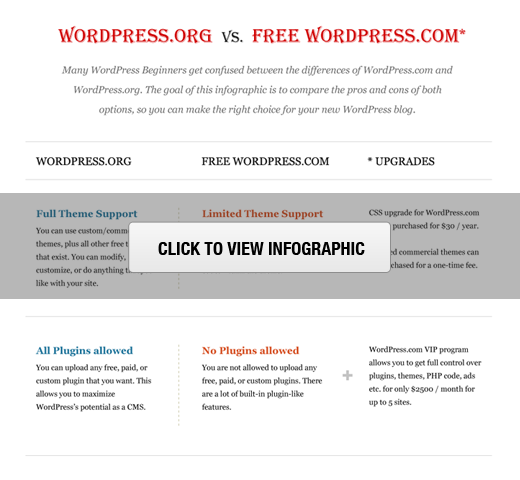
Note: This infographic and article compares the powerful self-hosted WordPress.org with the free WordPress.com hosting service. You can unlock additional features in WordPress.com by upgrading to their paid service. We have highlighted those features as well.
WordPress.com vs WordPress.org Comparison
The best way to understand the difference between WordPress.com vs WordPress.org is to take a look at each platform individually.
WordPress.org
WordPress.org aka “the real WordPress”, is the popular website platform that you have heard all the great things about.
It is open source and 100% free for anyone to use. All you need is a domain name and web hosting. This is why it is also referred to as self-hosted WordPress.
Below are the pros and cons of using the self-hosted WordPress.org to build your website or blog.
WordPress.org Benefits
With WordPress.org, you have full control of your website. You are free to do anything you want and customize it as much as you need. Here are some of the benefits of choosing WordPress.org to build your website, and the reason why it is the go-to choice.
- It is free and super easy to use. (See why is WordPress free?)
- You own your website and all its data. Your site will NOT be turned off because someone decides that it is against their terms of service (as long as you are not doing something illegal). You are in full control.
- You can add free, paid, and custom WordPress plugins / apps to your website.
- You can use customize your website design as needed. You can add any free or paid WordPress theme that you want. You can also create completely custom designs or modify anything that you want.
- You can actually make money from your WordPress site by running your own ads without sharing revenue with anyone.
- You can use powerful tools like Google Analytics for custom analytics and tracking.
- You can use self-hosted WordPress to create an online store to sell digital or physical products, accept credit card payments, and deliver / ship the goods directly from your website.
- You can also create membership sites and sell memberships for premium content, courses, etc and build an online community around your website.
WordPress.org Cons
There are a very few cons of using the self-hosted WordPress.org site.
- Like all websites, you will need web hosting. This is where your website files are stored on the internet. Initially, the cost is around $3-$10 per month. However as your website grows and gets more traffic, the web hosting costs will increase as expected, but then you would be making enough money to cover the costs.
- You are responsible for updates. You can easily update your WordPress site by simply clicking on the update button (1-click), so it’s not too much work.
- You are responsible for backups. Thankfully, there are tons of WordPress backup plugins that let you setup automatic backups.
The real cost of WordPress.org website varies based on what you are trying to build (simple blog, portfolio website, eCommerce store, membership site, etc). There are also other factors like free templates vs premium templates, free plugins vs premium plugins, etc.
On a low budget, you can build your website for as little as $46 per year. See our guide on how much does it really cost to build a WordPress website for full details.
For 99% of users, our recommendation is always to use WordPress.org. See our guide on how to start a website.
WordPress.com
WordPress.com is a hosting service created by the co-founder of WordPress, Matt Mullenweg. Because of the same founder, often users confuse WordPress.com with the popular WordPress.org software.
The WordPress.com hosting service has 5 plans:
- Free – Very limited.
- Personal – $36 per year
- Premium – $99 per year
- Business – $299 per year
- VIP – starting at $5000 per month
Let’s take a look at the pros and cons of WordPress.com.
WordPress.com Benefits
The free WordPress.com platform is a good choice for hobby bloggers and those starting a blog for their family. Here are some of the benefits of using WordPress.com:
- It’s free for up to 3GB of space. After that you will have to switch to a paid plan for more space. (Personal plan $36 /year gives you 6GB, Premium plan $99/year gives you 13GB storage, or Business plan for $299/year for unlimited storage).
- You will not have to worry about updates or backups. WordPress.com will take care of that.
WordPress.com Cons
There are several limitations of free WordPress.com which differentiate it from WordPress.org. Here are some of the disadvantages of using WordPress.com:
- They place ads on all free websites. So your users will see ads, and you don’t make money from it. If you don’t want your users to see their ads, then you can upgrade to a paid plan (starting from $36 per year).
- You are NOT allowed to sell ads on your website. If you run a high traffic site, then you can apply for their advertising program called WordAds where you share revenue with them. Premium and Business plan users can use WordAds right away.
- You cannot upload plugins. Free plan users get built-in JetPack features pre-activated. Business plan users can install from a selection of compatible plugins ($299 / year). WordPress.com VIP program lets you install plugins, and it starts from $5000 per month.
- You cannot upload custom themes. Free plan users can only install from the limited free themes collection. Premium and business plan users can also select premium themes. There are limited customization options for the free version. Premium and Business plan users can use custom CSS.
- You are restricted to their stats. You cannot add Google Analytics or install any other powerful tracking platform. Business plan users can install Google Analytics.
- They can delete your site at anytime if they think it violates their Terms of Service.
- Your site will display a powered by WordPress.com link. It can be removed by upgrading to the Business plan.
- WordPress.com does not offer any eCommerce features or integrated payment gateways.
- You cannot build membership websites with WordPress.com.
As you can see, the WordPress.com hosting platform is quite limited when you’re on the free, personal, or even premium plan. To unlock some of the more advanced features, you have to be on the Business plan ($299 per year) or on the VIP plan ($5000 per month).
WordPress.com vs WordPress.org (FAQs)
Since this is a popular topic, and WPBeginner is the largest free WordPress resource site for beginners, we get tons of questions regarding WordPress.com vs WordPress.org.
We have done our best to answer the most frequently asked questions below:
WordPress.com vs WordPress.org – Which is Better?
If you are a personal blogger, and you don’t care about making money from your website, then go with the free WordPress.com.
If you are a business or a blogger that wants to make money from your site, then we recommend using the self-hosted WordPress.org. It gives you the freedom and flexibility to grow your website the way you want.
While you can get several advanced features with the WordPress.com Business plan ($299 / year for each website), you can make that money go much further on a self-hosted WordPress site which costs $46 per year.
In our expert opinion, WordPress.org is hands down the better platform. That’s the platform that every professional blogger, small business owner, and even big name brands likes Disney uses.
How do I start a WordPress.org Website?
To start a self-hosted WordPress website, you need a domain name and WordPress hosting.
A domain name is your website’s address on the internet such as google.com, wpbeginner.com, etc. Web hosting is where your website files are stored on the internet.
We recommend using Bluehost for hosting your website because they are one of the largest web hosting companies in the world. They’re also an official WordPress.org recommended hosting provider. Last but not least, they’re offering our users a free domain + 60% off on hosting.
For step by step instructions, you can checkout our free guide on how to make a website.
If you need help, WPBeginner team can even build your website for free. Learn more about how our free WordPress blog setup works.
Can I move from WordPress.com to WordPress.org?
Often new users who don’t know the difference between WordPress.com vs WordPress.org end up starting with the free WordPress.com service. Once they see the limitations of the platform, they want to switch to “the Real WordPress” aka WordPress.org.
Yes, you can definitely switch from WordPress.com to WordPress.org and fairly easily move all of your content.
We have created a step by step guide on how to move your blog from WordPress.com to WordPress.org, or you can take advantage of our free blog setup servie, and we will transfer your blog for free.
WordPress.com vs WordPress.org – Summary
The best way to think about the differences between WordPress.com vs WordPress.org is the analogy of renting a house vs. owning a house.
WordPress.com is similar to renting a house. You have limited power and control over what you can and cannot do.
WordPress.org is like owning a house. Where you have full control, no one can kick you out, and you can do anything that you want.
Below is the summary of everything we discussed above in our self-hosted WordPress.org vs WordPress.com comparison:
| WP.org (Platform) | WP.com (Free) | WP.com (Premium) | WP.com (Business) | |
|---|---|---|---|---|
| Cost | $46 - $100 / year | Free | $99 / year | $299 / year |
| Custom Domain | Yes | No | Yes | Yes |
| Hosting Storage | Unlimited | 3 GB | 13 GB | Unlimited |
| Monetization Freedom | Yes | No | Yes (with rev/share) | Yes (with rev / share) |
| Branding Freedom | Yes | No | No | Yes |
| All SEO Features | Yes | No | No | Yes |
| Powerful Analytics | Yes | No | No | Yes |
| Full Theme Support | Yes | No | Limited | Yes |
| Full Plugin Support | Yes | No | No | Yes |
| Ecommerce Store | Yes | No | No | No |
| Membership Site | Yes | No | No | No |
| Maintenance | Yes | No | No | No |
| Full Control | Yes | No | No | No |
Final Thoughts
The confusion created by the similar domains: WordPress.com vs WordPress.org is quite unfortunate for beginners. There is a lot of history behind the decisions, and you can read more about that in our article how WordPress.com and WordPress.org are related.
Our hope is that you found this article helpful in understanding the differences between WordPress.org and WordPress.com.
We wish you all the best with your website and hope that you chose the right platform: WordPress.org.
If so, you may want to follow our guide on how to learn WordPress in 7 days or less.
If you liked this article, then please subscribe to our YouTube Channel for WordPress video tutorials. You can also find us on Twitter and Facebook.

Wow! Am Most impressed with this article, but my question is, will my wordpress.org hosted blog provide auto email respoder services for my blog subscribers?
Hello,
Auto email sending feature is not built-in to the WordPress core itself. However, there are plenty of third party services and plugins that you can use for that.
Hi,
Thanks for this article super helpful!
I have a personal plan with a G Suite account attached to it on wordpress.com. If I want to transfer it to a self hosted wordpress.org site, will my G Suite account be ‘transferred’ as well or will I have to cancel the subscription I ordered on wordpress.com and set up a new G suite account for my wordpress.org site? I hope that makes sense.
Thanks!
Hi Evelyn,
You Gsuite account uses your domain name which is currently managed by WordPress.com. You can manage your domain name on WordPress.com and point it to your WordPress.org hosting provider. You can also move your domain to your new WordPress.org host. You will have to add G Suite A records to your domain settings. Contact Google, WordPress.com, and your new self hosted WordPress.org hosting provider to ensure smooth transition and detailed instructions.
Hi, I have a self hosted wordpress site hosted by hostmonster. If I sign up for bluehost services, how can I migrate my site’s content from hostmonster to bluehost? Thank you.
Hey Nitz,
Please see our guide on how to move WordPress to a new host or server. You can also take advantage of our free blog setup service.
I want to change default currency in my website, from USD to INR what should be done.
Hi,
i’m new to the whole wordpress and website scene but am considering to do some work on a website for my comapny myself to learn the basics and to have full control over the process.
We do already have a domain and a host – does it make sense to purchase a theme and use it with wordpress.org as a simple way of creating a decent website? Our website is super outdated and was created over 10 years ago by a former employee.
Many thanks!
Daniel
Hi Daniel,
If you already have a hosting account then you can add a domain name and install WordPress.
I currently have a blogspot blog but am wanting to rebrand transfer over and have been considering WordPress. I’m trying to decide between com and org. Everyone is cautioning me against org because I am far from tech savvy…how do I know if org is something I will be able to “handle?”
I currently have a blog on WordPress.com and find the reader and tags very good to gain more readers and followers.
Does the ‘reader’ become unavailable on self hosted and can people still follow you on self hosted?
Are there any limitions on the WordPress app for iOS between Self Hosted and Hosted?
If I switch to WordPress.org + Blue Host – let’s say , Would I be able to start e-mail marketing for my blog? Would I have tools for this? Would I have to pay extra money for e-mail marketing tools?
Hi Vizi,
Yes, you will be able to start email marketing. Yes, you will have to use an email marketing service for best results.
I’m using bluehost.Because it’s free,so it’s some not convinience.
Such as,Google can crawl your website.But bot of another SEO services can’t crawl it.It always have error.
And another services : Ahref…are also.
Excellent info – thank you! I started on WordPress.com and bought my domain through them with the premium package. Can I transfer that to WordPress.org or do I need to start over with a new domain name?
Hey Midge,
You can use the same domain with your self hosted WordPress.org site. You will just need to change your domain name settings and point them to your new host’s name servers.
Can you add your link to your online store with a different website
Thank you sooooooooo much for this article! You guys helped me make the switch from WordPress.com to .org!
Hi Shacree,
You are welcome Don’t forget to follow us on Facebook for more WordPress tips and tutorials.
WordPress.com turned to be something different. I paid $35 to upgrade but since then, I can’t even install plugins and my site is struggling to survive. Is it daylight robbery? Please work for the betterment of your clients.
so I cannot install instant article because use wordpress.com even i pay 99 dollars a year (premium)
I currently am blogging at Blogger but would like to migrate over to WordPress.org . It seems like all the comments below are about WordPress.com/org. Is there an easy way to switch from Blogger?
Thank you for this useful article. I’m trying to create a wordpress.org site but find that I’m being moved to.wordpress.com every move I make.
How do I even create wordpress.org account? I went to their website and was forced to download the app, which I think is .com , and also asked me for $129 to use my ow n domain.
Hey Anastasia,
Please follow the instructions in our how to start a WordPress blog guide.
So for someone who just wants a blog that friends can read and does not want to make money from it, I would be OK with WordPress.com? I understand from your notes above that the free version will show adverts but if I pay, I can elect not to have these. However, you quote the cost as dollars. I am in the UK, so if I set up my blog, will I get an option to pay in Sterling? Thanks
Hello,
Great article! However, I have a question which some other readers may also experience. I have purchased Go Daddy’s WordPress Website product which includes hosting. Is having this product as good as using WordPress.org or more comparable to WordPress.com?
Thank you
It is a self hosted WordPress.org site.
Hi! Thanks for the informative article. I have the same question as above and would like more clarity on it. I have purchased Go Daddy’s WordPress Website product which includes hosting (I think!) and if this is same as a WordPress.org site (as mentioned above) why am I always being prompted to upgrade to Personal, Premium or Business plans? Why not the WordPress.org plan? And if I am on WP.com and if I make the shift to WP.org how will it affect my URL? Will it be .org? I cannot remember visiting any blog with this sort of URL. Any response to my queries will be highly appreciated. Thanks in advance.
Hi Mohua,
Most likely you are using a self-hosted WordPress.org site. The easiest way to check this is by installing a plugin, if you can install a plugin then you are using self-hosted WordPress.org site. For detailed explanation please contact GoDaddy support and they will be able to help you understand.
Does this mean I can’t apply for google adsense with my WP.com account?
That’s correct Okoto, you can only use your adsense on a standalone wordpress.org website you own
Best Regards
Hi!
I read the differences between WordPress.com vs. WordPress.org. What if you don’t care about making money from your site but you do want to post blogs regularly, add plugins etc.
What would be the best suitable option?
I have some question
1. Is wp.com cost money for build a site?
2.how will I pay the money?
3.IF I don’t pay money what will they do?
You cant be able to build a website using wp.com, if you are talking about the blog, then yes you can. For this you have nothing to pay.
Thanks so much for your wonderful advice here! I am wanting to set up a webhost on Blue Host and then use WordPress.org for blogging. I will be moving my Blogger blog over. I have always worked from another computer (other than my home or phone) on my lunch hour and before and after office hours through my gmail account. If I set everything up that way – from another location than my home computer – will it all actually still be hosted only from my home computer? (I hate to sound so dumb – but I really don’t know or understand how these things work, I just use them.) I don’t want to do anything wrong or illegal, but have time limitations for setting things up at home and want them to work primarily from my homebase but be accessible everywhere that I go. Can I set it all up remotely or do I have to set up from home originally?
Hey Gail,
It will work just like your Blogger blog. Your WordPress site will live on your Bluehost hosting account it will be your website’s home on the internet. You will use your own domain name to access your website like (wpbeginner.com or google.com). You will be able to access your site on the internet from anywhere, using any device or computer.
Wow…
Thanks so much for this great explanation… I didn’t even realize there were 2 different wordpresses… lol… Man..
Sounds like workpress.org is definitely the way to go for a serious commercial or sem-commercial web site…
So of course the big thing today is building a “responsive web site”…
I’ve read things about wordpress that say, yeah you can… but… if have to do this and you have to do that type answers…
I’m not sure what an answer like that means…
So if I want to build a site that works on desktop and mobil, is it easy to do with wordpress..?
Do you build say, a desktop site and just push a button and it converts it into mobil..?
Any thoughts about this are greatly appreciated..!
I used to use NetObjects Fusion which was great back when there was no mobil but things are way different now..
Thanks very much..
Hi Johnny,
Yes your WordPress site will work on both mobile and desktop. You will need to use responsive design template and most modern WordPress templates are responsive by default.
Just to make this crystal clear for Johnny.
Wordpress sites don’t work on mobile by default (rather they can look horrible with loads of scrolling).
To have a site work (look good) on mobile is all about which THEME YOU USE and purchase. Although you’d think most themes should now work well on mobiles, there are still many out there that do not.
So when choosing a theme, ensure it is ‘Responsive’ because not all of them are. And ideally check it out live or at least view screenshots of the theme on mobile devices to double check it looks good on mobile, before you buy.
Some themes are better than others for mobile, and although they may say responsive, some cater better for all screen sizes than others do.
So just take a few minutes to check out the theme first before buying it
All the best
My church created a website on “wordpress.org” The administrator is handing over the administration duties to me because I have some web training. He created a New User and checked the “Administrator” role for me. He emailed me the password. I am able to log in to the /wordpress/wp-admin/profile.php Profile page and the /wordpress/wp-admin/index.php Dashboard page. When I am in the Dashboard page, I do not have any tools or controls present in the left-hand navigation pane. In the main body of the page, I have (2) text sentences with a vertical red bar to the left of them. The first message says “You’re using W3 Total Cache plugin. If Captcha by BestWebSoft doesn’t work properly, please clear the cache in W3 Total Cache plugin and turn on ‘Show CAPTCHA after the end of the page loading’ option on the plugin settings page.” When I click on the hyperlinked settings page, a new page is displayed with the message “Sorry, you are not allowed to access this page.” The second text sentence with the vertical red bar to the left says” No valid license key has been entered, so automatic updates for Envira Gallery have been turned off. Please click here to enter your license key and begin receiving automatic updates.” When I click on the blue hyperlink a new page is displayed that says, “Sorry, you are not allowed to access this page.” I have read several hours worth of help and FAQ’s and haven’t seen this scenario. Any help or suggestions about this matter will be greatly appreciated. My administrator and I are stumped for now.
Hi Robert,
The account you have is not an administrator user account. You should ask the administrator to recheck your profile and assign you the administrator user role.
Go to the theme in the dashboard and re enter the license key/product purchase. That should help.
Can you add custom javascript in self hosted WP site?, I know wordpress.com doesn’t allow it for security reasons
Yes you can. See our guide on how to properly add JavaScript and styles in WordPress.
Hello,Thanks for this comparison, it helped alot. However I’m still confused about one thing: what if I buy a domain and host my site through a different company (so I don’t go through wordpress itself), and then download WordPress from WordPress.ORG, can I then download a theme from WordPress.COM and use plugins? Ordoes it not matter when you’re hosted somewhere else, as long as you use a WordPress.COM theme, plugins are unavailable?Thank you for your answer!
Hi Sagar,
Yes, you can do that.
Hello! I’ve been using for some time the free wordpress.com and now I want to go to next level. Normally I was planning to buy a domain and to upgrade my WP to the premium plan. Two days ago I received an email from for collaboration. I’ve read a bit on their site, look like is Self-Hosted WordPress, they have the Blue Host option and they move all your content on the new page. I don’t know what to do! Can I trust this site? Someone knows them? Thank you!
Hi Alexandra,
You can easily move WordPress.com blog to self hosted WordPress all by yourself. You can also take advantage of our free blog setup service.
Thank you so much for your answer… but even though there is a tutorial on how to go for self-hosting, I’m afraid I’m gonna do something wrong. Plus this site that emailed me, BlueHost plans at different prices. The question is should I trust ? Please and thanx
This is an informative post. So, thank you for all the detail. I have been looking at WordPress dot com and they appear to have changed their hosting packages. Before you could not monetize but now you can if you have the premium package or above. Do all the above cons you listed still stand or just some of them? I did look at the forum and plug-ins are still not allowed. WordPress dot org does not host anything but rather directs the user to potential hosting companies. It almost looks like WordPress dot com is competing some with those hosts, but maybe not if the only con they appear to have removed is no monetization.
Hello,
Thanks for this comparison, it helped a lot. However I’m still confused about one thing: what if I buy a domain and host my site through a different company (so I don’t go through wordpress itself), and then download WordPress from WordPress.ORG, can I then download a theme from WordPress.COM and use plugins? Or does it not matter when you’re hosted somewhere else, as long as you use a WordPress.COM theme, plugins are unavailable?
Thank you for your answer!
Hi Gabrielle,
WordPress.com does not allow you to install plugins.
WordPress.org allows you to install any plugin or theme you want.
Hi,
I blog at . And I can make out that I am on wordpress.org. However, I cannot add plugins. Why is this so? Do revert. Thanks and regs…
Er, my blog address was removed by the moderator. How are the commentators going to help me if you don’t know my blog address? I understand that you do not want to direct traffic to my site, which is understandably fine, but I also hope that you guys would help me out with my problem. Just in case, you need the blog address it www dot india hypen travels dot com. Here’s sincerely hoping that you don’t delete this. Once my query is answered, probably I myself can delete this post. Thanks
Is there any Number where I can contact WordPress support? I have few queries on upgrading my blog.
Thanks so much for the response. I have refunded 73$ now and I still retain my domain name.
There is a problem now. I goto BLUEHOST and insert my domain name to register and it requires a password to verify I am the owner
I typed my password and it cannot login. And I am sure of my password.
Please help … Thanks in anticipation
I will use your coupon code for bluehost. If I want a refund of my 99$.can I take all full refund or I still leave my domain name with them. Tho its just 36hours now that I registered. Which do you recommend? Take all 99 and goto bluehost for all or take 73 and pay them for domain?
Hey Macc,
You can’t get a refund on a domain name. So probably best to get a refund and move to Bluehost. You can point your domain to Bluehost.
I just purcahsed a domain and hosting from wordpress.com at 99$. Now I started seeing the diffs btw wordpress.com and .org
My question is
Can I go take a refund of my 99$, and then goto bluehost for hosting and get to wordpress.org
Or
I just export my files as youve said and leave the 99$. And I am still going to pay for bluehost again?
Please I am confused. In a nutshell. Since I already purchased a premium plan from wordpress.com. Will I still pay to bluehost for another host again cos I want to migrate to wordpress.org? Cos I am a begginer and no money.
my question. I am not a blogger. I just need a website for my business with:
1. about page with my pictures
2. pages (maybe two additoinal) services (not selling just telling what my business has and contact me)
3. three emails with business domain (i have domanin)
4. maybe a contact form
5. maybe a newsletter (maybe in the future but not now)
6. no sponsors – but links to certifications, etc.
7. job postings
It seems as though the wordpress.com premium would benefit me.
Can you please direct me if this .com would be the best option? Thanks!
You can do all these things using the self hosted WordPress.org as well. This will give you much more flexibility to grow your business in the future. See our guide on the limitations of WordPress.com
i suggest it too wordpress.org is really good for professional blogger as it allow customization as per our need
What about the paid WordPress.com plans (personal, premium, business)? How do they compare to WordPress.org? I don’t have a lot of disposable income, especially for a blog that’s not currently generating any money, but I’d like to add some scripts for Google Analytics and a couple of affiliate programs. The personal plan is reasonably priced but WordPress does not make it at all clear what kind of benefits are included in comparison to the free plan. And what is the difference between the premium plan and WordPress.org? The features seem to be almost identical.
hello sir,my concern is security and wordpress.org.how muc difficult is that and also how different is worpress.org vs wordpress.com for a novice user.and how different is to optimize wordpress.org vs wordpress.com
if we have features like ddos and spam control and other ones.will our site be safe from hackers or is it vulnerable.can a novice do this easily.
Do You Offer Training For WordPress.org i dont mind if i have to pay.
Thanks
Wow, This is Great Article Thank for the WordPress,org Difference, and WordPress Dot Com, Thank You So Much,
I have a premium account with WordPress since 10 month,. A Domaine name and I will use your service to move to WordPress.org my blog.
I have Basic simple questions:
1) can you confirm me that after the moving process , I will not have to continue to pay the WordPress.com premium ( Maybe just the small year fee to keep the redirect)?
2) my WordPress.org will be host by Bluehost. can I do the important setting with an IMac ?
3) can,I had post with an iPad ?
Thanks for your answer, Icall start the process with you in few days.
Hi François,
1. You will not have to pay for WordPress.com Premium. However, you will have to pay for your domain when its registration expires.
2. You can use any computer PC or Mac to update and manage your site.
3. You can add posts with an iPad.
You’ve convinced me. Now can I use WordPress.org and integrate it with my existing website which is powered by weebly and they own my domain and email? Thanks.
Self-host your WordPress Blog & later Migrate Weebly to WordPress.
Hi,
I have used the free WordPress website for about two years to blog pictures and memories
and have used up the 3 GB. I just would like the least amount money spent on something for a blog to post pictures and videos for my kids to read one day. At this light, I posted a lot of pics which is why I’ve used up the 3GB. Is there one you’d recommend? I thought there is one that is about $100 a year for 15 GB. What happens, though, after you use up 15 GB? Do you have to pay the higher membership or just it restart every year? Also, I thought I read something here differently that says you can pay just $20 a year for more GB but perhaps less than 15 GB. Is that correct? Any thoughts would be helpful as I’m not computer savvy. Just want to write online with pics one day for my kids to possibly read one day. Thank you for any help!
You can buy additional storage from WordPress.com. Alternately, you can switch to self-hosted WordPress.org blog and get freedom to upload as many images as you want. See our guide on the difference between WordPress.com and WordPress.org
With premium plan of 99$ per year. Is it includes hosting, domain name, Google email free for one year?
With free wordpress.com blog, you can’t do much as they have limited features but with wordpress.org, you can add as many features as you want through WordPress plugins. There are so many plugins available online in both free as well as paid options. So my choice would be wordpress.org.
How do I know which version of wordpress I am currently using? (.com or .org?) I am unable to add my own plugins….but I do have my own site name.com (theminiapartment.com). Is there a way to tell which version of wordpress I’m using? And how would I upgrade to wordpress.org? Thanks!
Hi Rebecca!
Your website is wordpress.com
You can check at the footer of your site.
So confused right now! I’ll break my questions down into list form to make it easier:
1) Can I use my .com site for affiliate marketing and sponsored posts? Or do I need a .org?
2) Do I need a .org site to use my own plug-ins?
3) Is having a self-hosted WP difficult? Does it require extensive training on codes and such. I have none.
Thanks so much for your awesome site!
1. No, you can’t.
2. Yes you need a self hosted .org site to use your own plugins.
3. No it is not. There is a learning curve, but you will find plenty of help every step of the way.
1)Offer freebies like free pdfs of 3 to 4 pages
2) Share links on fb groups
3) Always remember content is king
Hi,
I have recently started blogging and even though I am just doing it out of interest, at some point I would want to pursue it full time. I am on the free – basic wordpress plan. (abc.wordpress.com)
I have two questions:
1. What can I do to drive more traffic to my blog?
2. If, at a later stage, I want to move to an org/ Premium wordpress plan, what happens to my existing subscribers.
Well Self-Hosted is the best!
Great article for every newbie. I think you should add topics like SEO, website traffic etc.