The latest Android and Google Play news for app and game developers.
Posted by Sami Tolvanen, Senior Software Engineer, Android Security
The hardening of Android's userspace has increasingly made the underlying Linux kernel a more attractive target to attackers. As a result, more than a third of Android security bugs were found in the kernel last year. In Android 8.0 (Oreo), significant effort has gone into hardening the kernel to reduce the number and impact of security bugs.
Android Nougat worked to protect the kernel by isolating it from userspace processes with the addition of SELinux ioctl filtering and requiring seccomp-bpf support, which allows apps to filter access to available system calls when processing untrusted input. Android 8.0 focuses on kernel self-protection with four security-hardening features backported from upstream Linux to all Android kernels supported in devices that first ship with this release.
Usercopy functions are used by the kernel to transfer data from user space to kernel space memory and back again. Since 2014, missing or invalid bounds checking has caused about 45% of Android's kernel vulnerabilities. Hardened usercopy adds bounds checking to usercopy functions, which helps developers spot misuse and fix bugs in their code. Also, if obscure driver bugs slip through, hardening these functions prevents the exploitation of such bugs.
This feature was introduced in the upstream kernel version 4.8, and we have backported it to Android kernels 3.18 and above.
int buggy_driver_function(void __user *src, size_t size)
{
    /* potential size_t overflow (don’t do this) */
    u8 *buf = kmalloc(size * N, GPF_KERNEL);
    …
    /* results in buf smaller than size, and a heap overflow */
    if (copy_from_user(buf, src, size))
    return -EFAULT;

    /* never reached with CONFIG_HARDENED_USERCOPY=y */
}
An example of a security issue that hardened usercopy prevents.
While hardened usercopy functions help find and mitigate security issues, they can only help if developers actually use them. Currently, all kernel code, including drivers, can access user space memory directly, which can lead to various security issues.
To mitigate this, CPU vendors have introduced features such as Supervisor Mode Access Prevention (SMAP) in x86 and Privileged Access Never (PAN) in ARM v8.1. These features prevent the kernel from accessing user space directly and ensure developers go through usercopy functions. Unfortunately, these hardware features are not yet widely available in devices that most Android users have today.
Upstream Linux introduced software emulation for PAN in kernel version 4.3 for ARM and 4.10 in ARM64. We have backported both features to Android kernels starting from 3.18.
Together with hardened usercopy, PAN emulation has helped find and fix bugs in four kernel drivers in Pixel devices.
int buggy_driver_copy_data(struct mydata *src, void __user *ptr)
{
    /* failure to keep track of user space pointers */
    struct mydata *dst = (struct mydata *)ptr;
    …
    /* read/write from/to an arbitrary user space memory location */
    dst->field = … ;    /* use copy_(from|to)_user instead! */
    …
    /* never reached with PAN (emulation) or SMAP */
}
An example of a security issue that PAN emulation mitigates.
Android has included support for Address Space Layout Randomization (ASLR) for years. Randomizing memory layout makes code reuse attacks probabilistic and therefore more difficult for an attacker to exploit, especially remotely. Android 8.0 brings this feature to the kernel. While Linux has supported KASLR on x86 since version 3.14, KASLR for ARM64 has only been available upstream since Linux 4.6. Android 8.0 makes KASLR available in Android kernels 4.4 and newer.
KASLR helps mitigate kernel vulnerabilities by randomizing the location where kernel code is loaded on each boot. On ARM64, for example, it adds 13–25 bits of entropy depending on the memory configuration of the device, which makes code reuse attacks more difficult.
The final hardening feature extends existing memory protections in the kernel by creating a memory region that's marked read-only after the kernel has been initialized. This makes it possible for developers to improve protection on data that needs to be writable during initialization, but shouldn't be modified after that. Having less writable memory reduces the internal attack surface of the kernel, making exploitation harder.
Post-init read-only memory was introduced in upstream kernel version 4.6 and we have backported it to Android kernels 3.18 and newer. While we have applied these protections to some data structures in the core kernel, this feature is extremely useful for developers working on kernel drivers.
Android Oreo includes mitigations for the most common source of security bugs in the kernel. This is especially relevant because 85% of kernel security bugs in Android have been in vendor drivers that tend to get much less scrutiny. These updates make it easier for driver developers to discover common bugs during development, stopping them before they can reach end user devices.
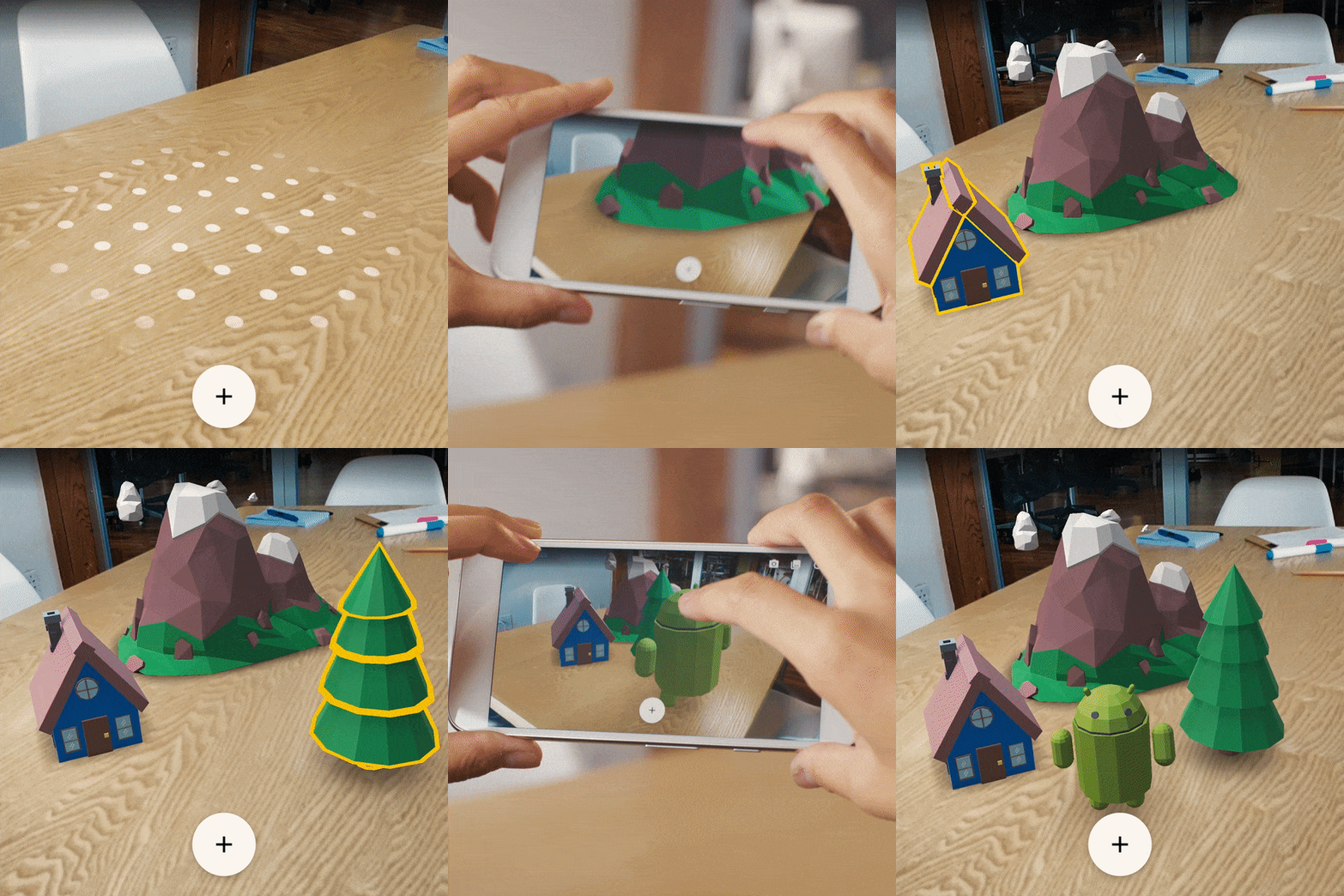
With more than two billion active devices, Android is the largest mobile platform in the world. And for the past nine years, we've worked to create a rich set of tools, frameworks and APIs that deliver developers' creations to people everywhere. Today, we're releasing a preview of a new software development kit (SDK) called ARCore. It brings augmented reality capabilities to existing and future Android phones. Developers can start experimenting with it right now.
We've been developing the fundamental technologies that power mobile AR over the last three years with Tango, and ARCore is built on that work. But, it works without any additional hardware, which means it can scale across the Android ecosystem. ARCore will run on millions of devices, starting today with the Pixel and Samsung's S8, running 7.0 Nougat and above. We're targeting 100 million devices at the end of the preview. We're working with manufacturers like Samsung, Huawei, LG, ASUS and others to make this possible with a consistent bar for quality and high performance.
ARCore works with Java/OpenGL, Unity and Unreal and focuses on three things:
Alongside ARCore, we've been investing in apps and services which will further support developers in creating great AR experiences. We built Blocks and Tilt Brush to make it easy for anyone to quickly create great 3D content for use in AR apps. As we mentioned at I/O, we're also working on Visual Positioning Service (VPS), a service which will enable world scale AR experiences well beyond a tabletop. And we think the Web will be a critical component of the future of AR, so we're also releasing prototype browsers for web developers so they can start experimenting with AR, too. These custom browsers allow developers to create AR-enhanced websites and run them on both Android/ARCore and iOS/ARKit.
ARCore is our next step in bringing AR to everyone, and we'll have more to share later this year. Let us know what you think through GitHub, and check out our new AR Experiments showcase where you can find some fun examples of what's possible. Show us what you build on social media with #ARCore; we'll be resharing some of our favorites.
With so many great mobile games launching this year, we saw a huge amount of interest from indie developers to showcase their art at the Google Play Indie Games Festival in San Francisco next month. While it was a tough selection process, we're excited to announce the 20 finalists, as well as our esteemed judging panel. Fans will be able to play the new and un-released indie games in a fun festival atmosphere where they can also meet the creators themselves. To attend and learn more about the event, register now for free at g.co/play/sfindiegamesfest2017.
So how did we choose the 20 finalists? We powered up our phones, put our game-faces on, and looked for games that not only met the festival requirements, but also stood out with their overall design, fun, and quality. These are the 20 finalists who will be joining us at the festival to demo their games.
In addition to playing these games and meeting the developers who made them, fans will have a chance to vote for their favorites throughout the festival. The Top 10 will then move on to present a short pitch in pursuit of going home as one of the three overall festival winners. The winners will be chosen by this year's panel of judges representing a diverse lineup of gaming expertise.
Emceeing this year's event is J.D. Witherspoon, aka runJDrun. No stranger to gaming, YouTuber/actor/comedian, J.D. plays a wide array of games and frequently uploads gaming, vlog, and comedy content to his channels.
If you want to try out these games and celebrate the indie community, learn more about the event and register at g.co/play/sfindiegamesfest2017.
Wear 2.0 launched back in February with added support for new hardware features in addition to adopting new Material Design themes, guidelines, and a simpler vertical UI pattern. It also introduces a complications API, making it easier for apps to provide data to watch faces, and watch faces to incorporate external data. The final big update was that, apps targeting Wear 2.0 now have the ability to operate in a standalone mode, without needing a connection to a companion app on the phone.
There are a few design considerations in relation to navigation, notifications, the complications API, and the standalone functionality to help you better optimize for Wear 2.0 devices:
Ensure that for devices using Wear 2.0, your app takes advantage of these new UI patterns to provide a consistent user experience. Check out more training resources for Wear Navigation and Actions and the Material Design specifications for Navigation and Action Drawers.
Wear 2.0 uses a simpler vertical navigation pattern, removing the horizontal swiping gesture to present actions for a notification. Notification actions are now presented as a single primary action (if applicable) at the bottom of a notification. If there is no primary action, expanding the notification will present options in a single, vertically scrollable view.
Notifications will work without needing many changes on both 1.x and 2.0 devices, but appear quite different:
When creating apps for Wear 2.0 devices, improve the user experience with notifications by applying the following best practices:
To learn more about adding wearable features to notifications.
The complications API in Wear 2.0 makes it much easier for watch face developers and third-party data providers to surface important information users want, at a glance. Watch faces that support the API can be configured to use any of the data providers that have been installed on the watch while maintaining complete control over their appearance. Apps supporting the complication API allow the app's data to be accessible on any watch faces that support complications. These complications can be displayed in a variety of forms (short text, icon, ranged value, long text, small image, and large image) depending on what the data provider has configured and how much space has been allocated on the watch face.
To ensure that complications fit the overall design of the watch face and properly handle their data type, when adding complication support we recommend watch face makers should:
TextRenderer
ComplicationDrawable
ComplicationProviderService
ComplicationData
Though a lot was covered here, there are additional resources you can use to ensure that your apps or games are optimized and use the latest patterns and functionality on Wear. Be sure to review the quality guidelines and check out the developer training documentation to learn more best practices for wearable app development and wearable app design in order to build quality apps for Wear.
Since announcing ConstraintLayout at Google I/O last year, we've continued to improve the layout's stability and layout editor support. We've also added new features specific to ConstraintLayout that help you build various type of layouts, such as introducing chains and setting size as a ratio. In addition to these features, there is a notable performance benefit by using ConstraintLayout. In this post, we'll walk through how you can benefit from these performance improvements.
ConstraintLayout
To better understand the performance of ConstraintLayout, let's take a step back and see how Android draws views.
When a user brings an Android view into focus, the Android framework directs the view to draw itself. This drawing process comprises 3 phases:
The system completes a top-down traversal of the view tree to determine how large each ViewGroup and View element should be. When a ViewGroup is measured, it also measures its children.
ViewGroup
Another top-down traversal occurs, with each ViewGroup determining the positions of its children using the sizes determined in the measure phase.
The system performs yet another top-down traversal. For each object in the view tree, a Canvas object is created to send a list of drawing commands to the GPU. These commands include the ViewGroup and View objects' sizes and positions, which the system determined during the previous 2 phases.
Canvas
View
Each phase within the drawing process requires a top-down traversal of the view tree. Therefore, the more views you embed within each other (or nest) into the view hierarchy, the more time and computation power it takes for the device to draw the views. By keeping a flat hierarchy in your Android app layouts, you can create a fast and responsive user interface for your app.
With that explanation in mind, let's create a traditional layout hierarchy that uses LinearLayout and RelativeLayout objects.
LinearLayout
RelativeLayout
Let's say we want to build a layout like the image above. If you build it with traditional layouts, the XML file contains an element hierarchy similar to the following (for this example, we've omitted the attributes):
<RelativeLayout>
  <ImageView />
  <ImageView />
  <RelativeLayout>
    <TextView />
    <LinearLayout>
      <TextView />
      <RelativeLayout>
        <EditText />
      </RelativeLayout>
    </LinearLayout>
    <LinearLayout>
      <TextView />
      <RelativeLayout>
        <EditText />
      </RelativeLayout>
    </LinearLayout>
    <TextView />
  </RelativeLayout>
  <LinearLayout >
    <Button />
    <Button />
  </LinearLayout>
</RelativeLayout>
Although there's usually room for improvement in this type of view hierarchy, you'll almost certainly still need to create a hierarchy with some nested views.
As discussed before, nested hierarchies can adversely affect performance. Let's take a look at how the nested views actually affect the UI performance using Android Studio's Systrace tool. We called the measure and layout phases for each ViewGroup (ConstraintLayout and RelativeLayout) programmatically and triggered Systrace while the measure and layout calls are executing. The following command generates an overview file that contains key events, such as expensive measure/layout passes, that occur during a 20-second interval:
python $ANDROID_HOME/platform-tools/systrace/systrace.py --time=20 -o ~/trace.html gfx view res
For more details about how you can use Systrace, see the Analyzing UI Performance with Systrace guide.
Systrace automatically highlights the (numerous) performance problems with this layout, as well as suggestions for fixing them. By clicking the "Alerts" tab, you will find that drawing this view hierarchy requires 80 expensive passes through the measure and layout phases!
Triggering that many expensive measure and layout phases is far from ideal; such a large amount of drawing activity could result in skipped frames that users notice. We can conclude that the layout has poor performance due to the nested hierarchy as well as the characteristic of RelativeLayout, which measures each of its children twice.
You can check the entire code on how we performed these measurements in our GitHub repository.
If you create the same layout using ConstraintLayout, the XML file contains an element hierarchy similar to the following (attributes again omitted):
<android.support.constraint.ConstraintLayout>
  <ImageView />
  <ImageView />
  <TextView />
  <EditText />
  <TextView />
  <TextView />
  <EditText />
  <Button />
  <Button />
  <TextView />
</android.support.constraint.ConstraintLayout>
As this example shows, the layout now has a completely flat hierarchy. This is because ConstraintLayout allows you to build complex layouts without having to nest View and ViewGroup elements.
For example, let's look at the TextView and EditText in the middle of the layout:
TextView
EditText
<LinearLayout
    android:id="@+id/camera_area"
    android:layout_width="match_parent"
    android:layout_height="wrap_content"
    android:orientation="horizontal"
    android:layout_below="@id/title" >

    <TextView
        android:text="@string/camera"
        android:layout_width="wrap_content"
        android:layout_height="wrap_content"
        android:layout_gravity="center_vertical"
        android:id="@+id/cameraLabel"
        android:labelFor="@+id/cameraType"
        android:layout_marginStart="16dp" />

    <RelativeLayout
        android:layout_width="match_parent"
        android:layout_height="wrap_content">

        <EditText
            android:id="@+id/cameraType"
            android:ems="10"
            android:inputType="textPersonName"
            android:text="@string/camera_value"
            android:layout_width="match_parent"
            android:layout_height="wrap_content"
            android:layout_centerVertical="true"
            android:layout_marginTop="8dp"
            android:layout_marginStart="8dp"
            android:layout_marginEnd="8dp" />
    </RelativeLayout>
</LinearLayout>
By using ConstraintLayout instead, you can achieve the same effect just by adding a constraint from the baseline of the TextView to the baseline of the EditText without creating another ViewGroup:
<TextView
      android:layout_width="wrap_content"
      android:layout_height="wrap_content"
      app:layout_constraintLeft_creator="1"
      app:layout_constraintBaseline_creator="1"
      app:layout_constraintLeft_toLeftOf="@+id/activity_main_done"
      app:layout_constraintBaseline_toBaselineOf="@+id/cameraType" />
When running the Systrace tool for the version of our layout that uses ConstraintLayout, you see far fewer expensive measure/layout passes during the same 20-second interval. This improvement in performance makes sense, now that we're keeping the view hierarchy flat!
On a related note, we built the ConstraintLayout variant of our layout using just the layout editor instead of editing the XML by hand. To achieve the same visual effect using RelativeLayout, we probably would have needed to edit the XML by hand.
We analyzed how long every measure and layout pass took for two type of layouts, ConstraintLayout and RelativeLayout, by using OnFrameMetricsAvailableListener, which was introduced in Android 7.0 (API level 24). This class allows you to collect frame-by-frame timing information about your app's UI rendering.
OnFrameMetricsAvailableListener
By calling the following code, you can start recording per-frame UI actions:
window.addOnFrameMetricsAvailableListener(
        frameMetricsAvailableListener, frameMetricsHandler);
After timing information becomes available, the app triggers the frameMetricsAvailableListener() callback. We are interested in the measure/layout performance, so we call FrameMetrics.LAYOUT_MEASURE_DURATION when retrieving the actual frame duration.
frameMetricsAvailableListener()
FrameMetrics.LAYOUT_MEASURE_DURATION
Window.OnFrameMetricsAvailableListener {
        _, frameMetrics, _ ->
        val frameMetricsCopy = FrameMetrics(frameMetrics);
        // Layout measure duration in nanoseconds
        val layoutMeasureDurationNs =
                frameMetricsCopy.getMetric(FrameMetrics.LAYOUT_MEASURE_DURATION);
To learn more about the other types of duration information that FrameMetrics can receive, see the FrameMetrics API reference.
FrameMetrics
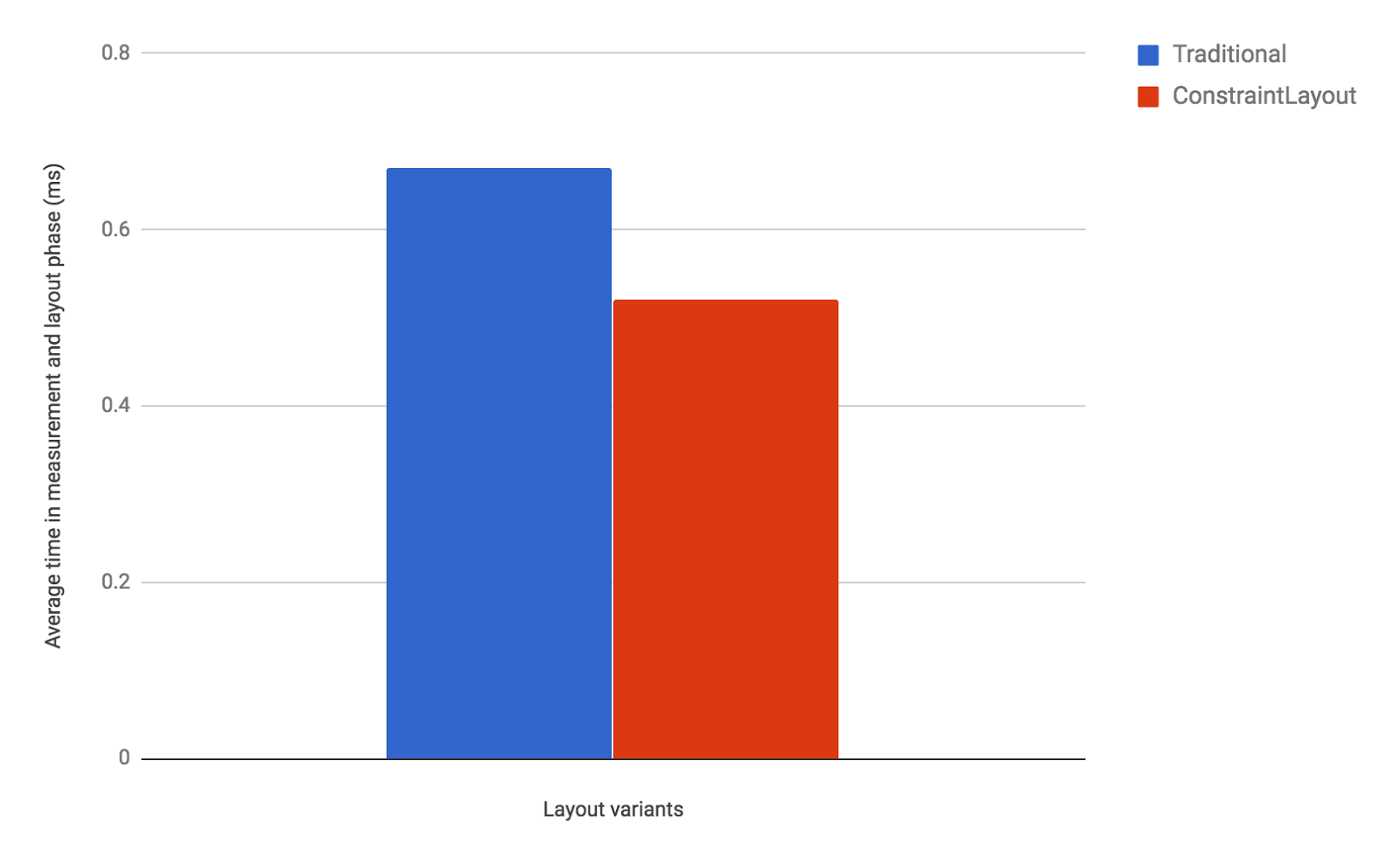
Our performance comparison shows that ConstraintLayout performs about 40% better in the measure/layout phase than RelativeLayout:
As these results show, ConstraintLayout is likely to be more performant than traditional layouts. Moreover, ConstraintLayout has other features that help you build complex and performant layouts, as discussed in the benefits of a ConstraintLayout object section. For details, see the Build a Responsive UI with ConstraintLayout guide. We recommend that you use ConstraintLayout when designing your app's layouts. In almost all cases when you would have previously need a deeply-nested layout, ConstraintLayout should be your go-to layout for optimal performance and ease of use.
All the measurements above were performed in the following environment.
Check out the developer guide, the API reference documentation, and the article on Medium to fully understand what ConstraintLayout can provide for you. And once again, thank you to all who submitted feedback and issues over the months since our alpha release of ConstraintLayout. We're truly grateful that we were able to release the production-ready 1.0 version of ConstraintLayout earlier this year. As we continue to improve ConstraintLayout, please continue to send us feedback using the Android issue tracker.
Early Access was launched at Google I/O 2016 as a destination on Google Play for beta app and game titles still in development, and to attract early adopters willing to test those titles. The results speak for themselves. The program has helped over 350 developers launch their titles and generated over 40M beta installs for their apps and games during just the short window before their public availability on the Play Store. More importantly, the average rating for titles that have been through Early Access is 4.3☆ once in production, putting them in a strong position to be favored in search and discovery on Google Play.
Early Access also generates positive awareness for new titles. Alumni like Simple Habit and Digit were chosen as finalists in the "Standout Startup" category at the Google Play Awards this year. Omnidrone's game Titan Brawl became the first game to reach 1M testers. Hear more about their experience in the video below.
Early Access and our work with the venture capital community has taught us a lot about successful startups. We know you seek rapid iteration towards product-market fit and are thirsty for the same kind of powerful testing, analytics, and user feedback that Google's own product teams depend on to launch successful products. When we know about your startup's plans well in advance of your launch date, we can impact your trajectory by supporting you through this understood process of iterative improvement.
Earlier this year we launched Start on Android to identify the highest potential Android startups earlier in their lifecycle and provide tools, perks, and guidance for those who qualify. We've developed five components that have proven to be most impactful:
We've already seen a lot of developer interest and received hundreds of public applications and referrals from venture capitalists and other startup influencers. Below are a few accepted startups:
We are incredibly proud of every developer we work with and grateful to our friends within VC firms and the wider community who bring exciting new startups to our attention.
If you would like to be part of Start on Android, complete the form at StartonAndroid.com. We're looking for developers who are planning to launch on Android soon, or have done so in the past 6 months.
How useful did you find this blogpost?
Eagle-eyed users of Android O will have noticed the absence of the 'Allow unknown sources' setting, which has existed since the earliest days of Android to facilitate the installation of apps from outside of Google Play and other preloaded stores. In this post we'll talk about the new Install unknown apps permission and the security benefits it brings for both Android users and developers.
Earlier this year we introduced Google Play Protect - comprehensive security services that are always at work to protect your device from harm. Google Play continues to be one of the safest places for Android users to download their apps, with the majority of Potentially Harmful Apps (PHAs) originating from third-party sources.
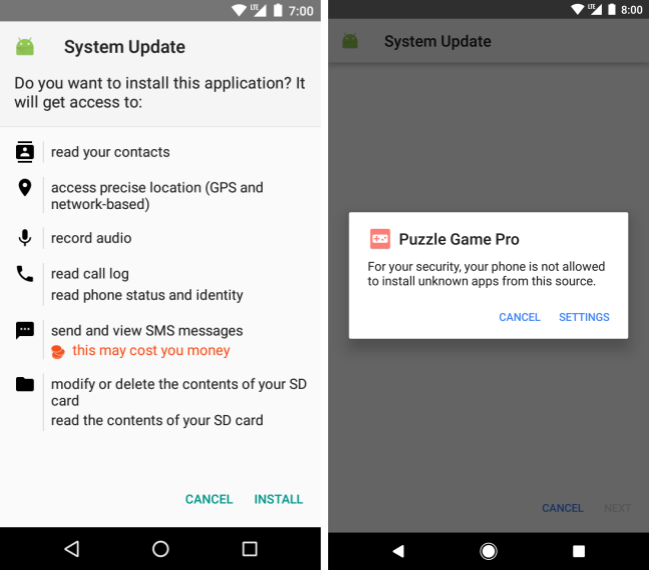
A common strategy employed by PHA authors is to deliver their apps via a hostile downloader. For example, a gaming app might not contain malicious code but instead might notify the user to install a PHA that masquerades as an important security update. (You can read more about hostile downloaders in the Android Security 2016 Year in Review). Users who have enabled the installation of apps from unknown sources leave themselves vulnerable to this deceptive behavior.
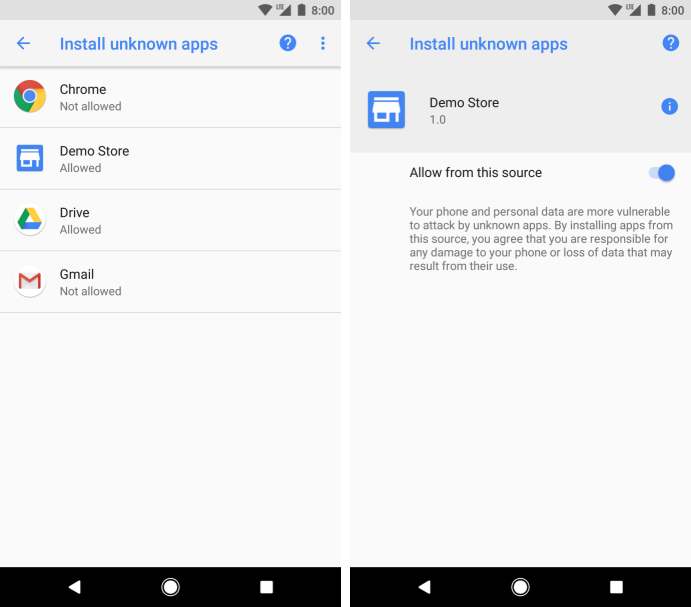
In Android O, the Install unknown apps permission makes it safer to install apps from unknown sources. This permission is tied to the app that prompts the install— just like other runtime permissions—and ensures that the user grants permission to use the install source before it can prompt the user to install an app. When used on a device running Android O and higher, hostile downloaders cannot trick the user into installing an app without having first been given the go-ahead.
This new permission provides users with transparency, control, and a streamlined process to enable installs from trusted sources. The Settings app shows the list of apps that the user has approved for installing unknown apps. Users can revoke the permission for a particular app at any time.
To take advantage of this new behavior, developers of apps that require the ability to download and install other apps via the Package Installer may need to make some changes. If an app uses a targetSdkLevel of 26 or above and prompts the user to install other apps, the manifest file needs to include the REQUEST_INSTALL_PACKAGES permission:
targetSdkLevel
REQUEST_INSTALL_PACKAGES
<uses-permission android:name="android.permission.REQUEST_INSTALL_PACKAGES" />
Apps that haven't declared this permission cannot install other apps, a handy security protection for apps that have no intention of doing so. You can choose to pre-emptively direct your users to the Install unknown apps permission screen using the ACTION_MANAGE_UNKNOWN_APP_SOURCES Intent action. You can also query the state of this permission using the PackageManager canRequestPackageInstalls() API.
ACTION_MANAGE_UNKNOWN_APP_SOURCES
canRequestPackageInstalls()
Remember that Play policies still apply to apps distributed on Google Play if those apps can install and update other apps. In the majority of cases, such behavior is inappropriate; you should instead provide a deep link to the app's listing on the Play Store.
Be sure to check out the updated publishing guide that provides more information about installing unknown apps, and stay tuned for more posts on security hardening in Android O.

 Play Console