How do I install StatCounter using Microsoft Office Live?
- Sign up for a free account at StatCounter and follow the steps to create your first project and generate your StatCounter code.
- If prompted, make sure to choose Microsoft Office Live from the list of Installation Guides.
- Copy the StatCounter code
- Log into your Microsoft Office Live website and click "Design Your Site"

- Click the "Site Actions" button

- Click "Activate Advanced Design Features" then click "OK" (NOTE: if you are already using the Advanced Design Features, you will see an option to "Deactivate Advanced Design Features". In this case, just skip this step.)


- Click "Edit" beside the web page to which you want to add StatCounter - this opens the Page Editor

- Click "Module" and select "Custom Footer"

- Paste your StatCounter code into the window and click "OK"
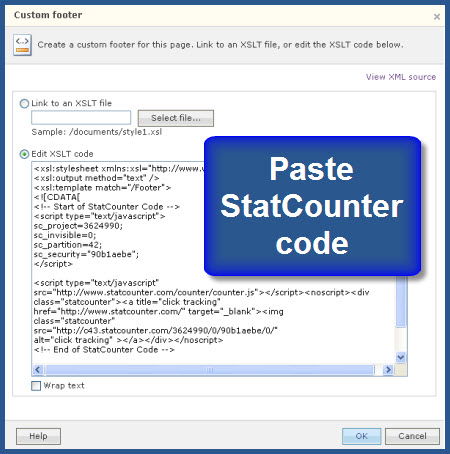
- Click "Save" and that’s it!
Your StatCounter will now begin recording visitor information and, if you chose the visible option, your counter will be visible on your website!

To save time, consider setting up a template with your StatCounter code installed and use your template as the basis for all new pages on your site. Here's how:
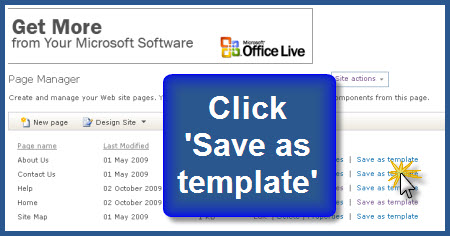
Install StatCounter on one of your website pages following the instructions above. Then click 'Save as template' beside your page in the Page Manager section. Your template will now be available to you every time you create a new page
Answers to the majority of questions we receive can be found here in the knowledge base.
Installation
- How do I install StatCounter?
- How do I install code inside phpbb forum?
- How do I install StatCounter using Shopify?
- How do I install StatCounter using Blogger / Blogspot?
- How do I install StatCounter using MySpace?
- How do I install StatCounter using Multiply?
- How do I install StatCounter using Friendster?
- How do I install StatCounter using ComfyPage?
- How do I install StatCounter using GoDaddy Website Builder?
- How do I install StatCounter using Tripod?
- How do I install StatCounter using Register.com?
- How do I install StatCounter using Britnett-Carver Webpage Editor?
- How do I install StatCounter using Yahoo! Commerce site / Yahoo! Online Store?
- How do I install StatCounter using NVU editor?
- How do I install StatCounter using PBase?
- How do I install StatCounter using Dreamweaver?
- How do I install StatCounter using Microsoft Office Live?
- How do I install StatCounter using Yahoo! Site Builder (Windows)?
- How do I install StatCounter using Contribute?
- How do I install StatCounter using BluDomain?