Omschrijving
Houd elke WordPress-site veilig, verhoog je bezoekersaantallen en betrek je lezers.
Bezoekers- en SEO-hulpmiddelen
De bezoekers zijn het belangrijkste element van een website. Jetpack bevat:
- [gratis] Site-statistieken en -analyses
- [gratis] Automatisch delen op Facebook, Twitter, LinkedIn, Tumblr, Reddit en WhatsApp
- [gratis] Gerelateerde berichten
- [betaald] Tools voor zoekmachineoptimalisatie voor Google, Bing, Twitter, Facebook en WordPress.com
- [betaald] Programma dat je de beste advertenties geeft van AdSense, Facebook Ads, AOL, Amazon, Google AdX en Yahoo
Beveiligings- en back-upservices
Maak je nooit meer zorgen over gegevensverlies, downtime en hacken. Jetpack biedt:
- [gratis] Krachtige bescherming tegen aanvallen
- [gratis] Monitoring van downtime en uptime
- [gratis] Beveiligde logins en tweevoudige authenticatie
- [betaald] Malwarescans, codescans en oplossing van bedreigingen
- [betaald] Back-ups van je site, herstelmogelijkheden en migraties
Content aanmaken
Voeg uitgebreide, prachtige media toe. Je hoeft geen designer te zijn:
- [gratis] Een supersnel CDN voor je afbeeldingen
- [gratis] Carousels, diavoorstellingen en galerij-tegels
- [gratis] Eenvoudige integratie van YouTube, Google Documents, Spotify en nog veel meer
- [gratis] Aanpassing van de sidebar voor Facebook, Twitter en RSS-feeds
- [gratis] Extra sidebar-widgets inclusief blogstatistieken, een kalender en auteurs-widgets
- [betaald] Snelle videohosting in HD-kwaliteit zonder advertenties
Discussie en community
Leer je lezers kennen en zorg ervoor dat ze terugkeren naar je site met:
- [gratis] E-mailabonnementen
- [gratis] De mogelijkheid om in te loggen via Facebook, Twitter en Google om te reageren
- [gratis] Volledig aanpasbare contactformulieren
- [gratis] Oneindig scrollen voor je berichten
Deskundige ondersteuning
We hebben een compleet team gereed om je te helpen. Stel je vragen in het supportforum, of neem rechtstreeks contact op.
Betaalde services
De meeste functies en services van Jetpack zijn gratis. Jetpack biedt ook geavanceerde beveiligings- en back-upservices, videohosting, site-inkomsten, ondersteuning met prioriteit en meer SEO-hulpmiddelen in drie eenvoudige en betaalbare abonnementen.
Aan de slag
De installatie is gratis, snel en eenvoudig. Het gratis abonnement binnen enkele minuten instellen.
Schermafdrukken
Dashboard: Uitgebreid overzicht van de statistieken, status en gezondheid van je site. 
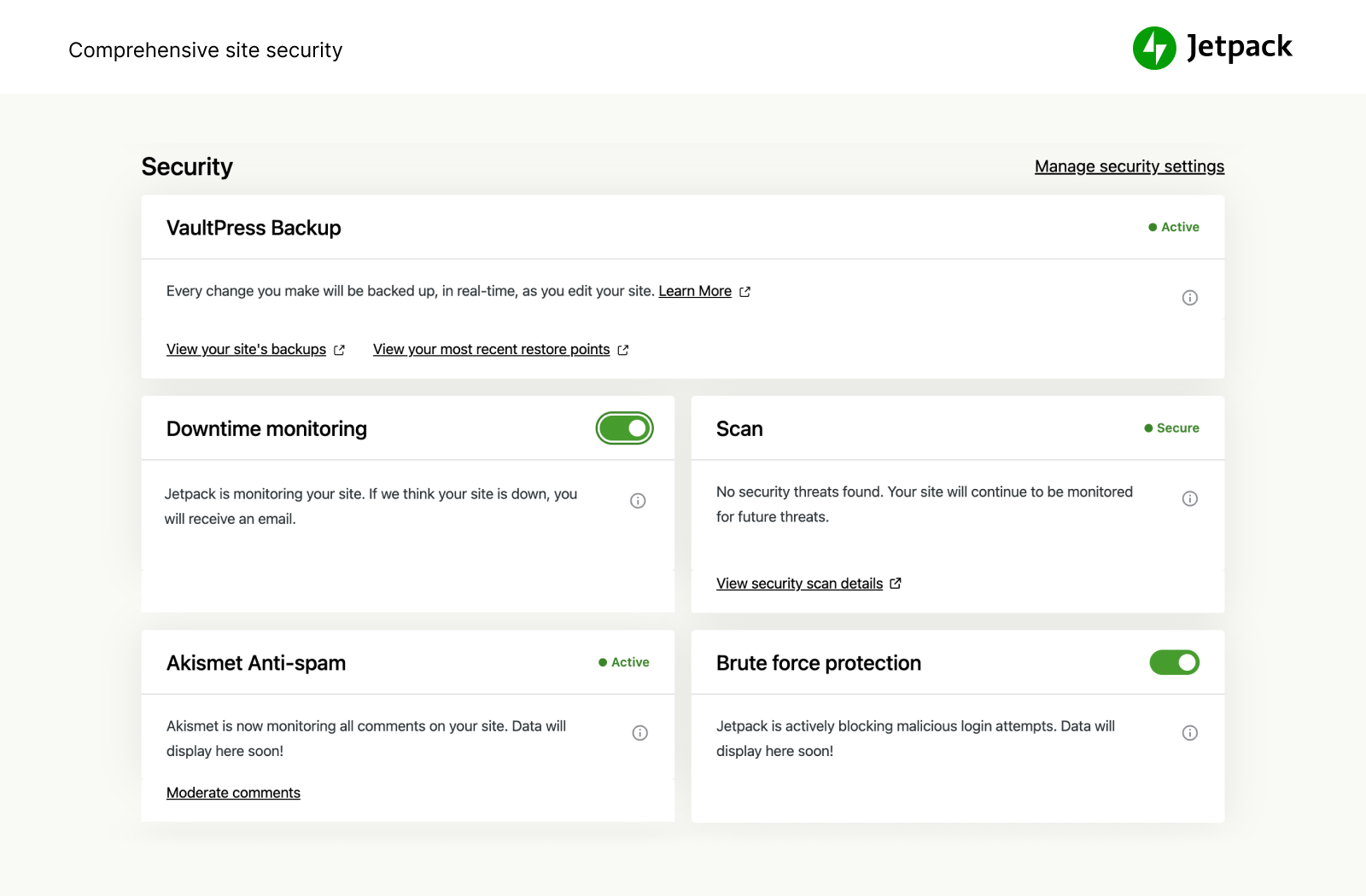
Veiligheid: Bescherm je site en gegevens met krachtige beveiligingsfuncties. 
Betrokkenheid: Delen via social media, likes en gerelateerde berichten. 
Analyses: Verbeterde sitestatistieken en inzichten in bezoekers. 
Bezoekers: SEO-hulpmiddelen voor Google, Twitter, Facebook en meer.
Installatie
Automatische installatie
De installatie is gratis, snel en eenvoudig. Installeer Jetpack van onze site binnen enkele minuten.
Handmatige alternatieven
Je kunt Jetpack ook via de plugin directory installeren of de bestanden handmatig naar je server uploaden en vervolgens de aanwijzingen op het scherm opvolgen. Lees onze gedetailleerde instructies als je meer hulp nodig hebt.
FAQ
- Installatie-instructies
-
Automatische installatie
De installatie is gratis, snel en eenvoudig. Installeer Jetpack van onze site binnen enkele minuten.
Handmatige alternatieven
Je kunt Jetpack ook via de plugin directory installeren of de bestanden handmatig naar je server uploaden en vervolgens de aanwijzingen op het scherm opvolgen. Lees onze gedetailleerde instructies als je meer hulp nodig hebt.
- Is Jetpack gratis?
-
Ja! De belangrijkste functies van Jetpack zijn gratis en zullen altijd gratis blijven.
Hiertoe behoren: site-statistieken, een supersnel CDN voor afbeeldingen, gerelateerde berichten, downtime-monitoring, krachtige bescherming tegen aanvallen, automatische functies voor delen met sociale netwerken, aangepaste sidebars en nog veel meer.
- Heb ik een betaald abonnement nodig?
-
Tot de betaalde services van Jetpack behoren automatische back-ups, beveiligingsscans, spamfilters, videohosting, site-inkomsten, SEO-hulpmiddelen en ondersteuning met prioriteit.
Als je geïnteresseerd bent in meer informatie over de extra beschermingsniveaus en de beschikbare geavanceerde tools, bekijk dan meer informatie over betaalde abonnementen.
- Waarom heb ik een WordPress.com account nodig?
-
Aangezien Jetpack en de bijbehorende services worden aangeboden en gehost door WordPress.com, is er een WordPress.com-account vereist om Jetpack te laten werken.
- Ik heb al een WordPress-account, maar het werkt niet. Wat is er aan de hand?
-
Een WordPress.com-account is anders dan het account dat je gebruikt om in te loggen op je zelf-gehoste WordPress. Als je kunt inloggen op WordPress.com dan heb je al een WordPress.com-account. Als je dat niet kunt, kun je eenvoudig een account aanmaken tijdens het installeren.
- Hoe bekijk ik mijn statistieken?
-
Zodra je Jetpack hebt geïnstalleerd, kun je je statistieken bekijken op WordPress.com/Stats, op de officiële mobiele apps van WordPress en op je Jetpack-dashboard.
- Hoe draag ik bij aan Jetpack?
-
Ontwikkelaars van alle niveaus hebben de mogelijkheid om bij te dragen. Ontdek meer over bijdragen aan Jetpack of overweeg om mee te doen aan ons bèta-programma.
Beoordelingen

Hamed Shirandami
very good plugin
baypass frp

Always Crashes
Good app but keeps crashing and down time too much.
please visit my website at www.pinoyathletics.info

Not everyone cup of tea
I had heard about Jet Pack many a times and finally, all this hype resulted in an installation. But now I realize that the plugin is suitable for newbies and rookies of WordPress. It has a lot of features and can help manage a website much easier. But I guess people with more knowledge about WordPress and web design, would prefer a better, more focused plugin for each section of their features.

Can not add new post
There are big problems after the last plugin update – article editing does not work and it is not possible to add a new article.
I use theme Extra (Elegant Themes) and Divi Editor – the latest version of the plugin is not compatible with them.
If everything does not fix the new version, I will stop using this plugin. But it’s a shame, it has many great features.

Reason of WordPress existence
It is one of the reasons that WordPress is still out there because it has many functionalities combined, in it. But, there are issues like loading of Mobile theme view on Desktop where mobile theme option is enabled. Photon should be more intelligent than it is still, but ofcourse bringing free wordpress.com functionality can’t be more rewarding.

this disables editor-style.css
I have TinyMCE Advanced which activates Editor-style.css
But recent Jetpack plugin update makes it disabled when the site is connected to Jetpack
I had to entirely delete JETPACK and install again
Bijdragers & ontwikkelaars
“Jetpack door WordPress.com” is open source software. De volgende personen hebben bijgedragen aan deze plugin.
Bijdragers-
Automattic
-
Adam Heckler
-
Andrew Duthie
-
Alex Kirk
-
allendav
-
alternatekev
-
Andy Skelton
-
annezazu
-
Andy Peatling
-
Andrew Ozz
-
Mohammad Jangda
-
Barry
-
Beau Lebens
-
Ben Lobaugh (blobaugh)
-
Michael Cain
-
Cena
-
Christopher Finke
-
Chase Livingston
-
Michelle Langston
-
csonnek
-
Daniel Bachhuber
-
Davor
-
daniloercoli
-
designsimply
-
Daryl L. L. Houston (dllh)
-
Dan
-
Derek Smart
-
dzver
-
Eric Binnion
-
Elio Rivero
-
Enej Bajgoric
-
Eoin Gallagher
-
Stefania Mattana
-
Erick Hitter
-
Gregory Cornelius
-
George Stephanis
-
Greg Ichneumon Brown
-
goldsounds
-
Hew
-
Hugo Baeta
-
hypertextranch
-
Matt (Thomas) Miklic
-
Ian Dunn
-
jacobshere
-
Jeff Bowen
-
Jeremy Herve
-
Jen H.
-
Jenia
-
Greg Stewart
-
Joey Kudish
-
Jennifer M. Dodd
-
Joen Asmussen
-
John James Jacoby
-
Justin Shreve
-
Jorge Bernal
-
Brandon Kraft
-
lamday
-
Lance Willett
-
lschuyler
-
James Huff
-
martinremy
-
Matt Mullenweg
-
Matias Ventura
-
Matt Wiebe
-
Jeff Golenski
-
Miguel Fonseca
-
Michael Adams (mdawaffe)
-
Michael Arestad
-
Miguel Lezama
-
Mikey Arce
-
Marcus Kazmierczak
-
nancythanki
-
Nick Momrik
-
Konstantin Obenland
-
Gary Pendergast
-
Jesse Friedman
-
rachelsquirrel
-
Rich Collier
-
Ryan Cowles
-
Richard Muscat
-
Richard Archambault
-
Rocco Tripaldi
-
Sam Hotchkiss
-
Stefan Carstocea
-
Stephen Quirk
-
Stephane Daury (stephdau)
-
Tim Moore
-
Marin Atanasov
-
Alex Mills
-
Peter Westwood
-
Yoav Farhi
-
Igor Zinovyev
“Jetpack door WordPress.com” is vertaald in 34 talen. Dank voor de vertalers voor hun bijdragen.
Vertaal “Jetpack door WordPress.com” naar jouw taal.
Interesse in ontwikkeling?
Bekijk de code, haal de SVN repository op, of abonneer je op het ontwikkellog via RSS.
Changelog
5.5
- Release date: November 7, 2017
- Release post: https://wp.me/p1moTy-6rk
Major Enhancements
- Jetpack is now fully compatible with WordPress’s new Gallery Widget. Your old Gallery widgets powered by Jetpack will switch to the new Widget when you update to WordPress 4.9.
Enhancements
* We have improved the performance when loading the Jetpack Settings in the dashboard by optimizing the number of calls made when loading the page.
* We have updated the plugin to do a better job of cleaning up after itself whenever you decide to remove Jetpack from your site.
* We made some changes to reduce the number of connection issues that may happen on a site when switching from HTTP to HTTPs.
* We made some performance improvements to the Jetpack dashboard interface, to make sure your options and settings are loaded faster there.
* Error messages are also better in the Jetpack Dashboard; whenever you can’t update settings, Jetpack will provide you with more information about why.
* We improved the Jetpack update process to make sure updating Jetpack does not stress your database during it, even on high-traffic sites.
* The next version of WordPress, 4.9, will be released very soon and will include a lot of changes to its code editors. Jetpack’s Custom CSS will be fully compatible with the new editors and their syntax highlighting feature.
* We also made changes to make sure Jetpack was fully compatible with the role and capability changes in WordPress 4.9.
* We have made some performance improvements to the Carousel feature.
* Contact Form: do not process shortcodes in widgets when WordPress itself does, starting in 4.9.
* Contact Form: we have improved the “website” field to display better error messages when you don’t supply a URL. We have also improved the look of the date picker for the date field.
* Contact Form: avoid duplicate slashes when loading editor style.
* Masterbar: update the “Plugins” menu item to match the updated design on WordPress.com.
* Open Graph: do not display images smaller than Facebook’s required size.
* Sharing: use Google’s minified libraries to improve performance when loading Google buttons.
* Sharing: update Open Graph Image tags appearing on the home page to offer better alternatives based on your site settings in Appearance > Customize.
* We improved the way sitemaps are built so they do not consume too much memory when they are generated.
* WP.me Shorlinks: those links will now always use HTTPS.
* Spellchecker: we improved the admin interface to make it more clear when adding ignored phrases and saving them.
* Subscriptions: we added a filter so third party developers can track comment subscription activations.
* Sync: synchronize plugin action links to add that information to WordPress.com.
* Sync: improvements to better track theme and widget changes.
* VideoPress: we removed Jetpack version locking for directly embedded VideoPress videos to ensure all users receive the newest version of the player.
* We added a new filter (jetpack_google_translate_widget_layout) to the Google Translate Widget to allow you to change its layout.
* WordPress.com REST API: improve comment management for all roles, including post authors.
* WordPress.com REST API: allow site owners to manage comments on attachment pages from WordPress.com.
* WordPress.com REST API: improve the response from the API when WordPress’ autoupdates are disabled.
Improved compatibility
* You can now use Jetpack’s contact form and Yoast SEO’s Focus keywords on the same page without any issues in the editor.
* Top Posts Widget: avoid Fatal Errors when the widget is used on a site using WPML, and when a popular post cannot be found by WPML.
* Sync: add more Custom Post Types from third-party plugins to the list of things we do not synchronize with WordPress.com, to improve sync performance.
* Sharing: since Press This is now a plugin and not part of WordPress itself, we removed the Press This sharing button if you are not using the plugin.
Bug fixes
* We now avoid displaying notices to user roles that cannot benefit or act based on the info in the notices.
* Gravatar Hovercards: avoid PHP Notices when the user info is an object.
* Infinite Scroll: avoid PHP notices when a site customizes galleries thanks to the post_gallery filter.
* Mailchimp: make sure subscription forms can still be embedded in posts and pages.
* Mailchimp: do not require the use of the shortcodes feature to use the Mailchimp widget.
* Mailchimp: fix issue where Mailchimp form code could not be added to the Mailchimp widget.
* Masterbar: avoid JavaScript errors by always loading jQuery.
* Post By Email: do not display any content in the email address field if no email address has ever been set before.
* Publicize: avoid errors when DOMDocument is not available.
* Publicize: we now hide the feature activation toggle if you are not allowed to manage Jetpack features.
* Search: make sure module cannot be activated when the site does not use a Plan.
* SEO Tools: do not output any custom meta tags if another SEO plugin is already active.
* Sharing: make sure Twitter Cards can be displayed even when a post does not include a title.
* Sharing: fix alignment of sharing buttons in the admin preview when using custom sharing buttons.
* Sitemaps: wait a minute before to generate sitemaps when the feature is activated, to avoid performance issues.
* Sync: avoid synchronization issues on Multisite networks using custom domains.
* Top Posts Widget: display the default title when it is set to empty.
* Milestone Widget: make sure the widget is displayed properly and can easily be translated into other languages.
* Verification Tools: avoid notices when saving changes on a Multisite network admin page.
* VideoPress: avoid missing file warning in the editor when using an RTL language.
* Upcoming events Widget: avoid PHP notices on sites using a custom timezone setting.
* WordPress.com REST API: avoid errors when installing plugins via the WordPress.com API.
5.4
- Release date: October 3, 2017
- Release post: http://wp.me/p1moTy-67V
Major Enhancements
* Multiple improvements to the connection process, to allow more people to use the Jetpack plugin, even on very specific server configurations.
* Add a new Welcome screen to guide site owners after they have purchased a Jetpack plan.
Enhancements
* Add Schema.org markup to the Contact Info Widget.
* Add a new “Date” field to the Contact Form.
* Do not show any update notices when in development mode.
* Improve our documentation to help contributors set up a unit testing environment.
* Avoid conflicts between Jetpack’s Infinite Scroll and other Infinite Scroll plugins.
* Improvements to the WordPress.com REST API to avoid issues when interacting with your site’s categories and tags on WordPress.com.
* Allow third party plugin and theme authors to add new menu items to the WordPress.com toolbar.
* Improve the Content Options panel displayed in the Customizer with certain themes.
* Add architecture for the Jetpack Search feature, available for Jetpack Professional users.
* Simple Payments: improve the display of the payment items when used on your site.
* Ensure a proper display of the Recipe shortcode on sites using an RTL language.
* Improve the display of the Facebook posts, images, and all other Facebook embeds in your posts.
* Synchronize the author information for all published posts.
* Record how Jetpack was discovered and activated to better understand how site owners first discover Jetpack.
* Improve the display and options offered with the Milestone Widget.
Bug fixes
* We fixed layout issues appearing in the admin interface for IE11 users.
* Comment Form: avoid whitespace sometimes appearing below the form with some themes.
* Contact Form: avoid errors in the post editor on sites using RTL languages.
* Toolbar: always display the Toolbar when it’s active, regardless of other admin bar settings.
* Widget Visibility: make sure rules are correctly migrated from the old Jetpack image widget to the new WordPress Image Widget.
* Avoid errors showing that Jetpack is out of date on WordPress.com, when running a Multisite network.
* WP CLI: avoid warnings when using the wp jetpack protect whitelist list command to list the whitelisted IP addresses in the Protect feature.
* Avoid displaying raw HTML in the Stats Configuration screen.
* Comment edits are reflected properly in wordpress.com.
5.3
- Release date: September 5, 2017
- Release post: http://wp.me/p1moTy-5Xv
Major Enhancements
* Full PHP 7.1 compatibility.
* It’s now possible to preview your site within WordPress.com.
Enhancements
* The Ads feature now gives you more options and control over the ads displayed on your site.
* Increased performance in the admin by cutting back on unnecessary requests.
* Loading comment avatars from Facebook and Twitter through a more secure https.
* Admin UI is much friendlier on initial activation when there are no stats to display.
* You’re now able to stop VideoPress from looping a video during autoplay through the shortcode.
* Made some optimizations to the Jetpack connection process which means connecting your site more is more reliable.
* The EU Cookie Law widget got some styling improvements and looks better in any theme.
* There’s a new Jetpack CLI command to allow testing of the Jetpack connection.
* Added the Likes and Monitor features to our recommended features list, making it easier to activate for new sites.
* Improvements made that makes sure we have the most up-to-date version of your site when managing from WordPress.com.
* Added a link to view your Comments in the WordPress.com toolbar.
* Lots of minor design improvements to the Jetpack admin area.
* We’ve found a few places where we were able to optimize the loading of css files.
* Removed the Omnisearch feature.
Bug fixes
* Fixed compatibility issues with plugins using TinyMCE.
* Contact Form submission emails have been fixed for sites hosted on SiteGround.
* Updating WordPress.com themes will no longer have any problems.
* The Sitemaps feature will no longer error with posts/images with special characters in the title.
* There are no more conflicts with the ACF plugin when adding a new custom field.
* Fixed a bug that would cause some plugins to throw warnings with the Shortcode feature.
* We’re no longer loading a font on the front-end for the Likes feature, which will also have some performance benefits.
* The Jetpack admin UI had some bugs that were causing some features to not display the correct active status, which are squashed now.
* Cleaned up our markup to avoid XHTML validation errors.
* Brought back a filter for the Widget Visibility feature that was accidentally removed.
* Managing your comments and comment authors more reliable from WordPress.com.
