

Creating regular WordPress backups is the best thing you can do for your website. Backups give you a peace of mind and can save you in catastrophic situations when your site gets hacked or you accidentally lock yourself out. There are several free and paid backup plugins for WordPress, and most of them are fairly easy to use. In this article, we will show you the 7 best backup plugins for WordPress.

Important: Many WordPress hosting providers offer limited backup services, but please remember that it is your responsibility to backup your website on your own. Do not rely solely on your hosting provider for backups.
If you are not already backing up your site, then you should pick one of these 7 best WordPress bckup plugins and start using it right away.
1. VaultPress

At WPBeginner, we use VaultPress to backup our site. VaultPress was founded by Matt Mullenweg (WordPress co-founder) and his team at Automattic.
It is a subscription based service with different plans and pricing. VaultPress offers automated real-time cloud backup solution starting at $5 / month (which is good for most websites).
Setting up VaultPress and restoring from backups is just a matter of clicks. With some of their packages, they even offer security scans.
The only downside to VaultPress is that it is a recurring expense that can add up if you have multiple WordPress sites.
2. BackupBuddy
BackupBuddy is the most popular premium backup plugin for WordPress. It allows you to easily schedule daily, weekly, or monthly backups and store them in Dropbox, Amazon S3, Rackspace Cloud, FTP, Stash (their cloud service), and even email it to yourself.
The biggest advantage of using BackupBuddy is that it is not a subscription based service. You are licensed to use the plugin on the number of sites mentioned in your plan. You get access to premium support forums, updates, and 1GB of cloud storage to store your backups.
You can even use BackupBuddy to move WordPress to a new host with no Downtime.
3. BackWPup

BackWPup is a free plugin that allows you to create complete WordPress backup for free and store it on the cloud (Dropbox, Amazon S3, Rackspace, etc), FTP, email, or on your computer.
It is extremely easy to use and allows you to schedule automatic backups according to your site’s update frequency.
Restoring a WordPress site from backup is also very simple. The BackWPup Pro version comes with priority support, ability to store backups on Google Drive, and some other cool features.
4. BackUpWordPress
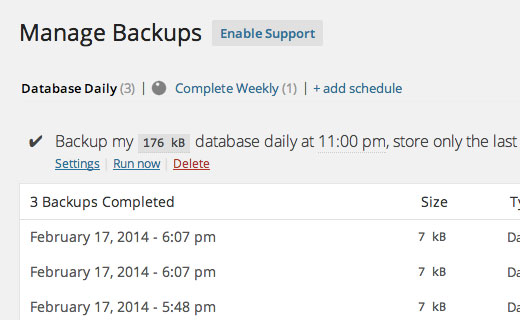
BackupWordPress is a complete WordPress backup plugin with automatic scheduling support. It allows you to create different schedules for your database and files. The only problem is that the free version does not allow you to store your WordPress backups to a cloud storage service.
If you want to store your backups on Dropbox, Google Drive, FTP, etc, then you will need to purchase a premium extension for it. The extensions are available for each service, and you can buy the one you need or the whole bundle.
5. UpdraftPlus
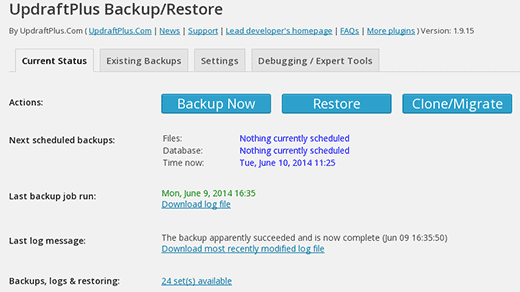
UpdraftPlus is another WordPress backup plugin. It allows you to create complete backup of your WordPress site and store it on the cloud or download to your computer. The plugin allows you to create scheduled backups and store them to your chosen location. There is a premium version of the plugin with additional features and addons.
The only downside of Updraftplus is that despite having great features, it has a cluttered user interface. This makes it difficult for beginners to locate the options they need. Despite the clutter, it still has a very good rating in the WordPress plugins directory.
6. Duplicator
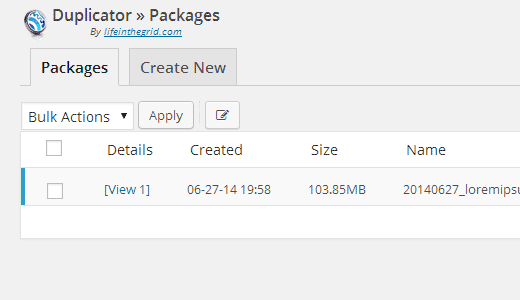
As the name suggests, Duplicator is a popular WordPress plugin used to migrate WordPress sites. However it is also has backup features.
It does not allow you to create automated scheduled backups which makes it less than ideal for a regularly maintained site to use as its primary backup solution.
7. WP-DB-Backup
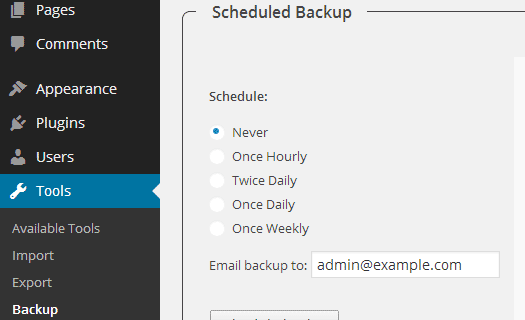
With more than 2 Million downloads, WP-DB-Backup is one of the most popular WordPress backup plugins. The only problem is that it only backups your WordPress database.
This means that you will have to backup your media files manually. If you do not update a site too often or do not upload images, then you can use WP-DB-Backup as your primary WordPress backup plugin.
WP-DB-Backup makes it really simple to create database backups, schedule automated backups, and restore your database. It is also a very useful tool for users who do not have access to phpMyAdmin to backup WordPress dataabase manually.
Conclusion
Each WordPress backup plugin has it’s Pros and Cons. We use and recommend VaultPress for two main reasons. First it is extremely easy to use. Second, it offers real-time incremental backups. What that means is that instead of backing up all of your files every day or every hour, it only creates a backup of what has updated and literally within minutes of the update. This is ideal for large sites like ours because it allows us to use our server resources efficiently.
However if you run a small-medium size website and hate paying monthly fees, then we recommend the popular BackupBuddy plugin. Why? Because they have their own cloud storage, Stash, which makes it easy for beginners to store their backups in cloud with a matter of few clicks.
That’s all. We hope that this list helped you pick the best WordPress backup plugin for your site. Make regular backups a habit and save yourself from a lot of trouble.
If you liked this article, then please subscribe to our YouTube Channel for WordPress video tutorials. You can also find us on Twitter and Google+.


Hello,
I bought VaultPress Subscription starting at $5 / month and now in the setting section, they need hosting credentials.
My question is, Is it safe to provide, username, password etc?
Thanks.
On their website, iThmes claims that BackupBuddy does a “Full Site Restore – BackupBuddy handles restoring your entire site back to its original glory, including all uploaded media library files, themes and plugin files.”
However, when one of the site’s wordpress authors uses non-ASCII-characters (what the iThemes support team calls “international” characters), i.e. characters which are a integral part of most written languages but exceed the 26 characters known to the English speaking world, THE BACKUP WILL NOT BE RESTORED CORRECTLY EVEN ON THE SAME SERVER WHERE THE SITE WORKED FLAWLESSLY BEFORE – images and assets will be missing all over the website because their names are mangled in the process. I learned this the hard way when trying to restore a site, and ended up with a frustrated customer and a lot of extra work diagnosing and then fixing the issue.
iThemes support explained to me they are aware of the problem, but blame WordPress and the user for this, they suggest using some third party plugins to fix the issue.
What bugs me about this is several things:
(a) it’s so easy to issue a warning on either the iThemes website, on the plugin page, or when restoring the site, but they chose not to do that, even though they are aware of the issue.
(b) there’s a way to detect actual or potential issues and warn the user, either when the site’s language is one that contains “international” characters (I’m not aware of any European language with the exception of English and Italian, let alone Asian and African languages), or when a backup actually contains a file with those characters in the filename.
(c) there’s a way of fixing this in the background when restoring the site.
(d) my support ticket was put on hold, my answer to iThemes’ reply was never addressed.
So I cannot recommend BackupBuddy to anyone who runs a site in any other language than English (or Italian).
To the rest of the world, I’d also hesitate to recommend it, because I think that not addressing problems right away when there’s the potential of disastrous consequences for your customers (i.e. a restored site not working properly, which might not even be obvious on first sight) is not building trust on my part.
Disclaimer: I own a lifetime (GOLD) license for BackupBuddy, host quite a few wordpress sites for myself, and for customers, and I have a bit of experience developing web applications.
Right now I don’t have any Backup Plan and planning to go for PRO.
As you suggested, Vaultpress Plugin, going to buy that plan for one site.
I have one question, Is it necessary to use Akismet or any other WordPress free Plugin to use VaultPress?
Thanks.
Nope. You will need to install a connector plugin that hooks up your WordPress site to VaultPress
How i can back Up my site after update wp ….?
i did try it but, i’m confuse because I can’t backup all my data and update wp new version… anyone have solution for me?
Backup Buddy is not FREE
Thanks for the post and I am planning to go with Vaultpress.com for my Ease Bedding Blog’s Backup.
As you recommend at number one, I hope this will be fine Plan to buy.
I am currently using database backup amazon s3 which has enabled me to create database backup of my web page and then upload this to amazon s3 cloud and together with this plugin i also use backup&restore dropbox for my other site and so far i have no regret.
I am trying to use Updraft but i seem to have a problem when restoring my latest backup. I click on restore and this appears:
“Error: Download failed
backup_2016-07-19-2300_Matias_Travels_39a7db93e2be-plugins.zip: The backup archive for this file could not be found. The remote storage method in use (email) does not allow us to retrieve files. To perform any restoration using UpdraftPlus, you will need to obtain a copy of this file and place it inside UpdraftPlus’s working folder (updraft)
Download themes (Jul 19, 2016 23:00):”
It says you can use your email but then does not restore with email. I am confused please someone help me!
Well, because the plugin has no access to your email account…
i am currently using backup&restore dropbox plugin and so far no regrets
I have been using backup&restore dropbox for 2 months now and i wont trade this backup plugin for any other.it’s the best of all i have tried since i started blogging.
I am using Backup & Restore Dropbox and I like it. It is my first and I think the last one. Everything is simple and convenient panel.
I have been using Updraft Plus and BackupBuddy on a number of sites.
Backup Buddy is terrible. Lots of annoying messages about timeouts, errors even when it’s working fine, lack of information on remote transfer status, duplicate “Send to remote destination” messages, bad remote destination navigation policies, and makes it REALLY DIFFICULT TO PERFORM A RESTORATION! I can’t believe it.
Updraft works really well, even on sites that Backup Buddy can’t handle. Restoration is simple. The interface is a bit unpolished, but that’s the only downside.
I have a very limited experience of VaultPress. It seemed pretty good.