

Do you want an easy way to build and customize your WordPress site? That’s where drag and drop WordPress page builder plugins come in handy. These WordPress page builders allow you to create, edit, and customize your site layout without writing any code. In this article, we will compare and review 5 of the best drag and drop page builders for WordPress.

Why Use a Drag and Drop Page Builder for WordPress?
Many WordPress beginners find it difficult to change or customize page layouts on their site. While premium WordPress themes come with different page layouts, those are extremely hard to customize for anyone who does not know code (HTML / CSS).
This is why users often ask us questions like: “how can we make WordPress drag and drop?” or “is there an easy drag and drop page builder for WordPress?”
There are also beginners who leave WordPress for solutions like Weebly and Wix because of easier design functionality. When we asked some users who switched, their response was: “I wish WordPress had a drag and drop website builder”.
Well, there are several great drag and drop page builder plugins available for WordPress. They allow you to customize every component on your site without writing a single line of code.
These components can be anything like adding multiple columns, parallex backgrounds, full width images, content slider, etc. Users can use these components as blocks to build their own layouts within their WordPress themes.
Now since there are different type of WordPress drag and drop page builders, some which are part of theme frameworks while others are plugins, we decided to compare them to make your decision easy.
Our criteria for comparing these WordPress page builders are: ease of use, flexibility, and the design output.
Having said that, let’s review the best page builders for WordPress in the market.
Video Tutorial
If you prefer the text version, then continue reading.
Beaver Builder
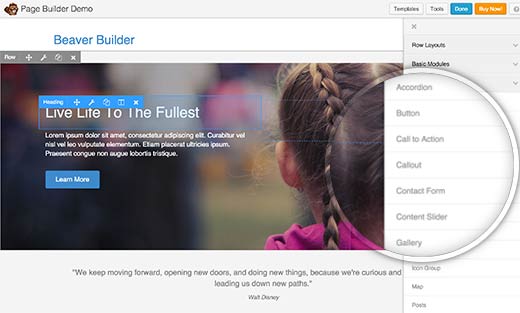
Beaver Builder is a premium WordPress drag and drop page builder plugin, and in our opinion the best one in the market right now.
Beaver is extremely fast and comes with a built in on-boarding tour that quickly familiarizes users with their interface.
Beaver Builder comes with a live drag and drop interface. You get to see all your changes as you add them by simply dragging elements from the right sidebar and dropping them on your page. You can click on any element in a page to edit its properties.
Beaver Builder also comes with several basic and advanced modules which cover almost anything you may want to add. It has sliders, carousel, backgrounds, content blocks, buttons, among many other things.
Pricing: Starting from $99 for single site license.
Our Grade: A+
Review: Beaver Builder is by far the best option in the market. It comes with pre-made templates to help you get started. The ability to customize every little detail makes it a perfect solution for ALL users.
Page Builder by Site Origin
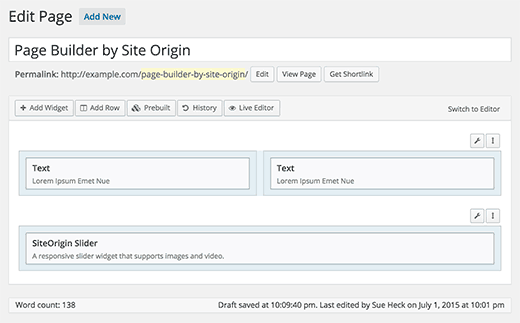
With more than half a million active installs, Site Origin’s Page Builder is one the most popular page builder in the market. One of the primary reason for it’s popularity is the price (free). It is available as a fully functional free plugin.
Site Origin Page Builder is fairly easy to use and works with any standard compliant WordPress theme. For components, Page Builder allows you to use WordPress widgets. It comes with several widgets of its own, and you can download and install any widget. See our list of the 25 most useful WordPress widgets because you can add all of them using page builder.
It also comes with a history tool which allows you to switch back and forth to undo and redo changes that you made. This is a huge time saver and gives you a peace of mind knowing that you revert and undo changes.
Pricing: Free
Our Grade: B
Review: This is the only free page builder that comes to close being great. You have a drag-and-drop interface to create and customize layouts. Although the live editing is not comparable to other solutions that we mention below, you can’t beat the value you are getting for the price.
Velocity Page

Velocity Page is a simple but very powerful page builder plugin for WordPress. First of all, you get to edit your page with a live preview. Your page appear exactly how you see it during the editing process.
It comes with several built-in modules that you can use by clicking on the add element button. You can create new sections, rearrange columns, and add media from the same screen. This allows you to build multi-media rich pages with very little effort.
Pricing: Starting from $97 for single site license and limited features.
Our Grade: A
Review: Considering it’s coded by the lead developer of WordPress, Mark Jaquith, Velocity Pages goes above and beyond in code quality standards. It’s a very close second after Beaver Builder in terms of ease of use and design output.
Themify Builder
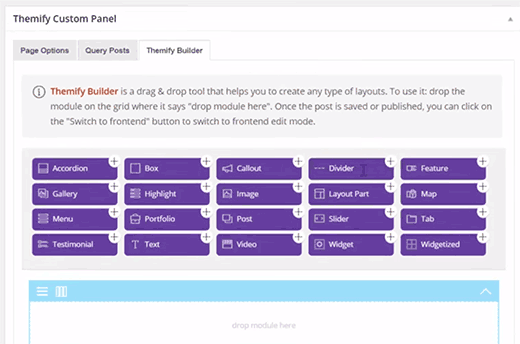
If you are already using a WordPress theme by Themeify, then Themify Builder is already part of your theme. For other non-Themify WordPress themes, you can get the Themify Builder plugin.
This simple and highly intuitive page builder comes with several ready to use modules that you can add to your pages or posts. Many of these modules usually require you to install separate WordPress plugins.
Themify Builder allows you to edit your pages from the admin area as well as from your live site. With live editing you get to see exactly how your changes will appear on the site. Apart from that, Themify Builder comes with ready-to-use layouts that you can quickly apply to your page.
Pricing: $39
Our Grade: C+
Review: While the builder comes with promising features and it’s drag and drop, there is a learning curve that can leave a user frustrated. You can get nearly everything in Site Orign page builder for free.
Divi
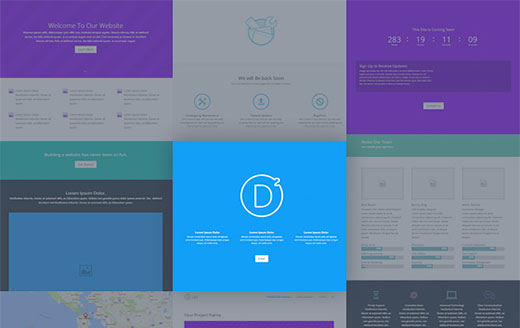
Divi is a drag and drop theme and WordPress page builder. It is an extremely easy to use and fast WordPress theme with 20+ layouts/templates for different kind of websites.
You can create and save your own Divi layouts. You can also export a layout from one Divi installation into another. Divi also comes with tons of elements that you can drag and drop anywhere in your layout.
Pricing: Starting from $69 per year
Our Grade: C+
Review: Divi is an awesome page builder. The page builder functionality is superb which allows you to work with other WordPress themes as well. However, Divi uses a lot of shortcodes and this makes it difficult for you to switch themes or use a different page builder.
Conclusion
As we compared the different drag and drop WordPress page builders, one thing became very clear. Beaver Builder and VelocityPage are clearly the top choice.
If you don’t mind spending little money to get the best in market along with guaranteed support from developers, then go for any of these two and you won’t regret it.
If price is a concern, then SiteOrigin Page Builder is your best choice.
We hope this article helped you find the best WordPress drag and drop page builder plugins for your site. You may also want to see our comparison to find the best WordPress photo gallery plugins.
If you liked this article, then please subscribe to our YouTube Channel for WordPress video tutorials. You can also find us on Twitter and Facebook.


Velocity really?
no mention of KingComposer or Elementor?
Divi worth A+, it has live editing also. Many freebies and online communities. I vote DIVI all the way
100% agree with you
I didn’t see Visual Composer!
Edit and include it, then give it an A+
Hi,
I’m looking for a way to add a nofollow to a link via page builder. I tried to activate some plugins for that but apparently no one is working.. Could you please tell me if there is a plug in which could do this?
Thanks
Thanks for the information
I love theme divi,, very easy drag drop bulider
Awesome list but I think Page Builder Sandwich should be there somewhere. It’s one of the newest and easiest frontend page builder plus real time editing.
Well, I am still quite new to WP but I can say that Page Builder Sandwich’s just like using MS Word.