All of our official .NET samples that show some web UX are based on MVC. This caused somebody to speculate that the new OWIN components for OpenId Connect and WS-Federation require MVC to function. Nothing farther from the true! You can totally use those to secure your WebForms apps. Here there’s a super quick tutorial on how to do it. It is super easy. 98.8% of the tutorial is exactly the same of the corresponding MVC based tutorial, but for the sake of de-normalization I am going to go through those steps by value instead of by reference, on account of the possibility that some of you guys might not have had any previous exposure to this given the samples’ MVC bias.
Create an empty project
Fire up the good ol’ VS2013, and head to new project->ASP.NET Web application. On the project template dialog, pick Web Forms. Hit OK.

Visual Studio will create your project according to the template you picked. Before moving any further, let’s enable SSL.
- Select the project node in solution explorer. Hit F4.
- In the resulting property pages, flip SSL Enabled from false to true.
- Copy the newly populated SSL URL.
- Right click on the project node. Choose properties.
- Move to the Web tab. Paste the SSL Url in the Project Url field. Shift+CTR+S to save the new settings.
Provision the app in Azure AD
Let’s leave VS for few moments and pay a visit to the Azure portal, where we will tell to our Azure AD tenant about our newly minted application.
Navigate to https://manage.windowsazure.com/, sign in as your tenant admin, scroll to the Active Directory tab, choose the tenant you want to use, select the Applications tab, and click the Add button on the appbar at the bottom of the screen.
Choose “Add an application my organization is developing”.
Give to the app any name you like. Keep the default “web application and/or web api”. Click the Next arrow.
In the Sign-On URL enter the HTTPS address you got when you enabled SSL on the project (mine is https://localhost:44307/). In the App ID URI enter any valid URI that will later remind you of what this app is. For my test app I chose http://wifeistravellinghenceIblogoutofboredom. Click the Done button.
Click on the Configure tab and leave the browser open there. We’re going to need some of the values here in just a moment.
Add references to the Cookie/OpenId Connect/SystemWeb NuGets
Next, let’s go back to Visual Studio. Go to Tools->Library Package Manager->Package Manager Console. In the console, enter the following three magic commands:
Install-Package Microsoft.Owin.Security.OpenIdConnect -Pre
Install-Package Microsoft.Owin.Security.Cookies –Pre
Install-Package Microsoft.Owin.Host.SystemWeb –Pre
Those will bring down the Katana components you need.
Add the initialization logic
We are in good shape! Given that we started from the Individual Auth template, the OWIN pipeline is already present. We just need to change it to use OpenId Connect. If for some reason (e.g ADFS) you want to use WS-Federation, the mechanism is *exactly* the same, you just use the appropriate middleware.
- Go to the App_Start folder and open Startup.Auth.cs.
- Change the usings directives with the following:
using Microsoft.Owin.Security;
using Microsoft.Owin.Security.Cookies;
using Microsoft.Owin.Security.OpenIdConnect;
using Owin;
- Next, change the body of ConfigureAuth to match the following:
app.SetDefaultSignInAsAuthenticationType(CookieAuthenticationDefaults.AuthenticationType);

app.UseCookieAuthentication(new CookieAuthenticationOptions());

app.UseOpenIdConnectAuthentication(
    new OpenIdConnectAuthenticationOptions
    {
        ClientId = "d04fb01f-0715-4ed7-a656-0793b545e1f1",
        Authority = "https://login.windows.net/6c3d51dd-f0e5-4959-b4ea-a80c4e36fe5e"
    });
That will change the pipeline to use OpenId Connect. The values you see there are associated to my test app: you will have to change those with the coordinates of your own app, in your own tenant. Namely:
- Go back to the portal. Scroll the app configuration page until you find Client ID. Copy the value. Come back to VS and paste the copied value in the string initializing ClientId
- In the string used to initialize Authority, substitute the GUID you see there with the domain of your tenant (e.g. myawesometenant.onmicrosoft.com).
Done.
Give it a spin!
Hit F5. Your page will come up. Click on the Log In link on the top right corner, which comes directly from the template bits.
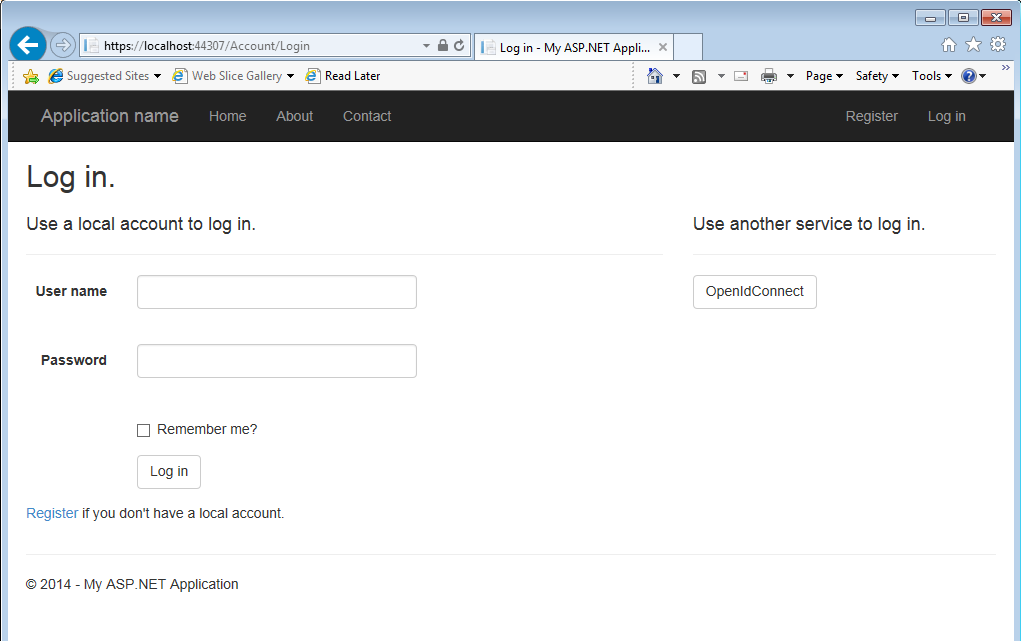
On the right hand side, you’ll notice the OpenIdConnect button. Hit it.

You’ll see the familiar AAD authentication UX. Enter your test user.

And voila’! The user is signed in. Q.E.D.
Extra Credit
The sequence below does not leave the project in the cleanest possible state – my goal was to show you in the smallest number of steps that the OpenId Connect (and WSFederation) middleware does work with WebForms.
In a more realistic setup, you would likely start from a template with the “no authentication” option. That would leave you with the responsibility of adding Startup.CS, but that’s really boilerplate code. Also, you would likely want to add some automatic authentication trigger. That is easy enough to achieve. For example, consider the following implementation of Default.aspx.cs:
using Microsoft.Owin.Security;
using Microsoft.Owin.Security.OpenIdConnect;
using System;
using System.Web;
using System.Web.UI;

namespace OWINandWebForms
{
    public partial class _Default : Page
    {
        protected void Page_Load(object sender, EventArgs e)
        {
            if (!Request.IsAuthenticated)
            {
                HttpContext.Current.GetOwinContext().Authentication.Challenge(
                    new AuthenticationProperties { RedirectUri = "/" },
                    OpenIdConnectAuthenticationDefaults.AuthenticationType);
            }
        }
    }
}
That simply triggers a sign in in case the caller is not authenticated. Not hard at all 
Well, there you have it. OpenId Connect, Azure AD and WebForms.
We chose OWIN as the platform for our new wave of identity libraries because of its flexibility – don’t let the fact that we standardized on MVC for our samples stop you from enjoying the latest and greatest
The future is already here - simply, it is not very evenly distributed. Fix that by sharing!


Vittorio who?

Vittorio Bertocci is a developer, speaker, published author, avid reader, troublemaker, foodie, Italian expat, and other things that would not be wise to mention here. This is Vittorio's personal blog. The views and opinions expressed here are his, and not those of his employer.
Follow @vibronetLatest Video
AzureCon identity session

Books
Oh joy, the book on Azure AD is OUT :)