By Vsevolod Vlasov, DevTools Software Engineer and Workspace Ninja
Cross-posted from the Chromium Blog
By Vsevolod Vlasov, DevTools Software Engineer and Workspace Ninja
Cross-posted from the Chromium Blog
With Chrome DevTools our goal is to make your experience as a web developer as productive as possible. In the most recent version of Chrome we've added three major new features that will improve your authoring experience more than ever before.
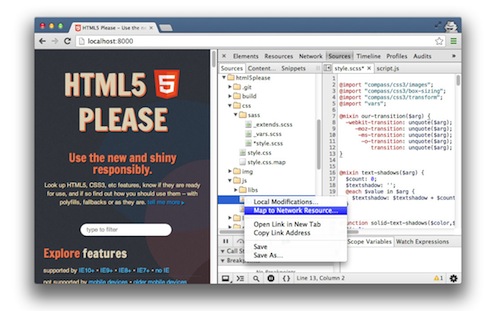
Workspaces allows you to live-edit source files within DevTools with bidirectional disk persistence. CSS preprocessor mapping supports
Sass file
live-editing in the DevTools, allowing you to instantly see your changes. Finally
snippets lets you create, edit, save and execute custom JavaScript snippets.
Workspaces
Within
Workspaces you can load complete local filesystem folders (including back-end files such as scripts and build/deployment files) into the DevTools editor and
map these to network resources. This enables you to author and tweak your scripts and styles, instantly see those changes reflected in the browser and have them transparently persist to disk — no more switching back and forth between browser and editor. The editor now supports syntax highlighting for a number of languages including PHP, Python, Java, CSS, HTML and of course JavaScript.
CSS preprocessor mapping
CSS preprocessors like
Sass make it easier to organize your CSS, but until now tweaking your styles required switching to another program and refreshing Chrome. CSS preprocessor
mapping enables live-editing of these sources directly within the Sources panel. To see it in action, just map the .scss file, then Ctrl-click on a property or value to jump to the variable, mixin or function that defined it. Support for
other pre-processors such as
Less,
Stylus and
Compass is in the works. Refer to the improved
DevTools css-preprocessor documentation for more details and setup instructions.
Snippets
There are times when you want to be able to save smaller scripts, bookmarklets and utilities so that you always have them available while debugging in the browser.
Snippets is a new DevTools feature that makes it possible. It allows you to create, store and run JavaScript within the Sources tab. It gives you a multi-line console with syntax-highlight and persistence, making it convenient for prototyping code that is more than a one-liner. There's also a community-curated
repository of snippets for developers that contains useful snippets such as color pickers, CSS prettyfiers, logging helpers and much more.
Today’s new features should help make web developers even more productive with DevTools. Please follow us on Google+ at
Google Chrome Developers or on Twitter at
@ChromiumDev and send feedback at
crbug.com.
Vsevolod Vlasov is a Software Engineer on the Chrome DevTools team in Saint Petersburg, Russia.
His current work focuses on improving web developers authoring workflow.
Posted by Ashleigh Rentz, Editor Emerita




 By Peter Lubbers, Program Manager and MOOC Manufacturer