Posted:

Posted by Leon Nicholls, Developer Programs Engineer

Today we launched the Google Cast Remote Display plugin for Unity to make it easy to take your Unity games to TVs. The Google Cast Remote Display APIs use the powerful GPUs, CPUs and sensors of your Android or iOS mobile device to render a local display on your mobile device and a remote display on your TV.

Unity is a very popular cross-platform game development platform that supports mobile devices. By combining the Google Cast Remote Display technology with the amazing rendering engine of Unity, you can now develop high-end gaming experiences that users can play on an inexpensive Chromecast and other Google Cast devices.


Games Using the Plugin

We have exciting gaming apps from our partners that already use the Remote Display plugin for Unity, with many more coming shortly.

Monopoly Here & Now is the latest twist on the classic Monopoly game. Travel the world visiting some of the world’s most iconic cities and landmarks and race to be the first player to fill your passport with stamps to win! It's a fun new way to play for the whole family.

Risk brings the original game of strategic conquest to the big screen. Challenge your friends, build your army, and conquer the world! The game includes the classic world map as well as two additional themed maps.

These games show that you can create games that look beautiful, using the power of a phone or tablet and send that amazing world to the TV.

Add the Remote Display Plugin to Your Game

You can download the Remote Display plugin for Unity from either GitHub or the Unity Asset Store. If you have an existing Unity game, simply import the Remote Display package and add the CastRemoteDisplayManager prefab to your scene. Next, set up cameras for the local and remote displays and configure them with the CastRemoteDisplayManager.

To display a Cast button in the UI so the user can select a Google Cast device, add the CastDefaultUI prefab to your scene.

Now you are ready to build and run the app. Once you connect to a Cast device you will see the remote camera view on the TV.

You have to consider how you will adapt your game interactions to support a multi-screen user experience. You can use the mobile device sensors to create abstract controls which interact with actions on the screen via motion or touch. Or you can create virtual controls where the player touches something on the device to control something else on the screen.

For visual design it is important not to fatigue the player by making them constantly look up and down. The Google Cast UX team has developed the Google Cast Games UX Guidelines to explain how to make the user experience of cast-enabled games consistent and predictable.

Developer Resources

Learn more about Google's official Unity plugins here. To see a more detailed description on how to use the Remote Display plugin for Unity, read our developer documentation and try our codelab. We have also published a sample Unity game on the Unity Asset Store and GitHub that is UX compliant. Join our G+ community to share your Google Cast developer experience.

With over 20 million Chromecast devices sold, the opportunity for developers is huge, and it’s simple to add Remote Display to an existing Unity game. Now you can take your game to the biggest screen in millions of user’s homes.

Posted:

Posted by Paul Kinlan, Chrome Developer Relations

Welcome to day two of the Chrome Dev Summit livestream 2015! Today, we’ll have a full day of sessions covering every aspect of performance on the web. Flipkart will also be joining us on stage later today to talk about their experience building a Progressive web app. Tune in to the livestream below. We look forward to engaging in the conversation with you at #ChromeDevSummit.


Posted:

Posted by Paul Kinlan, Chrome Developer Relations

The Chrome Dev Summit is almost here! We’ll kick off live from Mountain View, California at 9:00AM PT this coming Tuesday, November 17th. To get the most out of the event, make sure to check out the speaker list and talk schedule on our site.

Can’t join us in person? Don’t worry, we’ve got you covered! You can tune into the summit live on developer.chrome.com/devsummit. We will stream the keynote and all sessions over the course of the event. If you want us to send you a reminder to tune into the livestream, sign up here. We’ll also be publishing all of the talks as videos on the Chrome Developers YouTube Channel.

We’re looking forward to seeing you in person or remotely on Tuesday. Don’t forget to join the social conversations at #ChromeDevSummit!

Posted:
Cross-posted from the Chromium Blog

Author PhotoBy Paul Kinlan, Chrome Developer Relations

The web is a rich computing platform with unparalleled reach. In recent years, mobile devices have brought the web to billions of new users and introduced many new device capabilities, screen sizes, input methods, and more. To help developers navigate this brave new world, we built Web Fundamentals, a curated source for modern best practices. Today, we’re making it even easier to build multi-device experiences with the Beta release of the Web Starter Kit.

Web Fundamentals Preview

Web Fundamentals' guidelines are intended to be fundamental to the platform: useful no matter which framework you choose or which browser your users run. We have articles about responsive layouts, forms, touch, media, performance, device capabilities, and setting up a development workflow. Articles cover both coding and design. For example, the article on layout design patterns explains both the usability tradeoffs between different layout options and how to implement them. The performance section complements PageSpeed Insights, an auditing tool that encourages instant (<1 second) mobile web sites.

Designed to help you apply Web Fundamentals’ best practices in new projects, Web Starter Kit is a lightweight boilerplate with templates and tooling. Web Starter Kit gives you responsive layout, a visual style guide, and optional workflow features like performance optimization so you can keep your pages lean and fast.

Web Starter Kit preview animation

Both Web Fundamentals and the Web Starter Kit are actively developed and curated by a team of developers from Google and several open-source contributors. Our source code is available on GitHub, and we welcome contributions and feedback. Looking ahead, we’ll be adding new content and working with the web development community to refine our advice. Please file an issue or submit a pull request to help us capture web development best practices.

We look forward to a more modern, multi-device web!

Posted by Paul Kinlan, Developer Advocate and Web Fundamentalist

Posted by Louis Gray, Googler

Posted:
Cross-posted from the Chromium Blog

By Anders Johnsen, Google Chrome Team

Today's release of the Dart SDK version 1.3 includes a 2x performance improvement for asynchronous Dart code combined with server-side I/O operations. This puts Dart in the same league as popular server-side runtimes and allows you to build high-performance server-side Dart VM apps.

We measured request-per-second improvements using three simple HTTP benchmarks: Hello, File, and JSON. Hello, which improved by 130%, provides a measure for how many basic connections an HTTP server can handle, by simply measuring an HTTP server responding with a fixed string. The File benchmark, which simulates the server accessing and serving static content, improved by nearly 30%. Finally, as a proxy for performance of REST apps, the JSON benchmark nearly doubled in throughput. In addition to great performance, another benefit of using Dart on the server is that it allows you to use the same language and libraries on both the client and server, reducing mental context switches and improving code reuse.

The data for the chart above was collected on a Ubuntu 12.04.4 LTS machine with 8GB RAM and a Intel(R) Core(TM) i5-2400 CPU, running a single-isolate server on Dart VM version 1.1.3, 1.2.0 and 1.3.0-dev.7.5.
The source for the benchmarks is available.

We are excited about these initial results, and we anticipate continued improvements for server-side Dart VM apps. If you're interested in learning how to build a web server with Dart, check out the new Write HTTP Clients and Servers tutorial and explore the programmer's guide to command-line apps with Dart. We hope to see what you build in our Dartisans G+ community.

Anders Johnsen is a software engineer on the Chrome team, working in the Aarhus, Denmark office. He helps Dart run in the cloud.

Posted by Louis Gray, Googler

Posted:
By Chary Chen, Chrome Web Store team

Cross-posted from the Chromium blog

As a developer, you should spend as much of your development time as possible creating great content and services — not managing overhead. Today we're announcing new tools and services in the Chrome Web Store that make it easier to automate the publish process and monetize all of your Chrome Web Store items.

Table 1: Chrome Web Store (CWS) monetization methods by item type


Hosted Apps
Packaged Apps
Extensions
Themes
Free trial
✓  new!
✓  new!
x
Paid up-front
✓  new!
✓  new!
Subscription
✓  new!
x
In-app payments (IAP)
Google Wallet for Digital Goods
CWS Managed IAP  new!
x

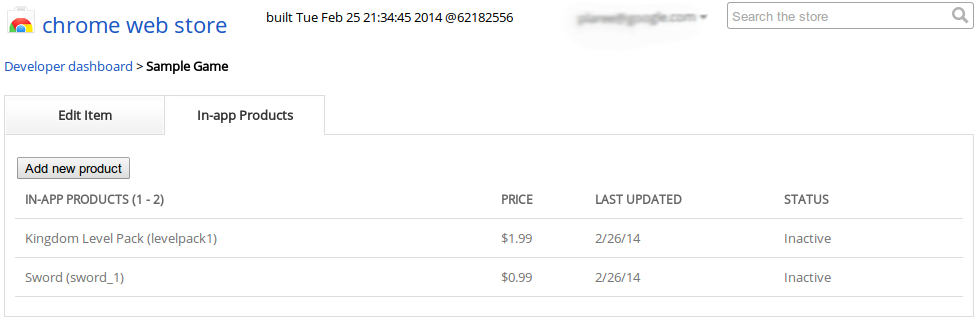
The Managed In-App Payments feature simplifies the developer experience of our previous solution and expands it to extensions and themes. You can now create and manage all of your in-app products directly in the developer dashboard instead of having to embed or dynamically generate and serve a payment token for each sale. You can enable or disable products, provide localized descriptions, set prices for different regions and the Chrome Web Store manages the licensing.


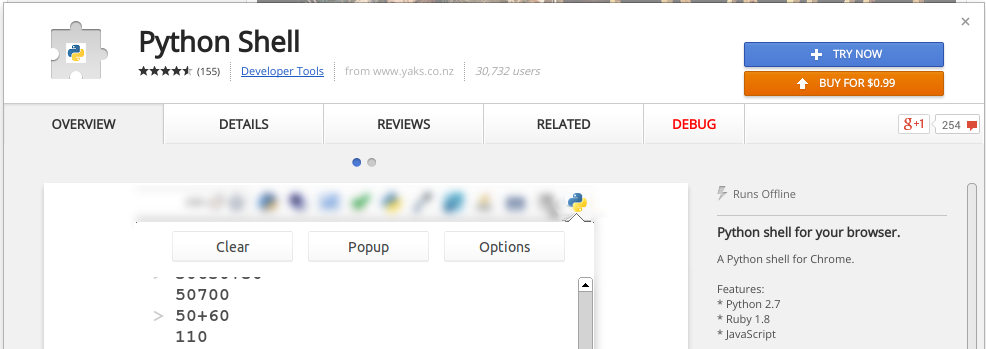
The Free Trial feature, which is now available for Chrome Packaged Apps and Extensions, allows a developer to specify that an item can be used for a limited time before it must be purchased. This gives users the flexibility to try paid items before deciding to buy them.


In addition to making it easier to monetize your Web Store items, we have now made it easier to publish them. Our Chrome Web Store API has been expanded to allow developers to programmatically create, update and publish items in the Web Store. If you have an automated build and deployment process, we hope you will be able to use this API to integrate the Web Store publishing flow into your existing process.

We’re excited to release these new features, so please give them a try and send your feedback via Stack Overflow, our G+ Developers page, or our developer forum.

Posted by Chary Chen, Software Engineer & developer delighter Chary Chen is a member of the Chrome Web Store team, where she connects great developers with Google-scale users.

Posted by Louis Gray, Googler

Posted:
Author PictureBy Peter Lubbers, Program Manager and MOOC Manufacturer

Cross-posted from the Chromium Blog

As a web developer, you know that your users are moving to mobile platforms in droves. Beginning today, you can learn how to apply your web development skills to build great mobile web apps with Mobile Web Development (CS256) — a new Udacity MOOC training course.


In each of the course’s 12 lessons, you can watch short videos teaching you the latest mobile web development techniques, and follow a series of quizzes and interactive code challenges that will test your knowledge. Specifically, you will learn how to build web experiences that adapt to different screen sizes, how to program touch interaction, and how to configure web experiences to work great even when network conditions are suboptimal. You’ll also learn to investigate performance in mobile applications using Chrome DevTools, with a strong emphasis on mobile networking.

On Tuesday, January 7th at 9:30 a.m. PST, we are hosting an introductory Google Developers Live session with special guest and Udacity CEO, Sebastian Thrun. In this session we will tell you all about the content of the course and answer your questions live. You can add this event to your calendar and vote for your questions.

We’ll also be running a study group for the first several weeks of the course. The study group will be livestreamed (and recorded) from the Google Developer Live studio and course instructors Sean, Chris, and Peter will be there to answer any questions you might have and help you out with the course material.

We hope you’ll try out the new course and start building awesome mobile web experiences!


+Peter Lubbers is a Program Manager on the Chrome Developer Relations Team, spreading HTML5 and Open Web goodness.

Posted by Scott Knaster, Editor

Posted:
Author Photo By Max Heinritz, Product Manager and (Tolkien) Troll Evader

Cross-posted from the Chromium Blog

For the past few years, building multimedia web experiences for mobile devices has been difficult. Phones and tablets are less powerful than their counterparts, and mobile browsers have traditionally had limited API support. Despite these challenges, the mobile web is evolving rapidly. In the last few months alone, Chrome for Android gained support for WebGL, WebRTC, and Web Audio.

“A Journey through Middle-Earth”, our latest Chrome Experiment, demonstrates what’s now possible on the mobile web. Developed by North Kingdom in collaboration with Warner Bros. Pictures, New Line Cinema and Metro-Goldwyn-Mayer Pictures, the experiment uses the latest web technologies to deliver a multimedia experience designed specifically for tablets, phones, and touch-enabled desktops.


The experiment starts with an interactive map of Middle-earth. It may not feel like it, but this cinematic part of the experience was built with just HTML, CSS, and JavaScript. North Kingdom used the Touch Events API to support multi-touch pinch-to-zoom and the Full Screen API to allow users to hide the URL address bar. It looks natural on any screen size thanks to media queries and feels low-latency because of hardware-accelerated CSS Transitions.

Clicking or tapping a location in the map reveals a second layer with horizontal parallax scrolling, again built just with HTML, CSS, and JavaScript. Eventually users reach an immersive WebGL-based 3D environment optimized for Android phones and tablets with high-end GPUs. These environments also use the Web Audio API for interactive audio.

The multi-device web is evolving rapidly, and we’re looking forward to more sites like “A Journey Through Middle-earth” that show the potential of the platform’s latest mobile features. For a deeper technical case study, check out North Kingdom’s new HTML5 Rocks article about using WebGL in Chrome for Android*. We’re also planning to host a Google Developers Live session with the team in early December; circle +Google Chrome Developers for details.

*Update: you can now read North Kingdom's second HTML5 Rocks case study on building the rest of the HTML5 front-end for "A Journey through Middle-earth".

Max Heinritz is an Associate Product Manager on the Chrome Web Platform team. He's helping the web reach its potential to become the universal application platform. On the weekends you can find him exploring the Northern California wilderness.

Posted by Scott Knaster, Editor

Posted:
Author PhotoBy Peter Lubbers, Chrome Developer Relations

Massive open online courses (MOOCs) such as our free Udacity HTML5 Game Development course (CS255) have the incredible ability to reach a global audience, but language barriers still prevent many students from participating. Today we’re announcing some steps we have taken to break these barriers down.

As part of an initiative to empower developers in emerging markets with high-quality training content in local languages, Google funded a project to translate a large portion of the Udacity web development curriculum into Spanish and Brazilian Portuguese. Specifically, we teamed up with Udacity to add fully translated subtitles for CS253 (Web development), CS255 (HTML5 games), and CS256 (Mobile Web Dev, launching soon—register free today!).

+Nick Bortolotti, a Developer Relations Program Manager at Google in Buenos Aires who played an instrumental role in getting the project off the ground said: “This is a tremendous contribution to the ecosystem and the regional community. I am very excited about the new ways and possibilities. No doubt, talented Latin American developers will be inspired with this high quality, localized content from top speakers.”

screenshot from Udacity course
 ¡Que empiece la fiesta!

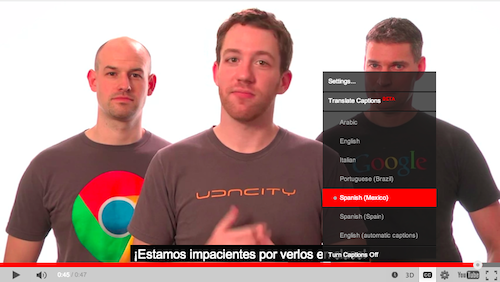
To see the translations live, go to, for example, www.udacity.com/course/cs255 and start taking the class. When you're in the classroom watching videos, click on the Closed Captions (CC) button on the YouTube player and select Spanish (Mexico) or Portuguese (Brazil).

One of the CS255 students, Edwin Rodolfo Maldonado Perez from Guatemala City, Guatemala, told us: "In Latin America, if you study in a public school you won't have access to learning a second language like English. When public school students grow up and look for jobs, they don't have time or money to go to a decent language school. From there it becomes a chicken-and-egg situation, where to get a new job or improve technical skills like learning a new programming language, people find that almost all developer documentation is in English."

The translations for CS253 and CS255 are already live. Enjoy!


+Peter Lubbers is a Program Manager on the Chrome Developer Relations Team, spreading HTML5 and Open Web goodness. He is the founder of the San Francisco HTML5 User Group--the world's first and largest HTML5 meetup with over 8,000 members. Peter is the author of "Pro HTML5 Programming" (Apress) and, yes, his car's license plate is HTML5. In his spare time he likes to run around Lake Tahoe in one go and jump out of airplanes.

Posted by +Scott Knaster, Editor

Posted:
Author Photo
By Vsevolod Vlasov, DevTools Software Engineer and Workspace Ninja

Cross-posted from the Chromium Blog

With Chrome DevTools our goal is to make your experience as a web developer as productive as possible. In the most recent version of Chrome we've added three major new features that will improve your authoring experience more than ever before.

Workspaces allows you to live-edit source files within DevTools with bidirectional disk persistence. CSS preprocessor mapping supports Sass file live-editing in the DevTools, allowing you to instantly see your changes. Finally snippets lets you create, edit, save and execute custom JavaScript snippets.

Workspaces

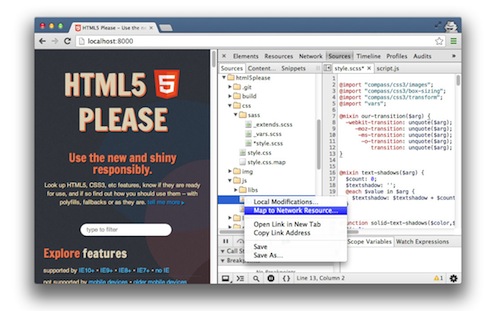
Within Workspaces you can load complete local filesystem folders (including back-end files such as scripts and build/deployment files) into the DevTools editor and map these to network resources. This enables you to author and tweak your scripts and styles, instantly see those changes reflected in the browser and have them transparently persist to disk — no more switching back and forth between browser and editor. The editor now supports syntax highlighting for a number of languages including PHP, Python, Java, CSS, HTML and of course JavaScript.

CSS preprocessor mapping

CSS preprocessors like Sass make it easier to organize your CSS, but until now tweaking your styles required switching to another program and refreshing Chrome. CSS preprocessor mapping enables live-editing of these sources directly within the Sources panel. To see it in action, just map the .scss file, then Ctrl-click on a property or value to jump to the variable, mixin or function that defined it. Support for other pre-processors such as Less, Stylus and Compass is in the works. Refer to the improved DevTools css-preprocessor documentation for more details and setup instructions.

Snippets

There are times when you want to be able to save smaller scripts, bookmarklets and utilities so that you always have them available while debugging in the browser. Snippets is a new DevTools feature that makes it possible. It allows you to create, store and run JavaScript within the Sources tab. It gives you a multi-line console with syntax-highlight and persistence, making it convenient for prototyping code that is more than a one-liner. There's also a community-curated repository of snippets for developers that contains useful snippets such as color pickers, CSS prettyfiers, logging helpers and much more.

Today’s new features should help make web developers even more productive with DevTools. Please follow us on Google+ at Google Chrome Developers or on Twitter at @ChromiumDev and send feedback at crbug.com.


Vsevolod Vlasov is a Software Engineer on the Chrome DevTools team in Saint Petersburg, Russia.
His current work focuses on improving web developers authoring workflow.


Posted by Ashleigh Rentz, Editor Emerita

Posted:
Author Photo
By John Affaki, Engineering Manager

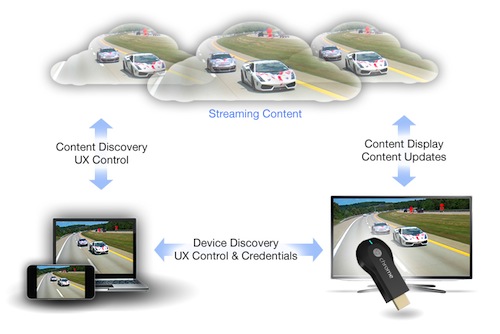
Today we announced Chromecast, a small $35 device that plugs into any HDTV in your house to bring online video and entertainment to your TV. Chromecast users can cast content from dedicated apps like Netflix or from the web using Chrome, but we'd like to see more multi-screen experiences brought directly to the TV. So today, we've also released the developer preview of the Google Cast SDK, a technology that brings mobile and web content to the TV screen.

You can use the Google Cast SDK to enable your mobile and web apps to cast content to the TV. Chromecast then streams that content directly from the web. Integrating Google Cast technology into your app makes it easier for your users to enjoy their favorite videos, playlists, movies and more on the big screen, without requiring them to download a new application or learn a new interaction model.

Chromecast
The developer preview includes the SDKs for Android, iOS and Chrome, which enable you to extend your application to the TV. We're excited to see what you build with Google Cast, and we're looking forward to your feedback as we continue to refine Google Cast. Get the Google Cast preview SDKs, documentation and samples at Google Developers.


John Affaki manages the client software and services teams for Google Cast. He never grew out of childhood and spends his free time playing video games and reading comic books, but is glad to have some real kids now.

Posted by Scott Knaster, Editor

Posted:
Author Photo
By Scott Knaster, Google Developers Blog Editor

This week we announced Project Loon, a cool and kind of crazy project that launches Internet-connected balloons and shares their connection with people below on Earth. These are not your typical birthday balloons: they’re 15 meters wide, and they rise to an altitude of 20 km, where winds carry them around the world. Software computes where the balloons should go to provide the best network coverage, and the balloons are then steered and moved as necessary.


Sailing along in the stratosphere is an essential aspect of Project Loon. The stratosphere is far above general air traffic and weather, so Loon balloons don’t have to worry about that. On the other hand, the environment is not friendly, with thin atmosphere and -50°C temperatures. But because the balloons are designed for these conditions, they can survive happily.

Moving further away from Earth, all the way to deep space, astronomers have found 26 new black holes right here in the neighborhood, in the Andromeda galaxy next door. Scientists using the Chandra X-Ray Observatory detected the black holes by observing telltale bursts of X-rays as the black holes ingested the outer atmosphere of ordinary stars. And this is just the start: there are likely thousands more black holes in Andromeda. So if Internet balloons ever make to Andromeda, we now know some places to avoid.

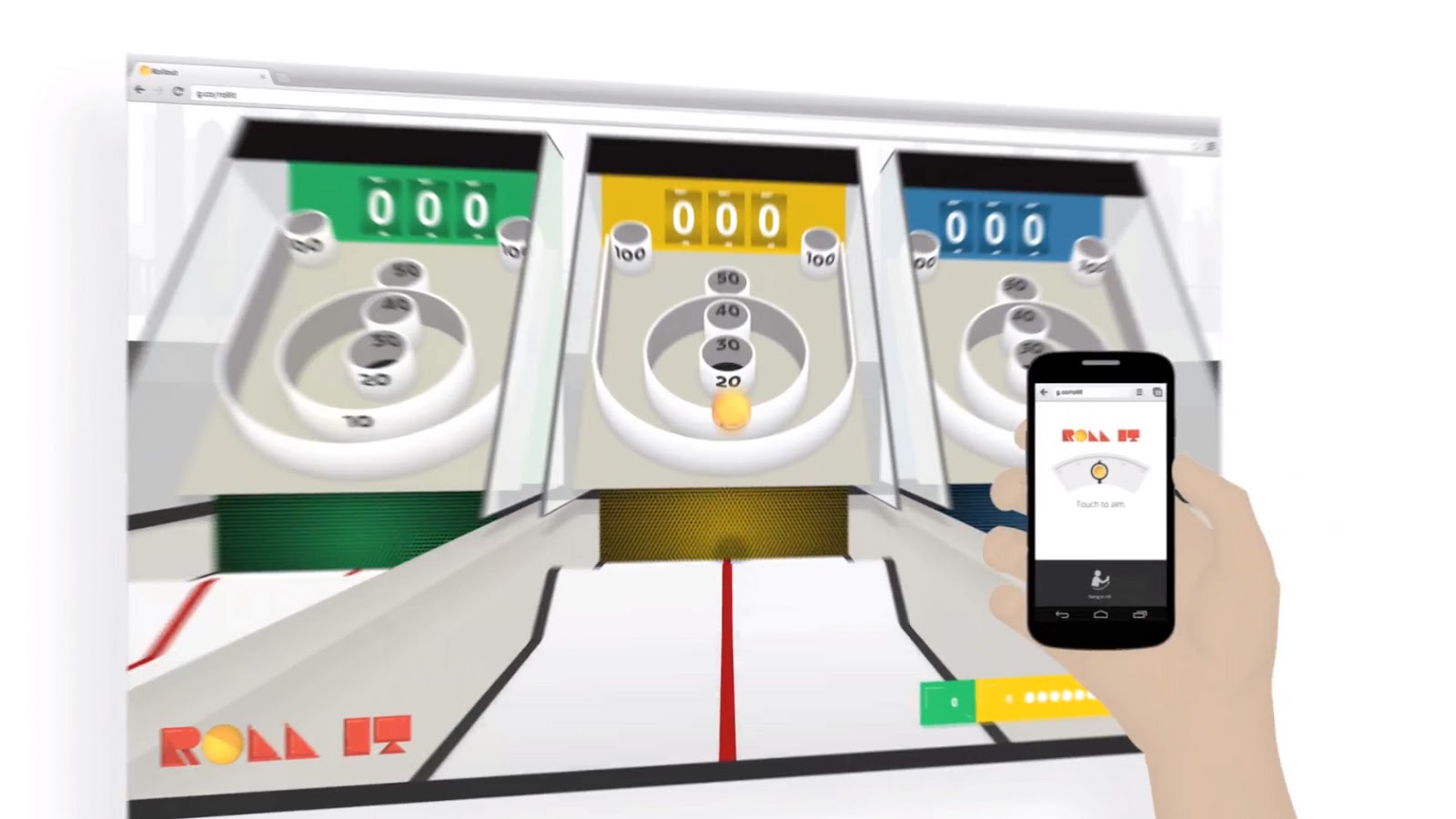
Finally, if you’re looking for something fun to do this weekend, you can spend time with a trio of nifty Chrome Experiment games released over the past couple of weeks: Roll It is a classic boardwalk game with the modern twist of using your mobile device as a controller, Racer builds a race track and soundtrack from several mobile devices put together, and Cube Slam lets you play an old-school arcade game over the Internet with friends (and if you have no friends, you can play against a virtual bear). Have fun!


From distant galaxies to ursine videogame opponents, Fridaygram rolls wide and deep. We cover fun stuff that isn’t always directly related to writing code, just in case you need an end-of-week break. If you’re having too much fun with our trio of games and you want to learn something instead, you can read about how we built each of them: Roll It, Racer, Cube Slam.

Posted:
Author Photo
By Louis Gray, Program Manager, Google Developers Live

One year ago, we took the magic of Google I/O and brought it home with Google Developers Live (+GDL)  - engaging with our developer community all year round, live, from our offices around the world. Nearly 1,000 videos and several million views later, we’ve seen you connect with Googlers and industry experts every day, gaining knowledge, sharing insights, and getting feedback on how to create incredible apps and leverage Google’s tools.

Thanks to the combination of Google+ Hangouts and YouTube Live, you can now see our engineers face to face and gain up to the minute insights on +Android+Google Chrome+Google Cloud Platform, and many more.

But Google Developers Live is not just all Google products, all the time. It’s an interactive platform for innovative applications, design wizards and entrepreneurs. We’ve hosted initiatives like Women Techmakers, Google Top Geek from Mexico City, Android Design In Action and Root Access, and we hear directly from the minds behind applications many of us use every day.


It was on GDL where we saw Google Fellow +Sebastian Thrun introduce a new HTML5 course on Udacity. GDL debuted the Mirror API for +Project Glass. And it was on GDL where we first demonstrated YouTube API v3, went behind the scenes with Santa Tracker, and answered questions on the Blink rendering engine.

And when we returned to I/O last month, it was Google Developers Live with wall-to-wall broadcasts, featuring exceptional guests like Megan Smith of Google[x], Bradley Horowitz of Google+ and Hiroshi Lockheimer and Hugo Barra of Android.

While we love the live interaction, Google Developers Live is more than just live. Our archives make it easy for you to watch on your own schedule - in any order, on any product.

Although GDL is only a year old, we’re now broadcasting from Mountain View, New York, Sydney, Tokyo, Milan, Moscow, Buenos Aires, and many places around the world, to bring you the latest Google tools for developers in your time zone, in your language. And we’ve got a lot more planned. So make sure you don’t miss a show, by subscribing to Google Developers on YouTube and staying tuned to https://developers.google.com/live/.


+Louis Gray is a Program Manager on Google's Developer Relations Team, running Google Developers Live. He believes life is but a (live) stream.

Posted by +Scott Knaster, Editor

Posted:
Author Photo By Pete LePage, Developer Advocate and Boardwalk King

Cross-posted from the Chromium Blog

Last week we launched Roll It, a Chrome Experiment that links phones to computers and gets people out of their chairs and swinging. We wanted to share how we built a physical game experience with no dedicated hardware. It requires just the web, your computer and a phone.

Here’s a look at the APIs and browser-based features we used to create it.


Roll It is a three-dimensional (3D) experience, from the swing of your phone’s accelerometer right up to the virtual models rendered on your computer’s HTML5 Canvas. On the phone side, we hooked into browser events like DeviceOrientation and DeviceMotion to detect the speed and direction of a swing. On the computer side we rendered our scene using Three.js and plugged in Physijs to add physics to the ball and environment.

To sync the phone to the computer we employed WebSockets which enable rapid two-way communication between devices via a central server.

For extra stability we built our backend on Google Cloud Platform:
We couldn’t have brought this experiment to life without a great team. The theme for Roll It was composed by Mr. Tim Healey. Legwork Studio developed the interfaces and game environment, and teamed up with Mode Set for the development.

To dig deeper into the technology behind Roll It, check out the HTML5 Rocks Case Study, or join the team for a Google Developers Live event this Friday, June 7, 2013 at 5pm GMT for an in-depth discussion.


Pete LePage is a Developer Advocate on the Google Chrome team and helps developers create great web applications and mobile web experiences.

Posted by Scott Knaster, Editor

Posted:
Author PhotoBy Paul Kinlan, Chrome Developer Relations

Cross-posted with the Chromium Blog

Earlier today we launched Chrome Super Sync Sports. It’s an interactive web game that enables up to four friends to compete in running, swimming and cycling events on a shared computer screen, using their smartphones or tablets as game controllers.


Chrome Super Sync Sports was built with the latest browser technologies:
  • Touch APIs to recognise gestures made on your smartphone and tablet. 
  • WebSockets are used to deliver immediate real-time playback across all the players in your group and to update the main game screen as you play. 
  • Finally, CSS3SVG and Canvas provide rich visuals and an immersive experience. 
In the next few weeks, we’ll be publishing an article on HTML5 Rocks with more information on how we built this experience. You can follow +Google Chrome Developers to learn when the article will be live.

In the meantime, enjoy competing with your friends at chrome.com/supersyncsports and be sure to open Chrome’s developer tools to see what happens under the track!


Paul Kinlan is a Developer Advocate in the UK on the Chrome team specialising on mobile. He lives in Liverpool and loves trying to progress the city's tech community from places like DoES Liverpool hack-space.

Posted by Scott Knaster, Editor

Posted:
Author Photo
By Max Heinritz, Associate Product Magician (Manager)

Cross-posted with the Chromium Blog

Today we unveiled "Find Your Way To Oz", a new Chrome Experiment inspired by the upcoming feature film Oz The Great and Powerful. Developed by UNIT9, this experiment brings together Disney’s unique storytelling tradition and the power of the web platform, allowing users to interact with the web in a completely new way.


The desktop version of "Find Your Way To Oz" uses many of the open web’s more advanced features:
  • Immersive Graphics: The experiment uses WebGL for the main 3D environment, CSS3 features such as CSS Transitions for various visual embellishments, and GLSL shaders for the tornado’s ominous look and feel.

  • Rich Audio: As the user explores the experiment, the 3D sound dynamically adapts thanks to the Web Audio API. The same API powers the experiment’s music composing section.

  • Camera-based interactions: Through WebRTC’s getUserMedia API, users can become circus characters or record their own mini-movies.
The experiment’s mobile web version also uses cutting-edge web technologies. These include graphics features such as accelerated 3D transforms and sprite sheets as well as mobile hardware features like camera, multi-touch, gyroscope and accelerometer. Together they create an experience that can normally only be found in native apps.

To learn more about how this experiment was built, read our technical case study and join us for a Google Developers Live event on February 11th at 11 a.m. GMT where we’ll be talking to the team behind the project. Alternatively, use Chrome’s developer tools to see how the experiment works on your own, perhaps finding in the process your own path to the yellow brick road.


Max Heinritz is an Associate Product Manager on the Chrome Web Platform team. He's helping the web reach its potential to become the universal application platform. On the weekends you can find him exploring the Northern California wilderness.

Posted by Scott Knaster, Editor

Posted:
Author Photo
By Mark Davis, International Software Architect

Until now, it has been very difficult for web application designers to do something as simple as sort names correctly according to the user's language. And it matters: English readers wouldn’t expect Århus to sort below Zürich, but Danish speakers would.

Because linguistic sorting requires a sophisticated algorithm and lots of data, it was impractical to do this natively in JavaScript. Until now, the only full solution for sorting on the client side was to generate on a server a sortKey for every string that needed to be sorted, and send the sortkeys — base64-encoded — down to the client along with the strings. Pretty ugly! And what’s doubly frustrating is that the underlying operating systems have all been able to handle this, whether through International Components for Unicode (ICU) or Windows APIs.

The new internationalization specification for ECMAScript (the “official” name for JavaScript) changes this picture. It is already in the production version of Chrome, and is on track for other major browsers.

Linguistic sorting is not the only benefit—not only will users be able to see names sorted correctly, but also correct numeric values (“1,234.56” in English, but “1.234,56” in German), dates (“March 10, 2012” vs “10. März 2012”), and so on. While the results might not be precisely the same in every browser, they should be appropriate to the language, and are returned using a uniform API.

On any enabled browser — in its supported languages — web application developers can:
  • compare strings correctly: choosing whether or not to ignore accents, case differences, etc.
  • format numbers correctly: choosing decimal places, currencies, whether to use thousands-separator, etc.
  • format dates and times correctly: choosing decimal places, numeric vs named months, etc.
  • match locales: comparing the user’s desired locales (say Arabic and French) against the supported locales (say French, German, and English), to get the best match.
The API also allows for linguistic support in offline web applications, which wasn’t practical before. It builds on the industry standards BCP47 (for identifying languages and locales) and LDML (part of the Unicode Common Locale Data Repository (CLDR) project). For the gory details of the spec, see ECMA-402: ECMAScript Internationalization API Specification (just approved by the Ecma General Assembly).


Mark Davis is president and cofounder of the Unicode consortium, and founder of ICU and CLDR. Mark is fond of food, film, travel, and RPGs. Mark lived for 4 years in Switzerland, and is moving back in February.

Posted by Scott Knaster, Editor

Posted:
Author Photo
By Soonson Kwon, Developer Relations Program Manager

For developers and engineers, the best way to learn something is to get your hands dirty and try making something. That is why Google hosts many hackathons around the world. Last November 17 and 18, we had a bigger experiment at Gangnam (yes, this is the very Gangnam in Gangnam Style!) in Seoul, South Korea which expanded a 1-2 day hackathon into a much longer one which we called Google HackFair.


The idea was to give developers enough time (2 months) to develop something bigger and provide a nice chance to showcase their projects. 153 developers submitted 92 projects, and 40 projects were chosen from among them and displayed. Developers used many different technologies, including Android, Chrome, App Engine, and HTML5, and they completed creative and interesting projects: a remote controlled car guided by Android, a serial terminal for Chrome, a braille printer using Go, and many more!


Besides the exhibition, we also prepared a mini-conference and GDG (Google Developers Group) booth where Googlers and community developers gave 27 sessions in total.


More than 1000 people attended and enjoyed the Google HackFair. Although the event is finished, developers continue updating and polishing their projects. It was a great time indeed.

If you are interested in details for the projects including full demos or source code, please check here.


Soonson Kwon is Developer Relations Program Manager and Country Lead for South Korea. His mission is to help Korean developers make better use of Google’s developer products. He is also passionate about Open Source.

Posted by Scott Knaster, Editor

Posted:
Author Photo
By Scott Knaster, Google Developers Blog Editor

Hey, wanna start a band? A new Chrome Experiment, JAM with Chrome, lets you play music in a web app and jam with others online in real time. You get to pick from 19 different instruments, including drums, guitars, and keyboards. Once you get really good, you can use shortcuts on your (computer) keyboard to play your instrument.


When you’ve had enough fun making music with your friends, you can explore how JAM with Chrome works. Take a look at the tools and technologies that were used to make this app, and for details, read the case study. Then you can decide whether you want to build the next great web app or become a rock star instead.

Speaking of stars, scientists have astonishingly figured out how to learn about light from every star that ever existed. Researchers used the orbiting Fermi Large Area Telescope to look at distant galaxies and measure photons from various places around the universe. This data goes back to the formation of the first stars more than 13 billion years ago.

Finally, back on our own planet, you might have noticed that Google Maps recently added more building footprints to map displays. In case you didn’t count them, over 25 million new building footprints have been added to both desktop and mobile versions of Google Maps. Maybe you’ll see the new footprints while exploring your favorite city this weekend.


On Fridays we detour slightly from our usual posts and publish a Fridaygram, a fun compilation of nerdy stuff to amuse you (and us). And how cool is it that we have orbiting telescopes?

Posted:
Author PhotoBy Christian Stefansen, Native Client Team

Native Client (NaCl) enables you to write high-performance apps that run your C and C++ code in the browser. With the new Native Client add-in for Microsoft Visual Studio and the new Native Client debugger it just got a lot easier.

The Visual Studio add-in makes it easy to set up, build, run, and debug your app as a Pepper plug-in and as a Native Client module. If you are porting an existing application to Native Client, building as a Pepper plug-in is a convenient intermediate stage for development enabling you to gradually rewrite the app to use the Pepper APIs (video).


The Native Client debugger, affectionately called nacl-gdb, works on Windows, Mac, and Linux and is now available in the SDK. So whatever your development platform, you can now spend more time coding features and less time chasing bugs with printf.

Following the Native Client philosophy of being OS-independent and open source, nacl-gdb is based on... well... gdb! For those of you who are not excited by a text interface, the Visual Studio add-in makes interacting with the debugger easier. If you use a different development environment that can interact with gdb, you can point it to nacl-gdb and use the same commands plus some additional NaCl-specific commands.


Whether you’re an existing Native Client developer or thinking about using Native Client for your next project, now is a great time to grab the SDK, write an amazing app, and quickly squash any bugs you find. We look forward to questions on Stack Overflow and ideas and comments in the discussion forum.


Christian Stefansen is the Product Manager for Native Client and Pepper (PPAPI). When he is not busy planning new features for Native Client, he likes traveling and writing. He is currently writing a book about India.

Posted by Scott Knaster, Editor