
Posted:

Posted by Shanea King-Roberson, Program Manager

As a developer, writing your app is important. But even more important is getting it into the hands of users. Ideally millions of users. To that end, you can now learn what it takes to design, validate, prototype, monetize, and market app ideas from the ground up and grow them into a scalable business with the new Tech Entrepreneur Nanodegree.

Designed by Google in partnership with Udacity, the Tech Entrepreneur Nanodegree, takes 4-7 months to complete. We have teamed up with most successful thought leaders in this space to provide students with a unique and battle-tested perspective. You’ll meet Geoffrey Moore, author of “Crossing the Chasm”, Pete Koomen, co-founder of Optimizely; Aaron Harris and Kevin Hale, Partners at Y-Combinator; Nir Eyal, author of the book “Hooked: How to build habit forming products” and co-founder of Product Hunt; Steve Chen, Co-Founder of YouTube, rapid prototyping company InVision and many more.

All of the content that make up this nanodegree is available online for free at udacity.com/google. In addition, Udacity provides paid services, including access to coaches, guidance on your project, help staying on track, career counseling, and a certificate when you complete the nanodegree.


The Tech Entrepreneur offering will consist of the following courses:

  • Product Design: Learn Google’s Design Sprint methodology, Ideation & Validation, UI/UX design and gathering the right metrics.
  • Prototyping: Experiment with rapid-low and high-fidelity prototyping on mobile and the web using online tools.
  • Monetization: Learn how to monetize your app and how to set up an effective payment funnel.
  • App Marketing: Understand your market, analyze competition, position your product, prepare for launch, acquire customers and learn growth hacks.
  • How to get your startup started: Find out whether you really need venture capital funding, evaluate build vs. buy, and learn simple ways to monitor and maintain your startup business effectively.

Pitch your ideas in front of Venture Capitalists

Upon completion, students will receive a joint certificate from Udacity and Google. The top graduates will also be invited to an exclusive pitch event, where they will have the opportunity to pitch their final product to venture capitalists at Google.

Posted:

Posted by Hillel Maoz, Engineering Lead, Search Console Team and Mariya Moeva, Webmaster Trends Analyst

Originally posted to the Webmaster Central blog

Wouldn’t it be nifty if you could track where your indexed app content shows up in search results, for which queries, which app pages are most popular, and which ones have errors? Yeah, we thought so too! So we’ve equipped our freshly renamed Search Console with new reports to show you how Google understands and treats your app content in search results.

Our goal is to make Search Console a comprehensive source of information for everyone who cares about search, regardless of the format of their content. So, if you own or develop an app, Search Console is your new go-to place for search stats.

Add your app to Search Console

Simply open Search Console and enter your app name: android-app://com.example. Of course, we’ll only show data to authorized app owners, so you need to use your Google Play account to let Search Console know you have access to the app. If you don’t have access to your app in Google Play, ask an owner to verify the app in Search Console and add you next.

Connect your site to your app

Associating your site with your app is necessary for App Indexing to work. Plus, it helps with understanding and ranking the app content better.

Track your app content’s performance in search

The new Search Analytics report provides detailed information on top queries, top app pages, and traffic by country. It also has a comprehensive set of filters, allowing you to narrow down to a specific query type or region, or sort by clicks, impressions, CTR, and positions.

Use the Search Analytics report to compare which app content you consider most important with the content that actually shows up in search and gets the most clicks. If they match, you’re on the right track! Your users are finding and liking what you want them to see. If there’s little overlap, you may need to restructure your navigation, or make the most important content easier to find. Also worth checking in this case: have you provided deep links to all the app content you want your users to find?

Make sure Google understands your app content

If we encounter errors while indexing your app content, we won’t be able to show deep links for those app pages in search results. The Crawl Errors report will show you the type and number of errors we’ve detected.

See your app content the way Google sees it

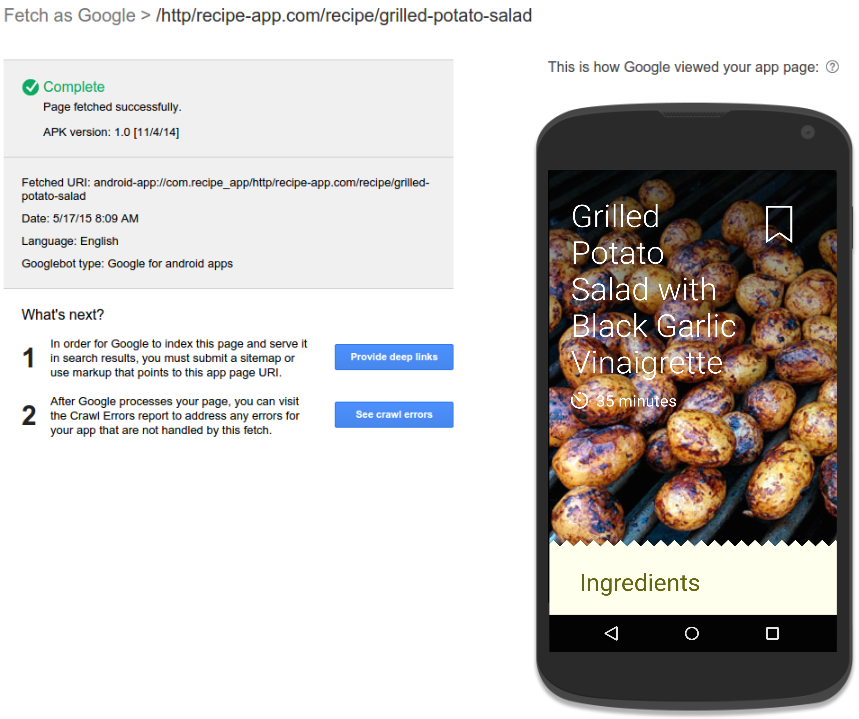
We’ve created an alpha version of the Fetch as Google tool for apps to help you check if an app URI works and see how Google renders it. It can also be useful for comparing the app content with the webpage content to debug errors such as content mismatch. In many cases, the mismatch errors are caused by blocked resources within the app or by pop-ups asking users to sign in or register. Now you can see and resolve these issues.

To get started on optimizing and troubleshooting your own app, add it to Search Console now. If you want to know more about App Indexing, read about it on our Developer Site. And, as always, you’re welcome to drop by the help forum with more questions.