
Showing posts with label WebHelp. Show all posts

Tuesday, June 03, 2014

Create a Custom Skin for Oxygen WebHelp Pages with the WebHelp Skin Builder

Share to Facebook Share to Twitter Email This Share on Google Plus Share on Tumblr
One of the new features of Oxygen 16.0 is the option of setting a skin for the WebHelp pages created by the DITA WebHelp transformation or the DocBook WebHelp transformation, in the form of a CSS stylesheet that modifies the default look of all WebHelp pages in a consistent way.

You can choose one of the six predefined skins available on the Skins tab of the DITA WebHelp transformation:

The Skins tab in the Oxygen WebHelp transformation

or you can build your own custom CSS skin visually on the Oxygen website: 
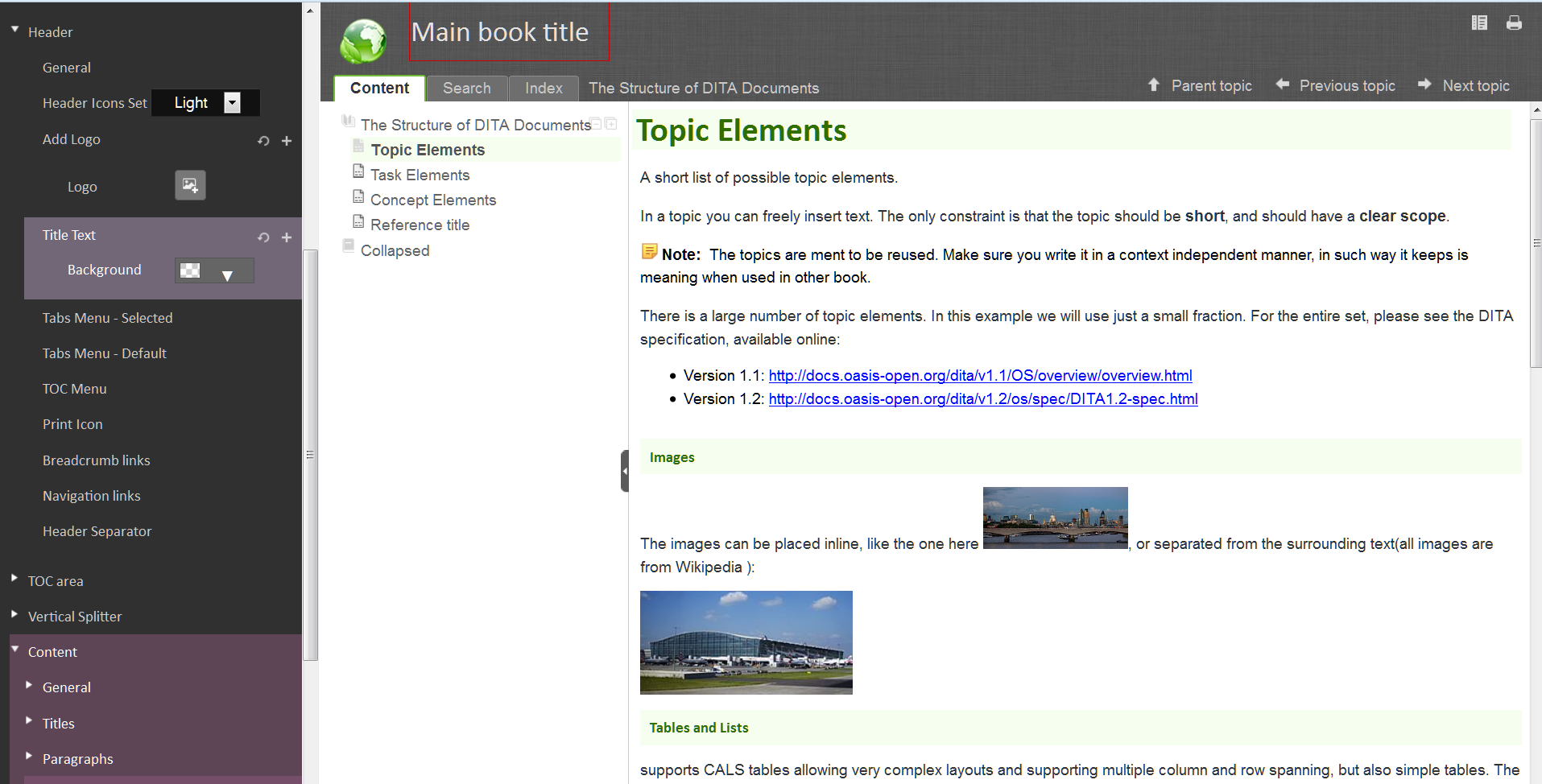
The Skin Builder in action on the Oxygen website


The WebHelp Skin Builder is a small Web app that allows you to configure many CSS properties of a large palette of elements in the header area, the content area or the Table of Contents area of a WebHelp page, like: background color, border, margin, font properties, text properties, adding a logo image in the header area, etc. The properties are grouped by type of component of a WebHelp page like: title, paragraph, list, figure, table, etc.

Once created with the WebHelp Skin Builder and set in the Oxygen WebHelp transformation as a custom CSS skin, it can really give a professional look to a set of WebHelp pages published on your company website, which has the potential to impress your users. Give it a try and let me know what you think!

Wednesday, April 16, 2014

How to set a favicon in Webhelp pages

Share to Facebook Share to Twitter Email This Share on Google Plus Share on Tumblr
Small additions or customizations are frequently needed or desirable in the WebHelp pages generated by the DITA Map WebHelp transformation in Oxygen. This need will prompt a serial of blog posts with specific WebHelp customizations and the required source code modifications.

In the first installment let's see how we can add one of those small but significant details which lend a mark of distinction and help to increase the consistency with the overall website design theme: setting a favicon.  [ BTW the upcoming version of Oxygen will introduce a set of built-in WebHelp skins (design themes) and also a small WebHelp Skin Builder web app for visually building your own WebHelp skin/theme. Sounds like an interesting topic for a future blog post! ]

The recent versions of all the mainstream browsers (by that I mean the Web browsers with more than 3% Web usage share) will know how to interpret the following link XHTML elements:


<link rel="icon" href="/favicon.ico" type="image/x-icon"/>

<link rel="shortcut icon" href="/favicon.ico" type="image/x-icon"/>


The href attribute obviously must point to the favicon file available on the server which hosts the Webhelp pages.

These two elements must be inserted in the file:

OXYGEN_INSTALL_DIR\frameworks\dita\DITA-OT\plugins\com.oxygenxml.webhelp\xsl\createMainFiles.xsl
in the template with the attribute name="create-toc-common-file", in the head element, after title:


<title> 
    <xsl:value-of select="$title"/>
</title>

<link rel="icon" href="/favicon.ico" type="image/x-icon"/>
<link rel="shortcut icon" href="/favicon.ico" type="image/x-icon"/>


That's it! Repeating the WebHelp transformation will add the favicon to the title of the browser tab.

It would be nice to have a customization mechanism for separating the built-in WebHelp files and the custom code files, but that is an enhancement for a future version of Oxygen.