Browser Push Notifications
Keep your users coming back to your website with Web and Mobile Browser Push Notifications
Keep your users coming back to your website with Web and Mobile Browser Push Notifications

Looking for a way to engage your massive subscriber reach? It’s time to add the brand new marketing tool called Push Notifications for Web Browsers, to your priority list. These are clickable messages that appear to website visitors. The best part is your immediate wider online reach, without you trying to capture leads through email IDs.
PushCrew is supported by Chrome and Firefox Browsers on Desktops and Mobiles.
 the opt-ins than Email
Browser Push Notifications will help you increase your audience. Stop counting on Email IDs and other details; just one click on ‘Allow’ and you attain a subscriber.
 Engage Subscribers
Browser Push Notifications ensure that your latest post or website update reaches your users and keep them re-visiting your website often. It’s win-win, really!
 Increase Viewership
Raise both astounding subscribership and user loyalty by using PushCrew Browser Notifications. Works on both Chrome and Firefox Browsers on Desktop as well as on Android mobiles.
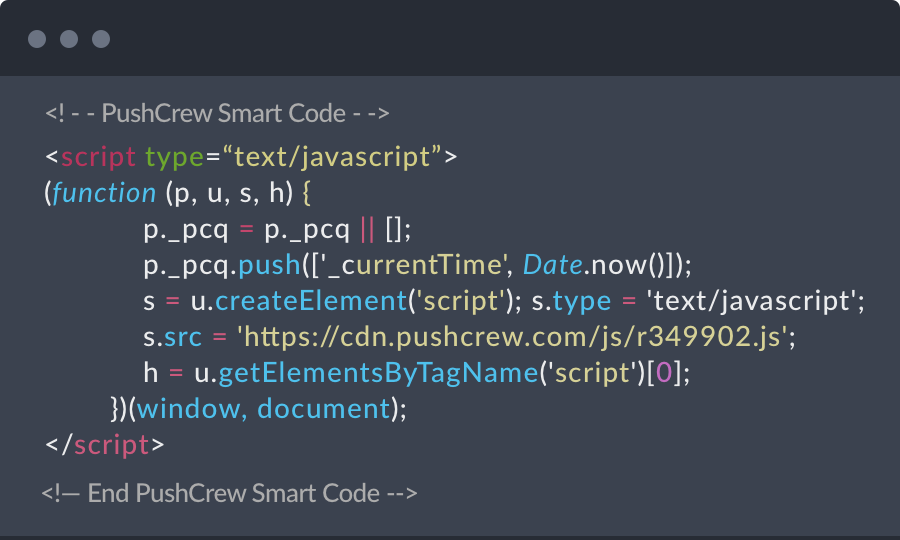
Register with PushCrew for a Free Account. You will now receive a Smart Code. Place this Smart Code before the closing </head> tag on your web page.

A small opt-in box pops up when someone visits your website. They are asked for permission to receive Push Notifications from your website. When the visitor clicks “Allow”, they automatically get added to your subscriber list. This doesn’t require email id or any other personal details. Sweet and simple.

You are now all set to send the first Push Notification to your subscribers. Just go to your PushCrew dashboard, compose the title and the message and send! Sit back and watch your subscriber count and traffic grow.

Your users can now see your Push Notifications. For your love of metrics, we have a whole set of user insights you can access through your dashboard. Check out the number of clicks, opt-ins, and other metrics related to your Push Notifications.
Trusted By

Trusted By


PushCrew lets you talk to your subscribers in a succinct, easy and delightful manner using push notifications on websites.