<?xml version="1.0" encoding="utf-8"?>
<feed xmlns="http://www.w3.org/2005/Atom">

  <title><![CDATA[David Smith, Independent iOS Developer]]></title>
  <link href="http://david-smith.org/atom.xml" rel="self"/>
  <link href="http://david-smith.org/"/>
  <updated>2017-12-03T17:03:10-05:00</updated>
  <id>http://david-smith.org/</id>
  <author>
    <name><![CDATA[David Smith]]></name>
    
  </author>
  <generator uri="http://octopress.org/">Octopress</generator>

  
  <entry>


        <title type="html"><![CDATA[The Tesla Flat Tire Process]]></title>
        <link href="http://david-smith.org/blog/2017/10/10/the-tesla-flat-tire-process/"/>
    
    
    <updated>2017-10-10T17:00:00-04:00</updated>
    <published>2017-10-10T17:00:00-04:00</published>
    <id>http://david-smith.org/blog/2017/10/10/the-tesla-flat-tire-process</id>
    <content type="html"><![CDATA[<p>One of the more peculiar things I discovered during the sales process for my <a href="https://david-smith.org/blog/2016/04/04/a-nerds-review-of-the-tesla-model-s/">tesla</a> was that it doesn’t have a spare tire.  This seems like a general trend across car manufactures, either shrinking their spares to sometimes comical sizes or eliminating them altogether.  The weight and space savings are obvious but it did make me wonder what happens when you get a flat.  </p>

<p>When I was investigating this before I got my car I couldn’t find a straightforward description of the process from an owners perspective, and instead pieced it together from forum posts and the like.  I recently experienced my first flat and so can now speak from my own experience.  This post is my attempt to help anyone else who is curious about how the process goes and what to expect.  </p>

<h4 id="the-flat">1. The Flat</h4>

<p>While driving along we started to receive low tire pressure warnings on the main dashboard.  Initially these were just the regular “Low Pressure” warning that I’ve gotten a few times when I just need to top up a tire.  So we added a bit of air to the tire in question and kept driving.  </p>

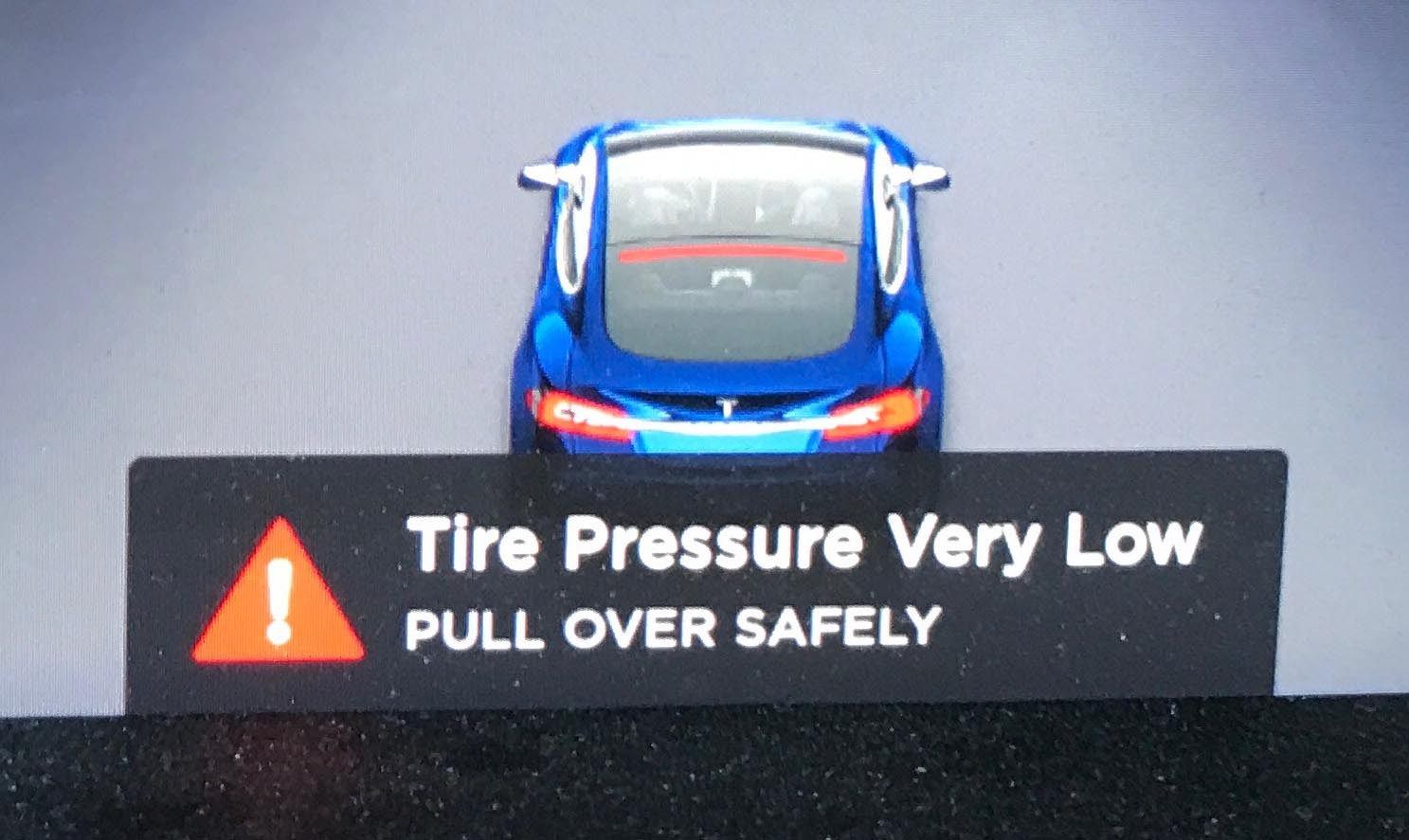
<p>A few miles later the warning returned and now quickly escalated from <em>‘hey, one of your tires might need some air’</em> to <em>‘woah there, you need to pull over <strong>right now</strong>‘</em>.  </p>

<p><img src="http://david-smith.org/resources/warning1.jpg" alt="" /></p>

<p>As soon as we safely could, we pulled the car over (in our case in a residential neighborhood).  After a quick visual inspection the tire was definitely a full on flat now.  </p>

<h4 id="roadside-service">2. Roadside Service</h4>

<p>As the car has no spare the next thing to do was to call Roadside Service.  They answered right away and were able to lookup my account profile information from Caller ID, so we very quickly moved right to sending over help.  The representative had a good balance of friendliness and directness. </p>

<p>He said the nearest tow service with a tire for me was about 30-60 minutes away and would be able to provide me with a loaner spare to get me moving again and the tow truck driver would then take my flat tire to my nearest Tesla service center for evaluation.  He also then quite helpfully said that I should expect a call from him in around an hour to check that things were moving along.  </p>

<p>The tow truck driver called and asked to confirm the tire size and specs for my vehicle.  He also let me know that he couldn’t guarantee that the rim for the loaner spare would exactly match my other wheels (in my case it did but I appreciated the warning).  </p>
<p><img src="http://david-smith.org/resources/tow2.jpg" alt="" /></p>

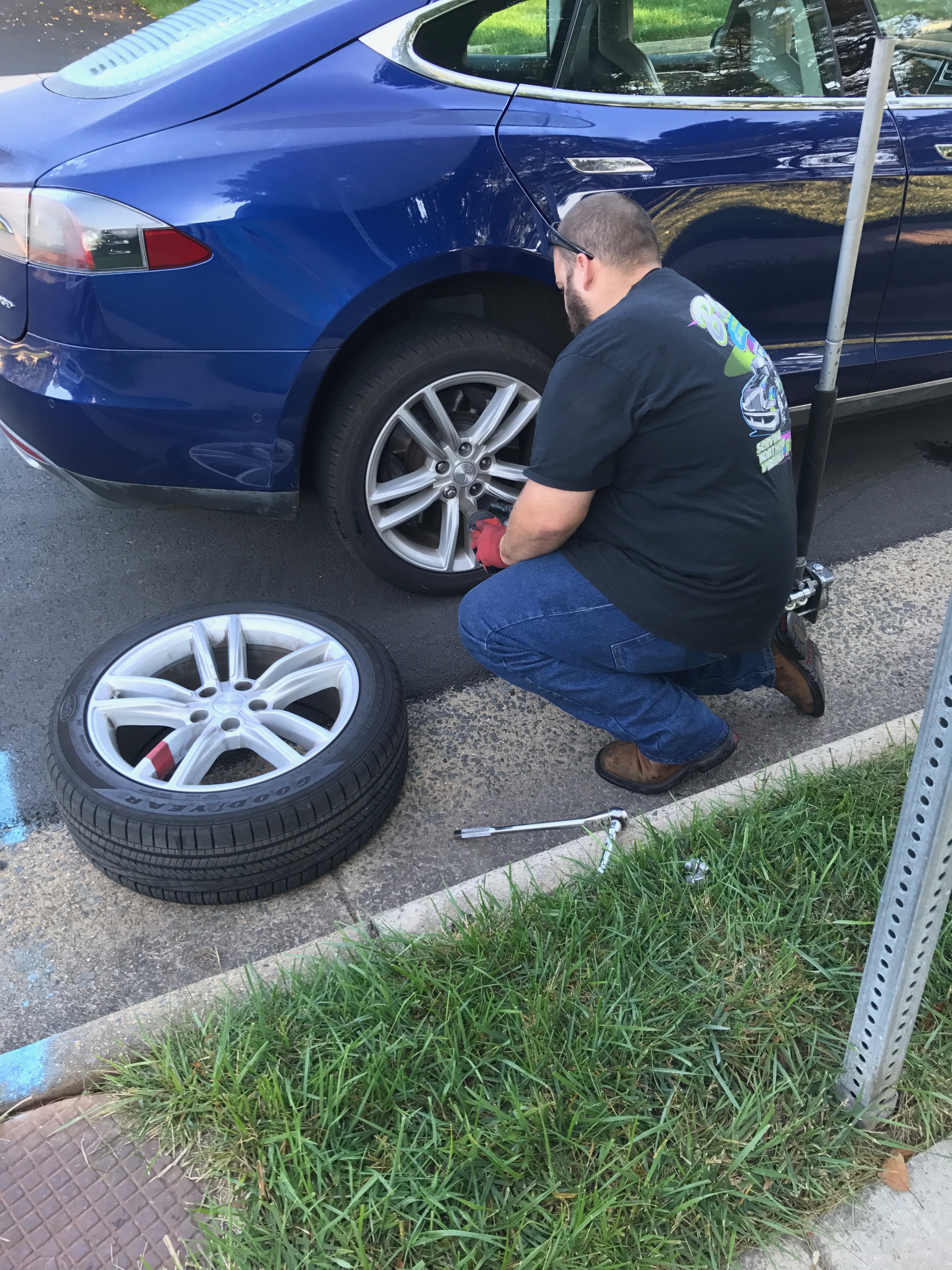
<p>He arrived around 40 minutes later and proceeded to remove my flat tire and put on the loaner spare.   He then took the broken tire with him and said he would drop it off with Tesla later that day, and then I should expect a call from Tesla with next steps for getting it fixed or replaced.  From talking to him it sounded like Tesla had provided his tow truck company with a few spare tires that they cycle through as needed.  He was efficient and helpful.  The whole process took around 10 minutes.  </p>

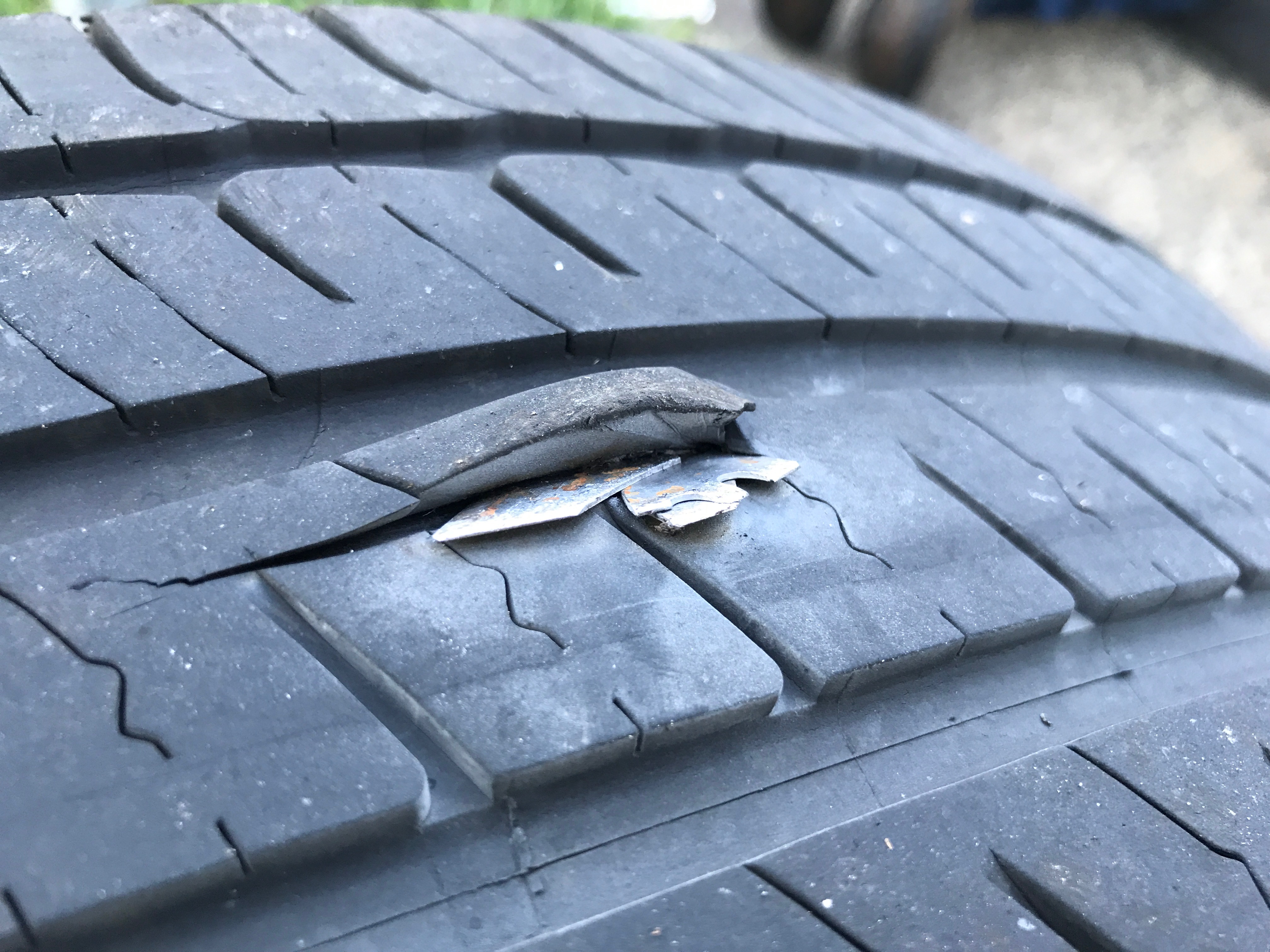
<p>Before he took away the old tire I was able to locate the source of my trouble…I’m no mechanic but I’m pretty sure this isn’t good:</p>

<p><img src="http://david-smith.org/resources/tire.jpg" alt="" /></p>

<h4 id="the-loaner-spare">3. The Loaner Spare</h4>

<p>The same customer service representative from Roadside Service called me back to make sure everything had worked out correctly.  He also sent over a simple document for me to e-sign regarding the loaner spare.  Basically a general waiver of liability and an agreement that I’d bring back the tire to Tesla within 3 business days (or later if mutually agreed to).  </p>

<p>So basically rather than carrying a spare in my truck, when I needed one it was delivered to me on the side of the road and I could then use it until a proper replacement could be arranged.  The tire I got was a full size regular tire, and didn’t have any use restrictions.  There was no cost for either the roadside service or loaner spare (though I think that after my car is beyond a certain age their might be).</p>

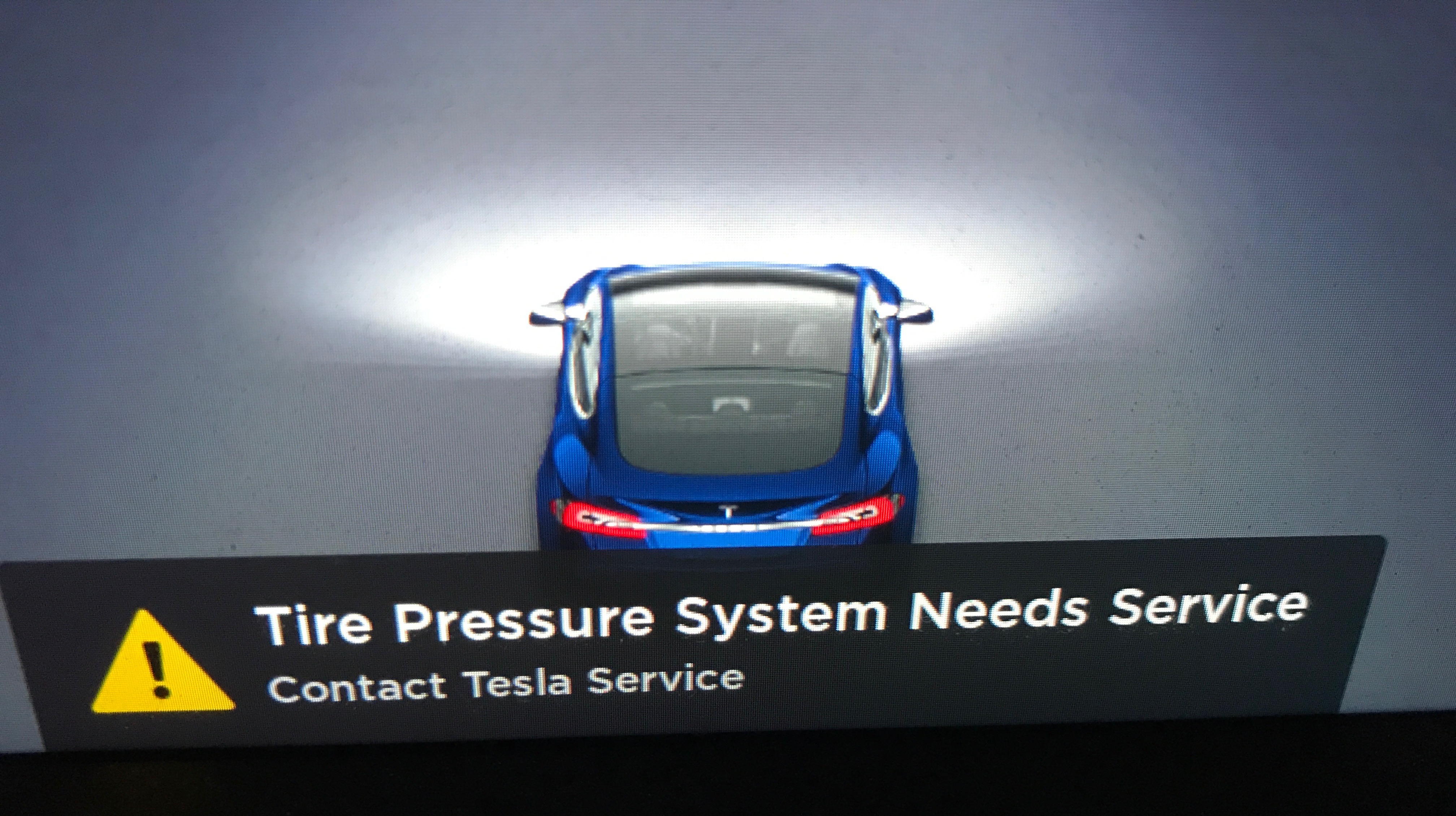
<p>The only downside of the loaner spare was that the tire pressure system wasn’t connected to it so I had this warning every time I drove until it was replaced.  </p>
<p><img src="http://david-smith.org/resources/warning2.jpg" alt="" /></p>

<h4 id="the-replacement">4. The Replacement</h4>

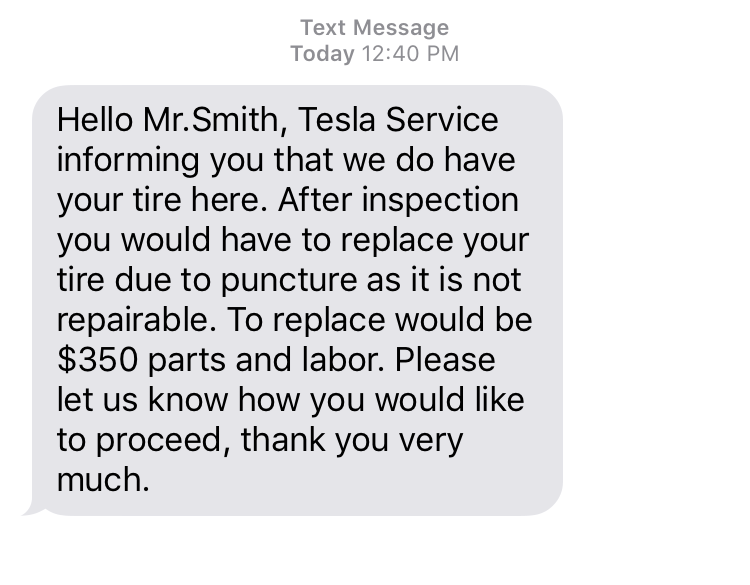
<p>I got a text message from Tesla service later that day after the tow truck driver delivered the tire to them.  </p>
<p><img src="http://david-smith.org/resources/servicetext.png" alt="" /></p>

<p>First, let me say how much I <strong>loved</strong> that this was a <strong>text</strong> and not a phone call.  While a bit silly I really loved that I could handle the entire process of scheduling the replacement over text message.  That way I could just pick up the conversation as I was free and didn’t feel like it intruded into my day very much.  </p>

<p>As I’d guessed when I saw that big chunk of metal sticking out of my tire I was told that I needed a new tire and that the cost for the replacement would be $350.  Which is a bit higher than I may have hoped for, but certainly not unreasonable.  I was able to authorize the work to begin changing the tire on my rim and schedule a time for me to drop in to have it put on.  This ended up being 5 days after I got the flat because that worked best for me.  </p>

<p>I brought my car in and they replaced the tire, reset the tire pressure monitoring system and gave it a good wash.  The appointment was quoted at around an hour, but ended up more like 2 hours.  </p>

<h4 id="general-observations">General observations</h4>

<p>This happened to me in probably one of the more ideal circumstances.  We were driving on quiet roads and were able to pull over into a neighborhood.  The nearest Telsa Service center is only 10 miles away and the tow truck was within an hour.  I’d expect that if this had happened to me out on the highway, in the middle of nowhere things would have been a bit more tricky or at least taken much longer.  But hopefully the general process would follow the same smooth progression.</p>

<p>Overall, I was very pleased with the process.  The lack of spare had given me a bit of pause when we were first considering the car but this process went off without a hitch and was about as painless as I could hope for given the circumstances.  In a funny way it is slightly liberating to not have a spare in the trunk, so no matter what happens I have to call for professional help.  This mean I’m never having to put myself in a potentially awkward or dangerous situation roadside.  </p>
  <br/><br/><a href="http://david-smith.org/blog/2017/10/10/the-tesla-flat-tire-process/">»</a>]]></content>
  </entry>
  
  <entry>


        <title type="html"><![CDATA[Apple Watch Apps Head to College]]></title>
        <link href="http://david-smith.org/blog/2017/09/13/apple-watch-apps-head-to-college/"/>
    
    
    <updated>2017-09-13T10:23:00-04:00</updated>
    <published>2017-09-13T10:23:00-04:00</published>
    <id>http://david-smith.org/blog/2017/09/13/apple-watch-apps-head-to-college</id>
    <content type="html"><![CDATA[<p>The thing I was most excited about during yesterday’s <a href="https://www.apple.com/apple-events/september-2017/">Apple Event</a> was the addition of LTE to the Apple Watch. While the new iPhones are great, and a 4K Apple TV is useful,  I see this new capability on the Apple Watch as being potentially transformative to how I use technology on a daily basis.  </p>

<p>While I’ll have to live with it for a few weeks to see if it really pans out, imagining a future where my iPhone is no longer a <em>‘must carry’</em> device is remarkable.  </p>

<p>The more, however, I think about this prospective future the more I think I’ll have to fundamentally change the way I consider and approach the development of my own Apple Watch apps.  </p>

<p>Even though watchOS is only three years old we’ve already seen it grow from a hyper dependent toddler (WatchKit 1), to a slightly more independent adolescent (watchOS 2/3/4), to now suddenly a college student heading out of the home for the first time on its own. Asserting its independence while still holding on to a bit of a parental safety net.  </p>

<p>Each evolution of the Apple Watch platform has made it less and less dependent on its parent iPhone.  The addition of LTE takes all of this quite abruptly to another level. </p>

<p>I am now thinking about my watchOS apps as though they must be able to fully function out on their own with only minimal help and supervision from their iPhone.  If they don’t, I suspect I’ll find them to be quite frustrating. </p>

<p>While previously there have been technical capabilities where watchOS apps could connect to external services without their iPhone present, the expectation I think has always been that this would be rare and unusual.  Now it may very well be common and expected.  </p>

<p>Practically I see this impacting my own apps in a few ways.  These are mostly speculative at this point, so after living with an LTE watch for a few weeks they may change but I think these are going to be important considerations for watchOS developers moving forward. </p>

<h4 id="sync">Sync</h4>

<p>Firstly, I’m going to need to do some management of application state and data via a web service rather than relying solely on the direct connection between the Apple Watch and iPhone.  </p>

<p>I can imagine a situation where I configure a workout in <a href="https://itunes.apple.com/us/app/workouts++/id1182551958?at=10l3KS&amp;ct=invade&amp;ls=1&amp;mt=8">Workouts++</a> and then immediately head out for a run.  In this case if for some reason the new workout configuration hadn’t yet synced to the Apple Watch (via WatchConnectivity), right now the user would just be stuck.  However, with LTE they would have a reasonable expectation that this new data would just be loaded over their cellular connection.  </p>

<p>So I’m going to have to work through how to create a seamless experience for syncing application state between the Apple Watch and iPhone, where they are treated more like peers. </p>

<h4 id="application-dead-ends">Application Dead-ends</h4>

<p>Secondarily, while Apple Watch apps will still need to be simple and concise,  I think I will need to make sure that there are very few ‘dead-ends’ where I’d currently punt the user to their iPhone to complete an action or do some setup.  </p>

<p>These escape hatches were a great way to keep watchOS apps dead simple, but never really were particularly elegant.  But in a world where the Apple Watch may be used for extended periods without being next to its iPhone they could become infuriating.  </p>

<p>As an example, I’m thinking that for Workouts++ I may want to add the ability to do some very basic workout configuration on the Apple Watch, so that you aren’t stuck if you decide to do an activity you haven’t previously setup on your iPhone while you are out.  </p>

<p>I’ll have to be extremely careful to not make the app overly complex as a result, but I’ll be on the lookout for these ‘dead-end’ spots. </p>

<h4 id="new-opportunities">New Opportunities</h4>

<p>Lastly,  I’m going to look for opportunities for what type of watchOS apps might now be possible with a persistent connection.  In much the way that having an always internet connected iPhone opened a wide range of completely new use cases, I suspect a similar thing will be made possible on the Apple Watch.  Some uses may be limited by the form factor of the Apple Watch but I suspect that a bit of creativity should allow many to become possible.  </p>

<p>As someone who has been making apps for the Apple Watch from the <a href="https://david-smith.org/blog/2015/04/20/my-watchkit-apps/">beginning</a> this new hardware addition has be more excited than ever for the platform. </p>
  <br/><br/><a href="http://david-smith.org/blog/2017/09/13/apple-watch-apps-head-to-college/">»</a>]]></content>
  </entry>
  
  <entry>


        <title type="html"><![CDATA[Introducing Pedometer++ 3.0]]></title>
        <link href="http://david-smith.org/blog/2017/08/29/introducing-pedometer-plus-plus-3-dot-0/"/>
    
    
    <updated>2017-08-29T08:43:00-04:00</updated>
    <published>2017-08-29T08:43:00-04:00</published>
    <id>http://david-smith.org/blog/2017/08/29/introducing-pedometer-plus-plus-3-dot-0</id>
    <content type="html"><![CDATA[<p>Today I’m delighted to announce <a href="https://itunes.apple.com/us/app/pedometer++/id712286167?mt=8&amp;at=10l3KS&amp;ct=blog">Pedometer++</a> 3.0.  I’ve been steadily working on Pedometer++ now for nearly four years.  Over that time the core conceit of the app has remained the same, to motivate you to be more active.  It has done this with colors, confetti, complications and streaks.  Now I’ve added another tool to hopefully motivate, <strong>achievements</strong>!</p>

<h3 id="achievements">Achievements</h3>

<center>

<div style="display: inline-block; padding: 4px; text-align: center;">
    <img src="http://david-smith.org/resources/day4.png" width="100px" /><br />
</div>
<div style="display: inline-block; padding: 4px; text-align: center;">
    <img src="http://david-smith.org/resources/floors4.png" width="100px" /><br />
</div>
<div style="display: inline-block; padding: 4px; text-align: center;">
    <img src="http://david-smith.org/resources/steps4.png" width="100px" /><br />
</div>
<div style="display: inline-block; padding: 4px; text-align: center;">
    <img src="http://david-smith.org/resources/streak4.png" width="100px" /><br />
</div>
</center>

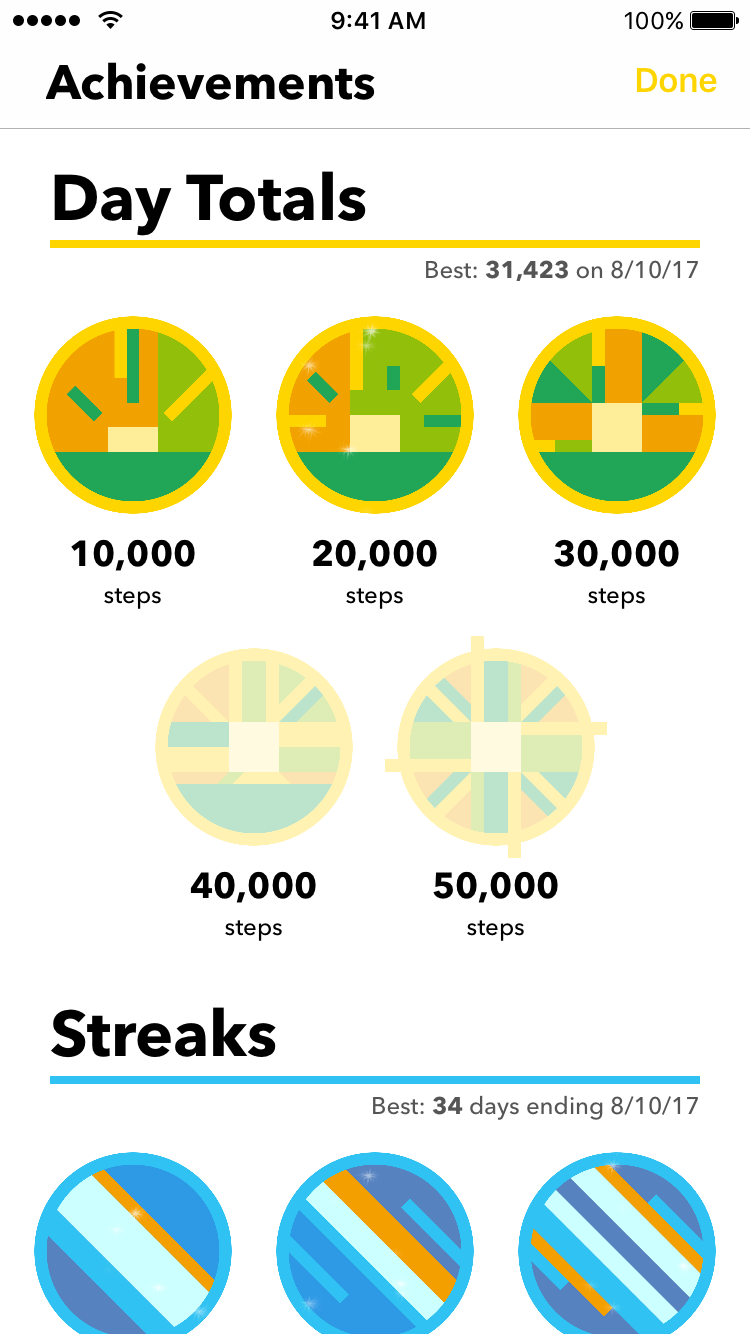
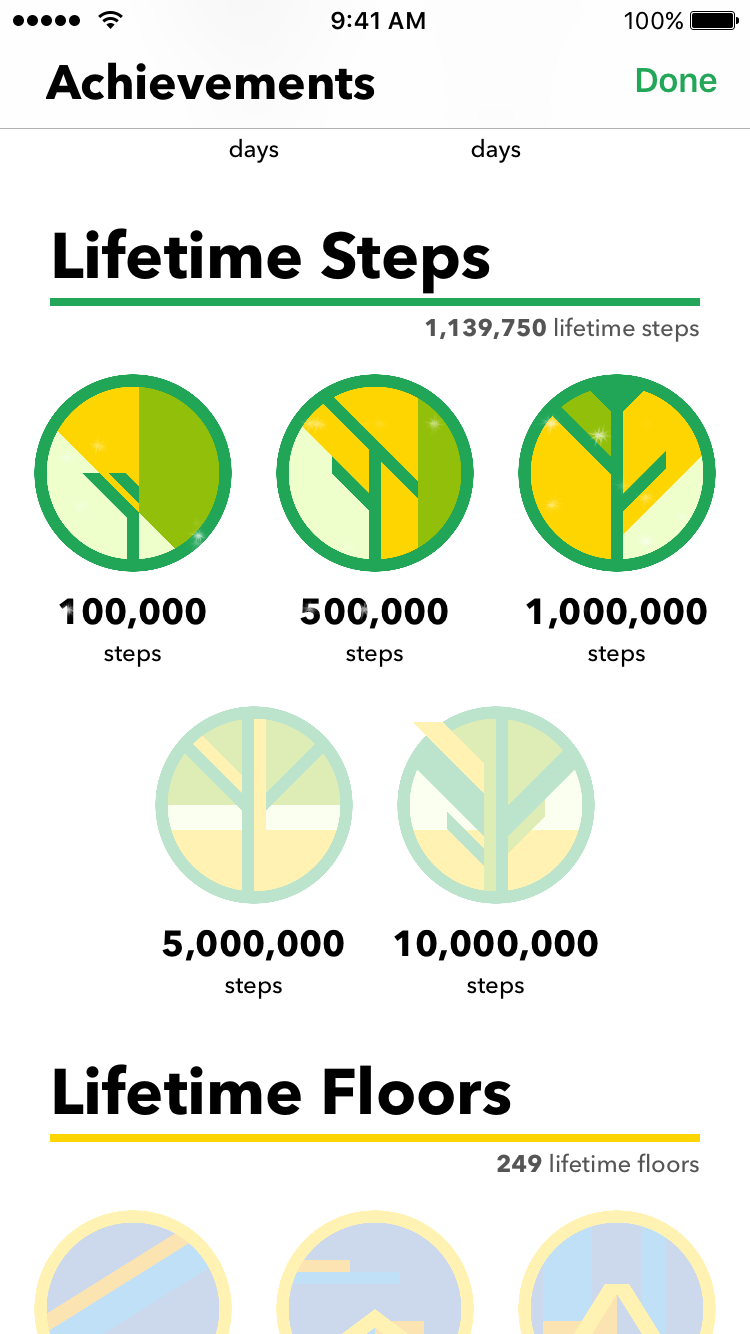
<p>You can now earn badges within the app for the reaching certain milestones. These include:</p>

<ul>
  <li>The biggest number of steps you have taken in a day</li>
  <li>The longest streaks you have been able to reach</li>
  <li>Your lifetime steps taken</li>
  <li>Your lifetime floors climbed</li>
  <li>Special badges for meeting certain criteria</li>
</ul>

<center>

<div style="display: inline-block; padding: 4px; text-align: center;">
    <img src="http://david-smith.org/resources/achievements2.png" width="200px" /><br />
</div>

<div style="display: inline-block; padding: 4px; text-align: center;">
    <img src="http://david-smith.org/resources/achievements.png" width="200px" /><br />
</div>

</center>

<p>I hope to add several more of these categories over time based on the feedback this initial set receives. </p>

<p>The sweet artwork for the badges was done by excellent Louie and Alexa over at <a href="http://www.parakeet.co">Parakeet</a>.</p>

<h3 id="widget">Widget</h3>

<center><img src="http://david-smith.org/resources/widget.png" width="200px" /></center>

<p>With iOS 11 just around the corner there is increasingly an emphasis on the use of widgets in iOS.  So this update also updates the widget Pedometer++ provides to be more capable by adding a daily detail view of your steps each day. </p>

<p>Enjoy!</p>

<center><a href="https://itunes.apple.com/us/app/pedometer++/id712286167?mt=8&amp;at=10l3KS&amp;ct=blog"><img width="281" style="border:none;padding:0px;margin:5px" src="http://david-smith.org/resources/appstorebadge@2x.png" /></a></center>

  <br/><br/><a href="http://david-smith.org/blog/2017/08/29/introducing-pedometer-plus-plus-3-dot-0/">»</a>]]></content>
  </entry>
  
  <entry>


        <title type="html"><![CDATA[A favorite hack]]></title>
        <link href="http://david-smith.org/blog/2017/07/07/a-favorite-hack/"/>
    
    
    <updated>2017-07-07T09:42:00-04:00</updated>
    <published>2017-07-07T09:42:00-04:00</published>
    <id>http://david-smith.org/blog/2017/07/07/a-favorite-hack</id>
    <content type="html"><![CDATA[<p>In my latest update to Pedometer++ I had to remove the feature where you could badge your app’s icon with your current step count.  In doing so I also removed one of the all time favorite hacks I’ve ever written.  I felt that this deserved a little send off before it departs off into my Git history. </p>

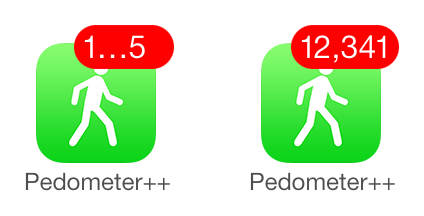
<p>First, the back story.  During the introduction of iOS 7 one of the random side effects of the wide reaching changes to the iOS user interface was that app icon badges started to get truncated whenever they got above 4 digits long.  </p>

<p>This usually isn’t a problem since if you have more than (say) 10,000 unread emails you are likely long past caring about the precise number anymore.  But for my little hack of using the badge to show specific counts this caused a problem.  </p>

<p><img src="http://david-smith.org/resources/badge.png" alt="" /></p>

<p>At first, I thought I’d have to remove the feature in iOS 7, until one fateful afternoon (while taking a shower, of course) I had the insight that I might be able to work around this.  My realization was that the numbers were getting truncated based on their displayed width and not their digit count.  Thus a number with a lot of <code>1</code>s in it would not get truncated because the <code>1</code>s are so thin, whereas a number with a lot of <code>4</code>s in it would be truncated because they render much wider.  </p>

<p>So I then set out to alter the numbers that were displayed so that if I thought it would get truncated I would replace the least significant digits with <code>1</code>s until it would no longer be truncated.  After a bit of experimentation I found that I needed for a 5 digit number to contain at least <em>two</em> <code>1</code>s in it in order to be assured that the number wouldn’t truncate.  Usually, but not always, the first of these would be the leading digit since getting above 20,000 steps is quite a full day of walking.  </p>

<p>Kind of awkwardly though, I realized that in order to achieve this I’d have to calculate how many <code>1</code>s there were in the number.  I poked a round a bit on the mathematical side of this but couldn’t work out a way to count how many <code>1</code>s there were in a given number via mathematical means.  There might be a way to do this, but I couldn’t find it.  </p>

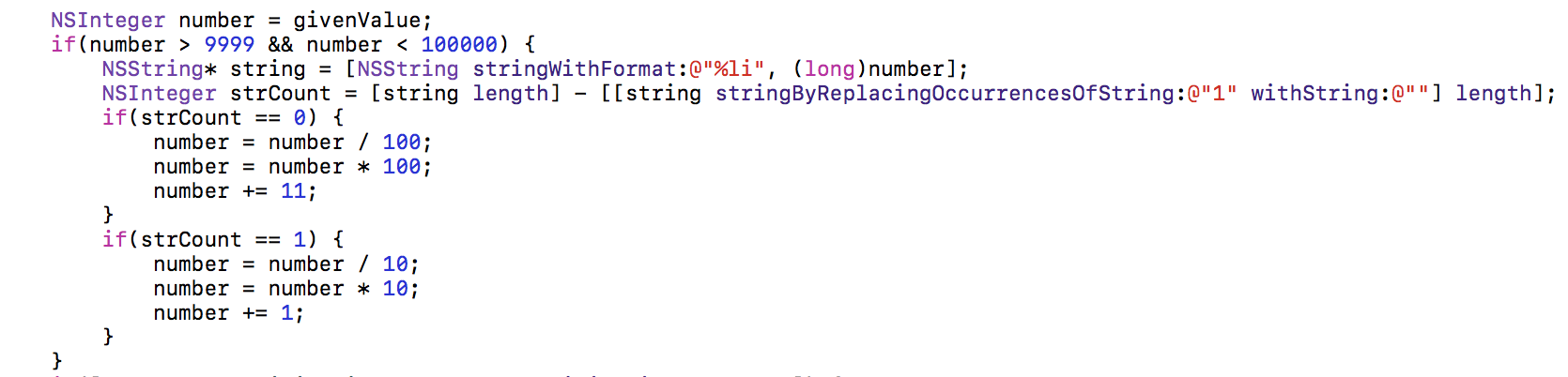
<p>So instead I figured that I could just write a really crude method using strings.  I just cast the number to a string, then compared its length to a string where I replace all the <code>1</code> characters with the empty string.  From here I could work out if I should change the last digit to a <code>1</code> (in the case of it already having another <code>1</code>), or if I should replace the last two digits (if no other <code>1</code>s are found). </p>

<p>Here is the final result:</p>

<p><img src="http://david-smith.org/resources/badgecode.png" alt="" /></p>

<p>I’ll be sad to see this little hack go.  While it might sound a bit funny to have a favorite line of code, I think this was mine.  I just loved how silly of a hack it was, but yet how effective it proved to be.  </p>

<p>Though one small consolation for it being gone now is that I can publish it here and the world can see it for all of its silly goodness. </p>

<blockquote>
  <p>P.S. And yes, if you are wondering if I really did just have that inscrutable block of code entirely undocumented in the app…I did.  I suppose that’s the blessing and curse of being an independent developer. 😇</p>
</blockquote>
  <br/><br/><a href="http://david-smith.org/blog/2017/07/07/a-favorite-hack/">»</a>]]></content>
  </entry>
  
  <entry>


        <title type="html"><![CDATA[Pedometer++ 2.5.2 Release Diary]]></title>
        <link href="http://david-smith.org/blog/2017/05/22/pedometer-plus-plus-2-dot-5-2-release-notes/"/>
    
    
    <updated>2017-05-22T14:37:00-04:00</updated>
    <published>2017-05-22T14:37:00-04:00</published>
    <id>http://david-smith.org/blog/2017/05/22/pedometer-plus-plus-2-dot-5-2-release-notes</id>
    <content type="html"><![CDATA[<p>I just pushed out version 2.5.2 of <a href="https://itunes.apple.com/us/app/pedometer++/id712286167?mt=8&amp;at=10l3KS&amp;ct=blog">Pedometer++</a>.  This includes a number of interesting updates that seemed worth expanding on.  </p>

<h3 id="data-changing-in-the-past">Data Changing in the Past</h3>

<p>One of the more insidiously difficult technical problems I’ve had to deal with for Pedometer++ is handing data from multiple sources.  Pedometer++ has a mechanism for integrating your step data from an Apple Watch (<a href="https://david-smith.org/blog/2015/12/03/pedometer-plus-plus-2-dot-3-embracing-the-apple-watch/">explained in detail here</a>).  This feature generally works great but has exposed a number of difficult situations to navigate from the data processing side.  The hardest deals with knowing when data reported from your iPhone to the app is actually <em>new</em>.  </p>

<p>If you put your Apple Watch in airplane mode for a while then reconnect, Pedometer++ now has access to data that appears <em>old</em> in terms of date but is <em>new</em> in terms of Pedometer++’s data integration scheme. </p>

<p>So since the start of data merging I’ve had to look back at past history to detect when new data is available.  The tricky part became knowing when that data is truly new.  </p>

<p>My initial attempt at this worked correctly most of the time but would occasionally get fooled by either a bug in iOS (#27823135) or by a privacy feature in Core Motion.  In either case users would see their old step counts slowly creeping up by a few steps a day.  </p>

<p>In this update I’ve re-written the integration logic to now be robust against both of the previous areas for error.  This involved keeping much closer record of exactly which steps have been counted and where they were counted from.  The new method has so far been incredibly reliable in my testing regime.  It will result in a one-time adjustment the first time the new algorithm is run, but after that should be much better.</p>

<h3 id="new-icon">New Icon</h3>

<p><img src="http://david-smith.org/resources/newicon.png" width="256px" /></p>

<p>The original icon for Pedometer++ was something that I threw together myself in a hurry back when the app was first made.  I felt it was high time for it to finally get a proper icon.  The newly updated one was made by the incomparable <a href="https://twitter.com/forgottentowel">@forgottentowel</a>.  He did a great job of keeping the original feel of the icon but making it much more clean and nice.  </p>

<h3 id="alternate-icon">Alternate Icon</h3>

<p><img src="http://david-smith.org/resources/alticon.png" height="256px" /></p>

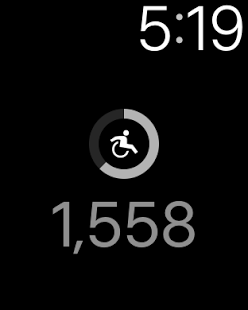
<p>This update also makes use of the new in iOS 10.3 ability for apps to have alternative icons to provide a different icon for use when the app is in Wheelchair Mode. Since watchOS 3 introduced the ability of the Apple Watch to count a user’s wheelchair pushes Pedometer++ has had the ability to use these as an alternative to steps within the app.  </p>

<p>When in this mode it seemed like having a more consistent icon made a lot more sense.  I really like the resulting icon, I think it captures a great sense of movement.  </p>
  <br/><br/><a href="http://david-smith.org/blog/2017/05/22/pedometer-plus-plus-2-dot-5-2-release-notes/">»</a>]]></content>
  </entry>
  
  <entry>


        <title type="html"><![CDATA[Inevitable Sherlocking]]></title>
        <link href="http://david-smith.org/blog/2017/01/18/inevitable-sherlocking/"/>
    
    
    <updated>2017-01-18T11:21:00-05:00</updated>
    <published>2017-01-18T11:21:00-05:00</published>
    <id>http://david-smith.org/blog/2017/01/18/inevitable-sherlocking</id>
    <content type="html"><![CDATA[<p>This week I’ve been working on a big update to my Apple Watch sleep tracker, <a href="https://itunes.apple.com/us/app/sleep++/id1038440371?at=10l3KS&amp;ct=sapps&amp;ls=1&amp;mt=8">Sleep++</a>.  While I love the app, it is a bit funny to work on.  I am pretty confident that somewhere deep within the Cupertino mothership, Apple is working on their own sleep tracking app for the Apple Watch.  </p>

<p>That isn’t based on anything specific, other than common sense.  If they weren’t, they’d be leaving a massive gap in their fitness/wellness offering.  I suspect their ultimate offering will have more capabilities and operate better than anything I can do, just given how much more integrated into watchOS it could be.    Which makes putting lots of effort into an app that any day could be competing against something better and permanently installed feel a bit hopeless. </p>

<p>I’ve had the feeling that one day Apple would introduce a sleep tracker ever since I began working on <a href="https://itunes.apple.com/us/app/sleep++/id1038440371?at=10l3KS&amp;ct=sapps&amp;ls=1&amp;mt=8">Sleep++</a> back in 2015.  The question was always <em>when</em>, not <em>if</em>.  Each successive update to watchOS I dive into the changelog to look for clues as to when this fateful day will finally arrive.  I got especially worried in watchOS 3 when Apple introduced their “Bedtime” alarm feature to iOS 10’s alarm clock, but September came and went without anything more.  </p>

<p>In a weird way I’ve just come to peace with this reality and grown to understand that this isn’t something that I should really fear.  While the indefinite nature of its arrival certainly gives me a bit of unease, once I accepted that it was inevitable things got much simpler.  </p>

<p>I approach development now with a slightly different perspective.  My goal is to </p>

<ul>
  <li><em>(a)</em> in the meantime be the best Apple Watch sleep tracker on the market and take advantage of this opportunity as best I can, and</li>
  <li><em>(b)</em> prepare for when they eventually arrive by making the real value of the app not tied solely to data collection.  </li>
</ul>

<p>The first part seems to be working so far.  The app has nearly 650k downloads and I’d put it up against any other sleep tracker on the market.  I suppose I’m just not letting the fact that <em>someday</em> I might get smooshed, detract from the potential that the time between <em>today</em> and <em>someday</em> contains.  </p>

<p>The second part is far more interesting.  Nearly all of the features I have in mind for the app have nothing to do with the data collection side of things.  When Apple inevitably launches their offering it will certainly do a better job of tracking a user’s sleep and do it in a less invasive way than I ever could. The nature of watchOS is such that doing long running, background monitoring of a user’s motion is difficult as a third party, but I suspect straight forward for a first party app.  </p>

<p>Given Apple’s track record with health and fitness data I can reasonably expect that whatever data they collect will be made available in the Health database, which <a href="https://itunes.apple.com/us/app/sleep++/id1038440371?at=10l3KS&amp;ct=sapps&amp;ls=1&amp;mt=8">Sleep++</a> could then switch over to using.  </p>

<p>My goals now are to give <a href="https://itunes.apple.com/us/app/sleep++/id1038440371?at=10l3KS&amp;ct=sapps&amp;ls=1&amp;mt=8">Sleep++</a> tools for helping my users understand their sleep patterns and insights into how to potentially improve them—using my own data for now, but with future sources in mind.  </p>

<p>I suppose the reason I thought writing this post would be helpful was to try and give a sense of how letting go of the fear of a big competitor can help you focus in on what you can uniquely do…and if I’m honest I wanted to put my expectations in writing now so that when that day eventually comes I can compare my expectations with the reality. </p>
  <br/><br/><a href="http://david-smith.org/blog/2017/01/18/inevitable-sherlocking/">»</a>]]></content>
  </entry>
  
  <entry>


        <title type="html"><![CDATA[Basic watchOS Analytics]]></title>
        <link href="http://david-smith.org/blog/2017/01/16/basic-watchos-analytics/"/>
    
    
    <updated>2017-01-16T11:40:00-05:00</updated>
    <published>2017-01-16T11:40:00-05:00</published>
    <id>http://david-smith.org/blog/2017/01/16/basic-watchos-analytics</id>
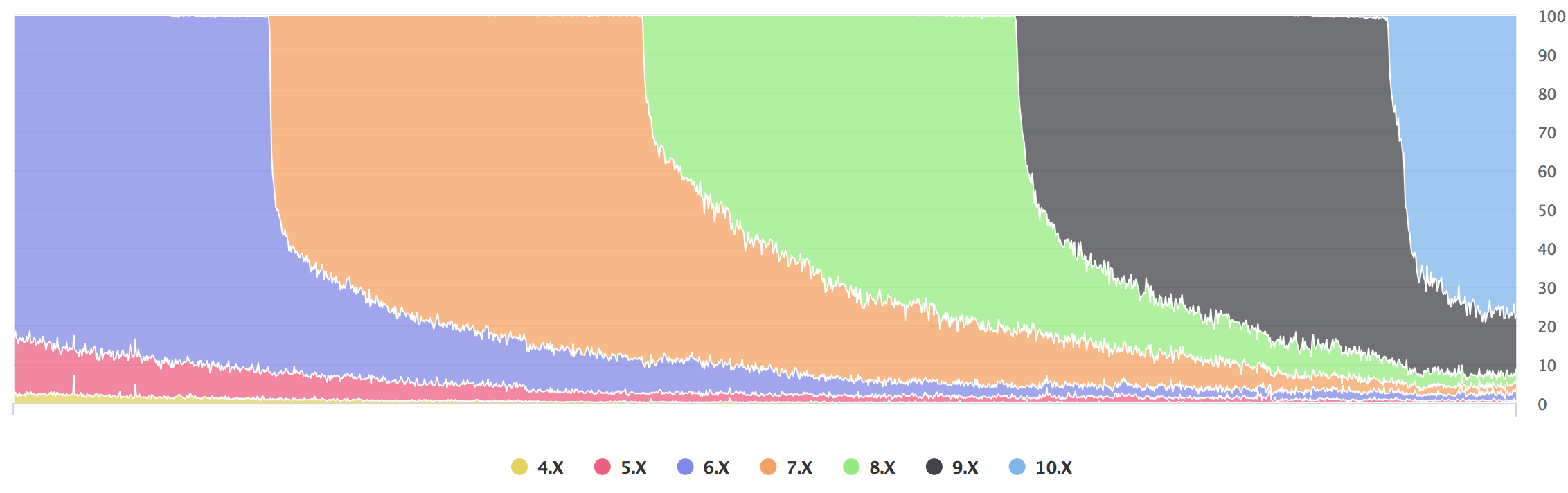
    <content type="html"><![CDATA[<p>It is no secret that I love analyzing statistics.  Since 2013, I’ve maintained a <a href="http://david-smith.org/iosversionstats">statistics page</a> for my <a href="http://itunes.apple.com/us/app/audiobooks/id311507490?mt=8&amp;at=10l3KS&amp;ct=stats">Audiobooks</a> app.  This has provided me with countless insights into my customers and how I can best design my apps for their use.  It also just makes some really pretty pictures:</p>

<p><img src="http://david-smith.org/resources/prettyadoption.png" alt="" /></p>

<p>Today I wanted to understand my Apple Watch users a bit better so I dug into the usage of my app <a href="https://itunes.apple.com/us/app/pedometer++/id712286167?mt=8&amp;at=10l3KS&amp;ct=blog">Pedometer++</a>.  </p>

<p>It currently has around a 13% Apple Watch attachment rate amongst my users.  I suspect this skews higher than the overall rate since Pedometer++ is a fitness app and the Apple Watch is a fitness tracker, but it provides a large enough sample size to give me useful insights.  </p>

<p>These stats are based on active users of Pedometer++ and based on usage in early January, 2017. </p>

<h3 id="watchos-adoption">watchOS Adoption</h3>

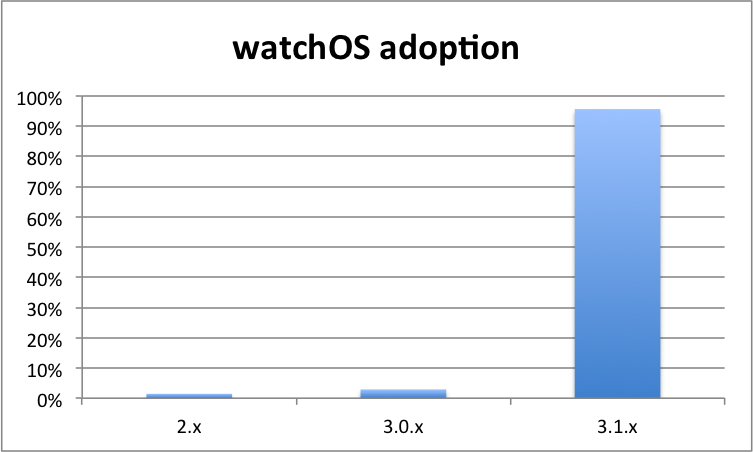
<p>First off, I was curious to see what the adoption rate was of watchOS itself.  The upgrade process for the Apple Watch is exceedingly cumbersome and long, so I was worried that lots of users would lag behind and not be running the latest versions.  </p>

<p>It turns out quite the opposite.  For my users essentially all of them are running watchOS 3.1.x (96%), which is fantastic for me as an Apple Watch developer.  </p>

<p><img src="http://david-smith.org/resources/watchosadoption.png" alt="" /></p>

<h3 id="apple-watch-size">Apple Watch Size</h3>

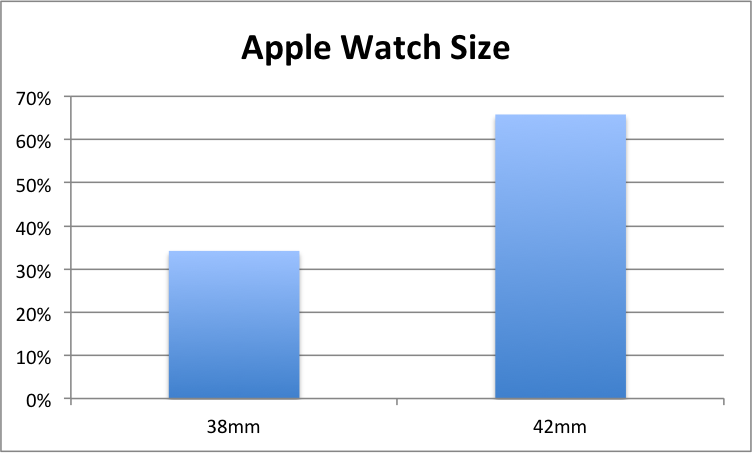
<p>Next, I wanted to understand the distribution of sizes worn by my users.  While supporting both sizes is an essential part of developing a watchOS app, it is still useful to have a sense for which size is more commonly used. </p>

<p>For my user base, the split somewhat favors the larger 42mm model (66%).  </p>

<p><img src="http://david-smith.org/resources/applewatchsize.png" alt="" /></p>

<h3 id="apple-watch-cpu">Apple Watch CPU</h3>

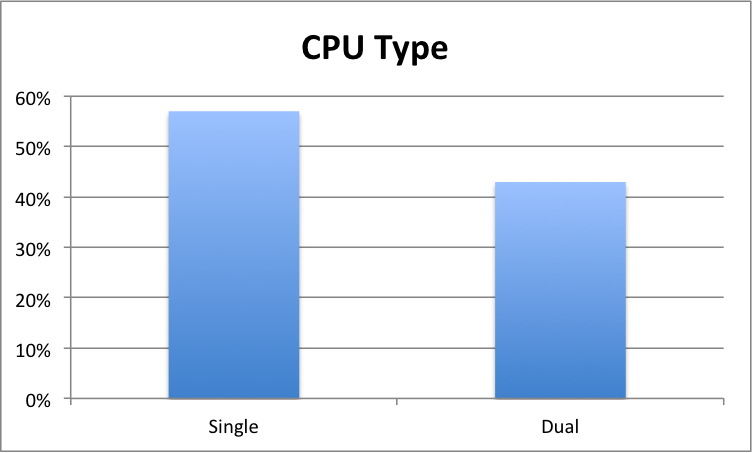
<p>Lastly I wanted to get a sense of the split between the two possible CPU configurations.  The first-gen Apple Watch featured a (rather slow) single core CPU, while the Series 1 and Series 2 have a (much faster) dual core CPU.  </p>

<p>I was delighted when Apple elected to not keep selling the first-gen model when the newer ones were released, which I hoped would hasten the adoption of the speedier one.</p>

<p>That hope appears to have been largely realized.  43% of my users are running a dual CPU model.  Since the first-gen was on sale for so much longer than the newer ones have been so far, I find this split quite promising.  While I wish the dual cores were in the lead, I suspect they will soon overtake the single cores at this rate.  </p>

<p><img src="http://david-smith.org/resources/watchoscpu.png" alt="" /></p>

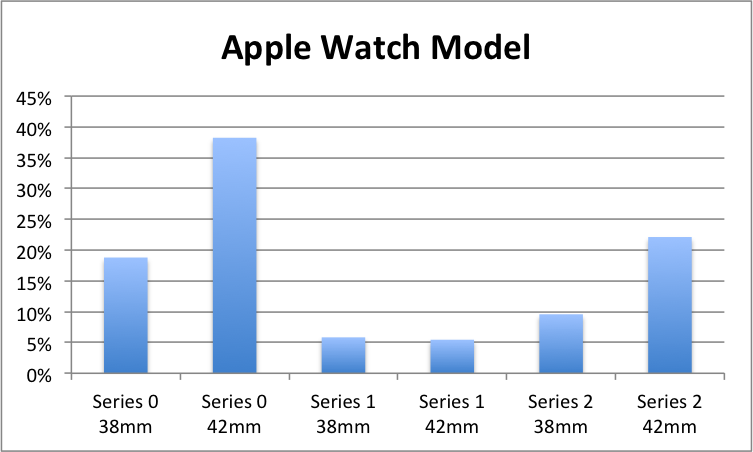
<h3 id="apple-watch-models">Apple Watch Models</h3>

<p>While not particularly useful from a development perspective, I didn’t think I could finish this post without a chart showing the breakdown by types…just for interest sake.  </p>

<p><img src="http://david-smith.org/resources/applewatchmodel.png" alt="" /></p>

<blockquote>
  <p>If you find this post useful and haven’t already, please consider taking a look at <a href="http://david-smith.org/apps">my wide array of Apple Watch apps</a> and seeing if one or more of them might be of use to you.</p>
</blockquote>
  <br/><br/><a href="http://david-smith.org/blog/2017/01/16/basic-watchos-analytics/">»</a>]]></content>
  </entry>
  
  <entry>


        <title type="html"><![CDATA[Podcast Search - A Random Side Project]]></title>
        <link href="http://david-smith.org/blog/2017/01/12/podsearch-a-random-side-project/"/>
    
    
    <updated>2017-01-12T10:02:00-05:00</updated>
    <published>2017-01-12T10:02:00-05:00</published>
    <id>http://david-smith.org/blog/2017/01/12/podsearch-a-random-side-project</id>
    <content type="html"><![CDATA[<p>I have a knack for remembering audio.  I’m awful at remembering names and faces, but if I hear something I can often recall it later.  This has manifested itself as a bit of a party trick for the podcasts I listen to, where I can quickly find the section of a show where a topic was discussed even years after I heard it.  Fun, but not particularly useful. </p>

<p>This situation gave me the idea for a little side project, <a href="http://podcastsearch.david-smith.org">Podcast Search</a>, empowering the same quick podcast recall for anyone.  The concept was simple.  Take a few of my favorite podcasts and run them through automated speech-to-text and make the result searchable.  </p>

<p>At first I wasn’t sure what to expect from fully automated speech recognition.  The results are pretty comical:</p>

<p>(<a href="http://podcastsearch.david-smith.org/episodes/669#2">Original Audio</a>)</p>

<blockquote>
  <p>The Incomparable, Number 324, January 2017.  Welcome back everybody to The Incomparable, I’m your host Jason Snell.  So Batman won a tournament that we ran here that was stupid, and we honor Batman by doing episodes about Batman.”</p>
</blockquote>

<p>became</p>

<blockquote>
  <p>the incontrovertible numbers we January
2n474 welcome back everybody to be
uncomfortable on your host Jason L we so
bad man won the tournament that we ran
here that was stupid and we wanted to
have an amazing episode about that man</p>
</blockquote>

<p>This is absolute gibberish.</p>

<p><em>But</em> after playing with the output a bit I found that even though this is an awful transcription, it is actually pretty good for keyword searching.  While the context is usually lost and words are sometimes wrong (“Batman” -&gt; “that man”), it gets it correct enough to be useful.</p>

<p>I ran the resulting scripts through a handful of podcasts and have published the result on <a href="http://podcastsearch.david-smith.org">Podcast Search</a>.</p>

<p>You can easily search for a term or keyword and then play the actual audio back to find if it was the section you were thinking about.  I even tag the sections with timecoded Overcast links for easy sharing.   It is very rough and a work in progress but surprisingly fun to play around with.  </p>

<p>Enjoy!</p>
  <br/><br/><a href="http://david-smith.org/blog/2017/01/12/podsearch-a-random-side-project/">»</a>]]></content>
  </entry>
  
  <entry>


        <title type="html"><![CDATA[Dev Notes for Workouts++ 1.0.1]]></title>
        <link href="http://david-smith.org/blog/2017/01/10/dev-notes-for-workouts-plus-plus-1-dot-0-1/"/>
    
    
    <updated>2017-01-10T11:55:00-05:00</updated>
    <published>2017-01-10T11:55:00-05:00</published>
    <id>http://david-smith.org/blog/2017/01/10/dev-notes-for-workouts-plus-plus-1-dot-0-1</id>
    <content type="html"><![CDATA[<p>I’ve decided to start writing up informal development notes for each of my significant app updates.  My goal is to communicate with my customers about the thinking behind new features.  I’ll also throw in a few little technical notes that are perhaps more interesting to the iOS developer community.  </p>

<h2 id="workouts-101">Workouts++ 1.0.1</h2>

<p>So often when I ship a v1.0 of a new app I am doing it knowing full well that it isn’t perfect.  I have found that it is usually more important to ship a solid, useful v1.0 and then start collecting feedback, than it is to agonize over perfection.  It might be possible for a larger team to have enough internal discussion and critique to ship a ‘perfect’ v1.0 but for a solo developer that just hasn’t been my experience.</p>

<p>So when I shipped v1.0 on December 21 I knew I’d be turning around a quick update shortly thereafter. Both to add a feature as well as to fix all the little bugs that hadn’t shown up in testing.  </p>

<p>The bugs fixed were:</p>

<ul>
  <li>It turned out that my method of detecting a user’s preferred units from the Health app didn’t work consistently on the Apple Watch, so I had to manually determine this on the iPhone and sync the setting over.  </li>
  <li>I had initially limited the range of heart rates configurable in the app to a max of 170bpm, but after hearing a lot of feedback from some distinctly impressive athletes this was bumped up to allow them to set their alerts and color thresholds how they needed them.</li>
  <li>I added Strength, Yoga, Pilates and Functional training types to the available set of workout types.  Apple <a href="https://developer.apple.com/reference/healthkit/hkworkoutactivitytype">allows</a> for a rather extensive list of possible workout activity types, but to keep things manageable within the app I don’t want to include <em>all</em> of them. So I collected feedback from the initial wave of users to see where I was lacking. </li>
  <li>The speed/pace calculation system was completely overhauled to avoid situations where the displayed speed would fluctuate wildly.  These values aren’t provided directly by the Apple Watch.  Instead, I have to derive them from the distance samples I get.  The nuances about how often these samples are provided make getting a consistent speed output very tricky.  The current mechanism is far more stable and tolerant of fluctuations in the old method. One of the big things I’m working on for v1.1 is location tracking, which will help me gain access to much more accurate avenues for collecting this data. So this is likely an interim fix for now. </li>
</ul>

<p>The main feature of this update was the ability to Pause workouts.  This was intended to be included in v1.0, but I had run into a last minute bug where it wouldn’t consistently update the display when paused so I had disabled the feature for launch.  </p>

<p>Superficially pausing had seemed like a straightforward feature to add when I began working on it.  But it turns out to be subtly tricky, and in the ways that tend to keep a programmer up at night.  Clearly defining what it <em>should</em> do when paused was quite a conundrum for me.  Should I keep updating the UI with your heart rate data as it comes in?  If you move around while paused should I unpause, add the new distances, or ignore them?  How should I handle active calories ‘earned’ while paused for the purposes of totals?  </p>

<p>In the end I have initially chosen to take the conservative approach of displaying the data collected while paused, but not automatically resuming based on movement.  In my own testing/usage I find that since you can resume with the physical motion of rotating the Crown backwards I have just added that into my muscle memory and rarely forget to resume.  </p>

<p>Speaking of which, I reduced the sensitivity of the “rotate crown to end/pause” feature after getting reports that it was too sensitive and had accidentally triggered a few times.  The <em>absolute last</em> thing I want to do is loose workout data, which unexpectedly ending a workout would be.  Though on the positive side, this is probably the feature for which I have received the most positive feedback for.  Turns out I wasn’t the only one annoyed with trying to use their Watch with sweaty fingers.</p>
  <br/><br/><a href="http://david-smith.org/blog/2017/01/10/dev-notes-for-workouts-plus-plus-1-dot-0-1/">»</a>]]></content>
  </entry>
  
  <entry>


        <title type="html"><![CDATA[Introducing Workouts++]]></title>
        <link href="http://david-smith.org/blog/2016/12/21/introducing-workouts-plus-plus/"/>
    
    
    <updated>2016-12-21T09:00:00-05:00</updated>
    <published>2016-12-21T09:00:00-05:00</published>
    <id>http://david-smith.org/blog/2016/12/21/introducing-workouts-plus-plus</id>
    <content type="html"><![CDATA[<style type="text/css" media="screen">
.videowrapper {
    float: none;
    clear: both;
    width: 100%;
    position: relative;
    padding-bottom: 56.25%;
    padding-top: 25px;
    height: 0;
}
.videowrapper iframe {
    position: absolute;
    top: 0;
    left: 0;
    width: 100%;
    height: 100%;
}
</style>

<center><div class="videowrapper"><iframe width="560" height="315" src="https://www.youtube.com/embed/mDAvuw-bMSs" frameborder="0" allowfullscreen=""></iframe></div></center>
<center><span style="font-size:80%">A quick overview of Workouts++</span></center>

<p><br /></p>

<p>Just in time for all your New Years Resolutions, I’m delighted to announce my newest app, Workouts++.</p>

<p><a href="https://geo.itunes.apple.com/us/app/workouts++/id1182551958?at=10l3KS&amp;ct=blogw&amp;ls=1&amp;mt=8">Workouts++</a> lets you completely customize your Apple Watch workouts to display whatever fitness data you’d like — from a 6 metric display packed with info to a focused single metric display.  For each metric you can setup conditional coloring and haptic alerts to help keep you in the zone.  You can even display graphs of your performance to help you understand how well your workout is going.  My goal was to create the most customizable workout app possible for the Apple Watch.  </p>

<p>The Apple Watch app then lets you use these custom workout screens during your workout, with your configured haptics keeping you on track.  </p>

<p>I added a feature to the Apple Watch to help make ending your workout better when your fingers are wet or are wearing gloves.  You can now do this solely using the Digital Crown.</p>

<p>Back on your iPhone once the workout is complete you can browse all the collected workouts in the <em>Workouts</em> area.  This includes summary statistics as well as minute-by-minute graphs showing precisely your performance.  </p>

<p>I started out making the perfect workout app for myself and I believe I ended up making the best workout app for the Apple Watch, period. I hope you’ll give it a try.  </p>

<p><a href="https://geo.itunes.apple.com/us/app/workouts++/id1182551958?at=10l3KS&amp;ct=blogw&amp;ls=1&amp;mt=8">Workouts++</a> is typically going to be $4.99, but is on a 20% launch sale for $3.99 until January 2nd.</p>

<center><a href="https://geo.itunes.apple.com/us/app/workouts++/id1182551958?at=10l3KS&amp;ct=blogw&amp;ls=1&amp;mt=8"><img style="border:none;padding:0px;margin:5px" src="http://david-smith.org/resources/appstorebadge.png" /></a></center>

<p><br /><br /></p>

<p>I made a walkthrough video below showing how the app works in practice to give you a better idea how best to use Workouts++.</p>

<p><br /></p>

<center><div class="videowrapper"><iframe width="560" height="315" src="https://www.youtube.com/embed/dC9vj-g2Kzw" frameborder="0" allowfullscreen=""></iframe></div></center>
<center><span style="font-size:80%">A <b>detailed</b> walkthrough of Workouts++</span></center>

  <br/><br/><a href="http://david-smith.org/blog/2016/12/21/introducing-workouts-plus-plus/">»</a>]]></content>
  </entry>
  
  <entry>


        <title type="html"><![CDATA[Christmas Wish: AirPod Double-Tap to Skip]]></title>
        <link href="http://david-smith.org/blog/2016/12/19/christmas-wish-airpod-double-tap-to-skip/"/>
    
    
    <updated>2016-12-19T14:40:00-05:00</updated>
    <published>2016-12-19T14:40:00-05:00</published>
    <id>http://david-smith.org/blog/2016/12/19/christmas-wish-airpod-double-tap-to-skip</id>
    <content type="html"><![CDATA[<p>Today I receive my AirPods.  Since getting my iPhone 7 a few months ago I’ve been very excited to give these a try.  For my type of listening (heavy on podcasts, light on music) they seem ideal.  Small, unobtrusive and won’t get snagged on things.  The main thing though that has given me some apprehension is the lack of easy playback controls.  </p>

<p>The ‘remove to pause’ feature covers most of the instances where I’d currently press the pause button on my white earbud headset controls.  It is a rare thing that I’d want to turn off the audio then leave them sitting quietly in my ears.  So that side of things is well covered.</p>

<p>Where things get tricky, however, is for skip forward and backwards, or in actual practice skip forward (I probably skip backwards only a fraction of the times I want to skip forward).  Currently there are three ways to accomplish this with AirPods:</p>

<ul>
  <li>Pull out my iPhone and use the onscreen controls.</li>
  <li>Raise my Apple Watch, press the side button, swipe over in the Dock to the Now Playing app, select it and press controls (As an aside, I really wish there was a Now Playing complication [filed as radar #26919899])</li>
  <li>Double-Tap AirPod and ask Siri to skip forward</li>
</ul>

<p>None of these are great. The first two are certainly workable but feel like I am giving up some of the benefits of being truly wireless.  Asking Siri for something like this is just plain awkward.  Both in terms of the flow (I have to interrupt the audio, have a conversation, then return to it) and in terms of it disrupting those around me. </p>

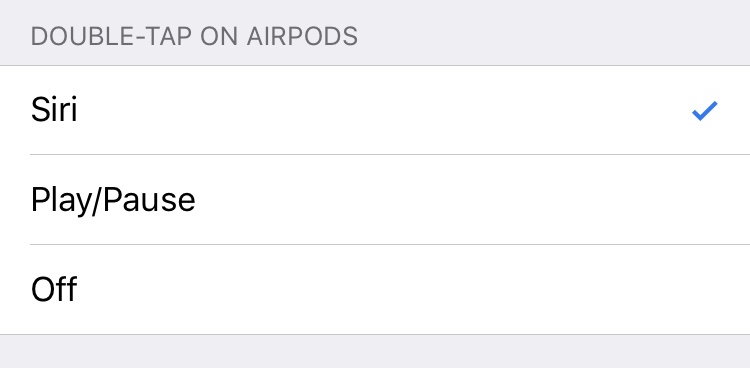
<p>What I’d really like is for there to be a way for this to work directly on the AirPod itself.  Its lack of physical controls originally made me think this was impossible but as reviews of the AirPods started to come out, I heard that Apple has already provided a mechanism for customizing the double-tap gesture for playback controls…</p>

<p><img src="http://david-smith.org/resources/doubletapoptions.jpg" alt="" /></p>

<p>…<strong>though sadly</strong> not including skip forward as an option :(</p>

<p>This blog post is my polite request that Apple consider adding another option to this setting for “Double-Tap to Skip Forward”.  This seems like a natural fit.  The Double-Tap on an iPhone headset control has meant skip forward since headset controls were first introduced.  The muscle memory I’ve built up over the years for it is significant. </p>

<p>I wouldn’t expect this to be the default, but making it an option here would <em>dramatically</em> increase the utility and convenience of AirPods for me (and I suspect many others).</p>

<p>[Filed as radar #29739099]</p>
  <br/><br/><a href="http://david-smith.org/blog/2016/12/19/christmas-wish-airpod-double-tap-to-skip/">»</a>]]></content>
  </entry>
  
  <entry>


        <title type="html"><![CDATA[Discontinuing support for Check the Weather]]></title>
        <link href="http://david-smith.org/blog/2016/10/17/discontinuing-support-for-check-the-weather/"/>
    
    
    <updated>2016-10-17T15:24:00-04:00</updated>
    <published>2016-10-17T15:24:00-04:00</published>
    <id>http://david-smith.org/blog/2016/10/17/discontinuing-support-for-check-the-weather</id>
    <content type="html"><![CDATA[<p>Four years ago today I <a href="https://twitter.com/_DavidSmith/status/258558679526285313">introduced</a> a weather app called <em>Check the Weather</em>.  I was really proud of how it turned out.  It was my first app where I was able to do everything ‘right’ from the beginning.  It was localized, had solid VoiceOver support and had an actual marketing plan to get it off the ground. </p>

<p><img src="http://david-smith.org/resources/usa.png" width="320px" /></p>

<p>It got off to a great start and was the first of my apps to break into the Top Charts.  I’m really proud of how it turned out and have used it regularly ever since.</p>

<p>Sadly, however, the time has come to discontinue support for the app.  The cost of providing weather data to it has grown too large to sustain. It has been operating at a slight loss for the last 2 years, which I didn’t mind providing as I used the app myself.  However, a recent change in the pricing for my radar data provider has made it infeasible to continue providing weather data for the app.  </p>

<p>I removed the app from sale about two months ago when it became clear that I would have to discontinue support for it.  I didn’t want anyone to purchase it and then have it immediately turned off.  The vast majority of purchases for the app occurred several years ago so hopefully most of the users will feel they got their money’s worth.  </p>

<p>I will be turning off the radar data in the app this week and the general weather data at the end of the year.  </p>

<p>I’d like to thank everyone who purchased Check the Weather.  I’m genuinely sad to see it go, but the time has come.</p>
  <br/><br/><a href="http://david-smith.org/blog/2016/10/17/discontinuing-support-for-check-the-weather/">»</a>]]></content>
  </entry>
  
  <entry>


        <title type="html"><![CDATA[iOS 10 / watchOS 3 Updates]]></title>
        <link href="http://david-smith.org/blog/2016/09/13/ios-10-slash-watchos-3-updates/"/>
    
    
    <updated>2016-09-13T14:04:00-04:00</updated>
    <published>2016-09-13T14:04:00-04:00</published>
    <id>http://david-smith.org/blog/2016/09/13/ios-10-slash-watchos-3-updates</id>
    <content type="html"><![CDATA[<p>I have major updates to Pedometer++, Sleep++ and Activity++ ready to take advantage of the new features and capabilities of iOS 10 and watchOS 3.</p>

<h2 id="pedometerhttpsitunesapplecomusapppedometerid712286167mt8at10l3ksctblog"><a href="https://itunes.apple.com/us/app/pedometer++/id712286167?mt=8&amp;at=10l3KS&amp;ct=blog">Pedometer++</a></h2>

<ul>
  <li>I’ve added support for the new wheelchair mode to <a href="https://itunes.apple.com/us/app/pedometer++/id712286167?mt=8&amp;at=10l3KS&amp;ct=blog">Pedometer++</a>.  When enabled the app will  change to using the new <em>Wheelchair Pushes</em> metric rather than steps.  I’m simply delighted to open up the app to a new wider audience of users.</li>
</ul>

<p><img src="http://david-smith.org/resources/pedometerwheelchair.png" alt="" /></p>

<ul>
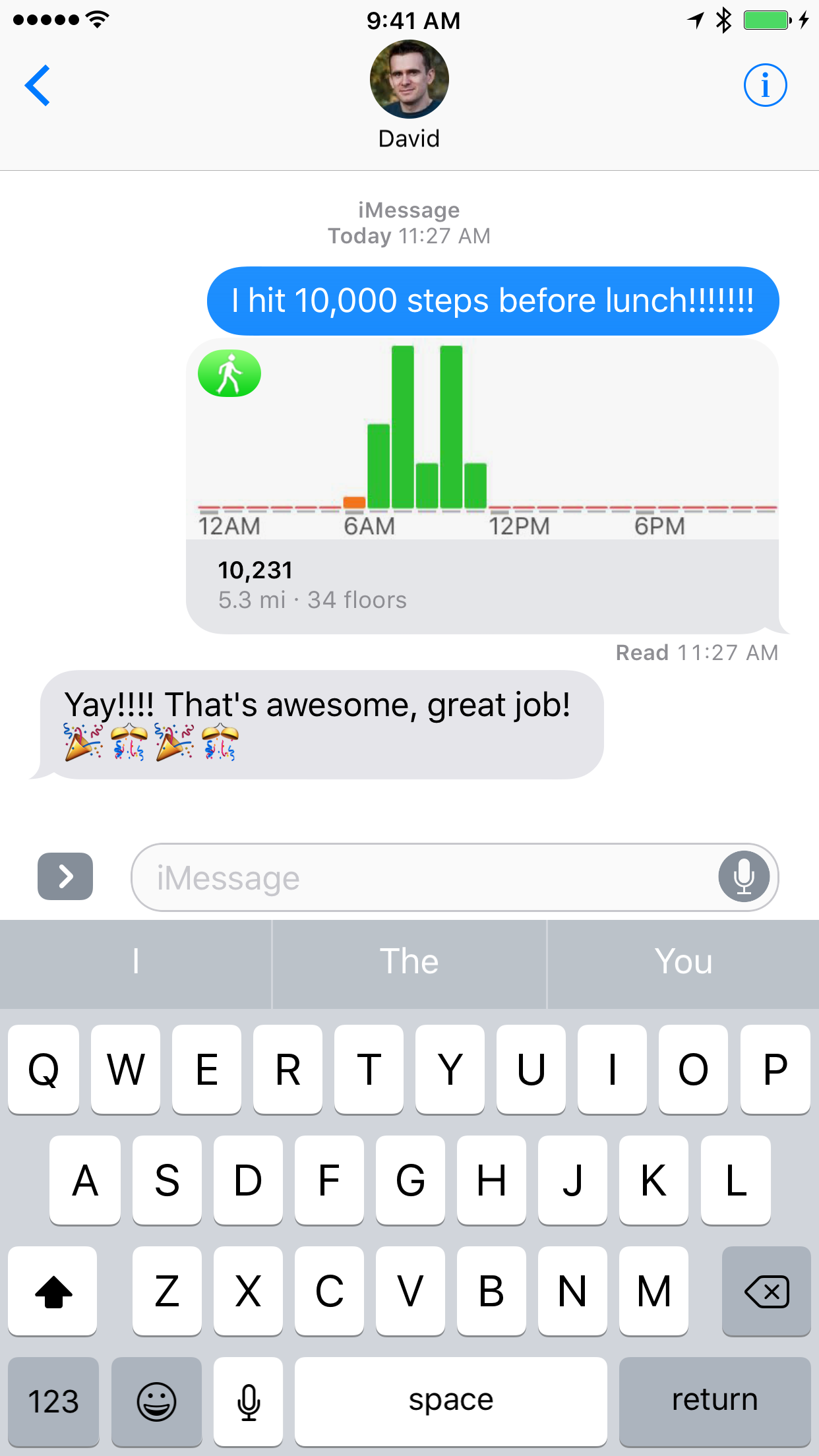
  <li>I’ve added the ability to share your daily step count and goal progress right from iMessage.  Perfect for bragging about that amazing hike you just went on or commiserating about being stuck inside a beautiful day.</li>
</ul>

<p><img src="http://david-smith.org/resources/pedometerimessage.png" width="320" /></p>

<ul>
  <li>I’ve also overhauled the refresh system for the Apple Watch, both on the watch face itself (when added as a complication) and while doing a walking workout.  Both should now be massively more response and timely. </li>
</ul>

<h2 id="sleephttpsitunesapplecomusappsleepid1038440371at10l3ksctappsls1mt8"><a href="https://itunes.apple.com/us/app/sleep++/id1038440371?at=10l3KS&amp;ct=apps&amp;ls=1&amp;mt=8">Sleep++</a></h2>

<ul>
  <li>
    <p><a href="https://itunes.apple.com/us/app/sleep++/id1038440371?at=10l3KS&amp;ct=apps&amp;ls=1&amp;mt=8">Sleep++</a> has been updated to take advantage of the new Background Refresh mechanism in watchOS 3.  Now rather than performing all of the sleep analysis in the morning when you wake up, instead it is able to analyze your night while you are sleeping.  So when you wake up only the last few minutes of the night need to be processed.  The end result of this is that you should barely see the <em>Analyzing Night</em> progress dialog any more. </p>
  </li>
  <li>
    <p><a href="https://itunes.apple.com/us/app/sleep++/id1038440371?at=10l3KS&amp;ct=apps&amp;ls=1&amp;mt=8">Sleep++</a> has also been updated to integrate with iMessage.  You can now send a snapshot of your last night right from within the Messages app.  This lets you quickly and easily share just how good (or bad 😳) your night was. </p>
  </li>
</ul>

<p><img src="http://david-smith.org/resources/sleepimessage.png" width="320" /></p>

<h2 id="activityhttpsitunesapplecomusappactivityid1089666978ls1at10l3ksctappsls1mt8"><a href="https://itunes.apple.com/us/app/activity++/id1089666978?ls=1&amp;at=10l3KS&amp;ct=apps&amp;ls=1&amp;mt=8">Activity++</a></h2>

<ul>
  <li>
    <p><a href="https://itunes.apple.com/us/app/activity++/id1089666978?ls=1&amp;at=10l3KS&amp;ct=apps&amp;ls=1&amp;mt=8">Activity++</a> has been improved to make the complications shown the watch update in near real-time now.  Previously there could be considerable delays in how often they would update.  In this version they should typically be within a few minutes of current. </p>
  </li>
  <li>
    <p>Additionally, I’ve also added the ability to export your activity data as a CSV file.  Just in case you (like me) enjoy making charts and graphs.  </p>
  </li>
</ul>

  <br/><br/><a href="http://david-smith.org/blog/2016/09/13/ios-10-slash-watchos-3-updates/">»</a>]]></content>
  </entry>
  
  <entry>


        <title type="html"><![CDATA[App Store Name Lengths]]></title>
        <link href="http://david-smith.org/blog/2016/09/06/app-store-name-lengths/"/>
    
    
    <updated>2016-09-06T10:40:00-04:00</updated>
    <published>2016-09-06T10:40:00-04:00</published>
    <id>http://david-smith.org/blog/2016/09/06/app-store-name-lengths</id>
    <content type="html"><![CDATA[<p>Starting tomorrow Apple will start enforcing a new rule limiting the length of an app’s name to 50 characters.  Additionally, they will start <a href="https://developer.apple.com/app-store/review/guidelines/">disallowing apps</a> from including “terms or descriptions that are not the name of the app”.  </p>

<p>The latter of these rules is probably the most actually impactful and important in terms of cleaning up the App Store.  As the length of the names hasn’t really been the problem, it is keyword spamming at the end of the name. </p>

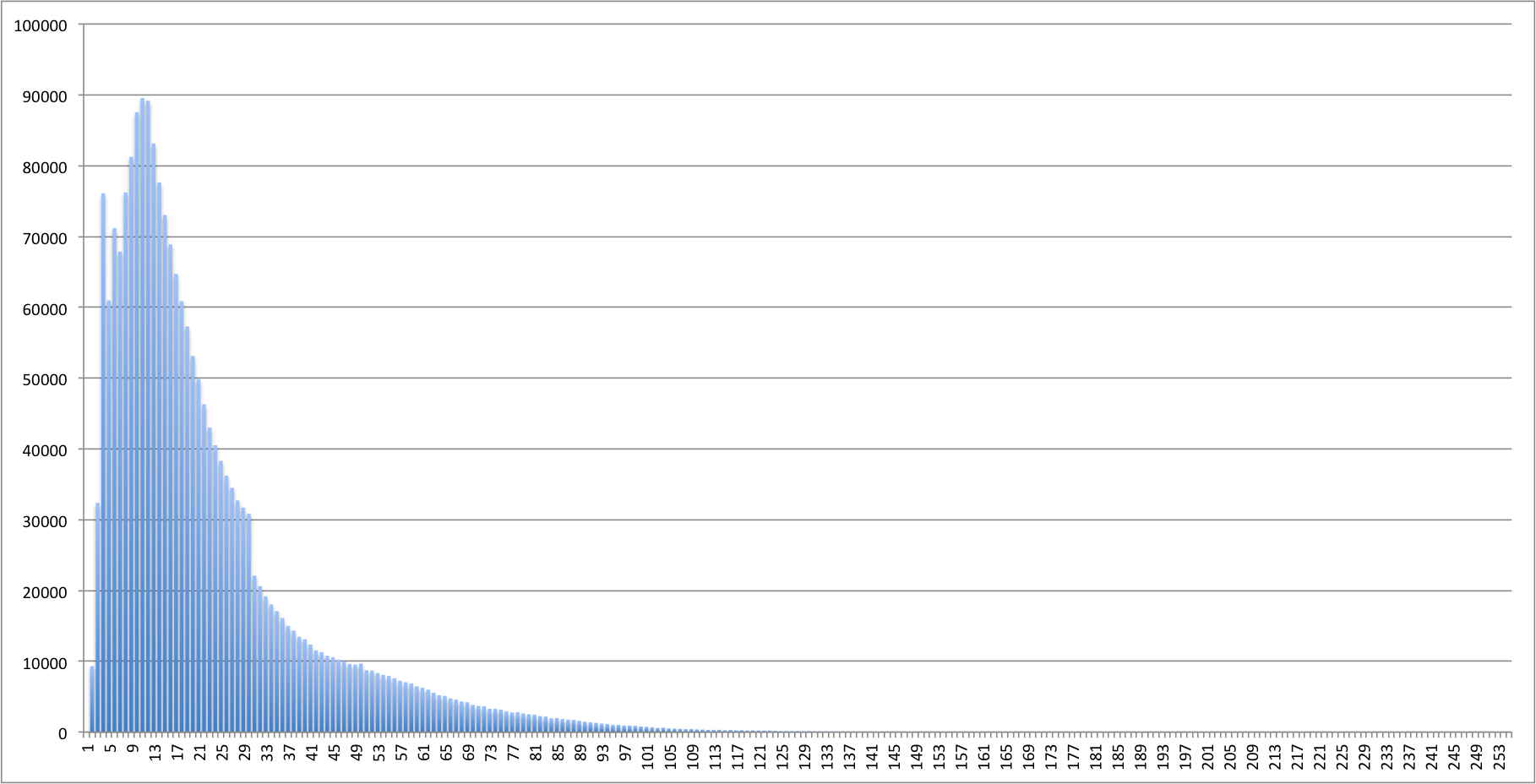
<p>But the 50 character limit is still interesting to consider, so I dug through my App Store metadata cache to see just how many apps would be affected.  It looks like only around 9% of apps currently have names that are longer than 50 characters (around 200k).  The distribution of all app name lengths looks like this:</p>

<p><img src="http://david-smith.org/resources/NumberOfAppsAtLength.png" alt="" /></p>

<p>You can clearly see that the vast majority of app names are clustered around 10-15 characters long, with a steep drop off to the absurdly long ones.  </p>

<p>The average length of an app name is 22 characters.  The mode is 11.  The median is 17.  Which tells me that the 50 character limit was added largely to constrain the problem rather than address it directly..  The vast majority of apps are short enough to be unaffected by the limit. </p>

<p>In case you are wondering, the longest an app name can currently be is 255 characters.  There are around 44 apps with that length including <em>“Super Flappy-blade-lord-new-baby-cheats-fall-plus-jump-cooking-fly-bird-shooter-mania-all-tap-top-cool-new-shooter-riff-all-in-space-cycle-pal-all-in-one-fm-messenger-epic-head-you-epic-guess-hero-run-hero-top-fun-girl-me-crazy-my-in-uber-flinch-net-fix-4”</em> which is quite a feat in-and-of itself.  I pulled all 44 of the 255 length names into a <a href="http://david-smith.org/resources/255.txt">text file</a> if you want to browse them.  </p>

<p>I will be very curious to see how strictly the policy against adding additional terms to the name will be enforced.  Will creatively descriptive names be allowed?  Would something like “The Ultimate Platform Running and Jumping Adventure” be permitted?  Is just moving the keyword adjectives forward to be part of the name rather than as a suffix going to be acceptable?</p>

<p>At the very least I suspect the trend of adding a dash/colon to the end of your app’s name and then appending a subtitle will be strictly forbidden.  Roughly 500k apps (23%) include a dash or colon in their name so that will catch out a more sizable number than the 50 character limit.    </p>

<p>I also got started wondering if the new limit would have a negative affect on any ‘legitimate’ names.  So I lost more time than I’d like to admit on <a href="https://en.m.wikipedia.org/wiki/Longest_word_in_English">this Wikipedia</a> page about the longest English words.  The longest word in a major dictionary “<a href="https://en.m.wikipedia.org/wiki/Pneumonoultramicroscopicsilicovolcanoconiosis">Pneumonoultramicroscopicsilicovolcanoconiosis</a>” is only 45 characters long so if someone were to make an app specific to this lung disease they’d be fine.  If Disney wanted to make a ‘Supercalifragilisticexpialidocious’ (34 characters) app they too would be fine.  </p>

<p>Things would only start to get tricky for long place names.  If the local hiking club of “<a href="https://en.m.wikipedia.org/wiki/Taumatawhakatangihangakoauauotamateaturipukakapikimaungahoronukupokaiwhenuakitanatahu">Tau­mata­whaka­tangi­hanga­koau­auota­matea­pokai­when­uaki­tana­tahu</a>” (a hill in New Zealand) wanted to make an app they’d be out of luck with a name 35 characters over the limit. But in practice I don’t expect the 50 character limit to be a problem outside of these more novelty cases. </p>
  <br/><br/><a href="http://david-smith.org/blog/2016/09/06/app-store-name-lengths/">»</a>]]></content>
  </entry>
  
  <entry>


        <title type="html"><![CDATA[Evolving App Store Business Models]]></title>
        <link href="http://david-smith.org/blog/2016/09/05/evolving-business-app-store-business-models/"/>
    
    
    <updated>2016-09-05T16:07:00-04:00</updated>
    <published>2016-09-05T16:07:00-04:00</published>
    <id>http://david-smith.org/blog/2016/09/05/evolving-business-app-store-business-models</id>
    <content type="html"><![CDATA[<p>I’ve been thinking this past week (as I often do) about the ever-changing landscape of the App Store.  This year has seen some of the biggest changes in policy and structure that I can remember.  We have new <a href="https://developer.apple.com/app-store/subscriptions/whats-new/">subscription pricing models</a>, <a href="https://developer.apple.com/app-store/search-ads/">search ads</a>, <a href="https://developer.apple.com/news/?id=09012016a">a substantial purge of older apps</a>, <a href="https://developer.apple.com/news/?id=09012016a">new requirements for app names</a> and a variety of little changes to the App Store app itself in iOS 10. </p>

<p>I won’t know how the sum of these changes will impact my business until probably later this fall, but it seemed like a good time to look back at the last several years and examine the path that brought me here.  </p>

<p>On November 8th it will have been <strong>eight</strong> years since my first app went live in the App Store.  Back when I started I would have been gobsmacked to hear that eight years later I’d still be making my living solely from apps. </p>

<p>The App Store ecosystem today is wildly different from what it was back then.  I launched my first app into a store of around 90k apps; today we have well over 2 million.  Back then we didn’t have advertising networks, in-app purchases or subscriptions.  You were free or paid, and if you wanted to make a living you pretty much had to be paid.  </p>

<p>Today things are quite different.  Paid apps now make up a vanishingly small proportion of my income, and nearly all of my recent successes have come on the back of free apps.  The transition between the two ends has not always been straightforward but I’ve focused hard on being adaptable and open-minded during the transition.  </p>

<h4 id="the-data">The Data</h4>

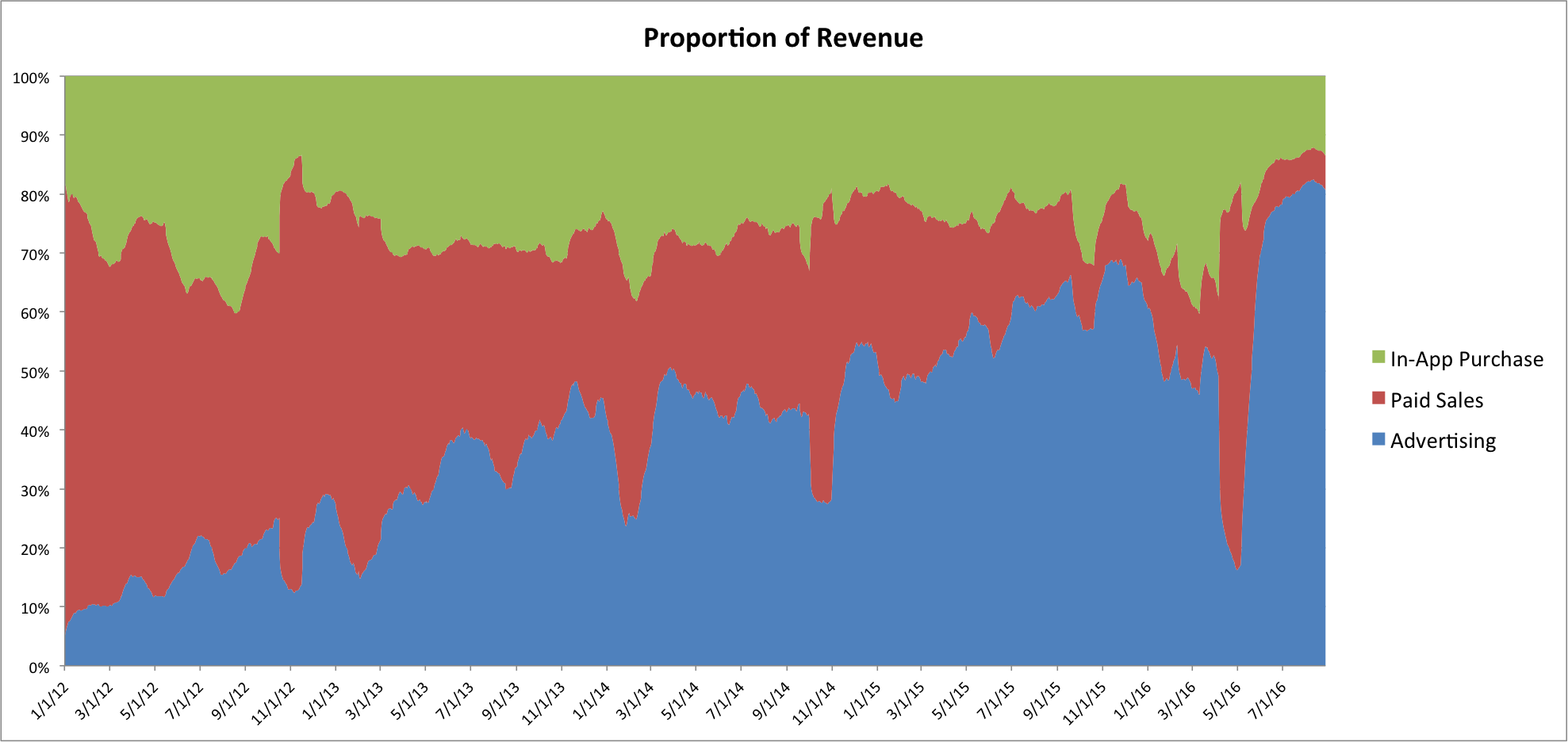
<p>I can perhaps most simply show the evolution of my indie software business with this chart:</p>

<p><img src="http://david-smith.org/resources/PercentRevenue.png" alt="" /></p>

<p>I don’t have solid data going all the way back to 2008 when I launched my first app, but I do from 2012.  In the last 4.5 years the split of where my revenue comes from has followed a clear, inexorable march from being paid-based to advertising-based.  Starting in 2012 advertising in my apps made up around 10% of sales whereas now it is nearly 80%. That increase has come almost entirely from a near collapse of my paid upfront sales (with my in-app purchase income largely unchanged).  </p>

<p>The steadiness of this progression, which traces a near perfectly linear curve over the last few years, initially made me worried I’d goofed in the data analysis.  But I’ve double checked my data and this is what my history looks like.  </p>

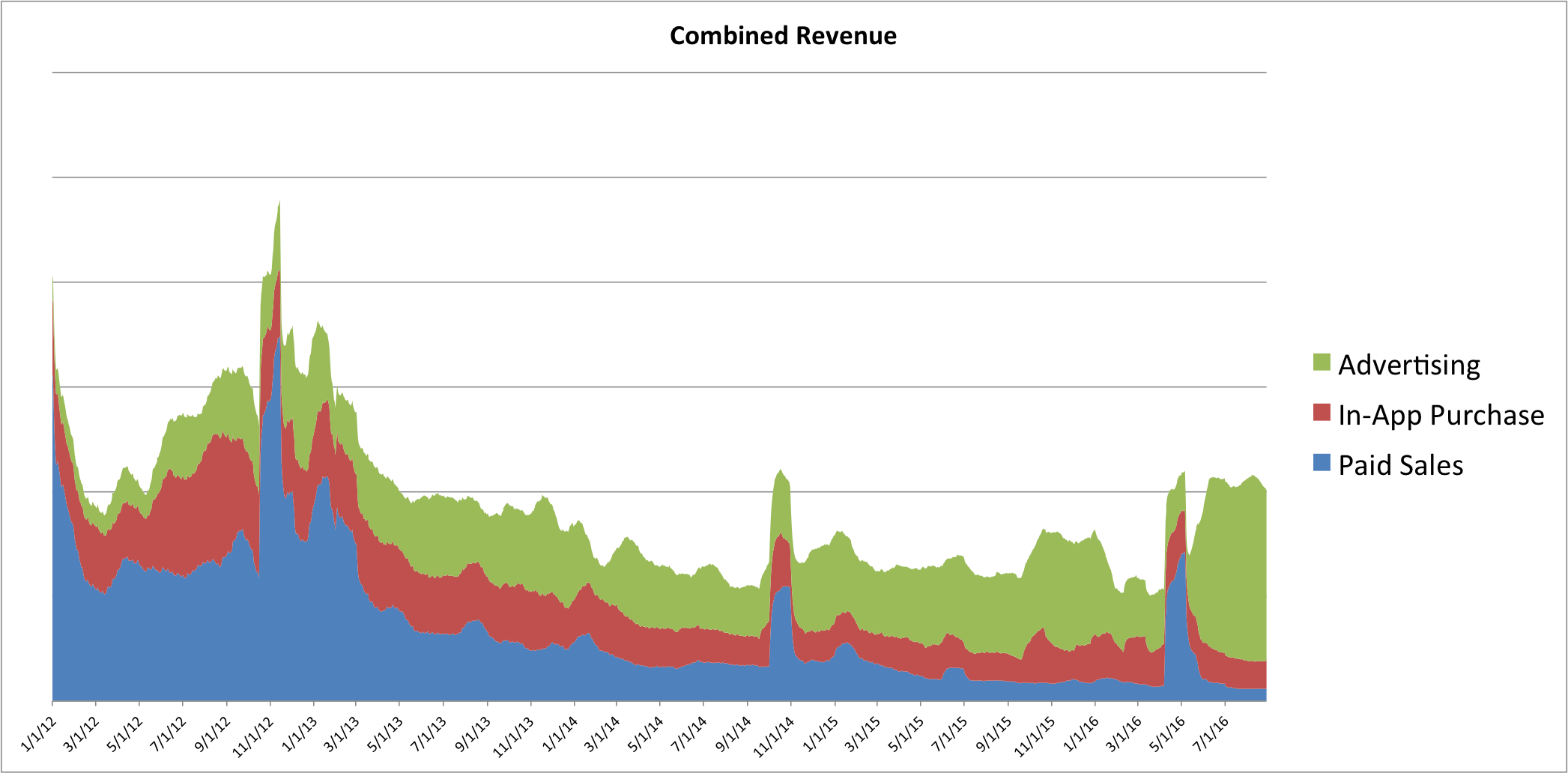
<p>Now before all you data scientists out there start shouting about how awful a 100% stacked chart is since it is so easily tricked by changes in the overall totals, here is a bezos chart of overall revenue over that period:</p>

<p><img src="http://david-smith.org/resources/CombinedRevenue.png" alt="" /></p>

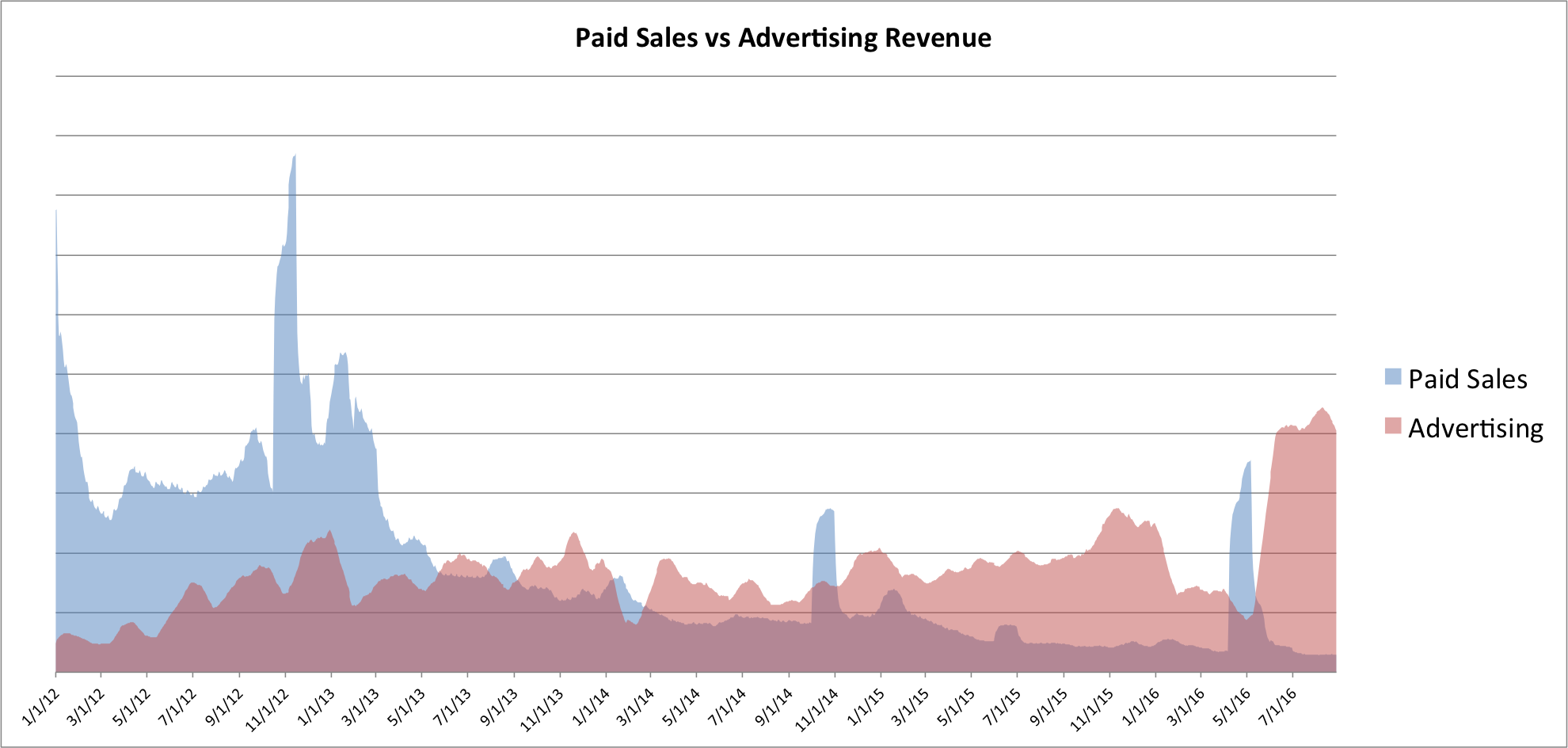
<p>The same trends are quite visible here too. Other than the spikes caused by the launch of new paid apps (for example, Emoji++ in Oct, 2014 and Activity++ in May, 2016) paid sales have been on a steady decline since roughly 2013.  The absolute value of in-app purchase revenue has diminished somewhat but held steady since around 2014.  While advertising revenue has been on a gradual but definite rise.   </p>

<p><em>(The sizable jump in advertising revenue this year was caused by switching away from iAd to AdMob when Apple announced they were discontinuing that advertising platform.  The dip in revenue from January to May of this year was caused by staying on iAd even when their rates started to slide, likely an early indication of the end of the service)</em></p>

<p>You can see the transition between paid and advertising even more easily when I stack the two together:</p>

<p><img src="http://david-smith.org/resources/PaidVsAdvertising.png" alt="" /></p>

<h4 id="conclusions">Conclusions</h4>

<p>Now this is all just the experience of one developer.  It doesn’t really paint a full and complete picture of the App Store.  But nevertheless I think that my experiences are consistent with what I have heard from countless other developers of the last few years.  I am living proof that it is still quite possible to make a solid and reliable income from the App Store.  The way in which I have been able to do that, however, has been to change with the times and constantly adapt to the changes in the market.</p>

<p>When I was discussing this data with a few friends I was asked a rather incisive question <em>“Is this a change in your attitude, or a change in how the market is pushing?”</em>  Whenever we look at history it is easy to see what you want to see.  To cherry pick your interpretation or ascribe causation to simple chance.  </p>

<p>As I have looked back on these last few years I’ve come to the conclusion that the change is mostly been in the App Store market, rather than in my own attitudes.  In many cases adding advertising to my apps has been something I’ve fought and resisted as long as possible.  But in the end the pragmatic answer has been to not swim upstream and instead follow where my customers have led.  </p>

<p>The market has been pulling me along towards advertising based apps, and I’ve found that the less I fight back with anachronistic ideas about how software <em>“should”</em> be sold, the more sustainable a business I have. </p>
  <br/><br/><a href="http://david-smith.org/blog/2016/09/05/evolving-business-app-store-business-models/">»</a>]]></content>
  </entry>
  
  <entry>


        <title type="html"><![CDATA[A Sizeable Cleanup]]></title>
        <link href="http://david-smith.org/blog/2016/09/03/a-sizeable-cleanup/"/>
    
    
    <updated>2016-09-03T11:39:00-04:00</updated>
    <published>2016-09-03T11:39:00-04:00</published>
    <id>http://david-smith.org/blog/2016/09/03/a-sizeable-cleanup</id>
    <content type="html"><![CDATA[<p>Last week we got news that Apple will be starting to <a href="https://developer.apple.com/support/app-store-improvements/">clean out</a> apps “that no longer function as intended, don’t follow current review guidelines, or are outdated.”  This is fantastic news.  Back in 2014 a program like this was my #1 hope in my <a href="https://david-smith.org/blog/2014/04/16/towards-a-better-app-store/">Towards a Better App Store</a> series.  Wherein I argued that all apps on the Store should be required to keep up to date with the modern review requirements.  </p>

<p>There are all kinds of challenges with cleaning out old apps.  It is quite reasonable to argue that just because it hasn’t been updated in a while doesn’t make an app ‘bad’, however, that argument only holds water so far.  After a certain point if an app is just left on the Store it will start to hurt the user experience.  Determining that line is extremely tricky but there are certain aspects that are very straightforward.  </p>

<p>The simplest are those that are <em>objective</em> rather than <em>subjective.</em> While Apple hasn’t said exactly the criteria they are going to apply, a few reasonable guesses are likely.  If an app wouldn’t pass modern app review criteria and if it doesn’t function at all on modern devices.  Beyond those it will get into the grey area where I expect them to (through trial-and-error) find the right balance between longevity and freshness. </p>

<p>As with all things I wanted to quantify the scale of this cleanup.  I have no way of really knowing the scale of things with regards to functionality based criteria.  But I can make some good guesses as to the more straightforward reasons to remove an app.  </p>

<p>The simplest of which would be to see how many apps could not possibly support 64-bit.  Since June, 2015 it has been a requirement that all new app updates include a 64 bit binary.  It was only possible to include such a binary starting on September 9, 2014.  So any app that wasn’t updated since then necessarily couldn’t pass modern review.  Of the App Store’s roughly 2M apps my initial analysis showed that roughly <strong>585,000</strong> apps would fall short of this (or roughly 27% of apps).  </p>

<p>Beyond that straight forward requirement things get a bit more vague.  How old is <em>tooo</em> old?  How broken is <em>tooo</em> broken?   How long can an app go without updates before it is <em>abandoned</em>?  These are much harder for me to guess for Apple’s policies.  If they set the requirement at one year since last update nearly <strong>half</strong> of the apps in the Store would go.  But that might be a bit too broad of a brush.  I’d guess something more case-by-case rather than a strict age rule (except for when a new submission requirement like 64-bit is added).</p>

<p>Wherever the scope of the cleanup falls the results should be substantial.  Both to customers who should have far fewer bad app download experiences and for developers who will be able to sell their apps in a cleaner storefront. </p>

<p>Of the twelve items I had initially hoped for back in 2014 around 5 of them are now in the App Store.  While I could grump about the remaining 7, instead I’m simply delighted that for the first time in what feels like forever I’m seeing significant and profound progress on the platform on which I make my living.  Which I must say is a fantastic feeling.  </p>
  <br/><br/><a href="http://david-smith.org/blog/2016/09/03/a-sizeable-cleanup/">»</a>]]></content>
  </entry>
  
  <entry>


        <title type="html"> <![CDATA[» Speaking at CocoaConf Yosemite]]></title>
        <link href="http://cocoaconf.com/yosemite"/>
    
    
    <updated>2016-07-21T14:39:00-04:00</updated>
    <published>2016-07-21T14:39:00-04:00</published>
    <id>http://david-smith.org/blog/2016/07/21/yosemite-by-cocoaconf-the-apple-conference-with-a-view</id>
    <content type="html"><![CDATA[<p>I’m delighted to have been asked to be one of the speakers at the next <a href="http://cocoaconf.com/yosemite">CocoaConf Yosemite</a>.  A technical conference hosted within Yosemite National Park (one of my very favorite places on earth).  The conference runs from March 20 - March 23, 2017.  </p>

<p>In case you missed it in today’s <a href="https://www.relay.fm/radar/37">Under the Radar</a> you can use the code <em>UnderTheRadar</em> to save 20% off your ticket.  </p>

<p>Hope to see you there.</p>
  <br/><br/><a href="http://david-smith.org/blog/2016/07/21/yosemite-by-cocoaconf-the-apple-conference-with-a-view/">»</a>]]></content>
  </entry>
  
  <entry>


        <title type="html"><![CDATA[Historical iPhone Screen Sizes]]></title>
        <link href="http://david-smith.org/blog/2016/05/02/historical-iphone-screen-sizes/"/>
    
    
    <updated>2016-05-02T11:10:00-04:00</updated>
    <published>2016-05-02T11:10:00-04:00</published>
    <id>http://david-smith.org/blog/2016/05/02/historical-iphone-screen-sizes</id>
    <content type="html"><![CDATA[<p>I’ve recently been curious about the overall trend in iPhone screen sizing.  Both as a result of the introduction of iPhone SE and because I feel it is an important thing for app developers to understand to make better decisions about their app UIs.  </p>

<p>Since 2013 I’ve kept a pretty detailed set of device analytics for my <a href="http://itunes.apple.com/us/app/audiobooks/id311507490?mt=8&amp;partnerId=30&amp;siteID=IzE7m699rYo">Audiobooks</a> app,  these are the stats that power my <a href="https://david-smith.org/iosversionstats/">iOS Version Stats  Page</a>.  </p>

<p>Included is the screen size of the device being used.  While the latest summary has always been included in the bottom portion of the stats page, I’ve never really thought to look at it over time.  The result turned out to be very interesting.  </p>

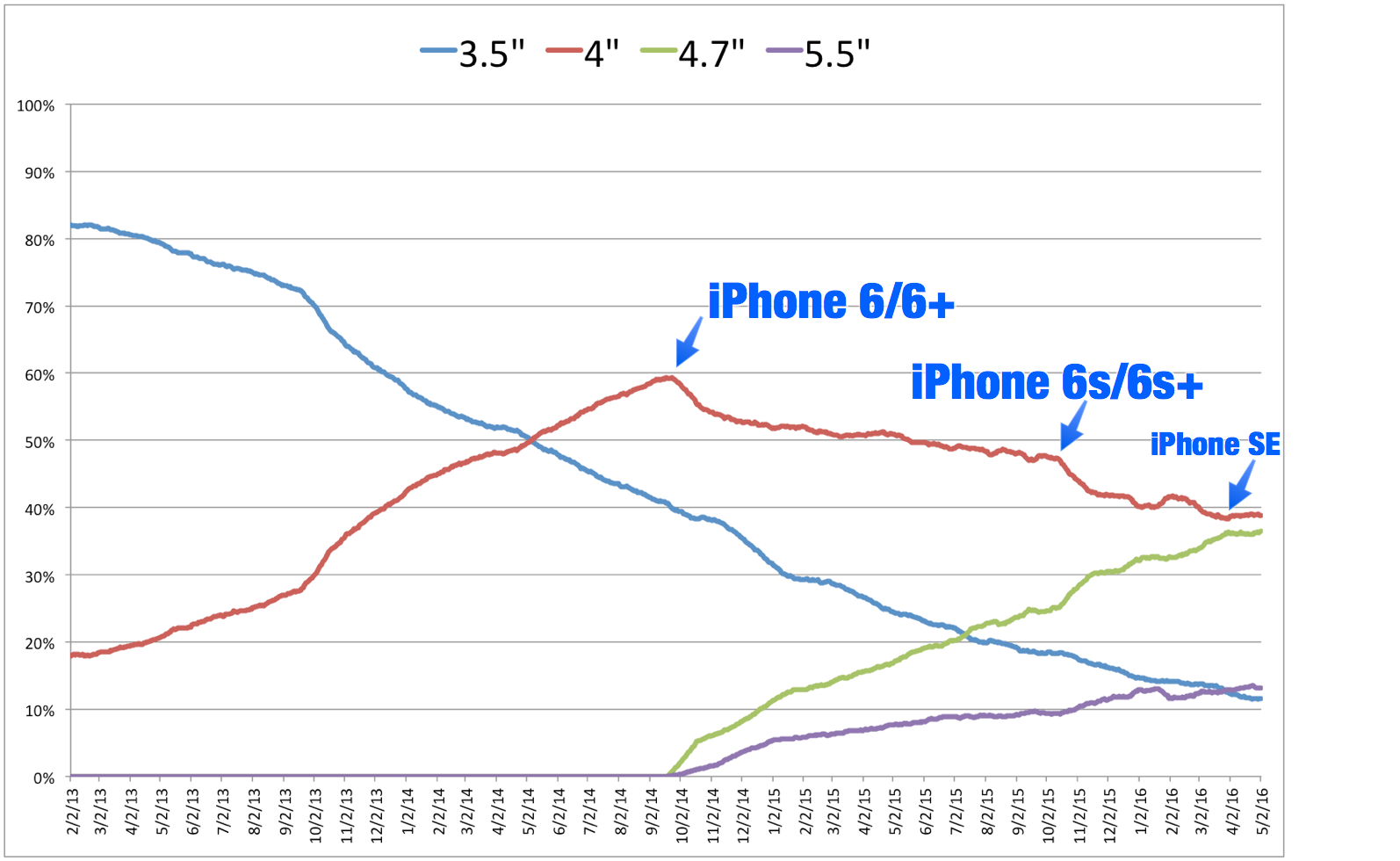
<p>Here is the percent of daily sessions (30 day moving average) using each size of iPhone over the last three years.  The iPhone 5 (which introduced the 4″ size) was introduced in September 2012, so around five months before I have data.   </p>

<p><img src="http://david-smith.org/resources/ScreenSizesOverTimeAnnotated.png" alt="" /></p>

<p>Much of the shape of this curve isn’t particularly surprising.  4.7 and 5.5″ screens have seen a steady increase in popularity since their introduction, with the 4.7″ outselling the 5.5″ at nearly a 3:1 ratio.  </p>

<p>What did catch my eye was the impact of the iPhone SE over the last month or so.  The 4.7″ curve had been steadily growing since its introduction and poised to take over as the most popular screen size. However, since the introduction of the SE the 4.7″ line has leveled out demonstrably (currently settling around 36%).  This may be a short lived phenomenon, but is nevertheless very interesting to see.</p>

<p>From a development perspective this shows me that continuing to target my visual design around a 4″ layout continues to be a smart move.  While the 3.5″ screen is essentially out-to-pasture at this point (I’d expect iOS 10 to drop support for the iPhone 4S), the 4″ layout will be with us for a long time to come. </p>
  <br/><br/><a href="http://david-smith.org/blog/2016/05/02/historical-iphone-screen-sizes/">»</a>]]></content>
  </entry>
  
  <entry>


        <title type="html"><![CDATA[A Year Wearing an Apple Watch]]></title>
        <link href="http://david-smith.org/blog/2016/04/25/a-year-wearing-an-apple-watch/"/>
    
    
    <updated>2016-04-25T10:48:00-04:00</updated>
    <published>2016-04-25T10:48:00-04:00</published>
    <id>http://david-smith.org/blog/2016/04/25/a-year-wearing-an-apple-watch</id>
    <content type="html"><![CDATA[<p>Yesterday was the one year anniversary of the launch of the Apple Watch.  It is a device that has had a profound impact on my life both personally and professionally.  The Apple Watch I <a href="https://twitter.com/_DavidSmith/status/591658664450195456">received</a> on launch day is still firmly on my wrist each day (notably with barely a scratch).  </p>

<p>I’m a bit of a numbers nut, so I had the idea to see just how much I’ve worn my watch over the last year.  The result turned out to be rather striking.</p>

<p>I wrote a little app to dig through all the sensor data collected by the Apple Watch and work out when it was on my wrist and when it was not.  I considered a “worn hour” to be any hour of the day during which a sensor sample was collected (so not necessarily worn 100% for that hour, but worn at some point during that hour). </p>

<p>Since receiving my watch 8,784 hours have past, during which I have worn my Apple Watch 7,277 hours. That works out to be around 83% of the time.  I have worn it for at least one hour in all but just 8 days (with most of those being a week I intentionally ‘disconnected’ around Christmas).  </p>

<p>The average hours I’ve worn it per day is 20.4.  With the median a rather staggering 23.  </p>

<p><img src="http://david-smith.org/resources/watchworn.png" alt="" /></p>

<p>Amusingly, you can clearly see when development of <a href="https://itunes.apple.com/us/app/sleep++/id1038440371?at=10l3KS&amp;ct=apps&amp;ls=1&amp;mt=8">Sleep++</a> began in earnest in late August, when my wearing suddenly jumps to 24 hours a day.  </p>

<p>I remember being rather skeptical of Apple’s original marketing of the Apple Watch as “our most personal device ever”, but a year later I must say that it would be a hard case to make that something that has been physically attached to me for 83% of my life is anything other than personal.  </p>
  <br/><br/><a href="http://david-smith.org/blog/2016/04/25/a-year-wearing-an-apple-watch/">»</a>]]></content>
  </entry>
  
  <entry>


        <title type="html"> <![CDATA[» Under the Radar #24: Should You Register for a WWDC Ticket?]]></title>
        <link href="https://www.relay.fm/radar/24"/>
    
    
    <updated>2016-04-19T16:45:00-04:00</updated>
    <published>2016-04-19T16:45:00-04:00</published>
    <id>http://david-smith.org/blog/2016/04/19/under-the-radar-number-24-should-you-register-for-a-wwdc-ticket-relay-fm</id>
    <content type="html"><![CDATA[<p>This week Marco and I discuss whether you should register for the WWDC ticket lottery, our experiences at WWDC over the last view years and what to do if you don’t get a ticket. </p>
  <br/><br/><a href="http://david-smith.org/blog/2016/04/19/under-the-radar-number-24-should-you-register-for-a-wwdc-ticket-relay-fm/">»</a>]]></content>
  </entry>
  
</feed>