Here's a walkthrough of my multi-camera live switching rig that I use to record conferences and events. I've spent a while finding small enough parts so that the entire setup can fit on my bike. I intentionally created this rig with dedicated components so that no computer is required for any part of this workflow.
Video Switcher

The heart of this whole operation is my favorite switcher, the Roland V-1HD. This little device is a powerhouse! It has 4 HDMI inputs (so you need an SDI to HDMI converter to get an SDI cable back into it), and analog audio inputs.
It can do picture-in-picture or split screen composites, which is useful if you want to combine the presenter's slides with the video. Kind of amazing for a device of this size and price point.
The analog inputs are super useful as well, since I can run the audio from the Zoom H6 mixer directly into this device, which gets the good audio feed onto the recording and HDMI output that goes to the livestream.
Cameras

I use three Canon Vixia HF G20 cameras. These are relatively inexpensive camcorder-style cameras with a mini HDMI output. They also record to an SD card in the camera which I use as a backup recording.
I usually have one camera right next to me, connected via the short cable that comes with the camera, and one camera about 20 feet behind me, connected with a 25 foot mini HDMI to HDMI cable. The camera produces a strong enough HDMI signal to carry the 25 feet, but that's about the maximum length that will work.
The third camera I connect with either an HDMI to SDI converter so that I can place it 100+ feet away, or via wireless HDMI. The wireless HDMI transmitter adds a slight delay, so it's not ideal, but is often easier to get a camera in a far corner of the room that way.
HDMI Scaler

Capturing the presenters' computers has always been a challenge. The video switcher requires all inputs have the same resolution, so since my cameras are running at 1080, I need the computers to be outputting that same signal as well. I've had some amount of luck telling the presenters to switch their display settings to 1080 when they plug in to the projector, but as you can imagine, that is not always successful.
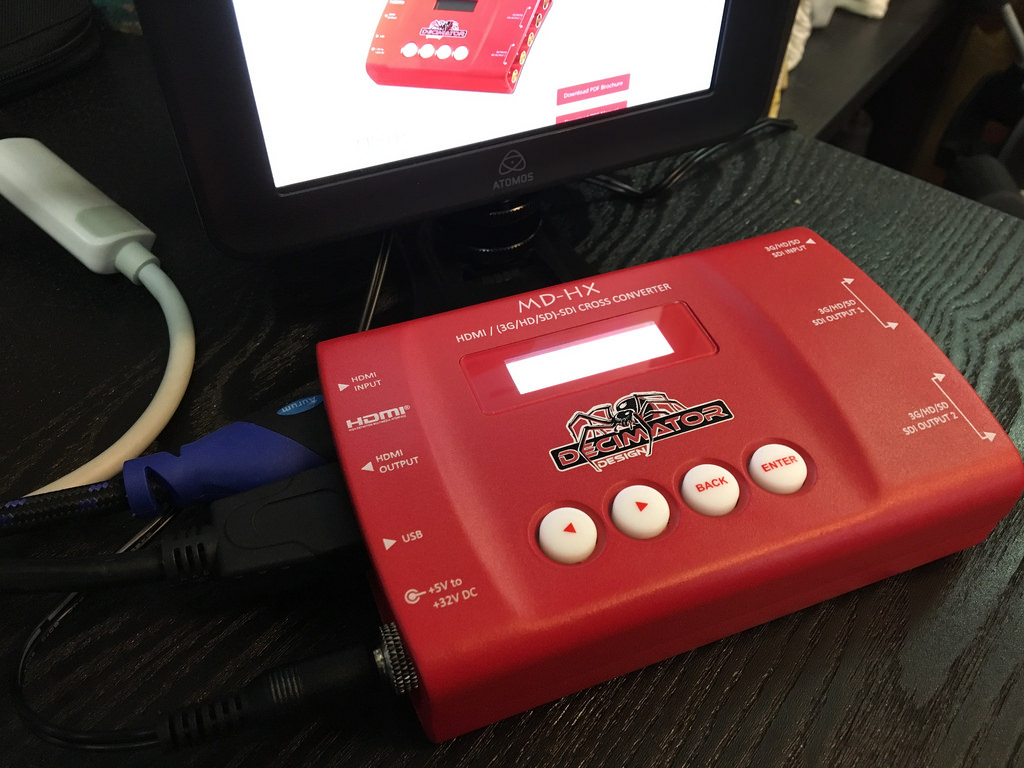
The Decimator MD-HX Scaler will convert an HDMI input at whatever resolution the computer outputs into a consistent 1080 signal, and output it on both HDMI and SDI. This is perfect, as it lets me pass the HDMI signal through to the projector, and run a long SDI cable to the video switcher.
Audio

The Zoom H6 six-track recorder is the audio hub of this setup. This allows me to record ambient room audio with the built-in microphones, an XLR or 1/4" feed from the house audio, and also run one or two of my own microphones as needed.
I prefer to get a feed from the house sound if possible, since it means the house crew will be handling mixing and leveling the stage mics. If that's not an option, then I can run my own mic to the stage and capture that audio separate from what's used to amplify the speaker in the room.
I typically use an Audio-Technica Shotgun microphone and/or a Shure Boundary Condenser microphone.
One thing that makes this so powerful is the Zoom H6 has built-in effects such as a compressor, so I can get a strong audio signal into the video mixer. Another bonus feature is this device can act as a USB interface in case you need to use it to get mic feeds into a computer.
I also record all tracks individually onto an SD card in the device, so that I have the raw audio files if I need to re-mix it later when publishing the final videos.
Monitor

I stumbled across this amazing 13" HDMI monitor from GeChic. It's super compact, about the size of a 13" Macbook Air, and only 1cm thick, so it packs up great in a backpack along with a laptop. It supports full 1920x1080 resolution, and is super bright and crisp. This makes a perfect monitor for viewing the multi-camera preview out that the Roland V-1HD provides.

Recorder

The program output from the switcher is fed into this Atomos Ninja Blade HDMI Recorder. This acts as a monitor so I can see the final output, and also records the mixed video to a Samsung 850 PRO 512gb 2.5" SSD hard drive. It also has an HDMI pass-through that feeds into the H.264 encoder.
H.264 Encoder

The last piece in the puzzle is getting the final video feed broadcast to the Internet. I take the HDMI output from the recorder and feed it into the Teradek VidiU H.264 encoder. This is a fantastic little device that's a dedicated encoder, with both a wired and wireless network connection.
I typically broadcast to YouTube Live, although this can actually push to any arbitrary RTMP endpoint.
End Result
Below are some links to playlists of videos from events I've recorded with various iterations of this rig.