<?xml version="1.0" encoding="utf-8" standalone="yes" ?>

<feed xmlns="http://www.w3.org/2005/Atom">
  <title><![CDATA[Julia Evans]]></title>
  <link href="http://jvns.ca/atom.xml" rel="self"/>
  <link href="http://jvns.ca"/>
  <updated>2024-02-01T08:47:00+00:00</updated>
  <id>http://jvns.ca</id>
  <author>
    <name><![CDATA[Julia Evans]]></name>
  </author>
  <generator uri="http://gohugo.io/">Hugo</generator>

  
  <entry>
    <title type="html"><![CDATA[Dealing with diverged git branches]]></title>
    <link href="https://jvns.ca/blog/2024/02/01/dealing-with-diverged-git-branches/"/>
    <updated>2024-02-01T08:47:00+00:00</updated>
    <id>https://jvns.ca/blog/2024/02/01/dealing-with-diverged-git-branches/</id>
    <content type="html"><![CDATA[

<p>Hello! One of the most common problems I see folks struggling with in Git is
when a local branch (like <code>main</code>) and a remote branch (maybe also called
<code>main</code>) have diverged.</p>

<p>There are two things that make this situation hard:</p>

<ul>
<li>If you&rsquo;re not used to interpreting git&rsquo;s error messages, it&rsquo;s nontrivial to
even <strong>realize</strong> that your <code>main</code> has diverged from the remote <code>main</code> (git
will often just give you an intimidating but generic error message like
<code>! [rejected] main -&gt; main (non-fast-forward) error: failed to push some refs to 'github.com:jvns/int-exposed'</code>)</li>
<li>Once you realize that your branch has diverged from the remote <code>main</code>, there
no single clear way to handle it (what you need to do depends on the
situation and your git workflow)</li>
</ul>

<p>So let&rsquo;s talk about a) how to recognize when you&rsquo;re in a situation where a local
branch and remote branch have diverged and b) what you can do about it! Here&rsquo;s a
quick table of contents:</p>

<ul>
<li><a href="#what-does-diverged-mean">what does &ldquo;diverged&rdquo; mean?</a></li>
<li><a href="#recognizing-when-branches-are-diverged">recognizing when branches are diverged</a>

<ul>
<li><a href="#way-1-git-status">way 1: git status</a></li>
<li><a href="#way-2-git-push">way 2: git push</a></li>
<li><a href="#way-3-git-pull">way 3: git pull</a></li>
</ul></li>
<li><a href="#there-s-no-one-solution">there&rsquo;s no one solution</a>

<ul>
<li><a href="#solution-1-1-git-pull-rebase">solution 1.1: git pull &ndash;rebase</a></li>
<li><a href="#solution-1-2-git-pull-no-rebase">solution 1.2: git pull &ndash;no-rebase</a></li>
<li><a href="#solution-2-1-git-push-force">solution 2.1: git push &ndash;force</a></li>
<li><a href="#solution-2-2-git-push-force-with-lease">solution 2.2: git push &ndash;force-with-lease</a></li>
<li><a href="#solution-3-git-reset-hard-origin-main">solution 3: git reset &ndash;hard origin/main</a></li>
</ul></li>
</ul>

<p>Let&rsquo;s start with what it means for 2 branches to have &ldquo;diverged&rdquo;.</p>

<h3 id="what-does-diverged-mean">what does &ldquo;diverged&rdquo; mean?</h3>

<p>If you have a local <code>main</code> and a remote <code>main</code>, there are 4 basic configurations:</p>

<p><strong>1: up to date</strong>. The local and remote <code>main</code> branches are in the exact same place. Something like this:</p>

<pre><code>a - b - c - d
            ^ LOCAL
            ^ REMOTE
</code></pre>

<p><strong>2: local is behind</strong></p>

<p>Here you might want to <code>git pull</code>. Something like this:</p>

<pre><code>a - b - c - d - e
    ^ LOCAL     ^ REMOTE
</code></pre>

<p><strong>3: remote is behind</strong></p>

<p>Here you might want to <code>git push</code>. Something like this:</p>

<pre><code>a - b - c - d - e
    ^ REMOTE    ^ LOCAL
</code></pre>

<p><strong>4: they&rsquo;ve diverged :(</strong></p>

<p>This is the situation we&rsquo;re talking about in this blog post. It looks something like this:</p>

<pre><code>a - b - c - d - e
        \       ^ LOCAL
         -- f 
            ^ REMOTE
</code></pre>

<p>There&rsquo;s no one recipe for resolving this (how you want to handle it depends on
the situation and your git workflow!) but let&rsquo;s talk about how to recognize
that you&rsquo;re in that situation and some options for how to resolve it.</p>

<h3 id="recognizing-when-branches-are-diverged">recognizing when branches are diverged</h3>

<p>There are 3 main ways to tell that your branch has diverged.</p>

<h3 id="way-1-git-status">way 1: <code>git status</code></h3>

<p>The easiest way to is to run <code>git fetch</code> and then <code>git status</code>. You&rsquo;ll get a message something like this:</p>

<pre><code>$ git fetch
$ git status
On branch main
Your branch and 'origin/main' have diverged, &lt;-- here's the relevant line!
and have 1 and 2 different commits each, respectively.
  (use &quot;git pull&quot; to merge the remote branch into yours)
</code></pre>

<h3 id="way-2-git-push">way 2: <code>git push</code></h3>

<p>When I run <code>git push</code>, sometimes I get an error like this:</p>

<pre><code>$ git push
To github.com:jvns/int-exposed
 ! [rejected]        main -&gt; main (non-fast-forward)
error: failed to push some refs to 'github.com:jvns/int-exposed'
hint: Updates were rejected because the tip of your current branch is behind
hint: its remote counterpart. Integrate the remote changes (e.g.
hint: 'git pull ...') before pushing again.
hint: See the 'Note about fast-forwards' in 'git push --help' for details.
</code></pre>

<p>This doesn&rsquo;t <strong>always</strong> mean that my local <code>main</code> and the remote <code>main</code> have
diverged (it could just mean that my <code>main</code> is behind), but for me it <strong>often</strong>
means that. So if that happens I might run <code>git fetch</code> and <code>git status</code> to
check.</p>

<h3 id="way-3-git-pull">way 3: <code>git pull</code></h3>

<p>If I <code>git pull</code> when my branches have diverged, I get this error message:</p>

<pre><code>$ git pull
hint: You have divergent branches and need to specify how to reconcile them.
hint: You can do so by running one of the following commands sometime before
hint: your next pull:
hint:
hint:   git config pull.rebase false  # merge
hint:   git config pull.rebase true   # rebase
hint:   git config pull.ff only       # fast-forward only
hint:
hint: You can replace &quot;git config&quot; with &quot;git config --global&quot; to set a default
hint: preference for all repositories. You can also pass --rebase, --no-rebase,
hint: or --ff-only on the command line to override the configured default per
hint: invocation.
fatal: Need to specify how to reconcile divergent branches.
</code></pre>

<p>This is pretty clear about the issue (&ldquo;you have divergent branches&rdquo;).</p>

<p><code>git pull</code> doesn&rsquo;t always spit out this error message though when your branches have diverged: it depends on how
you configure git. The three other options I&rsquo;m aware of are:</p>

<ol>
<li>if you set <code>git config pull.rebase false</code>, it&rsquo;ll automatically start merging the remote <code>main</code></li>
<li>if you set <code>git config pull.rebase true</code>, it&rsquo;ll automatically start rebasing onto the remote <code>main</code></li>
<li>if you set <code>git config pull.ff only</code>, it&rsquo;ll exit with the error <code>fatal: Not possible to fast-forward, aborting.</code></li>
</ol>

<p>Now that we&rsquo;ve talked about some ways to recognize that you&rsquo;re in a situation
where your local branch has diverged from the remote one, let&rsquo;s talk about what
you can do about it.</p>

<h3 id="there-s-no-one-solution">there&rsquo;s no one solution</h3>

<p>There&rsquo;s no &ldquo;best&rdquo; way to resolve branches that have diverged &ndash; it really
depends on your workflow for git and why the situation is happening.</p>

<p>I use 3 main solutions, depending on the situation:</p>

<ol>
<li>I want to <strong>keep both sets of changes</strong> on <code>main</code>. To do this, I&rsquo;ll run <code>git
pull --rebase</code>.</li>
<li>The <strong>remote changes are useless</strong> and I want to overwrite them. To do this,
I&rsquo;ll run <code>git push --force</code></li>
<li>The <strong>local changes are useless</strong> and I want to overwrite them. To do this, I&rsquo;ll
run <code>git reset --hard origin/main</code></li>
</ol>

<p>Here are some more details about all 3 of these solutions.</p>

<h3 id="solution-1-1-git-pull-rebase">solution 1.1: <code>git pull --rebase</code></h3>

<p>This is what I do when I want to keep both sets of changes. It rebases <code>main</code>
onto the remote <code>main</code> branch. I mostly use this in repositories where I&rsquo;m
doing all of my work on the <code>main</code> branch.</p>

<p>You can configure <code>git config pull.rebase true</code>, to do this automatically every
time, but I don&rsquo;t because sometimes I actually want to use solutions 2 or 3
(overwrite my local changes with the remote, or the reverse). I&rsquo;d rather be
warned &ldquo;hey, these branches have diverged, how do you want to handle it?&rdquo; and
decide for myself if I want to rebase or not.</p>

<h3 id="solution-1-2-git-pull-no-rebase">solution 1.2: <code>git pull --no-rebase</code></h3>

<p>This starts a merge between the <code>local</code> and remote <code>main</code>. Here you&rsquo;ll need to:</p>

<ol>
<li>Run <code>git pull --no-rebase</code>. This starts a merge and (if it succeeds) opens a text editor so that you can confirm that you want to commit the merge</li>
<li>Save the file in your text editor.</li>
</ol>

<p>I don&rsquo;t have too much to say about this because I&rsquo;ve never done it. I always
use rebase instead. That&rsquo;s a personal workflow choice though, lots of people have very
legitimate reasons to <a href="https://jvns.ca/blog/2023/11/06/rebasing-what-can-go-wrong-/">avoid rebase</a>.</p>

<h3 id="solution-2-1-git-push-force">solution 2.1: <code>git push --force</code></h3>

<p>Sometimes I know that the work on the remote <code>main</code> is actually useless and I
just want to overwrite it with whatever is on my local <code>main</code>.</p>

<p>I do this pretty often on private repositories where I&rsquo;m the only committer,
for example I might:</p>

<ul>
<li><code>git push</code> some commits</li>
<li>belatedly decide I want to change the most recent commit</li>
<li>make the changes and run <code>git commit --amend</code></li>
<li>run <code>git push --force</code></li>
</ul>

<p>Of course, if the repository has many different committers, force-pushing in
this way can cause a lot of problems. On shared repositories I&rsquo;ll usually
enable <a href="https://docs.github.com/en/repositories/configuring-branches-and-merges-in-your-repository/managing-protected-branches/about-protected-branches">github branch protection</a>
so that it&rsquo;s impossible to force push.</p>

<h3 id="solution-2-2-git-push-force-with-lease">solution 2.2: <code>git push --force-with-lease</code></h3>

<p>I&rsquo;ve still never actually used <code>git push --force-with-lease</code>, but I&rsquo;ve seen a
lot of people recommend it as an alternative to <code>git push --force</code> that makes
sure that nobody else has changed the branch since the last time you pushed or
fetched, so that you don&rsquo;t accidentally blow their changes away.</p>

<p>Seems like a good option. I did notice that <code>--force-with-lease</code> isn&rsquo;t
foolproof though &ndash; for example <a href="https://github.com/git/git/commit/f17d642d3b0fa64879d59b311e596949f2a1f6d2">this git commit</a>
talks about how if you use VSCode&rsquo;s autofetching feature to continuously <code>git fetch</code>,
then <code>--force-with-lease</code> won&rsquo;t help you.</p>

<p>Apparently now Git also has <code>--force-with-lease --force-if-includes</code>
(<a href="https://git-scm.com/docs/git-push#Documentation/git-push.txt---no-force-if-includes">documented here</a>),
which I think checks the reflog to make sure that you&rsquo;ve already integrated the
remote branch into your branch somehow. I still don&rsquo;t totally understand this
but I found this <a href="https://stackoverflow.com/questions/65837109/when-should-i-use-git-push-force-if-includes">stack overflow conversation</a>
helpful.</p>

<h3 id="solution-3-1-git-reset-hard-origin-main">solution 3.1: <code>git reset --hard origin/main</code></h3>

<p>You can use this as the reverse of <code>git push --force</code> (since there&rsquo;s no <code>git pull --force</code>). I do this when I know that
my <strong>local</strong> work shouldn&rsquo;t be there and I want to throw it away and replace it
with whatever&rsquo;s on the remote branch.</p>

<p>For example, I might do this if I accidentally made a commit to <code>main</code> that
actually should have been on new branch. In that case I&rsquo;ll also create a new
branch (<code>new-branch</code> in this example) to store my local work on the <code>main</code>
branch, so it&rsquo;s not really being thrown away.</p>

<p>Fixing that problem looks like this:</p>

<pre><code>git checkout main

# 1. create `new-branch` to store my work
git checkout -b new-branch   

# 2. go back to the `main` branch I messed up
git checkout main            

# 3. make sure that my `origin/main` is up to date
git fetch                    

# 4. double check to make sure I don't have any uncomitted 
# work because `git reset --hard` will blow it away                                       
git status                   

# 5. force my local branch to match the remote `main`                               
#    NOTE: replace `origin/main` with the actual name of the
#    remote/branch, you can get this from `git status`.
git reset --hard origin/main  
</code></pre>

<p>This &ldquo;store your work on <code>main</code> on a new branch and then <code>git reset --hard</code>&rdquo; pattern can
also be useful if you&rsquo;re not sure yet how to solve the conflict, since most
people are more used to merging 2 local branches than dealing with merging a
remote branch.</p>

<p>As always <code>git reset --hard</code> is a dangerous action and you can permanently lose
your uncommitted work. I always run <code>git status</code> first to make sure I don&rsquo;t
have any uncommitted changes.</p>

<p>Some alternatives to using <code>git reset --hard</code> for this:</p>

<ul>
<li>check out some other branch and run <code>git branch -f main origin/main</code>.</li>
<li>check out some other branch and run <code>git fetch origin main:main --force</code></li>
</ul>

<h3 id="that-s-all">that&rsquo;s all!</h3>

<p>I&rsquo;d never really thought about how confusing the <code>git push</code> and <code>git pull</code>
error messages can be if you&rsquo;re not used to reading them.</p>
]]></content>
  </entry>
  
  <entry>
    <title type="html"><![CDATA[Inside .git]]></title>
    <link href="https://jvns.ca/blog/2024/01/26/inside-git/"/>
    <updated>2024-01-26T09:42:42+00:00</updated>
    <id>https://jvns.ca/blog/2024/01/26/inside-git/</id>
    <content type="html"><![CDATA[

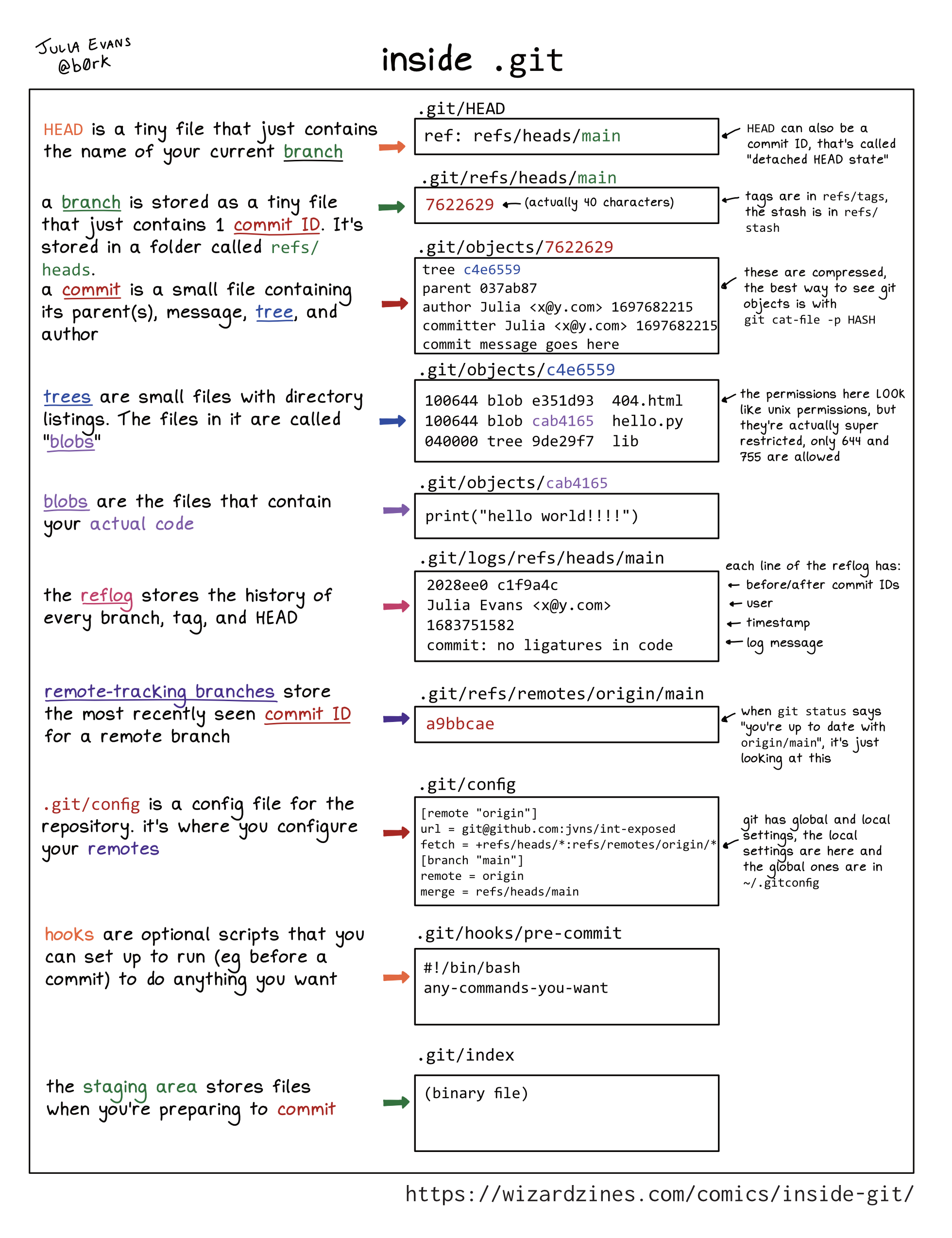
<p>Hello! I posted a comic on Mastodon this week about what&rsquo;s in the <code>.git</code>
directory and someone requested a text version, so here it is. I added some
extra notes too. First, here&rsquo;s the image. It&rsquo;s a ~15 word explanation of each
part of your <code>.git</code> directory.</p>

<p><a href="https://wizardzines.com/comics/inside-git"><img src="https://wizardzines.com/images/uploads/inside-git.png"></a></p>

<p>You can <code>git clone https://github.com/jvns/inside-git</code> if you want to run all
these examples yourself.</p>

<p>Here&rsquo;s a table of contents:</p>

<ul>
<li><a href="#head-git-head">HEAD: .git/head</a></li>
<li><a href="#branch-git-refs-heads-main">branch: .git/refs/heads/main</a></li>
<li><a href="#commit-git-objects-10-93da429">commit: .git/objects/10/93da429&hellip;</a></li>
<li><a href="#tree-git-objects-9f-83ee7550">tree: .git/objects/9f/83ee7550&hellip;</a></li>
<li><a href="#blobs-git-objects-5a-475762c">blobs: .git/objects/5a/475762c&hellip;</a></li>
<li><a href="#reflog-git-logs-refs-heads-main">reflog: .git/logs/refs/heads/main</a></li>
<li><a href="#remote-tracking-branches-git-refs-remotes-origin-main">remote-tracking branches: .git/refs/remotes/origin/main</a></li>
<li><a href="#tags-git-refs-tags-v1-0">tags: .git/refs/tags/v1.0</a></li>
<li><a href="#the-stash-git-refs-stash">the stash: .git/refs/stash</a></li>
<li><a href="#git-config">.git/config</a></li>
<li><a href="#hooks-git-hooks-pre-commit">hooks: .git/hooks/pre-commit</a></li>
<li><a href="#the-staging-area-git-index">the staging area: .git/index</a></li>
<li><a href="#this-isn-t-exhaustive">this isn&rsquo;t exhaustive</a></li>
<li><a href="#this-isn-t-meant-to-completely-explain-git">this isn&rsquo;t meant to completely explain git</a></li>
</ul>

<p>The first 5 parts (<code>HEAD</code>, branch, commit, tree, blobs) are the core of git.</p>

<h3 id="head-git-head">HEAD: <code>.git/head</code></h3>

<p><strong><code>HEAD</code></strong> is a tiny file that just contains the name of your current <strong>branch</strong>.</p>

<p>Example contents:</p>

<pre><code>$ cat .git/HEAD
ref: refs/heads/main
</code></pre>

<p><code>HEAD</code> can also be a commit ID, that’s called &ldquo;detached HEAD state&rdquo;.</p>

<h3 id="branch-git-refs-heads-main">branch: <code>.git/refs/heads/main</code></h3>

<p>A <strong>branch</strong> is stored as a tiny file that just contains 1 <strong>commit ID</strong>. It’s stored
in a folder called <code>refs/heads</code>.</p>

<p>Example contents:</p>

<pre><code>$ cat .git/refs/heads/main
1093da429f08e0e54cdc2b31526159e745d98ce0
</code></pre>

<h3 id="commit-git-objects-10-93da429">commit: <code>.git/objects/10/93da429...</code></h3>

<p>A <strong>commit</strong> is a small file containing its parent(s), message, <strong>tree</strong>, and author.</p>

<p>Example contents:</p>

<pre><code>$ git cat-file -p 1093da429f08e0e54cdc2b31526159e745d98ce0
tree 9f83ee7550919867e9219a75c23624c92ab5bd83
parent 33a0481b440426f0268c613d036b820bc064cdea
author Julia Evans &lt;julia@example.com&gt; 1706120622 -0500
committer Julia Evans &lt;julia@example.com&gt; 1706120622 -0500

add hello.py
</code></pre>

<p>These files are compressed, the best way to see objects is with <code>git cat-file -p HASH</code>.</p>

<h3 id="tree-git-objects-9f-83ee7550">tree: <code>.git/objects/9f/83ee7550...</code></h3>

<p><strong>Trees</strong> are small files with directory listings. The files in it are called <strong>blobs</strong>.</p>

<p>Example contents:</p>

<pre><code>$  git cat-file -p 9f83ee7550919867e9219a75c23624c92ab5bd83
100644 blob e69de29bb2d1d6434b8b29ae775ad8c2e48c5391	.gitignore
100644 blob 665c637a360874ce43bf74018768a96d2d4d219a	hello.py
040000 tree 24420a1530b1f4ec20ddb14c76df8c78c48f76a6	lib
</code></pre>

<p>The permissions here LOOK like unix permissions, but they’re actually super
restricted, only 644 and 755 are allowed.</p>

<h3 id="blobs-git-objects-5a-475762c">blobs: <code>.git/objects/5a/475762c...</code></h3>

<p><strong>blobs</strong> are the files that contain your actual code</p>

<p>Example contents:</p>

<pre><code>$ git cat-file -p 665c637a360874ce43bf74018768a96d2d4d219a	
print(&quot;hello world!&quot;)
</code></pre>

<p>Storing a new blob with every change can get big, so <code>git gc</code> periodically
<a href="https://codewords.recurse.com/issues/three/unpacking-git-packfiles">packs them</a> for efficiency in <code>.git/objects/pack</code>.</p>

<h3 id="reflog-git-logs-refs-heads-main">reflog: <code>.git/logs/refs/heads/main</code></h3>

<p>The reflog stores the history of every branch, tag, and HEAD. For (mostly) every file in <code>.git/refs</code>, there&rsquo;s a corresponding log in <code>.git/logs/refs</code>.</p>

<p>Example content for the <code>main</code> branch:</p>

<pre><code>$ tail -n 1 .git/logs/refs/heads/main
33a0481b440426f0268c613d036b820bc064cdea
1093da429f08e0e54cdc2b31526159e745d98ce0
Julia Evans &lt;julia@example.com&gt;
1706119866 -0500
commit: add hello.py
</code></pre>

<p>each line of the reflog has:</p>

<ul>
<li>before/after commit IDs</li>
<li>user</li>
<li>timestamp</li>
<li>log message</li>
</ul>

<p>Normally it&rsquo;s all one line, I just wrapped it for readability here.</p>

<h3 id="remote-tracking-branches-git-refs-remotes-origin-main">remote-tracking branches: <code>.git/refs/remotes/origin/main</code></h3>

<p><strong>Remote-tracking branches</strong> store the most recently seen <strong>commit ID</strong> for a remote branch</p>

<p>Example content:</p>

<pre><code>$ cat .git/refs/remotes/origin/main
fcdeb177797e8ad8ad4c5381b97fc26bc8ddd5a2
</code></pre>

<p>When git status says &ldquo;you’re up to date with <code>origin/main</code>&rdquo;, it’s just looking
at this. It&rsquo;s often out of date, you can update it with <code>git fetch origin
main</code>.</p>

<h3 id="tags-git-refs-tags-v1-0">tags: <code>.git/refs/tags/v1.0</code></h3>

<p>A tag is a tiny file in <code>.git/refs/tags</code> containing a commit ID.</p>

<p>Example content:</p>

<pre><code>$ cat .git/refs/tags/v1.0
1093da429f08e0e54cdc2b31526159e745d98ce0
</code></pre>

<p>Unlike branches, when you make new commits it doesn&rsquo;t update the tag.</p>

<h3 id="the-stash-git-refs-stash">the stash: <code>.git/refs/stash</code></h3>

<p>The stash is a tiny file called <code>.git/refs/stash</code>. It contains the commit ID of a commit that&rsquo;s created when you run <code>git stash</code>.</p>

<pre><code>cat .git/refs/stash
62caf3d918112d54bcfa24f3c78a94c224283a78
</code></pre>

<p>The stash is a stack, and previous values are stored in <code>.git/logs/refs/stash</code> (the reflog for <code>stash</code>).</p>

<pre><code>cat .git/logs/refs/stash
62caf3d9 e85c950f Julia Evans &lt;julia@example.com&gt; 1706290652 -0500	WIP on main: 1093da4 add hello.py
00000000 62caf3d9 Julia Evans &lt;julia@example.com&gt; 1706290668 -0500	WIP on main: 1093da4 add hello.py
</code></pre>

<p>Unlike branches and tags, if you <code>git stash pop</code> a commit from the stash, it&rsquo;s
<strong>deleted</strong> from the reflog so it&rsquo;s almost impossible to find it again. The
stash is the only reflog in git where things get deleted very soon after
they&rsquo;re added. (entries expire out of the branch reflogs too, but generally
only after 90 days)</p>

<p><strong>A note on refs:</strong></p>

<p>At this point you&rsquo;ve probably noticed that a lot of things (branches,
remote-tracking branches, tags, and the stash) are commit IDs in <code>.git/refs</code>.
They&rsquo;re called &ldquo;references&rdquo; or &ldquo;refs&rdquo;. Every ref is a commit ID, but the
different types of refs are treated VERY differently by git, so I find it
useful to think about them separately even though they all use
the same file format. For example, git deletes things from the stash reflog in
a way that it won&rsquo;t for branch or tag reflogs.</p>

<h3 id="git-config">.git/config</h3>

<p><code>.git/config</code> is a config file for the repository. It&rsquo;s where you configure
your remotes.</p>

<p>Example content:</p>

<pre><code>[remote &quot;origin&quot;] 
url = git@github.com: jvns/int-exposed 
fetch = +refs/heads/*: refs/remotes/origin/* 
[branch &quot;main&quot;] 
remote = origin 
merge refs/heads/main
</code></pre>

<p>git has local and global settings, the local settings are here and the global
ones are in <code>~/.gitconfig</code> hooks</p>

<h3 id="hooks-git-hooks-pre-commit">hooks: <code>.git/hooks/pre-commit</code></h3>

<p>Hooks are optional scripts that you can set up to run (eg before a commit) to do anything you want.</p>

<p>Example content:</p>

<pre><code>#!/bin/bash 
any-commands-you-want
</code></pre>

<p>(this obviously isn&rsquo;t a real pre-commit hook)</p>

<h3 id="the-staging-area-git-index">the staging area: <code>.git/index</code></h3>

<p>The staging area stores files when you’re preparing to commit. This one is a
binary file, unlike a lot of things in git which are essentially plain text
files.</p>

<p>As far as I can tell the best way to look at the contents of the index is with <code>git ls-files --stage</code>:</p>

<pre><code>$ git ls-files --stage
100644 e69de29bb2d1d6434b8b29ae775ad8c2e48c5391 0	.gitignore
100644 665c637a360874ce43bf74018768a96d2d4d219a 0	hello.py
100644 e69de29bb2d1d6434b8b29ae775ad8c2e48c5391 0	lib/empty.py
</code></pre>

<h3 id="this-isn-t-exhaustive">this isn&rsquo;t exhaustive</h3>

<p>There are some other things in <code>.git</code> like <code>FETCH_HEAD</code>, <code>worktrees</code>, and
<code>info</code>. I only included the ones that I&rsquo;ve found it useful to understand.</p>

<h3 id="this-isn-t-meant-to-completely-explain-git">this isn&rsquo;t meant to completely explain git</h3>

<p>One of the most common pieces of advice I hear about git is &ldquo;just learn how
the <code>.git</code> directory is structured and then you&rsquo;ll understand everything!&ldquo;.</p>

<p>I love understanding the internals of things more than anyone, but there&rsquo;s a
LOT that &ldquo;how the .git directory is structured&rdquo; doesn&rsquo;t explain, like:</p>

<ul>
<li>how merges and rebases work and how they can go wrong (for instance this list of <a href="https://jvns.ca/blog/2023/11/06/rebasing-what-can-go-wrong-/">what can go wrong with rebase</a>)</li>
<li>how exactly your colleagues are using git, and what guidelines you should be following to work with them successfully</li>
<li>how pushing/pulling code from other repositories works</li>
<li>how to handle merge conflicts</li>
</ul>

<p>Hopefully this will be useful to some folks out there though.</p>

<h3 id="some-other-references">some other references:</h3>

<ul>
<li>the book <a href="https://shop.jcoglan.com/building-git/">building git</a> by James Coglan (side note: looks like there&rsquo;s a <a href="https://mastodon.social/@jcoglan/111807463940323655">50% off discount for the rest of January</a>)</li>
<li><a href="https://maryrosecook.com/blog/post/git-from-the-inside-out">git from the inside out</a> by mary rose cook</li>
<li>the official <a href="https://git-scm.com/docs/gitrepository-layout#Documentation/gitrepository-layout.txt-index">git repository layout docs</a></li>
</ul>
]]></content>
  </entry>
  
  <entry>
    <title type="html"><![CDATA[Do we think of git commits as diffs, snapshots, and/or histories?]]></title>
    <link href="https://jvns.ca/blog/2024/01/05/do-we-think-of-git-commits-as-diffs--snapshots--or-histories/"/>
    <updated>2024-01-05T14:00:51+00:00</updated>
    <id>https://jvns.ca/blog/2024/01/05/do-we-think-of-git-commits-as-diffs--snapshots--or-histories/</id>
    <content type="html"><![CDATA[

<p>Hello! I&rsquo;ve been extremely slowly trying to figure how to explain every core
concept in Git (commits! branches! remotes! the staging area!) and commits have
been surprisingly tricky.</p>

<p>Understanding how git commits are implemented feels pretty straightforward to
me (those are facts! I can look it up!), but it&rsquo;s been much harder to figure
out how other people think about commits. So like I&rsquo;ve been doing a lot
recently, I went on Mastodon and started asking some questions.</p>

<h3 id="how-do-people-think-about-git-commits">how do people think about Git commits?</h3>

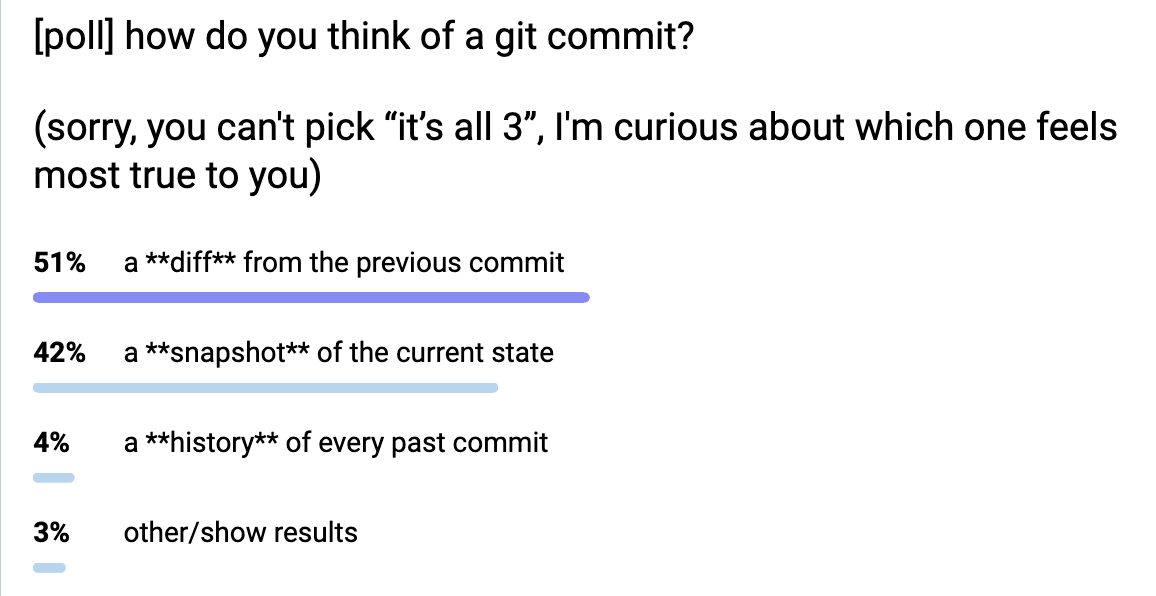
<p>I did a <a href="https://social.jvns.ca/@b0rk/111563158717698550">highly unscientific poll</a> on Mastodon about how people think about Git
commits: is it a snapshot? is it a diff? is it a list of every previous commit?
(Of course it&rsquo;s legitimate to think about it as all three, but I was curious
about the <em>primary</em> way people think about Git commits). Here it is:</p>

<p><img src="https://jvns.ca/images/git-commit-poll.png"></p>

<p>The results were:</p>

<ul>
<li>51% diff</li>
<li>42% snapshot</li>
<li>4% history of every previous commit</li>
<li>3% &ldquo;other&rdquo;</li>
</ul>

<p>I was really surprised that it was so evenly split between diffs and snapshots.
People also made some interesting kind of contradictory statements like &ldquo;in my
mind a commit is a diff, but I think it&rsquo;s actually implemented as a snapshot&rdquo;
and &ldquo;in my mind a commit is a snapshot, but I think it&rsquo;s actually implemented
as a diff&rdquo;. We&rsquo;ll talk more about how a commit is actually implemented later in
the post.</p>

<p>Before we go any further: when we say &ldquo;a diff&rdquo; or &ldquo;a snapshot&rdquo;, what does that
mean?</p>

<h3 id="what-s-a-diff">what&rsquo;s a diff?</h3>

<p>What I mean by a diff is probably obvious: it&rsquo;s what you get when you run <code>git show
COMMIT_ID</code>. For example here&rsquo;s a typo fix from rbspy:</p>

<pre><code>diff --git a/src/ui/summary.rs b/src/ui/summary.rs
index 5c4ff9c..3ce9b3b 100644
--- a/src/ui/summary.rs
+++ b/src/ui/summary.rs
@@ -160,7 +160,7 @@ mod tests {
 &quot;;

         let mut buf: Vec&lt;u8&gt; = Vec::new();
-        stats.write(&amp;mut buf).expect(&quot;Callgrind write failed&quot;);
+        stats.write(&amp;mut buf).expect(&quot;summary write failed&quot;);
         let actual = String::from_utf8(buf).expect(&quot;summary output not utf8&quot;);
         assert_eq!(actual, expected, &quot;Unexpected summary output&quot;);
     }
</code></pre>

<p>You can see it on GitHub here: <a href="https://github.com/rbspy/rbspy/commit/24ad81d2439f9e63dd91cc1126ca1bb5d3a4da5b">https://github.com/rbspy/rbspy/commit/24ad81d2439f9e63dd91cc1126ca1bb5d3a4da5b</a></p>

<h3 id="what-s-a-snapshot">what&rsquo;s a snapshot?</h3>

<p>When I say &ldquo;a snapshot&rdquo;, what I mean is &ldquo;all the files that you get when you
run <code>git checkout COMMIT_ID</code>&rdquo;.</p>

<p>Git often calls the list of files for a commit a &ldquo;tree&rdquo; (as in &ldquo;directory
tree&rdquo;), and you can see all of the files for the above example commit here on
GitHub:</p>

<p><a href="https://github.com/rbspy/rbspy/tree/24ad81d2439f9e63dd91cc1126ca1bb5d3a4da5b">https://github.com/rbspy/rbspy/tree/24ad81d2439f9e63dd91cc1126ca1bb5d3a4da5b</a> (it&rsquo;s <code>/tree/</code> instead of <code>/commit/</code>)</p>

<h3 id="is-how-git-implements-it-really-the-right-way-to-explain-it">is &ldquo;how Git implements it&rdquo; really the right way to explain it?</h3>

<p>Probably the most common piece of advice I hear related to learning Git is
&ldquo;just learn how Git represents things internally, and everything will make
sense&rdquo;. I obviously find this perspective extremely appealing (if you&rsquo;ve spent
any time reading this blog, you know I <em>love</em> thinking about how things are
implemented internally).</p>

<p>But as a strategy for teaching Git, it hasn&rsquo;t been as successful as I&rsquo;d hoped!
Often I&rsquo;ve eagerly started explaining &ldquo;okay, so git commits are snapshots with
a pointer to their parent, and then a branch is a pointer to a commit, and&hellip;&ldquo;,
but the person I&rsquo;m trying to help will tell me that they didn&rsquo;t really find
that explanation that useful at all and they still don&rsquo;t get it. So I&rsquo;ve been
considering other options.</p>

<p>Let&rsquo;s talk about the internals a bit anyway though.</p>

<h3 id="how-git-represents-commits-internally-snapshots">how git represents commits internally: snapshots</h3>

<p>Internally, git represents commits as snapshots (it stores the &ldquo;tree&rdquo; of the
current version of every file). I wrote about this in <a href="https://jvns.ca/blog/2023/09/14/in-a-git-repository--where-do-your-files-live-/">In a git repository, where do your files live?</a>,
but here&rsquo;s a very quick summary of what the internal format looks like.</p>

<p>Here&rsquo;s how a commit is represented:</p>

<pre><code>$ git cat-file -p 24ad81d2439f9e63dd91cc1126ca1bb5d3a4da5b
tree e197a79bef523842c91ee06fa19a51446975ec35
parent 26707359cdf0c2db66eb1216bf7ff00eac782f65
author Adam Jensen &lt;adam@acj.sh&gt; 1672104452 -0500
committer Adam Jensen &lt;adam@acj.sh&gt; 1672104890 -0500

Fix typo in expectation message
</code></pre>

<p>and here&rsquo;s what we get when we look at this tree object: a list of every file /
subdirectory in the repository&rsquo;s root directory as of that commit:</p>

<pre><code>$ git cat-file -p e197a79bef523842c91ee06fa19a51446975ec35
040000 tree 2fcc102acd27df8f24ddc3867b6756ac554b33ef	.cargo
040000 tree 7714769e97c483edb052ea14e7500735c04713eb	.github
100644 blob ebb410eb8266a8d6fbde8a9ffaf5db54a5fc979a	.gitignore
100644 blob fa1edfb73ce93054fe32d4eb35a5c4bee68c5bf5	ARCHITECTURE.md
100644 blob 9c1883ee31f4fa8b6546a7226754cfc84ada5726	CODE_OF_CONDUCT.md
100644 blob 9fac1017cb65883554f821914fac3fb713008a34	CONTRIBUTORS.md
100644 blob b009175dbcbc186fb8066344c0e899c3104f43e5	Cargo.lock
100644 blob 94b87cd2940697288e4f18530c5933f3110b405b	Cargo.toml
</code></pre>

<p>What this means is that checking out a Git commit is always fast: it&rsquo;s just as
easy for Git to check out a commit from yesterday as it is to check out a
commit from 1 million commits ago. Git never has to replay 10000 diffs to
figure out the current state or anything, because commits just aren&rsquo;t stored as
diffs.</p>

<h3 id="snapshots-are-compressed-using-packfiles">snapshots are compressed using packfiles</h3>

<p>I just said that Git commits are snapshots, but when someone says &ldquo;I think of
git commits as a snapshot, but I think internally they&rsquo;re actually diffs&rdquo;,
that&rsquo;s actually kind of true too! Git commits are not represented as diffs in
the sense you&rsquo;re probably used to (they&rsquo;re not represented on disk as a diff
from the previous commit), but the basic intuition that if you&rsquo;re editing a
10,000 lines 500 times, it would be inefficient to store 500 copies of that
file is right.</p>

<p>Git does have a way of storing files as differences from other ways. This is
called &ldquo;packfiles&rdquo; and periodically git will do a garbage collection and
compress your data into packfiles to save disk space. When you <code>git clone</code> a
repository git will also compress the data.</p>

<p>I don&rsquo;t have space for a full explanation of how packfiles work in this post
(Aditya Mukerjee&rsquo;s <a href="https://codewords.recurse.com/issues/three/unpacking-git-packfiles">Unpacking Git packfiles</a>
is my favourite writeup of how they work). But here&rsquo;s a quick summary of my
understanding of how deltas work and how they&rsquo;re different from diffs:</p>

<ul>
<li>Objects are stored as a reference to an &ldquo;original file&rdquo;, plus a &ldquo;delta&rdquo;</li>
<li>the delta has a bunch of instructions like &ldquo;read bytes 0 to 100, then insert bytes &lsquo;hello there&rsquo;, then read bytes 120 to 200&rdquo;. It cobbles together bytes from the original plus new text. So there&rsquo;s no notion of &ldquo;deletions&rdquo;, just copies and additions.</li>
<li>I think there are less layers of deltas: I don&rsquo;t know how to actually check how many layers of deltas Git actually had to go through to get a given object, but my impression is that it usually isn&rsquo;t very many. Probably less than 10? I&rsquo;d love to know how to actually find this out though.</li>
<li>The &ldquo;original file&rdquo; isn&rsquo;t necessarily from the previous commit, it could be anything. Maybe it could even be from a later commit? I&rsquo;m not sure about that.</li>
<li>There&rsquo;s no &ldquo;right&rdquo; algorithm for how to compute deltas, Git just has some approximate heuristics</li>
</ul>

<h3 id="what-actually-happens-when-you-do-a-diff-is-kind-of-weird">what actually happens when you do a diff is kind of weird</h3>

<p>When I run <code>git show SOME_COMMIT</code> to look at the diff for a commit, what
actually happens is kind of counterintuitive. My understanding is:</p>

<ol>
<li>git looks in the packfiles and applies deltas to reconstruct the tree for that commit and for its parent.</li>
<li>git diffs the two directory trees (the current commit&rsquo;s tree, and the parent commit&rsquo;s tree). Usually this is pretty fast because almost all of
the files are exactly the same, so git can just compare the hashes of the identical files and do nothing almost all of the time.</li>
<li>finally git shows me the diff</li>
</ol>

<p>So it takes deltas, turns them into a snapshot, and then calculates a diff. It
feels a little weird because it starts with a diff-like-thing and ends up with
another diff-like-thing, but the deltas and diffs are actually totally
different so it makes sense.</p>

<p>That said, the way I think of it is that git stores commits as snapshots and
packfiles are just an implementation detail to save disk space and make clones
faster. I&rsquo;ve never actually needed to know how packfiles work for any practical
reason, but it does help me understand how it&rsquo;s <em>possible</em> for git commits to
be snapshots without using way too much disk space.</p>

<h3 id="a-wrong-mental-model-for-git-commits-are-diffs">a &ldquo;wrong&rdquo; mental model for git: commits are diffs</h3>

<p>I think a pretty common &ldquo;wrong&rdquo; mental model for Git is:</p>

<ul>
<li>commits are stored as diffs from the previous commit (plus a pointer to the parent commit(s) and an author and message).</li>
<li>to get the current state for a commit, Git starts at the beginning and
replays all the previous commits</li>
</ul>

<p>This model is obviously not <strong>true</strong> (in real life, commits are stored as
snapshots, and diffs are calculated from those snapshots), but it seems very
useful and coherent to me! It gets a little weird with merge commits, but maybe
you just say it&rsquo;s stored as a diff from the first parent of the merge.</p>

<p>I think wrong mental models are often extremely useful, and this one doesn&rsquo;t
seem very problematic to me for every day Git usage. I really like that it
makes the thing that we deal with the most often (the diff) the most
fundamental &ndash; it seems really intuitive to me.</p>

<p>I&rsquo;ve also been thinking about other &ldquo;wrong&rdquo; mental models you can have about
Git which seem pretty useful like:</p>

<ul>
<li>commit messages can be edited (they can&rsquo;t really, actually you make a copy of the commit with a new message, and the old commit continues to exist)</li>
<li>commits can be moved to have a different base (similarly, they&rsquo;re copied)</li>
</ul>

<p>I feel like there&rsquo;s a whole very coherent &ldquo;wrong&rdquo; set of ideas you can have
about git that are pretty well supported by Git&rsquo;s UI and not very problematic
most of the time. I think it can get messy when you want to undo a change or
when something goes wrong though.</p>

<h3 id="some-advantages-of-commit-as-diff">some advantages of &ldquo;commit as diff&rdquo;</h3>

<p>Personally even though I know that in Git commits are snapshots, I probably think of them as diffs most of the time, because:</p>

<ul>
<li>most of the time I&rsquo;m concerned with the <strong>change</strong> I&rsquo;m making &ndash; if I&rsquo;m just
changing 1 line of code, obviously I&rsquo;m mostly thinking about just that 1 line
of code and not the entire current state of the codebase</li>
<li>when you click on a Git commit on GitHub or use <code>git show</code>, you see the diff, so it&rsquo;s just what I&rsquo;m used to seeing</li>
<li>I use rebase a lot, which is all about replaying diffs</li>
</ul>

<h3 id="some-advantages-of-commit-as-snapshot">some advantages of &ldquo;commit as snapshot&rdquo;</h3>

<p>I also think about commits as snapshots sometimes though, because:</p>

<ul>
<li>git often gets confused about file moves: sometimes if I move a file and edit
it, Git can&rsquo;t recognize that it was moved and instead will show it as
&ldquo;deleted old.py, added new.py&rdquo;. This is because git only stores snapshots, so
when it says &ldquo;moved old.py -&gt; new.py&rdquo;, it&rsquo;s just guessing because the
contents of <code>old.py</code> and <code>new.py</code> are similar.</li>
<li>it&rsquo;s conceptually much easier to think about what <code>git checkout COMMIT_ID</code> is doing (the idea of replaying 10000 commits just feels stressful to me)</li>
<li>merge commits kind of make more sense to me as snapshots, because the merged
commit can actually be literally anything (it&rsquo;s just a new snapshot!). It
helps me understand why you can make arbitrary changes when you&rsquo;re resolving
a merge conflict, and why it&rsquo;s so important to be careful about conflict
resolution.</li>
</ul>

<h3 id="some-other-ways-to-think-about-commits">some other ways to think about commits</h3>

<p>Some folks in the Mastodon replies also mentioned:</p>

<ul>
<li>&ldquo;extra&rdquo; out-of-band information about the commit, like an email or a GitHub pull request or just a conversation you had with a coworker</li>
<li>thinking about a diff as a &ldquo;before state + after state&rdquo;</li>
<li>and of course, that lots of people think of commits in lots of different ways depending on the situation</li>
</ul>

<p>some other words people use to talk about commits might be less ambiguous:</p>

<ul>
<li>&ldquo;revision&rdquo; (seems more like a snapshot)</li>
<li>&ldquo;patch&rdquo; (seems more like a diff)</li>
</ul>

<h3 id="that-s-all-for-now">that&rsquo;s all for now!</h3>

<p>It&rsquo;s been very difficult for me to get a sense of what different mental models
people have for git. It&rsquo;s especially tricky because people get really into
policing &ldquo;wrong&rdquo; mental models even though those &ldquo;wrong&rdquo; models are often
really useful, so folks are reluctant to share their &ldquo;wrong&rdquo; ideas for fear of
some Git Explainer coming out of the woodwork to explain to them why they&rsquo;re
Wrong. (these Git Explainers are often well-intentioned, but it still has a chilling effect either way)</p>

<p>But I&rsquo;ve been learning a lot! I still don&rsquo;t feel totally clear about how I want to
talk about commits, but we&rsquo;ll get there eventually.</p>

<p>Thanks to Marco Rogers, Marie Flanagan, and everyone on Mastodon for talking to
me about git commits.</p>
]]></content>
  </entry>
  
  <entry>
    <title type="html"><![CDATA[Some notes on NixOS]]></title>
    <link href="https://jvns.ca/blog/2024/01/01/some-notes-on-nixos/"/>
    <updated>2024-01-01T10:22:37+00:00</updated>
    <id>https://jvns.ca/blog/2024/01/01/some-notes-on-nixos/</id>
    <content type="html"><![CDATA[

<p>Hello! Over the holidays I decided it might be fun to run NixOS on one of my
servers, as part of my continuing experiments with Nix.</p>

<p>My motivation for this was that previously I was using <a href="https://www.ansible.com/">Ansible</a> to
provision the server, but then I&rsquo;d ad hoc installed a bunch of stuff on the
server in a chaotic way separately from Ansible, so in the end I had no real
idea of what was on that server and it felt like it would be a huge pain to
recreate it if I needed to.</p>

<p>This server just runs a few small personal Go services, so it seemed like a
good candidate for experimentation.</p>

<p>I had trouble finding explanations of how to set up NixOS and I needed to
cobble together instructions from a bunch of different places, so here&rsquo;s a
very short summary of what worked for me.</p>

<h3 id="why-nixos-instead-of-ansible">why NixOS instead of Ansible?</h3>

<p>I think the reason NixOS feels more reliable than Ansible to me is that NixOS <strong>is</strong>
the operating system. It has full control over all your users and services and
packages, and so it&rsquo;s easier for it to reliably put the system into the state
you want it to be in.</p>

<p>Because Nix has so much control over the OS, I think that if I tried to make
any ad-hoc changes at all to my Nix system, Nix would just blow them away the
next time I ran <code>nixos-rebuild</code>. But with Ansible, Ansible only controls a few
small parts of the system (whatever I explicitly tell it to manage), so it&rsquo;s
easy to make changes outside Ansible.</p>

<p>That said, here&rsquo;s what I did to set up NixOS on my server and run a Go service on it.</p>

<h3 id="step-1-install-nixos-with-nixos-infect">step 1: install NixOS with nixos-infect</h3>

<p>To install NixOS, I created a new Hetzner instance running Ubuntu, and then ran <a href="https://github.com/elitak/nixos-infect/tree/master#hetzner-cloud">nixos-infect</a> on it to convert the Ubuntu installation into a NixOS install, like this:</p>

<pre><code>curl https://raw.githubusercontent.com/elitak/nixos-infect/master/nixos-infect | PROVIDER=hetznercloud NIX_CHANNEL=nixos-23.11 bash 2&gt;&amp;1 | tee /tmp/infect.log
</code></pre>

<p>I originally tried to do this on DigitalOcean, but it didn&rsquo;t work for some
reason, so I went with Hetzner instead and that worked.</p>

<p>This isn&rsquo;t the only way to install NixOS (<a href="https://nixos.wiki/wiki/NixOS_friendly_hosters">this wiki page</a> lists options for setting up NixOS cloud servers), but it seemed to work.
It&rsquo;s possible that there are problems with installing that way that I don&rsquo;t
know about though. It does feel like using an ISO is probably better because that way you don&rsquo;t have to do this transmogrification of Ubuntu into NixOS.</p>

<p>I definitely skipped Step 1 in <code>nixos-infect</code>&rsquo;s README (&ldquo;Read and understand
<a href="https://github.com/elitak/nixos-infect/blob/master/nixos-infect">the script</a>&rdquo;), but I didn&rsquo;t feel too worried because I was running it on a
new instance and I figured that if something went wrong I&rsquo;d just delete it.</p>

<h3 id="step-2-copy-the-generated-nix-configuration">step 2: copy the generated Nix configuration</h3>

<p>Next I needed to copy the generated Nix configuration to a new local Git
repository, like this:</p>

<pre><code>scp root@SERVER_IP:/etc/nixos/* .
</code></pre>

<p>This copied 3 files: <code>configuration.nix</code>, <code>hardware-configuration.nix</code>, and <code>networking.nix</code>. <code>configuration.nix</code> is the main file. I didn&rsquo;t touch anything in <code>hardware-configuration.nix</code> or <code>networking.nix</code>.</p>

<h3 id="step-3-create-a-flake">step 3: create a flake</h3>

<p>I created a flake to wrap <code>configuration.nix</code>. I don&rsquo;t remember why I did this
(I have some idea of what the advantages of flakes are, but it&rsquo;s not clear to
me if any of them are actually relevant in this case) but it seems to work. Here&rsquo;s
my <code>flake.nix</code>:</p>

<pre><code>{ inputs.nixpkgs.url = &quot;github:NixOS/nixpkgs/23.11&quot;;

  outputs = { nixpkgs, ... }: {
    nixosConfigurations.default = nixpkgs.lib.nixosSystem {
      system = &quot;x86_64-linux&quot;;

      modules = [ ./configuration.nix ];
    };
  };
}
</code></pre>

<p>The main gotcha about flakes that I needed to remember here was that you need
to <code>git add</code> every <code>.nix</code> file you create otherwise Nix will pretend it doesn&rsquo;t
exist.</p>

<p>The rules about git and flakes seem to be:</p>

<ul>
<li>you do need to <code>git add</code> your files</li>
<li>you <strong>don&rsquo;t</strong> need to commit your changes</li>
<li>unstaged changes to files are also fine, as long as the file has been <code>git add</code>ed</li>
</ul>

<p>These rules feel very counterintuitive to me (why require that you <code>git add</code>
files but allow unstaged changes?) but that&rsquo;s how it works. I think it might be
an optimization because Nix has to copy all your <code>.nix</code> files to the Nix store for some
reason, so only copying files that have been <code>git add</code>ed makes the copy faster. There&rsquo;s a <a href="https://github.com/NixOS/nix/issues/7107">GitHub issue tracking it here</a> so maybe the way this works will change at some point.</p>

<h3 id="step-4-figure-out-how-to-deploy-my-configuration">step 4: figure out how to deploy my configuration</h3>

<p>Next I needed to figure out how to deploy changes to my configuration.  There are a bunch
of tools for this, but I found the blog post <a href="https://www.haskellforall.com/2023/01/announcing-nixos-rebuild-new-deployment.html">Announcing nixos-rebuild: a &ldquo;new&rdquo; deployment tool for NixOS</a>
that said you can just use the built-in <code>nixos-rebuild</code>, which has
<code>--target-host</code> and <code>--build-host</code> options so that you can specify which host
to build on and deploy to, so that&rsquo;s what I did.</p>

<p>I wanted to be able to get Go repositories and build the Go code on the target
host, so I created a bash script that runs this command:</p>

<pre><code>nixos-rebuild switch --fast --flake .#default --target-host my-server --build-host my-server --option eval-cache false
</code></pre>

<p>Making <code>--target-host</code> and <code>--build-host</code> the same machine is certainly not
something I would do for a Serious Production Machine, but this server is
extremely unimportant so it&rsquo;s fine.</p>

<p>This <code>--option eval-cache false</code> is because Nix kept not showing me my errors
because they were cached &ndash; it would just say <code>error: cached failure of
attribute 'nixosConfigurations.default.config.system.build.toplevel'</code> instead
of showing me the actual error message. Setting <code>--option eval-cache false</code>
turned off caching so that I could see the error messages.</p>

<p>Now I could run <code>bash deploy.sh</code> on my laptop and deploy my configuration to the server! Hooray!</p>

<h3 id="step-5-update-my-ssh-config">step 5: update my ssh config</h3>

<p>I also needed to set up a <code>my-server</code> host in my <code>~/.ssh/config</code>. I set up SSH
agent forwarding so that the server could download the private Git repositories
it needed to access.</p>

<pre><code>Host my-server
   Hostname MY_IP_HERE
   User root
   Port 22
   ForwardAgent yes

AddKeysToAgent yes
</code></pre>

<h3 id="step-6-set-up-a-go-service">step 6: set up a Go service</h3>

<p>The thing I found the hardest was to figure out how to compile and configure a
Go web service to run on the server. The norm seems to be to define your package and define your
service&rsquo;s configuration in 2 different files, but I didn&rsquo;t feel like doing that
&ndash; I wanted to do it all in one file. I couldn&rsquo;t find a simple example of how
to do this, so here&rsquo;s what I did.</p>

<p>I&rsquo;ve replaced the actual repository name with <code>my-service</code> because it&rsquo;s a
private repository and you can&rsquo;t run it anyway.</p>

<pre><code>{ pkgs ? (import &lt;nixpkgs&gt; { }), lib, stdenv, ... }: 
let myservice = pkgs.callPackage pkgs.buildGoModule {
  name = &quot;my-service&quot;;
  src = fetchGit {
    url = &quot;git@github.com:jvns/my-service.git&quot;;
    rev = &quot;efcc67c6b0abd90fb2bd92ef888e4bd9c5c50835&quot;; # put the right git sha here
  };
  vendorHash = &quot;sha256-b+mHu+7Fge4tPmBsp/D/p9SUQKKecijOLjfy9x5HyEE&quot;; # nix will complain about this and tell you the right value
}; in { 
  services.caddy.virtualHosts.&quot;my-service.example.com&quot;.extraConfig = ''
    reverse_proxy localhost:8333
  '';

  systemd.services.my-service = {
    enable = true;
    description = &quot;my-service&quot;;
    after = [&quot;network.target&quot;];
    wantedBy = [&quot;multi-user.target&quot;];
    script = &quot;${myservice}/bin/my-service&quot;;
    environment = {
      DB_FILENAME = &quot;/var/lib/my-service/db.sqlite&quot;;
    };
    serviceConfig = {
      DynamicUser = true;
      StateDirectory = &quot;my-service&quot;; # /var/lib/my-service
    };
  };
}
</code></pre>

<p>Then I just needed to do 2 more things:</p>

<ol>
<li>add <code>./my-service.nix</code> to the imports section of <code>configuration.nix</code></li>
<li>add <code>services.caddy.enable = true;</code> to <code>configuration.nix</code> to enable Caddy</li>
</ol>

<p>and everything worked!!</p>

<p>Some notes on this service configuration file:</p>

<ol>
<li>I used <code>extraConfig</code> to configure Caddy because I didn&rsquo;t feel like learning
Nix&rsquo;s special Caddy syntax &ndash; I wanted to just be able to refer to the Caddy
documentation directly.</li>
<li>I used systemd&rsquo;s <code>DynamicUser</code> to create a user dynamically to run the
service. I&rsquo;d never used this before but it seems like a great simple way to
create a different user for every service without having to write a bunch of
repetitive boilerplate and being really careful to choose unique UID and
GIDs. The blog post <a href="https://0pointer.net/blog/dynamic-users-with-systemd.html">Dynamic Users with systemd</a> talks
about how it works.</li>
<li>I used <code>StateDirectory</code> to get systemd to create a persistent directory where I could store a SQLite database. It creates a directory at <code>/var/lib/my-service/</code></li>
</ol>

<p>I&rsquo;d never heard of <code>DynamicUser</code> or <code>StateDirectory</code> before Kamal told me about
them the other day but they seem like cool systemd features and I wish
I&rsquo;d known about them earlier.</p>

<h3 id="why-caddy">why Caddy?</h3>

<p>One quick note on <a href="https://caddyserver.com/">Caddy</a>: I switched to Caddy a while back from nginx
because it automatically sets up Let&rsquo;s Encrypt certificates. I&rsquo;ve only been
using it for tiny hobby services, but it seems pretty great so far for that,
and its configuration language is simpler too.</p>

<h3 id="problem-fetchtree-requires-a-locked-input">problem: &ldquo;fetchTree requires a locked input&rdquo;</h3>

<p>One problem I ran into was this error message:</p>

<pre><code>error: in pure evaluation mode, 'fetchTree' requires a locked input, at «none»:0
</code></pre>

<p>I found this really perplexing &ndash; what is <code>fetchTree</code>? What is <code>«none»:0</code>? What did I do wrong?</p>

<p>I learned 4 things from debugging this (with help from the folks in the Nix discord):</p>

<ol>
<li>In Nix, <code>fetchGit</code> calls an internal function called <code>fetchTree</code>. So errors that say <code>fetchTree</code> might actually be referring to <code>fetchGit</code>.</li>
<li>Nix truncates long stack traces by default. Sometimes you can get more information with <code>--show-trace</code>.</li>
<li>It seems like Nix doesn&rsquo;t always give you the line number in your code which caused the error, even if you use <code>--show-trace</code>. I&rsquo;m not sure why this is. Some people told me this is because <code>fetchTree</code> is a built in function but &ndash; why can&rsquo;t I see the line number in my nix code that <strong>called</strong> that built in function?</li>
<li>Like I mentioned before, you can pass <code>--option eval-cache false</code> to turn off caching so that Nix will always show you the error message instead of <code>error: cached failure of attribute 'nixosConfigurations.default.config.system.build.toplevel'</code></li>
</ol>

<p>Ultimately the problem turned out to just be that I forgot to pass the Github
revision ID (<code>rev = &quot;efcc67c6b0abd90fb2bd92ef888e4bd9c5c50835&quot;;</code>) to <code>fetchGit</code>
which was really easy to fix.</p>

<h3 id="nix-syntax-is-still-pretty-confusing-to-me">nix syntax is still pretty confusing to me</h3>

<p>I still don&rsquo;t really understand the nix language syntax that well, but I
haven&rsquo;t felt motivated to get better at it yet &ndash; I guess learning new language
syntax just isn&rsquo;t something I find fun. Maybe one day I&rsquo;ll learn it. My plan
for now with NixOS is to just keep copying and pasting that <code>my-service.nix</code>
file above forever.</p>

<h3 id="some-questions-i-still-have">some questions I still have</h3>

<p>I think my main outstanding questions are:</p>

<ul>
<li>When I run <code>nixos-rebuild</code>, Nix checks that my systemd services are still
working in some way. What does it check exactly? My best guess is that it
checks that the systemd service <strong>starts</strong> successfully, but if the service
starts and then immediately crashes, it won&rsquo;t notice.</li>
<li>Right now to deploy a new version of one of my services, I need to manually
copy and paste the Git SHA of the new revision. There&rsquo;s probably a better
workflow but I&rsquo;m not sure what it is.</li>
</ul>

<h3 id="that-s-all">that&rsquo;s all!</h3>

<p>I really do like having all of my service configuration defined in one file,
and the approach Nix takes does feel more reliable than the approach I was
taking with Ansible.</p>

<p>I just started doing this a week ago and as with all things Nix I have no idea
if I&rsquo;ll end up liking it or not. It seems pretty good so far though!</p>

<p>I will say that I find using Nix to be very difficult and I really struggle
when debugging Nix problems (that <code>fetchTree</code> problem I mentioned sounds
simple, but it was SO confusing to me at the time), but I kind of like it
anyway. Maybe because I&rsquo;m not using Linux on my laptop right now I miss having
<a href="https://fabiensanglard.net/a_linux_evening/">linux evenings</a> and Nix feels
like a replacement for that :)</p>
]]></content>
  </entry>
  
  <entry>
    <title type="html"><![CDATA[2023: Year in review]]></title>
    <link href="https://jvns.ca/blog/2023/12/31/2023--year-in-review/"/>
    <updated>2023-12-31T08:54:42+00:00</updated>
    <id>https://jvns.ca/blog/2023/12/31/2023--year-in-review/</id>
    <content type="html"><![CDATA[

<p>Hello! This was my 4th year working full time on Wizard Zines! Here are a few
of the things I worked on this year.</p>

<h3 id="a-zine">a zine!</h3>

<p>I published <a href="https://wizardzines.com/zines/integers-floats">How Integers and Floats Work</a>, which I worked on with
<a href="https://marieflanagan.com/">Marie</a>.</p>

<p>This one started out its life as &ldquo;how your computer represents things in
memory&rdquo;, but once we&rsquo;d explained how integers and floats were represented in
memory the zine was already long enough, so we just kept it to integers and
floats.</p>

<p>This zine was fun to write: I learned about why signed integers are represented
in memory the way they are, and I&rsquo;m really happy with the explanation of
floating point we ended up with.</p>

<h3 id="a-playground-memory-spy">a playground: memory spy!</h3>

<p>When explaining to people how your computer represents people in memory, I kept
wanting to open up <code>gdb</code> or <code>lldb</code> and show some example C programs and how the
variables in those C programs are represented in memory.</p>

<p>But gdb is kind of confusing if you&rsquo;re not used to looking at it! So me and
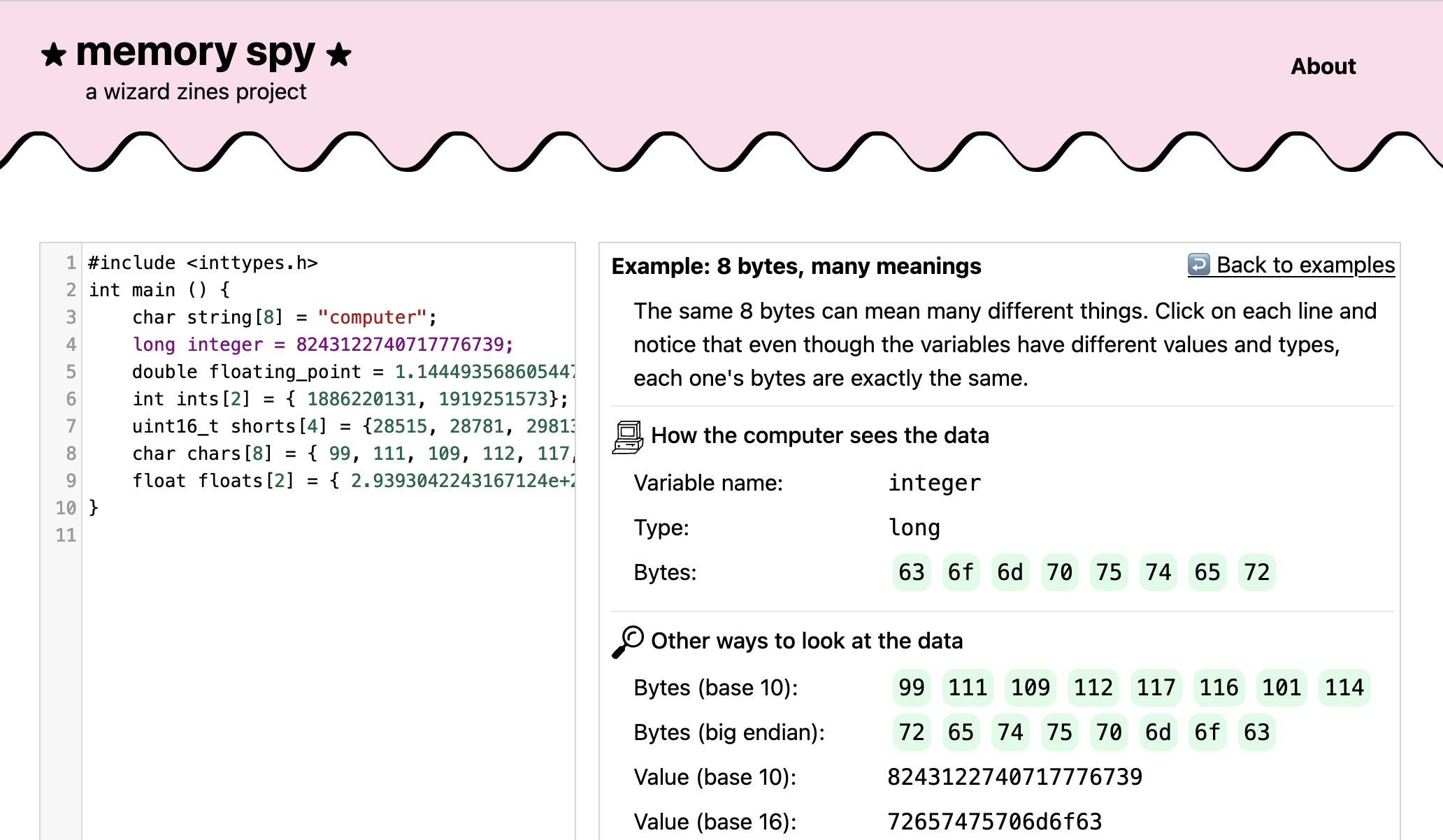
<a href="https://marieflanagan.com/">Marie</a> made a cute interface on top of <code>lldb</code>, where you can put in any C program,
click on a line, and see what the variable looks like. It&rsquo;s called <a href="https://memory-spy.wizardzines.com">memory spy</a> and here&rsquo;s what it looks like:</p>

<p><a href="https://memory-spy.wizardzines.com">
<img src="https://jvns.ca/images/memory-spy2.png">
</a></p>

<h3 id="a-playground-integer-exposed">a playground: integer exposed!</h3>

<p>I got really obsessed with <a href="https://float.exposed">float.exposed</a> by <a href="https://ciechanow.ski/">Bartosz
Ciechanowski</a> for seeing how floats are represented in
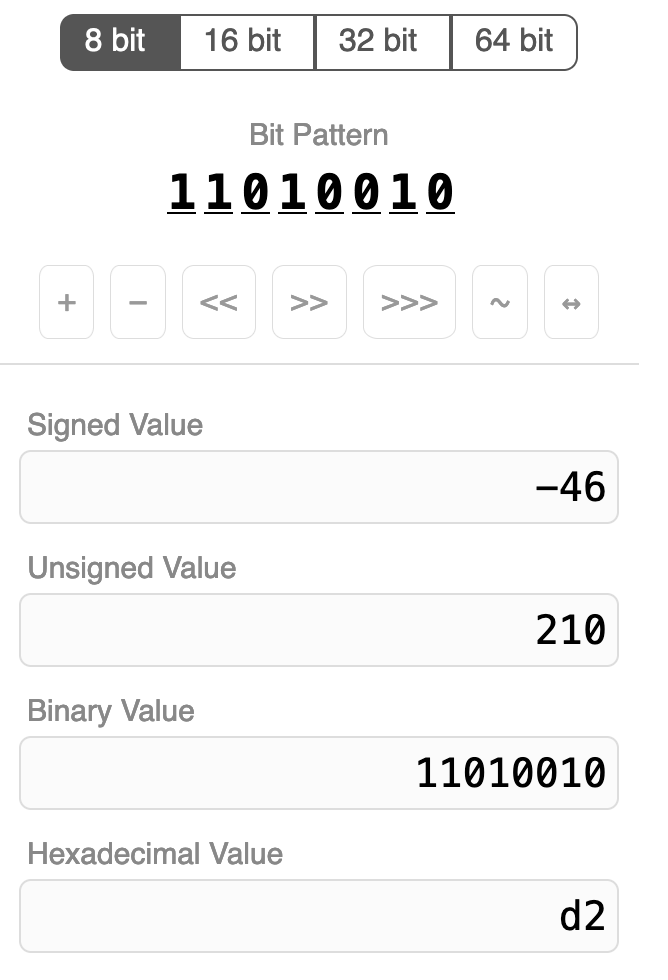
memory. So with his permission, I made a copy of it for integers called <a href="https://integer.exposed">integer.exposed</a>.</p>

<p>Here&rsquo;s a screenshot:</p>

<p><img src="https://jvns.ca/images/int-exposed2.png" style="height: 400px"></p>

<p>It was pretty straightforward to make (copying someone else&rsquo;s design is so much
easier than making your own!) but I learned a few CSS tricks from analyzing how
he implemented it.</p>

<h3 id="implement-dns-in-a-weekend">Implement DNS in a Weekend</h3>

<p>I&rsquo;ve been working on a big project to show people how to implement a working
networking stack (TCP, TLS, DNS, UDP, HTTP) in 1400 lines of Python, that you
can use to download a webpage using 100% your own networking code. Kind of like <a href="https://www.nand2tetris.org/">Nand to Tetris</a>, but for computer networking.</p>

<p>This has been going VERY slowly &ndash; writing my own working shitty
implementations was relatively easy (I finished that in October 2022), but
writing clear tutorials that other people can follow is not.</p>

<p>But in March, I released the first part: <a href="https://implement-dns.wizardzines.com/">Implement DNS in a Weekend</a>. The response was really good
&ndash; there are <a href="https://github.com/search?q=dns%20weekend&amp;type=repositories">dozens of people&rsquo;s implementations on GitHub</a>, and
people have implemented it in Go, C#, C, Clojure, Python, Ruby, Kotlin, Rust,
Typescript, Haskell, OCaml, Elixir, Odin, and probably many more languages too.
I&rsquo;d like to see more implementations in less systems-y languages like vanilla
JS and PHP, need to think about what I can do to encourage that.</p>

<p>I think &ldquo;Implement IPv4 in a Weekend&rdquo; might be the next one I release. It&rsquo;s
going to come with bonus guides to implementing ICMP and UDP too.</p>

<h3 id="a-talk-making-hard-things-easy">a talk: Making Hard Things Easy!</h3>

<p>I gave a keynote at Strange Loop this year called <a href="https://jvns.ca/blog/2023/10/06/new-talk--making-hard-things-easy/">Making Hard Things Easy (video + transcript)</a>,
about why some things are so hard to learn and how we can make them easier. I&rsquo;m
really proud of how it turned out.</p>

<h3 id="a-lot-of-blog-posts-about-git">a lot of blog posts about Git!</h3>

<p>In September I decided to work on a second zine about Git, focusing more on how
Git works. This is one of the hardest projects I&rsquo;ve ever worked on, because
over the last 10 years of using it I&rsquo;d completely lost sight of what&rsquo;s hard
about Git.</p>

<p>So I&rsquo;ve been doing a lot of research to try to figure out why Git is hard, and
I&rsquo;ve been writing a lot of blog posts. So far I&rsquo;ve written:</p>

<ul>
<li><a href="https://jvns.ca/blog/2023/09/14/in-a-git-repository--where-do-your-files-live-/">In a git repository, where do your files live?</a></li>
<li><a href="https://jvns.ca/blog/2023/10/20/some-miscellaneous-git-facts/">Some miscellaneous git facts</a></li>
<li><a href="https://jvns.ca/blog/2023/11/01/confusing-git-terminology/">Confusing git terminology</a></li>
<li><a href="https://jvns.ca/blog/2023/11/06/rebasing-what-can-go-wrong-/">git rebase: what can go wrong?</a></li>
<li><a href="https://jvns.ca/blog/2023/11/10/how-cherry-pick-and-revert-work/">How git cherry-pick and revert use 3-way merge</a></li>
<li><a href="https://jvns.ca/blog/2023/11/23/branches-intuition-reality/">git branches: intuition &amp; reality</a></li>
<li><a href="https://jvns.ca/blog/2023/12/04/mounting-git-commits-as-folders-with-nfs/">Mounting git commits as folders with NFS</a></li>
</ul>

<p>What&rsquo;s been most surprising so far is that I originally thought &ldquo;to understand
Git, people just need to learn git&rsquo;s internal data model!&ldquo;. But the more I talk
to people about their struggles with Git, the less I think that&rsquo;s true. I&rsquo;ll
leave it at that for now, but there&rsquo;s a lot of work still to do.</p>

<h3 id="some-git-prototypes">some Git prototypes!</h3>

<p>I worked on a couple of fun Git tools this year:</p>

<ul>
<li><a href="https://github.com/jvns/git-commit-folders">git-commit-folders</a>: a way to
mount your Git commits as (read-only) folders using FUSE or NFS. This one
came about because someone mentioned that they think of Git commits as being
folders with old versions of the code, and it made me wonder &ndash; why <strong>can&rsquo;t</strong>
you just have a virtual folder for every commit? It turns out that it can and
it works pretty well.</li>
<li><a href="https://github.com/jvns/git-oops">git-oops</a>: an experimental prototype of an
undo system for git. This one came out of me wondering &ldquo;why can&rsquo;t we just
have a <code>git undo</code>?&ldquo;. I learned a bunch of things about why that&rsquo;s not easy
through writing the prototype, I might write a longer blog post about it
later.</li>
</ul>

<p>I&rsquo;ve been trying to put a little less pressure on myself to release software
that&rsquo;s Amazing and Perfect &ndash; sometimes I have an idea that I think is cool but
don&rsquo;t really have the time or energy to fully execute on it. So I decided to
just put these both on Github in a somewhat unfinished state, so I can come
back to them if later if I want. Or not!</p>

<p>I&rsquo;m also working on another Git software project, which is a collaboration with
a friend.</p>

<h3 id="hired-an-operations-manager">hired an operations manager!</h3>

<p>This year I hired an Operations Manager for <a href="https://wizardzines.com/">Wizard Zines</a>! Lee is incredible and has done SO much to
streamline the logistics of running the company, so that I can focus more on
writing and coding. I don&rsquo;t talk much about the mechanics of running the
business on here, but it&rsquo;s a lot and I&rsquo;m very grateful to have some help.</p>

<p>A few of the many things Lee has made possible:</p>

<ul>
<li>run a Black Friday sale!</li>
<li>we added a review system to the website! (it&rsquo;s so nice to hear about how people loved getting zines for Christmas!)</li>
<li>the <a href="https://store.wizardzines.com">store</a> has been reorganized to be way clearer!</li>
<li>we&rsquo;re more consistent about sending out the <a href="https://wizardzines.com/new-comics/">new comics</a> newsletter!</li>
<li>I can take a vacation and not worry about support emails!</li>
</ul>

<h3 id="migrated-to-mastodon">migrated to Mastodon!</h3>

<p>I spent 10 years building up a Twitter presence, but with the Recent Events, I
spent a lot of time in 2023 working on building up a <a href="https://social.jvns.ca/@b0rk">Mastodon account</a>. I&rsquo;ve found that I&rsquo;m able to have more
interesting conversations about computers on Mastodon than on Twitter or
Bluesky, so that&rsquo;s where I&rsquo;ve been spending my time. We&rsquo;ve been having a lot of
great discussions about Git there recently.</p>

<p>I&rsquo;ve run into a few technical issues with Mastodon (which I wrote about at <a href="https://jvns.ca/blog/2023/08/11/some-notes-on-mastodon/">Notes on
using a single-person Mastodon server</a>) but overall
I&rsquo;m happy there and I&rsquo;ve been spending a lot more time there than on Twitter.</p>

<h3 id="some-questions-for-2024">some questions for 2024</h3>

<p>one of my questions for 2022 was:</p>

<ul>
<li>What&rsquo;s hard for developers about learning to use the Unix command line in 2022? What do I want to do about it?</li>
</ul>

<p>Maybe I&rsquo;ll work on that in 2024! Maybe not! I did make a little bit of progress
on that question this year (I wrote <a href="https://jvns.ca/blog/2023/08/08/what-helps-people-get-comfortable-on-the-command-line-/">What helps people get comfortable on the command line?</a>).</p>

<p>Some other questions I&rsquo;m thinking about on and off:</p>

<ul>
<li>Could man pages be a more useful form of documentation? Do I want to try to do anything about that?</li>
<li>What format do I want to use for this &ldquo;implement all of computer networking in Python&rdquo; project? (is it a website? a book? is there a zine? what&rsquo;s the deal?) Do I want to run workshops?</li>
<li>What community guidelines do I want to have for discussions on Mastodon?</li>
<li>Could I be marketing <a href="https://messwithdns.net/">Mess With DNS</a> (from 2021) more? How do I want to do that?</li>
</ul>

<h3 id="moving-slowly-is-okay">moving slowly is okay</h3>

<p>I&rsquo;ve started to come to terms with the fact that projects always just take
longer than I think they will. I started working this &ldquo;implement your own
terrible networking stack&rdquo; project in 2022, and I don&rsquo;t know if I&rsquo;ll finish it
in 2024. I&rsquo;ve been working on this Git zine since September and I still don&rsquo;t
completely understand why Git is hard yet. There&rsquo;s another small secret project
that I initally thought of 5 years ago, made a bunch of progress on this year,
but am still not done with. Things take a long time and that&rsquo;s okay.</p>

<p>As always, thanks for reading and for making it possible for me to do this
weird job.</p>
]]></content>
  </entry>
  
  <entry>
    <title type="html"><![CDATA[Mounting git commits as folders with NFS]]></title>
    <link href="https://jvns.ca/blog/2023/12/04/mounting-git-commits-as-folders-with-nfs/"/>
    <updated>2023-12-04T09:28:03+00:00</updated>
    <id>https://jvns.ca/blog/2023/12/04/mounting-git-commits-as-folders-with-nfs/</id>
    <content type="html"><![CDATA[

<p>Hello! The other day, I started wondering &ndash; has anyone ever made a FUSE
filesystem for a git repository where all every commit is a folder? It turns
out the answer is yes! There&rsquo;s <a href="https://github.com/fanzeyi/giblefs">giblefs</a>,
<a href="https://belkadan.com/blog/2023/11/GitMounter/">GitMounter</a>, and <a href="https://orib.dev/git9.html">git9</a> for Plan 9.</p>

<p>But FUSE is pretty annoying to use on Mac &ndash; you need to install a kernel
extension, and Mac OS seems to be making it harder and harder to install kernel
extensions for security reasons. Also I had a few ideas for how to organize the
filesystem differently than those projects.</p>

<p>So I thought it would be fun to experiment with ways to mount filesystems on
Mac OS other than FUSE, so I built a project that does that called
<a href="https://github.com/jvns/git-commit-folders">git-commit-folders</a>. It works (at least on my computer) with both FUSE and NFS, and there&rsquo;s a broken WebDav
implementation too.</p>

<p>It&rsquo;s pretty experimental (I&rsquo;m not sure if this is actually a useful piece of
software to have or just a fun toy to think about how git works) but it was fun
to write and I&rsquo;ve enjoyed using it myself on small repositories so here are
some of the problems I ran into while writing it.</p>

<h3 id="goal-show-how-commits-are-like-folders">goal: show how commits are like folders</h3>

<p>The main reason I wanted to make this was to give folks some intuition for how
git works under the hood. After all, git commits really <em>are</em> very similar to
folders &ndash; every Git commit <a href="https://jvns.ca/blog/2023/09/14/in-a-git-repository--where-do-your-files-live-/#commit-step-2-look-at-the-tree">contains a directory listing</a> of the files in it,
and that directory can have subdirectories, etc.</p>

<p>It&rsquo;s just that git commits aren&rsquo;t <em>actually</em> implemented as folders to save
disk space.</p>

<p>So in <code>git-commit-folders</code>, every commit is actually a folder, and if you want
to explore your old commits, you can do it just by exploring the filesystem!
For example, if I look at the initial commit for my blog, it looks like this:</p>

<pre><code>$ ls commits/8d/8dc0/8dc0cb0b4b0de3c6f40674198cb2bd44aeee9b86/
README
</code></pre>

<p>and a few commits later, it looks like this:</p>

<pre><code>$ ls /tmp/git-homepage/commits/c9/c94e/c94e6f531d02e658d96a3b6255bbf424367765e9/
_config.yml  config.rb  Rakefile  rubypants.rb  source
</code></pre>

<h3 id="branches-are-symlinks">branches are symlinks</h3>

<p>In the filesystem mounted by <code>git-commit-folders</code>, commits are the only real folders &ndash; everything
else (branches, tags, etc) is a symlink to a commit. This mirrors how git works under the hood.</p>

<pre><code>$ ls -l branches/
lr-xr-xr-x 59 bork bazil-fuse -&gt; ../commits/ff/ff56/ff563b089f9d952cd21ac4d68d8f13c94183dcd8
lr-xr-xr-x 59 bork follow-symlink -&gt; ../commits/7f/7f73/7f73779a8ff79a2a1e21553c6c9cd5d195f33030
lr-xr-xr-x 59 bork go-mod-branch -&gt; ../commits/91/912d/912da3150d9cfa74523b42fae028bbb320b6804f
lr-xr-xr-x 59 bork mac-version -&gt; ../commits/30/3008/30082dcd702b59435f71969cf453828f60753e67
lr-xr-xr-x 59 bork mac-version-debugging -&gt; ../commits/18/18c0/18c0db074ec9b70cb7a28ad9d3f9850082129ce0
lr-xr-xr-x 59 bork main -&gt; ../commits/04/043e/043e90debbeb0fc6b4e28cf8776e874aa5b6e673
$ ls -l tags/
lr-xr-xr-x - bork 31 Dec  1969 test-tag -&gt; ../commits/16/16a3/16a3d776dc163aa8286fb89fde51183ed90c71d0
</code></pre>

<p>This definitely doesn&rsquo;t completely explain how git works (there&rsquo;s a lot more to
it than just &ldquo;a commit is like a folder!&rdquo;), but my hope is that it makes thie
idea that every commit is like a folder with an old version of your code&rdquo; feel
a little more concrete.</p>

<h3 id="why-might-this-be-useful">why might this be useful?</h3>

<p>Before I get into the implementation, I want to talk about why having a filesystem
with a folder for every git commit in it might be useful. A lot of my projects
I end up never really using at all (like <a href="https://github.com/jvns/dnspeep">dnspeep</a>) but I did find myself using this
project a little bit while I was working on it.</p>

<p>The main uses I&rsquo;ve found so far are:</p>

<ul>
<li>searching for a function I deleted &ndash; I can run <code>grep someFunction branch_histories/main/*/commit.go</code> to find an old version of it</li>
<li>quickly looking at a file on another branch to copy a line from it, like <code>vim branches/other-branch/go.mod</code></li>
<li>searching every branch for a function, like <code>grep someFunction branches/*/commit.go</code></li>
</ul>

<p>All of these are through symlinks to commits instead of referencing commits
directly.</p>

<p>None of these are the most efficient way to do this (you can use <code>git show</code> and
<code>git log -S</code> or maybe <code>git grep</code> to accomplish something similar), but
personally I always forget the syntax and navigating a filesystem feels easier
to me. <code>git worktree</code> also lets you have multiple branches checked out at the same
time, but to me it feels weird to set up an entire worktree just to look at 1
file.</p>

<p>Next I want to talk about some problems I ran into.</p>

<h3 id="problem-1-webdav-or-nfs">problem 1: webdav or NFS?</h3>

<p>The two filesystems I could that were natively supported by Mac OS were WebDav
and NFS. I couldn&rsquo;t tell which would be easier to implement so I just
tried both.</p>

<p>At first webdav seemed easier and it turns out that golang.org/x/net has a
<a href="https://pkg.go.dev/golang.org/x/net/webdav">webdav implementation</a>, which  was
pretty easy to set up.</p>

<p>But that implementation doesn&rsquo;t support symlinks, I think because it uses the <code>io/fs</code> interface
and <code>io/fs</code> doesn&rsquo;t <a href="https://github.com/golang/go/issues/49580">support symlinks yet</a>. Looks like that&rsquo;s in progress
though. So I gave up on webdav and decided to focus on the NFS implementation, using this <a href="https://github.com/willscott/go-nfs/">go-nfs</a> NFSv3 library.</p>

<p>Someone also mentioned that there&rsquo;s
<a href="https://developer.apple.com/documentation/fileprovider/">FileProvider</a> on Mac
but I didn&rsquo;t look into that.</p>

<h3 id="problem-2-how-to-keep-all-the-implementations-in-sync">problem 2: how to keep all the implementations in sync?</h3>

<p>I was implementing 3 different filesystems (FUSE, NFS, and WebDav), and it
wasn&rsquo;t clear to me how to avoid a lot of duplicated code.</p>

<p>My friend Dave suggested writing one core implementation and then writing
adapters (like <code>fuse2nfs</code> and <code>fuse2dav</code>) to translate it into the NFS and
WebDav verions. What this looked like in practice is that I needed to implement
3 filesystem interfaces:</p>

<ul>
<li><code>fs.FS</code> for FUSE</li>
<li><code>billy.Filesystem</code> for NFS</li>
<li><code>webdav.Filesystem</code> for webdav</li>
</ul>

<p>So I put all the core logic in the <code>fs.FS</code> interface, and then wrote two functions:</p>

<ul>
<li><code>func Fuse2Dav(fs fs.FS) webdav.FileSystem</code></li>
<li><code>func Fuse2NFS(fs fs.FS) billy.Filesystem</code></li>
</ul>

<p>All of the filesystems were kind of similar so the translation wasn&rsquo;t too hard,
there were just 1 million annoying bugs to fix.</p>

<h3 id="problem-3-i-didn-t-want-to-list-every-commit">problem 3: I didn&rsquo;t want to list every commit</h3>

<p>Some git repositories have thousands or millions of commits. My first idea for how to address this was to make <code>commits/</code> appear empty, so that it works like this:</p>

<pre><code>$ ls commits/
$ ls commits/80210c25a86f75440110e4bc280e388b2c098fbd/
fuse  fuse2nfs  go.mod  go.sum  main.go  README.md
</code></pre>

<p>So every commit would be available if you reference it directly, but you can&rsquo;t
list them. This is a weird thing for a filesystem to do but it actually works
fine in FUSE. I couldn&rsquo;t get it to work in NFS though. I assume what&rsquo;s going on
here is that if you tell NFS that a directory is empty, it&rsquo;ll interpret that
the directory is actually empty, which is fair.</p>

<p>I ended up handling this by:</p>

<ul>
<li>organizing the commits by their 2-character prefix the way <code>.git/objects</code>
does (so that <code>ls commits</code> shows <code>0b 03 05 06 07 09 1b 1e 3e 4a</code>), but doing
2 levels of this so that a <code>18d46e76d7c2eedd8577fae67e3f1d4db25018b0</code> is at <code>commits/18/18df/18d46e76d7c2eedd8577fae67e3f1d4db25018b0</code></li>
<li>listing all the packed commits hashes only once at the beginning, caching
them in memory, and then only updating the loose objects afterwards. The idea
is that almost all of the commits in the repo should be packed and git
doesn&rsquo;t repack its commits very often.</li>
</ul>

<p>This seems to work okay on the Linux kernel which has ~1 million commits. It
takes maybe a minute to do the initial load on my machine and then after that
it just needs to do fast incremental updates.</p>

<p>Each commit hash is only 20 bytes so caching 1 million commit hashes isn&rsquo;t a
big deal, it&rsquo;s just 20MB.</p>

<p>I think a smarter way to do this would be to load the commit listings lazily &ndash;
Git sorts its packfiles by commit ID, so you can pretty easily do a binary
search to find all commits starting with <code>1b</code> or <code>1b8c</code>. The <a href="https://github.com/go-git/go-git">git library</a> I was using
doesn&rsquo;t have great support for this though, because listing all commits in a
Git repository is a really weird thing to do. I spent maybe a couple of days
<a href="https://github.com/jvns/git-commit-folders/tree/fast-commits">trying to implement it</a> but I didn&rsquo;t manage to get the performance I wanted so I
gave up.</p>

<h3 id="problem-4-not-a-directory">problem 4: &ldquo;not a directory&rdquo;</h3>

<p>I kept getting this error:</p>

<pre><code>&quot;/tmp/mnt2/commits/59/59167d7d09fd7a1d64aa1d5be73bc484f6621894/&quot;: Not a directory (os error 20)
</code></pre>

<p>This really threw me off at first but it turns out that this just means that
there was an error while listing the directory, and the way the NFS library
handles that error is with &ldquo;Not a directory&rdquo;. This happened a bunch of times
and I just needed to track the bug down every time.</p>

<p>There were a lot of weird errors like this. I also got <code>cd: system call
interrupted</code> which was pretty upsetting but ultimately was just some other bug
in my program.</p>

<p>Eventually I realized that I could use Wireshark to look at all the NFS
packets being sent back and forth, which made some of this stuff easier to debug.</p>

<h3 id="problem-5-inode-numbers">problem 5: inode numbers</h3>

<p>At first I was accidentally setting all my directory inode numbers to 0. This
was bad because if if you run <code>find</code> on a directory where the inode number of
every directory is 0, it&rsquo;ll complain about filesystem loops and give up, which
is very fair.</p>

<p>I fixed this by defining an <code>inode(string)</code> function which hashed a string to
get the inode number, and using the tree ID / blob ID as the string to hash.</p>

<h3 id="problem-6-stale-file-handles">problem 6: stale file handles</h3>

<p>I kept getting this &ldquo;Stale NFS file handle&rdquo; error. The problem is that I need
to be able to take an opaque 64-byte NFS &ldquo;file handle&rdquo; and map it to the right
directory.</p>

<p>The way the NFS library I&rsquo;m using works is that it generates a file handle for
every file and caches those references with a fixed size cache. This works fine
for small repositories, but if there are too many files then it&rsquo;ll overflow the
cache and you&rsquo;ll start getting stale file handle errors.</p>

<p>This is still a problem and I&rsquo;m not sure how to fix it. I don&rsquo;t understand how
real NFS servers do this, maybe they just have a really big cache?</p>

<p>The NFS file handle is 64 bytes (64 bytes! not bits!) which is pretty big, so
it does seem like you could just encode the entire file path in the handle a
lot of the time and not cache it at all. Maybe I&rsquo;ll try to implement that at
some point.</p>

<h3 id="problem-7-branch-histories">problem 7: branch histories</h3>

<p>The <code>branch_histories/</code> directory only lists the latest 100 commits for each
branch right now. Not sure what the right move is there &ndash; it would be nice to
be able to list the full history of the branch somehow. Maybe I could use a
similar subfolder trick to the <code>commits/</code> directory.</p>

<h3 id="problem-8-submodules">problem 8: submodules</h3>

<p>Git repositories sometimes have submodules. I don&rsquo;t understand anything about
submodules so right now I&rsquo;m just ignoring them. So that&rsquo;s a bug.</p>

<h3 id="problem-9-is-nfsv4-better">problem 9: is NFSv4 better?</h3>

<p>I built this with NFSv3 because the only Go library I could find at the time
was an NFSv3 library. After I was done I discovered that the buildbarn project
has an <a href="https://github.com/buildbarn/bb-adrs/blob/master/0009-nfsv4.md">NFSv4 server</a> in it. Would it be better to use that?</p>

<p>I don&rsquo;t know if this is actually a problem or how big of an advantage it would
be to use NFSv4. I&rsquo;m also a little unsure about using the buildbarn NFS library
because it&rsquo;s not clear if they expect other people to use it or not.</p>

<h3 id="that-s-all">that&rsquo;s all!</h3>

<p>There are probably more problems I forgot but that&rsquo;s all I can think of for
now. I may or may not fix the NFS stale file handle problem or the &ldquo;it takes 1
minute to start up on the linux kernel&rdquo; problem, who knows!</p>

<p>Thanks to my friend <a href="https://github.com/vasi">vasi</a> who explained one million things about filesystems to me.</p>
]]></content>
  </entry>
  
  <entry>
    <title type="html"><![CDATA[git branches: intuition & reality]]></title>
    <link href="https://jvns.ca/blog/2023/11/23/branches-intuition-reality/"/>
    <updated>2023-11-23T09:51:27+00:00</updated>
    <id>https://jvns.ca/blog/2023/11/23/branches-intuition-reality/</id>
    <content type="html"><![CDATA[

<p>Hello! I&rsquo;ve been working on writing a zine about git so I&rsquo;ve been thinking
about git branches a lot. I keep hearing from people that they find the way git
branches work to be counterintuitive. It got me thinking:  what might an
&ldquo;intuitive&rdquo; notion of a branch be, and how is it different from how git
actually works?</p>

<p>So in this post I want to briefly talk about</p>

<ul>
<li>an intuitive mental model I think many people have</li>
<li>how git actually represents branches internally (&ldquo;branches are a pointer to a commit&rdquo; etc)</li>
<li>how the &ldquo;intuitive model&rdquo; and the real way it works are actually pretty closely related</li>
<li>some limits of the intuitive model and why it might cause problems</li>
</ul>

<p>Nothing in this post is remotely groundbreaking so I&rsquo;m going to try to keep it pretty short.</p>

<h3 id="an-intuitive-model-of-a-branch">an intuitive model of a branch</h3>

<p>Of course, people have many different intuitions about branches. Here&rsquo;s the one
that I think corresponds most closely to the physical &ldquo;a branch of an
apple tree&rdquo; metaphor.</p>

<p>My guess is that a lot of people think about a git branch like this: the 2
commits in pink in this picture are on a &ldquo;branch&rdquo;.</p>

<p><img src="https://jvns.ca/images/git-branch.png" width="200px"></p>

<p>I think there are two important things about this diagram:</p>

<ol>
<li>the branch has 2 commits on it</li>
<li>the branch has a &ldquo;parent&rdquo; (<code>main</code>) which it&rsquo;s an offshoot of</li>
</ol>

<p>That seems pretty reasonable, but that&rsquo;s not how git defines a branch &ndash; most
importantly, git doesn&rsquo;t have any concept of a branch&rsquo;s &ldquo;parent&rdquo;. So how does
git define a branch?</p>

<h3 id="in-git-a-branch-is-the-full-history">in git, a branch is the full history</h3>

<p>In git, a branch is the full history of every previous commit, not just the &ldquo;offshoot&rdquo; commits. So in our picture above both branches (<code>main</code> and <code>branch</code>) have 4 commits on them.</p>

<p>I made an example repository at <a href="https://github.com/jvns/branch-example">https://github.com/jvns/branch-example</a> which
has its branches set up the same way as in the picture above. Let&rsquo;s look at the
2 branches:</p>

<p><code>main</code> has 4 commits on it:</p>

<pre><code>$ git log --oneline main
70f727a d
f654888 c
3997a46 b
a74606f a
</code></pre>

<p>and <code>mybranch</code> has 4 commits on it too. The bottom two commits are shared
between both branches.</p>

<pre><code>$ git log --oneline mybranch
13cb960 y
9554dab x
3997a46 b
a74606f a
</code></pre>

<p>So <code>mybranch</code> has 4 commits on it, not just the 2 commits <code>13cb960</code> and <code>9554dab</code> that are &ldquo;offshoot&rdquo; commits.</p>

<p>You can get git to draw all the commits on both branches like this:</p>

<pre><code>$ git log --all --oneline --graph
* 70f727a (HEAD -&gt; main, origin/main) d
* f654888 c
| * 13cb960 (origin/mybranch, mybranch) y
| * 9554dab x
|/
* 3997a46 b
* a74606f a
</code></pre>

<h3 id="a-branch-is-stored-as-a-commit-id">a branch is stored as a commit ID</h3>

<p>Internally in git, branches are stored as tiny text files which have a commit ID in
them. That commit is the latest commit on the branch. This is the &ldquo;technically correct&rdquo; definition I was talking about at the beginning.</p>

<p>Let&rsquo;s look at the text files for <code>main</code> and <code>mybranch</code> in our example repo:</p>

<pre><code>$ cat .git/refs/heads/main
70f727acbe9ea3e3ed3092605721d2eda8ebb3f4
$ cat .git/refs/heads/mybranch
13cb960ad86c78bfa2a85de21cd54818105692bc
</code></pre>

<p>This makes sense: <code>70f727</code> is the latest commit on <code>main</code> and <code>13cb96</code> is the latest commit on <code>mybranch</code>.</p>

<p>The reason this works is that every commit contains a pointer to its parent(s),
so git can follow the chain of pointers to get every commit on the branch.</p>

<p>Like I mentioned before, the thing that&rsquo;s missing here is any relationship at
all between these two branches. There&rsquo;s no indication that <code>mybranch</code> is an
offshoot of <code>main</code>.</p>

<p>Now that we&rsquo;ve talked about how the intuitive notion of a branch is &ldquo;wrong&rdquo;, I
want to talk about how it&rsquo;s also right in some very important ways.</p>

<h3 id="people-s-intuition-is-usually-not-that-wrong">people&rsquo;s intuition is usually not that wrong</h3>

<p>I think it&rsquo;s pretty popular to tell people that their intuition about git is
&ldquo;wrong&rdquo;. I find that kind of silly &ndash; in general, even if people&rsquo;s intuition
about a topic is technically incorrect in some ways, people usually have the
intuition they do for very legitimate reasons! &ldquo;Wrong&rdquo; models can be super useful.</p>

<p>So let&rsquo;s talk about 3 ways the intuitive &ldquo;offshoot&rdquo; notion of a branch matches
up very closely with how we actually use git in practice.</p>

<h3 id="rebases-use-the-intuitive-notion-of-a-branch">rebases use the &ldquo;intuitive&rdquo; notion of a branch</h3>

<p>Now let&rsquo;s go back to our original picture.</p>

<p><img src="https://jvns.ca/images/git-branch.png" width="200px"></p>

<p>When you rebase <code>mybranch</code> on <code>main</code>, it takes the commits on the &ldquo;intuitive&rdquo;
branch (just the 2 pink commits) and replays them onto <code>main</code>.</p>

<p>The result is that just the 2 (<code>x</code> and <code>y</code>) get copied. Here&rsquo;s what that looks like:</p>

<pre><code>$ git switch mybranch
$ git rebase main
$ git log --oneline mybranch
952fa64 (HEAD -&gt; mybranch) y
7d50681 x
70f727a (origin/main, main) d
f654888 c
3997a46 b
a74606f a
</code></pre>

<p>Here <code>git rebase</code> has created two new commits (<code>952fa64</code> and <code>7d50681</code>) whose
information comes from the previous two <code>x</code> and <code>y</code> commits.</p>

<p>So the intuitive model isn&rsquo;t THAT wrong! It tells you exactly what happens in a
rebase.</p>

<p>But because git doesn&rsquo;t know that <code>mybranch</code> is an offshoot of <code>main</code>, you need
to tell it explicitly where to rebase the branch.</p>

<h3 id="merges-use-the-intuitive-notion-of-a-branch-too">merges use the &ldquo;intuitive&rdquo; notion of a branch too</h3>

<p>Merges don&rsquo;t copy commits, but they do need a &ldquo;base&rdquo; commit: the way merges
work is that it looks at two sets of changes (starting from the shared base)
and then merges them.</p>

<p>Let&rsquo;s undo the rebase we just did and then see what the merge base is.</p>

<pre><code>$ git switch mybranch
$ git reset --hard 13cb960  # undo the rebase
$ git merge-base main mybranch
3997a466c50d2618f10d435d36ef12d5c6f62f57
</code></pre>

<p>This gives us the &ldquo;base&rdquo; commit where our branch branched off, <code>3997a4</code>.
That&rsquo;s exactly the commit you would think it might be based on our intuitive
picture.</p>

<h3 id="github-pull-requests-also-use-the-intuitive-idea">github pull requests also use the intuitive idea</h3>

<p>If we create a pull request on GitHub to merge <code>mybranch</code> into <code>main</code>, it&rsquo;ll
also show us 2 commits: the commits <code>x</code> and <code>y</code>. That makes sense and also
matches our intuitive notion of a branch.</p>

<p><img src="https://jvns.ca/images/gh-pr.png" width="300px"></p>

<p>I assume if you make a merge request on GitLab it shows you something similar.</p>

<h3 id="intuition-is-pretty-good-but-it-has-some-limits">intuition is pretty good, but it has some limits</h3>

<p>This leaves our intuitive definition of a branch looking pretty good actually!
The &ldquo;intuitive&rdquo; idea of what a branch is matches exactly with how merges and
rebases and GitHub pull requests work.</p>

<p>You do need to explicitly
specify the other branch when merging or rebasing or making a pull request (like <code>git rebase main</code>),
because git doesn&rsquo;t know what branch you think your offshoot is based on.</p>

<p>But the intuitive notion of a branch has one fairly serious problem: the way
you intuitively think about <code>main</code> and an offshoot branch are very different,
and git doesn&rsquo;t know that.</p>

<p>So let&rsquo;s talk about the different kinds of git branches.</p>

<h3 id="trunk-and-offshoot-branches">trunk and offshoot branches</h3>

<p>To a human, <code>main</code> and <code>mybranch</code> are pretty different, and you probably have
pretty different intentions around how you want to use them.</p>

<p>I think it&rsquo;s pretty normal to think of some branches as being &ldquo;trunk&rdquo; branches,
and some branches as being &ldquo;offshoots&rdquo;. Also you can have an offshoot of an
offshoot.</p>

<p>Of course, git itself doesn&rsquo;t make any such distinctions (the term &ldquo;offshoot&rdquo;
is one I just made up!), but what kind of a branch it is definitely affects how
you treat it.</p>

<p>For example:</p>

<ul>
<li>you might rebase <code>mybranch</code> onto <code>main</code> but you probably wouldn&rsquo;t rebase <code>main</code> onto <code>mybranch</code> &ndash; that would be weird!</li>
<li>in general people are much more careful around rewriting the history on &ldquo;trunk&rdquo; branches than short-lived offshoot branches</li>
</ul>

<h3 id="git-lets-you-do-rebases-backwards">git lets you do rebases &ldquo;backwards&rdquo;</h3>

<p>One thing I think throws people off about git is &ndash; because git doesn&rsquo;t
have any notion of whether a branch is an &ldquo;offshoot&rdquo; of another branch, it
won&rsquo;t give you any guidance about if/when it&rsquo;s appropriate to rebase branch X
on branch Y. You just have to know.</p>

<p>for example, you can do either:</p>

<pre><code>$ git checkout main
$ git rebase mybranch
</code></pre>

<p>or</p>

<pre><code>$ git checkout mybranch
$ git rebase main
</code></pre>

<p>Git will happily let you do either one, even though in this case <code>git rebase main</code> is
extremely normal and <code>git rebase mybranch</code> is pretty weird. A lot of people
said they found this confusing so here&rsquo;s a picture of the two kinds of rebases:</p>

<p><img src="https://jvns.ca/images/backwards-rebase.png"></p>

<p>Similarly, you can do merges &ldquo;backwards&rdquo;, though that&rsquo;s much more normal than
doing a backwards rebase &ndash; merging <code>mybranch</code> into <code>main</code> and <code>main</code> into
<code>mybranch</code> are both useful things to do for different reasons.</p>

<p>Here&rsquo;s a diagram of the two ways you can merge:</p>

<p><img src="https://jvns.ca/images/merge-two-ways.png"></p>

<h3 id="git-s-lack-of-hierarchy-between-branches-is-a-little-weird">git&rsquo;s lack of hierarchy between branches is a little weird</h3>

<p>I hear the statement &ldquo;the <code>main</code> branch is not special&rdquo; a lot and I&rsquo;ve been
puzzled about it &ndash; in most of the repositories I work in, <code>main</code> <strong>is</strong>
pretty special! Why are people saying it&rsquo;s not?</p>

<p>I think the point is that even though branches <strong>do</strong> have relationships
between them (<code>main</code> is often special!), git doesn&rsquo;t know anything about those
relationships.</p>

<p>You have to tell git explicitly about the relationship between branches every
single time you run a git command like <code>git rebase</code> or <code>git merge</code>, and if you
make a mistake things can get really weird.</p>

<p>I don&rsquo;t know whether git&rsquo;s design here is &ldquo;right&rdquo; or &ldquo;wrong&rdquo; (it definitely has
some pros and cons, and I&rsquo;m very tired of reading endless arguments about
it), but I do think it&rsquo;s surprising to a lot of people for good reason.</p>

<h3 id="git-s-ui-around-branches-is-weird-too">git&rsquo;s UI around branches is weird too</h3>

<p>Let&rsquo;s say you want to look at just the &ldquo;offshoot&rdquo; commits on a branch, which as
we&rsquo;ve discussed is a completely normal thing to want.</p>

<p>Here&rsquo;s how to see just the 2 offshoot commits on our branch with <code>git log</code>:</p>

<pre><code>$ git switch mybranch
$ git log main..mybranch --oneline
13cb960 (HEAD -&gt; mybranch, origin/mybranch) y
9554dab x
</code></pre>

<p>You can look at the combined diff for those same 2 commits with <code>git diff</code> like this:</p>

<pre><code>$ git diff main...mybranch
</code></pre>

<p>So to see the 2 commits <code>x</code> and <code>y</code> with <code>git log</code>, you need to use 2 dots
(<code>..</code>), but to look at the same commits with <code>git diff</code>, you need to use 3 dots
(<code>...</code>).</p>

<p>Personally I can never remember what <code>..</code> and <code>...</code> mean so I just avoid
them completely even though in principle they seem useful.</p>

<h3 id="in-github-the-default-branch-is-special">in GitHub, the default branch is special</h3>

<p>Also, it&rsquo;s worth mentioning that GitHub does have a &ldquo;special branch&rdquo;: every
github repo has a &ldquo;default branch&rdquo; (in git terms, it&rsquo;s what <code>HEAD</code> points at),
which is special in the following ways:</p>

<ul>
<li>it&rsquo;s what you check out when you <code>git clone</code> the repository</li>
<li>it&rsquo;s the default destination for pull requests</li>
<li>github will suggest that you protect the default branch from force pushes</li>
</ul>

<p>and probably even more that I&rsquo;m not thinking of.</p>

<h3 id="that-s-all">that&rsquo;s all!</h3>

<p>This all seems extremely obvious in retrospect, but it took me a long time to
figure out what a more &ldquo;intuitive&rdquo; idea of a branch even might be because I was
so used to the technical &ldquo;a branch is a reference to a commit&rdquo; definition.</p>

<p>I also hadn&rsquo;t really thought about how git makes you tell it about the
hierarchy between your branches every time you run a <code>git rebase</code> or <code>git
merge</code> command &ndash; for me it&rsquo;s second nature to do that and it&rsquo;s not a big deal,
but now that I&rsquo;m thinking about it, it&rsquo;s pretty easy to see how somebody could
get mixed up.</p>
]]></content>
  </entry>
  
  <entry>
    <title type="html"><![CDATA[Some notes on nix flakes]]></title>
    <link href="https://jvns.ca/blog/2023/11/11/notes-on-nix-flakes/"/>
    <updated>2023-11-14T09:06:07+00:00</updated>
    <id>https://jvns.ca/blog/2023/11/11/notes-on-nix-flakes/</id>
    <content type="html"><![CDATA[

<p>I&rsquo;ve been using nix for about <a href="https://jvns.ca/blog/2023/02/28/some-notes-on-using-nix/">9 months now</a>.
For all of that time I&rsquo;ve been steadfastly ignoring flakes, but everyone keeps
saying that flakes are great and the best way to use nix, so I decided to try
to figure out what the deal is with them.</p>

<p>I found it very hard to find simple examples of flake files and I ran into a
few problems that were very confusing to me, so I wanted to write down some very
basic examples and some of the problems I ran into in case it&rsquo;s helpful to
someone else who&rsquo;s getting started with flakes.</p>

<p>First, let&rsquo;s talk about what a flake is a little.</p>

<h3 id="flakes-are-self-contained">flakes are self-contained</h3>

<p>Every explanation I&rsquo;ve found of flakes explains them in terms of other nix
concepts (&ldquo;flakes simplify nix usability&rdquo;, &ldquo;flakes are processors of Nix
code&rdquo;). Personally I really needed a way to think about flakes in terms of
other non-nix things and someone made an analogy to Docker containers that
really helped me, so I&rsquo;ve been thinking about flakes a little like Docker
container images.</p>

<p>Here are some ways in which flakes are like Docker containers:</p>

<ul>
<li>you can install and compile any software you want in them</li>
<li>you can use them as a dev environment (the flake sets up all your dependencies)</li>
<li>you can share your flake with other people with a <code>flake.nix</code> file and
then they can build the software exactly the same way you built it (a little
like how you can share a <code>Dockerfile</code>, though flakes are MUCH better at the
&ldquo;exactly the same way you built it&rdquo; thing)</li>
</ul>

<p>flakes are also different from Docker containers in a LOT of ways:</p>

<ul>
<li>with a <code>Dockerfile</code>, you&rsquo;re not actually guaranteed to get the exact same
results as another user. With <code>flake.nix</code> and <code>flake.lock</code> you are.</li>
<li>they run natively on Mac (you don&rsquo;t need to use Linux / a Linux VM the way you do with Docker)</li>
<li>different flakes can share dependencies very easily (you can technically share layers between Docker images, but flakes are MUCH better at this)</li>
<li>flakes can depend on other flakes and pick and choose which parts they want to take from their dependencies</li>
<li><code>flake.nix</code> files are programs in the nix programming language instead of mostly a bunch of shell commands</li>
<li>the way they do isolation is completely different (nix uses <a href="https://github.com/NixOS/patchelf">dynamic linker/rpath tricks</a> instead of filesystem overlays, and there are no cgroups or namespaces or VMs or anything with nix)</li>
</ul>

<p>Obviously this analogy breaks down pretty quickly (the list of differences is
VERY long), but they do share the &ldquo;you can share a dev environment with a
single configuration file&rdquo; design goal.</p>

<h3 id="nix-has-a-lot-of-pre-compiled-binaries">nix has a lot of pre-compiled binaries</h3>

<p>To me one of the biggest advantages of nix is that I&rsquo;m on a Mac and nix has a
repository with a lot of pre-compiled binaries of various packages for Mac. I
mostly mention this because people always say that nix is good because it&rsquo;s
&ldquo;declarative&rdquo; or &ldquo;reproducible&rdquo; or &ldquo;functional&rdquo; or whatever but my main
motivation for using nix personally is that it has a lot of binary packages. I
do appreciate that it makes it easier for me to build a <a href="https://github.com/jvns/nixpkgs/blob/main/flakes/hugo-0.40/flake.nix">5-year-old version of hugo on mac</a>
though.</p>

<p>My impression is that nix has more binary packages than Homebrew does, so
installing things is faster and I don&rsquo;t need to build as much from source.</p>

<h3 id="my-goal-make-a-flake-with-every-package-i-want-installed-on-my-system">my goal: make a flake with every package I want installed on my system</h3>

<p>Previously I was using nix as a Homebrew replacement like this (which I talk about more in <a href="https://jvns.ca/blog/2023/02/28/some-notes-on-using-nix/">this blog post</a>):</p>

<ul>
<li>run <code>nix-env -iA nixpkgs.whatever</code> to install stuff</li>
<li>that&rsquo;s it</li>
</ul>

<p>This worked great (except that it <a href="https://github.com/NixOS/nix/issues/9340">randomly broke occasionally</a>, but someone helped me
find a workaround for that so the random breaking wasn&rsquo;t a big issue).</p>

<p>I thought it might be fun to have a single <code>flake.nix</code> file where I could maintain a list
of all the packages I wanted installed and then put all that stuff in a
directory in my <code>PATH</code>. This isn&rsquo;t very well motivated: my previous setup was
generally working just fine, but I have a long history of fiddling with my
computer setup (Arch Linux ftw) and so I decided to have a Day Of Fiddling.</p>

<p>I think the only practical advantages of flakes for me are:</p>

<ul>
<li>I could theoretically use the <code>flake.nix</code> file to set up a new computer more easily</li>
<li>I can never remember how to <strong>uninstall</strong> software in nix, deleting a line in a configuration file is maybe easier to remember</li>
</ul>

<p>These are pretty minor though.</p>

<h3 id="how-do-we-make-a-flake">how do we make a flake?</h3>

<p>Okay, so I want to make a flake with a bunch of packages installed in it, let&rsquo;s say Ruby and cowsay to start. How do I
do that? I went to <a href="https://zero-to-nix.com/">zero-to-nix</a> and copied and pasted some things and ended up with this <code>flake.nix</code> file (<a href="https://gist.github.com/jvns/b51d4c2f04b705310cff18fcab291630">here it is in a gist</a>):</p>

<pre><code>{
  inputs.nixpkgs.url = &quot;github:NixOS/nixpkgs/nixpkgs-23.05-darwin&quot;;
  outputs = { self, nixpkgs }: {
    devShell.aarch64-darwin = nixpkgs.legacyPackages.aarch64-darwin.mkShell {
      buildInputs = with nixpkgs.legacyPackages.aarch64-darwin; [
        cowsay
        ruby
      ];
    };
  };
}
</code></pre>

<p>This has a little bit of boilerplate so let&rsquo;s list the things I understand about this:</p>

<ul>
<li><a href="https://github.com/NixOS/nixpkgs">nixpkgs</a> is a huge central repository of nix packages</li>
<li><code>aarch64-darwin</code> is my machine&rsquo;s architecture, this is important because I&rsquo;m asking nix to download binaries</li>
<li>I&rsquo;ve been thinking of an &ldquo;input&rdquo; as a sort of dependency. <code>nixpkgs</code> is my one
input. I get to pick and choose which bits of it I want to bring into my
flake though.</li>
<li>the <code>github:NixOS/nixpkgs/nixpkgs-23.05-darwin</code> url scheme is a bit unusual:
the format is <code>github:USER/REPO_NAME/TAG_OR_BRANCH_NAME</code>. So this is looking
at the <code>nixpkgs-23.05-darwin</code> tag in the <code>NixOS/nixpkgs</code> repository.</li>
<li><code>mkShell</code> is a nix function that&rsquo;s apparently useful if you want to run <code>nix develop</code>. I stopped using it after this so I don&rsquo;t know more than that.</li>
<li><code>devShell.aarch64-darwin</code> is the name of the output. Apparently I need to give it that exact name or else <code>nix develop</code> will yell at me</li>
<li><code>cowsay</code> and <code>ruby</code> are the things I&rsquo;m taking from nixpkgs to put in my output</li>
<li>I don&rsquo;t know what <code>self</code> is doing here or what <code>legacyPackages</code> is about</li>
</ul>

<p>Okay, cool.  Let&rsquo;s try to build it:</p>

<pre><code>$ nix build
error: getting status of '/nix/store/w1v41cyqyx4d7q4g7c8nb50bp9dvjm29-source/flake.nix': No such file or directory
</code></pre>

<p>This error is VERY mysterious &ndash; what is <code>/nix/store/w1v41cyqyx4d7q4g7c8nb50bp9dvjm29-source/</code> and why does nix think it should exist???</p>

<p>I was totally stuck until a very nice person on Mastodon helped me. So let&rsquo;s talk about what&rsquo;s going wrong here.</p>

<h3 id="problem-1-nix-completely-ignores-untracked-files">problem 1: nix completely ignores untracked files</h3>

<p>Apparently nix flakes have some Weird Rules about git. The way it works is:</p>

<ul>
<li>if your current directory <strong>isn&rsquo;t</strong> a git repo, everything is fine</li>
<li>if your <strong>are</strong> in a git repository, and all your files have been <code>git add</code>ed to git, everything is fine</li>
<li>but if you&rsquo;re in a git directory and your <code>flake.nix</code> file isn&rsquo;t tracked by
git yet (because you just created it and are trying to get it to work), nix
will COMPLETELY IGNORE YOUR FILE</li>
</ul>

<p>After someone kindly told me what was happening, I found that this is
<a href="https://www.tweag.io/blog/2020-05-25-flakes/">mentioned in this blog post about flakes</a>, which says:</p>

<blockquote>
<p>Note that any file that is not tracked by Git is invisible during Nix evaluation</p>
</blockquote>

<p>There&rsquo;s also a <a href="https://github.com/NixOS/nix/issues/7107">github issue</a> discussing what to do about this.</p>

<p>So we need to <code>git add</code> the file to get nix to pay attention to it. Cool. Let&rsquo;s keep going.</p>

<h3 id="a-note-on-enabling-the-flake-feature">a note on enabling the flake feature</h3>

<p>To get any of the commands we&rsquo;re going to talk about to work (like <code>nix build</code>), you need to enable two nix features:</p>

<ol>
<li>flakes</li>
<li>&ldquo;commands&rdquo;</li>
</ol>

<p>I set this up by putting <code>experimental-features = nix-command flakes</code>  in my
<code>~/.config/nix/nix.conf</code>, but you can also run <code>nix --extra-experimental-features &quot;flakes nix-command&quot; build</code> instead of <code>nix build</code>.</p>

<h3 id="time-for-nix-develop">time for <code>nix develop</code></h3>

<p>The instructions I was following told me that I could now run <code>nix develop</code> and get a shell inside my new environment. I tried it and it works:</p>

<pre><code>$ nix develop
grapefruit:nix bork$ cowsay hi
 ____
&lt; hi &gt;
 ----
        \   ^__^
         \  (oo)\_______
            (__)\       )\/\
                ||----w |
</code></pre>

<p>Cool! I was curious about how the PATH was set up inside this environment so I took a look:</p>

<pre><code>grapefruit:nix bork$ echo $PATH
/nix/store/v5q1bxrqs6hkbsbrpwc81ccyyfpbl8wk-clang-wrapper-11.1.0/bin:/nix/store/x9jmvvxcys4zscff39cnpw0kyfvs80vp-clang-11.1.0/bin:/nix/store/3f1ii2y5fs1w7p0id9mkis0ffvhh1n8w-coreutils-9.1/bin:/nix/store/8ldvi6b3ahnph19vm1s0pyjqrq0qhkvi-cctools-binutils-darwin-wrapper-973.0.1/bin:/nix/store/5kbbxk18fp645r4agnn11bab8afm0ry3-cctools-binutils-darwin-973.0.1/bin:/nix/store/5si884h02nqx3dfcdm5irpf7caihl6f8-cowsay-3.7.0/bin:/nix/store/5bs5q2dw5bl7c4krcviga6yhdrqbvdq6-ruby-3.1.4/bin:/nix/store/3f1ii2y5fs1w7p0id9mkis0ffvhh1n8w-coreutils-9.1/bin
</code></pre>

<p>It looks like every dependency has been added to the PATH separately: for example there&rsquo;s
<code>/nix/store/5si884h02nqx3dfcdm5irpf7caihl6f8-cowsay-3.7.0/bin</code> for <code>cowsay</code> and
<code>/nix/store/5bs5q2dw5bl7c4krcviga6yhdrqbvdq6-ruby-3.1.4/bin</code> for <code>ruby</code>. That&rsquo;s
fine but it&rsquo;s not how I wanted my setup to work: I wanted a single directory of
symlinks that I could just put in my PATH in my normal shell.</p>

<h3 id="getting-a-directory-of-symlinks-with-buildenv">getting a directory  of symlinks with <code>buildEnv</code></h3>

<p>I asked in the Nix discord and someone told me I could use <code>buildEnv</code> to turn
my flake into a directory of symlinks. As far as I can tell it&rsquo;s just a way to
take nix packages and copy their symlinks into another directory.</p>

<p>After some fiddling, I ended up with this: (<a href="https://gist.github.com/jvns/f0fa8de179cf2b14d210c9a5f9adbbd5">here&rsquo;s a gist</a>)</p>

<pre><code>{
  inputs.nixpkgs.url = &quot;github:NixOS/nixpkgs/nixpkgs-23.05-darwin&quot;;
  outputs = { self, nixpkgs }: {
    defaultPackage.aarch64-darwin = nixpkgs.legacyPackages.aarch64-darwin.buildEnv {
      name = &quot;julia-stuff&quot;;
      paths = with nixpkgs.legacyPackages.aarch64-darwin; [
        cowsay
        ruby
      ];
      pathsToLink = [ &quot;/share/man&quot; &quot;/share/doc&quot; &quot;/bin&quot; &quot;/lib&quot; ];
      extraOutputsToInstall = [ &quot;man&quot; &quot;doc&quot; ];
    };
  };
}
</code></pre>

<p>This put a bunch of symlinks in <code>result/bin</code>:</p>

<pre><code>$ ls result/bin/
bundle  bundler  cowsay  cowthink  erb  gem  irb  racc  rake  rbs  rdbg  rdoc  ri  ruby  typeprof
</code></pre>

<p>Sweet! Now I have a thing I can theoretically put in my PATH &ndash; this <code>result</code> directory. Next I mostly just
needed to add every other package I wanted to install to this <code>flake.nix</code> file (I got the list
from <code>nix-env -q</code>).</p>

<h3 id="next-step-add-all-the-packages">next step: add all the packages</h3>

<p>I ran into a bunch of weird problems adding all the packges I already had
installed to my nix, so let&rsquo;s talk about them.</p>

<h3 id="problem-2-an-unfree-package">problem 2: an unfree package</h3>

<p>I wanted to install a non-free package called <code>ngrok</code>. Nix gave me 3 options for how I could do this. Option C seemed the most promising:</p>

<pre><code>       c) For `nix-env`, `nix-build`, `nix-shell` or any other Nix command you can add
         { allowUnfree = true; }
       to ~/.config/nixpkgs/config.nix.
</code></pre>

<p>But adding <code>{ allowUnfree = true}</code> to <code>~/.config/nixpkgs/config.nix</code> didn&rsquo;t do
anything for some reason so instead I went with option A, which did seem to
work:</p>

<pre><code>            $ export NIXPKGS_ALLOW_UNFREE=1

        Note: For `nix shell`, `nix build`, `nix develop` or any other Nix 2.4+
        (Flake) command, `--impure` must be passed in order to read this
        environment variable.
</code></pre>

<h3 id="problem-3-installing-a-flake-from-a-relative-path-doesn-t-work">problem 3: installing a flake from a relative path doesn&rsquo;t work</h3>

<p>I made a couple of flakes for custom Nix packages I&rsquo;d made (which I wrote about in <a href="https://jvns.ca/blog/2023/02/28/some-notes-on-using-nix/">my first nix blog post</a>, and I wanted to set them up like this
(you can see the <a href="https://github.com/jvns/nixpkgs/blob/f26e3db8ea929d7f228893adf973e678cc9c1741/flakes/grapefruit/flake.nix#L5-L6">full configuration here</a>):</p>

<pre><code>      hugoFlake.url = &quot;path:../hugo-0.40&quot;;
      paperjamFlake.url = &quot;path:../paperjam&quot;;
</code></pre>

<p>This worked fine the first time I ran <code>nix build</code>, but when I reran <code>nix build</code>
again later I got some totally inscrutable error.</p>

<p>My workaround was just to run <code>rm flake.lock</code> everytime before running <code>nix
build</code>, which seemed to fix the problem.</p>

<p>I don&rsquo;t really understand what&rsquo;s going on here but there&rsquo;s a <a href="https://github.com/NixOS/nix/issues/3978">very long github issue thread about it</a>.</p>

<h3 id="problem-4-error-while-reading-the-response-from-the-build-hook">problem 4 : &ldquo;error while reading the response from the build hook&rdquo;</h3>

<p>For a while, every time I ran <code>nix build</code>, I got this error:</p>

<pre><code>$ nix build
error:
       … while reading the response from the build hook

       error: unexpected EOF reading a line
</code></pre>

<p>I spent a lot of time poking at my <code>flake.nix</code> trying to guess at what I could
have gone wrong.</p>

<p>A very nice person on Mastodon also helped me with this one and it turned out
that what I needed to do was find the <code>nix-daemon</code> process and kill it. I still
have no idea what happened here or what that error message means, I did upgrade
nix at some point during this whole process so I guess the
upgrade went wonky somehow.</p>

<p>I don&rsquo;t think this one is a common problem.</p>

<h3 id="problem-5-error-with-share-man-symlink">problem 5: error with share/man symlink</h3>

<p>I wanted to install the <code>zulu</code> package for Java, but when I tried to add it to
my list of packages I got this error complaining about a broken symlink:</p>

<pre><code>$ nix build
error: builder for '/nix/store/4n9c4707iyiwwgi9b8qqx7mshzrvi27r-julia-dev.drv' failed with exit code 2;
       last 1 log lines:
       &gt; error: not a directory: `/nix/store/2vc4kf5i28xcqhn501822aapn0srwsai-zulu-11.62.17/share/man'
       For full logs, run 'nix log /nix/store/4n9c4707iyiwwgi9b8qqx7mshzrvi27r-julia-dev.drv'.
$ ls /nix/store/2vc4kf5i28xcqhn501822aapn0srwsai-zulu-11.62.17/share/ -l
lrwxr-xr-x 29 root 31 Dec  1969 man -&gt; zulu-11.jdk/Contents/Home/man
</code></pre>

<p>I think what&rsquo;s going on here is that the <code>zulu</code> package in <code>nixpkgs-23.05</code> was
just broken (looks like it&rsquo;s since been <a href="https://github.com/NixOS/nixpkgs/pull/259622">fixed</a> in the unstable version).</p>

<p>I decided I didn&rsquo;t feel like dealing with that and it turned out I already had
Java installed another way outside nix, so I just removed <code>zulu</code> from my list
and moved on.</p>

<h3 id="putting-it-in-my-path">putting it in my PATH</h3>

<p>Now that I knew how to fix all of the weird problems I&rsquo;d run into, I wrote a
little shell script called <code>nix-symlink</code> to build my flake and symlink it to
the very unimaginitively named <code>~/.nix-flake</code>. The idea was that then I could
put <code>~/.nix-flake</code> in my <code>PATH</code> and have all my programs available.</p>

<p>I think people usually use nix flakes in a per-project way instead of &ldquo;a single
global flake&rdquo;, but this is how I wanted my setup to work so that&rsquo;s what I did.</p>

<p>Here&rsquo;s the <code>nix-symlink</code> script. The <code>rm flake.lock</code> is because of that relative path issue,
and the <code>NIXPKGS_ALLOW_UNFREE</code> is so I could install ngrok.</p>

<pre><code>#!/bin/bash

set -euo pipefail

export NIXPKGS_ALLOW_UNFREE=1
cd ~/work/nixpkgs/flakes/grapefruit || exit
rm flake.lock
nix build --impure --out-link ~/.nix-flake
</code></pre>

<p>I put <code>~/.nix-flake</code> at the beginning of my <code>PATH</code> (not at the end), but I might revisit that, we&rsquo;ll see.</p>

<h3 id="a-note-on-gc-roots">a note on GC roots</h3>

<p>At the end of all this, I wanted to run a garbage collection because I&rsquo;d
installed a bunch of random stuff that was taking about 20GB of extra hard
drive space in my <code>/nix/store</code>. I think there are two different ways to collect
garbage in nix:</p>

<ul>
<li><code>nix-store --gc</code></li>
<li><code>nix-collect-garbage</code></li>
</ul>

<p>I have no idea what the difference between them is, but <code>nix-collect-garbage</code>
seemed to delete more stuff for some reason.</p>

<p>I wanted to check that my <code>~/.nix-flake</code> directory was actually a GC root, so
that all my stuff wouldn&rsquo;t get deleted when I ran a GC.</p>

<p>I ran <code>nix-store --gc --print-roots</code> to print out all the GC roots and my
<code>~/.nix-flake</code> was in there so everything was good! This command also runs a GC
so it was kind of a dangerous way to check if a GC was going to delete
everything, but luckily it worked.</p>

<h3 id="problem-6-it-s-a-little-slow">problem 6: it&rsquo;s a little slow</h3>

<p>The last problem I ran into is speed. Previously, installing a new small package took me 2 seconds with <code>nix-env -iA</code>:</p>

<pre><code>$ time nix-env -iA nixpkgs.sl
installing 'sl-5.05'
these 2 paths will be fetched (0.41 MiB download, 3.77 MiB unpacked):
  /nix/store/yv1c98m5pncx3i5q7nr7i7mfjkiyii72-ncurses-6.4
  /nix/store/2k78vf30czicjs0dq9x0sj4017ziwxkn-sl-5.05
copying path '/nix/store/yv1c98m5pncx3i5q7nr7i7mfjkiyii72-ncurses-6.4' from 'https://cache.nixos.org'...
copying path '/nix/store/2k78vf30czicjs0dq9x0sj4017ziwxkn-sl-5.05' from 'https://cache.nixos.org'...
building '/nix/store/zadpfs9k1cw5x7iniwwcqd8lb7nnc7bb-user-environment.drv'...

________________________________________________________
Executed in    1.96 secs      fish           external
</code></pre>

<p>Installing the same package with flakes takes 7 seconds, plus the time to edit the config file:</p>

<pre><code>$ vim ~/work/nixpkgs/flakes/grapefruit/flake.nix
$ time nix-symlink
________________________________________________________
Executed in    7.04 secs    fish           external
   usr time    1.78 secs    0.29 millis    1.78 secs
   sys time    0.51 secs    2.03 millis    0.51 secs
</code></pre>

<p>I don&rsquo;t know what to do about this so I&rsquo;ll just live with it. We&rsquo;ll see if
this ends up being annoying or not</p>

<h3 id="that-s-it">that&rsquo;s it!</h3>

<p>Now my new nix workflow is:</p>

<ul>
<li>edit my <code>flake.nix</code> to add or remove packages (<a href="https://github.com/jvns/nixpkgs/blob/f26e3db8ea929d7f228893adf973e678cc9c1741/flakes/grapefruit/flake.nix">this file</a>)</li>
<li>rerun my <code>nix-symlink</code> script after editing it</li>
<li>maybe periodically run <code>nix-collect-garbage</code></li>
<li>that&rsquo;s it</li>
</ul>

<h3 id="setting-up-the-nix-registry">setting up the nix registry</h3>

<p>The last thing I wanted to do was run</p>

<pre><code>nix registry add nixpkgs github:NixOS/nixpkgs/nixpkgs-23.05-darwin
</code></pre>

<p>so that if I want to ad-hoc run a flake with <code>nix run nixpkgs#cowsay</code>, it&rsquo;ll
take the version from the 23.05 version of nixpkgs. Mostly I just wanted this
so I didn&rsquo;t have to download new versions of the nixpkgs repository all the
time &ndash; I just wanted to pin the 23.05 version.</p>

<p>I think <code>nixpkgs-unstable</code> is the default which I&rsquo;m sure is fine too if you
want to have more up-to-date software.</p>

<h3 id="my-solutions-are-probably-not-the-best">my solutions are probably not the best</h3>

<p>My solutions to all the nix problems I described are maybe not The Best &trade;,
but I&rsquo;m happy that I figured out a way to install stuff that just involves one
relatively simple <code>flake.nix</code> file and a 6-line bash script and not a lot of other
machinery.</p>

<p>Personally I still feel extremely uncomfortable with nix and so
it&rsquo;s important to me to keep my configuration as simple as possible without a
lot of extra abstraction layers that I don&rsquo;t understand. I might try out
<a href="https://github.com/lf-/flakey-profile/">flakey-profile</a> at some point though
because it seems extremely simple.</p>

<h3 id="you-can-do-way-fancier-stuff">you can do way fancier stuff</h3>

<p>You can manage a lot more stuff with nix, like:</p>

<ul>
<li>your npm / ruby / python / etc packages (I just do <code>npm install</code> and <code>pip install</code> and <code>bundle install</code>)</li>
<li>your config files</li>
</ul>

<p>There are all kind of tools that build on top of nix and flakes like
<a href="https://github.com/nix-community/home-manager">home-manager</a>. Like I said
before though, it&rsquo;s important to me to keep my configuration super simple so that I
can have any hope of understanding how it works and being able to fix problems
when it breaks so I haven&rsquo;t paid attention to any of that stuff.</p>

<h3 id="there-s-a-useful-discord">there&rsquo;s a useful discord</h3>

<p>I&rsquo;ve been complaining about nix a little in this post, but as usual with open source
projects I assume that nix has all of these papercuts because it&rsquo;s a
complicated system run by a small team of volunteers with very limited time.</p>

<p>Folks on the <a href="https://discord.gg/RbvHtGa">unofficial nix discord</a> have been
helpful, I&rsquo;ve had a somewhat mixed experience there but they have a &ldquo;support
forum&rdquo; section in there and I&rsquo;ve gotten answers to a lot of my questions.</p>

<h3 id="some-other-nix-resources">some other nix resources</h3>

<p>the main resources I&rsquo;ve found for understanding nix flakes are:</p>

<ul>
<li><a href="https://www.tweag.io/blog/2020-05-25-flakes/">Nix Flakes, Part 1: An introduction and tutorial</a>, I think by their creator</li>
<li><a href="https://xeiaso.net/blog/">xe iaso&rsquo;s blog</a></li>
<li><a href="https://ianthehenry.com/posts/how-to-learn-nix/">ian henry&rsquo;s blog</a></li>
<li><a href="https://nixos.org/manual/nix/stable/">the nix docs</a></li>
<li><a href="https://zero-to-nix.com/">zero to nix</a></li>
</ul>

<p>Also Kamal (my partner) uses nix and that really helps, I think using nix with
an experienced friend around is a lot easier.</p>

<h3 id="that-s-all">that&rsquo;s all!</h3>

<p>I still kind of like nix after using it for 9 months despite how confused I am
about it all the time, I feel like once I get things working they don&rsquo;t usually
break.</p>

<p>We&rsquo;ll see if that&rsquo;s continues to be the case with flakes! Maybe I&rsquo;ll go back to
just using <code>nix-env -iA</code>ing everything if it goes badly.</p>
]]></content>
  </entry>
  
  <entry>
    <title type="html"><![CDATA[How git cherry-pick and revert use 3-way merge]]></title>
    <link href="https://jvns.ca/blog/2023/11/10/how-cherry-pick-and-revert-work/"/>
    <updated>2023-11-10T12:00:48+00:00</updated>
    <id>https://jvns.ca/blog/2023/11/10/how-cherry-pick-and-revert-work/</id>
    <content type="html"><![CDATA[

<p>Hello! I was trying to explain to someone how <code>git cherry-pick</code> works the other
day, and I found myself getting confused.</p>

<p>What went wrong was: I thought that <code>git cherry-pick</code> was basically applying a
patch, but when I tried to actually do it that way, it didn&rsquo;t work!</p>

<p>Let&rsquo;s talk about what I thought <code>cherry-pick</code> did (applying a patch), why
that&rsquo;s not quite true, and what it actually does instead (a &ldquo;3-way merge&rdquo;).</p>

<p>This post is extremely in the weeds and you definitely don&rsquo;t need to understand
this stuff to use git effectively. But if you (like me) are curious about git&rsquo;s
internals, let&rsquo;s talk about it!</p>

<h3 id="cherry-pick-isn-t-applying-a-patch">cherry-pick isn&rsquo;t applying a patch</h3>

<p>The way I previously understood <code>git cherry-pick COMMIT_ID</code> is:</p>

<ul>
<li>calculate the diff for <code>COMMIT_ID</code>, like <code>git show COMMIT_ID --patch &gt; out.patch</code></li>
<li>Apply the patch to the current branch, like <code>git apply out.patch</code></li>
</ul>

<p>Before we get into this &ndash; I want to be clear that this model is mostly
right, and if that&rsquo;s your mental model that&rsquo;s fine. But it&rsquo;s wrong in some
subtle ways and I think that&rsquo;s kind of interesting, so let&rsquo;s see how it works.</p>

<p>If I try to do the &ldquo;calculate the diff and apply the patch&rdquo; thing in a case
where there&rsquo;s a merge conflict, here&rsquo;s what happens:</p>

<pre><code>$ git show 10e96e46 --patch &gt; out.patch
$ git apply out.patch
error: patch failed: content/post/2023-07-28-why-is-dns-still-hard-to-learn-.markdown:17
error: content/post/2023-07-28-why-is-dns-still-hard-to-learn-.markdown: patch does not apply
</code></pre>

<p>This just fails &ndash; it doesn&rsquo;t give me any way to resolve the conflict or figure
out how to solve the problem.</p>

<p>This is quite different from what actually happens when run <code>git cherry-pick</code>,
which is that I get a merge conflict:</p>

<pre><code>$ git cherry-pick 10e96e46
error: could not apply 10e96e46... wip
hint: After resolving the conflicts, mark them with
hint: &quot;git add/rm &lt;pathspec&gt;&quot;, then run
hint: &quot;git cherry-pick --continue&quot;.
</code></pre>

<p>So it seems like the &ldquo;git is applying a patch&rdquo; model isn&rsquo;t quite right. But the
error message literally does say &ldquo;could not <strong>apply</strong> 10e96e46&rdquo;, so it&rsquo;s not quite
<em>wrong</em> either. What&rsquo;s going on?</p>

<h3 id="so-what-is-cherry-pick-doing">so what is cherry-pick doing?</h3>

<p>I went digging through git&rsquo;s source code to see how <code>cherry-pick</code> works, and
ended up at <a href="https://github.com/git/git/blob/dadef801b365989099a9929e995589e455c51fed/sequencer.c#L2353-L2358">this line of code</a>:</p>

<pre><code>res = do_recursive_merge(r, base, next, base_label, next_label, &amp;head, &amp;msgbuf, opts);
</code></pre>

<p>So a cherry-pick is a&hellip; merge? What? How? What is it even merging? And how does merging even work in the first place?</p>

<p>I realized that I didn&rsquo;t really know how git&rsquo;s merge worked, so I googled it
and found out that git does a thing called &ldquo;3-way merge&rdquo;. What&rsquo;s that?</p>

<h3 id="how-git-merges-files-the-3-way-merge">how git merges files: the 3-way merge</h3>

<p>Let&rsquo;s say I want to merge these 2 files. We&rsquo;ll call them <code>v1.py</code> and <code>v2.py</code>.</p>

<pre><code>def greet():
    greeting = &quot;hello&quot;
    name = &quot;julia&quot;
    return greeting + &quot; &quot; + name
</code></pre>

<pre><code>def say_hello():
    greeting = &quot;hello&quot;
    name = &quot;aanya&quot;
    return greeting + &quot; &quot; + name
</code></pre>

<p>There are two lines that differ: we have</p>

<ul>
<li><code>def greet()</code> and <code>def say_hello</code></li>
<li><code>name = &quot;aanya&quot;</code> and <code>name = &quot;julia&quot;</code></li>
</ul>

<p>How do we know what to pick? It seems impossible!</p>

<p>But what if I told you that the original function was this (<code>base.py</code>)?</p>

<pre><code>def say_hello():
    greeting = &quot;hello&quot;
    name = &quot;julia&quot;
    return greeting + &quot; &quot; + name
</code></pre>

<p>Suddenly it seems a lot clearer! <code>v1</code> changed the function&rsquo;s name to <code>greet</code>
and <code>v2</code> set <code>name = &quot;aanya&quot;</code>. So to merge, we should make both those changes:</p>

<pre><code>def greet():
    greeting = &quot;hello&quot;
    name = &quot;aanya&quot;
    return greeting + &quot; &quot; + name
</code></pre>

<p>We can ask git to do this merge with <code>git merge-file</code>, and it gives us exactly
the result we expected: it picks <code>def greet()</code> and <code>name = &quot;aanya&quot;</code>.</p>

<pre><code>$ git merge-file v1.py base.py v2.py -p
def greet():
    greeting = &quot;hello&quot;
    name = &quot;aanya&quot;
    return greeting + &quot; &quot; + name⏎
</code></pre>

<p>This way of merging where you merge 2 files + their original version is called
a <strong>3-way merge</strong>.</p>

<p>If you want to try it out yourself in a browser, I made a little playground at
<a href="https://jvns.ca/3-way-merge/">jvns.ca/3-way-merge/</a>. I made it very quickly so it&rsquo;s not mobile friendly.</p>

<h3 id="git-merges-changes-not-files">git merges changes, not files</h3>

<p>The way I think about the 3-way merge is &ndash; git merges <strong>changes</strong>, not files.
We have an original file and 2 possible changes to it, and git tries to combine
both of those changes in a reasonable way. Sometimes it can&rsquo;t (for example if
both changes change the same line), and then you get a merge conflict.</p>

<p>Git can also merge more than 2 possible changes: you can have an original file
and 8 possible changes, and it can try to reconcile all of them. That&rsquo;s called
an octopus merge but I don&rsquo;t know much more than that, I&rsquo;ve never done one.</p>

<h3 id="how-git-uses-3-way-merge-to-apply-a-patch">how git uses 3-way merge to apply a patch</h3>

<p>Now let&rsquo;s get a little weird! When we talk about git &ldquo;applying a patch&rdquo; (as you
do in a <code>rebase</code> or <code>revert</code> or <code>cherry-pick</code>), it&rsquo;s not actually creating a
patch file and applying it. Instead, it&rsquo;s doing a 3-way merge.</p>

<p>Here&rsquo;s how applying commit <code>X</code> as a patch to your current commit corresponds to
this <code>v1</code>, <code>v2</code>, and <code>base</code> setup from before:</p>

<ol>
<li>The version of the file <strong>in your current commit</strong> is <code>v1</code>.</li>
<li>The version of the file <strong>before commit X</strong> is <code>base</code></li>
<li>The version of the file <strong>in commit X</strong>. Call that <code>v2</code></li>
<li>Run <code>git merge-file v1 base v2</code> to combine them (technically git does not
actually run <code>git merge-file</code>, it runs a C function that does it)</li>
</ol>

<p>Together, you can think of <code>base</code> and <code>v2</code> as being the &ldquo;patch&rdquo;: the diff between
them is the change that you want to apply to <code>v1</code>.</p>

<h3 id="how-cherry-pick-works">how cherry-pick works</h3>

<p>Let&rsquo;s say we have this commit graph, and we want to cherry-pick <code>Y</code> on to <code>main</code>:</p>

<pre><code>A - B (main)
 \
  \
   X - Y - Z
</code></pre>

<p>How do we turn that into a 3-way merge? Here&rsquo;s how it translates into our <code>v1</code>, <code>v2</code> and <code>base</code> from earlier:</p>

<ul>
<li><code>B</code> is v1</li>
<li><code>X</code> is the base, <code>Y</code> is v2</li>
</ul>

<p>So together <code>X</code> and <code>Y</code> are the &ldquo;patch&rdquo;.</p>

<p>And <code>git rebase</code> is just like <code>git cherry-pick</code>, but repeated a bunch of times.</p>

<h3 id="how-revert-works">how revert works</h3>

<p>Now let&rsquo;s say we want to run <code>git revert Y</code> on this commit graph</p>

<pre><code>X - Y - Z - A - B
</code></pre>

<ul>
<li><code>B</code> is v1</li>
<li><code>Y</code> is the base, <code>X</code> is v2</li>
</ul>

<p>This is exactly like a cherry-pick, but with <code>X</code> and <code>Y</code> reversed. We have to
flip them because we want to apply a &ldquo;reverse patch&rdquo;.</p>

<p>Revert and cherry-pick are so closely related in git that they&rsquo;re actually
implemented in the same file:
<a href="https://github.com/git/git/blob/dadef801b365989099a9929e995589e455c51fed/builtin/revert.c">revert.c</a>.</p>

<h3 id="this-3-way-patch-is-a-really-cool-trick">this &ldquo;3-way patch&rdquo; is a really cool trick</h3>

<p>This trick of using a 3-way merge to apply a commit as a patch seems really
clever and cool and I&rsquo;m surprised that I&rsquo;d never heard of it before! I don&rsquo;t
know of a name for it, but I kind of want to call it a &ldquo;3-way patch&rdquo;.</p>

<p>The idea is that with a 3-way patch, you specify the patch as 2 files: the file
before the patch and after (<code>base</code> and <code>v2</code> in our language in this post).</p>

<p>So there are 3 files involved: 1 for the original and 2 for the patch.</p>

<p>The point is that the 3-way patch is a much better way to patch than a normal
patch, because you have a lot more context for merging when you have
both full files.</p>

<p>Here&rsquo;s more or less what a normal patch for our example looks like:</p>

<pre><code>@@ -1,1 +1,1 @@:
- def greet():
+ def say_hello():
    greeting = &quot;hello&quot;
</code></pre>

<p>and a 3-way patch. This &ldquo;3-way patch&rdquo; is not a real file format, it&rsquo;s just
something I made up.</p>

<pre><code>BEFORE: (the full file)
def greet():
    greeting = &quot;hello&quot;
    name = &quot;julia&quot;
    return greeting + &quot; &quot; + name
AFTER: (the full file)
def say_hello():
    greeting = &quot;hello&quot;
    name = &quot;julia&quot;
    return greeting + &quot; &quot; + name
</code></pre>

<h3 id="building-git-talks-about-this">&ldquo;Building Git&rdquo; talks about this</h3>

<p>The book <a href="https://shop.jcoglan.com/building-git/">Building Git</a> by James Coglan
is the only place I could find other than the git source code explaining how
<code>git cherry-pick</code> actually uses 3-way merge under the hood (I thought Pro Git might
talk about it, but it didn&rsquo;t seem to as far as I could tell).</p>

<p>I actually went to buy it and it turned out that I&rsquo;d already bought it in 2019
so it was a good reference to have here :)</p>

<h3 id="merging-is-actually-much-more-complicated-than-this">merging is actually much more complicated than this</h3>

<p>There&rsquo;s more to merging in git than the 3-way merge &ndash; there&rsquo;s something
called a &ldquo;recursive merge&rdquo; that I don&rsquo;t understand, and there are a bunch of
details about how to deal with handling file deletions and moves, and there are
also multiple merge algorithms.</p>

<p>My best idea for where to learn more about this stuff is Building Git, though I
haven&rsquo;t read the whole thing.</p>

<h3 id="so-what-does-git-apply-do">so what does <code>git apply</code> do?</h3>

<p>I also went looking through git&rsquo;s source to find out what <code>git apply</code> does, and it
seems to (unsurprisingly) be in <code>apply.c</code>. That code parses a patch file, and
then hunts through the target file to figure out where to apply it. The core logic
seems to be <a href="https://github.com/git/git/blob/dadef801b365989099a9929e995589e455c51fed/apply.c#L2684">around here</a>:
I think the idea is to start at the line number that the patch suggested and
then hunt forwards and backwards from there to try to find it:</p>

<pre><code>	/*
	 * There's probably some smart way to do this, but I'll leave
	 * that to the smart and beautiful people. I'm simple and stupid.
	 */
	backwards = current;
	backwards_lno = line;
	forwards = current;
	forwards_lno = line;
	current_lno = line;
  for (i = 0; ; i++) {
     ...
</code></pre>

<p>That all seems pretty intuitive and about what I&rsquo;d naively expect.</p>

<h3 id="how-git-apply-3way-works">how <code>git apply --3way</code> works</h3>

<p><code>git apply</code> also has a <code>--3way</code> flag that does a 3-way merge. So we actually
could have more or less implemented <code>git cherry-pick</code> with <code>git apply</code> like
this:</p>

<pre><code>$ git show 10e96e46 --patch &gt; out.patch
$ git apply out.patch --3way
Applied patch to 'content/post/2023-07-28-why-is-dns-still-hard-to-learn-.markdown' with conflicts.
U content/post/2023-07-28-why-is-dns-still-hard-to-learn-.markdown
</code></pre>

<p><code>--3way</code> doesn&rsquo;t just use the contents of the patch file  though! The patch file starts with:</p>

<pre><code>index d63ade04..65778fc0 100644
</code></pre>

<p><code>d63ade04</code> and <code>65778fc0</code> are the IDs of the old/new versions of that file in
git&rsquo;s object database, so git can retrieve them to do a 3-way patch
application. This won&rsquo;t work if someone emails you a patch and you don&rsquo;t have
the files for the new/old versions of the file though: if you&rsquo;re missing the
blobs you&rsquo;ll get this error:</p>

<pre><code>$ git apply out.patch
error: repository lacks the necessary blob to perform 3-way merge.
</code></pre>

<h3 id="3-way-merge-is-old">3-way merge is old</h3>

<p>A couple of people pointed out that 3-way merge is much older than git, it&rsquo;s
from the late 70s or something. Here&rsquo;s a <a href="https://www.cis.upenn.edu/~bcpierce/papers/diff3-short.pdf">paper from 2007 talking about it</a></p>

<h3 id="that-s-all">that&rsquo;s all!</h3>

<p>I was pretty surprised to learn that I didn&rsquo;t actually understand the core way
that git applies patches internally &ndash; it was really cool to learn about!</p>

<p>I have <a href="https://jvns.ca/blog/2023/11/01/confusing-git-terminology/">lots of issues</a> with git&rsquo;s UI but I think this particular thing is not
one of them. The 3-way merge seems like a nice unified way to solve a bunch of
different problems, it&rsquo;s pretty intuitive for people (the idea of &ldquo;applying a
patch&rdquo; is one that a lot of programmers are used to thinking about, and the
fact that it&rsquo;s implemented as a 3-way merge under the hood is an implementation
detail that nobody actually ever needs to think about).</p>

<p><small>
Also a very quick plug: I&rsquo;m working on writing a
<a href="https://wizardzines.com">zine</a> about git, if you&rsquo;re interested in getting an email when it comes out you can
sign up to my <a href="https://wizardzines.com/zine-announcements/">very infrequent announcements mailing list</a>.
</small></p>
]]></content>
  </entry>
  
  <entry>
    <title type="html"><![CDATA[git rebase: what can go wrong?]]></title>
    <link href="https://jvns.ca/blog/2023/11/06/rebasing-what-can-go-wrong-/"/>
    <updated>2023-11-06T07:45:21+00:00</updated>
    <id>https://jvns.ca/blog/2023/11/06/rebasing-what-can-go-wrong-/</id>
    <content type="html"><![CDATA[

<p>Hello! While talking with folks about Git, I&rsquo;ve been seeing a comment over and
over to the effect of &ldquo;I hate rebase&rdquo;. People seemed to feel pretty strongly
about this, and I was really surprised because I don&rsquo;t run into a lot of
problems with rebase and I use it all the time.</p>

<p>I&rsquo;ve found that if many people have a very strong opinion that&rsquo;s different from
mine, usually it&rsquo;s because they have different experiences around that thing
from me.</p>

<p>So I asked on <a href="https://social.jvns.ca/@b0rk/111342083852635579">Mastodon</a>:</p>

<blockquote>
<p>today I&rsquo;m thinking about the tradeoffs of using <code>git rebase</code> a bit. I think
the goal of rebase is to have a nice linear commit history, which is something
I like.</p>

<p>but what are the <em>costs</em> of using rebase? what problems has it caused for you
in practice? I&rsquo;m really only interested in specific bad experiences you&rsquo;ve had
here &ndash; not opinions or general statements like “rewriting history is bad”</p>
</blockquote>

<p>I got a huge number of incredible answers to this, and I&rsquo;m going to do my best
to summarize them here. I&rsquo;ll also mention solutions or workarounds to those
problems in cases where I know of a solution. Here&rsquo;s the list:</p>

<ul>
<li><a href="#fixing-the-same-conflict-repeatedly-is-annoying">fixing the same conflict repeatedly is annoying</a></li>
<li><a href="#rebasing-a-lot-of-commits-is-hard">rebasing a lot of commits is hard</a></li>
<li><a href="#undoing-a-rebase-is-hard">undoing a rebase is hard</a></li>
<li><a href="#force-pushing-to-shared-branches-can-cause-lost-work">force pushing to shared branches can cause lost work</a></li>
<li><a href="#force-pushing-makes-code-reviews-harder">force pushing makes code reviews harder</a></li>
<li><a href="#losing-commit-metadata">losing commit metadata</a></li>
<li><a href="#more-difficult-reverts">more difficult reverts</a></li>
<li><a href="#rebasing-can-break-intermediate-commits">rebasing can break intermediate commits</a></li>
<li><a href="#accidentally-run-git-commit-amend-instead-of-git-rebase-continue">accidentally run git commit &ndash;amend instead of git rebase &ndash;continue</a></li>
<li><a href="#splitting-commits-in-an-interactive-rebase-is-hard">splitting commits in an interactive rebase is hard</a></li>
<li><a href="#complex-rebases-are-hard">complex rebases are hard</a></li>
<li><a href="#rebasing-long-lived-branches-can-be-annoying">rebasing long lived branches can be annoying</a></li>
<li><a href="#rebase-and-commit-discipline">rebase and commit discipline</a></li>
<li><a href="#a-squash-and-merge-workflow">a &ldquo;squash and merge&rdquo; workflow</a></li>
<li><a href="#miscellaneous-problems">miscellaneous problems</a></li>
</ul>

<p>My goal with this isn&rsquo;t to convince anyone that rebase is bad and you shouldn&rsquo;t
use it (I&rsquo;m certainly going to keep using rebase!). But seeing all these
problems made me want to be more cautious about recommending rebase to
newcomers without explaining how to use it safely. It also makes me wonder if
there&rsquo;s an easier workflow for cleaning up your commit history that&rsquo;s harder to
accidentally mess up.</p>

<h3 id="my-git-workflow-assumptions">my git workflow assumptions</h3>

<p>First, I know that people use a lot of different Git workflows. I&rsquo;m going to be
talking about the workflow I&rsquo;m used to when working on a team, which is:</p>

<ul>
<li>the team uses a central Github/Gitlab repo to coordinate</li>
<li>there&rsquo;s one central <code>main</code> branch. It&rsquo;s protected from force pushes.</li>
<li>people write code in feature branches and make pull requests to <code>main</code></li>
<li>The web service is deployed from <code>main</code> every time a pull request is merged.</li>
<li>the only way to make a change to <code>main</code> is by making a pull request on Github/Gitlab and merging it</li>
</ul>

<p>This is not the only &ldquo;correct&rdquo; git workflow (it&rsquo;s a very &ldquo;we run a web service&rdquo;
workflow and open source project or desktop software with releases generally
use a slightly different workflow). But it&rsquo;s what I know so that&rsquo;s what I&rsquo;ll
talk about.</p>

<h3 id="two-kinds-of-rebase">two kinds of rebase</h3>

<p>Also before we start: one big thing I noticed is that there were 2 different kinds of rebase that kept coming up, and only one of them requires you to deal with merge conflicts.</p>

<ol>
<li><strong>rebasing on an ancestor</strong>, like <code>git rebase -i HEAD^^^^^^^</code> to squash many
small commits into one. As long as you&rsquo;re just squashing commits, you&rsquo;ll
never have to resolve a merge conflict while doing this.</li>
<li><strong>rebasing onto a branch that has diverged</strong>, like <code>git rebase main</code>. This can cause merge conflicts.</li>
</ol>

<p>I think it&rsquo;s useful to make this distinction because sometimes I&rsquo;m thinking
about rebase type 1 (which is a lot less likely to cause problems), but people
who are struggling with it are thinking about rebase type 2.</p>

<p>Now let&rsquo;s move on to all the problems!</p>

<h3 id="fixing-the-same-conflict-repeatedly-is-annoying">fixing the same conflict repeatedly is annoying</h3>

<p>If you make many tiny commits, sometimes you end up in a hellish loop where you
have to fix the same merge conflict 10 times.  You can also end up fixing merge
conflicts totally unnecessarily (like dealing with a merge conflict in code
that a future commit deletes).</p>

<p>There are a few ways to make this better:</p>

<ul>
<li>first do a <code>git rebase -i HEAD^^^^^^^^^^^</code> to squash all of the tiny commits
into 1 big commit and then a <code>git rebase main</code> to rebase onto a different
branch. Then you only have to fix the conflicts once.</li>
<li>use <code>git rerere</code> to automate repeatedly resolving the same merge conflicts
(&ldquo;rerere&rdquo; stands for &ldquo;reuse recorded resolution&rdquo;, it&rsquo;ll record your previous merge conflict resolutions and replay them).
I&rsquo;ve never tried this but I think you need to set <code>git config rerere.enabled
true</code> and then it&rsquo;ll automatically help you.</li>
</ul>

<p>Also if I find myself resolving merge conflicts more than once in a rebase,
I&rsquo;ll usually run <code>git rebase --abort</code> to stop it and then squash my commits into
one and try again.</p>

<h3 id="rebasing-a-lot-of-commits-is-hard">rebasing a lot of commits is hard</h3>

<p>Generally when I&rsquo;m doing a rebase onto a different branch, I&rsquo;m rebasing 1-2
commits. Maybe sometimes 5! Usually there are no conflicts and it works
fine.</p>

<p>Some people described rebasing hundreds of commits by many different people onto
a different branch. That sounds really difficult and I don&rsquo;t envy that task.</p>

<h3 id="undoing-a-rebase-is-hard">undoing a rebase is hard</h3>

<p>I heard from several people that when they were new to rebase, they messed up a
rebase and permanently lost a week of work that they then had to redo.</p>

<p>The problem here is that undoing a rebase that went wrong is <strong>much</strong> more complicated
than undoing a merge that went wrong (you can undo a bad merge with something like <code>git reset --hard HEAD^</code>).
Many newcomers to rebase don&rsquo;t even realize that undoing a rebase is even
possible, and I think it&rsquo;s pretty easy to understand why.</p>

<p>That said, it is possible to undo a rebase that went wrong. Here&rsquo;s an example of how to undo a rebase using <code>git reflog</code>.</p>

<p><strong>step 1</strong>: Do a bad rebase (for example run <code>git rebase -I HEAD^^^^^</code> and just delete 3 commits)</p>

<p><strong>step 2</strong>:  Run <code>git reflog</code>. You should see something like this:</p>

<pre><code>ee244c4 (HEAD -&gt; main) HEAD@{0}: rebase (finish): returning to refs/heads/main
ee244c4 (HEAD -&gt; main) HEAD@{1}: rebase (pick): test
fdb8d73 HEAD@{2}: rebase (start): checkout HEAD^^^^^^^
ca7fe25 HEAD@{3}: commit: 16 bits by default
073bc72 HEAD@{4}: commit: only show tooltips on desktop
</code></pre>

<p><strong>step 3</strong>: Find the entry immediately before <code>rebase (start)</code>. In my case that&rsquo;s <code>ca7fe25</code></p>

<p><strong>step 4</strong>:  Run <code>git reset --hard ca7fe25</code></p>

<p>A couple of other ways to undo a rebase:</p>

<ul>
<li>Apparently <code>@</code> always refers to your current branch in git, so you can run
<code>git reset --hard @{1}</code> to reset your branch to its previous location.</li>
<li>Another solution folks mentioned that avoids having to use the reflog is to
make a &ldquo;backup branch&rdquo; with <code>git switch -c backup</code> before rebasing, so you
can easily get back to the old commit.</li>
</ul>

<h3 id="force-pushing-to-shared-branches-can-cause-lost-work">force pushing to shared branches can cause lost work</h3>

<p>A few people mentioned the following situation:</p>

<ol>
<li>You&rsquo;re collaborating on a branch with someone</li>
<li>You push some changes</li>
<li>They rebase the branch and run <code>git push --force</code> (maybe by accident)</li>
<li>Now when you run <code>git pull</code>, it&rsquo;s a mess &ndash; you get the a <code>fatal: Need to specify how to reconcile divergent branches</code> error</li>
<li>While trying to deal with the fallout you might lose some commits, especially if some of the people are involved aren&rsquo;t very comfortable with git</li>
</ol>

<p>This is an even worse situation than the &ldquo;undoing a rebase is hard&rdquo; situation
because the missing commits might be split across many different people&rsquo;s and
the only worse thing than having to hunt through the reflog is multiple
different people having to hunt through the reflog.</p>

<p>This has never happened to me because the only branch I&rsquo;ve ever collaborated on
is <code>main</code>, and <code>main</code> has always been protected from force pushing (in my
experience the only way you can get something into <code>main</code> is through a pull
request). So I&rsquo;ve never even really been in a situation where this <em>could</em>
happen. But I can definitely see how this would cause problems.</p>

<p>The main tools I know to avoid this are:</p>

<ul>
<li>don&rsquo;t rebase on shared branches</li>
<li>use <code>--force-with-lease</code> when force pushing, to make sure that nobody else has pushed to the branch since your last fetch</li>
</ul>

<p>Apparently the &ldquo;since your last <strong>fetch</strong>&rdquo; is important here &ndash; if you run <code>git
fetch</code> immediately before running <code>git push --force-with-lease</code>, the
<code>--force-with-lease</code> won&rsquo;t protect you at all.</p>

<p>I was curious about why people would run <code>git push --force</code> on a shared branch. Some reasons people gave were:</p>

<ul>
<li>they&rsquo;re working on a collaborative feature branch, and the feature branch needs to be rebased onto <code>main</code>. The idea here is that you&rsquo;re just really careful about coordinating the rebase so nothing gets lost.</li>
<li>as an open source maintainer, sometimes they need to rebase a contributor&rsquo;s branch to fix a merge conflict</li>
<li>they&rsquo;re new to git, read some instructions online that suggested <code>git rebase</code> and <code>git push --force</code> as a solution, and followed them without understanding the consequences</li>
<li>they&rsquo;re used to doing <code>git push --force</code> on a personal branch and ran it on a shared branch by accident</li>
</ul>

<h3 id="force-pushing-makes-code-reviews-harder">force pushing makes code reviews harder</h3>

<p>The situation here is:</p>

<ul>
<li>You make a pull request on GitHub</li>
<li>People leave some comments</li>
<li>You update the code to address the comments, rebase to clean up your commits, and force push</li>
<li>Now when the reviewer comes back, it&rsquo;s hard for them to tell what you changed since the last time you saw it &ndash; all the commits show up as &ldquo;new&rdquo;.</li>
</ul>

<p>One way to avoid this is to push new commits addressing the review comments,
and then after the PR is approved do a rebase to reorganize everything.</p>

<p>I think some reviewers are more annoyed by this problem than others, it&rsquo;s kind
of a personal preference. Also this might be a Github-specific issue, other
code review tools might have better tools for managing this.</p>

<h3 id="losing-commit-metadata">losing commit metadata</h3>

<p>If you&rsquo;re rebasing to squash commits, you can lose important commit metadata
like <code>Co-Authored-By</code>. Also if you GPG sign your commits, rebase loses the
signatures.</p>

<p>There&rsquo;s probably other commit metadata that you can lose that I&rsquo;m not thinking of.</p>

<p>I haven&rsquo;t run into this one so I&rsquo;m not sure how to avoid it. I think GPG
signing commits isn&rsquo;t as popular as it used to be.</p>

<h3 id="more-difficult-reverts">more difficult reverts</h3>

<p>Someone mentioned that it&rsquo;s important for them to be able to easily revert
merging any branch (in case the branch broke something), and if the branch
contains multiple commits and was merged with rebase, then you need to do
multiple reverts to undo the commits.</p>

<p>In a merge workflow, I think you can revert merging any branch just by
reverting the merge commit.</p>

<h3 id="rebasing-can-break-intermediate-commits">rebasing can break intermediate commits</h3>

<p>If you&rsquo;re trying to have a very clean commit history where the tests pass on
every commit (very admirable!), rebasing can result in some intermediate
commits that are broken and don&rsquo;t pass the tests, even if the final commit
passes the tests.</p>

<p>Apparently you can avoid this by using <code>git rebase -x</code> to run the test suite at
every step of the rebase and make sure that the tests are still passing. I&rsquo;ve
never done that though.</p>

<h3 id="accidentally-run-git-commit-amend-instead-of-git-rebase-continue">accidentally run <code>git commit --amend</code> instead of <code>git rebase --continue</code></h3>

<p>A couple of people mentioned issues with running <code>git commit --amend</code> instead of <code>git rebase --continue</code> when resolving a merge conflict.</p>

<p>The reason this is confusing is that there are two reasons when you might want to edit files during a rebase:</p>

<ol>
<li>editing a commit (by using <code>edit</code> in <code>git rebase -i</code>), where you need to write <code>git commit --amend</code> when you&rsquo;re done</li>
<li>a merge conflict, where you need to run <code>git rebase --continue</code> when you&rsquo;re done</li>
</ol>

<p>It&rsquo;s very easy to get these two cases mixed up because they feel very similar. I think what goes wrong here is that you:</p>

<ul>
<li>Start a rebase</li>
<li>Run into a merge conflict</li>
<li>Resolve the merge conflict, and run <code>git add file.txt</code></li>
<li>Run <code>git commit</code> because that&rsquo;s what you&rsquo;re used to doing after you run <code>git add</code></li>
<li>But you were supposed to run <code>git rebase --continue</code>! Now you have a weird extra commit, and maybe it has the wrong commit message and/or author</li>
</ul>

<h3 id="splitting-commits-in-an-interactive-rebase-is-hard">splitting commits in an interactive rebase is hard</h3>

<p>The whole point of rebase is to clean up your commit history, and <strong>combining</strong>
commits with rebase is pretty easy. But what if you want to split up a commit into 2
smaller commits? It&rsquo;s not as easy, especially if the commit you want to split
is a few commits back! I actually don&rsquo;t really know how to do it even though I
feel very comfortable with rebase. I&rsquo;d probably just do <code>git reset HEAD^^^</code>  or
something and use <code>git add -p</code> to redo all my commits from scratch.</p>

<p>One person shared <a href="https://github.com/kimgr/git-rewrite-guide#split-a-commit">their workflow for splitting commits with rebase</a>.</p>

<h3 id="complex-rebases-are-hard">complex rebases are hard</h3>

<p>If you try to do too many things in a single <code>git rebase -i</code> (reorder commits
AND combine commits AND modify a commit), it can get really confusing.</p>

<p>To avoid this, I personally prefer to only do 1 thing per rebase, and if I want
to do 2 different things I&rsquo;ll do 2 rebases.</p>

<h3 id="rebasing-long-lived-branches-can-be-annoying">rebasing long lived branches can be annoying</h3>

<p>If your branch is long-lived (like for 1 month), having to rebase repeatedly
gets painful. It might be easier to just do 1 merge at the end and only resolve
the conflicts once.</p>

<p>The dream is to avoid this problem by not having long-lived branches but it
doesn&rsquo;t always work out that way in practice.</p>

<h3 id="miscellaneous-problems">miscellaneous problems</h3>

<p>A few more issues that I think are not that common:</p>

<ul>
<li><strong>Stopping a rebase wrong</strong>: If you try to abort a rebase that&rsquo;s going badly with
<code>git reset --hard</code> instead of <code>git rebase --abort</code>, things will behave
weirdly until you stop it properly</li>
<li><strong>Weird interactions with merge commits</strong>: A couple of quotes about this: &ldquo;If you
rebase your working copy to keep a clean history for a branch, but the
underlying project uses merges, the result can be ugly. If you do rebase -i
HEAD~4 and the fourth commit back is a merge, you can see dozens of commits
in the interactive editor.&ldquo;, &ldquo;I&rsquo;ve learned the hard way to <em>never</em> rebase if
I&rsquo;ve merged anything from another branch&rdquo;</li>
</ul>

<h3 id="rebase-and-commit-discipline">rebase and commit discipline</h3>

<p>I&rsquo;ve seen a lot of people arguing about rebase. I&rsquo;ve been thinking about why
this is and I&rsquo;ve noticed that people work at a few different levels of &ldquo;commit
discipline&rdquo;:</p>

<ol>
<li>Literally anything goes, &ldquo;wip&rdquo;, &ldquo;fix&rdquo;, &ldquo;idk&rdquo;, &ldquo;add thing&rdquo;</li>
<li>When you make a pull request (on github/gitlab), squash all of your crappy commits into a single commit with a reasonable message (usually the PR title)</li>
<li>Atomic Beautiful Commits &ndash; every change is split into the appropriate
number of commits, where each one has a nice commit message and where they
all tell a story around the change you&rsquo;re making</li>
</ol>

<p>Often I think different people inside the same company have different levels of
commit discipline, and I&rsquo;ve seen people argue about this a lot. Personally I&rsquo;m
mostly a Level 2 person. I think Level 3 might be what people mean when they say
&ldquo;clean commit history&rdquo;.</p>

<p>I think Level 1 and Level 2 are pretty easy to achieve without rebase &ndash; for
level 1, you don&rsquo;t have to do anything, and for level 2, you can either press
&ldquo;squash and merge&rdquo; in github or run <code>git switch main; git merge --squash mybranch</code> on the command line.</p>

<p>But for Level 3, you either need rebase or some other tool (like GitUp) to help
you organize your commits to tell a nice story.</p>

<p>I&rsquo;ve been wondering if when people argue about whether people &ldquo;should&rdquo; use
rebase or not, they&rsquo;re really arguing about which minimum level of commit
discipline should be required.</p>

<p>I think how this plays out also depends on how big the changes folks are making &ndash;
if folks are usually making pretty small pull requests anyway, squashing them
into 1 commit isn&rsquo;t a big deal, but if you&rsquo;re making a 6000-line change you
probably want to split it up into multiple commits.</p>

<h3 id="a-squash-and-merge-workflow">a &ldquo;squash and merge&rdquo; workflow</h3>

<p>A couple of people mentioned using this workflow that doesn&rsquo;t use rebase:</p>

<ul>
<li>make commits</li>
<li>Run <code>git merge main</code> to merge main into the branch periodically (and fix conflicts if necessary)</li>
<li>When you&rsquo;re done, use GitHub&rsquo;s &ldquo;squash and merge&rdquo; feature (which is the
equivalent of running <code>git checkout main; git merge --squash mybranch</code>) to
squash all of the changes into 1 commit. This gets rid of all the &ldquo;ugly&rdquo; merge
commits.</li>
</ul>

<p>I originally thought this would make the log of commits on my branch too ugly,
but apparently <code>git log main..mybranch</code> will just show you the changes on your
branch, like this:</p>

<pre><code>$ git log main..mybranch
756d4af (HEAD -&gt; mybranch) Merge branch 'main' into mybranch
20106fd Merge branch 'main' into mybranch
d7da423 some commit on my branch
85a5d7d some other commit on my branch
</code></pre>

<p>Of course, the goal here isn&rsquo;t to <strong>force</strong> people who have made beautiful
atomic commits to squash their commits &ndash; it&rsquo;s just to provide an easy
option for folks to clean up a messy commit history (&ldquo;add new feature; wip;
wip; fix; fix; fix; fix; fix;&ldquo;) without having to use rebase.</p>

<p>I&rsquo;d be curious to hear about other people who use a workflow like this and if
it works well.</p>

<h3 id="there-are-more-problems-than-i-expected">there are more problems than I expected</h3>

<p>I went into this really feeling like &ldquo;rebase is fine, what could go wrong?&rdquo; But
many of these problems actually have happened to me in the past, it&rsquo;s just that
over the years I&rsquo;ve learned how to avoid or fix all of them.</p>

<p>And I&rsquo;ve never really seen anyone share best practices for rebase, other than
&ldquo;never force push to a shared branch&rdquo;. All of these honestly make me a lot more
reluctant to recommend using rebase.</p>

<p>To recap, I think these are my personal rebase rules I follow:</p>

<ul>
<li>stop a rebase if it&rsquo;s going badly instead of letting it finish (with <code>git rebase --abort</code>)</li>
<li>know how to use <code>git reflog</code> to undo a bad rebase</li>
<li>don&rsquo;t rebase a million tiny commits (instead do it in 2 steps: <code>git rebase -i HEAD^^^^</code> and then <code>git rebase main</code>)</li>
<li>don&rsquo;t do more than one thing in a <code>git rebase -i</code>. Keep it simple.</li>
<li>never force push to a shared branch</li>
<li>never rebase commits that have already been pushed to <code>main</code></li>
</ul>

<p><small>
Thanks to Marco Rogers for encouraging me to think about the problems people
have with rebase, and to everyone on Mastodon who helped with this.
</small></p>
]]></content>
  </entry>
  
  <entry>
    <title type="html"><![CDATA[Confusing git terminology]]></title>
    <link href="https://jvns.ca/blog/2023/11/01/confusing-git-terminology/"/>
    <updated>2023-11-01T08:45:26+00:00</updated>
    <id>https://jvns.ca/blog/2023/11/01/confusing-git-terminology/</id>
    <content type="html"><![CDATA[

<p>Hello! I&rsquo;m slowly working on explaining git. One of my biggest problems is that
after almost 15 years of using git, I&rsquo;ve become very used to git&rsquo;s
idiosyncracies and it&rsquo;s easy for me to forget what&rsquo;s confusing about it.</p>

<p>So I asked people <a href="https://social.jvns.ca/@b0rk/111330564535454510">on Mastodon</a>:</p>

<blockquote>
<p>what git jargon do you find confusing? thinking of writing a blog post that explains some of git&rsquo;s weirder terminology: &ldquo;detached HEAD state”, &ldquo;fast-forward&rdquo;, &ldquo;index/staging area/staged&rdquo;, “ahead of &lsquo;origin/main&rsquo; by 1 commit”, etc</p>
</blockquote>

<p>I got a lot of GREAT answers and I&rsquo;ll try to summarize some of them here.  Here&rsquo;s a list of the terms:</p>

<ul>
<li><a href="#head-and-heads">HEAD and &ldquo;heads&rdquo;</a></li>
<li><a href="#detached-head-state">&ldquo;detached HEAD state&rdquo;</a></li>
<li><a href="#ours-and-theirs-while-merging-or-rebasing">&ldquo;ours&rdquo; and &ldquo;theirs&rdquo; while merging or rebasing</a></li>
<li><a href="#your-branch-is-up-to-date-with-origin-main">&ldquo;Your branch is up to date with &lsquo;origin/main&rsquo;&rdquo;</a></li>
<li><a href="#head-head-head-head-head-2-head-2">HEAD^, HEAD~ HEAD^^, HEAD~~, HEAD^2, HEAD~2</a></li>
<li><a href="#and">.. and &hellip;</a></li>
<li><a href="#can-be-fast-forwarded">&ldquo;can be fast-forwarded&rdquo;</a></li>
<li><a href="#reference-symbolic-reference">&ldquo;reference&rdquo;, &ldquo;symbolic reference&rdquo;</a></li>
<li><a href="#refspecs">refspecs</a></li>
<li><a href="#tree-ish">&ldquo;tree-ish&rdquo;</a></li>
<li><a href="#index-staged-cached">&ldquo;index&rdquo;, &ldquo;staged&rdquo;, &ldquo;cached&rdquo;</a></li>
<li><a href="#reset-revert-restore">&ldquo;reset&rdquo;, &ldquo;revert&rdquo;, &ldquo;restore&rdquo;</a></li>
<li><a href="#untracked-files-remote-tracking-branch-track-remote-branch">&ldquo;untracked files&rdquo;, &ldquo;remote-tracking branch&rdquo;, &ldquo;track remote branch&rdquo;</a></li>
<li><a href="#checkout">checkout</a></li>
<li><a href="#reflog">reflog</a></li>
<li><a href="#merge-vs-rebase-vs-cherry-pick">merge vs rebase vs cherry-pick</a></li>
<li><a href="#rebase-onto">rebase &ndash;onto</a></li>
<li><a href="#commit">commit</a></li>
<li><a href="#more-confusing-terms">more confusing terms</a></li>
</ul>

<p>I&rsquo;ve done my best to explain what&rsquo;s going on with these terms, but they
cover basically every single major feature of git which is definitely too much
for a single blog post so it&rsquo;s pretty patchy in some places.</p>

<h3 id="head-and-heads"><code>HEAD</code> and &ldquo;heads&rdquo;</h3>

<p>A few people said they were confused by the terms <code>HEAD</code> and <code>refs/heads/main</code>,
because it sounds like it&rsquo;s some complicated technical internal thing.</p>

<p>Here&rsquo;s a quick summary:</p>

<ul>
<li>&ldquo;heads&rdquo; are &ldquo;branches&rdquo;. Internally in git, branches are stored in a directory called <code>.git/refs/heads</code>. (technically the <a href="https://git-scm.com/docs/gitglossary">official git glossary</a> says that the branch is all the commits on it and the head is just the most recent commit, but they&rsquo;re 2 different ways to think about the same thing)</li>
<li><code>HEAD</code> is the current branch. It&rsquo;s stored in <code>.git/HEAD</code>.</li>
</ul>

<p>I think that &ldquo;a <code>head</code> is a branch, <code>HEAD</code> is the current branch&rdquo; is a good
candidate for the weirdest terminology choice in git, but it&rsquo;s definitely too
late for a clearer naming scheme so let&rsquo;s move on.</p>

<p>There are some important exceptions to &ldquo;HEAD is the current branch&rdquo;, which we&rsquo;ll talk about next.</p>

<h3 id="detached-head-state">&ldquo;detached HEAD state&rdquo;</h3>

<p>You&rsquo;ve probably seen this message:</p>

<pre><code>$ git checkout v0.1
You are in 'detached HEAD' state. You can look around, make experimental
changes and commit them, and you can discard any commits you make in this
state without impacting any branches by switching back to a branch.

[...]
</code></pre>

<p>Here&rsquo;s the deal with this message:</p>

<ul>
<li>In Git, usually you have a &ldquo;current branch&rdquo; checked out, for example <code>main</code>.</li>
<li>The place the current branch is stored is called <code>HEAD</code>.</li>
<li>Any new commits you make will get added to your current branch, and if you run <code>git merge other_branch</code>, that will also affect your current branch</li>
<li>But <code>HEAD</code> doesn&rsquo;t <strong>have</strong> to be a branch! Instead it can be a commit ID.</li>
<li>Git calls this state (where HEAD is a commit ID instead of a branch) &ldquo;detached HEAD state&rdquo;</li>
<li>For example, you can get into detached HEAD state by checking out a tag, because a tag isn&rsquo;t a branch</li>
<li>if you don&rsquo;t have a current branch, a bunch of things break:

<ul>
<li><code>git pull</code> doesn&rsquo;t work at all (since the whole point of it is to update your current branch)</li>
<li>neither does <code>git push</code> unless you use it in a special way</li>
<li><code>git commit</code>, <code>git merge</code>, <code>git rebase</code>, and <code>git cherry-pick</code> <strong>do</strong> still
work, but they&rsquo;ll leave you with &ldquo;orphaned&rdquo; commits that aren&rsquo;t connected
to any branch, so those commits will be hard to find</li>
</ul></li>
<li>You can get out of detached HEAD state by either creating a new branch or switching to an existing branch</li>
</ul>

<h3 id="ours-and-theirs-while-merging-or-rebasing">&ldquo;ours&rdquo; and &ldquo;theirs&rdquo; while merging or rebasing</h3>

<p>If you have a merge conflict, you can run <code>git checkout --ours file.txt</code> to pick the version of <code>file.txt</code> from the &ldquo;ours&rdquo; side. But which side is &ldquo;ours&rdquo; and which side is &ldquo;theirs&rdquo;?</p>

<p>I always find this confusing and I never use <code>git checkout --ours</code> because of
that, but I looked it up to see which is which.</p>

<p>For merges, here&rsquo;s how it works: the current branch is &ldquo;ours&rdquo; and the branch
you&rsquo;re merging in is &ldquo;theirs&rdquo;, like this. Seems reasonable.</p>

<pre><code>$ git checkout merge-into-ours # current branch is &quot;ours&quot;
$ git merge from-theirs # branch we're merging in is &quot;theirs&quot;
</code></pre>

<p>For rebases it&rsquo;s the opposite &ndash; the current branch is &ldquo;theirs&rdquo; and the target branch we&rsquo;re rebasing onto is &ldquo;ours&rdquo;, like this:</p>

<pre><code>$ git checkout theirs # current branch is &quot;theirs&quot;
$ git rebase ours # branch we're rebasing onto is &quot;ours&quot;
</code></pre>

<p>I think the reason for this is that under the hood <code>git rebase main</code> is
repeatedly merging commits from the current branch into a copy of the <code>main</code> branch (you can
see what I mean by that in <a href="https://gist.github.com/jvns/0f45c910ea2d255c6e130299c99c3123">this weird shell script the implements <code>git rebase</code> using <code>git merge</code></a>. But I
still find it confusing.</p>

<p><a href="https://nitaym.github.io/ourstheirs/">This nice tiny site</a> explains the &ldquo;ours&rdquo; and &ldquo;theirs&rdquo; terms.</p>

<p>A couple of people also mentioned that VSCode calls &ldquo;ours&rdquo;/&ldquo;theirs&rdquo; &ldquo;current
change&rdquo;/&ldquo;incoming change&rdquo;, and that it&rsquo;s confusing in the exact same way.</p>

<h3 id="your-branch-is-up-to-date-with-origin-main">&ldquo;Your branch is up to date with &lsquo;origin/main&rsquo;&rdquo;</h3>

<p>This message seems straightforward &ndash; it&rsquo;s saying that your <code>main</code> branch is up
to date with the origin!</p>

<p>But it&rsquo;s actually a little misleading. You might think that this means that
your <code>main</code> branch is up to date. It doesn&rsquo;t. What it <strong>actually</strong> means is &ndash;
if you last ran <code>git fetch</code> or <code>git pull</code> 5 days ago, then your <code>main</code> branch
is up to date with all the changes <strong>as of 5 days ago</strong>.</p>

<p>So if you don&rsquo;t realize that, it can give you a false sense of security.</p>

<p>I think git could theoretically give you a more useful message like &ldquo;is up to
date with the origin&rsquo;s <code>main</code> <strong>as of your last fetch 5 days ago</strong>&rdquo; because the time
that the most recent fetch happened is stored in the reflog, but it doesn&rsquo;t.</p>

<h3 id="head-head-head-head-head-2-head-2"><code>HEAD^</code>, <code>HEAD~</code> <code>HEAD^^</code>, <code>HEAD~~</code>, <code>HEAD^2</code>, <code>HEAD~2</code></h3>

<p>I&rsquo;ve known for a long time that <code>HEAD^</code> refers to the previous commit, but I&rsquo;ve
been confused for a long time about the difference between <code>HEAD~</code> and <code>HEAD^</code>.</p>

<p>I looked it up, and here&rsquo;s how these relate to each other:</p>

<ul>
<li><code>HEAD^</code> and <code>HEAD~</code> are the same thing (1 commit ago)</li>
<li><code>HEAD^^^</code> and <code>HEAD~~~</code> and <code>HEAD~3</code> are the same thing (3 commits ago)</li>
<li><code>HEAD^3</code> refers the the third parent of a commit, and is different from <code>HEAD~3</code></li>
</ul>

<p>This seems weird &ndash; why are <code>HEAD~</code> and <code>HEAD^</code> the same thing? And what&rsquo;s the
&ldquo;third parent&rdquo;? Is that the same thing as the parent&rsquo;s parent&rsquo;s parent? (spoiler: it
isn&rsquo;t) Let&rsquo;s talk about it!</p>

<p>Most commits have only one parent. But merge commits have multiple parents  &ndash;
they&rsquo;re merging together 2 or more commits. In Git <code>HEAD^</code> means &ldquo;the parent of
the HEAD commit&rdquo;. But what if HEAD is a merge commit? What does <code>HEAD^</code> refer
to?</p>

<p>The answer is that <code>HEAD^</code> refers to the the <strong>first</strong> parent of the merge,
<code>HEAD^2</code> is the second parent, <code>HEAD^3</code> is the third parent, etc.</p>

<p>But I guess they also wanted a way to refer to &ldquo;3 commits ago&rdquo;, so <code>HEAD^3</code> is
the third parent of the current commit (which may have many parents if it&rsquo;s a merge commit), and <code>HEAD~3</code> is the parent&rsquo;s parent&rsquo;s
parent.</p>

<p>I think in the context of the merge commit ours/theirs discussion earlier, <code>HEAD^</code> is &ldquo;ours&rdquo; and <code>HEAD^2</code> is &ldquo;theirs&rdquo;.</p>

<h3 id="and"><code>..</code> and <code>...</code></h3>

<p>Here are two commands:</p>

<ul>
<li><code>git log main..test</code></li>
<li><code>git log main...test</code></li>
</ul>

<p>What&rsquo;s the difference between <code>..</code> and <code>...</code>? I never use these so I had to look it up in <a href="https://git-scm.com/docs/git-range-diff">man git-range-diff</a>. It seems like the answer is that in this case:</p>

<pre><code>A - B main
  \ 
    C - D test
</code></pre>

<ul>
<li><code>main..test</code> is commits C and D</li>
<li><code>test..main</code> is commit B</li>
<li><code>main...test</code> is commits B, C, and D</li>
</ul>

<p>But it gets worse: apparently <code>git diff</code> also supports <code>..</code> and <code>...</code>, but
they do something completely different than they do with <code>git log</code>? I think the summary is:</p>

<ul>
<li><code>git log test..main</code> shows changes on <code>main</code> that aren&rsquo;t on <code>test</code>, whereas <code>git log test...main</code> shows changes on <em>both</em> sides.</li>
<li><code>git diff test..main</code> shows <code>test</code> changes <em>and</em> <code>main</code> changes (it diffs <code>B</code> and <code>D</code>) whereas <code>git diff test...main</code> diffs <code>A</code> and <code>D</code> (it only shows you the diff on one side).</li>
</ul>

<p><a href="https://matthew-brett.github.io/pydagogue/pain_in_dots.html">this blog post</a> talks about it a bit more.</p>

<h3 id="can-be-fast-forwarded">&ldquo;can be fast-forwarded&rdquo;</h3>

<p>Here&rsquo;s a very common message you&rsquo;ll see in <code>git status</code>:</p>

<pre><code>$ git status
On branch main
Your branch is behind 'origin/main' by 2 commits, and can be fast-forwarded.
  (use &quot;git pull&quot; to update your local branch)
</code></pre>

<p>What does &ldquo;fast-forwarded&rdquo; mean? Basically it&rsquo;s trying to say that the two branches look something like this: (newest commits are on the right)</p>

<pre><code>main:        A - B - C
origin/main: A - B - C - D - E
</code></pre>

<p>or visualized another way:</p>

<pre><code>A - B - C - D - E (origin/main)
        |
       main
</code></pre>

<p>Here <code>origin/main</code> just has 2 extra commits that <code>main</code> doesn&rsquo;t have, so it&rsquo;s
easy to bring <code>main</code> up to date &ndash; we just need to add those 2 commits.
Literally nothing can possibly go wrong &ndash; there&rsquo;s no possibility of merge
conflicts. A fast forward merge is a very good thing! It&rsquo;s the easiest way to combine 2 branches.</p>

<p>After running <code>git pull</code>, you&rsquo;ll end up this state:</p>

<pre><code>main:        A - B - C - D - E
origin/main: A - B - C - D - E
</code></pre>

<p>Here&rsquo;s an example of a state which <strong>can&rsquo;t</strong> be fast-forwarded.</p>

<pre><code>             A - B - C - X  (main)
                     |
                     - - D - E  (origin/main)
</code></pre>

<p>Here <code>main</code> has a commit that <code>origin/main</code> doesn&rsquo;t have (<code>X</code>). So
you can&rsquo;t do a fast forward. In that case, <code>git status</code> would say:</p>

<pre><code>$ git status
Your branch and 'origin/main' have diverged,
and have 1 and 2 different commits each, respectively.
</code></pre>

<h3 id="reference-symbolic-reference">&ldquo;reference&rdquo;, &ldquo;symbolic reference&rdquo;</h3>

<p>I&rsquo;ve always found the term &ldquo;reference&rdquo; kind of confusing. There are at least 3 things that get called &ldquo;references&rdquo; in git</p>

<ul>
<li>branches and tags like <code>main</code> and <code>v0.2</code></li>
<li><code>HEAD</code>, which is the current branch</li>
<li>things like <code>HEAD^^^</code> which git will resolve to a commit ID. Technically these are probably not &ldquo;references&rdquo;, I guess git <a href="https://git-scm.com/docs/revisions">calls them</a> &ldquo;revision parameters&rdquo; but I&rsquo;ve never used that term.</li>
</ul>

<p>&ldquo;symbolic reference&rdquo; is a very weird term to me because personally I think the only
symbolic reference I&rsquo;ve ever used is <code>HEAD</code> (the current branch), and <code>HEAD</code>
has a very central place in git (most of git&rsquo;s core commands&rsquo; behaviour depends
on the value of <code>HEAD</code>), so I&rsquo;m not sure what the point of having it as a
generic concept is.</p>

<h3 id="refspecs">refspecs</h3>

<p>When you configure a git remote in <code>.git/config</code>, there&rsquo;s this <code>+refs/heads/main:refs/remotes/origin/main</code> thing.</p>

<pre><code>[remote &quot;origin&quot;]
	url = git@github.com:jvns/pandas-cookbook
	fetch = +refs/heads/main:refs/remotes/origin/main
</code></pre>

<p>I don&rsquo;t really know what this means, I&rsquo;ve always just used whatever the default
is when you do a <code>git clone</code> or <code>git remote add</code>, and I&rsquo;ve never felt any
motivation to learn about it or change it from the default.</p>

<h3 id="tree-ish">&ldquo;tree-ish&rdquo;</h3>

<p>The man page for <code>git checkout</code> says:</p>

<pre><code> git checkout [-f|--ours|--theirs|-m|--conflict=&lt;style&gt;] [&lt;tree-ish&gt;] [--] &lt;pathspec&gt;...
</code></pre>

<p>What&rsquo;s <code>tree-ish</code>??? What git is trying to say here is when you run <code>git checkout THING .</code>, <code>THING</code> can be either:</p>

<ul>
<li>a commit ID (like <code>182cd3f</code>)</li>
<li>a reference to a commit ID (like <code>main</code> or <code>HEAD^^</code> or <code>v0.3.2</code>)</li>
<li>a subdirectory <strong>inside</strong> a commit (like <code>main:./docs</code>)</li>
<li>I think that&rsquo;s it????</li>
</ul>

<p>Personally I&rsquo;ve never used the &ldquo;directory inside a commit&rdquo; thing and from my perspective &ldquo;tree-ish&rdquo; might as well just mean &ldquo;commit or reference to commit&rdquo;.</p>

<h3 id="index-staged-cached">&ldquo;index&rdquo;, &ldquo;staged&rdquo;, &ldquo;cached&rdquo;</h3>

<p>All of these refer to the exact same thing (the file <code>.git/index</code>, which is where your changes are staged when you run <code>git add</code>):</p>

<ul>
<li><code>git diff --cached</code></li>
<li><code>git rm --cached</code></li>
<li><code>git diff --staged</code></li>
<li>the file <code>.git/index</code></li>
</ul>

<p>Even though they all ultimately refer to the same file, there&rsquo;s some variation in how those terms are used in practice:</p>

<ul>
<li>Apparently the flags <code>--index</code> and <code>--cached</code> do not generally mean the same
thing. I have personally never used the <code>--index</code> flag so I&rsquo;m not
going to get into it, but <a href="https://gitster.livejournal.com/39629.html">this blog post by Junio
Hamano</a> (git&rsquo;s lead maintainer)
explains all the gnarly details</li>
<li>the &ldquo;index&rdquo; lists untracked files (I guess for performance reasons) but you don&rsquo;t usually think of the &ldquo;staging area&rdquo; as including untracked files&rdquo;</li>
</ul>

<h3 id="reset-revert-restore">&ldquo;reset&rdquo;, &ldquo;revert&rdquo;, &ldquo;restore&rdquo;</h3>

<p>A bunch of people mentioned that &ldquo;reset&rdquo;, &ldquo;revert&rdquo; and &ldquo;restore&rdquo; are very
similar words and it&rsquo;s hard to differentiate them.</p>

<p>I think it&rsquo;s made worse because</p>

<ul>
<li><code>git reset --hard</code> and <code>git restore .</code> on their own do basically the same thing. (though <code>git reset --hard COMMIT</code> and <code>git restore --source COMMIT .</code> are completely different from each other)</li>
<li>the respective man pages don&rsquo;t give very helpful descriptions:

<ul>
<li><code>git reset</code>: &ldquo;Reset current HEAD to the specified state&rdquo;</li>
<li><code>git revert</code>: &ldquo;Revert some existing commits&rdquo;</li>
<li><code>git restore</code>: &ldquo;Restore working tree files&rdquo;</li>
</ul></li>
</ul>

<p>Those short descriptions do give you a better sense for which noun is being
affected (&ldquo;current HEAD&rdquo;, &ldquo;some commits&rdquo;, &ldquo;working tree files&rdquo;) but they assume
you know what &ldquo;reset&rdquo;, &ldquo;revert&rdquo; and &ldquo;restore&rdquo; mean in this context.</p>

<p>Here are some short descriptions of what they each do:</p>

<ul>
<li><code>git revert COMMIT</code>: Create a new commit that&rsquo;s the &ldquo;opposite&rdquo; of COMMIT on your current branch (if COMMIT added 3 lines, the new commit will delete those 3 lines)</li>
<li><code>git reset --hard COMMIT</code>: Force your current branch back to the state it was at <code>COMMIT</code>, erasing any new changes since <code>COMMIT</code>. Very dangerous operation.</li>
<li><code>git restore --source=COMMIT PATH</code>: Take all the files in <code>PATH</code> back to how they were at <code>COMMIT</code>, without changing any other files or commit history.</li>
</ul>

<h3 id="untracked-files-remote-tracking-branch-track-remote-branch">&ldquo;untracked files&rdquo;, &ldquo;remote-tracking branch&rdquo;, &ldquo;track remote branch&rdquo;</h3>

<p>Git uses the word &ldquo;track&rdquo; in 3 different related ways:</p>

<ul>
<li><code>Untracked files:</code> in the output of <code>git status</code>. This means those files aren&rsquo;t managed by Git and won&rsquo;t be included in commits.</li>
<li>a &ldquo;remote tracking branch&rdquo; like <code>origin/main</code>. This is a local reference, and it&rsquo;s the commit ID that <code>main</code> pointed to on the remote <code>origin</code> the last time you ran <code>git pull</code> or <code>git fetch</code>.</li>
<li>“branch foo set up to <strong>track</strong> remote branch bar from origin”</li>
</ul>

<p>The &ldquo;untracked files&rdquo; and &ldquo;remote tracking branch&rdquo; thing is not too bad &ndash; they
both use &ldquo;track&rdquo;, but the context is very different. No big deal. But I think
the other two uses of &ldquo;track&rdquo; are actually quite confusing:</p>

<ul>
<li><code>main</code> is a branch that tracks a remote</li>
<li><code>origin/main</code> is a remote-tracking branch</li>
</ul>

<p>But a &ldquo;branch that tracks a remote&rdquo; and a &ldquo;remote-tracking branch&rdquo; are
different things in Git and the distinction is pretty important! Here&rsquo;s a quick
summary of the differences:</p>

<ul>
<li><code>main</code> is a branch. You can make commits to it, merge into it, etc. It&rsquo;s often configured to &ldquo;track&rdquo; the remote <code>main</code> in <code>.git/config</code>, which means that you can use <code>git pull</code> and <code>git push</code> to push/pull changes.</li>
<li><code>origin/main</code> is not a branch. It&rsquo;s a &ldquo;remote-tracking branch&rdquo;, which is not
a kind of branch (I&rsquo;m sorry). You <strong>can&rsquo;t</strong> make commits to it. The only way
you can update it is by running <code>git pull</code> or <code>git fetch</code> to get the latest
state of <code>main</code> from the remote.</li>
</ul>

<p>I&rsquo;d never really thought about this ambiguity before but I think it&rsquo;s pretty
easy to see why folks are confused by it.</p>

<h3 id="checkout">checkout</h3>

<p>Checkout does two totally unrelated things:</p>

<ul>
<li><code>git checkout BRANCH</code> switches branches</li>
<li><code>git checkout file.txt</code> discards your unstaged changes to <code>file.txt</code></li>
</ul>

<p>This is well known to be confusing and git has actually split those two
functions into <code>git switch</code> and <code>git restore</code> (though you can still use
checkout if, like me, you have 15 years of muscle memory around <code>git checkout</code>
that you don&rsquo;t feel like unlearning)</p>

<p>Also personally after 15 years I still can&rsquo;t remember the order of the
arguments to <code>git checkout main file.txt</code> for restoring the version of
<code>file.txt</code> from the <code>main</code> branch.</p>

<p>I think sometimes you need to pass <code>--</code> to <code>checkout</code> as an argument somewhere
to help it figure out which argument is a branch and which ones are paths but I
never do that and I&rsquo;m not sure when it&rsquo;s needed.</p>

<h3 id="reflog">reflog</h3>

<p>Lots of people mentioning reading reflog as <code>re-flog</code> and not <code>ref-log</code>. I
won&rsquo;t get deep into the reflog here because this post is REALLY long but:</p>

<ul>
<li>&ldquo;reference&rdquo; is an umbrella term git uses for branches, tags, and HEAD</li>
<li>the reference log (&ldquo;reflog&rdquo;) gives you the history of everything a reference has ever pointed to</li>
<li>It can help get you out of some VERY bad git situations, like if you accidentally delete an important branch</li>
<li>I find it one of the most confusing parts of git&rsquo;s UI and I try to avoid
needing to use it.</li>
</ul>

<h3 id="merge-vs-rebase-vs-cherry-pick">merge vs rebase vs cherry-pick</h3>

<p>A bunch of people mentioned being confused about the difference between merge
and rebase and not understanding what the &ldquo;base&rdquo; in rebase was supposed to be.</p>

<p>I&rsquo;ll try to summarize them very briefly here, but I don&rsquo;t think these 1-line
explanations are that useful because people structure their workflows around
merge / rebase in pretty different ways and to really understand merge/rebase
you need to understand the workflows. Also pictures really help. That could
really be its whole own blog post though so I&rsquo;m not going to get into it.</p>

<ul>
<li>merge creates a single new commit that merges the 2 branches</li>
<li>rebase copies commits on the current branch to the target branch, one at a time.</li>
<li>cherry-pick is similar to rebase, but with a totally different syntax (one
big difference is that rebase copies commits FROM the current branch,
cherry-pick copies commits TO the current branch)</li>
</ul>

<h3 id="rebase-onto"><code>rebase --onto</code></h3>

<p><code>git rebase</code> has an flag called <code>onto</code>. This has always seemed confusing to me
because the whole point of <code>git rebase main</code> is to rebase the current branch
<strong>onto</strong> main. So what&rsquo;s the extra <code>onto</code> argument about?</p>

<p>I looked it up, and <code>--onto</code> definitely solves a problem that I&rsquo;ve rarely/never
actually had, but I guess I&rsquo;ll write down my understanding of it anyway.</p>

<pre><code>A - B - C (main)
     \
      D - E - F - G (mybranch)
          | 
          otherbranch
</code></pre>

<p>Imagine that for some reason I just want to move commits <code>F</code> and <code>G</code> to be
rebased on top of <code>main</code>. I think there&rsquo;s probably some git workflow where this
comes up a lot.</p>

<p>Apparently you can run <code>git rebase --onto main otherbranch mybranch</code> to do
that. It seems impossible to me to remember the syntax for this (there are 3
different branch names involved, which for me is too many), but I heard about it from a
bunch of people so I guess it must be useful.</p>

<h3 id="commit">commit</h3>

<p>Someone mentioned that they found it confusing that commit is used both as a
verb and a noun in git.</p>

<p>for example:</p>

<ul>
<li>verb: &ldquo;Remember to commit often&rdquo;</li>
<li>noun: &ldquo;the most recent commit on <code>main</code>&ldquo;</li>
</ul>

<p>My guess is that most folks get used to this relatively quickly, but this use
of &ldquo;commit&rdquo; is different from how it&rsquo;s used in SQL databases, where I think
&ldquo;commit&rdquo; is just a verb (you &ldquo;COMMIT&rdquo; to end a transaction) and not a noun.</p>

<p>Also in git you can think of a Git commit in 3 different ways:</p>

<ol>
<li>a <strong>snapshot</strong> of the current state of every file</li>
<li>a <strong>diff</strong> from the parent commit</li>
<li>a <strong>history</strong> of every previous commit</li>
</ol>

<p>None of those are wrong: different commands use commits in all of these ways.
For example <code>git show</code> treats a commit as a diff, <code>git log</code> treats it as a
history, and <code>git restore</code> treats it as a snapshot.</p>

<p>But git&rsquo;s terminology doesn&rsquo;t do much to help you understand in which sense a
commit is being used by a given command.</p>

<h3 id="more-confusing-terms">more confusing terms</h3>

<p>Here are a bunch more confusing terms. I don&rsquo;t know what a lot of these mean.</p>

<p>things I don&rsquo;t really understand myself:</p>

<ul>
<li>&ldquo;the git pickaxe&rdquo; (maybe this is <code>git log -S</code> and <code>git log -G</code>, for searching the diffs of previous commits?)</li>
<li>submodules (all I know is that they don&rsquo;t work the way I want them to work)</li>
<li>&ldquo;cone mode&rdquo; in git sparse checkout (no idea what this is but someone mentioned it)</li>
</ul>

<p>things that people mentioned finding confusing but that I left out of this post
because it was already 3000 words:</p>

<ul>
<li>blob, tree</li>
<li>the direction of &ldquo;merge&rdquo;</li>
<li>&ldquo;origin&rdquo;, &ldquo;upstream&rdquo;, &ldquo;downstream&rdquo;</li>
<li>that <code>push</code> and <code>pull</code> aren&rsquo;t opposites</li>
<li>the relationship between <code>fetch</code> and <code>pull</code> (pull = fetch + merge)</li>
<li>git porcelain</li>
<li>subtrees</li>
<li>worktrees</li>
<li>the stash</li>
<li>&ldquo;master&rdquo; or &ldquo;main&rdquo; (it sounds like it has a special meaning inside git but it doesn&rsquo;t)</li>
<li>when you need to use <code>origin main</code> (like <code>git push origin main</code>) vs <code>origin/main</code></li>
</ul>

<p>github terms people mentioned being confused by:</p>

<ul>
<li>&ldquo;pull request&rdquo; (vs &ldquo;merge request&rdquo; in gitlab which folks seemed to think was clearer)</li>
<li>what &ldquo;squash and merge&rdquo; and &ldquo;rebase and merge&rdquo; do (I&rsquo;d never actually heard of <code>git merge --squash</code> until yesterday, I thought &ldquo;squash and merge&rdquo; was a special github feature)</li>
</ul>

<h3 id="it-s-genuinely-every-git-term">it&rsquo;s genuinely &ldquo;every git term&rdquo;</h3>

<p>I was surprised that basically every other core feature of git was mentioned by
at least one person as being confusing in some way. I&rsquo;d be interested in
hearing more examples of confusing git terms that I missed too.</p>

<p>There&rsquo;s another great post about this from 2012 called <a href="https://longair.net/blog/2012/05/07/the-most-confusing-git-terminology/">the most confusing git terminology</a>.
It talks more about how git&rsquo;s terminology relates to CVS and Subversion&rsquo;s terminology.</p>

<p>If I had to pick the 3 most confusing git terms, I think right now I&rsquo;d pick:</p>

<ul>
<li>a <code>head</code> is a branch, <code>HEAD</code> is the current branch</li>
<li>&ldquo;remote tracking branch&rdquo; and &ldquo;branch that tracks a remote&rdquo; being different things</li>
<li>how &ldquo;index&rdquo;, &ldquo;staged&rdquo;, &ldquo;cached&rdquo; all refer to the same thing</li>
</ul>

<h3 id="that-s-all">that&rsquo;s all!</h3>

<p>I learned a lot from writing this &ndash; I learned a few new facts about git, but
more importantly I feel like I have a slightly better sense now for what
someone might mean when they say that everything in git is confusing.</p>

<p>I really hadn&rsquo;t thought about a lot of these issues before &ndash; like I&rsquo;d never
realized how &ldquo;tracking&rdquo; is used in such a weird way when discussing branches.</p>

<p>Also as usual I might have made some mistakes, especially since I ended up in a
bunch of corners of git that I hadn&rsquo;t visited before.</p>

<p><small>
Also a very quick plug: I&rsquo;m working on writing a
<a href="https://wizardzines.com">zine</a> about git, if you&rsquo;re interested in getting an email when it comes out you can
sign up to my <a href="https://wizardzines.com/zine-announcements/">very infrequent announcements mailing list</a>.
</small></p>

<h3 id="translations-of-this-post">translations of this post</h3>

<ul>
<li><a href="https://ptrtoj.com/git/">Korean</a></li>
</ul>
]]></content>
  </entry>
  
  <entry>
    <title type="html"><![CDATA[Some miscellaneous git facts]]></title>
    <link href="https://jvns.ca/blog/2023/10/20/some-miscellaneous-git-facts/"/>
    <updated>2023-10-20T14:39:23+00:00</updated>
    <id>https://jvns.ca/blog/2023/10/20/some-miscellaneous-git-facts/</id>
    <content type="html"><![CDATA[

<p>I&rsquo;ve been very slowly working on writing about how Git works. I thought I
already knew Git pretty well, but as usual when I try to explain something I&rsquo;ve
been learning some new things.</p>

<p>None of these things feel super surprising in retrospect, but I hadn&rsquo;t thought
about them clearly before.</p>

<p>The facts are:</p>

<ul>
<li><a href="#the-index-staging-area-and-cached-are-all-the-same-thing">the &ldquo;index&rdquo;, &ldquo;staging area&rdquo; and &ldquo;&ndash;cached&rdquo; are all the same thing</a></li>
<li><a href="#the-stash-is-a-bunch-of-commits">the stash is a bunch of commits</a></li>
<li><a href="#not-all-references-are-branches-or-tags">not all references are branches or tags</a></li>
<li><a href="#merge-commits-aren-t-empty">merge commits aren&rsquo;t empty</a></li>
</ul>

<p>Let&rsquo;s talk about them!</p>

<h3 id="the-index-staging-area-and-cached-are-all-the-same-thing">the &ldquo;index&rdquo;, &ldquo;staging area&rdquo; and &ldquo;&ndash;cached&rdquo; are all the same thing</h3>

<p>When you run <code>git add file.txt</code>, and then <code>git status</code>, you&rsquo;ll see something like this:</p>

<pre><code>$ git add content/post/2023-10-20-some-miscellaneous-git-facts.markdown
$ git status
Changes to be committed:
  (use &quot;git restore --staged &lt;file&gt;...&quot; to unstage)
	new file:   content/post/2023-10-20-some-miscellaneous-git-facts.markdown
</code></pre>

<p>People usually call this &ldquo;staging a file&rdquo; or &ldquo;adding a file to the staging area&rdquo;.</p>

<p>When you stage a file with <code>git add</code>, behind the scenes git adds the file to its object
database (in <code>.git/objects</code>) and updates a file called <code>.git/index</code> to refer to
the newly added file.</p>

<p>This &ldquo;staging area&rdquo; actually gets referred to by 3 different names in Git. All
of these refer to the exact same thing (the file <code>.git/index</code>):</p>

<ul>
<li><code>git diff --cached</code></li>
<li><code>git diff --staged</code></li>
<li>the file <code>.git/index</code></li>
</ul>

<p>I felt like I should have realized this earlier, but I didn&rsquo;t, so there it is.</p>

<h3 id="the-stash-is-a-bunch-of-commits">the stash is a bunch of commits</h3>

<p>When I run <code>git stash</code> to stash my changes, I&rsquo;ve always been a bit confused
about where those changes actually went. It turns out that when you run <code>git
stash</code>, git makes some commits with your changes and labels them with a reference
called <code>stash</code> (in <code>.git/refs/stash</code>).</p>

<p>Let&rsquo;s stash this blog post and look at the log of the <code>stash</code> reference:</p>

<pre><code>$ git log stash --oneline
6cb983fe (refs/stash) WIP on main: c6ee55ed wip
2ff2c273 index on main: c6ee55ed wip
... some more stuff
</code></pre>

<p>Now we can look at the commit <code>2ff2c273</code> to see what it contains:</p>

<pre><code>$ git show 2ff2c273  --stat
commit 2ff2c273357c94a0087104f776a8dd28ee467769
Author: Julia Evans &lt;julia@jvns.ca&gt;
Date:   Fri Oct 20 14:49:20 2023 -0400

    index on main: c6ee55ed wip

 content/post/2023-10-20-some-miscellaneous-git-facts.markdown | 40 ++++++++++++++++++++++++++++++++++++++++
</code></pre>

<p>Unsurprisingly, it contains this blog post. Makes sense!</p>

<p><code>git stash</code> actually creates 2 separate commits: one for the index, and one for
your changes that you haven&rsquo;t staged yet. I found this kind of heartening
because I&rsquo;ve been working on a tool to snapshot and restore the state of a git
repository (that I may or may not ever release) and I came up with a very
similar design, so that made me feel better about my choices.</p>

<p>Apparently older commits in the stash are stored in the reflog.</p>

<h3 id="not-all-references-are-branches-or-tags">not all references are branches or tags</h3>

<p>Git&rsquo;s documentation often refers to &ldquo;references&rdquo; in a generic way that I find
a little confusing sometimes. Personally 99% of the time when I deal with
a &ldquo;reference&rdquo; in Git it&rsquo;s a branch or <code>HEAD</code> and the other 1% of the time it&rsquo;s a tag. I
actually didn&rsquo;t know ANY examples of references that weren&rsquo;t branches or tags or <code>HEAD</code>.</p>

<p>But now I know one example &ndash; the stash is a reference, and it&rsquo;s not a branch
or tag! So that&rsquo;s cool.</p>

<p>Here are all the references in my blog&rsquo;s git repository (other than <code>HEAD</code>):</p>

<pre><code>$ find .git/refs -type f
.git/refs/heads/main
.git/refs/remotes/origin/HEAD
.git/refs/remotes/origin/main
.git/refs/stash
</code></pre>

<p>Some other references people mentioned in reponses to this post:</p>

<ul>
<li><code>refs/notes/*</code>, from  <a href="https://tylercipriani.com/blog/2022/11/19/git-notes-gits-coolest-most-unloved-feature/"><code>git notes</code></a></li>
<li><code>refs/pull/123/head</code>, and `<code>refs/pull/123/head</code> for GitHub pull requests  (which you can get with <code>git fetch origin refs/pull/123/merge</code>)</li>
<li><code>refs/bisect/*</code>, from <code>git bisect</code></li>
</ul>

<h3 id="merge-commits-aren-t-empty">merge commits aren&rsquo;t empty</h3>

<p>Here&rsquo;s a toy git repo where I created two branches <code>x</code> and <code>y</code>, each with 1
file (<code>x.txt</code> and <code>y.txt</code>) and merged them. Let&rsquo;s look at the merge commit.</p>

<pre><code>$ git log --oneline
96a8afb (HEAD -&gt; y) Merge branch 'x' into y
0931e45 y
1d8bd2d (x) x
</code></pre>

<p>If I run <code>git show 96a8afb</code>, the commit looks &ldquo;empty&rdquo;: there&rsquo;s no diff!</p>

<pre><code>git show 96a8afb
commit 96a8afbf776c2cebccf8ec0dba7c6c765ea5d987 (HEAD -&gt; y)
Merge: 0931e45 1d8bd2d
Author: Julia Evans &lt;julia@jvns.ca&gt;
Date:   Fri Oct 20 14:07:00 2023 -0400

    Merge branch 'x' into y
</code></pre>

<p>But if I diff the merge commit against each of its two parent commits
separately, you can see that of course there <strong>is</strong> a diff:</p>

<pre><code>$ git diff 0931e45 96a8afb   --stat
 x.txt | 1 +
 1 file changed, 1 insertion(+)
$ git diff 1d8bd2d 96a8afb   --stat
 y.txt | 1 +
 1 file changed, 1 insertion(+)
</code></pre>

<p>It seems kind of obvious in retrospect that merge commits aren&rsquo;t actually &ldquo;empty&rdquo;
(they&rsquo;re snapshots of the current state of the repo, just like any other
commit), but I&rsquo;d never thought about why they appear to be empty.</p>

<p>Apparently the reason that these merge diffs are empty is that merge diffs only show <strong>conflicts</strong> &ndash; if I instead create a repo
with a merge conflict (one branch added <code>x</code> and another branch added <code>y</code> to the
same file), and show the merge commit where I resolved the conflict, it looks
like this:</p>

<pre><code>$ git show HEAD
commit 3bfe8311afa4da867426c0bf6343420217486594
Merge: 782b3d5 ac7046d
Author: Julia Evans &lt;julia@jvns.ca&gt;
Date:   Fri Oct 20 15:29:06 2023 -0400

    Merge branch 'x' into y

diff --cc file.txt
index 975fbec,587be6b..b680253
--- a/file.txt
+++ b/file.txt
@@@ -1,1 -1,1 +1,1 @@@
- y
 -x
++z
</code></pre>

<p>It looks like this is trying to tell me that one branch added <code>x</code>, another
branch added <code>y</code>, and the merge commit resolved it by putting <code>z</code> instead.  But
in the earlier example, there was no conflict, so Git didn&rsquo;t display a diff at all.</p>

<p><small>
(thanks to Jordi for telling me how merge diffs work)
</small></p>

<h3 id="that-s-all">that&rsquo;s all!</h3>

<p>I&rsquo;ll keep this post short, maybe I&rsquo;ll write another blog post with more git
facts as I learn them.</p>
]]></content>
  </entry>
  
  <entry>
    <title type="html"><![CDATA[New talk: Making Hard Things Easy]]></title>
    <link href="https://jvns.ca/blog/2023/10/06/new-talk--making-hard-things-easy/"/>
    <updated>2023-10-06T08:43:54+00:00</updated>
    <id>https://jvns.ca/blog/2023/10/06/new-talk--making-hard-things-easy/</id>
    <content type="html"><![CDATA[

<p>A few weeks ago I gave a keynote at <a href="https://www.thestrangeloop.com/">Strange Loop</a>
called Making Hard Things Easy. It&rsquo;s about why I think some things are hard
to learn and ideas for how we can make them easier.</p>

<p>Here&rsquo;s the video, as well as the slides and a transcript of (roughly) what I
said in the talk.</p>

<h3 id="the-video">the video</h3>

<iframe width="560" height="315" src="https://www.youtube.com/embed/30YWsGDr8mA" title="YouTube video player" frameborder="0" allow="accelerometer; autoplay; clipboard-write; encrypted-media; gyroscope; picture-in-picture; web-share" allowfullscreen></iframe>

<h3 id="the-transcript">the transcript</h3>

<style>
.container{
  display:flex;
}
.slide {
  width:40%;
  border-bottom: 2px #ccc dashed;
  padding: 10px 0px;
}

.slide img {
  width: 100%;
}
.content{
  width:60%;
  align-items:center;
  padding:20px;
}
@media (max-width: 400px) 
{
  .container{
    display:block;
  }
  .slide, .content {
    width:100%;
  }
}
</style>

<div class="container">
<div class="slide">
<a href="https://jvns.ca/images/strangeloop-2023-talk/slide-0.png"><img src="https://jvns.ca/images/strangeloop-2023-talk/slide-0.png"></a>
</div>
<div class="content">


Hello, Strange Loop! Strange Loop is one of the first places I
spoke almost 10 years ago and I'm so honored to be back here today for the
last one. Can we have one more round of applause for the organizers?


</div>
</div>

<div class="container">
<div class="slide">
<a href="https://jvns.ca/images/strangeloop-2023-talk/slide-1.png"><img src="https://jvns.ca/images/strangeloop-2023-talk/slide-small-1.png"></a>
</div>
<div class="content">

<p>
I often give talks about things that I'm excited about,
or that I think are really fun.
</p>

<p>
But today, I want to talk about something that I'm a little bit mad about,
which is that sometimes things that seem like they should be basic take me 10
years or 20 years to learn, way longer than it seems like they should. 
</p>

</div>
</div>

<div class="container">
<div class="slide">
<a href="https://jvns.ca/images/strangeloop-2023-talk/slide-2.png"><img src="https://jvns.ca/images/strangeloop-2023-talk/slide-small-2.png"></a>
</div>
<div class="content">

One thing that took me a long time to learn was DNS, which is this question
of -- what's the IP address for a domain name like example.com?
This feels like it should be a straightforward thing.


</div>
</div>

<div class="container">
<div class="slide">
<a href="https://jvns.ca/images/strangeloop-2023-talk/slide-3.png"><img src="https://jvns.ca/images/strangeloop-2023-talk/slide-small-3.png"></a>
</div>
<div class="content">

But seven years into learning DNS, I'd be setting up a website. And I'd feel
like things should be working. I thought I understood DNS. But then I'd run
into problems, like my domain name wouldn't work. And I'd wonder -- why not?
What's happening?

</div>
</div>

<div class="container">
<div class="slide">
<a href="https://jvns.ca/images/strangeloop-2023-talk/slide-4.png"><img src="https://jvns.ca/images/strangeloop-2023-talk/slide-small-4.png"></a>
</div>
<div class="content">

<p>
And sometimes this would feel kind of personal! This shouldn't be so hard
for me! I should understand this already. It's been seven years!
</p>


<p>
And this "it's just me" attitude is often encouraged -- when I write about
finding things hard to learn on the Internet, Internet strangers will sometimes
tell me: "yeah, this is easy! You should get it already! Maybe you're just not
very smart!"
</p>

<p>
But luckily I have a pretty big ego so I don't take the internet strangers too
seriously. And I have a lot of patience so I'm willing to keep coming back to a
topic I'm confused about. There were maybe four different things that were
going wrong with DNS in my life and eventually I figured them all out.
</p>


</div>
</div>

<div class="container">
<div class="slide">
<a href="https://jvns.ca/images/strangeloop-2023-talk/slide-5.png"><img src="https://jvns.ca/images/strangeloop-2023-talk/slide-small-5.png"></a>
</div>
<div class="content">

<p>
So, hooray! I understood DNS! I win! But then I see some of my friends struggling with
the exact same things.
</p>

<p>
They're wondering, hey, my DNS isn't working. Why not? 
</p>


</div>
</div>

<div class="container">
<div class="slide">
<a href="https://jvns.ca/images/strangeloop-2023-talk/slide-6.png"><img src="https://jvns.ca/images/strangeloop-2023-talk/slide-small-6.png"></a>
</div>
<div class="content">
<p>
And it doesn't end. We're still having the same problems over and over and over
again. And it's frustrating! It feels redundant! It makes
me mad. Especially when friends take it personally, and they feel like "hey I
should really understand this already".
</p>

<p>
Because everyone is going through this. From the sounds of recognition I hear,
I think a lot of you have been through some of these same problems with DNS.
</p>
</div>
</div>

<div class="container">
<div class="slide">
<a href="https://jvns.ca/images/strangeloop-2023-talk/slide-7.png"><img src="https://jvns.ca/images/strangeloop-2023-talk/slide-small-7.png"></a>
</div>
<div class="content">

I got so mad about this that I decided to make it my job. 
</div>
</div>

<div class="container">
<div class="slide">
<a href="https://jvns.ca/images/strangeloop-2023-talk/slide-8.png"><img src="https://jvns.ca/images/strangeloop-2023-talk/slide-small-8.png"></a>
</div>
<div class="content">

   <p>
   I started a little publishing company called Wizard Zines where --
   </p>
   
 <p>
 (applause)
 </p>
 
   <p>
   Wow. Where I write about some of these topics and try to demystify them.
   </p>
     
</div>
</div>

<div class="container">
<div class="slide">
<a href="https://jvns.ca/images/strangeloop-2023-talk/slide-9.png"><img src="https://jvns.ca/images/strangeloop-2023-talk/slide-small-9.png"></a>
</div>
<div class="content">
     Here are a few of the zines I've published. I want to talk today about a
     few of these topics and what makes them so hard and how we can make them
     easier.
     
    
</div>
</div>

<div class="container">
<div class="slide">
<a href="https://jvns.ca/images/strangeloop-2023-talk/slide-10.png"><img src="https://jvns.ca/images/strangeloop-2023-talk/slide-small-10.png"></a>
</div>
<div class="content">

<p>
 We're going to talk about bash, HTTP, SQL, and DNS.
</p> 


</div>
</div>

<div class="container">
<div class="slide">
<a href="https://jvns.ca/images/strangeloop-2023-talk/slide-11.png"><img src="https://jvns.ca/images/strangeloop-2023-talk/slide-small-11.png"></a>
</div>
<div class="content">


<p>
 For each of them, we're
 going to talk a little bit about:
 </p>
   
 <p>
 a.  what's so hard about it? 
 </p>
   
 <p>
 b. what are some things we can do to make it a little bit easier for each other?
 </p>


</div>
</div>

<div class="container">
<div class="slide">
<a href="https://jvns.ca/images/strangeloop-2023-talk/slide-12.png"><img src="https://jvns.ca/images/strangeloop-2023-talk/slide-small-12.png"></a>
</div>
<div class="content">
   Let's start with Bash. 

</div>
</div>

<div class="container">
<div class="slide">
<a href="https://jvns.ca/images/strangeloop-2023-talk/slide-13.png"><img src="https://jvns.ca/images/strangeloop-2023-talk/slide-small-13.png"></a>
</div>
<div class="content">
What's so hard about it?
</div>
</div>

<div class="container">
<div class="slide">
<a href="https://jvns.ca/images/strangeloop-2023-talk/slide-14.png"><img src="https://jvns.ca/images/strangeloop-2023-talk/slide-small-14.png"></a>
</div>
<div class="content">
So, bash is a programming language, right?
But it's one of the weirdest programming languages that I work
with.


</div>
</div>

<div class="container">
<div class="slide">
<a href="https://jvns.ca/images/strangeloop-2023-talk/slide-15.png"><img src="https://jvns.ca/images/strangeloop-2023-talk/slide-small-15.png"></a>
</div>
<div class="content">

To understand why it's weird, let's do a little small demo
of bash.
</div>
</div>

<div class="container">
<div class="slide">
<a href="https://jvns.ca/images/strangeloop-2023-talk/slide-16.png"><img src="https://jvns.ca/images/strangeloop-2023-talk/slide-small-16.png"></a>
</div>
<div class="content">


<p>
First, let's run this script, <code>bad.sh</code>:
</p>

<pre>
mv ./*.txt /tmmpp
echo "success!"
</pre>

   <p>
   This moves a file and prints "success!". And with most of the programming languages that I use, if there's a problem, the program will stop.
   </p>
   
 <p>
 [laughter from audience]
 </p>
 
 <p>
 
     But I think a lot of you know from maybe sad experience that bash does not
     stop, right? It keeps going. And going... and sometimes very bad things
     happen to your computer in the process. 
   </p>
   
 <p>
 When I run this program, here's the output:
 </p>
   
   <pre>
mv: cannot stat './*.txt': No such file or directory
success!
</pre>

<p>
It didn't stop after the failed <code>mv</code>.
</p>
     
</div>
</div>

<div class="container">
<div class="slide">
<a href="https://jvns.ca/images/strangeloop-2023-talk/slide-17.png"><img src="https://jvns.ca/images/strangeloop-2023-talk/slide-small-17.png"></a>
</div>
<div class="content">

<p>
Eventually I learned that you can write <code>set
-e</code> at the top of your program, and that will make bash stop if
there's a problem. 
</p>

<p>
When we run this new program with <code>set -e</code> at the top, here's the output:
</p>

<pre>
mv: cannot stat './*.txt': No such file or directory
</pre>


</div>
</div>

<div class="container">
<div class="slide">
<a href="https://jvns.ca/images/strangeloop-2023-talk/slide-18.png"><img src="https://jvns.ca/images/strangeloop-2023-talk/slide-small-18.png"></a>
</div>
<div class="content">
Great. We're happy. Everything is good. But every time I think I've learned
everything that go wrong with bash, I'll find out -- surprise! There are more
bad things that can happen! Let's look at another program as an example.
     
    </div>
</div>

<div class="container">
<div class="slide">
<a href="https://jvns.ca/images/strangeloop-2023-talk/slide-19.png"><img src="https://jvns.ca/images/strangeloop-2023-talk/slide-small-19.png"></a>
</div>
<div class="content">

<p>
Here we've put our code in a function. And if the function
fails, we want to echo "failed". 

</p>

<p>
So use <code>set -e</code> at the beginning, and you might think everything should be okay. 
</p>

<p>
But if we run it... this is the output we get
</p>

<pre>
mv: cannot stat './*.txt': No such file or directory
success
</pre>

<p>
We get the "success" message again! It didn't stop, it just kept going. This is
because the "or" (<code>|| echo "failed"</code>) globally disables <code>set -e</code> in the
function.
</p>

<p>
Which is certainly not what I wanted, and not what I would expect. But this is
not a bug in bash, it's is the documented behavior.
</p>

</div>
</div>

<div class="container">
<div class="slide">
<a href="https://jvns.ca/images/strangeloop-2023-talk/slide-20.png"><img src="https://jvns.ca/images/strangeloop-2023-talk/slide-small-20.png"></a>
</div>
<div class="content">

<p>
And I think one reason this is tricky is a lot of us don't use bash very often.
Maybe you write a bash script every six months and don't look at it again.
</p>

<p>
When you use a system very infrequently and it's full of a lot of weird trivia
and gotchas, it's hard to use the system correctly.
</p>


</div>
</div>

<div class="container">
<div class="slide">
<a href="https://jvns.ca/images/strangeloop-2023-talk/slide-21.png"><img src="https://jvns.ca/images/strangeloop-2023-talk/slide-small-21.png"></a>
</div>
<div class="content">

So how can we make this easier? What can we do about it?
</div>
</div>

<div class="container">
<div class="slide">
<a href="https://jvns.ca/images/strangeloop-2023-talk/slide-22.png"><img src="https://jvns.ca/images/strangeloop-2023-talk/slide-small-22.png"></a>
</div>
<div class="content">
One thing that I sometimes hear is -- a newcomer will say "this is hard",
and someone more experienced will say "Oh, yeah, it's impossible to use bash.
Nobody knows how to use it."


</div>
</div>

<div class="container">
<div class="slide">
<a href="https://jvns.ca/images/strangeloop-2023-talk/slide-23.png"><img src="https://jvns.ca/images/strangeloop-2023-talk/slide-small-23.png"></a>
</div>
<div class="content">

<p>
But I would say this is factually untrue. How many of you are using bash?
</p>

<p>
A lot of us ARE using it! And it doesn't always work perfectly, but often
it gets the job done.
</p>


</div>
</div>

<div class="container">
<div class="slide">
<a href="https://jvns.ca/images/strangeloop-2023-talk/slide-24.png"><img src="https://jvns.ca/images/strangeloop-2023-talk/slide-small-24.png"></a>
</div>
<div class="content">

We have a lot of bash programs that are mostly working, and there's a big
community of us who are using bash mostly successfully despite all the
problems.

</div>
</div>

<div class="container">
<div class="slide">
<a href="https://jvns.ca/images/strangeloop-2023-talk/slide-25.png"><img src="https://jvns.ca/images/strangeloop-2023-talk/slide-small-25.png"></a>
</div>
<div class="content">

<p>
The way I think this is --  you have some people on the left in this
diagram who are confused about bash, who think it seems awful and
incomprehensible.
</p>

<p>
And some people on the right who know how to make the bash work for them,
mostly.
</p>

<p>
So how do we move people from the left to the right, from being overwhelmed by
a pile of impossible gotchas to being able to mostly use the system correctly?
</p>

</div>
</div>

<div class="container">
<div class="slide">
<a href="https://jvns.ca/images/strangeloop-2023-talk/slide-26.png"><img src="https://jvns.ca/images/strangeloop-2023-talk/slide-small-26.png"></a>
</div>
<div class="content">

Well, bash has a giant pile of trivia to remember. But who's good at remembering
giant piles of trivia?
</div>
</div>

<div class="container">
<div class="slide">
<a href="https://jvns.ca/images/strangeloop-2023-talk/slide-27.png"><img src="https://jvns.ca/images/strangeloop-2023-talk/slide-small-27.png"></a>
</div>
<div class="content">

Not me! I can't memorize all of the weird things about bash. But computers!
Computers are great at memorizing trivia!

</div>
</div>

<div class="container">
<div class="slide">
<a href="https://jvns.ca/images/strangeloop-2023-talk/slide-28.png"><img src="https://jvns.ca/images/strangeloop-2023-talk/slide-small-28.png"></a>
</div>
<div class="content">

<p>
And for bash, we have this incredible tool called
shellcheck.
</p>

<p>
[ Applause ]
</p>

<p>
Yes! Shellcheck is amazing! And shellcheck knows a lot of things that can go
wrong and can tell you "oh no, you don't want to do that. You're going to have
a bad time."
</p>

<p>
I'm very grateful for shellcheck, it makes it much easier for me to write
tiny bash scripts from time to time. 
</p>

</div>
</div>

<div class="container">
<div class="slide">
<a href="https://jvns.ca/images/strangeloop-2023-talk/slide-29.png"><img src="https://jvns.ca/images/strangeloop-2023-talk/slide-small-29.png"></a>
</div>
<div class="content">

<p>
Now let's do a shellcheck demo! 
</p>

<pre>
$ shellcheck -o all bad-again.sh
In bad-again.sh line 7:
f || echo "failed!"
^-- SC2310 (info): This function is invoked in an || condition so set -e will be disabled. Invoke separately if failures should cause the script to exit.
</pre>

<p>
Shellcheck gives us this
lovely error message. The message isn't completely obvious on its own (and this
check is only run if you invoke shellcheck with <code>-o all</code>). But
shellcheck tells you "hey, there's this problem, maybe you should be worried
about that".
</p>

<p>
And I think it's wonderful that all these tips live in this linter. 
</p>


</div>
</div>

<div class="container">
<div class="slide">
<a href="https://jvns.ca/images/strangeloop-2023-talk/slide-30.png"><img src="https://jvns.ca/images/strangeloop-2023-talk/slide-small-30.png"></a>
</div>
<div class="content">

<p>
I'm not trying to tell you to write linters, though I think that some of you
probably will write linters because this is that kind of crowd.
</p>

<p>
I've personally never written a linter, and I'm definitely not going to create
something as cool as shellcheck!
</p>

</div>
</div>

<div class="container">
<div class="slide">
<a href="https://jvns.ca/images/strangeloop-2023-talk/slide-31.png"><img src="https://jvns.ca/images/strangeloop-2023-talk/slide-small-31.png"></a>
</div>
<div class="content">

<p>
But instead, the way I write linters is I tell people about shellcheck from
time to time and then I feel a little like I invented shellcheck for those
people. Because some people didn't know about the tool until I told them about
it!
</p>

<p>
I didn't find out about shellcheck for a long time and I was kind of mad about
it when I found out. I felt like -- excuse me? I could have been using
shellcheck this whole time? I didn't need to remember all of this stuff in
my brain?
</p>

<p>
So I think an incredible thing we can do is to reflect on the tools that we're
using to reduce our cognitive load and all the things that we can't fit into
our minds, and make sure our friends or coworkers know about them.
</p>

</div>
</div>

<div class="container">
<div class="slide">
<a href="https://jvns.ca/images/strangeloop-2023-talk/slide-32.png"><img src="https://jvns.ca/images/strangeloop-2023-talk/slide-small-32.png"></a>
</div>
<div class="content">

<p>
I also like to warn people about gotchas and some of the terrible things
computers have done to me.
</p>

</div>
</div>

<div class="container">
<div class="slide">
<a href="https://jvns.ca/images/strangeloop-2023-talk/slide-33.png"><img src="https://jvns.ca/images/strangeloop-2023-talk/slide-small-33.png"></a>
</div>
<div class="content">

<p>
I think this is an incredibly valuable community service. The example I shared
about how <code>set -e</code> got disabled is something I learned from my
friend Jesse a few weeks ago. 
</p>

<p>
They told me how this thing happened to them, and now I know and I don't have
to go through it personally.
</p>

</div>
</div>

<div class="container">
<div class="slide">
<a href="https://jvns.ca/images/strangeloop-2023-talk/slide-34.png"><img src="https://jvns.ca/images/strangeloop-2023-talk/slide-small-34.png"></a>
</div>
<div class="content">

<p>
One way I see people kind of trying to share terrible things that their
computers have done to them is by sharing "best practices".
</p>

<p>
But I really love to hear the stories behind the best practices!
</p>


</div>
</div>

<div class="container">
<div class="slide">
<a href="https://jvns.ca/images/strangeloop-2023-talk/slide-35.png"><img src="https://jvns.ca/images/strangeloop-2023-talk/slide-small-35.png"></a>
</div>
<div class="content">


<p>
If someone has
a strong opinion like "nobody should ever use bash", I want to hear about the
story! What did bash do to you? I need to know.
</p>

<p>
The reason I prefer stories to best practices is if I know the story about how
the bash hurt you, I can take that information and decide for myself how I want
to proceed.
</p>

<p>
Maybe I feel like -- the computer did that to you? That's okay, I can deal with
that problem, I don't mind.
</p>

<p>
Or I might instead feel like "oh no, I'm going to do the best practice you
recommended, because I do not want that thing to happen to me". 
</p>

<p>
These bash stories are a great example of that: my reaction to them is "okay,
I'm going to keep using bash, I'll just use shellcheck and keep my bash scripts
pretty simple". But other people see them and decide "wow, I never want to use
bash for anything, that's awful, I hate it".
</p>

<p>
Different people have different reactions to the same stories and that's okay.
</p>

</div>
</div>

<div class="container">
<div class="slide">
<a href="https://jvns.ca/images/strangeloop-2023-talk/slide-36.png"><img src="https://jvns.ca/images/strangeloop-2023-talk/slide-small-36.png"></a>
</div>
<div class="content">
That's all for bash. Next up we're gonna talk about HTTP. 
</div>
</div>

<div class="container">
<div class="slide">
<a href="https://jvns.ca/images/strangeloop-2023-talk/slide-37.png"><img src="https://jvns.ca/images/strangeloop-2023-talk/slide-small-37.png"></a>
</div>
<div class="content">
</div>
</div>

<div class="container">
<div class="slide">
<a href="https://jvns.ca/images/strangeloop-2023-talk/slide-38.png"><img src="https://jvns.ca/images/strangeloop-2023-talk/slide-small-38.png"></a>
</div>
<div class="content">

<p>
I was talking to Marco Rogers at some point, many years ago, and he mentioned
some new developers he was working with were struggling with HTTP.
</p>

<p>
And at first, I was a little confused about this -- I didn't understand what
was hard about HTTP.
</p>

</div>
</div>

<div class="container">
<div class="slide">
<a href="https://jvns.ca/images/strangeloop-2023-talk/slide-39.png"><img src="https://jvns.ca/images/strangeloop-2023-talk/slide-small-39.png"></a>
</div>
<div class="content">

<p>
The way I was thinking about it
at the time was that if you have an HTTP response, it has a few parts: a response
code, some headers, and a body.
</p>


<p>
I felt like -- that's a pretty simple structure, what's the problem? But of
course there was a problem, I just couldn't see what it was at first.
</p>


</div>
</div>

<div class="container">
<div class="slide">
<a href="https://jvns.ca/images/strangeloop-2023-talk/slide-40.png"><img src="https://jvns.ca/images/strangeloop-2023-talk/slide-small-40.png"></a>
</div>
<div class="content">

<p>
So, I talked to a friend who was newer to HTTP. And they asked "why does it
matter what headers you set?"
</p>

<p>
And I said: "well, the browser..."
</p>


</div>
</div>

<div class="container">
<div class="slide">
<a href="https://jvns.ca/images/strangeloop-2023-talk/slide-41.png"><img src="https://jvns.ca/images/strangeloop-2023-talk/slide-small-41.png"></a>
</div>
<div class="content">
But then I thought... the browser?
</div>
</div>

<div class="container">
<div class="slide">
<a href="https://jvns.ca/images/strangeloop-2023-talk/slide-42.png"><img src="https://jvns.ca/images/strangeloop-2023-talk/slide-small-42.png"></a>
</div>
<div class="content">
the browser?
</div>
</div>

<div class="container">
<div class="slide">
<a href="https://jvns.ca/images/strangeloop-2023-talk/slide-43.png"><img src="https://jvns.ca/images/strangeloop-2023-talk/slide-small-43.png"></a>
</div>
<div class="content">

<p>
The browser!
</p>

<p>
Firefox is 20 million lines of code! It's been
evolving since the '90s. There have been as I understand it, 1 million
changes to the browser security model as people have discovered new and
exciting exploits and the web has become a scarier and scarier place.
</p>

<p>
The browser is really a lot to understand.
</p>

</div>
</div>

<div class="container">
<div class="slide">
<a href="https://jvns.ca/images/strangeloop-2023-talk/slide-44.png"><img src="https://jvns.ca/images/strangeloop-2023-talk/slide-small-44.png"></a>
</div>
<div class="content">


<p>
One trick for understanding why a topic is hard is -- if the implementation if the
thing involves 20 million lines of code, maybe that's why people are confused!
</p>

<p>
Though that 20 million lines of code also involves CSS and JS and many other
things that aren't HTTP, but still.
</p>

</div>
</div>

<div class="container">
<div class="slide">
<a href="https://jvns.ca/images/strangeloop-2023-talk/slide-45.png"><img src="https://jvns.ca/images/strangeloop-2023-talk/slide-small-45.png"></a>
</div>
<div class="content">

<p>
Once I thought of it in terms of how complex a modern web browser is, it
made so much more sense! Of course newcomers are confused about HTTP if you
have to understand what the browser is doing!
</p>

<p>
Then my problem changed from "why is this hard?" to "how do I explain this at all?"
</p>

<p>
So how do we make it easier? How do we wrap our minds around this 20 million lines
of code?
</p>


</div>
</div>

<div class="container">
<div class="slide">
<a href="https://jvns.ca/images/strangeloop-2023-talk/slide-46.png"><img src="https://jvns.ca/images/strangeloop-2023-talk/slide-small-46.png"></a>
</div>
<div class="content">


<p>
One way I think about this for HTTP is: here are some of the HTTP request
headers. That's kind of a big list there are 43 headers there.
</p>

</div>
</div>

<div class="container">
<div class="slide">
<a href="https://jvns.ca/images/strangeloop-2023-talk/slide-47.png"><img src="https://jvns.ca/images/strangeloop-2023-talk/slide-small-47.png"></a>
</div>
<div class="content">


<p>
There are more unofficial headers too.
</p>

</div>
</div>

<div class="container">
<div class="slide">
<a href="https://jvns.ca/images/strangeloop-2023-talk/slide-48.png"><img src="https://jvns.ca/images/strangeloop-2023-talk/slide-small-48.png"></a>
</div>
<div class="content">

<p>
My brain does not contain all of those headers, I have no idea what most of
them are.
</p>

<p>
When I think about trying to explain big topics, I think about -- what is
actually in my brain, which only contains a normal human number of things?
</p>

</div>
</div>

<div class="container">
<div class="slide">
<a href="https://jvns.ca/images/strangeloop-2023-talk/slide-49.png"><img src="https://jvns.ca/images/strangeloop-2023-talk/slide-small-49.png"></a>
</div>
<div class="content">


<p>
This is <a href="https://wizardzines.com/comics/request-headers/">a comic I drew about HTTP request headers</a>.
You don't have to read the whole thing. This has 15
request headers.
</p>

<p>
I wrote that these are "the most important headers", but what I mean by "most
important" here is that these are the ones that I know about and use. It's a
subjective list.
</p>

<p>
I wrote about 12 words about each one, which I think is approximately the
amount of information about each header that lives in my mind.
</p>

<p>
For example I know that you can set <code>Accept-Encoding</code> to <code>gzip</code>
and then you might get back a compressed response. That's all I know,
and that's usually all I need to know!
</p>

<p>
This very small set of information is working pretty well for me.
</p>

</div>
</div>

<div class="container">
<div class="slide">
<a href="https://jvns.ca/images/strangeloop-2023-talk/slide-50.png"><img src="https://jvns.ca/images/strangeloop-2023-talk/slide-small-50.png"></a>
</div>
<div class="content">


<p>
The general way I think about this trick is "turn a big list into a small list".
</p>

<p>
Turn the set of EVERY SINGLE THING into just the things I've personally used. I
find it helps a lot.
</p>

</div>
</div>

<div class="container">
<div class="slide">
<a href="https://jvns.ca/images/strangeloop-2023-talk/slide-51.png"><img src="https://jvns.ca/images/strangeloop-2023-talk/slide-small-51.png"></a>
</div>
<div class="content">


<p>
Another example of this "turn a big list into a small list" trick is command line arguments.
</p>

<p>
I use a lot of command line tools, the number of arguments they have can be
overwhelming, and I've written about them <a
href="https://wizardzines.com/zines/bite-size-command-line/">a fair amount</a> over
the years.
</p>

</div>
</div>

<div class="container">
<div class="slide">
<a href="https://jvns.ca/images/strangeloop-2023-talk/slide-52.png"><img src="https://jvns.ca/images/strangeloop-2023-talk/slide-small-52.png"></a>
</div>
<div class="content">


<p>
Here are all the flags for grep, from its man page. That's too much! I've been
using grep for 20 years but I don't know what all that stuff is.
</p>

</div>
</div>

<div class="container">
<div class="slide">
<a href="https://jvns.ca/images/strangeloop-2023-talk/slide-53.png"><img src="https://jvns.ca/images/strangeloop-2023-talk/slide-small-53.png"></a>
</div>
<div class="content">

<p>
But when I look at the grep man page, this is what I see.
</p>


<p>
I think it's very helpful to newcomers when a more experienced person says
"look, I've been using this system for a while, I know about 7 things about it,
and here's what they are".
</p>

<p>
We're just pruning those lists down to a more human scale. And it can even help
other more experienced people -- often someone else will know a slightly
different set of 7 things from me.
</p>

</div>
</div>

<div class="container">
<div class="slide">
<a href="https://jvns.ca/images/strangeloop-2023-talk/slide-54.png"><img src="https://jvns.ca/images/strangeloop-2023-talk/slide-small-54.png"></a>
</div>
<div class="content">

<p>
But what about the stuff that doesn't fit in my brain?
</p>

<p>
Because I have a few things about HTTP stored in my brain. But sometimes I need
other information which is hard to remember, like maybe the exact details of
how CORS works.
</p>

</div>
</div>

<div class="container">
<div class="slide">
<a href="https://jvns.ca/images/strangeloop-2023-talk/slide-55.png"><img src="https://jvns.ca/images/strangeloop-2023-talk/slide-small-55.png"></a>
</div>
<div class="content">

And so, that's where we come to references. Where do we find the information
that we can't remember?

</div>
</div>

<div class="container">
<div class="slide">
<a href="https://jvns.ca/images/strangeloop-2023-talk/slide-56.png"><img src="https://jvns.ca/images/strangeloop-2023-talk/slide-small-56.png"></a>
</div>
<div class="content">

<p>
I often have trouble finding the right references.
</p>

<p>
For example I've been trying to learn CSS off and on for 20 years. I've made a
lot of progress -- it's going well!
</p>

<p>
But only in the last 2 years or so I learned about this wonderful website called 
<a href="https://css-tricks.com/">CSS Tricks</a>.
</p>

<p>
And I felt kind of mad when I learned about CSS Tricks! Why didn't I know about
this before? It would have helped me!
</p>

</div>
</div>

<div class="container">
<div class="slide">
<a href="https://jvns.ca/images/strangeloop-2023-talk/slide-57.png"><img src="https://jvns.ca/images/strangeloop-2023-talk/slide-small-57.png"></a>
</div>
<div class="content">


<p>
But anyway, I'm happy to know about CSS Tricks now. (though sadly they seem to
have stopped publishing in April after the acquisition, I'm still happy the older posts are there)
</p>

<p>
For HTTP, I think a lot of us use the Mozilla Developer Network. 
</p>


</div>
</div>

<div class="container">
<div class="slide">
<a href="https://jvns.ca/images/strangeloop-2023-talk/slide-58.png"><img src="https://jvns.ca/images/strangeloop-2023-talk/slide-small-58.png"></a>
</div>
<div class="content">


<p>
Another HTTP reference I love is the official RFC, <a
href="https://www.rfc-editor.org/rfc/rfc9110">RFC 9110</a> (also
<a href="https://www.rfc-editor.org/rfc/rfc9111">9111</a>,
<a href="https://www.rfc-editor.org/rfc/rfc9112">9112</a>,
<a href="https://www.rfc-editor.org/rfc/rfc9113">9113</a>,
<a href="https://www.rfc-editor.org/rfc/rfc9114">9114</a>)
</p>

<p>
It's a new authoritative reference for HTTP and it was written just last
year, in 2022! They decided to organize all the information really nicely. So if you
want to know exactly what the <code>Connection</code> header does, you can look
it up. 
</p>

<p>
This is not really my top reference. I'm usually on MDN. But I really
appreciate that it's available.
</p>

</div>
</div>

<div class="container">
<div class="slide">
<a href="https://jvns.ca/images/strangeloop-2023-talk/slide-59.png"><img src="https://jvns.ca/images/strangeloop-2023-talk/slide-small-59.png"></a>
</div>
<div class="content">


<p>
So I love to share my favorite references.
</p>

</div>
</div>

<div class="container">
<div class="slide">
<a href="https://jvns.ca/images/strangeloop-2023-talk/slide-60.png"><img src="https://jvns.ca/images/strangeloop-2023-talk/slide-small-60.png"></a>
</div>
<div class="content">

<p>
I do sometimes find it tempting to kind of lie about references. Not on
purpose.
But I'll see something on the internet, and I'll think it's kind of cool, and
tell a friend about. But then my friend might ask me -- "when have you used this?"
And I'll have to admit "oh, never, I just thought it seemed cool".
</p>

<p>
I think it's important to be honest about what the references that I'm actually
using in real life are. Even if maybe the real references I use are a little
"embarrassing", like maybe w3schools or something.
</p>


</div>
</div>

<div class="container">
<div class="slide">
<a href="https://jvns.ca/images/strangeloop-2023-talk/slide-61.png"><img src="https://jvns.ca/images/strangeloop-2023-talk/slide-small-61.png"></a>
</div>
<div class="content">

So that's HTTP! Next we're going to talk about SQL.
</div>
</div>

<div class="container">
<div class="slide">
<a href="https://jvns.ca/images/strangeloop-2023-talk/slide-62.png"><img src="https://jvns.ca/images/strangeloop-2023-talk/slide-small-62.png"></a>
</div>
<div class="content">
The case of the mysterious execution order.
</div>
</div>

<div class="container">
<div class="slide">
<a href="https://jvns.ca/images/strangeloop-2023-talk/slide-63.png"><img src="https://jvns.ca/images/strangeloop-2023-talk/slide-small-63.png"></a>
</div>
<div class="content">

<p>
I started thinking about SQL because someone mentioned they're trying to learn
SQL. I get most of my zine ideas that way, one person will make an offhand
comment and I'll decide "ok, I'm going to spend 4 months writing about
that". It's a weird process.
</p>

<p>
So I was wondering -- what's hard about SQL? What gets in the way of trying
to learn that?
</p>

<p>
I want to say that when I'm confused about what's hard about something, that's
a fact about me. It's not usually that the thing is easy, it's that I need to
work on understanding what's hard about it. It's easy to forget when you've
been using something for a while.
</p>

</div>
</div>

<div class="container">
<div class="slide">
<a href="https://jvns.ca/images/strangeloop-2023-talk/slide-64.png"><img src="https://jvns.ca/images/strangeloop-2023-talk/slide-small-64.png"></a>
</div>
<div class="content">

<p>
So, I was used to reading SQL queries. For example this made up query that tries to
find people who own exactly two cats. It felt straightforward
to me, SELECT,
FROM, WHERE, GROUP BY.
</p>

</div>
</div>

<div class="container">
<div class="slide">
<a href="https://jvns.ca/images/strangeloop-2023-talk/slide-65.png"><img src="https://jvns.ca/images/strangeloop-2023-talk/slide-small-65.png"></a>
</div>
<div class="content">

<p>
But then I was talking to a friend about these queries who was new to SQL. And
my friend asked -- what is this doing?
</p>

<p>
I thought, hmm, fair point.
</p>


</div>
</div>

<div class="container">
<div class="slide">
<a href="https://jvns.ca/images/strangeloop-2023-talk/slide-66.png"><img src="https://jvns.ca/images/strangeloop-2023-talk/slide-small-66.png"></a>
</div>
<div class="content">

<p>
And I think the point my friend was making was that the order that this SQL
query is written in, is not the order that it actually happens in. It happens
in a different order, and it's not immediately obvious what that is.
</p>


</div>
</div>

<div class="container">
<div class="slide">
<a href="https://jvns.ca/images/strangeloop-2023-talk/slide-67.png"><img src="https://jvns.ca/images/strangeloop-2023-talk/slide-small-67.png"></a>
</div>
<div class="content">

So how do we make this easier?
</div>
</div>

<div class="container">
<div class="slide">
<a href="https://jvns.ca/images/strangeloop-2023-talk/slide-68.png"><img src="https://jvns.ca/images/strangeloop-2023-talk/slide-small-68.png"></a>
</div>
<div class="content">


<p>
I like to think about: what does the computer do first?
What actually happens first chronologically?
</p>

<p>
Computers actually do live in the same timeline as us. Things happen. Things
happen in an order. So what happens first?
</p>

</div>
</div>

<div class="container">
<div class="slide">
<a href="https://jvns.ca/images/strangeloop-2023-talk/slide-69.png"><img src="https://jvns.ca/images/strangeloop-2023-talk/slide-small-69.png"></a>
</div>
<div class="content">

</div>
</div>

<div class="container">
<div class="slide">
<a href="https://jvns.ca/images/strangeloop-2023-talk/slide-70.png"><img src="https://jvns.ca/images/strangeloop-2023-talk/slide-small-70.png"></a>
</div>
<div class="content">

The way I think about an SQL query is: is you start with a table like
<code>cats</code>.

</div>
</div>

<div class="container">
<div class="slide">
<a href="https://jvns.ca/images/strangeloop-2023-talk/slide-71.png"><img src="https://jvns.ca/images/strangeloop-2023-talk/slide-small-71.png"></a>
</div>
<div class="content">

Then maybe you filter it, you remove some stuff. 
</div>
</div>

<div class="container">
<div class="slide">
<a href="https://jvns.ca/images/strangeloop-2023-talk/slide-72.png"><img src="https://jvns.ca/images/strangeloop-2023-talk/slide-small-72.png"></a>
</div>
<div class="content">

Then you make some groups.
</div>
</div>

<div class="container">
<div class="slide">
<a href="https://jvns.ca/images/strangeloop-2023-talk/slide-73.png"><img src="https://jvns.ca/images/strangeloop-2023-talk/slide-small-73.png"></a>
</div>
<div class="content">

Then you filter the groups, remove some of them.
</div>
</div>

<div class="container">
<div class="slide">
<a href="https://jvns.ca/images/strangeloop-2023-talk/slide-74.png"><img src="https://jvns.ca/images/strangeloop-2023-talk/slide-small-74.png"></a>
</div>
<div class="content">

Then you do some
aggregation. There's two things in each group.
</div>
</div>

<div class="container">
<div class="slide">
<a href="https://jvns.ca/images/strangeloop-2023-talk/slide-75.png"><img src="https://jvns.ca/images/strangeloop-2023-talk/slide-small-75.png"></a>
</div>
<div class="content">

And you sort it.

And you
can also limit the results.
</div>
</div>

<div class="container">
<div class="slide">
<a href="https://jvns.ca/images/strangeloop-2023-talk/slide-76.png"><img src="https://jvns.ca/images/strangeloop-2023-talk/slide-small-76.png"></a>
</div>
<div class="content">


<p>
So, that's how I think about SQL. The way a query runs is first
FROM, then WHERE, GROUP BY, HAVING, SELECT, ORDER BY, LIMIT.
</p>

<p>
At least conceptually. Real life databases have optimizations and it's more
complicated than that. But this is the mental model that I use most of the time
and it works for me. Everything is in the same order as you write it,
except SELECT is fifth. 
</p>

</div>
</div>

<div class="container">
<div class="slide">
<a href="https://jvns.ca/images/strangeloop-2023-talk/slide-77.png"><img src="https://jvns.ca/images/strangeloop-2023-talk/slide-small-77.png"></a>
</div>
<div class="content">

I've really gotten a lot out of this trick where you try to tell the
chronological story of what the computer is doing. I want to talk about a
couple other examples.
</div>
</div>

<div class="container">
<div class="slide">
<a href="https://jvns.ca/images/strangeloop-2023-talk/slide-78.png"><img src="https://jvns.ca/images/strangeloop-2023-talk/slide-small-78.png"></a>
</div>
<div class="content">


<p>
One is CORS, in HTTP. 
</p>

<p>
This <a href="https://wizardzines.com/comics/cors/">comic</a> is way too small to read on the slide.
But the idea is if you're making a cross-origin request in your
browser, you can write down every communication that's happening between your
browser and the server, in chronological order.
</p>

<p>
And I think writing down everything in chronological order makes it a lot easier to understand and more concrete.
</p>

</div>
</div>

<div class="container">
<div class="slide">
<a href="https://jvns.ca/images/strangeloop-2023-talk/slide-79.png"><img src="https://jvns.ca/images/strangeloop-2023-talk/slide-small-79.png"></a>
</div>
<div class="content">


<p>
"What happens in chronological order?" is a very
straightforward structure, which is what I like about it. "What happens first?"
feels like it should be easy to answer. But it's not!
</p>

<p>
I've found that it's actually very hard to know what our computers is
doing, and it's a really fun question to explore.
</p>

</div>
</div>

<div class="container">
<div class="slide">
<a href="https://jvns.ca/images/strangeloop-2023-talk/slide-80.png"><img src="https://jvns.ca/images/strangeloop-2023-talk/slide-small-80.png"></a>
</div>
<div class="content">


<p>
As an example of how this is hard: I wrote a blog post recently called 
<a href="https://jvns.ca/blog/2023/08/03/behind--hello-world/">"Behind Hello World on Linux"</a>. It's about what happens when you run "hello world" on a
Linux computer. I wrote a bunch about it, and I was really happy with it.
</p>

<p>
But after I wrote the post, I thought -- haven't I written about this before? Maybe 10 years ago?
</p>

</div>
</div>

<div class="container">
<div class="slide">
<a href="https://jvns.ca/images/strangeloop-2023-talk/slide-81.png"><img src="https://jvns.ca/images/strangeloop-2023-talk/slide-small-81.png"></a>
</div>
<div class="content">

<p>
And sure enough, I'd tried to write <a href="https://jvns.ca/blog/2013/11/29/what-happens-when-you-run-a-unix-program/">
a similar post</a> 10 years before.
</p>

<p>
I think this is really cool. Because the 2013 version of this post was about 6
times shorter. This isn't because Linux is more complicated than it was 10
years ago -- I think everything in the 2023 post was probably also true in
2013. The 2013 post just has a lot less information in it.
</p>

<p>
The reason the 2023 post is longer is that I didn't know what was happening
chronologically on my computer in 2013 very well, and in 2023 I know a lot
more. Maybe in 2033 I'll know even more!
</p>

<p>
I think a lot of us -- like me in 2013 and honestly me now, often don't know
the facts of what's happening on our computers. It's very hard, which is what
makes it such a fun question to try and discuss.
</p>

</div>
</div>

<div class="container">
<div class="slide">
<a href="https://jvns.ca/images/strangeloop-2023-talk/slide-82.png"><img src="https://jvns.ca/images/strangeloop-2023-talk/slide-small-82.png"></a>
</div>
<div class="content">


<p>
I think it's cool that all of us
have different knowledge about what is happening chronologically on our
computers and we can all chip in to this conversation.
</p>

<p>
For example when I posted this blog post about Hello World on Linux, some people
mentioned that they had a lot of thoughts about what happens exactly in your
terminal, or more details about the filesystem, or about what's happening
internally in the Python interpreter, or any number of things. You can go
really deep.
</p>

<p>
I think it's just a really fun collaborative question. 
</p>

</div>
</div>

<div class="container">
<div class="slide">
<a href="https://jvns.ca/images/strangeloop-2023-talk/slide-83.png"><img src="https://jvns.ca/images/strangeloop-2023-talk/slide-small-83.png"></a>
</div>
<div class="content">

<p>
I've seen "what happens chronologically?" work really well as an activity with
coworkers, where you're ask: "when a request comes into this API endpoint we
run, how does that work? What happens?"
</p>

<p>
What I've seen is that someone will understand some part of the system, like "X
happens, then Y happens, then it goes over to the database and I have no idea
how that works".  And then someone else can chime in and say "ah, yes, with the
database A B C happens, but then there's a queue and I don't know about that".
</p>

<p>
I think it's really fun to get together with people who have different
specializations and try to make these little timelines of what the
computers are doing. I've learned a lot from doing that with people.
</p>


</div>
</div>

<div class="container">
<div class="slide">
<a href="https://jvns.ca/images/strangeloop-2023-talk/slide-84.png"><img src="https://jvns.ca/images/strangeloop-2023-talk/slide-small-84.png"></a>
</div>
<div class="content">
That's all for SQL.
</div>
</div>

<div class="container">
<div class="slide">
<a href="https://jvns.ca/images/strangeloop-2023-talk/slide-85.png"><img src="https://jvns.ca/images/strangeloop-2023-talk/slide-small-85.png"></a>
</div>
<div class="content">

So, now we've arrived at DNS which is
where we started the talk.
</div>
</div>

<div class="container">
<div class="slide">
<a href="https://jvns.ca/images/strangeloop-2023-talk/slide-86.png"><img src="https://jvns.ca/images/strangeloop-2023-talk/slide-small-86.png"></a>
</div>
<div class="content">


<p>
Even though I struggled with DNS. Once I got figured it out, I felt like "dude,
this is easy!". Even though it just took me 10 years to learn how it
works.
</p>

<p>
But of course, DNS was pretty hard for me to learn. So -- why is that? Why did
it take me so long?
</p>

</div>
</div>

<div class="container">
<div class="slide">
<a href="https://jvns.ca/images/strangeloop-2023-talk/slide-87.png"><img src="https://jvns.ca/images/strangeloop-2023-talk/slide-small-87.png"></a>
</div>
<div class="content">


<p>
So, I have a little <a href="https://wizardzines.com/comics/cast-of-characters/">chart</a> here of how I think about DNS.
</p>

<p>
You have your browser on the left. And over on the right there's the authoritative
nameservers, the source of truth of where the DNS records for a domain live. 
</p>

<p>
In the middle, there's a function that you call and a cache.
So you have browser, function, cache, source of truth.
</p>

</div>
</div>

<div class="container">
<div class="slide">
<a href="https://jvns.ca/images/strangeloop-2023-talk/slide-88.png"><img src="https://jvns.ca/images/strangeloop-2023-talk/slide-small-88.png"></a>
</div>
<div class="content">

<p>
One problem is that there are a lot of things in this diagram that are
totally hidden from you.
</p>

<p>
The library code that you're using where you make a DNS request -- there are a
lot of different libraries you could be using, and it's not straightforward to figure out which one is being used.
That was the source of some of my confusion.
</p>

<p>
There's a cache which has a bunch of cached data. That's invisible to you, you
can't inspect it easily and you have no control over it. that
</p>

<p>
And there's a conversation between the cache and the source of
truth, these two red arrows which also you can't see at all.
</p>

<p>
So this is kind of tough! How are you supposed to develop an intuition for a
system when it's mostly things that are completely hidden from you? Feels like
a lot to expect.
</p>

</div>
</div>

<div class="container">
<div class="slide">
<a href="https://jvns.ca/images/strangeloop-2023-talk/slide-89.png"><img src="https://jvns.ca/images/strangeloop-2023-talk/slide-small-89.png"></a>
</div>
<div class="content">

So, what do we do about this?
</div>
</div>

<div class="container">
<div class="slide">
<a href="https://jvns.ca/images/strangeloop-2023-talk/slide-90.png"><img src="https://jvns.ca/images/strangeloop-2023-talk/slide-small-90.png"></a>
</div>
<div class="content">


<p>
So: let's talk about these red arrows
on the right.
</p>

<p>
We have our cache and then we have the source of truth. This conversation
is normally hidden from you because you often don't control either of these
servers. Usually they're too busy doing high-performance computing to report to
you what they're doing.
</p>

<p>
But I thought: anyone can write an authoritative nameserver!
In particular, I could write one that reports back every single message that it receives to its users.
So, with my friend <a href="https://marieflanagan.com/">Marie</a>, we wrote a little DNS server.
</p>

</div>
</div>

<div class="container">
<div class="slide">
<a href="https://jvns.ca/images/strangeloop-2023-talk/slide-91.png"><img src="https://jvns.ca/images/strangeloop-2023-talk/slide-small-91.png"></a>
</div>
<div class="content">

<p>
(demo of <a href="https://messwithdns.net">messwithdns.net</a>)
</p>

<p>
This is called Mess With DNS. The idea is I have a domain name and you
can do whatever you want with it. We're going to make a DNS record called
<code>strangeloop</code>, and we're going to make a CNAME record pointing at
<code>orange.jvns.ca</code>, which is just a picture of an orange. Because I
like oranges.
</p>

<p>
And then over here, every time a request comes in from a resolver, this will --
this will report back what happened. So, if we click on this link, we can see
-- a Canadian DNS resolver, which is apparently what my browser is configured
to use, is requesting an IPv4 record and an IPv6 record, A and AAAA.
</p>


(at this point in the demo everyone in the audience starts visiting the link
and it gets a bit chaotic, it's very funny)

</div>
</div>

<div class="container">
<div class="slide">
<a href="https://jvns.ca/images/strangeloop-2023-talk/slide-93.png"><img src="https://jvns.ca/images/strangeloop-2023-talk/slide-small-93.png"></a>
</div>
<div class="content">


<p>
So the trick here is to find ways to show people parts of what the computer is
doing that are normally hidden.
</p>

</div>
</div>

<div class="container">
<div class="slide">
<a href="https://jvns.ca/images/strangeloop-2023-talk/slide-94.png"><img src="https://jvns.ca/images/strangeloop-2023-talk/slide-small-94.png"></a>
</div>
<div class="content">

<p>
Another great example of showing things that are hidden is this website called <a href="https://float.exposed/0x4d000006">float.exposed</a>
by <a href="https://ciechanow.ski/">Bartosz Ciechanowski</a> who makes a lot of incredible visualizations.
</p>

<p>
So if you look at <a href="https://float.exposed/0x4b800000">this 32-bit
floating point number</a> and click the "up" button on the significand, it'll
show you the next floating point number, which is 2 more. And then as you make
the number bigger and bigger (by increasing the exponent), you can see that the
floating point numbers get further and further apart.
</p>

<p>
Anyway, this is not a talk about floating point. I could do an entire talk
about this site and how we can use it to see how floating point works, but
that's not this talk.
</p>


</div>
</div>

<div class="container">
<div class="slide">
<a href="https://jvns.ca/images/strangeloop-2023-talk/slide-95.png"><img src="https://jvns.ca/images/strangeloop-2023-talk/slide-small-95.png"></a>
</div>
<div class="content">

<p>
Another thing that makes DNS confusing is that it's a giant distributed system
-- maybe you're confused because there are 5 million computers involved (really, more!).
Most of which you have no control over, and some
are doing not what they're supposed to do. 
</p>

<p>
So that's another trick for understanding why things are hard, check to see if
there are actually 5 million computers involved.
</p>

</div>
</div>

<div class="container">
<div class="slide">
<a href="https://jvns.ca/images/strangeloop-2023-talk/slide-96.png"><img src="https://jvns.ca/images/strangeloop-2023-talk/slide-small-96.png"></a>
</div>
<div class="content">

<p>
So what else is hard about DNS?
</p>

<p>
We've talked about how most of the system is hidden from you, and about how
it's a big distributed system.
</p>

</div>
</div>

<div class="container">
<div class="slide">
<a href="https://jvns.ca/images/strangeloop-2023-talk/slide-97.png"><img src="https://jvns.ca/images/strangeloop-2023-talk/slide-small-97.png"></a>
</div>
<div class="content">

One problem I've run into is that the tools are confusing.

</div>
</div>

<div class="container">
<div class="slide">
<a href="https://jvns.ca/images/strangeloop-2023-talk/slide-98.png"><img src="https://jvns.ca/images/strangeloop-2023-talk/slide-small-98.png"></a>
</div>
<div class="content">

<p>
One of the hidden things I talked about was: the resolver has cached data,
right? And you might be curious about whether a certain domain name is cached
or not by your resolver right now.
</p>

<p>
Just to understand what's happening:  am I getting this result because it was
cached? What's the deal?
</p>

<p>

I said this was hidden, but there are a couple of ways to query a resolver to
see what it has cached, and I want to show you one of them.

</p>


</div>
</div>

<div class="container">
<div class="slide">
<a href="https://jvns.ca/images/strangeloop-2023-talk/slide-99.png"><img src="https://jvns.ca/images/strangeloop-2023-talk/slide-small-99.png"></a>
</div>
<div class="content">

The tool I usually use for making DNS queries is called <code>dig</code>, and
it has a flag called <code>+norecurse</code>. You can use it to query a
resolver and ask it to only return results it already has cached.

<p>
With <code>dig +norecurse jvns.ca</code>, I'm kind of asking -- how popular is my website? Is it popular enough that someone has visited it in the last 5 minutes?
Because my records are not cached for that long, only for 5 minutes.
</p>

</div>
</div>

<div class="container">
<div class="slide">
<a href="https://jvns.ca/images/strangeloop-2023-talk/slide-100.png"><img src="https://jvns.ca/images/strangeloop-2023-talk/slide-small-100.png"></a>
</div>
<div class="content">


<p>
But when I look at this
response, I feel like "please! What is all this?"
</p>

<p>
And when I show newcomers this output, they often respond by saying "wow,
that's complicated, this DNS thing must be really complicated". But really this
is just not a great output format, I think someone just made some relatively
arbitrary choices about how to print this stuff out in the 90s and it's stayed
that way ever since.
</p>

<p>
So a bad output format can mislead newcomers into thinking that something is more complicated than it actually is.
</p>

</div>
</div>

<div class="container">
<div class="slide">
<a href="https://jvns.ca/images/strangeloop-2023-talk/slide-101.png"><img src="https://jvns.ca/images/strangeloop-2023-talk/slide-small-101.png"></a>
</div>
<div class="content">

What can we do about confusing output like this?

</div>
</div>

<div class="container">
<div class="slide">
<a href="https://jvns.ca/images/strangeloop-2023-talk/slide-102.png"><img src="https://jvns.ca/images/strangeloop-2023-talk/slide-small-102.png"></a>
</div>
<div class="content">

<p>
One of my favorite tricks, I call eraser eyes.
</p>

<p>
Because when I look at that output, I'm not looking at all of it, I'm just
looking at a few things. My eyes are ignoring the rest of it.
</p>
</div>
</div>

<div class="container">
<div class="slide">
<a href="https://jvns.ca/images/strangeloop-2023-talk/slide-103.png"><img src="https://jvns.ca/images/strangeloop-2023-talk/slide-small-103.png"></a>
</div>
<div class="content">

<p>
When I look at the output, this is what I see: it says <code>SERVFAIL</code>.
That's the DNS response code.
</p>


<p>
Which as I understand it is a very unintuitive way of it saying, "I do not have
that in my cache". So nobody has asked that resolver about my domain name in
the last 5 minutes, which isn't very surprising.
</p>

<p>
I've learned so much from people doing a little demo of a tool, and showing how
they use it and which parts of the output or UI they pay attention to, and which parts they ignore.
</p>

<p>
Becuase usually we ignore most of what's on our screens!
</p>

<p>
I really love to use <code>dig</code> even though it's a little hairy because
it has a lot of features (I don't know of another DNS debugging that supports this
<code>+norecurse</code> trick), it's everywhere, and it hasn't changed in a
long time. And I know if I learn its weird output format once I can know that
forever. Stability is really valuable to me.
</p>

</div>
</div>

<div class="container">
<div class="slide">
<a href="https://jvns.ca/images/strangeloop-2023-talk/slide-104.png"><img src="https://jvns.ca/images/strangeloop-2023-talk/slide-small-104.png"></a>
</div>
<div class="content">

So we've talked about these four technologies. Let's talk a little more about
how we can make things easier for each other.

</div>
</div>

<div class="container">
<div class="slide">
<a href="https://jvns.ca/images/strangeloop-2023-talk/slide-105.png"><img src="https://jvns.ca/images/strangeloop-2023-talk/slide-small-105.png"></a>
</div>
<div class="content">


What can we do to move folks from "I really don't get it" to "okay, I can
mostly deal with this, at least 90% of the time, it's fine"? For bash or HTTP or DNS or anything else.

</div>
</div>

<div class="container">
<div class="slide">
<a href="https://jvns.ca/images/strangeloop-2023-talk/slide-106.png"><img src="https://jvns.ca/images/strangeloop-2023-talk/slide-small-106.png"></a>
</div>
<div class="content">


<p>
We've talked about some tricks I use to bring people over, like:
</p>

<ul>
<li> sharing useful tools </li>
<li> sharing references</li>
<li>telling a chronological story of what happens on your computer</li>
<li>turning a big list into a small list of the things you actually use</li>
<li>showing the hidden things</li>
<li>demoing a confusing tool and telling folks which parts I pay attention to</li>
</ul>


</div>
</div>

<div class="container">
<div class="slide">
<a href="https://jvns.ca/images/strangeloop-2023-talk/slide-107.png"><img src="https://jvns.ca/images/strangeloop-2023-talk/slide-small-107.png"></a>
</div>
<div class="content">

<p>

When I practiced this talk, I got some feedback from people saying "julia! I don't
do those things! I don't have a blog, and I'm not going to start one!"

</p>

<p>
And it's true that most people are probably not going to start programming blogs.
</p>

</div>
</div>

<div class="container">
<div class="slide">
<a href="https://jvns.ca/images/strangeloop-2023-talk/slide-108.png"><img src="https://jvns.ca/images/strangeloop-2023-talk/slide-small-108.png"></a>
</div>
<div class="content">


<p>
But I really don't think you need to have a public presence on the internet to
tell the people around you a little bit about how you use computers and how you
understand them.
</p>

</div>
</div>

<div class="container">
<div class="slide">
<a href="https://jvns.ca/images/strangeloop-2023-talk/slide-109.png"><img src="https://jvns.ca/images/strangeloop-2023-talk/slide-small-109.png"></a>
</div>
<div class="content">


<p>
My experience is that a lot of people (who do not have blogs!) have helped me
understand how computers work and have
shared little pieces of their experience with computers with me.
</p>

<p>
I've learned a lot from my friends and my coworkers and honestly a lot of
random strangers on the Internet too. I'm pretty sure some of you here today
have helped me over the years, maybe on Twitter or Mastodon.
</p>

<p>
So I want to talk about some archetypes of helpful people
</p>

</div>
</div>

<div class="container">
<div class="slide">
<a href="https://jvns.ca/images/strangeloop-2023-talk/slide-110.png"><img src="https://jvns.ca/images/strangeloop-2023-talk/slide-small-110.png"></a>
</div>
<div class="content">

<p>
One kind of person who has really helped me is the
grumpy old-timer. I'll say "this is so cool". And they'll reply yes,
however, let me tell you some stories of how this has gone wrong in my life.
</p>


<p>
And those stories have sometimes helped spare me some suffering.
</p>

</div>
</div>

<div class="container">
<div class="slide">
<a href="https://jvns.ca/images/strangeloop-2023-talk/slide-111.png"><img src="https://jvns.ca/images/strangeloop-2023-talk/slide-small-111.png"></a>
</div>
<div class="content">

<p>
We have the loud newbie, who asks questions like "wait, how does that work?"
And then everyone else feels relieved -- "oh, thank god. It's not just me."
</p>

<p>
I think it's especially valuable when the person who takes the "loud newbie"
role is actually a pretty senior developer. Because when you're more secure in
your position, it's easier to put yourself out there and say "uh, I don't get
this" because nobody is going to judge you for that and think you're
incompetent.
</p>

<p>
And then other people who feel more like they might be judged for not knowing
something can ride along on your coattails.
</p>


</div>
</div>

<div class="container">
<div class="slide">
<a href="https://jvns.ca/images/strangeloop-2023-talk/slide-112.png"><img src="https://jvns.ca/images/strangeloop-2023-talk/slide-small-112.png"></a>
</div>
<div class="content">

<p>
Then we have the bug chronicler. Who decides "ok, that bug. This can never happen again".
</p>

<p>
"I'm gonna make sure we understand what happened. Because I want this to end
now."
</p>

</div>
</div>

<div class="container">
<div class="slide">
<a href="https://jvns.ca/images/strangeloop-2023-talk/slide-113.png"><img src="https://jvns.ca/images/strangeloop-2023-talk/slide-small-113.png"></a>
</div>
<div class="content">

We have the tool builder, whose attitude is more like "I see people struggling
with something, and I don't feel like explaining it. But I can write code to
just make it easier permanently for everyone."

</div>
</div>

<div class="container">
<div class="slide">
<a href="https://jvns.ca/images/strangeloop-2023-talk/slide-114.png"><img src="https://jvns.ca/images/strangeloop-2023-talk/slide-small-114.png"></a>
</div>
<div class="content">

There's this "today I learned" person who's into sharing cool new tools they
learned about, a bug that they ran into, or a great new-to-them library feature.

</div>
</div>

<div class="container">
<div class="slide">
<a href="https://jvns.ca/images/strangeloop-2023-talk/slide-115.png"><img src="https://jvns.ca/images/strangeloop-2023-talk/slide-small-115.png"></a>
</div>
<div class="content">

There's the person who has read the entire Internet and has 700 tabs open. If you
want to know where to find something, there's a good chance they already have
it open in their browser.


</div>
</div>

<div class="container">
<div class="slide">
<a href="https://jvns.ca/images/strangeloop-2023-talk/slide-116.png"><img src="https://jvns.ca/images/strangeloop-2023-talk/slide-small-116.png"></a>
</div>
<div class="content">

We have the person who is just willing to answer questions! "Yeah, I can tell
you how that works!"
</div>
</div>

<div class="container">
<div class="slide">
<a href="https://jvns.ca/images/strangeloop-2023-talk/slide-117.png"><img src="https://jvns.ca/images/strangeloop-2023-talk/slide-small-117.png"></a>
</div>
<div class="content">

And at the end of all this, sometimes you have someone who likes to write some
things down so that other people can read it and can find it later.


</div>
</div>

<div class="container">
<div class="slide">
<a href="https://jvns.ca/images/strangeloop-2023-talk/slide-118.png"><img src="https://jvns.ca/images/strangeloop-2023-talk/slide-small-118.png"></a>
</div>
<div class="content">

But all of us have different roles and we need to work together. I'm into
writing but a lof of the stuff I've written about, I only know about because
someone told me about it or explained it to me.

</div>
</div>

<div class="container">
<div class="slide">
<a href="https://jvns.ca/images/strangeloop-2023-talk/slide-119.png"><img src="https://jvns.ca/images/strangeloop-2023-talk/slide-small-119.png"></a>
</div>
<div class="content">

To end: the one thing I would like to convince you of is: if you're struggling
with something that feels basic, it's not just you! You're not alone. We're all struggling with a
lot of these things that feel like they should be "basic".


</div>
</div>

<div class="container">
<div class="slide">
<a href="https://jvns.ca/images/strangeloop-2023-talk/slide-120.png"><img src="https://jvns.ca/images/strangeloop-2023-talk/slide-small-120.png"></a>
</div>
<div class="content">

And we're struggling with these things for a lot of
the same reasons as each other. 


</div>
</div>

<div class="container">
<div class="slide">
<a href="https://jvns.ca/images/strangeloop-2023-talk/slide-123.png"><img src="https://jvns.ca/images/strangeloop-2023-talk/slide-small-123.png"></a>
</div>
<div class="content">

<p>
And much like when debugging a computer program, when you have a bug, you
want to understand why the bug is happening if you're gonna fix it.
</p>

<p>
If we're all struggling with the same things together for the same reasons, if
we can figure out what those reasons are, we can do a better job of fixing
them.
</p>

</div>
</div>

<div class="container">
<div class="slide">
<a href="https://jvns.ca/images/strangeloop-2023-talk/slide-121.png"><img src="https://jvns.ca/images/strangeloop-2023-talk/slide-small-121.png"></a>
</div>
<div class="content">

Some of the reasons we've talked about were:

<ul>
<li>
a giant pile of trivia and gotchas.
</li>
<li>
or maybe there's 20 million lines of code somewhere.
</li>
<li>
Maybe a big part of the system is being hidden from you.
</li>
<li>
Maybe the tool's output is extremely confusing and no UI designer has ever worked on improving it
</li>
</ul>

And there are a lot more reasons.

</div>
</div>

<div class="container">
<div class="slide">
<a href="https://jvns.ca/images/strangeloop-2023-talk/slide-124.png"><img src="https://jvns.ca/images/strangeloop-2023-talk/slide-small-124.png"></a>
</div>
<div class="content">

I don't have all the answers for why things are hard. For example I don't really understand why Git is hard, that's something I've been thinking about recently.

</div>
</div>

<div class="container">
<div class="slide">
<a href="https://jvns.ca/images/strangeloop-2023-talk/slide-125.png"><img src="https://jvns.ca/images/strangeloop-2023-talk/slide-small-125.png"></a>
</div>
<div class="content">

But that's something I'm excited to keep
working on and keep trying to figure out.


</div>
</div>

<div class="container">
<div class="slide">
<a href="https://jvns.ca/images/strangeloop-2023-talk/slide-126.png"><img src="https://jvns.ca/images/strangeloop-2023-talk/slide-small-126.png"></a>
</div>
<div class="content">

<p>
And that's all I have for you. Thank you.
</p>

<p>
I brought some zines to the conference, if you come to the signing later on you can get one.
</p>

</div>
</div>

<h3 id="some-thanks">some thanks</h3>

<p>This was the last ever Strange Loop and I&rsquo;m really grateful to Alex Miller and the
whole organizing team for making such an incredible conference for so many years. Strange Loop
accepted one of my first talks (<a href="https://www.youtube.com/watch?v=0IQlpFWTFbM">you can be a kernel hacker</a>) 9 years ago when I had
almost no track record as a speaker so I owe a lot to them.</p>

<p>Thanks to Sumana for coming up with the idea for this talk, and to Marie,
Danie, Kamal, Alyssa, and Maya for listening to rough drafts of it and helping
make it better, and to Dolly, Jesse, and Marco for some of the conversations I
mentioned.</p>

<p>Also after the conference Nick Fagerland wrote a nice post with thoughts on <a href="https://roadrunnertwice.dreamwidth.org/596185.html">why git is hard</a> in response to my &ldquo;I
don&rsquo;t know why git is hard&rdquo; comment and I really appreciated it. It had some
new-to-me ideas and I&rsquo;d love to read more analyses like that.</p>
]]></content>
  </entry>
  
  <entry>
    <title type="html"><![CDATA[In a git repository, where do your files live?]]></title>
    <link href="https://jvns.ca/blog/2023/09/14/in-a-git-repository--where-do-your-files-live-/"/>
    <updated>2023-09-14T11:53:00+00:00</updated>
    <id>https://jvns.ca/blog/2023/09/14/in-a-git-repository--where-do-your-files-live-/</id>
    <content type="html"><![CDATA[

<p>Hello! I was talking to a friend about how git works today, and we got onto the
topic &ndash; where does git store your files? We know that it&rsquo;s in your <code>.git</code>
directory, but where exactly in there are all the versions of your old files?</p>

<p>For example, this blog is in a git repository, and it contains a file called
<code>content/post/2019-06-28-brag-doc.markdown</code>. Where is that in my <code>.git</code> folder?
And where are the old versions of that file? Let&rsquo;s investigate by writing some
very short Python programs.</p>

<h3 id="git-stores-files-in-git-objects">git stores files in <code>.git/objects</code></h3>

<p>Every previous version of every file in your repository is in <code>.git/objects</code>.
For example, for this blog, <code>.git/objects</code> contains 2700 files.</p>

<pre><code>$ find .git/objects/ -type f | wc -l
2761
</code></pre>

<p><small>
note: <code>.git/objects</code> actually has more information than &ldquo;every previous version
of every file in your repository&rdquo;, but we&rsquo;re not going to get into that just yet
</small></p>

<p>Here&rsquo;s a very short Python program
(<a href="https://gist.github.com/jvns/ff884dceef7660402fe1eca697cfbf51">find-git-object.py</a>) that
finds out where any given file is stored in <code>.git/objects</code>.</p>

<pre><code class="language-python">import hashlib
import sys


def object_path(content):
    header = f&quot;blob {len(content)}\0&quot;
    data = header.encode() + content
    digest = hashlib.sha1(data).hexdigest()
    return f&quot;.git/objects/{digest[:2]}/{digest[2:]}&quot;


with open(sys.argv[1], &quot;rb&quot;) as f:
    print(object_path(f.read()))
</code></pre>

<p>What this does is:</p>

<ul>
<li>read the contents of the file</li>
<li>calculate a header (<code>blob 16673\0</code>) and combine it with the contents</li>
<li>calculate the sha1 sum (<code>e33121a9af82dd99d6d706d037204251d41d54</code> in this case)</li>
<li>translate that sha1 sum into a path (<code>.git/objects/e3/3121a9af82dd99d6d706d037204251d41d54</code>)</li>
</ul>

<p>We can run it like this:</p>

<pre><code>$ python3 find-git-object.py content/post/2019-06-28-brag-doc.markdown
.git/objects/8a/e33121a9af82dd99d6d706d037204251d41d54
</code></pre>

<h3 id="jargon-content-addressed-storage">jargon: &ldquo;content addressed storage&rdquo;</h3>

<p>The term for this storage strategy (where the filename of an object in the
database is the same as the hash of the file&rsquo;s contents) is &ldquo;content addressed
storage&rdquo;.</p>

<p>One neat thing about content addressed storage is that if I have two files (or
50 files!) with the exact same contents, that doesn&rsquo;t take up any extra space
in Git&rsquo;s database &ndash; if the hash of the contents is <code>aabbbbbbbbbbbbbbbbbbbbbbbbb</code>, they&rsquo;ll both be stored in <code>.git/objects/aa/bbbbbbbbbbbbbbbbbbbbb</code>.</p>

<h3 id="how-are-those-objects-encoded">how are those objects encoded?</h3>

<p>If I try to look at this file in <code>.git/objects</code>, it gets a bit weird:</p>

<pre><code>$ cat .git/objects/8a/e33121a9af82dd99d6d706d037204251d41d54
x^A&lt;8D&gt;&lt;9B&gt;}s&lt;E3&gt;Ƒ&lt;C6&gt;&lt;EF&gt;o|&lt;8A&gt;^Q&lt;9D&gt;&lt;EC&gt;ju&lt;92&gt;&lt;E8&gt;&lt;DD&gt;\&lt;9C&gt;&lt;9C&gt;*&lt;89&gt;j&lt;FD&gt;^...
</code></pre>

<p>What&rsquo;s going on? Let&rsquo;s run <code>file</code> on it:</p>

<pre><code>$ file .git/objects/8a/e33121a9af82dd99d6d706d037204251d41d54
.git/objects/8a/e33121a9af82dd99d6d706d037204251d41d54: zlib compressed data
</code></pre>

<p>It&rsquo;s just compressed! We can write another little Python program called <code>decompress.py</code> that uses the <code>zlib</code> module to decompress the data:</p>

<pre><code>import zlib
import sys

with open(sys.argv[1], &quot;rb&quot;) as f:
    content = f.read()
    print(zlib.decompress(content).decode())
</code></pre>

<p>Now let&rsquo;s decompress it:</p>

<pre><code>$ python3 decompress.py .git/objects/8a/e33121a9af82dd99d6d706d037204251d41d54 
blob 16673---
title: &quot;Get your work recognized: write a brag document&quot;
date: 2019-06-28T18:46:02Z
url: /blog/brag-documents/
categories: []
---
... the entire blog post ...
</code></pre>

<p>So this data is encoded in a pretty simple way: there&rsquo;s this
<code>blob 16673\0</code> thing, and then the full contents of the file.</p>

<h3 id="there-aren-t-any-diffs">there aren&rsquo;t any diffs</h3>

<p>One thing that surprised me here is the first time I learned it: there aren&rsquo;t
any diffs here! That file is the 9th version of that blog post, but the version
git stores in the <code>.git/objects</code> is the whole file, not the diff from the
previous version.</p>

<p>Git actually sometimes also does store files as diffs (when you run <code>git gc</code> it
can combine multiple different files into a &ldquo;packfile&rdquo; for efficiency), but I
have never needed to think about that in my life so we&rsquo;re not going to get into
it. Aditya Mukerjee has a great post called <a href="https://codewords.recurse.com/issues/three/unpacking-git-packfiles">Unpacking Git packfiles</a> about how the format works.</p>

<h3 id="what-about-older-versions-of-the-blog-post">what about older versions of the blog post?</h3>

<p>Now you might be wondering &ndash; if there are 8 previous versions of that blog
post (before I fixed some typos), where are they in the <code>.git/objects</code>
directory? How do we find them?</p>

<p>First, let&rsquo;s find every commit where that file changed with <code>git log</code>:</p>

<pre><code>$ git log --oneline  content/post/2019-06-28-brag-doc.markdown
c6d4db2d
423cd76a
7e91d7d0
f105905a
b6d23643
998a46dd
67a26b04
d9999f17
026c0f52
72442b67
</code></pre>

<p>Now let&rsquo;s pick a previous commit, let&rsquo;s say <code>026c0f52</code>. Commits are also stored
in <code>.git/objects</code>, and we can try to look at it there. But the commit isn&rsquo;t
there! <code>ls .git/objects/02/6c*</code> doesn&rsquo;t have any results! You know how we
mentioned &ldquo;sometimes git packs objects to save space but we don&rsquo;t need to worry
about it?&ldquo;. I guess now is the time that we need to worry about it.</p>

<p>So let&rsquo;s take care of that.</p>

<h3 id="let-s-unpack-some-objects">let&rsquo;s unpack some objects</h3>

<p>So we need to unpack the objects from the pack files. I looked it up on Stack
Overflow and apparently you can do it like this:</p>

<pre><code>$ mv .git/objects/pack/pack-adeb3c14576443e593a3161e7e1b202faba73f54.pack .
$ git unpack-objects &lt; pack-adeb3c14576443e593a3161e7e1b202faba73f54.pack
</code></pre>

<p>This is weird repository surgery so it&rsquo;s a bit alarming but I can always
just clone the repository from Github again if I mess it up, so I wasn&rsquo;t too
worried.</p>

<p>After unpacking all the object files, we end up with way more objects: about
20000 instead of about 2700. Neat.</p>

<pre><code>find .git/objects/ -type f | wc -l
20138
</code></pre>

<h3 id="back-to-looking-at-a-commit">back to looking at a commit</h3>

<p>Now we can go back to looking at our commit <code>026c0f52</code>. You know how we said
that not everything in <code>.git/objects</code> is a file? Some of them are commits! And
to figure out where the old version of our post
<code>content/post/2019-06-28-brag-doc.markdown</code> is stored, we need to dig pretty
deep into this commit.</p>

<p>The first step is to look at the commit in <code>.git/objects</code>.</p>

<h3 id="commit-step-1-look-at-the-commit">commit step 1: look at the commit</h3>

<p>The commit <code>026c0f52</code> is now in
<code>.git/objects/02/6c0f5208c5ea10608afc9252c4a56c1ac1d7e4</code> after doing some
unpacking and we can look at it like this:</p>

<pre><code>$ python3 decompress.py .git/objects/02/6c0f5208c5ea10608afc9252c4a56c1ac1d7e4
commit 211tree 01832a9109ab738dac78ee4e95024c74b9b71c27
parent 72442b67590ae1fcbfe05883a351d822454e3826
author Julia Evans &lt;julia@jvns.ca&gt; 1561998673 -0400
committer Julia Evans &lt;julia@jvns.ca&gt; 1561998673 -0400

brag doc
</code></pre>

<p>We can also get same information with <code>git cat-file -p 026c0f52</code>, which does the same thing but does a better job of formatting the data. (the <code>-p</code> option means &ldquo;format it nicely please&rdquo;)</p>

<h3 id="commit-step-2-look-at-the-tree">commit step 2: look at the tree</h3>

<p>This commit has a <strong>tree</strong>. What&rsquo;s that? Well let&rsquo;s take a look. The tree&rsquo;s ID
is <code>01832a9109ab738dac78ee4e95024c74b9b71c27</code>, and we can use our
<code>decompress.py</code> script from earlier to look at that git object. (though I had to remove the <code>.decode()</code> to get the script to not crash)</p>

<pre><code>$ python3 decompress.py .git/objects/01/832a9109ab738dac78ee4e95024c74b9b71c27
b'tree 396\x00100644 .gitignore\x00\xc3\xf7`$8\x9b\x8dO\x19/\x18\xb7}|\xc7\xce\x8e:h\xad100644 README.md\x00~\xba\xec\xb3\x11\xa0^\x1c\xa9\xa4?\x1e\xb9\x0f\x1cfG\x96\x0b
</code></pre>

<p>This is formatted in kind of an unreadable way. The main display issue here is that
the commit hashes  (<code>\xc3\xf7$8\x9b\x8dO\x19/\x18\xb7}|\xc7\xce\</code>&hellip;) are raw
bytes instead of being encoded in hexadecimal. So we see <code>\xc3\xf7$8\x9b\x8d</code>
instead of <code>c3f76024389b8d</code>. Let&rsquo;s switch over to using <code>git cat-file -p</code> which
formats the data in a friendlier way, because I don&rsquo;t feel like writing a
parser for that.</p>

<pre><code>$ git cat-file -p 01832a9109ab738dac78ee4e95024c74b9b71c27
100644 blob c3f76024389b8d4f192f18b77d7cc7ce8e3a68ad	.gitignore
100644 blob 7ebaecb311a05e1ca9a43f1eb90f1c6647960bc1	README.md
100644 blob 0f21dc9bf1a73afc89634bac586271384e24b2c9	Rakefile
100644 blob 00b9d54abd71119737d33ee5d29d81ebdcea5a37	config.yaml
040000 tree 61ad34108a327a163cdd66fa1a86342dcef4518e	content &lt;-- this is where we're going next
040000 tree 6d8543e9eeba67748ded7b5f88b781016200db6f	layouts
100644 blob 22a321a88157293c81e4ddcfef4844c6c698c26f	mystery.rb
040000 tree 8157dc84a37fca4cb13e1257f37a7dd35cfe391e	scripts
040000 tree 84fe9c4cb9cef83e78e90a7fbf33a9a799d7be60	static
040000 tree 34fd3aa2625ba784bced4a95db6154806ae1d9ee	themes
</code></pre>

<p>This is showing us all of the files I had in the root directory of the
repository as of that commit. Looks like I accidentally committed some file
called <code>mystery.rb</code> at some point which I later removed.</p>

<p>Our file is in the <code>content</code> directory, so let&rsquo;s look at that tree: <code>61ad34108a327a163cdd66fa1a86342dcef4518e</code></p>

<h3 id="commit-step-3-yet-another-tree">commit step 3: yet another tree</h3>

<pre><code>$ git cat-file -p 61ad34108a327a163cdd66fa1a86342dcef4518e

040000 tree 1168078878f9d500ea4e7462a9cd29cbdf4f9a56	about
100644 blob e06d03f28d58982a5b8282a61c4d3cd5ca793005	newsletter.markdown
040000 tree 1f94b8103ca9b6714614614ed79254feb1d9676c	post &lt;-- where we're going next!
100644 blob 2d7d22581e64ef9077455d834d18c209a8f05302	profiler-project.markdown
040000 tree 06bd3cee1ed46cf403d9d5a201232af5697527bb	projects
040000 tree 65e9357973f0cc60bedaa511489a9c2eeab73c29	talks
040000 tree 8a9d561d536b955209def58f5255fc7fe9523efd	zines
</code></pre>

<p>Still not done&hellip;</p>

<h3 id="commit-step-4-one-more-tree">commit step 4: one more tree&hellip;.</h3>

<p>The file we&rsquo;re looking for is in the <code>post/</code> directory, so there&rsquo;s one more tree:</p>

<pre><code>$ git cat-file -p 1f94b8103ca9b6714614614ed79254feb1d9676c	
.... MANY MANY lines omitted ...
100644 blob 170da7b0e607c4fd6fb4e921d76307397ab89c1e	2019-02-17-organizing-this-blog-into-categories.markdown
100644 blob 7d4f27e9804e3dc80ab3a3912b4f1c890c4d2432	2019-03-15-new-zine--bite-size-networking-.markdown
100644 blob 0d1b9fbc7896e47da6166e9386347f9ff58856aa	2019-03-26-what-are-monoidal-categories.markdown
100644 blob d6949755c3dadbc6fcbdd20cc0d919809d754e56	2019-06-23-a-few-debugging-resources.markdown
100644 blob 3105bdd067f7db16436d2ea85463755c8a772046	2019-06-28-brag-doc.markdown &lt;-- found it!!!!!
</code></pre>

<p>Here the <code>2019-06-28-brag-doc.markdown</code> is the last file listed because it was
the most recent blog post when it was published.</p>

<h3 id="commit-step-5-we-made-it">commit step 5: we made it!</h3>

<p>Finally we have found the object file where a previous version of my blog post
lives! Hooray! It has the hash <code>3105bdd067f7db16436d2ea85463755c8a772046</code>, so
it&rsquo;s in  <code>git/objects/31/05bdd067f7db16436d2ea85463755c8a772046</code>.</p>

<p>We can look at it with <code>decompress.py</code></p>

<pre><code>$ python3 decompress.py .git/objects/31/05bdd067f7db16436d2ea85463755c8a772046 | head
blob 15924---
title: &quot;Get your work recognized: write a brag document&quot;
date: 2019-06-28T18:46:02Z
url: /blog/brag-documents/
categories: []
---
... rest of the contents of the file here ...
</code></pre>

<p>This is the old version of the post! If I ran <code>git checkout 026c0f52 content/post/2019-06-28-brag-doc.markdown</code> or <code>git restore --source 026c0f52 content/post/2019-06-28-brag-doc.markdown</code>, that&rsquo;s what I&rsquo;d get.</p>

<h3 id="this-tree-traversal-is-how-git-log-works">this tree traversal is how <code>git log</code> works</h3>

<p>This whole process we just went through (find the commit, go through the
various directory trees, search for the filename we wanted) seems kind of long
and complicated but this is actually what&rsquo;s happening behind the scenes when we
run <code>git log content/post/2019-06-28-brag-doc.markdown</code>. It needs to go through
every single commit in your history, check the version (for example
<code>3105bdd067f7db16436d2ea85463755c8a772046</code> in this case) of
<code>content/post/2019-06-28-brag-doc.markdown</code>, and see if it changed from the previous commit.</p>

<p>That&rsquo;s why <code>git log FILENAME</code> is a little slow sometimes &ndash; I have 3000 commits in this
repository and it needs to do a bunch of work for every single commit to figure
out if the file changed in that commit or not.</p>

<h3 id="how-many-previous-versions-of-files-do-i-have">how many previous versions of files do I have?</h3>

<p>Right now I have 1530 files tracked in my blog repository:</p>

<pre><code>$ git ls-files | wc -l
1530
</code></pre>

<p>But how many historical files are there? We can list everything in <code>.git/objects</code> to see how many object files there are:</p>

<pre><code>$ find .git/objects/ -type f | grep -v pack | awk -F/ '{print $3 $4}' | wc -l
20135
</code></pre>

<p>Not all of these represent previous versions of files though &ndash; as we saw
before, lots of them are commits and directory trees. But we can write another little Python
script called <code>find-blobs.py</code> that goes through all of the objects and checks
if it starts with <code>blob</code> or not:</p>

<pre><code>import zlib
import sys

for line in sys.stdin:
    line = line.strip()
    filename = f&quot;.git/objects/{line[0:2]}/{line[2:]}&quot;
    with open(filename, &quot;rb&quot;) as f:
        contents = zlib.decompress(f.read())
        if contents.startswith(b&quot;blob&quot;):
            print(line)
</code></pre>

<pre><code>$ find .git/objects/ -type f | grep -v pack | awk -F/ '{print $3 $4}' | python3 find-blobs.py | wc -l
6713
</code></pre>

<p>So it looks like there are <code>6713 - 1530 = 5183</code> old versions of files lying
around in my git repository that git is keeping around for me in case I ever
want to get them back. How nice!</p>

<h3 id="that-s-all">that&rsquo;s all!</h3>

<p><a href="https://gist.github.com/jvns/ff884dceef7660402fe1eca697cfbf51">Here&rsquo;s the gist</a> with all
the code for this post. There&rsquo;s not very much.</p>

<p>I thought I already knew how git worked, but I&rsquo;d never really thought about
pack files before so this was a fun exploration. I also don&rsquo;t spend too much
time thinking about how much work <code>git log</code> is actually doing when I ask it to
track the history of a file, so that was fun to dig into.</p>

<p>As a funny postscript: as soon as I committed this blog post, git got mad about
how many objects I had in my repository (I guess 20,000 is too many!) and
ran <code>git gc</code> to compress them all into packfiles. So now my <code>.git/objects</code>
directory is very small:</p>

<pre><code>$ find .git/objects/ -type f | wc -l
14
</code></pre>
]]></content>
  </entry>
  
  <entry>
    <title type="html"><![CDATA[Notes on using a single-person Mastodon server]]></title>
    <link href="https://jvns.ca/blog/2023/08/11/some-notes-on-mastodon/"/>
    <updated>2023-08-11T08:13:16+00:00</updated>
    <id>https://jvns.ca/blog/2023/08/11/some-notes-on-mastodon/</id>
    <content type="html"><![CDATA[

<p>I started using Mastodon back in November, and it&rsquo;s the Twitter alternative
where I&rsquo;ve been spending most of my time recently, mostly because the Fediverse
is where a lot of the Linux nerds seem to be right now.</p>

<p>I&rsquo;ve found Mastodon quite a bit more confusing than Twitter because it&rsquo;s a
distributed system, so here are a few technical things I&rsquo;ve learned about it
over the last 10 months. I&rsquo;ll mostly talk about what using a single-person
server has been like for me, as well as a couple of notes about the API, DMs
and ActivityPub.</p>

<p>I might have made some mistakes, please let me know if I&rsquo;ve gotten anything
wrong!</p>

<h3 id="what-s-a-mastodon-instance">what&rsquo;s a mastodon instance?</h3>

<p>First: Mastodon is a decentralized collection of independently run servers
instead of One Big Server. The software is <a href="https://github.com/mastodon/mastodon">open source</a>.</p>

<p>In general, if you have an account on one server (like <code>ruby.social</code>), you
<strong>can</strong> follow people on another server (like <code>hachyderm.io</code>), and they can
follow you.</p>

<p>I&rsquo;m going to use the terms &ldquo;Mastodon server&rdquo; and &ldquo;Mastodon instance&rdquo;
interchangeably in this post.</p>

<h3 id="on-choosing-a-mastodon-instance">on choosing a Mastodon instance</h3>

<p>These were the things I was concerned about when choosing an instance:</p>

<ol>
<li>An instance name that I was comfortable being part of my online
identity. For example, I probably wouldn&rsquo;t want to be
<code>@b0rk@infosec.exchange</code> because I&rsquo;m not an infosec person.</li>
<li>The server&rsquo;s stability. Most servers are volunteer-run, and volunteer
moderation work can be exhausting &ndash; will the server really be around in a few
years? For example <a href="https://ashfurrow.com/blog/mastodon-technology-shutdown/">mastodon.technology</a>  and mastodon.lol shut down.</li>
<li>The admins&rsquo; moderation policies.</li>
<li>That server&rsquo;s general reputation with other servers. I started out on
<code>mastodon.social</code>, but some servers choose to block or limit mastodon.social
for various reasons</li>
<li>The community: every Mastodon instance has a local timeline with all posts
from users on that instance, would I be interested in reading the local
timeline?</li>
<li>Whether my account would be a burden for the admin of that server (since I have a lot of followers)</li>
</ol>

<p>In the end, I chose to run my own mastodon server because it seemed simplest &ndash;
I could pick a domain I liked, and I knew I&rsquo;d definitely agree with the
moderation decisions because I&rsquo;d be in charge.</p>

<p>I&rsquo;m not going to give server recommendations here, but here&rsquo;s a list of the <a href="https://gist.github.com/jvns/5eb0a58319b93049a8c014433766edd3">top 200 most common servers people who follow me use</a>.</p>

<h3 id="using-your-own-domain">using your own domain</h3>

<p>One big thing I wondered was &ndash; can I use my own domain (and have the username <code>@b0rk@jvns.ca</code> or something) but be on someone else&rsquo;s Mastodon server?</p>

<p>The answer to this seems to be basically &ldquo;no&rdquo;: if you want to use your own
domain on Mastodon, you need to run your own server. (you can <a href="https://blog.maartenballiauw.be/post/2022/11/05/mastodon-own-donain-without-hosting-server.html">kind of do this</a>,
but it&rsquo;s more like an alias or redirect &ndash; if I used that method to direct <code>b0rk@jvns.ca</code> to <code>b0rk@mastodon.social</code>, my
posts would still show up as being from <code>b0rk@mastodon.social</code>)</p>

<p>There&rsquo;s also other
ActivityPub software (<a href="https://jointakahe.org/">Takahē</a>) that supports people
bringing their own domain in a first-class way.</p>

<h3 id="notes-on-having-my-own-server">notes on having my own server</h3>

<p>I really wanted to have a way to use my own domain name for identity, but to
share server hosting costs with other people. This isn&rsquo;t possible on Mastodon
right now, so I decided to set up my own server instead.</p>

<p>I chose to run a Mastodon server (instead of some other ActivityPub
implementation) because Mastodon is the most popular one. Good managed
Mastodon hosting is readily available, there are tons of options for client
apps, and I know for sure that my server will work well with other people&rsquo;s
servers.</p>

<p>I use <a href="https://masto.host/">masto.host</a> for Mastodon hosting, and it&rsquo;s been great so
far. I have nothing interesting to say about what it&rsquo;s like to operate a
Mastodon instance because I know literally nothing about it. Masto.host handles
all of the server administration and Mastodon updates, and I never think about
it at all.</p>

<p>Right now I&rsquo;m on their $19/month (&ldquo;Star&rdquo;) plan, but it&rsquo;s possible I could use a
smaller plan with no problems. Right now their cheapest plan is $6/month and I
expect that would be fine for someone with a smaller account.</p>

<p>Some things I was worried about when embarking on my own Mastodon server:</p>

<ul>
<li>I wanted to run the server at <code>social.jvns.ca</code>, but I wanted my username to
be <code>b0rk@jvns.ca</code> instead of <code>b0rk@social.jvns.ca</code>. To get this to work I
followed these <a href="https://jacobian.org/til/my-mastodon-instance/">Setting up a personal fediverse ID</a> directions from
Jacob Kaplan-Moss and it&rsquo;s been fine.</li>
<li>The administration burden of running my own server. I imported a small list
of servers to block/defederate from but didn&rsquo;t do anything else. That&rsquo;s been
fine.</li>
<li>Reply and profile visibility. This has been annoying and we&rsquo;ll talk about it next</li>
</ul>

<h3 id="downsides-to-being-on-a-single-person-server">downsides to being on a single-person server</h3>

<p>Being on a 1-person server has some significant downsides. To understand
why, you need to understand a little about how Mastodon works.</p>

<p>Every Mastodon server has a database of posts. Servers only have posts that
they were explicitly sent by another server in their database.</p>

<p>Some reasons that servers might receive posts:</p>

<ul>
<li>someone on the server follows a user</li>
<li>a post mentions someone on the server</li>
</ul>

<p>As a 1-person server, my server does not receive that many posts! I only get
posts from people I follow or posts that explicitly mention me in some way.</p>

<p>The causes several problems:</p>

<ol>
<li>when I visit someone&rsquo;s profile on Mastodon who I don&rsquo;t already follow, my
server will not fetch the profile&rsquo;s content (it&rsquo;ll fetch their profile
picture, description, and pinned posts, but not any of their post history).
So their profile appears as if they&rsquo;ve never posted anything</li>
<li>bad reply visibility: when I look at the replies to somebody else&rsquo;s post
(even if I follow them!), I don&rsquo;t see all of the replies, only the ones
which have made it to my server. If you want to understand the exact rules
about who can see which replies (which are quite complicated!), <a href="https://seb.jambor.dev/posts/understanding-activitypub-part-3-the-state-of-mastodon/">here&rsquo;s a great deep dive</a> by Sebastian Jambor.
I think it&rsquo;s possible to end up in a state where no one person can see all
of the replies, including the original poster.</li>
<li>favourite and boost accounts are inaccurate &ndash; usually posts show up having
at most 1 or 2 favourites / boosts, even if the post was actually favourite
or boosted hundreds of times. I think this is because it only counts
favourites/boosts from people I follow.</li>
</ol>

<p>All of these things will happen to users of any small Mastodon server, not just
1-person servers.</p>

<h3 id="bad-reply-visibility-makes-conversations-harder">bad reply visibility makes conversations harder</h3>

<p>A lot of people are on smaller servers, so when they&rsquo;re participating in a
conversation, they can&rsquo;t see all the replies to the post.</p>

<p>This means that replies can get pretty repetitive because people literally
cannot see each other&rsquo;s replies. This is especially annoying for posts that are
popular or controversial, because the person who made the post has to keep
reading similar replies over and over again by people who think they&rsquo;re making
the point for the first time.</p>

<p>To get around this (as a reader), you can click &ldquo;open link to post&rdquo; or something in your
Mastodon client, which will open up the page on the poster&rsquo;s server where you
can read all of the replies. It&rsquo;s pretty annoying though.</p>

<p>As a poster, I&rsquo;ve tried to reduce repetitiveness in replies by:</p>

<ul>
<li>putting requests in my posts like &ldquo;(no need to reply if you don’t remember, or if you’ve been using the command line comfortably for 15 years — this question isn’t for you :) )&rdquo;</li>
<li>occasionally editing my posts to include very common replies</li>
<li>very occasionally deleting the post if it gets too out of hand</li>
</ul>

<p>The Mastodon devs are extremely aware of these issues, there are a bunch of github issues about them:</p>

<ul>
<li><a href="https://github.com/mastodon/mastodon/issues/34">backfill statuses when first subscribed</a></li>
<li><a href="https://github.com/mastodon/mastodon/issues/9409">fetch whole conversation threads</a></li>
</ul>

<p>My guess is that there are technical reasons these features are difficult to
add because those issues have been open for 5-7 years.</p>

<p>The Mastodon devs have said that they plan to improve reply fetching, but that
it requires a significant amount of work.</p>

<h3 id="some-visibility-workarounds">some visibility workarounds</h3>

<p>Some people have built workarounds for fetching profiles / replies.</p>

<ul>
<li><a href="https://blog.thms.uk/fedifetcher">Fedifetcher</a></li>
<li><a href="https://combine.social/">combine.social</a></li>
</ul>

<p>Also, there are a couple of Mastodon clients which will proactively fetch replies. For iOS:</p>

<ul>
<li>Mammoth does it automatically</li>
<li>Mona will fetch posts if I click &ldquo;load from remote server&rdquo; manually</li>
</ul>

<p>I haven&rsquo;t tried those yet though.</p>

<h3 id="other-downsides-of-running-your-own-server-discovery-is-much-harder">other downsides of running your own server: discovery is much harder</h3>

<p>Mastodon instances have a &ldquo;local timeline&rdquo; where you can see everything other
people on the server are posting, and a &ldquo;federated timeline&rdquo; which shows sort
of a combined feed from everyone followed by anyone on the server. This means
that you can see trending posts and get an idea of what&rsquo;s going on and find
people to follow. You don&rsquo;t get that if you&rsquo;re on a 1-person
server &ndash; it&rsquo;s just me talking to myself! (plus occasional interjections from
<a href="https://social.jvns.ca/@b0rk_reruns">my reruns bot</a>).</p>

<p>Some workarounds people mentioned for this:</p>

<ul>
<li>you can populate your federated timeline with posts from another instance by
using a <strong>relay</strong>. I haven&rsquo;t done this but someone else said they use
<a href="https://relay.fedi.buzz">FediBuzz</a> and I might try it out.</li>
<li>some mastodon clients (like apparently Moshidon on Android) let you follow other instances</li>
</ul>

<p>If anyone else on small servers has suggestions for how to make discovery
easier I&rsquo;d love to hear them.</p>

<h3 id="account-migration">account migration</h3>

<p>When I moved to my own server from <code>mastodon.social</code>, I needed to run an account migration to move over my followers. First, here&rsquo;s how migration works:</p>

<ol>
<li>Account migration <strong>does not</strong> move over your posts. All of my posts stayed
on my old account. This is part of why I moved to running my own server
&ndash; I didn&rsquo;t want to ever lose my posts a second time.</li>
<li>Account migration <strong>does not</strong> move over the list of people you
follow/mute/block. But you can import/export that list in your Mastodon
settings so it&rsquo;s not a big deal. If you follow private accounts they&rsquo;ll have
to re-approve your follow request.</li>
<li>Account migration <strong>does</strong> move over your followers</li>
</ol>

<p>The follower move was the part I was most worried about. Here&rsquo;s how it turned out:</p>

<ul>
<li>over ~24 hours, most of my followers moved to the new account</li>
<li>one or two servers did not get the message about the account migration for
some reason, so about 2000 followers were &ldquo;stuck&rdquo; and didn&rsquo;t migrate. I
fixed this by waiting 30 days and re-running the account migration, which
moved over most of the remaining followers. There&rsquo;s also a <a href="https://github.com/mastodon/mastodon/issues/22281">tootctl command</a> that the admin of
the <strong>old instance</strong> can run to retry the migration</li>
<li>about 200 of my followers never migrated over, I think because they&rsquo;re using
ActivityPub software other than Mastodon which doesn&rsquo;t support account
migration. You can see the <a href="https://mastodon.social/@b0rk">old account here</a></li>
</ul>

<h3 id="using-the-mastodon-api-is-great">using the Mastodon API is great</h3>

<p>One thing I love about Mastodon is &ndash; it has an API that&rsquo;s MUCH easier to use
than Twitter&rsquo;s API. I&rsquo;ve always been frustrated with how difficult it is to
navigate large Twitter threads, so I made a small <a href="https://mastodon-thread-view.jvns.ca/">mastodon thread view</a> website that lets you log into
your Mastodon account. It&rsquo;s pretty janky and it&rsquo;s really only made for me to
use, but I&rsquo;ve really appreciated the ability to write my own janky software to
improve my Mastodon experience.</p>

<p>Some notes on the Mastodon API:</p>

<ul>
<li>You can build Mastodon client software totally on the frontend in Javascript, which is really cool.</li>
<li>I couldn&rsquo;t find a vanilla Javascript Mastodon client, so I <a href="https://github.com/jvns/mastodon-threaded-replies/blob/main/mastodon.js">wrote a crappy one</a></li>
<li><a href="https://docs.joinmastodon.org/client/intro/">API docs are here</a></li>
<li>Here&rsquo;s a <a href="https://gist.github.com/jvns/0fe51383cbbb63e94177c60f1e0371c6">tiny Python script I used to list all my Mastodon followers</a>,
which also serves as a simple example of how easy using the API is.</li>
<li>The best documentation I could find for which OAuth scopes correspond to which API endpoints is <a href="https://github.com/mastodon/mastodon/pull/7929">this github issue</a></li>
</ul>

<p>Next I&rsquo;ll talk about a few general things about Mastodon that confused or
surprised me that aren&rsquo;t specific to being on a single-person instance.</p>

<h3 id="dms-are-weird">DMs are weird</h3>

<p>The way Mastodon DMs work surprised me in a few ways:</p>

<ul>
<li>Technically DMs are just regular posts with visibility limited to the
people mentioned in the post. This means that if you accidentally mention
someone in a DM (&ldquo;@x is such a jerk&rdquo;), it&rsquo;s possible to accidentally send the
message to them</li>
<li>DMs aren&rsquo;t very private: the admins on the sending and receiving servers can
technically read your DMs if they have access to the database. So they&rsquo;re not
appropriate for sensitive information.</li>
<li>Turning off DMs is weird. Personally I don&rsquo;t like receiving DMs from
strangers &ndash; it&rsquo;s too much to keep track of and I&rsquo;d prefer that people email
me. On Twitter, I can just turn it off and people won&rsquo;t see an option to DM
me. But on Mastodon, when I turn off notifications for DMs, anyone can still
&ldquo;DM&rdquo; me, but the message will go into a black hole and I&rsquo;ll never see it. I
put a note in my profile about this.</li>
</ul>

<h3 id="defederation-and-limiting">defederation and limiting</h3>

<p>There are a couple of different ways for a server to block another Mastodon
server. I haven&rsquo;t really had to do this much but people talk about it a lot and I was confused about the difference, so:</p>

<ul>
<li>A server can <strong>defederate</strong> from another server (this seems to be called <a href="https://docs.joinmastodon.org/admin/moderation/#suspend-server">suspend</a> in the Mastodon docs). This means that nobody on a server can follow someone from the other server.</li>
<li>A server can <strong><a href="https://docs.joinmastodon.org/admin/moderation/#limit-user">limit</a></strong> (also known as &ldquo;silence&rdquo;) a user or server. This means that content from that user is only visible to
that user&rsquo;s followers &ndash; people can&rsquo;t discover the user through retweets (aka &ldquo;boosts&rdquo; on Mastodon).</li>
</ul>

<p>One thing that wasn&rsquo;t obvious to me is that who servers defederate / limit is
sometimes hidden, so it&rsquo;s hard to suss out what&rsquo;s going on if you&rsquo;re
considering joining a server, or trying to understand why you can&rsquo;t see certain
posts.</p>

<h3 id="there-s-no-search-for-posts">there&rsquo;s no search for posts</h3>

<p>There&rsquo;s no way to search past posts you&rsquo;ve read. If I see something interesting
on my timeline and want to find it later, I usually can&rsquo;t. (Mastodon has a
<a href="https://docs.joinmastodon.org/admin/optional/elasticsearch/">Elasticsearch-based search feature</a>, but it only allows you to search your own posts, your mentions, your
favourites, and your bookmarks)</p>

<p>These limitations on search are intentional (and a very common source of arguments) &ndash; it&rsquo;s a privacy / safety issue.
Here&rsquo;s a <a href="https://www.tbray.org/ongoing/When/202x/2022/12/30/Mastodon-Privacy-and-Search">summary from Tim Bray</a>
with lots of links.</p>

<p>It would be personally convenient for me to be able to search more easily but I respect folks&rsquo; safety concerns so I&rsquo;ll leave it at that.</p>

<p>My understanding is that the Mastodon devs are planning to add opt-in search
for public posts relatively soon.</p>

<h3 id="other-activitypub-software">other ActivityPub software</h3>

<p>We&rsquo;ve been talking about Mastodon a lot, but not everyone who I follow is using
Mastodon: Mastodon uses a protocol called <a href="https://activitypub.rocks/">ActivityPub</a> to distribute messages.</p>

<p>Here are some examples of other software I see people talking about, in no particular order:</p>

<ul>
<li><a href="https://calckey.org/">Calckey</a></li>
<li><a href="https://akkoma.social/">Akkoma</a></li>
<li><a href="https://gotosocial.org/">gotosocial</a></li>
<li><a href="https://jointakahe.org/">Takahē</a></li>
<li><a href="https://writefreely.org/">writefreely</a></li>
<li><a href="https://pixelfed.org/">pixelfed</a> (for images)</li>
</ul>

<p>I&rsquo;m probably missing a bunch of important ones.</p>

<h3 id="what-s-the-difference-between-mastodon-and-other-activitypub-software">what&rsquo;s the difference between Mastodon and other ActivityPub software?</h3>

<p>This confused me for a while, and I&rsquo;m still not super clear on how ActivityPub works. What I&rsquo;ve understood is:</p>

<ul>
<li>ActivityPub is a protocol (you can explore how it works with blinry&rsquo;s nice <a href="https://json.blinry.org/#https://chaos.social/users/blinry">JSON explorer</a>)</li>
<li>Mastodon <strong>servers</strong> communicate with each other (and with other ActivityPub servers) using ActivityPub</li>
<li>Mastodon <strong>clients</strong> communicate with their server using the Mastodon API, which is its own thing</li>
<li>There&rsquo;s also software like <a href="https://github.com/superseriousbusiness/gotosocial">GoToSocial</a> that aims to be compatible with the Mastodon API, so that you can use a Mastodon client with it</li>
</ul>

<h3 id="more-mastodon-resources">more mastodon resources</h3>

<ul>
<li><a href="https://fedi.tips/">Fedi.Tips</a> seems to be a great introduction</li>
<li>I think you can still use <a href="https://fedifinder.glitch.me/">FediFinder</a> to find folks you followed on Twitter on Mastodon</li>
<li>I&rsquo;ve been using the <a href="https://tapbots.com/ivory/">Ivory</a> client on iOS, but
there are lots of great clients. <a href="https://elk.zone/">Elk</a> is an alternative
web client that folks seem to like.</li>
</ul>

<p>I haven&rsquo;t written here about what Mastodon culture is like because other people
have done a much better job of talking about it than me, but of course it&rsquo;s is
the biggest thing that affects your experience and it was the thing that took
me longest to get a handle on. A few links:</p>

<ul>
<li>Erin Kissane on <a href="https://erinkissane.com/mastodon-is-easy-and-fun-except-when-it-isnt">frictions people run into when joining Mastodon</a></li>
<li>Kyle Kingsbury wrote some great <a href="https://blog.woof.group/mods/">moderation guidelines for woof.group</a> (note: woof.group is a LGBTQ+ leather instance, be prepared to see lots of NSFW posts if you visit it)</li>
<li>Mekka Okereke writes <a href="https://hachyderm.io/@mekkaokereke/110273797004251326">lots of great posts about issues Black people encounter on Mastodon</a> (though they&rsquo;re all on Mastodon so it&rsquo;s a little hard to navigate)</li>
</ul>

<h3 id="that-s-all">that&rsquo;s all!</h3>

<p>I don&rsquo;t regret setting up a single-user server &ndash; even though it&rsquo;s
inconvenient, it&rsquo;s important to me to have control over my social media. I
think &ldquo;have control over my social media&rdquo; is more important to me than it is to
most other people though, because I use Twitter/Mastodon a lot for work.</p>

<p>I am happy that I didn&rsquo;t <em>start out</em> on a single-user server though &ndash;  I think
it would have made getting started on Mastodon a lot more difficult.</p>

<p>Mastodon is pretty rough around the edges sometimes but I&rsquo;m able to have more
interesting conversations about computers there than I am on Twitter (or
Bluesky), so that&rsquo;s where I&rsquo;m staying for now.</p>
]]></content>
  </entry>
  
  <entry>
    <title type="html"><![CDATA[What helps people get comfortable on the command line?]]></title>
    <link href="https://jvns.ca/blog/2023/08/08/what-helps-people-get-comfortable-on-the-command-line-/"/>
    <updated>2023-08-08T08:30:40+00:00</updated>
    <id>https://jvns.ca/blog/2023/08/08/what-helps-people-get-comfortable-on-the-command-line-/</id>
    <content type="html"><![CDATA[

<p>Sometimes I talk to friends who need to use the command line, but are
intimidated by it. I never really feel like I have good advice (I&rsquo;ve been using
the command line for too long), and so I asked some people <a href="https://social.jvns.ca/@b0rk/110842645317766338">on Mastodon</a>:</p>

<blockquote>
<p>if you just stopped being scared of the command line in the last year or
three — what helped you?</p>

<p>(no need to reply if you don’t remember, or if you’ve been using the command
line comfortably for 15 years — this question isn’t for you :) )</p>
</blockquote>

<p>This list is still a bit shorter than I would like, but I&rsquo;m posting it in the
hopes that I can collect some more answers. There obviously isn&rsquo;t one single
thing that works for everyone &ndash; different people take different paths.</p>

<p>I think there are three parts to getting comfortable: <strong>reducing risks</strong>, <strong>motivation</strong> and <strong>resources</strong>. I&rsquo;ll
start with risks, then a couple of motivations and then list some resources.</p>

<h3 id="ways-to-reduce-risk">ways to reduce risk</h3>

<p>A lot of people are (very rightfully!) concerned about accidentally doing some
destructive action on the command line that they can&rsquo;t undo.</p>

<p>A few strategies people said helped them reduce risks:</p>

<ul>
<li>regular backups (one person mentioned they accidentally deleted their entire
home directory last week in a command line mishap, but it was okay because
they had a backup)</li>
<li>For code, using git as much as possible</li>
<li>Aliasing <code>rm</code> to a tool like <a href="https://launchpad.net/safe-rm">safe-rm</a> or <a href="https://github.com/PhrozenByte/rmtrash">rmtrash</a> so that you can&rsquo;t accidentally delete something you shouldn&rsquo;t (or just <code>rm -i</code>)</li>
<li>Mostly avoid using wildcards, use tab completion instead. (my shell will tab complete <code>rm *.txt</code> and show me exactly what it&rsquo;s going to remove)</li>
<li>Fancy terminal prompts that tell you the current directory, machine you&rsquo;re on, git branch, and whether you&rsquo;re root</li>
<li>Making a copy of files if you&rsquo;re planning to run an untested / dangerous command on them</li>
<li>Having a dedicated test machine (like a cheap old Linux computer or Raspberry Pi) for particularly dangerous testing, like testing backup software or partitioning</li>
<li>Use <code>--dry-run</code> options for dangerous commands, if they&rsquo;re available</li>
<li>Build your own <code>--dry-run</code> options into your shell scripts</li>
</ul>

<h3 id="a-killer-app">a &ldquo;killer app&rdquo;</h3>

<p>A few people mentioned a &ldquo;killer command line app&rdquo; that motivated them to start
spending more time on the command line. For example:</p>

<ul>
<li><a href="https://github.com/BurntSushi/ripgrep">ripgrep</a></li>
<li>jq</li>
<li>wget / curl</li>
<li>git (some folks found they preferred the git CLI to using a GUI)</li>
<li>ffmpeg (for video work)</li>
<li><a href="https://github.com/yt-dlp/yt-dlp">yt-dlp</a></li>
<li>hard drive data recovery tools (from <a href="https://github.com/summeremacs/public/blob/main/20230629T180135--how-i-came-to-use-emacs-and-other-things__emacs_explanation_linux_origin_raspberrypi_story_terminal.org">this great story</a>)</li>
</ul>

<p>A couple of people also mentioned getting frustrated with GUI tools (like heavy
IDEs that use all your RAM and crash your computer) and being motivated to
replace them with much lighter weight command line tools.</p>

<h3 id="inspiring-command-line-wizardry">inspiring command line wizardry</h3>

<p>One person mentioned being motivated by seeing cool stuff other people were
doing with the command line, like:</p>

<ul>
<li><a href="https://adamdrake.com/command-line-tools-can-be-235x-faster-than-your-hadoop-cluster.html">Command-line Tools can be 235x Faster than your Hadoop Cluster</a></li>
<li><a href="https://www.youtube.com/watch?v=ZQnyApKysg4&amp;feature=youtu.be">this &ldquo;command-line chainsaw&rdquo; talk by Gary Bernhardt</a></li>
</ul>

<h3 id="explain-shell">explain shell</h3>

<p>Several people mentioned <a href="https://explainshell.com/">explainshell</a> where you
can paste in any shell incantation and get it to break it down into different
parts.</p>

<h3 id="history-tab-completion-etc">history, tab completion, etc:</h3>

<p>There were lots of little tips and tricks mentioned that make it a lot easier
to work on the command line, like:</p>

<ul>
<li>up arrow to see the previous command</li>
<li>Ctrl+R to search your bash history</li>
<li>navigating inside a line with <code>Ctrl+w</code> (to delete a word), <code>Ctrl+a</code> (to go to
the beginning of the line), <code>Ctrl+e</code> (to go to the end), and <code>Ctrl+left arrow</code> / <code>Ctrl+right arrow</code> (to
jump back/forward a word)</li>
<li>setting bash history to unlimited</li>
<li><code>cd -</code> to go back to the previous directory</li>
<li>tab completion of filenames and command names</li>
<li>learning how to use a pager like <code>less</code> to read man pages or other large text files (how to search, scroll, etc)</li>
<li>backing up configuration files before editing them</li>
<li>using pbcopy/pbpaste on Mac OS to copy/paste from your clipboard to stdout/stdin</li>
<li>on Mac OS, you can drag a folder from the Finder into the terminal to get its path</li>
</ul>

<h3 id="fzf">fzf</h3>

<p>Lots of mentions of using <a href="https://github.com/junegunn/fzf">fzf</a> as a better
way to fuzzy search shell history. Some other things people mentioned using fzf for:</p>

<ul>
<li>picking git branches (<code>git checkout  $(git for-each-ref --format='%(refname:short)' refs/heads/ | fzf)</code>)</li>
<li>quickly finding files to edit (<code>nvim $(fzf)</code>)</li>
<li>switching kubernetes contexts (<code>kubectl config use-context $(kubectl config get-contexts -o name | fzf --height=10 --prompt=&quot;Kubernetes Context&gt; &quot;)</code>)</li>
<li>picking a specific test to run from a test suite</li>
</ul>

<p>The general pattern here is that you use fzf to pick something (a file, a git
branch, a command line argument), fzf prints the thing you picked to stdout,
and then you insert that as the command line argument to another command.</p>

<p>You can also use fzf as an tool to automatically preview the output and quickly iterate, for example:</p>

<ul>
<li>automatically previewing jq output (<code>echo '' | fzf --preview &quot;jq {q} &lt; YOURFILE.json&quot;</code>)</li>
<li>or for <code>sed</code> (<code>echo '' | fzf --preview &quot;sed {q} YOURFILE&quot;</code>)</li>
<li>or for <code>awk</code> (<code>echo '' | fzf --preview &quot;awk {q} YOURFILE&quot;</code>)</li>
</ul>

<p>You get the idea.</p>

<p>In general folks will generally define an alias for their <code>fzf</code> incantations so
you can type <code>gcb</code> or something to quickly pick a git branch to check out.</p>

<h3 id="raspberry-pi">raspberry pi</h3>

<p>Some people started using a Raspberry Pi, where it&rsquo;s safer to experiment
without worrying about breaking your computer (you can just erase the SD card and start over!)</p>

<h3 id="a-fancy-shell-setup">a fancy shell setup</h3>

<p>Lots of people said they got more comfortable with the command line
when they started using a more user-friendly shell setup like
<a href="https://ohmyz.sh/">oh-my-zsh</a> or <a href="https://fishshell.com/">fish</a>. I really
agree with this one &ndash; I&rsquo;ve been using fish for 10 years and I love it.</p>

<p>A couple of other things you can do here:</p>

<ul>
<li>some folks said that making their terminal prettier helped them feel more
comfortable (&ldquo;make it pink!&rdquo;).</li>
<li>set up a fancy shell prompt to give you more information (for example you can
make the prompt red when a command fails). Specifically <a href="https://www.reddit.com/r/zsh/comments/dsh1g3/new_powerlevel10k_feature_transient_prompt/">transient prompts</a>
(where you set a super fancy prompt for the current command, but a much
simpler one for past commands) seem really nice.</li>
</ul>

<p>Some tools for theming your terminal:</p>

<ul>
<li>I use <a href="https://github.com/chriskempson/base16-shell">base16-shell</a></li>
<li><a href="https://github.com/romkatv/powerlevel10k">powerlevel10k</a> is a popular fancy zsh theme which has transient prompts</li>
<li><a href="https://github.com/starship/starship">starship</a> is a fancy prompt tool</li>
<li>on a Mac, I think <a href="https://iterm2.com/">iTerm2</a> is easier to customize than the default terminal</li>
</ul>

<h3 id="a-fancy-file-manager">a fancy file manager</h3>

<p>A few people mentioned fancy terminal file managers like
<a href="https://github.com/ranger/ranger">ranger</a> or
<a href="https://github.com/jarun/nnn">nnn</a>, which I hadn&rsquo;t heard of.</p>

<h3 id="a-helpful-friend-or-coworker">a helpful friend or coworker</h3>

<p>Someone who can answer beginner questions and give you pointers is invaluable.</p>

<h3 id="shoulder-surfing">shoulder surfing</h3>

<p>Several mentions of watching someone more experienced using the terminal &ndash;
there are lots of little things that experienced users don&rsquo;t even realize
they&rsquo;re doing which you can pick up.</p>

<h3 id="aliases">aliases</h3>

<p>Lots of people said that making their own aliases or scripts for commonly used
tasks felt like a magical &ldquo;a ha!&rdquo; moment, because:</p>

<ul>
<li>they don&rsquo;t have to remember the syntax</li>
<li>then they have a list of their most commonly used commands that they can summon easily</li>
</ul>

<h3 id="cheat-sheets-to-get-examples">cheat sheets to get examples</h3>

<p>A lot of man pages don&rsquo;t have examples, for example the <a href="https://linux.die.net/man/1/s_client">openssl s_client</a> man page has no examples.
This makes it a lot harder to get started!</p>

<p>People mentioned a couple of cheat sheet tools, like:</p>

<ul>
<li><a href="https://tldr.sh/">tldr.sh</a></li>
<li><a href="https://github.com/cheat/cheat">cheat</a> (which has the bonus of being editable &ndash; you can add your own commands to reference later)</li>
<li><a href="http://ratfactor.com/cards/um">um</a> (an incredibly minimal system that you have to build yourself)</li>
</ul>

<p>For example the <a href="https://github.com/cheat/cheatsheets/blob/master/openssl">cheat page for openssl</a> is really
great &ndash; I think it includes almost everything I&rsquo;ve ever actually used openssl
for in practice (except the <code>-servername</code> option for <code>openssl s_client</code>).</p>

<p>One person said that they configured their <code>.bash_profile</code> to print out a cheat
sheet every time they log in.</p>

<h3 id="don-t-try-to-memorize">don&rsquo;t try to memorize</h3>

<p>A couple of people said that they needed to change their approach &ndash; instead of
trying to memorize all the commands, they realized they could just look up
commands as needed and they&rsquo;d naturally memorize the ones they used the most
over time.</p>

<p>(I actually recently had the exact same realization about learning to read x86
assembly &ndash; I was taking a class and the instructor said &ldquo;yeah, just look
everything up every time to start, eventually you&rsquo;ll learn the most common
instructions by heart&rdquo;)</p>

<p>Some people also said the opposite &ndash; that they used a spaced repetition app
like Anki to memorize commonly used commands.</p>

<h3 id="vim">vim</h3>

<p>One person mentioned that they started using vim on the command line to edit
files, and once they were using a terminal text editor it felt more natural to
use the command line for other things too.</p>

<p>Also apparently there&rsquo;s a new editor called
<a href="https://micro-editor.github.io/">micro</a> which is like a nicer version of
pico/nano, for folks who don&rsquo;t want to learn emacs or vim.</p>

<h3 id="use-linux-on-the-desktop">use Linux on the desktop</h3>

<p>One person said that they started using Linux as their main daily driver, and
having to fix Linux issues helped them learn. That&rsquo;s also how I got comfortable
with the command too back in ~2004 (I was really into installing lots of
different Linux distributions to try to find my favourite one), but my guess is
that it&rsquo;s not the most popular strategy these days.</p>

<h3 id="being-forced-to-only-use-the-terminal">being forced to only use the terminal</h3>

<p>Some people said that they took a university class where the professor made
them do everything in the terminal, or that they created a rule for themselves
that they had to do all their work in the terminal for a while.</p>

<h3 id="workshops">workshops</h3>

<p>A couple of people said that workshops like <a href="https://software-carpentry.org/">Software Carpentry</a>
workshops (an introduction to the command line, git, and Python/R programming
for scientists) helped them get more comfortable with the command line.</p>

<p>You can see the <a href="https://software-carpentry.org/lessons/">software carpentry curriculum here</a>.</p>

<h3 id="books-articles">books &amp; articles</h3>

<p>a few that were mentioned:</p>

<p>articles:</p>

<ul>
<li><a href="https://furbo.org/2014/09/03/the-terminal/">The Terminal</a></li>
<li><a href="http://blog.commandlinekungfu.com/">command line kung fu</a> (has a mix of Unix and Windows command line tips)</li>
</ul>

<p>books:</p>

<ul>
<li><a href="https://www.oreilly.com/library/view/efficient-linux-at/9781098113391/">effective linux at the command line</a></li>
<li>unix power tools (which might be outdated)</li>
<li>The Linux Pocket guide</li>
</ul>

<p>videos:</p>

<ul>
<li><a href="https://www.youtube.com/watch?v=IcV9TVb-vF4">CLI tools aren&rsquo;t inherently user-hostile</a>  by Mindy Preston</li>
<li>Gary Bernhardt&rsquo;s <a href="https://www.destroyallsoftware.com/screencasts">destroy all software screencasts</a></li>
<li><a href="https://www.youtube.com/@DistroTube">DistroTube</a></li>
</ul>
]]></content>
  </entry>
  
  <entry>
    <title type="html"><![CDATA[Some tactics for writing in public]]></title>
    <link href="https://jvns.ca/blog/2023/08/07/tactics-for-writing-in-public/"/>
    <updated>2023-08-07T05:48:45+00:00</updated>
    <id>https://jvns.ca/blog/2023/08/07/tactics-for-writing-in-public/</id>
    <content type="html"><![CDATA[

<p>Someone recently asked me &ndash; &ldquo;how do you deal with writing in public? People on
the internet are such assholes!&rdquo;</p>

<p>I&rsquo;ve often heard the advice &ldquo;don&rsquo;t read the comments&rdquo;, but actually I&rsquo;ve
learned a huge amount from reading internet comments on my posts from strangers
over the years, even if sometimes people are jerks. So I want to explain some
tactics I use to try to make the comments on my posts more informative and
useful to me, and to try to minimize the number of annoying comments I get.</p>

<h3 id="talk-about-facts">talk about facts</h3>

<p>On here I mostly talk about facts &ndash; either facts about computers, or stories
about my experiences using computers.</p>

<p>For example <a href="https://jvns.ca/blog/2016/03/16/tcpdump-is-amazing/">this post</a> about tcpdump contains some basic facts about how to use tcpdump,
as well as an example of how I&rsquo;ve used it in the past.</p>

<p>Talking about facts means I get a lot of fact-based comments like:</p>

<ul>
<li>people sharing their own similar (or different) experiences (&ldquo;I use tcpdump a lot to look at our RTP sequence numbers&rdquo;)</li>
<li>pointers to other resources (&ldquo;the documentation from F5 about tcpdump is great&rdquo;)</li>
<li>other interesting related facts I didn&rsquo;t mention (&ldquo;you can use tcpdump -X
too&rdquo;, &ldquo;netsh on windows is great&rdquo;, &ldquo;you can use <code>sudo tcpdump -s 0 -A
'tcp[((tcp[12:1] &amp; 0xf0) &gt;&gt; 2):4] = 0x47455420'</code> to filter for HTTP GET requests)</li>
<li>potential problems or gotchas (&ldquo;be careful about running tcpdump as root, try just setting the required capabilities instead&rdquo;)</li>
<li>questions (&ldquo;Is there a way to place the BPF filter after IP packet reassembly?&rdquo; or &ldquo;what&rsquo;s the advantage of tcpdump over wireshark?&rdquo;)</li>
<li>mistakes I made</li>
</ul>

<p>In general, I&rsquo;d say that people&rsquo;s comments about facts tend to stay pretty
normal. The main kinds of negative comments I get about facts are:</p>

<ul>
<li>occasionally people get a little rude about facts I didn&rsquo;t mention (&ldquo;Didn&rsquo;t
use -n in any of the examples&hellip;please&hellip;&ldquo;). I think I didn&rsquo;t mention <code>-n</code> in
that post because at the time I didn&rsquo;t know why the <code>-n</code> flag was useful
(it&rsquo;s useful because it turns off this annoying reverse DNS lookup that
tcpdump does by default so you can see the IP addresses).</li>
<li>people are also sometimes weird about mistakes. I mostly try to head this off
by trying to be self-aware about my knowledge level on a topic, and saying
&ldquo;I&rsquo;m not sure&hellip;&rdquo; when I&rsquo;m not sure about something.</li>
</ul>

<h3 id="stories-are-great">stories are great</h3>

<p>I think stories encourage pretty good discussion. For example, <a href="https://jvns.ca/blog/2015/11/21/why-you-should-understand-a-little-about-tcp/">why you should understand (a little) about TCP</a>
is a story about a time it was important for me to understand how TCP worked.</p>

<p>When I share stories about problems I solved, the comments really help me
understand how what I learned fits into a bigger context. For example:</p>

<ul>
<li>is this a common problem? people will often comment saying &ldquo;this happened to me too!&rdquo;</li>
<li>what are other common related problems that come up?</li>
<li>are there other possible solutions I didn&rsquo;t consider?</li>
</ul>

<p>Also I think these kinds of stories are incredibly important &ndash; that post
describes a bug that was VERY hard for me to solve, and the only reason I was
able to figure it out in the first place was that I read <a href="https://gocardless.com/blog/in-search-of-performance-how-we-shaved-200ms-off-every-post-request/">this blog post</a>.</p>

<h3 id="ask-technical-questions">ask technical questions</h3>

<p>Often in my blog posts I ask technical questions that I don&rsquo;t know the answer
to (or just mention &ldquo;I don&rsquo;t know X&hellip;&rdquo;). This helps people focus their
replies a little bit &ndash; an obvious comment to make is to provide an answer to
the question, or explain the thing I didn&rsquo;t know!</p>

<p>This is fun because it feels like a guaranteed way to get value out of people&rsquo;s
comments &ndash; people LOVE answering questions, and so they get to look smart, and
I get the answer to a question I have! Everyone wins!</p>

<h3 id="fix-mistakes">fix mistakes</h3>

<p>I make a lot of mistakes in my blog posts, because I write about a lot of
things that are on the edge of my knowledge. When people point out mistakes, I
often edit the blog post to fix it.</p>

<p>Usually I&rsquo;ll stay near a computer for a few hours after I post a blog post so
that I can fix mistakes quickly as they come up.</p>

<p>Some people are very careful to list every single error they made in their blog
posts (&ldquo;errata: the post previously said X which was wrong, I have corrected it
to say Y&rdquo;). Personally I make mistakes constantly and I don&rsquo;t have time for
that so I just edit the post to fix the mistakes.</p>

<h3 id="ask-for-examples-experiences-not-opinions">ask for examples/experiences, not opinions</h3>

<p>A lot of the time when I post a blog post, people on Twitter/Mastodon will
reply with various opinions they have about the thing. For example, someone
recently replied to a blog post about DNS saying that they love using zone
files and dislike web interfaces for managing DNS records. That&rsquo;s not an
opinion I share, so I asked them why.</p>

<p>They explained that there are some DNS record types (specifically <code>TLSA</code>) that they find
often aren&rsquo;t supported in web interfaces. I didn&rsquo;t know that people used <code>TLSA</code>
records, so I learned something! Cool!</p>

<p>I&rsquo;ve found that asking people to share their <strong>experiences</strong> (&ldquo;I wanted to use
X DNS record type and I couldn&rsquo;t&rdquo;) instead of their <strong>opinions</strong>  (&ldquo;DNS web
admin interfaces are bad&rdquo;) leads to a lot of useful information and
discussion. I&rsquo;ve learned a lot from it over the years, and written a lot of
tweets like &ldquo;which DNS record types have you needed?&rdquo; to try to extract more
information about people&rsquo;s experiences.</p>

<p>I try to model the same behaviour in my own work when I can &ndash; if I have an
opinion, I&rsquo;ll try to explain the experiences I&rsquo;ve had with computers that
caused me to have that opinion.</p>

<h3 id="start-with-a-little-context">start with a little context</h3>

<p>I think internet strangers are more likely to reply in a weird way when they
have no idea who you are or why you&rsquo;re writing this thing. It&rsquo;s easy to make
incorrect assumptions! So often I&rsquo;ll mention a little context about why I&rsquo;m
writing this particular blog post.</p>

<p>For example:</p>

<blockquote>
<p>A little while ago I started using a Mac, and one of my biggest frustrations
with it is that often I need to run Linux-specific software.</p>
</blockquote>

<p>or</p>

<blockquote>
<p>I’ve started to run a few more servers recently (nginx playground, mess with
dns, dns lookup), so I’ve been thinking about monitoring.</p>
</blockquote>

<p>or</p>

<blockquote>
<p>Last night, I needed to scan some documents for some bureaucratic reasons.
I’d never used a scanner on Linux before and I was worried it would take hours
to figure out&hellip;</p>
</blockquote>

<h3 id="avoid-causing-boring-conversations">avoid causing boring conversations</h3>

<p>There are some kinds of programming conversations that I find extremely boring
(like &ldquo;should people learn vim?&rdquo; or &ldquo;is functional programming better than
imperative programming?&ldquo;). So I generally try to avoid writing blog posts that
I think will result in a conversation/comment thread that I find annoying or
boring.</p>

<p>For example, I wouldn&rsquo;t write about my opinions about functional programming: I
don&rsquo;t really have anything interesting to say about it and I think it would
lead to a conversation that I&rsquo;m not interested in having.</p>

<p>I don&rsquo;t always succeed at this of course (it&rsquo;s impossible to predict what
people are going to want to comment about!), but I try to avoid the most
obvious flamebait triggers I&rsquo;ve seen in the past.</p>

<p>There are a bunch of &ldquo;flamebait&rdquo; triggers that can set people off on a
conversation that I find boring: cryptocurrency, tailwind, DNSSEC/DoH, etc. So
I have a weird catalog in my head of things not to mention if I don&rsquo;t want to
start the same discussion about that thing for the 50th time.</p>

<p>Of course, if you think that conversations about functional programming are
interesting, you should write about functional programming and start the
conversations you want to have!</p>

<p>Also, it&rsquo;s often possible to start an interesting conversation about a topic
where the conversation is normally boring. For example I often see the same
talking points about IPv6 vs IPv4 over and over again, but I remember the
comments on <a href="https://jvns.ca/blog/2022/01/29/reasons-for-servers-to-support-ipv6/">Reasons for servers to support IPv6</a>
being pretty interesting. In general if I really care about a topic I&rsquo;ll talk
about it anyway, but I don&rsquo;t care about functional programming very much so I
don&rsquo;t see the point of bringing it up.</p>

<h3 id="preempt-common-suggestions">preempt common suggestions</h3>

<p>Another kind of &ldquo;boring conversation&rdquo; I try to avoid is suggestions of things I
have already considered. Like when someone says &ldquo;you should do X&rdquo; but I
already know I could have done X and chose not to because of A B C.</p>

<p>So I often will add a short note like &ldquo;I decided not to do X because of A B
C&rdquo; or &ldquo;you can also do X&rdquo; or &ldquo;normally I would do X, here I didn&rsquo;t because&hellip;&rdquo;.
For example, in <a href="https://jvns.ca/blog/2023/02/28/some-notes-on-using-nix/">this post about nix</a>, I list a bunch
of Nix features I&rsquo;m choosing not to use (nix-shell, nix flakes, home manager)
to avoid a bunch of helpful people telling me that I should use flakes.</p>

<p>Listing the things I&rsquo;m <em>not</em> doing is also helpful to readers &ndash; maybe
someone new to nix will discover nix flakes through that post and decide to use
them! Or maybe someone will learn that there are exceptions to when a certain
&ldquo;best practice&rdquo; is appropriate.</p>

<h3 id="set-some-boundaries">set some boundaries</h3>

<p>Recently on Mastodon I complained about some gross terminology (&ldquo;domain
information groper&rdquo;) that I&rsquo;d just noticed in the dig man page on my machine. A
few dudes in the replies (who by now have all deleted their posts) asked me to
prove that the original author <em>intended</em> it to be offensive (which of course
is besides the point, there&rsquo;s just no need to have
<a href="https://dictionary.cambridge.org/dictionary/english/groper">a term widely understood to be referring to sexual assault</a>
in the dig man page) or tried to explain to me why
it actually wasn&rsquo;t a problem.</p>

<p>So I blocked a few people and wrote a quick post:</p>

<blockquote>
<p>man so many dudes in the replies demanding that i prove that the person who
named dig “domain information groper” intended it in an offensive way. Big day
for the block button I guess :)</p>
</blockquote>

<p>I don&rsquo;t do this too often, but I think it&rsquo;s very important on social media to
occasionally set some rules about what kind of behaviour I won&rsquo;t tolerate. My
goal here is usually to drive away some of the assholes (they can unfollow me!)
and try to create a more healthy space for everyone else to have a conversation
about computers in.</p>

<p>Obviously this only works in situations (like Twitter/Mastodon) where I have
the ability to garden my following a little bit over time &ndash; I can&rsquo;t do this on
HN or Reddit or Lobsters or whatever and wouldn&rsquo;t try.</p>

<p>As for fixing it &ndash; the dig maintainers removed the problem language years ago,
but Mac OS still has a very outdated version for license reasons.</p>

<p>(you might notice that this section is breaking the &ldquo;avoid boring
conversations&rdquo; rule above, this section was certain to start a very boring
argument, but I felt it was important to talk about boundaries so I left it in)</p>

<h3 id="don-t-argue">don&rsquo;t argue</h3>

<p>Sometimes people seem to want to get into arguments or make dismissive
comments. I don’t reply to them, even if they’re <a href="https://xkcd.com/386/">wrong</a>. I dislike arguing on
the internet and I’m extremely bad at it, so it’s not a good use of my time.</p>

<h3 id="analyze-negative-comments">analyze negative comments</h3>

<p>If I get a lot of negative comments that I didn&rsquo;t expect, I try to see if I can
get something useful out of it.</p>

<p>For example, I wrote a <a href="https://jvns.ca/blog/2022/02/01/a-dns-resolver-in-80-lines-of-go/">toy DNS resolver</a> once and some of the commenters
were upset that I didn’t handle parsing the DNS packet. At the time I thought
this was silly (I thought DNS parsing was really straightforward and that it
was obvious how to do it, who cares that I didn&rsquo;t handle it?) but I realized
that maybe the commenters didn’t think it was easy or obvious, and wanted to
know how to do it. Which makes sense! It’s not obvious at all if you haven&rsquo;t
done it before!</p>

<p>Those comments partly inspired <a href="https://implement-dns.wizardzines.com/">implement DNS in a weekend</a>, which focuses much more
heavily on the parsing aspects, and which I think is a much better explanation
how to write a DNS resolver. So ultimately those comments helped me a lot, even
if I found them annoying at the time.</p>

<p>(I realize this section makes me sound like a Perfectly Logical Person who does
not get upset by negative public criticism, I promise this is not at all the
case and I have 100000 feelings about everything that happens on the internet
and get upset all the time. But I find that analyzing the criticism and trying
to take away something useful from it helps a bit)</p>

<h3 id="that-s-all">that&rsquo;s all!</h3>

<p>Thanks to Shae, Aditya, Brian, and Kamal for reading a draft of this.</p>

<p>Some other similar posts I&rsquo;ve written in the past:</p>

<ul>
<li><a href="https://jvns.ca/blog/2017/03/20/blogging-principles/">some blogging principles</a></li>
<li><a href="https://jvns.ca/blog/2023/06/05/some-blogging-myths">some blogging myths</a></li>
</ul>
]]></content>
  </entry>
  
  <entry>
    <title type="html"><![CDATA[Behind "Hello World" on Linux]]></title>
    <link href="https://jvns.ca/blog/2023/08/03/behind--hello-world/"/>
    <updated>2023-08-04T11:17:25+00:00</updated>
    <id>https://jvns.ca/blog/2023/08/03/behind--hello-world/</id>
    <content type="html"><![CDATA[

<p>Today I was thinking about &ndash; what happens when you run a simple &ldquo;Hello World&rdquo;
Python program on Linux, like this one?</p>

<pre><code>print(&quot;hello world&quot;)
</code></pre>

<p>Here&rsquo;s what it looks like at the command line:</p>

<pre><code>$ python3 hello.py
hello world
</code></pre>

<p>But behind the scenes, there&rsquo;s a lot more going on. I&rsquo;ll
describe some of what happens, and (much much more importantly!) explain some tools you can use to
see what&rsquo;s going on behind the scenes yourself. We&rsquo;ll use <code>readelf</code>, <code>strace</code>,
<code>ldd</code>, <code>debugfs</code>, <code>/proc</code>, <code>ltrace</code>, <code>dd</code>, and <code>stat</code>. I won&rsquo;t talk about the Python-specific parts at all &ndash; just what happens when you run any dynamically linked executable.</p>

<p>Here&rsquo;s a table of contents:</p>

<ol>
<li><a href="#1-the-shell-parses-the-string-python3-hello-py-into-a-command-to-run-and-a-list-of-arguments-python3-and-hello-py">parse &ldquo;python3 hello.py&rdquo;</a></li>
<li><a href="#2-the-shell-figures-out-the-full-path-to-python3">figure out the full path to python3</a></li>
<li><a href="#3-stat-under-the-hood">stat, under the hood</a></li>
<li><a href="#4-time-to-fork">time to fork</a></li>
<li><a href="#5-the-shell-calls-execve">the shell calls execve</a></li>
<li><a href="#6-get-the-binary-s-contents">get the binary&rsquo;s contents</a></li>
<li><a href="#7-find-the-interpreter">find the interpreter</a></li>
<li><a href="#8-dynamic-linking">dynamic linking</a></li>
<li><a href="#9-go-to-start">go to _start</a></li>
<li><a href="#10-write-a-string">write a string</a></li>
</ol>

<h3 id="before-execve">before <code>execve</code></h3>

<p>Before we even start the Python interpreter, there are a lot of things that
have to happen. What executable are we even running? Where is it?</p>

<h4 id="1-the-shell-parses-the-string-python3-hello-py-into-a-command-to-run-and-a-list-of-arguments-python3-and-hello-py">1: The shell parses the string <code>python3 hello.py</code> into a command to run and a list of arguments: <code>python3</code>, and <code>['hello.py']</code></h4>

<p>A bunch of things like glob expansion could happen here. For example if you run <code>python3 *.py</code>, the shell will expand that into <code>python3 hello.py</code></p>

<h4 id="2-the-shell-figures-out-the-full-path-to-python3">2: The shell figures out the full path to <code>python3</code></h4>

<p>Now we know we need to run <code>python3</code>. But what&rsquo;s the full path to that binary? The way this works is that there&rsquo;s a special environment variable named <code>PATH</code>.</p>

<p><strong>See for yourself</strong>: Run <code>echo $PATH</code> in your shell. For me it looks like this.</p>

<pre><code>$ echo $PATH
/usr/local/sbin:/usr/local/bin:/usr/sbin:/usr/bin:/sbin:/bin
</code></pre>

<p>When you run a command, the shell will search every directory in that list (in order) to try to find a match.</p>

<p>In <code>fish</code> (my shell), you can see the <a href="https://github.com/fish-shell/fish-shell/blob/900a0487443f10caa6539634ca8c49fb6e3ce5ba/src/path.cpp#L31-L45">path resolution logic here</a>.
It uses the <code>stat</code> system call to check if files exist.</p>

<p><strong>See for yourself</strong>: Run <code>strace -e stat</code>, and then run a command like <code>python3</code>. You should see output like this:</p>

<pre><code>stat(&quot;/usr/local/sbin/python3&quot;, 0x7ffcdd871f40) = -1 ENOENT (No such file or directory)
stat(&quot;/usr/local/bin/python3&quot;, 0x7ffcdd871f40) = -1 ENOENT (No such file or directory)
stat(&quot;/usr/sbin/python3&quot;, 0x7ffcdd871f40) = -1 ENOENT (No such file or directory)
stat(&quot;/usr/bin/python3&quot;, {st_mode=S_IFREG|0755, st_size=5479736, ...}) = 0
</code></pre>

<p>You can see that it finds the binary at <code>/usr/bin/python3</code> and stops: it
doesn&rsquo;t continue searching <code>/sbin</code> or <code>/bin</code>.</p>

<p>(if this doesn&rsquo;t work for you, instead try <code>strace -o out bash</code>, and then <code>grep
stat out</code>. One reader mentioned that their version of libc uses a different
system call instead of <code>stat</code>)</p>

<h4 id="2-1-a-note-on-execvp">2.1: A note on <code>execvp</code></h4>

<p>If you want to run the same PATH searching logic as the shell does without
reimplementing it yourself, you can use the libc function <code>execvp</code> (or one of
the other <code>exec*</code> functions with  <code>p</code> in the name).</p>

<h4 id="3-stat-under-the-hood">3: <code>stat</code>, under the hood</h4>

<p>Now you might be wondering &ndash; Julia, what is <code>stat</code> doing? Well, when your OS opens a file, it&rsquo;s split into 2 steps.</p>

<ol>
<li>It maps the <strong>filename</strong> to an <strong>inode</strong>, which contains metadata about the file</li>
<li>It uses the <strong>inode</strong> to get the file&rsquo;s contents</li>
</ol>

<p>The <code>stat</code> system call just returns the contents of the file&rsquo;s inodes &ndash; it
doesn&rsquo;t read the contents at all. The advantage of this is that it&rsquo;s a lot
faster. Let&rsquo;s go on a short adventure into inodes. (<a href="https://www.cyberdemon.org/2023/07/19/bunch-of-bits.html">this great post &ldquo;A disk is a bunch of bits&rdquo; by Dmitry Mazin</a> has more details)</p>

<pre><code>$ stat /usr/bin/python3
  File: /usr/bin/python3 -&gt; python3.9
  Size: 9         	Blocks: 0          IO Block: 4096   symbolic link
Device: fe01h/65025d	Inode: 6206        Links: 1
Access: (0777/lrwxrwxrwx)  Uid: (    0/    root)   Gid: (    0/    root)
Access: 2023-08-03 14:17:28.890364214 +0000
Modify: 2021-04-05 12:00:48.000000000 +0000
Change: 2021-06-22 04:22:50.936969560 +0000
 Birth: 2021-06-22 04:22:50.924969237 +0000
</code></pre>

<p><strong>See for yourself</strong>: Let&rsquo;s go see where exactly that inode is on our hard drive.</p>

<p>First, we have to find our hard drive&rsquo;s device name</p>

<pre><code>$ df
...
tmpfs             100016      604     99412   1% /run
/dev/vda1       25630792 14488736  10062712  60% /
...
</code></pre>

<p>Looks like it&rsquo;s <code>/dev/vda1</code>. Next, let&rsquo;s find out where the inode for <code>/usr/bin/python3</code> is on our hard drive:</p>

<pre><code>$ sudo debugfs /dev/vda1
debugfs 1.46.2 (28-Feb-2021)
debugfs:  imap /usr/bin/python3
Inode 6206 is part of block group 0
	located at block 658, offset 0x0d00
</code></pre>

<p>I have no idea how <code>debugfs</code> is figuring out the location of the inode for that filename, but we&rsquo;re going to leave that alone.</p>

<p>Now, we need to calculate how many bytes into our hard drive &ldquo;block 658, offset 0x0d00&rdquo; is on the big array of bytes that is your hard drive. Each block is 4096 bytes, so we need to go <code>4096 * 658 + 0x0d00</code> bytes. A calculator tells me that&rsquo;s <code>2698496</code></p>

<pre><code>$ sudo dd if=/dev/vda1 bs=1 skip=2698496 count=256 2&gt;/dev/null | hexdump -C
00000000  ff a1 00 00 09 00 00 00  f8 b6 cb 64 9a 65 d1 60  |...........d.e.`|
00000010  f0 fb 6a 60 00 00 00 00  00 00 01 00 00 00 00 00  |..j`............|
00000020  00 00 00 00 01 00 00 00  70 79 74 68 6f 6e 33 2e  |........python3.|
00000030  39 00 00 00 00 00 00 00  00 00 00 00 00 00 00 00  |9...............|
00000040  00 00 00 00 00 00 00 00  00 00 00 00 00 00 00 00  |................|
*
00000060  00 00 00 00 12 4a 95 8c  00 00 00 00 00 00 00 00  |.....J..........|
00000070  00 00 00 00 00 00 00 00  00 00 00 00 2d cb 00 00  |............-...|
00000080  20 00 bd e7 60 15 64 df  00 00 00 00 d8 84 47 d4  | ...`.d.......G.|
00000090  9a 65 d1 60 54 a4 87 dc  00 00 00 00 00 00 00 00  |.e.`T...........|
000000a0  00 00 00 00 00 00 00 00  00 00 00 00 00 00 00 00  |................|
</code></pre>

<p>Neat! There&rsquo;s our inode! You can see it says <code>python3</code> in it, which is a really
good sign. We&rsquo;re not going to go through all of this, but the <a href="https://github.com/torvalds/linux/blob/fdf0eaf11452d72945af31804e2a1048ee1b574c/fs/ext4/ext4.h#L769">ext4 inode struct from the Linux kernel</a>
says that the first 16 bits are the &ldquo;mode&rdquo;, or permissions. So let&rsquo;s work that out how <code>ffa1</code> corresponds to file permissions.</p>

<ul>
<li>The bytes <code>ffa1</code> correspond to the number <code>0xa1ff</code>, or 41471 (because x86 is little endian)</li>
<li>41471 in octal is <code>0120777</code></li>
<li>This is a bit weird &ndash; that file&rsquo;s permissions could definitely be <code>777</code>, but what
are the first 3 digits? I&rsquo;m not used to seeing those! You can find out what
the <code>012</code> means in <a href="https://man7.org/linux/man-pages/man7/inode.7.html">man inode</a> (scroll down to &ldquo;The file type and mode&rdquo;).
There&rsquo;s a little table that says <code>012</code> means &ldquo;symbolic link&rdquo;.</li>
</ul>

<p>Let&rsquo;s list the file and see if it is in fact a symbolic link with permissions <code>777</code>:</p>

<pre><code>$ ls -l /usr/bin/python3
lrwxrwxrwx 1 root root 9 Apr  5  2021 /usr/bin/python3 -&gt; python3.9
</code></pre>

<p>It is! Hooray, we decoded it correctly.</p>

<h4 id="4-time-to-fork">4: Time to fork</h4>

<p>We&rsquo;re still not ready to start <code>python3</code>. First, the shell needs to create a
new child process to run. The way new processes start on Unix is a little weird
&ndash; first the process clones itself, and then runs <code>execve</code>, which replaces the
cloned process with a new process.</p>

<p>*<strong>See for yourself:</strong> Run <code>strace -e clone bash</code>, then run <code>python3</code>. You should see something like this:</p>

<pre><code>clone(child_stack=NULL, flags=CLONE_CHILD_CLEARTID|CLONE_CHILD_SETTID|SIGCHLD, child_tidptr=0x7f03788f1a10) = 3708100
</code></pre>

<p><code>3708100</code> is the PID of the new process, which is a child of the shell process.</p>

<p>Some more tools to look at what&rsquo;s going on with processes:</p>

<ul>
<li><code>pstree</code> will show you a tree of all the processes on your system</li>
<li><code>cat /proc/PID/stat</code> shows you some information about the process. The contents of that file are documented in <code>man proc</code>. For example the 4th field is the parent PID.</li>
</ul>

<h4 id="4-1-what-the-new-process-inherits">4.1: What the new process inherits.</h4>

<p>The new process (which will become <code>python3</code>) has inherited a bunch of from the shell. For example, it&rsquo;s inherited:</p>

<ol>
<li><strong>environment variables</strong>: you can look at them with <code>cat /proc/PID/environ | tr '\0' '\n'</code></li>
<li><strong>file descriptors</strong> for stdout and stderr: look at them with <code>ls -l /proc/PID/fd</code></li>
<li>a <strong>working directory</strong> (whatever the current directory is)</li>
<li><strong>namespaces and cgroups</strong> (if it&rsquo;s in a container)</li>
<li>the <strong>user</strong> and <strong>group</strong> that&rsquo;s running it</li>
<li>probably more things I&rsquo;m not thinking of right now</li>
</ol>

<h4 id="5-the-shell-calls-execve">5: The shell calls <code>execve</code></h4>

<p>Now we&rsquo;re ready to start the Python interpreter!</p>

<p><strong>See for yourself</strong>: Run <code>strace -f -e execve bash</code>, then run <code>python3</code>. The <code>-f</code> is important because we want to follow any forked child subprocesses. You should see something like this:</p>

<pre><code>[pid 3708381] execve(&quot;/usr/bin/python3&quot;, [&quot;python3&quot;], 0x560397748300 /* 21 vars */) = 0
</code></pre>

<p>The first argument is the binary, and the second argument is the list of
command line arguments. The command line arguments get placed in a special
location in the program&rsquo;s memory so that it can access them when it runs.</p>

<p>Now, what&rsquo;s going on inside <code>execve</code>?</p>

<h4 id="6-get-the-binary-s-contents">6: get the binary&rsquo;s contents</h4>

<p>The first thing that has to happen is that we need to open the <code>python3</code>
binary file and read its contents. So far we&rsquo;ve only used the <code>stat</code> system call to access its metadata,
but now we need its contents.</p>

<p>Let&rsquo;s look at the output of <code>stat</code> again:</p>

<pre><code>$ stat /usr/bin/python3
  File: /usr/bin/python3 -&gt; python3.9
  Size: 9         	Blocks: 0          IO Block: 4096   symbolic link
Device: fe01h/65025d	Inode: 6206        Links: 1
...
</code></pre>

<p>This takes up 0 blocks of space on the disk. This is because the contents of
the symbolic link (<code>python3.9</code>) are actually in the inode itself: you can see
them here (from the binary contents of the inode above, it&rsquo;s split across 2
lines in the hexdump output):</p>

<pre><code>00000020  00 00 00 00 01 00 00 00  70 79 74 68 6f 6e 33 2e  |........python3.|
00000030  39 00 00 00 00 00 00 00  00 00 00 00 00 00 00 00  |9...............|
</code></pre>

<p>So we&rsquo;ll need to open <code>/usr/bin/python3.9</code> instead. All of this is happening
inside the kernel so you won&rsquo;t see it another system call for that.</p>

<p>Every file is made up of a bunch of <strong>blocks</strong> on the hard drive. I think each of these
blocks on my system is 4096 bytes, so the minimum size of a file is 4096 bytes
&ndash; even if the file is only 5 bytes, it still takes up 4KB on disk.</p>

<p><strong>See for yourself</strong>: We can find the block numbers using <code>debugfs</code> like this: (again, I got these instructions from <a href="https://www.cyberdemon.org/2023/07/19/bunch-of-bits.html">dmitry mazin&rsquo;s &ldquo;A disk is a bunch of bits&rdquo; post</a>)</p>

<pre><code>$ debugfs /dev/vda1
debugfs:  blocks /usr/bin/python3.9
145408 145409 145410 145411 145412 145413 145414 145415 145416 145417 145418 145419 145420 145421 145422 145423 145424 145425 145426 145427 145428 145429 145430 145431 145432 145433 145434 145435 145436 145437
</code></pre>

<p>Now we can use <code>dd</code> to read the first block of the file. We&rsquo;ll set the block size to 4096 bytes, skip <code>145408</code> blocks, and read 1 block.</p>

<pre><code>$ dd if=/dev/vda1 bs=4096 skip=145408 count=1 2&gt;/dev/null | hexdump -C | head
00000000  7f 45 4c 46 02 01 01 00  00 00 00 00 00 00 00 00  |.ELF............|
00000010  02 00 3e 00 01 00 00 00  c0 a5 5e 00 00 00 00 00  |..&gt;.......^.....|
00000020  40 00 00 00 00 00 00 00  b8 95 53 00 00 00 00 00  |@.........S.....|
00000030  00 00 00 00 40 00 38 00  0b 00 40 00 1e 00 1d 00  |....@.8...@.....|
00000040  06 00 00 00 04 00 00 00  40 00 00 00 00 00 00 00  |........@.......|
00000050  40 00 40 00 00 00 00 00  40 00 40 00 00 00 00 00  |@.@.....@.@.....|
00000060  68 02 00 00 00 00 00 00  68 02 00 00 00 00 00 00  |h.......h.......|
00000070  08 00 00 00 00 00 00 00  03 00 00 00 04 00 00 00  |................|
00000080  a8 02 00 00 00 00 00 00  a8 02 40 00 00 00 00 00  |..........@.....|
00000090  a8 02 40 00 00 00 00 00  1c 00 00 00 00 00 00 00  |..@.............|
</code></pre>

<p>You can see that we get the exact same output as if we read the file with <code>cat</code>, like this:</p>

<pre><code>$ cat /usr/bin/python3.9 | hexdump -C | head
00000000  7f 45 4c 46 02 01 01 00  00 00 00 00 00 00 00 00  |.ELF............|
00000010  02 00 3e 00 01 00 00 00  c0 a5 5e 00 00 00 00 00  |..&gt;.......^.....|
00000020  40 00 00 00 00 00 00 00  b8 95 53 00 00 00 00 00  |@.........S.....|
00000030  00 00 00 00 40 00 38 00  0b 00 40 00 1e 00 1d 00  |....@.8...@.....|
00000040  06 00 00 00 04 00 00 00  40 00 00 00 00 00 00 00  |........@.......|
00000050  40 00 40 00 00 00 00 00  40 00 40 00 00 00 00 00  |@.@.....@.@.....|
00000060  68 02 00 00 00 00 00 00  68 02 00 00 00 00 00 00  |h.......h.......|
00000070  08 00 00 00 00 00 00 00  03 00 00 00 04 00 00 00  |................|
00000080  a8 02 00 00 00 00 00 00  a8 02 40 00 00 00 00 00  |..........@.....|
00000090  a8 02 40 00 00 00 00 00  1c 00 00 00 00 00 00 00  |..@.............|
</code></pre>

<h4 id="an-aside-on-magic-numbers">an aside on magic numbers</h4>

<p>This file starts with <code>ELF</code>, which is a &ldquo;magic number&rdquo;, or a byte sequence that
tells us that this is an ELF file. ELF is the binary file format on Linux.</p>

<p>Different file formats have different magic numbers, for example the magic
number for gzip is <code>1f8b</code>. The magic number at the beginning is how <code>file blah.gz</code> knows that it&rsquo;s a gzip file.</p>

<p>I think <code>file</code> has a variety of heuristics for figuring out the file type of a
file, not just magic numbers, but the magic number is an important one.</p>

<h4 id="7-find-the-interpreter">7: find the interpreter</h4>

<p>Let&rsquo;s parse the ELF file to see what&rsquo;s in there.</p>

<p><strong>See for yourself:</strong> Run <code>readelf -a /usr/bin/python3.9</code>. Here&rsquo;s what I get (though I&rsquo;ve redacted a LOT of stuff):</p>

<pre><code>$ readelf -a /usr/bin/python3.9
ELF Header:
    Class:                             ELF64
    Machine:                           Advanced Micro Devices X86-64
...
-&gt;  Entry point address:               0x5ea5c0
...
Program Headers:
  Type           Offset             VirtAddr           PhysAddr
  INTERP         0x00000000000002a8 0x00000000004002a8 0x00000000004002a8
                 0x000000000000001c 0x000000000000001c  R      0x1
-&gt;      [Requesting program interpreter: /lib64/ld-linux-x86-64.so.2]
        ...
-&gt;        1238: 00000000005ea5c0    43 FUNC    GLOBAL DEFAULT   13 _start
</code></pre>

<p>Here&rsquo;s what I understand of what&rsquo;s going on here:</p>

<ol>
<li>it&rsquo;s telling the kernel to run <code>/lib64/ld-linux-x86-64.so.2</code> to start this program. This is called the <strong>dynamic linker</strong> and we&rsquo;ll talk about it next</li>
<li>it&rsquo;s specifying an entry point (at <code>0x5ea5c0</code>, which is where this program&rsquo;s code starts)</li>
</ol>

<p>Now let&rsquo;s talk about the dynamic linker.</p>

<h4 id="8-dynamic-linking">8: dynamic linking</h4>

<p>Okay! We&rsquo;ve read the bytes from disk and we&rsquo;ve started this &ldquo;interpreter&rdquo; thing. What next? Well, if you run <code>strace -o out.strace python3</code>, you&rsquo;ll see a bunch of stuff like this right after the <code>execve</code> system call:</p>

<pre><code>execve(&quot;/usr/bin/python3&quot;, [&quot;python3&quot;], 0x560af13472f0 /* 21 vars */) = 0
brk(NULL)                       = 0xfcc000
access(&quot;/etc/ld.so.preload&quot;, R_OK) = -1 ENOENT (No such file or directory)
openat(AT_FDCWD, &quot;/etc/ld.so.cache&quot;, O_RDONLY|O_CLOEXEC) = 3
fstat(3, {st_mode=S_IFREG|0644, st_size=32091, ...}) = 0
mmap(NULL, 32091, PROT_READ, MAP_PRIVATE, 3, 0) = 0x7f718a1e3000
close(3)                        = 0
openat(AT_FDCWD, &quot;/lib/x86_64-linux-gnu/libpthread.so.0&quot;, O_RDONLY|O_CLOEXEC) = 3
read(3, &quot;\177ELF\2\1\1\0\0\0\0\0\0\0\0\0\3\0&gt;\0\1\0\0\0 l\0\0\0\0\0\0&quot;..., 832) = 832
fstat(3, {st_mode=S_IFREG|0755, st_size=149520, ...}) = 0
mmap(NULL, 8192, PROT_READ|PROT_WRITE, MAP_PRIVATE|MAP_ANONYMOUS, -1, 0) = 0x7f718a1e1000
...
close(3)                        = 0
openat(AT_FDCWD, &quot;/lib/x86_64-linux-gnu/libdl.so.2&quot;, O_RDONLY|O_CLOEXEC) = 3
</code></pre>

<p>This all looks a bit intimidating at first, but the part I want you to pay
attention to is <code>openat(AT_FDCWD, &quot;/lib/x86_64-linux-gnu/libpthread.so.0&quot;</code>.
This is opening a C threading library called <code>pthread</code> that the Python
interpreter needs to run.</p>

<p><strong>See for yourself:</strong> If you want to know which libraries a binary needs to load at runtime, you can use <code>ldd</code>. Here&rsquo;s what that looks like for me:</p>

<pre><code>$ ldd /usr/bin/python3.9
	linux-vdso.so.1 (0x00007ffc2aad7000)
	libpthread.so.0 =&gt; /lib/x86_64-linux-gnu/libpthread.so.0 (0x00007f2fd6554000)
	libdl.so.2 =&gt; /lib/x86_64-linux-gnu/libdl.so.2 (0x00007f2fd654e000)
	libutil.so.1 =&gt; /lib/x86_64-linux-gnu/libutil.so.1 (0x00007f2fd6549000)
	libm.so.6 =&gt; /lib/x86_64-linux-gnu/libm.so.6 (0x00007f2fd6405000)
	libexpat.so.1 =&gt; /lib/x86_64-linux-gnu/libexpat.so.1 (0x00007f2fd63d6000)
	libz.so.1 =&gt; /lib/x86_64-linux-gnu/libz.so.1 (0x00007f2fd63b9000)
	libc.so.6 =&gt; /lib/x86_64-linux-gnu/libc.so.6 (0x00007f2fd61e3000)
	/lib64/ld-linux-x86-64.so.2 (0x00007f2fd6580000)
</code></pre>

<p>You can see that the first library listed is <code>/lib/x86_64-linux-gnu/libpthread.so.0</code>, which is why it was loaded first.</p>

<h4 id="on-ld-library-path">on LD_LIBRARY_PATH</h4>

<p>I&rsquo;m honestly still a little confused about dynamic linking. Some things I know:</p>

<ul>
<li>Dynamic linking happens in userspace and the dynamic linker on my system is at <code>/lib64/ld-linux-x86-64.so.2</code>. If you&rsquo;re missing the dynamic linker, you can end up with weird bugs like this <a href="https://jvns.ca/blog/2021/11/17/debugging-a-weird--file-not-found--error/">weird &ldquo;file not found&rdquo; error</a></li>
<li>The dynamic linker uses the <code>LD_LIBRARY_PATH</code> environment variable to find libraries</li>
<li>The dynamic linker will also use the <code>LD_PRELOAD</code> environment to override any dynamically linked function you want (you can use this for <a href="https://jvns.ca/blog/2014/11/27/ld-preload-is-super-fun-and-easy/">fun hacks</a>, or to replace your default memory allocator with an alternative one like jemalloc)</li>
<li>there are some <code>mprotect</code>s in the strace output which are marking the library code as read-only, for security reasons</li>
<li>on Mac, it&rsquo;s <code>DYLD_LIBRARY_PATH</code> instead of <code>LD_LIBRARY_PATH</code></li>
</ul>

<p>You might be wondering &ndash; if dynamic linking happens in userspace, why don&rsquo;t we
see a bunch of <code>stat</code> system calls where it&rsquo;s searching through
<code>LD_LIBRARY_PATH</code> for the libraries, the way we did when bash was searching the
<code>PATH</code>?</p>

<p>That&rsquo;s because <code>ld</code> has a cache in <code>/etc/ld.so.cache</code>, and all of those
libraries have already been found in the past. You can see it opening the cache
in the strace output &ndash; <code>openat(AT_FDCWD, &quot;/etc/ld.so.cache&quot;, O_RDONLY|O_CLOEXEC) = 3</code>.</p>

<p>There are still a bunch of system calls after dynamic linking in the <a href="https://gist.github.com/jvns/4254251bea219568df9f43a2efd8d0f5">full strace output</a> that I
still don&rsquo;t really understand (what&rsquo;s <code>prlimit64</code> doing? where does the locale
stuff come in? what&rsquo;s <code>gconv-modules.cache</code>? what&rsquo;s <code>rt_sigaction</code> doing?
what&rsquo;s <code>arch_prctl</code>? what&rsquo;s <code>set_tid_address</code> and <code>set_robust_list</code>?). But this feels like a good start.</p>

<h4 id="aside-ldd-is-actually-a-simple-shell-script">aside: ldd is actually a simple shell script!</h4>

<p>Someone on mastodon <a href="https://octodon.social/@lkundrak/110832640058459399">pointed out</a> that <code>ldd</code> is actually a shell script
that just sets the <code>LD_TRACE_LOADED_OBJECTS=1</code> environment variable and
starts the program. So you can do exactly the same thing like this:</p>

<pre><code>$ LD_TRACE_LOADED_OBJECTS=1 python3
	linux-vdso.so.1 (0x00007ffe13b0a000)
	libpthread.so.0 =&gt; /lib/x86_64-linux-gnu/libpthread.so.0 (0x00007f01a5a47000)
	libdl.so.2 =&gt; /lib/x86_64-linux-gnu/libdl.so.2 (0x00007f01a5a41000)
	libutil.so.1 =&gt; /lib/x86_64-linux-gnu/libutil.so.1 (0x00007f2fd6549000)
	libm.so.6 =&gt; /lib/x86_64-linux-gnu/libm.so.6 (0x00007f2fd6405000)
	libexpat.so.1 =&gt; /lib/x86_64-linux-gnu/libexpat.so.1 (0x00007f2fd63d6000)
	libz.so.1 =&gt; /lib/x86_64-linux-gnu/libz.so.1 (0x00007f2fd63b9000)
	libc.so.6 =&gt; /lib/x86_64-linux-gnu/libc.so.6 (0x00007f2fd61e3000)
	/lib64/ld-linux-x86-64.so.2 (0x00007f2fd6580000)
</code></pre>

<p>Apparently <code>ld</code> is also a binary you can just run, so <code>/lib64/ld-linux-x86-64.so.2 --list /usr/bin/python3.9</code> also does the the same thing.</p>

<h4 id="on-init-and-fini">on <code>init</code> and <code>fini</code></h4>

<p>Let&rsquo;s talk about this line in the <code>strace</code> output:</p>

<pre><code>set_tid_address(0x7f58880dca10)         = 3709103
</code></pre>

<p>This seems to have something to do with threading, and I think this might be
happening because the <code>pthread</code> library (and every other dynamically loaded)
gets to run initialization code when it&rsquo;s loaded. The code that runs when the
library is loaded is in the <code>init</code> section (or maybe also the <code>.ctors</code> section).</p>

<p><strong>See for yourself:</strong> Let&rsquo;s take a look at that using readelf:</p>

<pre><code>$ readelf -a /lib/x86_64-linux-gnu/libpthread.so.0
...
  [10] .rela.plt         RELA             00000000000051f0  000051f0
       00000000000007f8  0000000000000018  AI       4    26     8
  [11] .init             PROGBITS         0000000000006000  00006000
       000000000000000e  0000000000000000  AX       0     0     4
  [12] .plt              PROGBITS         0000000000006010  00006010
       0000000000000560  0000000000000010  AX       0     0     16
...
</code></pre>

<p>This library doesn&rsquo;t have a <code>.ctors</code> section, just an <code>.init</code>. But what&rsquo;s in
that <code>.init</code> section? We can use <code>objdump</code> to disassemble the code:</p>

<pre><code>$ objdump -d /lib/x86_64-linux-gnu/libpthread.so.0
Disassembly of section .init:

0000000000006000 &lt;_init&gt;:
    6000:       48 83 ec 08             sub    $0x8,%rsp
    6004:       e8 57 08 00 00          callq  6860 &lt;__pthread_initialize_minimal&gt;
    6009:       48 83 c4 08             add    $0x8,%rsp
    600d:       c3
</code></pre>

<p>So it&rsquo;s calling <code>__pthread_initialize_minimal</code>.  I found the <a href="https://github.com/bminor/glibc/blob/a78e5979a92c7985eadad7246740f3874271303f/nptl/nptl-init.c#L100">code for that function in glibc</a>,
though I had to find an older version of glibc because it looks like in more
recent versions <a href="https://developers.redhat.com/articles/2021/12/17/why-glibc-234-removed-libpthread">libpthread is no longer a separate library</a>.</p>

<p>I&rsquo;m not sure whether this <code>set_tid_address</code> system call actually comes from
<code>__pthread_initialize_minimal</code>, but at least we&rsquo;ve learned that libraries can
run code on startup through the <code>.init</code> section.</p>

<p>Here&rsquo;s a note from <code>man elf</code> on the <code>.init</code> section:</p>

<pre><code>$ man elf
 .init  This section holds executable instructions that contribute to the process initialization code.  When a program starts to run
              the system arranges to execute the code in this section before calling the main program entry point.
</code></pre>

<p>There&rsquo;s also a <code>.fini</code> section in the ELF file that runs at the end, and
<code>.ctors</code> / <code>.dtors</code> (constructors and destructors) are other sections that
could exist.</p>

<p>Okay, that&rsquo;s enough about dynamic linking.</p>

<h4 id="9-go-to-start">9: go to <code>_start</code></h4>

<p>After dynamic linking is done, we go to <code>_start</code> in the Python interpreter.
Then it does all the normal Python interpreter things you&rsquo;d expect.</p>

<p>I&rsquo;m not going to talk about this because here I&rsquo;m interested in general
facts about how binaries are run on Linux, not the Python interpreter
specifically.</p>

<h4 id="10-write-a-string">10: write a string</h4>

<p>We still need to print out &ldquo;hello world&rdquo; though. Under the hood, the Python <code>print</code> function calls some function from libc. But which one? Let&rsquo;s find out!</p>

<p><strong>See for yourself</strong>: Run <code>ltrace -o out python3 hello.py</code>.</p>

<pre><code>$ ltrace -o out python3 hello.py
$ grep hello out
write(1, &quot;hello world\n&quot;, 12) = 12
</code></pre>

<p>So it looks like it&rsquo;s calling <code>write</code></p>

<p>I honestly am always a little suspicious of ltrace &ndash; unlike strace (which I
would trust with my life), I&rsquo;m never totally sure that ltrace is actually
reporting library calls accurately. But in this case it seems to be working. And
if we look at the <a href="https://github.com/python/cpython/blob/400835ea1626c8c6dcd967c7eabe0dad4a923182/Python/fileutils.c#L1955">cpython source code</a>, it does seem to be calling <code>write()</code> in some places. So I&rsquo;m willing to believe that.</p>

<h4 id="what-s-libc">what&rsquo;s libc?</h4>

<p>We just said that Python calls the <code>write</code> function from libc. What&rsquo;s libc?
It&rsquo;s the C standard library, and it&rsquo;s responsible for a lot of basic things
like:</p>

<ul>
<li>allocating memory with <code>malloc</code></li>
<li>file I/O (opening/closing/</li>
<li>executing programs (with <code>execvp</code>, like we mentioned before)</li>
<li>looking up DNS records with <code>getaddrinfo</code></li>
<li>managing threads with <code>pthread</code></li>
</ul>

<p>Programs don&rsquo;t <em>have</em> to use libc (on Linux, Go famously doesn&rsquo;t use it and
calls Linux system calls directly instead), but most other programming
languages I use (node, Python, Ruby, Rust) all use libc. I&rsquo;m not sure about Java.</p>

<p>You can find out if you&rsquo;re using libc by running <code>ldd</code> on your binary: if you
see something like <code>libc.so.6</code>, that&rsquo;s libc.</p>

<h4 id="why-does-libc-matter">why does libc matter?</h4>

<p>You might be wondering &ndash; why does it matter that Python calls the libc <code>write</code>
and then libc calls the <code>write</code> system call? Why am I making a point of saying
that <code>libc</code> is in the middle?</p>

<p>I think in this case it doesn&rsquo;t really matter (AFAIK the <code>write</code> libc function
maps pretty directly to the <code>write</code> system call)</p>

<p>But there are different libc implementations, and sometimes they behave
differently. The two main ones are glibc (GNU libc) and musl libc.</p>

<p>For example, until recently <a href="https://www.openwall.com/lists/musl/2023/05/02/1">musl&rsquo;s <code>getaddrinfo</code> didn&rsquo;t support TCP DNS</a>, <a href="https://christoph.luppri.ch/fixing-dns-resolution-for-ruby-on-alpine-linux">here&rsquo;s a blog post talking about a bug that that caused</a>.</p>

<h4 id="a-little-detour-into-stdout-and-terminals">a little detour into stdout and terminals</h4>

<p>In this program, stdout (the <code>1</code> file descriptor) is a terminal. And you can do
funny things with terminals! Here&rsquo;s one:</p>

<ol>
<li>In a terminal, run <code>ls -l /proc/self/fd/1</code>. I get <code>/dev/pts/2</code></li>
<li>In another terminal window, write <code>echo hello &gt; /dev/pts/2</code></li>
<li>Go back to the original terminal window. You should see <code>hello</code> printed there!</li>
</ol>

<h4 id="that-s-all-for-now">that&rsquo;s all for now!</h4>

<p>Hopefully you have a better idea of how <code>hello world</code> gets printed! I&rsquo;m going to stop
adding more details for now because this is already pretty long, but obviously there&rsquo;s
more to say and I might add more if folks chip in with extra details. I&rsquo;d
especially love suggestions for other tools you could use to inspect parts of
the process that I haven&rsquo;t explained here.</p>

<p>Thanks to everyone who suggested corrections / additions &ndash; I&rsquo;ve edited this blog post a lot to incorporate more things :)</p>

<p>Some things I&rsquo;d like to add if I can figure out how to spy on them:</p>

<ul>
<li>the kernel loader and ASLR (I haven&rsquo;t figured out yet how to use bpftrace + kprobes to trace the kernel loader&rsquo;s actions)</li>
<li>TTYs (I haven&rsquo;t figured out how to trace the way <code>write(1, &quot;hello world&quot;, 11)</code> gets sent to the TTY that I&rsquo;m looking at)</li>
</ul>

<h3 id="i-d-love-to-see-a-mac-version-of-this">I&rsquo;d love to see a Mac version of this</h3>

<p>One of my frustrations with Mac OS is that I don&rsquo;t know how to introspect my
system on this level &ndash; when I print <code>hello world</code>, I can&rsquo;t figure out how to
spy on what&rsquo;s going on behind the scenes the way I can on Linux. I&rsquo;d love to
see a really in depth explainer.</p>

<p>Some Mac equivalents I know about:</p>

<ul>
<li><code>ldd</code> -&gt; <code>otool -L</code></li>
<li><code>readelf</code> -&gt; <code>otool</code></li>
<li>supposedly you can use <code>dtruss</code> or <code>dtrace</code> on mac instead of strace but I&rsquo;ve never been brave enough to turn off system integrity protection to get it to work</li>
<li><code>strace</code> -&gt; <code>sc_usage</code> seems to be able to collect stats about syscall usage, and <code>fs_usage</code> about file usage</li>
</ul>

<h3 id="more-reading">more reading</h3>

<p>Some more links:</p>

<ul>
<li><a href="https://www.muppetlabs.com/~breadbox/software/tiny/teensy.html">A Whirlwind Tutorial on Creating Really Teensy ELF Executables for Linux</a></li>
<li><a href="https://people.freebsd.org/~brooks/talks/asiabsdcon2017-helloworld/helloworld.pdf">an exploration of &ldquo;hello world&rdquo; on FreeBSD</a></li>
<li><a href="https://gynvael.coldwind.pl/?lang=en&amp;id=754">hello world under the microscope</a> for Windows</li>
<li>From LWN: <a href="https://lwn.net/Articles/630727/">how programs get run</a> (<a href="https://lwn.net/Articles/631631/">and part two</a>) have a bunch more details on the internals of <code>execve</code></li>
<li><a href="https://cpu.land/how-to-run-a-program">Putting the “You” in CPU</a> by Lexi Mattick</li>
<li><a href="https://www.youtube.com/watch?v=LnzuMJLZRdU">&ldquo;Hello, world&rdquo; from scratch on a 6502 (video from Ben Eater)</a></li>
</ul>
]]></content>
  </entry>
  
  <entry>
    <title type="html"><![CDATA[Why is DNS still hard to learn?]]></title>
    <link href="https://jvns.ca/blog/2023/07/28/why-is-dns-still-hard-to-learn/"/>
    <updated>2023-07-28T09:40:04+00:00</updated>
    <id>https://jvns.ca/blog/2023/07/28/why-is-dns-still-hard-to-learn/</id>
    <content type="html"><![CDATA[

<p>I write a lot about technologies that I found hard to learn about. A
while back my friend Sumana asked me an interesting question &ndash; why are these
things so hard to learn about? Why do they seem so mysterious?</p>

<p>For example, take DNS. We&rsquo;ve been using DNS since the <a href="https://www.ietf.org/rfc/rfc1034.txt">80s</a> (for more than 35 years!). It&rsquo;s
used in every website on the internet. And it&rsquo;s pretty stable &ndash; in a lot of
ways, it works the exact same way it did 30 years ago.</p>

<p>But it took me YEARS to figure out how to confidently debug DNS issues, and
I&rsquo;ve seen a lot of other programmers struggle with debugging DNS problems as
well. So what&rsquo;s going on?</p>

<p>Here are a couple of thoughts about why learning to troubleshoot DNS problems
is hard.</p>

<p>(I&rsquo;m not going to explain DNS very much in this post, see <a href="https://implement-dns.wizardzines.com/">Implement DNS in a Weekend</a> or <a href="https://jvns.ca/categories/dns/">my DNS blog posts</a> for more about how DNS works)</p>

<h3 id="it-s-not-because-dns-is-super-hard">it&rsquo;s not because DNS is super hard</h3>

<p>When I finally learned how to troubleshoot DNS problems, my reaction was &ldquo;what,
that was it???? that&rsquo;s not that hard!&ldquo;. I felt a little bit cheated! I could
explain to you everything that I found confusing about DNS in <a href="https://wizardzines.com/zines/dns">a few hours</a>.</p>

<p>So &ndash; if DNS is not all that complicated, why did it take me so many years to
figure out how to troubleshoot pretty basic DNS issues (like &ldquo;my domain doesn&rsquo;t
resolve even though I&rsquo;ve set it up correctly&rdquo; or &ldquo;<code>dig</code> and my browser have
different DNS results, why?&ldquo;)?</p>

<p>And I wasn&rsquo;t alone in finding DNS hard to learn! I&rsquo;ve talked to a lot of
smart friends who are very experienced programmers about DNS of the years, and
many of them either:</p>

<ul>
<li>didn&rsquo;t feel comfortable making simple DNS changes to their websites</li>
<li>or were confused about basic facts about how DNS works (like that records are <a href="https://jvns.ca/blog/2021/12/06/dns-doesn-t-propagate/">pulled and not pushed</a>)</li>
<li>or did understand DNS basics pretty well, but had the some of the same
knowledge gaps that I&rsquo;d struggled with (negative caching and the details of
how <code>dig</code> and your browser do DNS queries differently)</li>
</ul>

<p>So if we&rsquo;re all struggling with the same things about DNS, what&rsquo;s going on? Why
is it so hard to learn for so many people?</p>

<p>Here are some ideas.</p>

<h3 id="a-lot-of-the-system-is-hidden">a lot of the system is hidden</h3>

<p>When you make a DNS request on your computer, the basic story is:</p>

<ol>
<li>your computer makes a request to a server called <strong>resolver</strong></li>
<li>the resolver checks its cache, and makes requests to some other servers called <strong>authoritative nameservers</strong></li>
</ol>

<p>Here are some things you don&rsquo;t see:</p>

<ul>
<li>the resolver&rsquo;s <strong>cache</strong>. What&rsquo;s in there?</li>
<li>which <strong>library code</strong> on your computer is making the DNS request (is it libc
<code>getaddrinfo</code>? if so, is it the getaddrinfo from glibc, or musl, or apple? is
it your browser&rsquo;s DNS code? is it a different custom DNS implementation?).
All of these options behave slightly differently and have different
configuration, approaches to caching, available features, etc. For example musl DNS didn&rsquo;t support TCP until <a href="https://www.theregister.com/2023/05/16/alpine_linux_318/">early 2023</a>.</li>
<li>the <strong>conversation</strong> between the resolver and the authoritative nameservers. I
think a lot of DNS issues would be SO simple to understand if you could
magically get a trace of exactly which authoritative nameservers were
queried downstream during your request, and what they said. (like, what if
you could run <code>dig +debug google.com</code> and it gave you a bunch of extra
debugging information?)</li>
</ul>

<h3 id="dealing-with-hidden-systems">dealing with hidden systems</h3>

<p>A couple of ideas for how to deal with hidden systems</p>

<ul>
<li>just teaching people what the hidden systems are makes a huge difference. For
a long time I had no idea that my computer had many different DNS libraries
that were used in different situations and I was confused about this for
literally years. This is a big part of my approach.</li>
<li>with <a href="https://messwithdns.net/">Mess With DNS</a> we tried out this &ldquo;fishbowl&rdquo;
approach where it shows you some parts of the system (the conversation with
the resolver and the authoritative nameserver) that are normally hidden</li>
<li>I feel like it would be extremely cool to extend DNS to include a &ldquo;debugging
information&rdquo; section. (edit: it looks like this already exists! It&rsquo;s called
<a href="https://blog.nlnetlabs.nl/extended-dns-error-support-for-unbound/">Extended DNS Errors</a>,
or EDE, and tools are slowly adding support for it.</li>
</ul>

<h3 id="extended-dns-errors-seem-cool">Extended DNS Errors seem cool</h3>

<p>Extended DNS Errors are a new way for DNS servers to provide extra debugging information in DNS response. Here&rsquo;s an example of what that looks like:</p>

<pre><code>$ dig @8.8.8.8 xjwudh.com
;; Got answer:
;; -&gt;&gt;HEADER&lt;&lt;- opcode: QUERY, status: NXDOMAIN, id: 39830
;; flags: qr rd ra; QUERY: 1, ANSWER: 0, AUTHORITY: 1, ADDITIONAL: 1

;; OPT PSEUDOSECTION:
; EDNS: version: 0, flags:; udp: 512
; EDE: 12 (NSEC Missing): (Invalid denial of existence of xjwudh.com/a)
;; QUESTION SECTION:
;xjwudh.com.			IN	A

;; AUTHORITY SECTION:
com.			900	IN	SOA	a.gtld-servers.net. nstld.verisign-grs.com. 1690634120 1800 900 604800 86400

;; Query time: 92 msec
;; SERVER: 8.8.8.8#53(8.8.8.8) (UDP)
;; WHEN: Sat Jul 29 08:35:45 EDT 2023
;; MSG SIZE  rcvd: 161
</code></pre>

<p>Here I&rsquo;ve requested a nonexistent domain, and I got the extended error <code>EDE:
12 (NSEC Missing): (Invalid denial of existence of xjwudh.com/a)</code>. I&rsquo;m not
sure what that means (it&rsquo;s some DNSSEC Thing), but it&rsquo;s cool to see an extra
debug message like that.</p>

<p>I did have to install a newer version of <code>dig</code> to get the above to work.</p>

<h3 id="confusing-tools">confusing tools</h3>

<p>Even though a lot of DNS stuff is hidden, there are a lot of ways to figure out
what&rsquo;s going on by using <code>dig</code>.</p>

<p>For example, you can use <code>dig +norecurse</code> to figure out if a given DNS resolver
has a particular record in its cache. <code>8.8.8.8</code> seems to return a <code>SERVFAIL</code>
response if the response isn&rsquo;t cached.</p>

<p>here&rsquo;s what that looks like for <code>google.com</code></p>

<pre><code>$ dig +norecurse  @8.8.8.8 google.com
;; Got answer:
;; -&gt;&gt;HEADER&lt;&lt;- opcode: QUERY, status: NOERROR, id: 11653
;; flags: qr ra; QUERY: 1, ANSWER: 1, AUTHORITY: 0, ADDITIONAL: 1

;; OPT PSEUDOSECTION:
; EDNS: version: 0, flags:; udp: 512
;; QUESTION SECTION:
;google.com.			IN	A

;; ANSWER SECTION:
google.com.		21	IN	A	172.217.4.206

;; Query time: 57 msec
;; SERVER: 8.8.8.8#53(8.8.8.8)
;; WHEN: Fri Jul 28 10:50:45 EDT 2023
;; MSG SIZE  rcvd: 55
</code></pre>

<p>and for <code>homestarrunner.com</code>:</p>

<pre><code>$ dig +norecurse  @8.8.8.8 homestarrunner.com
;; Got answer:
;; -&gt;&gt;HEADER&lt;&lt;- opcode: QUERY, status: SERVFAIL, id: 55777
;; flags: qr ra; QUERY: 1, ANSWER: 0, AUTHORITY: 0, ADDITIONAL: 1

;; OPT PSEUDOSECTION:
; EDNS: version: 0, flags:; udp: 512
;; QUESTION SECTION:
;homestarrunner.com.		IN	A

;; Query time: 52 msec
;; SERVER: 8.8.8.8#53(8.8.8.8)
;; WHEN: Fri Jul 28 10:51:01 EDT 2023
;; MSG SIZE  rcvd: 47
</code></pre>

<p>Here you can see we got a normal <code>NOERROR</code> response for <code>google.com</code> (which is
in <code>8.8.8.8</code>&rsquo;s cache) but a <code>SERVFAIL</code> for <code>homestarrunner.com</code> (which isn&rsquo;t).
This doesn&rsquo;t mean there&rsquo;s no DNS record <code>homestarrunner.com</code> (there is!), it&rsquo;s
just not cached).</p>

<p>But this output is really confusing to read if you&rsquo;re not used to it! Here are a few things that I think are weird about it:</p>

<ol>
<li>the headings are weird (there&rsquo;s <code>-&gt;&gt;HEADER&lt;&lt;-</code>, <code>flags:</code>, <code>OPT PSEUDOSECTION:</code>, <code>QUESTION SECTION:</code>, <code>ANSWER SECTION:</code>)</li>
<li>the spacing is weird (why is the no newline between <code>OPT PSEUDOSECTION</code> and <code>QUESTION SECTION</code>?)</li>
<li><code>MSG SIZE  rcvd: 47</code> is weird (are there other fields in <code>MSG SIZE</code> other than <code>rcvd</code>? what are they?)</li>
<li>it says that there&rsquo;s 1 record in the ADDITIONAL section but doesn&rsquo;t show it, you have to somehow magically know that the &ldquo;OPT PSEUDOSECTION&rdquo; record is actually in the additional section</li>
</ol>

<p>In general <code>dig</code>&rsquo;s output has the feeling of a script someone wrote in an adhoc
way that grew organically over time and not something that was intentionally
designed.</p>

<h3 id="dealing-with-confusing-tools">dealing with confusing tools</h3>

<p>some ideas for improving on confusing tools:</p>

<ul>
<li><strong>explain the output</strong>. For example I wrote <a href="https://jvns.ca/blog/2021/12/04/how-to-use-dig/">how to use dig</a> explaining how <code>dig</code>&rsquo;s
output works and how to configure it to give you a shorter output by default</li>
<li><strong>make new, more friendly tools</strong>. For example for DNS there&rsquo;s
<a href="https://github.com/ogham/dog">dog</a> and <a href="https://github.com/mr-karan/doggo">doggo</a> and <a href="https://dns-lookup.jvns.ca/">my dns lookup tool</a>. I think these are really cool but
personally I don&rsquo;t use them because sometimes I want to do something a little
more advanced (like using <code>+norecurse</code>) and as far as I can tell neither
<code>dog</code> nor <code>doggo</code> support <code>+norecurse</code>. I&rsquo;d rather use 1 tool for everything,
so I stick to <code>dig</code>. Replacing the breadth of functionality of <code>dig</code> is a
huge undertaking.</li>
<li><strong>make dig&rsquo;s output a little more friendly</strong>. If I were better at C programming,
I might try to write a <code>dig</code> pull request that adds a <code>+human</code> flag to dig
that formats the long form output in a more structured and readable way,
maybe something like this:</li>
</ul>

<pre><code>$ dig +human +norecurse  @8.8.8.8 google.com 
HEADER:
  opcode: QUERY
  status: NOERROR
  id: 11653
  flags: qr ra
  records: QUESTION: 1, ANSWER: 1, AUTHORITY: 0, ADDITIONAL: 1

QUESTION SECTION:
  google.com.			IN	A

ANSWER SECTION:
  google.com.		21	IN	A	172.217.4.206
  
ADDITIONAL SECTION:
  EDNS: version: 0, flags:; udp: 512

EXTRA INFO:
  Time: Fri Jul 28 10:51:01 EDT 2023
  Elapsed: 52 msec
  Server: 8.8.8.8:53
  Protocol: UDP
  Response size: 47 bytes
</code></pre>

<p>This makes the structure of the DNS response more clear &ndash; there&rsquo;s the header, the
question, the answer, and the additional section.</p>

<p>And it&rsquo;s not &ldquo;dumbed down&rdquo; or anything! It&rsquo;s the exact same information, just
formatted in a more structured way. My biggest frustration with alternative DNS
tools that they often remove information in the name of clarity. And though
there&rsquo;s definitely a place for those tools, I want to see all the information!
I just want it to be presented clearly.</p>

<p>We&rsquo;ve learned a lot about how to design more user friendly command line tools
in the last 40 years and I think it would be cool to apply some of that
knowledge to some of our older crustier tools.</p>

<h3 id="dig-yaml">dig +yaml</h3>

<p>One quick note on dig: newer versions of dig do have a <code>+yaml</code> output format
which feels a little clearer to me, though it&rsquo;s too verbose for my taste (a
pretty simple DNS response doesn&rsquo;t fit on my screen)</p>

<h3 id="weird-gotchas">weird gotchas</h3>

<p>DNS has some weird stuff that&rsquo;s relatively common to run into, but pretty hard
to learn about if nobody tells you what&rsquo;s going on. A few examples (there are more in <a href="https://jvns.ca/blog/2022/01/15/some-ways-dns-can-break/">some ways DNS can break</a>:</p>

<ul>
<li>negative caching! (which I talk about in <a href="https://jvns.ca/blog/2023/05/08/new-talk-learning-dns-in-10-years/">this talk</a>) It
took me probably 5 years to realize that I shouldn&rsquo;t visit a domain that
doesn&rsquo;t have a DNS record yet, because then the <strong>nonexistence</strong> of that
record will be cached, and it gets cached for HOURS, and it&rsquo;s really
annoying.</li>
<li>differences in <code>getaddrinfo</code> implementations: until <a href="https://www.theregister.com/2023/05/16/alpine_linux_318/">early 2023</a>, <code>musl</code> didn&rsquo;t support TCP DNS</li>
<li>resolvers that ignore TTLs: if you set a TTL on your DNS records (like &ldquo;5
minutes&rdquo;), some resolvers will ignore those TTLs completely and cache the
records for longer, like maybe 24 hours instead</li>
<li>if you configure nginx wrong (<a href="https://jvns.ca/blog/2022/01/15/some-ways-dns-can-break/#problem-nginx-caching-dns-records-forever">like this</a>), it&rsquo;ll cache DNS records forever.</li>
<li>how <a href="https://pracucci.com/kubernetes-dns-resolution-ndots-options-and-why-it-may-affect-application-performances.html">ndots</a> can make your Kubernetes DNS slow</li>
</ul>

<h3 id="dealing-with-weird-gotchas">dealing with weird gotchas</h3>

<p>I don&rsquo;t have as good answers here as I would like to, but knowledge about weird
gotchas is extremely hard won (again, it took me years to figure out negative
caching!) and it feels very silly to me that people have to rediscover them for
themselves over and over and over again.</p>

<p>A few ideas:</p>

<ul>
<li>It&rsquo;s incredibly helpful when people call out gotchas when explaining a topic. For example (leaving
DNS for a moment), Josh Comeau&rsquo;s Flexbox intro explains this <a href="https://www.joshwcomeau.com/css/interactive-guide-to-flexbox/#the-minimum-size-gotcha-11">minimum size gotcha</a>
which I ran into SO MANY times for several years before finally finding an
explanation of what was going on.</li>
<li>I&rsquo;d love to see more community collections of common gotchas. For bash,
<a href="https://www.shellcheck.net/">shellcheck</a> is an incredible collection of bash
gotchas.</li>
</ul>

<p>One tricky thing about documenting DNS gotchas is that different people are
going to run into different gotchas &ndash; if you&rsquo;re just configuring DNS for your
personal domain once every 3 years, you&rsquo;re probably going to run into different
gotchas than someone who administrates DNS for a domain with heavy traffic.</p>

<p>A couple of more quick reasons:</p>

<h3 id="infrequent-exposure">infrequent exposure</h3>

<p>A lot of people only deal with DNS extremely infrequently. And of course if you
only touch DNS every 3 years it&rsquo;s going to be harder to learn!</p>

<p>I think cheat sheets (like &ldquo;here are the steps to changing your nameservers&rdquo;)
can really help with this.</p>

<h3 id="it-s-hard-to-experiment-with">it&rsquo;s hard to experiment with</h3>

<p>DNS can be scary to experiment with &ndash; you don&rsquo;t want to mess up your domain.
We built <a href="https://messwithdns.net/">Mess With DNS</a> to make this one a little easier.</p>

<h3 id="that-s-all-for-now">that&rsquo;s all for now</h3>

<p>I&rsquo;d love to hear other thoughts about what makes DNS (or your favourite
mysterious technology) hard to learn.</p>
]]></content>
  </entry>
  
  <entry>
    <title type="html"><![CDATA[Lima: a nice way to run Linux VMs on Mac]]></title>
    <link href="https://jvns.ca/blog/2023/07/10/lima--a-nice-way-to-run-linux-vms-on-mac/"/>
    <updated>2023-07-10T09:23:08+00:00</updated>
    <id>https://jvns.ca/blog/2023/07/10/lima--a-nice-way-to-run-linux-vms-on-mac/</id>
    <content type="html"><![CDATA[

<p>Hello! Here&rsquo;s a new entry in the &ldquo;cool software julia likes&rdquo; section.</p>

<p>A little while ago I started using a Mac, and one of my biggest
frustrations with it is that often I need to run Linux-specific software. For
example, the <a href="https://jvns.ca/blog/2021/09/24/new-tool--an-nginx-playground/">nginx playground</a> I
posted about the other day only works on Linux because it uses Linux namespaces (via <code>bubblewrap</code>)
to sandbox nginx. And I&rsquo;m working on another playground right now that uses bubblewrap too.</p>

<p>This post is very short, it&rsquo;s just to say that Lima seems nice and much simpler
to get started with than Vagrant.</p>

<h3 id="enter-lima">enter Lima!</h3>

<p>I was complaining about this to a friend, and they mentioned
<a href="https://lima-vm.io/">Lima</a>, which stands for <strong>Li</strong>nux on <strong>Ma</strong>c. I&rsquo;d heard
of <a href="https://github.com/abiosoft/colima">colima</a> (another way to run Linux
containers on Mac), but I hadn&rsquo;t realized that Lima also just lets you run VMs.</p>

<p>It was surprisingly simple to set up. I just had to:</p>

<ol>
<li>Install Lima (I did <code>nix-env -iA nixpkgs.lima</code> but you can also install it with <code>brew install lima</code>)</li>
<li>Run <code>limactl start default</code> to start the VM</li>
<li>Run <code>lima</code> to get a shell</li>
</ol>

<p>That&rsquo;s it! By default it mounts your home directory as read-only inside the VM</p>

<p>There&rsquo;s a config file in <code>~/.lima/default/lima.yaml</code>, but I haven&rsquo;t needed to change it yet.</p>

<h3 id="some-nice-things-about-lima">some nice things about Lima</h3>

<p>Some things I appreciate about Lima (as opposed to Vagrant which I&rsquo;ve used in the past and found kind of frustrating) are:</p>

<ol>
<li>it provides a default config</li>
<li>it automatically downloads a Ubuntu 22.04 image to use in the VM (which is what I would have probably picked anyway)</li>
<li>it mounts my entire home directory inside the VM, which I really like as a default choice (it feels very seamless)</li>
</ol>

<p>I think the paradigm of &ldquo;I have a single chaotic global Linux VM which I use
for all my projects&rdquo; might work better for me than super carefully configured
per-project VMs. Though I&rsquo;m sure that you can have carefully configured
per-project VMs with Lima too if you want, I&rsquo;m just only using the <code>default</code> VM.</p>

<h3 id="problem-1-i-don-t-know-how-to-mount-directories-read-write">problem 1: I don&rsquo;t know how to mount directories read-write</h3>

<p>I wanted to have my entire home directory mounted read-only, but have some
subdirectories (like <code>~/work/nginx-playground</code>) mounted read-write. I did some
research and here&rsquo;s what I found:</p>

<ul>
<li>a comment on <a href="https://github.com/lima-vm/lima/issues/873">this github issue</a> says that you can use <a href="https://github.com/lima-vm/lima/blob/master/docs/vmtype.md#vz">mountType: &ldquo;virtiofs&rdquo; and vmType: &ldquo;vz&rdquo;</a> to mount subdirectories of your home directory read-write</li>
<li>the Lima version packaged in nix 23.05 doesn&rsquo;t seem to support <code>vmType: vz</code> (though I could be wrong about this)</li>
</ul>

<p>Maybe I&rsquo;ll figure out how to mount directories read-write later, I&rsquo;m not too
bothered by working around it for now.</p>

<h3 id="problem-2-networking">problem 2: networking</h3>

<p>I&rsquo;m trying to set up some weird networking stuff (<a href="https://jvns.ca/blog/2022/09/06/send-network-packets-python-tun-tap/">this tun/tap setup</a>)
in Lima and while it appeared to work at first, actually the <code>tun</code> network
device seems to be unreliable in a weird way for reasons I don&rsquo;t understand.</p>

<p>Another weird Lima networking thing: here&rsquo;s what gets printed out when I ping a machine:</p>

<pre><code>$ ping 8.8.8.8
PING 8.8.8.8 (8.8.8.8) 56(84) bytes of data.
ping: Warning: time of day goes back (-7148662230695168869us), taking countermeasures
ping: Warning: time of day goes back (-7148662230695168680us), taking countermeasures
64 bytes from 8.8.8.8: icmp_seq=0 ttl=255 time=0.000 ms
wrong data byte #16 should be 0x10 but was 0x0
#16	0 6 0 1 6c 55 ad 64 0 0 0 0 72 95 9 0 0 0 0 0 10 11 12 13 14 15 16 17 18 19 1a 1b
#48	1c 1d 1e 1f 20 21 22 23
ping: Warning: time of day goes back (-6518721232815721329us), taking countermeasures
64 bytes from 8.8.8.8: icmp_seq=0 ttl=255 time=0.000 ms (DUP!)
wrong data byte #16 should be 0x10 but was 0x0
#16	0 6 0 2 6d 55 ad 64 0 0 0 0 2f 9d 9 0 0 0 0 0 10 11 12 13 14 15 16 17 18 19 1a 1b
#48	1c 1d 1e 1f 20 21 22 23
ping: Warning: time of day goes back (-4844789546316441458us), taking countermeasures
64 bytes from 8.8.8.8: icmp_seq=0 ttl=255 time=0.000 ms (DUP!)
wrong data byte #16 should be 0x10 but was 0x0
#16	0 6 0 3 6e 55 ad 64 0 0 0 0 69 b3 9 0 0 0 0 0 10 11 12 13 14 15 16 17 18 19 1a 1b
#48	1c 1d 1e 1f 20 21 22 23
ping: Warning: time of day goes back (-3834857329877608539us), taking countermeasures
64 bytes from 8.8.8.8: icmp_seq=0 ttl=255 time=0.000 ms (DUP!)
wrong data byte #16 should be 0x10 but was 0x0
#16	0 6 0 4 6f 55 ad 64 0 0 0 0 6c c0 9 0 0 0 0 0 10 11 12 13 14 15 16 17 18 19 1a 1b
#48	1c 1d 1e 1f 20 21 22 23
ping: Warning: time of day goes back (-2395394298978302982us), taking countermeasures
64 bytes from 8.8.8.8: icmp_seq=0 ttl=255 time=0.000 ms (DUP!)
wrong data byte #16 should be 0x10 but was 0x0
#16	0 6 0 5 70 55 ad 64 0 0 0 0 65 d3 9 0 0 0 0 0 10 11 12 13 14 15 16 17 18 19 1a 1b
#48	1c 1d 1e 1f 20 21 22 23
</code></pre>

<p>This seems to be a <a href="https://github.com/lima-vm/lima/issues/193">known issue with ICMP</a>.</p>

<h3 id="why-not-use-containers">why not use containers?</h3>

<p>I wanted a VM and not a Linux container because:</p>

<ol>
<li>the playground runs on a VM in production, not in a container, and generally
it&rsquo;s easier to develop in a similar environment to production</li>
<li>all of my playgrounds use Linux namespaces, and I don&rsquo;t know how to create a
namespace inside a container. Probably you can but I don&rsquo;t feel like
figuring it out and it seems like an unnecessary distraction.</li>
<li>on Mac you need to run containers inside a Linux VM anyway, so I&rsquo;d rather
use a VM directly and not introduce another unnecessary layer</li>
</ol>

<h3 id="orbstack-seems-nice-too">OrbStack seems nice too</h3>

<p>After I wrote this, a bunch of people commented to say that
<a href="https://orbstack.dev/">OrbStack</a> is great. I was struggling with the
networking in Lima (like I mentioned above) so I tried out OrbStack and the network does seem to be better.</p>

<p><code>ping</code> acts normally, unlike in Lima:</p>

<pre><code>$ ping 8.8.8.8
PING 8.8.8.8 (8.8.8.8) 56(84) bytes of data.
64 bytes from 8.8.8.8: icmp_seq=1 ttl=113 time=19.8 ms
64 bytes from 8.8.8.8: icmp_seq=2 ttl=113 time=15.9 ms
64 bytes from 8.8.8.8: icmp_seq=3 ttl=113 time=23.1 ms
64 bytes from 8.8.8.8: icmp_seq=4 ttl=113 time=22.7 ms
</code></pre>

<p>The setup steps for OrbStack are:</p>

<ol>
<li>Download OrbStack from the website</li>
<li>In the GUI, create a VM</li>
<li>Run <code>orb</code></li>
<li>That&rsquo;s it</li>
</ol>

<p>So it seems equally simple to set up.</p>

<h3 id="that-s-all">that&rsquo;s all!</h3>

<p>Some other notes:</p>

<ul>
<li>It looks like Lima works on Linux too</li>
<li>a bunch of people on Mastodon also said <a href="https://github.com/abiosoft/colima">colima</a> (built on top of Lima) is a nice Docker alternative on Mac for running Linux containers</li>
</ul>
]]></content>
  </entry>
  
</feed>