New Relic Management in the VIP Dashboard

We’re excited to announce an enhancement to our VIP Dashboard: Management capabilities of your applications APM from New Relic. This integration simplifies managing New Relic APM for both production and non-production environments, offering a seamless experience in monitoring and optimizing your application’s performance.
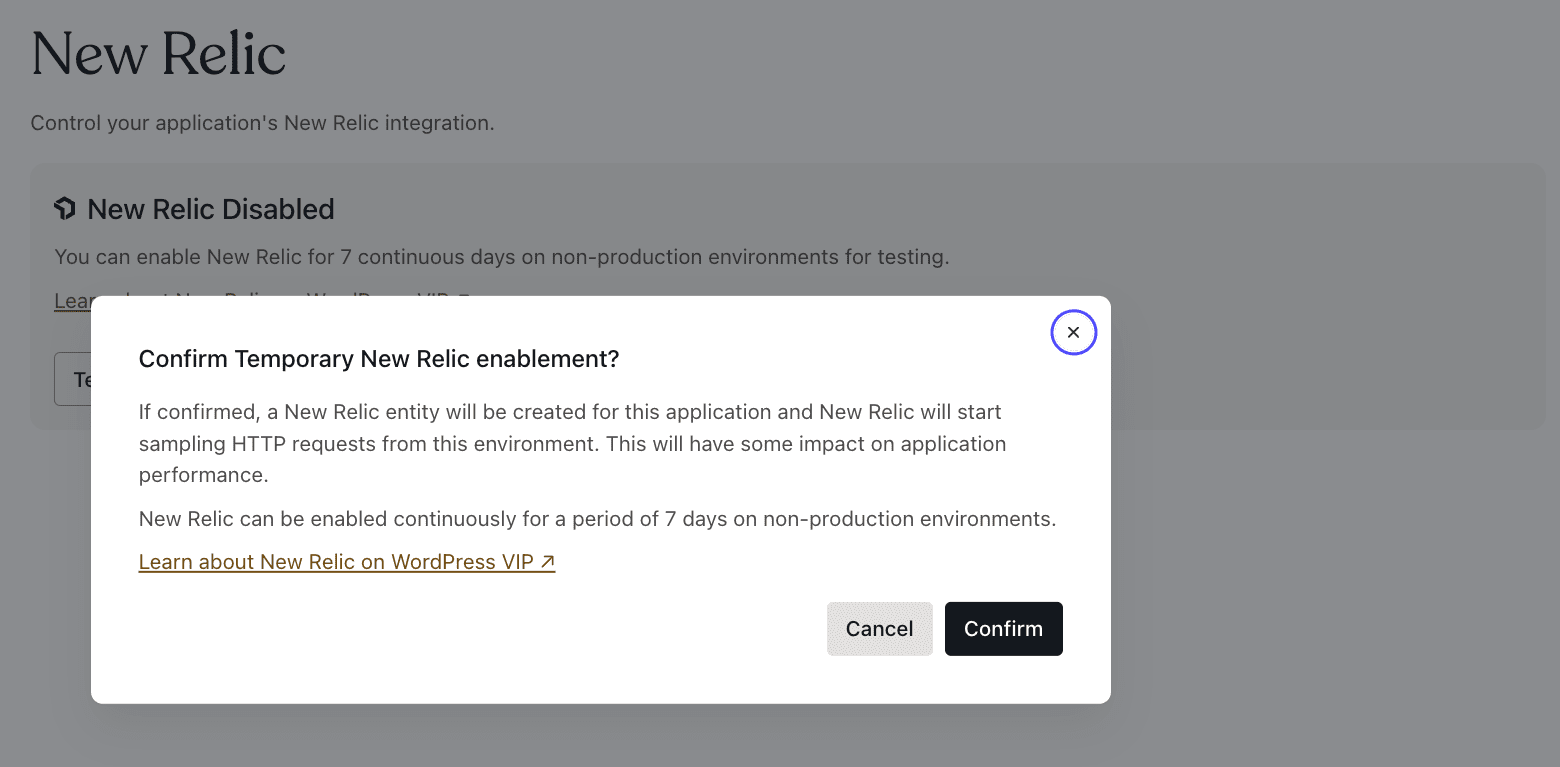
New Features at Your Fingertips

  • Easy Activation: Activate New Relic APM for your Production and Non-Production environments directly from the VIP Dashboard.
  • User Access Management: Effortlessly manage who has access to New Relic tools within your team.
  • Flexible Testing in Non-Production: Enable New Relic for continuous 7-day periods in non-production environments, perfect for thorough testing and analysis.
  • Uninterrupted Monitoring in Production: In Production environments, New Relic can be either permanently on or off, offering consistent monitoring without time constraints.

What to Expect

Upon activation, a New Relic entity is created for your application, and New Relic begins sampling HTTP requests. Please note, this may have a minimal impact on application performance, but the insights gained are invaluable for optimizing your user experience.

Ready to Enhance Your New Relic experience?

Get started by navigating to the New Relic section, located under “Performance” in your VIP Dashboard. For more detailed information, please check our documentation. If you’re activating New Relic for your Node.JS application please see our documentation for more advice on how to start reporting data from your application. 

Questions or Need Support?

If you have any questions or require assistance, our support team is always ready to help. Open a support ticket, and we’ll ensure your experience with New Relic APM is smooth and beneficial.

Announcing Enhanced Database Access with phpMyAdmin

Great news: We’re enhancing your database management capabilities by introducing read access to phpMyAdmin for all your environments. This user-friendly frontend tool will provide convenient read-only access to your database. 

Getting Started

To get access to phpMyAdmin you need to make sure to update your VIP-CLI to the latest version by running the following command:

npm install -g @automattic/vip

Once you’re at least on version 2.38.0 or higher you can simply run the following command:

vip db phpmyadmin @APPID.Environment

Check out our documentation for instructions on accessing and using phpMyAdmin through the VIP-CLI.

The introduction read-only access to your database through phpMyAdmin marks a pivotal moment in our continuous effort to provide advanced tools and features that cater to the evolving needs of our customers. It embodies our commitment to enhancing the development experience, offering a sophisticated yet user-friendly platform for efficient database management.

Need Help or Have Questions?

If you encounter any issues or have questions about using phpMyAdmin, our support team is here to assist. Please open a support ticket, and we’ll help ensure a smooth experience.

Call for Testing: Jetpack 13.1-beta

Jetpack 13.1-beta is available now for testing and the download link is available here

Jetpack 13.1 will be deployed to VIP on Wednesday, February 21, 2024*. The upgrade is expected to be performed at 17:00 UTC (1:00PM ET).

*This deployment date and time are subject to change if issues are discovered during testing of the Jetpack release.

A full list of changes is available in the commit log.

What is being added or changed?

Enhancements

  • Like block: the existing Jetpack Like & Reblog button features are now available as a block! With the new Like block, users are be able to add the Like & Reblog features not just to posts and pages, but also to block templates and block patterns. You can give the new Like block a try by adding it from within the editor just like any other block.
  • Sharing Buttons block: similar to the Like block mentioned above, the existing Jetpack Sharing Buttons feature is now available as a block.

Improved compatibility

  • GIF block: accept Giphy shortlinks as a valid embed.
  • Performance: improve script enqueuing strategies to rely on methods introduced in WordPress 6.3.
  • Sitemaps: use wp_loaded filter hook instead of init hook to load the permalinks for the sitemaps, which allows plugins and other hooks to load.

Bug fixes

  • Related Posts block: get related posts only when the option is turned on and the current post contains a Related Posts block.
  • Spotify shortcode: prevent a fatal error in PHP 8.1 if no attributes are passed.
  • Theme Tools: ensure that Content Options does not override the Featured Images options set within blocks.

What do I need to do?

We recommend the below:

  1. Installing the release on your non-production sites using these instructions.
  2. Running through the testing flows outlined in the Jetpack Testing Guide.

As you’re testing, there are a few things to keep in mind:

  • Check your browser’s JavaScript console and see if there are any errors reported by Jetpack there.
  • Use Query Monitor to help make PHP notices and warnings more noticeable and report anything you see.

Questions?

If you have any questions, related to this release, please open a support ticket and we will be happy to assist.

Cloud development environments with GitHub Codespaces

We’re excited to announce our cloud development environment implementation, based on GitHub Codespaces. This new type of development environment allows our customers to move faster and integrate their work directly with their code repositories.

This implementation will empower you to start developing immediately, without having to install and configure any software on your computer. Code from any device, you don’t even have to have a computer to develop.

GitHub Codespaces is a powerful feature that allows users to spin up development environments in the cloud in mere minutes.

Codespaces unlocks exciting possibilities like quickly sharing the results of your work with other members of the team or stakeholders and even pair programming (utilizing LiveShare). It’s much easier to share a link to your codespace than recording a demo or having a call to run a live demonstration.

Codespaces can be run in-browser or within select IDEs like Visual Studio Code and Jetbrains IDEs.

What’s included?

WordPress VIP implementation with GitHub Codespaces is packed with all the features you can find in the VIP Local Development Environment including XDebug, Mailpit, Photon, phpMyAdmin, Elasticsearch, and Cron. We provided conservative default values, many of these optional services are disabled by default, the configuration can be tweaked in features key of ‘devcontainer.json’.

Tooling like WP-CLI, latest LTS version of Node.js, and latest VIP-CLI is preinstalled for your convenience.

We’ve designed it in a way to be extensible so you can add your own features (including privately published ones), further tailoring your cloud development workflow to your needs.

Who’s it for?

We don’t intend this tool to be a replacement for VIP Local Development Environments, both products will receive the same level of support. Each has their own primary use-cases.

Using the VIP Local Development Environment would be preferred in the following scenarios:

  • The lack of a steady internet connection.
  • Running an Elasticsearch instance. It’s very resource intensive and requires at least 4 cores in Codespaces.
  • Have company policies preventing you from having the data on third-party services (in this case, GitHub.) 

Using codespaces will help with the following cases:

  • Inability to install or run Docker and Node.js. For example, for compliance and security reasons some companies disallow installing Docker. This is not an issue when using Codespaces since you’re not installing anything at all.
  • Quick access to work-in-progress features. All it takes is setting the visibility of the codespace to `public` and sharing a public link.
  • LiveShare makes it extremely easy to participate in pair programming sessions.

Find out more about our support on GitHub Codespaces in the documentation.

Use of Codespaces within the ‘wpcomvip’ GitHub organization is available as a part of our Enhanced and Premier packages. Please open a support ticket and our team will get you set up.

To work with Codespaces outside of the wpcomvip organization, customers can copy the .devcontainer/devcontainer.json file to their own GitHub repository. Each user gets up to 180 hours of compute free. Please refer to the Codespaces billing page for more details.

Email Delivery Changes on VIP

Following our earlier communication this month, we’re taking additional steps to fortify the reliability and security of email delivery from the VIP platform. This initiative underscores our commitment to providing a stable and trustworthy platform for all our users.

Key Updates

  • Mandatory Email Authentication Records: For domains mapped to VIP application environments, SPF, DMARC, and DKIM records are required. Email messages originating from domains that are mapped to VIP application environments but that do not have valid DKIM records will not be signed by our SMTP servers after 1 February 2024. 
  • Policy for Unmapped Domains: Emails from domains not mapped to VIP app environments will face a stricter policy. Starting in March 2024, our SMTP servers will reject such emails. However, to ease this transition, we’re implementing a one-month grace period.
    During this time, emails from unmapped domains won’t be blocked outright but will have their headers rewritten to be sent from [email protected].

Action Required

  • Verify and Update Domains: Before an application can send email using  WordPress VIP mail servers, its domain name must be mapped to VIP. Please verify that the domain is listed on the Domains & TLS page in the VIP Dashboard. Soon, emails sent from unmapped domains will be rejected.
  • DNS Setting Updates: As mentioned in our previous post, please ensure that your domains include the DNS records specified. This update is crucial to maintain uninterrupted email services.

We appreciate your prompt attention to these changes. Our goal is to ensure a seamless transition and continued excellence in service delivery.

If you have further questions about this change or how it affects your domains, you can open a ticket with VIP Support.

Better control around your deployment branches

We’re happy to unveil a significant advancement in code management: the Repository Management feature inside the VIP Dashboard. This new tool will accelerate your development and testing workflows by giving you the autonomy to take instant actions around your environments. 

Repository Management allows you to modify the branches from which we deploy your environments, offering a tailored and flexible approach to your project’s needs, without the need to go through our support. We’ve empowered you to take decisive action, toggle it yourself, and keep on deploying cool things. 

How to Get Started

To start using Repository Management, simply access the VIP Dashboard, go to Code, and select ‘Repository Management’. From there, you can choose your preferred deployment branch. For detailed instructions, please refer to our Repository Management Documentation.

Need Assistance?

As always, we’re here to help. If you have any questions or need support with Repository Management, please open a support ticket, and our team will be glad to assist you.

WordPress 6.4.3 Maintenance & Security Release

WordPress 6.4.3, a security and maintenance release, has been pushed out to all VIP sites running WordPress 6.4.

This security and maintenance release features 5 bug fixes on Core16 bug fixes for the Block Editor, and 2 security fixes.

The security fixes have been back-ported to older versions of WordPress as well.

Have questions?

If you have any questions related to this release, please open a support ticket and we will be happy to assist.

New Release: GraphQL for Block Data API

The Block Data API has been successfully serving millions of requests a day, and it is just getting better. We are excited to announce you can now retrieve Block Data via GraphQL.

What is the Block Data API?

The Block Data API is an API for retrieving block editor posts structured as pure JSON data, eliminating the need to parse HTML to get just the data you need. While primarily designed for use in headless architectures with WordPress, the Block Data API can be used anywhere a developer needs to represent block markup as structured data.

If you aren’t familiar with the Block Data API, you can read a full overview on what it does and how it works.

What is GraphQL?

GraphQL is an open-source data query and manipulation language. With GraphQL, developers can request the specific, typed data they need more efficiently than with a traditional REST API.

How do I activate the Block Data API with GraphQL?

Our documentation has instructions on activating the API. The plugin README has information on how to integrate with the WPGraphQL plugin to provide a GraphQL API

Where can I find more information/documentation?

The project Readme has comprehensive information on the Block Data API and its functions.

Parse.ly Plugin 3.13: New Release and Default Version

We are delighted to announce that the Parse.ly plugin version 3.13 will become available in VIP staging and production environments on Tuesday, January 23, 2023. Before using it in production, we recommend testing the new release in staging.

This release will become the default in production on Tuesday, January 30, 2023, and all non-pinned environments will be auto-upgraded to this version. These changes do not affect customers who don’t use wp-parsely, or use an integration method outside of mu-plugins.

What’s new

  • The Content Helper now remembers your settings. No need to select the same filters over and over again!
  • As part of the Content Helper, we’ve added a new Excerpt Generator feature which quickly and easily generates an SEO-optimized excerpt of your post or page.
  • The Content Helper Title Suggestions feature (available only in certain installations) now allows you to specify the tone and persona of the titles to be generated. If none of the predefined tones and personas are a good fit for what you’re working on, it is possible to set custom ones.
  • To complement all this work, some bug fixes and numerous other smaller improvements have been added to this release.

Reminder: DNSSEC implementation for convenience domain

On January 2, 2024 we announced that WordPress VIP will implement DNS Security Extensions (DNSSEC) for the go-vip.net domain on February 2, 2024. 

This post does not contain any changes from the original post, it serves as a reminder.

No action is required on your part.

If your domain points to a go-vip.net domain via an ALIAS, ANAME, or CNAME, DNS record, or if you access an unlaunched site at the go-vip.net domain, you will benefit from this enhancement. Our team has worked diligently to ensure a smooth transition for all applications, and we anticipate no downtime or complications.

What is DNSSEC?

DNSSEC is an advanced security protocol designed to protect Internet users from a range of cyber threats. It adds a layer of security to the Domain Name System (DNS), which is responsible for converting domain names (like go-vip.net) into IP addresses.

DNSSEC validates DNS responses with cryptographic proof, ensuring the resolution process is secure. Protecting your site from threats such as DNS spoofing and cache poisoning, techniques that allow attackers to redirect your visitors to a fraudulent site.

We have not experienced such attacks on the go-vip.net domain, but security is a top concern, and we want to prevent this possibility.

If you have further questions about this change or how it affects your domains, you can open a ticket with VIP Support.