
Spring uses MultipartResolver interface to handle the file uploads in web application, two of the implementation :
StandardServletMultipartResolver– Servlet 3.0 multipart request parsing.CommonsMultipartResolver– Classic commons-fileupload.jar
Tools used in this article :
- Spring 4.3.5.RELEASE
- Maven 3
- Tomcat 7 or 8, Jetty 9 or any Servlet 3.0 container
In a nutshell, this article shows you how to handle file upload in Spring MVC web application, and also how to handle the popular max exceeded file size exception.
This article will focus on the Servlet 3.0 multipart request parsing.
P.S Article is updated from Spring 2.5.x to Spring 4.3.x
1. Project Structure
A standard Maven project structure.

2. Project Dependency
Standard Spring dependencies, no need extra library for file upload.
<project xmlns="http://maven.apache.org/POM/4.0.0"
         xmlns:xsi="http://www.w3.org/2001/XMLSchema-instance"
         xsi:schemaLocation="http://maven.apache.org/POM/4.0.0
  http://maven.apache.org/maven-v4_0_0.xsd">
    <modelVersion>4.0.0</modelVersion>
    <groupId>com.mkyong</groupId>
    <artifactId>spring-mvc-file-upload</artifactId>
    <packaging>war</packaging>
    <version>1.0-SNAPSHOT</version>
    <name>Spring MVC file upload</name>

    <properties>
        <jdk.version>1.8</jdk.version>
        <spring.version>4.3.5.RELEASE</spring.version>
        <jstl.version>1.2</jstl.version>
        <servletapi.version>3.1.0</servletapi.version>
        <logback.version>1.1.3</logback.version>
        <jcl.slf4j.version>1.7.12</jcl.slf4j.version>
    </properties>

    <dependencies>

        <dependency>
            <groupId>org.springframework</groupId>
            <artifactId>spring-webmvc</artifactId>
            <version>${spring.version}</version>
            <exclusions>
                <exclusion>
                    <groupId>commons-logging</groupId>
                    <artifactId>commons-logging</artifactId>
                </exclusion>
            </exclusions>
        </dependency>

        <dependency>
            <groupId>javax.servlet</groupId>
            <artifactId>jstl</artifactId>
            <version>${jstl.version}</version>
        </dependency>

        <!-- compile only, deployed container will provide this -->
        <dependency>
            <groupId>javax.servlet</groupId>
            <artifactId>javax.servlet-api</artifactId>
            <version>${servletapi.version}</version>
            <scope>provided</scope>
        </dependency>

		<!-- Logging -->
        <dependency>
            <groupId>org.slf4j</groupId>
            <artifactId>jcl-over-slf4j</artifactId>
            <version>${jcl.slf4j.version}</version>
        </dependency>

        <dependency>
            <groupId>ch.qos.logback</groupId>
            <artifactId>logback-classic</artifactId>
            <version>${logback.version}</version>
        </dependency>

    </dependencies>

    <build>
        <plugins>

            <plugin>
                <groupId>org.apache.maven.plugins</groupId>
                <artifactId>maven-compiler-plugin</artifactId>
                <version>3.3</version>
                <configuration>
                    <source>${jdk.version}</source>
                    <target>${jdk.version}</target>
                </configuration>
            </plugin>

            <!-- embedded Jetty server, for testing -->
            <plugin>
                <groupId>org.eclipse.jetty</groupId>
                <artifactId>jetty-maven-plugin</artifactId>
                <version>9.2.11.v20150529</version>
                <configuration>
                    <scanIntervalSeconds>10</scanIntervalSeconds>
                    <webApp>
                        <contextPath>/spring4upload</contextPath>
                    </webApp>
                </configuration>
            </plugin>

            <!-- configure Eclipse workspace -->
            <plugin>
                <groupId>org.apache.maven.plugins</groupId>
                <artifactId>maven-eclipse-plugin</artifactId>
                <version>2.9</version>
                <configuration>
                    <downloadSources>true</downloadSources>
                    <downloadJavadocs>true</downloadJavadocs>
                    <wtpversion>2.0</wtpversion>
                    <wtpContextName>/spring4upload</wtpContextName>
                </configuration>
            </plugin>

        </plugins>
    </build>

</project>
3. MultipartConfigElement
Create a Servlet initializer class and register a javax.servlet.MultipartConfigElement
package com.mkyong;

import org.springframework.web.servlet.support.AbstractAnnotationConfigDispatcherServletInitializer;

import javax.servlet.MultipartConfigElement;
import javax.servlet.ServletRegistration;
import java.io.File;

public class MyWebInitializer extends
        AbstractAnnotationConfigDispatcherServletInitializer {

    private int maxUploadSizeInMb = 5 * 1024 * 1024; // 5 MB

    @Override
    protected Class<?>[] getServletConfigClasses() {
        return new Class[]{SpringWebMvcConfig.class};
    }

    @Override
    protected String[] getServletMappings() {
        return new String[]{"/"};
    }

    @Override
    protected Class<?>[] getRootConfigClasses() {
        return null;
    }

    @Override
    protected void customizeRegistration(ServletRegistration.Dynamic registration) {

        // upload temp file will put here
        File uploadDirectory = new File(System.getProperty("java.io.tmpdir"));

        // register a MultipartConfigElement
        MultipartConfigElement multipartConfigElement =
                new MultipartConfigElement(uploadDirectory.getAbsolutePath(),
                        maxUploadSizeInMb, maxUploadSizeInMb * 2, maxUploadSizeInMb / 2);

        registration.setMultipartConfig(multipartConfigElement);

    }

}
Review the MultipartConfigElement method signature.
public MultipartConfigElement(java.lang.String location,
                              long maxFileSize,
                              long maxRequestSize,
                              int fileSizeThreshold)
4. Spring Configuration
Register a multipartResolver bean, and returns StandardServletMultipartResolver
package com.mkyong;

import org.springframework.context.annotation.Bean;
import org.springframework.context.annotation.ComponentScan;
import org.springframework.context.annotation.Configuration;
import org.springframework.web.multipart.MultipartResolver;
import org.springframework.web.multipart.support.StandardServletMultipartResolver;
import org.springframework.web.servlet.config.annotation.EnableWebMvc;
import org.springframework.web.servlet.config.annotation.WebMvcConfigurerAdapter;
import org.springframework.web.servlet.view.InternalResourceViewResolver;
import org.springframework.web.servlet.view.JstlView;

@EnableWebMvc
@Configuration
@ComponentScan({"com.mkyong"})
public class SpringWebMvcConfig extends WebMvcConfigurerAdapter {

	// Bean name must be "multipartResolver", by default Spring uses method name as bean name.
    @Bean
    public MultipartResolver multipartResolver() {
        return new StandardServletMultipartResolver();
    }

	/*
	// if the method name is different, you must define the bean name manually like this :
	@Bean(name = "multipartResolver")
    public MultipartResolver createMultipartResolver() {
        return new StandardServletMultipartResolver();
    }*/

    @Bean
    public InternalResourceViewResolver viewResolver() {
        InternalResourceViewResolver viewResolver = new InternalResourceViewResolver();
        viewResolver.setViewClass(JstlView.class);
        viewResolver.setPrefix("/WEB-INF/views/jsp/");
        viewResolver.setSuffix(".jsp");
        return viewResolver;
    }

}
At this stage, the Servlet 3.0 multipart request parsing is configured properly, and you can start uploading file.
4. Single File Upload
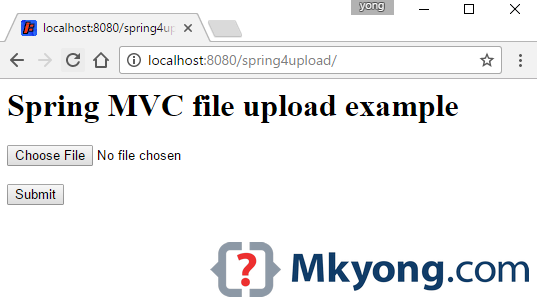
4.1 Normal HTML form tag.
<html>

<body>
<h1>Spring MVC file upload example</h1>

<form method="POST" action="${pageContext.request.contextPath}/upload" enctype="multipart/form-data">
    <input type="file" name="file" /><br/>
    <input type="submit" value="Submit" />
</form>

</body>
</html>
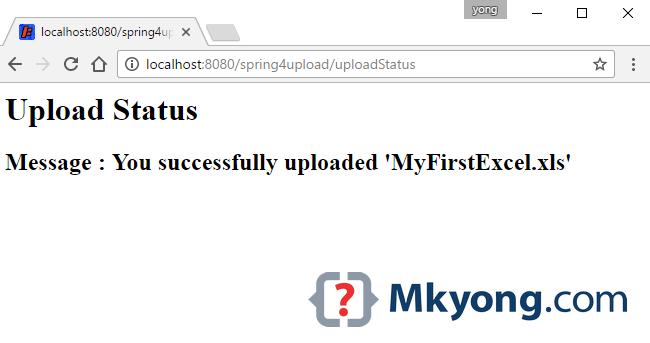
4.2 Another page to show the upload status.
<html>
<body>
<h1>Upload Status</h1>
<h2>Message : ${message}</h2>
</body>
</html>
4.3 In the Controller, map the uploaded file to MultipartFile
package com.mkyong.controller;

import org.springframework.stereotype.Controller;
import org.springframework.util.StringUtils;
import org.springframework.web.bind.annotation.GetMapping;
import org.springframework.web.bind.annotation.PostMapping;
import org.springframework.web.bind.annotation.RequestParam;
import org.springframework.web.multipart.MultipartFile;
import org.springframework.web.servlet.mvc.support.RedirectAttributes;

import java.io.IOException;
import java.nio.file.Files;
import java.nio.file.Path;
import java.nio.file.Paths;
import java.util.StringJoiner;

@Controller
public class UploadController {

	//Save the uploaded file to this folder
    private static String UPLOADED_FOLDER = "F://temp//";

    @GetMapping("/")
    public String index() {
        return "upload";
    }

    //@RequestMapping(value = "/upload", method = RequestMethod.POST)
    @PostMapping("/upload") // //new annotation since 4.3
    public String singleFileUpload(@RequestParam("file") MultipartFile file,
                                   RedirectAttributes redirectAttributes) {

        if (file.isEmpty()) {
            redirectAttributes.addFlashAttribute("message", "Please select a file to upload");
            return "redirect:uploadStatus";
        }

        try {

            // Get the file and save it somewhere
            byte[] bytes = file.getBytes();
            Path path = Paths.get(UPLOADED_FOLDER + file.getOriginalFilename());
            Files.write(path, bytes);

            redirectAttributes.addFlashAttribute("message",
                        "You successfully uploaded '" + file.getOriginalFilename() + "'");

        } catch (IOException e) {
            e.printStackTrace();
        }

        return "redirect:/uploadStatus";
    }

    @GetMapping("/uploadStatus")
    public String uploadStatus() {
        return "uploadStatus";
    }

}
5. Multiple File Upload
5.1 Just add more file input.
<html>

<body>
<h1>Spring MVC multi files upload example</h1>

<form method="POST" action="${pageContext.request.contextPath}/uploadMulti" enctype="multipart/form-data">
    <input type="file" name="files" /><br/>
    <input type="file" name="files" /><br/>
    <input type="file" name="files" /><br/>
    <input type="submit" value="Submit" />
</form>

</body>
</html>
5.2 In Spring Controller, maps the multiple uploaded files to MultipartFile []
    //...

    @PostMapping("/uploadMulti")
    public String multiFileUpload(@RequestParam("files") MultipartFile[] files,
                                  RedirectAttributes redirectAttributes) {

        StringJoiner sj = new StringJoiner(" , ");

        for (MultipartFile file : files) {

            if (file.isEmpty()) {
                continue; //next pls
            }

            try {

                byte[] bytes = file.getBytes();
                Path path = Paths.get(UPLOADED_FOLDER + file.getOriginalFilename());
                Files.write(path, bytes);

                sj.add(file.getOriginalFilename());

            } catch (IOException e) {
                e.printStackTrace();
            }

        }

        String uploadedFileName = sj.toString();
        if (StringUtils.isEmpty(uploadedFileName)) {
            redirectAttributes.addFlashAttribute("message",
                        "Please select a file to upload");
        } else {
            redirectAttributes.addFlashAttribute("message",
                        "You successfully uploaded '" + uploadedFileName + "'");
        }

        return "redirect:/uploadStatus";

    }

    @GetMapping("/uploadMultiPage")
    public String uploadMultiPage() {
        return "uploadMulti";
    }
    //...
6. Handle Max upload size exceeded
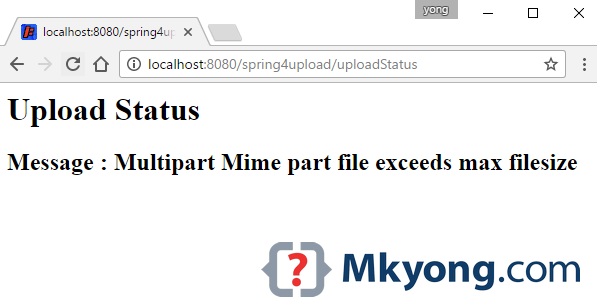
To handle the popular max upload size exceeded exception, declares a @ControllerAdvice and catch the MultipartException
package com.mkyong.exception;

import org.springframework.web.bind.annotation.ControllerAdvice;
import org.springframework.web.bind.annotation.ExceptionHandler;
import org.springframework.web.multipart.MultipartException;
import org.springframework.web.servlet.mvc.support.RedirectAttributes;

@ControllerAdvice
public class GlobalExceptionHandler {

    @ExceptionHandler(MultipartException.class)
    public String handleError1(MultipartException e, RedirectAttributes redirectAttributes) {

        redirectAttributes.addFlashAttribute("message", e.getCause().getMessage());
        return "redirect:/uploadStatus";

    }

	// For commons-fileupload solution
    /*@ExceptionHandler(MaxUploadSizeExceededException.class)
    public String handleError2(MaxUploadSizeExceededException e, RedirectAttributes redirectAttributes) {

        redirectAttributes.addFlashAttribute("message", e.getCause().getMessage());
        return "redirect:/uploadStatus";

    }*/
}
If you deployed to Tomcat, and unable to catch the file size exceeded exception, this may cause by the Tomcat
maxSwallowSize setting. Read this – Spring file upload and connection reset issue7. DEMO
Get the source code below and test with the embedded Jetty server mvn jetty:run.
7.1 Review the pom.xml above, the embedded Jetty will deploy the web application on this /spring4upload context.
project $ mvn jetty:run
//...
[INFO] Started o.e.j.m.p.JettyWebAppContext@341672e{/spring4upload,
	file:/SpringMVCUploadExample/src/main/webapp/,AVAILABLE}{file:/SpringMVCUploadExample/src/main/webapp/}
[WARNING] !RequestLog
[INFO] Started ServerConnector@3ba1308d{HTTP/1.1}{0.0.0.0:8080}
[INFO] Started @3743ms
[INFO] Started Jetty Server
[INFO] Starting scanner at interval of 10 seconds.
7.2 Access http://localhost:8080/spring4upload
7.3 Select a file ‘MyFirstExcel.xml‘ and upload it.
7.4 Access http://localhost:8080/spring4upload/uploadMultiPage

7.5 Select few files and upload it.

7.6 Select a file larger than 5mb, you will visit this page.
8. Download Source Code
P.S For Spring 2.5.x, try this Spring.2.5-file-upload-example.zip (10KB)

Pingback: photography websites()
Pingback: houston texas()
Pingback: Spring MVC – How to handle max upload size exceeded exception()
Pingback: Spring MVC file upload example – Commons FileUpload()
Pingback: Spring file upload and connection reset issue()
Pingback: bad credit home loans()
Pingback: juegosfriv.one/()
Pingback: www.friv.run()
Pingback: M88()
Pingback: top to bottom()
Pingback: click for info()
Pingback: free classified ads()
Pingback: URL()
Pingback: aisti.online.smotret.aisti.mult()
Pingback: illuziaobmana()
Pingback: clic here()
Pingback: ukraine girl kiev lviv()
Pingback: more()
Pingback: zootopia 2016()
Pingback: dedpul-online-2016()
Pingback: http://ibizblog.ru/()
Pingback: Монастырский чай. Цена в Украине.()
Pingback: vojna-v-sirii news()