Help > Mobile Website
No, you can’t. If you’re looking for a great mobile reading experience that offers the world's largest catalog of ebooks, including thousands of free ebooks, we recommend the Kindle app, available for free from the App Store or Google Play:


If you’re looking for a place to discover a great book, a place to discuss your favorite books, or a place to get in touch with your favorite author, Goodreads is the place to be.
Yes! Our official apps are available for free from the iOS App Store and Google Play Store.
While we don’t have a Windows Phone app, there are a number of unofficial apps that make use of our API, including Epiphany and Social Reads.
In order for a book to count towards your annual Reading Challenge, you'll need to set the date you finished the book as part of your review.
The only way to do this on the mobile website is to mark the book as finished from the "Update Progress" button for a book that you're Currently reading. (On our non-mobile website, you can add the date at any time from your My Books page.)
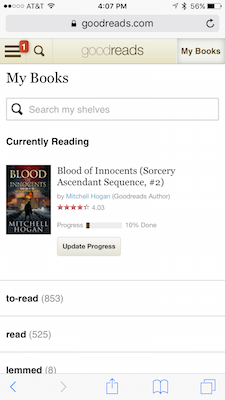
If you’re reading this, you’re likely on our mobile site. To switch to the full desktop version of the site, tap the menu icon at the top left of the screen (three stacked lines; some people call it a “hamburger”). Tap on “Switch to Desktop” at the bottom of the menu options and you’ll be taken to the full site.
If you’d like to switch to the mobile site from our full site, scroll to the bottom of the home page and find “Switch to: mobile version." Just tap on that, and you’ll be taken to a mobile-friendly view.
You’ll need to visit our full (non-mobile) site to edit your friends list. (Here's how to switch to our desktop site on your mobile device.) Once you're on the desktop site, click on the Friends icon at the top right (two silhouettes, next to your profile picture) and find the friend in question. Once you click the green “edit friends” link at the top of your Friends list, you can add or revoke “top friend” status with your current friends, or remove friends completely. Any changes you make on the desktop site will apply to your account on the mobile site and apps.
We offer a range of privacy settings so that you can customize what you share with other members of Goodreads. To edit your privacy settings, you’ll need to visit our full (non-mobile) site (here's how). Then, click on the arrow next to your profile picture at the top of the page and select edit profile.
Our privacy settings are located on the profile and settings tabs. You’ll find controls for what information we publish to your linked social networks on the apps tab.
Your custom shelves are available on our mobile site, but when you shelve a book, the default menu only displays our three main shelves (want to read, currently reading, and read). To access your custom shelves, simply tap the three-books icon and choose “See All Shelves” at the bottom of the list. You can choose which shelves to place the book on, and tap “I’m Finished” when you’re done
We do not yet have a mobile-optimized experience for groups. In order to join or leave groups, or participate in group discussions, you'll need to switch to our desktop site. (Here's how.) Any changes you make on the desktop site to your group membership will apply to your account on the mobile site and apps.

