Showing posts with label Netflix API. Show all posts

Friday, April 29, 2016

It’s All A/Bout Testing: The Netflix Experimentation Platform


Ever wonder how Netflix serves a great streaming experience with high-quality video and minimal playback interruptions? Thank the team of engineers and data scientists who constantly A/B test their innovations to our adaptive streaming and content delivery network algorithms. What about more obvious changes, such as the complete redesign of our UI layout or our new personalized homepage? Yes, all thoroughly A/B tested.

In fact, every product change Netflix considers goes through a rigorous A/B testing process before becoming the default user experience. Major redesigns like the ones above greatly improve our service by allowing members to find the content they want to watch faster. However, they are too risky to roll out without extensive A/B testing, which enables us to prove that the new experience is preferred over the old. And if you ever wonder whether we really set out to test everything possible, consider that even the images associated with many titles are A/B tested, sometimes resulting in 20% to 30% more viewing for that title!

Results like these highlight why we are so obsessed with A/B testing. By following an empirical approach, we ensure that product changes are not driven by the most opinionated and vocal Netflix employees, but instead by actual data, allowing our members themselves to guide us toward the experiences they love. 

In this post we’re going to discuss the Experimentation Platform: the service which makes it possible for every Netflix engineering team to implement their A/B tests with the support of a specialized engineering team. We’ll start by setting some high level context around A/B testing before covering the architecture of our current platform and how other services interact with it to bring an A/B test to life. 

Overview

The general concept behind A/B testing is to create an experiment with a control group and one or more experimental groups (called “cells” within Netflix) which receive alternative treatments. Each member belongs exclusively to one cell within a given experiment, with one of the cells always designated the “default cell”. This cell represents the control group, which receives the same experience as all Netflix members not in the test. As soon as the test is live, we track specific metrics of importance, typically (but not always) streaming hours and retention. Once we have enough participants to draw statistically meaningful conclusions, we can get a read on the efficacy of each test cell and hopefully find a winner.

From the participant’s point of view, each member is usually part of several A/B tests at any given time, provided that none of those tests conflict with one another (i.e. two tests which modify the same area of a Netflix App in different ways). To help test owners track down potentially conflicting tests, we provide them with a test schedule view in ABlaze, the front end to our platform. This tool lets them filter tests across different dimensions to find other tests which may impact an area similar to their own.


Screen Shot 2016-04-16 at 11.30.36 AM.png
There is one more topic to address before we dive further into details, and that is how members get allocated to a given test. We support two primary forms of allocation: batch and real-time.

Batch allocations give analysts the ultimate flexibility, allowing them to populate tests using custom queries as simple or complex as required. These queries resolve to a fixed and known set of members which are then added to the test. The main cons of this approach are that it lacks the ability to allocate brand new customers and cannot allocate based on real-time user behavior. And while the number of members allocated is known, one cannot guarantee that all allocated members will experience the test (e.g. if we’re testing a new feature on an iPhone, we cannot be certain that each allocated member will access Netflix on an iPhone while the test is active).

Real-Time allocations provide analysts with the ability to configure rules which are evaluated as the user interacts with Netflix. Eligible users are allocated to the test in real-time if they meet the criteria specified in the rules and are not currently in a conflicting test. As a result, this approach tackles the weaknesses inherent with the batch approach. The primary downside to real-time allocation, however, is that the calling app incurs additional latencies waiting for allocation results. Fortunately we can often run this call in parallel while the app is waiting on other information. A secondary issue with real-time allocation is that it is difficult to estimate how long it will take for the desired number of members to get allocated to a test, information which analysts need in order to determine how soon they can evaluate the results of a test.

A Typical A/B Test Workflow

With that background, we’re ready to dive deeper. The typical workflow involved in calling the Experimentation Platform (referred to as A/B in the diagrams for shorthand) is best explained using the following workflow for an Image Selection test. Note that there are nuances to the diagram below which I do not address in depth, in particular the architecture of the Netflix API layer which acts as a gateway between external Netflix apps and internal services.

In this example, we’re running a hypothetical A/B test with the purpose of finding the image which results in the greatest number of members watching a specific title. Each cell represents a candidate image. In the diagram we’re also assuming a call flow from a Netflix App running on a PS4, although the same flow is valid for most of our Device Apps.

Screen Shot 2016-04-29 at 7.42.46 AM.png
  1. The Netflix PS4 App calls the Netflix API. As part of this call, it delivers a JSON payload containing session level information related to the user and their device.
  2. The call is processed in a script written by the PS4 App team. This script runs in the Client Adaptor Layer of the Netflix API, where each Client App team adds scripts relevant to their app. Each of these scripts come complete with their own distinct REST endpoints. This allows the Netflix API to own functionality common to most apps, while giving each app control over logic specific to them. The PS4 App Script now calls the A/B Client, a library our team maintains, and which is packaged within the Netflix API. This library allows for communication with our backend servers as well as other internal Netflix services.
  3. The A/B Client calls a set of other services to gather additional context about the member and the device.
  4. The A/B Client then calls the A/B Server for evaluation, passing along all the context available to it.
  5. In the evaluation phase:
    1. The A/B Server retrieves all test/cell combinations to which this member is already allocated.
    2. For tests utilizing the batch allocation approach, the allocations are already known at this stage.
    3. For tests utilizing real-time allocation, the A/B Server evaluates the context to see if the member should be allocated to any additional tests. If so, they are allocated.
    4. Once all evaluations and allocations are complete, the A/B Server passes the complete set of tests and cells to the A/B Client, which in turn passes them to the PS4 App Script. Note that the PS4 App has no idea if the user has been in a given test for weeks or the last few microseconds. It doesn’t need to know or care about this.
  6. Given the test/cell combinations returned to it, the PS4 App Script now acts on any tests applicable to the current client request. In our example, it will use this information to select the appropriate piece of art associated with the title it needs to display, which is returned by the service which owns this title metadata. Note that the Experimentation Platform does not actually control this behavior: doing so is up to the service which actually implements each experience within a given test.
  7. The PS4 App Script (through the Netflix API) tells the PS4 App which image to display, along with all the other operations the PS4 App must conduct in order to correctly render the UI.

Now that we understand the call flow, let’s take a closer look at that box labelled “A/B Server”.

The Experimentation Platform

Screen Shot 2016-04-29 at 6.58.44 AM.png
The allocation and retrieval requests described in the previous section pass through REST API endpoints to our server. Test metadata pertaining to each test, including allocation rules, are stored in a Cassandra data store. It is these allocation rules which are compared to context passed from the A/B Client in order to determine a member’s eligibility to participate in a test (e.g. is this user in Australia, on a PS4, and has never previously used this version of the PS4 app).

Member allocations are also persisted in Cassandra, fronted by a caching layer in the form of an EVCache cluster, which serves to reduce the number of direct calls to Cassandra. When an app makes a request for current allocations, the AB Client first checks EVCache for allocation records pertaining to this member. If this information was previously requested within the last 3 hours (the TTL for our cache), a copy of the allocations will be returned from EVCache. If not, the AB Server makes a direct call to Cassandra, passing the allocations back to the AB Client, while simultaneously populating them in EVCache.

When allocations to an A/B test occur, we need to decide the cell in which to place each member. This step must be handled carefully, since the populations in each cell should be as homogeneous as possible in order to draw statistically meaningful conclusions from the test. Homogeneity is measured with respect to a set of key dimensions, of which country and device type (i.e. smart TV, game console, etc.) are the most prominent. Consequently, our goal is to make sure each cell contains similar proportions of members from each country, using similar proportions of each device type, etc. Purely random sampling can bias test results by, for instance, allocating more Australian game console users in one cell versus another. To mitigate this issue we employ a sampling method called stratified sampling, which aims to maintain homogeneity across the aforementioned key dimensions. There is a fair amount of complexity to our implementation of stratified sampling, which we plan to share in a future blog post.

In the final step of the allocation process, we persist allocation details in Cassandra and invalidate the A/B caches associated with this member. As a result, the next time we receive a request for allocations pertaining to this member, we will experience a cache miss and execute the cache related steps described above.

We also simultaneously publish allocation events to a Kafka data pipeline, which feeds into several data stores. The feed published to Hive tables provides a source of data for ad-hoc analysis, as well as Ignite, Netflix’s internal A/B Testing visualization and analysis tool. It is within Ignite that test owners analyze metrics of interest and evaluate the results of a test. Once again, you should expect an upcoming blog post focused on Ignite in the near future.

The latest updates to our tech stack added Spark Streaming, which ingests and transforms data from Kafka streams before persisting them in ElasticSearch, allowing us to display near real-time updates in ABlaze. Our current use cases involve simple metrics, allowing users to view test allocations in real-time across dimensions of interest. However, these additions have laid the foundation for much more sophisticated real-time analysis in the near future.

Upcoming Work

The architecture we’ve described here has worked well for us thus far. We continue to support an ever-widening set of domains: UI, Recommendations, Playback, Search, Email, Registration, and many more. Through auto-scaling we easily handle our platform’s typical traffic, which ranges from 150K to 450K requests per second. From a responsiveness standpoint, latencies fetching existing allocations range from an average of 8ms when our cache is cold to < 1ms when the cache is warm. Real-time evaluations take a bit longer, with an average latency around 50ms.

However, as our member base continues to expand globally, the speed and variety of A/B testing is growing rapidly. For some background, the general architecture we just described has been around since 2010 (with some obvious exceptions such as Kafka). Since then:

  • Netflix has grown from streaming in 2 countries to 190+
  • We’ve gone from 10+ million members to 80+ million
  • We went from dozens of devices to thousands, many with their own Netflix app

International expansion is part of the reason we’re seeing an increase in device types. In particular, there is an increase in the number of mobile devices used to stream Netflix. In this arena, we rely on batch allocations, as our current real-time allocation approach simply doesn’t work: the bandwidth on mobile devices is not reliable enough for an app to wait on us before deciding which experience to serve… all while the user is impatiently staring at a loading screen.

Additionally, some new areas of innovation conduct A/B testing on much shorter time horizons than before. Tests focused on UI changes, recommendation algorithms, etc. often run for weeks before clear effects on user behavior can be measured. However the adaptive streaming tests mentioned at the beginning of this post are conducted in a matter of hours, with internal users requiring immediate turn around time on results.

As a result, there are several aspects of our architecture which we are planning to revamp significantly. For example, while the real-time allocation mechanism allows for granular control, evaluations need to be faster and must interact more effectively with mobile devices.

We also plan to leverage the data flowing through Spark Streaming to begin forecasting per-test allocation rates given allocation rules. The goal is to address the second major drawback of the real-time allocation approach, which is an inability to foresee how much time is required to get enough members allocated to the test. Giving analysts the ability to predict allocation rates will allow for more accurate planning and coordination of tests.
These are just a couple of our upcoming challenges. If you’re simply curious to learn more about how we tackle them, stay tuned for upcoming blog posts. However, if the idea of solving these challenges and helping us build the next generation of Netflix’s Experimentation platform excites you, feel free to reach out to us!

Tuesday, February 10, 2015

Nicobar: Dynamic Scripting Library for Java

By James Kojo, Vasanth Asokan, George Campbell, Aaron Tull


The Netflix API is the front door to the streaming service, handling billions of requests per day from more than 1000 different device types around the world. To provide the best experience to our subscribers, it is critical that our UI teams have the ability to innovate at a rapid pace. As described in our blog post a year ago, we developed a Dynamic Scripting Platform that enables this rapid innovation.

Today, we are happy to announce Nicobar, the open source script execution library that allows our UI teams to inject UI-specific adapter code dynamically into our JVM without the API team’s involvement. Named after a remote archipelago in the eastern Indian Ocean, Nicobar allows each UI team to have its own island of code to optimize the client/server interaction for each device, evolved at its own pace.

Background

As of this post’s writing, a single Netflix API instance hosts hundreds of UI scripts, developed by a dozen teams. Together, they deploy anywhere between a handful to a hundred UI scripts per day. A strong, core scripting library is what allows the API JVM to handle this rate of deployment reliably and efficiently.

Our success with the scripting approach in the API platform led us to identify other applications that could benefit also from the ability to alter their behavior without a full scale deployment. Nicobar is a library that provides this functionality in a compact and reusable manner, with pluggable support for JVM languages.

Architecture Overview

Early implementations of dynamic scripting at Netflix used basic java classloader technology to host and sandbox scripts from one another. While this was a good start, it was not nearly enough. Standard Java classloaders can have only one parent, and thus allow only simple, flattened hierarchies. If one wants to share classloaders, this is a big limitation and an inefficient use of memory. Also, code loaded within standard classloaders is fully visible to downstream classloaders. Finer-grained visibility controls are helpful in restricting what packages are exported and imported into classloaders.

Given these experiences, we designed into Nicobar a script module loader that holds a graph of inter-dependent script modules. Under the hood, we use JBoss Modules (which is open source) to create java modules. JBoss modules represent powerful extensions to basic Java classloaders, allowing for arbitrarily complex classloader dependency graphs, including multiple parents. They also support sophisticated package filters that can be applied to incoming and outgoing dependency edges.

A script module provides an interface to retrieve the list of java classes held inside it. These classes can be instantiated and methods exercised on the instances, thereby “executing” the script module.

Script source and resource bundles are represented by script archives. Metadata for the archives is defined in the form of a script module specification, where script authors can describe the content language, inter-module dependencies, import and export filters for packages, as well as user specific metadata.

Script archive contents can be in source form and/or in precompiled form (.class files). At runtime, script archives are converted into script modules by running the archive through compilers and loaders that translate any source found into classes, and then loading up all classes into a module. Script compilers and loaders are pluggable, and out of the box, Nicobar comes with compilation support for Groovy 2, as well as a simple loader for compiled java classes.

Archives can be stored into and queried from archive repositories on demand, or via a continuous repository poller. Out of the box, Nicobar comes with a choice of file-system based or Cassandra based archive repositories. 

As the usage of a scripting system grows in scale, there is often the need for an administrative interface that supports publishing and modifying script archives, as well as viewing published archives. Towards this end, Nicobar comes with a manager and explorer subproject, based on Karyon and Pytheas.

Putting it all together

The diagram below illustrates how all the pieces work together.


Usage Example - Hello Nicobar!

Here is an example of initializing the Nicobar script module loader to support Groovy scripts.

Create a script archive

Create a simple groovy script archive, with the following groovy file:

Add a module specification file moduleSpec.json, along with the source:

Jar the source and module specification together as a jar file. This is your script archive.


Create a script module loader

Create an archive repository

If you have more than a handful of scripts, you will likely need a repository representing the collection. Let’s create a JarArchiveRepository, which is a repository of script archive jars at some file system path. Copy helloworld.jar into /tmp/archiveRepo to match the code below.

Hooking up the repository poller provides dynamic updates of discovered modules into the script module loader. You can wire up multiple repositories to a poller, which would poll them iteratively.

Execute script
Script modules can be retrieved out of the module loader by name (and an optional version). Classes can be retrieved from script modules by name, or by type. Nicobar itself is agnostic to the type of the classes held in the module, and leaves it to the application’s business logic to decide what to extract out and how to execute classes.

Here is an example of extracting a class implementing Callable and executing it:

At this point, any changes to the script archive jar will result in an update of the script module inside the module loader and new classes reflecting the update will be vended seamlessly!

More about the Module Loader

In addition to the ability to dynamically inject code, Nicobar’s module loading system also allows for multiple variants of a script module to coexist, providing for runtime selection of a variant. As an example, tracing code execution involves adding instrumentation code, which adds overhead. Using Nicobar, the application could vend classes from an instrumented version of the module when tracing is needed, while vending classes from the uninstrumented, faster version of the module otherwise. This paves the way for on demand tracing of code without having to add constant overhead on all executions. 

Module variants can also be leveraged to perform slow rollouts of script modules. When a module deployment is desired, a portion of the control flow can be directed through the new version of the module at runtime. Once confidence is gained in the new version, the update can be “completed”, by flushing out the old version and sending all control flow through the new module.

Static parts of an application may benefit from a modular classloading architecture as well. Large applications, loaded into a monolithic classloader can become unwieldy over time, due to an accumulation of unintended dependencies and tight coupling between various parts of the application. In contrast, loading components using Nicobar modules allows for well defined boundaries and fine-grained isolation between them. This, in turn, facilitates decoupling of components, thereby allowing them to evolve independently

Conclusion

We are excited by the possibilities around creating dynamic applications using Nicobar. As usage of the library grows, we expect to see various feature requests around access controls, additional persistence and query layers, and support for other JVM languages.

Project Jigsaw, the JDK’s native module loading system, is on the horizon too, and we are interested in seeing how Nicobar can leverage native module support from Jigsaw.

If these kinds of opportunities and challenges interest you, we are hiring and would love to hear from you!

Wednesday, June 12, 2013

Announcing Zuul: Edge Service in the Cloud

The Netflix streaming application is a complex array of intertwined systems that work together to seamlessly provide our customers a great experience. The Netflix API is the front door to that system, supporting over 1,000 different device types and handing over 50,000 requests per second during peak hours. We are continually evolving by adding new features every day.  Our user interface teams, meanwhile,  continuously push changes to server-side client adapter scripts to support new features and AB tests.  New AWS regions are deployed to and catalogs are added for new countries to support international expansion.  To handle all of these changes, as well as other challenges in supporting a complex and high-scale system, a robust edge service that enables rapid development, great flexibility, expansive insights, and resiliency is needed.

Today, we are pleased to introduce Zuul  our answer to these challenges and the latest addition to our our open source suite of software  Although Zuul is an edge service originally designed to front the Netflix API, it is now being used in a variety of ways by a number of systems throughout Netflix. 


Zuul in Netflix's Cloud Architecture


How Does Zuul Work?

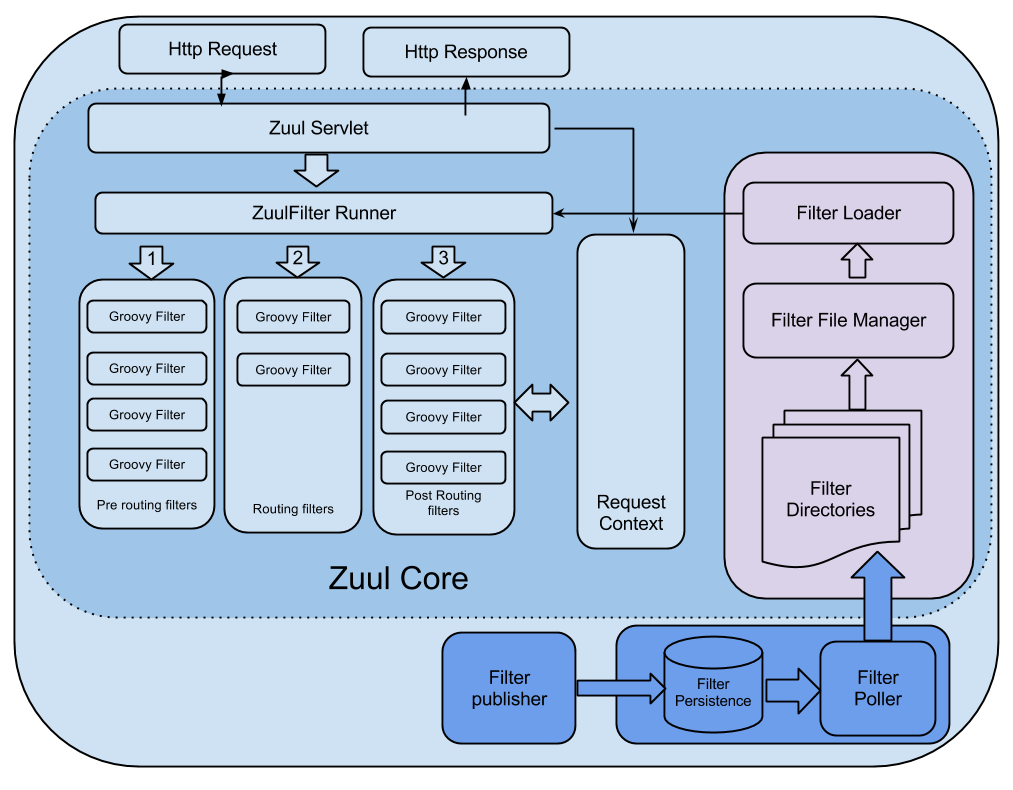
At the center of Zuul is a series of filters that are capable of performing a range of actions during the routing of HTTP requests and responses.  The following are the key characteristics of a Zuul filter:
  • Type: most often defines the stage during the routing flow when the filter will be applied (although it can be any custom string)
  • Execution Order: applied within the Type, defines the order of execution across multiple filters
  • Criteria: the conditions required in order for the filter to be executed
  • Action: the action to be executed if the Criteria are met
Here is an example of a simple filter that delays requests from a malfunctioning device in order to distribute the load on our origin:


 1
 2
 3
 4
 5
 6
 7
 8
 9
10
11
12
13
14
15
16
17
18
19
20
21
22
23
24
25
26
class DeviceDelayFilter extends ZuulFilter {

    def static Random rand = new Random()
    
    @Override
     String filterType() {
       return 'pre'
     }

    @Override
    int filterOrder() {
       return 5
    }

    @Override
    boolean shouldFilter() {
 return  RequestContext.getRequest().
     getParameter("deviceType")?equals("BrokenDevice"):false
    }

    @Override
    Object run() {
 sleep(rand.nextInt(20000)) //Sleep for a random number of seconds
                                   //between [0-20]
    }
}

Zuul provides a framework to dynamically read, compile, and run these filters. Filters do not communicate with each other directly - instead they share state through a RequestContext which is unique to each request.

Filters are currently written in Groovy, although Zuul supports any JVM-based language. The source code for each filter is written to a specified set of directories on the Zuul server that are periodically polled for changes. Updated filters are read from disk, dynamically compiled into the running server, and are invoked by Zuul for each subsequent request.

Zuul Core Architecture

There are several standard filter types that correspond to the typical lifecycle of a request:
  • PRE filters execute before routing to the origin. Examples include request authentication, choosing origin servers, and logging debug info.
  • ROUTING filters handle routing the request to an origin. This is where the origin HTTP request is built and sent using Apache HttpClient or Netflix Ribbon.
  • POST filters execute after the request has been routed to the origin.  Examples include adding standard HTTP headers to the response, gathering statistics and metrics, and streaming the response from the origin to the client.
  • ERROR filters execute when an error occurs during one of the other phases.
Request Lifecycle
Alongside the default filter flow, Zuul allows us to create custom filter types and execute them explicitly.  For example, Zuul has a STATIC type that generates a response within Zuul instead of forwarding the request to an origin.  


How We Use Zuul

There are many ways in which Zuul helps us run the Netflix API and the overall Netflix streaming application.  Here is a short list of some of the more common examples, and for some we will go into more detail below:
  • Authentication
  • Insights
  • Stress Testing
  • Canary Testing
  • Dynamic Routing
  • Load Shedding
  • Security
  • Static Response handling
  • Multi-Region Resiliency 


Insights

Zuul gives us a lot of insight into our systems, in part by making use of other Netflix OSS components.  Hystrix is used to wrap calls to our origins, which allows us to shed and prioritize traffic when issues occur.  Ribbon is our client for all outbound requests from Zuul, which provides detailed information into network performance and errors, as well as handles software load balancing for even load distribution.  Turbine aggregates fine-grained metrics in real-time so that we can quickly observe and react to problems.  Archaius handles configuration and gives the ability to dynamically change properties. 

Because Zuul can add, change, and compile filters at run-time, system behavior can be quickly altered. We add new routes, assign authorization access rules, and categorize routes all by adding or modifying filters. And when unexpected conditions arise, Zuul has the ability to quickly intercept requests so we can explore, workaround, or fix the problem. 

The dynamic filtering capability of Zuul allows us to find and isolate problems that would normally be difficult to locate among our large volume of requests.  A filter can be written to route a specific customer or device to a separate API cluster for debugging.  This technique was used when a new page from the website needed tuning.  Performance problems, as well as unexplained errors were observed. It was difficult to debug the issues because the problems were only happening for a small set of customers. By isolating the traffic to a single instance, patterns and discrepancies in the requests could be seen in real time. Zuul has what we call a “SurgicalDebugFilter”. This is a special “pre” filter that will route a request to an isolated cluster if the patternMatches() criteria is true.  Adding this filter to match for the new page allowed us to quickly identify and analyze the problem.  Prior to using Zuul, Hadoop was being used to query through billions of logged requests to find the several thousand requests for the new page.  We were able to reduce the problem to a search through a relatively small log file on a few servers and observe behavior in real time.

The following is an example of the SurgicalDebugFilter that is used to route matched requests to a debug cluster:
 1
 2
 3
 4
 5
 6
 7
 8
 9
10
11
12
class SharpDebugFilter extends SurgicalDebugFilter {
   private static final Set<String> DEVICE_IDS = ["XXX", "YYY", "ZZZ"]
   @Override
   boolean patternMatches() {
       final RequestContext ctx = RequestContext.getCurrentContext()
       final String requestUri = ctx.getRequest().getRequestURI();
       final String contextUri = ctx.requestURI;
       String id = HTTPRequestUtils.getInstance().
           getValueFromRequestElements("deviceId");
       return DEVICE_IDS.contains(id);
  }
}
In addition to dynamically re-routing requests that match a specified criteria, we have an internal system, built on top of Zuul and Turbine, that allows us to display a real-time streaming log of all matching requests/responses across our entire cluster.  This internal system allows us to quickly find patterns of anomalous behavior, or simply observe that some segment of traffic is behaving as expected,  (by asking questions such as "how many PS3 API requests are coming from Sao Paolo”)?


Stress Testing 

Gauging the performance and capacity limits of our systems is important for us to predict our EC2 instance demands, tune our autoscaling policies, and keep track of general performance trends as new features are added.  An automated process that uses dynamic Archaius configurations within a Zuul filter steadily increases the traffic routed to a small cluster of origin servers. As the instances receive more traffic, their performance characteristics and capacity are measured. This informs us of how many EC2 instances will be needed to run at peak, whether our autoscaling policies need to be modified, and whether or not a particular build has the required performance characteristics to be pushed to production.


Multi-Region Resiliency

Zuul is central to our multi-region ELB resiliency project called Isthmus. As part of Isthmus, Zuul is used to bridge requests from the west coast cloud region to the east coast to help us have multi-region redundancy in our ELBs for our critical domains. Stay tuned for a tech blog post about our Isthmus initiative. 


Zuul OSS

Today, we are open sourcing Zuul as a few different components:
  • zuul-core - A library containing a set of core features.
  • zuul-netflix - An extension library using many Netflix OSS components:
    • Servo for insights, metrics, monitoring
    • Hystrix for real time metrics with Turbine
    • Eureka for instance discovery
    • Ribbon for routing
    • Archaius for real-time configuration
    • Astyanax for and filter persistence in Cassandra
  • zuul-filters - Filters to work with zuul-core and zuul-netflix libraries 
  • zuul-webapp-simple -  A simple example of a web application built on zuul-core including a few basic filters
  • zuul-netflix-webapp- A web application putting zuul-core, zuul-netflix, and zuul-filters together.
Netflix OSS libraries in Zuul
Putting everything together, we are also providing a web application built on zuul-core and zuul-netflix.  The application also provides many helpful filters for things such as:
  • Weighted load balancing to balance a percentage of load to a certain server or cluster for capacity testing
  • Request debugging
  • Routing filters for Apache HttpClient and Netflix Ribbon
  • Statistics collecting
We hope that this project will be useful for your application and will demonstrate the strength of our open source projects when using Zuul as a glue across them, and encourage you to contribute to Zuul to make it even better. Also, if this type of technology is as exciting to you as it is to us, please see current openings on our team: jobs  

Mikey Cohen - API Platform
Matt Hawthorne - API Platform


Tuesday, January 15, 2013

Optimizing the Netflix API

by Ben Christensen

About a year ago the Netflix API team began redesigning the API to improve performance and enable UI engineering teams within Netflix to optimize client applications for specific devices. Philosophies of the redesign were introduced in a previous post about embracing the differences between the different clients and devices.

This post is part one of a series on the architecture of our redesigned API.

Goals


We had multiple goals in creating this system, as follows:

Reduce Chattiness


One of the key drivers in pursuing the redesign in the first place was to reduce the chatty nature of our client/server communication, which could be hindering the overall performance of our device implementations.

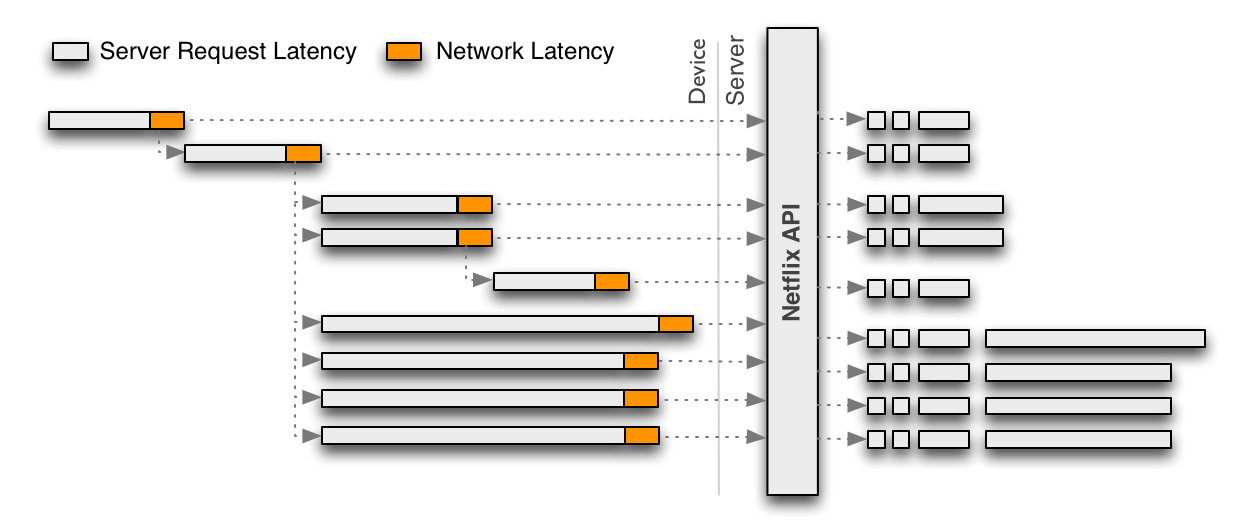
Due to the generic and granular nature of the original REST-based Netflix API, each call returns only a portion of functionality for a given user experience, requiring client applications to make multiple calls that need to be assembled in order to render a single user experience. This interaction model is illustrated in the following diagram:

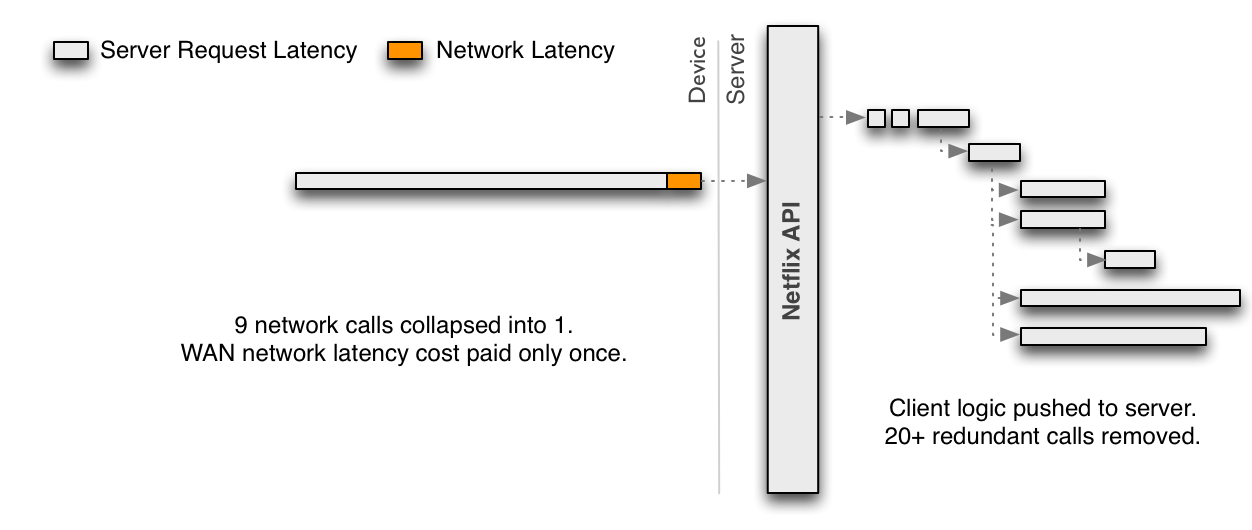
To reduce the chattiness inherent in the REST API, the discrete requests in the diagram above should be collapsed into a single request optimized for a given client. The benefit is that the device then pays the price of WAN latency once and leverages the low latency and more powerful hardware server-side. As a side effect, this also eliminates redundancies that occur for every incoming request.

A single optimized request such as this must embrace server-side parallelism to at least the same level as previously achieved through multiple network requests from the client. Because the server-side parallelized requests are running in the same network, each one should be more performant than if it was executed from the device. This must be achieved without each engineer implementing an endpoint needing to become an expert in low-level threading, synchronization, thread-safety, concurrent data structures, non-blocking IO and other such concerns.

Distribute API Development


A single team should not become a bottleneck nor need to have expertise on every client application to create optimized endpoints. Rapid innovation through fast, decoupled development cycles across a wide variety of device types and distributed ownership and expertise across teams should be enabled. Each client application team should be capable of implementing and operating their own endpoints and the corresponding requests/responses.

Mitigate Deployment Risks


The Netflix API is a Java application running on hundreds of servers processing 2+ billion incoming requests a day for millions of customers around the world. The system must mitigate risks inherent in enabling rapid and frequent deployment by multiple teams with minimal coordination.

Support Multiple Languages


Engineers implementing endpoints come from a wide variety of backgrounds with expertise including Javascript, Objective-C, Java, C, C#, Ruby, Python and others. The system should be able to support multiple languages at the same time.

Distribute Operations


Each client team will now manage the deployment lifecycle of their own web service endpoints. Operational tools for monitoring, debugging, testing, canarying and rolling out code must be exposed to a distributed set of teams so teams can operate independently.

Architecture


To achieve the goals above our architecture distilled into a few key points:
  • dynamic polyglot runtime
  • fully asynchronous service layer
  • Reactive programming model
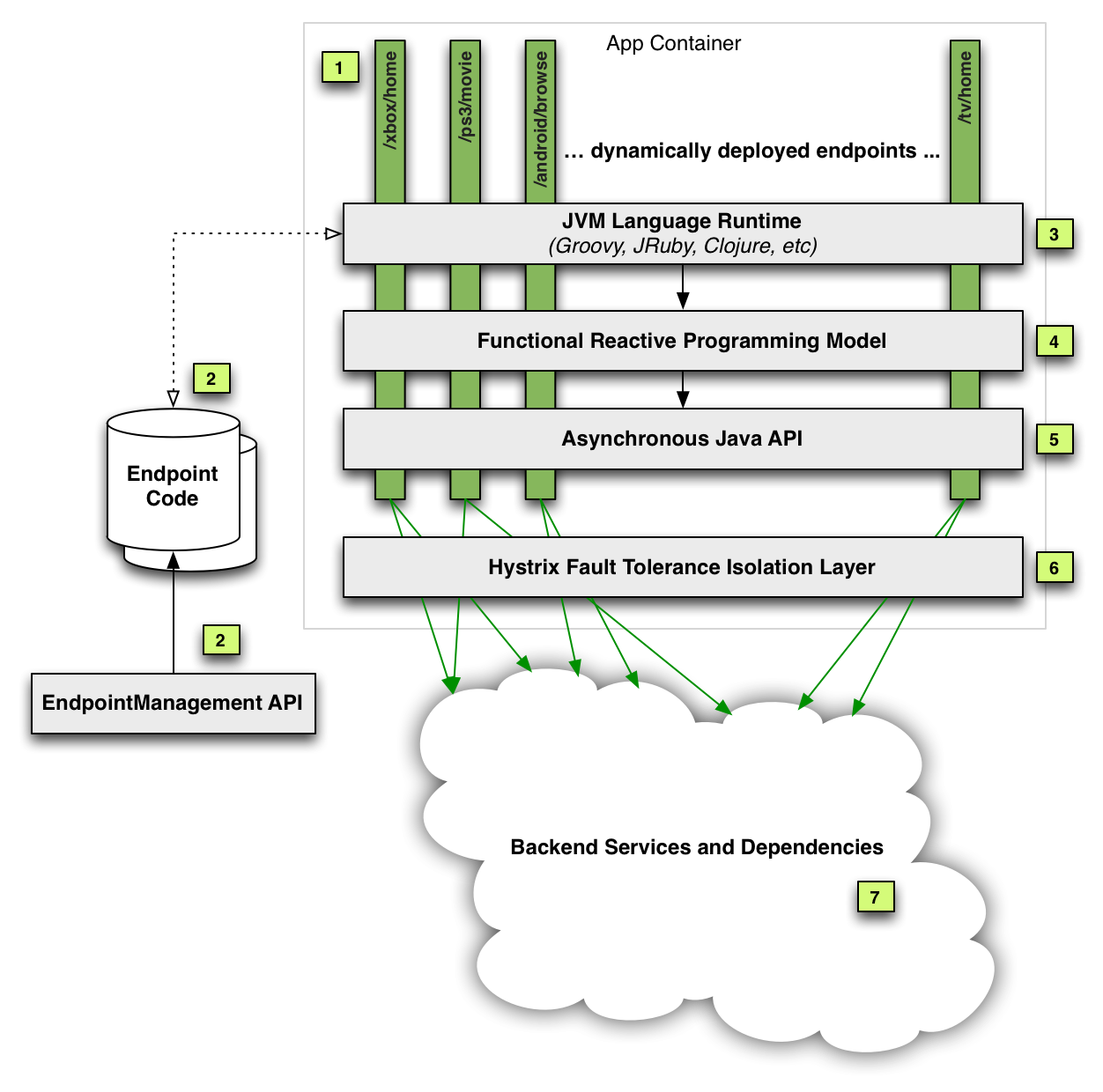
The following diagram and subsequent annotations explain the architecture:


[1] Dynamic Endpoints


All new web service endpoints are now dynamically defined at runtime. New endpoints can be developed, tested, canaried and deployed by each client team without coordination (unless they depend on new functionality from the underlying API Service Layer shown at item 5 in which case they would need to wait until after those changes are deployed before pushing their endpoint).

[2] Endpoint Code Repository and Management


Endpoint code is published to a Cassandra multi-region cluster (globally replicated) via a RESTful Endpoint Management API used by client teams to manage their endpoints.

[3] Dynamic Polyglot JVM Language Runtime


Any JVM language can be supported so each team can use the language best suited to them.
The Groovy JVM language was chosen as our first supported language. The existence of first-class functions (closures), list/dictionary syntax, performance and debuggability were all aspects of our decision. Moreover, Groovy provides syntax comfortable to a wide range of developers, which helps to reduce the learning curve for the first language on the platform.

[4 & 5] Asynchronous Java API + Reactive Programming Model


Embracing concurrency was a key requirement to achieve performance gains but abstracting away thread-safety and parallel execution implementation details from the client developers was equally important in reducing complexity and speeding up their rate of innovation. Making the Java API fully asynchronous was the first step as it allows the underlying method implementations to control whether something is executed concurrently or not without the client code changing. We chose a reactive programming model with a functional programming style for handling composition and conditional flows of asynchronous callbacks. Our implementation is modeled after Rx Observables.

[6] Hystrix Fault Tolerance


As we have described in a previous post, all service calls to backend systems are made via the Hystrix fault tolerance layer (which was recently open sourced, along with its dashboard) that isolates the dynamic endpoints and the API Service Layer from the inevitable failures that occur while executing billions of network calls each day from the API to backend systems.
The Hystrix layer is inherently mutlti-threaded due to its use of threads for isolating dependencies and thus is leveraged for concurrent execution of blocking calls to backend systems. These asynchronous requests are then composed together via the reactive framework.

[7] Backend Services and Dependencies


The API Service Layer abstracts away all backend services and dependencies behind facades. As a result, endpoint code accesses “functionality” rather than a “system”. This allows us to change underlying implementations and architecture with no or limited impact on the code that depends on the API. For example, if a backend system is split into 2 different services, or 3 are combined into one, or a remote network call is optimized into an in-memory cache, none of these changes should affect endpoint code and thus the API Service Layer ensures that object models and other such tight-couplings are abstracted and not allowed to “leak” into the endpoint code.

Summary


The new Netflix API architecture is a significant departure from our previous generic RESTful API.
Dynamic JVM languages combined with an asynchronous Java API and the reactive programming model have proven to be a powerful combination to enable safe and efficient development of highly concurrent code.

The end result is a fault-tolerant, performant platform that puts control in the hands of those who know their target applications the best.

Following posts will provide further implementation and operational details about this new architecture.
If this type of work interests you we are always looking for talented engineers.

September 2014 Update

  • This blog post originally used the term "functional reactive programming" or FRP. This term was used in error. RxJava does not implement "continuous time" which is a requirement for FRP from previous literature.

Monday, July 9, 2012

Embracing the Differences : Inside the Netflix API Redesign

As I discussed in my recent blog post on ProgrammableWeb.com, Netflix has found substantial limitations in the traditional one-size-fits-all (OSFA) REST API approach. As a result, we have moved to a new, fully customizable API. The basis for our decision is that Netflix's streaming service is available on more than 800 different device types, almost all of which receive their content from our private APIs. In our experience, we have realized that supporting these myriad device types with an OSFA API, while successful, is not optimal for the API team, the UI teams or Netflix streaming customers. And given that the key audiences for the API are a small group of known developers to which the API team is very close (i.e., mostly internal Netflix UI development teams), we have evolved our API into a platform for API development. Supporting this platform are a few key philosophies, each of which is instrumental in the design of our new system. These philosophies are as follows:

  • Embrace the Differences of the Devices
  • Separate Content Gathering from Content Formatting/Delivery
  • Redefine the Border Between "Client" and "Server"
  • Distribute Innovation

I will go into more detail below about each of these, including our implementation and what the benefits (and potential detriments) are of this approach. However, each philosophy reflects our top-level goal: to provide whatever is best for the Netflix customer. If we can improve the interaction between the API and our UIs, we have a better chance of making more of our customers happier.

Now, the philosophies…

Embrace the Differences of the Devices

The key driver for this redesigned API is the fact that there are a range of differences across the 800+ device types that we support. Most APIs (including the REST API that Netflix has been using since 2008) treat these devices the same, in a generic way, to make the server-side implementations more efficient. And there is good reason for this approach. Providing an OSFA API allows the API team to maintain a solid contract with a wide range of API consumers because the API team is setting the rules for everyone to follow.

While effective, the problem with the OSFA approach is that its emphasis is to make it convenient for the API provider, not the API consumer. Accordingly, OSFA is ignoring the differences of these devices; the differences that allow us to more optimally take advantage of the rich features offered on each. To give you an idea of these differences, devices may differ on:

  • Memory capacity or processing power, potentially modifying how much content it can manage at a given time
  • Requirements for distinct markup formats and broader device proliferation increases the likelihood of this
  • Document models, some devices may perform better with flatter models, others with more hierarchical
  • Screen real estate which may impact the content elements that are needed
  • Document delivery, some performing better with bits streamed across HTTP rather than delivered as a complete document
  • User interactions, which could influence the metadata fields, delivery method, interaction model, etc.

Our new model is designed to cut against the OSFA paradigm and embrace the differences across devices while supporting those differences equally. To achieve this, our API development platform allows each UI team to create customized endpoints. So the request/response model can be optimized for each team’s UIs to account for unique or divergent device requirements. To support the variability in our request/response model, we need a different kind of architecture, which takes us to the next philosophy...

Separate Content Gathering from Content Formatting/Delivery

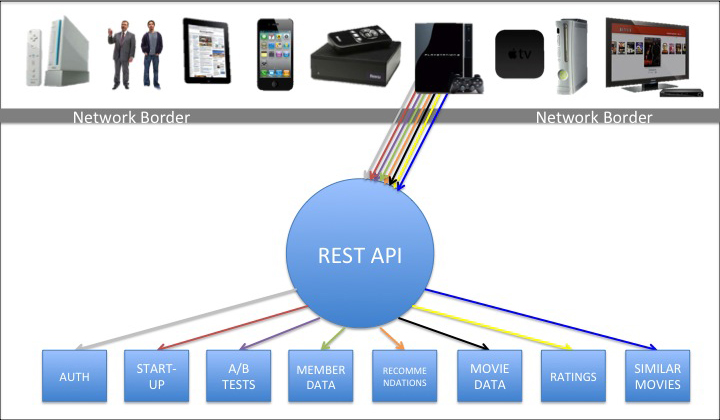
In many OSFA implementations, the API is the engine that retrieves the content from the source(s), prepares that payload, and then ultimately delivers it. Historically, this implementation is also how the Netflix REST API has operated, which is loosely represented by the following image.

Diagram showing Netflix UIs interacting with the Netflix REST API

The above diagram shows a rainbow of colors roughly representing some of the different requests needed for the PS3, as an example, to start the Netflix experience. Other UIs will have a similar set of interactions against the OSFA REST API given that they are all required by the API to adhere to roughly the same set of rules. Inside the REST API is the engine that performs the gathering, preparation and delivery of the content (indifferent to which UI made the request).

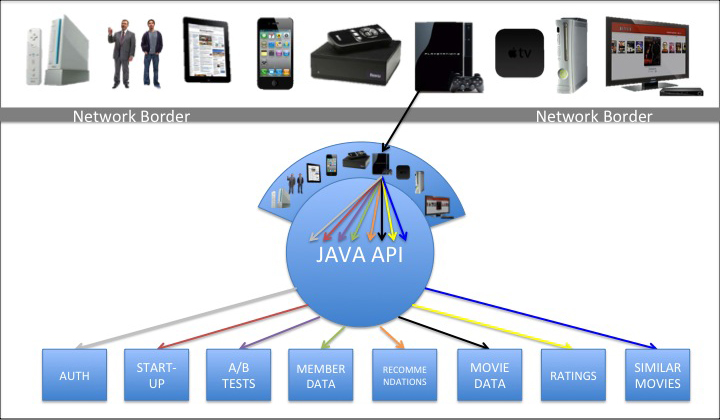
Our new API has departed from the OSFA API model towards one that enables fine-grained customizations without compromising overall system manageability. To achieve this model, our new architecture clearly separates the operations of content gathering from content formatting and delivery. The following diagram represents this modified architecture:

Diagram showing Netflix UIs interacting with the new optimized Netflix non-REST API

In this new model, the UIs make a single request to a custom endpoint that is designed to specifically handle that request. Behind the endpoint is a handler that parses the request and calls the Java API, which gathers the content by calling back to a range of dependent services. We will discuss in later posts how we do this, particularly in how we parse the requests, trigger calls to dependencies, handle concurrency, support fallbacks, as well as other techniques we use to ensure optimized and accurate gathering of the content. For now, though, I will just say that the content gathering from the Java API is generic and independent of destination, just like the OSFA approach.

After the content has been gathered, however, it is handed off to the formatting and delivery engines which sit on top of the Java API on the server. The diagram represents this layer by showing an array of different devices resting on top of the Java API, each of which corresponds to the custom endpoints for a given UI and/or set of devices. The custom endpoints, as mentioned earlier, support optimized request/response handling for that device, which takes us to the next philosophy...

Redefine the Border Between "Client" and "Server"

The traditional definition of "client code" is all code that lives on a given device or UI. "Server code" is typically defined as the code that resides on the server. The divide between the two is the network border. This is often the case for REST APIs and that border is where the contract between the API provider and API consumer is engaged, as was the case for Netflix’s REST API, as shown below:

Diagram showing the traditional border between client and server code in REST APIs

In our new approach, we are pushing this border back to the server, and with it goes a substantial portion of the UI-specific content processing. All of the code on the device is still considered client code, but some client code now resides on the server. In essence, the client code on the device makes a network call back to a dedicated client adapter that resides on the server behind the custom endpoint. Once back on the server, the adapter (currently written in Groovy) explodes that request out to a series of server-side calls that get the corresponding content (in some cases, roughly the same rainbow of requests that would be handled across HTTP in our old REST API). At that point, the Java APIs perform their content gathering functions and deliver the requested content back to the adapter. Once the adapter has some or all of its content, the adapter processes it for delivery, which includes pruning out unwanted fields, error handling and retries, formatting the response, and delivering the document header and body. All of this processing is custom to the specific UI. This new definition of client/server is represented in the following diagram:

Diagram showing the modified border between client and server code in the optimized Netflix non-REST API

There are two major aspects to this change. First, it allows for more efficient interactions between the device and the server since most calls that otherwise would be going across the network can be handled on the server. Of course, network calls are the most expensive part of the transaction, so reducing the number of network requests improves performance, in some cases by several seconds. The second key component leads us to the final (and perhaps most important) philosophy to this approach, which is the distribution of the work for building out the optimized adapters.

Distribute Innovation

One expected critique with this approach is that as we add more devices and build more UIs for A/B and multivariate tests, there will undoubtedly be myriad adapters needed to support all of these distinct request profiles. How can we innovate rapidly and support such a diverse (and growing) set of interactions? It is critical for us to support the custom adapters, but it is equally important for us to maintain a high rate of innovation across these UIs and devices.
Example of how this new system works:
  1. A device, such as the PS3, makes a single request across the network to load the home screen (This code is written and supported by the PS3 UI team)
  2. A Groovy adapter receives and parses the PS3 request (PS3 UI team)
  3. The adapter explodes that one request into many requests that call the Java API to (PS3 UI team)
  4. Each Java API calls back to a dependent service, concurrently when appropriate, to gather the content needed for that sub-request (API team)
  5. In the Java API, if a dependent service unavailable or returns a 4xx or 5xx, the Java API returns a fallback and/or an error code to the adapter (API team)
  6. Successful Java API transactions then return the content back to the adapter when each thread has completed (API team)
  7. The adapter can handle the responses from each thread progressively or all together, depending on how the UI team wants to handle it (PS3 UI team)
  8. The adapter then manipulates the content, retrieves the wanted (and prunes out the unwanted) elements, handle errors, etc. (PS3 UI team)
  9. The adapter formats the response in preparation for delivery back across the network to the PS3, which includes everything needed for the PS3 home screen in the single payload (PS3 UI team)
  10. The adapter finally handles the delivery of the payload across the network (PS3 UI team)
  11. The device will then parse this optimized response and populate the UI (PS3 UI team)

As described above, pushing some of the client code back to the servers and providing custom endpoints gives us the opportunity to distribute the API development to the UI teams. We are able to do this because the consumers of this private API are the Netflix UI and device teams. Given that the UI teams can create and modify their own adapter code (potentially without any intervention or involvement from the API team), they can be much more nimble in their development. In other words, as long as the content is available in the Java API, the UI teams can change the code that lives on the device to support the user experience and at the same time change the adapter code to deliver the payload needed for that experience. They are no longer bound by server teams dictating the rules and/or being a bottleneck for their development. API innovation is now in the hands of the UI teams! Moreover, because these adapters are isolated from each other, this approach also diminishes the risk of harming other device implementations with tactical changes in their device-specific APIs.

Of course, one drawback to this is that UI teams are often more skilled in technologies like HTML5, CSS3, JavaScript, etc. In this system, they now need to learn server-side technologies and techniques. So far, however, this has been a relatively small issue, especially since our engineering culture is to hire very strong, senior-level engineers who are adaptable, curious and passionate about learning and implementing these kinds of solutions. Another concern is that because the UI teams are implementing server-side adapters, they have the potential to bring down the servers through infinite loops or other processes that are resource intensive. To offset this, we are working on scrubbing engines that will hopefully minimize the likelihood of such mistakes. That said, in the OSFA world, code on the device can just as easily DDOS the server, it is just potentially a bigger problem if it runs on the server.


We are still in the early stages of this new system. Some of our devices have fully migrated over to it, others are split between it and the REST API, and others are just getting their feet wet. In upcoming posts, we will share more about the deeper technical aspects of the system, including the way we handle concurrency, how we manage the adapters, the interaction between the adapters and the Java API, our Groovy implementation, error handling, etc. We will also continue to share the evolution of this system as we learn more about it.

In the meantime, if you are interested in building high-scale, cloud-based solutions such as this one, we are hiring!

Daniel Jacobson (@daniel_jacobson)
Director of Engineering – Netflix API