

By default WordPress displays your content in a blog format on the homepage. But what if you want to create a custom homepage in WordPress? Where does your blog page go? In this article, we will show you how to create a separate page for blog posts in WordPress.
Video Tutorial
If you don’t like the video or need more instructions, then continue reading.
Using Default Static and Blog Page Settings in WordPress
WordPress comes with built-in support for creating a custom home page (static front page), and a separate page for blog posts. To use this method, you need to create two new WordPress pages. The first page is going to be your custom home page. In your WordPress admin, go to Pages » Add New to create a new page. You can title this page Home. On the right hand side, you will see Page Attributes box with an option to choose a template.
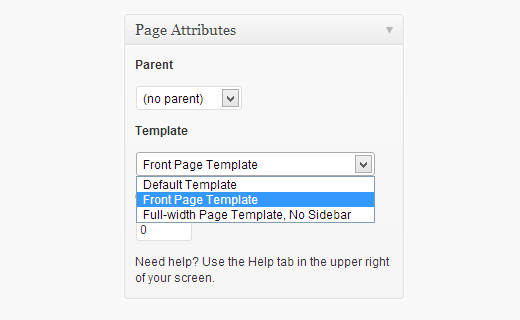
Most modern WordPress themes come with custom page templates that can be used for the static front page of your website. In this example we are using the Twenty Twelve theme which comes with a front page template. After choosing the template, the next thing you need to do is to click on screen options at the top right corner of the screen and check the discussion box.
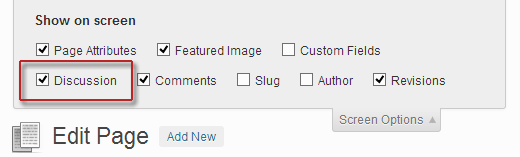
This will display discussion meta box below the post edit area. Uncheck both comments and trackbacks to disable discussion on the home page.
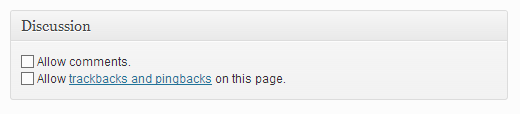
Next you need to create another page for your blog posts. You can title this page as Blog. A lot of WordPress themes come with different templates, and it is possible that your theme may have a template to be used for blog page. However, if there is no template available in your theme, then you can simply choose default. Don’t forget to disable the comments and trackbacks option on this page as well.
What we have done here is created two pages which we will use to display a custom homepage and a page for blog posts. Now we need to get WordPress to use these pages accordingly. To do that go to Setttings » Reading and under the Front page displays option choose A static page. Below that choose the page to be used as the front page and the page for your blog posts.

Save your changes, and load your site to review changes. You may want to display the blog page in your navigation menus. To do that go to Appearance » Menus and add blog page to your menu.
We hope this article helped you create a custom page for blog posts in WordPress. For feedback and questions please leave us a comment or reach us on twitter @WPBeginner.


Hi,
I want to ask something, My WordPress doesn’t have Reading Settings it only have Writing Settings. What can i do? Any help? I hope you’ll answer this.
Thanks!
Great! This was precisely what I needed to know. Much appreciated to such an extent!
You are welcome, make sure you follow us on Twitter to get more WordPress tips and tricks.
Hi, so, I’ve already made a home page, as well as many other pages. But my question is, I want to post on more than ONE page.. Example, I blog about school AND life and I want themto post on separate pages that I’ve made. How can I do this? Thank you!
WordPress comes with a built-in feature called Categories. It allows you to create posts and file them into different categories. Your homepage may show all your posts. But you will also have category archive pages, where users will be able to see all posts filed under that particular topic. Please see our guide on how to
Hello Syed,
I have already done this thing and would like to know after changing my bog post page to news the URL is oming like this http://localhost/wp-yfu/news/
however when I click on the post the URL change to http://localhost/wp-yfu/hello-world/
How can I change the url to http://localhost/wp-yfu/news/hello-world/
You can go to Settings » Permalinks and click on custom structure to add /news/ as a prefix to your blog posts. Like this:
/news/%postname%/
Thanks for this excellent tutorial. The static home page requires a URL distinct from the site URL. How do I make the static home page (www.example.com/home/) actually be the home page (www.example.com)? Does it have to be through a URL redirect, or is there a cleaner way?
Go to Settings > Reading page and then select the page you want to set as your homepage by clicking on the dropdown next to ‘Front Page’ option. Don’t forget to save your changes.
How do i create a whole new page,where i get to post stuff and engage people to comments on it,it would be different from my normal Blog homepage… I intend on calling the page “community”…
@wpbeginner, is it possible to command one page to have one category of blog posts?
Ex. I want my page “day in the life of Rei” to have its own blog posts
All categories in WordPress have their own pages. You can file all posts under “day in the life of Rei” category and then add that category into your navigation menu. See our guide on how to add topics in WordPress navigation menu
I’m trying to add a Blog page to my existing site with several pages. I already have a “Home” page. Do I need to create a 2nd “Home” page, i.e. ‘Bog Home’ or something like that? When I tried to publish the new Page for the Blog the link simply took page viewers to my main web site’s home page. Thank you!
By default, WordPress has posts (entries in a blog) and pages. See our guide on difference between posts vs pages.
You can create different static pages. For example, you can create a static page to be used as your home page. You can also create a separate page for blog posts. This blog post page does not have any content of its own. It is simply used to display posts published on your blog.
Hi! thanks for the tutorial, can you also make on Blogger?
Hi!
This was really helpful! Thanks!
Just have a quick question…
On my home page I want to show say eg. 6 of my latest posts and then have a parent page with all my posts showing up on it as well, is this possible??
Thanks,
Daisy
Hi there
I just created a wordpress blog, and everything is going fine so far except my post that appears on home page don’t link to other pages. for example when i post a blog about beauty i want it to link to the beauty page as well home page but this is not working with me. please help! how do i link each post to related page as well as showing in front page?
thank you
Alaa
You need to file your post into categories or tags Then you can add those topics into your navigation bar. See our guide on how to add topics in WordPress navigation menu.
Hi,
I wanted to know if it’s possible to create more than 5 static pages on blog site? I haven’t been able to do so. Is that the maximum number of pages you can put up?
No you can create as many pages as you want.
Hi there, I want to show less words in post pages. all the content show in post page and i want to show less.
Please help me !
This video and explanation is so clear and helpful. But it still doesn’t work with me
I don’t have a template for blog, but I follow every other step carefully.
The result is, when I am on my static frontpage and press the blog button in the upper right menu, the new window that opens up, is all blank, except it says test in the top left corner.
Has anyone tried this, and know how to fix it?
Thanks in advance.
What appears to be with this is the Page creation is only a template and will not display any text or content you happen to write in the page WYSIWYG editor.
If you post a test “post”, and publish it, that post will appear as a regular excerpt post item on that page.
Publish 2-3 test posts and you will see the posts listed on the blog page. Without any posts at all, you will get a near blank page with something like “not found” and with a search box below it.
Did that help?
This is not working. I still dont have home page to be my blog and to be seen in the page menu
hello, nice tips.
i would to ask you how to make my url is like this
mydomain.com/tutorial-web/post.html and not mydomain.com/category/tutorial-web/post.html
and if my visitor go to mydomain.com/tutorial-web/ the will find all post with ‘Tutorial Web’ category at that page
sorry for my bad english
Thanks for your tutorial, your website is amazing for beginner like me
You may want to take a look at our guide about using SEO friendly url structure in WordPress.
Searched everywhere for this and you finally answered it for me! Thanks!
Perfect! This was exactly what I wanted to know. Thanks so much!
Glad you found it helpful.
Same thing here! Exactly my problem! Very helpful indeed.
Nice! Thanks.
Hi! I would like to know how to make an “overview” of all the blogs you have posted? Please help me out
the blog page is going to the main page means home page.
why i don’t know, any suggestion??
its work really nice, thanks
The video was really helpful, i am stuck in one more problem ahead of it, its that all the posts do appear in blog page of mine but their permalink is not showing the page name BLOG in it, it’s like
website.com/postname and not
website.com/blog/postname… can you please help me in this regard ?
you can edit permalinks by visiting Settings » Permalinks page. There you can check the custom structure checkbox and use /blog/%postname%/ as your permalink structure. Please note that it will change all your WordPress URLs, this could be bad for SEO.
Oh my Gosh thank you!!!!!! Eventually I’ll be able to post the volg about me being able to finally make A PAGE, YES, YES, YES
I’m a novice to WP and your tutorial is the most helpful I have found so far in rebuilding my website. Thank you.
Glad you found it helpful.
Hi, Im new with word press. I did this exactly and was finished customizing my home page. When I was to customize my Post page, I cannot see the “Template” and its corresponding drop down in the “Page attributes.”
Is this because of the theme? Is there any way that I can create a template for my Post page so I can customize the page where my blogs will be posted?
Thanks
@wpbeginner – Awesome tutorial, very helpful. Now I would like to seek your wise council regarding an issue: I made a seperate news/blog page and it’s all working fine. On my full-width homepage I display a bit of all my pages (services, about us, contact etc). But HOW do I feed the posts from the news section back tot the homepage (I have 4 blocks with only the title and h1 of the news article)?
Thanks!