Posted:
We’ve made it easier and faster to apply for AdSense and get your account approved.

Starting today, you’ll have immediate access to your AdSense account once you sign up. Previously, when you applied for AdSense, you’d need to wait for your account information to be approved before you could access your account and place ad units on your site. Now you can create ad units and place them on your site right after signing up for AdSense.

To get started with AdSense:
  1. Make sure your website is compliant with the AdSense program policies.
  2. Sign up for an AdSense account by enrolling your site.
  3. Add the AdSense ad code to your site.
It typically takes 48 hours for our specialists to complete the site review after you add the code to your site. Until you pass this review step, your ad units will remain blank. Once your site is approved, ads will be displayed on your site and you can start earning money from your content.

Learn more about the new application process in the AdSense Help Center. This new process is now in place for many countries and we're looking forward to even more publishers joining the AdSense family. Let us know what you think in the comments section below.


Nikos Ioannou
AdSense Software Engineer

Posted:
We’ve recently updated the AdSense app with a fresh new look using material design and added some new features. Based on your feedback, we’ve added the following functionality to make it even better:

  • New metrics: View impressions, impression RPM, and CTR of your ads.
  • Support for Hindi and Malay: Use your AdSense app in Malay and Hindi, which have recently joined the AdSense family, as well as in 31 other languages.
  • New reports for Android: Check the performance of different ad sizes, ad types, ad networks, targeting, bid types, and custom date ranges.
  • Today widget for iOS: Check your earnings even quicker on your iPhone in the Today view.

If you haven’t tried the AdSense app yet, download the iOS or Android version today and start checking your AdSense account on the go. Let us know what you think about the new design and what new features you’d like to see in the future.


Posted by Daniel Kenyon-Jones
AdSense Product Manager


Posted:
Late last year we announced Hindi as the first Indic language supported by AdSense. It means you can earn money by displaying Google AdSense ads on Hindi webpages.

But why does Hindi matter? If you have a large user base in India; or you’re looking to grow in this strategic emerging market; catering your content to Hindi speakers is key. Check out this infographic to learn more:
Keen to start creating? Here are our top five tips for publishing Hindi content online:

1. Create Hindi content that is unique and provides value to your users.
Check out Google Trends in Search and YouTube to see what’s popular in India right now. You can also see a selection of high quality Hindi content from fellow publishers at hindiweb.com.

2. Get a professional translation, or have a native speaker review content.
If you plan to translate your site for Hindi speakers, ensure you provide good quality translations. Avoid auto-translation as it risks a low quality user experience. Read the Webmaster Quality Guidelines to learn more.

3. Be multi-screen and fast-loading.
Delight users with a mobile-friendly site that works well even on low-bandwidth connections. Explore these multi-screen guidelines to get your site ready.

4. Use Devanagari script. 
Access up to 40 free, beautiful fonts for publishing your Hindi content and benefit from better indexing of your site. Select Devanagari script at Google Fonts to add fonts to your collection.

5. Monetize with Google AdSense.
You can use your existing Google AdSense account and create a new ad unit to get started. If you’re new to AdSense, sign up now

We look forward to seeing the content you create in Hindi.


Posted by Amelia Walkley
Marketing Communications Specialist

Posted:
To help you make more money for your image-only ad units, we previously launched the magazine ad format. Today, we’re happy to introduce richer text ads, a new ad format that automatically creates image ads from text ads. The new richer text ads compete both for your text and display, and display-only ad units and could increase your earnings even more.

This new ad format, inspired by material design, adheres closely to the advertiser’s brand by using their logos and brand colors. This enables brand advertisers who are particularly sensitive to how their text advertisements are displayed to spend more on the Google Display Network, thereby increasing competition for the ad units on your site.


If you currently have text and display or display-only ads on your site, richer text ads will automatically be set up for your site. If you’d prefer not to show richer text ads, you can disable them through the Enhanced display ads option in the Allow & block ads tab in your account.

We’d love to hear your thoughts on our new richer text ad format! Share your feedback in the comments section below this post.


Posted by Daniel Kaemmerer
AdSense Product Manager

Posted:
Today we're introducing Matched content, a free content recommendation tool for AdSense publishers that promotes your content to your site visitors. Matched content generates contextually relevant and personalized article recommendations from the pages on your website.

With Matched content, your visitors can:

  • Discover relevant articles on your site
  • Spend more time on your pages
  • Engage more with your content

This new feature can help you increase your site's page views and ad impressions, and could increase your ad revenue by making it easy for your visitors to find your content. To provide a great experience for you and your site visitors, Matched content is available for sites with multiple pages and high volumes of traffic. Have a look at the site management settings in your AdSense account to see if your sites are eligible to run Matched content.
Adding Matched content units to your site now could help you to grow the number of page views on your site and increase user engagement. You can get the most out of this new tool by checking the best practices in the AdSense Help Center.

We'd love to hear your thoughts about this new feature in the comments section below this post.

Posted by Tobias Maurer, Matched Content Product Manager
Was this blog post useful? Share your feedback with us.

Posted:
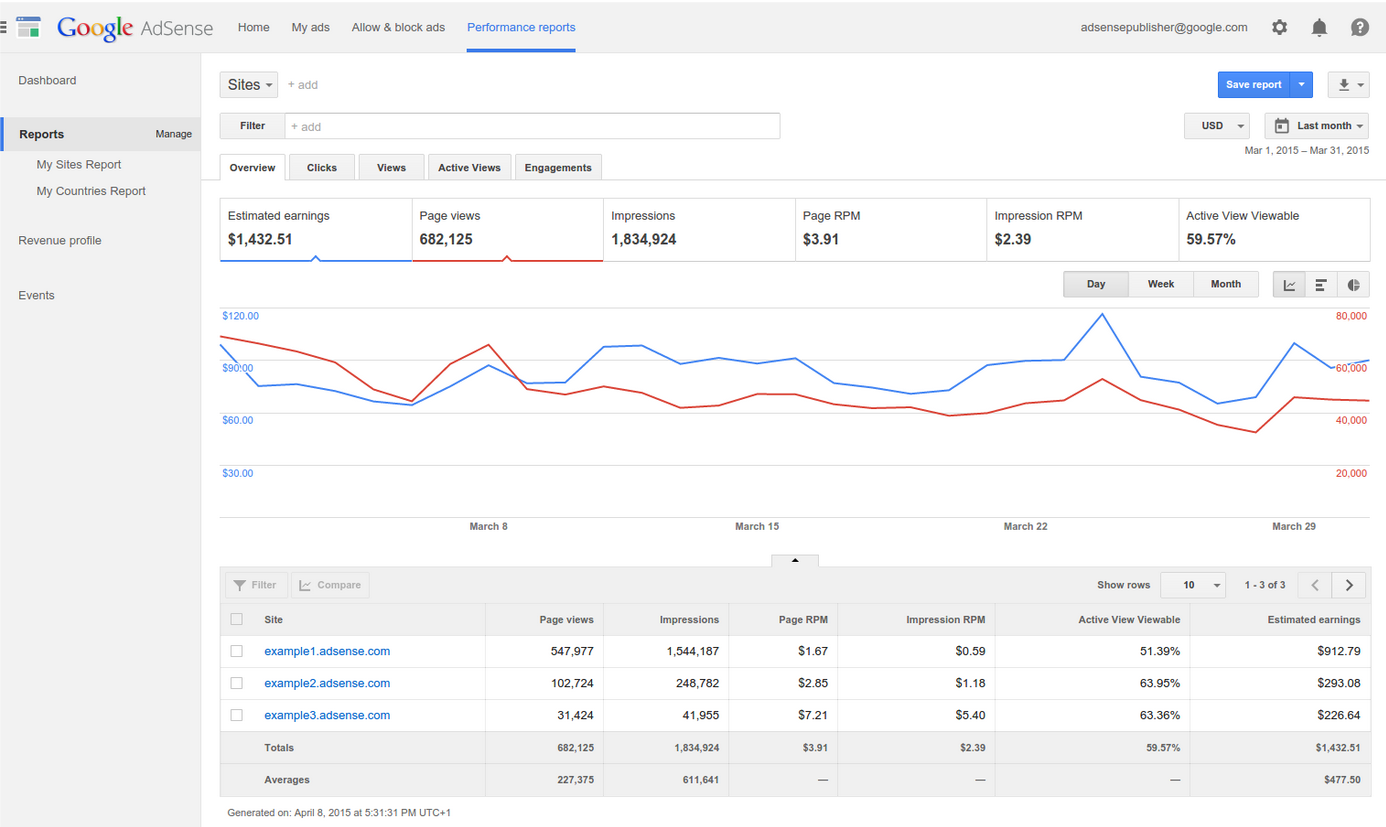
Your performance reports are the key to gaining insights into how much you're earning and what impacts those earnings. To give you quick and easy access to these reports, we’ve introduced a new design for AdSense reporting with a new dashboard.
Fig 1. New Performance reports tab
With the redesigned Performance tab, you now have more control and flexibility, allowing you to better understand your AdSense earnings and performance. Some of the highlights of the new performance reports include:
  • Easier analysis: Get deeper insights by adding, changing or removing dimensions with the simple, redesigned dimension selector.
  • Simple metrics: Better understand your earnings with the redesigned metric families. We've designed metric families to group related reporting metrics and separate the different ways you make money from ads. For instance, the Clicks metric family includes metrics that relate to the CPC bid type.
  • Flexible reporting: Configure your filters the way you want. You can now apply multiple filters to your reports with the redesigned multiple filtering. For instance, you can now filter your Ad sizes report by both the country and platform dimension.
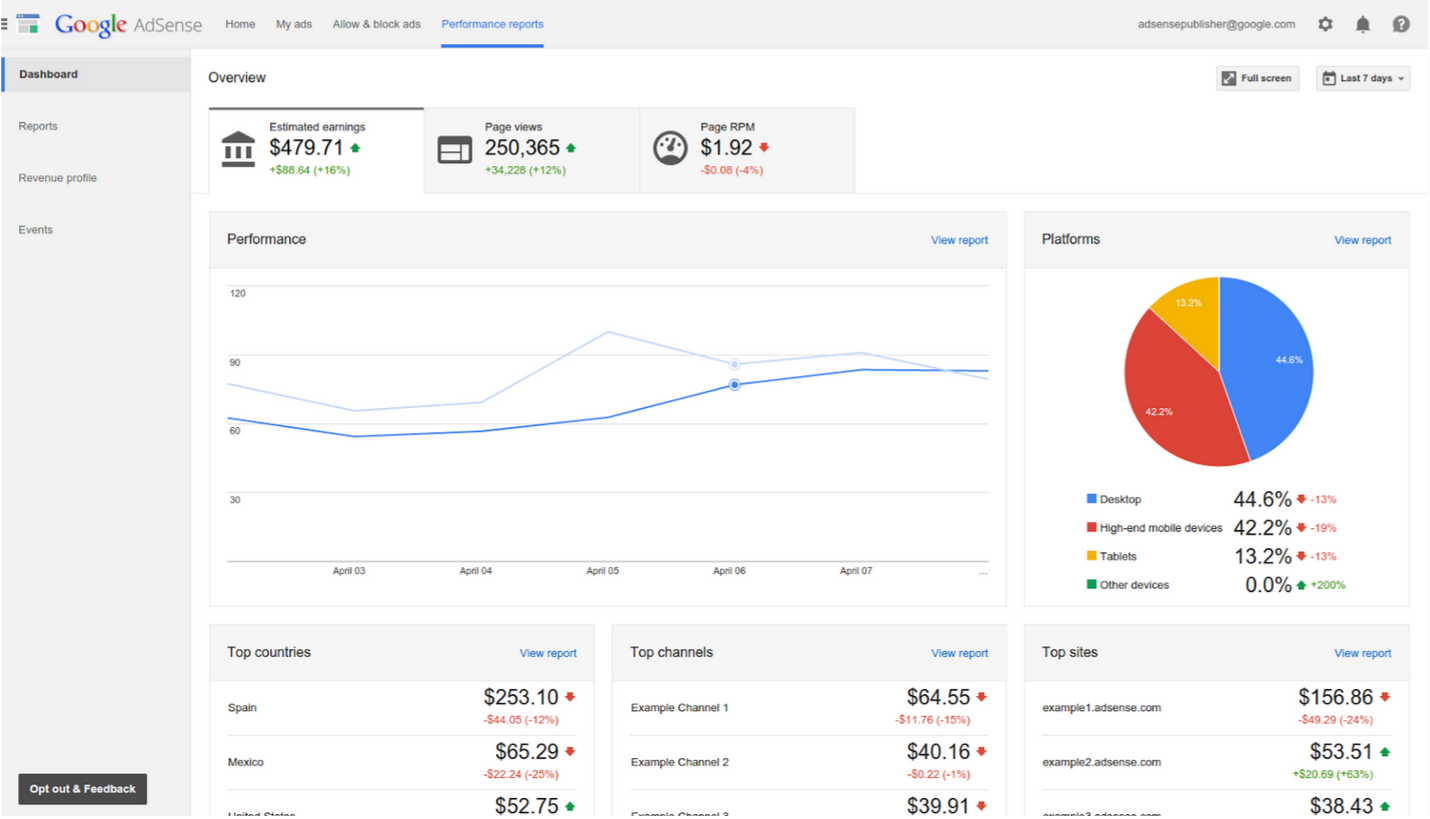
Fig 2. New reporting dashboard
To give you a centralized view of your account’s performance, we’ve also built a new reporting dashboard. With the new reporting dashboard, you can:
  • Access your top performance metrics: Switch easily between three key performance metrics: Estimated earnings, pageviews, and page RPM.
  • Understand what’s driving your key metrics: Analyze your top performance metrics by five different dimensions: Time, top platforms, top countries, top channels, and top sites.
  • Perform detailed analysis: View more detail for any report in the dashboard by clicking on “View report.” 
To see your new AdSense reporting design and reporting dashboard, opt in below. Alternatively, you can opt in from within the Performance reports tab in your AdSense account. 
Start using new AdSense reporting today and let us know your thoughts in the comments below.

Posted by Agnieszka Janowska and Daniel Kenyon-Jones, AdSense Reporting Team
Was this blog post useful? Share your feedback with us.


Posted:
We’re happy to announce that starting today AdSense supports content in Malay (Bahasa Melayu), the national language of Malaysia, and one of the fastest growing languages on the Web.

By adding Malay to the family of AdSense supported languages, we hope to support publishers in creating even more great quality web content in Malay, and connect advertisers to a rapidly growing online audience.

If you already have a website in Malay, follow the steps below to start earning money with relevant ads on your website. If you were already thinking of creating a website in Malay, now you have one more reason!

  1. Make sure your website is compliant with the AdSense program policies.
  2. Sign up for an AdSense account by enrolling your Malay website.
  3. Once your AdSense account has been approved, simply add the AdSense code to start displaying relevant ads to your users.

Selamat datang ke AdSense!
Welcome to AdSense!

Posted by Emanuele Brandi, Product Sales Lead on behalf of the AdSense Internationalization Team
Was this blog post useful? Share your feedback with us.

Posted:
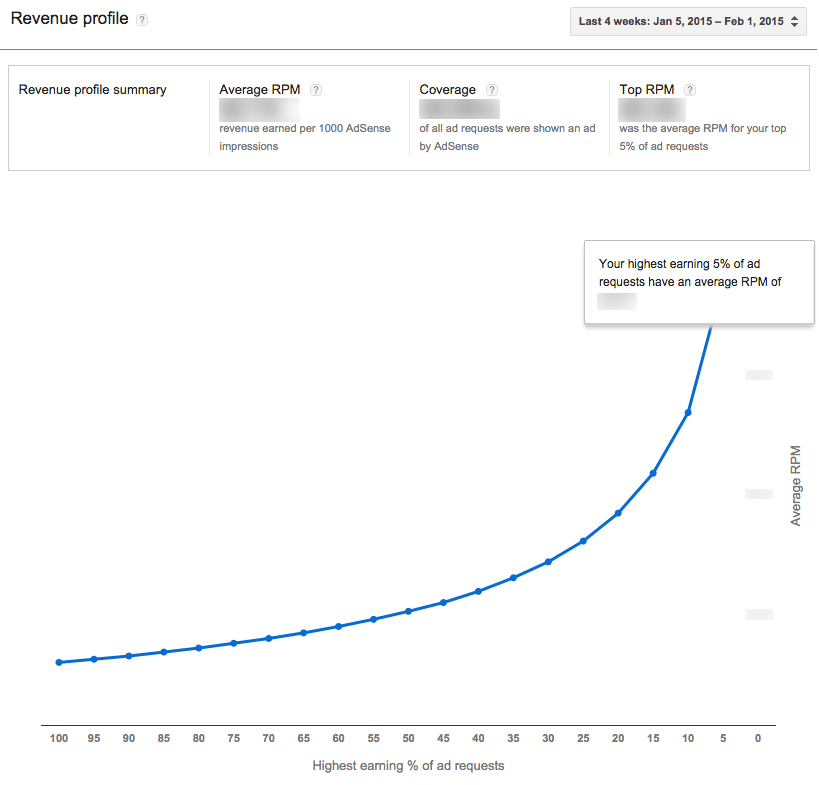
Starting today, a new Revenue profile report will be available in your AdSense account. Currently, AdSense reporting shows you an average of your ad request RPM. This new report will help you understand the value of your top performing ad requests in more detail.

The AdSense ad auction handles billions of ad requests each day, channeling demand from AdWords advertisers and Google certified ad networks (via the DoubleClick Ad Exchange) to our publishers. This real-time digital ad marketplace works to serve high paying ads on your site. Now, you will be able to see the performance of these valuable ads. For example, you can now see the RPM of the top 5% of ads performing on your site.


To make sure you're getting the most out of the ads on your site, follow these best practices:

The new Revenue profile report is available if your AdSense account receives a minimum number of ad requests. It currently offers an aggregate view of your account and we are working to offer a more complete picture with detailed reporting in the future.

Find out more about the new Revenue profile in the AdSense Help Center and let us know what you think about this feature in the comments section below.

Posted by Nick Radicevic - AdSense Product Manager
Was this blog post useful? Share your feedback with us.

Posted:
A few years ago we launched a product called "Mute this ad" - a small [x] that appears in the corner of some display ads on the Google Display Network. When a user clicked the [x], they no longer saw ads from that particular ad campaign.

We’ve found that increased user control benefits the entire ads ecosystem, so we’ve launched features and products like "Mute this ad" and TrueView ads on YouTube to give users more control over ads they see online. With ‘Mute this ad,’ users have a way to signal that they aren’t interested in certain ads, advertisers no longer pay to show ads to users who aren’t interested, and publishers like you show better performing (and potentially more valuable) ads on your site.

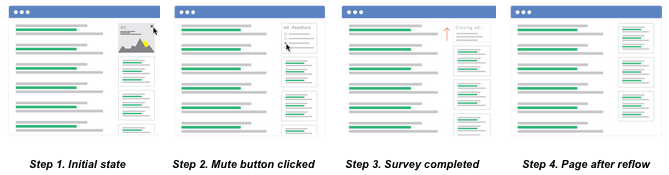
Now with ‘Mute this ad’, when a user clicks on the Mute button "[x]" and completes a short survey, when possible, the ad disappears from the page. The space previously occupied by the ad collapses smoothly, allowing the content surrounding the ad to fill the space.
This new feature gives users additional control over ad units. It also helps us find ad placements and creatives that users may not prefer so that we can continue working hard to serve better performing ads on your site.

As always, we’d love to hear your feedback. Tell us what you think about this new feature in the comment section below this post.
Michael Aiello - Product Manager
Was this blog post useful? Share your feedback with us.

Posted:
The end of the year is approaching and before we say goodbye to 2014, we'd like to recap all the AdSense product enhancements launched this year.

Multi-screen additions: 
  • Responsive ad units 
Responsive ad units can help you provide a great ad experience for users on every screen (i.e., computers, phones, tablets) if you have a responsively designed website. To make your code simpler and save you time and effort, our responsive ad code automatically adapts the ad unit size to your page layout.
  • Multi-screen scorecard
Check the new multi-screen category in your publisher scorecard to see what percentage of your pages are multi-screen optimized, and review how this compares to other AdSense publishers.
  • Tools for building multi-screen sites
New to multi-screen? The AdSense Multi-Screen guidelines can help you get started on or improve your mobile site. For more technical resources on developing a mobile website, visit the Web Fundamentals course and the Web Starter Kit.

Ad unit updates:
  • Custom size ad units
Creating custom ad unit sizes for your website will give you the flexibility to design your ads and your site to fit your audience. We now have 434,216 new ad unit options which behave just like their standard sized counterparts.
  • New ad sizes
Increase the flexibility of your ad units with the the new Billboard (970 x 250) and Portrait (300 x 1050) ad unit sizes. Learn how these sizes can help you reach more advertisers while also enhancing user experience and engagement on your site.

New features in your AdSense account:
  • New features in the Ad review center
Discover how filtering reviewed ads, searching by ad sizes, and finding related ads can give you more control. Learn more about these new Ad review center features.
  • A/B testing for categories in the AdSense interface
Interested in testing how blocking certain ad categories changes your site’s revenue? Now you can run A/B experiments without changing your ad code to better understand how to use ad category settings to your advantage.

Toolbar and plugin updates:
  • View Google Analytics data in the Google Publisher Toolbar
You can now view visitor data from Google Analytics in the Google Publisher Toolbar. Learn how to install the Google Publisher Toolbar and use Google Analytics insights while you browse your pages.
  • AdSense Plugin for WordPress
Using Google products within WordPress just got easier. Link your WordPress site to your AdSense account, easily place ads, and check your page visibility with the AdSense Plugin for WordPress.

We’d like to thank you for sharing your feedback about these launches over the past year. Please keep sharing your thoughts and suggestions through our AdSense +page and stay tuned for more AdSense updates in 2015.

Happy New Year, and see you online in 2015!

Posted by Lizzie Pace and Yigit Yucel - Inside AdSense Team
Was this blog post useful? Share your feedback with us.

Posted:
We're proud to announce that AdSense now supports Hindi, one of India's most widely spoken languages.

With over 500 million speakers around the world*, a wealth of quality Hindi content is available on the web.  We’re excited to launch AdSense Hindi language support today to help fuel even more quality content creation on the web, and to help advertisers connect with a rapidly growing online audience.
If you have a website in Hindi, you'll now be able to earn money by displaying Google AdSense ads on your website. To get started:
  1. Make sure your website is compliant with the AdSense program policies.
  2. Sign up for an AdSense account by enrolling your Hindi website.
  3. Once your AdSense account has been approved, simply add the AdSense code to start displaying relevant ads to your users.
ऐडसेंस कार्यक्रम में आपका स्वागत है!
Welcome to AdSense!

Posted by Emanuele Brandi, Product Sales Lead on behalf of the AdSense Internationalization Team

* Source: Encyclopedia Britannica
Was this blog post useful? Share your feedback with us.

Posted:
If you want to grow your website and your ad revenue, you need to understand your audience. Google Analytics is a powerful tool that helps you better understand your site visitors and define the right strategy for your site.

We've recently improved how Google Analytics links to your AdSense account, making it easier than ever to understand what's working on your site. With this new update, you can link your AdSense account within Google Analytics in fewer steps and can also link your AdSense account to multiple Google Analytics accounts.

If you haven’t linked Google Analytics with your AdSense account yet, it’s a good time to learn more about your audience. Linking these accounts can help you:

  • Optimize your website: Identify opportunities across traffic sources, geographies, devices, pages and browsers.
  • Improve user experience: See which pages are popular among your visitors and which pages drive them away. Understanding where your visitors’ attention is focused will also help you to place your ads where users are most likely to look at them.
  • Grow revenue: Make changes based on how earnings are affected by aspects of user behaviour such as visit frequency and page depth.
Learn how to link Google Analytics with your AdSense account in our Help Center and start identifying revenue opportunities. If you don’t have a Google Analytics account, you can easily set up your account now.

As always, we’d love to hear your feedback. Tell us what you think and share your insights from Google Analytics in the comment section below this post.

Posted by Matthew Anderson - Product Manager Publisher Analytics
Was this blog post useful? Share your feedback with us.

Posted:
Readability and appearance are essential elements of a positive mobile user experience. With that in mind, we’ve made some changes to the design of our text ads on the Google Display Network.

The title and description in the new text ads will now be easier for your mobile users to read. Your site visitors will be able to quickly understand what the ad is about because the ad description will be more prominent. In addition, the ad format will give them a more interactive experience, letting them swipe across or click on the dot to see the advertiser website URL.

Be on the look out for our new text ads and tell us what you think of this redesign over on our AdSense +page.

Posted by Amit Mhatre - AdSense Software Engineer & Pasha Nahass - AdSense Product Manager
Was this blog post useful? Share your feedback with us.

Posted:
Many of you currently use the Ad review center to view and control the ads displayed on your website. You've recently told us you'd like to see more options to search for specific ads. Today we're launching two new filters which will give you even more control.

Find ads that look similar
When you identify an ad that you want to block, you can choose to find related ads, e.g., ads that have the same landing page or advertiser. We've enhanced this feature, so that now when you run a "related ads" search, you'll also see ads that look similar too. This filter can help save you time looking for similar ads to allow or block.

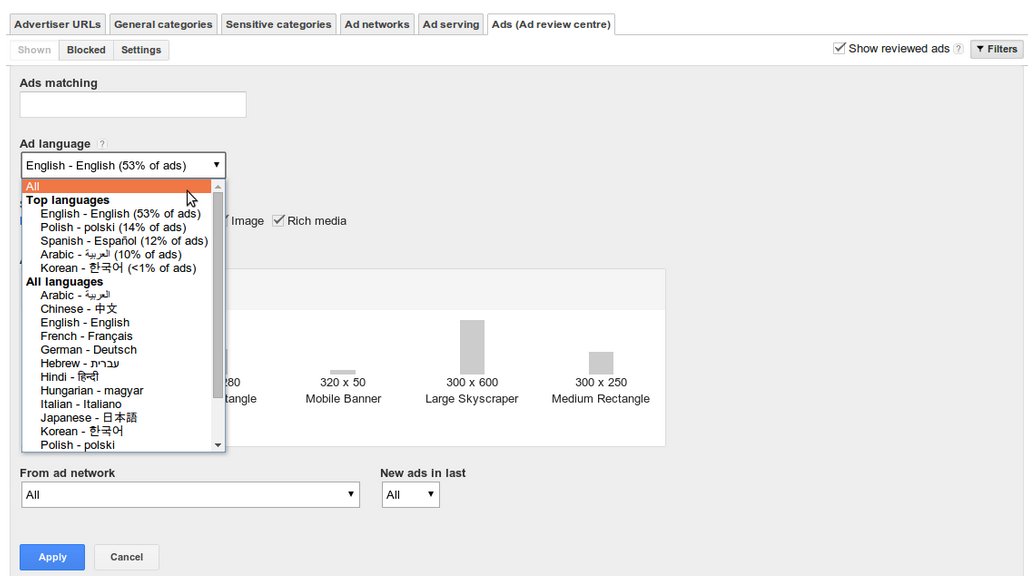
Filter ads by language
If your website is international in scope, ads on your website can show in different languages. Now you can filter ads running on your site by language in the Ad review center. For example, you could choose to see all Spanish-language ads that have shown in the last 30 days.
You’ll find more information in the Help Center on how to search for ads in the Ad review center. We’d love to hear your feedback and suggestions in the comment section below.

Posted by Robin Schlinkert - Product Manager
Was this blog post useful? Share your feedback with us.

Posted:
Creating new ad units for your site can take time, especially when deciding on their look and style. Save time on this process with the new, simplified My ads tab in your AdSense account. From today, it’s quicker and easier to create new ad units, giving you more time to concentrate on optimizing your ad space.
In addition to simplifying the ad unit creation process, we’ve also refreshed the user interface for this page, making it more intuitive and easier to navigate. When choosing from the various options for your new ad units, we’ll help you in your final decision by highlighting the potential impact of your choices. Once you’ve decided on the best ad style, you can quickly implement this across your entire site rather than having to apply changes on an ad unit level.

Finally, to help enhance the look of ads on your site, we’ve made some changes to the default color palette for our text ads. The URL link will now display in a light gray replacing the green color previously associated with it.

It's important to note that these new features will not cause any changes to the way your existing ads appear on your site. For more information on the ad unit creation process, visit our Help Center. We hope the new My ads page will help make the ad unit creation process a quicker and more impactful experience for you. Share your feedback and suggestions over on our Google+ page.

Posted by Emma Burrows - AdSense Software Engineer
Was this blog post useful? Share your feedback with us.


Posted:
We've heard from both publishers and advertisers that new, larger ad formats provide a great canvas for rich creatives and perform well on many sites. Today, we’re pleased to share two new ad sizes - 970 x 250 Billboard and the 300 x 1050 Portrait - that will help you reach more advertisers while also enhancing user experience and engagement on your site.

300x1050_256.png

As with most of our ad sizes, both of these ad units can accommodate standard text ads in addition to image ads. Additionally, they can show similar-sized image ads when doing so will maximize the performance of your ad unit. In this case, a 300 x 250 ad would serve in the 970 x 250 ad unit and a 160 x 600 would serve in the 300 x 1050 ad unit.

As both of these new sizes are large ad units, you can place a maximum of one per page. As always, remember to keep a balance between your content and ads and ensure your ad placements comply with our AdSense program policies.

We’re always looking for your feedback and suggestions to help us provide you with the ad sizes you need to stay flexible to your advertiser and user needs. Stay tuned for more updates coming soon and share your feedback in the comment section below.

Posted by Alexey Petrov, AdSense Product Specialist
Was this blog post useful? Share your feedback with us.

Posted:
A/B testing is one of the most effective ways of ensuring your ad units are performing to their full potential. Last year we launched AdSense experiments to make A/B testing easy for your ad units. From today, you’ll be able to optimize your entire account with AdSense experiments, now available for account-level settings.

AdSense experiments let you quickly launch and analyze A/B experiments without you having to make any changes to your ad or page code. Using this feature allows you to configure your ad settings to give you the best possible performance. With account-level A/B testing, you can now also compare the performance of your account-level settings such as general or sensitive category blocking or ad-serving blocks.

If you haven’t already tried AdSense experiments to run A/B tests on your site, give it a try to make sure you’re getting the most out of your account and your ad units. You’ll find more information over on our Help Center. We’re looking forward to hearing your feedback - tell us what you think over on our AdSense+ page.

Posted by Nick Radicevic - AdSense Product Manager
Was this blog post useful? Share your feedback with us.

Posted:
Today we’re happy to launch a new display-only format that we call magazine ads. To optimize revenue, we normally recommend that you enable both text and display for your ad units, however we recognize that the type of ads you feature on your site is also influenced by your own style preferences. To that end, we’ve created a new format allowing text advertisers to increase competition on your display-only ad units while maintaining a design aesthetic suitable for display.

If a text advertiser is the winning bidder for your ad unit, their ad will appear in the magazine ad format. This format has been designed with print magazine ads in mind, putting a big emphasis on space and typography and displaying a new look distinctive from our regular text ads. Take a look at the examples below to see how magazine ads will look in your display ad units.


If you currently have display-only enabled ads on your site, magazine ads will automatically be set up for these ad units. If you’d prefer not to show magazine ads, you can disable them through the Enhanced display option in the My ads tab in your account.

For now, when magazine ads are enabled for your display ad units, the Ad Review Center will still show you the original text ad provided by the advertiser and not the the newly-styled magazine ad. Check out our Help Center for more information. We’d love to hear if you’re using magazine ads already -- share your experience and feedback over on the AdSense +page.

Posted by Yuheng Kuang - AdSense Software Engineer
Was this blog post useful? Share your feedback with us.

Posted:
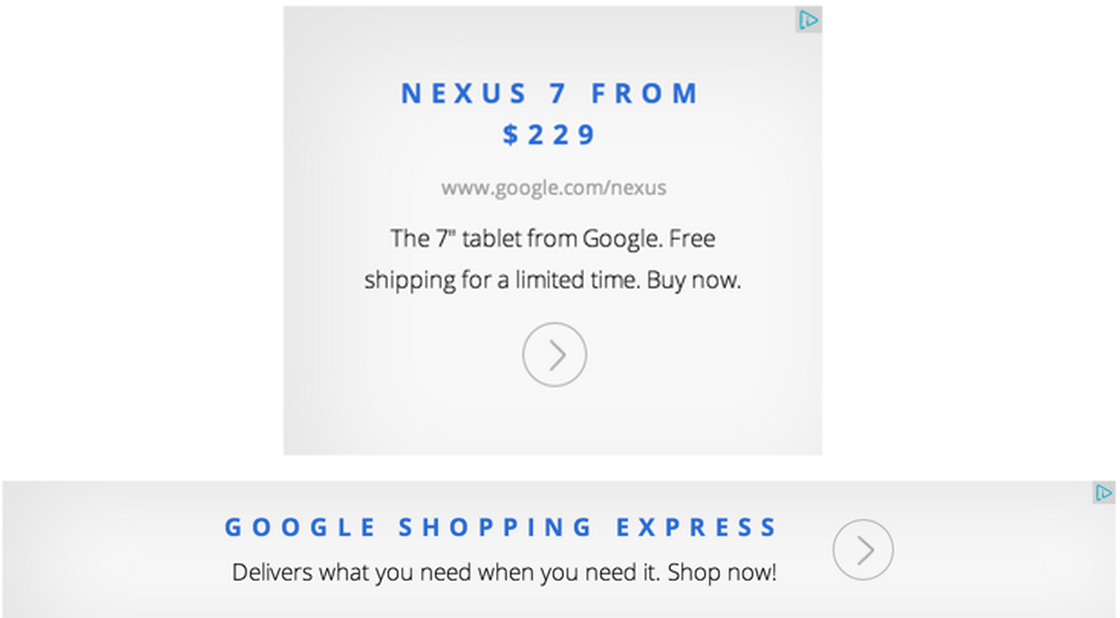
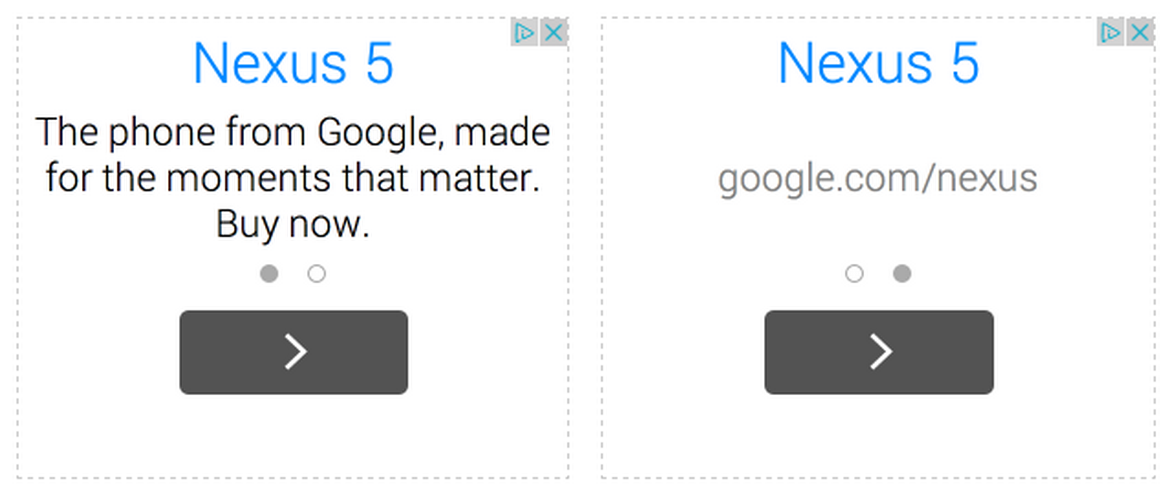
Users are consuming more and more web content across screens. Given this shift, we’re updating the design of our text ads to strengthen their performance and make them more consistent and easy to read across devices.

Our new text ads have been designed with better readability in mind, regardless of what device they’re being viewed from. We’ve introduced a new default color palette of blue and grey, making the ads easier to read for the user. We’ve also updated our default font to Roboto, designed for easier readability on mobile devices as well as desktop. With this change, we’ve aligned our text ad font with the web font we use on our Android OS.
160x600 (shown with multiple ads)
We've also made improvements to the ad call-to-action button by making the tap target size and position more user-friendly across devices.

468x60
300x250
Look out for our new text ads and tell us what you think of this redesign over on our AdSense+ page.

Posted by Clyde Li - AdSense Software Engineer
Was this blog post useful? Share your feedback with us.

Posted:
Having the right information on the ads displayed on your site and being able to control them, is a big ask we hear from publishers. Many of you are already using the Ad review center to review and control these ads. From today, enjoy more choice with new updates designed to save you time and give you more control in the review process.

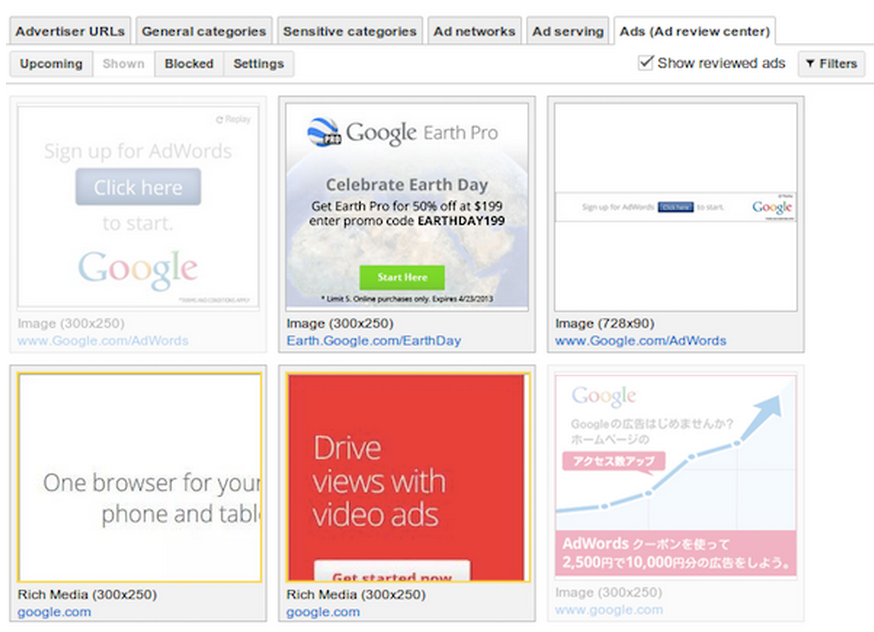
Save time by not having to review the same ad twice. Now you can see which ads you’ve already reviewed by selecting the ‘Show reviewed ads’ checkbox in the top right corner of the Ad review center.
Show reviewed ads feature
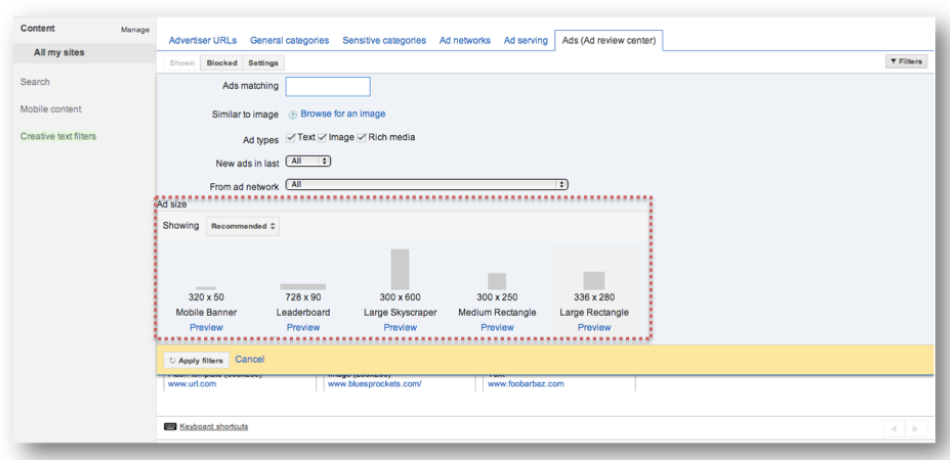
 You’ll also have more choice when reviewing ads with our new ad size widget. Using the widget, you can review ads according to their size. If you want to review only the banner ads on your page for example, they’ll be quick and easy to find. We’re still fine-tuning this feature meaning it’s possible that not every single ad of a particular size will be captured right away, but it will capture the majority of them.
New ad size widget
You’ll now also have more control with new enhancements to our related ads feature. Over the next few days, related ads will start to identify ads containing the same logo. It’ll then group together different ads containing that logo and give you the option to allow or block them running on your site. This feature will also cover ads containing the same video.

Finally, we’ve given the Ad review center a new look with a brand new user interface designed for quick and simple navigation. Try out these new features today. We’re continuously looking for new ways to make this a valuable tool for you - please tell us what else you’d like to see over on our AdSense+ page.

Posted by Fiona Herring - AdSense Product Manager
Was this blog post useful? Share your feedback with us.