
Recent & UpcomingResources |
webactionsA web action is the interface and user experience of taking a specific discrete action, across the web, from one site to another site or application. [1] WhyYou should put web action buttons (or links) on your posts so that users can quickly interact with them and perform common actions such as: You should also consider putting web action buttons on your posts even when inline in a stream (composite, home page, or archive pages), so that users can quickly interact with your posts while reading through a collection of them (without having to dive into and out of each post to interact with it). Any button in the UI of a post which creates a response to that post should be a webaction. Why event specificYou should put RSVP and invitation web action buttons (or links) on your event posts so that users can quickly RSVP to events that you post with common replies like:
Clicking any of those should trigger the RSVP post creation handler on the user's own site to post the respective RSVP post.
Clicking that button should trigger the Invitation post creation handler on the user's own site to post an invitation post. For example see the RSVP webaction buttons that Facebook provides users on event posts: Why fallback silo webactionsIf you POSSE your posts to one or more silos, you should consider providing fallback webaction buttons for one or more of those silos, since the user may have navigated to your post from its POSSE copy (which you could potentially detect via referer [sic] and provide fallbacks accordingly). HowHow to markupHow to markup web actions on your posts: Use the <indie-action do="post" with="http://tantek.com/2014/179/b1/indiewebcamp-thoughts-before-gathering"> <span class="tweet-button"> <a href="http://twitter.com/share" class="twitter-share-button" data-url="http://tantek.com/2014/179/b1/indiewebcamp-thoughts-before-gathering" data-text="IndieWebCamp 2014 — Thoughts Before The Gathering:" data-count="horizontal" data-via="t" data-related="html5now:microformats">Tweet</a> <script type="text/javascript" src="http://platform.twitter.com/widgets.js"></script> </span> </indie-action> Note that everything inside the The Wrap favorite reply retweetIf you have Twitter "Favorite", "Reply", "Retweet" tweet action links, you can wrap those in <indie-action do="like" with="http://tantek.com/2014/175/t1/pdf14-why-need-indieweb-video-slides"> <a target="" href="https://twitter.com/intent/favorite?tweet_id=481682185359880192"> <img src="http://si0.twimg.com/images/dev/cms/intents/icons/favorite_hover.png" alt=""/> Like </a> </indie-action> <indie-action do="repost" with="http://tantek.com/2014/175/t1/pdf14-why-need-indieweb-video-slides"> <a target="" href="https://twitter.com/intent/retweet?tweet_id=481682185359880192"> <img src="http://si0.twimg.com/images/dev/cms/intents/icons/retweet_hover.png" alt=""/> Repost </a> </indie-action> <indie-action do="reply" with="http://tantek.com/2014/175/t1/pdf14-why-need-indieweb-video-slides"> <a target="" href="https://twitter.com/intent/tweet?in_reply_to=481682185359880192"> <img src="http://si0.twimg.com/images/dev/cms/intents/icons/reply_hover.png" alt=""/> Reply </a> </indie-action> action markup1. Be sure to include these scripts (once per page is sufficient) to polyfill the <script type="text/javascript" src="/path/to/indieconfig.js"></script> <!-- download from https://github.com/voxpelli/voxpelli.github.com/blob/master/js/indieconfig.js --> <script type="text/javascript" src="/path/to/webaction.js"></script> <!-- download from https://github.com/voxpelli/voxpelli.github.com/blob/master/js/webaction.js --> See: indie-config#How_to_consume for more details on the scripts (what each does etc.).
  <indie-action do="post" with="permalink">
   <a href=twitter>..</a>
   <a href=pinterest>...</a>
   ...
  </indie-action>
action do verbs
See also: webactions-verbs-brainstorming with URL
For most actions (e.g. reply, repost, like), the URL should resolve to a post permalink. Some actions may apply to a user / whole site (e.g. follow, add friend, invite), and those will likely thus resolve to a home page. Some actions may apply to any URL (e.g. bookmark). How to polyfill web action buttonsMain article: indie-config#How_to_consume
Until browsers have native support for handling web actions, you can make them work on your site with the consuming half of the indie-config polyfill. In short, add to the head of your pages with web actions: See indie-config: How to consume for more details. How to handle web actionsTo set up your site to handle web actions, that is, to respond when you activate web actions buttons, you can use the "publish" half of the indie-config poly-fill. "Publish" in the context of indie-config refers to the act of your site "publishing" that it can handle web actions. See indie-config: How to publish for details of how to set this up on your site. IndieWeb ExamplesExamples of real world web sites using the Barnaby WaltersBarnaby Walters on notes since at least 2013-03-15, e.g.
LaurentLaurent (all posts?) since ????-??-??, e.g.
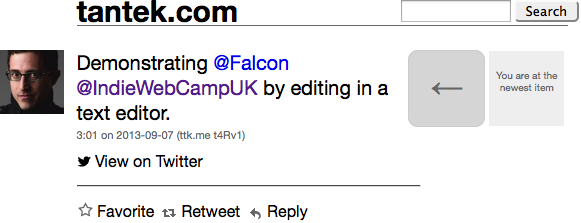
TantekTantek's posts on tantek.com have the following web actions (using Falcon) since 2013-09-08:
IndienewsIndienews comments pages, e.g.
Barry FrostSome of Barry Frost's post have webactions as of 2013-10-01[2], e.g.:
Glenn JonesGlenn Jones notes, e.g.
Kyle Mahan
Then at some point (2014-??-??) Kyle dropped webactions when he rebuilt/simplified his site theme As of 2015-02-05, all post permalinks have "Reply" and "Like" webaction links, and supporting loading indie-config so anyone's site that registers an indie-config can use his webaction links to reply/like using their own site! E.g. Scott GilbertsonScott Gilbertson posts notes with "Reply" "Retweet" and "Favourite" webaction links since ~2014-06-09. Links fallback to Twitter reply, retweet, favorite tweet actions. Example: Michael OwensMichael Owens's notes on mowens.com have the following web actions since 2014-08-14 (verified by
Pelle WessmanPelle Wessman on posts since 2014-09-07 (deployed at IndieWebCampUK hack day!) e.g.
Jeremy Keith
David Shanske
Malcolm BlaneyMalcolm Blaney on posts since 2015-09-08
Use CasesThere are at least two key use cases that are worthy of exploring for webactions: Action Buttons1. Provide the familiar buttons UI of Twitter, so that notes on your own site feel "at least as useful" as syndicated tweet copies. This is for the scenario where a reader of your tweets clicks a permalink on the tweet copy, navigates back to the original on your own site (perhaps to read more or view better embedded images / video), the reader can still favorite/reply/retweet/tweet etc. your note (all verbs/buttons which will act on the tweet copy of that note). There's been some demand for this in response to POSSEing out to Twitter:
Inline Comment UI2. Provide a UI for indieweb users to comment / link-blog your notes/articles on their own site By designing, developing for these two particular use cases, it may provide us a with a constrained enough design-space that we can come up with simple uses/guidelines for webactions that produce a good user experience on indieweb posts. Quote This3. Additionally, some news articles include "Tweet this" links inside an article, inline with the content, or quotes. Such "Tweet this" links appear to be contextually handcrafted, including an elided version of the text they're adjacent to, along with a permalink to the article, and a "via @-name" where @-name is the article author or publisher's Twitter account. E.g.:
Generically, "Quote this" is a better non-silo-specific phrase for this functionality. Brainstormingwhich actionsThere are many possible web actions to place on / above / in a post. Here are some suggestions. In general, successful interfaces have very few web actions on a piece of content, e.g.:
noteA note is most similar to a Twitter tweet, thus the following actions are recommended as buttons to be placed in the footer of a note, after info about the note such as date published, location:
If you POSSE to Twitter, providing familiar verbs (even wording and icons) provides a more comfortable and lower cognitive load actions interface to your readers. articleAn article is worthy of posting as a headline (article name) and permalink to anyone doing indie-bookmark posts, and as a short post on any number of services, and thus at a minimum it makes sense to include
eventFor event posts in particular:
Facebook examples: http://microformats.org/wiki/rsvp-examples#2015_RSVP_buttons_update how many actionsTo minimize the cognitive load of an interface, minimize the options for the user to consider. E.g.
Thus consider having at most 4 actions on a post. Perhaps only 3 at most since the (...) button is not a web action (but rather a method of hiding the far more uncommon actions). what orderBy analyzing silo designs we see some patterns for what order actions are displayed. These patterns of convergence are slowly educating users and making them familiar with a certain order. There are likely reasons behind such convergence as well such as
The "(...) More" button/link in Instagram and Twitter is not a web action itself, but rather a way of hiding "other" much less common actions from the UI (progressive disclosure). It's also typically placed away from the other buttons, often right-aligned with the content that it applies to (and thus out of the way). action fallbacksInside the which silo buttonsYou should add provider-specific / silo-specific buttons only for the silos that your site POSSEs to. A lot of the design/UX we do on the indieweb is driven by doing the right thing for our friends to read and use our content. For example: one of your friends who reads your posts from a silo happens to click through on the permashortlink to your post, then reads the full post on your site, then wants to reply/favorite/like/repost, and should be able to click those buttons right there on your site, rather than clicking back to go to the silo, and looking for and clicking a button there. (e.g. this real-world complaint from @zeldman re: having to click back to Twitter to reply.) Such buttons also help your site and your permalinks become a better (more complete) replacement for the silo-UIs your friends are used to interacting with. We should encourage our friends to interact more with our own sites than with silos. For event posts in particular, if you're POSSEing your indie events to Facebook, consider providing fallback buttons to that POSSE copy, e.g. RSVP popup (Going, Maybe, Can't Go), Invite conditional fallbacksProvide hardcoded markup for silo-specific web actions only when the HTTP referer [sic] shows that the user came from that silo. No need to direct any traffic to silos that didn't come from them. No need to pollute your user interface (a la NASCAR problem) with silo buttons unless your user came from that silo and would appreciate even expect those silo buttons. The whole point to start with is to support (provide a better user experience for) readers who are coming from the silos you've POSSE'd to. Make them feel at home (even more comfortable) on your own site, than they do on the silo they came from. clientside conditionalsConditional showing of silo buttons could even be done in clientside javascript, because non-JS useragents certainly do not care about silo buttons ( E.g. on the serverside, always provide a rel-syndication ("View on ..silo-name..") link to POSSE copies of posts, because they are useful for original-post-discovery and POSSE threading (e.g. threading POSSE tweets) and other syndication-link-use-cases. Then in JS on the clientside, replace the ("View on ..silo-name..") link with web action buttons (using Perhaps consider keeping (instead of replacing) the ("View on ..silo-name..") visible link (in addition to the web actions) if you think the silo POSSE copy of your post provides sufficient additional value to offset the cost of UI clutter and directing your readers to a silo. More advantages of dynamically adding silo buttons in clientside JS:
minimum silo buttonsIs there a minimal recommended silo button set for each silo that indieweb sites choose to POSSE to? E.g.:
To be clear, this is not advocating for adding any more silo-specific buttons than you already have for whatever reasons you decided. Help figure out what are minimum sensible sets of silo-buttons for each silo and contribute to the above lists. silo button varianceIt's expected that indieweb sites will likely all end up with slightly different sets of action tags and silo buttons inside, based on:
silo button examplesThis article[7] has a collection of hyperlink-only silo buttons/links that we can use to create our own silo button fallbacks. generic webaction (with silo-specific label in parentheses) is for each silo-specific web action URL endpoint. Here are a few from that article, feel free to add more silo-specific web action endpoints as you find them. Add more different per-silo web action URLs as you find them!
icons reflecting current stateBoth reader readers and webactions on permalink posts should ideally be aware of that status of likes, reposts, and replys to a post. Per our [discussion on IRC] we have come up with 4 states and thus 4 options for each button. Using Like as an example we have
Each of these could map to a different version of the icon.
as part of post h-entryIf webaction buttons were somehow properties (nested objects?) of their h-entry, then indie readers and other h-entry consuming code could parse/extrac the webactions for a post, and then display them as part of their UI for that post. reader upgrading webactions to micropubIf we do define how to publish / parse webactions, then readers can *upgrade* those webaction buttons to micropub if the user is signed into the reader with micropub (as is often the case today). sites upgrading webactions to micropubNote that we've had discussions where we already decided we don't want to make (or teach!) users to give their micropub credentials to every site they read, so for other sites (e.g. indieweb sites in general showing posts), they should: When displaying a post:
VerbsWe need a registry of common verbs to use with web actions. This should be built based on research into real world usage and brainstorming on top of that: Web Action Browser SupportIf you install a browser (or browser extension) that implements the action tag, you can click on action buttons on other sites (e.g. like those listed in the examples in the wild above), and then have the actions direct to your own site. Current implementations: Web Action Hero Toolbelt
Greasemonkey Script
Website Action URL SupportMain article: Web Action URL APIs
IndieWeb Support in particular:
Drop Social ButtonsThe always insightful @IA wrote up a post explaining why we should consider dropping social buttons (perhaps currently the largest / most popular set of web actions) Follow-ups:
Some statics on sharing button use: Privacy concernsThe social buttons used by a variety of silos often come with tracking cookies, meaning that the social networking services are alerted to the fact that logged-in readers have been reading content even if they do not actually take any actions (sharing, retweeting, +1ing/faveing). Depending on the nature of the content on your site, this may be a breach of your ethical standards and the reasonable standards of privacy. For instance, visits to sexuality, health and political sites may then lead tracking cookie organisations to draw unwanted or undesirable inferences that breach a users privacy. In 2010, the British developer Mischa Tuffield noted that Facebook and Google tracking cookies were used on the NHS Choices website, which is used by people to look up health conditions. See here. Wikipedia has rejected the introduction of social share buttons partly on the grounds of privacy (Wikipedia:Perennial proposals). Adblock Plus blockingThe browser extension "Adblock Plus" as of version 2.6.3 (possibly earlier) is known to block some social share buttons, even just Twitter tweet action hyperlinks! The following Adblock Plus filters appear to be at least blocking follow, tweet, and retweet links: ##a[href^="https://twitter.com/intent/follow?"] ##a[href^="https://twitter.com/intent/retweet?tweet_id"] ##a[href^="https://twitter.com/intent/tweet?"] If you're using Tweet Actions as silo-specific fallbacks for web actions, be aware that your fallbacks may not show up on users' machines with Ad Block plus installed. If you're a user of Adblock Plus, you can re-enable these by:
Drop Delegated LoginsWhile delegated logins aren't necessarily seen as a web action, they are at least superficially similar, in that they typically consist of a button with a particular social site brand. MailChimp decided to drop theirs, read why: Real-World Candidates for Web ActionsAdd links to/screenshots of existing website UIs which a web actions UI could replace
Delegate URLsSee Also: Web_Action_URL_APIs Web action delegate URLs are URLs which present a configurable UI for performing an action, which can be customized via query parameters in the URL. They're kind of like a callback URL but presenting a UI to help perform an action instead of performing it automatically with no user intervention. The web action delegate URL pattern is the practice of software allowing a user to set these custom URLs as delegates for certain actions within an application, probably with URL template placeholders which are auto-filled depending on the context of the delegation. Benefits:
Apps which submit to to delegate URLs
History2012Web actions were presented and discussed at OSBridge 2012. The 2012-06-28 OSBridge "Web Actions" presentation proposed the <action do="post" with="permalink"> <a href=twitter>..</a> <a href=pinterest>...</a> ... </action> But this has been updated as of IndieWebCampUK 2014 to use <indie-action do="post" with="permalink"> <a href=twitter>..</a> <a href=pinterest>...</a> ... </indie-action> 2011The concept of "web actions" was introduced to both capture the emergence of this new type of web interaction (e.g. the spread of "Blog this, Digg, Read later, Follow, Like, Share, Tweet, +1" buttons across pages[8]), and as a user-centric reframing of the previous developer-centric notion of "web intents". At IndieWebCamp 2011, both discussions and a UX effort demonstrated that the term "web intents" was too confusing and too abstract to effectively do user centered research and design in the area. The term "web action" is based on the fact that from the user's perspective, they think they are taking an action when they click these buttons. When the term was tried out with others creating designs/UX in the space, it seemed to work much better to convey understanding. EventsSession notes from events where web actions have been discussed:
Articles
See Also
|


Thank you to our sponsors of IndieWebCamp events!


