Posted by Saurabh Gupta, Product Manager, Google Apps Script
Back in December 2014, we announced the IFRAME sandbox mode for HtmlService which has helped improve the speed of an application’s user interface (UI). It also gives users a choice of using a variety of JS libraries on the client. We have been working hard to improve IFRAME sandbox mode and have added many features since then, including: Firefox support, file uploads, top navigation support, and improved Google Picker API support. Since IFRAME sandbox provides faster UIs and has more capabilities than NATIVE and EMULATED modes, developers should only be using IFRAME sandbox mode moving forward.
As of today, both EMULATED and NATIVE modes in HtmlService are deprecated. Over the next few months, we plan on sunsetting both EMULATED and NATIVE modes in stages to give you enough time to migrate your scripts.
We have created a migration guide to help you with this transition. For many scripts, no changes will be needed, unless they use a small set of features described in the migration guide. The guide also describes a few potential breaking changes. It is important that you review all your scripts that use HtmlService to ensure that the switch to IFRAME sandbox mode does not cause them to fail.
Here’s the timeline:
In November 2015, all new scripts will default to IFRAME sandbox mode unless NATIVE mode is explicitly specified. For example, if you make a copy of an existing script, the new script will use IFRAME sandbox mode unless you have explicitly set the sandbox mode to NATIVE.
In December 2015 (see sunset schedule for exact dates), EMULATED mode will be shutdown. Any scripts explicitly using EMULATED mode will default to IFRAME sandbox mode.
On April 28th, 2016, all scripts will default to IFRAME sandbox unless you have explicitly specified NATIVE mode in your script. For example, if your script has not specified any mode, then it will change from using NATIVE mode to IFRAME sandbox mode. Please make sure that your UI works well in IFRAME sandbox mode.
On June 30th 2016, NATIVE mode will be shutdown. All scripts explicitly using NATIVE mode will default to IFRAME sandbox mode.
While deprecations may at times seem inconvenient, this staged deprecation should ease in the migration process. Our goal is to provide a modern and secure environment enabling developers to create great apps for their users with Google Apps Script.
Editor's note: Posted by Romain Vialard, a Google Developer Expert and developer of Yet Another Mail Merge, a Google Sheets add-on.
Yet Another Mail Merge is a Google Sheets add-on that lets users send multiple personalized emails based on a template saved as a draft in Gmail and data in a Google Sheet. It can send hundreds of emails, but this kind of operation usually takes a few minutes to complete. This raises the question: what should be displayed in the user interface while a function is running on server side for a long time?
Firebase is all about real-time and became the answer to that issue. Last December, the Apps Script team announced a better version of the HtmlService with far fewer restrictions and the ability to use external JS libraries. With Firebase, we now had a solution to easily store and sync data in real-time.
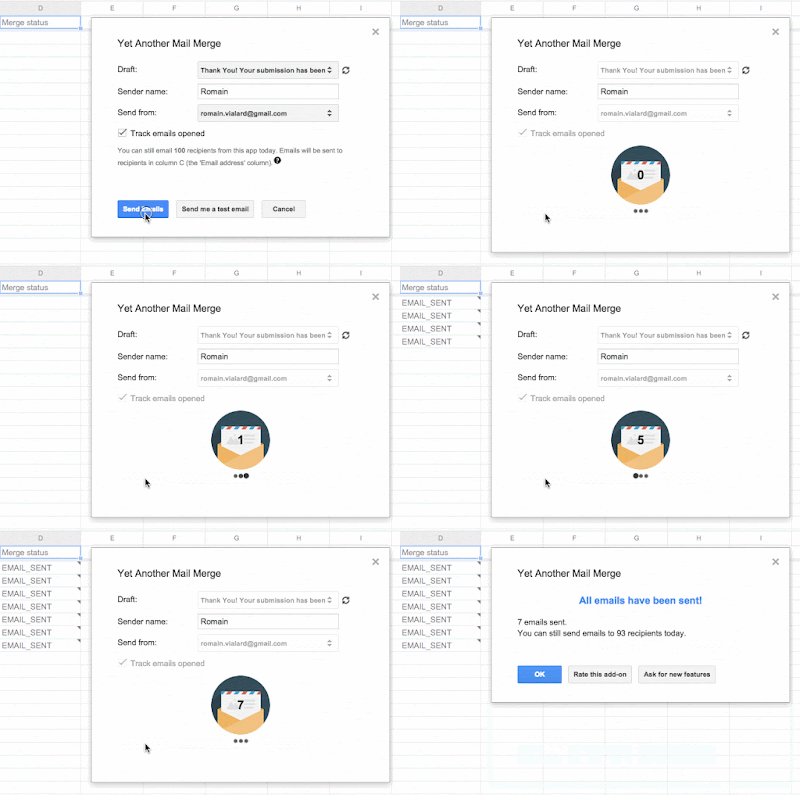
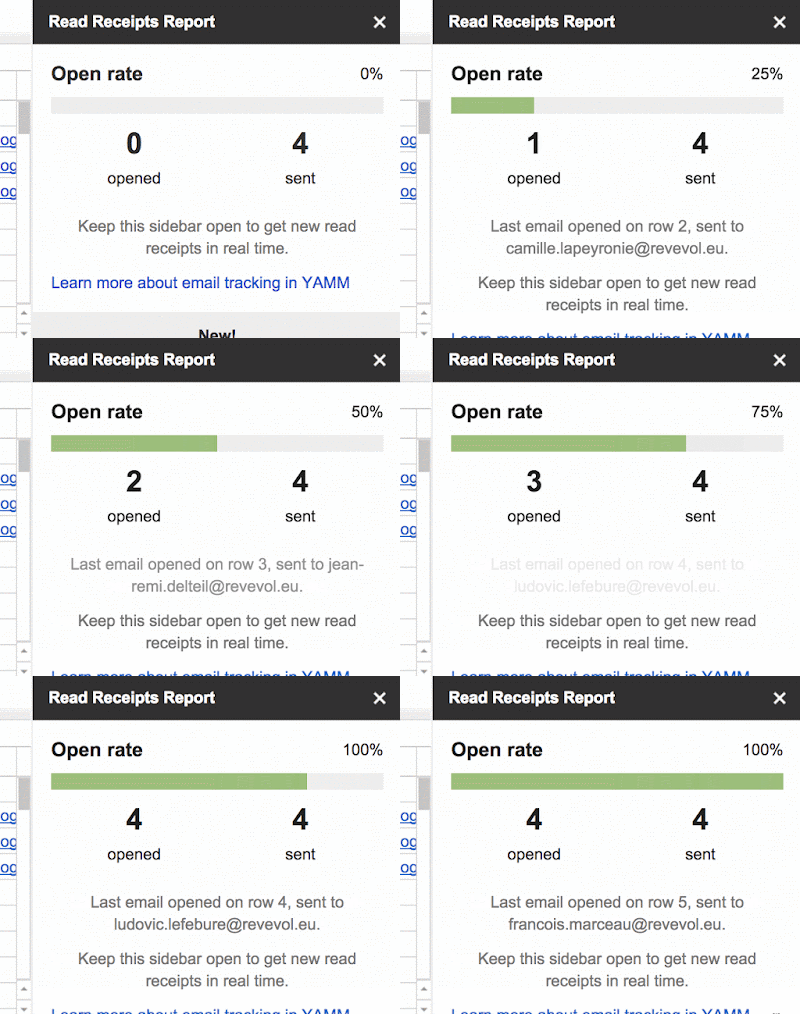
Combined, users are able to know, in real-time, the number of emails sent by an Apps Script function running server-side. When the user starts the mail merge, it calls the Apps Script function that sends emails and connects to Firebase at the same time. Every time the Apps Script function has finished sending a new email, it increments a counter on Firebase and the UI is updated in real-time, as shown in the following image.
Inside the loop, each time an email is sent (i.e. each time we use the method GmailApp.sendEmail()), we use the Apps Script UrlFetch service to write into Firebase using its REST API. Firebase's capabilities makes this easy & secure and there’s no need for an OAuth Authorization Flow, just a Firebase app secret, as shown in the following example:
function addNewUserToFirebase() {
  var dbUrl = "https://test-apps-script.firebaseio.com";
  var secret = PropertiesService.getScriptProperties().getProperty("fb-secret");
  var path = "/users/";
  var userData = {
    romainvialard:{
      firstName:"Romain",
      lastName:"Vialard",
      registrationDate: new Date()
    }
  };
  var params = {
    method: "PUT",
    payload : JSON.stringify(userData)
  }
   UrlFetchApp.fetch(dbUrl + path + ".json?auth=" + secret, params);
}
On the client side, thanks to the improved Apps Script HtmlService, we can use the official JS client library to connect to Firebase and retrieve the data stored previously. Specifically, the on() method in this library can be used to listen for data changes at a particular location in our database. So each time a new task is completed on server side (e.g. new email sent), we notify Firebase and the UI is automatically updated accordingly.
var fb = new Firebase("https://test-apps-script.firebaseio.com");
var ref = fb.child('users/' + UID + '/nbOfEmailsSent');
ref.on("value", function(data) {
  if (data.val()) {
    document.getElementById("nbOfEmailsSent").innerHTML = data.val();
  }
});
In addition to the example above, there are other places where Firebase can be useful in Google Apps Script add-ons.
Those are just a few examples of what you can do with Apps Script and Firebase. Don’t hesitate to try it yourself or install Yet Another Mail Merge to see a live example. In addition, there is a public Apps Script library called FirebaseApp that can help you start with Firebase; use it like any other standard Apps Script library.
For example, you can easily fetch data from Firebase using specific query parameters:
function getFrenchContacts() {
  var firebaseUrl = "https://script-examples.firebaseio.com/";
  var base = FirebaseApp.getDatabaseByUrl(firebaseUrl);
  var queryParameters = {orderBy:"country", equalTo: "France"};
  var data = base.getData("", queryParameters);
  for(var i in data) {
    Logger.log(data[i].firstName + ' ' + data[i].lastName
        + ' - ' + data[i].country);
  }
}
Build your own add-ons via Google Apps Script. Check out the documentation (developers.google.com/apps-script) to get more information as well as try out the Quickstart projects there. We look forward to seeing your add-ons soon!
Romain Vialard profile | website
Romain Vialard is a Google Developer Expert. After some years spent as a Google Apps consultant, he is now focused on products for Google Apps users, including add-ons such as Yet Another Mail Merge and Form Publisher.
Posted by Janet Traub, Program Manager, Google Apps APIs
The Google Apps Developer team recently hosted a 3-part Hangout On Air series that provided the developer community a unique opportunity to engage with the creative minds behind Google Apps developer tools. Each session covered topics ranging from business automation using Apps Script to Google Calendar API usage to creating Add-Ons for Docs & Sheets.
In the first installment of the series, Mike Harm, the creator of Apps Script and his colleague Kenzley Alphonse delivered a captivating session entitled, “Automate your Business with Apps Script.” Together, they reviewed the various features of Apps Script that can help developers build powerful solutions with Google Apps, such as simple scripts, to easily do a mail merge, export calendars into a Sheet, and to generate regularly scheduled reports.
The series then shifted focus to Google Calendar. In “Creating Calendar Events - Easy and Useful” Ali A. Rad (Product Manager) and Lucia Fedorova (Tech Lead) for Google Calendar API, explained how developers can benefit from injecting content into users’ calendars. In addition, they reviewed different approaches on Google Calendar to create events and meetings, such as API features, email markups, Android intents, Calendar import, and more.
We concluded the series with “How to Increase Traffic to Your Add-On with Google Apps Script.” This session, delivered by Apps Script Product Manager, Saurabh Gupta and Mike Harm, gave developers an in depth understanding of the Add-Ons framework, steps to deployment and strategies to increase adoption of their Docs, Sheets and Forms Add-Ons.
For more information on developing for Google Apps, visit developers.google.com/google-apps
Posted by Saurabh Gupta, Product Manager
Originally posted to Google Developers blog
Back in 2014, we introduced add-ons for Google Docs, Sheets, and Forms in developer preview. Since then, the developer community has built a wide variety of features to help millions of Docs, Sheets and Forms users become more productive. Over the last few months, we launched a number of developer-friendly features that made it easier to build, test, deploy and distribute add-ons. Some key capabilities include:
With these features under our belt, we are ready to graduate add-ons out of developer preview. Starting today, any developer can publish an add-on. To ensure users find the best tools for them, every new add-on will undergo a review for adherence to our guidelines before it’s available in the add-ons store.
We can’t wait to see what you will build!
Posted by Kalyan Reddy, Developer Programs Engineer
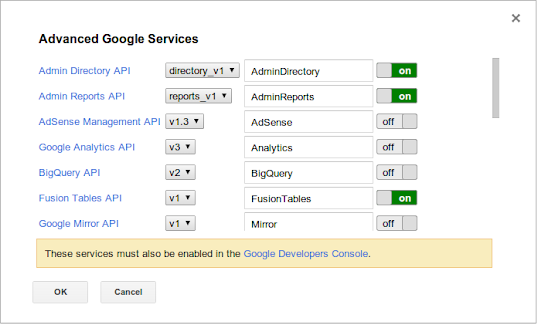
Apps Script includes many built-in Google services for major products like Gmail and Drive, and lately, we've been working to add other APIs that developers have been clamoring for as advanced Google services. Today, we are launching seven more advanced services, including:
Like all other advanced services in Apps Script, they must first be enabled before use. Once enabled, they are just as easy to use as built-in Apps Script services -- the editor provides autocomplete, and the authentication flow is handled automatically.
Here is a sample using the Apps Activity advanced service that shows how to get a list of users that have performed an action on a particular Google Drive file.
function getUsersActivity() {
  var fileId = 'YOUR_FILE_ID_HERE';
  var pageToken;
  var users = {};
  do {
    var result = AppsActivity.Activities.list({
      'drive.fileId': fileId,
      'source': 'drive.google.com',
      'pageToken': pageToken
    });
    var activities = result.activities;
    for (var i = 0; i < activities.length; i++) {
      var events = activities[i].singleEvents;
      for (var j = 0; j < events.length; j++) {
        var event = events[j];
        users[event.user.name] = true;
      }
    }
    pageToken = result.nextPageToken;
  } while (pageToken);
  Logger.log(Object.keys(users));
}
This function uses the AppsActivity.Activities.list() method, passing in the required parameters drive.fileId and source, and uses page tokens to get the full list of activities. The full list of parameters this method accepts can be found in the Apps Activity API's reference documentation.
AppsActivity.Activities.list()
drive.fileId
source
Update (2015-06-15): The sunset date listed below has been changed from June 26th to July 6th, 2015.
Posted by Eric Koleda, Developer Platform Engineer
OAuth is the de facto standard for authorization today and is used by most modern APIs. Apps Script handles the OAuth flow automatically for dozens of built-in and advanced services, but until recently only had limited support for connecting to other OAuth-protected APIs such as Twitter, etc. The URL Fetch service’s OAuthConfig class only works with the older OAuth 1.0 standard and only allows the developer of the script (not its users) to grant access to their data. To address this, we’ve create two new open source libraries:
OAuthConfig
With only a few clicks, you can add these libraries to your scripts. The full source code is available on GitHub if you need to tinker with how they work. These libraries allow for greater control over the OAuth flow, including the ability for users to grant access separately, a long standing feature request from the community.
We believe that these open libraries are a better alternative to our previous solution, and therefore we are deprecating the OAuthConfig class. The class will continue to function until July 6, 2015, after which it will be removed completely and any scripts that use it will stop working We’ve prepared a migration guide that walks you through the process of upgrading your existing scripts to use these new libraries.
Separate from these changes in Apps Script and as announced in 2012, all Google APIs will stop supporting OAuth 1.0 for inbound requests on April 20, 2015. If you use OAuthConfig to connect to Google APIs, you will need to migrate before that date. Update your code to use the OAuth2 library or the API’s equivalent Advanced Service if one exists.
We see Apps Script and Sheets as the perfect hub for connecting together data inside and outside of Google, and hope this additional OAuth functionality makes it an even more compelling platform.
DocsListDialog is a widget used by only a small fraction of Apps Script projects to provide a Google Drive "file open" dialog in a UI service user interface. In almost all cases, using Google Picker in HTML service is preferable and more secure.
DocsListDialog
Before September 30, 2014, we require scripts using DocsListDialog to make a small update to improve security.
Specifically, if you use DocsListDialog, you'll need to start calling a new method, setOAuthToken(oAuthToken) before you call showDocsPicker(). The new method sets an OAuth 2.0 token to use when fetching data for the dialog, on behalf of the user whose content should be shown.
setOAuthToken(oAuthToken)
showDocsPicker()
So long as the app isn't a web app set to execute as "me" (the developer), you can get the necessary OAuth 2.0 token by calling ScriptApp.getOAuthToken(). The example below shows how to convert an old DocsListDialog implementation to the new model.
ScriptApp.getOAuthToken()
function showDialog() {
  var app = UiApp.createApplication();

  app.createDocsListDialog()
     .addCloseHandler(serverHandler)
     .addSelectionHandler(serverHandler)
     .showDocsPicker();

  SpreadsheetApp.getUi()
     .showModalDialog(app,' ');
}
function showDialog() {
  var app = UiApp.createApplication();

  app.createDocsListDialog()
     .addCloseHandler(serverHandler)
     .addSelectionHandler(serverHandler)
     .setOAuthToken(ScriptApp.getOAuthToken())
     .showDocsPicker();

  SpreadsheetApp.getUi()
     .showModalDialog(app,' ');
}
To ensure your script continues to work properly, be sure to make this change before September 30.
Posted by Dan Lazin, Googler
Editor’s Note: Guest author Alex Moore is the CEO of Baydin, an email productivity company. --Arun Nagarajan
var d = new Date();
d.setDate(d.getDate() - DAYS_TO_SEARCH);
var dateString = d.getFullYe

ar() + "/" + (d.getMonth() + 1) + "/" + d.getDate();
threads = GmailApp.search("in:Sent after:" + dateString);
var userEmailAddress = Session.getEffectiveUser().getEmail();
var EMAIL_REGEX = /[a-zA-Z0-9\._\-]+@[a-zA-Z0-9\.\-]+\.[a-z\.A-Z]+/g;

# if the label already exists, createLabel will return the existing label
var label = GmailApp.createLabel("AwaitingResponse");

var threadsToUpdate = [];
for (var i = 0; i < threads.length; i++)
{
  var thread = threads[i];
  var lastMessage = thread.getMessages()[thread.getMessageCount()-1];
  lastMessageSender = lastMessage.getFrom().match(EMAIL_REGEX)[0];
  if (lastMessageSender == userEmailAddress)
  {
    threadsToUpdate.push[thread];
  }
}

label.addToThreads(threads)
In the last few months, we've added a number of new features to Google Apps Script, including add-ons for Sheets and Docs and 7 new advanced services.
We're eager to maintain that momentum — focusing on new features that help you do more with Google Apps. As a result, we're deprecating two Apps Script services for which good replacements exist elsewhere: ScriptDB (a NoSQL database that has been marked as experimental since it was introduced) and the Domain service (which encapsulates the GroupsManager, NicknameManager, and UserManager global objects).
GroupsManager
NicknameManager
UserManager
Both ScriptDB and the Domain service will be turned off on November 20, 2014.
Before then, you'll need to port any ScriptDB projects to another data store, like Google Cloud SQL or a third-party NoSQL database. We've created a migration guide that explains how to export your data from ScriptDB and suggests a few alternate data stores. We have also improved the documentation for connecting to external databases through JDBC to make it a little easier for you to set up Cloud SQL with Apps Script.
The Domain service, which only Google Apps domain administrators can use, is replaced by the recently added Admin SDK Directory and Admin SDK Reports advanced services. Those advanced services also provide many new features that the Domain service does not — like managing users' devices, OAuth tokens, and application-specific passwords — so we expect that you'll prefer using them in the future.
We've just announced Google Docs and Sheets add-ons — new tools created by developers like you that give Google users even more features in their documents and spreadsheets. Joining the launch are more than 60 add-ons that partners have built using Apps Script. Now, we're opening up the platform in a developer-preview phase. If you have a cool idea for Docs and Sheets users, we'd love to publish your code in the add-on store and get it in front of millions of users.
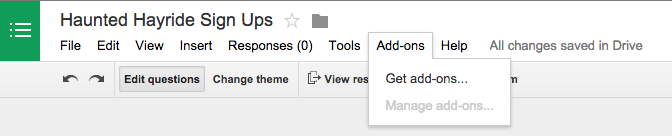
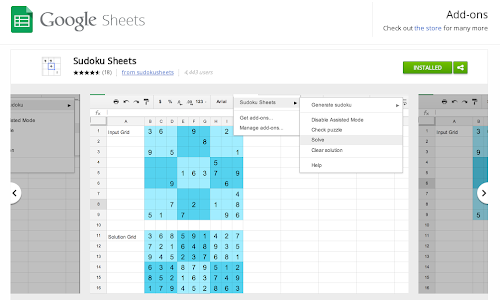
To browse through add-ons for Docs and Sheets, select Get add-ons in the Add-ons menu of any document or spreadsheet. (Add-ons for spreadsheets are only available in the new Google Sheets).
Docs and Sheets add-ons are powered by Google Apps Script, a server-side JavaScript platform that requires zero setup. Even though add-ons are in developer preview right now, the tools and APIs are available to everyone. The only restriction is on final publication to the store.
Once you have a great working prototype in Docs or Sheets, please apply to publish. Scripts that are distributed as add-ons gain a host of benefits:
Thanks to hard work from our developer partners, the add-ons in the store look and feel just like native features of Google Docs and Sheets. We're providing a couple of new resources to help all developers achieve the same visual quality: a CSS package that applies standard Google styling to typography, buttons, and other form elements, and a UI style guide that provides great guidance on designing a Googley user experience.
Add-ons are available in the new version of Google Sheets as a replacement for the older version's script gallery. If you have a popular script in the old gallery, now's a great time to upgrade it to newer technology.
We can't wait to see the new uses you'll dream up for add-ons, and we're looking forward to your feedback on Google+ and questions on Stack Overflow. Better yet, if you're free at noon Eastern time this Friday, join us live on YouTube for a special add-on-centric episode of Apps Unscripted.
Developers like you have built amazing scripts with Apps Script, and we want to make Apps Script even more useful. We've been working hard to add a variety of new APIs and features in Google Apps Script. Today, we're ready to share a few of them with you.
Named ranges are a popular feature of the Spreadsheet service; and now, you’ll be able to do something similar in the Document service. With named ranges, your scripts can tag a section of a Google Doc for later reference. For example, a bibliography script could set a named range on every citation in a document, then easily update the citations in the future.
You can use a similar API to manage bookmarks, too. Unlike named ranges, bookmarks are visible to the user and allow you to link to a particular place in a document.
Also for Google Docs, we've added the server-side methods setCursor(position) and setSelection(range) to change the user's cursor position or active selection, plus a client-side method, google.script.host.editor.focus(), which switches the browser focus from a sidebar or dialog back to the document.
setCursor(position)
setSelection(range)
google.script.host.editor.focus()
Oh, and hey: the Undo command in Google Docs can now revert changes made by a script.
If you've used HTML service much, you'll know that the Caja security sandbox has two modes. NATIVE mode imposes fewer restrictions than EMULATED mode and generally runs faster. As of today, NATIVE is now the default if you have not specified which mode your script should use. In a few edge cases, this may affect how existing web apps operate; if so, simply append .setSandboxMode(HtmlService.SandboxMode.EMULATED) to your HtmlOutput object to restore the old behavior.
NATIVE
EMULATED
.setSandboxMode(HtmlService.SandboxMode.EMULATED)
HtmlOutput
In preparation for future improvements to Apps Script, we've revamped script properties and user properties, combining them into a unified Properties service and adding the notion of document properties, which are (surprise!) specific to a particular document, but shared among all collaborators. The biggest change is that user properties are no longer shared between scripts, but our guide to the Properties service provides all the details. As part of the change, the old ScriptProperties and UserProperties services have been deprecated, although they will continue to function in existing scripts until a sunset date is announced.
We’re excited to bring you these new tools. With these new additions, we have also deprecated Finance service. It will remain available for the next six months but will be turned off on September 26, 2014.
One of things that makes Apps Script great is its ability to act as a hub for various types of Google data. In addition to our built-in services for popular products such as Gmail, Drive, Docs, and Calendar, we also provide a line of advanced Google services that let you use existing Google APIs such as Analytics and Tasks. Today, we're expanding that family of advanced services to include the following:
From Google Apps administrators and data-heads to Glass Explorers and YouTube content creators, this collection of new services has something for everyone. Getting started with advanced services is easy, since we take cake of the authorization for you and even provide autocomplete in the script editor.
While our built-in services are hand-crafted for ease-of-use, our advanced services are automatically generated from existing public Google APIs. They provide access to the full power of the underlying API but can be slightly more difficult to use. Let's look at some sample code that searches for YouTube videos with the keyword "dogs".
function searchByKeyword() {
  var part = 'id,snippet';
  var optionalArgs = {
    q: 'dogs',
    maxResults: 25
  };

  var results = YouTube.Search.list(part, optionalArgs);

  for (var i = 0; i < results.items.length; i++) {
    var item = results.items[i];
    Logger.log('[%s] Title: %s', item.id.videoId, item.snippet.title);
  }
}
This function uses the YouTube.Search.list() method, which has a required parameter part and optional parameters q and maxResults, among others. Required parameters are passed individually as method arguments, while optional parameters are passed as one key-value map. The full list of parameters this method accepts can be found in the YouTube API's reference documentation.
YouTube.Search.list()
part
q
maxResults
We're also changing our advanced services to behave more like vanilla JavaScript, so that it's easier to reference the APIs' existing documentation. You can now pass native JavaScript objects into these services' methods, and access the results using regular dot-notation. Below is some sample code that adds a new user to a Google Apps domain.
function addUser() {
  var user = {
    primaryEmail: 'liz@example.com',
    name: {
      givenName: 'Elizabeth',
      familyName: 'Smith'
    },
    // Generate a random password string.
    password: Math.random().toString(36)
  };
  user = AdminDirectory.Users.insert(user);
  Logger.log('User %s created with ID %s.', user.primaryEmail, user.id);
}
Notice that the user resource is constructed as a plain object literal, and the ID of the created user is accessed via dot-notation. The legacy getter/setter notation will continue to work but will no longer appear in autocomplete.
Finally, it's worth reminding that advanced Google services must be enabled in each script that uses them. This involves toggling them on once in the script editor under Resources > Advanced Google services and again in the associated Google Developers Console project.
The APIs for three of Apps Script's advanced services — Analytics, BigQuery, and Prediction — will undergo breaking changes on Monday, November 18. If you don't update your code to the new syntax before then, you'll receive error messages such as Required parameter is missing.
Required parameter is missing
Advanced services allow you to easily connect to certain public Google APIs from Apps Script. We're working to expand and improve our advanced services, and as a side effect some methods and parameters that were incorrectly listed as optional are now required.
On November 18, these services will switch to use the new method signatures shown in the tables below. To learn how new arguments should be structured, refer to the documentation for the underlying API. For example, the documentation for the BigQuery service's Jobs.query() method shows the valid properties for the resource object in the "Request body" section of the page.
Jobs.query()
resource
Analytics.Management.Uploads
.deleteUploadData(
    accountId,
    webPropertyId,
    customDataSourceId,
    optionalArgs)
.deleteUploadData(
    resource,
    accountId,
    webPropertyId,
    customDataSourceId)
BigQuery.Datasets
.insert(
    resource,
    optionalArgs)
.insert(
    resource,
    projectId)
.update(
    resource,
    optionalArgs)
.update(
    resource,
    projectId,
    datasetId)
BigQuery.Jobs
.insert(
    resource,
    mediaData,
    optionalArgs)
.insert(
    resource,
    projectId,
    mediaData)
.query(
    projectId,
    query)
.query(
    resource,
    projectId)
BigQuery.Tabledata
.insertAll(
    projectId,
    datasetId,
    tableId,
    optionalArgs)
.insertAll(
    resource,
    projectId,
    datasetId,
    tableId)
BigQuery.Tables
.insert(
    resource,
    projectId,
    datasetId)
.update(
    resource,
    projectId,
    datasetId,
    tableId)
Prediction.Hostedmodels
.predict(
    project,
    hostedModelName,
    optionalArgs)
.predict(
    resource,
    project,
    hostedModelName)
Prediction.Trainedmodels
.insert(
    project,
    optionalArgs)
.insert(
    resource,
    project)
.predict(
    project,
    id,
    optionalArgs)
.predict(
    resource,
    project,
    id)
.update(
    project,
    id,
    optionalArgs)
.update(
    resource,
    project,
    id)
If you want to prepare your code ahead of time, you can add a try/catch around your existing code that retries with the new method signature if the old one fails. For example, the following sample applies this approach to the BigQuery service's Jobs.query() method:
try/catch
  var result;
  try {
    result = BigQuery.Jobs.query(projectId, query, {
      timeoutMs: 10000
    });
  } catch (e) {
    // Refer to the BigQuery documentation for the structure of the
    // resource object.
    var resource = {
      query: query,
      timeoutMs: 1000
    };
    result = BigQuery.Jobs.query(resource, projectId);
  }
We apologize for inconvenience and look forward to sharing exciting news about advanced services in the coming weeks.
Apps Script started out as a simple tool to let developers add new features to Google Apps, but it’s grown into a programming platform that thousands of professional coders use every day. We hear a couple common requests from developers when they’re building complex projects with Apps Script: they want a full-featured IDE, and they want to sync to external version-control systems like GitHub.
Today, we’re introducing support for Apps Script in the Google Plugin for Eclipse. You can now sync with your existing Apps Script files on Google Drive, edit them in Eclipse — offline, if necessary, and with all the benefits of autocomplete — then write your code back to Drive so you can run it in the cloud. Because the plugin stores a copy of each script in a local workspace, you can manage Apps Script projects with your favorite version-control system.
Getting started is easy:
For step-by-step instructions on installation and use, see the documentation on using Apps Script with the Google Plugin for Eclipse.
Just in case you were wondering, the plugin uses the public Google Drive SDK to sync Apps Script files between your local file system and Google’s servers. We’ve previously covered the techniques it uses in our documentation on importing and exporting projects and the recent episode of Apps Script Crash Course on Google Developers Live below.
Last month, we announced several new ways to customize Google Forms. As of this week, three of those options are also available in forms created from Apps Script — embedding YouTube videos, displaying a progress bar, and showing a custom message if a form isn’t accepting responses.
Adding a YouTube video is as simple as any other Google Forms operation in Apps Script — from the Form object, just call addVideoItem(), then setVideoUrl(youtubeUrl). Naturally, you can also control the video’s size, alignment, and so forth.
Form
addVideoItem()
setVideoUrl(youtubeUrl)
To show a progress bar, call setProgressBar(enabled). Don’t even need a second sentence to explain that one. The custom message for a form that isn’t accepting responses is similarly easy: setCustomClosedFormMessage(message), and you’re done.
setProgressBar(enabled)
setCustomClosedFormMessage(message)
Want to give it a try yourself? Copy and paste the sample code below into the script editor at script.google.com, then hit Run. When the script finishes, click View > Logs to grab the URL for your new form, or look for it in Google Drive.
script.google.com
function showNewFormsFeatures() {
  var form = FormApp.create('New Features in Google Forms');
  var url = form.getPublishedUrl();

  form.addVideoItem()
    .setVideoUrl('http://www.youtube.com/watch?v=38H7WpsTD0M');

  form.addMultipleChoiceItem()
    .setTitle('Look, a YouTube video! Is that cool, or what?')
    .setChoiceValues(['Cool', 'What']);

  form.addPageBreakItem();

  form.addCheckboxItem()
    .setTitle('Progress bars are silly on one-page forms.')
    .setChoiceValues(['Ah, that explains why the form has two pages.']);

  form.setProgressBar(true);

  form.setCustomClosedFormMessage('Too late — this form is closed. Sorry!');
  // form.setAcceptingResponses(false); // Uncomment to see custom message.

  Logger.log('Open this URL to see the form: %s', url);
}
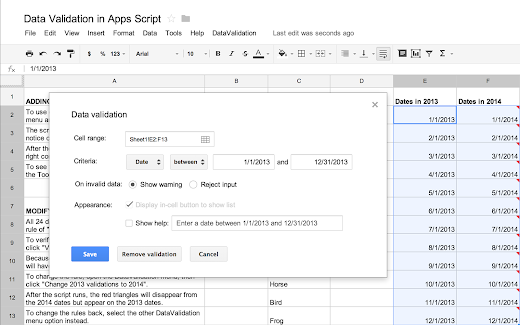
Google Apps Script is, first and foremost, a tool for making Google Apps more powerful — and today’s addition of programmatic control over data-validation rules in Google Sheets is a perfect example. For a quick demo, make a copy of this spreadsheet, then follow the instructions provided.
For the last few months, scriptable access to the data validation feature in Sheets has been the most requested feature on the Apps Script issue tracker. A common use for data-validation rules is to require that a cell’s value match one of the values in a different range. The following example shows how to achieve that goal with Apps Script. First, we use the newDataValidation() method to construct a DataValidationBuilder, then set the appropriate options and apply the final DataValidation with setDataValidation().
newDataValidation()
DataValidationBuilder
DataValidation
setDataValidation()
// Set the data-validation rule for cell A1 to require a value from B1:B10.
var cell = SpreadsheetApp.getActive().getRange('A1');
var range = SpreadsheetApp.getActive().getRange('B1:B10');
var rule = SpreadsheetApp.newDataValidation().requireValueInRange(range)
    .build();
cell.setDataValidation(rule);
It’s also possible to modify existing data-validation rules. The next example changes rules that require a date in 2013 to require a date in 2014 instead. You’ll see that the script calls getDataValidations() to retrieve the existing rules, then uses getCriteriaType(), getCriteriaValues(), and the DataValidationCriteria enum to examine the rules before applying the new date restriction via the advanced withCriteria() method.
getDataValidations()
getCriteriaType()
getCriteriaValues()
DataValidationCriteria
withCriteria()
// Change existing data-validation rules that require a date in 2013
// to require a date in 2014.
var oldDates = [new Date('1/1/2013'), new Date('12/31/2013')];
var newDates = [new Date('1/1/2014'), new Date('12/31/2014')];
var sheet = SpreadsheetApp.getActiveSheet();
var range = sheet.getRange(1, 1, sheet.getMaxRows(), sheet.getMaxColumns());
var rules = range.getDataValidations();

for (var i = 0; i < rules.length; i++) {
  for (var j = 0; j < rules[i].length; j++) {
    var rule = rules[i][j];

    if (rule != null) {
      var criteria = rule.getCriteriaType();
      var args = rule.getCriteriaValues();

      if (criteria == SpreadsheetApp.DataValidationCriteria.DATE_BETWEEN
          && args[0].getTime() == oldDates[0].getTime()
          && args[1].getTime() == oldDates[1].getTime()) {
        rules[i][j] = rule.copy().withCriteria(criteria, newDates).build();
      }
    }
  }
}
range.setDataValidations(rules);
With this new feature in Apps Script, you should find it much easier to manage complex data-validation scenarios. Please keep the feature requests coming!