Showing posts with label servlets. Show all posts

Wednesday, March 2, 2011

Chapter 10: Form Parameters

By now, we all know what a JSP page is and the contents that can be placed inside it. One of those is the “Form” or the “HTML Form”. This is the entity that is going to capture all the data displayed on the screen (including user entered values) and bring it back to the Servlet.
In this chapter, we are going to take a look at how the servlet will handle/understand the contents of the data that the form sends.

So, lets get started!!!

The ServletRequest Interface

The contents of the HTML Form is made available to the Servlet through the ServletRequest interface. This interface is implemented by the Web container to get the parameters from a request. Parameters are sent in the query string or posted form data. This interface has methods that can be used the servlet to access the contents of the form or the query string. They are:

• getParameter(String). You use this method if you know the particular parameter name. It returns the value of a request parameter as a string, or null if the parameter does not exist. Use this method when you are sure the parameter has only one value
• getParameterMap(). You use this method to create a map of the form parameters supplied with this request.
• getParameterNames(). This method returns an Enumeration of string objects containing the names of the parameters contained in this request, or an empty Enumeration if the request has no parameters.
• getParameterValues(String). This method returns an array of values as strings, or null if the parameter does not exist. If the parameter has a single value, the array has a length of 1. One of the common uses of getParameterValues() is for processing drop down lists that have their “multiple” attribute set.

Exam Trivia:
If you use the getParameter() method with a multivalued parameter, you won't get an error. You will get the first value in the array returned by getParameterValues() and you will end up losing the other values that were part of the return data.
Let us now take a look at a simple servlet that can read the contents of the form from the request.

Servlet Code

import java.io.*;
import java.util.*;
import javax.servlet.*;
import javax.servlet.http.*;

public class RequestParametersReadingServlet extends HttpServlet
{
public void doPost(HttpServletRequest request, HttpServletResponse response)
throws IOException, ServletException
{
Enumeration parameterNames = request.getParameterNames();

PrintWriter out = res.getWriter ();

while (parameterNames.hasMoreElements()) {
String name = (String)parameterNames.nextElement();
String value = request.getParameter(name);
out.println(“Parameter ” + name + " = " + value + "< br / >");
}
}
}

This Servlet is pretty straightforward. It just uses the getParameterNames() method to get the enumeration of all parameters in the request and then loops through it to print out the contents.

Previous Chapter: Chapter 9 - Triggering HttpServlet GET, POST, and HEAD Methods

Next Chapter: Chapter 11 - Obtaining a Servlets Initialization Parameters

Tuesday, March 1, 2011

Chapter 8: Servlet Request Types

As we saw in the previous chapter, we have many different types of requests that can be handled by the Servlet. For simplicity sake (more importantly the exam has these only) we are going to look at the 3 main types which are Get, Post and Put.

So, lets get started!!!

GET

The GET type request is normally used for simple HTML page requests. The Servlets method that will handle this type of request would look like:
public void doGet(HttpServletRequest request, HttpServletResponse response)
throws IOException, ServletException
{
// code to handle Get Request here
}

This is probably the first of the servlet methods any programmer begins his j2ee journey with. Even if this is the only method in your servlet, you’ll be able to handle a majority of the requests that get submitted to it. When a request gets submitted using the Get method, the whole URL in the browsers address bar gets passed on to the servlet and will be parsed & understood by the servlet when the request is processed.

Note: The init() and service() methods involved in a request are already provided by the HttpServlet class, so they don't need to be overridden. Overriding the init() method is always a good idea and overriding the service method can be done if you want (remember the example in the previous chapter???)


On the Job: The GET is the most common type of browser request.

POST

The POST type request is frequently used by pages that use HTML forms. A typical doXXX method that handles these requests would look as below:
public void doPost(HttpServletRequest request, HttpServletResponse response)
throws IOException, ServletException
{
//Code to handle Post request
}

The POST method is more sophisticated than a GET request. Normally, a Web form has fields whose names and values are sent to the server in key-value pairs. The POST is designed for posting large messages or providing a block of data, such as the result of submitting a form; and submitting long data fields to a database etc.

The amount of data you can send from the browser to the Servlet using POST is much larger than what we can send using GET.


Comparison Between Get and Post:

GET POST
Query string or form data is simply appended to the URL as name-value pairs. Form name-value pairs are sent in the body of the request, not in the URL itself.
Query length is limited (~1KB). Query length is unlimited.
Users can see data in address bar. Data hidden from users.
Not Safe – A person standing over your shoulder can view your userid/pwd if submitted via Get Safe – No one will be able to view what data is getting submitted
invokes doGet() invokes doPost()
Supports ASCII. Supports ASCII + Binary.
Easy to bookmark Hard to bookmark.

PUT

The PUT type request is used for uploading files to the server. While uploading is its original intent, it isnt used much. Instead, people prefer the POST to upload files over PUT. The doXXX method that handles PUT requests would look like below:

public void doPut(HttpServletRequest request, HttpServletResponse response)
throws IOException, ServletException
{
//code to handle PUT request goes here
}

The doPut() method is called by the server (via the service method) to handle a PUT request. Uploading files from a browser has always been tricky. The idea behind the PUT operation is to make uploading easy. It is supposed to allow a client to place a file on the server, just like sending a file by FTP. The javadoc for this method warns that when overriding this method, you should leave intact any content headers sent with the request (including Content-Length, Content-Type, Content-Transfer-Encoding, Content-Encoding, Content-Base, Content-Language, Content-Location, Content-MD5, and Content-Range). This method is rarely used, but it is powerful if you decide on using it.

Setting Request Submission Type:

We have seen how the GET/POST request submissions work and what their features are. But, we havent yet seen how to set the request submission type. Well, its pretty straightforward. Lets look at an example:

< form method= "GET" action="/myservlet/process" >

The above is a form declaration where the method is set as “GET”. You can replace this with “POST” and your JSP would work without any issues (Remember that you need to have the corresponding doXXX method in your servlet to handle the request that gets submitted)


Previous Chapter: Chapter 7 - Overriding HttpServlet GET, POST, and PUT Methods

Next Chapter: Chapter 9 - Triggering HttpServlet GET, POST, and HEAD Methods

Chapter 7: Overriding HttpServlet GET, POST, and PUT Methods

In the previous chapter we saw how a Servlet handles a Http Request that comes from a web browser. We also saw that there are many doXXX() methods inside a Servlet that serve a specific purpose. In this chapter we are going look at the XXX part of the Servlet code.

So, lets get started!!!

The doXXX Methods

There are 3 main types of requests that get processed by a Servlet. They are:
• Get
• Post
• Put
Each of them have a corresponding doXXX() method in the Servlet class which would be:
• doGet
• doPost
• doPut

In the exam you can expect many questions related to this topic so pay attention!!!

These methods are called by the service method in your Servlet.

Let us now take a look at a sample Servlet that has these 3 doXXX methods.
import java.io.*;
import javax.servlet.*;
import javax.servlet.http.*;

/**
* A servlet that has the 3 doXXX Methods
*
* @author Anand
*/

public class OurSecondServlet extends HttpServlet
{
// doGet()
public void doGet(HttpServletRequest request,
HttpServletResponse response)
throws IOException, ServletException
{
requestType("GET", response);
}

// doPost()
public void doPost(HttpServletRequest request,
HttpServletResponse response)
throws IOException, ServletException
{
requestType("POST", response);
}

// doPut()
public void doPut(HttpServletRequest request,
HttpServletResponse response)
throws IOException, ServletException
{
requestType("PUT", response);
}

public void requestType(String requestType,
HttpServletResponse response)
throws IOException, ServletException
{
response.setContentType("text/html");

PrintWriter out = response.getWriter();

out.println("< html >");
out.println("< head >");
out.println("< title >Our Second Servlet" +
"< / title >");
out.println("< / head >");
out.println("< body >");
out.println("< h1 >Servlet Request< / h1 >");
out.println("The Submitted Request type is : " + requestType);
out.println("< / body >");
out.println("< / html >");
}
}

How this code works?

As you can see, we have 3 different doXXX methods in our servlet, each of them calling the same method with just one parameter that differentiates them. Ideally in most cases, our code would be like this too. The logic that gets executed is mostly the same irrespective of the type of request submission. So, the doXXX methods, just receive the request, add some identifier that can be used to identify what request is submitted and then calls another method which will eventually be called by the other doXXX methods too.

The delegate method does the actual processing and returns the results.

In this case, based on the doXXX method calling it, the output will be different. If you submit using the GET option, you will get the below screen:


As mentioned earlier, the service method would invoke the appropriate doXXX method based on the request submission type. But, if you are curious and wonder how the code for such a service method would look like, well, you don't have to search anymore. Here is how it would look:

protected void service(HttpServletRequest req,
HttpServletResponse resp)
throws ServletException, IOException
{
String method = req.getMethod();

if (method.equals(METHOD_GET))
{
// Call doGet
doGet(req, resp);
} else if (method.equals(METHOD_POST))
{
// call doPost
doPost(req, resp);
} else if (method.equals(METHOD_PUT))
{
// call doPut
doPut(req, resp);
} else
{
// Our Servlet doesn't currently support
// other types of request.
String errMsg = "Method Not Supported");
resp.sendError(
HttpServletResponse.SC_NOT_IMPLEMENTED, errMsg);
}
}

Previous Chapter: Chapter 6 - Servlet Handling of Http Request

Next Chapter: Chapter 8 - Servlet Request Types

Quick Recap: Chapters 1 to 5

Let us quickly go over the concepts we have covered in the past few chapters.

JSP & Servlet History

• ARPANET was the initial backbone based on which Internet was built
• Tim Berners Lee paved the way for the current day Internet and World Wide Web
• CGI helped people transfer data from one computer to another
• Because CGI was not scalable, people looked out for better alternatives
• JSP and Servlets became an easier and a more scalable alternative to CGI


Advantages of Using Servlets

a. They are faster than CGI scripts because each CGI script produces an entirely new process that takes a lot of time to execute, whereas a servlet creates only a new thread.
b. Servlet API is standard and available easily on the internet (like JSPs)
c. Servlets have the advantages like ease of development & platform independence (like Java)
d. They can access all the J2SE and J2EE APIs
e. Can take the full advantage & capabilities of the Java programming language

Advantages of Using JSPs

a. Write Once, Run Anywhere
b. Code Re-use
c. Support for Scripting
d. Supports Actions
e. Supports both Static & Dynamic Content
f. Supports N-tier Enterprise Application Architecture
g. Superior Quality Documentation & Examples (All over the internet)
h. Reusable Tag Libraries

Web Servers & Servlet Containers

• A web server is the server on which our J2EE application runs
• A Servlet container is similar to a JVM for java programs and executes our Servlets
• Data is transferred using the request/response model


JSP to Servlet Conversion

• A JSP file gets converted into a Servlet at run time
• The web server (Ex: Tomcat) does the conversion of the JSP
• The web server invokes the converted Servlet version of the JSP page, every time the JSP is invoked.

Previous Chapter: Chapter 5 - JSP to Servlet Conversion

Next Chapter: Self Test - Chapters 1 to 5

Monday, February 28, 2011

Chapter 3: A Sample Servet

We saw what the purpose of a Servlet Container and a Web server is, in the previous chapter. In this chapter, we are going to look at how a Servlet code would look like.

So, lets get started!!!

Servlet Skeleton

If I ask you, what are the components of a Java class, you’ll happily tell me that, there are first package statements and then imports and then the class declaration. Within the class brackets, we have constructors, instance variables, methods etc. That was easy, wasn’t it?

The same way, every Servlet has a certain set of components that are mandatory for its well-being. (I just got carried away a bit) Or I must say, for its proper functioning.

A Servlets skeleton would look like below:

/*
* servlet name
*
* servlet description
* All other stuff that is part of a Standard Class comment section
*/

//package declarations

//import statements

public class ServletName extends HttpServlet {

// Instance Variables

/**
* Code to Initialize the Servlet
*/
public void init() throws ServletException
{
// Servlet Initialization Code goes here
}

/**
* The Service Method
* Gets invoked for every request submitted to the Servlet
* This method is optional. We mostly use doGet, doPost Methods
*/
protected void service(HttpServletRequest req,
HttpServletResponse resp)
throws ServletException, IOException
{
// Code for the Service Method goes here
}


/**
* Process a GET request
*
*/
protected void doGet(HttpServletRequest request,
HttpServletResponse response)
throws IOException, ServletException
{
// Code for the doGet() method goes here
}

/**
* Process a POST request
*
*/
protected void doPost(HttpServletRequest request,
HttpServletResponse response)
throws IOException, ServletException
{
// Code for the doPost() method goes here
}

/**
* Process a PUT request
*
*/
protected void doPut(HttpServletRequest req,
HttpServletResponse resp)
throws ServletException, IOException
{
//Code for the doPut() method goes here
}

/**
* You can have any number of methods for your processing
* here. There is no limit as to the number of methods or
* any restrictions on what you can name them.
* Since this is all java code, you need to keep them
* syntactically correct as per Java Coding Standards.
*/

/**
* Clean-Up
*/
public void destroy()
{
// clean up activities before the Servlet is put to death
}
}


The above is what a Servlets skeleton would look like. Now let us take a look at some sample code as to how a properly coded Servlet would look like:


import javax.servlet.http.HttpServlet;
import javax.servlet.http.HttpServletRequest;
import javax.servlet.http.HttpServletResponse;
import javax.servlet.ServletException;
import java.io.PrintWriter;
import java.io.IOException;


public class OurFirstServlet extends HttpServlet
{

public void service(HttpServletRequest request,
HttpServletResponse response)
throws ServletException, IOException
{
response.setContentType("text/html");
PrintWriter out = response.getWriter();
out.println("< html >");
out.println("< head >< title >Servlet Example " +
" ");
out.println("< body >");
out.println("Not Much code, but this is enough for a Servlet.");
out.println("");
out.println("");
}
}

The above is a simple Servlet. It would display an almost blank HTML page that contains the message we put in “Not Much code, but this is enough for a Servlet.”

Note: A Servlet is not a simple java class, that you can run using a main() method. You have deploy this Servlet on a web server in order to view the output. Lets not get too ahead of ourselves here. We’ll be looking at all that later in detail. For now, this is how a Servlet would look like and that wraps up our current chapter.

Previous Chapter: Web Servers & Servlet Containers

Next Chapter: A sample JSP

Chapter 2: Web Servers and Servlet Containers

In the previous chapter we looked at the history of the Web (Internet) and how JSPs and Servlets came into being. As you might have already guessed by now, any J2EE application needs a server on which it runs. It is called a Web Server. Also, the Servlet needs something in which it would run (Think of the JVM in which all java applications run) and that is called the Servlet container.

In this chapter, we are going to take a look at these two entities.

So, lets get started!!!

Web Servers and Servlet Containers

A servlet is nothing but Java code that runs in a container. It generates HTML & other contents that get displayed in the web page that we see. It is purely coded in Java, so the benefits and restrictions of all regular Java classes apply here too. Servlets are compiled to form a platform neutral bytecode (All java code is platform neutral, isnt it? Serlvet is no different). Upon request, this bytecode file is loaded into a container. Some containers (servlet engines) are integrated with the Web server, while others are plug-ins or extensions to Web servers that run inside the JVM. Servlets look the same as static Web pages to the client, but they really are complete programs capable of complex operations.

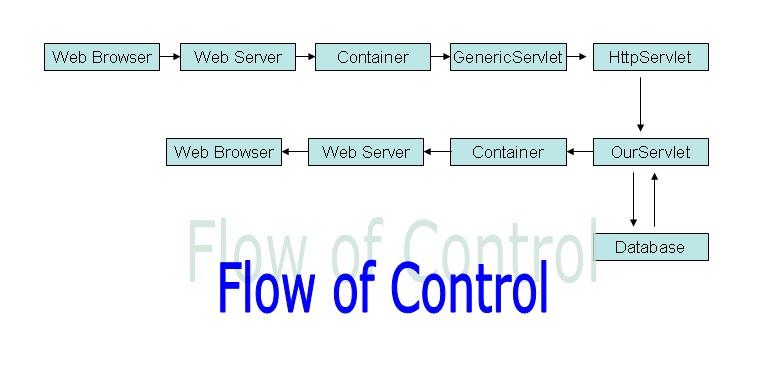
The servlet container is an extension of a Web server in the same way CGI, ASP, and PHP are. A servlet functions just like them, but the language in which it is written is Java. That's the main difference. The servlet doesn't talk to the client directly. The Web server functions as the intermediary that does it for the servlet. In a chain of processes, the client sends a request to the Web server, which hands it to the container, which hands it to the servlet. The Servlet processes the request and generates a response. The response starts from the servlet and goes to the container and then to the Web server and back to the client. Of course there are several other steps that happen too but this is just the introduction so this much would suffice I believe.

The servlet architecture makes the container manage servlets through their lifecycle. The container invokes a servlet upon receiving an HTTP request, providing that servlet with request information and the container configurations. The servlet uses this to do its job which is processing the data it received as part of the request. When finished, it hands back HTML and objects that hold information about the response. The container then forms an HTTP response and returns it to the client which inturn displays the stuff sent by the Servlet on screen in the web browser.

Below is a simple illustration of the flow of control that starts and ends at the Web Browser. Control starts at the browser, goes to the server and then to the container which in turn invokes the Servlet. Our Servlet happily does the processing (which might involve hitting a database) and returns the data to the container which in turn passes it on to the web server which finally displays the contents on the web browser.


The Servlet container is often written in Java, since it eventually runs inside a JVM. However, some vendors implement their containers in different languages (they aren’t essentially bound to Java). The point here is the fact that, all we need is a servlet container that can read and execute our servlets. The language in which it is implemented is not necessarily important for us.

Previous Chapter: Chapter 1 - Servlet & JSP History

Next Chapter: A Sample Servlet

Chapter 1: Servlet & JSP History

Here we are, studying for the SCWCD exam. I would like to congratulate you again for this decision of yours because of which you are going to get yourself SCWCD certified. It's a big step and am gonna be with you step by step to help you get this certification.

Well, it wouldn't be much fun preparing for a certification on JSPs and Servlets without knowing their history. Would it?

This chapter is going to be a history lesson taking you to the humble beginnings of these two wonderful technologies that have made our lives so much more easier & powerful.

How it all Began – Internet

Early in the 1950’s computer scientists in USA were working their backsides off in order to compete with Soviet Unions (The late USSR) advancements in superpower computing. They formed the Advanced Research Projects Agency (ARPA) in the year 1957. In those they still had powerful computers, but they weren’t able to talk or communicate with one another. In 1966 Lawrence G. Roberts (From MIT) proposed the first computer network which was named the ARPANET. The US Department of Defense (DoD) funded the venture and it took them 3 years to implement the network. The ARPANET team rewarded the DoD by establishing the Network Control Protocol (NCP), the first host to host protocol, which made possible for the university and the research center PC’s to communicate with one another.

With the success of the NCP, telco major AT&T installed the first cross country link between UCLA and BBN. It was a humble beginning and by 1973 hundreds of computers were talking to one another.

The real big breakthrough came in the year 1982 when the TCP/IP standard was established by Vint Cerf and Bob Kahn. Based on this development, the Domain Name System was established and by 1984 there were over 1000 hosts registered.

This was the backbone of the current day Internet. It was called NSFNET originally and with multiplying hosts it was becoming difficult to manage. By 1991 there were over a hundred thousand hosts and the system was getting out of control. There was nobody incharge and there was utter chaos all around.

In 1991, Tim Berners Lee created hyperlinks. He invented the whole protocol that made links communicate with one another and the World Wide Web was born. Telnet, email and many other services started using the networks.

In 1993, Marc Anderson and his friends wanted to see what was on the Internet, so they developed a new program called the NCSA Mosaic at the University of Illinois based on Berners Lee’s ideas. (NCSA stands for National Center for Supercomputing Applications)

Mosaic was the catalyst that caused the internet to explode. Nearly 200 million hosts were in use by the end of the decade and more than 1 billion users were using it.

This was not the end of it. Mobile phones, PDAs, GPS, Cars etc started connecting to the internet and the number of users began growing beyond numbers that we can write down or calculate.

It all started with basic HTML pages and hungry scientists created more and more advanced technologies whose powers were unbelievable. JSPs and Servlets just changed the landscape catastrophically and here we are, studying them to become better J2EE web programmers!!!

History of JSP & Servlets

The Internet's original purpose was to access and copy files from one computer to another. While TCP/IP provided a highway layer, the File Transfer Protocol (FTP) specification provided a standard way to exchange those files. It defined a way of shuttling them back and forth, but said nothing about looking at the content. HyperText Markup Language (HTML) allowed us to see the documents on the Internet. FTP can transmit HTML files just as easily as HTTP can. But we use Hypertext Transfer Protocol (HTTP) to act as an FTP specifically for HTML documents because it is a stateless protocol which makes having many short connections more efficient.
HTTP is the plumbing that connects the various computers. Now it is time to discuss about the fluid that flows through it “JSP & Servlets”

Note: JSP & Servlets arent the only technologies that are used in J2EE applications. Struts, Hibernate, Springs etc are other technologies that are used in J2EE Web applications. But, don't worry about them because they arent in the exam.

Using HTTP and HTML people were able to view/browse files and contents on a remote server. This is very useful, but people wanted live data. This is where the CGI (Common Gateway Interface) specification helped us. It helped us connect to databases and display stuff on the fly. The CGI specification was a major breakthrough in Web Application Development. The CGI standards made sure that the same CGI program worked on different Web servers.

CGI became the bread and butter of web developers. It was the most common means of displaying dynamic content on the internet. Though it was good, it wasn't good enough. It was not able to handle the performance requirements of the bursting Internet users. It was literally too much for it.

If you are asking me why CGI couldn't handle the load, the answer is simple. CGI spawned a separate process for every request that it receives. This design was able to sustain during off-peak hours but ate off server resources during peak loads which was eventually too much for it.
With growing numbers of users of web applications, scalability became a key consideration which wasn't CGI’s Middle Name and hence people started exploring other options.

Many CGI derivatives came up as server-side programming solutions that implement business logic, including ASP, ColdFusion, PHP, and Perl. Java surpassed them all due to portability and its object oriented programming design.

Alas, he we are, learning JSPs and Servlets that are the children of the Java Family which make our lives all the more easier in the world of Web Development.

Java was conceptualized in 1991 but it wasn't in the internet programming world until 1997. Servlets were the alternative to CGI and were released in 1997. Unlike CGI, which starts a process for each request, Servlets just spawn a new thread. Servlets had a better or rather efficient architecture which was able to handle the loads of the internet.

Though Servlets were awesome when compared to CGI, they still had some issues when it came to displaying dynamic content on a web page. Thankfully, Sun released the JSP (Java Server Pages) specifications in 1998, which solved all our UI woes. JSPs enabled programmers to display dynamic HTML content that could also use Java features. The combination of JSPs and Servlets was just what the Doctor Prescribed and it just revolutionized the Web Programming industry.
That's it for the history lesson. Now we are all set to dive deep into the world of magical Servlets and JSPs.

Previous Chapter: Introduction to the SCWCD Exam

Next Chapter: Web Servers & Servlet Containers
© 2013 by www.inheritingjava.blogspot.com. All rights reserved. No part of this blog or its contents may be reproduced or transmitted in any form or by any means, electronic, mechanical, photocopying, recording, or otherwise, without prior written permission of the Author.

ShareThis

Google+ Followers

Followers